ESP MERCEDES-BENZ B-Class 2017 W246 Owner's Guide
[x] Cancel search | Manufacturer: MERCEDES-BENZ, Model Year: 2017, Model line: B-Class, Model: MERCEDES-BENZ B-Class 2017 W246Pages: 290, PDF Size: 19.81 MB
Page 79 of 290
Convenience closing feature
Important safety notes G
WARNING
When using the convenience closing feature,
parts of the body could be trapped in the clos- ing area when a side window is being closed. There is a risk of injury.
Observe the complete closing procedure
when the convenience closing feature is oper-
ating. Make sure that no body parts are in
close proximity during the closing procedure.
Vehicles with KEYLESS-GO or the Exclusive package: when you lock the vehicle, you can
close the side windows at the same time.
i Notes on the automatic reversing feature for
the side windows (Y page 75).
Using the SmartKey X
Vehicles with the Exclusive package but
without KEYLESS-GO: for the following
operations, point the tip of the SmartKey at
the door handle on the driver's door. The
SmartKey must be close to the driver's door
handle.
i Vehicles with KEYLESS-GO:
the SmartKey
must be in close proximity to the vehicle.
X Press and hold the 0037button until the side
windows are fully closed.
X To interrupt convenience closing: release
the 0037 button.
Using KEYLESS-GO The driver's door and the door at which the han-
dle is used, must both be closed. The SmartKey
must be outside the vehicle. The gap between
the SmartKey and the corresponding door han-
dle should not be greater than 3 ft (1 m). X
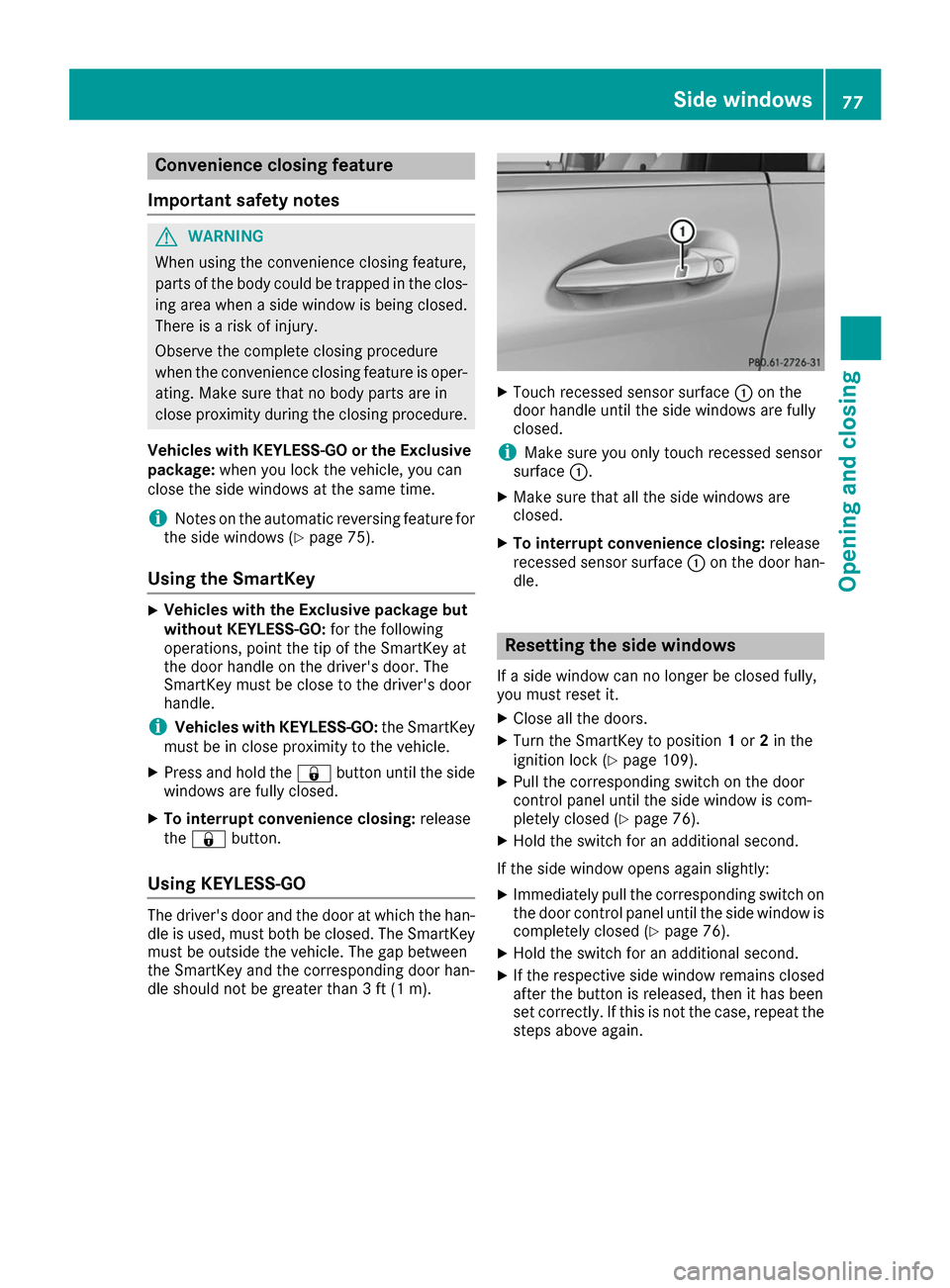
Touch recessed sensor surface 0043on the
door handle until the side windows are fully
closed.
i Make sure you only touch recessed sensor
surface 0043.
X Make sure that all the side windows are
closed.
X To interrupt convenience closing: release
recessed sensor surface 0043on the door han-
dle. Resetting the side windows
If a side window can no longer be closed fully,
you must reset it.
X Close all the doors.
X Turn the SmartKey to position 1or 2in the
ignition lock (Y page 109).
X Pull the corresponding switch on the door
control panel until the side window is com-
pletely closed (Y page 76).
X Hold the switch for an additional second.
If the side window opens again slightly: X Immediately pull the corresponding switch on
the door control panel until the side window is completely closed (Y page 76).
X Hold the switch for an additional second.
X If the respective side window remains closed
after the button is released, then it has been
set correctly. If this is not the case, repeat the
steps above again. Side windows
77Opening and closing Z
Page 80 of 290
Problems with the side windows
G
WARNING
If you close a side window again immediately after it has been blocked or reset, the side window
closes with increased or maximum force. The reversing feature is then not active. Parts of the
body could be trapped in the closing area in the process. This poses an increased risk of injury or even fatal injury.
Make sure that no parts of the body are in the closing area. To stop the closing process, releasethe switch or push the switch again to reopen the side window. Problem
Possible causes/consequences and
0050 0050Solutions A side window cannot be
closed because it is
blocked by objects, e.g.
leaves in the window
guide. X
Remove the objects.
X Close the side window. A side window cannot be
closed and you cannot
see the cause. If a side window is obstructed during closing and reopens again
slightly:
X Immediately after the window blocks, pull the corresponding switch
again until the side window has closed.
The side window is closed with increased force.
If a side window is obstructed again during closing and reopens again slightly:
X Immediately after the window blocks, pull the corresponding switch
again until the side window has closed.
The side window is closed without the automatic reversing feature. 78
Side windowsOpening and closing
Page 86 of 290
Exterior mirrors
Adjusting the exterior mirrors G
WARNING
You could lose control of your vehicle if you do the following while driving:
R adjust the driver's seat, head restraint,
steering wheel or mirrors
R fasten the seat belt
There is a risk of an accident.
Adjust the driver's seat, head restraint, steer-
ing wheel and mirror and fasten your seat belt before starting the vehicle's drive system. G
WARNING
The exterior mirror on the front-passenger
side reduces the size of the image. Visible
objects are actually closer than they appear.
This means that you could misjudge the dis-
tance from road users traveling behind, e.g.
when changing lane. There is a risk of an acci-
dent.
For this reason, always make sure of the
actual distance from the road users traveling
behind by glancing over your shoulder. X
Turn the SmartKey to position 1or 2in the
ignition lock (Y page 109).
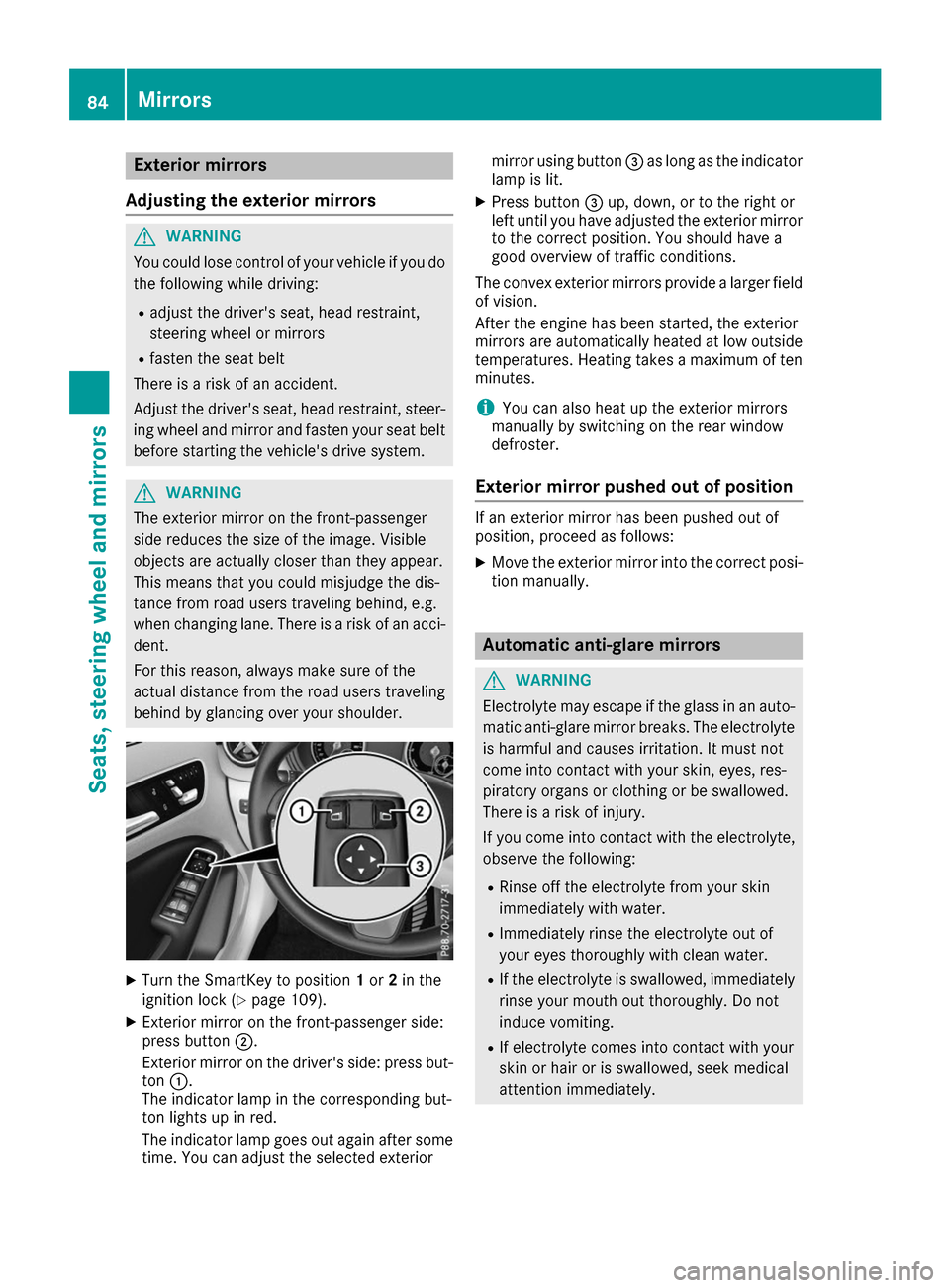
X Exterior mirror on the front-passenger side:
press button 0044.
Exterior mirror on the driver's side: press but- ton 0043.
The indicator lamp in the corresponding but-
ton lights up in red.
The indicator lamp goes out again after some
time. You can adjust the selected exterior mirror using button
0087as long as the indicator
lamp is lit.
X Press button 0087up, down, or to the right or
left until you have adjusted the exterior mirror
to the correct position. You should have a
good overview of traffic conditions.
The convex exterior mirrors provide a larger field
of vision.
After the engine has been started, the exterior
mirrors are automatically heated at low outside temperatures. Heating takes a maximum of ten
minutes.
i You can also heat up the exterior mirrors
manually by switching on the rear window
defroster.
Exterior mirror pushed out of position If an exterior mirror has been pushed out of
position, proceed as follows:
X Move the exterior mirror into the correct posi-
tion manually. Automatic anti-glare mirrors
G
WARNING
Electrolyte may escape if the glass in an auto- matic anti-glare mirror breaks. The electrolyte
is harmful and causes irritation. It must not
come into contact with your skin, eyes, res-
piratory organs or clothing or be swallowed.
There is a risk of injury.
If you come into contact with the electrolyte,
observe the following:
R Rinse off the electrolyte from your skin
immediately with water.
R Immediately rinse the electrolyte out of
your eyes thoroughly with clean water.
R If the electrolyte is swallowed, immediately
rinse your mouth out thoroughly. Do not
induce vomiting.
R If electrolyte comes into contact with your
skin or hair or is swallowed, seek medical
attention immediately. 84
MirrorsSeats, steering wheel and mirrors
Page 87 of 290
R
Immediately change out of clothing which
has come into contact with electrolyte.
R If an allergic reaction occurs, seek medical
attention immediately.
The "Automatic anti-glare mirrors" function is
only available if the vehicle is equipped with the
"Mirrors package".
The rear-view mirror and the exterior mirror on
the driver's side automatically go into anti-glare mode if:
R the ignition is switched on and
R incident light from headlamps strikes the sen-
sor in the rear-view mirror
The mirrors do not go into anti-glare mode if
reverse gear is engaged or if the interior lighting
is switched on. Parking position for the exterior mir-
ror on the front-passenger side
Setting and storing the parking position You can set the front-passenger side exterior
mirror such that you can see the rear wheel on
that side as soon as you engage reverse gear.
You can store this position.
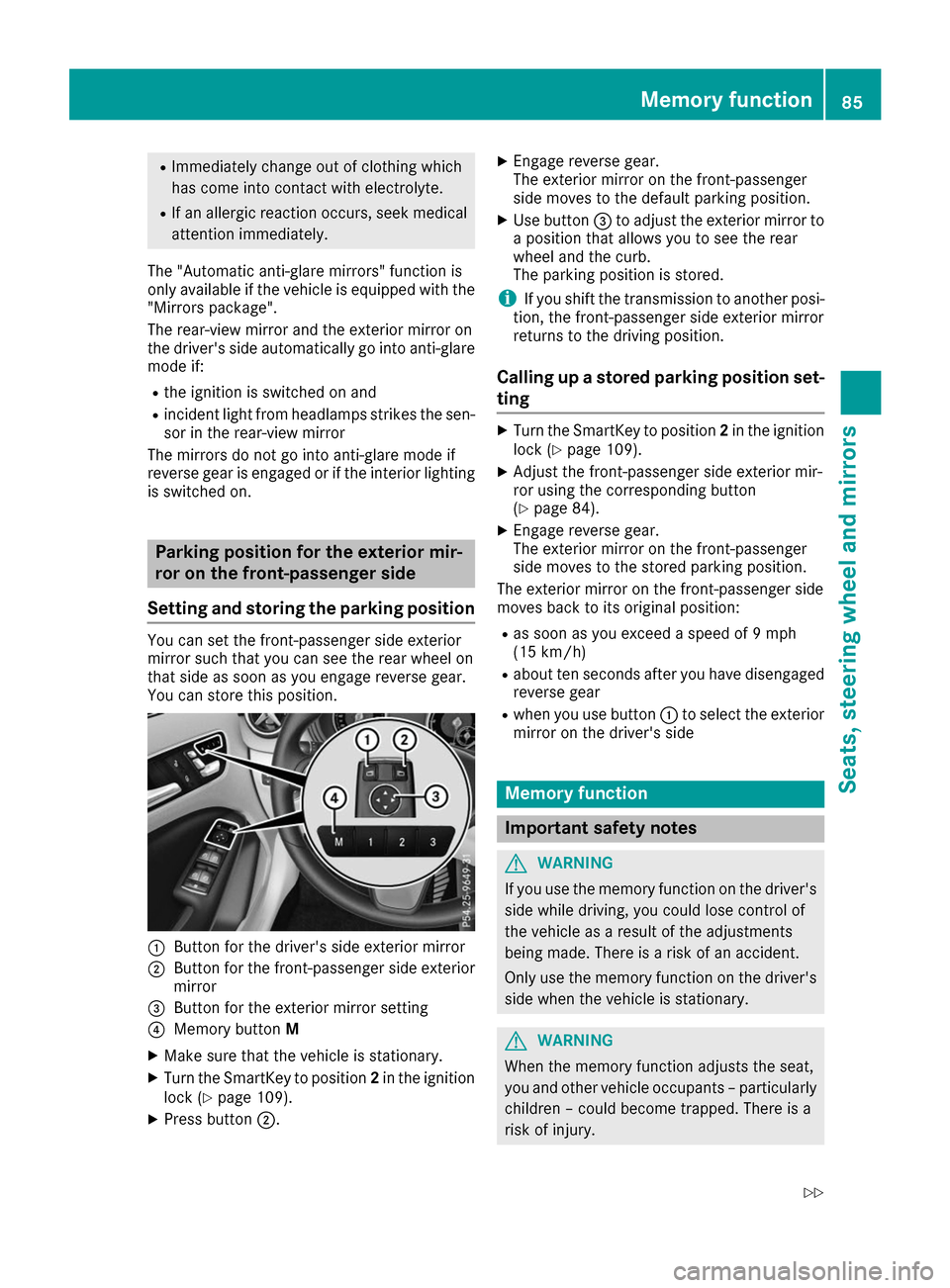
0043
Button for the driver's side exterior mirror
0044 Button for the front-passenger side exterior
mirror
0087 Button for the exterior mirror setting
0085 Memory button M
X Make sure that the vehicle is stationary.
X Turn the SmartKey to position 2in the ignition
lock (Y page 109).
X Press button 0044. X
Engage reverse gear.
The exterior mirror on the front-passenger
side moves to the default parking position.
X Use button 0087to adjust the exterior mirror to
a position that allows you to see the rear
wheel and the curb.
The parking position is stored.
i If you shift the transmission to another posi-
tion, the front-passenger side exterior mirror
returns to the driving position.
Calling up a stored parking position set- ting X
Turn the SmartKey to position 2in the ignition
lock (Y page 109).
X Adjust the front-passenger side exterior mir-
ror using the corresponding button
(Y page 84).
X Engage reverse gear.
The exterior mirror on the front-passenger
side moves to the stored parking position.
The exterior mirror on the front-passenger side
moves back to its original position:
R as soon as you exceed a speed of 9 mph
(15 km/h)
R about ten seconds after you have disengaged
reverse gear
R when you use button 0043to select the exterior
mirror on the driver's side Memory function
Important safety notes
G
WARNING
If you use the memory function on the driver's side while driving, you could lose control of
the vehicle as a result of the adjustments
being made. There is a risk of an accident.
Only use the memory function on the driver's
side when the vehicle is stationary. G
WARNING
When the memory function adjusts the seat,
you and other vehicle occupants – particularly children – could become trapped. There is a
risk of injury. Memory function
85Seats, steering wheel and mirrors
Z
Page 89 of 290
Exterior lighting
General notes
For reasons of safety, Mercedes-Benz recom-
mends that you drive with the lights switched on even during the daytime. In some countries,
operation of the headlamps varies due to legal
requirements and self-imposed obligations. Setting the exterior lighting
Setting options Exterior lighting can be set using the:
R light switch
R combination switch (Y page 88)
R on-board computer (Y page 166)
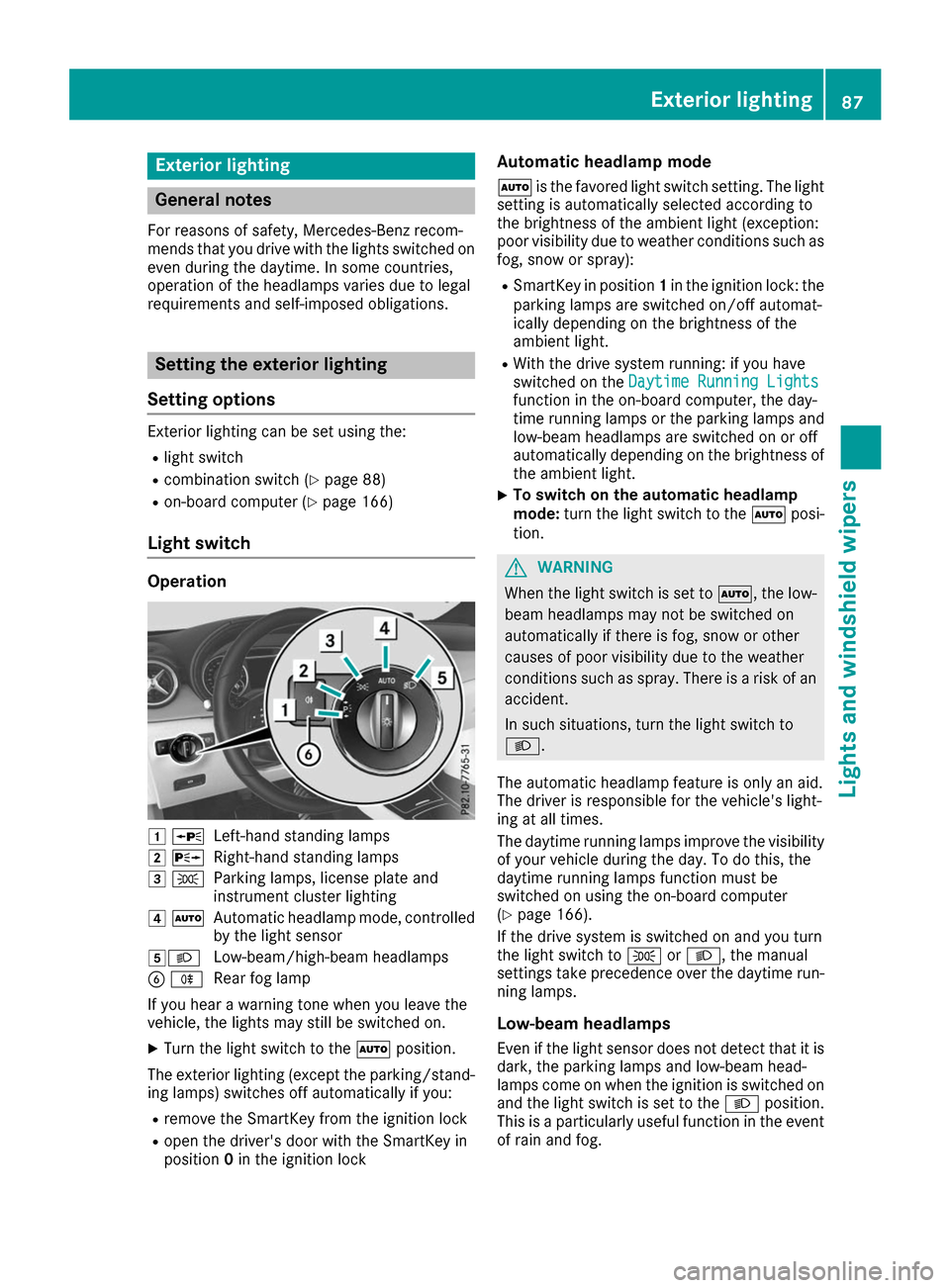
Light switch Operation
0047
0063
Left-hand standing lamps
0048 0064
Right-hand standing lamps
0049 0060
Parking lamps, license plate and
instrument cluster lighting
004A 0058
Automatic headlamp mode, controlled
by the light sensor
004B0058 Low-beam/high-beam headlamps
0084 005E
Rear fog lamp
If you hear a warning tone when you leave the
vehicle, the lights may still be switched on.
X Turn the light switch to the 0058position.
The exterior lighting (except the parking/stand- ing lamps) switches off automatically if you:
R remove the SmartKey from the ignition lock
R open the driver's door with the SmartKey in
position 0in the ignition lock Automatic headlamp mode
0058 is the favored light switch setting. The light
setting is automatically selected according to
the brightness of the ambient light (exception:
poor visibility due to weather conditions such as fog, snow or spray):
R SmartKey in position 1in the ignition lock: the
parking lamps are switched on/off automat-
ically depending on the brightness of the
ambient light.
R With the drive system running: if you have
switched on the Daytime Running Lights
Daytime Running Lights
function in the on-board computer, the day-
time running lamps or the parking lamps and
low-beam headlamps are switched on or off
automatically depending on the brightness of
the ambient light.
X To switch on the automatic headlamp
mode:
turn the light switch to the 0058posi-
tion. G
WARNING
When the light switch is set to 0058, the low-
beam headlamps may not be switched on
automatically if there is fog, snow or other
causes of poor visibility due to the weather
conditions such as spray. There is a risk of an
accident.
In such situations, turn the light switch to
0058.
The automatic headlamp feature is only an aid.
The driver is responsible for the vehicle's light-
ing at all times.
The daytime running lamps improve the visibility
of your vehicle during the day. To do this, the
daytime running lamps function must be
switched on using the on-board computer
(Y page 166).
If the drive system is switched on and you turn
the light switch to 0060or0058, the manual
settings take precedence over the daytime run- ning lamps.
Low-beam headlamps Even if the light sensor does not detect that it isdark, the parking lamps and low-beam head-
lamps come on when the ignition is switched on
and the light switch is set to the 0058position.
This is a particularly useful function in the event of rain and fog. Exterior lighting
87Lights and windshield wipers Z
Page 90 of 290
X
To switch on the low-beam headlamps:
turn the SmartKey in the ignition lock to posi-
tion 2or start the drive system.
X Turn the light switch to 0058.
The green 0058indicator lamp in the instru-
ment cluster lights up.
Rear fog lamp
The rear fog lamp improves visibility of your
vehicle for the traffic behind in the event of thick fog. Please take note of the country-specific
regulations for the use of rear fog lamps.
X To switch on the rear fog lamp: turn the
SmartKey in the ignition lock to position 2or
start the drive system.
X Turn the light switch to 0058or0058.
X Press the 005Ebutton.
The yellow 005Eindicator lamp in the instru-
ment cluster lights up.
X To switch off the rear fog lamp: press the
005E button.
The yellow 005Eindicator lamp in the instru-
ment cluster goes out.
Parking lamps ! If the battery charge level is very low, the
parking lamps or standing lamps are switched off automatically in order to preserve energy
to start the drive system. Always park your
vehicle safely and sufficiently lit according to
legal standards. Avoid using the parking
lamps 0060for periods of several hours.
Where possible, switch the right-hand 0064
or left-hand 0063standing lamp on.
X To switch on: turn the light switch to 0060.
The green 0060indicator lamp in the instru-
ment cluster lights up.
Standing lamps
Switching on the standing lamps ensures the
corresponding side of the vehicle is illuminated. X To switch on the standing lamps: the
SmartKey should not be in the ignition lock or it should be in position 0.
X Turn the light switch to 0063(left-hand side of
the vehicle) or 0064(right-hand side of the
vehicle). Combination switch
X
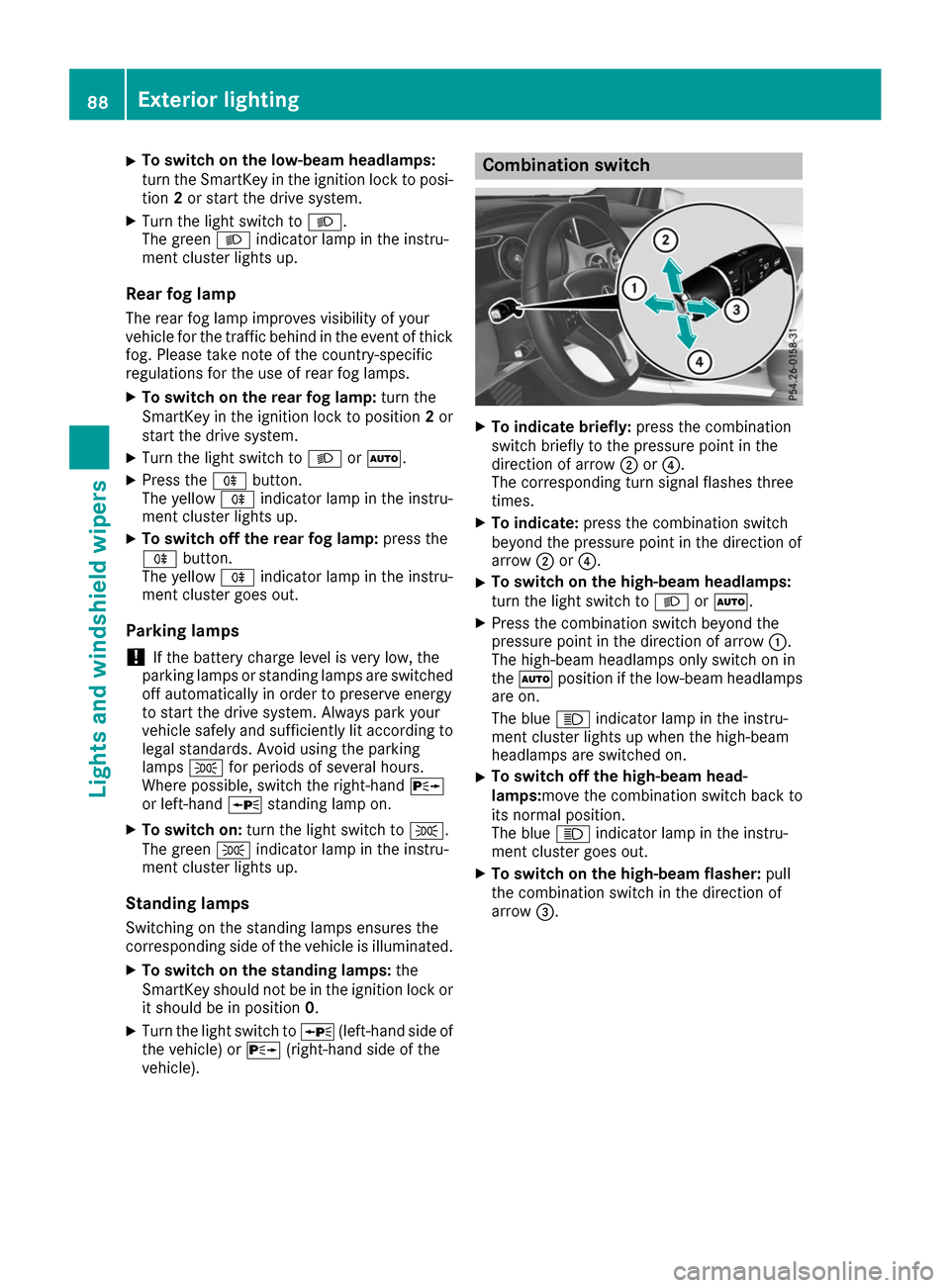
To indicate briefly: press the combination
switch briefly to the pressure point in the
direction of arrow 0044or0085.
The corresponding turn signal flashes three
times.
X To indicate: press the combination switch
beyond the pressure point in the direction of
arrow 0044or0085.
X To switch on the high-beam headlamps:
turn the light switch to 0058or0058.
X Press the combination switch beyond the
pressure point in the direction of arrow 0043.
The high-beam headlamps only switch on in
the 0058 position if the low-beam headlamps
are on.
The blue 0057indicator lamp in the instru-
ment cluster lights up when the high-beam
headlamps are switched on.
X To switch off the high-beam head-
lamps:move the combination switch back to
its normal position.
The blue
0057indicator lamp in the instru-
ment cluster goes out.
X To switch on the high-beam flasher: pull
the combination switch in the direction of
arrow 0087. 88
Exterior lightingLights and
windshield wipers
Page 91 of 290
Hazard warning lamps
X
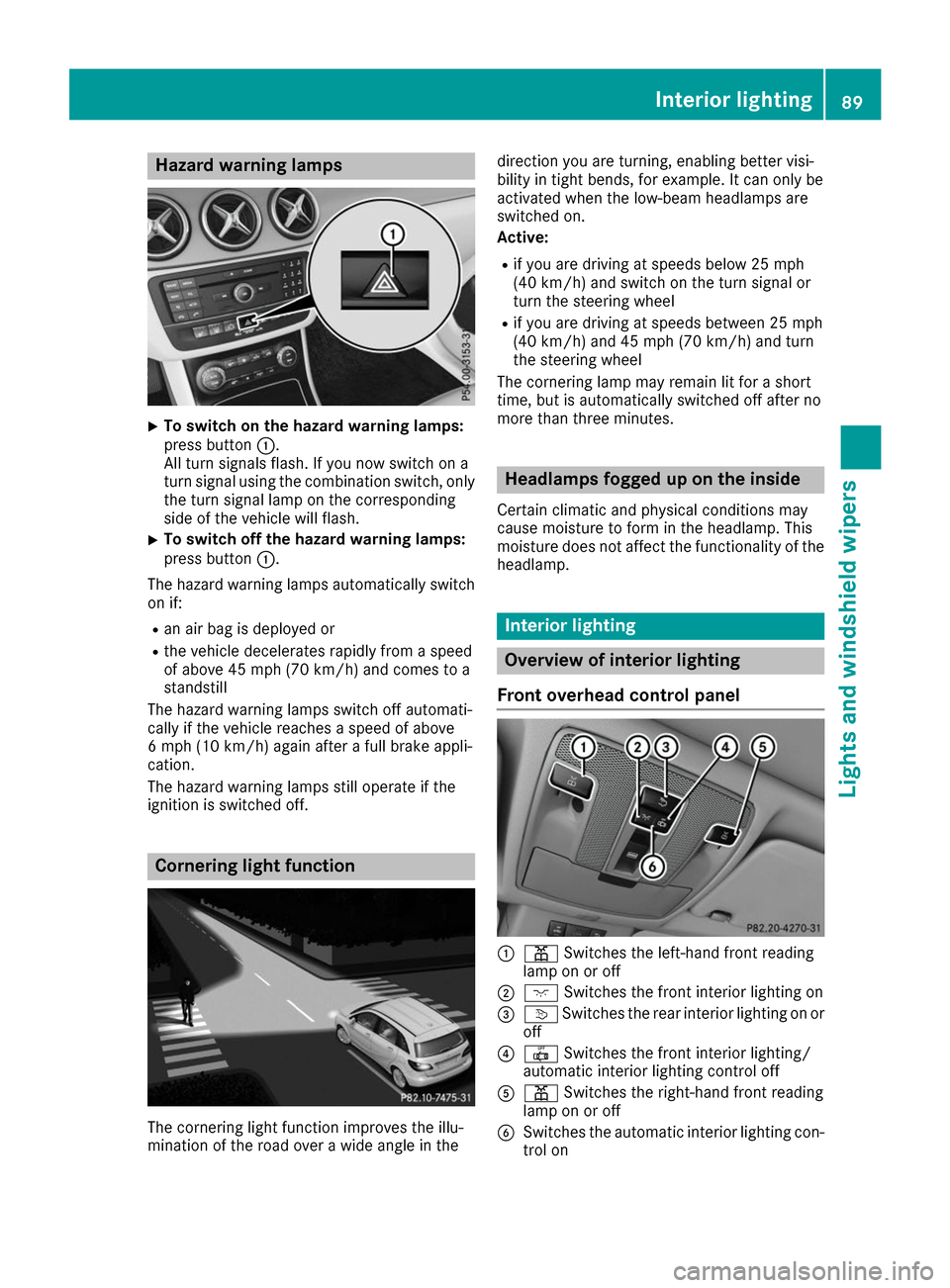
To switch on the hazard warning lamps:
press button
0043.
All turn signals flash. If you now switch on a
turn signal using the combination switch, only the turn signal lamp on the corresponding
side of the vehicle will flash.
X To switch off the hazard warning lamps:
press button
0043.
The hazard warning lamps automatically switch
on if:
R an air bag is deployed or
R the vehicle decelerates rapidly from a speed
of above 45 mph (70 km/h) and comes to a
standstill
The hazard warning lamps switch off automati-
cally if the vehicle reaches a speed of above
6 mph (10 km/h) again after a full brake appli-
cation.
The hazard warning lamps still operate if the
ignition is switched off. Cornering light function
The cornering light function improves the illu-
mination of the road over a wide angle in the direction you are turning, enabling better visi-
bility in tight bends, for example. It can only be
activated when the low-beam headlamps are
switched on.
Active:
R if you are driving at speeds below 25 mph
(40 km/h) and switch on the turn signal or
turn the steering wheel
R if you are driving at speeds between 25 mph
(40 km/h) and 45 mph (70 km/h) and turn
the steering wheel
The cornering lamp may remain lit for a short
time, but is automatically switched off after no
more than three minutes. Headlamps fogged up on the inside
Certain climatic and physical conditions may
cause moisture to form in the headlamp. This
moisture does not affect the functionality of the headlamp. Interior lighting
Overview of interior lighting
Front overhead control panel 0043
003D Switches the left-hand front reading
lamp on or off
0044 004A Switches the front interior lighting on
0087 0043 Switches the rear interior lighting on or
off
0085 0033 Switches the front interior lighting/
automatic interior lighting control off
0083 003D Switches the right-hand front reading
lamp on or off
0084 Switches the automatic interior lighting con-
trol on Interior lighting
89Lights and windshield wipers Z
Page 97 of 290
X
Lever out lamp lens 0043and remove it.
X Replace the bulb.
X Insert lamp lens 0043into the license plate lamp
and press it in until it engages. Windshield wipers
Switching the windshield wipers
on/off
! Do not operate the windshield wipers when
the windshield is dry, as this could damage
the wiper blades. Moreover, dust that has col-
lected on the windshield can scratch the glass
if wiping takes place when the windshield is
dry.
If it is necessary to switch on the windshield
wipers in dry weather conditions, always use
washer fluid when operating the windshield
wipers.
! If the windshield wipers leave smears on the
windshield after the vehicle has been washed
in an automatic car wash, wax or other resi-
dues may be the reason for this. Clean the
windshield using washer fluid after washing
the vehicle in an automatic car wash. Combination switch
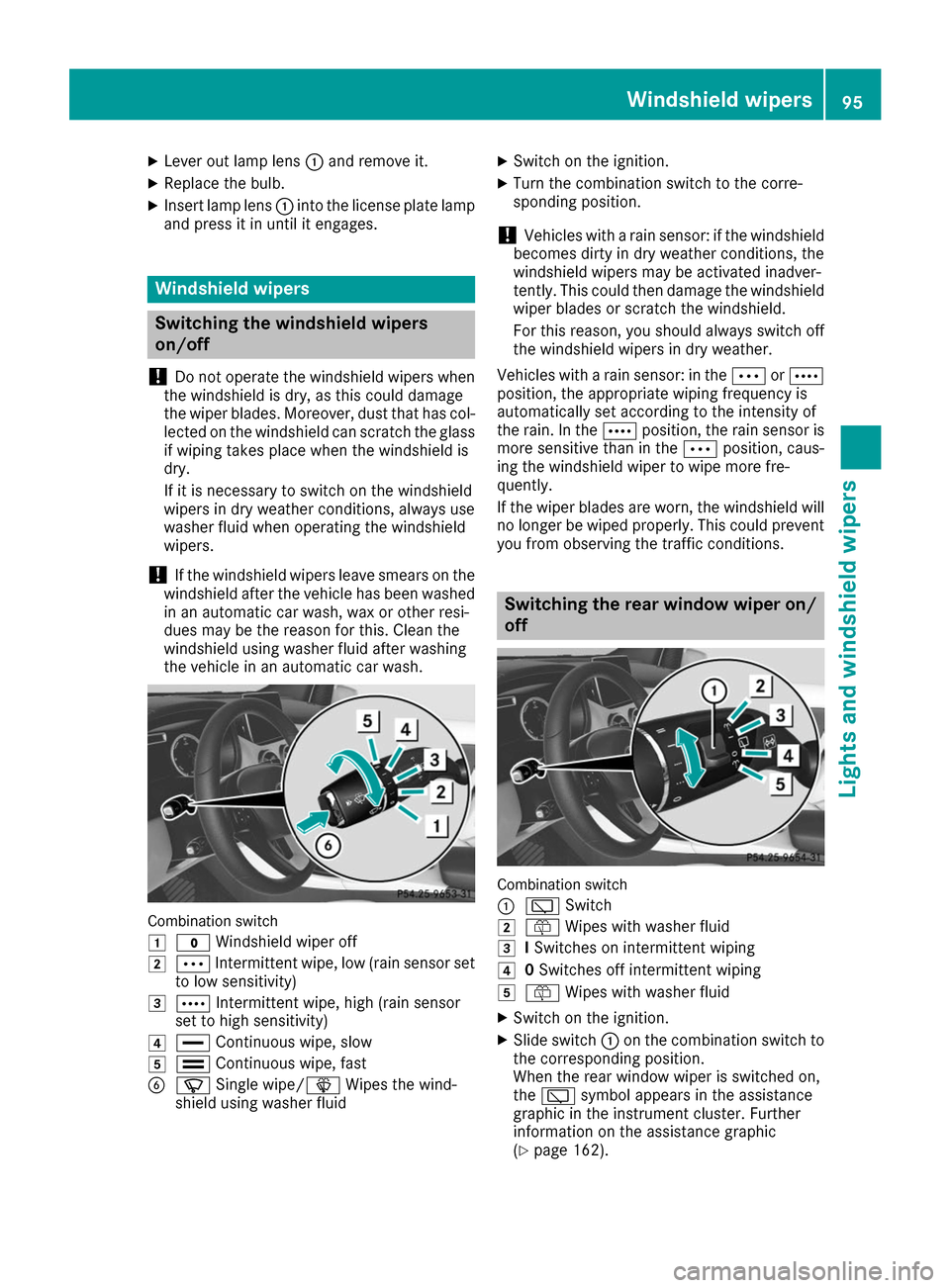
0047
003F Windshield wiper off
0048 0062 Intermittent wipe, low (rain sensor set
to low sensitivity)
0049 0063 Intermittent wipe, high (rain sensor
set to high sensitivity)
004A 00AA Continuous wipe, slow
004B 00A9 Continuous wipe, fast
0084 00D3 Single wipe/00D4 Wipes the wind-
shield using washer fluid X
Switch on the ignition.
X Turn the combination switch to the corre-
sponding position.
! Vehicles with a rain sensor: if the windshield
becomes dirty in dry weather conditions, the
windshield wipers may be activated inadver-
tently. This could then damage the windshield
wiper blades or scratch the windshield.
For this reason, you should always switch off
the windshield wipers in dry weather.
Vehicles with a rain sensor: in the 0062or0063
position, the appropriate wiping frequency is
automatically set according to the intensity of
the rain. In the 0063position, the rain sensor is
more sensitive than in the 0062position, caus-
ing the windshield wiper to wipe more fre-
quently.
If the wiper blades are worn, the windshield will no longer be wiped properly. This could prevent
you from observing the traffic conditions. Switching the rear window wiper on/
off Combination switch
0043
00C5 Switch
0048 00E2 Wipes with washer fluid
0049 ISwitches on intermittent wiping
004A 0Switches off intermittent wiping
004B 00E2 Wipes with washer fluid
X Switch on the ignition.
X Slide switch 0043on the combination switch to
the corresponding position.
When the rear window wiper is switched on,
the 00C5 symbol appears in the assistance
graphic in the instrument cluster. Further
information on the assistance graphic
(Y page 162). Windshield wipers
95Lights and windshield wipers Z
Page 103 of 290
not be dehumidified. The windows can fog up
more quickly. Therefore, only deactivate the
"Cooling with air-dehumidification" function
briefly.
The "Cooling with air-dehumidification" function is operational when the vehicle is ready to drive.
The air inside the vehicle is cooled and dehu-
midified according to the temperature selected.
Condensation may drip from the underside of
the vehicle when it is in cooling mode. This is
normal and not a sign that there is a malfunc-
tion. Activating/deactivating X
Press the 005Abutton.
The indicator lamp in the 005Abutton lights
up or goes out.
The indicator lamp in the button indicates that the respective function is activated. The
"Cooling with air dehumidification" function
has a delayed switch-off feature.
Problems with the "Cooling with air dehumidification" function Problem
Possible causes/consequences and
0050 0050Solutions The indicator lamp in the
005A button flashes
three times or remains
off. The "Cooling with air
dehumidification" func-
tion cannot be switched
on. Cooling with air dehumidification has been deactivated due to a mal-
function.
X Visit a qualified specialist workshop. Setting climate control to automatic
General notes In automatic mode, the set temperature is main-
tained automatically at a constant level. The
system automatically regulates the temperature of the dispensed air, the airflow and the air dis- tribution.
The "Cooling with air dehumidification" function
is activated automatically in automatic mode.
Setting climate control to automatic X
Turn the SmartKey to position 2in the ignition
lock (Y page 109).
X Set the desired temperature.
X To activate: press the0058button.
The indicator lamp in the 0058button lights
up. Automatic air distribution and airflow are
activated. X
To switch to manual mode:press the 004F
or 004A button.
or
X Press the 0097or0095 button.
The indicator lamp in the 0058button goes
out. Automatic air distribution and airflow are deactivated. Setting the temperature
Different temperatures can be set for the driv-
er's and front-passenger sides. The set temper-
ature is automatically maintained at a constant
level.
X Turn the SmartKey to position 2in the ignition
lock (Y page 109).
X To increase or decrease: turn control0043or
006D counter-clockwise or clockwise. Only
change the temperature setting in small
increments. Start at 72 ‡ (22 †). Operating the climate control systems
101Climate control
Page 110 of 290
Notes on breaking-in a new vehicle
The sensor system of some driving and driving
safety systems adjusts automatically while a
certain distance is being driven after the vehicle
has been delivered or after repairs. Full system
effectiveness is not reached until the end of this teach-in procedure.
New and replaced brake pads and discs only
reach their optimum braking effect after several
hundred kilometers of driving. Compensate for
this by applying greater force to the brake pedal. Driving
Important safety notes
G
WARNING
Objects in the driver's footwell can restrict the pedal travel or obstruct a depressed pedal.
The operating and road safety of the vehicle is
jeopardized. There is a risk of an accident.
Make sure that all objects in the vehicle are
stowed correctly, and that they cannot enter
the driver's footwell. Install the floormats
securely and as specified in order to ensure
sufficient clearance for the pedals. Do not use loose floormats and do not place floormats on
top of one another. G
WARNING
Unsuitable footwear can hinder correct usage of the pedals, e.g.:
R shoes with thick soles
R shoes with high heels
R slippers
There is a risk of an accident.
Wear suitable footwear to ensure correct
usage of the pedals. G
WARNING
If you switch off the ignition while driving,
safety-relevant functions are only available
with limitations, or not at all. This could affect, for example, the power steering and the brake
boosting effect. You will require considerably more effort to steer and brake. There is a risk
of an accident.
Do not switch off the ignition while driving. G
WARNING
If the parking brake has not been fully
released when driving, the parking brake can:
R overheat and cause a fire
R lose its hold function.
There is a risk of fire and an accident. Release
the parking brake fully before driving off.
! Before driving away, you must ensure that,
for your own safety and to avoid damage, the charging cable has been removed from the
vehicle socket. Otherwise, you cannot shift
the transmission out of position P.
The braking performance of the electric motor
using recuperative braking is, in some operating modes, either reduced or not effective:
R when the condition of charge of the high-volt-
age battery increases
R if the high-voltage battery is not yet at a nor-
mal operating temperature
R when driving close to the maximum speed
R when the vehicle is almost stationary
R in transmission position N
R during and after ESP stability control
If you do not make an additional effort to apply
the brake yourself, the braking effect may not be sufficient. If necessary, counteract the reduced
regenerative braking effect by applying the
brake yourself.
Before commencing your journey, ensure that
the charging cable required for charging the
high-voltage battery is in the vehicle. 108
DrivingDriving an
d parking