ignition MERCEDES-BENZ B-CLASS HATCHBACK 2008 Service Manual
[x] Cancel search | Manufacturer: MERCEDES-BENZ, Model Year: 2008, Model line: B-CLASS HATCHBACK, Model: MERCEDES-BENZ B-CLASS HATCHBACK 2008Pages: 305, PDF Size: 5.1 MB
Page 145 of 305
Roof
142
!
Only open the panorama louvred sliding
sunroof if it is free of snow and ice. Other-
wise, malfunctions may occur.
Do not allow anything to protrude from the
panorama louvred sliding sunroof. The
seals could otherwise be damaged.
i You can also set the panorama louvred
sliding sunroof to the ventilation position
from the outside by using the "Convenience
opening" feature (Y page 84).
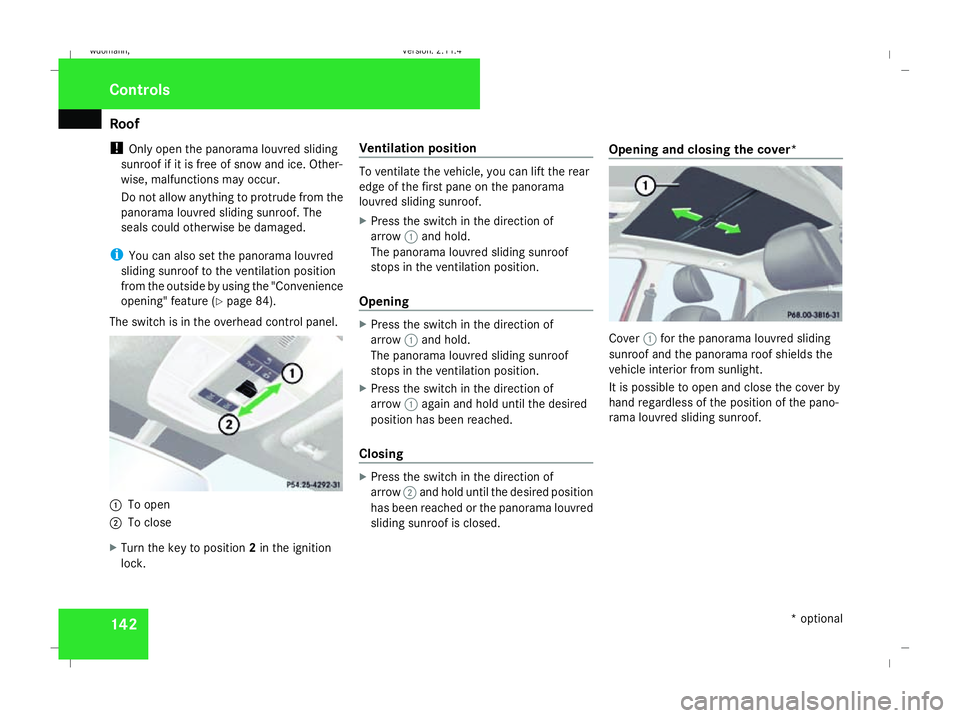
The switch is in the overhead control panel. 1
To open
2 To close
X Turn the key to position 2in the ignition
lock. Ventilation position To ventilate the vehicle, you can lift the rear
edge of the first pane on the panorama
louvred sliding sunroof.
X
Press the switch in the direction of
arrow 1and hold.
The panorama louvred sliding sunroof
stops in the ventilation position.
Opening X
Press the switch in the direction of
arrow 1and hold.
The panorama louvred sliding sunroof
stops in the ventilation position.
X Press the switch in the direction of
arrow 1again and hold until the desired
position has been reached.
Closing X
Press the switch in the direction of
arrow 2and hold until the desired position
has been reached or the panorama louvred
sliding sunroof is closed. Opening and closing the cover* Cover
1for the panorama louvred sliding
sunroof and the panorama roof shields the
vehicle interior from sunlight.
It is possible to open and close the cover by
hand regardless of the position of the pano-
rama louvred sliding sunroof. Controls
* optional
245_AKB; 2; 7, en-GB
wdomann,
Version: 2.11.4
2008-10-17T11:22:31+02:00 - Seite 142 Dateiname: 6515_1640_02_buchblock.pdf; preflight
Page 155 of 305
Loading and stowing
152
i
When the ignition is switched on, a mes-
sage is displayed for the corresponding
rear seats in the upper multi-function dis-
play. If, for example, both connectors are
removed, the message:
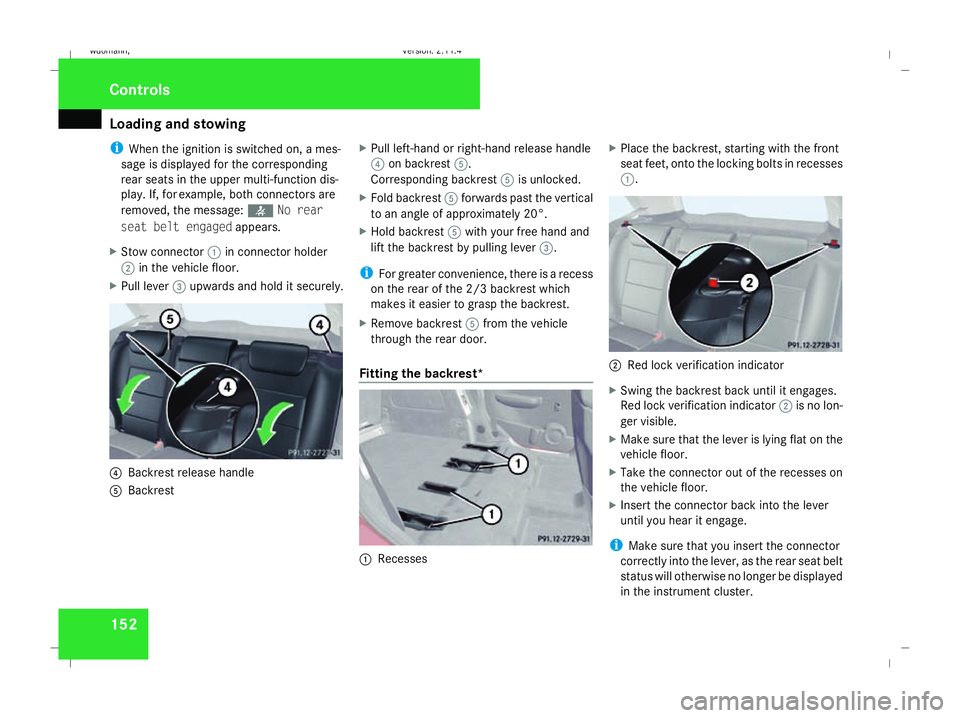
X Stow connector 1in connector holder
2 in the vehicle floor.
X Pull lever 3upwards and hold it securely. 4
Backrest release handle
5 Backrest X
Pull left-hand or right-hand release handle
4 on backrest 5.
Corresponding backrest 5is unlocked.
X Fold backrest 5forwards past the vertical
to an angle of approximately 20°.
X Hold backrest 5with your free hand and
lift the backrest by pulling lever 3.
i For greater convenience, there is a recess
on the rear of the 2/3 backrest which
makes it easier to grasp the backrest.
X Remove backrest 5from the vehicle
through the rear door.
Fitting the backrest* 1
Recesses X
Place the backrest, starting with the front
seat feet, onto the locking bolts in recesses
1. 2
Red lock verification indicator
X Swing the backrest back until it engages.
Red lock verification indicator 2is no lon-
ger visible.
X Make sure that the lever is lying flat on the
vehicle floor.
X Take the connector out of the recesses on
the vehicle floor.
X Insert the connector back into the lever
until you hear it engage.
i Make sure that you insert the connector
correctly into the lever, as the rear seat belt
status will otherwise no longer be displayed
in the instrument cluster. Controls
245_AKB; 2; 7, en-GB
wdomann,
Version: 2.11.4
2008-10-17T11:22:31+02:00 - Seite 152 Dateiname: 6515_1640_02_buchblock.pdf; preflight
Page 165 of 305
Features
162
X
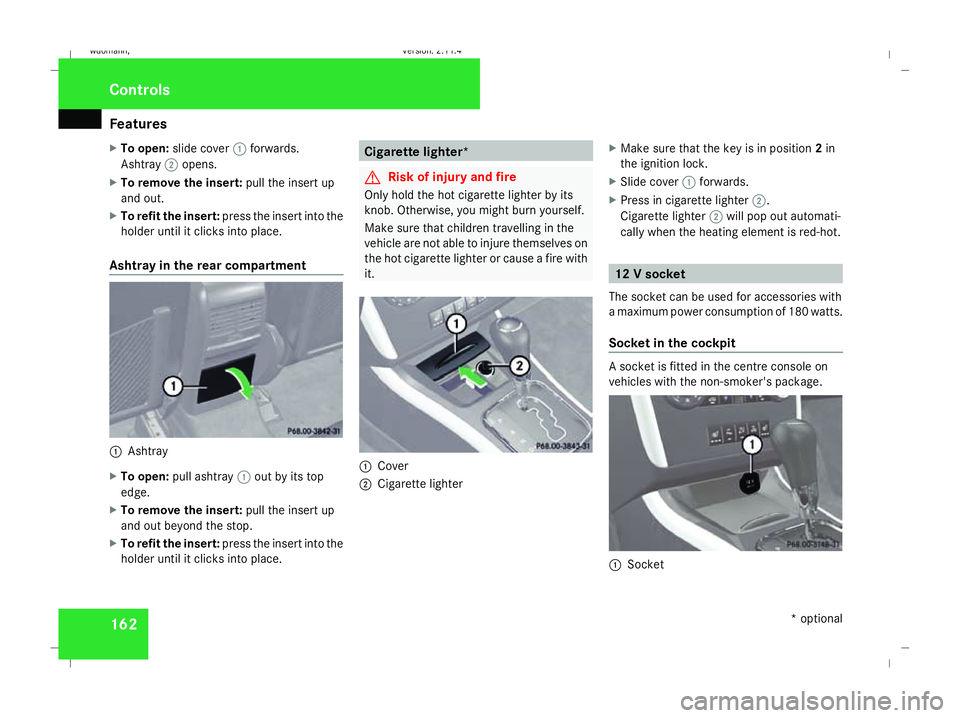
To open: slide cover 1forwards.
Ashtray 2opens.
X To remove the insert: pull the insert up
and out.
X To refit the insert: press the insert into the
holder until it clicks into place.
Ashtray in the rear compartment 1
Ashtray
X To open: pull ashtray 1out by its top
edge.
X To remove the insert: pull the insert up
and out beyond the stop.
X To refit the insert: press the insert into the
holder until it clicks into place. Cigarette lighter*
G
Risk of injury and fire
Only hold the hot cigarette lighter by its
knob. Otherwise, you might burn yourself.
Make sure that children travelling in the
vehicle are not able to injure themselves on
the hot cigarette lighter or cause a fire with
it. 1
Cover
2 Cigarette lighter X
Make sure that the key is in position 2in
the ignition lock.
X Slide cover 1forwards.
X Press in cigarette lighter 2.
Cigarette lighter 2will pop out automati-
cally when the heating element is red-hot. 12 V socket
The socket can be used for accessories with
a maximum power consumption of 180 watts.
Socket in the cockpit A socket is fitted in the centre console on
vehicles with the non-smoker's package.
1
Socket Cont
rols
* optional
245_AKB; 2; 7, en-GB
wdomann,
Version: 2.11.4 2008-10-17T11:22:31+02:00 - Seite 162Dateiname: 6515_1640_02_buchblock.pdf; preflight
Page 167 of 305
Features
164 relating to the possible health risk posed by
electromagnetic fields.
To ensure optimum reception quality for
mobile phones in the vehicle, and to minimise
mutual influences between the vehicle elec-
tronics and mobile phones, Mercedes-Benz
recommends the use of an approved exterior
aerial. An exterior aerial conducts the elec-
tromagnetic fields generated by a wireless
device to the exterior of the vehicle; the field
strength within the vehicle interior is lower
than in a vehicle that does not have an exte-
rior aerial.
i There are various mobile phone brackets
that may be fitted to your vehicle; in some
cases, these are country-specific. You can
obtain these mobile phone brackets from a
qualified specialist workshop, e.g. a
Mercedes-Benz Service Centre.
The functions and services available when
you use the phone depend on your mobile
phone model and service provider.
Inserting the mobile phone
X Open the telephone compartment
(Y page 159).
X Place the mobile phone bracket into the
pre-installed fitting; see the separate mobile phone bracket installation instruc-
tions.
X Insert the mobile phone into the mobile
phone bracket; see the separate mobile
phone bracket installation instructions.
If the mobile phone is inserted in the mobile
phone bracket, you can speak to the person
you are calling using the hands-free system.
You can operate the telephone using the
s andt buttons on the multi-function
steering wheel. You can operate other mobile
phone functions via the on-board computer
(Y page 112).
When you take the key out of the ignition lock,
the mobile phone stays on but you can no
longer use the hands-free system.
If you are making a call and you would like to
take the key out of the ignition lock, first
remove the mobile phone from the bracket.
Otherwise, the call will be terminated. Floormat on the driver's side
G
Risk of accident
Make sure that there is sufficient clearance
around the pedals when floormats are
used, and that the floormats are properly
secured.
The floormats must be secured at all times
using retainers and studs.
Before you drive off, make sure that the
floormats are secure and rectify if neces-
sary. A floormat which is not properly
secured can slip and thereby interfere with
the movement of the pedals.
Do not place floormats on top of one
another. Cont
rols
245_AKB; 2; 7, en-GB
wdomann,
Version: 2.11.4
2008-10-17T11:22:31+02:00 - Seite 164 Dateiname: 6515_1640_02_buchblock.pdf; preflight
Page 174 of 305
Engine compartment
171Engine compartment
Bonnet
G
Risk of accident
Do not pull the release lever while the vehi-
cle is in motion. If you do so, the bonnet
may open up and block your view.
Opening G
Risk of injury
There is a risk of injury if the bonnet is open,
even if the engine is not running.
Some engine components can become
very hot.
To avoid the risk of burns, only touch those
components described in the Owner’s Man-
ual and observe the relevant safety notes. G
Risk of injury
The radiator fan between the radiator and
the engine can start automatically, even if
the key has been removed from the ignition
lock. For this reason, you must not reach
into the fan rotation area. Otherwise, you
could be injured. Vehicles with a petrol engine:
The electronic ignition system uses high
voltage. For this reason, you must never
touch components of the ignition system
(ignition coil, ignition cable, spark plug con-
nector or test socket) when:
R
the engine is running.
R the engine is being started.
R the ignition is switched on and the engine
is being cranked by hand.
Vehicles with a diesel engine:
The electronic injection control uses high
voltage. Therefore, never touch fuel injec-
tion system components when:
R the engine is running.
R the engine is being started.
R the ignition is switched on.
X Make sure that the windscreen wipers are
switched off. G
Risk of injury
The windscreen wipers and wiper linkage
could be set in motion.
When the bonnet is open, you or others
could be injured by the wiper rods. Make sure that the windscreen wipers are
switched off and that the key has been
pulled out of the ignition lock before open-
ing the bonnet.
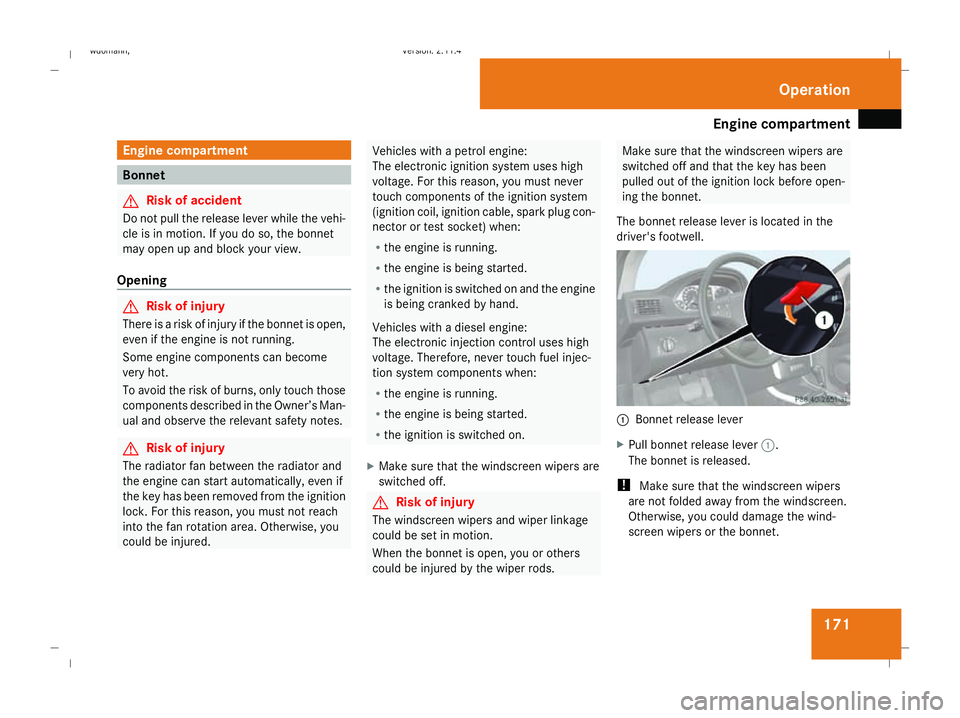
The bonnet release lever is located in the
driver's footwell. 1
Bonnet release lever
X Pull bonnet release lever 1.
The bonnet is released.
! Make sure that the windscreen wipers
are not folded away from the windscreen.
Otherwise, you could damage the wind-
screen wipers or the bonnet. Operation
245_AKB; 2; 7, en-GB
wdomann
,V ersion: 2.11.4
2008-10-17T11:22:31+02:00 - Seite 171 ZDateiname: 6515_1640_02_buchblock.pdf; preflight
Page 176 of 305
Engine compartment
173
operating temperature (i.e. if you only star-
ted the engine briefly)
Using the on-board computer*
i Only possible on vehicles with a diesel
engine. A dipstick is used to check petrol
engines (Y page 174).
X Make sure that the key is in position
2(Y page 62) in the ignition lock.
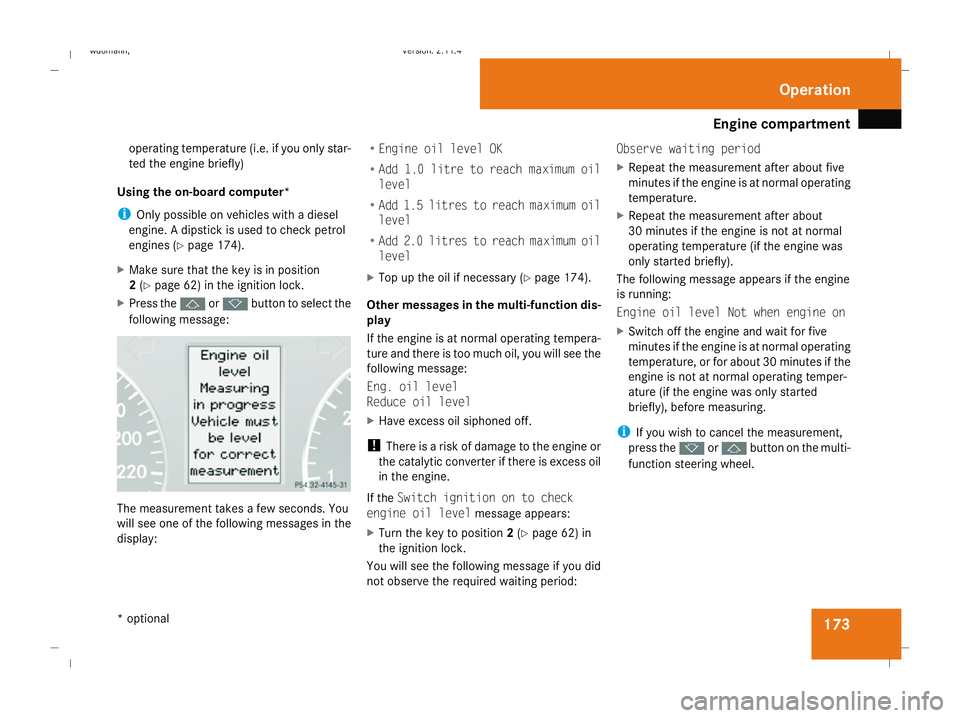
X Press the jork button to select the
following message: The measurement takes a few seconds. You
will see one of the following messages in the
display: R
Engine oil level OK
R Add 1.0 litre to reach maximum oil
level
R Add 1.5 litres to reach maximum oil
level
R Add 2.0 litres to reach maximum oil
level
X Top up the oil if necessary ( Ypage 174).
Other messages in the multi-function dis-
play
If the engine is at normal operating tempera-
ture and there is too much oil, you will see the
following message:
Eng. oil level
Reduce oil level
X Have excess oil siphoned off.
! There is a risk of damage to the engine or
the catalytic converter if there is excess oil
in the engine.
If the Switch ignition on to check
engine oil level message appears:
X Turn the key to position 2(Y page 62) in
the ignition lock.
You will see the following message if you did
not observe the required waiting period: Observe waiting period
X
Repeat the measurement after about five
minutes if the engine is at normal operating
temperature.
X Repeat the measurement after about
30 minutes if the engine is not at normal
operating temperature (if the engine was
only started briefly).
The following message appears if the engine
is running:
Engine oil level Not when engine on
X Switch off the engine and wait for five
minutes if the engine is at normal operating
temperature, or for about 30 minutes if the
engine is not at normal operating temper-
ature (if the engine was only started
briefly), before measuring.
i If you wish to cancel the measurement,
press the korj button on the multi-
function steering wheel. Operation
* optional
245_AKB; 2; 7, en-GB
wdomann,
Version: 2.11.4 2008-10-17T11:22:31+02:00 - Seite 173 ZDateiname: 6515_1640_02_buchblock.pdf; preflight
Page 183 of 305
Tyres and wheels
180 fully. Do not make any sudden steering
movements when doing so.
The function of the tyre pressure loss warning
system is limited or delayed if:
R snow chains are fitted to your vehicle's
tyres.
R road conditions are wintry.
R you are driving on sand or gravel.
R you adopt a very sporty driving style (cor-
nering at high speeds or driving with high
rates of acceleration).
R you are towing a very heavy or large trailer.
R you are driving with a heavy load (in the
vehicle or on the roof).
Restarting the tyre pressure loss warn-
ing system Restart the tyre pressure loss warning system
if you have:
R changed the tyre pressure
R changed the wheels or tyres
R fitted new wheels or tyres
X Before restarting, consult the table of tyre
pressures on the inside of the fuel filler flap
to ensure that the tyre pressure in all four tyres is set correctly for the operating con-
ditions concerned.
X Also observe the notes in the section on
tyre pressures (Y page 178). G
Risk of accident
The tyre pressure loss warning system can
only give reliable warnings if you have set
the correct tyre pressure.
If an incorrect tyre pressure is set, these
incorrect values will be monitored.
A tyre with insufficient pressure results in
vehicle instability when driving, thus
increasing the risk of an accident.
X Make sure that the key is in position
2(Y page 62) in the ignition lock.
You will see the following message on the
standard screen of the multi-function dis-
play (Y page 99)
X Press korj to select the tyre pres-
sure function:
Run Flat Indicator active
Menu: R-Button
X Press the reset button on the left of the
instrument cluster.
The following message appears in the
multi-function display: Restart Run Flat Indicat.? Yes Can-
cel
If you wish to confirm the restart:
X Press the æbutton.
The following message appears in the
multi-function display:
Run Flat Indicator restarted
After a teach-in period, the tyre pressure
loss warning system will monitor the set
tyre pressures of all four tyres.
If you wish to cancel the restart:
X Press the çbutton.
or
X Wait until the message
Restart Run Flat Indicator?
Yes Cancel disappears.
The tyre pressure values stored at the last
restart will continue to be monitored. Operation
245_AKB; 2; 7, en-GB
wdomann,
Version: 2.11.4 2008-10-17T11:22:31+02:00 - Seite 180Dateiname: 6515_1640_02_buchblock.pdf; preflight
Page 190 of 305
Trailer towing*
187
X
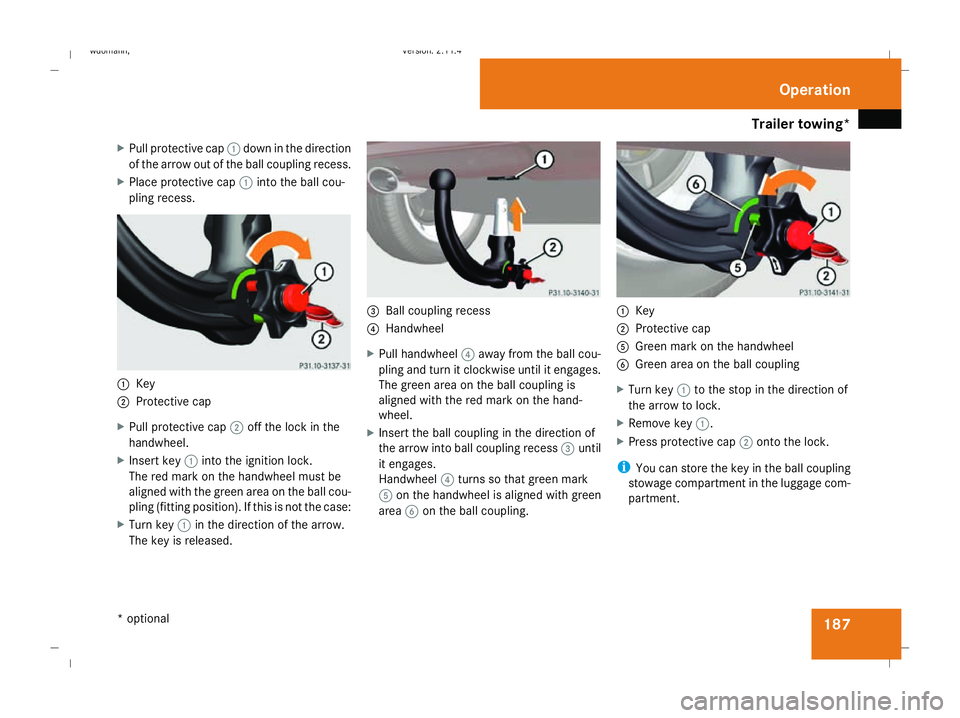
Pull protective cap 1down in the direction
of the arrow out of the ball coupling recess.
X Place protective cap 1into the ball cou-
pling recess. 1
Key
2 Protective cap
X Pull protective cap 2off the lock in the
handwheel.
X Insert key 1into the ignition lock.
The red mark on the handwheel must be
aligned with the green area on the ball cou-
pling (fitting position). If this is not the case:
X Turn key 1in the direction of the arrow.
The key is released. 3
Ball coupling recess
4 Handwheel
X Pull handwheel 4away from the ball cou-
pling and turn it clockwise until it engages.
The green area on the ball coupling is
aligned with the red mark on the hand-
wheel.
X Insert the ball coupling in the direction of
the arrow into ball coupling recess 3until
it engages.
Handwheel 4turns so that green mark
5 on the handwheel is aligned with green
area 6on the ball coupling. 1
Key
2 Protective cap
5 Green mark on the handwheel
6 Green area on the ball coupling
X Turn key 1to the stop in the direction of
the arrow to lock.
X Remove key 1.
X Press protective cap 2onto the lock.
i You can store the key in the ball coupling
stowage compartment in the luggage com-
partment. Operation
* optional
245_AKB; 2; 7, en-GB
wdomann,
Version: 2.11.4 2008-10-17T11:22:31+02:00 - Seite 187 ZDateiname: 6515_1640_02_buchblock.pdf; preflight
Page 193 of 305
Trailer towing*
190note that the power output of the engine,
and consequently the vehicle's gradient-
climbing capability, decrease with increas-
ing altitude.
If the trailer swings from side to side:
X Do not accelerate.
X Do not counter-steer.
X Brake if necessary. G
Risk of accident
On no account should you attempt to draw
the vehicle/trailer combination out by
increasing speed. Removing the ball coupling
X Pull the protective cap off the lock in the
handwheel.
X Insert the key into the lock in the hand-
wheel.
X Turn the key clockwise.
The lock is unlocked.
X Hold the ball coupling. Pull the handwheel
away from the ball coupling and turn it
clockwise until it engages.
The green area on the ball coupling is
aligned with the red mark on the hand-
wheel. X
Pull out the ball coupling downwards.
X Clean the ball coupling if it is dirty.
X Vehicles without ECO start/stop func-
tion*: open the stowage compartment on
the right of the luggage compartment.
X Fold the trim downwards.
X Vehicles with start/stop function*:
open the luggage compartment floor.
X Remove the protective cap from the ball
coupling recess.
X Press the protective cap into the ball cou-
pling recess until it engages.
Storing the ball coupling X
Store the ball coupling with the key inser-
ted in the ball coupling recess.
X Vehicle without ECO start/stop func-
tion: Secure the ball coupling in place using
the retainer strap. G
Risk of accident
Do not carry the ball coupling in the vehicle
interior if it is not secured.
Otherwise, you and others could be injured
by the ball coupling being thrown around if
you: R
brake sharply
R change direction suddenly
R are involved in an accident Trailer power supply
When it leaves the factory, your vehicle's
trailer socket outlet is equipped with a per-
manent power supply and a power supply that
is switched on via the ignition lock.
The permanent power supply is supplied via
trailer socket pin 9.
The power supply that is switched on via the
ignition lock is supplied via trailer socket pin
10.
! You can connect consumers with a power
rating of up to 240 W to the permanent
power supply and up to 180 W to the power
supply that is switched on via the ignition
lock.
You must not charge a trailer battery using
the power supply.
The trailer's turn signal lamps are only guar-
anteed to function when bulbs are used.
You can obtain further information about
installing the trailer electrics from a qualified Operation
* optional
245_AKB; 2; 7, en-GB
wdomann,
Version: 2.11.4 2008-10-17T11:22:31+02:00 - Seite 190Dateiname: 6515_1640_02_buchblock.pdf; preflight
Page 194 of 305
Service
191
specialist workshop, e.g. a Mercedes-Benz
Service Centre.
X To switch the switched power supply on
or off: turn the key in the ignition lock to
position 2or 0, respectively. Trailer with 7-pin connector
If your trailer has a 7-pin connector, you can
connect it to the 13-pin socket on the ball
coupling using an adapter or, if necessary, an
adapter cable. Both of these can be obtained
at a qualified specialist workshop, e.g. at a
Mercedes-Benz Service Centre.
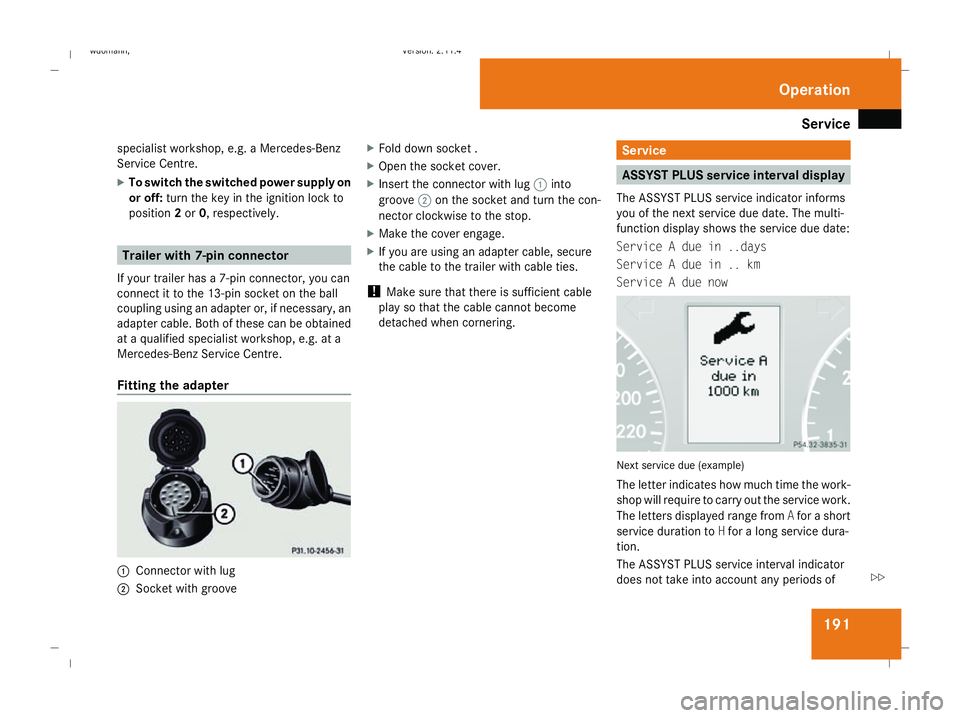
Fitting the adapter 1
Connector with lug
2 Socket with groove X
Fold down socket .
X Open the socket cover.
X Insert the connector with lug 1into
groove 2on the socket and turn the con-
nector clockwise to the stop.
X Make the cover engage.
X If you are using an adapter cable, secure
the cable to the trailer with cable ties.
! Make sure that there is sufficient cable
play so that the cable cannot become
detached when cornering. Service
ASSYST PLUS service interval display
The ASSYST PLUS service indicator informs
you of the next service due date. The multi-
function display shows the service due date:
Service A due in ..days
Service A due in .. km
Service A due now Next service due (example)
The letter indicates how much time the work-
shop will require to carry out the service work.
The letters displayed range from
Afor a short
service duration to Hfor a long service dura-
tion.
The ASSYST PLUS service interval indicator
does not take into account any periods of Operation
245_AKB; 2; 7, en-GB
wdomann,
Version: 2.11.4
2008-10-17T11:22:31+02:00 - Seite 191 ZDateiname: 6515_1640_02_buchblock.pdf; preflight