steering wheel MERCEDES-BENZ B-CLASS HATCHBACK 2011 Owner's Guide
[x] Cancel search | Manufacturer: MERCEDES-BENZ, Model Year: 2011, Model line: B-CLASS HATCHBACK, Model: MERCEDES-BENZ B-CLASS HATCHBACK 2011Pages: 329, PDF Size: 7.91 MB
Page 143 of 329

Kickdown
You can also use kickdown for maximum
acceleration in manual drive program M.
X Depress the accelerato rpedal beyond the
pressure point.
The transmission shifts to a lower gear
depending on the engine speed.
X Shift back up once the desired speed is
reached.
i During kickdown, you cannot shift gears
using the steering wheel gearshift paddles.
i If you apply full throttle, the automatic
transmission shifts up to the nextg ear
when the maximum engine speed is
reached. This prevents the engine from
overrevving.
Switching off the manual drive program X
Press the program selector button
(Y page 137) repeatedly until Eor S
appears in the multifunction display.
Deactivating the temporary manual drive
program
X Pull and hold the right steering wheel gear-
shift paddle until the automatic transmis-
sion shifts into the last active automatic
drive program Eor S.
i When manual drive program Mis deacti-
vated, the automatic transmission in auto-
matic drive program Eor Smay shift from
the curren tgear into a higher or lower gear.
This is dependen tonthe position of the
accelerator pedal, speed and load. 140
Automatic transmissionDriving and parking
Page 147 of 329
Problem Possible causes/consequences and
M Solutions
The fuel filler flap can-
not be opened. The fuel filler flap is not unlocked.
or
The key battery is discharged.
X
Unlock the vehicle (Y page 72).
or
X Unlock the vehicle using the emergency key element
(Y page 73). The fuel filler flap is unlocked, but the opening mechanism is jam-
med.
X
Consult a qualified specialist workshop. Parking
Important safety notes
G
WARNING
Only remove the key from the ignition lock
when the vehicle is stationary, as you cannot
steer the vehicle when the key is removed.
Never leave children unsupervised in the vehi-
cle. They might release the electric parking
brake. This could lead to aserious or fatal
accident. G
WARNING
Under no circumstances should the exhaust
system come into contact with flammable
materials such as dry grass or petrol, for
example. Do not park the vehicle on dry grass-
land or harvested grain fields. The hot exhaust
system could otherwise ignite the flammable
material and set the vehicle on fire.
To ensure that the vehicle is secured against
rolling away unintentionally:
R the electric parking brake must be applied.
R on vehicles with manual transmission,
engage first gear or reverse gear.
R on vehicles with automatic transmission,
the transmission must be in position Pand
the transmission position display must
show Pin the multifunction display. R
the key must be removed from the ignition
lock.
R on uphill or downhill gradients, turn the
fron twheels towards the kerb. Switching off the engine
Important safety notes G
WARNING
If the engine is not running, there is no power
assistance for the steering and brakes. Steer-
ing and braking then requires significantly
greater effort.
As a result, you might lose control of the vehi-
cle, cause an accident and injure yourself and
others.
Therefore, do not switch off the engine while
you are driving.
Vehicles with manual transmission X
Shift to either first gear or reverse gear R.
X Turn the key to position 0in the ignition
lock and remove it.
The immobiliser is activated.
X Apply the electric parking brake. 144
ParkingDriving and parking
Page 152 of 329
Have your vehicle winterproofed at a qualified
specialist workshop at the onset of winter.
Observe the notes in the "Winter operation"
sectio n(Ypage 294).
Driving with summer tyres Observe the notes in the "Winter operation"
section (Y page 294).
Slippery road surfaces G
WARNING
Do not shift down for additional engine brak-
ing on a slippery road surface. This could
cause the drive wheels to lose their grip and
the vehicle could skid.
If the vehicle threatens to skid or cannot be
stopped when moving at low speed:
X Vehicles with manual transmission:
shift to neutral.
X Vehicles with automatic transmission:
shift the transmission to position N.
X Try to bring the vehicle under control by
using corrective steering.
You should drive particularly carefully on slip-
pery road surfaces .Avoid sudden accelera-
tion, steering and braking manoeuvres.
i For more information on driving with
snow chains, see (Y page 295). Driving systems
Cruise control
General notes Cruise control maintains a constant road
speed for you.Itb
rakes automatically in order
to avoid exceeding the set speed. You must
select a lower gearing ood time on long and
steep downhill gradients, especially if the
vehicle is laden or towing a trailer. For vehi-
cles with automatic transmission, you need
to have selected manual drive program
M(Y page 147). By doing so, you will make use of the braking effect of the engine. This
relieves the load on the brake system and
prevents the brakes from overheating and
wearing too quickly.
Use cruise control only if road and traffic con-
ditions make it appropriate to maintain a
steady speed for a prolonged period. You can
store any road speed above 30 km/h.
Important safety notes
G
WARNING
Do not change down for additional engine
braking on a slippery road surface. This could
cause the drive wheels to lose their grip and
the vehicle could skid. G
WARNING
Cruise control cannot take account of road
and traffic conditions.
Always pay attention to traffic conditions
even when cruise control is activated.
Cruise control is only an aid designed to assist
driving. You are responsible for the vehicle's
speed and for braking in good time. G
WARNING
Do not use cruise control
R in traffic conditions that do not allow you to
drive at a constant speed (e.g. heavy traffic
or winding roads). You may otherwise
cause an accident.
R on slippery roads. The drive wheels may
lose their grip when braking or accelerating
and the vehicle may skid.
R when there is low visibility, e.g. due to fog,
heavy rain or snow.
Cruise control lever You can operate cruise control and variable
SPEEDTRONIC with the cruise control lever. Driving systems
149Driving and parking Z
Page 171 of 329
displays parking spaces on the front-
passenger side as standard. Parking spaces
on the driver's side are displayed as soon as
the turn signal on the driver's side is activa-
ted. To park on the driver's side, you must
leave the driver's side turn signal switched
on. This must remain switched on until you
acknowledge the use of Active Parking Assist
by pressing the abutton on the multi-
function steering wheel.
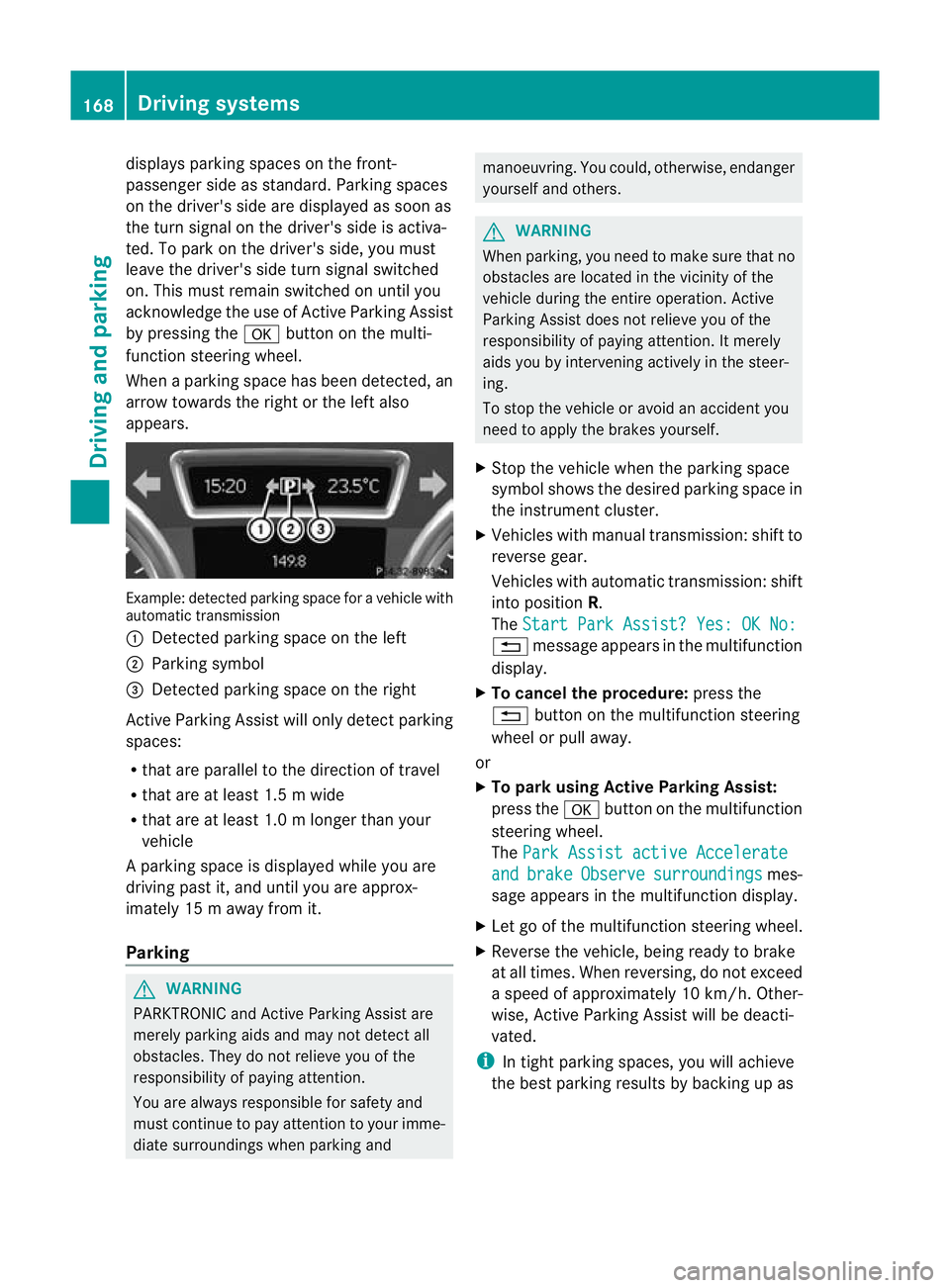
When a parking space has been detected, an
arrow towards the right or the left also
appears. Example: detected parkin
gspace for a vehicle with
automatic transmission
: Detected parking space on the left
; Parking symbol
= Detected parking space on the right
Active Parking Assist will only detec tparking
spaces:
R that are parallel to the direction of travel
R that are at least 1.5 m wide
R that are at least 1.0 m longer than your
vehicle
Ap arking space is displayed while you are
driving past it, and until you are approx-
imately 15 m away from it.
Parking G
WARNING
PARKTRONIC and Active Parking Assist are
merely parking aids and may no tdetec tall
obstacles. They do not relieve you of the
responsibility of paying attention.
You are always responsible for safety and
must continue to pay attention to your imme-
diate surroundings when parking and manoeuvring. You could, otherwise, endanger
yourself and others.
G
WARNING
When parking, you need to make sure that no
obstacles are located in the vicinity of the
vehicle during the entire operation. Active
Parking Assist does not relieve you of the
responsibility of paying attention. It merely
aids you by intervening actively in the steer-
ing.
To stop the vehicle or avoid an accident you
need to apply the brakes yourself.
X Stop the vehicle when the parking space
symbol shows the desired parking space in
the instrument cluster.
X Vehicles with manual transmission :shift to
reverse gear.
Vehicles with automatic transmission: shift
into position R.
The Start Park Assist? Yes: OK No: %
message appears in the multifunction
display.
X To cancel the procedure: press the
% button on the multifunction steering
wheel or pull away.
or
X To parku sing Active Parking Assist:
press the abutton on the multifunction
steering wheel.
The Park Assist active Accelerate and brake Observe surroundings mes-
sage appears in the multifunction display.
X Let go of the multifunction steering wheel.
X Reverse the vehicle, being ready to brake
at all times. When reversing, do not exceed
a speed of approximately 10 km/h. Other-
wise, Active Parking Assist will be deacti-
vated.
i In tight parking spaces, you will achieve
the best parking results by backing up as 168
Driving systemsDriving and parking
Page 172 of 329
far as possible
.When doing so, also
observe the PARKTRONIC messages.
X Stop as soon as PARKTRONIC sounds the
continuous warning tone, if not before.
Manoeuvring may be required in tight park-
ing spaces.
Vehicles with manual transmission: the ParkAssist active Engage forward gear
Observe surroundings message appears in
the multifunction display.
Vehicles with automatic transmission: the
Park Assist active Select D Observe
surroundings message appears in the mul-
tifunction display.
X Vehicles with manual transmission: while
the vehicle is stationary, shift to first gear.
Vehicles with automatic transmission:
select transmission position Dwhile the
vehicle is stationary.
Active Parking Assist immediately steers in
the other direction.
The Park Assist active Accelerate and brake Observe surroundings mes-
sage appears in the multifunction display.
i You will achieve the best results by wait-
ing for the steering procedure to complete
before pulling away.
X Drive forwards and be ready to brake at all
times.
X Stop as soon as PARKTRONIC sounds the
continuous warning tone, if not before.
Vehicles with manual transmission: the ParkAssist active Engage reverse gear
Observe surroundings message appears in
the multifunction display.
Vehicles with automatic transmission: the
Park Assist active Select R Observe
surroundings message appears in the mul-
tifunction display.
X Further transmission shifts may be neces-
sary.
As soon as the parking procedure is com-
plete, the Park Assist switched off message appears in the multifunction dis- play.A
ctive Parking Assist is now deacti-
vated. PARKTRONIC is still available.
X Manoeuvre if necessary.
X Always observe the warning messages dis-
played by PARKTRONIC (Y page 164).
Cancelling Active Parking Assist You can cancel Active Parking Assist at any
time.
X
Stop the movement of the multifunction
steering wheel or stee ryourself.
Active Parking Assist will be cancelled at
once. The Park Assist cancelled mes-
sage appears in the multifunction display.
or
X Press the PARKTRONIC button on the
centre console (Y page 165).
PARKTRONIC is switched off and Active
Parking Assist is immediately cancelled.
The Park Assist cancelled message
appears in the multifunction display.
Active Parking Assist is cancelled automati-
cally if:
R a gear is changed/the transmission is shif-
ted too early.
R parking using Active Parking Assist is no
longer possible.
R you are driving faster than 10 km/h.
R a wheel spins and ESP ®
intervenes or fails.
The ÷ warning lamp lights up in the
instrument cluster.
Aw arning tone sounds. The parking space
symbol disappears and the multifunction dis-
play shows the Park Assist cancelled message.
When Active Parking Assist is cancelled, you
must steer again yourself.
Towing
atrailer For vehicles with a trailer tow hitch, the min-
imum required length for parking spaces is
slightly increased. Driving systems
169Driving and parking Z
Page 174 of 329
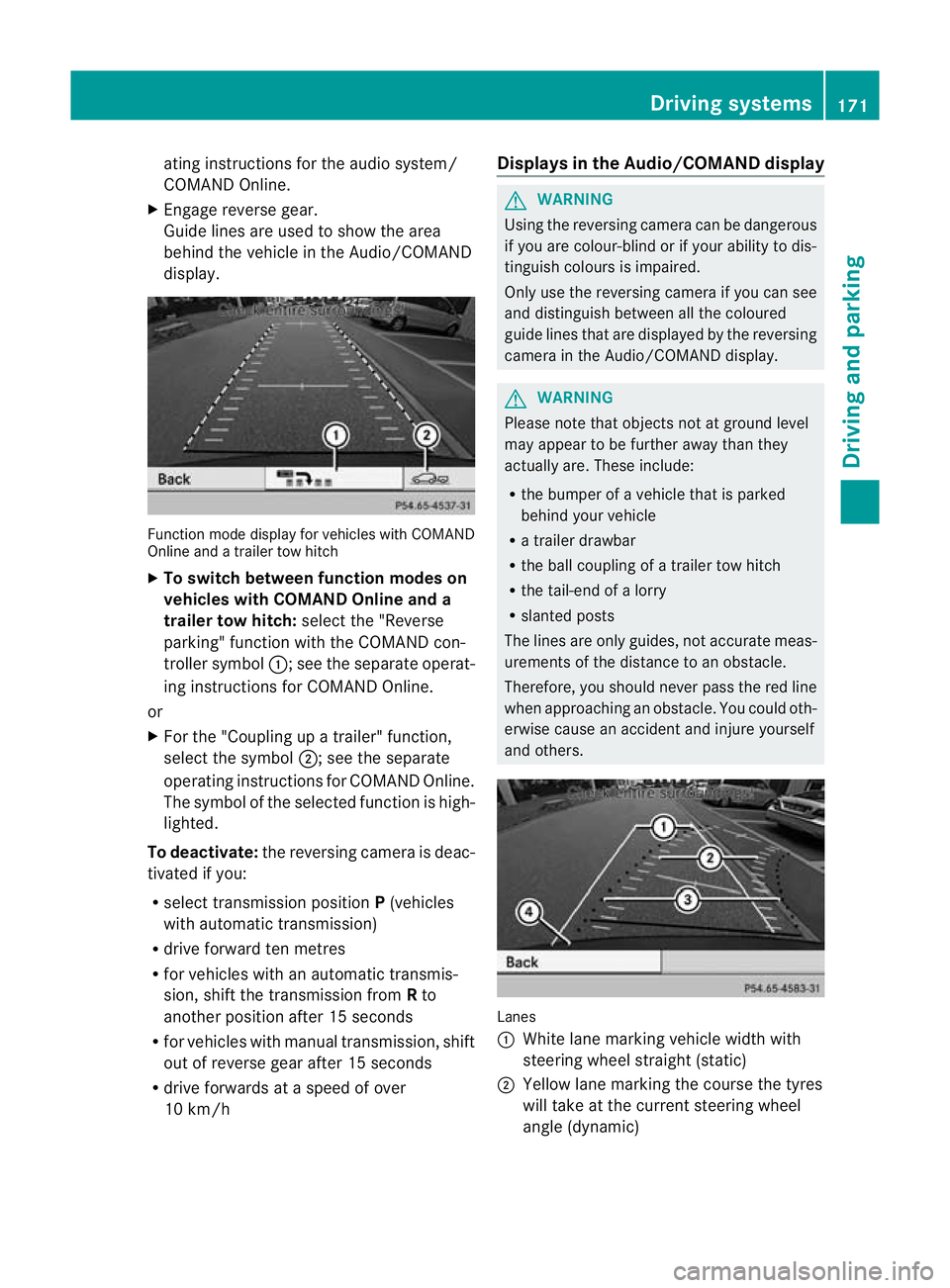
ating instructions for the audio system/
COMAND Online.
X Engage reverse gear.
Guide lines are used to show the area
behind the vehicle in the Audio/COMAND
display. Function mode display for vehicles with COMAND
Online and a trailer tow hitch
X
To switch between function modes on
vehicles with COMAND Online and a
trailer tow hitch: selectthe "Reverse
parking" function with the COMAND con-
troller symbol :; see the separate operat-
ing instructions for COMAND Online.
or
X For the "Coupling up a trailer" function,
select the symbol ;; see the separate
operating instructions for COMAND Online.
The symbol of the selected function is high-
lighted.
To deactivate: the reversing camera is deac-
tivated if you:
R select transmission position P(vehicles
with automatic transmission)
R drive forward ten metres
R for vehicles with an automatic transmis-
sion, shift the transmission from Rto
another position after 15 seconds
R for vehicles with manual transmission, shift
out of reverse gear after 15 seconds
R drive forwards at a speed of over
10 km/h Displays in the Audio/COMAND display G
WARNING
Using the reversing camera can be dangerous
if you are colour-blind or if your ability to dis-
tinguish colours is impaired.
Only use the reversing camera if you can see
and distinguish between all the coloured
guide lines that are displayed by the reversing
camera in the Audio/COMAND display. G
WARNING
Please note that objects not at ground level
may appear to be further away than they
actually are. These include:
R the bumper of a vehicle that is parked
behind your vehicle
R a trailer drawbar
R the ball coupling of a trailer tow hitch
R the tail-end of a lorry
R slanted posts
The lines are only guides, not accurate meas-
urements of the distance to an obstacle.
Therefore, you should never pass the red line
when approaching an obstacle. You could oth-
erwise cause an accident and injure yourself
and others. Lanes
:
White lane marking vehicle width with
steering wheel straight (static)
; Yellow lane marking the course the tyres
will take at the current steering wheel
angle (dynamic) Driving systems
171Driving and parking Z
Page 175 of 329
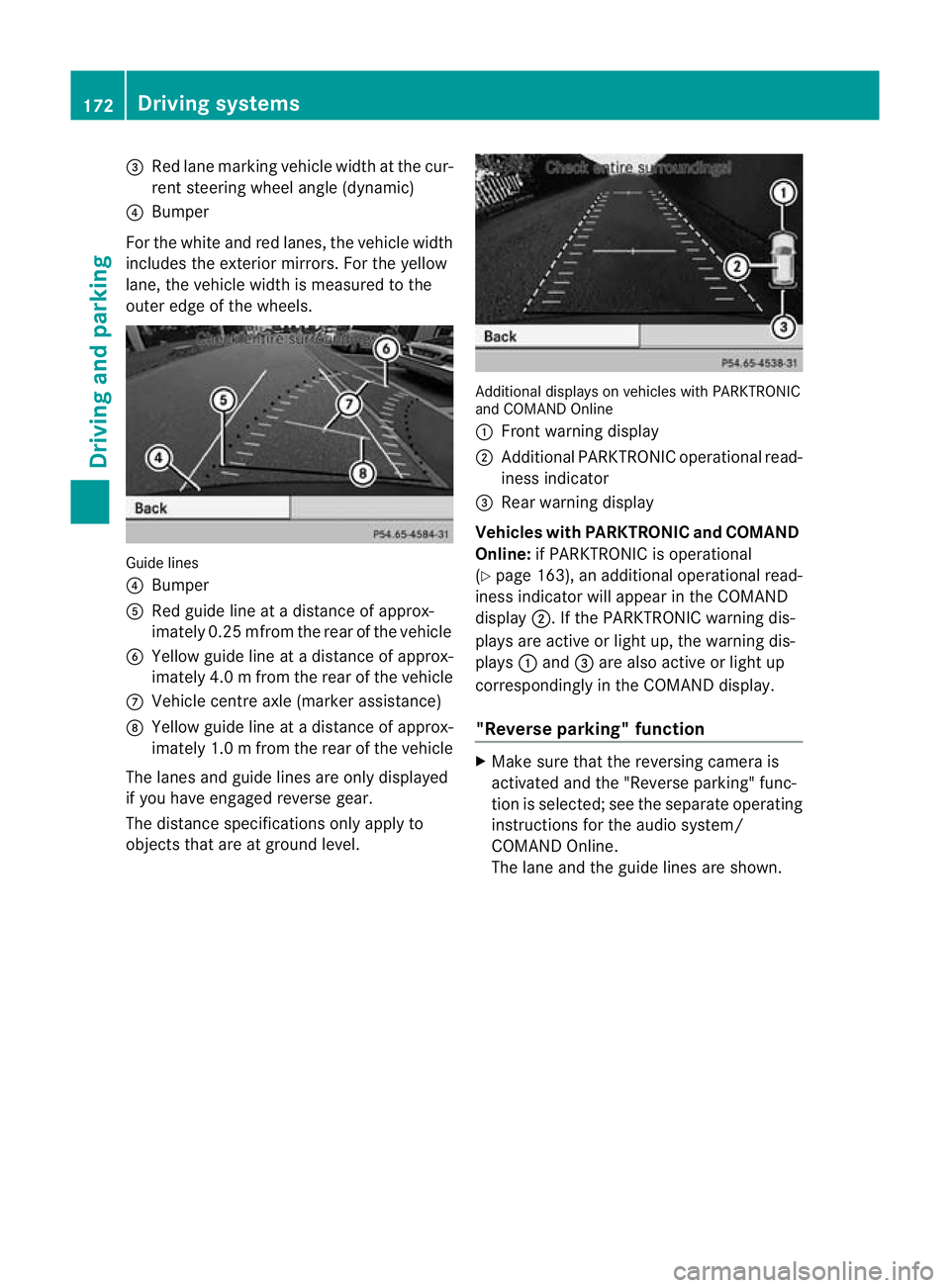
=
Red lane marking vehicle width at the cur-
ren tsteering wheel angle (dynamic)
? Bumper
For the white and red lanes, the vehicle width
includes the exterior mirrors. For the yellow
lane, the vehicle width is measured to the
outer edge of the wheels. Guide lines
? Bumper
A Red guide line at a distance of approx-
imately 0.25 mfrom the rear of the vehicle
B Yellow guide line at a distance of approx-
imately 4.0 mfrom the rear of the vehicle
C Vehicle centre axle (marker assistance)
D Yellow guide line at a distance of approx-
imately 1.0 mfrom the rear of the vehicle
The lanes and guide lines are only displayed
if you have engaged reverse gear.
The distance specifications only apply to
objects that are at ground level. Additional displays on vehicles with PARKTRONIC
and COMAND Online
:
Front warning display
; Additional PARKTRONIC operational read-
iness indicator
= Rearw arning display
Vehicles with PARKTRONIC and COMAND
Online: if PARKTRONIC is operational
(Y page 163), an additional operational read-
iness indicator will appear in the COMAND
display ;. If the PARKTRONIC warning dis-
plays are active or light up, the warning dis-
plays :and =are also active or light up
correspondingly in the COMAND display.
"Reverse parking" function X
Make sure that the reversing camera is
activated and the "Reverse parking" func-
tio nis selected; see the separate operating
instructions for the audio system/
COMAND Online.
The lane and the guide lines are shown. 172
Driving systemsDriving and parking
Page 176 of 329
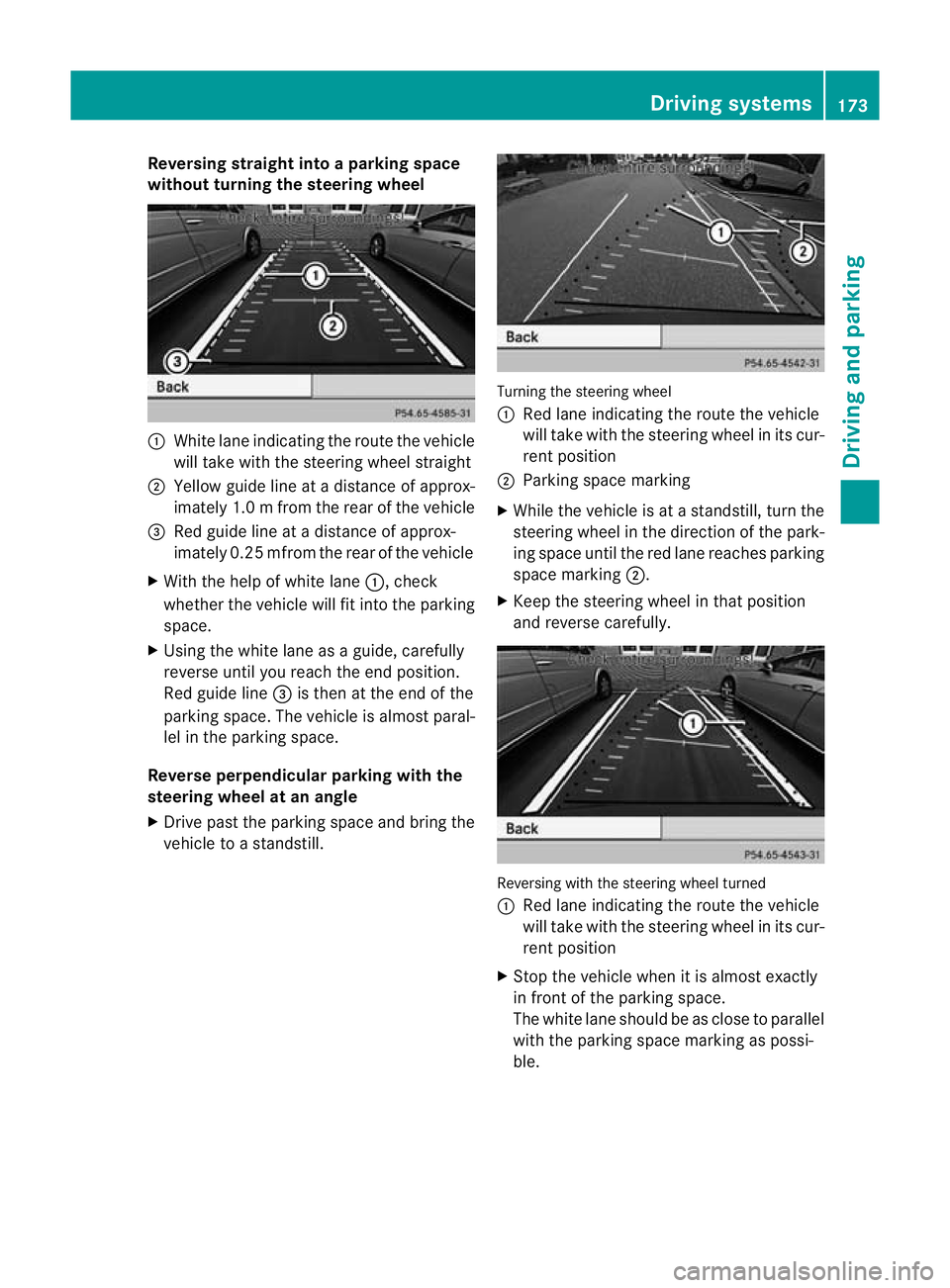
Reversing straight into a parking space
without turning the steering wheel :
White lane indicating the route the vehicle
will take with the steering wheel straight
; Yellow guide line at a distance of approx-
imately 1.0 mfrom the rear of the vehicle
= Red guide line at a distance of approx-
imately 0.25 mfrom the rear of the vehicle
X With the help of white lane :, check
whethe rthe vehicle will fit into the parking
space.
X Using the white lane as a guide, carefully
reverse until you reach the end position.
Red guide line =is then at the end of the
parking space. The vehicle is almost paral-
lel in the parking space.
Reverse perpendicular parking with the
steering wheel at an angle
X Drive past the parking space and bring the
vehicle to a standstill. Turning the steering wheel
:
Red lane indicating the route the vehicle
will take with the steering wheel in its cur-
rent position
; Parking space marking
X While the vehicle is at a standstill, turn the
steering wheel in the direction of the park-
ing space until the red lane reaches parking
space marking ;.
X Keep the steering wheel in that position
and reverse carefully. Reversing with the steering wheel turned
:
Red lane indicating the route the vehicle
will take with the steering wheel in its cur-
rent position
X Stop the vehicle when it is almost exactly
in front of the parking space.
The white lane should be as close to parallel
with the parking space marking as possi-
ble. Driving systems
173Driving and parking Z
Page 177 of 329
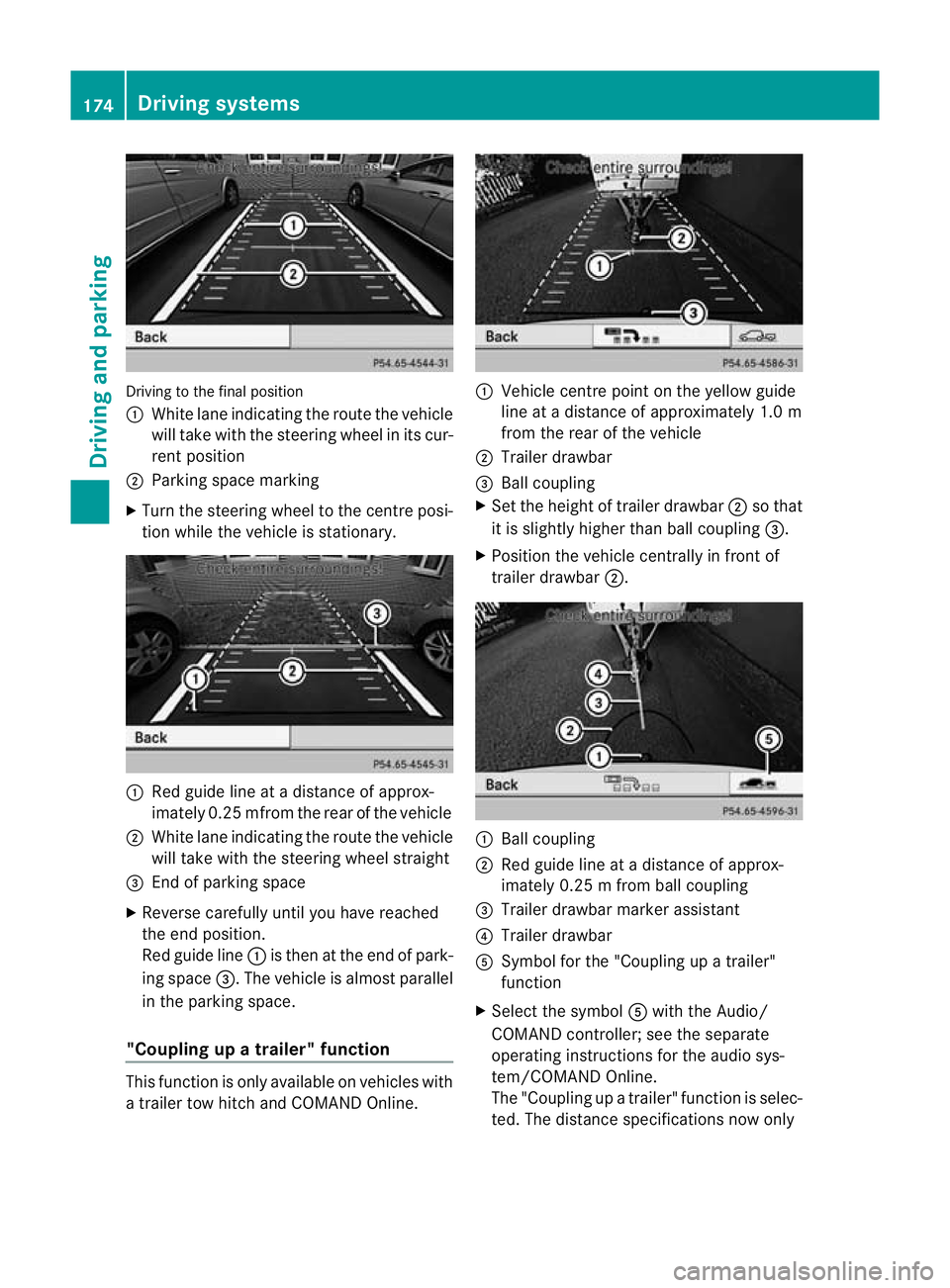
Driving to the final position
:
White lane indicating the route the vehicle
will take with the steering wheel in its cur-
rent position
; Parking space marking
X Turn the steering wheel to the centre posi-
tio nw hile the vehicle is stationary. :
Red guide line at a distance of approx-
imately 0.25 mfrom the rear of the vehicle
; White lane indicating the route the vehicle
will take with the steering wheel straight
= End of parking space
X Reverse carefully until you have reached
the end position.
Red guide line :is then at the end of park-
ing space =.The vehicle is almost parallel
in the parking space.
"Coupling up a trailer" function This function is only available on vehicles with
a trailer tow hitch and COMAND Online. :
Vehicle centre point on the yellow guide
line at a distance of approximately 1.0 m
from the rear of the vehicle
; Trailer drawbar
= Ball coupling
X Set the height of trailer drawbar ;so that
it is slightly higher than ball coupling =.
X Position the vehicle centrally in front of
trailer drawbar ;. :
Ball coupling
; Red guide line at a distance of approx-
imately 0.25 m from ball coupling
= Trailer drawbarm arker assistant
? Trailer drawbar
A Symbol for the "Coupling up a trailer"
function
X Select the symbol Awith the Audio/
COMAND controller; see th eseparate
operating instructions for the audio sys-
tem/COMAND Online.
The "Coupling up a trailer" function is selec-
ted. The distance specifications now only 174
Driving systemsDriving and parking
Page 183 of 329
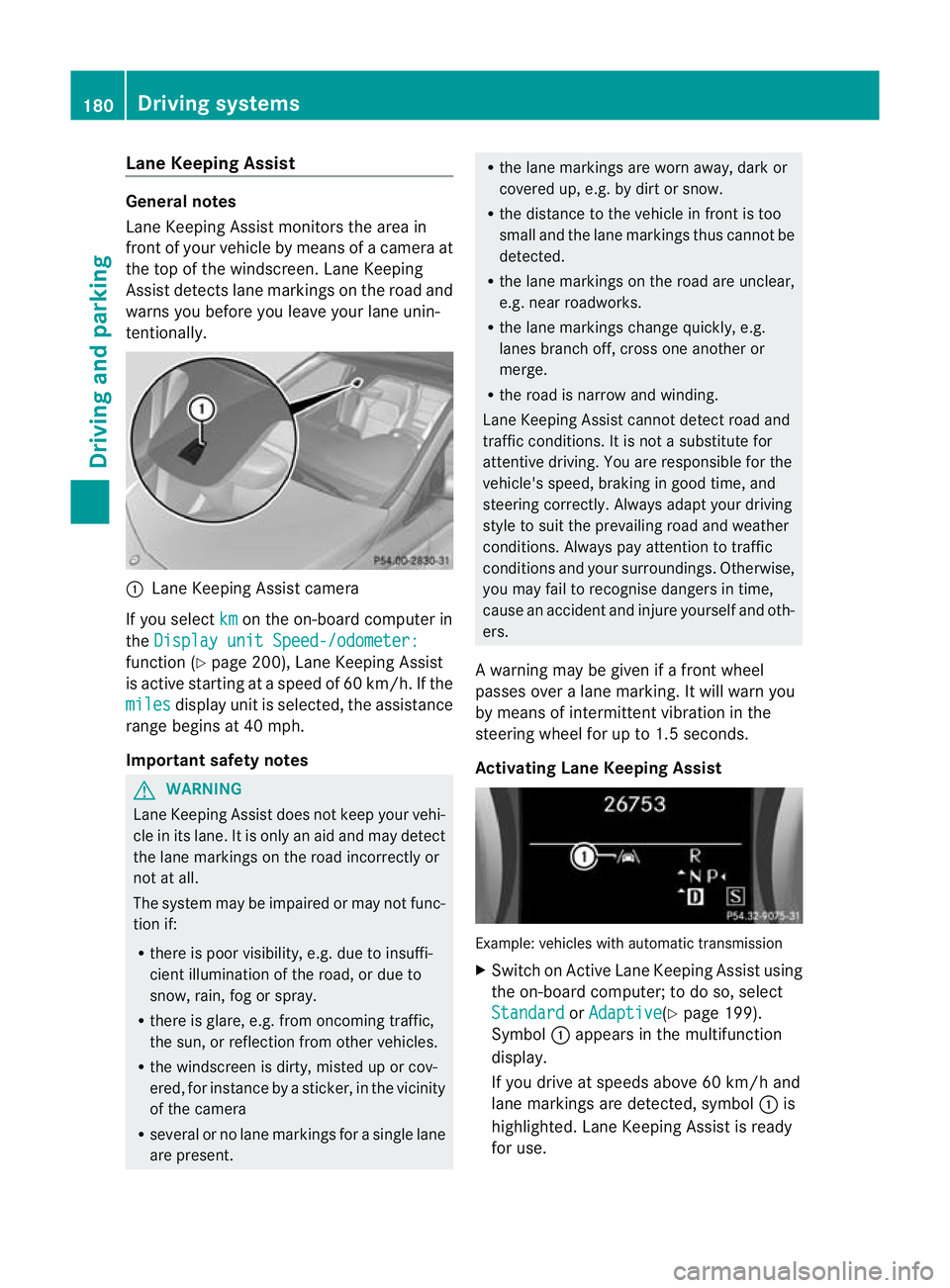
Lane Keeping Assist
General notes
Lane Keeping Assist monitors the area in
fron tofy our vehicle by means of a camera at
the top of the windscreen .Lane Keeping
Assist detects lane markings on the road and
warns you before you leave your lane unin-
tentionally. :
Lane Keeping Assist camera
If you select km on the on-board computer in
the Display unit Speed-/odometer: function (Y
page 200), Lane Keeping Assist
is active starting at aspeed of 60 km/h. If the
miles display unit is selected, the assistance
range begins at 40 mph.
Important safety notes G
WARNING
Lane Keeping Assist does not keep your vehi-
cle in its lane. It is only an aid and may detect
the lane markings on the road incorrectly or
not at all.
The system may be impaired or may not func-
tion if:
R there is poor visibility, e.g. due to insuffi-
cient illumination of the road, or due to
snow, rain, fog or spray.
R there is glare, e.g. from oncoming traffic,
the sun, or reflection from other vehicles.
R the windscreen is dirty, misted up or cov-
ered, for instance by a sticker, in the vicinity
of the camera
R several or no lane markings for a single lane
are present. R
the lane markings are worn away, dark or
covered up, e.g. by dirt or snow.
R the distance to the vehicle in front is too
small and the lane markings thus cannot be
detected.
R the lane markings on the road are unclear,
e.g. near roadworks.
R the lane markings change quickly, e.g.
lanes branch off, cross one another or
merge.
R the road is narrow and winding.
Lane Keeping Assist cannot detect road and
traffic conditions. It is not a substitute for
attentive driving. You are responsible for the
vehicle's speed, braking in good time, and
steering correctly. Always adapt your driving
style to suit the prevailing road and weather
conditions. Always pay attention to traffic
conditions and your surroundings. Otherwise,
you may fail to recognise dangers in time,
cause an acciden tand injure yoursel fand oth-
ers.
A warning may be given if a front wheel
passes ove ralane marking. It will warn you
by means of intermittent vibration in the
steering wheel for up to 1. 5seconds.
Activating Lane Keeping Assist Example: vehicles with automatic transmission
X
Switch on Active Lane Keeping Assist using
the on-board computer; to do so, select
Standard or
Adaptive (Y
page 199).
Symbol :appears in the multifunction
display.
If you drive at speeds above 60 km/h and
lane markings are detected, symbol :is
highlighted. Lane Keeping Assist is ready
for use. 180
Driving systemsDriving and parking