cruise control MERCEDES-BENZ B-CLASS HATCHBACK 2011 Owners Manual
[x] Cancel search | Manufacturer: MERCEDES-BENZ, Model Year: 2011, Model line: B-CLASS HATCHBACK, Model: MERCEDES-BENZ B-CLASS HATCHBACK 2011Pages: 329, PDF Size: 7.91 MB
Page 10 of 329
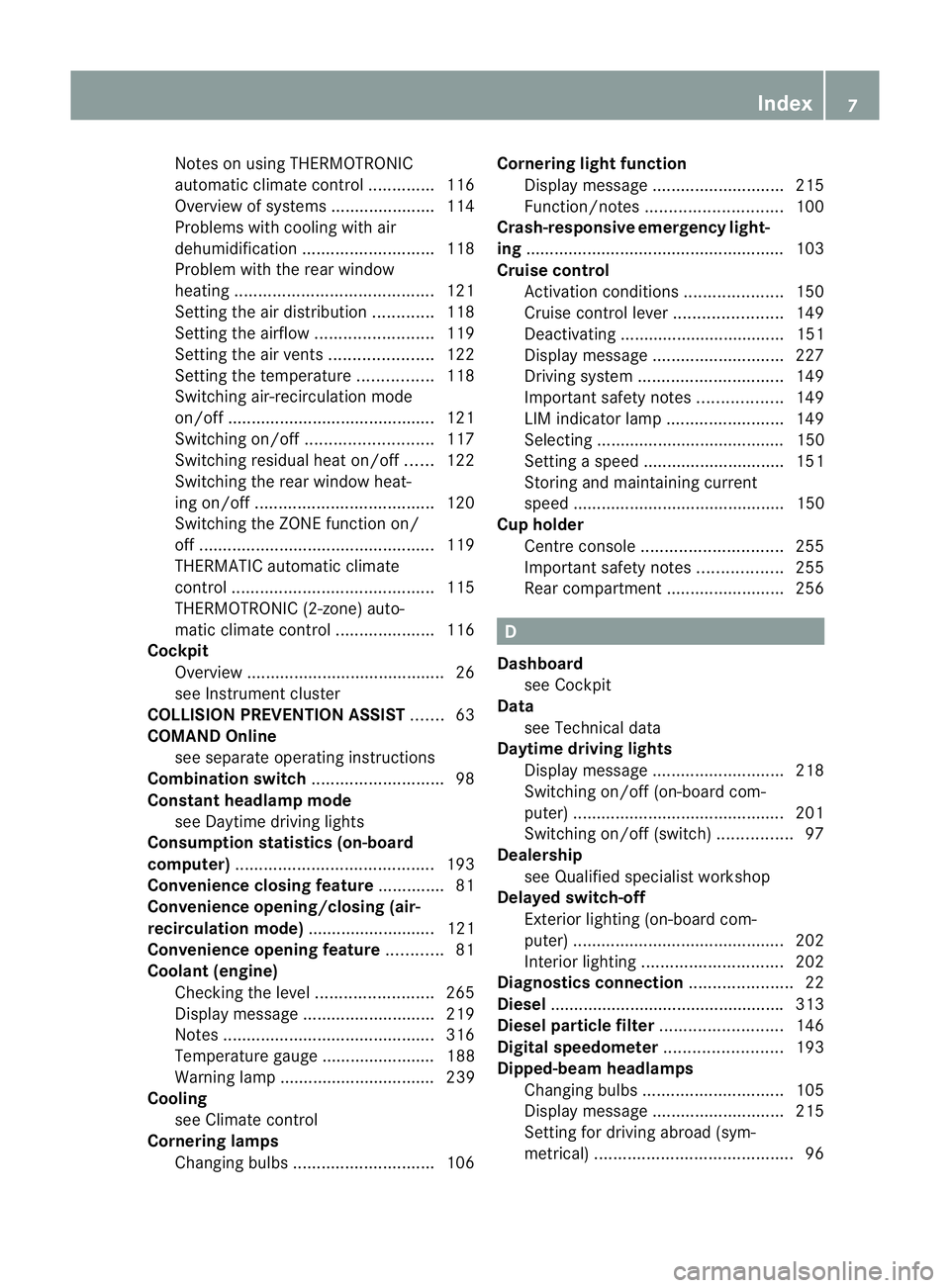
Notes on using THERMOTRONIC
automatic climate control
..............116
Overview of systems ......................114
Problems with cooling with air
dehumidification ............................ 118
Problem with the rear window
heating .......................................... 121
Setting the aird istribution.............118
Setting the airflow .........................119
Setting the airv ents...................... 122
Setting the temperature ................118
Switching air-recirculation mode
on/off ............................................ 121
Switching on/off ........................... 117
Switching residual hea ton/off ......122
Switching the rear window heat-
ing on/off ...................................... 120
Switching the ZONE function on/
off .................................................. 119
THERMATIC automatic climate
control ........................................... 115
THERMOTRONIC (2-zone) auto-
matic climate control .....................116
Cockpit
Overview .......................................... 26
see Instrument cluster
COLLISIO NPREVENTION ASSIST .......63
COMAND Online see separate operating instructions
Combination switch ............................98
Constant headlamp mode see Daytime driving lights
Consumption statistics (on-board
computer) .......................................... 193
Convenience closing feature ..............81
Convenience opening/closing (air-
recirculation mode) ........................... 121
Convenience opening feature ............81
Coolan t(engine)
Checkin gthe level ......................... 265
Display message ............................ 219
Notes ............................................. 316
Temperature gauge ........................ 188
Warning lamp ................................. 239
Cooling
see Climate control
Cornering lamps
Changing bulbs .............................. 106Cornering light function
Display message ............................ 215
Function/notes ............................. 100
Crash-responsive emergency light-
ing ....................................................... 103
Cruise control Activation conditions .....................150
Cruise control leve r....................... 149
Deactivating ................................... 151
Display message ............................ 227
Driving system ............................... 149
Important safety notes ..................149
LIM indicator lamp .........................149
Selecting ........................................ 150
Setting aspeed .............................. 151
Storing and maintaining current
speed ............................................. 150
Cup holder
Centr econsole .............................. 255
Important safety notes ..................255
Rea rcompartmen t......................... 256 D
Dashboard see Cockpit
Data
see Technical data
Daytime driving lights
Display message ............................ 218
Switching on/off (on-board com-
puter) ............................................. 201
Switching on/off (switch) ................97
Dealership
see Qualified specialist workshop
Delaye dswitch-off
Exterio rlighting (on-board com-
puter )............................................. 202
Interior lighting .............................. 202
Diagnostics connection ......................22
Diesel ................................................. .313
Diesel particle filter ..........................146
Digital speedometer .........................193
Dipped-beam headlamps Changing bulbs .............................. 105
Display message ............................ 215
Setting for driving abroad (sym-
metrical) .......................................... 96 Index
7
Page 11 of 329
Setting for driving on the right/
left
................................................. 201
Switching on/off .............................. 97
DIRECT SELECTl ever
see Automatic transmission
Displa y(cleaning instructions) ........271
Display message General information .......................205
Hiding (on-board computer) ...........205
Display messages
ASSYST PLUS service interval dis-
play................................................ 266
Calling up (on-board computer) .....205
Driving systems ............................. 221
Engine ............................................ 219
Key ................................................ 231
Lights ............................................ .215
Safety systems .............................. 206
Tyres .............................................. 228
Vehicle .......................................... .229
Distance display (on-board com-
puter) ................................................. .198
Distance recorder see Trip meter
Distance warning signal
Activating/deactivating .................199
Function/notes ................................ 63
Warning lamps ............................... 241
DISTRONIC PLUS
Activatio ncondition s..................... 156
Cruise control leve r....................... 155
Deactivating ................................... 160
Display message ............................ 225
Displays in the multifunctio ndis-
play ................................................ 157
Drivin gtips .................................... 160
Function/notes .....................154, 155
Important safety notes ..................154
Selecting ........................................ 155
Setting the specified minimum
distance ......................................... 159
Warning lamp ................................. 241
Door
Automatic locking (on-board com-
puter) ............................................. 203
Automatic locking (switch) .............. .77
Central locking/unlocking (key) ......72
Control pane l................................... 35Display message
............................ 230
Emergency locking ........................... 78
Emergency unlocking .......................77
Important safety notes ....................76
Opening (from the inside) ................76
Drinks holder
see Cuph older
Drive program
Automatic ...................................... 138
Display (DIRECT SELECT lever) ......135
Manual .......................................... .139
Driver's door
see Door
Driver's seat
see Seats
Driving abroad
Service24h .................................... 267
Symmetrical dipped bea m............... 96
Driving on flooded roads ..................148
Driving safety system BAS PLUS (Brake Assist System
PLUS) .............................................. .65
COLLISION PREVENTION ASSIST ....63
Distance warning signa l................... 63
Electronic Brake-force Distribu-
tion .................................................. 67
ESP ®
(Electroni cStability Pro-
gram) ............................................... 66
Important safety guidelines .............62
Driving safety systems
ABS (Anti-lock Braking System) .......63
ADAPTIVE BRAKE ............................. 68
Adaptive brake lamps ......................66
BAS (Brake Assist System) ..............63
ETS (Electronic Traction System) .....66
Overview .......................................... 62
Steering assistant STEER CON-
TRO L................................................ 68
Driving system
Active Parking Assist .....................166
Driving systems
ATTENTION ASSIST ........................175
Blind Spot Assist ............................ 177
Cruise control ................................ 149
Display message ............................ 221
Distronic Plu s................................ 154
HOLD function ............................... 1628
Index
Page 15 of 329
Emergency key element ................... 73
Important safety note s.................... 72
Loss ................................................. 75
Modifying the programming .............73
Positions (ignition lock) .................127
Problem (malfunction) .....................75
Starting the engine ........................127
Keyp ositions (ignition lock) ............127
Kickdown Driving tips .................................... 137
Manual drive program ....................140
Kneebag ............................................... 42L
Lamps see Warning and indicator lamps
Lane Keeping Assist
Activating/deactivating .................199
Display message ............................ 223
Function/informatio n.................... 180
Lane package ..................................... 177
Lashing eyelets ................................. 251
Licence plate lamp (display mes-
sage) ................................................... 217
Licence plate lighting Changing bulbs .............................. 108
Lighting
see Lights
Lights
Activating/deactivating the Intel-
ligent Ligh tSystem ........................ 201
Activating/deactivating the inte-
rior lighting delayed switch-off .......202
Active light function .......................100
Automatic headlamp mode ..............97
Cornering light function .................100
Dipped-bea mheadlamps ................. 97
Display message ............................ 215
Driving abroad ................................. 96
Foglamps ......................................... 97
Foglamps (extended range) ...........100
Hazard warning lamps .....................99
Headlamp flasher ............................. 99
Headlamp range .............................. 98
Ligh tswitc h..................................... 96
Main-beam headlamps ..................... 99
Motorway mode ............................. 100Parking lamps
.................................. 96
Rea rfoglamp ................................... 98
Switching Adaptive Highbeam
Assist on/off ................................. 202
Switching the daytime driving
lights on/off (on-board computer) .201
Switching the daytime driving
lights on/off (switch) .......................97
Switching the exterio rlighting
delayed switch-off on/off (on-
board computer )............................ 202
Switching the surround lighting
on/off (on-board computer) ..........202
Turn signals ..................................... 98
see Changing bulbs
see Interior lighting
Light sensor (display message) .......218
LIM indicator lamp Cruise control ................................ 149
DISTRONI CPLUS ........................... 155
Variabl eSPEEDTRONIC .................152
Limiting the speed
see SPEEDTRONIC
Loading guidelines ............................244
Locking see Centra llocking
Locking (doors)
Automatic ........................................ 77
Emergency locking ........................... 78
From inside (central locking but-
ton) .................................................. 77
Locking centrally
see Centra llocking
Locking verification signal (on-
board computer) ............................... 203
Luggage compartment cover ...........251
Luggage compartment enlarge-
ment ................................................... 248
Important safety notes ..................248
Notes on use ................................. 250
Luggage compartment floor
Adjusting the height ....................... 254
opening/closing ............................ 253
stowage well, unde r....................... 253
Luggage net ....................................... 247
Lumbar support Adjusting the 4-way lumba rsup-
por t.................................................. 9012
Index
Page 19 of 329
Sensors (cleaning instructions)
.......270
Service Centre see Qualified specialist workshop
Service menu (on-board computer) .200
Service products Brake fluid ..................................... 315
Coolant (engine) ............................ 316
Engine oil ....................................... 314
Fuel ................................................ 312
Important safety notes ..................311
Washer fluid .................................. .316
Settings
Factory (on-board computer) .........204
On-board computer .......................200
Setting the air distribution ...............118
Setting the airflow ............................119
Shifting to neutral (manual trans-
mission) ............................................. 134
Short journeys (diesel particle fil-
ter) ...................................................... 146
Sidebag ................................................ 42
Side windows Convenience closing ........................81
Convenience opening ......................81
Important safety notes ....................79
Opening/closing .............................. 80
Problem (malfunction) .....................82
resetting .......................................... 81
Sliding sunroof
see Panorama sliding sunroof
Snow chains ...................................... 295
Socket Centre console .............................. 258
Luggage compartment ...................258
Points to observe before use .........257
Rea rcompartmen t......................... 258
Spare wheel
see Emergency spare wheel
Specialist workshop ............................ 22
Spectacles compartment .................245
Speed, controlling see Cruise control
Spee dLimit Assist
Activating/deactivating the warn-
ing function .................................... 198
Displayin g...................................... 198
Display message ............................ 222Display message in the multifunc-
tion displa
y.................................... 177
Function/notes ............................. 176
Important safety notes ..................176
Spee dlimiter
SPEEDTRONIC ............................... 151
Speedometer
Activating/deactivating the addi-
tional speedometer ........................200
Digita l............................................ 193
In the Instrument cluster .................28
Segments ...................................... 189
Selecting the unit of measure-
ment .............................................. 200
see Instrument cluster
SPEEDTRONIC
Deactivating variabl e..................... 153
Display message ............................ 226
Function/notes ............................. 151
Important safety notes ..................152
LIM indicator lamp .........................152
Permanent ..................................... 154
Selecting ........................................ 152
Storing the current spee d.............. 153
Variabl e......................................... 152
SRS (Supplemental Restraint Sys-
tem)
Display message ............................ 214
Introduction ..................................... 39
Warning lamp ................................. 238
Warning lamp (function) ................... 39
Starting (engine) ................................ 127
STEE RCONTROL .................................. 68
Steering (display message) ..............230
Steering wheel Adjusting (manually). .......................91
Button overview ............................... 31
Buttons (on-board computer) ......... 189
Cleaning ......................................... 272
Gearshift paddles ........................... 138
Important safety notes ....................91
Steering wheel gearshift paddles ....138
Stowage areas ................................... 244
Stowage compartment Spectacles compartment ...............245
Stowage compartments
Armrest (front) ............................... 245
Armrest (under) ............................. 24616
Index
Page 22 of 329
Vehicle identification number
see VIN
Vehicle identification plate ..............310
Vehicle tool kit .................................. 275
Vehicle weights ................................. 317
Vents see Air vents
Video (DVD) ........................................ 196
Video DVD (on-board computer) ......196
VIN ...................................................... 310W
Warning and indicator lamps ABS ................................................ 233
Brakes ........................................... 233
Distance warning signa l................. 241
ESP ®
.............................................. 235
ESP ®
OFF ....................................... 236
Fuel tank ........................................ 239
LIM (cruise control) ........................ 149
LIM (DISTRONIC PLUS) ..................155
LIM (variable SPEEDTRONIC) .........152
Overview .......................................... 30
PASSENGER AIRBAG OFF ................49
Reserve fuel ................................... 239
Seat bel t........................................ 231
SRS ................................................ 238
Warning triangle ................................ 274
Washer fluid Display message ............................ 231
Wheel bol ttightening torque ...........302
Wheel chock ...................................... 299
Wheels Changing/replacing .......................298
Changing awheel .......................... 298
Checking ........................................ 293
Cleaning ......................................... 268
Cleaning (warning) .........................298
Emergency spare wheel .................304
Fitting anew wheel ........................ 301
Fitting awheel ............................... 298
Important safety notes ..................292
Removing awheel .......................... 301
Storing ........................................... 298
Tightening torque ........................... 302
Whee lsize/tyre size ...................... 302Windowbag
Display message ............................ 215
Operation ........................................ .43
Windows
Cleaning ......................................... 269
see Side windows
Windscreen
Demisting ...................................... 119
Windscreen washer fluid
see Windscreen washer system
Windscreen washer system .............265
Notes ............................................. 316
Windscreen wipers
Problem (malfunction) ...................110
Rea rwindow wiper ........................ 109
Replacing the wiper blades ............109
Switching on/off ........................... 108
Winter operation
Important safety notes ..................294
Slippery road surfaces ...................149
Snow chains .................................. 295
Winter tyres
Limiting the speed (on-board com-
puter) ............................................. 203
M+S tyres ...................................... 294
Wiper blades
Cleaning ......................................... 269
Important safety notes ..................109
Replacing (on the rear window) .....110
Replacing (windscreen) ..................109
Wooden trim (cleaning instruc-
tions) .................................................. 272
Workshop see Qualified specialist workshop Index
19
Page 29 of 329
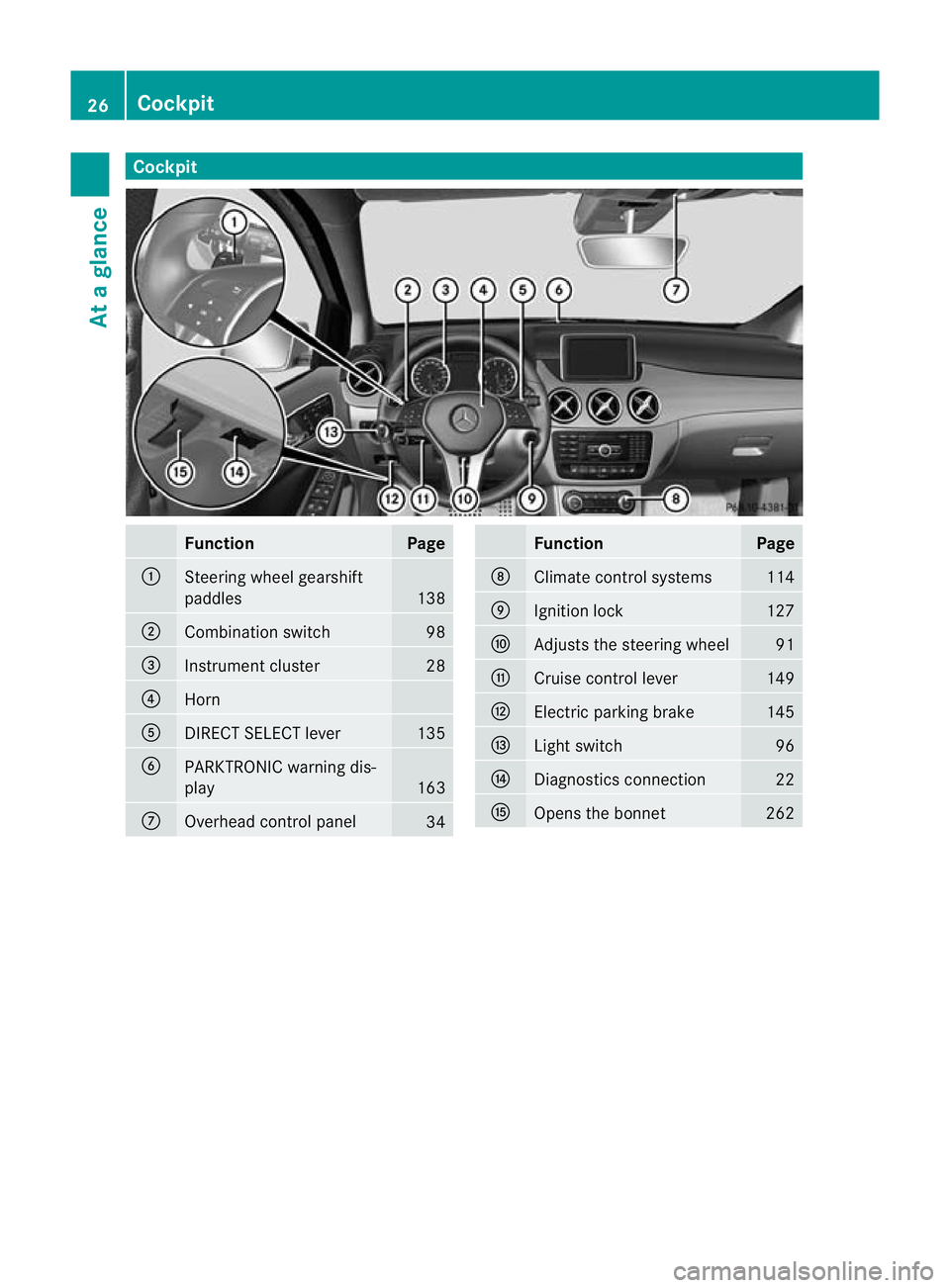
Cockpit
Function Page
:
Steering wheel gearshift
paddles
138
;
Combination switch 98
=
Instrument cluster 28
?
Horn
A
DIRECT SELECT lever 135
B
PARKTRONIC warning dis-
play
163
C
Overhead control panel
34 Function Page
D
Climate control systems 114
E
Ignition lock 127
F
Adjusts the steering wheel 91
G
Cruise control lever 149
H
Electric parking brake 145
I
Ligh
tswitch 96
J
Diagnostics connection 22
K
Opens the bonnet 26226
CockpitAt a glance
Page 30 of 329
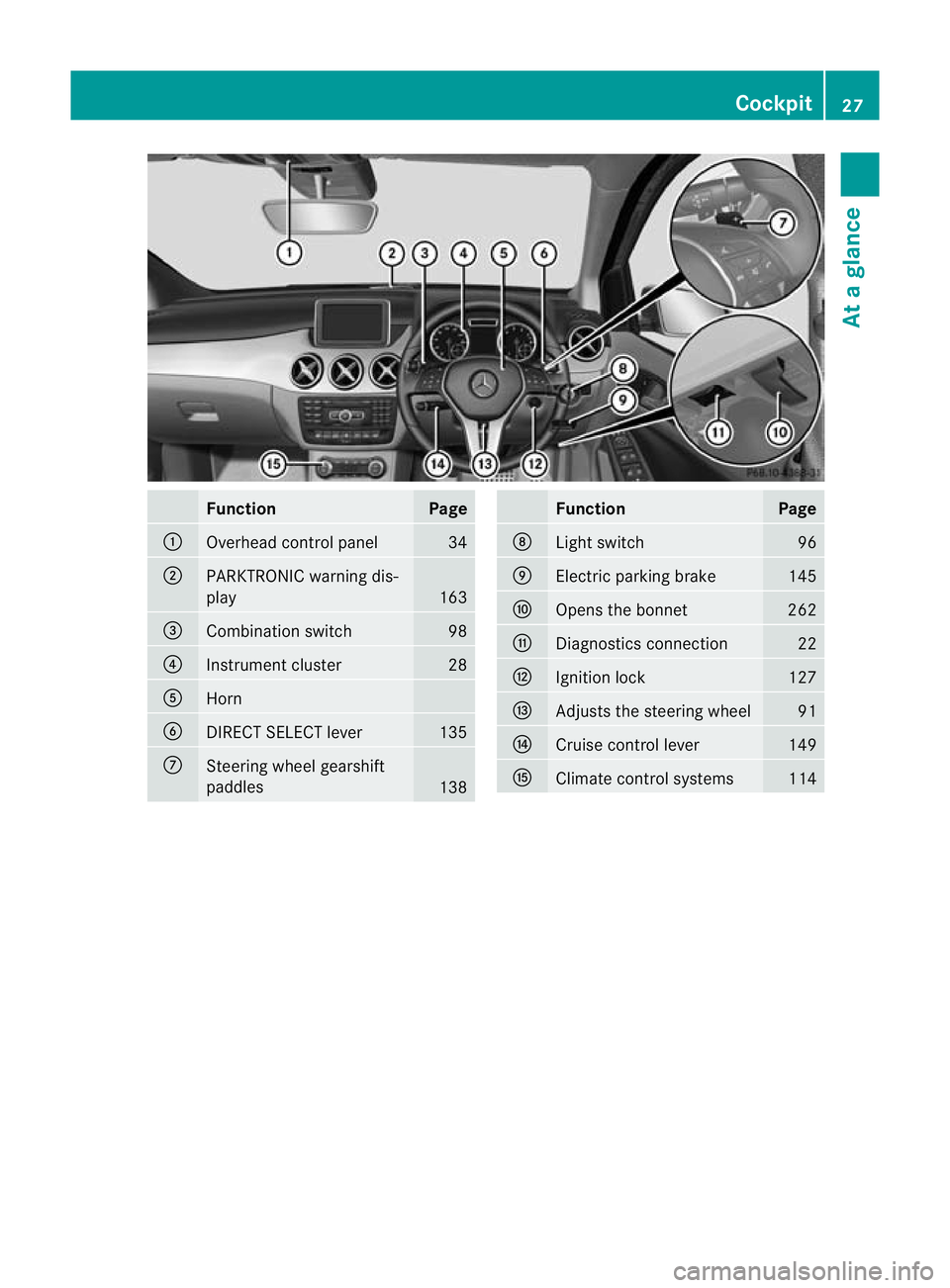
Function Page
:
Overhead control panel 34
;
PARKTRONIC warning dis-
play
163
=
Combination switch 98
?
Instrument cluster 28
A
Horn
B
DIRECT SELECT lever 135
C
Steering wheel gearshift
paddles
138 Function Page
D
Ligh
tswitch 96
E
Electric parking brake 145
F
Opens the bonnet 262
G
Diagnostics connection 22
H
Ignitio
nlock 127
I
Adjusts the steering wheel 91
J
Cruise control lever 149
K
Climate control systems 114Cockpit
27At a glance
Page 140 of 329
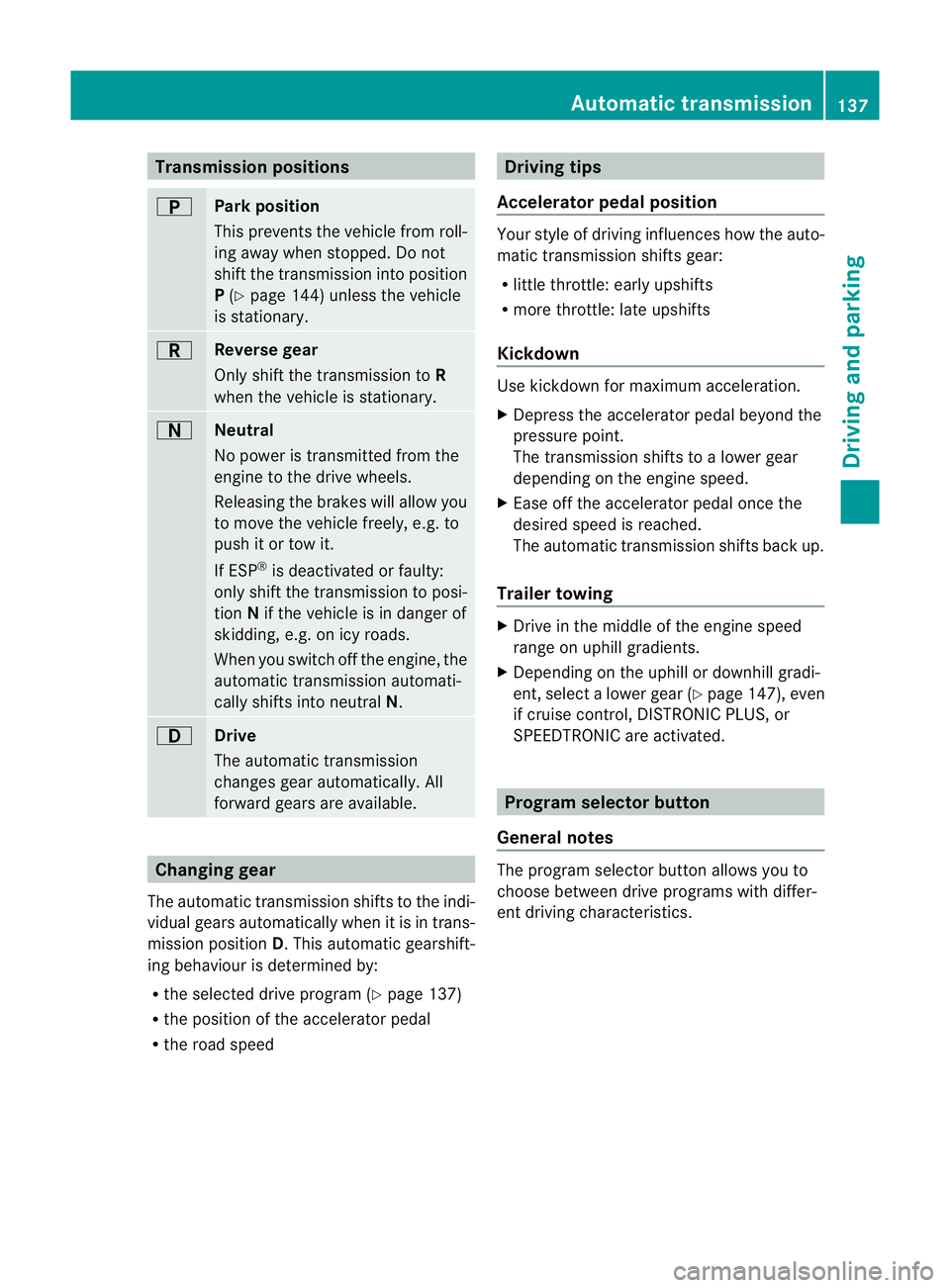
Transmission positions
B
Park position
This prevents the vehicle fro
mroll-
ing away when stopped. Do not
shift the transmission into position
P (Y page 144) unless the vehicle
is stationary. C
Reverse gear
Only shift the transmission to
R
when the vehicle is stationary. A
Neutral
No power is transmitted from the
engine to the drive wheels.
Releasing the brakes will allow you
to move the vehicle freely, e.g. to
push it or tow it.
If ESP
®
is deactivated or faulty:
only shift the transmission to posi-
tion Nif the vehicle is in danger of
skidding, e.g. on icy roads.
When you switch off the engine, the
automatic transmission automati-
cally shifts into neutral N.7
Drive
The automatic transmission
changes gear automatically. All
forward gears are available.
Changing gear
The automatic transmission shifts to the indi-
vidual gears automatically when it is in trans-
mission position D.This automatic gearshift-
ing behaviouri s determined by:
R the selected drive program (Y page 137)
R the position of the accelerator pedal
R the road speed Driving tips
Accelerator pedal position Your style of driving influences how the auto-
matic transmission shifts gear:
R
little throttle: early upshifts
R more throttle: late upshifts
Kickdown Use kickdown for maximum acceleration.
X
Depress the accelerator pedal beyond the
pressure point.
The transmission shifts to a lower gear
depending on the engine speed.
X Ease off the accelerator pedal once the
desired speed is reached.
The automatic transmission shifts back up.
Trailer towing X
Drive in the middle of the engine speed
range on uphill gradients.
X Depending on the uphill or downhill gradi-
ent, select a lower gear (Y page 147), even
if cruise control, DISTRONIC PLUS, or
SPEEDTRONIC are activated. Program selector button
General notes The program selector button allows you to
choose between drive programs with differ-
ent driving characteristics. Automatic transmission
137Driving and parking Z
Page 150 of 329
cause the drive wheels to los
etheir grip and
the vehicle could skid. G
WARNING
Make sure that other road users are not
endangered by your braking.
Downhill gradients You must select a lower gear in good time on
long and steep downhill gradients, especially
if the vehicle is laden or towing a trailer. To
do so in vehicles with an automatic transmis-
sion, you will need to select the manual drive
program Min advance (Y page 139).
i This also applies if you have activated
cruise control, SPEEDTRONIC or DIS-
TRONIC PLUS.
This will use the braking effect of the engine,
so less braking will be required to prevent the
vehicle from gaining speed. This relieves the
load on the brake system and prevents the
brakes from overheating and wearing too
quickly.
i Vehicles with automatic transmis-
sion: if the accelerator pedal is depressed
briefly on downhill gradients while the man-
ual drive program Mis temporarily activa-
ted, the automatic transmission may
switch back to the last active automatic
drive program Eor S.T he automatic trans-
mission may shift to a higher gear. This can
reduce the engine's braking effect.
Heavy and light loads G
WARNING
Never depress the brake pedal continuously
while the vehicle is in motion, e.g. never cause
the brakes to rub by applying constant slight
pedal pressure. This causes the brake system
to overheat, increases the braking distance
and can lead to the brakes failing completely.
If the brakes have been subjected to a heavy
load, do not stop the vehicle immediately, but drive on for a short while. This allows the air-
flow to cool the brakes more quickly.
If the brakes have been used only moderately,
you should occasionally test their effective-
ness. To do this, brake more firmly from a
higher speed. This improves the grip of the
brakes.
Wet road surfaces
If driving in heavy rain for a prolonged period
of time without braking, there may be a
delayed reaction from the brakes when brak-
ing for the first time. This may also occur after
the vehicle has been washed.
You have to depress the brake pedal more
firmly. Maintain a greater distance from the
vehicle in front.
After driving on a wet road or having the vehi-
cle washed, brake firmly while paying atten-
tion to the traffic conditions. This will warm
up the brake discs, thereby drying them more
quickly and protecting them against corro-
sion.
Limited braking performance on salt-
treated roads
G
WARNING
The layerofs alt on thebrake discs and the
brake pads/linings may caus eadelay in the
braking effect, resulting in a significantly lon-
ger braking distance, which could lead to an
accident.
To avoid this danger, you should:
R occasionally brake carefully, without put-
ting other road users at risk, when you are
driving on salted roads. This helps to
remove any salt that may have started to
build up on the brake discs and the brake
pads/linings.
R maintain a greater distanc eto the vehicle
ahead and drive with particular care.
R carefully apply the brakes at the end of a
trip and immediately after commencing a
new trip, so that salt residues are removed
from the brake discs. Driving tips
147Driving and parking Z
Page 152 of 329
Have your vehicle winterproofed at a qualified
specialist workshop at the onset of winter.
Observe the notes in the "Winter operation"
sectio n(Ypage 294).
Driving with summer tyres Observe the notes in the "Winter operation"
section (Y page 294).
Slippery road surfaces G
WARNING
Do not shift down for additional engine brak-
ing on a slippery road surface. This could
cause the drive wheels to lose their grip and
the vehicle could skid.
If the vehicle threatens to skid or cannot be
stopped when moving at low speed:
X Vehicles with manual transmission:
shift to neutral.
X Vehicles with automatic transmission:
shift the transmission to position N.
X Try to bring the vehicle under control by
using corrective steering.
You should drive particularly carefully on slip-
pery road surfaces .Avoid sudden accelera-
tion, steering and braking manoeuvres.
i For more information on driving with
snow chains, see (Y page 295). Driving systems
Cruise control
General notes Cruise control maintains a constant road
speed for you.Itb
rakes automatically in order
to avoid exceeding the set speed. You must
select a lower gearing ood time on long and
steep downhill gradients, especially if the
vehicle is laden or towing a trailer. For vehi-
cles with automatic transmission, you need
to have selected manual drive program
M(Y page 147). By doing so, you will make use of the braking effect of the engine. This
relieves the load on the brake system and
prevents the brakes from overheating and
wearing too quickly.
Use cruise control only if road and traffic con-
ditions make it appropriate to maintain a
steady speed for a prolonged period. You can
store any road speed above 30 km/h.
Important safety notes
G
WARNING
Do not change down for additional engine
braking on a slippery road surface. This could
cause the drive wheels to lose their grip and
the vehicle could skid. G
WARNING
Cruise control cannot take account of road
and traffic conditions.
Always pay attention to traffic conditions
even when cruise control is activated.
Cruise control is only an aid designed to assist
driving. You are responsible for the vehicle's
speed and for braking in good time. G
WARNING
Do not use cruise control
R in traffic conditions that do not allow you to
drive at a constant speed (e.g. heavy traffic
or winding roads). You may otherwise
cause an accident.
R on slippery roads. The drive wheels may
lose their grip when braking or accelerating
and the vehicle may skid.
R when there is low visibility, e.g. due to fog,
heavy rain or snow.
Cruise control lever You can operate cruise control and variable
SPEEDTRONIC with the cruise control lever. Driving systems
149Driving and parking Z