clock MERCEDES-BENZ B-CLASS HATCHBACK 2014 Owners Manual
[x] Cancel search | Manufacturer: MERCEDES-BENZ, Model Year: 2014, Model line: B-CLASS HATCHBACK, Model: MERCEDES-BENZ B-CLASS HATCHBACK 2014Pages: 405, PDF Size: 12.24 MB
Page 98 of 405
vehicle. You can deactivate the double lock
function by deactivating the interior motion
sensor (Y page 82). The doors can then be
opened from the inside after the vehicle has
been locked from the outside. You can open
the rear doors from inside the vehicle if they
are not secured by the child-proof locks
(Y page 72). The anti-theft alarm system is
triggered if the door is opened from the
inside. Switch off the alarm (Y page 80).
The anti-theft alarm system is triggered if the door is opened from the inside. Switch off the alarm (Y page 80).
When a locked door is opened from inside the vehicle, the previous unlocking process will
be observed if the vehicle has been:
R locked with the locking button for the cen-
tral locking or
R locked automatically
The vehicle will be fully unlocked if it had pre- viously been fully unlocked. Only the door
which has been opened from the inside is
unlocked if only the driver's door had been
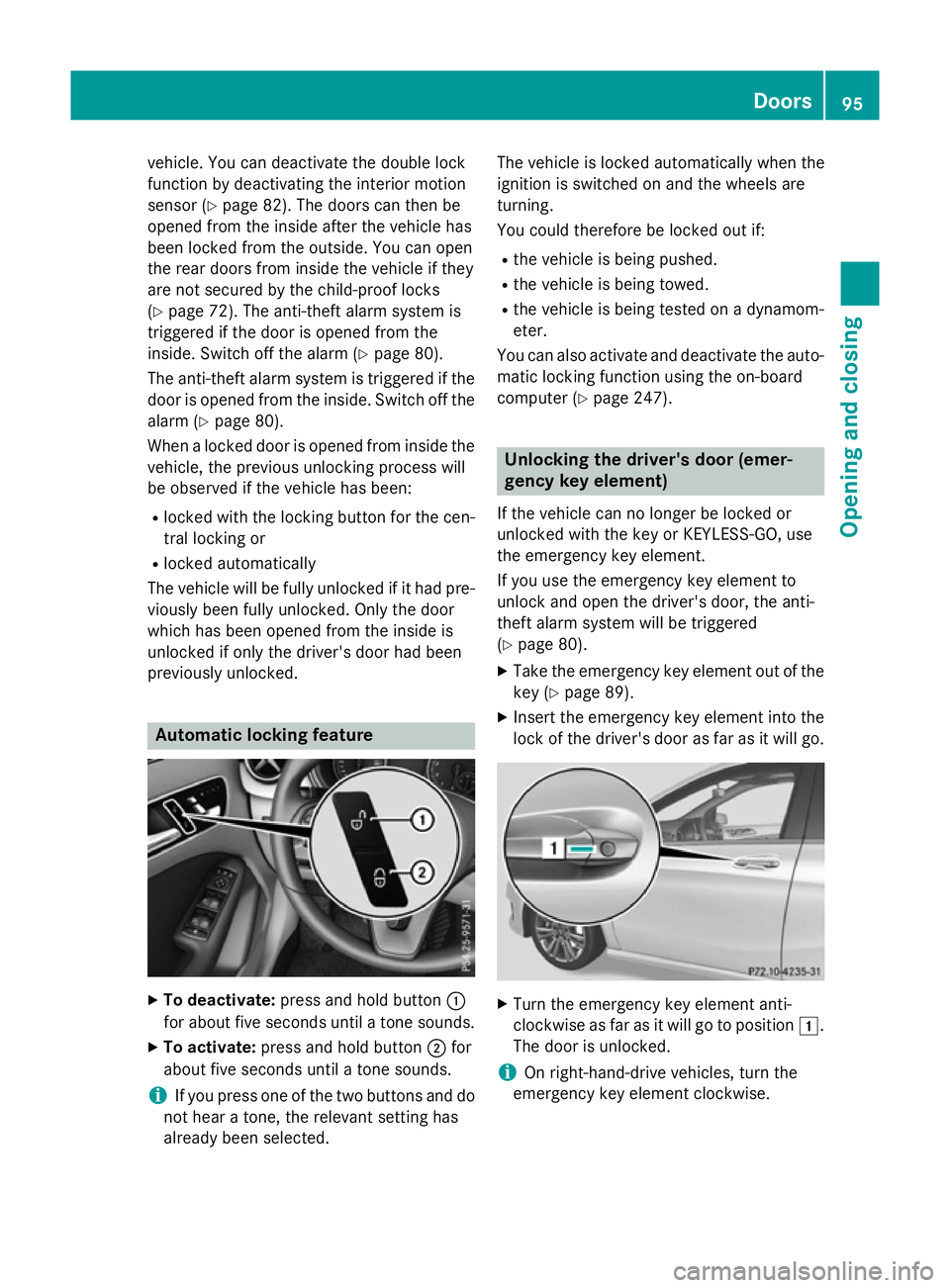
previously unlocked. Automatic locking feature
X
To deactivate: press and hold button :
for about five seconds until a tone sounds.
X To activate: press and hold button ;for
about five seconds until a tone sounds.
i If you press one of the two buttons and do
not hear a tone, the relevant setting has
already been selected. The vehicle is locked automatically when the
ignition is switched on and the wheels are
turning.
You could therefore be locked out if:
R the vehicle is being pushed.
R the vehicle is being towed.
R the vehicle is being tested on a dynamom-
eter.
You can also activate and deactivate the auto- matic locking function using the on-board
computer (Y page 247). Unlocking the driver's door (emer-
gency key element)
If the vehicle can no longer be locked or
unlocked with the key or KEYLESS-GO, use
the emergency key element.
If you use the emergency key element to
unlock and open the driver's door, the anti-
theft alarm system will be triggered
(Y page 80).
X Take the emergency key element out of the
key (Y page 89).
X Insert the emergency key element into the
lock of the driver's door as far as it will go. X
Turn the emergency key element anti-
clockwise as far as it will go to position 1.
The door is unlocked.
i On right-hand-drive vehicles, turn the
emergency key element clockwise. Doors
95Opening and closing Z
Page 99 of 405
X
Turn the emergency key element back and
remove it.
X Insert emergency key element into the key
(Y page 89). Locking the vehicle (emergency key
element)
If the vehicle can no longer be locked with the key or KEYLESS-GO, use the emergency key
element.
X Open the driver's door.
X Close the front-passenger door, the rear
doors and the tailgate.
X Press the locking button on the driver’s
door (Y page 94).
X Check whether the locking knobs on the
front-passenger door and the rear doors
are still visible. Press the locking knobs
down by hand if necessary.
X Close the driver's door.
X Take the emergency key element out of the
key (Y page 89).
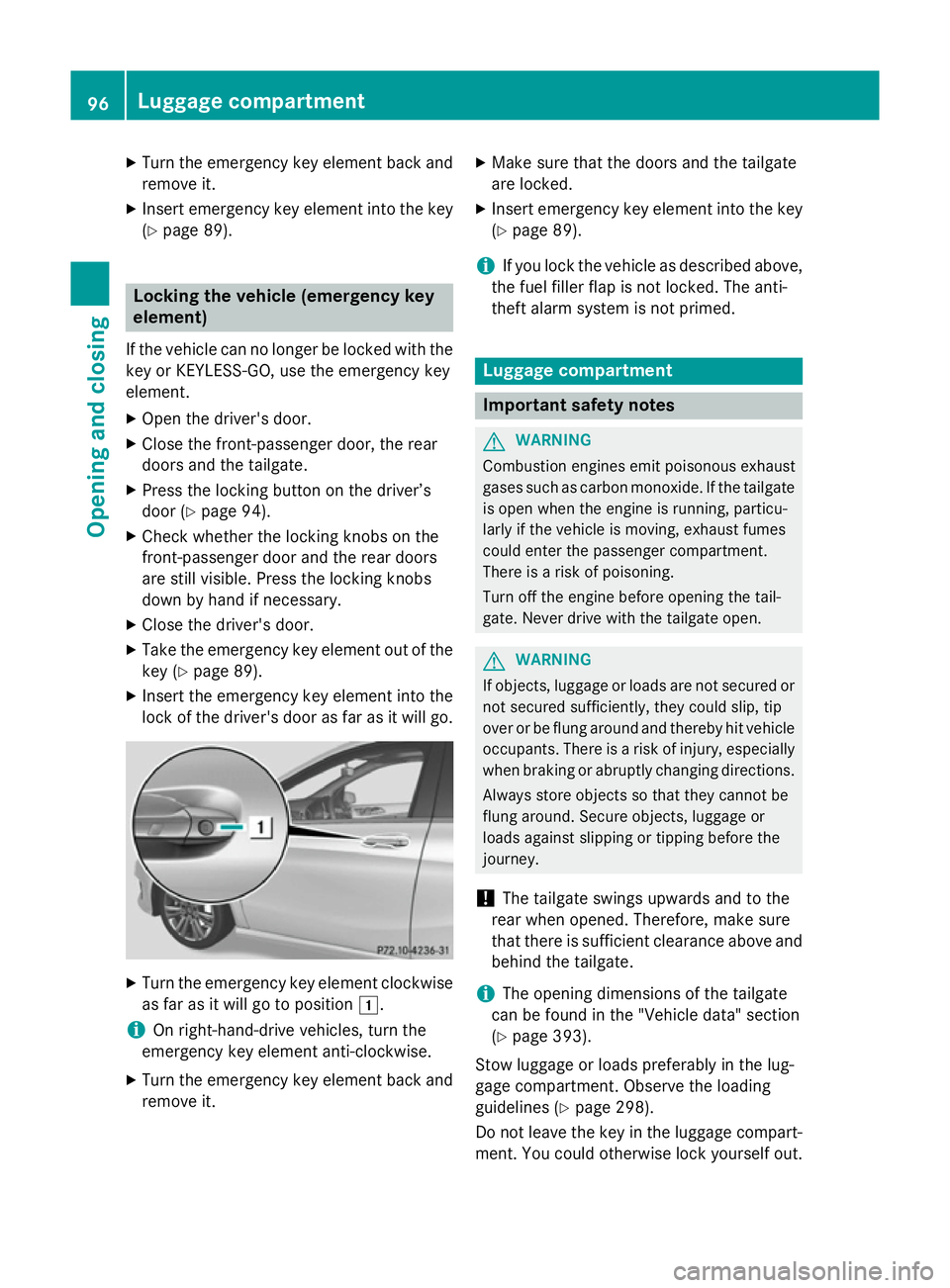
X Insert the emergency key element into the
lock of the driver's door as far as it will go. X
Turn the emergency key element clockwise
as far as it will go to position 1.
i On right-hand-drive vehicles, turn the
emergency key element anti-clockwise.
X Turn the emergency key element back and
remove it. X
Make sure that the doors and the tailgate
are locked.
X Insert emergency key element into the key
(Y page 89).
i If you lock the vehicle as described above,
the fuel filler flap is not locked. The anti-
theft alarm system is not primed. Luggage compartment
Important safety notes
G
WARNING
Combustion engines emit poisonous exhaust
gases such as carbon monoxide. If the tailgate is open when the engine is running, particu-
larly if the vehicle is moving, exhaust fumes
could enter the passenger compartment.
There is a risk of poisoning.
Turn off the engine before opening the tail-
gate. Never drive with the tailgate open. G
WARNING
If objects, luggage or loads are not secured or not secured sufficiently, they could slip, tip
over or be flung around and thereby hit vehicle
occupants. There is a risk of injury, especially when braking or abruptly changing directions.
Always store objects so that they cannot be
flung around. Secure objects, luggage or
loads against slipping or tipping before the
journey.
! The tailgate swings upwards and to the
rear when opened. Therefore, make sure
that there is sufficient clearance above and behind the tailgate.
i The opening dimensions of the tailgate
can be found in the "Vehicle data" section
(Y page 393).
Stow luggage or loads preferably in the lug-
gage compartment. Observe the loading
guidelines (Y page 298).
Do not leave the key in the luggage compart- ment. You could otherwise lock yourself out. 96
Luggage compartmentOpening and closing
Page 100 of 405
The tailgate can be:
R opened and closed manually from outside
R emergency release activated from the
inside Opening/closing from the outside
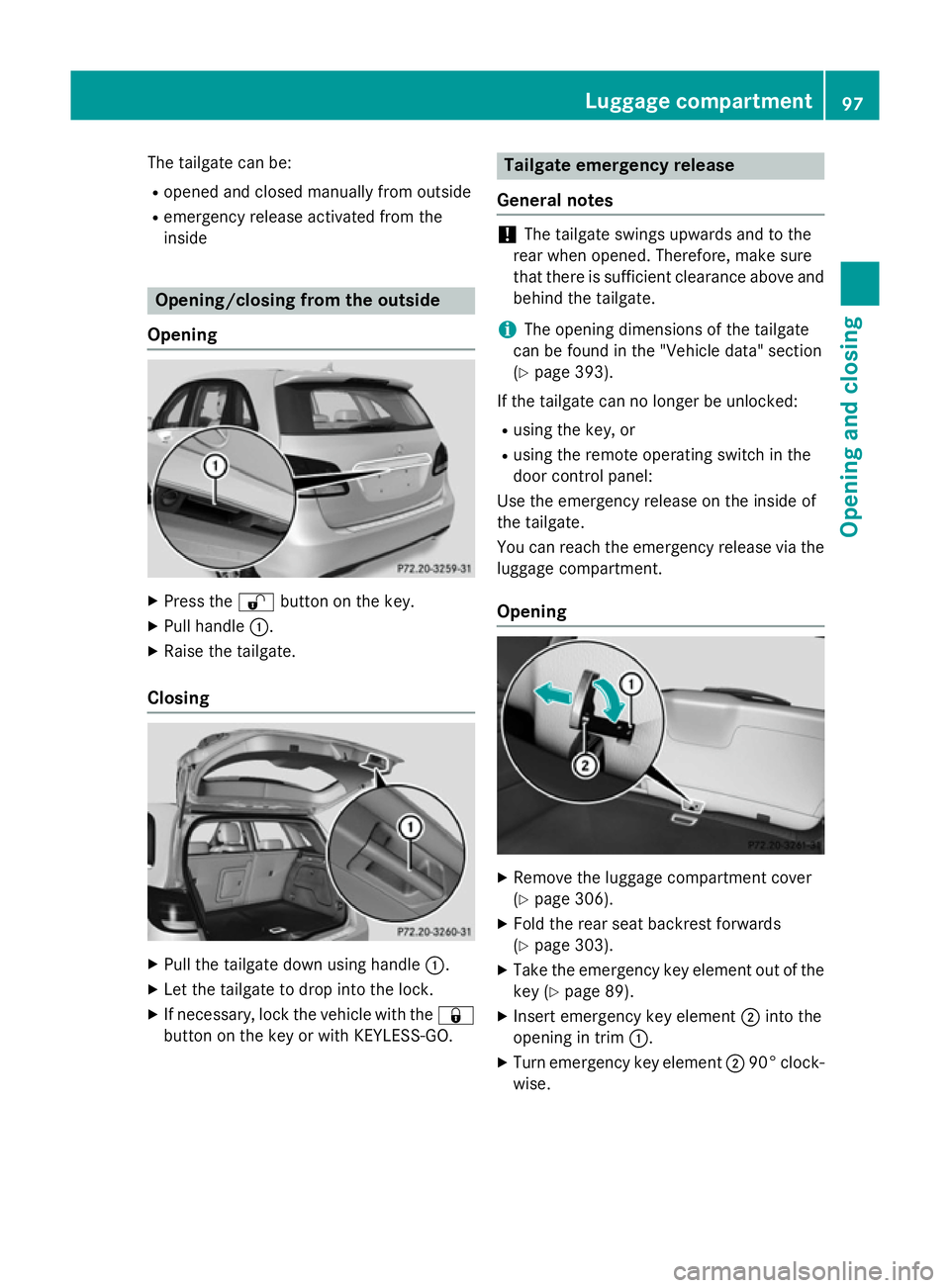
Opening X
Press the %button on the key.
X Pull handle :.
X Raise the tailgate.
Closing X
Pull the tailgate down using handle :.
X Let the tailgate to drop into the lock.
X If necessary, lock the vehicle with the &
button on the key or with KEYLESS-GO. Tailgate emergency release
General notes !
The tailgate swings upwards and to the
rear when opened. Therefore, make sure
that there is sufficient clearance above and behind the tailgate.
i The opening dimensions of the tailgate
can be found in the "Vehicle data" section
(Y page 393).
If the tailgate can no longer be unlocked:
R using the key, or
R using the remote operating switch in the
door control panel:
Use the emergency release on the inside of
the tailgate.
You can reach the emergency release via the
luggage compartment.
Opening X
Remove the luggage compartment cover
(Y page 306).
X Fold the rear seat backrest forwards
(Y page 303).
X Take the emergency key element out of the
key (Y page 89).
X Insert emergency key element ;into the
opening in trim :.
X Turn emergency key element ;90° clock-
wise. Luggage compartment
97Opening and closing Z
Page 132 of 405
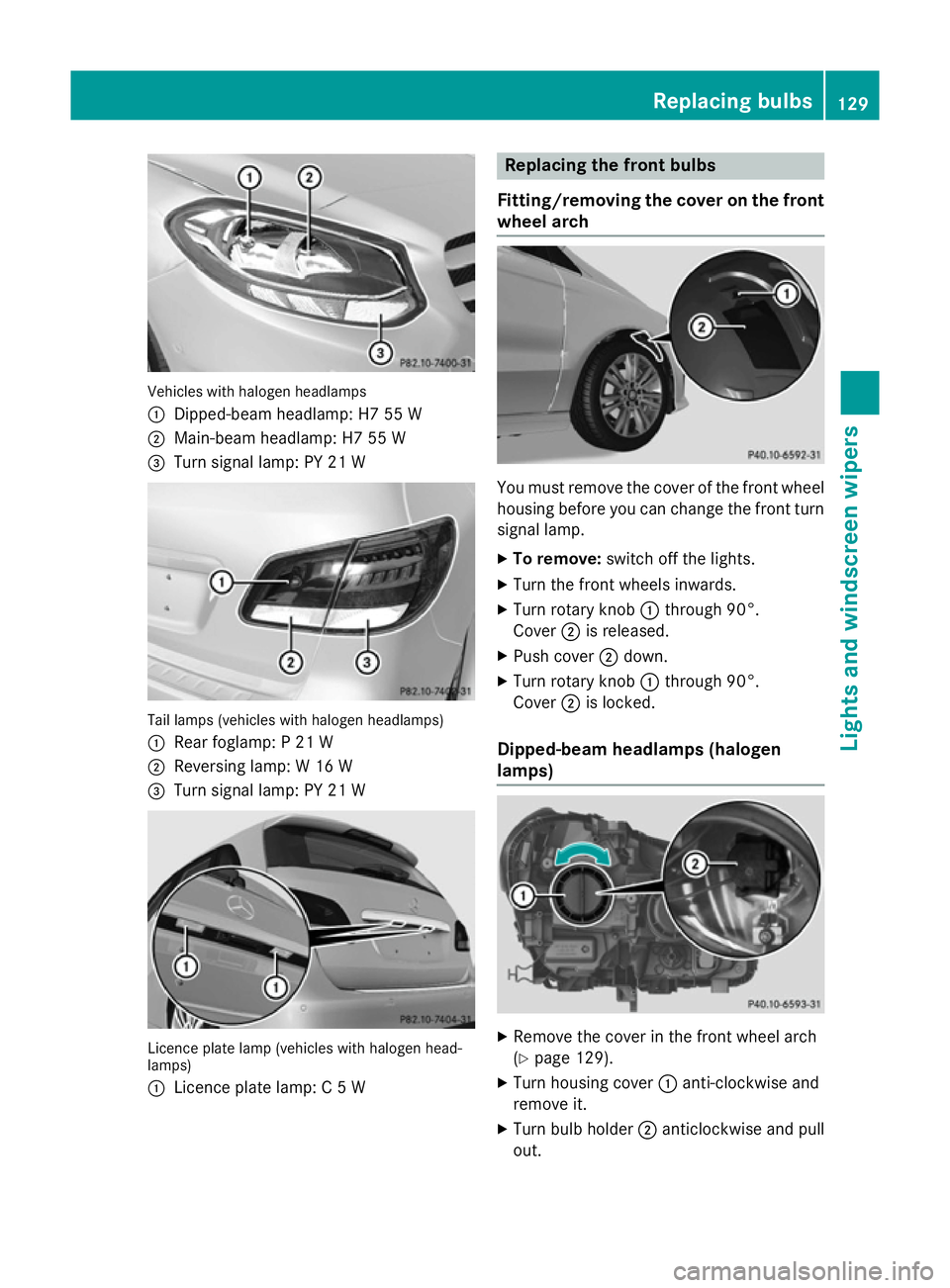
Vehicles with halogen headlamps
:
Dipped-beam headlamp: H7 55 W
; Main-beam headlamp: H7 55 W
= Turn signal lamp: PY 21 W Tail lamps (vehicles with halogen headlamps)
: Rear foglamp: P 21 W
; Reversing lamp: W 16 W
= Turn signal lamp: PY 21 W Licence plate lamp (vehicles with halogen head-
lamps)
: Licence plate lamp: C 5 W Replacing the front bulbs
Fitting/removing the cover on the front wheel arch You must remove the cover of the front wheel
housing before you can change the front turn signal lamp.
X To remove: switch off the lights.
X Turn the front wheels inwards.
X Turn rotary knob :through 90°.
Cover ;is released.
X Push cover ;down.
X Turn rotary knob :through 90°.
Cover ;is locked.
Dipped-beam headlamps (halogen
lamps) X
Remove the cover in the front wheel arch
(Y page 129).
X Turn housing cover :anti-clockwise and
remove it.
X Turn bulb holder ;anticlockwise and pull
out. Replacing bulbs
129Lights and windscreen wipers Z
Page 133 of 405
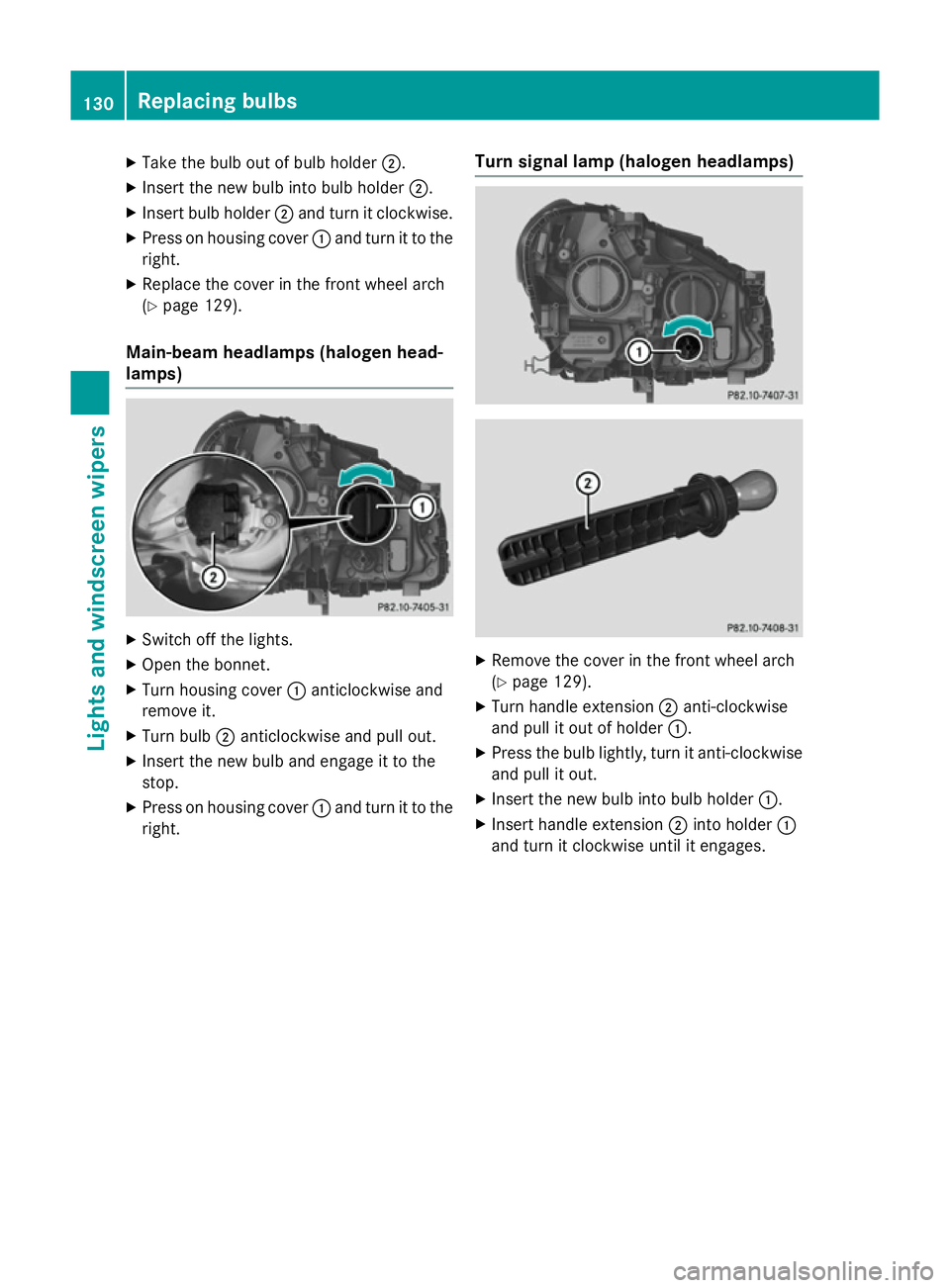
X
Take the bulb out of bulb holder ;.
X Insert the new bulb into bulb holder ;.
X Insert bulb holder ;and turn it clockwise.
X Press on housing cover :and turn it to the
right.
X Replace the cover in the front wheel arch
(Y page 129).
Main-beam headlamps (halogen head-
lamps) X
Switch off the lights.
X Open the bonnet.
X Turn housing cover :anticlockwise and
remove it.
X Turn bulb ;anticlockwise and pull out.
X Insert the new bulb and engage it to the
stop.
X Press on housing cover :and turn it to the
right. Turn signal lamp (halogen headlamps)
X
Remove the cover in the front wheel arch
(Y page 129).
X Turn handle extension ;anti-clockwise
and pull it out of holder :.
X Press the bulb lightly, turn it anti-clockwise
and pull it out.
X Insert the new bulb into bulb holder :.
X Insert handle extension ;into holder :
and turn it clockwise until it engages. 130
Replacing bulbsLights and windscreen wipers
Page 134 of 405
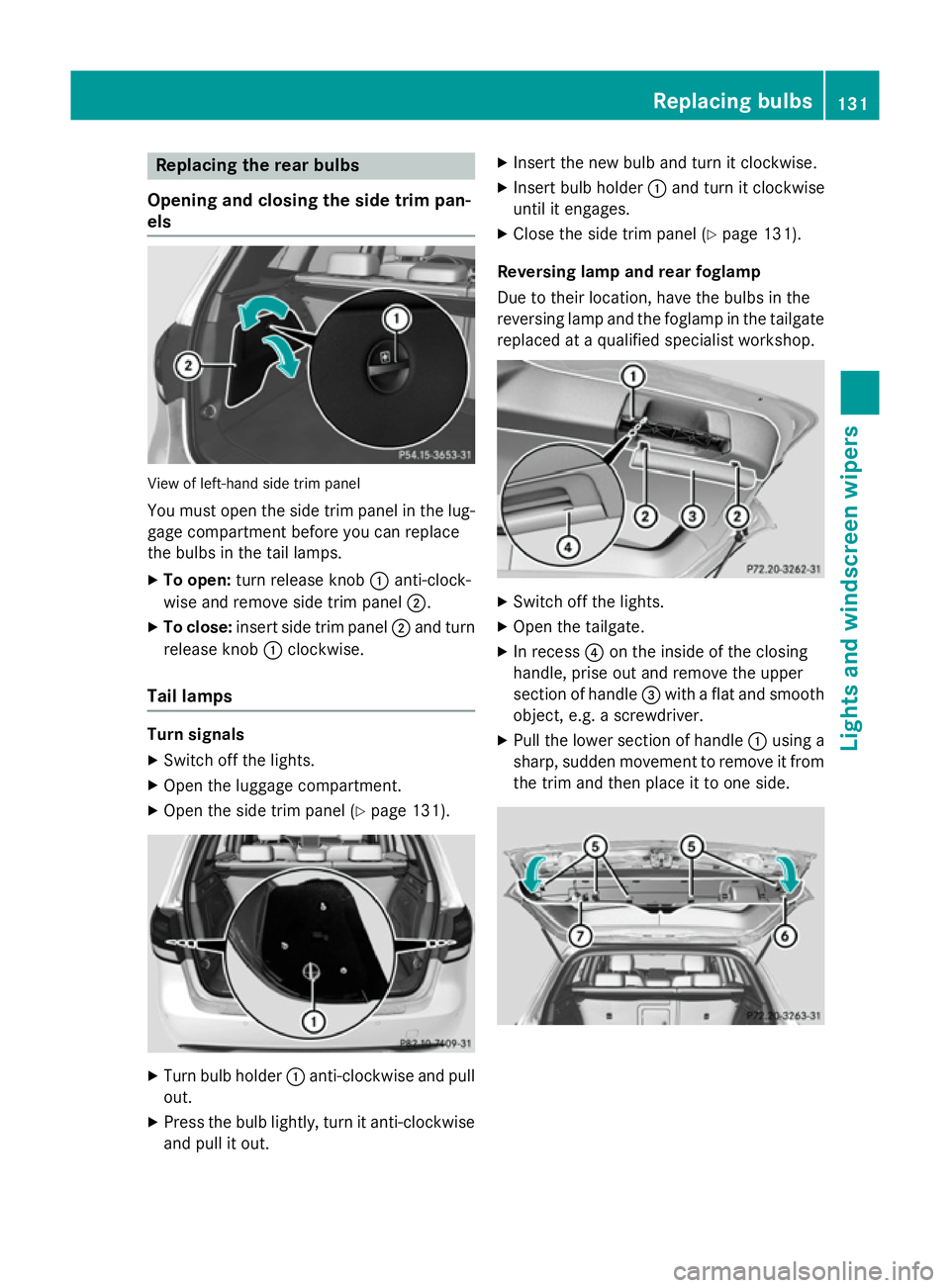
Replacing the rear bulbs
Opening and closing the side trim pan-
els View of left-hand side trim panel
You must open the side trim panel in the lug-
gage compartment before you can replace
the bulbs in the tail lamps.
X To open: turn release knob :anti-clock-
wise and remove side trim panel ;.
X To close: insert side trim panel ;and turn
release knob :clockwise.
Tail lamps Turn signals
X Switch off the lights.
X Open the luggage compartment.
X Open the side trim panel (Y page 131).X
Turn bulb holder :anti-clockwise and pull
out.
X Press the bulb lightly, turn it anti-clockwise
and pull it out. X
Insert the new bulb and turn it clockwise.
X Insert bulb holder :and turn it clockwise
until it engages.
X Close the side trim panel (Y page 131).
Reversing lamp and rear foglamp
Due to their location, have the bulbs in the
reversing lamp and the foglamp in the tailgate
replaced at a qualified specialist workshop. X
Switch off the lights.
X Open the tailgate.
X In recess ?on the inside of the closing
handle, prise out and remove the upper
section of handle =with a flat and smooth
object, e.g. a screwdriver.
X Pull the lower section of handle :using a
sharp, sudden movement to remove it from the trim and then place it to one side. Replacing bulbs
131Lights and windscreen wipers Z
Page 135 of 405
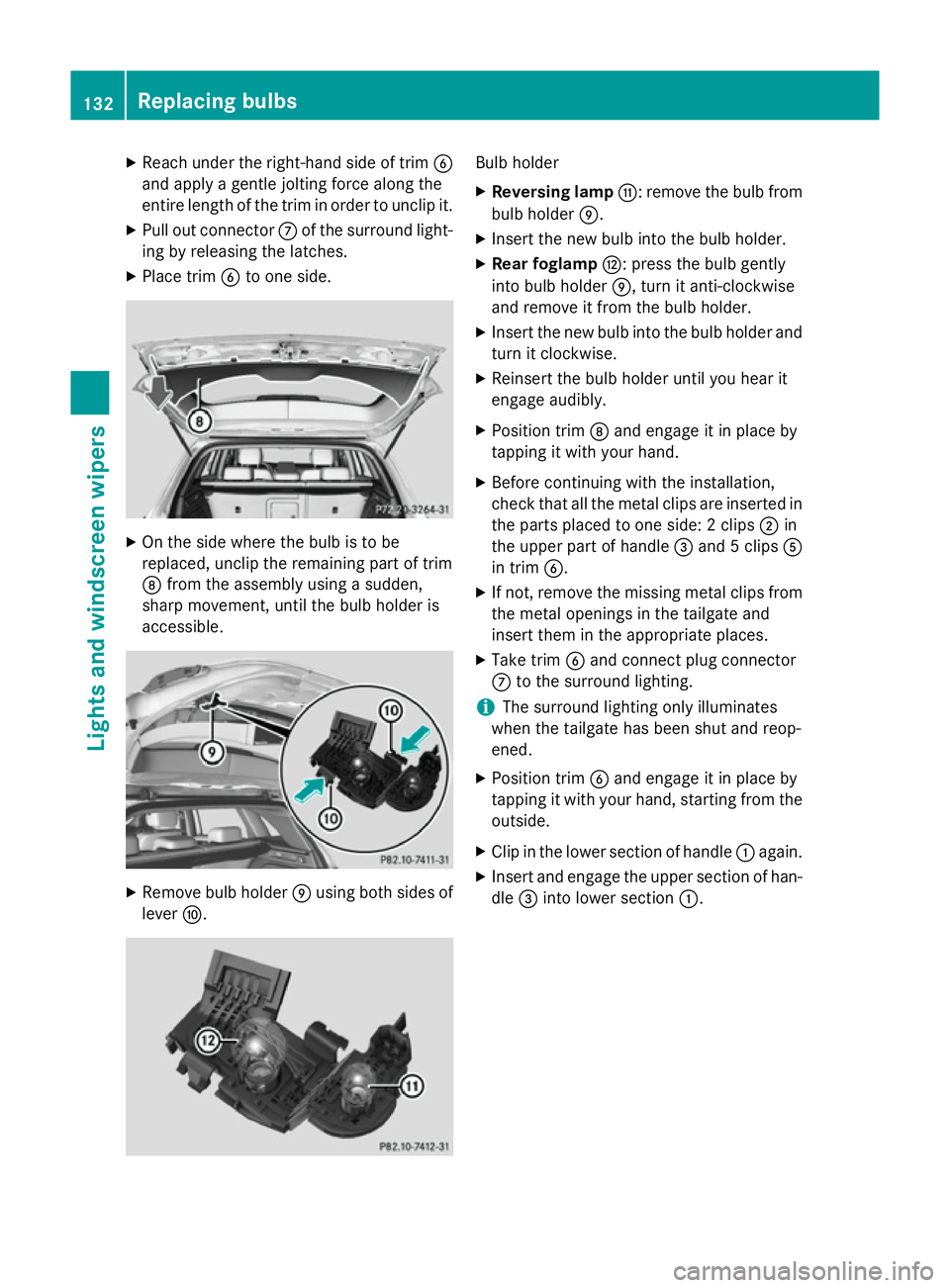
X
Reach under the right-hand side of trim B
and apply a gentle jolting force along the
entire length of the trim in order to unclip it.
X Pull out connector Cof the surround light-
ing by releasing the latches.
X Place trim Bto one side. X
On the side where the bulb is to be
replaced, unclip the remaining part of trim
D from the assembly using a sudden,
sharp movement, until the bulb holder is
accessible. X
Remove bulb holder Eusing both sides of
lever F. Bulb holder
X Reversing lamp G: remove the bulb from
bulb holder E.
X Insert the new bulb into the bulb holder.
X Rear foglamp H: press the bulb gently
into bulb holder E, turn it anti-clockwise
and remove it from the bulb holder.
X Insert the new bulb into the bulb holder and
turn it clockwise.
X Reinsert the bulb holder until you hear it
engage audibly.
X Position trim Dand engage it in place by
tapping it with your hand.
X Before continuing with the installation,
check that all the metal clips are inserted in
the parts placed to one side: 2 clips ;in
the upper part of handle =and 5 clips A
in trim B.
X If not, remove the missing metal clips from
the metal openings in the tailgate and
insert them in the appropriate places.
X Take trim Band connect plug connector
C to the surround lighting.
i The surround lighting only illuminates
when the tailgate has been shut and reop-
ened.
X Position trim Band engage it in place by
tapping it with your hand, starting from the
outside.
X Clip in the lower section of handle :again.
X Insert and engage the upper section of han-
dle =into lower section :.132
Replacing bulbsLights and windscreen wipers
Page 142 of 405
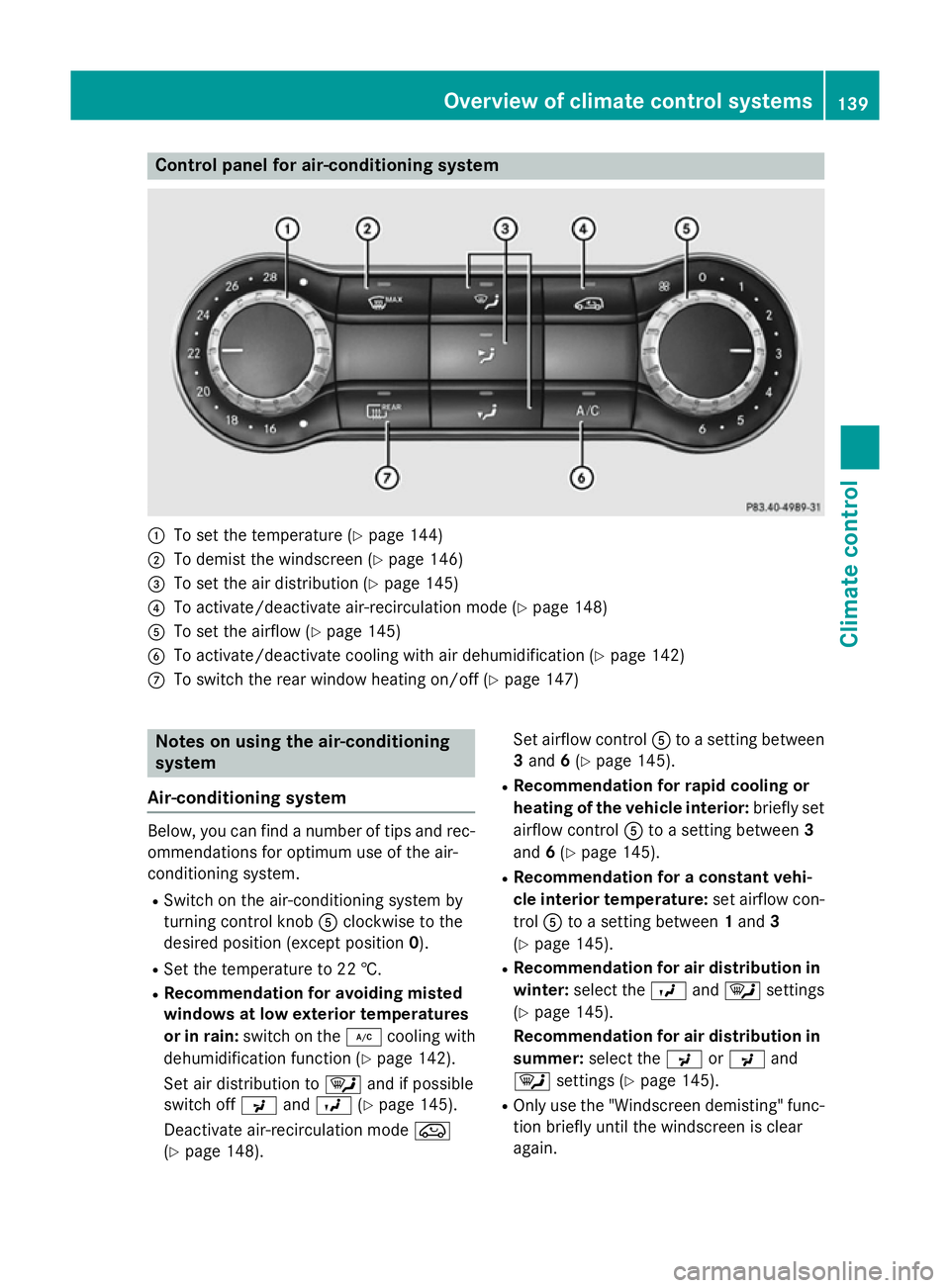
Control panel for air-conditioning system
:
To set the temperature (Y page 144)
; To demist the windscreen (Y page 146)
= To set the air distribution (Y page 145)
? To activate/deactivate air-recirculation mode (Y page 148)
A To set the airflow (Y page 145)
B To activate/deactivate cooling with air dehumidification (Y page 142)
C To switch the rear window heating on/off (Y page 147)Notes on using the air-conditioning
system
Air-conditioning system Below, you can find a number of tips and rec-
ommendations for optimum use of the air-
conditioning system.
R Switch on the air-conditioning system by
turning control knob Aclockwise to the
desired position (except position 0).
R Set the temperature to 22 †.
R Recommendation for avoiding misted
windows at low exterior temperatures
or in rain: switch on the ¿cooling with
dehumidification function (Y page 142).
Set air distribution to ¯and if possible
switch off PandO (Ypage 145).
Deactivate air-recirculation mode e
(Y page 148). Set airflow control
Ato a setting between
3 and 6(Y page 145).
R Recommendation for rapid cooling or
heating of the vehicle interior: briefly set
airflow control Ato a setting between 3
and 6(Y page 145).
R Recommendation for a constant vehi-
cle interior temperature: set airflow con-
trol Ato a setting between 1and 3
(Y page 145).
R Recommendation for air distribution in
winter: select the Oand¯ settings
(Y page 145).
Recommendation for air distribution in
summer: select the PorP and
¯ settings (Y page 145).
R Only use the "Windscreen demisting" func-
tion briefly until the windscreen is clear
again. Overview of climate control systems
139Climate control
Page 145 of 405
R
Use the residual heat function if you want to
heat or ventilate the vehicle interior when
the ignition is switched off. The residual
heat function can only be activated or deac- tivated with the ignition switched off.
R If you change the settings of the climate
control system, the climate status display
appears for approximately three seconds
at the bottom of the screen in the Audio/
COMAND display (see separate operating
instructions). You will see the current set-
tings of the various climate control func-
tions.
ECO start/stop function During automatic engine switch-off, the cli-
mate control only operates at a reduced capa-
city. If you require the full climate control out-
put, you can switch off the ECO start/stop
function by pressing the ECO button
(Y page 166). Operating the climate control system
Switching climate control on/off
General notes When the climate control is switched off, the
air supply and air circulation are also
switched off. The windows could mist up.
Therefore, only switch off climate control
briefly.
Air-conditioning system X
Turn the key to position 2in the ignition
lock (Y page 159).
X To switch on: turn controlAclockwise to
the desired position (except position 0)
(Y page 139).
X To switch off: turn controlAanti-clock-
wise to position 0(Y page 139). THERMOTRONIC automatic climate
control X
Turn the key to position 2in the ignition
lock (Y page 159).
X To activate: press theÃbutton.
The indicator lamp in the Ãbutton lights
up. Airflow and air distribution are set to
automatic mode.
or X Press the ^button.
The indicator lamp in the ^button goes
out. The previous settings are reactivated.
X To deactivate: press the^button.
The indicator lamp in the ^button lights
up.
i THERMOTRONIC automatic climate con-
trol: switch on climate control primarily
using the Ãbutton. Activating/deactivating the cooling
with air dehumidification function
General notes If you deactivate the "Cooling with air dehu-
midification" function, the air inside the vehi-
cle will not be cooled. The air inside the vehi- cle will also not be dehumidified. The win-
dows can mist up more quickly. Therefore,
only deactivate the "Cooling with air dehu-
midification" function briefly.
The "Cooling with air dehumidification" func-
tion is only available when the engine is run-
ning. The air inside the vehicle is cooled and
dehumidified according to the temperature
selected.
Condensation may drip from the underside of the vehicle when cooling mode is active. Thisis normal and not a sign that there is a mal-
function. 142
Operating the climate control systemClimate control
Page 147 of 405
Problems with the "Cooling with air dehumidification" function
Problem
Possible causes/consequences and
M
MSolutions The indicator lamp in
the
¿ button
flashes three times or
remains off. The cool-
ing with air dehumidifi-
cation function cannot
be activated. The cooling with air dehumidification function has been deactiva-
ted due to a malfunction.
X Visit a qualified specialist workshop. Setting climate control to automatic
mode
General notes Only THERMOTRONIC automatic climate con-
trol features the "Control climate control
automatically" function.
In automatic mode, the set temperature is
maintained automatically at a constant level.
The system automatically regulates the tem-
perature of the dispensed air, the airflow and
the air distribution.
The automatic mode functions optimally
when the "Cooling with air dehumidification"
function is activated. If desired, cooling with
air dehumidification can be deactivated.
If you deactivate the "Cooling with air-dehu-
midification" function, the air inside the vehi- cle will not be cooled. The air inside the vehi-cle will also not be dehumidified. The win-
dows can mist up more quickly. Therefore,
only deactivate the "Cooling with air-dehu-
midification" function briefly.
Setting climate control to automatic
mode X
Turn the key to position 2in the ignition
lock (Y page 159).
X Set the desired temperature.
X To activate: press theÃbutton.
The indicator lamp in the Ãbutton lights
up. Automatic air distribution and airflow
are activated. X
To switch to manual mode: press the
É orË button.
or
X Press the KorI button.
The indicator lamp in the Ãbutton goes
out. Automatic air distribution and airflow
are deactivated. Setting the temperature
Air-conditioning system You can set the temperature for the entire
vehicle. The set temperature is automatically
maintained at a constant level.
X Turn the key to position 2in the ignition
lock (Y page 159).
X To increase/reduce: turn control:anti-
clockwise or clockwise (Y page 139). Only
change the temperature setting in small
increments. Start at 22 †.
THERMOTRONIC automatic climate
control Different temperatures can be set for the
driver's and front-passenger sides. The set
temperature is automatically maintained at a
constant level.
X Turn the key to position 2in the ignition
lock (Y page 159).
X To increase/reduce: turn control:orE
anti-clockwise or clockwise (Y page 141).144
Operating the climate control systemClimate control