open bonnet MERCEDES-BENZ B-CLASS HATCHBACK 2015 Owners Manual
[x] Cancel search | Manufacturer: MERCEDES-BENZ, Model Year: 2015, Model line: B-CLASS HATCHBACK, Model: MERCEDES-BENZ B-CLASS HATCHBACK 2015Pages: 293, PDF Size: 10.83 MB
Page 7 of 293
Switching off the alarm .................... 68
ATTENTION ASSIST
Activating/deactivating ................. 183
Display message ............................ 205
Function/note s............................. 165
Audio menu (on-board computer) .... 180
Authorised workshop
see Qualified specialist workshop
AUTO lights
Display message ............................ 203
see Lights
Automatic front-passenger front
airbag deactivation
Display message ............................ 199
Automatic front-passenger front
airbag deactivation system
Operation ......................................... 42
Problems ......................................... 46
System self-test ............................... 45
Automatic headlamp mode ................ 98
Automatic transmission
Display message ............................ 210 B
Bag hook ............................................ 229
BAS (Brake Assist System) ................. 62
Battery (key)
Checking .......................................... 74
Important safety notes .................... 74
Replacing ......................................... 75
Battery (vehicle)
Charging ........................................ 256
Display message ............................ 204
Important safety notes .................. 254
Jump starting ................................. 258
Belt
see Seat belts
Belt tensioner
Activation ......................................... 46
Blind Spot Assist
Activating/deactivating (on-
board computer) ............................ 183
Display message ............................ 206
Notes/function .............................. 169
Bonnet
Closing ........................................... 240
Display message ............................ 211 Important safety notes .................. 239
Opening ......................................... 239
Boot lid
see Tailgate
Boot load (maximum) ........................ 284
Brake
EBD .................................................. 66
Brake Assist
see BAS (Brake Assist System)
Brake fluid
Display message ............................ 195
Notes ............................................. 283
Brake force distribution
see EBD (electronic brake force
distribution)
Brake lamps
Adaptive ........................................... 65
Display message ............................ 201
Brake system
Driving safety systems ..................... 67
Brakes
ABS .................................................. 61
Adaptive Brake Assist ...................... 64
BAS .................................................. 62
Brake fluid (notes) ......................... 283
Display message ............................ 190
Driving tips .................................... 148
Hill start assist ............................... 128
HOLD function ............................... 154
Important safety notes .................. 148
Parking brake ................................ 146
Warning lamp ................................. 215
Breakdown
Towing away .................................. 260
Where will I find...? ........................ 248
see Flat tyre
Brightness control (instrument
cluster lighting) ................................... 27
Buttons on the steering column ...... 174 C
Calling up a fault see Display messages
Car
see Vehicle
Car wash (care) ................................. 2434
Index
Page 28 of 293
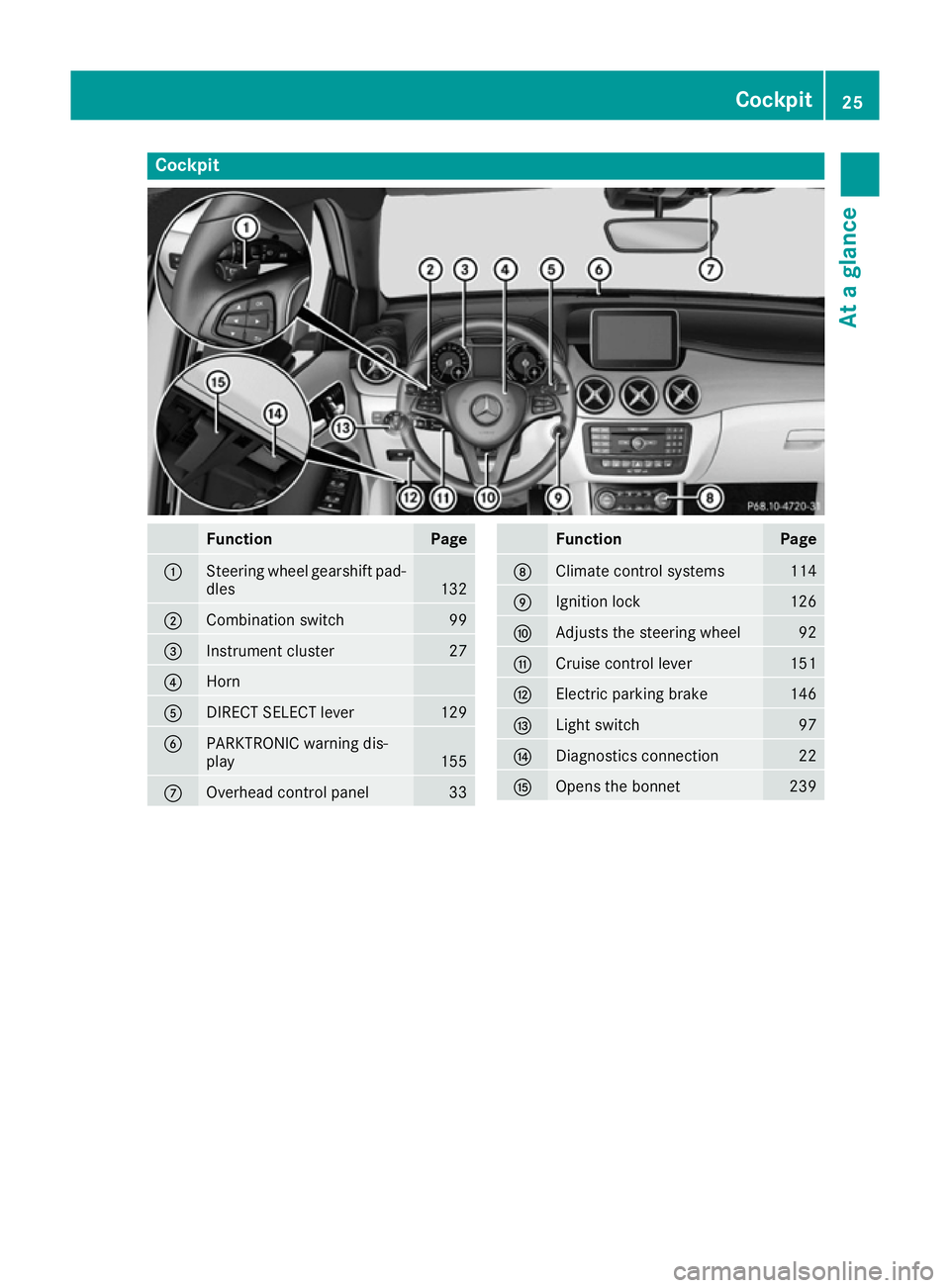
Cockpit
Function Page
:
Steering wheel gearshift pad-
dles 132
;
Combination switch 99
=
Instrument cluster 27
?
Horn
A
DIRECT SELECT lever 129
B
PARKTRONIC warning dis-
play
155
C
Overhead control panel 33 Function Page
D
Climate control systems 114
E
Ignition lock 126
F
Adjusts the steering wheel 92
G
Cruise control lever 151
H
Electric parking brake 146
I
Light switch 97
J
Diagnostics connection 22
K
Opens the bonnet 239Cockpit
25At a glance
Page 29 of 293
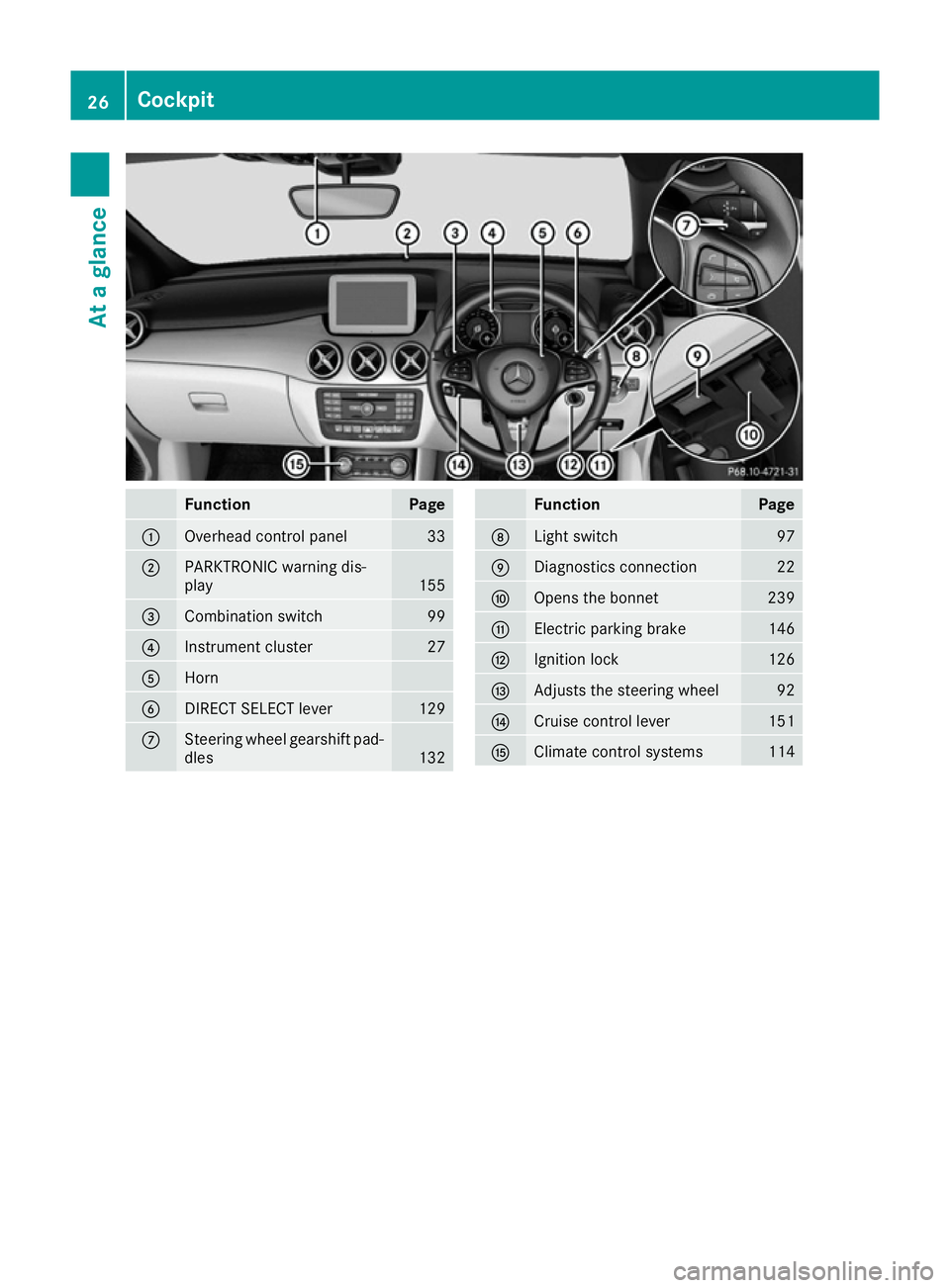
Function Page
:
Overhead control panel 33
;
PARKTRONIC warning dis-
play
155
=
Combination switch 99
?
Instrument cluster 27
A
Horn
B
DIRECT SELECT lever 129
C
Steering wheel gearshift pad-
dles 132 Function Page
D
Light switch 97
E
Diagnostics connection 22
F
Opens the bonnet 239
G
Electric parking brake 146
H
Ignition lock 126
I
Adjusts the steering wheel 92
J
Cruise control lever 151
K
Climate control systems 11426
CockpitAt a glance
Page 71 of 293
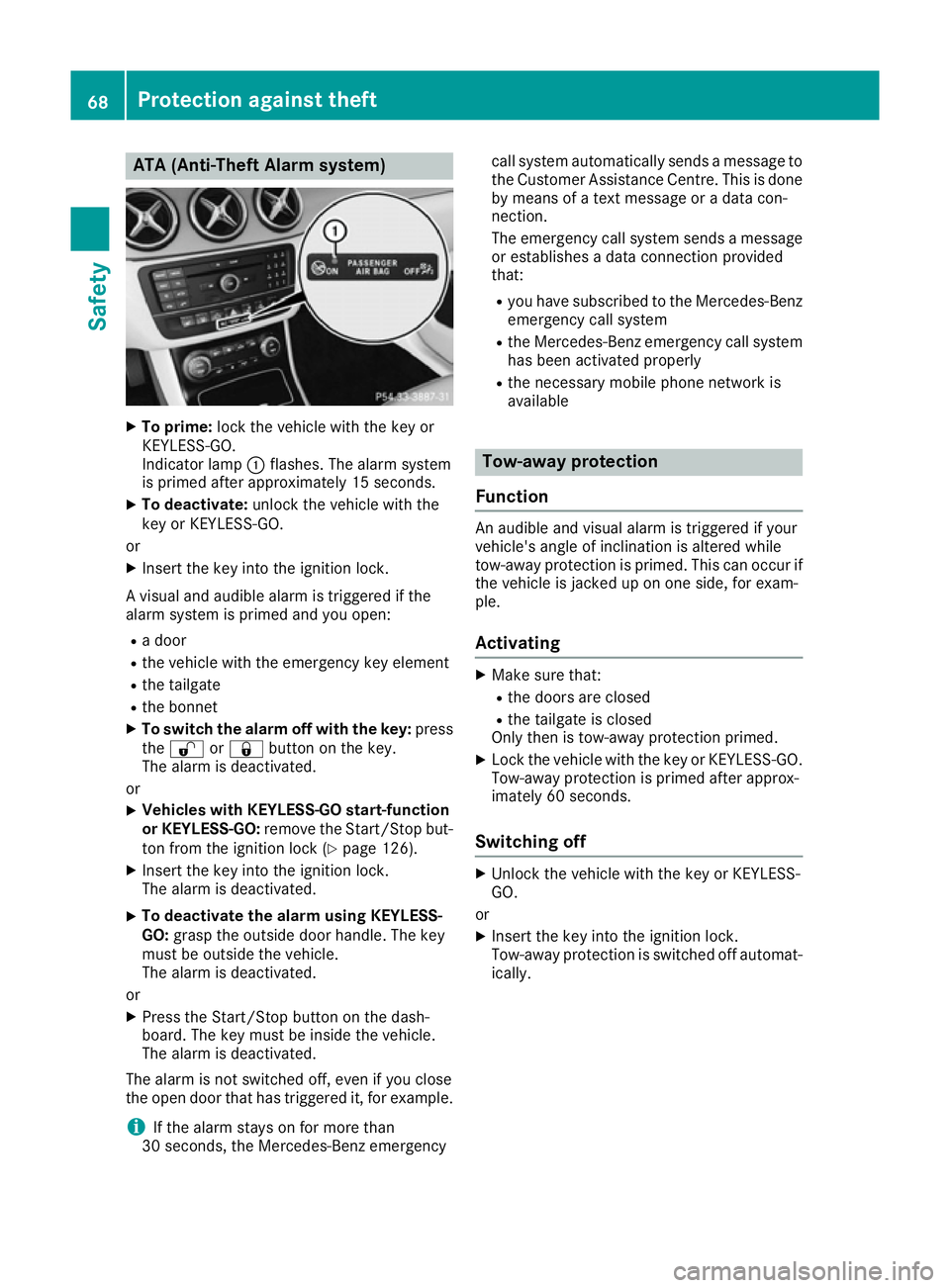
ATA (Anti-Theft Alarm system)
X
To prime: lock the vehicle with the key or
KEYLESS-GO.
Indicator lamp :flashes. The alarm system
is primed after approximately 15 seconds.
X To deactivate: unlock the vehicle with the
key or KEYLESS-GO.
or X Insert the key into the ignition lock.
A visual and audible alarm is triggered if the
alarm system is primed and you open: R a door
R the vehicle with the emergency key element
R the tailgate
R the bonnet
X To switch the alarm off with the key: press
the % or& button on the key.
The alarm is deactivated.
or X Vehicles with KEYLESS-GO start-function
or KEYLESS-GO: remove the Start/Stop but-
ton from the ignition lock (Y page 126).
X Insert the key into the ignition lock.
The alarm is deactivated.
X To deactivate the alarm using KEYLESS-
GO:
grasp the outside door handle. The key
must be outside the vehicle.
The alarm is deactivated.
or X Press the Start/Stop button on the dash-
board. The key must be inside the vehicle.
The alarm is deactivated.
The alarm is not switched off, even if you close
the open door that has triggered it, for example.
i If the alarm stays on for more than
30 seconds, the Mercedes ‑Benz emergencycall system automatically sends a message to
the Customer Assistance Centre. This is done by means of a text message or a data con-
nection.
The emergency call system sends a message
or establishes a data connection provided
that:
R you have subscribed to the Mercedes ‑Benz
emergency call system
R the Mercedes‑Benz emergency call system
has been activated properly
R the necessary mobile phone network is
available Tow-away protection
Function An audible and visual alarm is triggered if your
vehicle's angle of inclination is altered while
tow-away protection is primed. This can occur if
the vehicle is jacked up on one side, for exam-
ple.
Activating X
Make sure that:
R the doors are closed
R the tailgate is closed
Only then is tow-away protection primed.
X Lock the vehicle with the key or KEYLESS-GO.
Tow-away protection is primed after approx-
imately 60 seconds.
Switching off X
Unlock the vehicle with the key or KEYLESS-
GO.
or X Insert the key into the ignition lock.
Tow-away protection is switched off automat-
ically. 68
Protection against theftSafety
Page 108 of 293
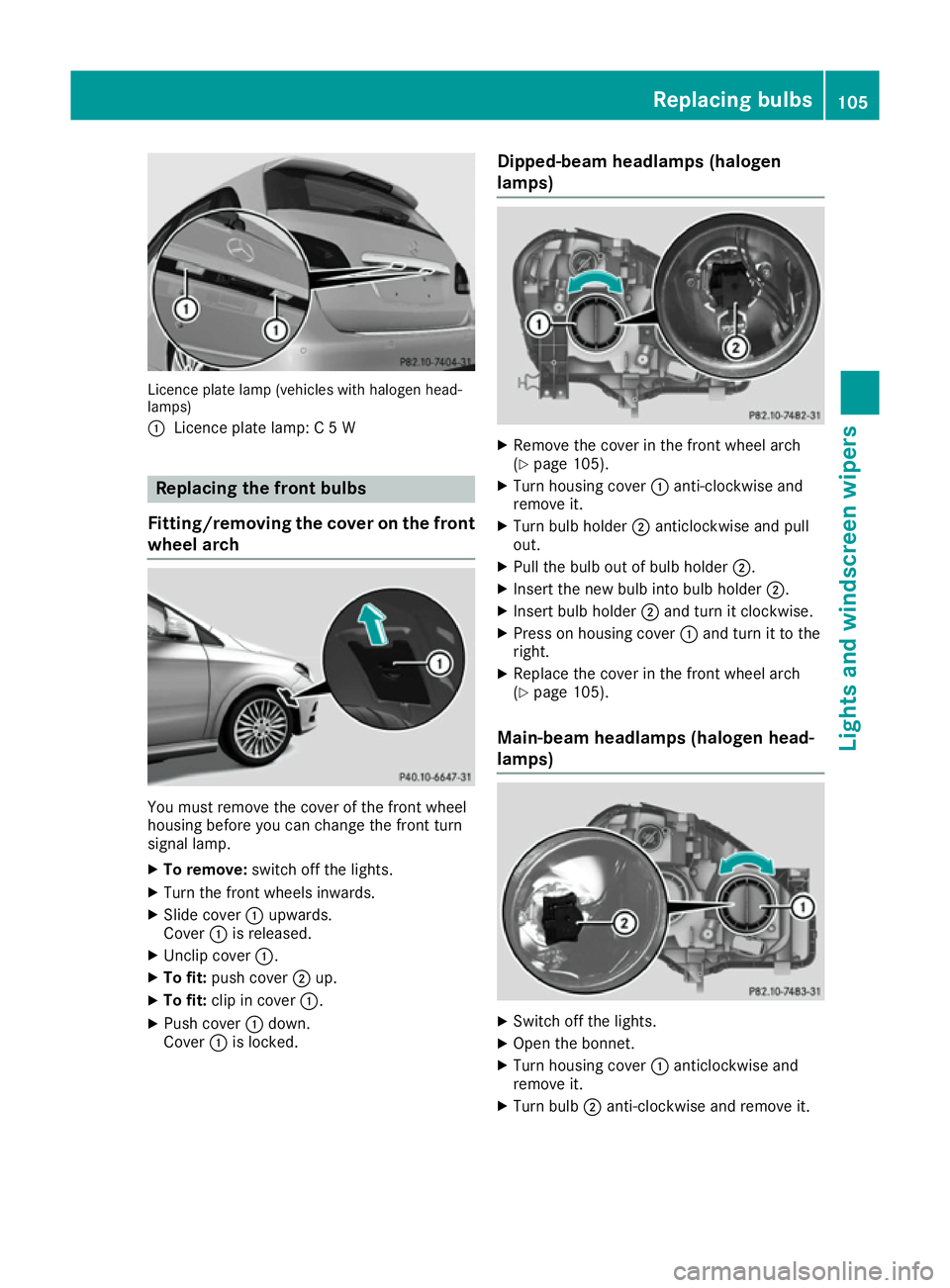
Licence plate lamp (vehicles with halogen head-
lamps)
: Licence plate lamp: C 5 W Replacing the front bulbs
Fitting/removing the cover on the front wheel arch You must remove the cover of the front wheel
housing before you can change the front turn
signal lamp.
X To remove: switch off the lights.
X Turn the front wheels inwards.
X Slide cover :upwards.
Cover :is released.
X Unclip cover :.
X To fit: push cover ;up.
X To fit: clip in cover :.
X Push cover :down.
Cover :is locked. Dipped-beam headlamps (halogen
lamps) X
Remove the cover in the front wheel arch
(Y page 105).
X Turn housing cover :anti-clockwise and
remove it.
X Turn bulb holder ;anticlockwise and pull
out.
X Pull the bulb out of bulb holder ;.
X Insert the new bulb into bulb holder ;.
X Insert bulb holder ;and turn it clockwise.
X Press on housing cover :and turn it to the
right.
X Replace the cover in the front wheel arch
(Y page 105).
Main-beam headlamps (halogen head-
lamps) X
Switch off the lights.
X Open the bonnet.
X Turn housing cover :anticlockwise and
remove it.
X Turn bulb ;anti-clockwise and remove it. Replacing bulbs
105Lights and windscreen wipers Z
Page 109 of 293
X
Insert the new bulb and engage it to the stop.
X Press on housing cover :and turn it to the
right.
Side lamps/parking lamps (halogen
headlamps) X
Switch off the lights.
X Open the bonnet.
X Turn housing cover :anti-clockwise and pull
it out.
X Pull out bulb holder ;.
X Pull the bulb out of bulb holder ;.
X Insert the new bulb into bulb holder ;.
X Insert bulb holder ;.
X Align housing cover :and turn it clockwise
until it engages.
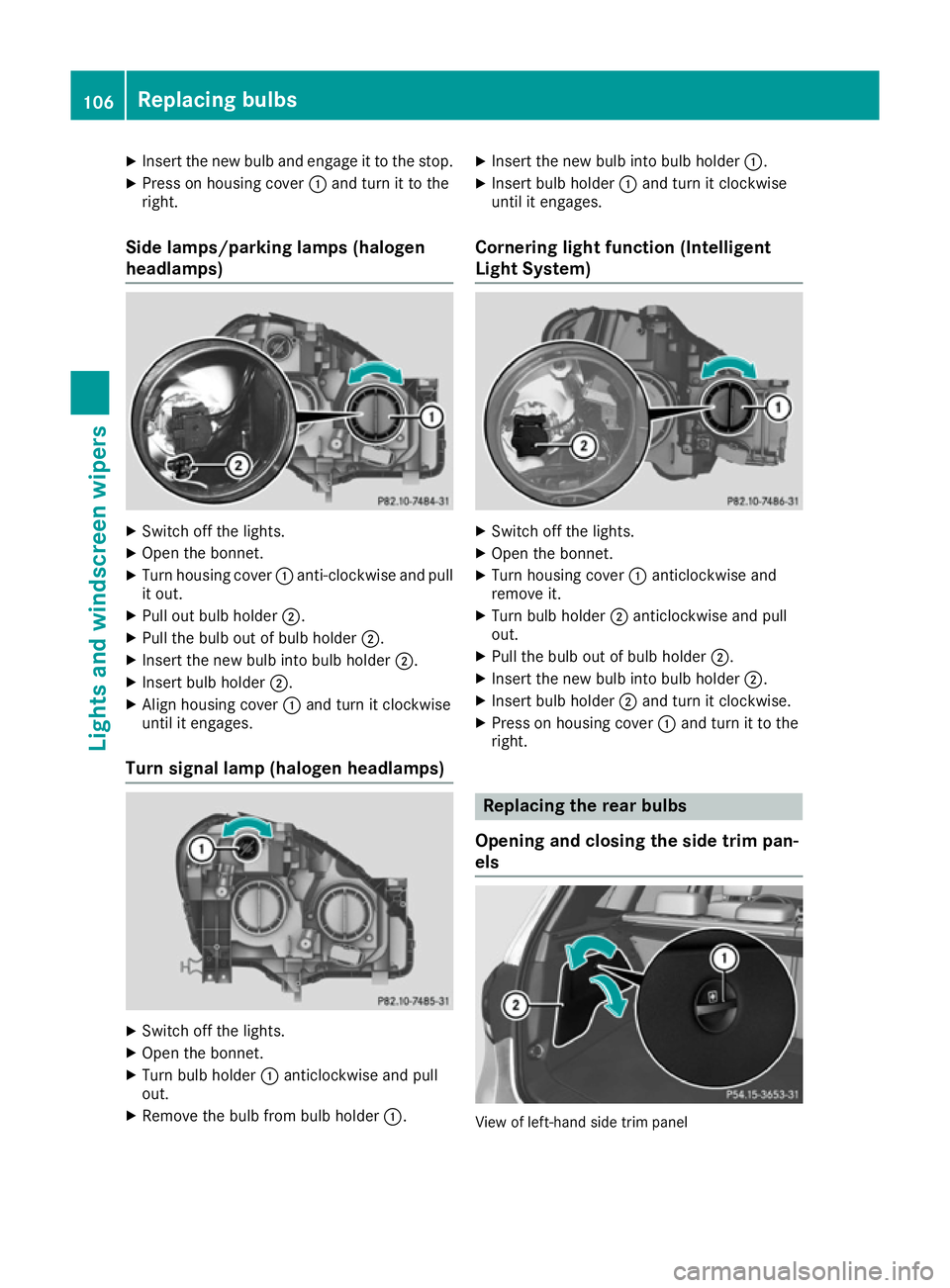
Turn signal lamp (halogen headlamps) X
Switch off the lights.
X Open the bonnet.
X Turn bulb holder :anticlockwise and pull
out.
X Remove the bulb from bulb holder :.X
Insert the new bulb into bulb holder :.
X Insert bulb holder :and turn it clockwise
until it engages.
Cornering light function (Intelligent
Light System) X
Switch off the lights.
X Open the bonnet.
X Turn housing cover :anticlockwise and
remove it.
X Turn bulb holder ;anticlockwise and pull
out.
X Pull the bulb out of bulb holder ;.
X Insert the new bulb into bulb holder ;.
X Insert bulb holder ;and turn it clockwise.
X Press on housing cover :and turn it to the
right. Replacing the rear bulbs
Opening and closing the side trim pan-
els View of left-hand side trim panel106
Replacing bulbsLights and windscreen wipers
Page 112 of 293
!
If the windscreen wipers leave smears on
the windscreen after the vehicle has been
washed in an automatic car wash, this may be
due to wax or other residue. Clean the wind-
screen with washer fluid after an automatic
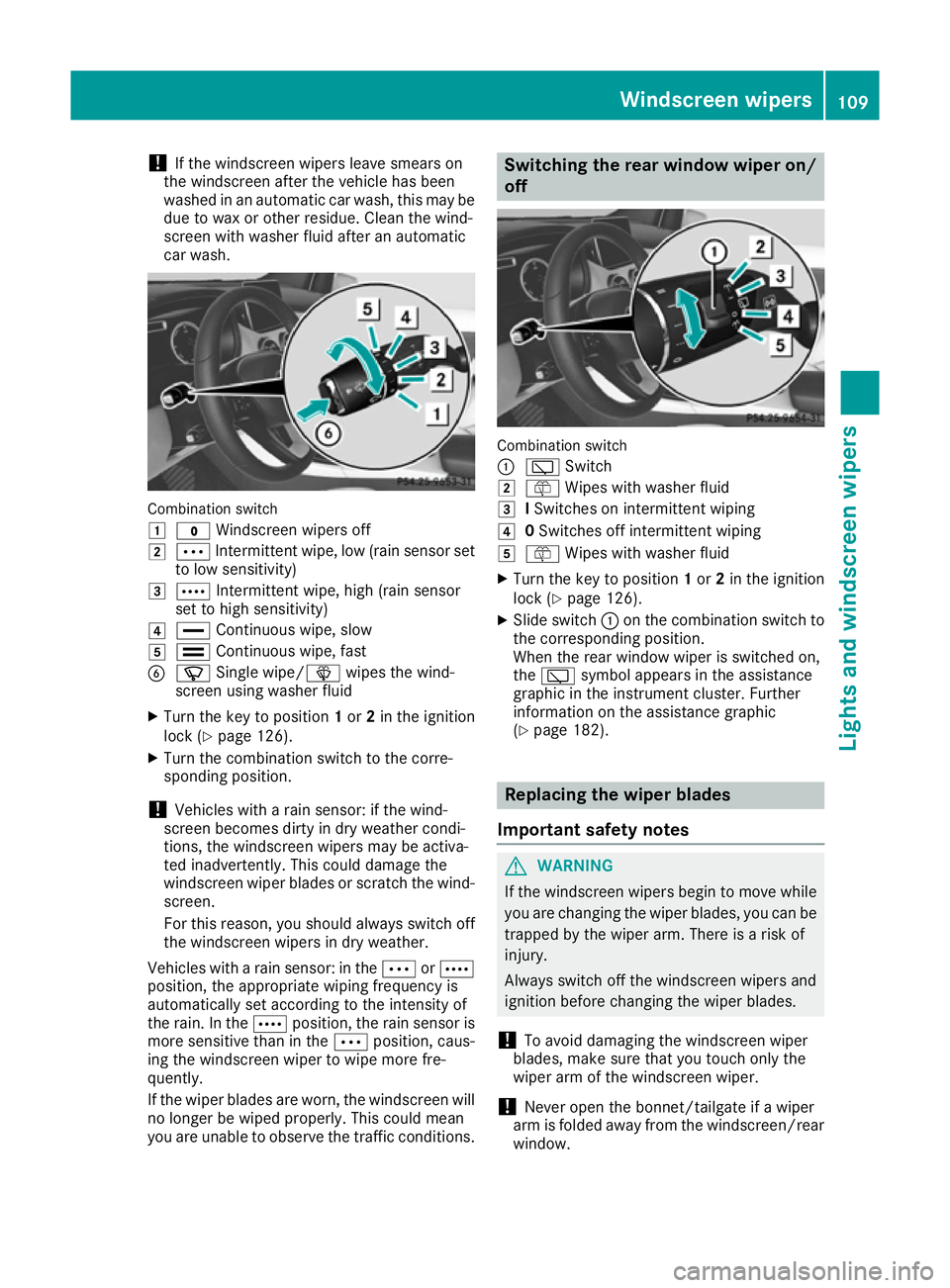
car wash. Combination switch
1
$ Windscreen wipers off
2 Ä Intermittent wipe, low (rain sensor set
to low sensitivity)
3 Å Intermittent wipe, high (rain sensor
set to high sensitivity)
4 ° Continuous wipe, slow
5 ¯ Continuous wipe, fast
B í Single wipe/î wipes the wind-
screen using washer fluid
X Turn the key to position 1or 2in the ignition
lock (Y page 126).
X Turn the combination switch to the corre-
sponding position.
! Vehicles with a rain sensor: if the wind-
screen becomes dirty in dry weather condi-
tions, the windscreen wipers may be activa-
ted inadvertently. This could damage the
windscreen wiper blades or scratch the wind- screen.
For this reason, you should always switch off
the windscreen wipers in dry weather.
Vehicles with a rain sensor: in the ÄorÅ
position, the appropriate wiping frequency is
automatically set according to the intensity of
the rain. In the Åposition, the rain sensor is
more sensitive than in the Äposition, caus-
ing the windscreen wiper to wipe more fre-
quently.
If the wiper blades are worn, the windscreen will
no longer be wiped properly. This could mean
you are unable to observe the traffic conditions. Switching the rear window wiper on/
off Combination switch
:
è Switch
2 ô Wipes with washer fluid
3 ISwitches on intermittent wiping
4 0Switches off intermittent wiping
5 ô Wipes with washer fluid
X Turn the key to position 1or 2in the ignition
lock (Y page 126).
X Slide switch :on the combination switch to
the corresponding position.
When the rear window wiper is switched on,
the è symbol appears in the assistance
graphic in the instrument cluster. Further
information on the assistance graphic
(Y page 182). Replacing the wiper blades
Important safety notes G
WARNING
If the windscreen wipers begin to move while
you are changing the wiper blades, you can be trapped by the wiper arm. There is a risk of
injury.
Always switch off the windscreen wipers and
ignition before changing the wiper blades.
! To avoid damaging the windscreen wiper
blades, make sure that you touch only the
wiper arm of the windscreen wiper.
! Never open the bonnet/tailgate if a wiper
arm is folded away from the windscreen/rear
window. Windscreen wipers
109Lights and windscreen wipers Z
Page 126 of 293
Switching on/off
X
Turn the key to position 0in the ignition lock
or remove it (Y page 126).
X To activate: press theÌbutton.
The indicator lamp in the Ìbutton lights
up.
X To deactivate: press theÌbutton.
The indicator lamp in the Ìbutton goes
out.
i Residual heat is deactivated automatically:
R after approximately 30 minutes
R when the ignition is switched on
R if the battery voltage drops Air vents
Important safety notes
G
WARNING
Very hot or very cold air can flow from the air vents. This could result in burns or frostbite in the immediate vicinity of the air vents. There
is a risk of injury.
Make sure that all vehicle occupants always
maintain a sufficient distance to the air out-
lets. If necessary, redirect the airflow to
another area of the vehicle interior.
In order to ensure the direct flow of fresh air
through the air vents into the vehicle interior,
please observe the following notes:
R keep the air inlet between the windscreen and
the bonnet free of blockages, such as ice,
snow or leaves
R never cover the vents or ventilation grilles in
the vehicle interior
i Optimal climate control function is achieved
by opening the air vents fully and setting the
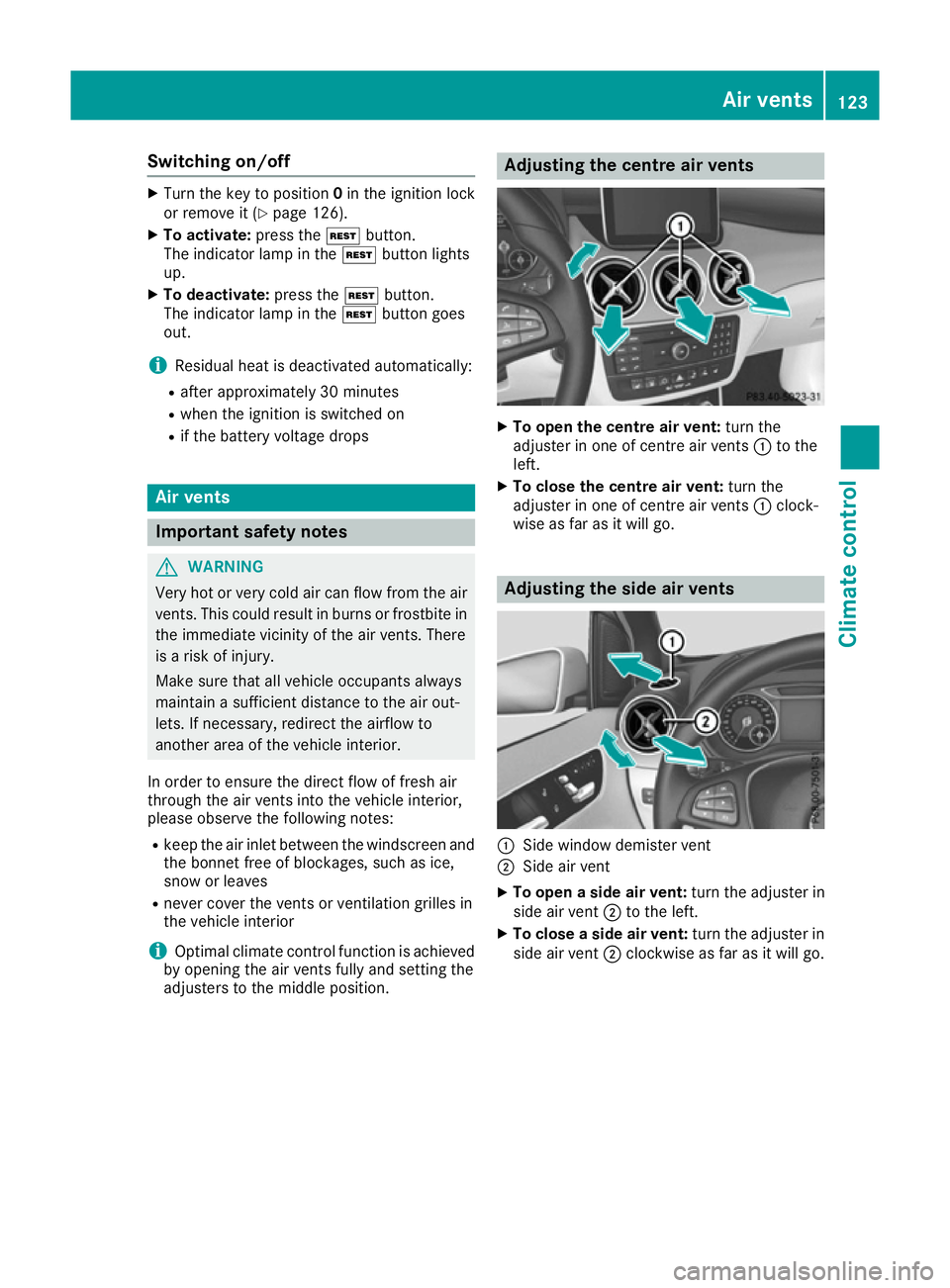
adjusters to the middle position. Adjusting the centre air vents
X
To open the centre air vent: turn the
adjuster in one of centre air vents :to the
left.
X To close the centre air vent: turn the
adjuster in one of centre air vents :clock-
wise as far as it will go. Adjusting the side air vents
:
Side window demister vent
; Side air vent
X To open a side air vent: turn the adjuster in
side air vent ;to the left.
X To close a side air vent: turn the adjuster in
side air vent ;clockwise as far as it will go. Air vents
123Climate control Z
Page 214 of 293
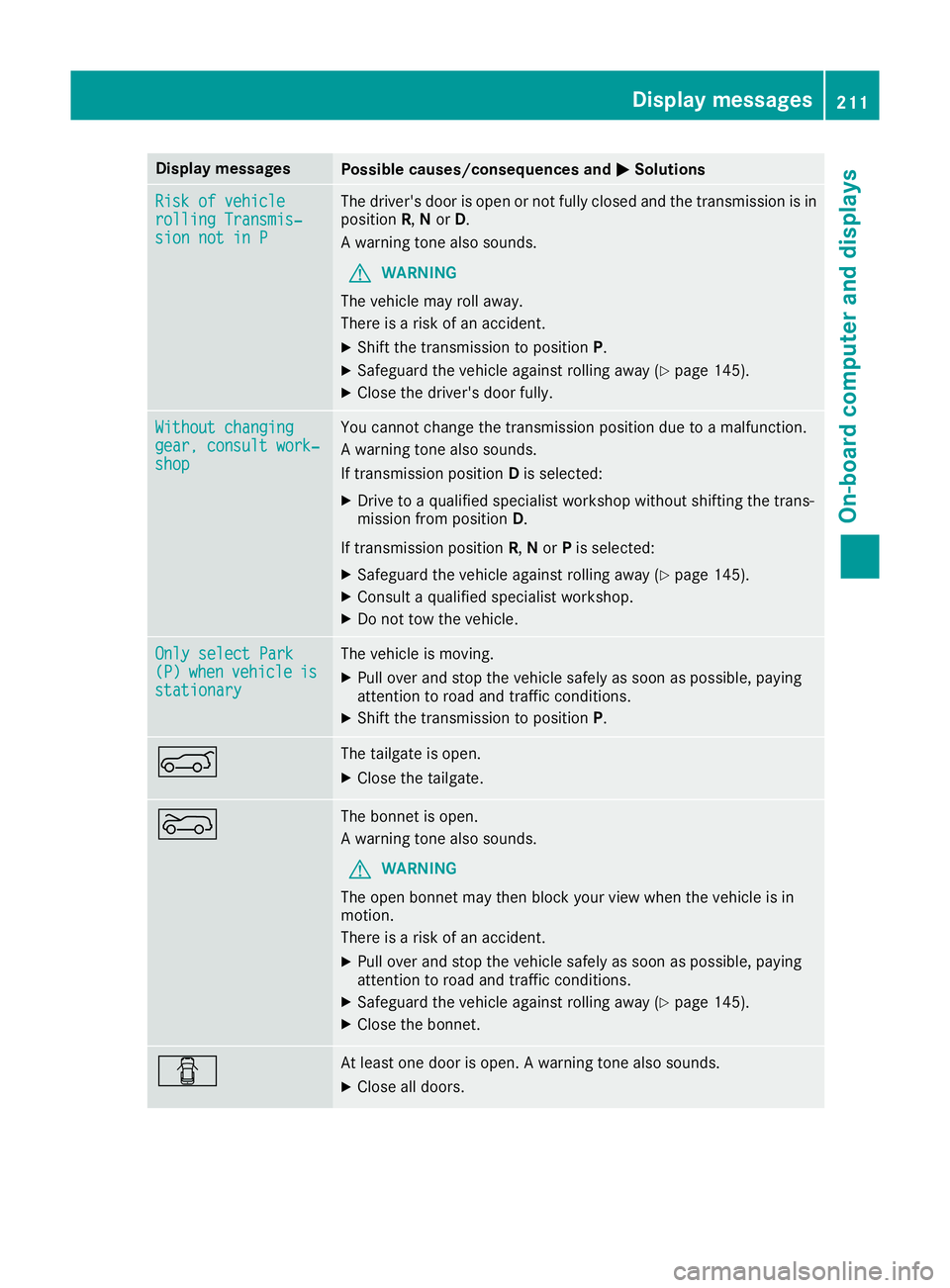
Display messages
Possible causes/consequences and
M
MSolutions Risk of vehicle
Risk of vehicle
rolling Transmis‐ rolling Transmis‐
sion not in P sion not in P The driver's door is open or not fully closed and the transmission is in
position R,Nor D.
A warning tone also sounds.
G WARNING
The vehicle may roll away.
There is a risk of an accident.
X Shift the transmission to position P.
X Safeguard the vehicle against rolling away (Y page 145).
X Close the driver's door fully. Without changing
Without changing
gear, consult work‐ gear, consult work‐
shop shop You cannot change the transmission position due to a malfunction.
A warning tone also sounds.
If transmission position
Dis selected:
X Drive to a qualified specialist workshop without shifting the trans-
mission from position D.
If transmission position R,Nor Pis selected:
X Safeguard the vehicle against rolling away (Y page 145).
X Consult a qualified specialist workshop.
X Do not tow the vehicle. Only select Park Only select Park
(P) (P)
when
when vehicle
vehicle is
is
stationary
stationary The vehicle is moving.
X
Pull over and stop the vehicle safely as soon as possible, paying
attention to road and traffic conditions.
X Shift the transmission to position P.A The tailgate is open.
X Close the tailgate. ? The bonnet is open.
A warning tone also sounds.
G WARNING
The open bonnet may then block your view when the vehicle is in
motion.
There is a risk of an accident.
X Pull over and stop the vehicle safely as soon as possible, paying
attention to road and traffic conditions.
X Safeguard the vehicle against rolling away (Y page 145).
X Close the bonnet. C At least one door is open. A warning tone also sounds.
X Close all doors. Display
messages
211On-board computer and displays Z
Page 242 of 293
Useful information
i This Owner's Manual describes all models,
series and optional equipment for your vehi-
cle that were available at the time of going to
press. National variations are possible. Note
that your vehicle may not be equipped with all
of the functions described. This is also the
case for systems and functions relevant to
safety.
i Read the information on qualified specialist
workshops: (Y page 23). Engine compartment
Bonnet
Important safety notes G
WARNING
An unlocked bonnet may open up when the
vehicle is in motion and block your view. There is a risk of an accident.
Never unlock the bonnet when driving. Before
every trip, ensure that the bonnet is locked. G
WARNING
When being opened and closed, the bonnet
may suddenly fall into the closed position.
There is a risk of injury to persons in the range of movement of the bonnet.
Open and close the bonnet only when nobody
is in the range of movement. G
WARNING
Certain components in the engine compart-
ment may be very hot, e.g. the drive system
and radiator. When carrying out work in the
engine compartment there is a risk of injury.
If possible, let the drive system cool down and only touch the components described in the
following. G
WARNING
There are moving components in the engine
compartment. Certain components may con-
tinue to move or suddenly move again even after the ignition has been switched off, e.g.
the radiator fan. There is a risk of injury.
If you have to carry out work in the engine
compartment:
R switch off the ignition
R never touch the dangerous areas surround-
ing moving components, e.g. the rotation
area of the fan
R remove jewellery and watches
R keep items of clothing and hair, for exam-
ple, away from moving parts.
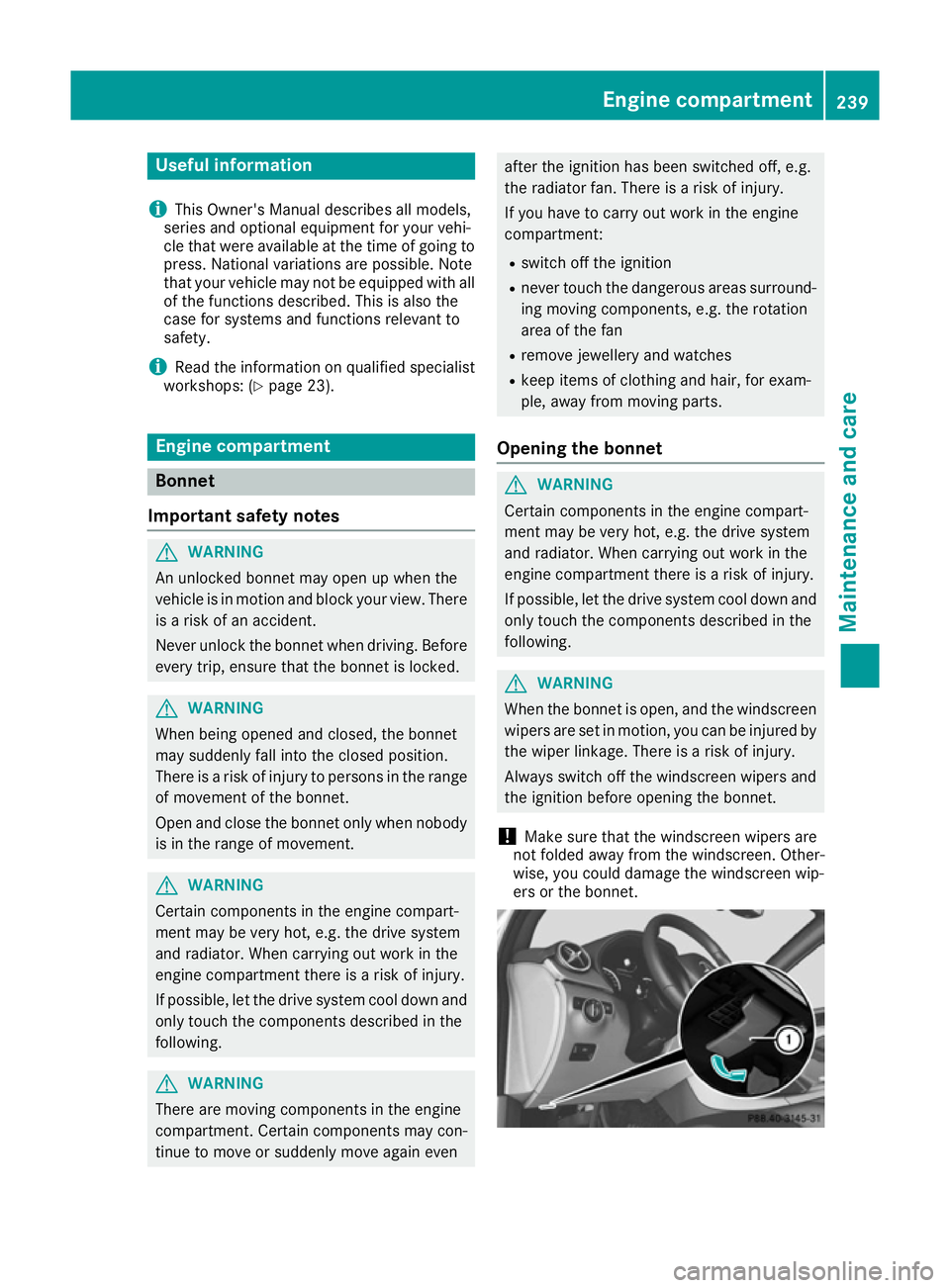
Opening the bonnet G
WARNING
Certain components in the engine compart-
ment may be very hot, e.g. the drive system
and radiator. When carrying out work in the
engine compartment there is a risk of injury.
If possible, let the drive system cool down and only touch the components described in the
following. G
WARNING
When the bonnet is open, and the windscreen wipers are set in motion, you can be injured by
the wiper linkage. There is a risk of injury.
Always switch off the windscreen wipers and
the ignition before opening the bonnet.
! Make sure that the windscreen wipers are
not folded away from the windscreen. Other-
wise, you could damage the windscreen wip-
ers or the bonnet. Engine compartment
239Maintenance and care Z