service MERCEDES-BENZ C-CLASS 2002 User Guide
[x] Cancel search | Manufacturer: MERCEDES-BENZ, Model Year: 2002, Model line: C-CLASS, Model: MERCEDES-BENZ C-CLASS 2002Pages: 399, PDF Size: 16.95 MB
Page 106 of 399
103
Multifunction steering wheel, multifunction display
Te ch n i c a l
data
Instruments
and controls Operation
DrivingInstrument
cluster display Practical hints Car care Index
Depending on your vehicle’s equipment, you may use
the buttons on the multifunction steering wheel to call
up, control and set the following systems in the
multifunction display:
1 Trip odometer and main odometer, see page 101 and
page 106
Flexible service system (FSS), see page 138
Vehicle speed, see page 106
Coolant temperature gauge, see page 137
Engine oil level indicator, see page 141
2 Audio systems, see page 108
Radio, seepage108
CD player, see page 109
Cassette player, see page 110 3
Navigation system, see page 116
4 Malfunction message memory, see page 119
5 Individual settings, see page 121
6 Trip computer, see page 117
After start
After reset
Fuel tank content
7 Telephone, see page 111
Press the è or ÿ button repeatedly until the
required system is displayed.
The display advances by one system each time the
button is pressed.
You may call up additional displays within some of these
categories by pressing the j or k button.
ProCarManuals.com
Page 110 of 399
107
Multifunction steering wheel, multifunction display
Te ch n i c a l
data
Instruments
and controls Operation
DrivingInstrument
cluster display Practical hints Car care Index
1
Trip odometer and main odometer
See page 101 for instructions on resetting the trip
odometer.
2 Coolant temperature gauge, see page 137
3 Vehicle speed if “SPEED DISP.” is selected in the
individual setting menu “INSTRUMENT CLUSTER” -
“SELECT DISPLAY”, refer to page 124
Outside temperature if “OUTSIDE TEMPERATURE”
is selected in the individual setting menu
“INSTRUMENT CLUSTER” - “SELECT DISPLAY”, see
page 124
4 FSS (Flexible service system), see page 138
5 Engine oil level indicator, see page 141 Press
è or ÿ button repeatedly until the trip
odometer and main odometer display (1) appears.
Press the j or k button repeatedly until the
required display (2, 3, 4, 5, 1) appears.
Pressing the è or ÿ button displays the next or
previous system.
ProCarManuals.com
Page 141 of 399

138
Flexible service system
Te ch n i c a l
data
Instruments
and controls Operation
DrivingInstrument
cluster display Practical hints Car care Index
Flexible service system (FSS)
(service indicator)
The FSS permits a flexible service schedule that is
directly related to the operating conditions of the
vehicle.
The symbol 9 or ½ appears together with a
message in the multifunction indicator prior to the next
suggested service. Depending on operating conditions throughout the year,
the next service is calculated and displayed in days or
distance remaining.
The message is displayed for approximately 10 seconds
when turning the electronic key in starter switch to
position 2, or while driving when reaching the service
warning threshold.
The symbols and messages indicate the type of service
to be performed:
9
Service A
½ Service B
One of the following messages will appear in the display
(e.g. Service A):
“SERVICE A – IN xx DAYS”
“SERVICE A – IN xx MILES” (Canada: KM)
“SERVICE A – EXCEEDED BY xx DAYS”
“SERVICE A – EXCEEDED BY xx MILES” (Canada: KM)
“SERVICE A – DUE NOW”
P54.30-4675-26
ProCarManuals.com
Page 142 of 399

139
Flexible service system
Te ch n i c a l
data
Instruments
and controls Operation
DrivingInstrument
cluster display Practical hints Car care Index
The next service due date is displayed either in days or
in miles, depending on your driving style.
Once the suggested service term has passed, the symbol
and message appear for approximately 30 seconds and
a signal sounds every time when turning the electronic
key in starter switch to position 2.
The service indicator disappears automatically after
30 seconds or if the knob for instrument cluster
illumination, see page 96, in the instrument cluster is
pressed.
Calling up service indicator manually:
Turn the electronic key in starter switch to position 1
or 2.
Call up the trip odometer and main odometer by
pressing button
è or ÿ on the multifunction
steering wheel until the display appears. See page 106.
Press button j or k until the FSS indicator
appears.
The next or previous system is displayed by pressing
button è or ÿ . Important!
The FSS indicator is not an engine oil level indicator.
See page 141 for engine oil level indicator.
Note:
When disconnecting vehicle battery for one or more
days at a time, such days will not be counted. Any such
days not counted by the FSS can be added by your
Mercedes-Benz Center.
The interval between services is determined by the type
of driving for which the vehicle is used. For example,
driving at extreme speeds, and cold starts combined
with short distance driving in which the engine does not
reach operating normal temperature, reduce the interval
between services.
ProCarManuals.com
Page 143 of 399

140
Flexible service system
Te ch n i c a l
data
Instruments
and controls Operation
DrivingInstrument
cluster display Practical hints Car care Index
Following a completed A or B service the Mercedes-Benz
Center sets the counter mileage to 10 000 miles
(Canada: 15 000 km).
The counter can also be set by any individual. To do so:
Turn the electronic key in starter switch to position 1
or 2.
To call up the trip odometer and main odometer, press
button è or ÿ on the multifunction steering
wheel until the display appears. See page 106.
Press button j or k until the FSS indicator
appears.
Press the reset knob on the instrument cluster, see
page 96, for approximately 4 seconds. The multifunction display will show the question:
“DO YOU WANT TO RESET SERVICE INTERVAL? –
CONFIRM BY PRESSING R”
Press the reset knob on the instrument cluster again for
approximately 4 seconds to reset the service indicator.
The new service indicator is displayed with the reset
distance of 10 000 miles (Canada 15 000 km).
If the FSS counter was inadvertently reset, have a
Mercedes-Benz Center correct it.
However you choose to set your reference numbers, the
scheduled services as posted in the Service Booklet
must be followed to properly care for your vehicle.
ProCarManuals.com
Page 176 of 399

173
Audio system
Te ch n i c a l
data
Instruments
and controls Operation
DrivingInstrument
cluster display Practical hints Car care Index
Audio and telephone operation
These instructions are intended to help you become
acquainted with your Mercedes-Benz audio system.
They contain useful tips and a detailed description of
the user functions.
Operating safety
1Optional equipment
Dolby and the double-D symbol
Ù
are trademarks of Dolby
Laboratories Licensing Corporation. The Dolby noise reduction
system is manufactured under licence from Dolby Laboratories
Licensing Corporation.
Wa r n i n g !
In order to avoid distraction which could lead to an
accident, system settings should be entered with
the vehicle at standstill and systems should be
operated by the driver only when traffic conditions
permit. Always pay full attention to traffic
conditions first before operating system controls
while driving. Bear in mind that at a speed of just 30 mph
(approximately 50 km/h), your car is covering a
distance of 50 feet (approximately14 m) every
second.
Wa r n i n g !
Any alterations made to electronic components can
cause malfunctions.The radio, cassette deck, CD changer
1 and
telephone
1 are interconnected. Therefore, when
one of the components is defective or has not been
removed/replaced properly this may impair the
function of other components.
These malfunctions might seriously impair the
operating safety of your vehicle.We recommend that you have any service work or
alterations to electronic components done at an
authorized Mercedes-Benz Center.
ProCarManuals.com
Page 189 of 399
186
Audio system
Te ch n i c a l
data
Instruments
and controls Operation
DrivingInstrument
cluster display Practical hints Car care Index
CD mode
General notes on CD mode
Should excessive temperatures occur while in CD mode,
“CD TEMP HIGH” will appear on the display and muting
will take place. The unit will then switch back to radio
mode until the temperature has decreased to a safe
operating level.
Should temperatures occur while in CD mode which are
too low, “CD TEMP LOW” will be displayed, but the CD
will play. It will be sensitive to skipping if you are
driving over rough roads.
Handle CDs carefully to prevent interference during
playback.
Avoid fingerprints and dust on CDs. Do not write on the
CDs or apply any label or other material or devices to
the CDs.
Clean CDs from time to time with a commercially
available cleaning cloth. No solvents, anti-static sprays,
etc. should be used.
Replace the CD in its container after use. Protect CDs
from heat and direct sunlight. Only use CDs, which bear the
label shown and that conform to
the compact disc digital audio
standard (IEC 60908).
Use of CDs which do not meet this
standard may cause damage to the
CD changer. Do not play single-CDs (80 mm) with an
adapter.
1Optional equipmentWa r n i n g !
The CD changer
1 is a Class1 laser product. There is
a danger of invisible laser radiation if the cover is
opened or damaged.
Do not remove the cover. The CD changer
1 does not
contain any parts which can be serviced by the
user. For safety reasons, have any service work
which may be necessary performed only by
qualified personnel.
ProCarManuals.com
Page 198 of 399
195
Audio system
Te ch n i c a l
data
Instruments
and controls Operation
DrivingInstrument
cluster display Practical hints Car care Index
Terminating call
A current call can be terminated by pressing the “END”
button.
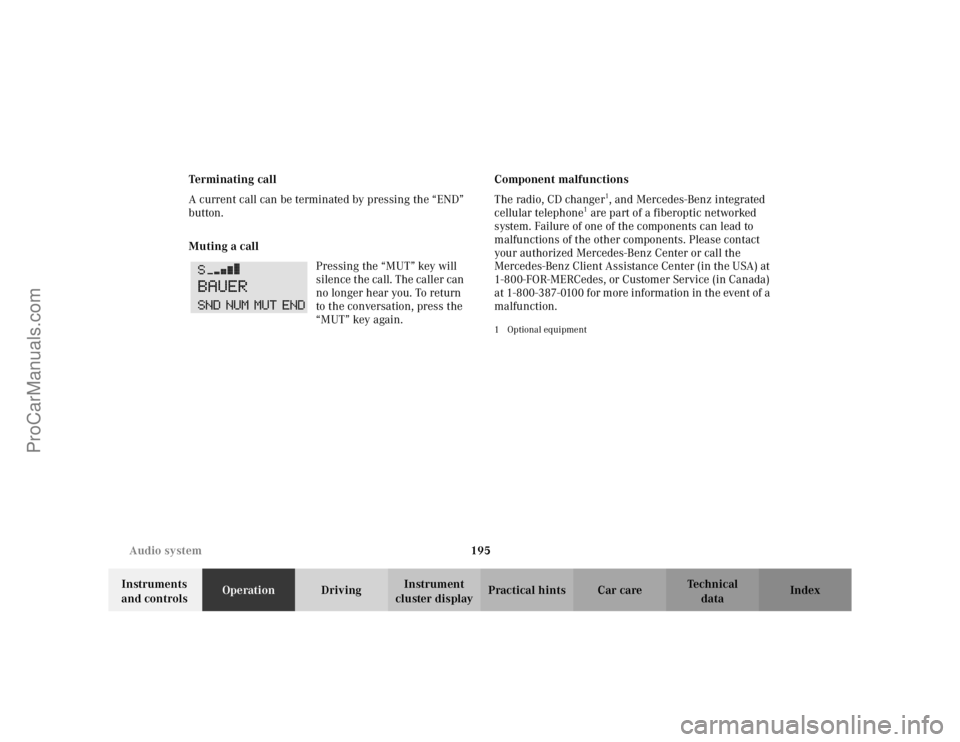
Muting a call
Pressing the “MUT” key will
silence the call. The caller can
no longer hear you. To return
to the conversation, press the
“MUT” key again. Component malfunctions
The radio, CD changer
1, and Mercedes-Benz integrated
cellular telephone
1 are part of a fiberoptic networked
system. Failure of one of the components can lead to
malfunctions of the other components. Please contact
your authorized Mercedes-Benz Center or call the
Mercedes-Benz Client Assistance Center (in the USA) at
1-800-FOR-MERCedes, or Customer Service (in Canada)
at 1-800-387-0100 for more information in the event of a
malfunction.
1Optional equipment
ProCarManuals.com
Page 199 of 399

196
Audio system
Te ch n i c a l
data
Instruments
and controls Operation
DrivingInstrument
cluster display Practical hints Car care Index
Emergency call
Important!
If you press button for more than 1 second, the
number stored in memory location 1 (for example 911)
will be dialed.
The 911 emergency call system is a public service.
Using it without due cause is a criminal offence.
You can make an emergency call to an emergency
rescue station with a mobile communications network.
The emergency call will be placed as long as the
corresponding mobile communications network is
available. To do this, switch the telephone on if you have
not already done so.
The call will also be placed if the unlock-code is not
entered. Emergency calls may not be possible with all telephone
networks or if certain network services and/or
telephone functions are active. Check with your local
network operating company. It may take some time to
set up an emergency call.
To use this function you must ensure that the number
stored in memory location 1 is the number to be dialed
in case of emergency.
Note:
If an emergency call cannot be
connected, the message
“SYSTM BUSY” appears.
ProCarManuals.com
Page 210 of 399
207
Interior equipment
Te ch n i c a l
data
Instruments
and controls Operation
DrivingInstrument
cluster display Practical hints Car care Index
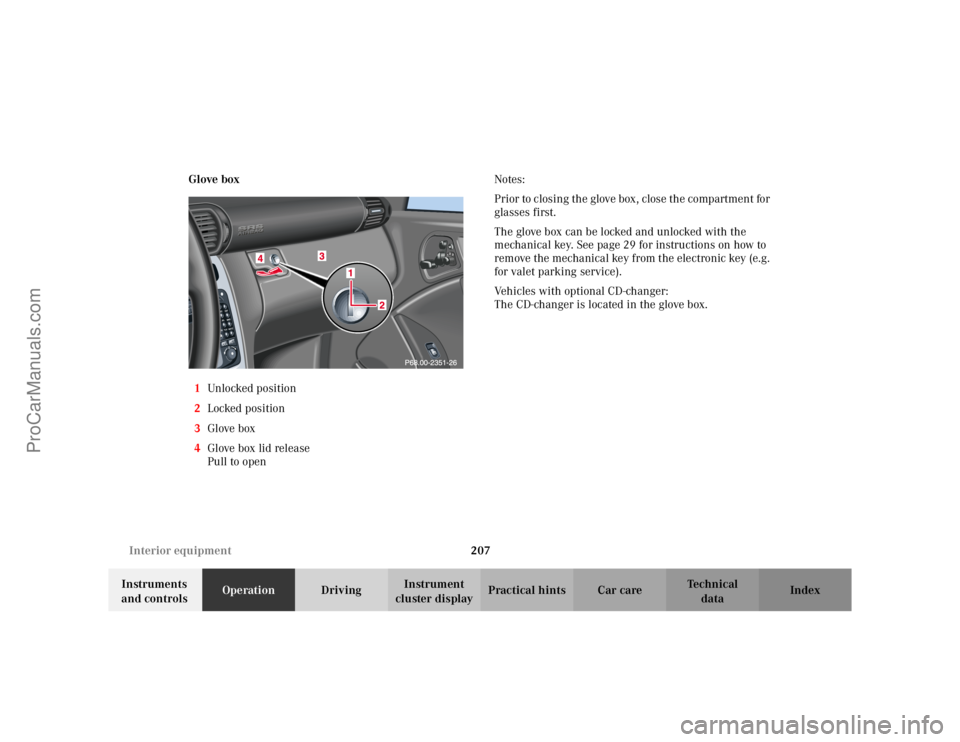
Glove box
1 Unlocked positio n
2 Locked position
3 Glove box
4 Glove box lid release
Pull to open Notes:
Prior to closing the glove box, close the compartment for
glasses first.
The glove box can be locked and unlocked with the
mechanical key. See page 29 for instructions on how to
remove the mechanical key from the electronic key (e.g.
for valet parking service).
Vehicles with optional CD-changer:
The CD-changer is located in the glove box.
ProCarManuals.com