phone MERCEDES-BENZ C-Class 2011 W204 Comand Manual
[x] Cancel search | Manufacturer: MERCEDES-BENZ, Model Year: 2011, Model line: C-Class, Model: MERCEDES-BENZ C-Class 2011 W204Pages: 190, PDF Size: 2.21 MB
Page 105 of 190

If
you select No,the process willbe aborted .
i Before re-authori zingthemobil ephone,
you shoul dalso deletethe device nameMB
Bluetooth fromyourmobile phone's
Bluetooth ®
list. Telephone
basicmenu (Bluetooth ®
interfa ce)
X Press the÷funct ionbutton onCOMAND.
If the mobile phoneisready foruse, the
following displayappears: :
Phone status
; Signal strengthofmobile phonenetwork
Ä
= Receiver icon:¢or¡
? Todisplay theCOMAND phonebook
A Todisplay calllists
B Character bar
C Name ofmobile phonecurrent ly
conn ected Reception
andtransmission volume
Once themobile phonehasbeen authorized,
you can optimize thetrans mission and
reception volumesettings. Findoutmore
about theoptimum settings foryour mobile
on the Internet at
htt p://www.mbusa- mobile.com.Orcall
the Mercedes-B enzCustomer Assistance
Center at
1-8 00- FOR-ME RCedes (1-800-367-6372 ) (for
theUSA )or Customer Relationsat
1-8 00-387- 0100 (forCanada).
i Incorrect settings may have asignificant
impact onthe quali tyof calls.
X Press the÷funct ionbutton .
X Select Phoneinthe telephone basicmenu
by turnin gcVd theCOMAND controller
and press Wtoconf irm.
X Select Adjust Volumeandpress Wto
conf irm.
X Select Reception Volumeor
Transmission Volumeandpress Wto
conf irm. X
Select avolume settingbyturnin gcVd the
COMAND controller.
X To close thesetting scale:pressWor
slide XVY. Using
thetelephone Incoming
call
Rejecting oraccepting acall When
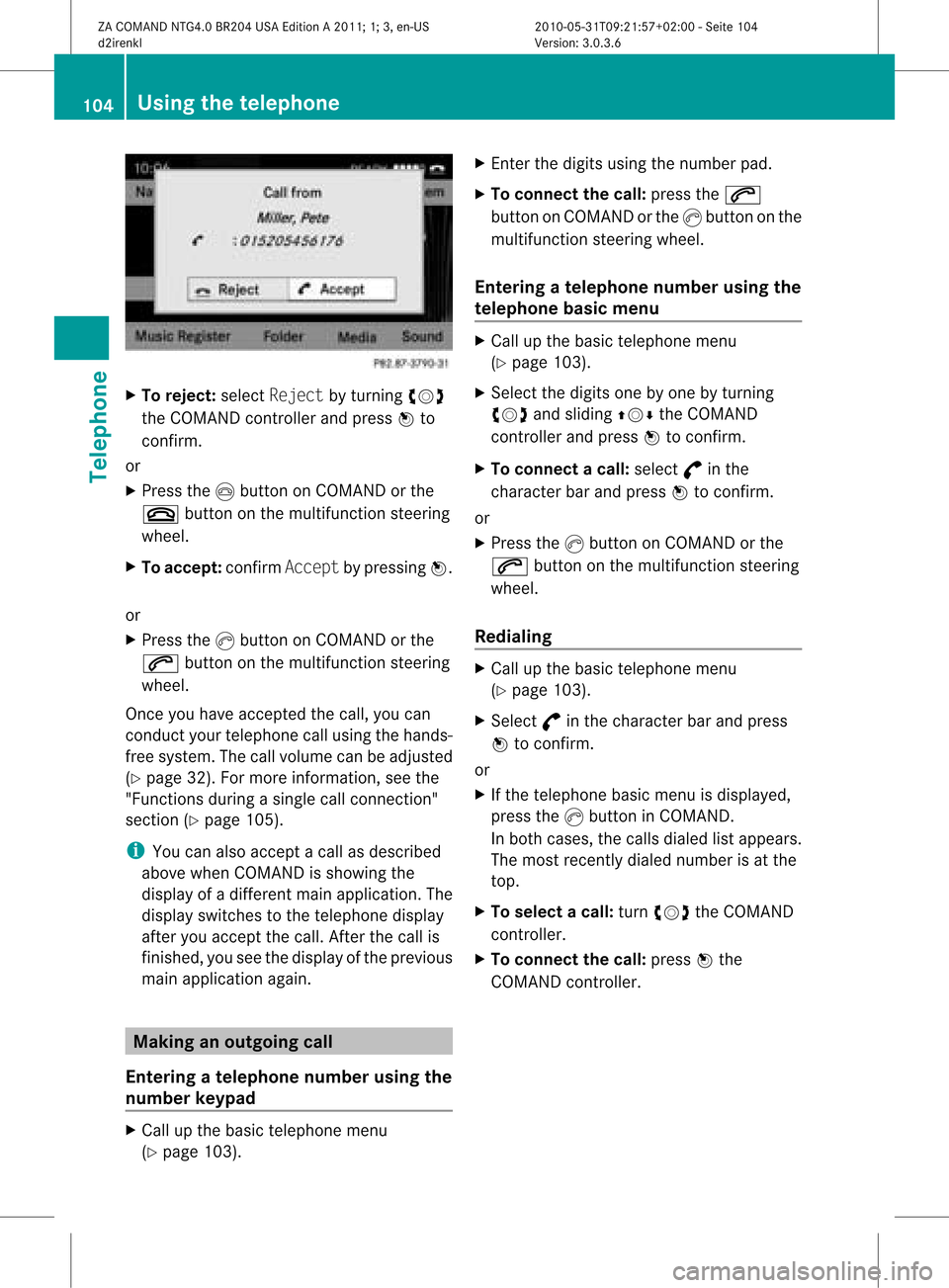
thereisan incomi ngcall ,you seea
corresp ondingwindow inthe displa y. Usi
ngthe telephone
103Telephone
ZACOMAN DNTG4 .0BR204 USAEditio nA 2011; 1;3,en-US
d2ire nkl Version:3.0.3.6
<003000230024002300250023002000250035002400490023002C002D00300024
002D0020003400330023V
2:00-Seite 103 Z
Page 106 of 190
X
To reje ct:select Reject byturning cVd
the COMAND controller and pressW to
confi rm.
or
X Pre ssthe Ibutton onCOMAND orthe
~ button onthe multifu nctio nstee ring
wh eel.
X To acc ept: confi rmAcc ept bypre ssing W.
or
X Pre ssthe Kbutton onCOMAND orthe
6 button onthe multifu nctio nstee ring
wh eel.
Once youha ve acce ptedthe call,yo ucan
cond uctyour telephone callusing thehands-
free system. Thecallvolume canbeadjusted
(Y page 32).Formore information, seethe
"Functions duringasingle callconn ection"
section (Ypage 105).
i You canalso accept acall asdescribed
above whenCOMAND isshowing the
displa yof adifferent mainapplication. The
displa yswitches tothe telephone display
after youaccept thecall. Afterthe call is
finished, youseethedispla yofthe previous
main application again. Making
anoutgoing call
Entering ateleph onenum berusin gth e
num berkeyp ad X
Call upthebasic telepho nemen u
(Y page 103). X
En tert he digits usingthenumber pad.
X To conne ctthe call: press the6
button onCOMAND orthe Kbutton onthe
multifunction steeringwheel.
Entering ateleph onenum berusin gth e
telep hone basicmen u X
Call upthebasic telepho nemen u
(Y page 103).
X Sele ctthedigit son eby oneby turnin g
cVd andslidin gZVÆ theCOMA ND
con troller andpres sW tocon firm.
X To connect acall: select °inthe
chara cterbarand press Wtoconfirm.
or
X Press theKbutton onCOM AND orthe
6 button onthe multifunctio nsteeri ng
whe el.
Redial ing X
Ca llup the basictelep hone menu
(Y pag e103).
X Sele ct° inthe chara cterbarand press
W toconfirm.
or
X Ifthe telep hone basicmenu isdis pla yed,
press theKbutton inCOM AND.
In both cases,the callsdialed listappears.
The most recent lydialed numberisat the
top .
X To select acall: turn cVd theCOM AND
controlle r.
X To conne ctthe call:press Wthe
COM AND controlle r. 104
Usi
ngthe telephoneTele phone
ZACOMAND NTG4.0BR204USAEditio nA 2011; 1;3,en-US
d2ire nkl Version:3.0.3.6
<003000230024002300250023002000250035002400490023002C002D00300024
002D00200034003300230030002D00230023V
-Seite 104
Page 107 of 190
Connect
ingacall toan entry onacall
lis to rinthe COMAND phonebook X
Call upacall listand select anent ry
(Y page 109).
or
X Call upthe COMAND phonebookand
select anent ry(Y page 106).
X To connect acall: press Wthe COM AND
controll eror the Kbutton. Func
tionsavail able during acall
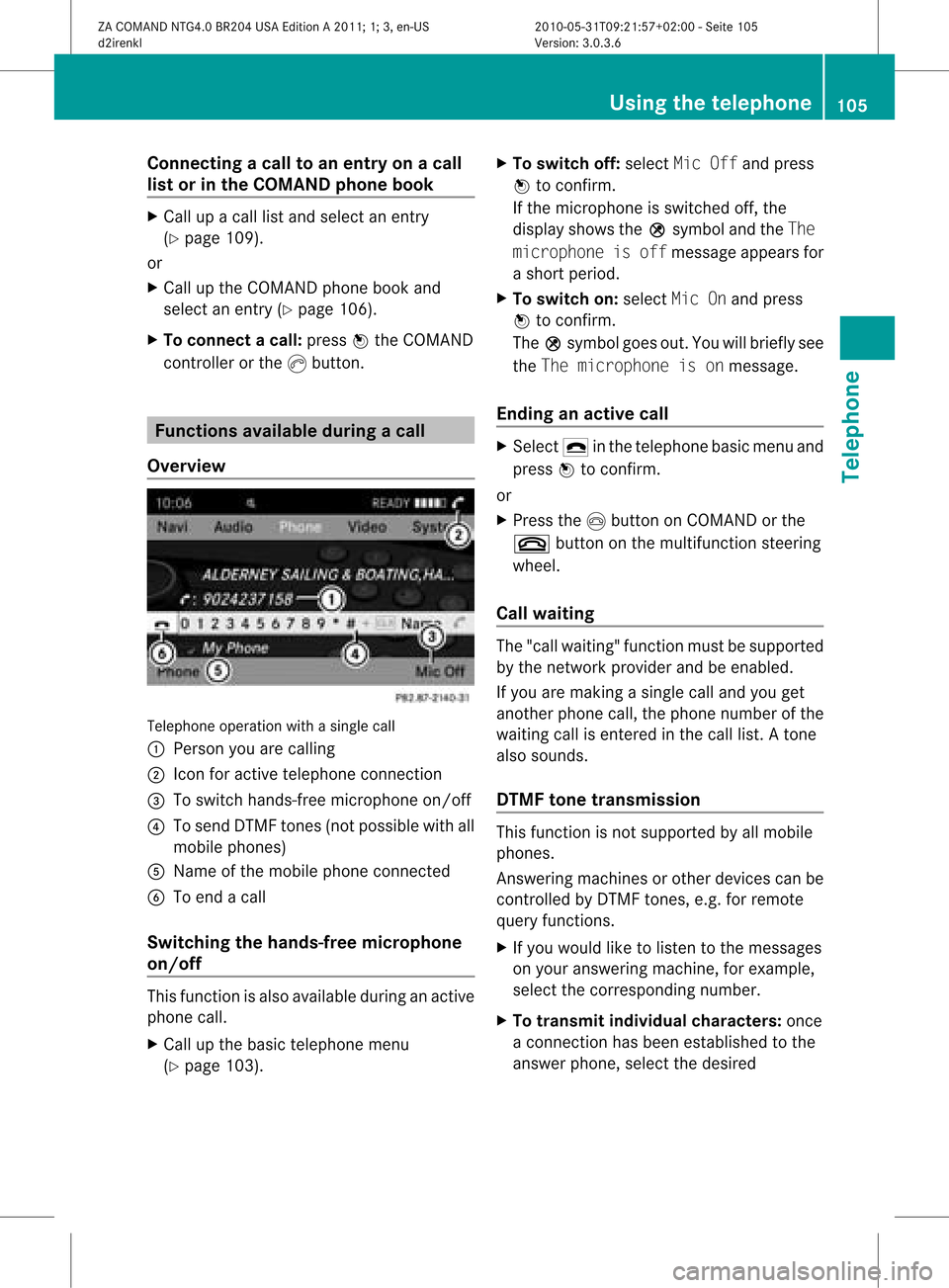
Ove rview Tel
epho neoper ationwithasing lecall
: Perso nyou are calling
; Icon foractive telephone connection
= Toswitch hands-fr eemicrophon eon/of f
? Tosend DTMF tones(not possible withall
mobile phones)
A Name ofthe mobile phoneconnected
B Toend acall
Switching thehands- freemicroph one
on/off This
funct ionisalso availa bleduring anactive
phone call.
X Call upthe basic telephone menu
(Y page 103). X
To switch off:select MicOffandpress
W toconf irm.
If the microphon eis switched off,the
display showstheQsymbol andtheThe
microphone isoff message appearsfor
a short period.
X To switch on:select MicOnand press
W toconf irm.
The Qsymbol goesout.Youwillbriefly see
the The microphone isonmessage.
Ending anactive call X
Select ¢inthe telephone basicmenu and
press Wtoconf irm.
or
X Press theIbutton onCOMAND orthe
~ button onthe multifunct ionsteerin g
wheel.
Call waiting The
"call waiting" functionmust besupported
by the network provider andbeenabled.
If you aremaking asingle calland youget
another phonecall,thephone number ofthe
waiting callisenter edinthe call list. Atone
also sounds.
DTMF tonetransmission This
funct ionisnot supported byallmobile
phones.
Ans wering machines orother devices canbe
cont rolled byDTMF tones, e.g. forremote
query functions.
X Ifyou would liketolisten tothe messages
on your answering machine,forexample,
select thecorrespon dingnumber.
X To transmit individual characters: once
a conn ection hasbeen established tothe
answer phone,selectthedesired Using
thetelephone
105Telephone
ZACOMAND NTG4.0BR204USAEdition A2011; 1;3,en-US
d2irenk lV ersion:3.0.3.6
2010
-05-31T09 :21:57+0 2:00-Seite 105 Z
Page 108 of 190
cha
racte rsinthe characte rba rand press
W toconfi rm.
or
X Pre ssthe corre sponding button on
CO MAND's numberkey pad.
Every characte rselected willbe
tran smitt edimmediately.
X To send aphone bookentry asaDTMF
sequence: selectNamebyturn ingcVd the
COMAND controller andpress Wto
con firm.
X Select thedesired phonebookentryand
press Wtocon firm.
The entryissent asaDTMF charact er
str ing.
X To retu rntothe call displa y:select
Back andpress Wtocon firm. Using
thephone book Introd
uction
The phone bookdisplays thenames and
phone numbers ofall ofthe address book
ent ries saved inthe COMAND addressbook.
If an address bookentryhas nophone
number, theentrydoes notappear inthe
phone book. Calling
upthe phone book
Overview X
Select Nameinthe telephon ebasic menu
by sliding VÆandturningcVd the
COMAND controller andpress Wto
con firm.
If the phone bookcontains entries, these
will bedisplayed alphabetically. Character
bar =isactive.
The charact erbar serves toreduce the
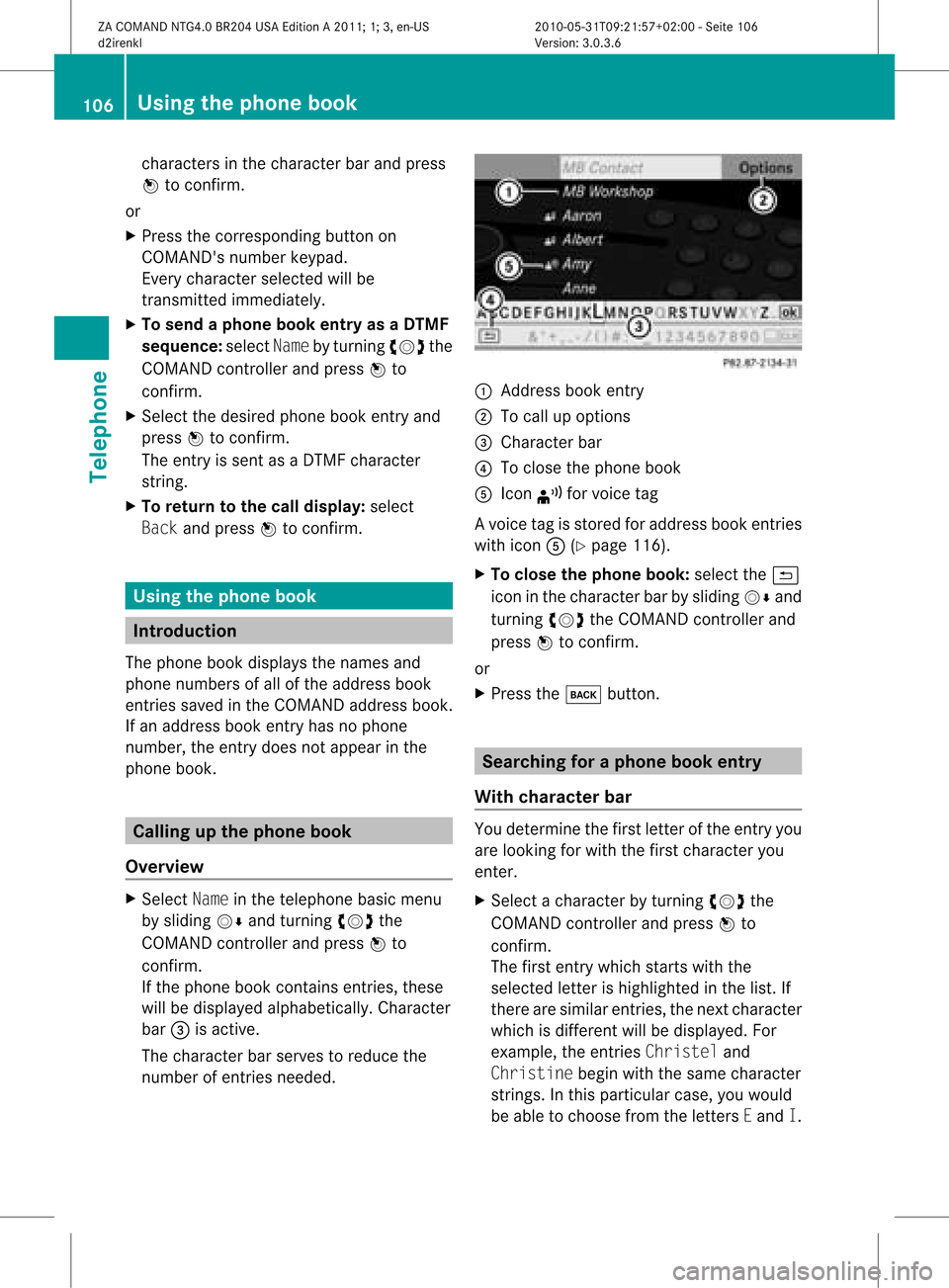
number ofent ries needed. :
Address bookentry
; Tocall upoption s
= Character bar
? Toclose thephone book
A Icon ¦forvoice tag
Av oice tagisstored foraddress bookentries
with iconA(Ypage 116).
X To close thephone book:select the&
icon inthe charact erbar bysliding VÆand
turnin gcVd theCOMAND controller and
press Wtoconf irm.
or
X Press thek button . Searching
foraphone bookentry
With chara cterbar You
determin ethe first letter ofthe entr yyou
are looking forwith thefirst charact eryou
enter .
X Select acharact erby turnin gcVd the
COMAND controller andpress Wto
conf irm.
The first entrywhich startswith the
selected letterishighlighted inthe list. If
there aresimilar entries,thenext charact er
which isdifferent willbedisplay ed.For
example, theentr iesChristel and
Christine beginwiththesame charact er
strin gs.Inthis particular case,youwould
be able tochoose fromtheletters Eand I. 106
Using
thephone bookTelephone
ZACOMAND NTG4.0BR204USAEdition A2011; 1;3,en-US
d2irenk lV ersion:3.0.3.6
2010
-05-31T09 :21:57+0 2:00-Seite 106
Page 109 of 190
X
Sel ect the characte rsof the entry youare
sea rchi ngfor one byone andpressW to
confi rm.
Whe nthe selection isclear, COMAND
switches automatically tothe selection list.
X To complete thesearch: switchfromthe
phone bookwithcharacter bartothe
selection list(Ypage 107).
The lastlistentr yis automatically
highlighted.
With number pad Altern
atively, youcan also enter digits using
the number keypad(directentry)
(Y page 28).
Dele ting character s X
To delete asingle character :select the
2 iconbyturn ingcVd theCOMAN D
con troller andbriefly pressW.
or
X Brief lypress the2 button.
Eac htim eacharac terisdelete d,the entry
most closelyresem blingtheremain ing
charac tersis shown atthe top ofthe list.
X To delet ean entr y:select the2 icon
by turn ingcVd theCOMAN Dcon troller
and press Wand hold untilthe entryhas
been delete d.
or
X Press andhold the2 buttonunt ilthe
ent ireent ryhas been delete d.
Changing thelangua geofthechar acter
bar X
Selec tB andpress W.
X Selec tthe desired language . Changing
thecharacter setofthe
character bar X
Select pandpress Wtoconfirm .
The character setchanges eachtimeyou
make thisselection.
Selec tinganentry directly fromthelist You
canswitch tothe listatany time during
character entry.
X Slide VZtheCOMAND controller
repeatedly orpress andhold Wuntil the
character bardisappe ars.
or
X Select ¬andpress Wtoconfirm .
X To selec tanentry :turn cVd the
COMAND controller untilthedesired entry
is highlighted andpress Wtocon firm.
To select aphone number: ifan entry
contains morethanonephone numbe r,this
is indi cated bythe Gicon.
X Select aphone bookentry withtheGicon
and press Wtoconfirm.
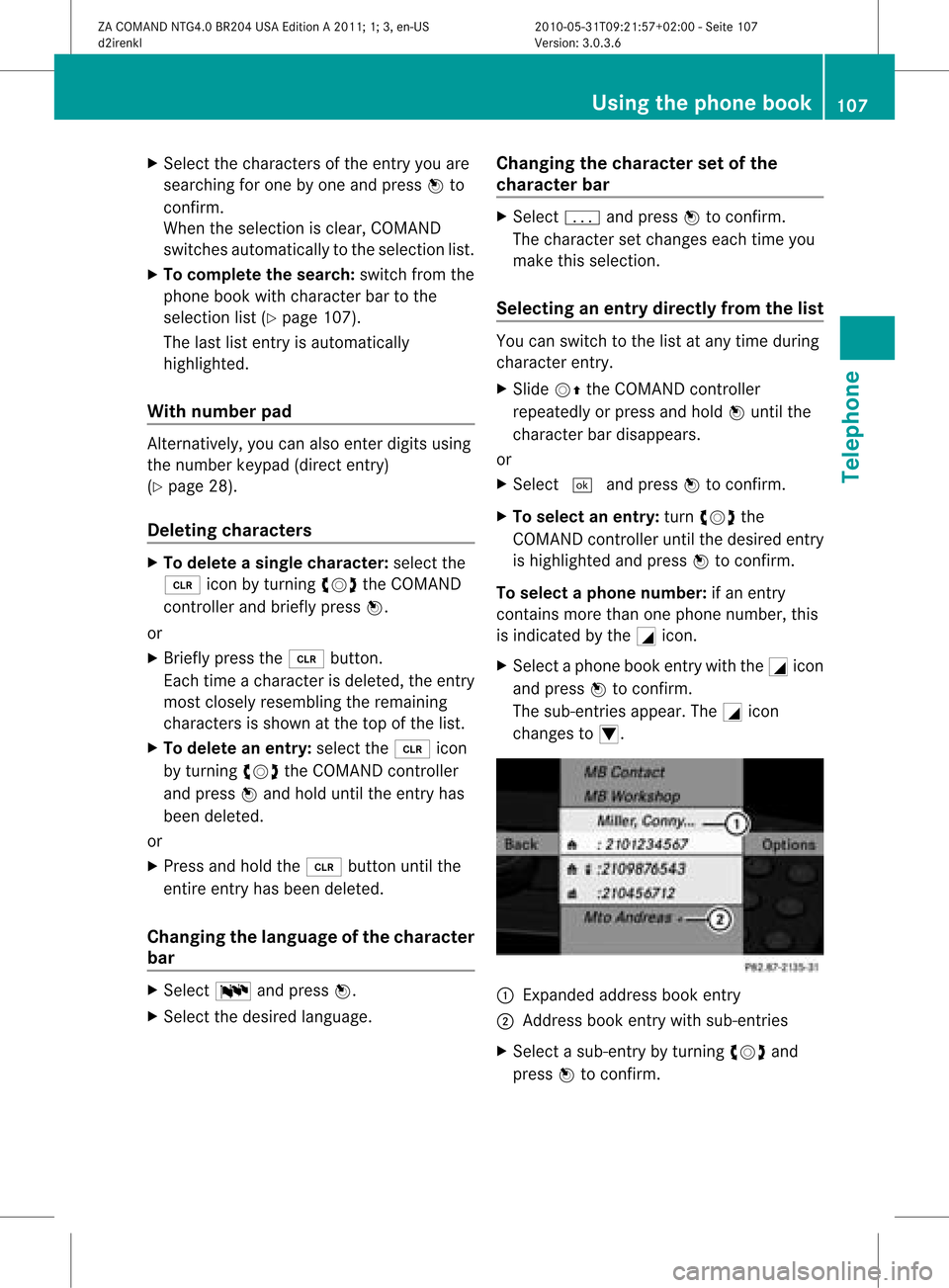
The sub-entries appear. TheGicon
changes toI. :
Expanded address book entry
; Address bookentry withsub-entries
X Select asub -entry byturning cVdand
press Wtoconfirm. Usi
ngthe phone book
107Tele phone
ZACOMAND NTG4.0BR204USAEdition A2011; 1;3,en-US
d2ire nkl Version:3.0.3.6
<003000230024002300250023002000250035002400490023002C002D00300024
002D00200034003300230030002D00230023V
-Seite 107 Z
Page 110 of 190
X
To return tothe phonebook with
ch arac terbar: select Backin the list and
pre ssW toconfi rm.
or
X Pre ssthe k button. Di
spl aying detai lsabo utan entry
X Sel ect anentry inthe selecti onlist by
tur ning cVd theCOMAND controller.
X Sel ect Optionsby slid ing VY andpress
W toconfi rm.
X Sel ect Detailsand pressW toconfi rm.
The detai led vie wap pe ars.
X To clos ethe deta iled view :sl id e XVY
rep eated lyunti lthe entry ishighl ighted
ag aino rpress thek backbutton. De
leti nganentry fromthephone
boo k
If the entry consists exclusivelyof phone
numbers ,it is del eted both from thephone
book andfrom theaddress book.
If there isadd itiona ldata includ edalong with
the phone number, e.g.anaviga ble
destina tion,theentry isdel eted from the
phone bookbutretained inthe add ress book.
X Select anentry inthe sele ction listby
turning cVdtheCOMAND controller.
X Select Options byslid ing VY andpress
W toconfirm.
X Select Delete andpress Wtoconfirm.
Ap rompt appears, asking whethe rthe
entr yshould bedeleted.
X Select YesorNo and press Wtoconfirm .
If you select Yes,theentr yis deleted in
accordance withtherules described above.
If you select No,the process willbeaborted. Creating
anew entry inthe phone
book
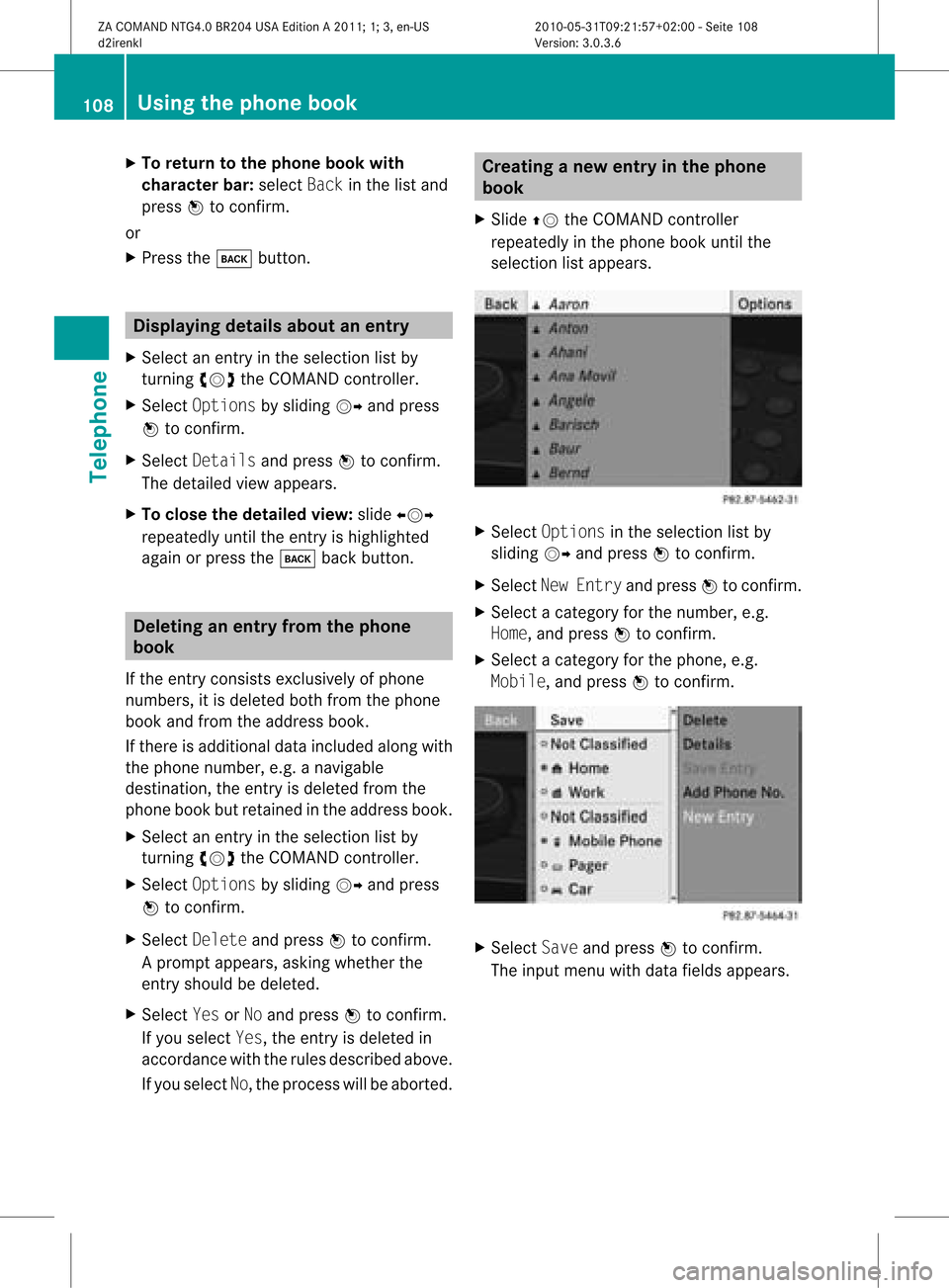
X Slide ZVtheCOMAND controller
repeatedly inthe phone bookuntilthe
selection listappea rs. X
Select Options inthe selection listby
sliding VYandpress Wtoconfirm .
X Select NewEntry andpress Wtoconfirm .
X Select acategory forthe number, e.g.
Home, andpress Wtoconfirm .
X Select acategory forthe phone, e.g.
Mobile, andpress Wtoconfirm . X
Select Saveandpress Wtoconfirm .
The input menu withdata fields appea rs. 108
Using
thephone bookTelephone
ZACOMAND NTG4.0BR204USAEdition A2011; 1;3,en-US
d2irenkl Version:3.0.3.6
2010-
05-31T09:21 :57+02:00-Seite 108
Page 111 of 190

:
Selected data fieldwith curs or
; Chara cter bar
X Enter characte rsand save the entry .
Pro cee das descri bedund er"Ente ring
cha racte rs"inthe "Enter ingcharacte rsin
the addre ssand phoneboo ks" secti on
(Y page 29).
i The entry iscrea tedinthe phoneboo k
and inthe addre ssboo k. Addi
ngtelepho nenumb erstoan
ex istin gphon ebo ok entry
X Sel ect anentry inthe selecti onlist by
turni ngcVd theCOMAND controller.
X Sel ect Optionsby sliding VY andpress
W toconfi rm.
X Sel ect Add PhoneNo. andpressW to
confi rm.
X Sel ect acate goryfor the numb er,e.g.
Hom e,and pressW toconfi rm.
X Sel ect acate goryfor the phone,e.g.
Mob ile,and pressW toconfi rm.
X Sel ect Saveand pressW toconfi rm.
CO MAND storesthe data ifthere arefewer
tha nfive numb ersassign edtothe entryyou
are searc hingforinthe selec tednumb er
cat egory.
If five numb ersare stored forthe entryin
the selec tednumb ercat egory, aprom pt
will appear askingwhet heryou wish to
over writeone ofthe exis tingnumb ers. X
Selec tYes orNo and press Wtocon firm .
If you selec tYes, aselec tionlistwill appear
con tain ingthe five existingnumb ers.
If you selec tNo, the proc esswillbeabort ed.
X Selec tthe numb erto be over written by
tur nin gcVd theCOMA NDcontroller and
press Wtocon firm .
An input menuappears. Thedata fieldfor
ent erin gthe new phon enumb eris
highligh ted.
X En ter char acters and save theentry.
Proc eedasdesc ribed under "Entering
char acters" inthe "Entering char acters in
the address andphon ebook s"sect ion
(Y page 29). Using
calllists Intr
odu ction
COMA NDdisplays callsreceived (including
misse dcalls) andmade duringphone
operation inlists.
i The respective menuitemcanonly be
selected ifcalls have already beenmade or
received inCOMAND.
Displayi ngmissed callsinthe COMAND
displa yis not supported byallmobile
phones.
The multifunction displayshows alist ofcalls
made. Opening
thecall listand selec tingan
entry
X Press the÷funct ionbutton.
X Select CallLists inthe telephone basic
menu bysliding VÆandturning cVdthe
COMAND controller andpress Wto
confirm .
Am enu appears. Using
calllists
109Telephone
ZACOMAND NTG4.0BR204USAEdition A2011 ;1; 3,en-U S
d2irenk lV ersion:3.0.3.6
2010
-05-31T09 :21:57+0 2:00-Seite 109 Z
Page 112 of 190

X
Sel ect Incoming CallsorCal ls
Dia led using cVd andpressW to
confi rm.
The corre sponding list appe ars . Examp
ledispl ay:list ofcalls received
: List ofcalls received
; Date/time and phon enumbe rof the
select edent ry
= Tocall upoptio ns
i You canalso callupthe listofcalls made
by press ingthe Kbutt onwhen the
teleph onebasic menuis shown .Int his
case, thelistwill only show phone
numbers.
X Select anentr yby turning cVdthe
COMAND controller.
X To dial aphone number: pressW.
X To close thelist: select Backandpress
W toconfirm orpress thek button. Displaying
detailsaboutalist entry
COMAND canalso show ashorten edlist entr y
in full.
X Select alist entr yby turning cVdthe
COMAND controller.
X Select Options bysliding VYandpress
W toconfirm .
X Select Details andpress Wtoconfirm .
The detailed viewappea rs.
X To retur ntothe list:sli de XVY repeatedl y
until thelistishighlig hted. Storing
aphone number whichhas
not yetbeen stored
Introduction For
incoming callsfrom aperson whoisnot
in the address book,COMAND displaysthe
phone number inthe call list. You cansave
this entry.
Storing asanew entry inthe addr ess
book X
Cal lup acall listand select anentry
(Y page 109).
X Select Options bysliding VYthe
COMAND controller andpress Wto
confirm.
X Select Saveandpress Wtoconfirm.
i Save isshown ingray ifthe selected list
entry hasalrea dybeen saved inthe address
book.
X Select NewEntry andpress Wtoconfirm.
X Select acategory forthe number, e.g.
Home, andpress Wtoconfirm.
X Select acategory forthe phone, e.g.
Mobile, andpress Wtoconfirm. Num
bercategory Display
(telephone
and addr essbook) Not
Classified °
Home 6
Work \
Telephone
category Display
(telephone
and addr essbook) Not
Classified °
Mobile ¢
Car ^
Pager ¨110
Using
calllistsTelephone
ZACOMAND NTG4.0BR204USAEdition A2011; 1;3,en-US
d2irenkl Version:3.0.3.6
2010-0
5-31T09 :21:57+02:0 0-Seite 110
Page 113 of 190

X
Sel ect Saveand pressW toconfi rm.
An inp utmenu appe ars with da tafie lds. The
da ta fie ldfor the telephone numb erisfilled
in automa tically. :
Cursor
; Data field
= Chara cter bar
? Data fieldfor telephone numb er(filled in
au toma tically)
A Telephone category
B Numbe rcate gor y
X Pro cee das desc ribedunde r"Enteri ng
cha racter s"inthe "Ente ring cha racter sin
the addre ssand phone books "se ctio n
(Y page 29) .
Add ingapho nenumb erto an addre ss
bo ok entry X
Ca llup acal llist and select an entry
(Y page 109) .
X Sel ect Optionsby slid ing VY the
CO MAND controller and pressW to
confi rm.
X Sel ect Saveand pressW toconfi rm.
i Sav eis sho wningra yif the selected list
entry hasal rea dybeen saved .
X Sel ect Add PhoneNo. andpressW to
confi rm.
X Sel ect acate gory for the num ber,e.g .
Hom e,and pressW toconfi rm.
X Sel ect acate gory for the phone ,e.g .
Mob ile,and pressW toconfi rm. X
Sel ect Save.
Th ese arch menu foraddre ssbook entri es
ap pe ars.
X Sea rch forthe desired entry .Proceed as
descri bedunder "Searching foraphone
book entry" (Ypag e106).
X Press Wwhen youhave finishe dsearchi ng.
COMAND storesthedata ifthere arefewe r
than fivenumbers assigned tothe entry you
are searchi ngfor inthe sele cted number
category .
You willsee amessa getothis effect.
If five numbers arestored forthe entry you
are searchi ngfor, aprompt willapp ear
asking whethe ryou wish tooverwrite one
of the existin gnumbers.
X Select YesorNo and press Wtoconf irm.
If you select Yes,aselection listwith the
five existin gnumbers isdisplay ed.
If you select No,the process willbeaborted.
X Select thenumber tobe overwritt eninthe
list byturnin gcVd theCOMAND controller
and press Wtoconf irm.
COMAND overwrites theselected number
with thenew data. Dele
ting calllists
The stored calllists remain inCOMAND, even
if you useCOMAND withanother mobile
phone. Forthis reason, deletethecall lists
before sellingortrans ferring ownership of
your vehicle.
X Select CallLists inthe telephone basic
menu byturnin gcVd theCOMAND
cont roller andpress Wtoconf irm.
X Select Delete CallLists andpress W
to conf irm.
Aq uery appear sask ing ifall call listsare to
be delet ed.
X Se lec tYes orNo and pressW toconfirm .
If you selectYes ,th ecall listsare delet ed.
If you sele ctNo, thepro ces swill beabor ted. Using
calllists
111Teleph one
ZACOMA NDNTG4 .0BR2 04USAEd ition A20 11;1; 3,en-US
d2i ren kl Version :3. 0.3.6
20
10-05-31 T09 :21:57 +02:00 -Sei te11 1 Z
Page 114 of 190
Using
theaddress book Intr
oduct ion G
War
ning!
Please devoteyour attent ion first and
forem osttothe trafficsituatio nyou arein.
Befor eyour journ ey,please familiarize
yourself withtheaddress bookfunctions.
Only usetheCOMAND whenroadandtraffic
con dition spermit youtodo so. Othe rwise you
could beinvolv edinan acciden tinw hich you
or others couldbeinjured.
The address bookorganizes andstores
entr ieswhich areimported fromdifferent
sources (mobilephone,memory card,
COMAND telephone book,navigation
system).
You canusethese entriestomake telephone
calls andfornavigation.
i Address bookentriesare not deleted
when themobile phoneisremoved. Forthis
reason, youshould deleteyourpersonal
data using thereset functionbefore selling
your vehicle, forexample (Ypage 45). Calling
upthe address book
X Press theKfunct ionbutton.
You seethetelephone basicmenu orthe
address bookifit was open previously .
X With thetelephone basicmenu shown,
select Phone bysliding VZtheCOMAND
cont roller andpress Wtoconfirm .
X Select Address Bookfromthemenu and
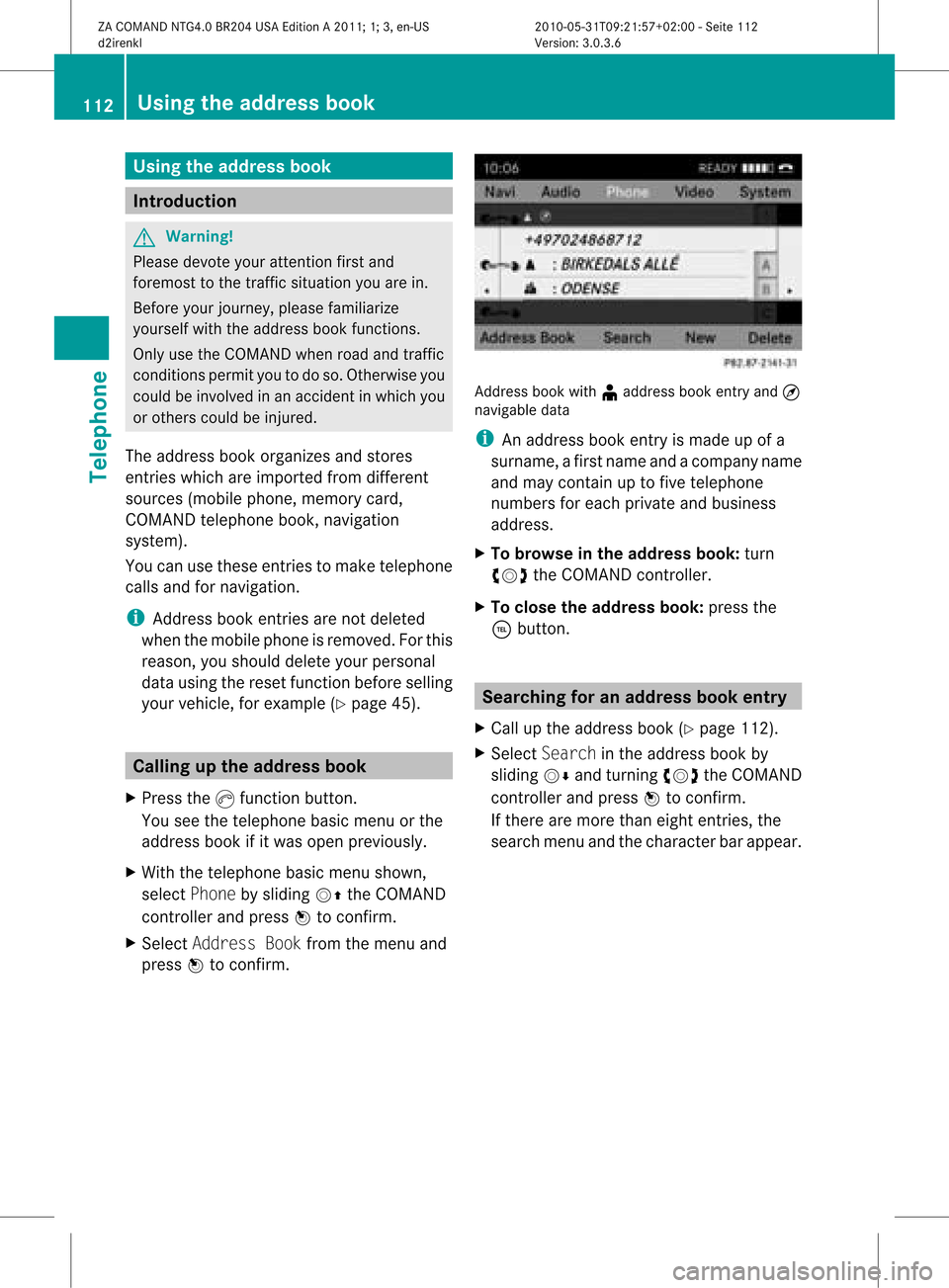
press Wtoconfirm . Address
bookwith¥address bookentry and¤
navigable data
i Anaddress bookentryis made upofa
surname, afirst name andacompany name
and may containuptofive telephone
numbers foreach private andbusiness
address.
X To browse inthe addr essbook: turn
cVd theCOMAND controller.
X To close theaddr essbook: pressthe
÷ button. Searching
foranadd ress book entry
X Call upthe address book(Ypage 112).
X Select Search inthe address bookby
sliding VÆandturning cVdtheCOMAND
cont roller andpress Wtoconfirm .
If there aremore thaneight entries, the
search menuandthecharacter barappea r. 112
Using
theaddress bookTelephone
ZACOMAND NTG4.0BR204USAEdition A2011; 1;3,en-US
d2irenkl Version:3.0.3.6
2010-
05-31T09:21 :57+02:00-Seite 112