phone MERCEDES-BENZ C-Class 2011 W204 Comand Manual
[x] Cancel search | Manufacturer: MERCEDES-BENZ, Model Year: 2011, Model line: C-Class, Model: MERCEDES-BENZ C-Class 2011 W204Pages: 190, PDF Size: 2.21 MB
Page 115 of 190

Sea
rch menu with cha racte rba r
: ¥icon foraddre ssboo kentry
; ¤icon forcomp lete addre ssdata from
the navi gation system
= Icon ¦forvoice tag
? d icon forpho neboo kentry fromthe
mob ile pho ne
A Chara cter bar
X Proce edasdes crib edund er"Se arch ingfor
a pho neboo kentry "(Y page 106) . Cre
atin gane wen try inthe addres s
bo ok
Yo ucan ente raddress datadirect lyint othe
address book.Ifyou storetelephon e
numbers inthe COMAND phonebook,these
are also saved inthe address book.Ifyou
stor eanavigat iondestin ation, COMAND
creat esan address bookentrywhich includes
the complet enavigable addressdata.
X Call upthe address book(Ypage 112).
X Select Newinthe address bookbysliding
VÆ andturningcVd theCOMAND
con troller and press Wtocon firm.
An input menu withdata fields appears. Input
menu withdata fields
: Select eddata fieldwithcursor
; Character bar
X En ter charac tersandsave theentry.
Procee das descr ibedunder "Entering
charac ters"in the "Ent ering charac tersin
the address andphone books" section
(Y page 29). Deleting
anadd ress book entry
X Opt ion1:select Delete bysliding VÆand
turn ingcVd theCOMAND controller and
press Wtocon firm.
X Opt ion2:search foranaddress bookentry
(Y page 112).
X Select Option sby sliding VYthe
COMAND controller and press Wto
con firm.
X Select Delete andpress Wtocon firm.
Irres pectiveofthe option chosen ,a prompt
will appear.
X Select YesorNo and press Wtocon firm.
If you select Yes,theentrywill bedeleted.
If you select No,the proces swill beaborted.
i Delet ingamobile phonebookentryonly
deletes theentryfrom theaddress book,
not from themobile phone. Using
thead dress book
113Telephone
ZACOMAND NTG4.0BR204USAEditionA2011 ;1; 3,en- US
d2iren kl Version:3.0 .3.6
2010
-05-31T09: 21:57+0 2:00-Seite 113 Z
Page 116 of 190

Disp
laying detailsab out anaddress
book entry
Selec ting anent ry X
Se arc hfo ran addr essbooken try and turn
cVd theCOM ANDc ont roller toselect itin
the selection list(Ypage 112).
or
X Select anaddress bookentryby browsing
(Y page 112).
X In both cases, pressW.
The detailed viewappears. Detailed
displayforhome details
: Togo back tothe previous menu
; Select eddata field
= 6 icon forhome details
? Tocall upoptions
A \icon forbusiness details
X Select thedata fieldbyturnin gcVd the
COMAND controller andpress Wto
conf irm.
X To close thedetailed view:select Back
and press Wtoconf irm.
Showing thedetails ofan add ress book
entry X
Select Options bysliding VYthe
COMAND controller andpress Wto
conf irm.
X Select Details andpress Wtoconf irm.
The display isshown infull. X
To close thedetailed display:pressthe
k button . Changing
anadd ress book entry
Changing anentry X
Option 1:search foranaddress bookentry
and turn cVd theCOMAND controller to
select itin the selection list(Ypage 112).
X Select Options bysliding VYthe
COMAND controller andpress Wto
conf irm.
X Select Change Entryandpress Wto
conf irm. X
Option 2:call upthe detailed viewforan
address bookentry(Y page 114).
X Select Options bysliding VYthe
COMAND controller andpress Wto
conf irm.
X Select Change Entryandpress Wto
conf irm.
Irrespect iveofthe option chosen, theinput
menu containing datafields appears.
X Proceed asdescribed under"Entering
charact ers"inthe "Ent ering charact ersin
the address andphone books" section
(Y page 29). 114
Using
theaddress bookTelephone
ZACOMAND NTG4.0BR204USAEdition A2011; 1;3,en-US
d2irenk lV ersion:3.0.3.6
2010
-05-31T09 :21:57+0 2:00-Seite 114
Page 117 of 190

Cha
nging thecat egor yof atele phone
num berdata field X
Dis play thedet ailed viewforanaddre ss
book entry (Y page 114)and highlight the
te lepho nenum berdatafiel d.
X Sel ect Optionsby slidin gVY the
COMA NDcontroll erand pres sW to
co nfirm .
X Sel ect Change Categoryand pres sW to
co nfirm .
X Sel ect anum bercategor y,e.g .Hom e.
X Sel ect ate lepho necat egor y,e.g .Mob ile
Pho ne.
X Ifdesir ed,selec tPre ferred andpres sW
to confirm .
De pen dingon theprev ious status ,swit ch
th eopt ion onO oroff ª.T hephone
number isdispla yedasthe first number in
the phone bookandcanbediale d
immediately.
X Select Saveandpress Wtoconfirm .
The new category isstored. Calling
anumber storedinan entry
Conditions The
mobile phonemustbeconn ected viathe
Bluetooth ®
interfac e.
Option 1 X
Call upthe detailed viewofan address book
entr y(Y page 114).
X Select thephone number datafieldby
turning cVdtheCOMAND controller and
press Wtoconfirm .
The callismade. Thedispla yswitc hes to
tel ephon emode . Opt
ion 2 X
Dis play thedet ailed viewforanaddres s
book entry.
X Sele ctthephon enum berdata fieldby
tur nin gcVd theCOMA NDcontroller .
X Sele ctOpt ionsby slidin gVY the
COMA NDcontroller andpres sW to
con firm.
X Sele ctCal land pres sW tocon firm.
The callismade. St
artin grou teguid ance toan entr y
Not es This
function isavailable assoon asyou have
st ored adest inationinthed estin ation
memory (Ypage 80).COMAND alsosaves
destin ations inthe address booktogether
with allthe data required forroute guidance.
Opt ion 1 X
Searc hfor anaddress bookentry
(Y page 112)with the ¤icon andselec tit
from thelist.
X Displ aythe detai ledview foranadd ress
book entry (Ypag e114).
X Select theaddress data fieldb ytur ning
cVd theCOMA NDcontro ller and press
W toconfirm .
Op tion 2 X
Se arc hfo ran addr essbooken try
(Y page 112)wit hthe ¤ icon andselect it
from thelist.
X Select Options bysliding VYthe
COMAND controller andpress Wto
confirm .
X Select Navigate andpress Wtoconfirm .
If the address dataiscomplete andit
matches thedigital map,route guidance
starts irrespective ofthe option chosen. Using
theaddress book
115Telephone
ZACOMAND NTG4.0BR204USAEdition A2011; 1;3,en-US
d2irenkl Version:3.0.3.6
2010-
05-31T09:21 :57+02:00-Seite 115 Z
Page 119 of 190

COMA
NDcontrol ler and pressW to
co nfirm .
X Se lec tDow nload Contactsand pressW
to confirm .
Am enu appears. X
Select anent ryby turn ingcVd the
COMAND controller andpress Wto
con firm.
Data import starts.
Deleting data X
Select Address Bookinthe address book
by sliding VÆandturningcVd the
COMAND controller andpress Wto
con firm.
X Select Delete Contact sand press Wto
con firm. Using
theadd ress book
117Telephone
ZACOMAND NTG4.0BR204USAEdition A2011 ;1; 3,en-U S
d2irenk lV ersion:3.0.3.6
2010
-05-31T09 :21:57+0 2:00-Seite 117 Z
Page 126 of 190

Reg
isteri ngsate llite radio
X Swi tch onsatell ite rad iomod e
(Y page 124).
The satell ite rad iomai nm enu appears
showing theweather channel.You cann ot
select anyother stations.
X Select SatRadio inthe lower menu bar
and press Wtocon firm.
X Select Service andpress the9button to
con firm.
The servic einfor mation screenappears. Serv
iceinfor mation screen
1 Provider's phonenumber (SIRIUSXM)
2 SIRIUS XMIDofyour satellite receiver
X Call thephone number ofyour satellite
radio provider shownonthe screen .
i You canalso have thesatellite service
activat edonline. Todo so, visit theSIRIUS
XM Radio website at
htt p://ww w.siriu s.com(USA)or
htt p://ww w.siriu scanada .com
(Canada).
Onc ethe connection hasbeen established:
X Follow theinstruct ions ofthe servic estaff .
The activat ionprocess maytake uptoten
minut es.Ifthe activat ioniscomplet ed
success fully,theNoService message
appears inthe display, followed bythe
satellite radiomainmenu.
i Ifregistr ationisnot included when
purchasing thesystem, yourcredit card details
willberequired toactivat eyour
accoun t.
If the satellite receiver isnot installed oris
not installed correctly,the Device
Unavail ablemessage willappear. Switching
tosatellit erad iomode
Notes You
canalso usethemultifunc tionsteer ing
wheel totune inchann elsorscroll through
lists, e.g.bypressing the=;
9: buttons(Y page 21).
Import antnoteson registr ation,see
"Registering satelliteradio"(Y page 124).
Opt ion 1 X
Press theófunc tion button .
The NoService message appearswhen
start inguporifno signal isbeing received.
Onc eCOMAND receivesthesignal, the
satellite radiodisplay appears. Thestation
last select edisplayed.
i Repeatedly pressingthisfunc tion button
switch esbetween theFM, AM, WB
wavebands inthat order andthen switch es
to satellite radiomode. Pressin gthe button
again takes youback toFM radio mode.
Opt ion 2 X
Select Audiointhe main function barby
sliding ZVandturningcVd theCOMAND
con troller andpress Wtocon firm.
If satellite radiomode wasthelast mode
select ed,itwill now beactiv e.
If anoth eraudio mode isswitch edon, you
can now switch tosatellite radiomode in
the audio menu. 124
Sat
Rad ioAudio
ZACOMAND NTG4.0BR204USAEdition A2011 ;1; 3,en-U S
d2irenk lV ersion:3.0.3.6
2010
-05-31T09 :21:57+0 2:00-Seite 124
Page 163 of 190

Rear-c
ompartmen tsc ree ns :
Socket forwired headphone s
; AUX jacks
= Disp lay
? Infra redrece iverdiodes Gener
alinfor mation
161RearSeat System
ZACOMA NDNTG4. 0BR20 4USA EditionA201 1;1;3,en- US
d2ir enklV ersion:3.0.3.6
2010
-05-31T09 :21:57+0 2:00-Seite 161 Z
Page 164 of 190
Remo
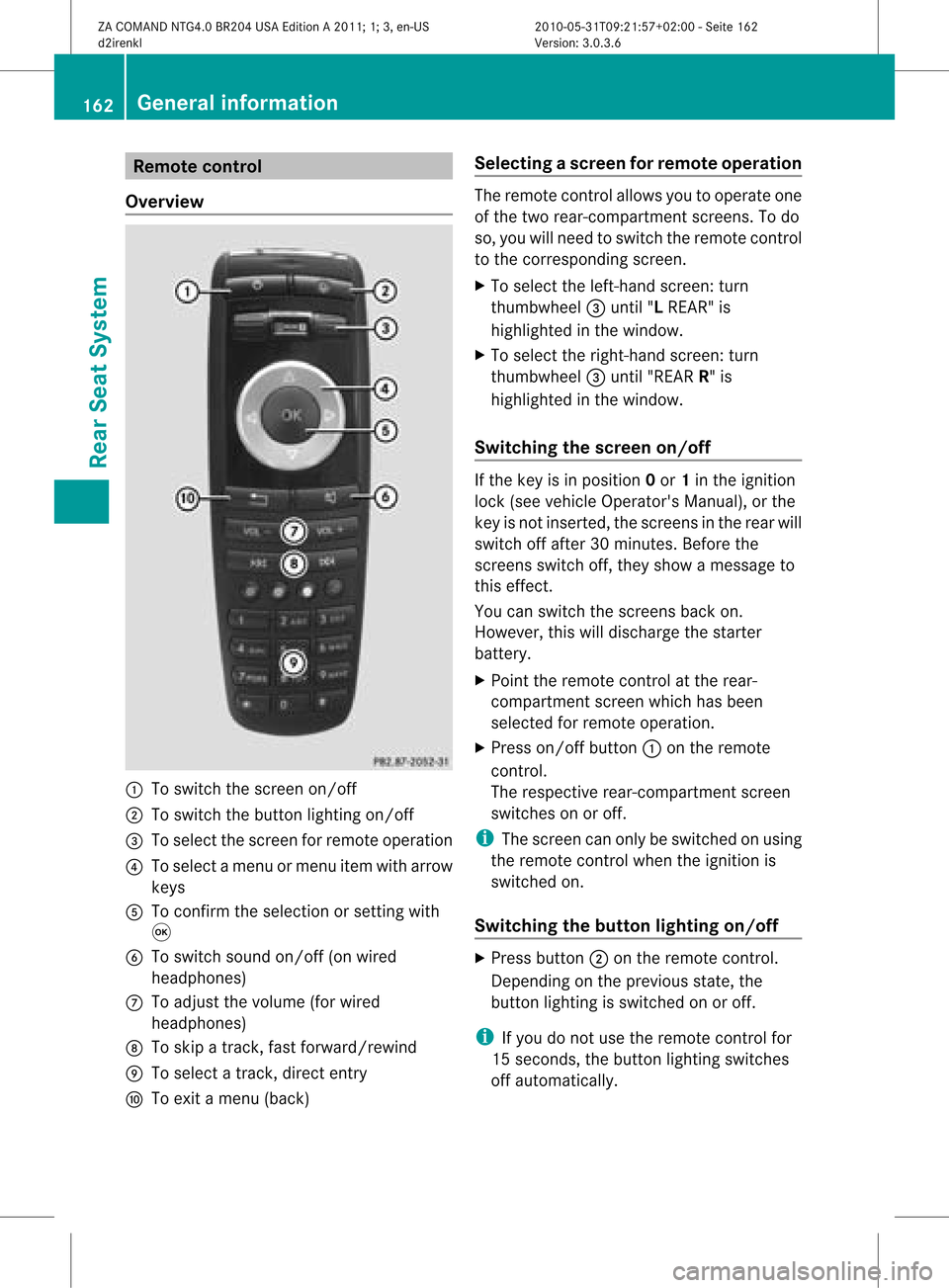
tecontrol
Ove rview :
Toswitch thescre enon/off
; Toswitch thebutton lighti ngon/off
= Toselect the scre enfor remo teope ration
? Toselect amenu ormenu itemwith arr ow
key s
A Toconfi rmthe selectio nor setti ngwith
9
B Toswitch soundon/off (onwired
hea dphone s)
C Toadjust thevolume (forw ired
headphon es)
D Toskip atrack ,fast forward/r ewind
E Toselec ta track ,direc tent ry
F Toexit amen u(back ) Selecting
ascree nfor rem oteoper ation The
remoteco ntrol allows youtooper ateone
of thetwo rear-comp artmen tsc ree ns.To do
so, you willneed toswit chtherem oteco ntrol
to theco rrespo nding scree n.
X To sele cttheleft -hand scree n:tur n
th umbwh eel=until"L REA R"is
high light edinthewin dow.
X To sele cttherig ht-hand scree n:tur n
th umbwh eel=until"REA RR" is
high light edinthewin dow.
Swit chingth escr een on/off If
th eke yis in posi tion 0or 1in theign ition
loc k(see vehicle Operator's Manual),or the
key isnot inserted, thescreens inthe rear will
switch offafter 30minutes. Beforethe
screens switchoff,they show amessage to
this effect.
You canswitch thescreens backon.
However, thiswilldischarge thestarter
battery.
X Point theremote controlatthe rear-
compartment screenwhichhasbeen
selected forremote operation.
X Press on/off button:onthe remote
cont rol.
The respective rear-compartmen tscreen
switches onoroff.
i The screen canonly beswitched onusing
the remote controlwhen theignition is
switched on.
Switching thebutton lighting on/off X
Press button ;onthe remote control.
Depending onthe previous state,the
button lighting isswitched onoroff.
i Ifyou donot use theremote controlfor
15 seconds, thebutton lighting switches
off automaticall y.162
General
informat ionRearSeatSystem
ZACOMAND NTG4.0BR204USAEdition A2011; 1;3,en-US
d2irenkl Version:3.0.3.6
2010-0
5-31T09 :21:57+02:0 0-Seite 162
Page 166 of 190
Wirel
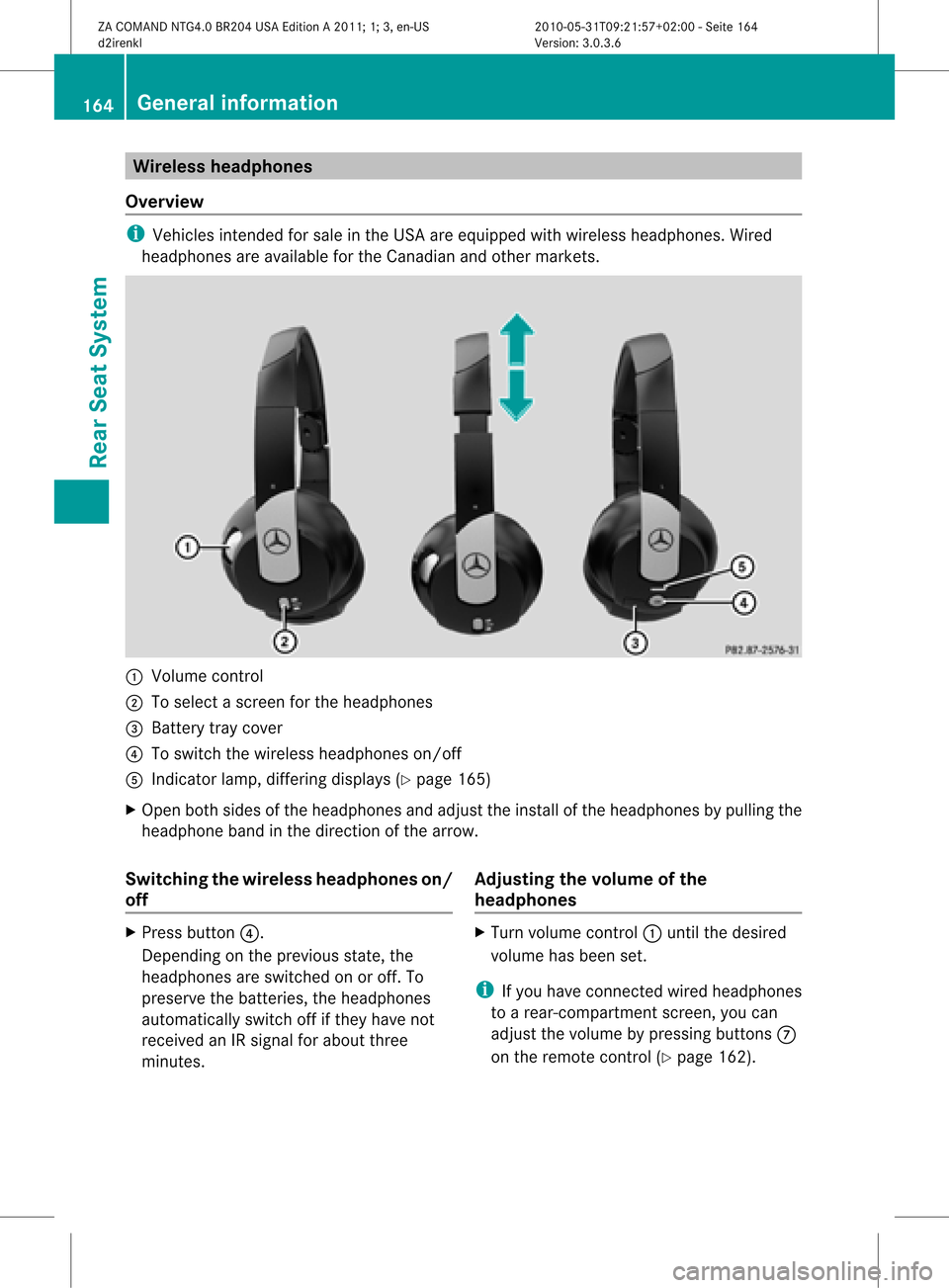
essheadphone s
Ove rview i
Vehi cles intended forsalein the USA areequipped with wireless headpho nes.Wired
hea dpho nesareavailable forthe Canadi anand other markets. :
Volu mecontrol
; Tosele ctascreen forthe headpho nes
= Battery traycover
? Toswi tch the wire less headpho neson/off
A Indica torlamp, diffe ring displays (Y pag e165)
X Open bothsidesof the headpho nesand adju stthe instal lof the headpho nesbypul ling the
hea dpho neband inthe direction ofthe arrow .
Swi tchin gthe wirele ssheadphone son/
off X
Press button ?.
Dependi ngon the previ ousstate, the
hea dpho nesareswitched onoroff. To
prese rvethe batteri es,the headpho nes
au tomatica llyswi tch offifthey have not
receive dan IRsigna lfor abo utthree
minutes . Adjusting
thevolume ofthe
headphone s X
Turn volumecontrol :until thedesi red
volu mehas been set.
i Ifyou have connected wiredhea dpho nes
to arear-comp artmentscreen,youcan
adju stthe volu mebypress ingbuttons C
on the remote control(Ypag e162). 164
Gene
ralinfo rmat ionRear SeatSystem
ZACOMAND NTG4.0BR204USAEdition A2011; 1;3,en-US
d2ire nkl Version:3.0.3.6
<003000230024002300250023002000250035002400490023002C002D00300024
002D00200034003300230030002D00230023V
-Seite 164
Page 167 of 190

Selec
tingascree nfor thehea dphones X
Mov epush slider; toL(lef t-han dsc ree n)
or R(rig ht-hand scree n).
Ind icat orlam p,dis pla ys The
color oftheind icat orlamp shows
whet hertheheadp honesare swit ched on or
off and indicat esthech arge levelof the
bat teries inserted. Disp
lay St
ate Gree
n The
headp honesare swit ched
on and thebat teries arefully
ch arge d. Red The
headp honesare swit ched
on and thebat teries are
almo stdisc harg ed. No
disp lay
(dar k) The
headp honesare swit ched
off orthebat teries are
disc harg ed,incorrect lyor not
ins erted. Connect
ingaddit iona lhea dphones You
canconn ecta na ddition alset ofwired
headphones toeach rear-compart ment
scre en(Ypage 161).The jack isfor
headphones with⅛"ster eojack plugs andan
impedanc eof 32 ohms. Rear
-comp artm ent socket
On vehicles withtheRear SeatEntert ainmen t
Syst em, thereis asock etinthe rear
compart mentonthe centercon sole.
The sock etcan beused foraccess orieswith
a maximum powerconsumption of180 W. :
Soc ket
X Lift upthe cover ofsock et:. Changing
thebatt eries
Bot hthe remot econ troland thetwo sets of
wireless headphones requirebatteries. G
War
ning!
Keep thebatt eries outofthe reach of
children .Consult adoctor immediately ifa
child should swallow abattery.
Do not dismantle, short-circuit orburn a
battery. H
Environmental
note
Dispose ofdischarged batteriesinan
environ mentallyresponsible manner. General
information
165RearSeatSystem
ZACOMAND NTG4.0BR204USAEdition A2011; 1;3,en-US
d2irenkl Version:3.0.3.6
2010-
05-31T09: 21:57+02: 00-Seite 165 Z
Page 168 of 190

In
therem otecont rol :
Battery tray
; Lug
= Battery compar tmentco ver
? Retaini nglugs
A Batteries
The remoteco ntrol contains 2typ eAA A
1. 5V bat teries .
X To open thebat terycomp artm ent :
rem ove battery compar tmentco ver =on
th ebac kof therem oteco ntrol .
X To do so, presslug ;down wards andtake
off battery compar tmentco ver =.
X Remo vedisc harg edbat teries Afrom the
co mpar tment. X
Inser tnew batter ies.Observe thepolarity
markin gon the batter iesand inthe batter y
compart mentwhen doing so.
Left -hand battery:the positive pole(+)
must faceupwards.
Right-h andbatter y:the positive pole(+)
must facedownwards.
X To close thebatt erycompa rtment: first
place batter ycompart mentcover =into
the batter ycompart mentwithretain ing
lugs ?and allow lug;toclip intoplace.
In the wireless headphones The
batter ycompart mentcover islocated on
the left headphone. :
Batt erycompart mentcover
The wireless headphones contain 2type AAA
1. 5V bat terie s.
X To ope nth ebat tery com partme nt:fo ld
th ebat tery compar tmentco ver :
upwar ds.Whe ndoing so,hold theleft
headphone asshown toprevent the
insert edbatteries fromfalling out.
X Remove thedischarged batteriesfromthe
compart ment.
X Insert newbatteries. Observethepolarity
marking onthe batteries andinthe battery
compart mentwhen doing so.
Left- hand battery: thepositive pole(+)
must faceupwards. 166
General
informationRearSeatSystem
ZACOMAND NTG4.0BR204USAEdition A2011; 1;3,en-US
d2irenk lV ersion:3.0.3.6
2010
-05-31T09 :21:57+0 2:00-Seite 166