automatic MERCEDES-BENZ C-Class 2011 W204 Owner's Guide
[x] Cancel search | Manufacturer: MERCEDES-BENZ, Model Year: 2011, Model line: C-Class, Model: MERCEDES-BENZ C-Class 2011 W204Pages: 320, PDF Size: 13.17 MB
Page 80 of 320
Unsecured or improperly positioned cargo
increases a child's risk of injury in the event
of
Rstrong braking maneuvers
Rsudden changes of direction
Ran accident
Unlocking and opening doors from
the inside
You can open a door from inside the vehicle
even if it has been locked, unless the child-
proof locks have been activated (Y page 60).
Only open the door if traffic conditions allow
you to do so.
If the vehicle has previously been locked with
the SmartKey or with KEYLESS-GO, opening
a door from the inside will trigger the anti-
theft alarm system. Switch off the alarm
(Y page 67).
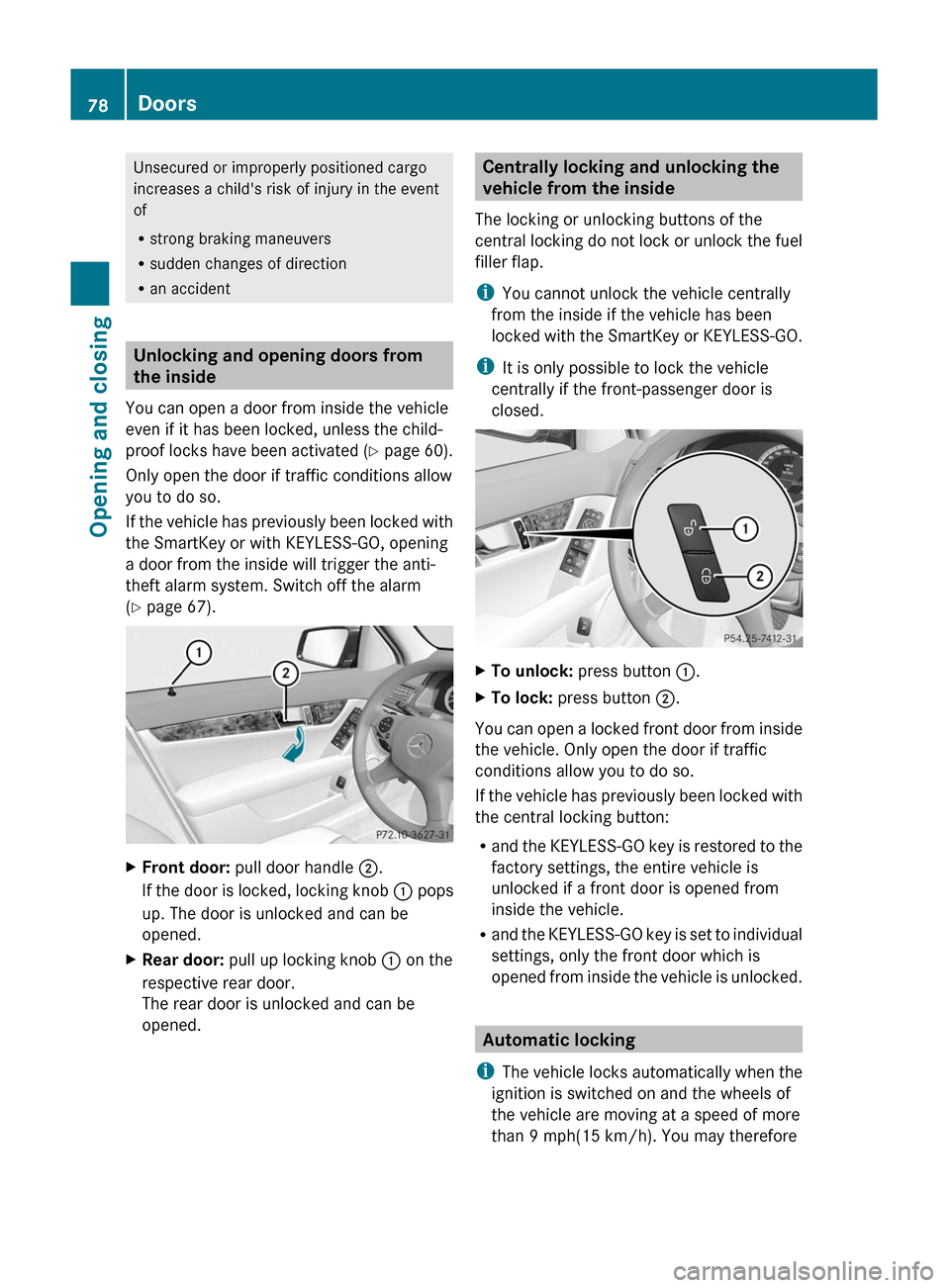
XFront door: pull door handle ;.
If the door is locked, locking knob : pops
up. The door is unlocked and can be
opened.
XRear door: pull up locking knob : on the
respective rear door.
The rear door is unlocked and can be
opened.
Centrally locking and unlocking the
vehicle from the inside
The locking or unlocking buttons of the
central locking do not lock or unlock the fuel
filler flap.
iYou cannot unlock the vehicle centrally
from the inside if the vehicle has been
locked with the SmartKey or KEYLESS-GO.
iIt is only possible to lock the vehicle
centrally if the front-passenger door is
closed.
XTo unlock: press button :.XTo lock: press button ;.
You can open a locked front door from inside
the vehicle. Only open the door if traffic
conditions allow you to do so.
If the vehicle has previously been locked with
the central locking button:
Rand the KEYLESS-GO key is restored to the
factory settings, the entire vehicle is
unlocked if a front door is opened from
inside the vehicle.
Rand the KEYLESS-GO key is set to individual
settings, only the front door which is
opened from inside the vehicle is unlocked.
Automatic locking
iThe vehicle locks automatically when the
ignition is switched on and the wheels of
the vehicle are moving at a speed of more
than 9 mph(15 km/h). You may therefore
78DoorsOpening and closing
BA 204 USA, CA Edition A 2011; 1; 5, en-UShereepeVersion: 3.0.3.62010-05-20T09:17:30+02:00 - Seite 78
Page 81 of 320
lock yourself out if the vehicle is being
pushed, towed, or located on a test rig.
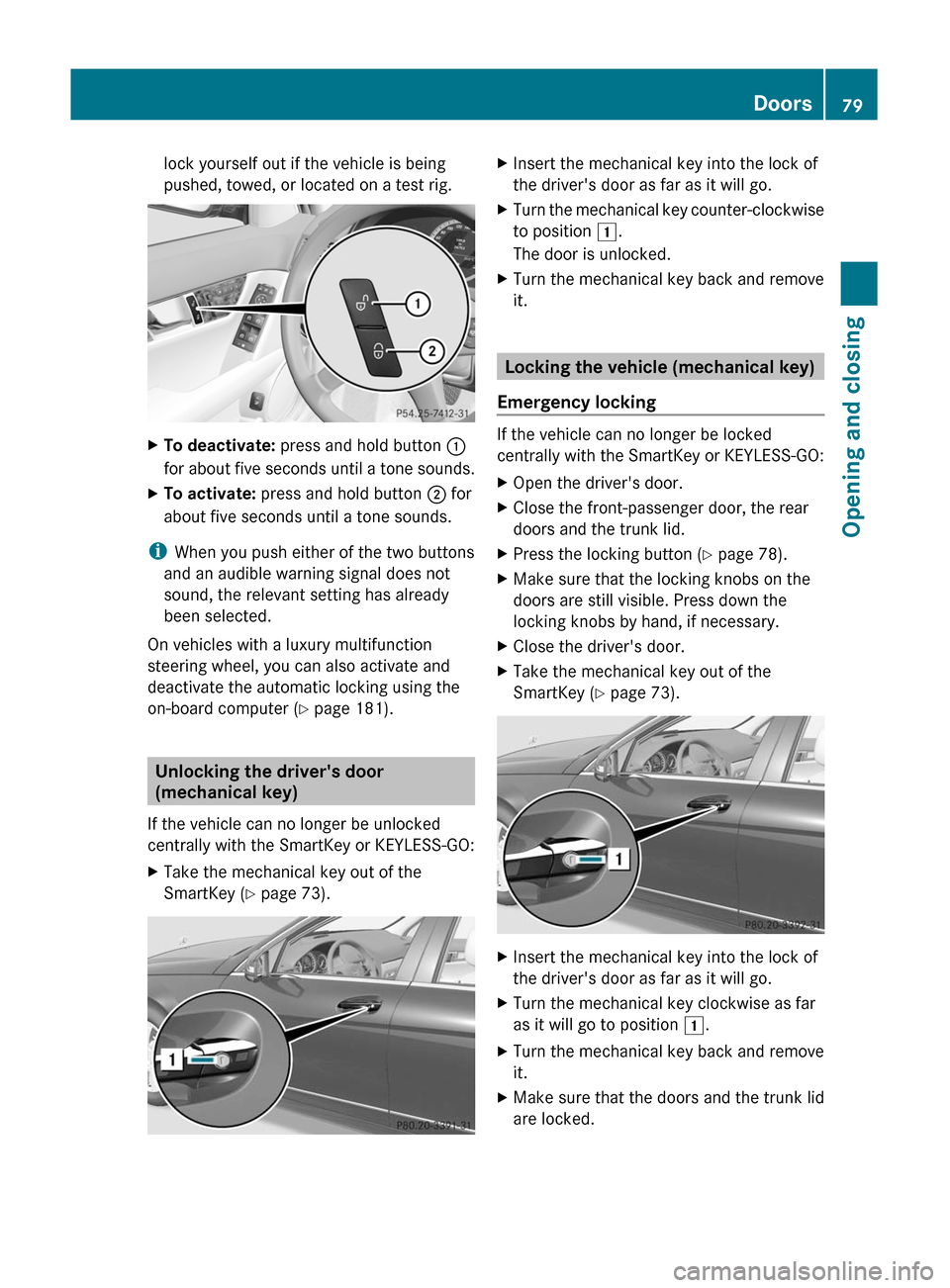
XTo deactivate: press and hold button :
for about five seconds until a tone sounds.
XTo activate: press and hold button ; for
about five seconds until a tone sounds.
iWhen you push either of the two buttons
and an audible warning signal does not
sound, the relevant setting has already
been selected.
On vehicles with a luxury multifunction
steering wheel, you can also activate and
deactivate the automatic locking using the
on-board computer (Y page 181).
Unlocking the driver's door
(mechanical key)
If the vehicle can no longer be unlocked
centrally with the SmartKey or KEYLESS-GO:
XTake the mechanical key out of the
SmartKey (Y page 73).
XInsert the mechanical key into the lock of
the driver's door as far as it will go.
XTurn the mechanical key counter-clockwise
to position 1.
The door is unlocked.
XTurn the mechanical key back and remove
it.
Locking the vehicle (mechanical key)
Emergency locking
If the vehicle can no longer be locked
centrally with the SmartKey or KEYLESS-GO:
XOpen the driver's door.XClose the front-passenger door, the rear
doors and the trunk lid.
XPress the locking button (Y page 78).XMake sure that the locking knobs on the
doors are still visible. Press down the
locking knobs by hand, if necessary.
XClose the driver's door.XTake the mechanical key out of the
SmartKey (Y page 73).
XInsert the mechanical key into the lock of
the driver's door as far as it will go.
XTurn the mechanical key clockwise as far
as it will go to position 1.
XTurn the mechanical key back and remove
it.
XMake sure that the doors and the trunk lid
are locked.
Doors79Opening and closingBA 204 USA, CA Edition A 2011; 1; 5, en-UShereepeVersion: 3.0.3.62010-05-20T09:17:30+02:00 - Seite 79Z
Page 82 of 320
iIf you lock the vehicle as described above,
the fuel filler flap is not locked. The anti-
theft alarm system is not activated.
Trunk
Important safety notes
Do not leave the SmartKey in the trunk. You
could otherwise lock yourself out.
GWarning
When leaving the vehicle, always remove the
SmartKey from the ignition lock. Always take
the SmartKey with you and lock the vehicle.
Do not leave children unsupervised in the
vehicle, even if they are secured in a child
restraint system, and do not give them access
to an unlocked vehicle. A child's unsupervised
access to a vehicle could result in an accident
and/or serious personal injury. They could:
R injure themselves on vehicle parts
R be seriously or fatally injured by extreme
heat or cold
R injure themselves or have an accident with
vehicle equipment that may still be in
operation even after the SmartKey has
been removed from the ignition, such as the
seat adjustment, steering wheel
adjustment or memory function.
If children open a door, they could cause
severe or even fatal injury to other persons; if
they get out of the vehicle, they could injure
themselves when doing so or be seriously or
even fatally injured by any passing traffic.
Do not expose the child restraint system to
direct sunlight. The child restraint system's
metal parts, for example, could become very
hot, and a child could be burned on these
parts.
GWarning!
Do not carry heavy or hard objects in the
passenger compartment or trunk unless they
are firmly secured in place.
Unsecured or improperly positioned cargo
increases a child's risk of injury in the event
of
R strong braking maneuvers
R sudden changes of direction
R an accidentGWarning
Make sure the trunk lid is closed when the
engine is running and while driving. Among
other dangers, deadly carbon monoxide (CO)
gases may enter the vehicle interior resulting
in unconsciousness and death.
! The trunk lid swings upwards when
opened. Therefore, make sure that there is
sufficient clearance above the trunk lid.
For the trunk lid to be opened fully, there must
be a minimum clearance from floor to ceiling
of 5.90 ft (1.80 m).
The trunk lid can be:
R opened and closed manually from outside
R opened automatically from outside
Opening and closing manually
Opening
You can only open the trunk lid after
unlocking it first.
You can only unlock the trunk lid when the
vehicle is stationary.
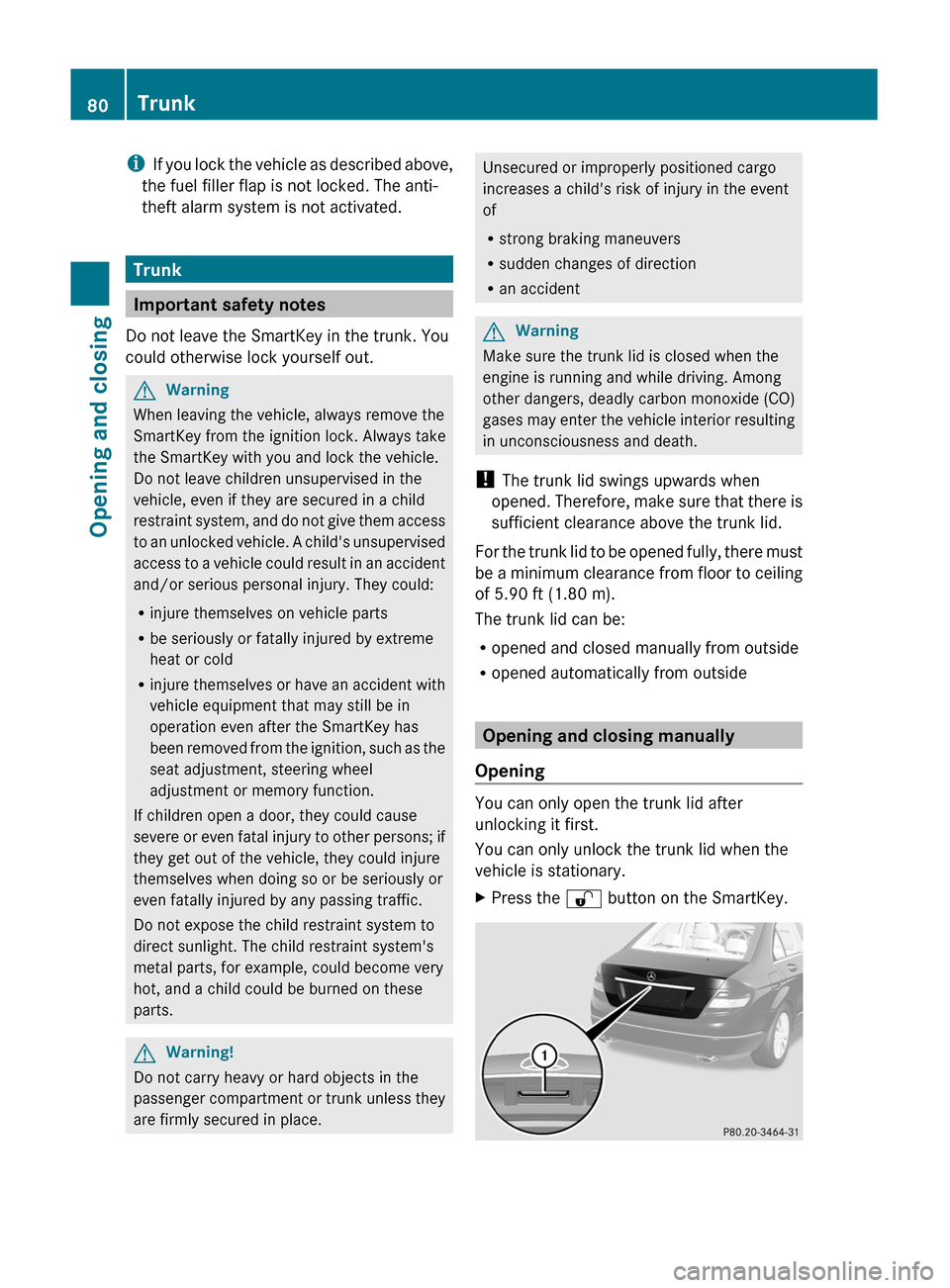
XPress the % button on the SmartKey.80TrunkOpening and closing
BA 204 USA, CA Edition A 2011; 1; 5, en-UShereepeVersion: 3.0.3.62010-05-20T09:17:30+02:00 - Seite 80
Page 83 of 320
XPull handle :.XRaise the trunk lid.
Closing
GWarning
To prevent possible personal injury, always
keep hands and fingers away from the trunk
opening when closing the trunk lid. Be
especially careful when small children are
around.
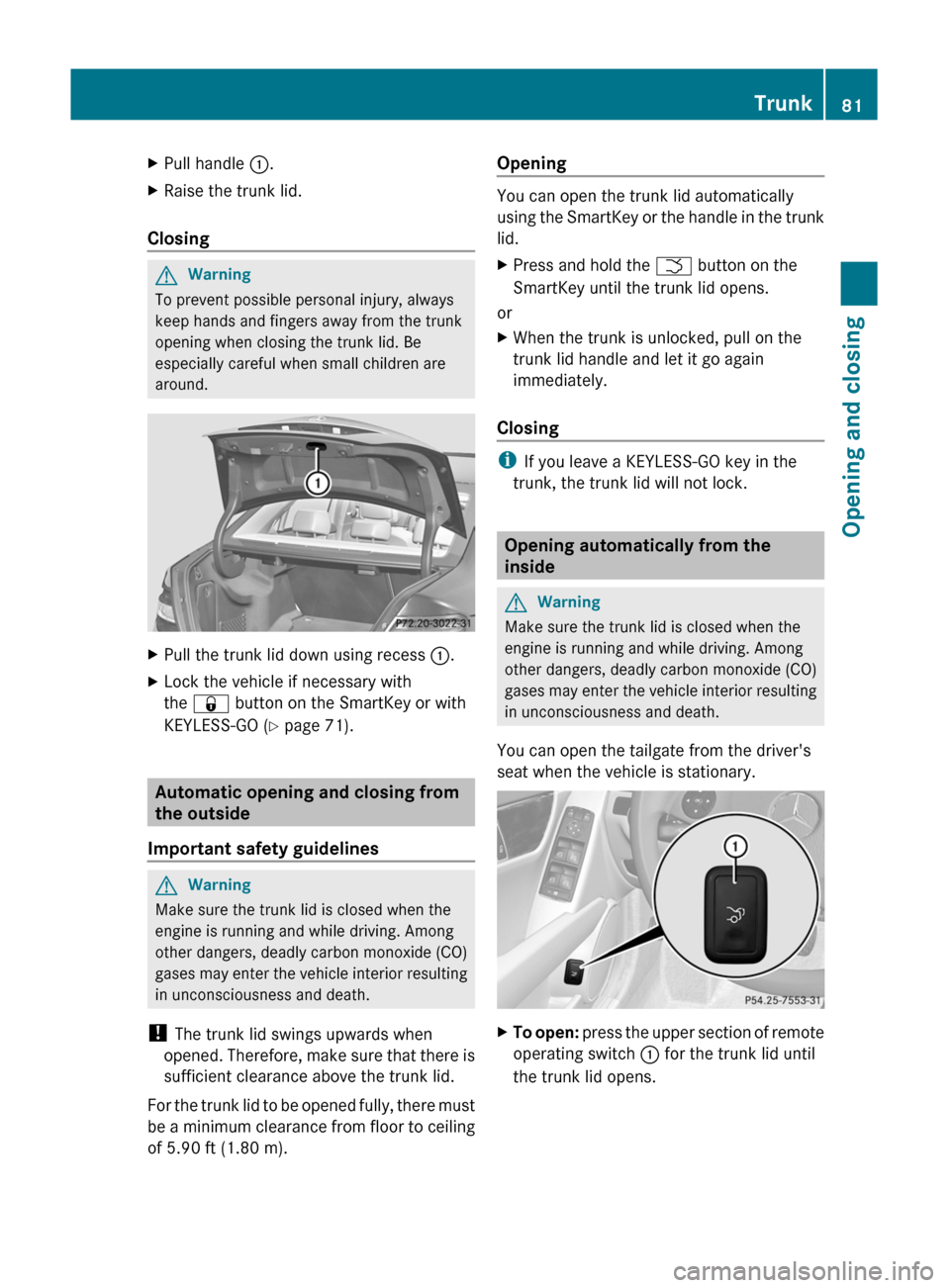
XPull the trunk lid down using recess :.XLock the vehicle if necessary with
the & button on the SmartKey or with
KEYLESS-GO ( Y page 71).
Automatic opening and closing from
the outside
Important safety guidelines
GWarning
Make sure the trunk lid is closed when the
engine is running and while driving. Among
other dangers, deadly carbon monoxide (CO)
gases may enter the vehicle interior resulting
in unconsciousness and death.
! The trunk lid swings upwards when
opened. Therefore, make sure that there is
sufficient clearance above the trunk lid.
For the trunk lid to be opened fully, there must
be a minimum clearance from floor to ceiling
of 5.90 ft (1.80 m).
Opening
You can open the trunk lid automatically
using the SmartKey or the handle in the trunk
lid.
XPress and hold the F button on the
SmartKey until the trunk lid opens.
or
XWhen the trunk is unlocked, pull on the
trunk lid handle and let it go again
immediately.
Closing
i If you leave a KEYLESS-GO key in the
trunk, the trunk lid will not lock.
Opening automatically from the
inside
GWarning
Make sure the trunk lid is closed when the
engine is running and while driving. Among
other dangers, deadly carbon monoxide (CO)
gases may enter the vehicle interior resulting
in unconsciousness and death.
You can open the tailgate from the driver's
seat when the vehicle is stationary.
XTo open: press the upper section of remote
operating switch : for the trunk lid until
the trunk lid opens.Trunk81Opening and closingBA 204 USA, CA Edition A 2011; 1; 5, en-UShereepeVersion: 3.0.3.62010-05-20T09:17:30+02:00 - Seite 81Z
Page 85 of 320
Side windows
Important safety notes
GWarning!
When leaving the vehicle, always remove the
SmartKey from the starter switch. Always
take the SmartKey with you and lock the
vehicle. Do not leave children unattended in
the vehicle, even if they are secured in a child
restraint system, or with access to an
unlocked vehicle. A child's unsupervised
access to a vehicle could result in an accident
and/or serious personal injury. The children
could
R injure themselves on parts of the vehicle
R be seriously or fatally injured through
excessive exposure to extreme heat or cold
R injure themselves or cause an accident with
vehicle equipment that can be operated
even if the SmartKey is removed from the
starter switch or removed from the vehicle,
such as seat adjustment, steering wheel
adjustment, or the memory function
If children open a door, they could injure other
persons or get out of the vehicle and injure
themselves or be injured by following traffic.
Do not expose the child restraint system to
direct sunlight. The child restraint system's
metal parts, for example, could become very
hot, and the child could be burned by these
parts.
GWarning!
Do not carry heavy or hard objects in the
passenger compartment or trunk unless they
are firmly secured in place.
Unsecured or improperly positioned cargo
increases a child's risk of injury in the event
of
R strong braking maneuvers
R sudden changes of direction
R an accident
GWarning!
When opening or closing the door windows,
make sure there is no danger of anyone being
harmed by the opening/closing procedure.
The door windows are equipped with the
automatic operation and anti-entrapment
features. If during automatic operation a door
window encounters an obstruction that
blocks its path, the anti-entrapment feature
will stop the door window and open it slightly.
The door windows operate differently when
the switch is pulled and held. See the section
about the side windows for details.
The closing of the door windows can be
immediately halted by releasing the switch or,
if the switch was pulled past the resistance
point and released, by either pressing or
pulling the respective switch.
If a door window encounters an obstruction
that blocks its path in a circumstance where
you are closing the door windows by pressing
and holding button & on the SmartKey or
by pressing and holding the sensor surface
(vehicles with KEYLESS-GO) on an outside
door handle, the anti-entrapment feature will
not operate.
Activate the override switch when children
are riding in the back seats of the vehicle. The
children may otherwise injure themselves,
e.g. by becoming trapped in the door window
opening.
GWarning!
Do not keep any part of your body up against
the window pane when opening a window. The
downward motion of the pane may pull that
part of your body down between the window
pane and the door frame and trap it there. If
there is a risk of entrapment, release the
switch and pull it to close the window.
Side windows83Opening and closingBA 204 USA, CA Edition A 2011; 1; 5, en-UShereepeVersion: 3.0.3.62010-05-20T09:17:30+02:00 - Seite 83Z
Page 86 of 320
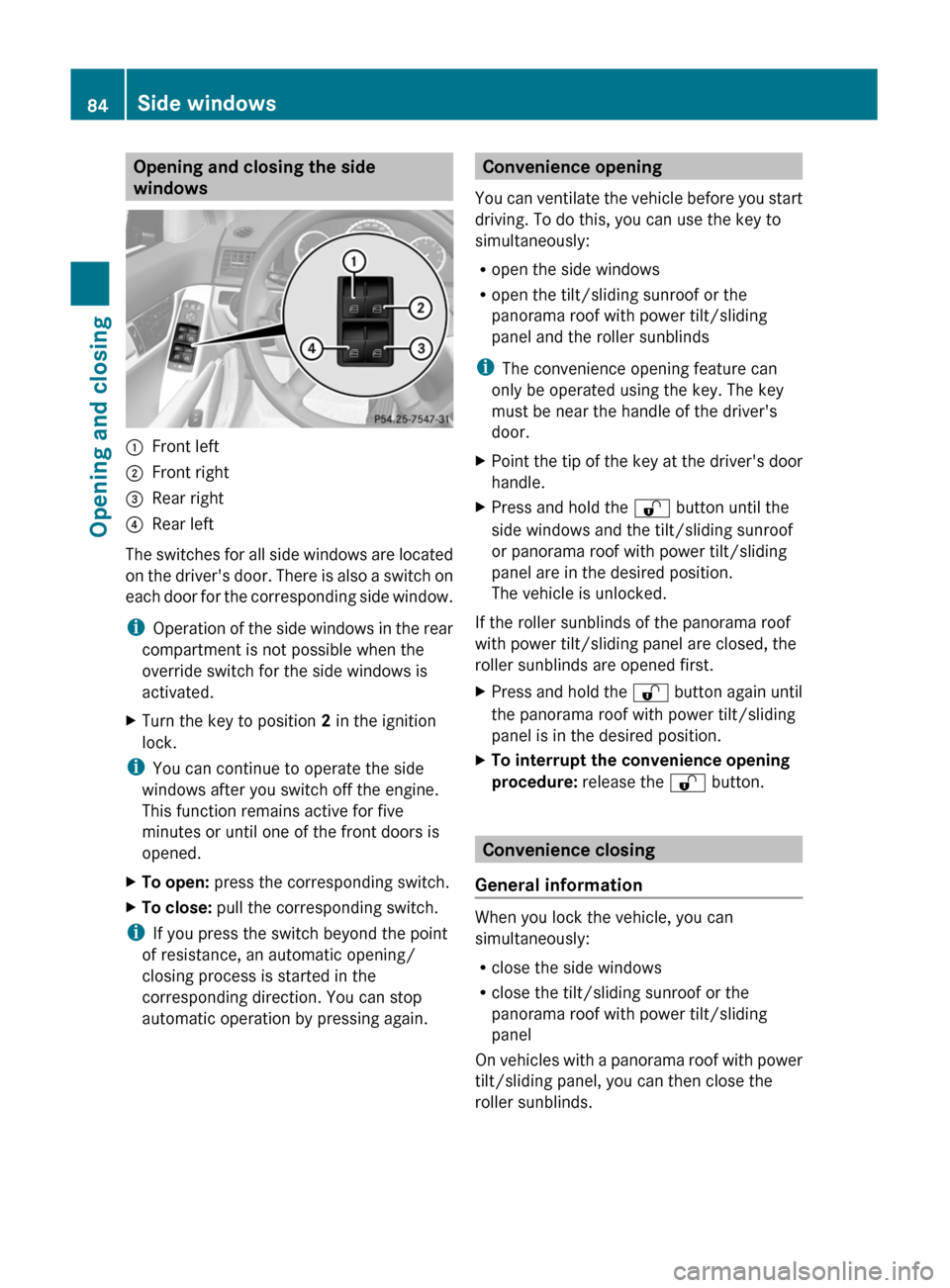
Opening and closing the side
windows:Front left;Front right=Rear right?Rear left
The switches for all side windows are located
on the driver's door. There is also a switch on
each door for the corresponding side window.
i Operation of the side windows in the rear
compartment is not possible when the
override switch for the side windows is
activated.
XTurn the key to position 2 in the ignition
lock.
i You can continue to operate the side
windows after you switch off the engine.
This function remains active for five
minutes or until one of the front doors is
opened.
XTo open: press the corresponding switch.XTo close: pull the corresponding switch.
i
If you press the switch beyond the point
of resistance, an automatic opening/
closing process is started in the
corresponding direction. You can stop
automatic operation by pressing again.
Convenience opening
You can ventilate the vehicle before you start
driving. To do this, you can use the key to
simultaneously:
R open the side windows
R open the tilt/sliding sunroof or the
panorama roof with power tilt/sliding
panel and the roller sunblinds
i The convenience opening feature can
only be operated using the key. The key
must be near the handle of the driver's
door.XPoint the tip of the key at the driver's door
handle.XPress and hold the % button until the
side windows and the tilt/sliding sunroof
or panorama roof with power tilt/sliding
panel are in the desired position.
The vehicle is unlocked.
If the roller sunblinds of the panorama roof
with power tilt/sliding panel are closed, the
roller sunblinds are opened first.
XPress and hold the % button again until
the panorama roof with power tilt/sliding
panel is in the desired position.XTo interrupt the convenience opening
procedure: release the % button.
Convenience closing
General information
When you lock the vehicle, you can
simultaneously:
R close the side windows
R close the tilt/sliding sunroof or the
panorama roof with power tilt/sliding
panel
On vehicles with a panorama roof with power
tilt/sliding panel, you can then close the
roller sunblinds.
84Side windowsOpening and closing
BA 204 USA, CA Edition A 2011; 1; 5, en-UShereepeVersion: 3.0.3.62010-05-20T09:17:30+02:00 - Seite 84
Page 89 of 320
hot, and the child could be burned by these
parts.GWarning!
Do not carry heavy or hard objects in the
passenger compartment or trunk unless they
are firmly secured in place.
Unsecured or improperly positioned cargo
increases a child's risk of injury in the event
of
R strong braking maneuvers
R sudden changes of direction
R an accident
GWarning!
When opening or closing the tilt/sliding
sunroof, make sure there is no danger of
anyone being harmed by the opening/closing
procedure.
The tilt/sliding sunroof is equipped with the
automatic operation and anti-entrapment
features. If the movement of the tilt/sliding
sunroof is blocked during the closing
procedure, the tilt/sliding sunroof will stop
and open slightly.
The tilt/sliding sunroof operates differently
when the sunroof switch is pressed and held.
See the section about problems with the
sliding sunroof for details.
The opening/closing procedure of the tilt/
sliding sunroof can be immediately halted by
releasing the sunroof switch or, if the sunroof
switch was moved past the resistance point
and released, by moving the sunroof switch in
any direction.
GWarning!
The tilt/sliding sunroof is made out of glass.
In the event of an accident, the glass may
shatter. This may result in an opening in the
roof.
In a vehicle rollover, occupants not wearing
their seat belts or not wearing them properly
may be thrown out of the opening. Such an
opening also presents a potential for injury for
occupants wearing their seat belts properly as
entire body parts or portions of them may
protrude from the passenger compartment.GWarning!
When opening or closing the tilt/sliding panel,
make sure there is no danger of anyone being
harmed by the opening/closing procedure.
The tilt/sliding panel is equipped with the
automatic operation and anti-entrapment
features. If the movement of the tilt/sliding
panel is blocked during the closing procedure,
the tilt/sliding panel will stop and open
slightly.
The tilt/sliding panel operates differently
when the roof panel switch is pressed and
held. See the relevant section in this chapter
for details.
The opening/closing procedure of the tilt/
sliding panel can be immediately halted by
releasing the roof panel switch or, if the roof
panel switch was moved past the resistance
point and released, by moving the roof panel
switch in any direction.
GWarning!
The panorama roof with tilt/sliding panel is
made out of glass. In the event of an accident,
the glass may shatter. This may result in an
opening in the roof.
In a vehicle rollover, occupants not wearing
their seat belts or not wearing them properly
may be thrown out of the opening. Such an
opening also presents a potential for injury for
occupants wearing their seat belts properly as
entire body parts or portions of them may
protrude from the passenger compartment.
! Only open the sliding sunroof if it is free
of snow and ice. Otherwise, malfunctions
may occur.
Do not allow anything to protrude from the
sliding sunroof. Otherwise, the seals could
be damaged.
! If the sliding sunroof cannot be opened or
closed due to a malfunction, contact a
Sliding sunroof87Opening and closingBA 204 USA, CA Edition A 2011; 1; 5, en-UShereepeVersion: 3.0.3.62010-05-20T09:17:30+02:00 - Seite 87Z
Page 90 of 320
qualified specialist workshop, e.g. an
authorized Mercedes-Benz Center.
! Do not forget that the weather can
change abruptly. Make certain that the
sliding sunroof is closed when you leave the
vehicle. The vehicle electronics can be
damaged if water enters the vehicle
interior.
i Resonance noises can occur in addition
to the usual airflow noises when the sliding
sunroof is open. They are caused by minor
pressure fluctuations in the vehicle interior.
Change the position of the sliding sunroof
or open a side window slightly to reduce or
eliminate these noises.
Operating the tilt/sliding sunroof
Opening and closing
i You can still operate the tilt/sliding
sunroof even if you switch off the engine or
remove the SmartKey. This function
remains active for five minutes or until one
of the front doors is opened.
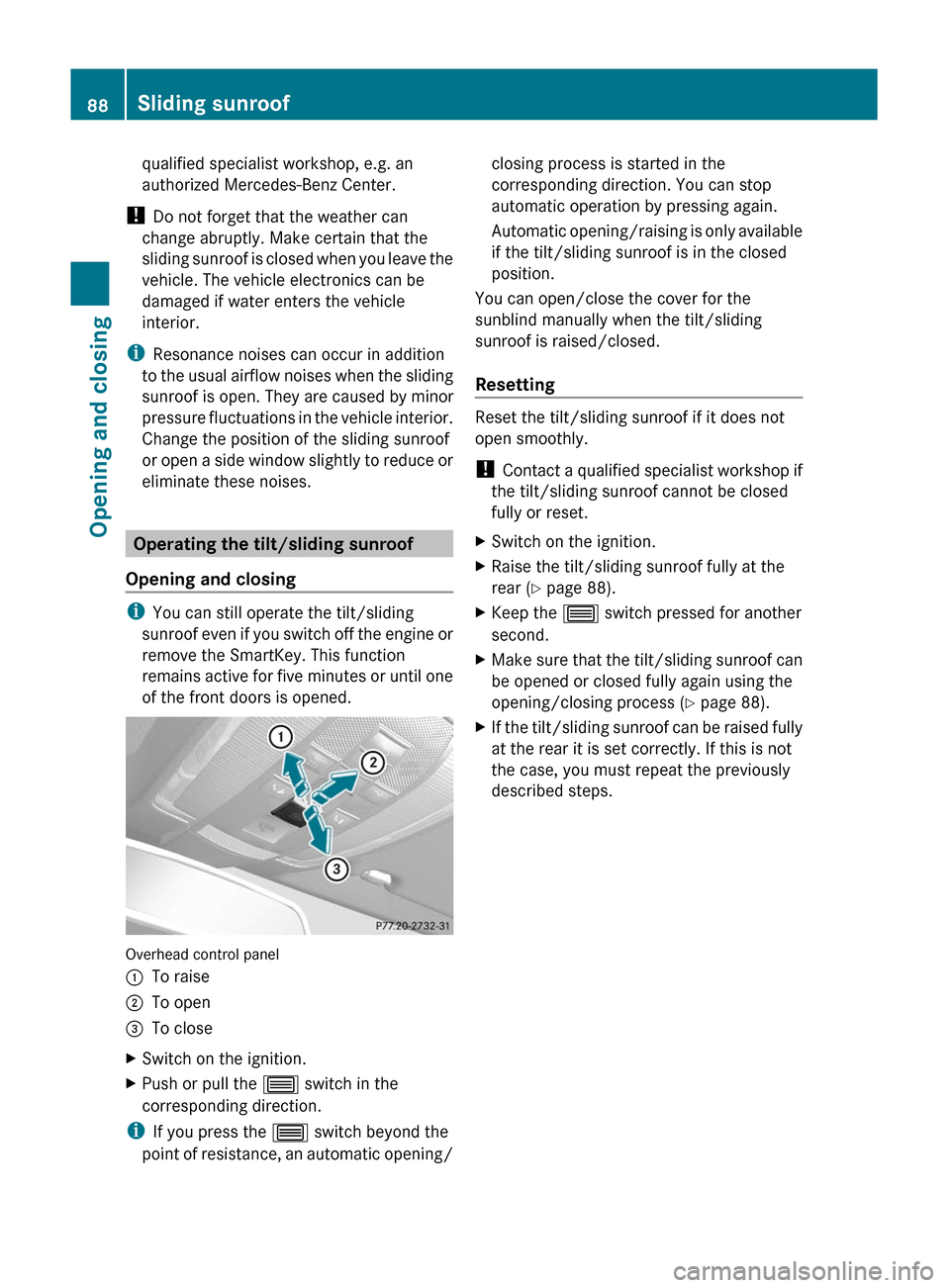
Overhead control panel
:To raise;To open=To closeXSwitch on the ignition.XPush or pull the 3 switch in the
corresponding direction.
i If you press the 3 switch beyond the
point of resistance, an automatic opening/
closing process is started in the
corresponding direction. You can stop
automatic operation by pressing again.
Automatic opening/raising is only available
if the tilt/sliding sunroof is in the closed
position.
You can open/close the cover for the
sunblind manually when the tilt/sliding
sunroof is raised/closed.
Resetting
Reset the tilt/sliding sunroof if it does not
open smoothly.
! Contact a qualified specialist workshop if
the tilt/sliding sunroof cannot be closed
fully or reset.
XSwitch on the ignition.XRaise the tilt/sliding sunroof fully at the
rear ( Y page 88).XKeep the 3 switch pressed for another
second.XMake sure that the tilt/sliding sunroof can
be opened or closed fully again using the
opening/closing process ( Y page 88).XIf the tilt/sliding sunroof can be raised fully
at the rear it is set correctly. If this is not
the case, you must repeat the previously
described steps.88Sliding sunroofOpening and closing
BA 204 USA, CA Edition A 2011; 1; 5, en-UShereepeVersion: 3.0.3.62010-05-20T09:17:30+02:00 - Seite 88
Page 91 of 320
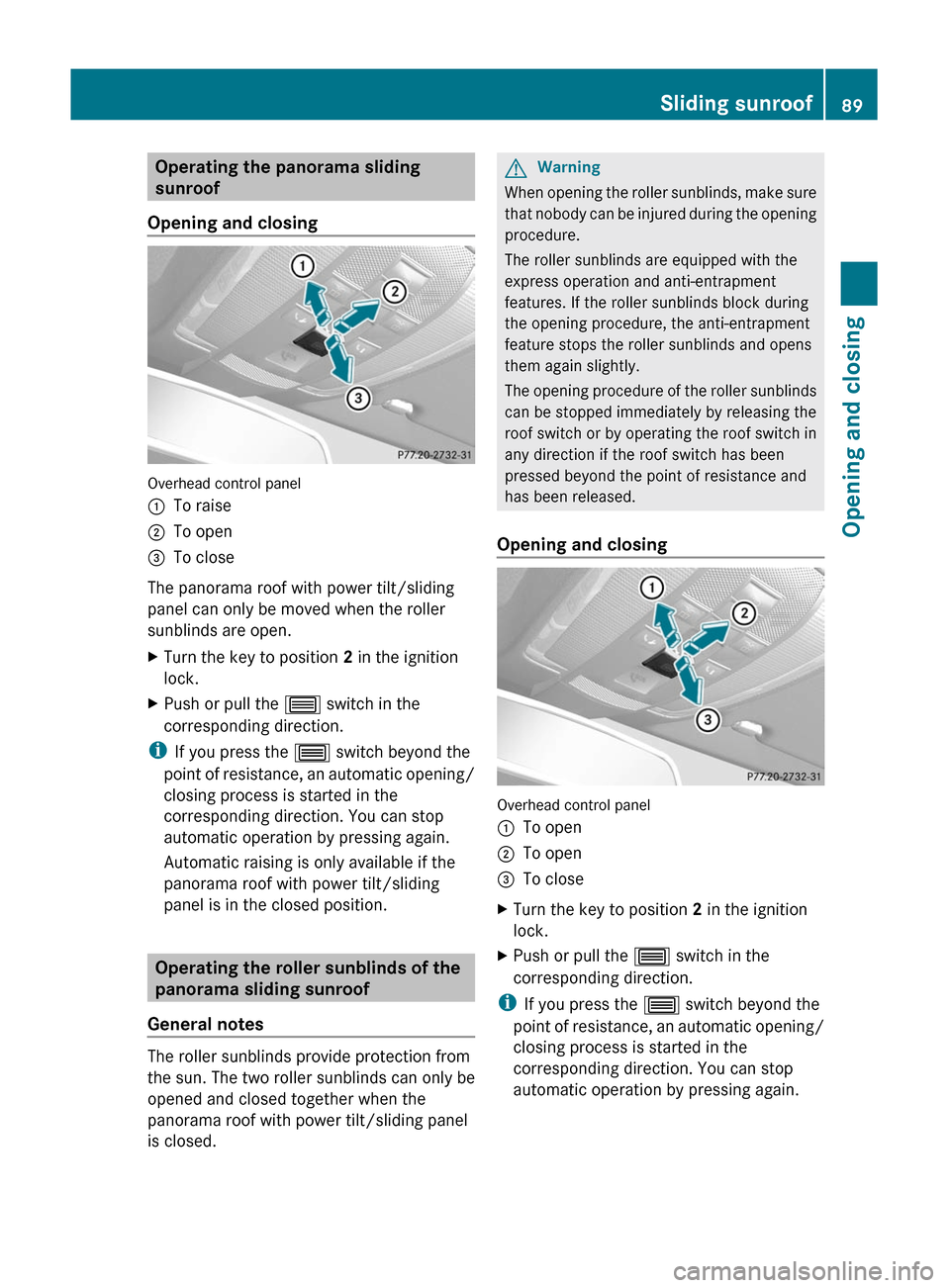
Operating the panorama sliding
sunroof
Opening and closing
Overhead control panel
:To raise;To open=To close
The panorama roof with power tilt/sliding
panel can only be moved when the roller
sunblinds are open.
XTurn the key to position 2 in the ignition
lock.XPush or pull the 3 switch in the
corresponding direction.
i If you press the 3 switch beyond the
point of resistance, an automatic opening/
closing process is started in the
corresponding direction. You can stop
automatic operation by pressing again.
Automatic raising is only available if the
panorama roof with power tilt/sliding
panel is in the closed position.
Operating the roller sunblinds of the
panorama sliding sunroof
General notes
The roller sunblinds provide protection from
the sun. The two roller sunblinds can only be
opened and closed together when the
panorama roof with power tilt/sliding panel
is closed.
GWarning
When opening the roller sunblinds, make sure
that nobody can be injured during the opening
procedure.
The roller sunblinds are equipped with the
express operation and anti-entrapment
features. If the roller sunblinds block during
the opening procedure, the anti-entrapment
feature stops the roller sunblinds and opens
them again slightly.
The opening procedure of the roller sunblinds
can be stopped immediately by releasing the
roof switch or by operating the roof switch in
any direction if the roof switch has been
pressed beyond the point of resistance and
has been released.
Opening and closing
Overhead control panel
:To open;To open=To closeXTurn the key to position 2 in the ignition
lock.XPush or pull the 3 switch in the
corresponding direction.
i If you press the 3 switch beyond the
point of resistance, an automatic opening/
closing process is started in the
corresponding direction. You can stop
automatic operation by pressing again.
Sliding sunroof89Opening and closingBA 204 USA, CA Edition A 2011; 1; 5, en-UShereepeVersion: 3.0.3.62010-05-20T09:17:30+02:00 - Seite 89Z
Page 99 of 320
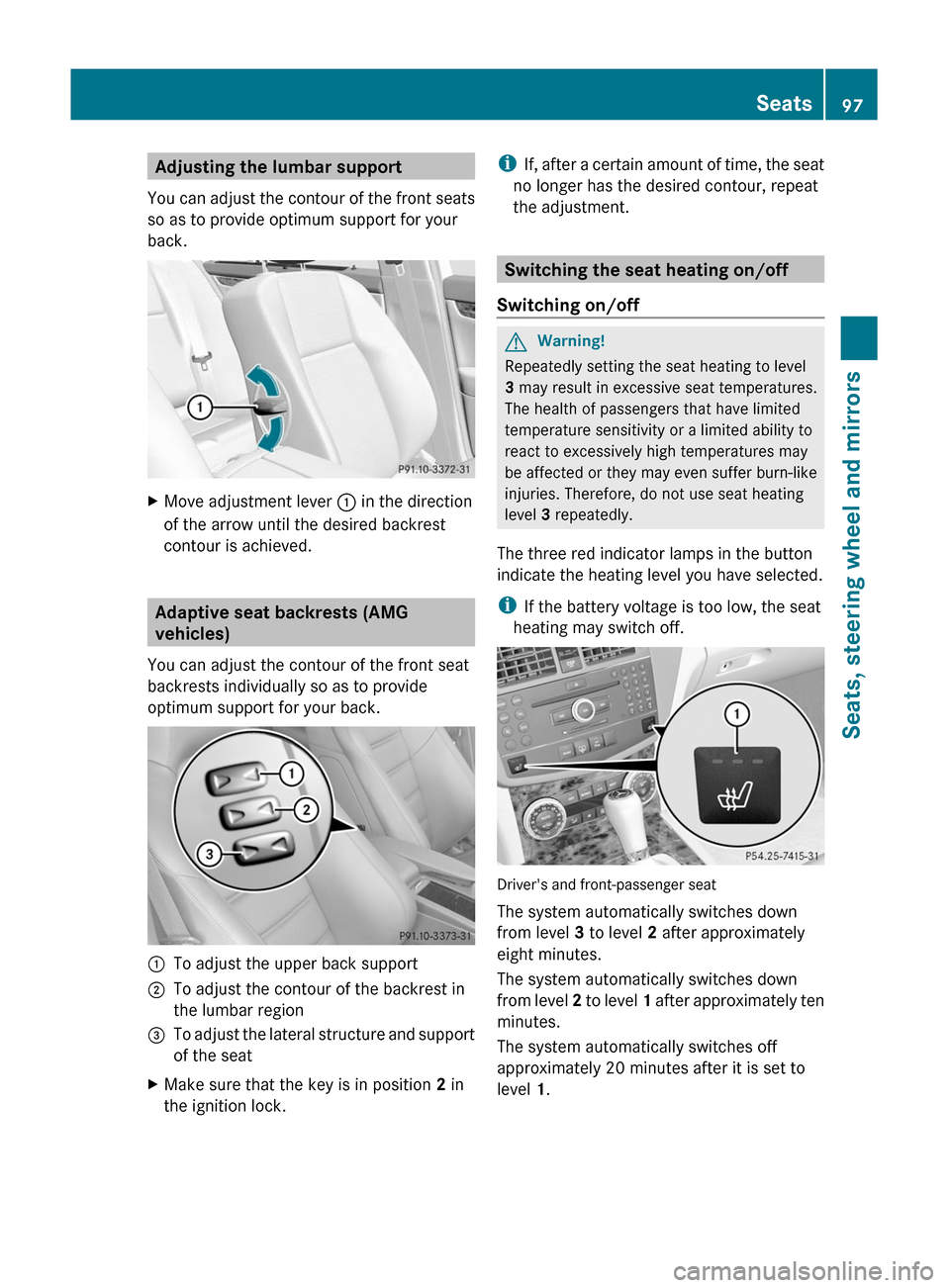
Adjusting the lumbar support
You can adjust the contour of the front seats
so as to provide optimum support for your
back.
XMove adjustment lever : in the direction
of the arrow until the desired backrest
contour is achieved.
Adaptive seat backrests (AMG
vehicles)
You can adjust the contour of the front seat
backrests individually so as to provide
optimum support for your back.
:To adjust the upper back support;To adjust the contour of the backrest in
the lumbar region
=To adjust the lateral structure and support
of the seat
XMake sure that the key is in position 2 in
the ignition lock.
iIf, after a certain amount of time, the seat
no longer has the desired contour, repeat
the adjustment.
Switching the seat heating on/off
Switching on/off
GWarning!
Repeatedly setting the seat heating to level
3 may result in excessive seat temperatures.
The health of passengers that have limited
temperature sensitivity or a limited ability to
react to excessively high temperatures may
be affected or they may even suffer burn-like
injuries. Therefore, do not use seat heating
level 3 repeatedly.
The three red indicator lamps in the button
indicate the heating level you have selected.
iIf the battery voltage is too low, the seat
heating may switch off.
Driver's and front-passenger seat
The system automatically switches down
from level 3 to level 2 after approximately
eight minutes.
The system automatically switches down
from level 2 to level 1 after approximately ten
minutes.
The system automatically switches off
approximately 20 minutes after it is set to
level 1.
Seats97Seats, steering wheel and mirrorsBA 204 USA, CA Edition A 2011; 1; 5, en-UShereepeVersion: 3.0.3.62010-05-20T09:17:30+02:00 - Seite 97Z