navi control MERCEDES-BENZ C-Class 2012 W204 Comand Manual
[x] Cancel search | Manufacturer: MERCEDES-BENZ, Model Year: 2012, Model line: C-Class, Model: MERCEDES-BENZ C-Class 2012 W204Pages: 234, PDF Size: 6.74 MB
Page 223 of 234
X
Sel ect Displa yTra ckInformation us
ing the 9: buttons andpressthe
9 button toconfi rm.
The functi onissw itche don O oroff ª,
de pe ndi ng on the previous statu s. Vide
oDVD mode Gen
eral informati on
Here youwi llfind further informa tion onthe
fol lowi ng topi cs:
R sa fety notes (Ypage 154)
R notes onDVDs (Y pa ge 186) DVD
playbackcondit ions
Playback problems mayoccurwhen playing
cop ieddisc s.Ther eis alarge varietyof disc s,
DV Da uth oring sof twar e,writ ingsoftwar eand
writ ersavailab le.This varietymean sth at
th ere isno guaran teeth at theRear Seat
En tertainm entS yst em will beable toplay
vid eo DVDs that you havecopied yourself.
You willfind further informationinthe Video
section (Ypage 187). Information regarding
COMAND alsoapplies tothe Rear Seat
En tert ainment System. Function
restrictions
Dependin gon the DVD ,it is possible that
cert ainfunct ionsoractions described inthis
section willbetemporarily blockedormay not
funct ionatall. Assoon asyou trytoactivate
these functionsoractions ,you willsee the
K symbol inthe display . Inserting
andremoving aCD/DV D
X Proc eed asdes cribed inthe"Au dio CD/
DV Da ndMP3 mode"sec tion
(Y page 216) . Sw
itchin gto video DVD mode
X Inse rtavid eo DVD.
The RearSea tEnterta inmentSys tem load s
the disc.
If disc mod ewa sthe last mod esel ecte d,it
wi llnow beacti ve.
If it wa snot, switch onvideo DVD modeas
de scri bedin the followi ng instructio n.
X Sel ect Disc in
the menu using the
9=; buttons onthe rem ote
contro land confi rmbypre ssing the 9
bu tton.
If the video DVD fulfills the play ba ck
cri teri a,the filme ithe rstar tsautoma tically
or the menu saved onthe DVD appe ars. If
the DVD menu appe ars, yo umu ststa rtthe
fi lm ma nua lly.
X Sel ect the corr espo ndi ngmenu itemi nthe
DVD menu. Hiding/show
ingthe navigation menu
X To show: pressthe9 or: button
on the remote control.
X To hide: press the9 or: button.
or
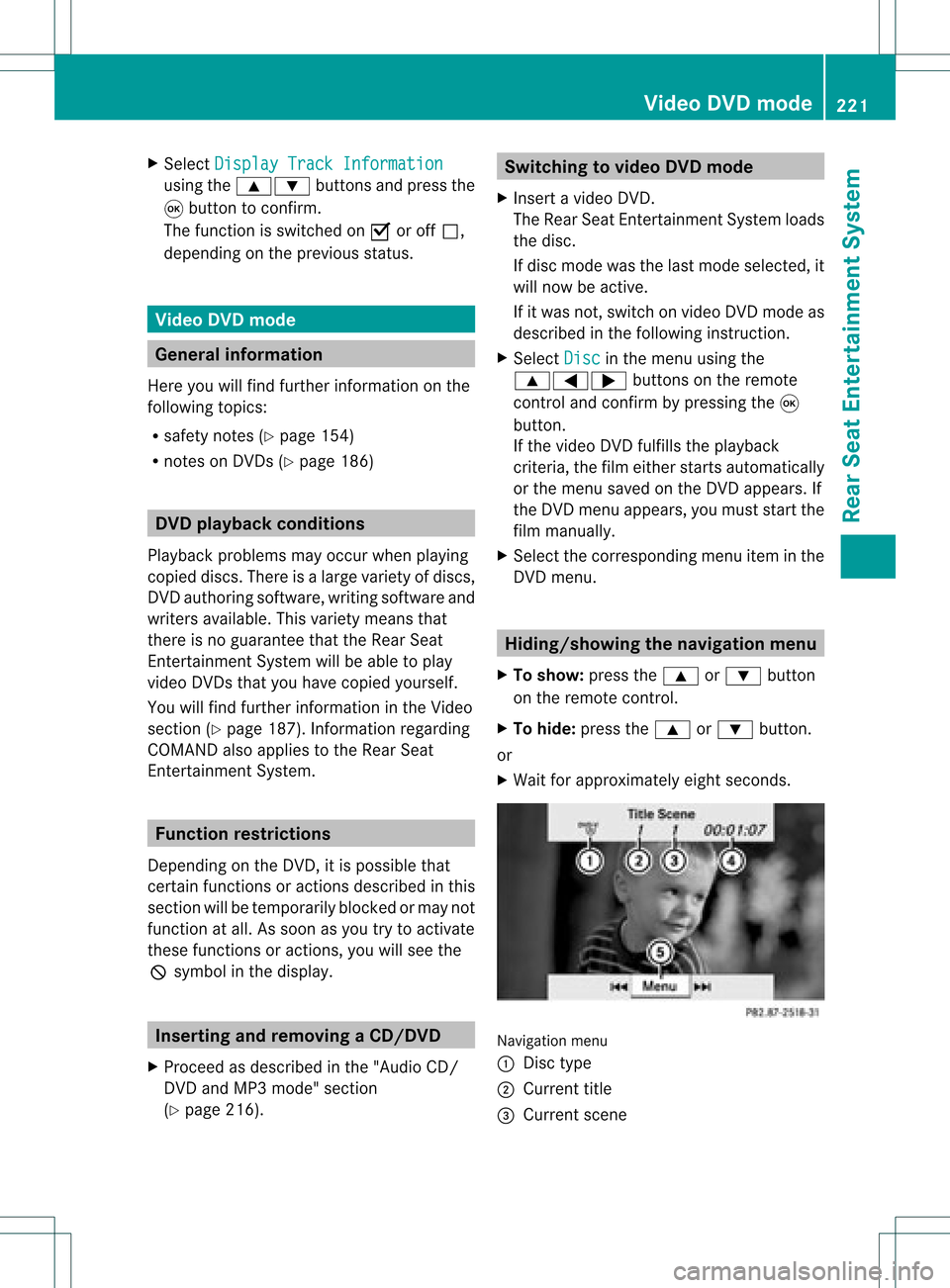
X Wait forapproximately eightseconds. Navigation
menu
: Disc type
; Current title
= Current scene Video
DVDmode
221RearSeatEnterta inment System Z
Page 224 of 234
?
Track time
A Toshow themenu Showing/hiding
themenu
X To show: pressthe9button onthe
remot econt rol.
or
X Select Menu while
thenavigation menuis
shown andpress the9button toconf irm.
X To hide: press the9 button ,select
Full Screen and
press the9button to
conf irm. Menu
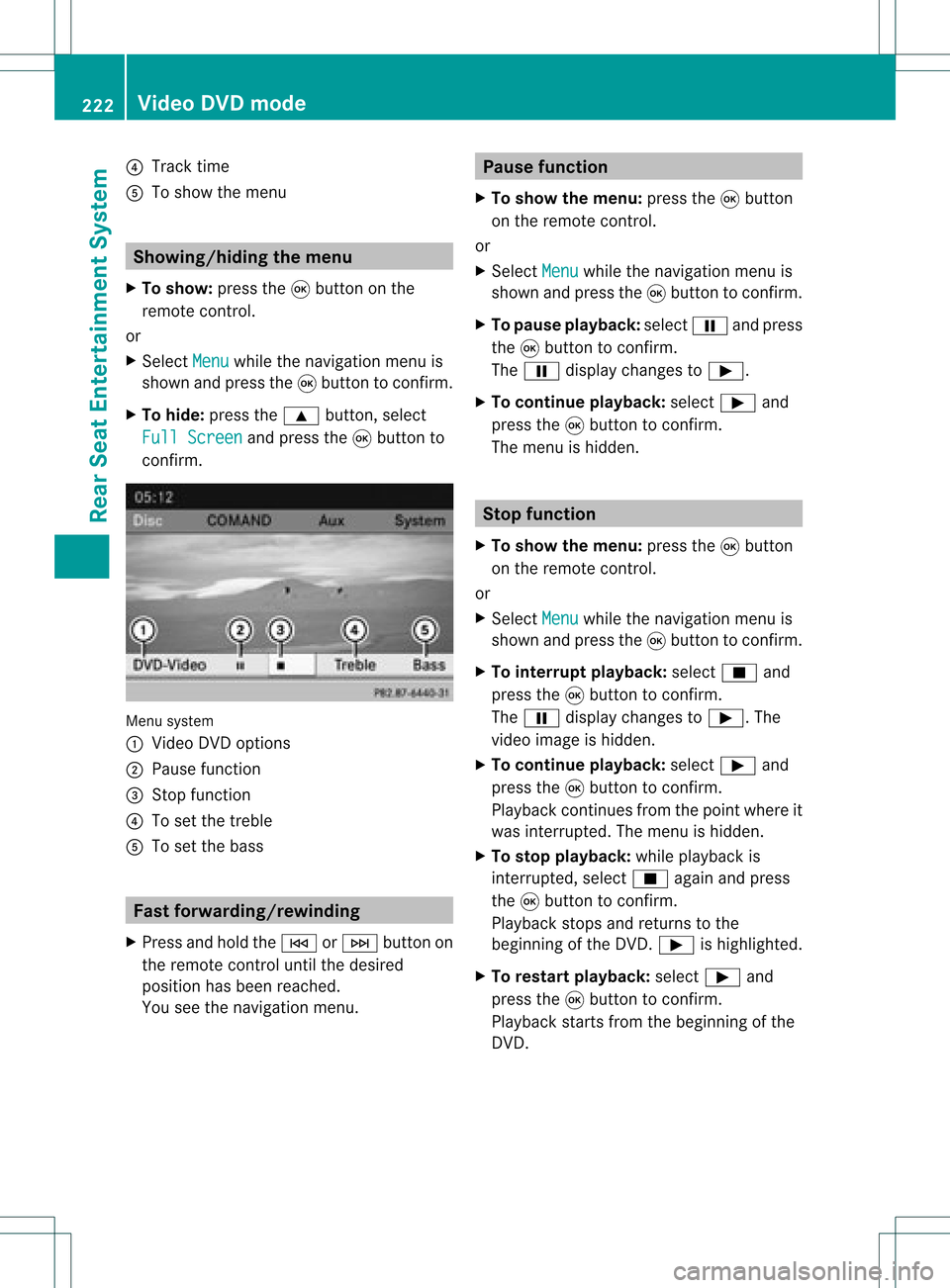
system
: Video DVDoptions
; Pause function
= Stop funct ion
? Toset the treble
A Toset the bass Fast
forwar ding/rewinding
X Press andhold theE orF button on
the remote controluntil thedesired
position hasbeen reached.
You seethenavigation menu. Pause
function
X To show themenu: pressthe9button
on the remote control.
or
X Select Menu while
thenavigation menuis
shown andpress the9button toconf irm.
X To pause playback: selectËandpress
the 9button toconf irm.
The Ë display changes toÌ.
X To continue playback: selectÌand
press the9button toconf irm.
The menu ishidden. Stop
function
X To show themenu: pressthe9button
on the remote control.
or
X Select Menu while
thenavigation menuis
shown andpress the9button toconf irm.
X To interr uptplayback: selectÉand
press the9button toconf irm.
The Ë display changes toÌ.T he
video image ishidden.
X To continue playback: selectÌand
press the9button toconfirm .
Play back continues fromthepoint where it
was interrupted. Themenu ishidden.
X To stop playback: whileplayback is
interrupted, selectÉagain andpress
the 9button toconfirm .
Play back stops andreturns tothe
beginning ofthe DVD .Ì ishighlighted.
X To restar tplayback: selectÌand
press the9button toconfirm .
Play back starts fromthebeginning ofthe
DVD . 222
Video
DVDmodeRear SeatEnterta inment System
Page 227 of 234

be
possible toaccess thesettings from the
DVD menu.
X Press the9butt onon the remot econ trol
and show themenu.
X Select DVD-Video and
press the9
butt ononthe remot econ trolto con firm.
X Select DVDFuncti ons and
press the9
butt ontocon firm.
X Select Audio Language and
press the9
butt ontocon firm.
Am enu appears afterashort while. The
# dot infron tof an ent ryindicat esthe
curren tlyselect edlanguage.
X Select alanguage usingthe9:
button sand press the9button tocon firm.
X To exit themenu: pressthe=
or ; button . Subtit
lesand camer aangle
These functionsare not available onallDVD s.
The number ofsubtitle languages andcamera
angles available dependsonthe contentof
the DVD. Itma yal so be possi ble to acc ess
the setting sfro mthe DVD menu .
X Pre ssthe 9button onthe rem otecontr ol
and showthe menu .
X Sel ect DVD-Video and
pressthe 9
bu tton onthe rem otecontr olto conf irm.
X Sel ect DVD Functions and
pressthe 9
bu tton toconf irm.
X Sel ect Subtit les or
Cam era Angle and
pre ssthe 9button toconf irm.
In bo th cas es,a menu appe arsaf ter afew
se cond s.Th e# dotin fro ntofan entry
ind icates the curre ntsetting .
X Sel ect ase tting using the 9:
bu ttons andpressthe 9button toconf irm.
X To exitthe men u:pre ssthe =
or ; button. In
tera ctive conte nt
DVDs canalso conta ininte ractiv econte nt
(e .g. avide oga me) .Inavi deogame ,you may
be ableto influ ence events bysele cting and
triggeri ngactions. Thetype andnumber of
actions dependonthe DVD.
X Select anaction using the
9;:= buttonsonthe
remote controlandpress the9button to
execute it.
A menu appears andthefirst entry,
Select ,
is high lighted.
X Press the9button. Operation
with an active COMAND
sourc e Swi
tching thefunctio non/ offin
COMA ND
You cantransfer anaudio orvide osource
sele cted inCOMAND tothe RearSeat
En tert ainmen tSystem .
i Ifyou then switch modes inCOMAND ,the
new source willnotbetran smitt edtothe
Rear SeatEntert ainmen tSystem .
X To switch onthe function inCOMAND:
switch onthe desired audiomode in
COMAND ,e.g. CDmode (Ypage 157),or
show themenu invideo DVDmode
(Y page 188).
X Select themenu itematthe bott omleft,
e.g. CD in
audio CDmode, bysliding VÆ
and turningcVd theCOMAND controller
and press Wtocon firm.
Am enu appears. Opera
tionwith anactive COMAND source
225RearSeatEntert ainment System Z