navi control MERCEDES-BENZ C-Class 2012 W204 Comand Manual
[x] Cancel search | Manufacturer: MERCEDES-BENZ, Model Year: 2012, Model line: C-Class, Model: MERCEDES-BENZ C-Class 2012 W204Pages: 234, PDF Size: 6.74 MB
Page 103 of 234
COMA
NDcontrol ler and pressW to
co nfirm .
A # dot indicat esthene wset ting.
Set tingth epoin tofinterest iconsonthe
map You
cansetthe point sof int erest youwish to
have displayed assymbols onthe map. Points
of interest are,forexample, gasstations,
hotels, cinemasand restaurants.
The following settings arepossible:
R Standar dSymbols Symbol
displaydeterminedbythe factory
sett ings.
R Persona lSymbols You
candeterm inethe symbols yourself.
R No Symbols The
map does notshow anysymbols.
X To show themenu: pressWthe COMAND
con troller.
X Select Navi in
the main function barby
sliding ZVandturningcVd theCOMAND
con troller andpress Wtocon firm.
X Select MapSetting s and
press Wto
con firm.
The map settings menu appears.
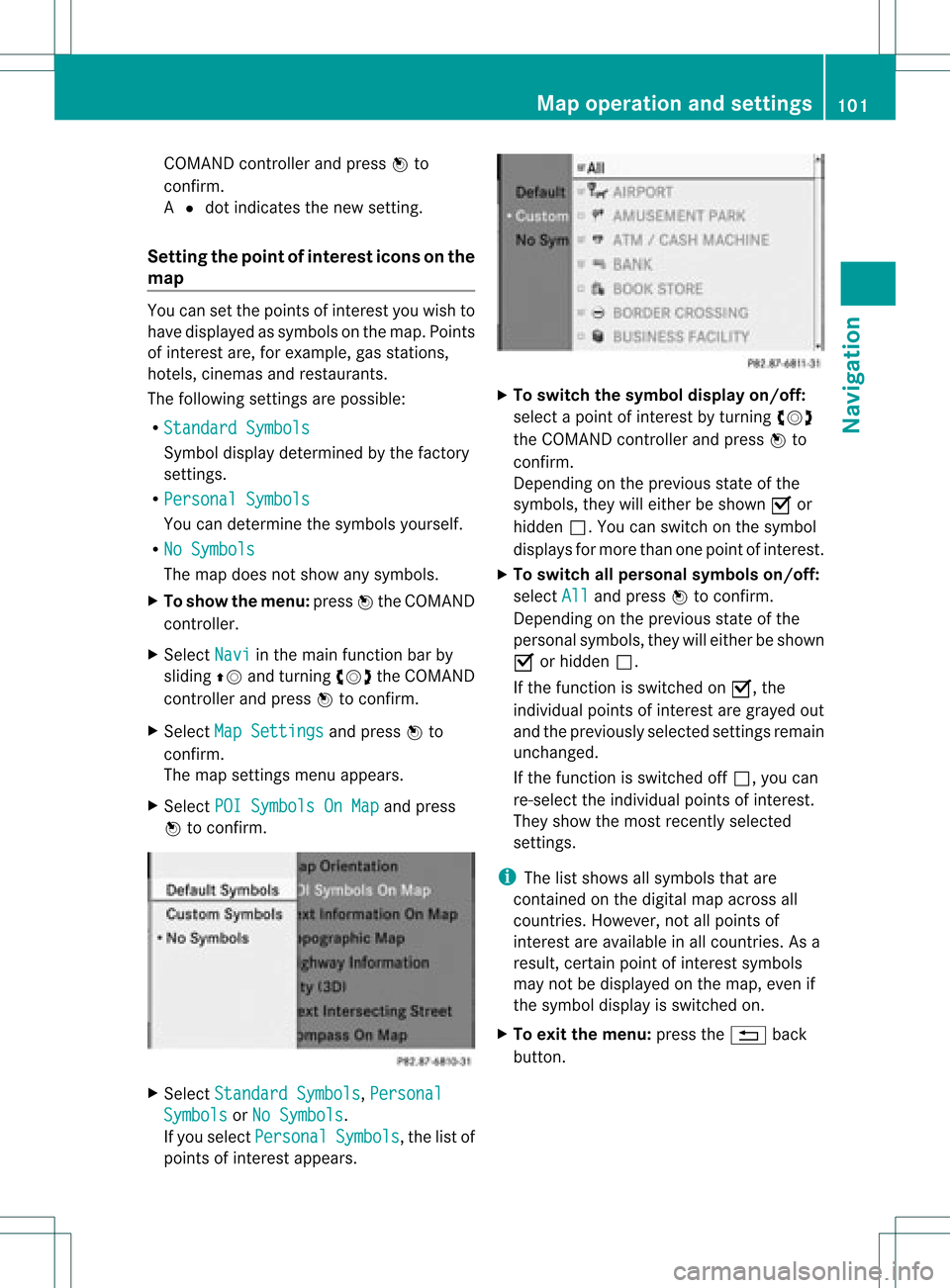
X Select POISymbols OnMap and
press
W tocon firm. X
Select Standar dSymbols ,
Persona l Symbols or
No Symbols .
If you select Persona l Symbols ,
the listof
point sof interest appears. X
To switch thesymbol displayon/off:
select apoint ofinterest byturn ingcVd
the COMAND controller andpress Wto
con firm.
Depen dingonthe previous stateof the
symbols, theywilleither beshown Oor
hidden ª.Youcan switch onthe symbol
display sfor more thanonepoint ofinteres t.
X To switch allpersonal symbolson/off:
select All and
press Wtoconf irm.
Dependin gon the previous stateofthe
personal symbols, theywilleither beshown
O orhidden ª.
If the funct ionisswitched onO, the
individual pointsofinteres tare gray edout
and theprevi ouslysele cted settings remain
unchange d.
If the function isswi tched offª, you can
re-sele ctthe indivi dualpoints ofinterest.
They show themost recently selected
settings.
i The listshow sall symb olsthat are
contained onthe digitalmap across all
countries. However,not allpoints of
interest areavailable inall countries. Asa
resu lt,certain pointofinterest symbols
may notbedisp layed on the map, evenif
the symb oldisp layisswi tched on.
X To exitthe menu: pressthe% back
button. Map
operation andsetting s
101Navigatio n Z
Page 107 of 234
Traffi
cin fo rmatio non the map
If yo usu bs cri be tothe SIRIUS XMSate llite
Ra dio Tra fficM essage Service,traff ic
infor mation canbedisplayed onthe map. You
can select three categor iesforthe display.
X To switch thedispla yson/off: pressW
the COMAND controller toshow themenu.
X Select Navi in
the main function barby
sliding ZVandturningcVd theCOMAND
con troller andpress Wtocon firm.
X Select Traffic Informa
tion On Map and
press Wtocon firm.
X Select Inciden ts and/or
Speed&Flow and/or
FreeFlow and
press Wto
con firm.
Depen dingonthe previous state,switch
the option onO oroff ª. Tr
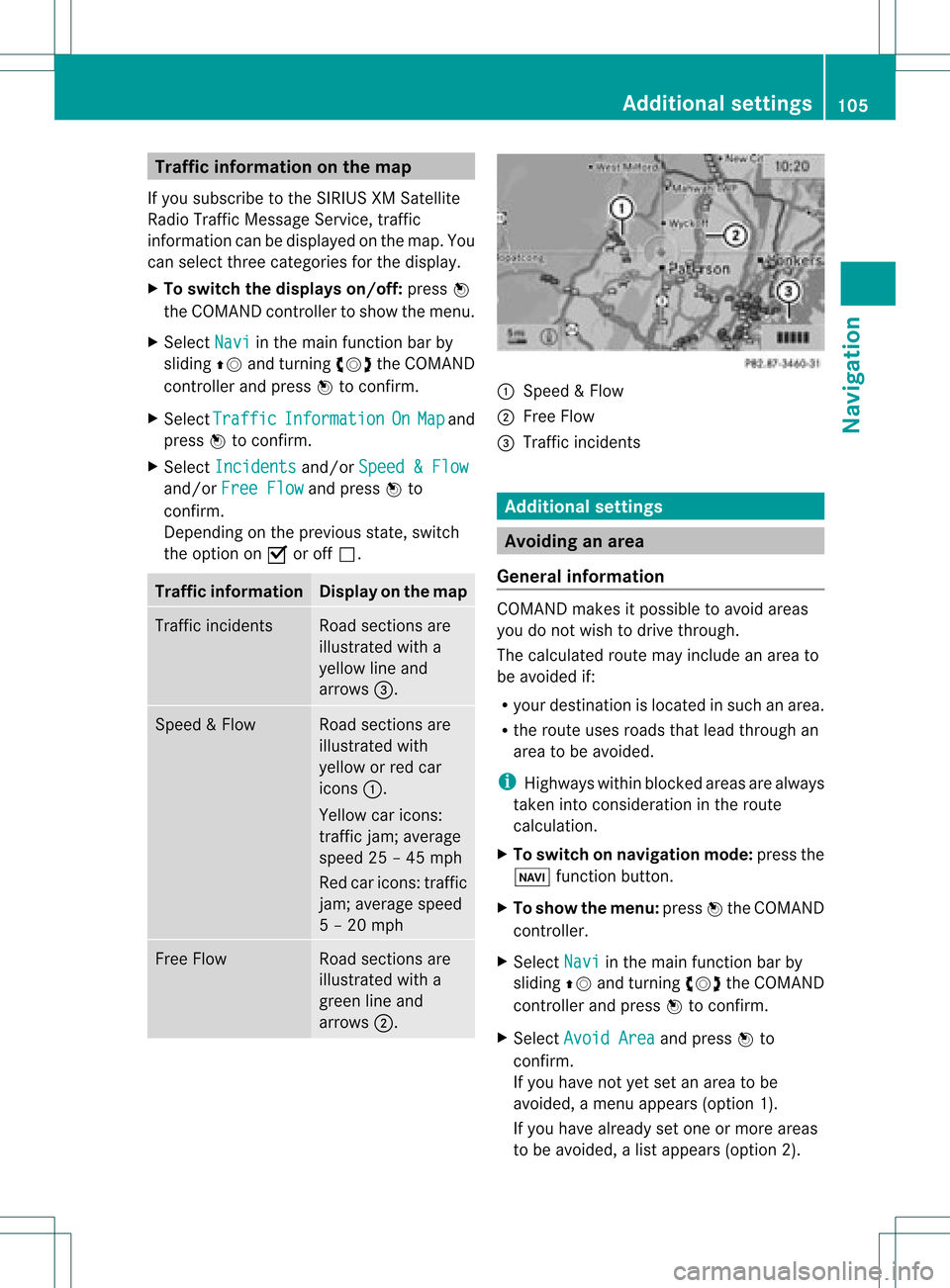
affic inform ation Display
onthe map Traffic
inciden ts Road
sections are
illustrated witha
yellow lineand
arrows =. Speed
&Flow Road
sections are
illustr atedwith
yellow orred car
icon s:.
Yellow caricon s:
tr affic jam;average
speed 25–45 mph
Red caricon s:traffic
jam ;average speed
5 –20 mph Fre
eFlow Road
sections are
illustr atedwitha
green lineand
arrows ;. :
Speed &Flow
; FreeFlow
= Traff icinc ident s Add
itiona lsett ings Avoiding
anarea
Gener alinfor mation COMA
NDmak esitpossible toavoid areas
you donot wish todrive through.
The calculated routemay include anarea to
be avoided if:
R your destinationislocat edinsuch anarea.
R the rout euses roads thatlead through an
area tobe avoided.
i Highways withinblockedareas arealways
tak enintocon siderat ioninthe rout e
calc ulation .
X To switch onnaviga tionmod e:press the
Ø function button.
X To show themenu :press Wthe COMA ND
con troller.
X Selec tNavi in
the main function barby
slidin gZV andturnin gcVd theCOMA ND
con troller andpress Wtocon firm .
X Selec tAvoi dArea and
press Wto
con firm .
If you have notyetsetanarea tobe
avoided, amen uappears (option1).
If you have already setone ormor eareas
to be avoided, alist appears (option2). Add
itiona lsett ings
105Navigat ion Z
Page 108 of 234
Opt
ion 1:the menu appears X
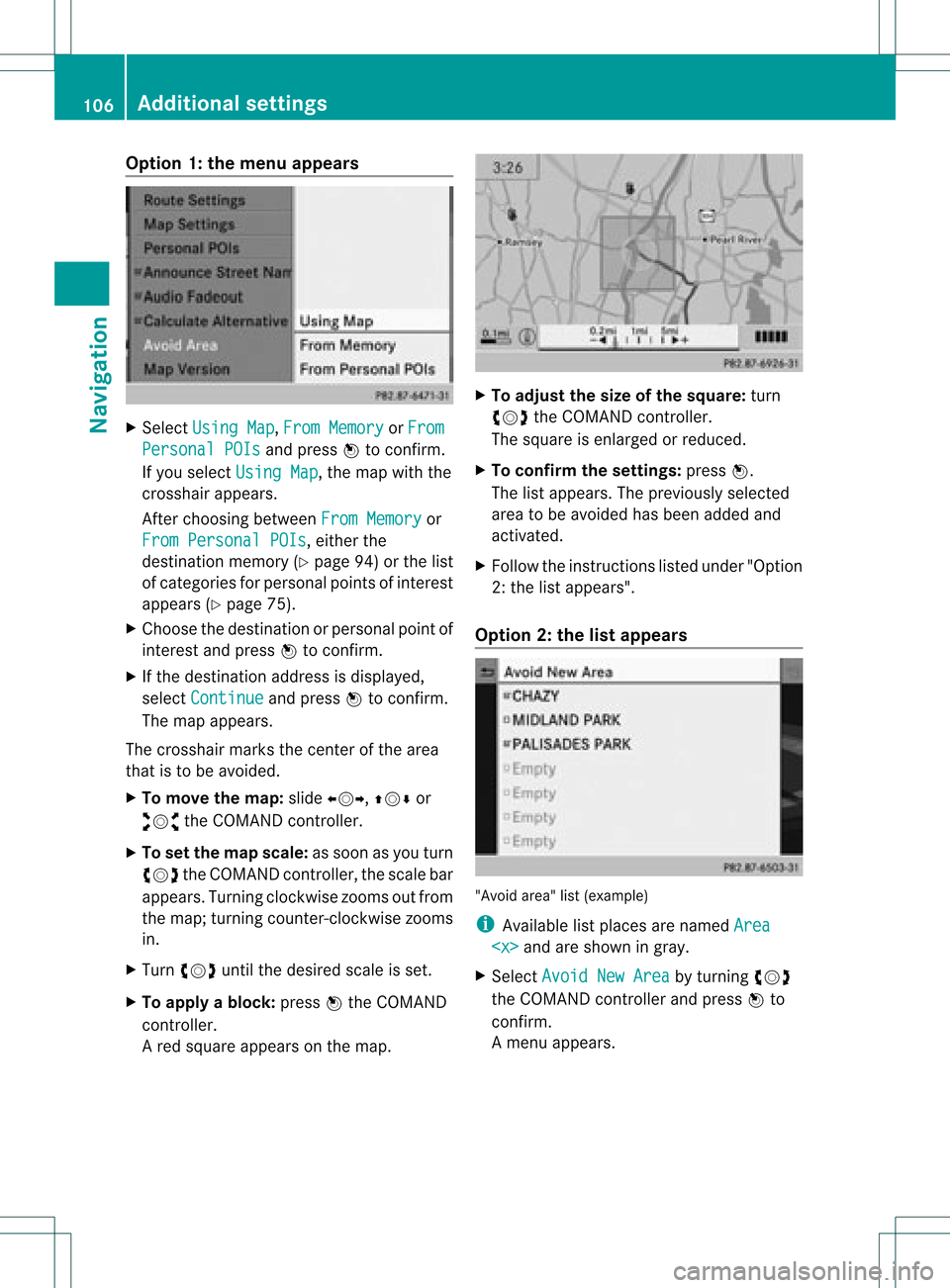
Select Using Map ,
From Memory or
From Persona
lPOIs and
press Wtocon firm.
If you select Using Map ,
the map withthe
cross hairappears.
Aft erchoosin gbetween FromMemory or
From Persona lPOIs ,
either the
destin ationmemory (Ypage 94)orthe list
of categor iesforpersonal pointsof int erest
appears (Ypage 75).
X Choose thedestin ationorpersonal pointof
int erest andpress Wtocon firm.
X Ifthe destin ationaddress isdisplayed,
select Continu e and
press Wtocon firm.
The map appears.
The cross hairmarks thecenterofthe area
that isto be avoided.
X To move themap :slide XVY, ZVÆor
aVb theCOMAND controller.
X To set the map scale: assoon asyou turn
cVd theCOMAND controller, thescale bar
appears. Turningclock wisezooms outfrom
the map; turningcount er-clockwise zooms
in.
X Turn cVd untilthedesired scaleisset.
X To app lyablock: pressWthe COMAND
con troller.
Ar ed square appears onthe map. X
To adj ust the size ofthe squa re:turn
cVd theCOMAND controller.
The square isenlarged orreduced.
X To confirm thesettings: pressW.
The listappears. Thepreviously selected
area tobe avoided hasbeen added and
activ ated.
X Follow theinst ruct ions listed under "Option
2: the listappears".
Opt ion 2:the listappears "Avoid
area"list(example)
i Available listplaces arenamed Area
areshown ingray.
X Select Avoid NewArea by
turn ingcVd
the COMAND controller andpress Wto
con firm.
Am enu appears. 106
Addit
ional settingsNavigation
Page 109 of 234
X
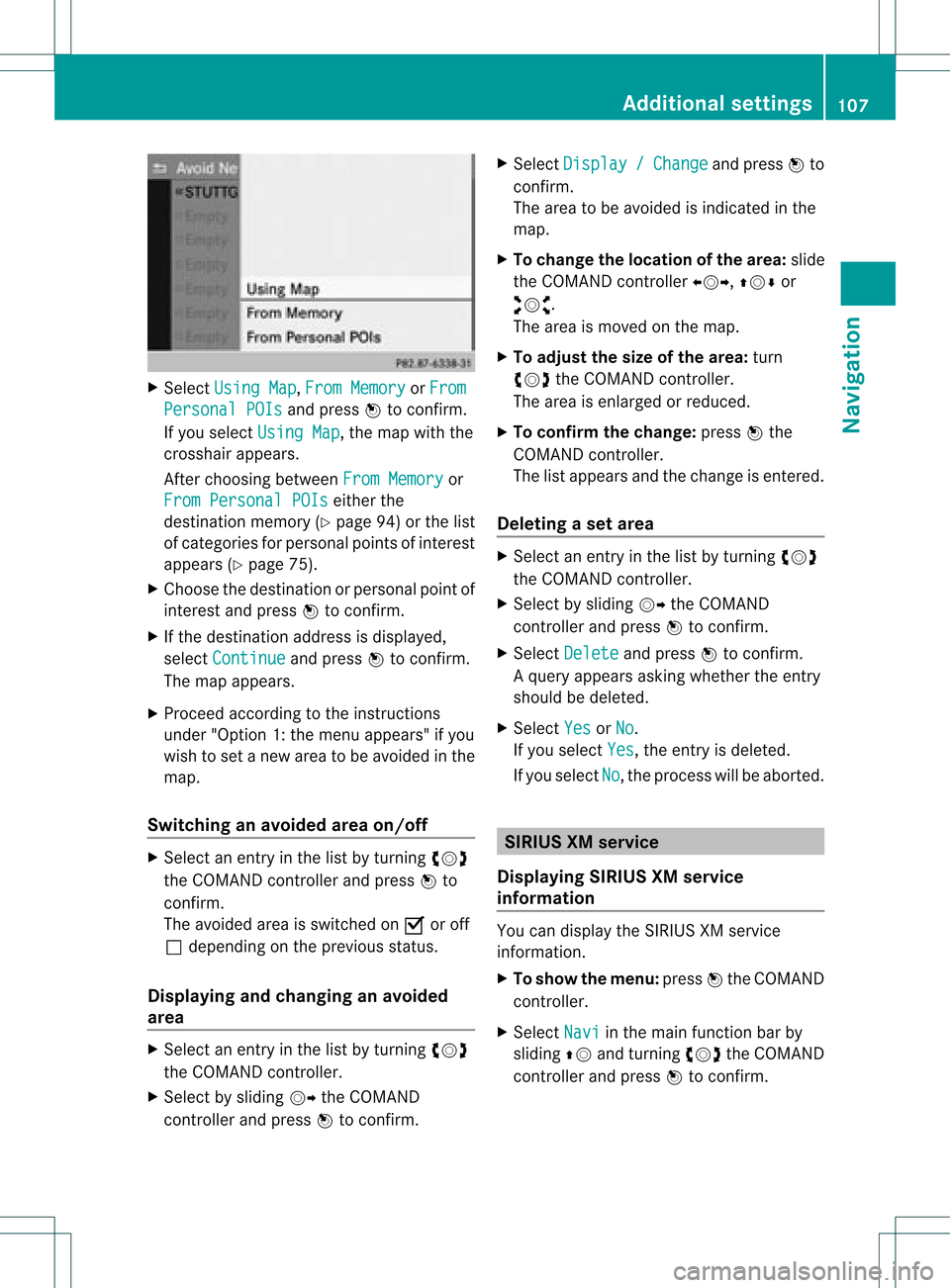
Sel ect UsingMap ,
Fro mMem ory or
Fro m Per
sonalPOI s and
pressW toconfi rm.
If yo usel ect UsingMap ,
the map with the
cros shairap pe ars .
After choosingbetwe enFro mMem ory or
Fro mPer son alPOIs ei
ther the
de stina tionmemo ry(Y page 94) orthe list
of cate goriesfor persona lpoi nts ofinter est
ap pe ars (Ypage 75).
X Ch oos ethe destina tionorpersona lpoi ntof
inter estand pressW toconfi rm.
X Ifthe destina tionaddre ssisdispl ayed ,
sel ect Continue and
pressW toconfi rm.
The map appe ars .
X Pro cee dacco rding tothe instr uctions
und er"Opti on 1:the menu appe ars "if yo u
wi sh toset anew areato be avo ided inthe
map .
Sw itchin gan avo idedarea on/o ff X
Sel ect anentr yin the list by turning cVd
the COMAND controllera nd pre ssW to
confi rm.
The avoide dar ea issw itch edon O oroff
ª depe ndi ng on the previous sta tus .
Di spl aying and chang ingan avo ided
area X
Sel ect anentry inthe list by turning cVd
the COMAND controller.
X Sel ect byslid ing VY theCOMAND
contro ller and pressW toconfi rm. X
Sel ect Dis play / Cha
nge and
pressW to
confi rm.
The area tobe avoide dis ind icated inthe
ma p.
X To chang ethe locati onofthe area :sl id e
the COMAND controller XVY ,ZVÆ or
aVb .
The area ismov edon the map.
X To adjust thesize ofthe area :tur n
cVd theCOMAND controller.
The area isenl arge dor red uce d.
X To confi rm the chang e:pre ssW the
CO MAND controller.
The list ap pe arsand thechange isente red.
De letin gas etarea X
Sele ctan ent ryinthelist byturnin gcVd
th eCOMA NDcontroller .
X Sele ctby slidin gVY theCOMA ND
con troller andpres sW tocon firm.
X Sele ctDel ete and
pres sW tocon firm.
Aq uery appear sask ing whet hertheen try
sho uld bedelet ed.
X Se lec tYes or
No .
If you selectYes ,
th een try is delet ed.
If you sele ctNo ,
th epro ces swill beabor ted. SIR
IUS XMservice
Disp laying SIRIUS XMservice
info rmation You
candisplaytheSI RIUS XMservice
inf orm ation.
X To show themen u:pre ssW theCOMA ND
co ntrol ler.
X Se lec tNav i in
themain function bar by
slidi ngZV andturnin gcVd theCOMA ND
co ntrol ler and pressW toconfirm . Add
itiona lset tings
107Navigatio n Z
Page 110 of 234
X
Sel ect SIRIUS Service and
pressW to
confi rm.
The window onthe right halfof the displ ay
sho wsthe telephone numb erofthe
pro vider(SIR IUSXM) andtheserialnumb er
of your ser vice module for rece iving traf fic
mes sages .
Reg isteri ngfor the SIRIU SXM traffic
repo rtse rvic e X
Ca llthe trafficrep ort provider'spho ne
numb ersho wnonthe scre en.
i Youcan also have the satel lite ser vice
acti vate donl ine.Todo so, visit theSIRIUS
XM Radio website at
htt <0010002C00210021001700170017002000130009001200090015001300200003
000F000DH (USA)or
htt <0010002C00210021001700170017002000130009001200090015001300030001
000E000100040001H .com
(Canada) .
Once theconn ection hasbeen established:
X Follow theinstr uctions ofthe operator.
The activation processmaytake uptoten
minutes.
If registrat ionisnot included when
purchasing thesystem, yourcredit card
details willberequired toactivate your
account . Compass
function
In the compass view,youcan seethecurrent
direction oftravel, thecurrent heightabove
sea level andthecoordinat esofthe vehicle
position, forexample.
X To switch onnavigation mode:pressthe
Ø functionbutton .
X To show themenu: pressWthe COMAND
cont roller.
X Select Pos. in
the navigation systemmenu
bar bysliding VÆandturnin gcVd the
COMAND controller andpress Wto
conf irm.
X Select Compass and
press Wtoconf irm. Compass
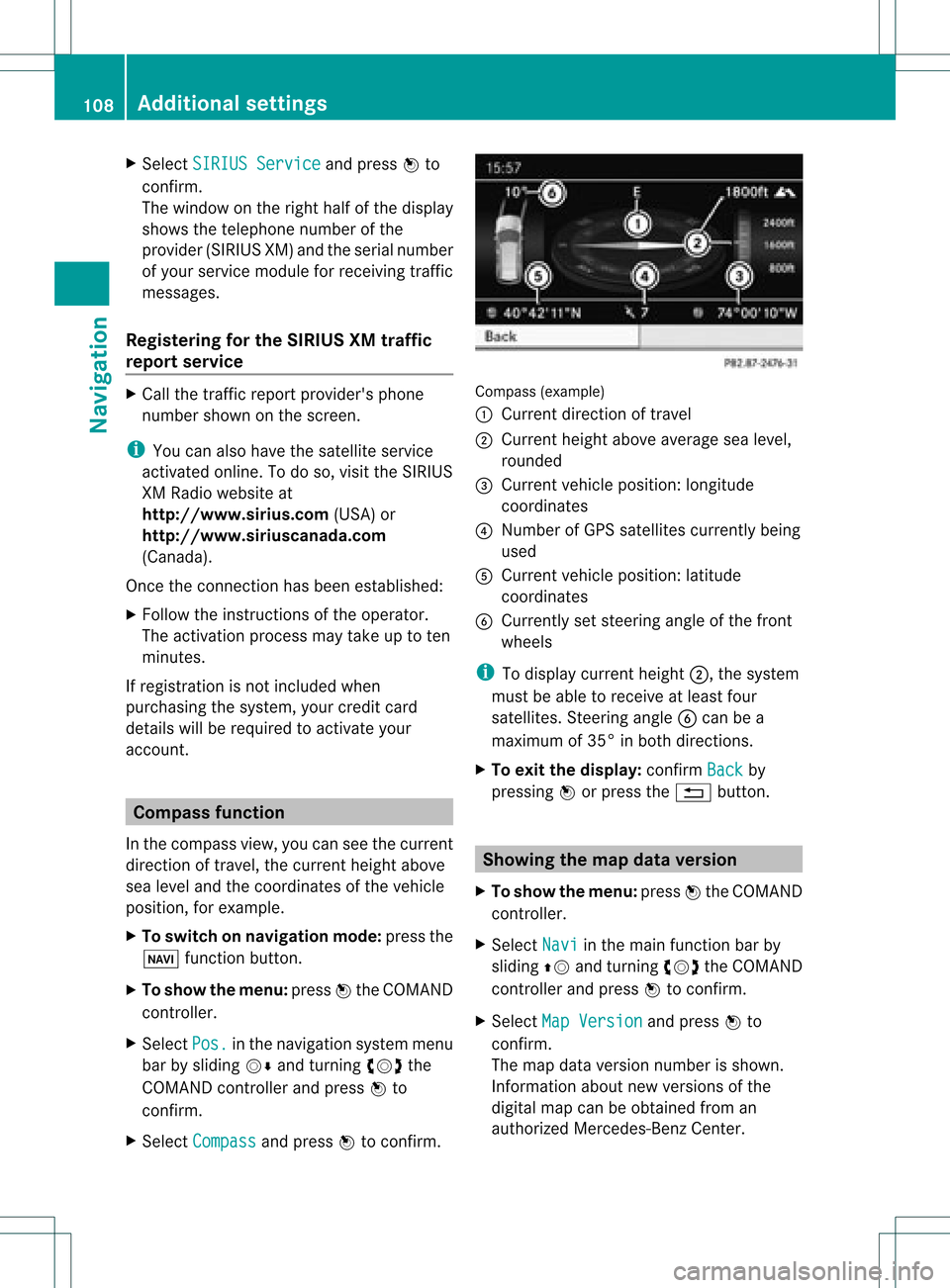
(example)
: Current direction oftravel
; Current heightaboveaverage sealevel,
rounded
= Current vehicleposition: longitude
coordinat es
? Number ofGPS satellites currentlybeing
used
A Current vehicleposition: latitude
coordinat es
B Currently setsteerin gangle ofthe front
wheels
i Todisplay current height;,thesystem
must beable toreceive atleast four
satellites. Steeringangle Bcan bea
maximum of35° inboth direction s.
X To exit thedisplay: confirmBack by
pressing Worpress the% button . Showing
themap dataversion
X To show themenu: pressWthe COMAND
cont roller.
X Select Navi in
the main functionbar by
sliding ZVandturnin gcVd theCOMAND
cont roller andpress Wtoconf irm.
X Select MapVersion and
press Wto
conf irm.
The map data version number isshown.
Infor mation aboutnewversions ofthe
digital mapcanbeobtained froman
authorized Mercedes-B enzCenter. 108
Additional
settingsNavigation
Page 111 of 234
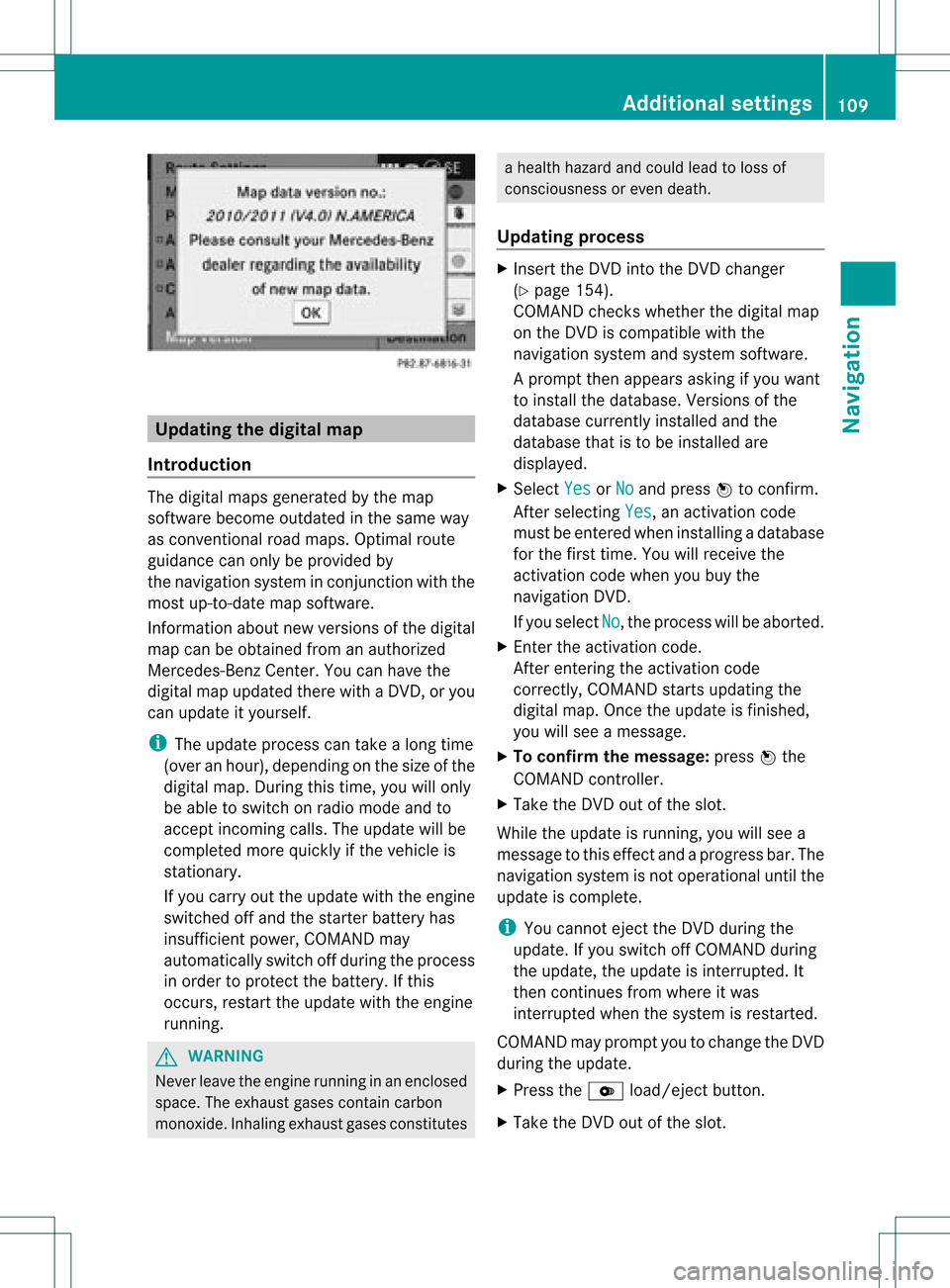
Upd
ating the digit alma p
Intr oduct ion The
digital mapsgeneratedbythe map
soft ware becom eoutdate din the same way
as con vent ional roadmaps. Optimalroute
guidance canonly beprovided by
the navigat ionsystem incon junction with the
most up-to-dat emap software.
Inf ormat ionabout newversion sof the digital
map canbeobtain edfrom anauthoriz ed
Merc edes-B enzCent er.You canhave the
digital mapupdated therewith aDVD ,or you
can update ityourself.
i The update processcan takealong time
(over anhour), dependingonthe size ofthe
digit almap. During this time,you willonly
be able toswitc hon radio mode andto
acc ept incomin gcalls. Theupdate willbe
com plete dmor equick lyifthe vehic leis
st ation ary.
If you carryout theupdate withtheengine
switc hedoffand thestart erbatt eryhas
insuf ficient power, COMANDmay
autom atically switc hoff durin gthe proc ess
in order toprot ectthe batt ery. Ifthis
occ urs, restartthe update withtheengine
runn ing. G
WARN
ING
Neve rleave theengine runninginan enclos ed
space. Theexhaust gasescontain carbon
monox ide.Inhaling exhaustgasesconstitutes a
health hazard andcould leadtoloss of
con sciousnes sor even death.
Upda tingprocess X
Inser tthe DVD intotheDVD changer
(Y page 154).
COMAND checkswhether thedigital map
on the DVD iscompat iblewith the
navigation systemandsystem software.
Ap rompt thenappears asking ifyou want
to install thedata base.Versio nsofthe
data basecurrently installedand the
data basethat isto be install edare
disp layed.
X Select Yes or
No and
press Wtoconfirm.
After selecting Yes ,
an activa tioncode
must beentered wheninstall ingadata base
for the first time. Youwillreceive the
activati oncode when youbuy the
naviga tionDVD.
If you sele ctNo ,
the process willbe abo rted.
X Enter theactiva tioncode.
After entering theactivati oncode
correctly, COMAND startsupdating the
digi talmap. Once theupdate isfinishe d,
you willsee amessa ge.
X To confirm themessage :press Wthe
COMAND controller.
X Take theDVD outofthe slot.
Whil ethe update isrunning, youwillsee a
messa getothis effect andaprogre ssbar. The
naviga tionsystem isnot opera tional untilthe
upd ate iscomple te.
i You cannot ejecttheDVD duringthe
upd ate. Ifyou switch offCOMAND during
the update, theupdate isinterrup ted.It
then continues fromwhere itwa s
interrup tedwhen thesystem isrestarted.
COMAND mayprompt youtochange theDVD
duri ngthe update.
X Press theV load/eject button.
X Take theDVD outofthe slot. Additio
nalsetting s
109Navigatio n Z
Page 112 of 234
X
Insert thereque stedDVD.
Once theupdate has been successfu lly
completed, youwillsee amessag eto this
effect.
X To con firm themessage :press Wthe
COMAND controller.
X Take theDVD outofthe slot.
The update iscomplete.
If the upd ateisnot successfu llycompleted,
you willsee amessag ethat themap update
is not possi ble.
X To con firm themessage :press Wthe
COMAND controller.
X Take theDVD outofthe slot. 110
Addition
alsettingsNavigation
Page 114 of 234
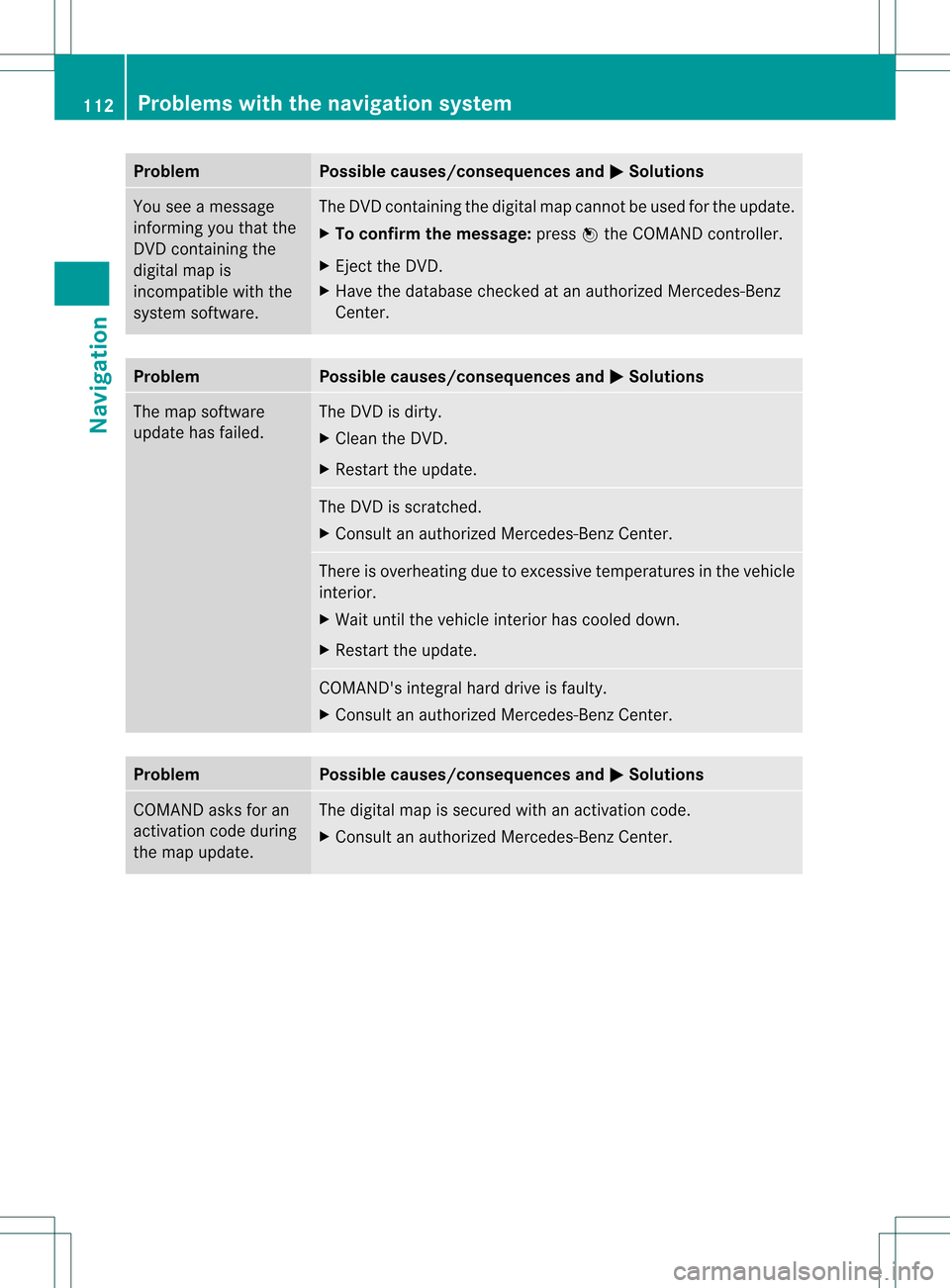
Problem Possible
causes/co nsequences andM Solutions
You
seeamessage
informin gyou that the
DVD containing the
digital mapis
incompatible withthe
system software. The
DVD containing thedigital mapcannot beused forthe update.
X To confirm themessage: pressWthe COMAND controller.
X Ejec tthe DVD .
X Have thedatabase checkedatan authorized Mercedes-B enz
Center. Problem Possible
causes/co nsequences andM Solutions
The
map software
update hasfailed. The
DVD isdirty.
X Clea nthe DVD .
X Restart theupdate. The
DVD isscratc hed.
X Consult anauthorized Mercedes-B enzCenter. There
isoverheating duetoexcessive temperatures inthe vehicle
interior.
X Wait untilthevehicle interior hascooled down.
X Restart theupdate. COMAND's
integralharddrive isfaulty.
X Consult anauthorized Mercedes-B enzCenter. Problem Possible
causes/co nsequences andM Solutions
COMAND
asksforan
activation codeduring
the map update. The
digital mapissecured withanactivation code.
X Consult anauthorized Mercedes-B enzCenter. 112
Problems
withthenavigation systemNavigation
Page 129 of 234

Cha
nging thecha racter setofthe
cha racter bar X
Sel ect p andpres sW toconfirm .
The charac ters et changes eachtimeyou
make thisselect ion.
Selecting anentry directly fromthelist You
canswitch tothe listatany time during
charact erent ry.
X Slide VZtheCOMAND controller
repeatedly orpress andhold Wuntil the
charact erbar disappears.
or
X Select ¬andpress Wtocon firm.
X To select anentry :turn cVd the
COMAND controller untilthedesired entry
is highlighted andpress Wtocon firm.
To select aphone number: theGicon
indi cates thatanentry contains morethan
one phone numbe r.
X Select aphone bookentry withtheGicon
and press Wtoconfirm.
The sub-entries appear. TheGicon
changes toI. Phone
bookentry withsevera lentries
X Select asub -entry byturning cVdand
press Wtoconfirm. X
To return tothe phone bookusin gthe
characte rbar: select& inthe listand
press Wtoconfirm.
or
X Press the% backbutton. Di
splayi ngdetails foranentry
X Select anentry inthe sele ction listby
turning cVdtheCOMAND controller.
X Select thelists ymbo lto therig ht ofthe
en try by slid ing VY theCOMA ND
co ntrol ler and pressW toconfirm .
X Se lec tDet ails and
pressW toconfirm .
The detailed viewappe ars.
X To close thedet ailed view: slideXVY
rep eatedly untilth een tryi shighlig hted
agai norpress the% backbutton. De
leti nganentry fromthephone
boo k
If the entry contains onlyphone numbers ,it
is del eted from thephone bookandaddress
book.
If there isadd itiona ldata includ edalong with
the phone number, e.g.anaviga ble
destina tion,theentry isdel eted from the
phone bookbutretained inthe add ress book.
X Select anentry inthe sele ction listby
turning cVdtheCOMAND controller.
X Select thelists ymbo lto therig ht ofthe
en try by slid ing VY theCOMA ND
co ntrol ler and pressW toconfirm .
X Se lec tDel ete and
pressW toconfirm .
Ap rompt appears asking whethe rthe entr y
should bedeleted.
X Select Yes or
No and
press Wtoconfirm .
If you select Yes ,
the entr yis deleted in
accordance withtherules described above.
If you select No ,
the process willbeaborted. Using
thephone book
127Telephone Z
Page 137 of 234
i
You canusethe"New entry" or"Add no."
func tionsto save thistelep honenumb eror
to add itto an exis tingent ry.
Stor ingthesender asanew address
book entry This
function isnot possible ifthe sender’s
telep honenumbe risalrea dystored inthe
address book.
X Press Wthe COMAND controller while the
text message isbeing displayed.
X Select SaveNumber and
press Wto
confirm.
X Select New entry and
press Wtoconfirm.
X Proceed asdescribed inthe "Storing asa
new entry inthe address book"section
(Y page 130).
Storing atext mes sage senderinan
exist ingaddress book entry X
Pres sW theCOMA NDcontroller while the
te xt mes sage isbein gdisplayed .
X Sele ctSav eNum ber and
pres sW to
con firm.
X Sele ctAdd PhoneNo. and
pres sW to
con firm.
X Proc eedfrom thest ep "Sele ctanum ber
cat egor y"inthe"Add ingtelepho ne
num bers toan existing phon ebook entry"
sec tion(Ypage 128).
Deleting atext mes sage (SMS) X
Sele ctate xt mes sage inthete xt mes sage
inbo xbytur ning cVd theCOMA ND
co ntro ller .
X Se lec tthe list symbol tothe right ofthe text
message bysliding VYtheCOMAND
cont roller andpress Wtoconfirm .
X Select Delete and
press Wtoconfirm .
Ad eletion prompt appears.
X Select Yes or
No and
press Wtocon firm.
If you select Yes ,
the textm essage is
deleted. If
you select No ,
the process willbeaborted.
i This delete function isnot supported by
all mobile phones. TheDeletio n Procedu
reFailed message
appears. Using
theaddress book Introd
uction G
WARN
ING
Please devote youratten tionfirst and
foremo stto the traff icsituation youarein.
Befor eyour journ ey,please familiarize
yourself withtheaddress bookfunctions.
Only usetheCOMAND whenroadandtraffic
con ditions permityoutodo so. Other wiseyou
could beinvolved inan acciden tinw hich you
or others couldbeinjured.
The address bookorganizes andstores
entr ieswhich areentered fromdifferent
sources (mobilephone,memory card,USB
device, COMAND telephone book,navigation
system).
You canusethese entriestomake telephone
calls andfornavigation.
i Num berofcontacts inthe addr ess
book: theaddress bookcanstore atotal of
4000 contacts. 1500 entriesare reserved
in the address bookformobile phone
cont acts and1500 forcont acts youcreate
in COMAND orimport fromother sources.
The remaining 1000entriesare assigned
by COMAND asnecessary.
i Display ofmobile phonecontacts:
cont acts downloaded fromthemobile
phone remain inthe address bookevenif
the mobile phoneisdisconnec tedfrom
COMAND. Thismeans thatcontacts which
have previously beenavaila blecan be
displa yedassoon asthe mobile phoneis
reconn ected.Thecont acts aredownloaded
again sothat anynew contacts thathave
been added tothe mobile phonecanbe
displa yed. Using
theaddress book
135Telephone Z