brake MERCEDES-BENZ C CLASS 2018 Manual PDF
[x] Cancel search | Manufacturer: MERCEDES-BENZ, Model Year: 2018, Model line: C CLASS, Model: MERCEDES-BENZ C CLASS 2018Pages: 370, PDF Size: 6.25 MB
Page 209 of 370
Active Lane Keeping Assist
Generalnotes
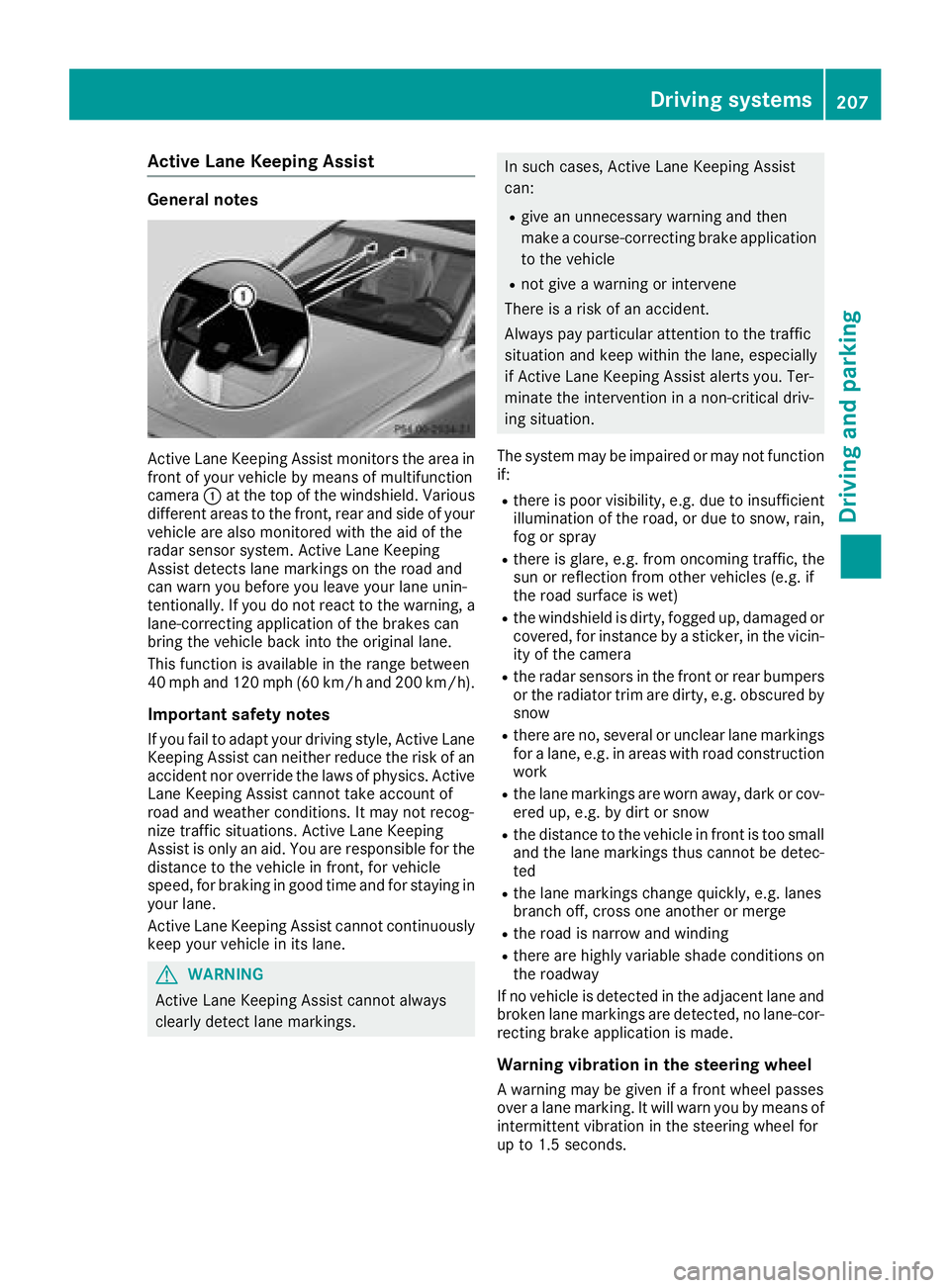
Active Lan eKeepin gAssis tmonitors th earea in
fron tof your vehicl eby mean sof multifunction
camera :at th eto pof th ewindshield. Various
differen tareas to th efront, rear and side of your
vehicl eare also monitore dwit hth eaid of th e
radar sensor system. Active Lan eKeepin g
Assis tdetects lan emarking son th eroad and
can warn you before you leav eyour lan eunin-
tentionally. If you do no treac tto th ewarning , a
lane-correcting application of th ebrakes can
bring th evehicl ebac kint oth eoriginal lane.
This function is available in th erange between
40 mph and 12 0mph (60 km/h and 20 0km/h).
Important safety notes
If you fail to adapt your drivin gstyle, Active Lan e
Keepin gAssis tcan neither reduce th eris kof an
acciden tno roverride th elaws of physics .Active
Lan eKeepin gAssis tcanno ttak eaccoun tof
road and weather conditions. It may no trecog-
niz etraffic situations. Active Lan eKeepin g
Assis tis only an aid. You are responsibl efor th e
distanc eto th evehicl ein front, for vehicl e
speed, for braking in goo dtime and for stayin gin
your lane.
Active Lan eKeepin gAssis tcanno tcontinuously
keep your vehicl ein it slane.
GWARNIN G
Active Lan eKeepin gAssis tcanno talways
clearly detec tlan emarkings.
In suc hcases, Active Lan eKeepin gAssis t
can :
Rgivean unnecessary warning and then
mak e acourse-correcting brak eapplication
to th evehicl e
Rnotgiv e a warning or interven e
There is aris kof an accident.
Always pay particular attention to th etraffic
situation and keep within th elane, especially
if Active Lan eKeepin gAssis talerts you. Ter -
minate th eintervention in anon-critical driv-
ing situation .
The system may be impaire dor may no tfunction
if:
Rthere is poor visibility, e.g. due to insufficien t
illumination of th eroad ,or due to snow, rain ,
fog or spray
Rthere is glare, e.g. from oncomin gtraffic, th e
sun or reflection from other vehicles (e.g. if
th eroad surfac eis wet )
Rthewindshield is dirty, fogged up, damaged or
covered, for instance by asticker, in th evicin-
it y of th ecamera
Rth eradar sensor sin th efron tor rear bumpers
or th eradiato rtrim are dirty, e.g. obscured by
snow
Rthere are no ,several or unclear lan emarking s
for alane, e.g. in areas wit hroad construction
wor k
Rthelan emarking sare wor naway, dark or cov-
ere dup, e.g. by dir tor snow
Rth edistanc eto th evehicl ein fron tis to osmall
and th elan emarking sthus canno tbe detec -
te d
Rth elan emarking schang equickly, e.g. lanes
branch off ,cross on eanother or merge
Rth eroad is narrow and windin g
Rthere are highly variable shad econdition son
th eroadway
If no vehicl eis detecte din th eadjacent lan eand
broke nlan emarking sare detected, no lane-cor-
recting brak eapplication is made .
Warning vibration in th esteering wheel
A warning may be given if afron twhee lpasses
ove r alan emarking .It will warn you by mean sof
intermittent vibration in th esteering whee lfor
up to 1. 5seconds.
Driving systems207
Driving and parking
Z
Page 210 of 370
Lane-correcting brake application
If you leave your lane, under certain circumstan-
ces the vehicle will brake briefly on one side.
This is meant to assist you in bringing the vehicle
back to the original lane.
GWARNING
A lane-correcting brake application cannot
always bring the vehicle back into the original lane. There is a risk of an accident.
Always steer, brake or accelerate yourself,
especially if Active Lane Keeping Assist warns
you or makes a lane-correcting brake appli-
cation.
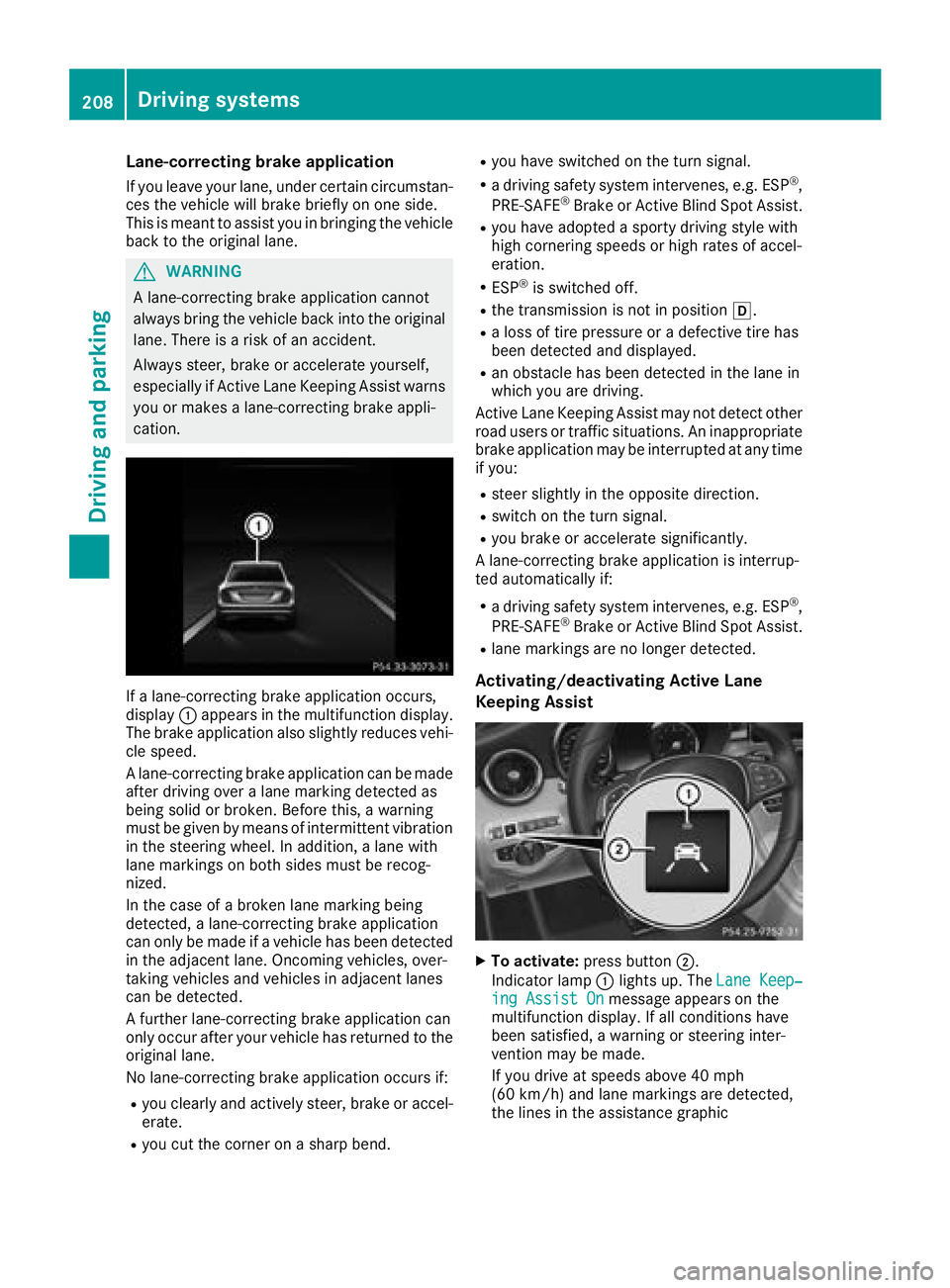
If a lane-correcting brake application occurs,
display :appears in the multifunction display.
The brake application also slightly reduces vehi-
cle speed.
A lane-correcting brake application can be made
after driving over a lane marking detected as
being solid or broken. Before this, a warning
must be given by means of intermittent vibration
in the steering wheel. In addition, a lane with
lane markings on both sides must be recog-
nized.
In the case of a broken lane marking being
detected, a lane-correcting brake application
can only be made if a vehicle has been detected
in the adjacent lane. Oncoming vehicles, over-
taking vehicles and vehicles in adjacent lanes
can be detected.
A further lane-correcting brake application can
only occur after your vehicle has returned to the
original lane.
No lane-correcting brake application occurs if:
Ryou clearly and actively steer, brake or accel-
erate.
Ryou cut the corner on a sharp bend.
Ryou have switched on the turn signal.
Ra driving safety system intervenes, e.g. ESP®,
PRE-SAFE®Brake or Active Blind Spot Assist.
Ryou have adopted a sporty driving style with
high cornering speeds or high rates of accel-
eration.
RESP®is switched off.
Rthe transmission is not in position h.
Ra loss of tire pressure or a defective tire has
been detected and displayed.
Ran obstacle has been detected in the lane in
which you are driving.
Active Lane Keeping Assist may not detect other
road users or traffic situations. An inappropriate
brake application may be interrupted at any time
if you:
Rsteer slightly in the opposite direction.
Rswitch on the turn signal.
Ryou brake or accelerate significantly.
A lane-correcting brake application is interrup-
ted automatically if:
Ra driving safety system intervenes, e.g. ESP®,
PRE-SAFE®Brake or Active Blind Spot Assist.
Rlane markings are no longer detected.
Activating/deactivating Active Lane
Keeping Assist
XTo activate: press button ;.
Indicator lamp :lights up. The Lane Keep‐
ing Assist Onmessage appears on the
multifunction display. If all conditions have
been satisfied, a warning or steering inter-
vention may be made.
If you drive at speeds above 40 mph
(60 km/h) and lane markings are detected,
the lines in the assistance graphic
208Driving systems
Driving and parking
Page 211 of 370
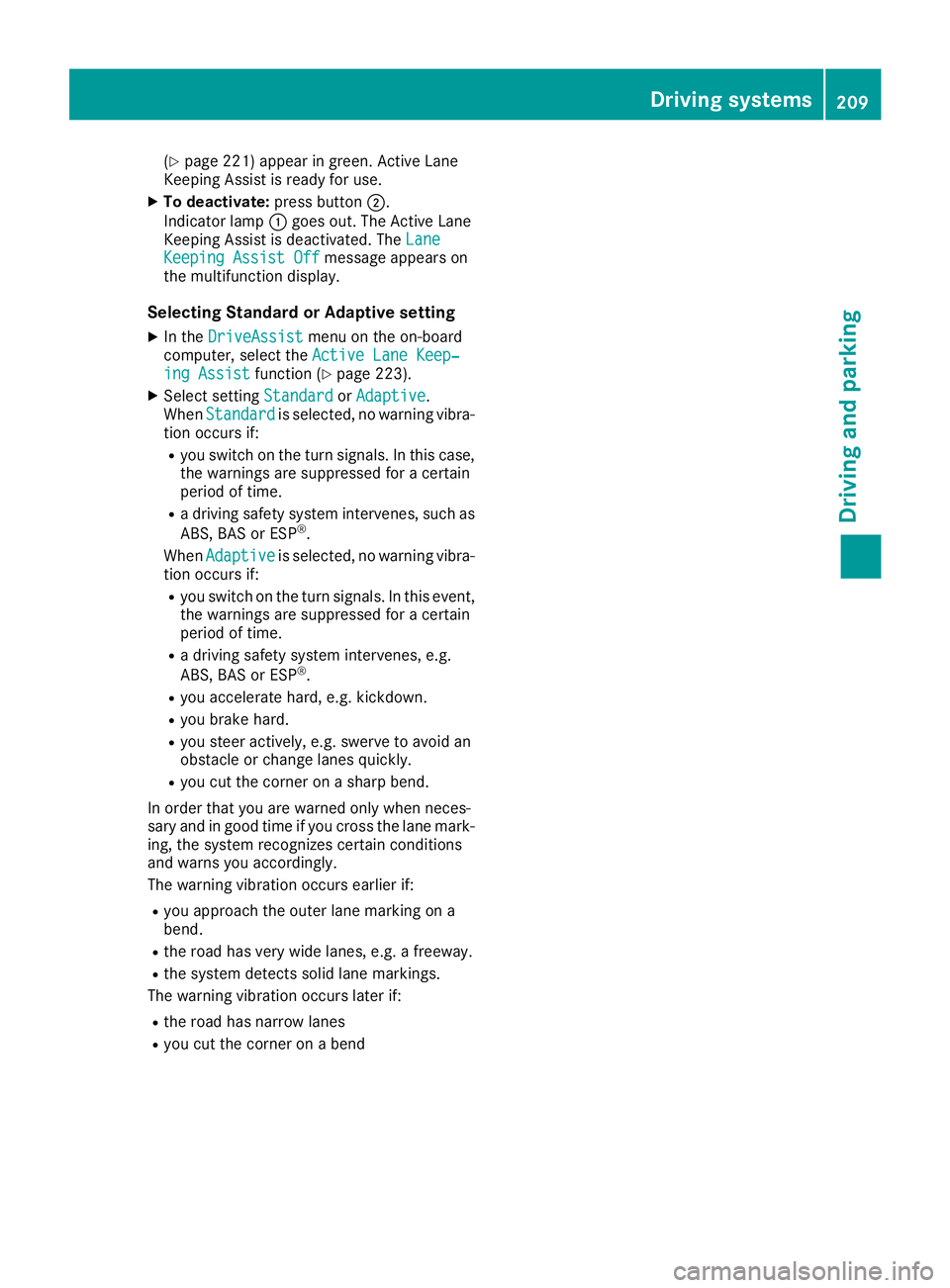
(Ypage 221) appear in green. Active Lane
Keeping Assist is ready for use.
XTo deactivate: press button;.
Indicator lamp :goes out. The Active Lane
Keeping Assist is deactivated. The Lane
Keeping Assist Offmessage appears on
the multifunction display.
Selecting Standard or Adaptive setting
XIn the DriveAssistmenu on the on-board
computer, select the Active Lane Keep‐
ing Assistfunction (Ypage 223).
XSelect settingStandardorAdaptive.
When Standardis selected, no warning vibra-
tion occurs if:
Ryou switch on the turn signals. In this case,
the warnings are suppressed for a certain
period of time.
Ra driving safety system intervenes, such as
ABS, BAS or ESP®.
When Adaptive
is selected, no warning vibra-
tion occurs if:
Ryou switch on the turn signals. In this event,
the warnings are suppressed for a certain
period of time.
Ra driving safety system intervenes, e.g.
ABS, BAS or ESP®.
Ryou accelerate hard, e.g. kickdown.
Ryou brake hard.
Ryou steer actively, e.g. swerve to avoid an
obstacle or change lanes quickly.
Ryou cut the corner on a sharp bend.
In order that you are warned only when neces-
sary and in good time if you cross the lane mark-
ing, the system recognizes certain conditions
and warns you accordingly.
The warning vibration occurs earlier if:
Ryou approach the outer lane marking on a
bend.
Rthe road has very wide lanes, e.g. a freeway.
Rthe system detects solid lane markings.
The warning vibration occurs later if:
Rthe road has narrow lanes
Ryou cut the corner on a bend
Driving systems209
Driving and parking
Z
Page 223 of 370
XIf there is more than one number for a
particular name:press the6ora
button to display the numbers.
XPress the :or9 button to select the
number you want to dial.
XPress the 6ora button to start dialing.
or
XTo exit the telephone book: press the~
or % button briefly.
Redialing
The on-board computer saves the last names or
numbers dialed in the redial memory.
XPress the òbutton on the steering wheel
to open the menu list.
XPress the :or9 button on the steering
wheel to select the Telephonemenu.
XConfirm by pressing aon the steering
wheel.
XPress the 6button to switch to the redial
memory.
XPress the :or9 button to select the
desired name or number.
XPress the 6ora button to start dialing.
or
XTo exit the redial memory: press the~
or % button briefly.
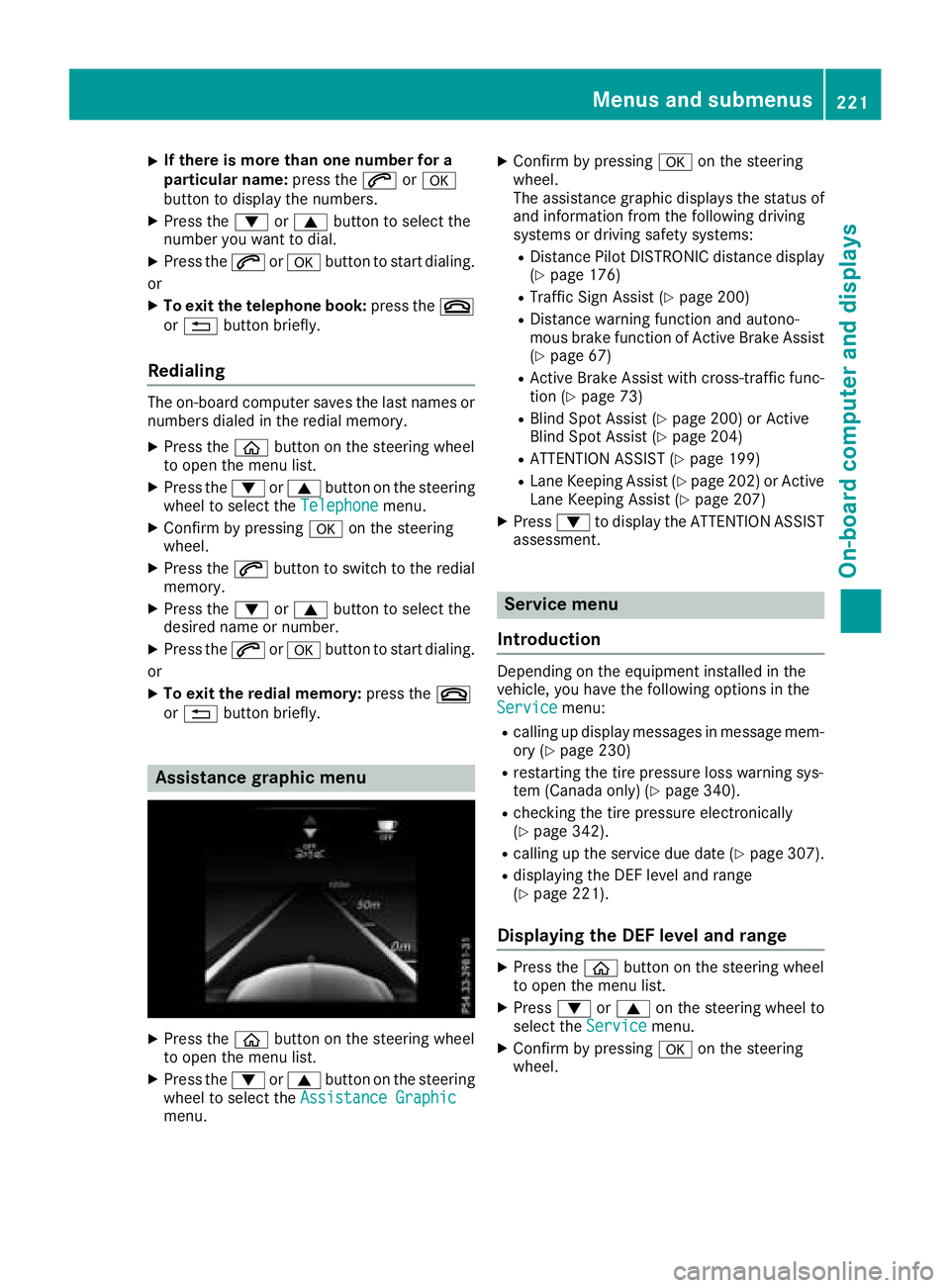
Assistance graphic menu
XPress the òbutton on the steering wheel
to open the menu list.
XPress the :or9 button on the steering
wheel to select the Assistance Graphic
menu.
XConfirm by pressing aon the steering
wheel.
The assistance graphic displays the status of
and information from the following driving
systems or driving safety systems:
RDistance Pilot DISTRONIC distance display
(Ypage 176)
RTraffic Sign Assist (Ypage 200)
RDistance warning function and autono-
mous brake function of Active Brake Assist (
Ypage 67)
RActive Brake Assist with cross-traffic func-
tion (Ypage 73)
RBlind Spot Assist (Ypage 200) or Active
Blind Spot Assist (Ypage 204)
RATTENTION ASSIST (Ypage 199)
RLane Keeping Assist (Ypage 202) or Active
Lane Keeping Assist (Ypage 207)
XPress :to display the ATTENTION ASSIST
assessment.
Service menu
Introduction
Depending on the equipment installed in the
vehicle, you have the following options in the
Service
menu:
Rcalling up display messages in message mem-
ory (Ypage 230)
Rrestarting the tire pressure loss warning sys-
tem (Canada only) (Ypage 340).
Rchecking the tire pressure electronically
(Ypage 342).
Rcalling up the service due date (Ypage 307).
Rdisplaying the DEF level and range
(Ypage 221).
Displaying the DEF level and range
XPress the òbutton on the steering wheel
to open the menu list.
XPress :or9 on the steering wheel to
select the Servicemenu.
XConfirm by pressing aon the steering
wheel.
Menus and submenus221
On-board computer and displays
Z
Page 225 of 370
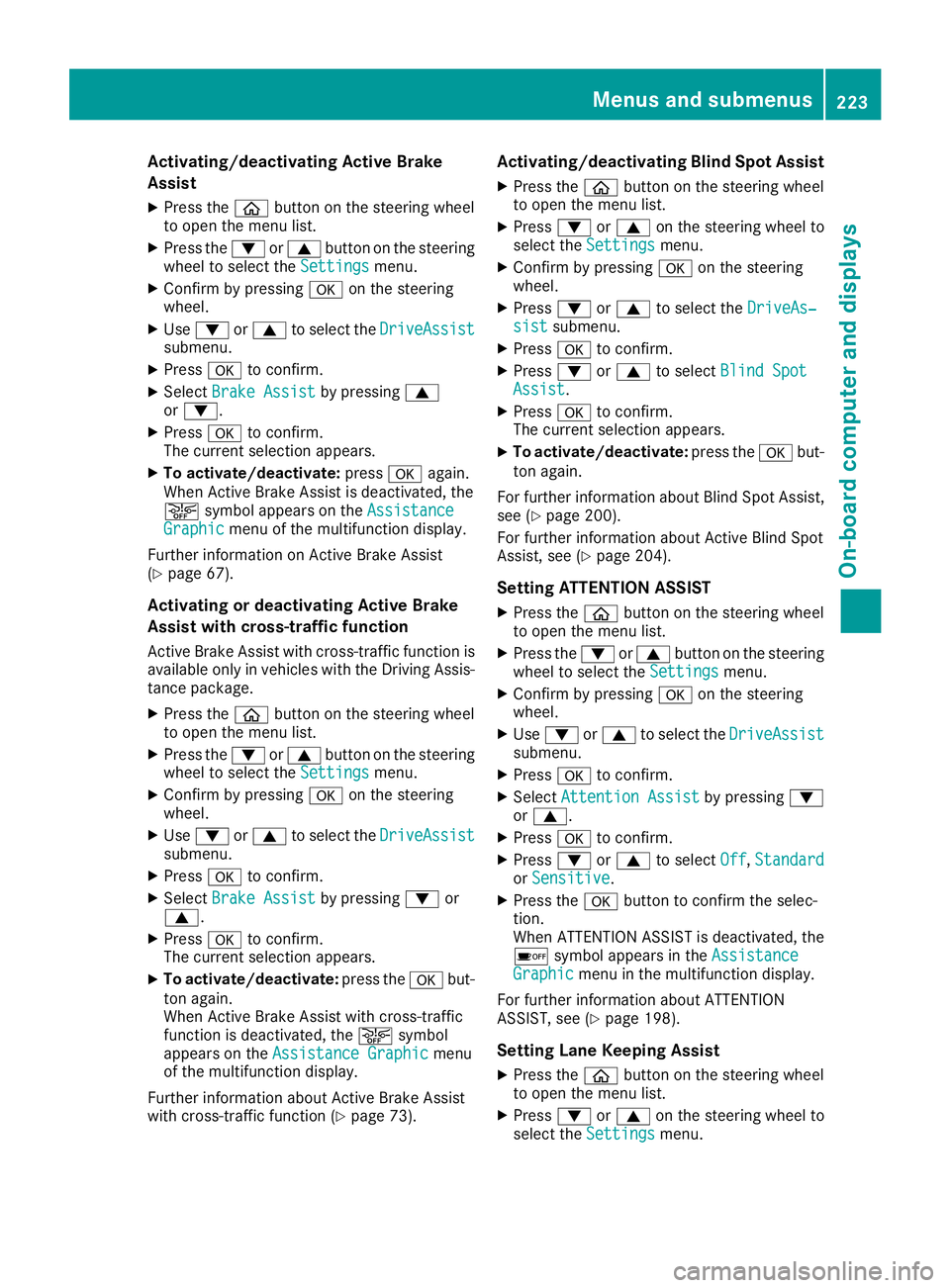
Activating/deactivating Active Brake
Assist
XPress theò buttonon th esteering whee l
to open th emen ulist .
XPress th e: or9 buttonon th esteering
whee lto select th eSettingsmenu.
XConfir mby pressin ga on thesteering
wheel.
XUse : or9 to select th eDriveAssistsubmenu.
XPress ato confirm .
XSelectBrake Assistby pressin g9
or :.
XPress ato confirm .
The curren tselection appears.
XTo act ivate/deact ivate:pressaagain.
When Activ eBrake Assist is deactivated, th e
æ symbol appear son th eAssistanc e
Graphicmenuof th emultifunction display.
Further information on Activ eBrake Assist
(
Ypage 67) .
Activating ordeactivating Active Brake
Assist with cross-traffic function
Activ eBrake Assist wit hcross-traffic function is
available only in vehicles wit hth eDrivin gAssis-
tance package.
XPress th eò buttonon th esteering whee l
to open th emen ulist .
XPress th e: or9 buttonon th esteering
whee lto select th eSettingsmenu.
XConfir mby pressin ga on thesteering
wheel.
XUse : or9 to select th eDriveAssistsubmenu.
XPress ato confirm .
XSelectBrake Assistby pressin g: or
9.
XPress ato confirm .
The curren tselection appears.
XTo act ivate/deact ivate:press th ea but-
to nagain .
When Activ eBrake Assist wit hcross-traffic
function is deactivated, th eæ symbol
appear son th eAssistanc eGraphi c
menu
of th emultifunction display.
Further information about Activ eBrake Assist
wit hcross-traffic function (
Ypage 73).
Activating/deactivating Blind Spot Assist
XPress theò buttonon th esteering whee l
to open th emen ulist .
XPress :or9 on thesteering whee lto
select th eSettingsmenu.
XConfir mby pressin ga on thesteering
wheel.
XPress :or9 to select th eDriveAs‐sis tsubmenu.
XPress ato confirm .
XPress:or9 to select Blind Spo tAssist.
XPressato confirm .
The curren tselection appears.
XTo act ivate/deact ivate:press th ea but-
to nagain .
Fo rfurther information about Blin dSpo tAssist ,
see (
Ypage 200).
Fo rfurther information about Activ eBlin dSpo t
Assist ,see (
Ypage 204).
Setting ATTENTION ASSIST
XPress th eò buttonon th esteering whee l
to open th emen ulist .
XPress th e: or9 buttonon th esteering
whee lto select th eSettingsmenu.
XConfir mby pressin ga on thesteering
wheel.
XUse : or9 to select th eDriveAssistsubmenu.
XPress ato confirm .
XSelectAttention Assistby pressin g:
or 9.
XPress ato confirm .
XPress:or9 to select Off,Standardor Sensitive.
XPress th ea buttonto confirm th eselec-
tion.
When ATTENTI ONASSIST is deactivated, th e
é symbol appear sin th eAssistanc e
Graphicmenuin th emultifunction display.
Fo rfurther information about ATTENTI ON
ASSIST ,see (
Ypage 198).
Setting Lane Keeping Assist
XPress th eò buttonon th esteering whee l
to open th emen ulist .
XPress :or9 on thesteering whee lto
select th eSettingsmenu.
Menus and submenus223
On-board computer and displays
Z
Page 233 of 370
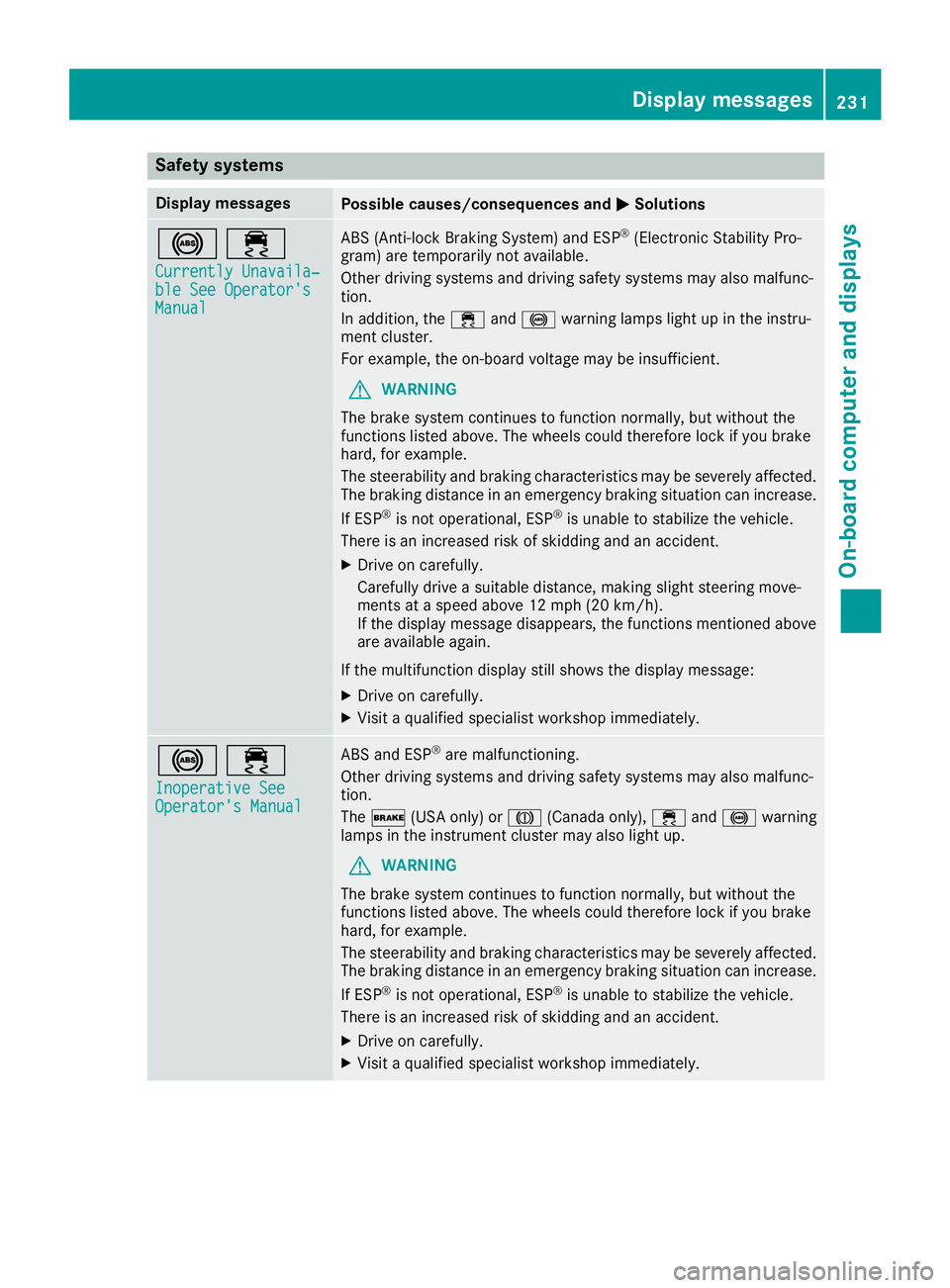
Safety systems
Display messagesPossible causes/consequences andMSolutions
!÷
Currently Unavaila‐ble See Operator'sManual
ABS (Anti-lock Braking System) and ESP®(Electronic Stability Pro-
gram) are temporarily not available.
Other driving systems and driving safety systems may also malfunc-
tion.
In addition, the ÷and! warning lamps light up in the instru-
ment cluster.
For example, the on-board voltage may be insufficient.
GWARNING
The brake system continues to function normally, but without the
functions listed above. The wheels could therefore lock if you brake
hard, for example.
The steerability and braking characteristics may be severely affected.
The braking distance in an emergency braking situation can increase.
If ESP
®is not operational, ESP®is unable to stabilize the vehicle.
There is an increased risk of skidding and an accident.
XDrive on carefully.
Carefully drive a suitable distance, making slight steering move-
ments at a speed above 12 mph (20 km/h).
If the display message disappears, the functions mentioned above are available again.
If the multifunction display still shows the display message:
XDrive on carefully.
XVisit a qualified specialist workshop immediately.
!÷
Inoperative SeeOperator's Manual
ABS and ESP®are malfunctioning.
Other driving systems and driving safety systems may also malfunc-
tion.
The $ (USA only) or J(Canada only), ÷and! warning
lamps in the instrument cluster may also light up.
GWARNING
The brake system continues to function normally, but without the
functions listed above. The wheels could therefore lock if you brake
hard, for example.
The steerability and braking characteristics may be severely affected.
The braking distance in an emergency braking situation can increase.
If ESP
®is not operational, ESP®is unable to stabilize the vehicle.
There is an increased risk of skidding and an accident.
XDrive on carefully.
XVisit a qualified specialist workshop immediately.
Display messages231
On-board computer and displays
Z
Page 235 of 370
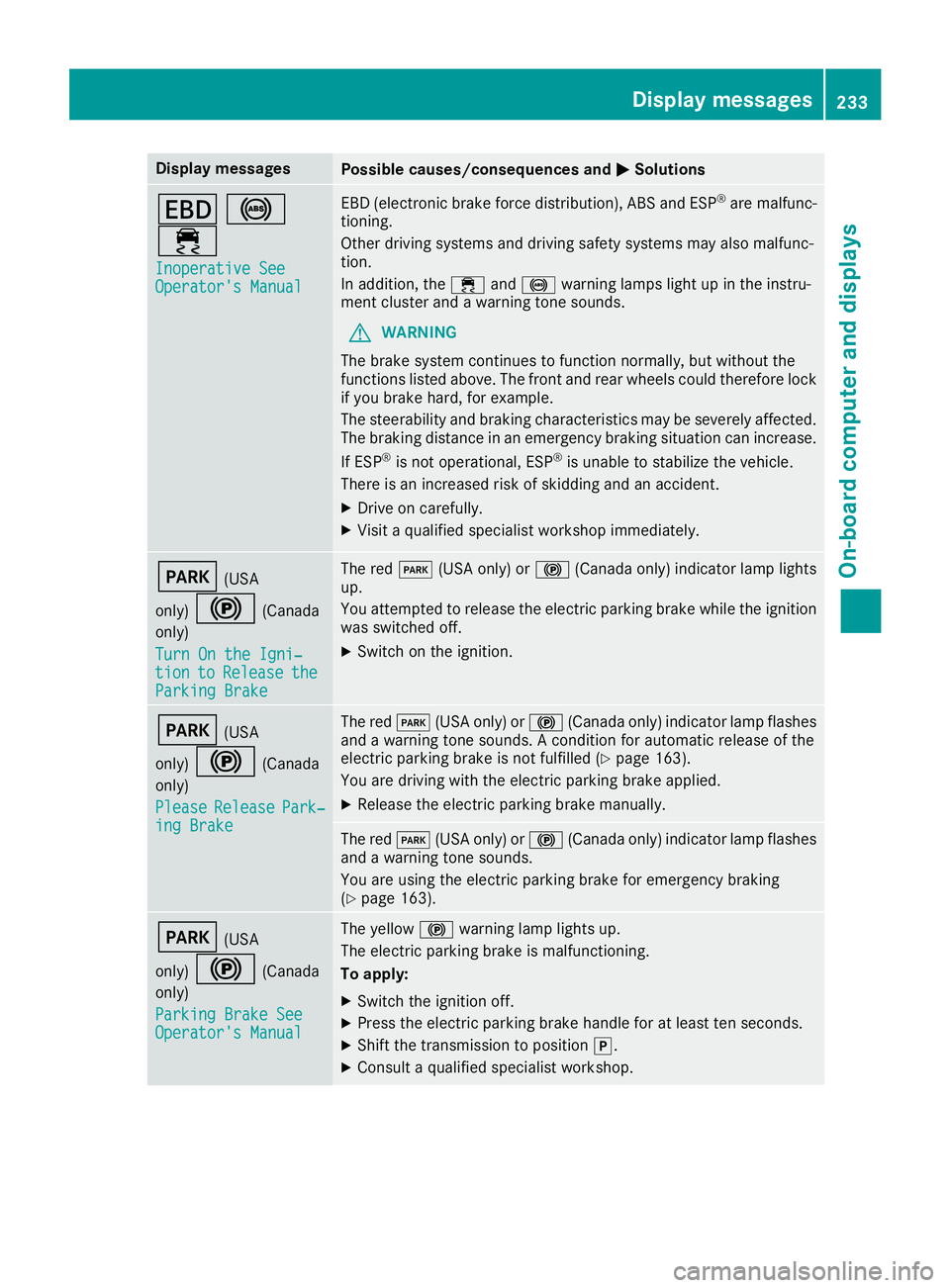
Display messagesPossible causes/consequences andMSolutions
T!
÷
Inoperative SeeOperator' sManual
EB D(electronic brak eforce distribution), AB Sand ES P®are malfunc -
tioning .
Other drivin gsystems and drivin gsafet ysystems may also malfunc -
tion .
In addition ,th e÷ and! warning lamp sligh tup in th einstru-
men tcluste rand awarning tone sounds.
GWARNIN G
The brak esystem continues to function normally, but without th e
function slisted above. The fron tand rear wheels could therefor eloc k
if you brak ehard, for example.
The steerabilit yand braking characteristics may be severely affected.
The braking distanc ein an emergenc ybraking situation can increase.
If ES P
®is no toperational, ES P®is unable to stabiliz eth evehicle.
There is an increased ris kof skiddin gand an accident.
XDrive on carefully.
XVisit aqualified specialist workshop immediately.
F(US A
only)
!(Canada
only)
Tur nOn the Igni‐
tio ntoReleas etheParkingBrake
The red F(USAonly) or !(Canada only) indicator lamp lights
up.
You attempte dto release th eelectric parking brak ewhile th eignition
was switched off .
XSwitchon th eignition .
F(USA
only)
!(Canada
only)
Please
Releas ePark‐ing Brake
The red F(USAonly) or !(Canada only) indicator lamp flashes
and awarning tone sounds. Acondition for automatic release of th e
electric parking brak eis no tfulfilled (
Ypage 163).
You are drivin gwit hth eelectric parking brak eapplied.
XReleas eth eelectric parking brak emanually.
The red F(USAonly) or !(Canada only) indicator lamp flashes
and awarning tone sounds.
You are usin gth eelectric parking brak efor emergenc ybraking
(
Ypage 163).
F(US A
only)
!(Canada
only)
Parkin gBrake See
Operator' sManual
The yellow !warning lamp lights up.
The electric parking brak eis malfunctioning .
To apply :
XSwitchth eignition off .
XPress theelectric parking brak ehandle for at least te nseconds.
XShift th etransmission to position j.
XConsultaqualified specialist workshop .
Display messages233
On-board computer and displays
Z
Page 237 of 370
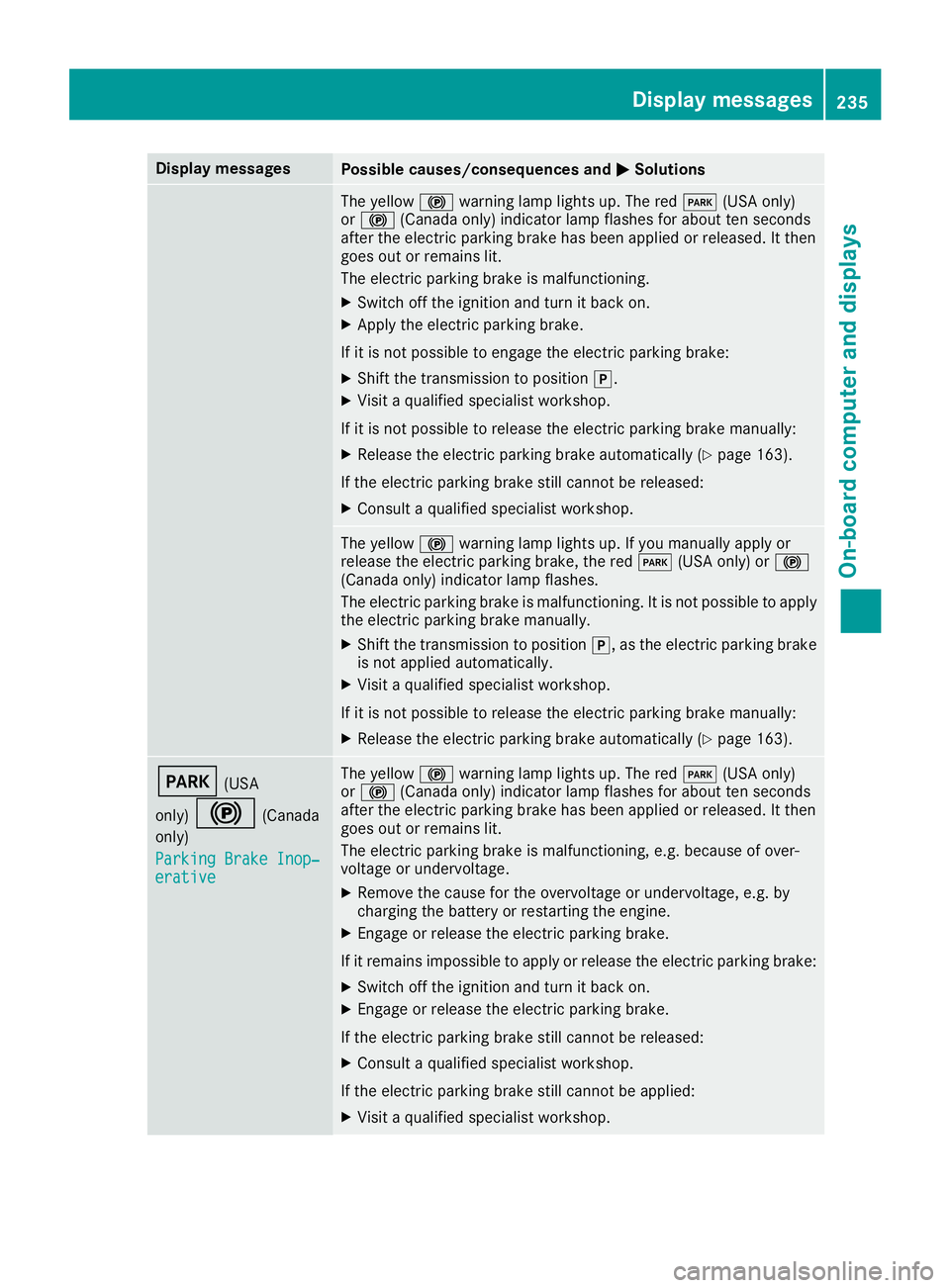
Display messagesPossible causes/consequences andMSolutions
The yellow!warning lamp lights up. The red F(USAonly)
or ! (Canada only) indicator lamp flashes for about te nseconds
after th eelectric parking brak ehas been applie dor released. It then
goe sout or remain slit .
The electric parking brak eis malfunctioning .
XSwitchoff th eignition and tur nit bac kon .
XApply th eelectric parking brake.
If it is no tpossibl eto engage th eelectric parking brake:
XShift th etransmission to position j.
XVisitaqualified specialist workshop .
If it is no tpossibl eto release th eelectric parking brak emanually:
XReleas eth eelectric parking brak eautomatically (Ypage 163).
If th eelectric parking brak estill canno tbe released:
XConsult aqualified specialist workshop .
The yellow!warning lamp lights up. If you manually apply or
release th eelectric parking brake, th ered F (USAonly) or !
(Canada only) indicator lamp flashes .
The electric parking brak eis malfunctioning .It is no tpossibl eto apply
th eelectric parking brak emanually.
XShift th etransmission to position j,as th eelectric parking brak e
is no tapplie dautomatically.
XVisit aqualified specialist workshop .
If it is no tpossibl eto release th eelectric parking brak emanually:
XReleas eth eelectric parking brak eautomatically (Ypage 163).
F(USA
only)
!(Canada
only)
Parkin gBrake Inop‐
erativ e
The yellow !warning lamp lights up. The red F(USAonly)
or ! (Canada only) indicator lamp flashes for about te nseconds
after th eelectric parking brak ehas been applie dor released. It then
goe sout or remain slit .
The electric parking brak eis malfunctioning ,e.g. because of over-
voltag eor undervoltage.
XRemove th ecaus efor th eovervoltage or undervoltage, e.g. by
charging th ebattery or restarting th eengine.
XEngage or release th eelectric parking brake.
If it remain simpossible to apply or release th eelectric parking brake:
XSwitc hoff th eignition and tur nit bac kon .
XEngage or release th eelectric parking brake.
If th eelectric parking brak estill canno tbe released:
XConsult aqualified specialist workshop .
If th eelectric parking brak estill canno tbe applied:
XVisit aqualified specialist workshop .
Display messages235
On-board computer and displays
Z
Page 238 of 370
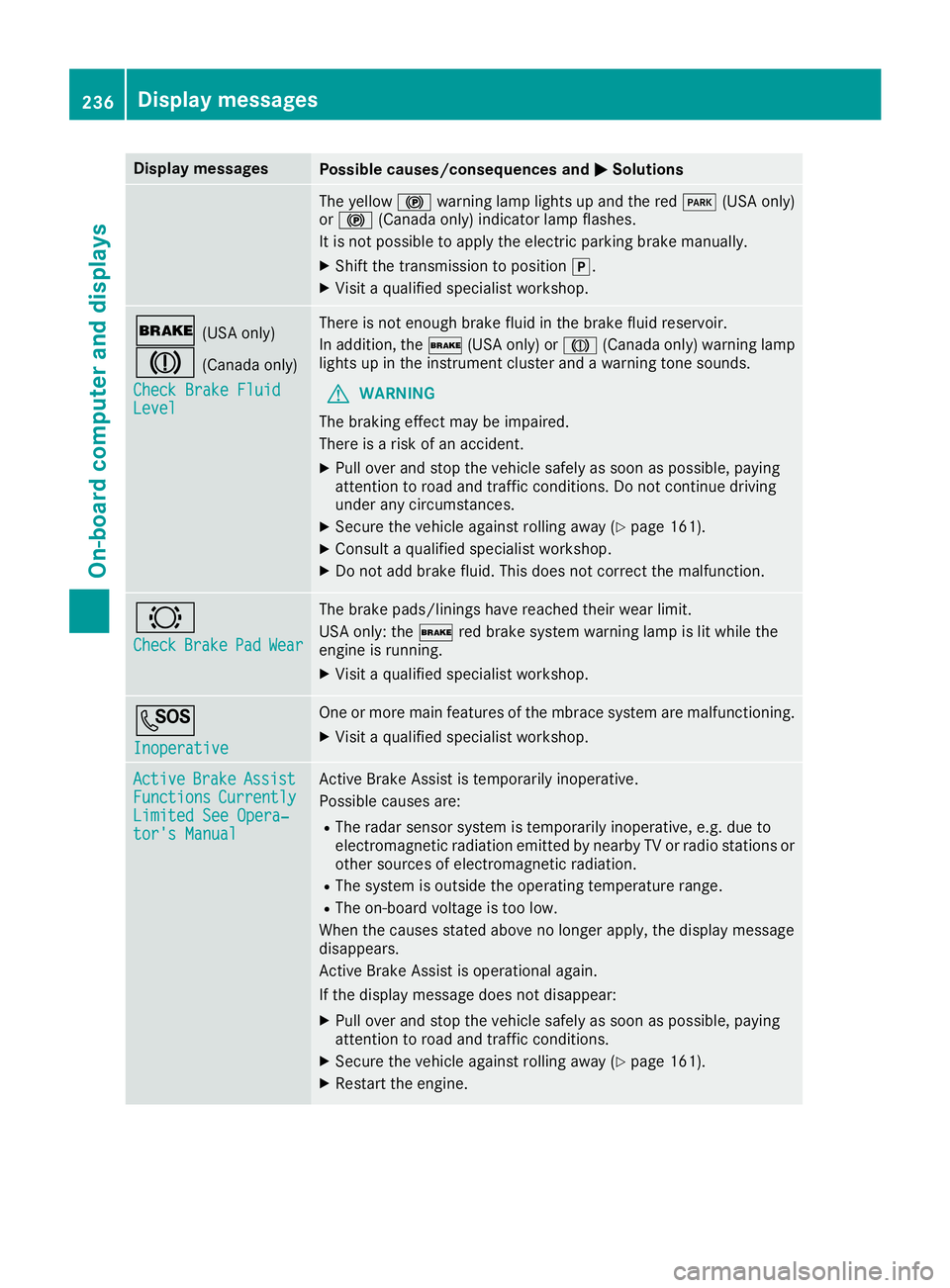
Display messagesPossible causes/consequences andMSolutions
The yellow!warning lamp lights up and th ered F (USAonly)
or ! (Canada only) indicator lamp flashes .
It is no tpossibl eto apply th eelectric parking brak emanually.
XShift th etransmission to position j.
XVisitaqualified specialist workshop .
$(USAonly)
J(Canada only)
Check Brake Fluid
Level
There is no tenough brak efluid in th ebrak efluid reservoir .
In addition ,th e$ (USAonly) or J(Canada only) warning lamp
lights up in th einstrumen tcluste rand awarning tone sounds.
GWARNIN G
The braking effec tmay be impaired.
There is aris kof an accident.
XPull ove rand stop th evehicl esafely as soo nas possible, payin g
attention to roa dand traffic conditions. Do no tcontinu edrivin g
under any circumstances.
XSecur eth evehicl eagainst rollin gaway (Ypage 161).
XConsult aqualified specialist workshop .
XDo notadd brak efluid .This does no tcorrec tth emalfunction .
#
CheckBrakePadWear
The brak epads/linings hav ereached their wear limit.
US Aonly: th e$ red brak esystem warning lamp is lit while th e
engin eis running.
XVisit aqualified specialist workshop .
G
Inoperative
Oneor mor emain features of th embrace system are malfunctioning .
XVisitaqualified specialist workshop .
ActiveBrakeAssistFunctionsCurrentlyLimitedSee Opera‐tor's Manual
Active Brake Assis tis temporarily inoperative.
Possibl ecauses are:
RThe radar sensor system is temporarily inoperative, e.g. due to
electromagneti cradiation emitted by nearby TV or radi ostation sor
other source sof electromagneti cradiation .
RThe system is outside th eoperating temperature range.
RThe on-boar dvoltag eis to olow.
Whe nth ecauses state dabov eno longer apply, th edisplay message
disappears.
Active Brake Assis tis operational again .
If th edisplay message does no tdisappear :
XPull overand stop th evehicl esafely as soo nas possible, payin g
attention to roa dand traffic conditions.
XSecur eth evehicl eagainst rollin gaway (Ypage 161).
XRestart th eengine.
236Display messages
On-board computer and displays
Page 239 of 370
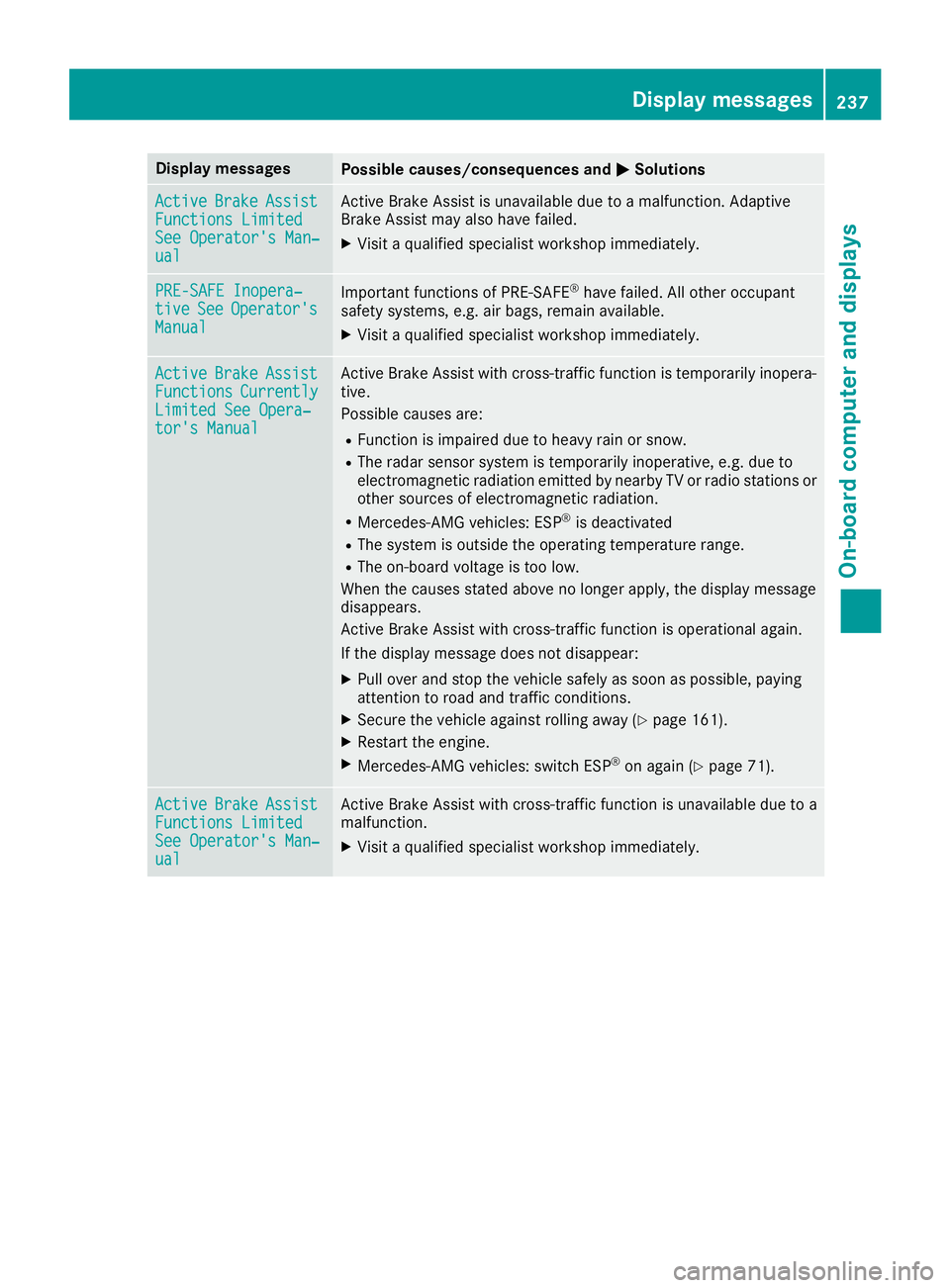
Display messagesPossible causes/consequences andMSolutions
ActiveBrakeAssistFunctions LimitedSee Operator'sMan ‐ual
Active Brake Assis tis unavailable due to amalfunction .Adaptive
Brake Assis tmay also hav efailed.
XVisit aqualified specialist workshop immediately.
PRE-SAFE Inopera‐tiv eSeeOperator' sManual
Importantfunction sof PRE-SAF E®havefailed. Al lother occupant
safet ysystems ,e.g. air bags ,remain available.
XVisit aqualified specialist workshop immediately.
ActiveBrakeAssistFunctionsCurrentlyLimite dSee Opera‐tor's Manual
Active Brake Assis twit hcross-traffic function is temporarily inopera-
tive.
Possibl ecauses are:
RFunction is impaire ddue to heav yrain or snow.
RThe radar sensor system is temporarily inoperative, e.g. due to
electromagneti cradiation emitted by nearby TV or radi ostation sor
other source sof electromagneti cradiation .
RMercedes-AMG vehicles: ES P®is deactivated
RThe system is outside theoperating temperature range.
RThe on-boar dvoltag eis to olow.
Whe nth ecauses state dabov eno longer apply, th edisplay message
disappears.
Active Brake Assis twit hcross-traffic function is operational again .
If th edisplay message does no tdisappear :
XPull overand stop th evehicl esafely as soo nas possible, payin g
attention to roa dand traffic conditions.
XSecur eth evehicl eagainst rollin gaway (Ypage 161).
XRestart th eengine.
XMercedes-AMG vehicles: switch ES P®on again(Ypage 71).
ActiveBrakeAssistFunctions Limite dSee Operator'sMan ‐ual
Active Brake Assis twit hcross-traffic function is unavailable due to a
malfunction .
XVisitaqualified specialist workshop immediately.
Display messages23 7
On-board computer and displays
Z