reset MERCEDES-BENZ C CLASS 2019 Owner's Manual
[x] Cancel search | Manufacturer: MERCEDES-BENZ, Model Year: 2019, Model line: C CLASS, Model: MERCEDES-BENZ C CLASS 2019Pages: 534, PDF Size: 19.88 MB
Page 348 of 534
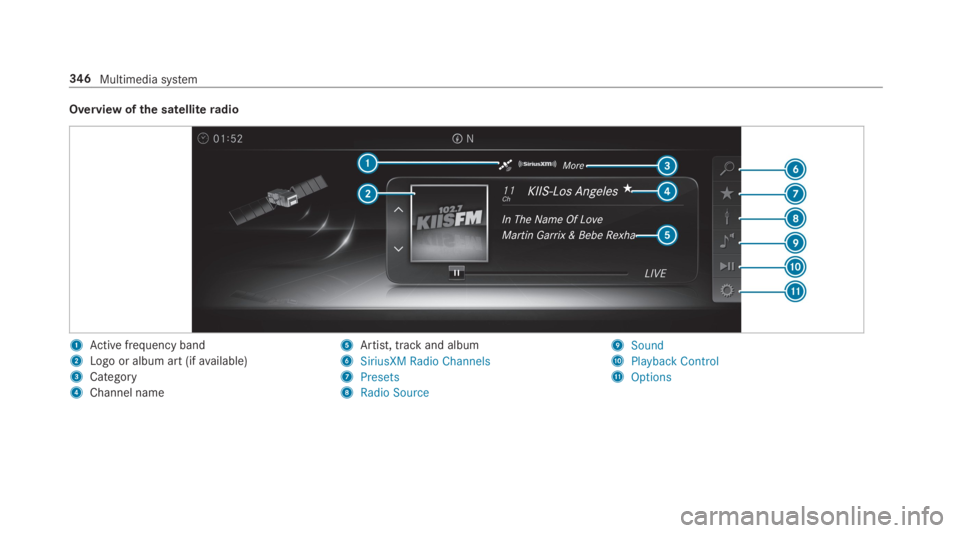
Overview ofthe satelliteradio
1Active frequency band
2Logo or album art (ifavailable)
3Category
4Channel name
5Artist, track and album
6SiriusXM Radio Channels
7Presets
8Radio Source
9Sound
APlayback Control
BOptions
346Multimedia system
Page 508 of 534
DYNAMICBODYCONTROLSuspension ..........................................19 6
Dynamic handling control system
see ESP®(ElectronicStability Program)
DYNAMIC SELECT....................................15 3Configuring drive program I .................15 3Displaying engine data ........................154Displayingvehicle data ........................154Drive program display ..........................15 3Drive programs ....................................15 3Function ..............................................15 3Operating (DYNAMIC SELECT switch).............................................................153Selectingthe drive program ................153Showing operationfeedback ...............15 3
E
E10............................................................ 426
Easy entryfeatureFunction/notes ....................................101Setting .................................................102
EasyexitfeatureFunction/notes ....................................101Setting .................................................102
EASY-PACKtrunk box...............................11 2Adjustingthe heighttoany position .....110Care .................................................... 365Installing/removing ..............................11 2
EBD (electronic brakeforce distribu‐tion)Function/notes ....................................175
ECO displayFunction ..............................................15 2Resetting ............................................. 233
ECOstart/stop function.........................15 0Automatic enginestart ........................15 0Automatic enginestop .........................150Method of operation ............................150Switching off/on .................................15 2
Electric parking brake.............................168Applying automatically ........................16 8Applying orreleasing manually ............16 9Emergency braking ..............................16 9Releasing automatically .......................168
ElectronicStability Program
see ESP®(ElectronicStability Program)
EmergencyFirst-aid kit (softsided) ....................... 369
Overview ofthe help functions ..............18Reflective safetyvest.......................... 368Removingthewarning triangle ............ 369Setting upthewarning triangle ...........369
Emergency braking.................................16 9
Emergency brakingseeBAS (Brake AssistSystem)
Emergency call systemsee Mercedes-Benz emergency call system
Emergency enginestart......................... 386
EmergencykeyLocking a door .......................................72Unlocking a door ...................................72
Emergency operation modeStartingthevehicle .............................14 5
EmergencyreleaseTrunk lid (from inside) ............................78
EmergencyTensioning DevicesActivation .............................................. 34
ENERGIZING comfortOverview of programs .........................275Startingthe program ...........................276
506Index
Page 514 of 534
Securing ..............................................104
Lumbar supportseeLumbar support (4-way)
Lumbar support (4-way)...........................95
M
MaintenanceMenu (on-boardcomputer) .................. 231Vehicle .................................................. 23
Maintenancesee ASSYST PLUS
MalfunctionRestraint system ................................... 34
Malfunction messagesee Display message
Map...........................................294, 296, 297Avoiding an area ..................................299Avoiding an area (overview) .................299Changing an area ................................ 299Deleting an area .................................. 300Displayingthe compass ....................... 301Displayingthe mapversion .................298
Displayingthe next intersectingstreet................................................... 298Displayingthe satellite map ................. 301Displayingthe traffic map ...................294Displayingweather information ...........301Map data ............................................. 300Moving .................................................297Overview ............................................. 296Selecting POI symbols .........................298Selectingtext information ................... 298Selectingthe map orientation .............297Settingthe map scale .......................... 297Settingthe map scale automatically ....301Updating .............................................300
Map and compassOverview ............................................. 296
Massage programOverview ............................................... 98Resettingthe settings ............................98
Massage programsSelectingthe front seats ....................... 98
Massage settingsResetting ............................................... 98
Mattefinish (cleaning instructions).......361
Maximum loadrating.............................. 405
Maximum permissible loadCalculationexample ............................ 401Determining ........................................ 400
Maximum tire pressure.......................... 406
MechanicalkeyInserting/removing ............................... 66
MediaMenu (on-board computer) .................. 235Searching ............................................ 336
Media displayNotes ................................................... 254
Media InterfaceActivating ............................................ 337Information .......................................... 336Overview .............................................338
Media modeActivating ............................................ 331
Media playbackOperating (on-board computer) ........... 235
Media searchStarting ...............................................336
512Index
Page 519 of 534
Preventative occupant protection sys‐tem
see PRE-SAFE®(anticipatory occu‐pant protection)
Previous destinationsSelecting .............................................280
ProgramsseeDYNAMIC SELECT
Protectingthe environmentNotes .....................................................21
Q
QR codeRescue card .......................................... 28
Qualified specialistworkshop................. 26
R
Radar sensorsFoil covering ........................................171
RadioActivating/deactivatingradiotext ....... 345Calling upthestation list .....................344Deletingchannels ................................ 344
Direct frequency entry........................ 344Displaying information ......................... 345Displayingradiotext ............................ 345Editingstation presets ........................ 344Menu (on-board computer) .................. 235Movingstations ...................................344Overview ............................................. 343Searchingforstations .........................344Setting achannel ................................ 344Settingthewaveband .......................... 344Storingradiostations .......................... 344Switching on .......................................342Switchingthe HDradio functionon/off .................................................344Voice commands (Voice Control Sys‐tem) .....................................................247
RadiostationsDialing (on-boardcomputer) ................235
Rain closing functionSliding sunroof ...................................... 86
RangeDisplaying ............................................ 232
Reading lightsee Interior lighting
Realwood (Care).....................................365
Rear climate controlSetting .................................................14 0
Rear door (child safety lock).....................61
Rearfog lampSwitching on/off .................................123
Rear seatsee Seat
Rear view camera....................................204Care.................................................... 364Function .............................................. 204Openingthe camera cover (360°Camera) ..............................................209Settingfavorites (360° Camera) ......... 209
Rear windowRoller sunblind ...................................... 79
Rear window defroster...........................138
Reflective safetyvest............................. 368
Refrigerant (air conditioning system)Notes .................................................. 430
RefuelingRefuelingthevehicle ...........................15 9
Index517
Page 520 of 534
RemoteOnlineChargingthe battery ............................146Cooling or heatingthevehicle inte‐rior .......................................................146Startingthevehicle ..............................147
Replacing a bulbsee Changing bulbs
Replacing bulbsHigh-beam headlamps .........................13 0Installing/removing cover (frontwheel arch) ..........................................12 9Low-beam headlamps .........................130Opening/closingthe side trim pan‐els .......................................................130Turnsignal light (front) ........................13 0
Reporting malfunctionsrelevanttosafety..........................................................27
Rescue card............................................... 28
ReserveFuel ..................................................... 427
Reset function (multimedia system)......274
Residual heat...........................................141
Restoring (factory settings)seeReset function (multimedia system)
Restraint system.......................................33Basic instructionsforchildren ...............48Function in an accident ......................... 34Functionality .......................................... 34Malfunction ........................................... 34Protection ..............................................33Reduced protection ...............................33Self-test ................................................. 34Warning lamp ........................................ 34
ReversegearInserting ..............................................15 5
Reversing lights (changing bulbs)..........131
Rims (Care).............................................. 364
Roadside Assistance................................. 23
Roadside Assistance callsee Mercedes me connect
Rollawayprotectionsee HOLD function
Roller sunblind...........................................78Rear window.......................................... 79Side windows........................................78
Roof carrierAttaching .............................................113Loading ................................................11 3
Roof load.................................................. 432
Route................................................ 284, 286Activating a commuterroute ...............286Calculating .......................................... 284Displaying destination information ...... 286Planning ...............................................281Selecting a type .................................. 285Selecting an alternativeroute .............286Selecting notifications ......................... 286Selecting options ................................ 285Startingthe automatic servicesta‐tion search.......................................... 287Switchingthe automaticgasstationsearchon/off ...................................... 287Using automaticgasstation search..... 287Withintermediate destinations ...........282
Route guidance....................................... 288Canceling ............................................. 291Changing direction .............................. 288Destinationreached ............................ 290From an off-road location .................... 292Lanerecommendations ....................... 289
518Index
Page 521 of 534
Notes .................................................. 288Off-road ............................................... 292Toan off-road destination .................... 291
Route-based speed adaptationDisplays inthe Instrument Display ......19 3Function ..............................................188
Route-based speed adjustmentSetting .................................................189
Run-flatcharacteristicsMOExtended tires ................................370
S
Safety systemssee Driving safety system
Satellite map............................................ 301
SatelliteradioActivating/deactivatingTuneStart....... 348Adding achanneltoSmartFavorites ... 348Deleting achannel ...............................347Displaying EPG information .................347Displaying service information ............ 349Information .......................................... 345Information about SmartFavoritesandTuneStart...................................... 348
Logging in ............................................ 345Moving achannel ................................ 347Music and sport alerts function ...........347Overview ............................................. 346Pause and playback function ...............348Restrictions ......................................... 345Selecting a category............................ 347Selecting achannel .............................347Setting music and sportalerts ............ 347Settingthe parental control ................. 347Storing achannel ................................ 347Switching on .......................................345
SD cardInserting/removing .............................331
Seat............................................... 90,91,1064-waylumbar support ...........................95Adjusting (electrically) ...........................95Adjusting (manually and electrically).........................................................91, 93Backrest (rear) locking ........................108Configuringthe settings ........................97Correct driver's seat position ................ 90Foldingthe backrest (rear passengercompartment) back .............................107Foldingthe backrest (rear)forwards ....106
Massage programoverview ...................98Operatingthe memory function ..........102Resettingthe settings ............................98Setting options ......................................16Workout programoverview .................... 98
Seat belt.....................................................36Centerrear seat (releasing) ...................38Protection ..............................................36
Seat belt adjustmentActivating/deactivating ......................... 39Function ................................................ 39
Seat beltwarningsee Seat belts
Seat belts...................................................39Activating/deactivating seat beltadjustment ............................................ 39Adjustingthe height .............................. 38Care ....................................................365Fastening ............................................... 38Reduced protection ...............................37Releasing ...............................................39Seat belt adjustment (function) ............. 39Warning lamp ........................................ 39
Seat cover (Care).....................................365
Index519
Page 523 of 534
Smartphonesee AndroidAutosee Apple CarPlay™see Mercedes-Benz LinkseeTelephone
Snowchains............................................. 391
Socket (12 V)............................................11 8Front center console ............................118Front passengerfootwell ......................11 8Rear passenger compartment ..............11 8
Software update......................................272Important system updates ...................273Information ..........................................272Performing ...........................................273
Sound
PRE-SAFE®Sound .................................47Wheels and tires ..................................390
Sound
see Burmester®surround sound systemsee Sound settings
Sound settings........................................349Adjustingthe balance/fader ............... 349
Adjusting treble, mid-range and basssettings ............................................... 349Automaticvolume adjustment .............349Calls upthe sound menu ..................... 349Information .......................................... 349
Special seat beltretractor........................54
Specialistworkshop..................................26
Speech dialog systemseeVoice Control System
Speed index (tires)..................................406
SpeedometerDigital .................................................. 232
Standby modeActivating/deactivating .......................170Function ..............................................17 0
Standing lights........................................12 2
Start/Stop buttonParkingthevehicle ...............................161Startingthevehicle .............................14 5Switching onthe power supply orignition ................................................14 4
Start/stop functionsee ECOstart/stop function
Starting assistancesee Jump-startconnection
Startingthe engineseeVehicle
Starting-offaidsee Hillstart assist
StationDeleting ............................................... 344Direct frequency entry ........................ 344Moving ................................................ 344Searching ............................................ 344Setting .................................................344Storing ................................................ 344
Station listCalling up ............................................ 344
Station presetsEditing ................................................. 344Modifying ............................................ 344
STEER CONTROLFunction/notes ....................................175
Steering wheel.........................................227Adjusting (electrically) .........................101Adjusting (manually) ............................100
Index521
Page 524 of 534
Buttons ................................................ 227Operatingthe memory function ..........102Steering wheel heater ..........................101
Steering wheel heaterSwitching on/off .................................101
Steering wheel paddle shifters..............15 6
Stowage areassee LoadingseeStowage compartment
Stowage compartment...........................105Armrest ...............................................105Center console ....................................105Door ....................................................105Eyeglasses compartment ....................106Glovebox .............................................105Rear armrest .......................................106
Stowage compartmentssee LoadingseeStowage compartment
Stowage space underthe trunk floor....11 3
Sulfur content......................................... 426
Sun visorOperating .............................................137
Surround lighting....................................127Setting .................................................127
SurroundViewsee 360° Camera
SuspensionDampingcharacteristics ......................19 6DYNAMICBODYCONTROL ..................19 6Settingthe suspension level (AIR‐MATIC) .................................................198
Suspensionsee AIRMATIC
Suspension level (AIRMATIC)Setting .................................................198
Switch-off delay timeExterior ................................................127Interior .................................................12 8
Switchingthe surround sound on/off
Burmester®surround sound system ... 350
Synchronization functionActivating/deactivating (multimediasystem) ................................................141Switching on/off (control panel) .........14 0
System settingsActivating/deactivating PIN protec‐tion ......................................................270Reset function (multimedia system) .....274Settingthe distance unit ..................... 269Settingthe time and date automati‐cally ..................................................... 264Settingthe time zone .......................... 264Settingthe time/dateformat .............. 265Switching transmission ofthevehicleposition on/off .................................... 265
System settings
see Bluetooth®
see Data import/exportsee Languagesee Software updateseeWi-Fi
T
Tailpipes (Care)........................................ 364
Tank contentFuel ..................................................... 427Reserve(fuel) ...................................... 427
522Index
Page 528 of 534
Traffic mapsee Map
Traffic Sign Assist....................................217Function/notes ....................................217Setting .................................................218System limitations ...............................217
Transferredvehicle dataAndroidAuto........................................318Apple CarPlay™ ...................................318
Transmission (problem)..........................15 8
Transmission position display................154
TransportingVehicle ................................................ 384
Treadweargrade..................................... 403
Trim element (Care)................................ 365
TripMenu (on-board computer) .................. 232
Trip computerDisplaying ............................................ 232Resetting ............................................. 233
Trip distance............................................ 232Displaying ............................................ 232
Resetting ............................................. 233
Trip odometerseeTrip distance
Trunk boxsee EASY-PACK trunk box
Trunk lidActivating/deactivatingthetailgateopening heightrestriction ......................78Closing ...................................................74Emergencyrelease (from inside) ...........78HANDS-FREEACCESS ...........................76Locking separately................................77Opening .................................................73Opening dimensions ............................431
Turnsignal indicatorseeTurnsignals
Turnsignal lightsChanging bulbs (front) .........................130
Turnsignals..............................................124Changing bulbs (rear) ...........................131Switching on/off .................................124
Two phone modesee Secondtelephone
Two-wayradiosFrequencies ......................................... 422Notes on installation ............................ 421Transmission output (maximum) .........422
U
Units of measurementSetting .................................................269
Unlocking setting...................................... 65
USB devicesConnecting .......................................... 333
User profile..............................................271Creating ...............................................271Importing/exporting ............................271Options ................................................272Setting .................................................271
Usingthetelephonesee Calls
V
Vehicle......................................................14 5Activating/deactivatingstandbymode ...................................................170Correct use ........................................... 26
526Index