climate control MERCEDES-BENZ C-CLASS CABRIOLET 2016 User Guide
[x] Cancel search | Manufacturer: MERCEDES-BENZ, Model Year: 2016, Model line: C-CLASS CABRIOLET, Model: MERCEDES-BENZ C-CLASS CABRIOLET 2016Pages: 377, PDF Size: 6.9 MB
Page 40 of 377
Centre console
Centre console, upper section
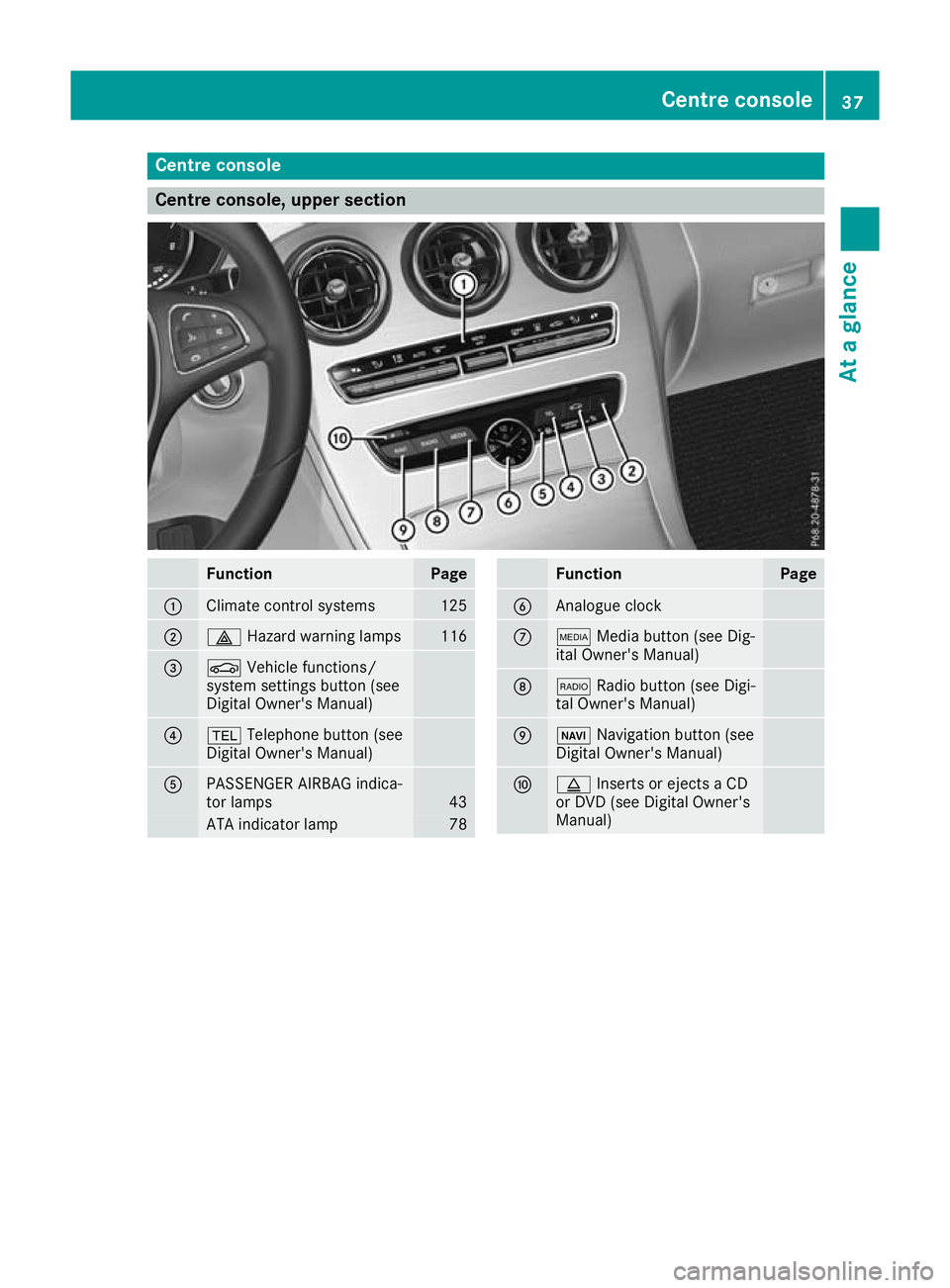
Function Page
:
Climate control systems 125
;
£
Hazard warning lamps 116
=
Ø
Vehicle functions/
system settings button (see
Digital Owner's Manual) ?
%
Telephone button (see
Digital Owner's Manual) A
PASSENGER AIRBAG indica-
tor lamps 43
ATA indicator lamp 78 Function Page
B
Analogue clock
C
Õ
Media button (see Dig-
ital Owner's Manual) D
$
Radio button (see Digi-
tal Owner's Manual) E
Ø
Navigation button (see
Digital Owner's Manual) F
þ
Inserts or ejects a CD
or DVD (see Digital Owner's
Manual) Centre console
37At a glance
Page 128 of 377
Overview of climate control systems
General notes
The THERMATIC automatic climate control is
available with one or two climate control zones. As dual-zone automatic climate control, the
temperature can be regulated separately on the
driver's side and front-passenger side.
Observe the settings recommended on the fol-
lowing pages. Otherwise, the windows could
mist up.
To prevent the windows from misting up:
R switch off climate control only briefly
R activate air-recirculation mode only briefly
R switch on "Cooling with dehumidification"
R activate the "Windscreen demisting" function
briefly, if required
Climate control regulates the temperature and
air humidity in the vehicle interior. The interior
filter cleans the air, thus improving the interior
climate.
The "Cooling with dehumidification" function is
available only when the engine is running. Opti- mum climate control is achieved only with the
side windows and roof closed.
The integrated filter filters out most particles of
dust and soot and completely filters out pollen.
It also reduces gaseous pollutants and odours. A
clogged filter reduces the amount of air supplied to the vehicle interior. For this reason, you
should always observe the interval for replacing
the filter, which is specified in the Service Book-
let. As this depends on environmental condi-
tions, e.g. heavy air pollution, the interval may
be shorter than stated in the Service Booklet.
i Ventilate the vehicle for a brief period during
warm weather, e.g. using the convenience
opening feature (Y page 95). This will speed
up the cooling process and the desired inte-
rior temperature will be reached more
quickly.
i It is possible that the blower may be activa-
ted automatically 60 minutes after the key
has been removed depending on various fac-
tors, e.g. the outside temperature. The vehi-
cle is then ventilated for 30 minutes to dry the
automatic climate control. Control panel for THERMATIC automatic climate control
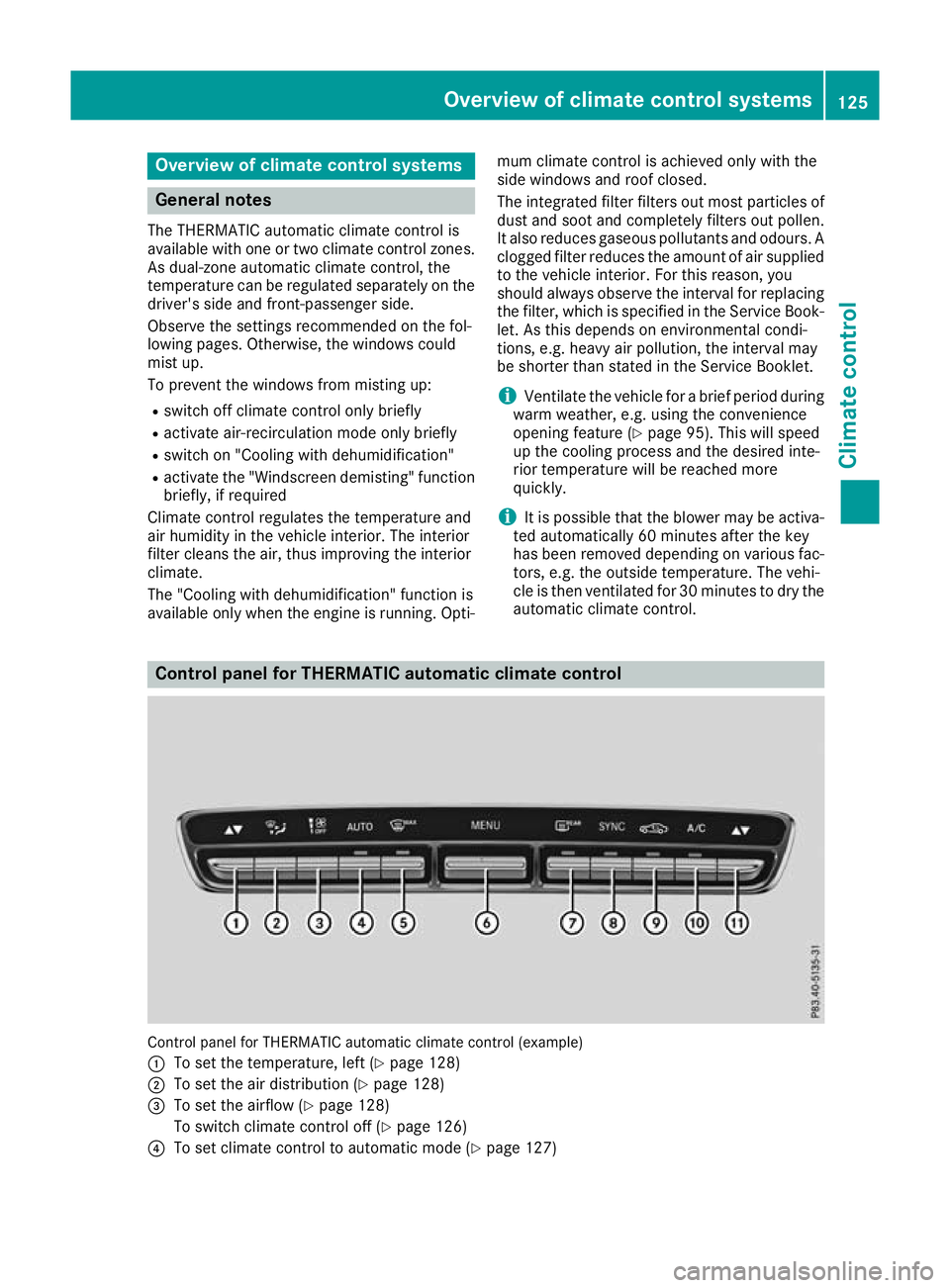
Control panel for THERMATIC automatic climate control (example)
: To set the temperature, left (Y page 128)
; To set the air distribution (Y page 128)
= To set the airflow (Y page 128)
To switch climate control off (Y page 126)
? To set climate control to automatic mode (Y page 127) Overview of climate control systems
125Climate control
Page 129 of 377
A
To demist the windscreen (Y page 128)
B To call up the climate control menu of the multimedia system (Y page 288)
C To switch the rear window heating on/off (Y page 129)
D To activate/deactivate synchronisation (Y page 128)
E To activate/deactivate air-recirculation mode manually (Y page 129)
F To activate/deactivate cooling with dehumidification (Y page 127)
G To set the temperature, right (Y page 128)Notes on using automatic climate
control
Optimum use of automatic climate con-
trol The following contains notes and recommenda-
tions on how best to use THERMATIC automatic
climate control.
R Activate climate control using the Ã
rocker switch. The indicator lamp above the
à rocker switch lights up. The "Cooling
with dehumidification" function is activated in
automatic mode.
R Set the temperature to 22 †.
R Use the "Windscreen demisting" function only
briefly until the windscreen is clear again.
R Use the "Air-recirculation mode" function only
briefly, e.g. if there are unpleasant outside
odours or when in a tunnel. The windows
could otherwise mist up as no fresh air is
drawn into the vehicle in air-recirculation
mode.
DYNAMIC SELECT switch (except
Mercedes-AMG vehicles) You can choose between various drive programs
with the DYNAMIC SELECT switch:
R manual transmission (Y page 141)
R automatic transmission (Y page 141)
If you have selected drive program E:
R during heating, the electrical heater booster
is deactivated and heat output is reduced as a
result
R the rear window heating running time is
reduced If you have selected drive program
C,Sor S+,
the current climate settings are maintained.
ECO start/stop function During automatic engine switch-off, the climate
control operates only at a reduced capacity. If
you require the full climate control output, you
can switch off the ECO start/stop function by
pressing the ECO button (Y page 139). Operating the climate control system
Switching the climate control on/off
General notes When climate control is switched off, the air
supply and air circulation are also switched off.
The windows could mist up. Therefore, switch
off climate control only briefly.
Switch on climate control primarily using the
à rocker switch (Y page 127).
Activating/deactivating X
Turn the key to position 2in the ignition lock
(Y page 133).
X To switch on: set the airflow to level 1or
higher using the Hrocker switch.
X To switch off: set the airflow to level 0using
the H rocker switch. 126
Operating the climate control systemClimate control
Page 130 of 377
Activating/deactivating cooling with air dehumidification
General notes If you deactivate the "Cooling with dehumidification" function, the air inside the vehicle will not be
cooled during warm weather. The air inside the vehicle will also not be dehumidified. The windows
can mist up more quickly. Therefore, deactivate the "Cooling with dehumidification" function only
briefly.
The "Cooling with dehumidification" function is available only when the engine is running. The air
inside the vehicle is cooled and dehumidified according to the temperature selected.
Condensation may drip from the underside of the vehicle when cooling mode is active. This is normal
and not a sign that there is a malfunction.
Activating/deactivating X
Press rocker switch ¿up or down.
The indicator lamp above the rocker switch lights up or goes out.
Problems with the "Cooling with dehumidification" function Problem
Possible causes/consequences and
M MSolutions The indicator lamp above
rocker switch
¿ remains off. The
"Cooling with dehumidi-
fication" function can no
longer be activated via
the multimedia system
(Y page 289). The cooling with dehumidification function has been deactivated due
to a malfunction.
X Consult a qualified specialist workshop. Setting climate control to automatic
mode
General notes In automatic mode, the set temperature is main-
tained automatically at a constant level. The
system automatically regulates the temperature of the dispensed air, the airflow and the air dis- tribution.
During automatic controlling, the "Cooling with
air dehumidification" function is activated.
The system automatically detects whether the
soft top is open or closed and automatically
adjusts the air settings depending on the soft
top status. Automatic control X
Turn the key to position 2in the ignition lock
(Y page 133).
X To activate: press theÃrocker switch up
or down.
The indicator lamp above the Ãrocker
switch lights up.
X Set the desired temperature using the w
rocker switch on the front control unit.
X To switch to manual operation: press the
H rocker switch up or down.
or
X Press the _rocker switch up or down.
The indicator lamp above the Ãrocker
switch goes out.
In automatic mode, if you adjust the airflow or
air distribution manually, the indicator lamp
above the Ãrocker switch goes out. The
function that has not been changed manually,
however, continues to be controlled automati- Operating the climate control system
127Climate control
Page 131 of 377
cally. When the manually set function switches
back to automatic mode, the indicator lamp
above the
Ãrocker switch lights up again. Setting the temperature
Different temperatures can be set for the driv-
er's and front-passenger sides.
X Turn the key to position 2in the ignition lock
(Y page 133).
X To increase or reduce: press thew
rocker switch up or down.
Only change the temperature setting in small increments. Start at 22 †. Setting the air distribution
Air distribution settings ¯
Directs the airflow through the demister
vents
P Directs the airflow through the centre
and side air vents
O Directs the airflow through the footwell
air vents
S Directs the airflow through the centre
and side air vents as well as the footwell
air vents
a Directs the airflow through the footwell
and demister vents
_ Directs the airflow through the demister
vents, the centre and side air vents as
well as the footwell air vents
b Directs the airflow through the centre
and side air vents as well as the demister
vents
W Sets the air distribution to automatic
Setting X
Turn the key to position 2(Y page 133).
X Press the _rocker switch up or down.
The various air distribution settings appear in the multimedia system. Setting the airflow
X Turn the key to position 2in the ignition lock
(Y page 133).
X To increase or reduce: press theH
rocker switch up or down. Activating/deactivating the synchro-
nisation function
General notes The
0 rocker switch is available only with
THERMATIC (2-zone) automatic climate control.
Climate control can be set centrally using the
synchronisation function. The temperature set-
ting is adopted for the front-passenger side.
Activating/deactivating X
Press the 0rocker switch up or down.
The indicator lamp above the 0rocker
switch lights up or goes out.
or X Activate or deactivate the "Synchronisation"
function using the multimedia system
(Y page 128).
The synchronisation function is deactivated if
the settings for the front-passenger side are
changed. Demisting the windscreen
General notes You can use this function to defrost the wind-
screen or to demist the inside of the windscreen
and the front side windows.
Switch off the "Windscreen demisting" functionas soon as the windscreen is clear again.
Switching the "Windscreen demisting"
function on or off X
Turn the key to position 2in the ignition lock
(Y page 133).
X To switch on: press rocker switch ¬on
the front control unit up or down.
The indicator lamp above rocker switch ¬
lights up. The current climate control settings are deactivated. 128
Operating the climate control systemClimate control
Page 132 of 377
The climate control system switches to the
following functions:
R high airflow
R high temperature
R air distribution to the windscreen and front
side windows
R air-recirculation mode off
i If necessary, the "Cooling with dehumidifi-
cation" function is activated. In this case, the
indicator lamp above rocker switch
¿ remains switched off.
X To switch off: press rocker switch ¬up or
down.
The indicator lamp above rocker switch ¬
goes out. The previous settings are reactiva-
ted. Air-recirculation mode remains deactiva- ted. Demisting the windows
Windows misted up on the inside X
Activate the "Cooling with air dehumidifica-
tion" function with the ¿rocker switch.
X Switch on automatic mode using the Ã
rocker switch.
X If the windows continue to mist up, activate
the "Windscreen demisting" function using
the ¬ rocker switch. i
You should select this setting only until the
windscreen is clear again.
Windows misted up on the outside X
Switch on the windscreen wipers.
X Switch on automatic mode using the Ã
rocker switch.
i If you clean the windows regularly, they do
not mist up as quickly. Rear window heating
General notes The rear window heating has a high current
draw. You should therefore switch it off as soon
as the window is clear. It otherwise switches off
automatically after several minutes.
If the battery voltage is too low, the rear window heating may switch off.
Switching the sound on/off X
Turn the key to position 2in the ignition lock
(Y page 133).
X Press the ¤rocker switch up or down.
The indicator lamp above the ¤rocker
switch lights up or goes out.
Problems with the rear window heating Problem
Possible causes/consequences and
M MSolutions The rear window heating
has switched off prema-
turely or cannot be acti-
vated. The battery has not been sufficiently charged.
X Switch off any consumers that are not required, e.g. reading lamps,
interior lighting or the seat heating.
When the battery is sufficiently charged, the rear window heating
can be activated again. Activating/deactivating air-recircula-
tion mode
General notes You can also temporarily deactivate the flow of
fresh air manually if unpleasant odours are
entering the vehicle from outside. The air already inside the vehicle will then be recircula-
ted.
If you activate air-recirculation mode, the win-
dows can mist up more quickly, particularly at
low outside temperatures. Use air-recirculation
mode only briefly to prevent the windows from
misting up. Operating the climate control system
129Climate control
Page 133 of 377

Activating/deactivating
X
Turn the key to position 2in the ignition lock
(Y page 133).
X To activate: press thegrocker switch up
or down.
The indicator lamp above the grocker
switch lights up.
Air-recirculation mode is activated automati-
cally: R at high outside temperatures
R in tunnels (vehicles with a navigation system
only)
The indicator lamp above the grocker
switch is not lit when automatic air-recirculation
mode is activated. Outside air is added after
approximately 30 minutes.
X To deactivate: press thegrocker switch
up or down.
The indicator lamp above the grocker
switch goes out.
Air-recirculation mode is deactivated automati-
cally:
R after approximately five minutes at outside
temperatures below approximately 5 †
R after approximately five minutes if "Cooling
with air dehumidification" is deactivated
R after approximately 30 minutes at outside
temperatures above approximately 5 †if the
"Cooling with air dehumidification" function is
activated Opening or closing using the air-recir-
culation button G
WARNING
During opening, body parts could be drawn in
or become trapped between the side window and the door frame. There is a risk of injury.
Monitor the entire opening procedure. When
opening, make sure that nobody is touching
the side window. If somebody becomes trap-
ped, release the switch immediately to inter-
rupt the opening procedure. G
WARNING
During closing, body parts could be drawn in
or become trapped between the side window and the door frame. There is a risk of injury.
Monitor the entire closing procedure. When
closing, make sure that no body parts are in
the closing area. If somebody becomes trap-
ped, release the switch immediately to inter-
rupt the closing procedure.
X To close: Press and hold the grocker
switch up or down until the side windows
close.
The indicator lamp above the grocker
switch lights up. Air-recirculation mode is
activated.
X To open: Press and hold the grocker
switch up or down until the side windows
open.
The indicator lamp above the grocker
switch goes out. Air-recirculation mode is
deactivated. Ionisation
Ionisation is used to purify and freshen the air in the vehicle interior, which is conducive to a
pleasant climate.
The ionisation of the interior air is odourless and
cannot, directly, be perceived in the vehicle inte- rior.
You can switch ionisation on or off using the
multimedia system (Y page 288).
Ionisation can only be operated when the auto-
matic climate control is switched on. The side air vent on the driver's side must be open. Air vents
Important safety notes
G
WARNING
Very hot or very cold air can flow from the air vents. This could result in burns or frostbite in the immediate vicinity of the air vents. There
is a risk of injury.
Make sure that all vehicle occupants always
maintain a sufficient distance to the air out- 130
Air ventsClimate control
Page 134 of 377

lets. If necessary, redirect the airflow to
another area of the vehicle interior.
In order to ensure the direct flow of fresh air
through the air vents into the vehicle interior,
please observe the following notes:
R keep the air inlet between the windscreen and
the bonnet free of blockages, such as ice,
snow or leaves
R never cover the vents or ventilation grilles in
the vehicle interior Adjusting the air vents
Air vents are located: R on the left and right-hand side of the dash-
board
R in the middle of the dashboard
R in the front head restraints
R in the rear centre console, depending on
equipment in the vehicle Side air vent (example)
: Side window demister vent
; Side air vent, left
= Control for left side air vent
X To open or close: turn thumbwheel=to the
left or right as far as it will go.
X To adjust the air direction: hold side air
vent ;by thumbwheel =and move it up or
down or to the left or right.
Adjusting the rear air vents (see Digital Owner's
Manual). Setting the blower output of the AIR-
SCARF vents
G
WARNING
When AIRSCARF is switched on, very hot air
can flow from the vents in the head restraints. This could result in burns in the immediate
vicinity of the air vents. There is a risk of injury.
Reduce the heater output before it becomes
too hot. You can adjust the blower output of AIRSCARF
vents :using the AIRSCARF button
(Y page 107). Air vents
131Climate control Z
Page 144 of 377
Problem
Possible causes/consequences and
M
MSolutions The starter motor was exposed to excessively high thermal load.
X Start the engine again (Y page 134).
If the engine still does not start: X Consult a qualified specialist workshop. Vehicles with a petrol
engine:
The engine is not running
smoothly and is misfir-
ing. The engine electronics or a mechanical component of the engine
management system are/is malfunctioning.
X Depress the accelerator pedal only slightly.
Otherwise, non-combusted fuel may get into the catalytic converter
and damage it.
X Have the cause rectified immediately at a qualified specialist work-
shop. The coolant temperature
display is showing more
than 120 †. A display
message may also
appear on the multifunc-
tion display and a warn-
ing tone may sound. The coolant level is too low. The coolant is too hot and the engine is not
being cooled sufficiently.
X Stop as soon as possible and allow the engine and the coolant to
cool down.
X Check the coolant level (Y page 312). Observe the warning notes
as you do so and top up the coolant if necessary. If the coolant level is correct, the engine radiator fan may be faulty. The
coolant is too hot and the engine is not being cooled sufficiently.
X If the coolant temperature is below 120 †, you can continue driving
to the nearest qualified specialist workshop.
X Avoid heavy loads on the engine as you do so, e.g. driving in moun-
tainous terrain and stop-start traffic. DYNAMIC SELECT switch
Mercedes-AMG vehicles
General information Use the DYNAMIC SELECT switch to select the
drive program.
Available drive programs:
RACE
(S‑MODEL)
Driving characteristics suit-
able for a race circuit
S+
Sport Plus Particularly sporty driving
characteristics
S
Sport Sporty driving characteris-
tics
C
Comfort Comfortable and economi-
cal driving characteristics
I
Individual Individual settings Depending on the drive program selected, the
following vehicle characteristics will change:
R the engine management
R the transmission management
R the suspension
R the position of the exhaust flap
R the steering
R the availability of the ECO start/stop function
R climate control
R the driver assistance systems
R the availability of gliding mode
Further information for automatic drive program
characteristics (Y page 148).
Additionally, in drive program Iyou can config-
ure the respective vehicle characteristics via the
multimedia system. You can find information
about this in the Digital Owner's Manual.
If the ignition is switched off for less than four
hours, the previously selected drive program is DYNAMIC SELECT switch
141Driving and parking Z
Page 145 of 377
activated when the engine is next started. If the
ignition is switched off for more than four hours,
drive program Cis activated when the engine is
next started.
Selecting the drive program X
Push DYNAMIC SELECT switch :forwards
or back until the desired drive program is
selected.
The status icon of the selected drive program
is shown on the multifunction display.
In addition, the current drive program settings are shown briefly on the multimedia system
display.
You can also shift gears yourself using the steer-
ing wheel gearshift paddles. Further information
on manual gearshifting (Y page 150).
Additional settings :
Position of the exhaust flap (Y page 139)
; ECO start/stop function (Y page 137)
= ESP ®
(Y page 72)
? Suspension (Y page 182)
A To permanently activate manual gearshift-
ing (Y page 150) When you press buttons
:–A, the corre-
sponding setting is selected. The DYNAMIC
SELECT switch setting is overwritten.
If you switch to drive program I, all stored char-
acteristics are applied. This is also the case if
you have previously pressed buttons :–A.
i Mercedes-AMG C 43 4MATIC:
in a few
countries, the ECO start/stop function is
deactivated at the factory due to the quality of the available fuel. In this case, the ECO start/
stop function is not available in any drive pro-
gram, regardless of what is shown on the mul- timedia system display. All other models
Use the DYNAMIC SELECT switch to change the
drive program.
Depending on the drive program selected, the
following vehicle characteristics will change:
R the drive (engine and transmission manage-
ment)
R the suspension
R the steering
R the availability of the ECO start/stop function
R the climate control
- The climate control settings
- The rear window heating operation period
- The performance of the seat heating
If the ignition is switched off for less than four
hours, the previously selected drive program is
activated when the engine is next started. If the
ignition is switched off for more than four hours,
drive program Cis activated when the engine is
next started. DYNAMIC SELECT switch (example)142
DYNAMIC SELECT switchDriving and parking