height MERCEDES-BENZ C-CLASS CABRIOLET 2016 User Guide
[x] Cancel search | Manufacturer: MERCEDES-BENZ, Model Year: 2016, Model line: C-CLASS CABRIOLET, Model: MERCEDES-BENZ C-CLASS CABRIOLET 2016Pages: 377, PDF Size: 6.9 MB
Page 186 of 377
80 km/h. Select the "Normal" setting for normal
road surfaces and "Raised" for driving with snow chains or on particularly poor road surfaces.
Your selection remains stored even if you
remove the key from the ignition lock.
X Start the engine.
If indicator lamp ;is not lit:
X Press button :.
Indicator lamp ;lights up. The vehicle is
raised by 25 mm compared with the normal
level.
The Vehicle rising Vehicle rising message appears on
the multifunction display.
i The message disappears after ten seconds,
irrespective of the level reached. If necessary,
the vehicle is raised further.
The "Raised level" setting is cancelled if you:
R drive at speeds above 120 km/h
R drive for approximately three minutes at a
speed above 80 km/h
The "Raised level" remains saved when you are
not driving within these speed ranges.
Setting the normal vehicle levelX Start the engine.
If indicator lamp ;is lit:
X Press button :.
Vehicles with automatic transmission:
indicator lamp ;goes out. The vehicle is
adjusted to the height of the currently selec-
ted drive program (Y page 141).
Vehicles with manual transmission: indi-
cator lamp ;goes out. The vehicle is adjus-
ted to the height of the currently selected
drive program (Y page 141).
Suspension settings General notes
The Adaptive Damping System automatically
controls the calibration of the dampers.
The damping is adjusted individually to each
wheel and depends on:
R your driving style, e.g. sporty
R the road surface condition, e.g. bumps
R your individual selection, i.e. sport or comfort
Your selection remains stored even if you
remove the key from the ignition lock. Sport mode
In the Sand S+drive programs, the firmer sus-
pension settings ensure even better contact
with the road. Select this mode when employing
a sporty driving style, e.g. on winding country
roads.
X Vehicles with automatic transmission:
select the
Sor S+ drive program with the
DYNAMIC SELECT switch (Y page 141).
Vehicles with manual transmission: select
the Sor S+ drive program with the DYNAMIC
SELECT switch (Y page 141).
The vehicle is lowered by 15 mm compared
with the normal level.
Comfort mode In the Eand Cdrive programs, the driving char-
acteristics of your vehicle are more comforta-
ble. Therefore, select this mode if you prefer a
more comfortable driving style. Select Comfort
mode also when driving at speed on straight
roads, e.g. on straight stretches of motorway.
X Vehicles with automatic transmission:
select the
Eor Cdrive program with the
DYNAMIC SELECT switch (Y page 141).
Vehicles with manual transmission: select
the Eor Cdrive program with the DYNAMIC
SELECT switch (Y page 141).
The vehicle is raised to the normal level.
At speeds of above 125 km/h, the vehicle is
automatically lowered by 15 mm in the Eand C
drive programs. At speeds of below 80 km/h,
the vehicle is raised again. AMG RIDE CONTROL
General notes The electronically controlled damping system
works continuously. This improves driving
safety and ride comfort.
The damping is adjusted individually to each
wheel and depends on:
R your driving style, e.g. sporty
R the road surface condition, e.g. bumps
R your individual selection of Sport, Sport + or
Comfort
The suspension mode is adjusted using the cor-
responding button in the centre console. Driving systems
183Driving and parking Z
Page 192 of 377
Parking tips:
R On narrow roads, drive as closely as possible
past the parking space
R Parking spaces that are littered or overgrown
might be identified or measured incorrectly
R Parking spaces that are partially occupied by
trailer drawbars might not be identified as
such or be measured incorrectly
R Snowfall or heavy rain may lead to a parking
space being measured inaccurately
R Pay attention to the PARKTRONIC
(Y page 186) warning messages during the
parking procedure
R You can intervene in the steering procedure
to correct it at any time. Active Parking Assist
is then deactivated
R When transporting a load that protrudes from
your vehicle, you should not use Active Park-
ing Assist
R Never use Active Parking Assist when snow
chains are fitted
R Always pay attention to the specified tyre
pressure for your vehicle. This has a direct
influence on the parking characteristics of the vehicle
Use Active Parking Assist for parking spaces
that are:
R parallel or at right angles to the direction of
travel
R on straight roads, not bends
R on the same level as the road, e.g. not on the
pavement
Detecting parking spaces Objects located above the height range of Active
Parking Assist will not be detected when the
parking space is measured. These are not taken into account when the parking procedure is cal-culated, e.g. overhanging loads, tail sections or
loading ramps of goods vehicles. G
WARNING
If there are objects above the detection range:
R Active Park Assist may steer too early
R the vehicle may not stop in front of these
objects
This could cause a collision. There is a risk of
an accident. If objects are located above the detection
range, stop and deactivate Active Parking
Assist.
Further information on the detection range
(Y page 185).
Active Parking Assist does not assist you with
parking in spaces at right angles to the direction of travel if:
R two parking spaces are located directly next
to one another
R the parking space is directly next to a low
obstacle such as a low kerb
R you forward-park
Active Parking Assist does not assist you with
parking in spaces that are parallel or at right
angles to the direction of travel if:
R the parking space is on a kerb
R the system reads the parking space as being
blocked, such as by foliage or grass paving
blocks
R the area is too small for the vehicle to
manoeuvre into
R the parking space is bordered by an obstacle,
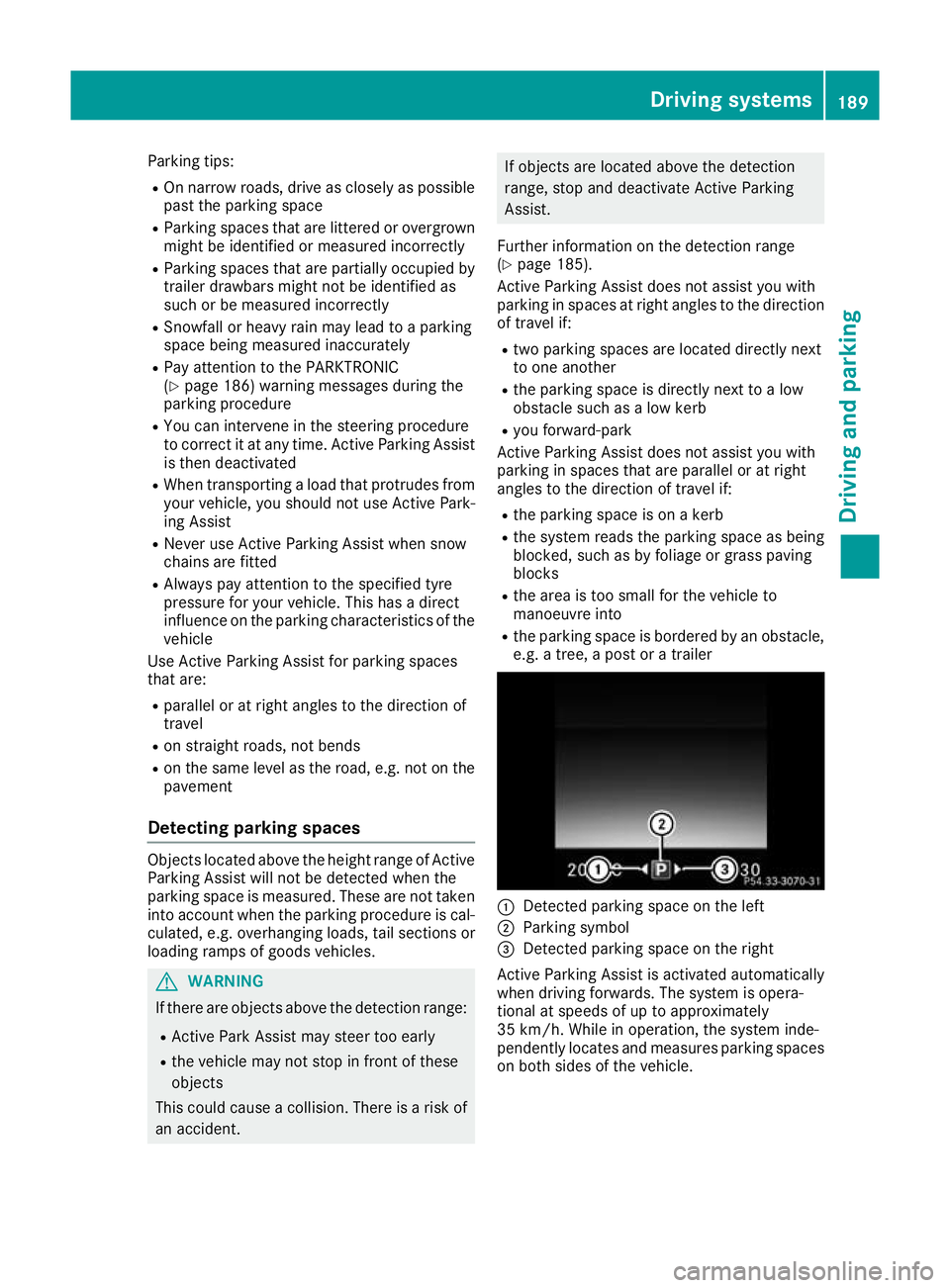
e.g. a tree, a post or a trailer :
Detected parking space on the left
; Parking symbol
= Detected parking space on the right
Active Parking Assist is activated automatically
when driving forwards. The system is opera-
tional at speeds of up to approximately
35 km/h. While in operation, the system inde-
pendently locates and measures parking spaces on both sides of the vehicle. Driving systems
189Driving and parking Z
Page 199 of 377
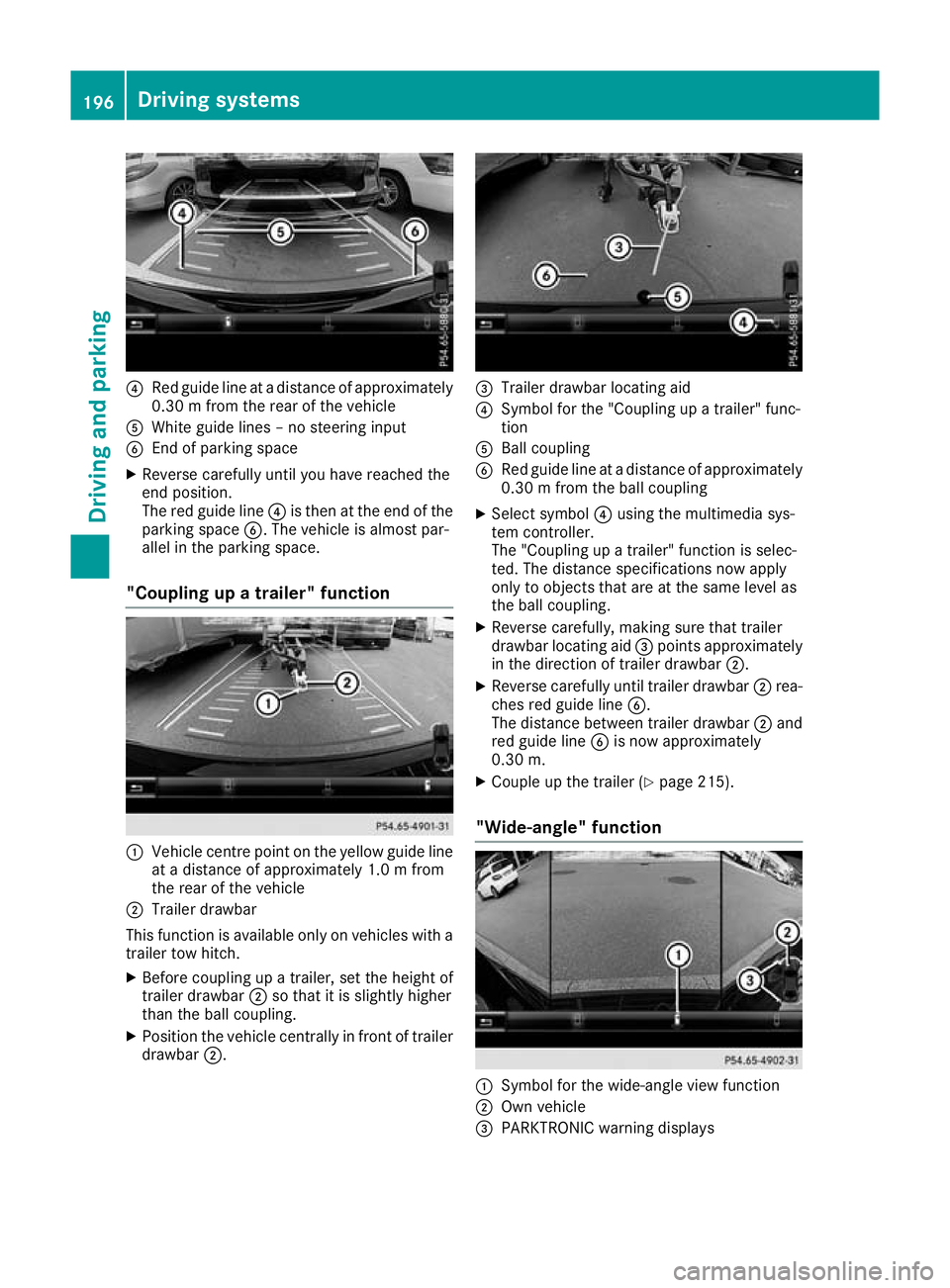
?
Red guide line at a distance of approximately
0.30 m from the rear of the vehicle
A White guide lines – no steering input
B End of parking space
X Reverse carefully until you have reached the
end position.
The red guide line ?is then at the end of the
parking space B. The vehicle is almost par-
allel in the parking space.
"Coupling up a trailer" function :
Vehicle centre point on the yellow guide line
at a distance of approximately 1.0 m from
the rear of the vehicle
; Trailer drawbar
This function is available only on vehicles with a
trailer tow hitch.
X Before coupling up a trailer, set the height of
trailer drawbar ;so that it is slightly higher
than the ball coupling.
X Position the vehicle centrally in front of trailer
drawbar ;. =
Trailer drawbar locating aid
? Symbol for the "Coupling up a trailer" func-
tion
A Ball coupling
B Red guide line at a distance of approximately
0.30 m from the ball coupling
X Select symbol ?using the multimedia sys-
tem controller.
The "Coupling up a trailer" function is selec-
ted. The distance specifications now apply
only to objects that are at the same level as
the ball coupling.
X Reverse carefully, making sure that trailer
drawbar locating aid =points approximately
in the direction of trailer drawbar ;.
X Reverse carefully until trailer drawbar ;rea-
ches red guide line B.
The distance between trailer drawbar ;and
red guide line Bis now approximately
0.30 m.
X Couple up the trailer (Y page 215).
"Wide-angle" function :
Symbol for the wide-angle view function
; Own vehicle
= PARKTRONIC warning displays 196
Driving systemsDriving and pa
rking
Page 201 of 377

R
if the area is lit by fluorescent lamps or LED
lighting (the display may flicker)
R if the camera lenses mist up, e.g. when you
drive into a heated garage in winter, causing a
rapid change in temperature
R if the camera lenses are dirty or covered
R if the vehicle components in which the cam-
eras are fitted are damaged. In this case, have
the camera position and setting checked at a qualified specialist workshop
Do not use the 360° camera under such cir-
cumstances. You could otherwise injure others
or damage objects when parking the vehicle.
The guide lines on the multimedia system dis-
play show the distances to your vehicle. The
distances apply only at road level.
In trailer mode, the guide lines are shown at the level of the trailer tow hitch.
The camera in the rear area is protected by a
flap. This flap opens when the 360° camera is
activated. See the notes on cleaning
(Y page 320). For technical reasons, the flap
may remain open briefly after the 360° camera
has been deactivated.
The field of vision and other functions of the
camera system may be restricted due to addi-
tional attachments (e.g. licence plate holder,
rear bicycle carrier).
On vehicles with height-adjustable suspension,
due to the technical conditions, leaving the
standard height can result in the following:
R inaccuracies in the guide lines
R inaccuracies in the display of generated
images (top view)
Activation conditions The image from the 360° camera appears when
R the multimedia system is switched on
R the 360° camera 360° camera function is switched on
If you are driving at more than a moderate speed and switch on the 360° camera, a warning mes-
sage appears.
The warning message disappears in the follow-
ing situations:
R you are again driving at a moderate speed.
The 360° camera is then activated
R the message is confirmed with the %but-
ton Switching the 360° camera on/off with
the button X
To switch on: press button:.
The following appears depending on whether gear Dor Ris selected:
R a split screen with top view and the image
from the front camera or
R a split screen with top view and the image
from the rear view camera
X To switch off: press button:again.
Switching on the 360° camera using
reverse gear You can show images from the 360° camera
automatically by engaging reverse gear.
X Make sure that the Activation by R gear Activation by R gear
function is selected in the multimedia system (see Digital Owner's Manual).
X To show the 360° camera image: engage
reverse gear.
The multimedia system shows the area
behind the vehicle in split-screen mode. You
see the top view of the vehicle and the image
from the reversing camera.
You cannot stop the 360° camera display if
reverse gear is engaged.
Selecting the split-screen view or full-
screen mode Switching between split screen views:
X To switch to the line with the vehicle icons:
slide 5the controller.
X To select a vehicle icon: turn the controller.
Switching to full-screen mode:
X Turn and press 180° 180°view
viewwith the controller. 198
Driving systemsDriving and parking
Page 203 of 377

A
Red guide line at a distance of approximately
0.30 m from the front of the vehicle
B Yellow guide line at a distance of approx-
imately 1.0 m from the front of the vehicle
Top view and enlarged rear view :
Symbol for the split-screen setting with top
view and reversing camera image enlarged
; Red guide line at a distance of approximately
0.30 m from the rear of the vehicle
This view assists you in estimating the distance to the vehicle behind you.
i This setting can also be selected as an
enlarged front view.
Top view with image from the side cam-
eras :
Symbol for the top view setting with the
forward-facing side camera image
; Yellow guide line for the vehicle width
including the exterior mirror (right side of
vehicle)
= Yellow guide line for the vehicle width
including the exterior mirror (left side of
vehicle)
i You can also select the side camera setting
for the rear-facing view. "Coupling up a trailer" function
:
Vehicle centre point on the yellow guide line
at a distance of approximately 1.0 m from
the rear of the vehicle
; Trailer drawbar
= Red guide line at a distance of approximately
0.30 m from the rear of the vehicle
X Set the height of trailer drawbar ;so that it
is slightly higher than the ball coupling.
X Position the vehicle centrally in front of trailer
drawbar ;. For technical reasons, the ball coupling
Bof
the trailer tow hitch on the multimedia system
display is either only partially visible or not visi-
ble at all.
X Select symbol ?using the controller.
The "Coupling up a trailer" function is selec-
ted. The distance specifications now apply
only to objects that are at the same level as
the ball coupling.
X Reverse carefully, making sure that trailer
drawbar locating aid Apoints approximately
in the direction of the trailer drawbar. 200
Driving systemsDriving and pa
rking
Page 222 of 377
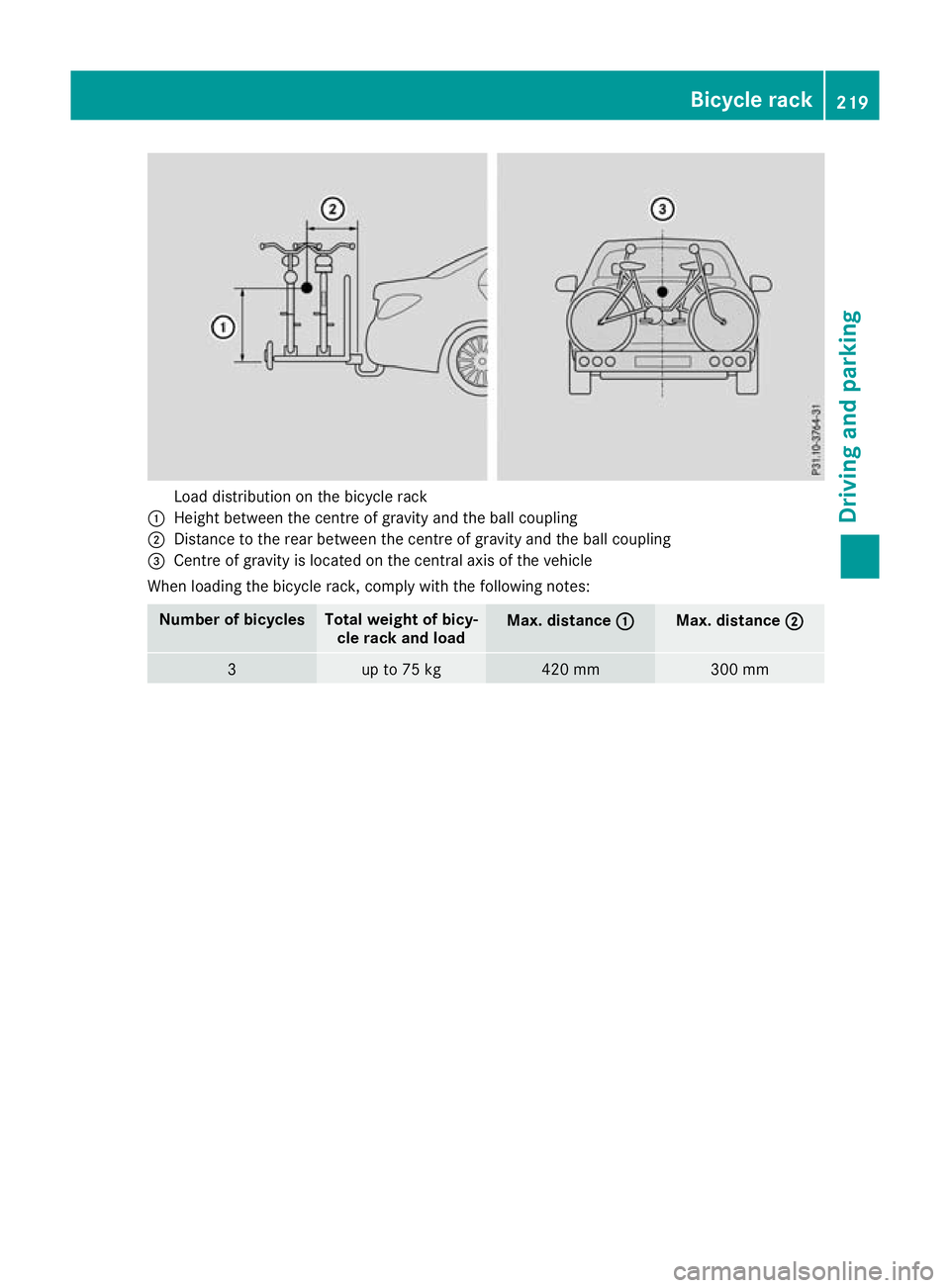
Load distribution on the bicycle rack
: Height between the centre of gravity and the ball coupling
; Distance to the rear between the centre of gravity and the ball coupling
= Centre of gravity is located on the central axis of the vehicle
When loading the bicycle rack, comply with the following notes: Number of bicycles Total weight of bicy-
cle rack and load Max. distance
:
: Max. distance
;
; 3 up to 75 kg 420 mm 300 mmBicycle rack
219Driving and parking Z
Page 238 of 377
X
Press ato confirm.
A graphical selection list appears.
X Press :or9 to select the desired dis-
play.
X Press the abutton to confirm the selec-
tion.
You can find more information on the navigation
displays in the multimedia system (see Digital
Owner's Manual).
Information on Traffic Sign Assist displays
(Y page 202).
Setting the position You can adjust the position of the head-up dis-
play on the windscreen. You can compensate for
height differences if the seat positions are
changed, for example.
X Switch on the head-up display (Y page 223).
X Press òon the steering wheel to open the
menu list.
X Press :or9 on the steering wheel to
select the Settings
Settings menu.
X Confirm by pressing aon the steering
wheel.
X Press :or9 to select the Head-up Head-up
display
display submenu.
X Press ato confirm.
X Press :or9 to select the Position
Position
function.
X Press ato change the setting.
X Press :or9 to adjust the position to a
level from Level
Level +5
+5(up) to Level
Level -5
-5(down).
X Press aor% to save the setting.
Using the Memory function, you can save and
call up the set position of the head-up display as
a preset position (Y page 112).
Adjusting the brightness
The brightness of the head-up display is auto-
matically adjusted to the surrounding light con- ditions. You can also individually adjust the
brightness of the head-up display.
X Switch on the head-up display (Y page 223).
X Press òon the steering wheel to open the
menu list.
X Press :or9 on the steering wheel to
select the Settings
Settings menu.
X Confirm by pressing aon the steering
wheel. X
Use : or9 to select the Head-up Head-up
display display submenu.
X Press ato confirm.
X Press :or9 to select the Brightness
Brightness
function.
X Press the abutton to change the setting.
X Press :or9 to adjust the brightness
to a level from Level
Level+5
+5(bright) to Level
Level-5
-5
(dark).
X Press the aor% button to save the
setting.
Light submenu Switching the Intelligent Light System
on/off
X Press òon the steering wheel to open the
menu list.
X Press :or9 on the steering wheel to
select the Settings
Settings menu.
X Confirm by pressing aon the steering
wheel.
X Press :or9 to select the Lights
Lights
submenu.
X Press ato confirm.
X Press :or9 to select the Intelli‐ Intelli‐
gent Light System
gent Light System function.
If the Intelligent Light System
Intelligent Light System function
has been switched on, the cone of light and
the L symbol are shown in white and yel-
low respectively in the multifunction display.
X Press the abutton to change the setting.
If you switch on the Intelligent
IntelligentLight
LightSys‐
Sys‐
tem
tem function, the following functions are activa-
ted:
R Motorway mode
R Active light function
R Cornering light function
R Extended range foglamps
If you set the dipped-beam headlamps for driv-
ing on the right/left, the multifunction display
shows the Inactive Inactive for
forleft-side
left-side traffic
traffic
or Inactive for right-side traffic
Inactive for right-side traffic dis-
play message in the Lights
Lightssubmenu instead of
the Intelligent Light System
Intelligent Light System function
(Y page 236). This display message will only
appear if the setting for driving on the left/right is set opposite to your vehicle's country version.
Further information on the Intelligent Light Sys-
tem (Y page 117). Menus and submenus
235On-board computer and displays Z
Page 312 of 377
X
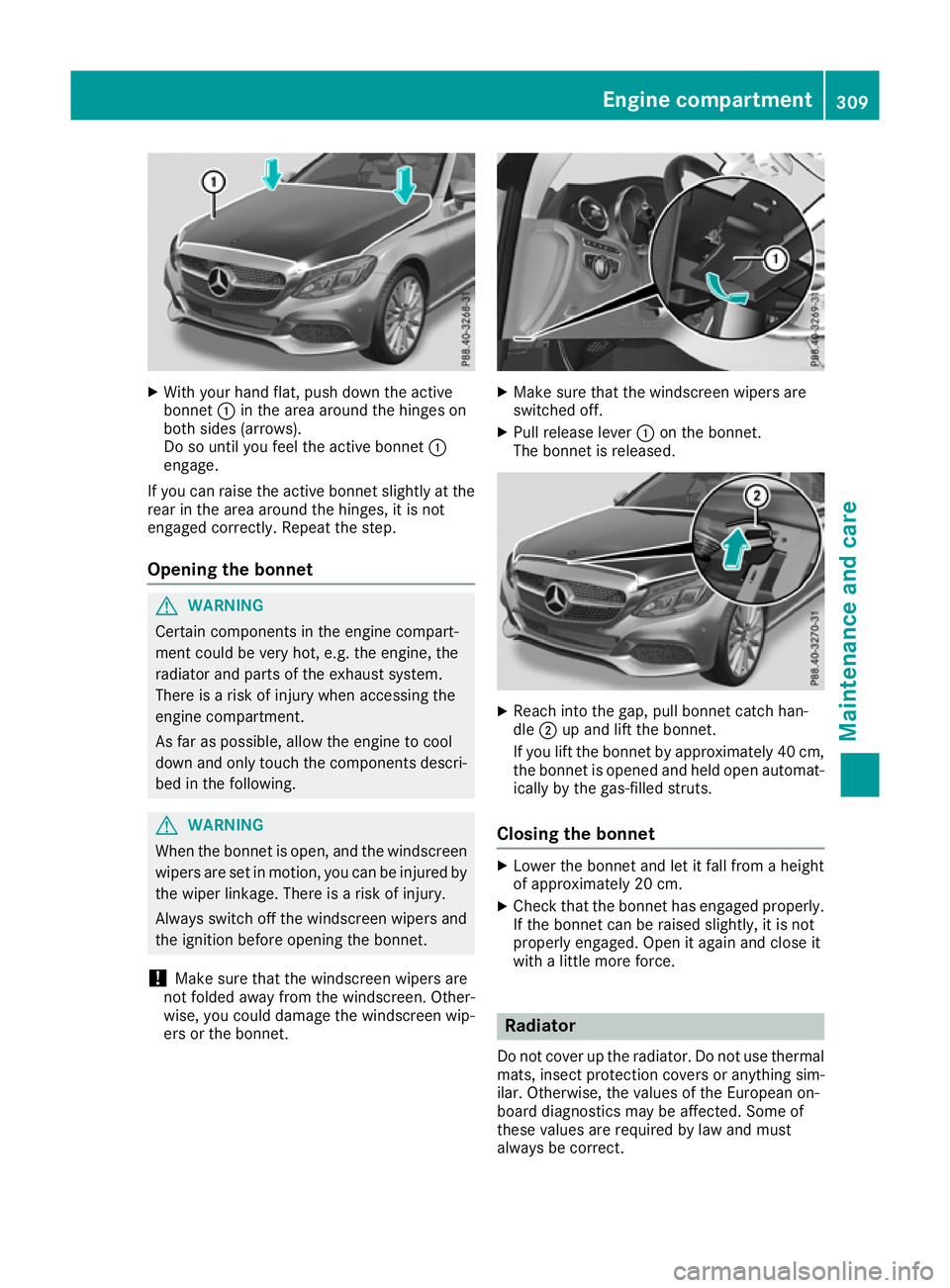
With your hand flat, push down the active
bonnet :in the area around the hinges on
both sides (arrows).
Do so until you feel the active bonnet :
engage.
If you can raise the active bonnet slightly at the rear in the area around the hinges, it is not
engaged correctly. Repeat the step.
Opening the bonnet G
WARNING
Certain components in the engine compart-
ment could be very hot, e.g. the engine, the
radiator and parts of the exhaust system.
There is a risk of injury when accessing the
engine compartment.
As far as possible, allow the engine to cool
down and only touch the components descri- bed in the following. G
WARNING
When the bonnet is open, and the windscreen wipers are set in motion, you can be injured by
the wiper linkage. There is a risk of injury.
Always switch off the windscreen wipers and
the ignition before opening the bonnet.
! Make sure that the windscreen wipers are
not folded away from the windscreen. Other-
wise, you could damage the windscreen wip-
ers or the bonnet. X
Make sure that the windscreen wipers are
switched off.
X Pull release lever :on the bonnet.
The bonnet is released. X
Reach into the gap, pull bonnet catch han-
dle ;up and lift the bonnet.
If you lift the bonnet by approximately 40 cm, the bonnet is opened and held open automat-
ically by the gas-filled struts.
Closing the bonnet X
Lower the bonnet and let it fall from a height
of approximately 20 cm.
X Check that the bonnet has engaged properly.
If the bonnet can be raised slightly, it is not
properly engaged. Open it again and close it
with a little more force. Radiator
Do not cover up the radiator. Do not use thermal mats, insect protection covers or anything sim-
ilar. Otherwise, the values of the European on-
board diagnostics may be affected. Some of
these values are required by law and must
always be correct. Engine compartment
309Maintenance and care Z
Page 355 of 377
Securing the vehicle against rolling
away
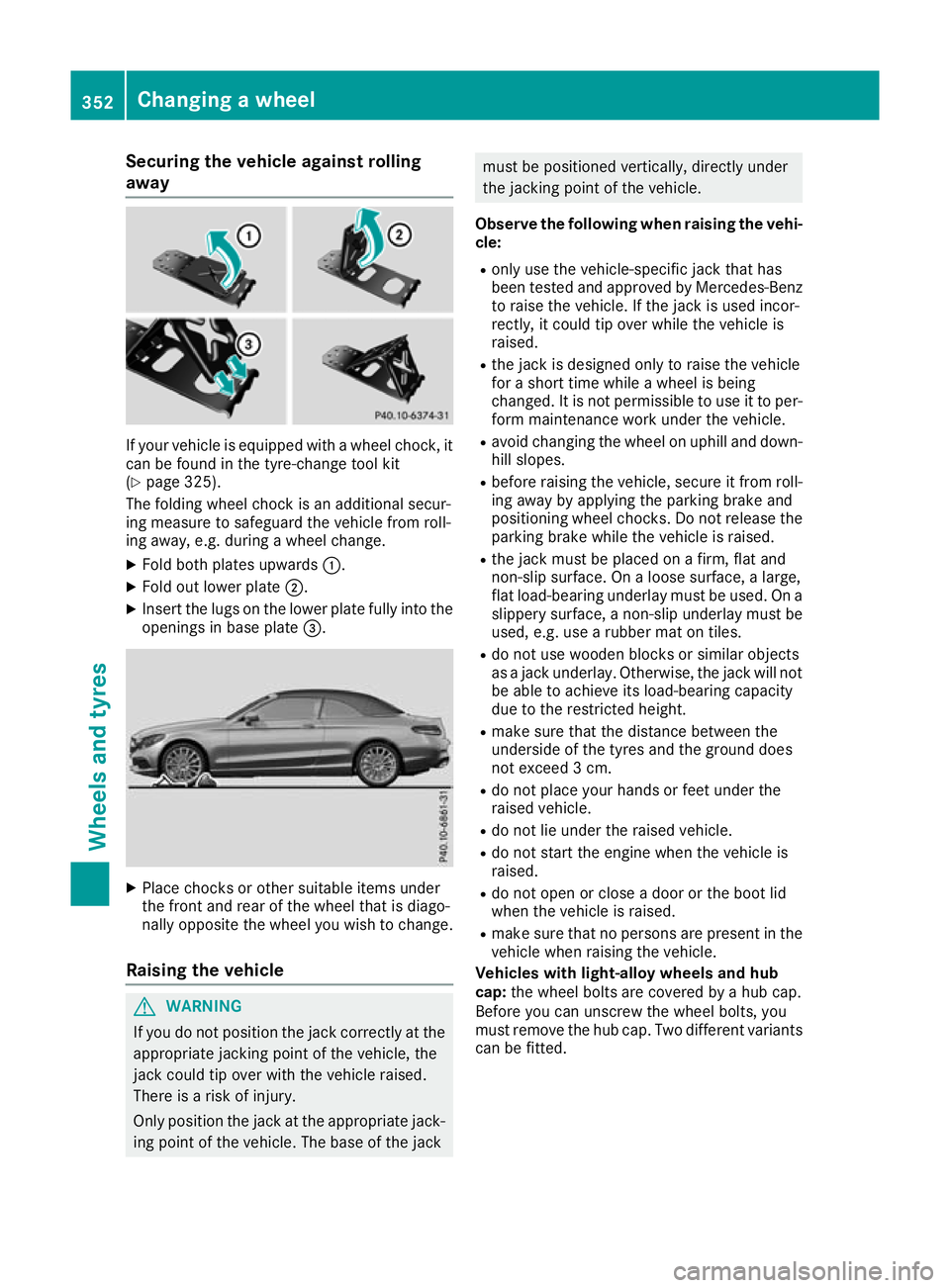
If your vehicle is equipped with a wheel chock, it
can be found in the tyre-change tool kit
(Y page 325).
The folding wheel chock is an additional secur-
ing measure to safeguard the vehicle from roll-
ing away, e.g. during a wheel change.
X Fold both plates upwards :.
X Fold out lower plate ;.
X Insert the lugs on the lower plate fully into the
openings in base plate =.X
Place chocks or other suitable items under
the front and rear of the wheel that is diago-
nally opposite the wheel you wish to change.
Raising the vehicle G
WARNING
If you do not position the jack correctly at the appropriate jacking point of the vehicle, the
jack could tip over with the vehicle raised.
There is a risk of injury.
Only position the jack at the appropriate jack-
ing point of the vehicle. The base of the jack must be positioned vertically, directly under
the jacking point of the vehicle.
Observe the following when raising the vehi- cle:
R only use the vehicle-specific jack that has
been tested and approved by Mercedes-Benz
to raise the vehicle. If the jack is used incor-
rectly, it could tip over while the vehicle is
raised.
R the jack is designed only to raise the vehicle
for a short time while a wheel is being
changed. It is not permissible to use it to per-
form maintenance work under the vehicle.
R avoid changing the wheel on uphill and down-
hill slopes.
R before raising the vehicle, secure it from roll-
ing away by applying the parking brake and
positioning wheel chocks. Do not release the parking brake while the vehicle is raised.
R the jack must be placed on a firm, flat and
non-slip surface. On a loose surface, a large,
flat load-bearing underlay must be used. On a
slippery surface, a non-slip underlay must be
used, e.g. use a rubber mat on tiles.
R do not use wooden blocks or similar objects
as a jack underlay. Otherwise, the jack will not
be able to achieve its load-bearing capacity
due to the restricted height.
R make sure that the distance between the
underside of the tyres and the ground does
not exceed 3 cm.
R do not place your hands or feet under the
raised vehicle.
R do not lie under the raised vehicle.
R do not start the engine when the vehicle is
raised.
R do not open or close a door or the boot lid
when the vehicle is raised.
R make sure that no persons are present in the
vehicle when raising the vehicle.
Vehicles with light-alloy wheels and hub
cap: the wheel bolts are covered by a hub cap.
Before you can unscrew the wheel bolts, you
must remove the hub cap. Two different variants
can be fitted. 352
Changing a wheelWheels and tyres
Page 370 of 377
The antifreeze concentrate/anti-corrosion addi-
tive concentration in the engine cooling system should:
R be at least 50%. This will protect the engine
cooling system against freezing down to
approximately -37 †.
R not exceed 55% (antifreeze protection down
to -45 †). Heat will otherwise not be dissipa- ted as effectively.
Mercedes-Benz recommends an antifreeze/
anti-corrosion additive concentration in accord-
ance with MB Specifications for Service Prod-
ucts 310.1.
i When the vehicle is first delivered, it is filled
with a coolant mixture that ensures adequate
antifreeze and corrosion protection.
i The coolant is checked at every mainte-
nance interval at a qualified specialist work-
shop. Windscreen washer system
Important safety notes G
WARNING
If windscreen washer concentrate comes into contact with hot components of the engine or
the exhaust system, it can ignite. There is a
risk of fire and injury.
Make sure the windscreen washer concen-
trate does not come into contact with the filler neck.
! Only use washer fluid that is suitable for
plastic lamp lenses, e.g. MB SummerFit or MB
WinterFit. Unsuitable washer fluid could dam-
age the plastic lenses of the headlamps.
! Only the washer fluids SummerFit and Win-
terFit can be mixed. Otherwise, the spraying
nozzles could become blocked.
Do not use distilled or de-ionised water, other-
wise the level sensor may give a false reading.
When handling washer fluid, observe the impor- tant safety notes on service products
(Y page 360).
At temperatures above freezing:
X Fill the washer fluid reservoir with a mixture of
water and washer fluid, e.g. MB SummerFit. Mix 1 part MB SummerFit to 100 parts water.
At temperatures below freezing:
X Fill the washer fluid reservoir with a mixture of
water and washer fluid, e.g. MB WinterFit.
For the correct mixing ratio, refer to the infor- mation on the antifreeze reservoir.
i Add washer fluid concentrate, e.g. MB Sum-
merFit or MB WinterFit, to the washer fluid all
year round. Vehicle data
General notes
Please note that for the specified vehicle data:
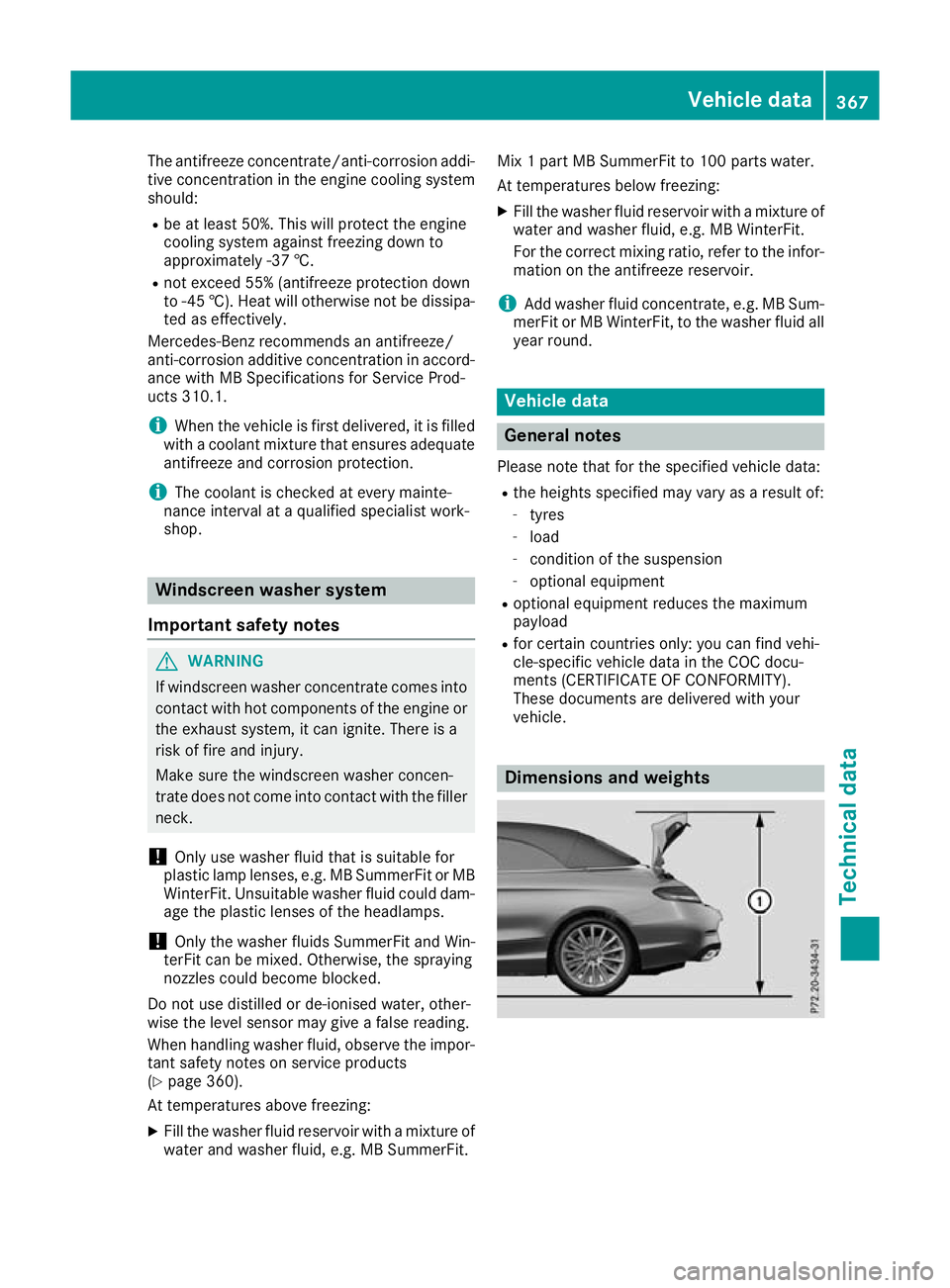
R the heights specified may vary as a result of:
- tyres
- load
- condition of the suspension
- optional equipment
R optional equipment reduces the maximum
payload
R for certain countries only: you can find vehi-
cle-specific vehicle data in the COC docu-
ments (CERTIFICATE OF CONFORMITY).
These documents are delivered with your
vehicle. Dimensions and weights Vehicle data
367Technical data Z