change time MERCEDES-BENZ C-CLASS CABRIOLET 2016 Owner's Manual
[x] Cancel search | Manufacturer: MERCEDES-BENZ, Model Year: 2016, Model line: C-CLASS CABRIOLET, Model: MERCEDES-BENZ C-CLASS CABRIOLET 2016Pages: 377, PDF Size: 6.9 MB
Page 174 of 377
Switching SPEEDTRONIC to passive
If you depress the accelerator pedal beyond the
pressure point (kickdown), SPEEDTRONIC is
switched to passive mode. The multifunction
display shows the SPEEDTRONIC suspended
SPEEDTRONIC suspended
message and you are able to exceed the stored speed. If SPEEDTRONIC is switched to passive
mode, SPEEDTRONIC will not brake automati-
cally until it is activated again.
SPEEDTRONIC is activated again if you:
R drive slower than the stored speed without
kickdown
R set a new speed or
R call up the last speed stored again
The SPEEDTRONIC suspended SPEEDTRONIC suspended message on the
multifunction display then disappears.
Deactivating variable SPEEDTRONIC
It is not possible to deactivate variable SPEED-
TRONIC by braking.
There are several ways to deactivate variable
SPEEDTRONIC:
X Briefly press the cruise control lever forwards
B.
or X Briefly press the cruise control lever in the
direction of arrow A.
Cruise control or DISTRONIC PLUS is selec-
ted. LIM indicator lamp ;in the cruise con-
trol lever goes out.
Vehicles with manual transmission: variable
SPEEDTRONIC switches off automatically if you shift to too high a gear and as a result the engine
speed drops sharply. A warning tone sounds,
the message on the multifunction display dis-
appears and the segments on the speedometer
go out.
i The last speed stored is cleared when you
switch off the engine.
Permanent SPEEDTRONIC You can use the on-board computer to limit the
speed permanently to a value between
160 km/h (e.g. when driving on winter tyres)
and 240 km/h(Y page 237).
Shortly before the stored speed is reached, it
appears in the multifunction display.
Permanent SPEEDTRONIC remains active even
if variable SPEEDTRONIC is deactivated. You cannot exceed the stored limit speed, even
if you depress the accelerator pedal beyond the pressure point (kickdown). DISTRONIC PLUS
General notes DISTRONIC PLUS regulates the speed and auto-
matically helps you maintain the distance to the vehicle detected in front. Vehicles are detected
with the aid of the radar sensor system.
DISTRONIC PLUS brakes automatically so that
the set speed is not exceeded.
Change into a lower gear in good time on long
and steep downhill gradients. Take particular
note of this when driving a laden vehicle. By
doing so, you will make use of the braking effect
of the engine. This relieves the load on the brake system and prevents the brakes from overheat-
ing and wearing too quickly.
If DISTRONIC PLUS detects that there is a risk of collision with the vehicle in front, you will be
warned visually and audibly. Without your inter-
vention, DISTRONIC PLUS cannot prevent a col-
lision. An intermittent warning tone will then
sound and the distance warning lamp will light
up in the instrument cluster. Brake immediately to increase the distance to the vehicle in front,
or take evasive action, provided it is safe to do
so.
DISTRONIC PLUS operates in the speed range
between 0 km/h and 200 km/h.
Do not use DISTRONIC PLUS while driving on
roads with steep gradients.
Important safety notes G
WARNING
DISTRONIC PLUS does not react to:
R people or animals
R stationary obstacles on the road, e.g. stop-
ped or parked vehicles
R oncoming and crossing traffic
As a result, DISTRONIC PLUS may neither give
warnings nor intervene in such situations.
There is a risk of an accident.
Always pay careful attention to the traffic sit- uation and be ready to brake. Driving systems
171Driving and parking Z
Page 175 of 377
G
WARNING
DISTRONIC PLUS cannot always clearly rec-
ognise other road users and complex traffic
conditions.
In such cases, DISTRONIC PLUS may:
R give an unnecessary warning and then
brake the vehicle
R neither give a warning nor intervene
R accelerate or brake unexpectedly
There is a risk of an accident.
Continue to drive carefully and be prepared to
brake, particularly if DISTRONIC PLUS warns
you. G
WARNING
DISTRONIC PLUS brakes your vehicle with up to 50% of the maximum possible deceleration.
If this deceleration is not sufficient,
DISTRONIC PLUS alerts you with a visual and
acoustic warning. There is a risk of an acci-
dent.
Apply the brakes yourself in these situations
and try to take evasive action.
! When DISTRONIC PLUS or the HOLD func-
tion is activated, the vehicle brakes automat- ically in certain situations.
To avoid damage to the vehicle, deactivate
DISTRONIC PLUS and the HOLD function in
the following or similar situations:
R when towing away
R in a car wash
DISTRONIC PLUS can neither reduce the risk of
an accident if you fail to adapt your driving style
nor override the laws of physics. DISTRONIC
PLUS cannot take into account road, weather or traffic conditions. DISTRONIC PLUS is only an
aid. You are responsible for maintaining a safe
distance, for vehicle speed, for braking in good
time and for staying in lane. Do not use DISTRONIC PLUS:
R in traffic conditions that do not allow you to
maintain a constant speed, e.g. in heavy traf-
fic or on winding roads
R on smooth or slippery roads. Braking or accel-
erating can cause the drive wheels to lose
traction and the vehicle could then skid
R when there is poor visibility, e.g. due to fog,
heavy rain or snow
DISTRONIC PLUS may not detect narrow vehi-
cles driving in front, e.g. motorcycles, or vehi-
cles driving on a different line.
In particular, the detection of obstacles can be
impaired in the case of:
R dirt on the sensors or obscured sensors
R snow or heavy rain
R interference by other radar sources
R strong radar reflections, e.g. in multi-storey
car parks
If DISTRONIC PLUS no longer detects a vehicle
in front, it may unexpectedly accelerate to the
speed stored.
This speed can:
R be too high for a filter lane or a slip road
R be so high in the right lane that you pass vehi-
cles driving on the left (in countries where
they drive on the right)
R be so high in the left lane that you pass vehi-
cles driving on the right (in countries where
they drive on the left)
If there is a change of drivers, advise the new
driver of the speed stored.
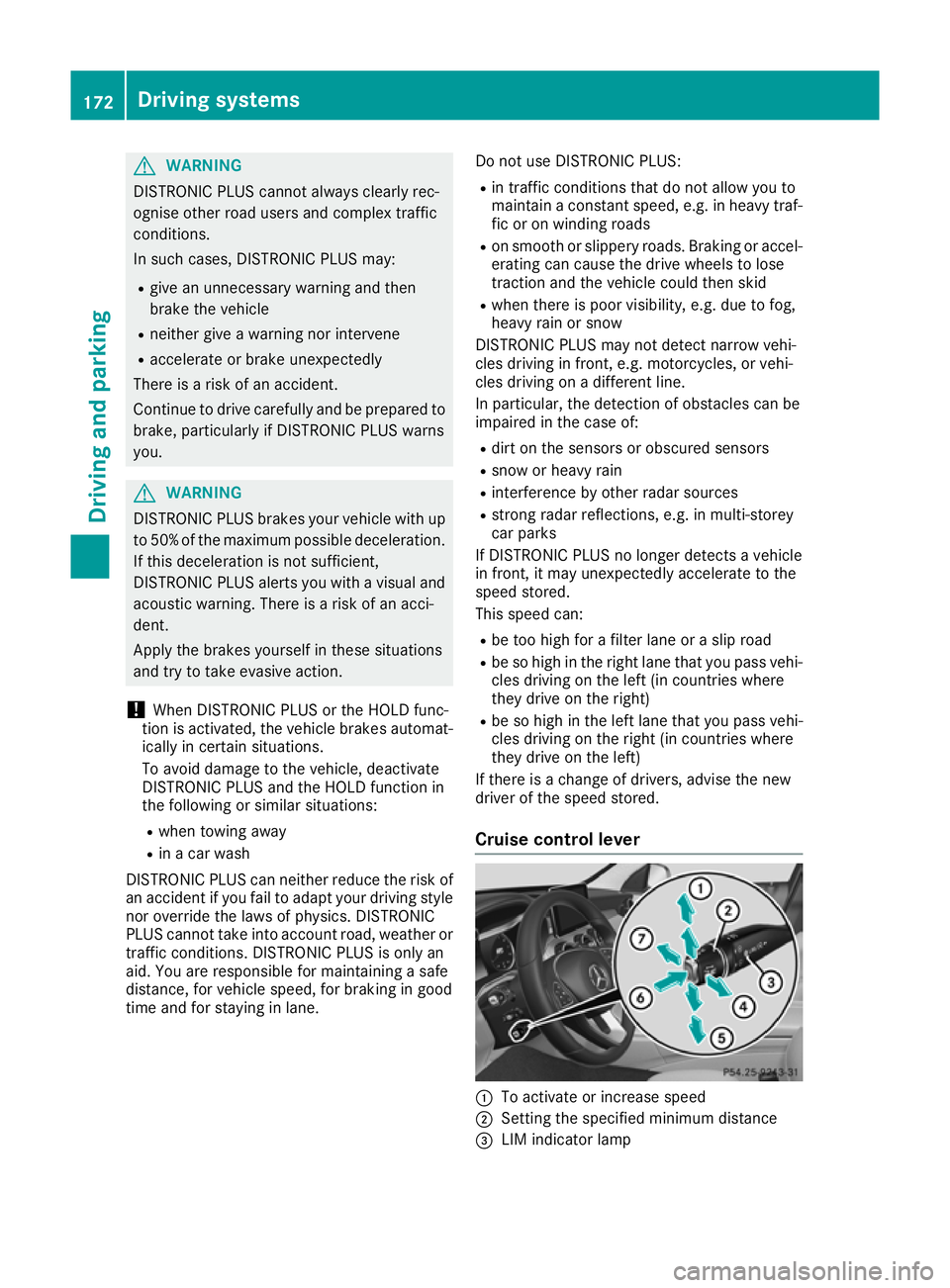
Cruise control lever :
To activate or increase speed
; Setting the specified minimum distance
= LIM indicator lamp 172
Driving systemsDriving and parking
Page 177 of 377
Driving with DISTRONIC PLUS
Pulling away and driving
X To pull away with DISTRONIC PLUS:
remove your foot from the brake pedal.
X Briefly pull the cruise control lever towards
you ?.
or X Accelerate briefly.
The vehicle pulls away and adapts its speed to
that of the vehicle in front. If no vehicle is
detected in front, the vehicle accelerates to
the set speed.
The vehicle can also pull away when it is facing
an unidentified obstacle or is driving on a differ-
ent line from another vehicle. The vehicle then
brakes automatically.
If DISTRONIC PLUS does not detect a vehicle in
front, the system operates like cruise control.
If DISTRONIC PLUS detects that the vehicle in
front has slowed down, it brakes the vehicle. In
this way, the specified minimum distance you
have selected is maintained.
If DISTRONIC PLUS detects a faster-moving
vehicle in front, it accelerates the vehicle to the
set speed.
Selecting the drive program
DISTRONIC PLUS supports a sporty driving style when you have selected the Sor S+ drive pro-
gram (Y page 148). Acceleration behind the
vehicle in front or to the set speed is then notice- ably more dynamic. If you have selected the Cor
E drive program, the vehicle accelerates more
gently. This setting is recommended in stop-
start traffic.
Changing lanes
If you change to the overtaking lane, DISTRONIC
PLUS supports you in the following situations:
R You are driving at a speed greater than
70 km/h
R you switch on the respective turn signal
R DISTRONIC PLUS does not detect a danger of
collision
If these conditions are met, your vehicle accel-
erates. Acceleration will be interrupted if chang- ing lanes takes too long or if the distance
between your vehicle and the vehicle in front
becomes too small. Vehicles with COMAND Online multimedia
system: when you change lanes, DISTRONIC
PLUS monitors the right lane in the case of left-
side traffic or the left lane in the case of right-
side traffic.
Vehicles with Audio 20 multimedia system:
when you change lanes, DISTRONIC PLUS mon- itors the left lane on left-hand-drive vehicles or
the right lane on right-hand-drive vehicles.
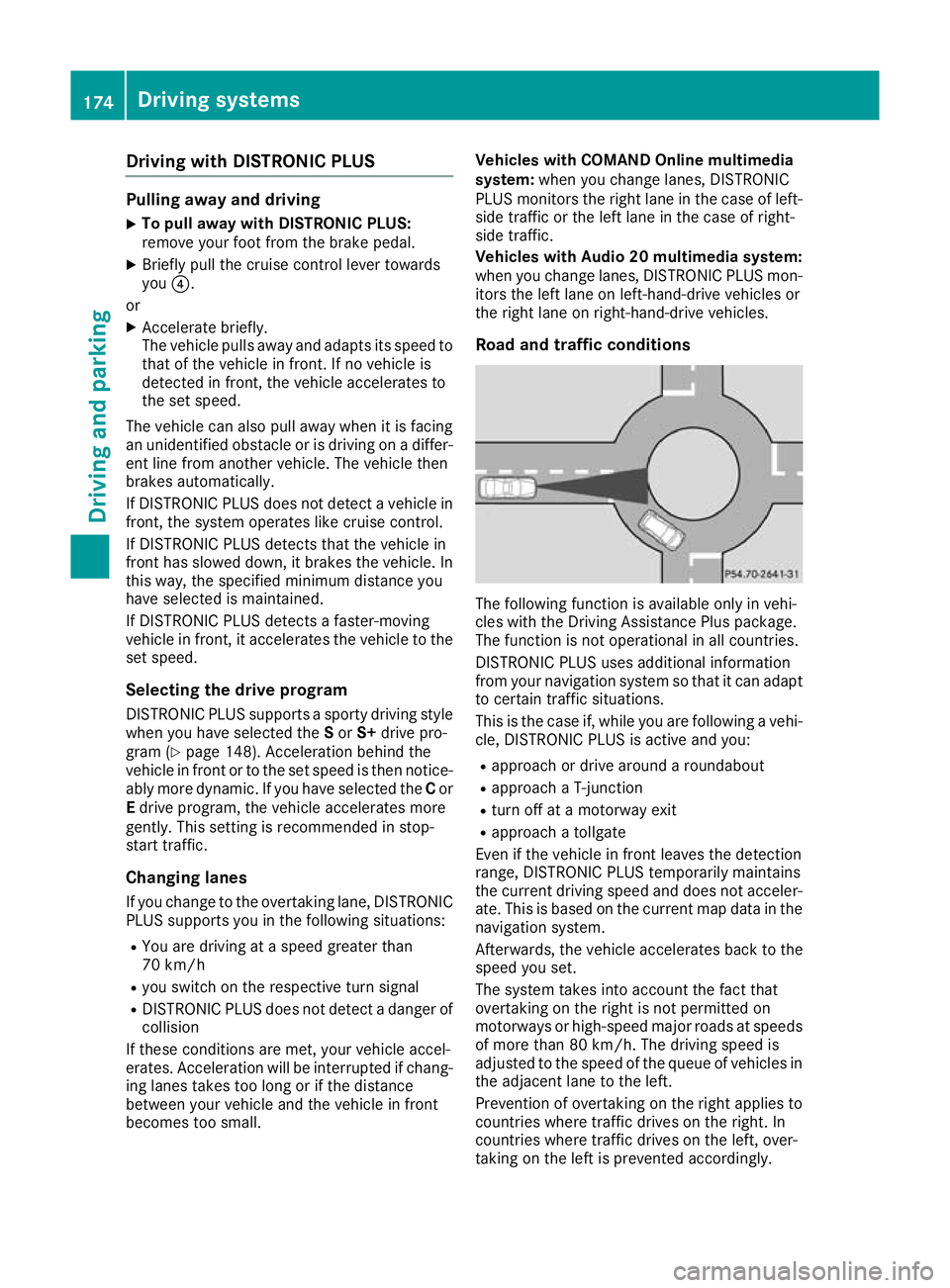
Road and traffic conditions The following function is available only in vehi-
cles with the Driving Assistance Plus package.
The function is not operational in all countries.
DISTRONIC PLUS uses additional information
from your navigation system so that it can adapt to certain traffic situations.
This is the case if, while you are following a vehi-
cle, DISTRONIC PLUS is active and you:
R approach or drive around a roundabout
R approach a T-junction
R turn off at a motorway exit
R approach a tollgate
Even if the vehicle in front leaves the detection
range, DISTRONIC PLUS temporarily maintains
the current driving speed and does not acceler-
ate. This is based on the current map data in the navigation system.
Afterwards, the vehicle accelerates back to the
speed you set.
The system takes into account the fact that
overtaking on the right is not permitted on
motorways or high-speed major roads at speeds
of more than 80 km/h. The driving speed is
adjusted to the speed of the queue of vehicles in
the adjacent lane to the left.
Prevention of overtaking on the right applies to
countries where traffic drives on the right. In
countries where traffic drives on the left, over-
taking on the left is prevented accordingly. 174
Driving syste
msDriving and parking
Page 181 of 377
DISTRONIC PLUS with Steering Assist
and Stop&Go Pilot General notes
DISTRONIC PLUS with Steering Assist and
Stop&Go Pilot aids you in keeping the vehicle in
the centre of the driving lane by means of mod-
erate steering interventions in a speed range
from 0–200 km/h.
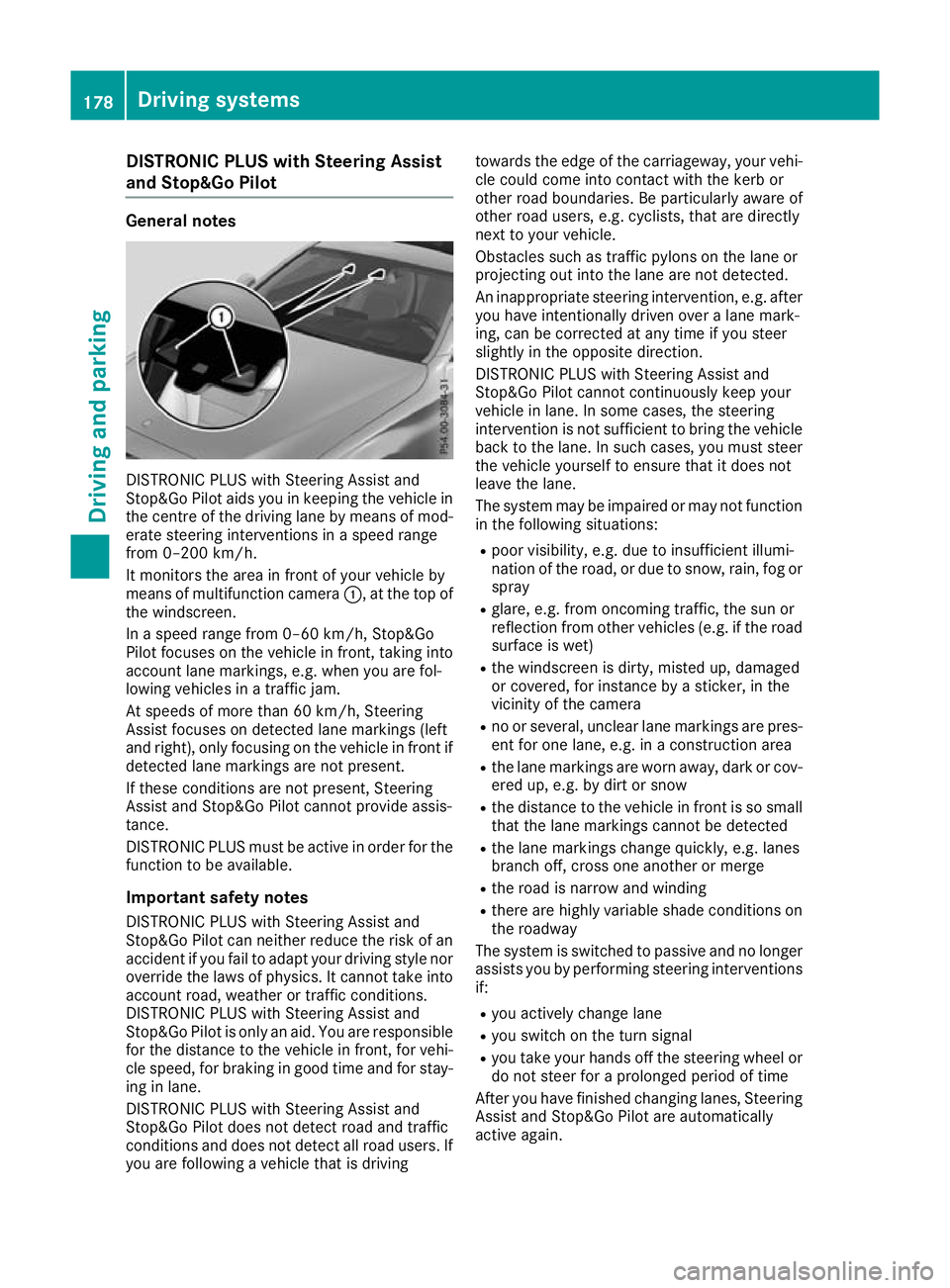
It monitors the area in front of your vehicle by
means of multifunction camera :, at the top of
the windscreen.
In a speed range from 0–60 km/h, Stop&Go
Pilot focuses on the vehicle in front, taking into
account lane markings, e.g. when you are fol-
lowing vehicles in a traffic jam.
At speeds of more than 60 km/h, Steering
Assist focuses on detected lane markings (left
and right), only focusing on the vehicle in front if detected lane markings are not present.
If these conditions are not present, Steering
Assist and Stop&Go Pilot cannot provide assis-
tance.
DISTRONIC PLUS must be active in order for the
function to be available.
Important safety notesDISTRONIC PLUS with Steering Assist and
Stop&Go Pilot can neither reduce the risk of an
accident if you fail to adapt your driving style nor
override the laws of physics. It cannot take into account road, weather or traffic conditions.
DISTRONIC PLUS with Steering Assist and
Stop&Go Pilot is only an aid. You are responsible
for the distance to the vehicle in front, for vehi-
cle speed, for braking in good time and for stay- ing in lane.
DISTRONIC PLUS with Steering Assist and
Stop&Go Pilot does not detect road and traffic
conditions and does not detect all road users. If
you are following a vehicle that is driving towards the edge of the carriageway, your vehi-
cle could come into contact with the kerb or
other road boundaries. Be particularly aware of
other road users, e.g. cyclists, that are directly
next to your vehicle.
Obstacles such as traffic pylons on the lane or
projecting out into the lane are not detected.
An inappropriate steering intervention, e.g. after
you have intentionally driven over a lane mark-
ing, can be corrected at any time if you steer
slightly in the opposite direction.
DISTRONIC PLUS with Steering Assist and
Stop&Go Pilot cannot continuously keep your
vehicle in lane. In some cases, the steering
intervention is not sufficient to bring the vehicle back to the lane. In such cases, you must steer the vehicle yourself to ensure that it does not
leave the lane.
The system may be impaired or may not function
in the following situations:
R poor visibility, e.g. due to insufficient illumi-
nation of the road, or due to snow, rain, fog or spray
R glare, e.g. from oncoming traffic, the sun or
reflection from other vehicles (e.g. if the road
surface is wet)
R the windscreen is dirty, misted up, damaged
or covered, for instance by a sticker, in the
vicinity of the camera
R no or several, unclear lane markings are pres-
ent for one lane, e.g. in a construction area
R the lane markings are worn away, dark or cov-
ered up, e.g. by dirt or snow
R the distance to the vehicle in front is so small
that the lane markings cannot be detected
R the lane markings change quickly, e.g. lanes
branch off, cross one another or merge
R the road is narrow and winding
R there are highly variable shade conditions on
the roadway
The system is switched to passive and no longer assists you by performing steering interventions
if:
R you actively change lane
R you switch on the turn signal
R you take your hands off the steering wheel or
do not steer for a prolonged period of time
After you have finished changing lanes, Steering
Assist and Stop&Go Pilot are automatically
active again. 178
Driving syste
msDriving and parking
Page 194 of 377

surroundings
surroundings
message appears in the multi-
function display.
Vehicles with manual transmission: the
Park
Park Assist Assist active
active Engage
Engageforward
forward gear
gear
Observe surroundings
Observe surroundings message appears in
the multifunction display.
X Vehicles with manual transmission: shift
to first gear while the vehicle is stationary.
Vehicles with automatic transmission:
select transmission position Dwhile the vehi-
cle is stationary.
Active Parking Assist immediately steers in
the other direction.
The Park Assist active Accelerate
Park Assist active Accelerate
and brake and brake Observe surroundings
Observe surroundings mes-
sage appears in the multifunction display.
i You will achieve the best results by waiting
for the steering procedure to complete before
pulling away.
X Drive forwards and be ready to brake at all
times.
Vehicles with automatic transmission:
Active Parking Assist brakes the vehicle to a
standstill when the vehicle approaches the
front border of the parking space.
Manoeuvring may be required in tight parking
spaces.
X Vehicles with manual transmission: stop
as soon as PARKTRONIC sounds the contin-
uous warning tone, if not before.
Vehicles with automatic transmission: the
Park Assist active Select R
Park Assist active Select R Observe Observe
surroundings
surroundings message appears in the multi-
function display.
Vehicles with manual transmission: the
Park
Park Assist
Assist active activeEngage
Engagereverse
reverse gear
gear
Observe surroundings
Observe surroundings message appears in
the multifunction display.
As soon as the parking procedure is complete,
the Park Assist switched off
Park Assist switched off message
appears and a warning tone sounds. The vehicle
is now parked.
Vehicles with automatic transmission: the
vehicle is kept stationary without the driver hav- ing to depress the brake pedal. The braking
effect is cancelled when you depress the accel-
erator pedal.
Active Parking Assist no longer supports you
with steering interventions and brake applica-
tions. When Active Parking Assist is finished,
you must steer and brake again yourself.
PARKTRONIC is still available. Parking tips:
R The way your vehicle is positioned in the park-
ing space after parking is dependent on vari-
ous factors. These include the position and
shape of the vehicles parked in front of and
behind it and the conditions of the location. It
may be the case that Active Parking Assist
guides you too far into a parking space, or not
far enough into it. In some cases, it may also
lead you across or onto the kerb. If necessary, you should cancel the parking procedure withActive Parking Assist.
R Vehicles with automatic transmission:
you can also preselect transmission position
D. The vehicle redirects and does not drive as
far into the parking space. Should the trans-
mission change take place too early, the park-
ing procedure will be cancelled. A sensible
parking position can no longer be achieved
from this position.
R Vehicles with manual transmission: you
can also engage forward gear prematurely.
The vehicle redirects and does not drive as far
into the parking space. Should the transmis-
sion change take place too early, the parking
procedure will be cancelled. A sensible park-
ing position can no longer be achieved from
this position.
Exiting a parking space In order that Active Parking Assist can support
you when you are exiting a parking space:
R the border of the parking space must be high
enough at the front and the rear. A kerb, for
example, is too small.
R the border of the parking space must not be
too wide. Your vehicle can be manoeuvred
into the parking space at a maximum angle of
45° to the starting position.
R a manoeuvring distance of at least 1.0 m must
be available.
Active Parking Assist can assist you with exiting
a parking space as well only if you have parked
the vehicle parallel to the direction of travel
using Active Parking Assist.
i Vehicles with automatic transmission: if
PARKTRONIC detects obstacles, Active Park- ing Assist brakes automatically whilst the
vehicle is exiting the parking space. You are
responsible for braking in good time. Driving systems
191Driving and parking Z
Page 196 of 377

Reversing camera
General notes Reversing camera
:is a visual parking and
manoeuvring aid. It shows the area behind the
vehicle with guide lines in the multimedia sys-
tem.
The area behind the vehicle is displayed as a
mirror image, as in the rear-view mirror.
i The text shown in the multimedia system
depends on the language setting. The follow-
ing are examples of reversing camera displays
in the multimedia system.
Important safety notes The reversing camera is only an aid. It is not a
substitute for your attention to the immediate
surroundings. The responsibility for safe
manoeuvring and parking remains with you.
Make sure that there are no persons, animals or
objects in range while manoeuvring and parking.
The reversing camera will not function or will
function only in a limited manner:
R if the boot lid is open
R in heavy rain, snow or fog
R at night or in very dark places
R if the camera is exposed to very bright light
R if the area is lit by fluorescent lamps or LED
lighting (the display may flicker)
R if there is a sudden change in temperature,
e.g. when driving into a heated garage in win- ter
R if the camera lens is dirty or obstructed.
Observe the notes on cleaning
(Y page 320)
R if the rear of your vehicle is damaged. In this
case, have the camera position and setting
checked at a qualified specialist workshop The field of vision and other functions of the
reversing camera may be restricted due to addi-
tional accessories on the rear of the vehicle (e.g. licence plate holder, rear-mounted bicycle
rack).
The reversing camera is protected from rain-
drops and dust by a flap. When the reversing
camera is activated, this flap opens.
The flap closes again when:
R you have finished the manoeuvring process
R you switch off the engine
R you open the boot
See the notes on cleaning (Y page 320).
For technical reasons, the flap may remain open
briefly after the reversing camera has been
deactivated.
Activating/deactivating the reversing
camera X
To activate: make sure that the Activa‐ Activa‐
tion by R gear
tion by R gear function is selected in the
multimedia system (see Digital Owner's Man-
ual).
X Engage reverse gear.
The reversing camera flap opens. The area
behind the vehicle appears with guide lines in
the multimedia system.
The image from the reversing camera is avail-
able throughout the manoeuvring process.
X To switch the function mode for vehicles
with trailer tow hitch:using the controller,
select symbol :for the "Reverse parking"
function or symbol ;for "Coupling up a
trailer".
The symbol of the selected function is high-
lighted. Driving systems
193Driving and parking Z
Page 200 of 377
You can also use the reversing camera to select
a wide-angle view.
When PARKTRONIC is operational (Y page 186),
a symbol for your own vehicle appears on the
multimedia system display. If the PARKTRONIC
warning displays are active, warning displays =
light up on the multimedia system display in yel-
low or red respectively.
Object detection The reversing camera helps detect moving and
stationary objects. If an object (person, vehicle
or other obstacle) is detected, this object is
marked with a bar. Objects located some dis-
tance away from the vehicle are marked with a
yellow bar. If the distance to the object is very
small, the bar is displayed in red.
Object detection works only in wide-angle view.
To use the function, it must be switched on in the
multimedia system (see Digital Owner's Man-
ual). 360° camera
General notes The 360° camera is a camera system compris-
ing four cameras.
The system evaluates images from the following
cameras:
R reversing camera
R front camera
R two side cameras on the exterior mirrors
The cameras cover the immediate surroundings
of the vehicle. The system assists you, e.g. when
parking or at exits with reduced visibility.
You can show images from the 360° camera in
full-screen mode or in seven different split-
screen views on the multimedia system. A split-
screen view also includes a top view of the vehi-
cle. This view is calculated from the data sup-
plied by the installed cameras (virtual camera).
The seven split-screen views are: R top view and image from the reversing cam-
era (130° viewing angle)
R top view and image from the front camera
(130° viewing angle without displaying the
maximum steering wheel angle)
R top view and enlarged rear view
R top view and enlarged front view R
top view and trailer view (vehicles with trailer
tow hitch)
R top view and images from the rear-facing side
cameras (rear wheel view)
R top view and images from the forward-facing
side cameras (front wheel view)
When the function is active and you shift the
transmission from Dor Rto N, the guide lines
are hidden in the multimedia system.
When you change between transmission posi-
tions Dand R, you see the previously selected
front or rear view.
Distances measured by PARKTRONIC will also
be displayed:
R as red or yellow brackets around the vehicle
symbol in top view in split-screen mode or
R at the bottom right as red or yellow brackets
around the vehicle symbol in full-screen mode
The line thickness and colour of the brackets
show how far the vehicle is from an object.
R yellow brackets with thin lines: PARKTRONIC
is active
R yellow brackets with normal lines: an object is
present in close range of the vehicle
R red line: an object is present in the immediate
close range of the vehicle
Important safety notes The 360° camera is only an aid and may show a
distorted view of obstacles, show them incor-
rectly or not show them at all. The 360° camera is not a substitute for attentive driving.
The responsibility for safe manoeuvring and
parking remains with you. Make sure that there
are no persons, animals or objects in range
while manoeuvring and parking.
You are responsible for safety at all times and
must always pay attention to your immediate
surroundings when parking and manoeuvring.
This applies to the areas behind, in front of and beside the vehicle. You could otherwise endan-
ger yourself and others.
The 360° camera will not function or will func-
tion only to a limited extent:
R if the doors are open
R if the exterior mirrors are folded in
R if the boot lid is open
R in heavy rain, snow or fog
R at night or in very dark places
R if the cameras are exposed to very bright light Driving systems
197Driving and parking Z
Page 201 of 377

R
if the area is lit by fluorescent lamps or LED
lighting (the display may flicker)
R if the camera lenses mist up, e.g. when you
drive into a heated garage in winter, causing a
rapid change in temperature
R if the camera lenses are dirty or covered
R if the vehicle components in which the cam-
eras are fitted are damaged. In this case, have
the camera position and setting checked at a qualified specialist workshop
Do not use the 360° camera under such cir-
cumstances. You could otherwise injure others
or damage objects when parking the vehicle.
The guide lines on the multimedia system dis-
play show the distances to your vehicle. The
distances apply only at road level.
In trailer mode, the guide lines are shown at the level of the trailer tow hitch.
The camera in the rear area is protected by a
flap. This flap opens when the 360° camera is
activated. See the notes on cleaning
(Y page 320). For technical reasons, the flap
may remain open briefly after the 360° camera
has been deactivated.
The field of vision and other functions of the
camera system may be restricted due to addi-
tional attachments (e.g. licence plate holder,
rear bicycle carrier).
On vehicles with height-adjustable suspension,
due to the technical conditions, leaving the
standard height can result in the following:
R inaccuracies in the guide lines
R inaccuracies in the display of generated
images (top view)
Activation conditions The image from the 360° camera appears when
R the multimedia system is switched on
R the 360° camera 360° camera function is switched on
If you are driving at more than a moderate speed and switch on the 360° camera, a warning mes-
sage appears.
The warning message disappears in the follow-
ing situations:
R you are again driving at a moderate speed.
The 360° camera is then activated
R the message is confirmed with the %but-
ton Switching the 360° camera on/off with
the button X
To switch on: press button:.
The following appears depending on whether gear Dor Ris selected:
R a split screen with top view and the image
from the front camera or
R a split screen with top view and the image
from the rear view camera
X To switch off: press button:again.
Switching on the 360° camera using
reverse gear You can show images from the 360° camera
automatically by engaging reverse gear.
X Make sure that the Activation by R gear Activation by R gear
function is selected in the multimedia system (see Digital Owner's Manual).
X To show the 360° camera image: engage
reverse gear.
The multimedia system shows the area
behind the vehicle in split-screen mode. You
see the top view of the vehicle and the image
from the reversing camera.
You cannot stop the 360° camera display if
reverse gear is engaged.
Selecting the split-screen view or full-
screen mode Switching between split screen views:
X To switch to the line with the vehicle icons:
slide 5the controller.
X To select a vehicle icon: turn the controller.
Switching to full-screen mode:
X Turn and press 180° 180°view
viewwith the controller. 198
Driving systemsDriving and parking
Page 204 of 377

X
Reverse carefully until the trailer drawbar rea-
ches red guide line C.
The distance between the trailer drawbar and
red guide line Cis now approximately
0.30 m.
X Couple up the trailer (Y page 215).
The lines are shown at the level of the trailer tow hitch.
180° view :
Symbol for the full-screen setting with the
reversing camera image
; Own vehicle
= PARKTRONIC warning displays
i 180° view can also be selected as front
view.
Select this view when you are driving out of an
exit and the view of crossing traffic is restricted,
for example.
If you select the %symbol on the display and
confirm with the controller, the split-screen view appears.
Stopping the 360° camera display X
Shift the transmission to position P.
or X Drive forwards at a speed greater than
10 km/h.
The 360° camera display is stopped.
The view that was active before the 360°
camera was displayed appears on the multi-
media system display. You can stop the 360°
camera from the split-screen view by select-
ing the %symbol on the display and con-
firming with the controller.
You cannot stop the 360° camera display if
transmission position Ris selected. ATTENTION ASSIST
General notes ATTENTION ASSIST helps you during long,
monotonous journeys such as on motorways
and trunk roads. It is active in the 60 km/h to
200 km/h speed range. If ATTENTION ASSIST
detects typical indicators of fatigue or increas-
ing lapses in concentration on the part of the
driver, it suggests taking a break.
Important safety notes ATTENTION ASSIST is only an aid. It may not
always detect fatigue or lapses in concentration
until too late, or may not detect them at all. The system is not a substitute for a well-rested and
attentive driver.
The functionality of ATTENTION ASSIST is
restricted, and warnings may be delayed or not
occur at all in the following situations:
R if the length of the journey is less than approx-
imately 30 minutes
R if the road condition is poor, e.g. if the surface
is uneven or contains potholes
R in case of strong side winds
R if you have adopted a sporty driving style with
high cornering speeds or high rates of accel-
eration
R if you are predominantly driving at a speed
below 60 km/h or above 200 km/h
R if you are driving with DISTRONIC PLUS Steer-
ing Assist activated
R if the time has been set incorrectly
R in active driving situations, such as when you
change lanes or change your speed
The ATTENTION ASSIST tiredness assessment
is deleted and restarted when you continue the
journey in the following situations:
R you switch off the engine
R you take off your seat belt and open the driv-
er's door, e.g. for a change of drivers or to
take a break Driving systems
201Driving and parking Z
Page 205 of 377

Displaying the attention level
In the Assistance menu (Y
page 232) of the on-
board computer, you can call up the current sta-
tus information.
X Select the assistance graphic display for
ATTENTION ASSIST using the on-board com-
puter (Y page 231).
The following information appears: R the length of the journey since the last break
R the attention level determined by ATTENTION
ASSIST (Attention level Attention level), displayed in a
bar display in five levels from high to low
R if ATTENTION ASSIST is unable to calculate
the attention level and cannot issue a warn-
ing, the System suspended
System suspended message
appears. The bar display then changes the
display, e.g. if you are driving at a speed below 60 km/h or above 200 km/h
Activating ATTENTION ASSIST X
Activate ATTENTION ASSIST using the on-
board computer (Y page 234).
The system determines the attention level of
the driver depending on the setting selected:
If Standard
Standard is selected: the sensitivity with
which the system determines the attention level
is set to normal.
If Sensitive
Sensitive is selected: the sensitivity is set
higher. The attention level detected by ATTEN-
TION ASSIST is adapted accordingly and the
driver is warned earlier.
When ATTENTION ASSIST is deactivated, the
é symbol appears on the multifunction dis-
play in the assistance graphic when the engine is running.
When ATTENTION ASSIST has been deactivated,
it is automatically reactivated after the engine
has been switched off. The sensitivity selected corresponds to the last selection activated
(standard/sensitive).
Warning on the multifunction display If fatigue or increasing lapses in concentration
are detected, a warning appears on the multi-
function display:
ATTENTION ASSIST ATTENTION ASSIST Take a
Take a
break!
break! .
In addition to the message shown on the multi-
function display, you will then hear a warning
tone.
X If necessary, take a break.
X Confirm the message by pressing the a
button on the steering wheel.
On long journeys, take regular breaks that allow for adequate recuperation. If you do not take a
break and ATTENTION ASSIST still detects
increasing lapses in concentration, you will be
warned again after 15 minutes at the earliest.
This will happen only if ATTENTION ASSIST still
detects typical indicators of fatigue or increas-
ing lapses in concentration.
Vehicles with COMAND Online multimedia
system: if a warning appears on the multifunc-
tion display, a service station search is per-
formed in the multimedia system. You can
select a service station and you will then be
navigated to this service station. This function
can be activated and deactivated in the
COMAND Online multimedia system (see Digital
Owner's Manual). Traffic Sign Assist
General notes Traffic Sign Assist displays the maximum speed
permitted and overtaking restrictions to the
driver on the instrument cluster. Driving onto a 202
Driving syste
msDriving and parking