display MERCEDES-BENZ C-CLASS CABRIOLET 2016 Workshop Manual
[x] Cancel search | Manufacturer: MERCEDES-BENZ, Model Year: 2016, Model line: C-CLASS CABRIOLET, Model: MERCEDES-BENZ C-CLASS CABRIOLET 2016Pages: 377, PDF Size: 6.9 MB
Page 145 of 377
activated when the engine is next started. If the
ignition is switched off for more than four hours,
drive program Cis activated when the engine is
next started.
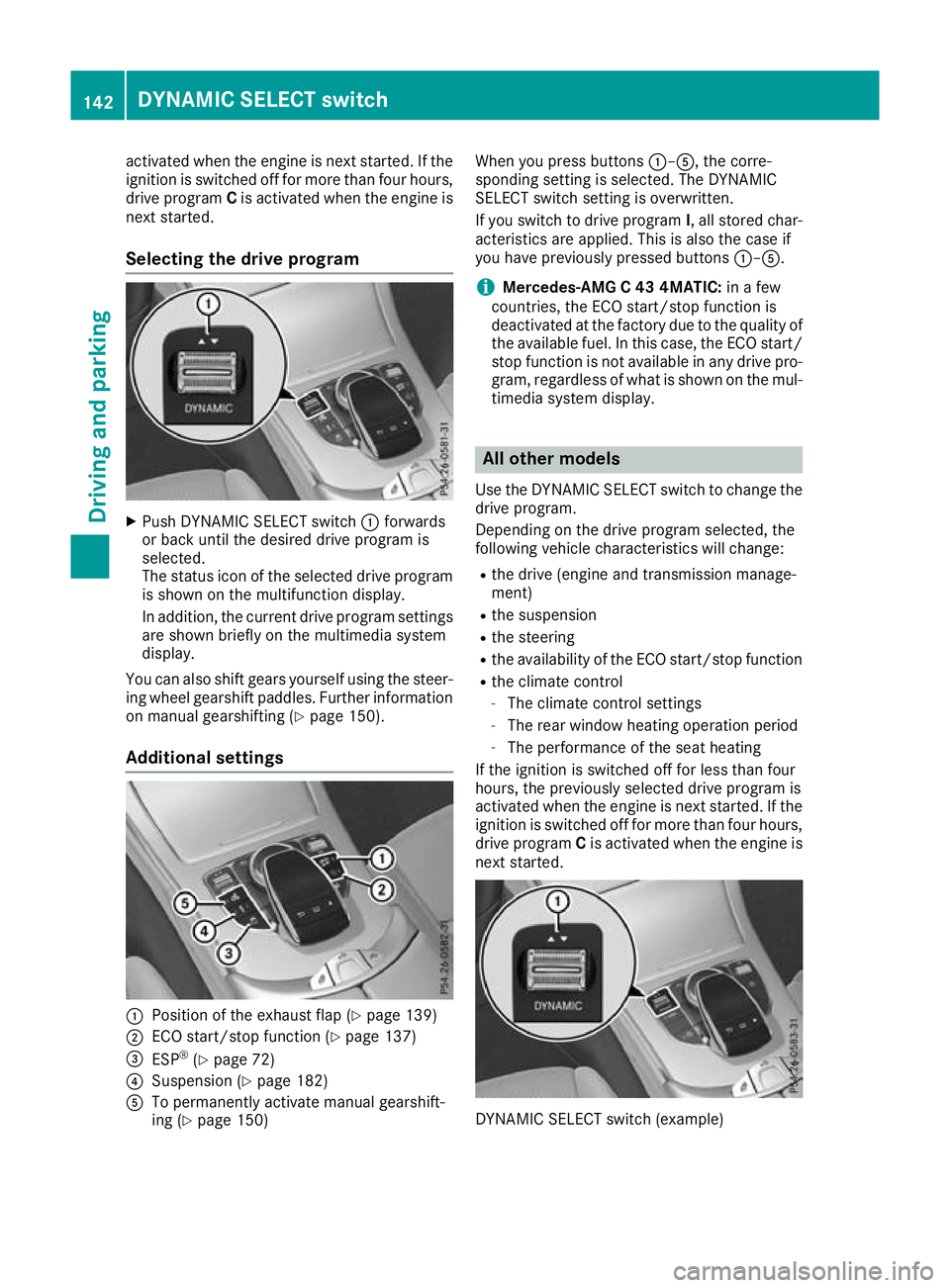
Selecting the drive program X
Push DYNAMIC SELECT switch :forwards
or back until the desired drive program is
selected.
The status icon of the selected drive program
is shown on the multifunction display.
In addition, the current drive program settings are shown briefly on the multimedia system
display.
You can also shift gears yourself using the steer-
ing wheel gearshift paddles. Further information
on manual gearshifting (Y page 150).
Additional settings :
Position of the exhaust flap (Y page 139)
; ECO start/stop function (Y page 137)
= ESP ®
(Y page 72)
? Suspension (Y page 182)
A To permanently activate manual gearshift-
ing (Y page 150) When you press buttons
:–A, the corre-
sponding setting is selected. The DYNAMIC
SELECT switch setting is overwritten.
If you switch to drive program I, all stored char-
acteristics are applied. This is also the case if
you have previously pressed buttons :–A.
i Mercedes-AMG C 43 4MATIC:
in a few
countries, the ECO start/stop function is
deactivated at the factory due to the quality of the available fuel. In this case, the ECO start/
stop function is not available in any drive pro-
gram, regardless of what is shown on the mul- timedia system display. All other models
Use the DYNAMIC SELECT switch to change the
drive program.
Depending on the drive program selected, the
following vehicle characteristics will change:
R the drive (engine and transmission manage-
ment)
R the suspension
R the steering
R the availability of the ECO start/stop function
R the climate control
- The climate control settings
- The rear window heating operation period
- The performance of the seat heating
If the ignition is switched off for less than four
hours, the previously selected drive program is
activated when the engine is next started. If the
ignition is switched off for more than four hours,
drive program Cis activated when the engine is
next started. DYNAMIC SELECT switch (example)142
DYNAMIC SELECT switchDriving and parking
Page 146 of 377
X
Push DYNAMIC SELECT switch :forwards
or backwards until the desired drive program is selected.
The status icon of the selected drive program
is shown on the multifunction display.
In addition, the current drive program settings are shown briefly on the multimedia system
display.
i In a few countries, the ECO start/stop func-
tion is deactivated at the factory due to the
quality of the available fuel. In this case, the
ECO start/stop function is not available in any
drive program, regardless of what is shown on
the multimedia system display.
Available drive programs: I
Individual Individual settings
S+
Sport Plus Particularly sporty driving
characteristics
S
Sport Sporty driving characteris-
tics
C
Comfort Comfortable and economi-
cal driving characteristics
E
Economy Particularly economical
driving characteristics
Additional information on drive programs for:
R vehicles with manual transmission
(Y page 144)
R vehicles with automatic transmission
(Y page 148)
Vehicles with automatic transmission: you
can also shift gears yourself using the steering
wheel gearshift paddles. Further information on
manual gearshifting (Y page 150).Manual transmission
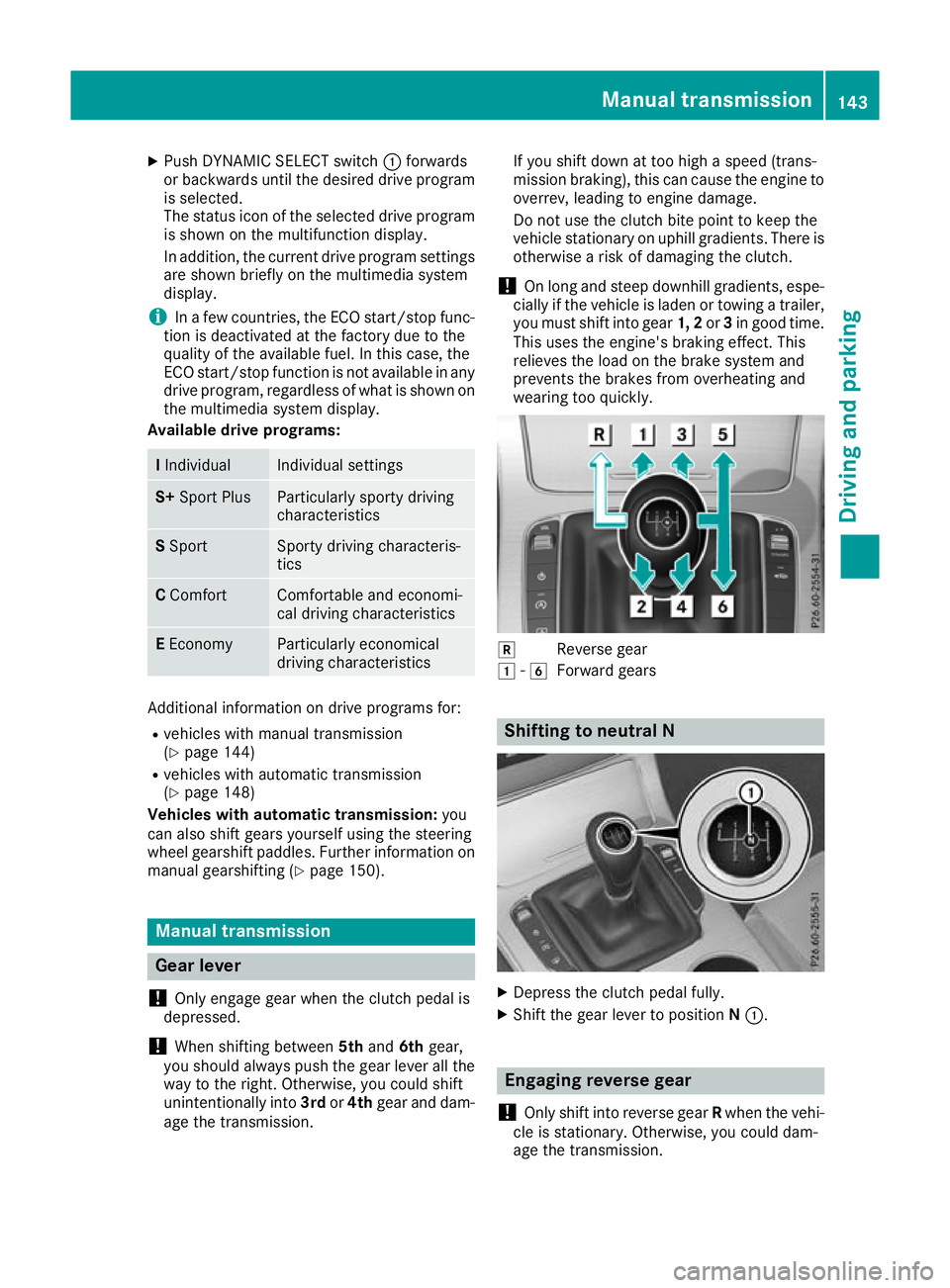
Gear lever
! Only engage gear when the clutch pedal is
depressed.
! When shifting between
5thand 6thgear,
you should always push the gear lever all the
way to the right. Otherwise, you could shift
unintentionally into 3rdor4th gear and dam-
age the transmission. If you shift down at too high a speed (trans-
mission braking), this can cause the engine to
overrev, leading to engine damage.
Do not use the clutch bite point to keep the
vehicle stationary on uphill gradients. There is otherwise a risk of damaging the clutch.
! On long and steep downhill gradients, espe-
cially if the vehicle is laden or towing a trailer,
you must shift into gear 1, 2or3in good time.
This uses the engine's braking effect. This
relieves the load on the brake system and
prevents the brakes from overheating and
wearing too quickly. k
Reverse gear
1 -6
Forward gears Shifting to neutral N
X
Depress the clutch pedal fully.
X Shift the gear lever to position N:. Engaging reverse gear
! Only shift into reverse gear
Rwhen the vehi-
cle is stationary. Otherwise, you could dam-
age the transmission. Manual transmission
143Driving and parking Z
Page 147 of 377
X
Move the gear lever firmly to the left, beyond
the point of resistance, then forwards.
The ECO start/stop function is not available
when reverse gear is engaged. Further informa-
tion on the ECO start/stop function
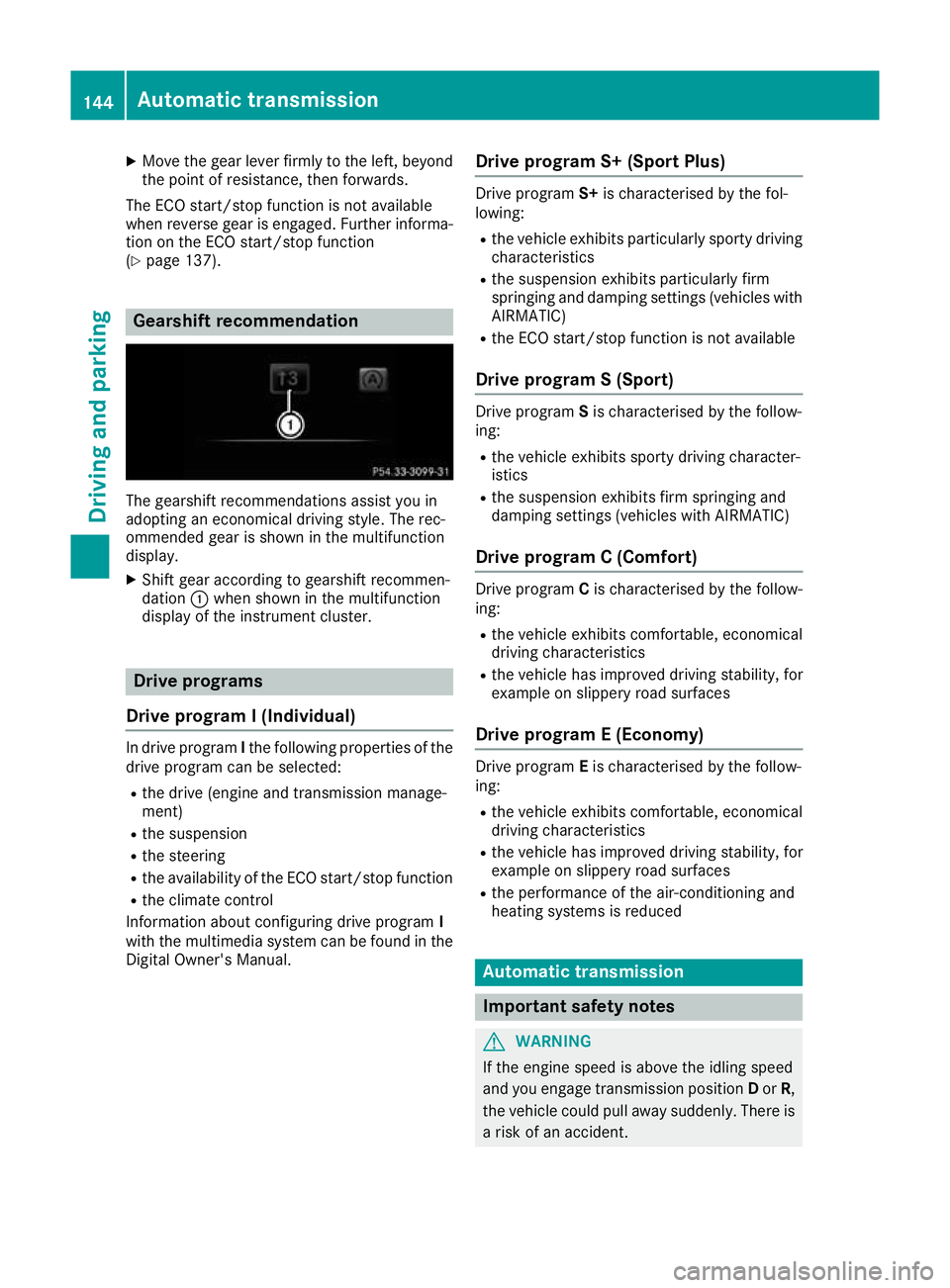
(Y page 137). Gearshift recommendation
The gearshift recommendations assist you in
adopting an economical driving style. The rec-
ommended gear is shown in the multifunction
display.
X Shift gear according to gearshift recommen-
dation :when shown in the multifunction
display of the instrument cluster. Drive programs
Drive program I (Individual) In drive program
Ithe following properties of the
drive program can be selected:
R the drive (engine and transmission manage-
ment)
R the suspension
R the steering
R the availability of the ECO start/stop function
R the climate control
Information about configuring drive program I
with the multimedia system can be found in the
Digital Owner's Manual. Drive program S+ (Sport Plus) Drive program
S+is characterised by the fol-
lowing:
R the vehicle exhibits particularly sporty driving
characteristics
R the suspension exhibits particularly firm
springing and damping settings (vehicles with
AIRMATIC)
R the ECO start/stop function is not available
Drive program S (Sport) Drive program
Sis characterised by the follow-
ing:
R the vehicle exhibits sporty driving character-
istics
R the suspension exhibits firm springing and
damping settings (vehicles with AIRMATIC)
Drive program C (Comfort) Drive program
Cis characterised by the follow-
ing:
R the vehicle exhibits comfortable, economical
driving characteristics
R the vehicle has improved driving stability, for
example on slippery road surfaces
Drive program E (Economy) Drive program
Eis characterised by the follow-
ing:
R the vehicle exhibits comfortable, economical
driving characteristics
R the vehicle has improved driving stability, for
example on slippery road surfaces
R the performance of the air-conditioning and
heating systems is reduced Automatic transmission
Important safety notes
G
WARNING
If the engine speed is above the idling speed
and you engage transmission position Dor R,
the vehicle could pull away suddenly. There is a risk of an accident. 144
Automatic transmissionDriving and parking
Page 148 of 377
When engaging transmission position
Dor R,
always firmly depress the brake pedal and do
not simultaneously accelerate. G
WARNING
The automatic transmission switches to neu-
tral position Nwhen you switch off the engine.
The vehicle may roll away. There is a risk of an
accident.
After switching off the engine, always switch
to parking position P. Prevent the parked vehi-
cle from rolling away by applying the parking
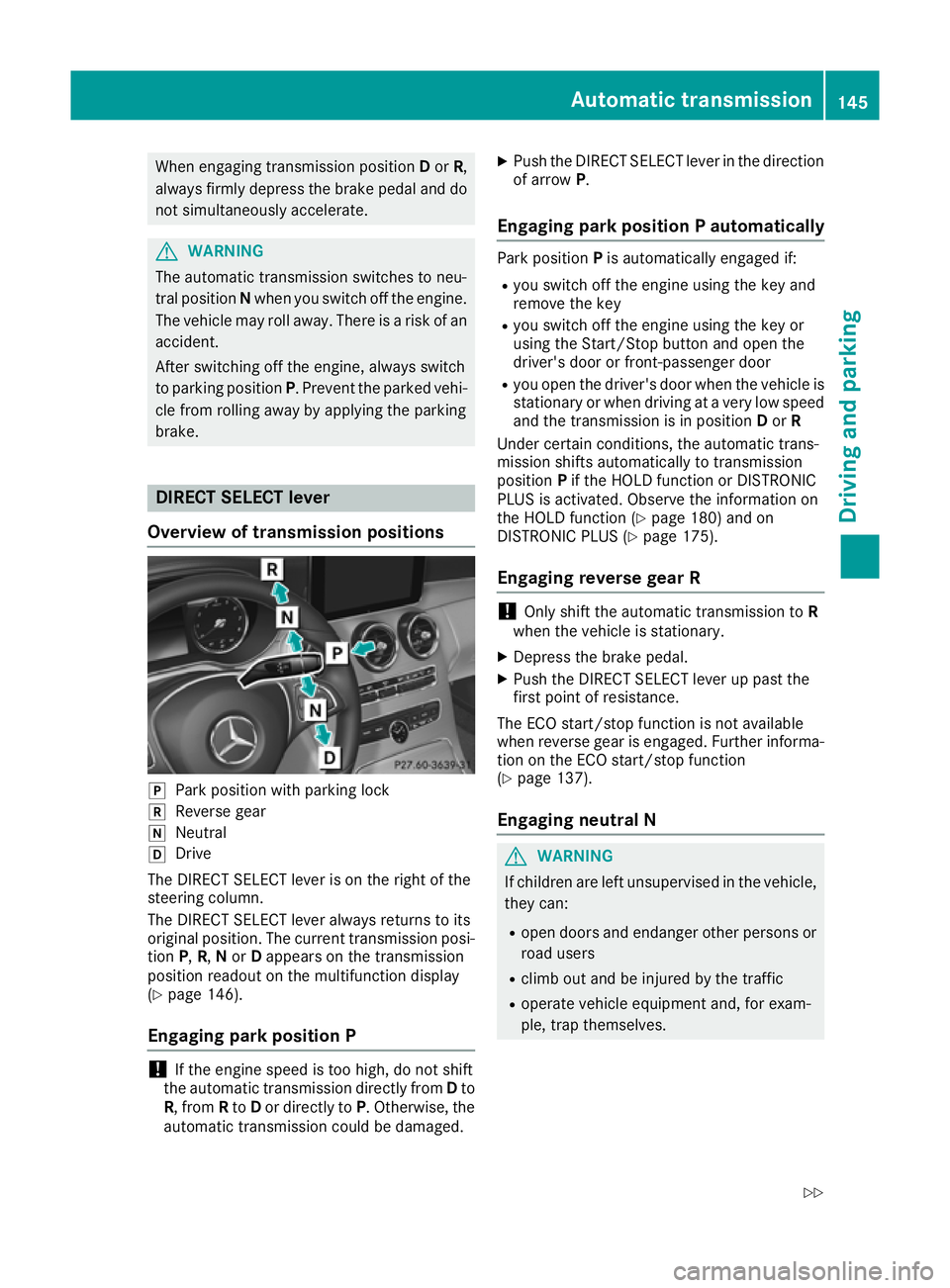
brake. DIRECT SELECT lever
Overview of transmission positions j
Park position with parking lock
k Reverse gear
i Neutral
h Drive
The DIRECT SELECT lever is on the right of the
steering column.
The DIRECT SELECT lever always returns to its
original position. The current transmission posi-
tion P,R, Nor Dappears on the transmission
position readout on the multifunction display
(Y page 146).
Engaging park position P !
If the engine speed is too high, do not shift
the automatic transmission directly from Dto
R, from Rto Dor directly to P. Otherwise, the
automatic transmission could be damaged. X
Push the DIRECT SELECT lever in the direction
of arrow P.
Engaging park position P automatically Park position
Pis automatically engaged if:
R you switch off the engine using the key and
remove the key
R you switch off the engine using the key or
using the Start/Stop button and open the
driver's door or front-passenger door
R you open the driver's door when the vehicle is
stationary or when driving at a very low speed
and the transmission is in position Dor R
Under certain conditions, the automatic trans-
mission shifts automatically to transmission
position Pif the HOLD function or DISTRONIC
PLUS is activated. Observe the information on
the HOLD function (Y page 180) and on
DISTRONIC PLUS (Y page 175).
Engaging reverse gear R !
Only shift the automatic transmission to
R
when the vehicle is stationary.
X Depress the brake pedal.
X Push the DIRECT SELECT lever up past the
first point of resistance.
The ECO start/stop function is not available
when reverse gear is engaged. Further informa-
tion on the ECO start/stop function
(Y page 137).
Engaging neutral N G
WARNING
If children are left unsupervised in the vehicle, they can:
R open doors and endanger other persons or
road users
R climb out and be injured by the traffic
R operate vehicle equipment and, for exam-
ple, trap themselves. Automatic transmission
145Driving and parking
Z
Page 149 of 377
Children could also set the vehicle in motion,
for example by:
R releasing the parking brake
R shifting the automatic transmission out of
park position P
R starting the engine.
There is a risk of an accident and injury.
When leaving the vehicle, always take the key with you and lock the vehicle. Never leave
children unattended in the vehicle. Always
keep the key out of reach of children.
X If the transmission is in position Dor R: push
the DIRECT SELECT lever up or down to the
first point of resistance.
X If the transmission is in position P: depress
the brake pedal and push the DIRECT SELECT lever up or down to the first point of resist-
ance.
If you switch the engine off with the transmis-
sion in position Ror D, the automatic transmis-
sion shifts to Nautomatically.
With the key: if you then open the driver's door
or the front-passenger door or remove the key
from the ignition, the automatic transmission
shifts to Pautomatically.
With the Start/Stop button: if you then open
the driver's door or the front-passenger door,
the automatic transmission shifts to Pautomat-
ically.
If you want the automatic transmission to
remain in neutral N, e.g. when having the vehicle
cleaned in an automatic car wash with a towing
system:
X Vehicles with KEYLESS-GO or KEYLESS-
GO start function:
remove the Start/Stop
button from the ignition lock.
X Insert the key into the ignition lock.
X All vehicles: switch the ignition on.
X Depress the brake pedal and keep it
depressed.
X Engage neutral N.
X Release the brake pedal.
X Release the electric parking brake.
X Switch off the ignition and leave the key in the
ignition lock. Engaging drive position D X
If the transmission is in position Ror N: push
the DIRECT SELECT lever down past the first
point of resistance.
X If the transmission is in position P: depress
the brake pedal and push the DIRECT SELECT lever down past the first point of resistance. Transmission position and drive pro-
gram display
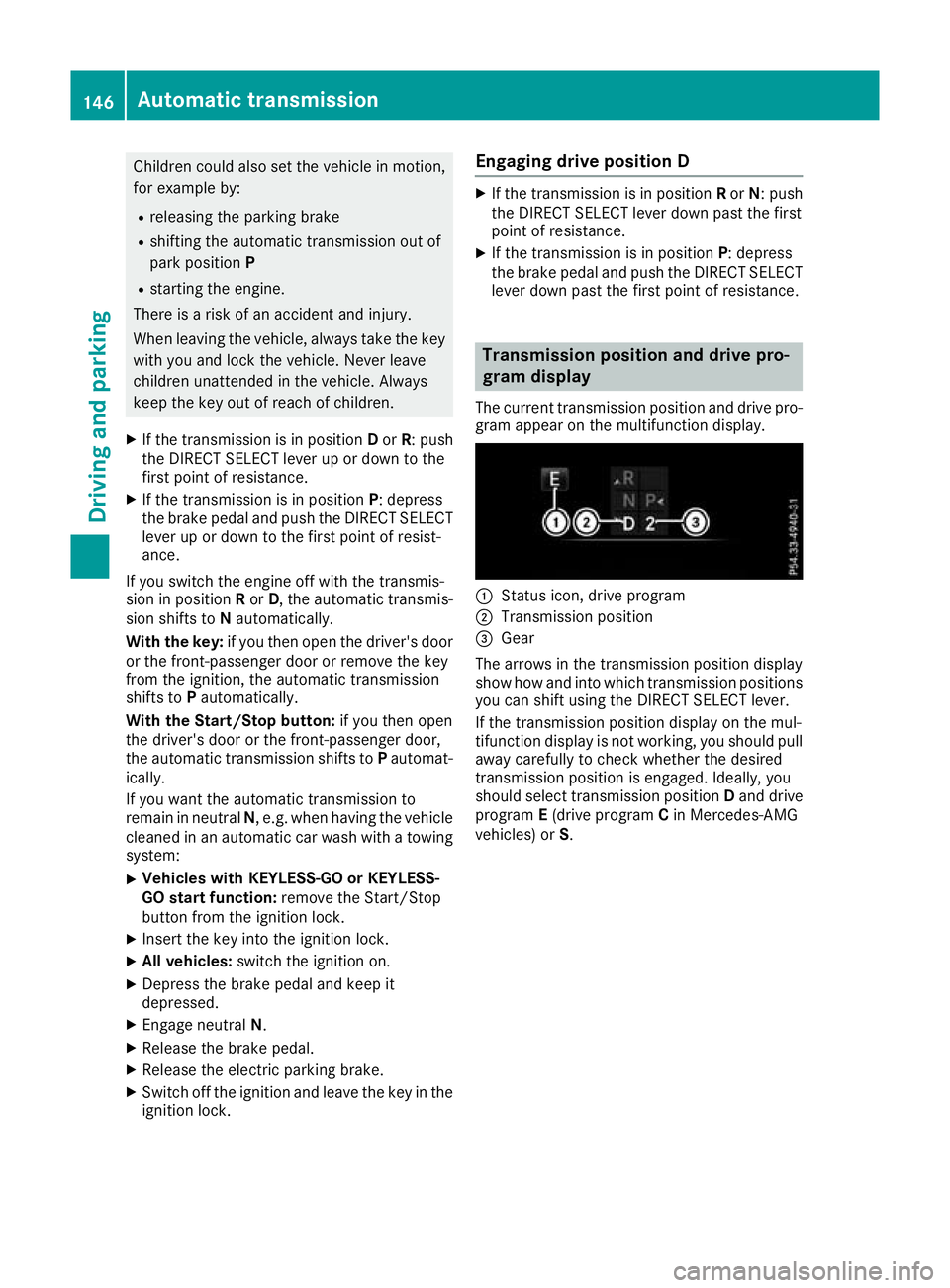
The current transmission position and drive pro-
gram appear on the multifunction display. :
Status icon, drive program
; Transmission position
= Gear
The arrows in the transmission position display
show how and into which transmission positions
you can shift using the DIRECT SELECT lever.
If the transmission position display on the mul-
tifunction display is not working, you should pull away carefully to check whether the desired
transmission position is engaged. Ideally, you
should select transmission position Dand drive
program E(drive program Cin Mercedes-AMG
vehicles) or S.146
Automatic transmissionDriving and parking
Page 151 of 377

reactions and is conducive to a sporty driving
style. The sound generated by the double-clutch
function depends on the drive program.
Kickdown Use kickdown for maximum acceleration:
X Depress the accelerator pedal beyond the
pressure point.
The automatic transmission shifts to a lower
gear depending on the engine speed.
X Ease off the accelerator pedal once the
desired speed is reached.
The automatic transmission shifts back up.
Gliding mode Gliding mode is characterised by the following:
R the combustion engine is disconnected from
the drive train
R the engine speed is equal to the engine idling
speed
R the multifunction display hides the gear indi-
cator and shows transmission position Din
green (Y page 146)
R Mercedes-AMG vehicles: the multifunction
display shows :as the status icon for the
drive program
In drive program Eand drive program C
(Mercedes-AMG vehicles) you can activate and
deactivate gliding mode using the ECO button
(Y page 139).
Gliding mode can be activated under the follow-
ing conditions:
R the speed is within a suitable range
R the type of road is suitable, e.g. no steep uphill
or downhill gradients
R you are no longer depressing the accelerator
pedal
Gliding mode is deactivated under the following
conditions:
R you depress the accelerator pedal
R you depress the brake pedal R
you change the transmission position
(Y page 145)
R you switch to drive program RACE
(Mercedes-AMG C 63 S), S+orS
(Y page 141)
R you activate manual gearshifting
(Y page 150)
R you leave the suitable speed range
i If you have selected the "Comfort" setting
for the drive (engine management) in drive
program I, you can also activate gliding mode.
You can find information about this in the Dig- ital Owner's Manual.
Towing a trailer Towing a trailer is not possible with all models.
Further information (Y
page 214).
X Drive in the middle of the engine speed range
on uphill gradients.
X Manual gearshifting: depending on the
uphill or downhill gradient, shift to a gear
(Y page 150) in which the engine will run in
the middle of the engine speed range.
This also applies if cruise control, DISTRONIC PLUS or SPEEDTRONIC are activated. Drive programs
All vehicles (except Mercedes-AMG
C 63 /C63S) Drive program I (Individual)
In drive program I, the following properties of
the drive program can be selected:
R the drive (engine and transmission manage-
ment)
R the suspension
R the steering
R the availability of the ECO start/stop function
R the climate control
Information on configuring drive program Iwith
the multimedia system can be found under
"DYNAMIC SELECT" in the vehicle's Digital Own- er's Manual.
i To permanently shift the gears manually in
drive program Iusing the steering wheel gear-
shift paddles, select the M(Manual) setting
for the drive. 148
Automatic transmissionDriving and pa
rking
Page 153 of 377

R
gliding mode is not available.
R the ECO start/stop function is not available.
Drive program S+ (Sport Plus)
Drive program S+is characterised by the fol-
lowing:
R the vehicle exhibits particularly sporty driving
characteristics.
R the vehicle pulls away in first gear.
R the automatic transmission shifts up later.
fuel consumption may be higher as a result of
the later automatic transmission shift points.
R the suspension exhibits particularly firm
springing and damping settings (vehicles with
AIRMATIC).
R gliding mode is not available.
R the ECO start/stop function is not available.
Drive program S (Sport)
Drive program Sis characterised by the follow-
ing:
R the vehicle exhibits sporty driving character-
istics.
R the vehicle pulls away in first gear.
R the automatic transmission shifts up later.
fuel consumption may be higher as a result of
the later automatic transmission shift points.
R the suspension exhibits firm springing and
damping settings (vehicles with AIRMATIC).
R gliding mode is not available.
R the ECO start/stop function is not available.
Drive program C (Comfort) Drive program Cis characterised by the follow-
ing:
R the vehicle exhibits comfortable, economical
driving characteristics.
R the vehicle pulls away more gently in forward
and reverse gears unless the accelerator
pedal is depressed fully.
R the vehicle has improved driving stability, e.g.
on slippery road surfaces.
R optimal fuel consumption resulting from the
automatic transmission shifting up sooner.
The vehicle is driven in the low engine speed
range and the wheels are less likely to spin.
R gliding mode is available.
R the ECO start/stop function is available. Drive program I (Individual)
In drive program I, the following properties of
the drive program can be selected:
R the drive (engine management)
R the transmission management
R ESP ®
(Y page 72)
R the suspension
R activation of the exhaust flap
Information on configuring drive program Iwith
the multimedia system can be found under
"DYNAMIC SELECT" in the vehicle's Digital Own- er's Manual.
i To permanently shift the gears manually in
drive program Iusing the steering wheel gear-
shift paddles, select the M(Manual) setting
for the transmission. Manual gearshifting
General notes You can shift gears yourself using the steering
wheel gearshift paddles. The transmission must
be in position Dto do this.
Depending on which steering wheel gearshift
paddle is pulled, the automatic transmission
immediately shifts into the next gear up or
down, if permitted.
Mercedes-AMG vehicles: to use manual gear-
shifting, you have two options:
R temporary setting
R permanent setting
If you activate manual gearshifting, the multi-
function display will show the current gear
instead of transmission position D.
If you deactivate manual gearshifting, the gears will be shifted automatically again. 150
Automatic transmissionDriving and parking
Page 155 of 377
indicator on the multifunction display. Always
make sure that the engine speed does not
reach the red area of the rev counter.
X To shift down: pull steering wheel gearshift
paddle :.
The automatic transmission shifts down to
the next gear.
Automatic downshifting occurs when coast-
ing.
If the engine exceeds the maximum engine
speed when shifting down, the automatic
transmission protects against engine damage by not shifting down.
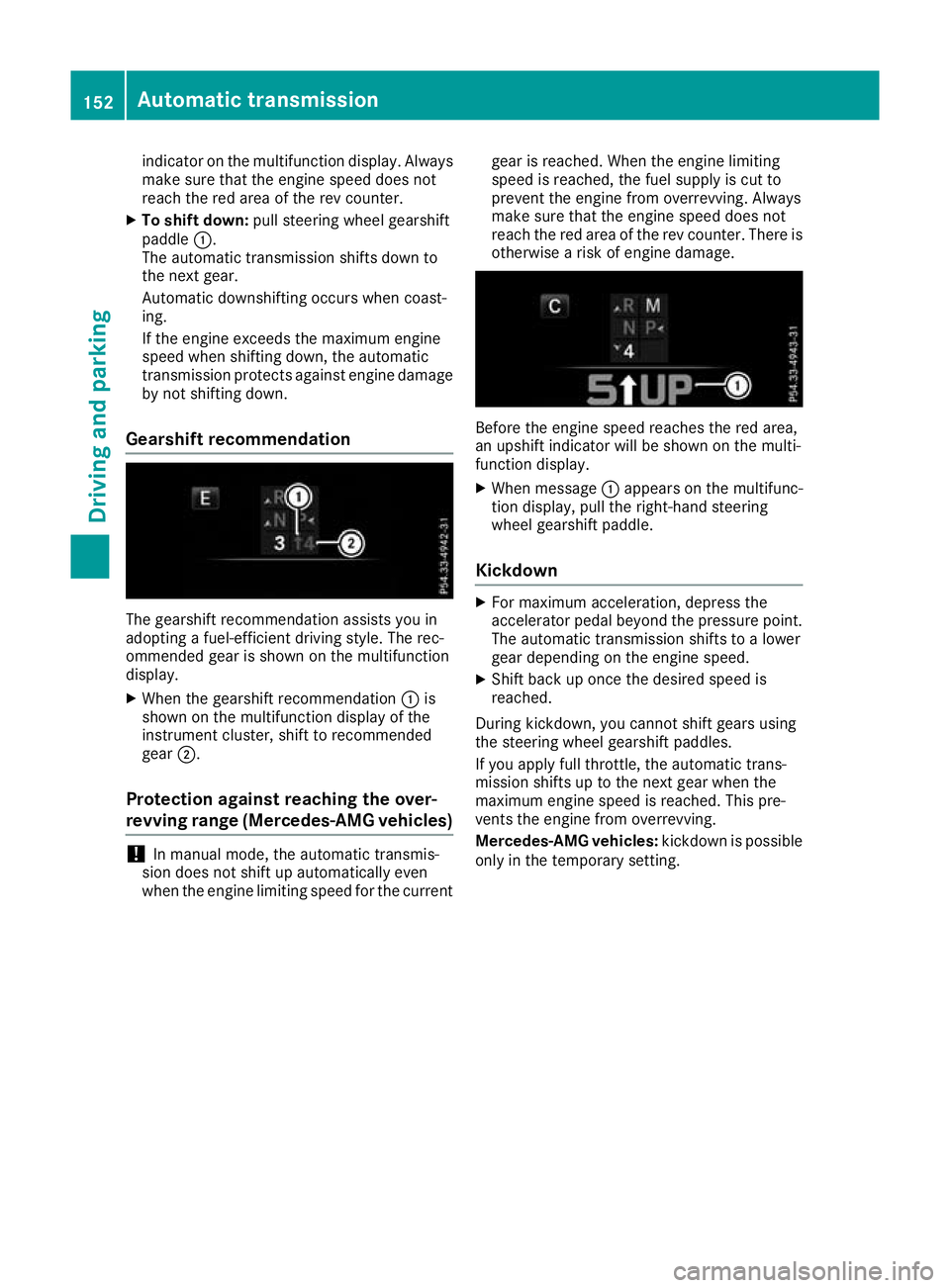
Gearshift recommendation The gearshift recommendation assists you in
adopting a fuel-efficient driving style. The rec-
ommended gear is shown on the multifunction
display.
X When the gearshift recommendation :is
shown on the multifunction display of the
instrument cluster, shift to recommended
gear ;.
Protection against reaching the over-
revving range (Mercedes-AMG vehicles) !
In manual mode, the automatic transmis-
sion does not shift up automatically even
when the engine limiting speed for the current gear is reached. When the engine limiting
speed is reached, the fuel supply is cut to
prevent the engine from overrevving. Always
make sure that the engine speed does not
reach the red area of the rev counter. There is
otherwise a risk of engine damage. Before the engine speed reaches the red area,
an upshift indicator will be shown on the multi-
function display.
X When message :appears on the multifunc-
tion display, pull the right-hand steering
wheel gearshift paddle.
Kickdown X
For maximum acceleration, depress the
accelerator pedal beyond the pressure point.
The automatic transmission shifts to a lower
gear depending on the engine speed.
X Shift back up once the desired speed is
reached.
During kickdown, you cannot shift gears using
the steering wheel gearshift paddles.
If you apply full throttle, the automatic trans-
mission shifts up to the next gear when the
maximum engine speed is reached. This pre-
vents the engine from overrevving.
Mercedes-AMG vehicles: kickdown is possible
only in the temporary setting. 152
Automatic transmissionDriving and parking
Page 160 of 377
Owner’s
Owner’s
Manual
Manualmessage is shown on the mul-
tifunction display.
If you drive the vehicle at a speed greater than
15 km/h after topping up, the Refill
Refill AdBlue AdBlue
See Owner’s Manual
See Owner’s Manual message disappears
after approximately one minute.
When the AdBlue ®
supply drops to a minimum,
the Refill AdBlue No start in ... mi
Refill AdBlue No start in ... mi
message is shown on the multifunction display.
When the Refill
Refill AdBlue AdBlueNo
Nostart
start in
in...
...
mi
mi message is shown on the multifunction dis-
play, you can still drive the vehicle over the dis-
tance shown. If AdBlue ®
is not topped up, you
will subsequently be unable to start the
engine . If theRefill AdBlue Start not
Refill AdBlue Start not
possible
possible message appears on the multifunc-
tion display and the engine does not start, you
must top up AdBlue ®
.
X Add at least 3.5 l of AdBlue ®
.
X Switch on the ignition for at least 60 seconds.
X Start the engine.
i You can also have the AdBlue ®
tank refilled
at a qualified specialist workshop.
Before driving your vehicle outside Europe, have
the AdBlue ®
supply checked at a qualified spe-
cialist workshop.
Further information about BlueTEC exhaust gas
aftertreatment and about AdBlue ®
can
be obtained from any Mercedes-Benz Service
Centre.
Important safety notes AdBlue
®
is a water-soluble fluid for the exhaust
gas aftertreatment of diesel engines. It is:
R non-toxic
R colourless and odourless
R non-flammable
If you open the AdBlue ®
tank, small amounts of
ammonia vapour may be released.
Ammonia vapours have a pungent odour and are
particularly irritating to the skin, mucous mem-
branes and eyes. You may experience a burning sensation in your eyes, nose and throat. You
may also experience coughing and watery eyes.
Do not inhale any ammonia vapours that may be
released. Fill the AdBlue ®
tank only in well-ven-
tilated areas. Do not swallow AdBlue
®
or let it come into con-
tact with your skin, eyes or clothing. Keep
AdBlue ®
away from children.
If you or others come into contact with AdBlue ®
,
observe the following:
R immediately rinse AdBlue ®
off your skin with
soap and water.
R if AdBlue ®
comes into contact with your eyes,
immediately rinse them thoroughly with clean water. Seek medical attention immediately.
R if AdBlue ®
is swallowed, immediately rinse
your mouth out thoroughly. Drink plenty of
water. Seek medical attention immediately.
R change immediately out of clothing that has
come into contact with AdBlue ®
.
! Only use AdBlue ®
in accordance with
ISO 22241. Do not mix any additives with
AdBlue ®
, and do not dilute AdBlue ®
with
water. This may destroy the BlueTEC exhaust
gas aftertreatment system.
! In order to fill the AdBlue ®
tank, the vehicle
must be parked on a level surface. The
AdBlue ®
tank can only be filled as intended
with the vehicle parked on a level surface.
Fluctuations in capacity will thus be avoided.
Filling a vehicle standing on an uneven sur-
face is not permitted. There is a danger of
overfilling, which can cause damage to Blue-
TEC exhaust gas aftertreatment components.
! Surfaces which have come into contact with
AdBlue ®
while refilling should be rinsed
immediately with water, or remove AdBlue ®
with a moist cloth and cold water. If AdBlue ®
has already crystallised, use a sponge and
cold water to clean the area. AdBlue ®
residue
crystallises after a certain amount of time and
soils the affected surfaces.
! AdBlue ®
is not a fuel additive and must not
be added to the fuel tank. If AdBlue ®
is added
to the fuel tank, this can lead to engine dam- age.
Have the AdBlue ®
tank refilled at a qualified
specialist workshop. However, you can also top
up the AdBlue ®
tank:
R at a filling station with an AdBlue ®
filling pump
R with AdBlue ®
refill bottles
R with an AdBlue ®
refill canister Refuelling
157Driving and parking Z
Page 161 of 377

When the pump nozzle switches off automati-
cally during filling at a filling pump, the AdBlue ®
tank has been completely filled. Do not fill the
AdBlue ®
tank any further. AdBlue ®
may leak
out.
To avoid transporting already opened refill con-
tainers in the vehicle, completely empty refill
bottles or canisters when filling the AdBlue ®
tank, if possible.
Further information on AdBlue ®
(Y page 364).
Opening/closing the AdBlue ®
filler cap X
To open:switch the ignition off.
X Press the fuel filler flap in the direction of
arrow :.
The fuel filler flap swings open.
X Turn blue AdBlue ®
filler cap ;anti-clockwise
and remove it.
AdBlue ®
filler cap ;is secured with a plastic
strip.
X To close:fit AdBlue ®
filler cap ;onto the
filler neck and turn it clockwise.
X To close the fuel filler flap, press it in the
direction of arrow :.
X Drive at a speed greater than 15 km/h.
The Refill AdBlue See Owner’s Manual
Refill AdBlue See Owner’s Manual
message disappears after approximately one minute.
If the Refill AdBlue See Owner’s Manual Refill AdBlue See Owner’s Manual
message continues to be shown on the multi-
function display, you must top up with more
AdBlue ®
.
i The fuel filler flap is unlocked or locked
automatically when you unlock or lock the
vehicle. AdBlue
®
refill canisters !
Do not tighten the disposable hose too
firmly. The disposable hose could otherwise
be damaged and AdBlue ®
may leak out. X
Unscrew the cap from the opening on top of
AdBlue ®
refill canister ;.
X Place disposable hose :on the opening of
AdBlue ®
refill canister ;and screw it on
clockwise until hand-tight.
Disposable hose :remains closed until you
fasten disposable hose :to the AdBlue ®
filler neck of the vehicle. X
Place disposable hose :on the filler neck on
the vehicle and screw it on clockwise until
hand-tight. When you feel resistance, dispos- able hose :is sufficiently secured.
X Lift up and tip AdBlue ®
refill canister ;.
Filling stops when the AdBlue ®
tank is com-
pletely filled. Do not fill the AdBlue ®
tank any
further. AdBlue ®
refill canister ;can be
removed when it has been only partially emp-
tied.
X Turn disposable hose :on the filler neck of
the vehicle anti-clockwise and remove it. 158
RefuellingDriving and parking