display MERCEDES-BENZ C-CLASS CABRIOLET 2016 Owner's Manual
[x] Cancel search | Manufacturer: MERCEDES-BENZ, Model Year: 2016, Model line: C-CLASS CABRIOLET, Model: MERCEDES-BENZ C-CLASS CABRIOLET 2016Pages: 377, PDF Size: 6.9 MB
Page 26 of 377
Blind Spot Assist ............................ 206
Cleaning the trailer tow hitch ......... 320
Coupling up a traile
r...................... 215
Decoupling a trailer ....................... 216
Driving tips .................................... 214
Folding in the ball coupling ............ 215
Folding out the ball coupling .......... 214
Important safety notes .................. 213
Lights display message .................. 253
Parktronic ...................................... 185
Power supply ................................. 216
Problem (fault) ............................... 217
Trailer load s................................... 369
Transfer case ..................................... 153
Transmission
see Automatic transmission
see Manual transmission
Transmission position display ......... 146
Transporting the vehicle .................. 338
Trim pieces (cleaning instruc-
tions) .................................................. 321
Trip computer (on-board com-
puter) .................................................. 225
Trip meter
Calling up ....................................... 224
Resetting (on-board computer) ...... 226
Turn signals
Replacing bulbs (front) ................... 120
Switching on/of f........................... 116
TV
Operating (on-board computer) ..... 230
Two-way radio
Frequencies ................................... 358
Installation ..................................... 358
Transmission output (maximum) .... 358
Type identification plate
see Vehicle identification plate
Tyre changing tool kit ....................... 325
Tyre pressure
Calling up (on-board computer) ..... 348
Display message ............................ 265
Not reached (TIREFIT) .................... 329
Reached (TIREFIT) .......................... 329
Recommended ............................... 345
Tyre pressure loss warning
General notes ................................ 347
Important safety notes .................. 347 Restarting ...................................... 347
Tyre pressure monitor
Checking the tyre pressure elec-
tronically ........................................ 349
Function/note s............................. 348
General notes ................................ 348
Important safety notes .................. 348
Radio type approval for the tyre
pressure monitor ........................... 350
Restarting ...................................... 349
Warning lamp ................................. 282
Warning message .......................... 349
Tyres
Changing a whee l.......................... 350
Checking ........................................ 343
Direction of rotation ...................... 351
Display message ............................ 265
Important safety notes .................. 342
Information on driving .................... 342
MOExtended tyre s......................... 344
Replacing ....................................... 350
Service life ..................................... 343
Snow chains .................................. 345
Storing ........................................... 351
Summer tyres in winter ................. 344
Tyre size (data ).............................. 355
Tyre tread ...................................... 343
Wheel and tyre combinations ........ 355
see Flat tyre U
Unlocking Emergency unlocking ....................... 89
From inside the vehicle (central
unlocking button) ............................. 88
USB devices
Connecting to the Media Inter-
face ............................................... 295
Using the TIREFIT
tyre pressure kit ............................ 328 V
Vanity mirror (in sun visor) .............. 302
Variable SPEEDTRONIC
see SPEEDTRONIC
Vehicle
Correct use ...................................... 31 Index
23
Page 27 of 377
Data acquisition ............................... 31
Display message ............................ 267
Electronics ....................................
.358
Equipment ....................................... 28
Implied warranty .............................. 31
Individual settings .......................... 232
Leaving parked up ......................... 163
Locking (in an emergency) .............. .89
Locking (key) ................................... 82
Lowering ........................................ 355
Operating safety .............................. 28
Parking .......................................... 159
Pulling away ................................... 135
Raising ........................................... 352
Registration ..................................... 31
Securing from rolling away ............ 352
Technical data ............................... 358
Towing away .................................. 336
Transporting .................................. 338
Unlocking (in an emergency) ........... 89
Unlocking (key) ................................ 82
Vehicle data ................................... 367
Vehicle data
Boot load (maximum) ..................... 367
Vehicle dimensions ........................... 367
Vehicle emergency locking ................ 89
Vehicle identification number
see VIN
Vehicle identification plate .............. 359
Vehicle level
AIRMATIC ...................................... 182
Display message ............................ 258
Vehicle tool kit .................................. 325
Video
Operating the DVD ......................... 229
See also Digital Owner's Manua l... 284
VIN
Seat ............................................... 360
Type plate ...................................... 359 W
Warning and indicator lamps ABS ................................................ 275
Brakes ........................................... 274
Distance warning signal ................. 281
ESP ®
.............................................. 275
ESP ®
OFF ....................................... 277 Fuel tank ........................................ 278
General notes ................................ 273
LIM (cruise control) ........................ 168
LIM (DISTRONIC PLUS) .................. 172
LIM (variable SPEEDTRONIC) ......... 170
Overview .......................................... 35
Parking brake ................................ 278
PASSENGER AIR BAG ...................... 43
Reserve fue
l................................... 278
Seat belt ........................................ 273
Steering ......................................... 283
Tyre pressure monitor ................... 282
Warning triangle ................................ 324
Washer fluid
Display message ............................ 271
Weather display (COMAND Online)
See also Digital Owner's Manua l... 284
Wheel and tyre combinations
Tyres .............................................. 355
Wheel bolt tightening torque ........... 355
Wheel chock ...................................... 352
Wheels
Changing a whee l.......................... 350
Changing/replacing ....................... 350
Checking ........................................ 343
Cleaning ......................................... 318
Emergency spare whee l................. 356
Fitting a new wheel ........................ 354
Fitting a wheel ............................... 351
Important safety notes .................. 342
Information on driving .................... 342
Removing a whee l.......................... 354
Snow chains .................................. 345
Storing ........................................... 351
Tightening torque ........................... 355
Wheel size/tyre size ...................... 355
Wind deflector (cleaning instruc-
tions) .................................................. 317
Windows
Cleaning ......................................... 318
see Side windows
Windscreen
Demisting ...................................... 128
Windscreen washer fluid
see Windscreen washer system
Windscreen washer system
Important safety notes .................. 367
Topping up ..................................... 312 24
Index
Page 29 of 377

Introduction
The printed Owner's Manual provides informa-
tion about the safe operation of your vehicle.
The Digital Owner's Manual provides compre-
hensive and specifically adapted information on
your vehicle's equipment and multimedia sys-
tem. You can call up the Digital Owner's Manual
via the multimedia system.
i You will not incur any costs when calling up
the Digital Owner's Manual. The Digital Own-
er's Manual works without connecting to the
internet.
There are three ways to access the topics of the Digital Owner's Manual:
R Visual search
The visual search allows you to explore your
vehicle "virtually". Starting from either the
vehicle exterior view or interior view, you can
access many of the different topics covered
by the Digital Owner's Manual. To access the vehicle interior section, select the "Vehicle
interior" view.
R Keyword search
The keyword search allows you to search for a
keyword by entering characters.
R Contents
You can select individual sections in the con-
tents.
i The Digital Owner's Manual is deactivated
for safety reasons while driving. Operation
Calling up the Digital Owner's Manual
X Press the Øbutton on the centre console.
The vehicle overview appears.
X Select the "Owner's Manual" menu item by
turning 3and pressing 7on the control-
ler.
X Confirm 7the message about the warning
and safety notes.
The basic menu for the Digital Owner's Man-
ual appears. Operating the Digital Owner's Manual
General notes Please observe the information about the oper-
ation of the controller (Y page 285).
Content pages You can access the pages of content by means
of a visual search or a keyword search or by
using the table of contents.
X
To scroll forwards/backwards: turn the
controller 3.
X To display in full screen or animation: slide
8 the controller to the left :.
X To select information text or save book-
marks:
slide9 the controller to the
right ;.
X To select a link: slide6the controller
downwards =.
X To exit a content page: select the%?
symbol.
X To call up the basic menu of the Digital
Owner's Manual:
select theÞAsymbol.
X To switch functions to the multimedia
system using the buttons on the centre
console:
press the $,%, ÕorØ
button.
The selected menu appears. The Digital Own- er's Manual remains open in the background. 26
Digital Owner's Manual
Page 36 of 377
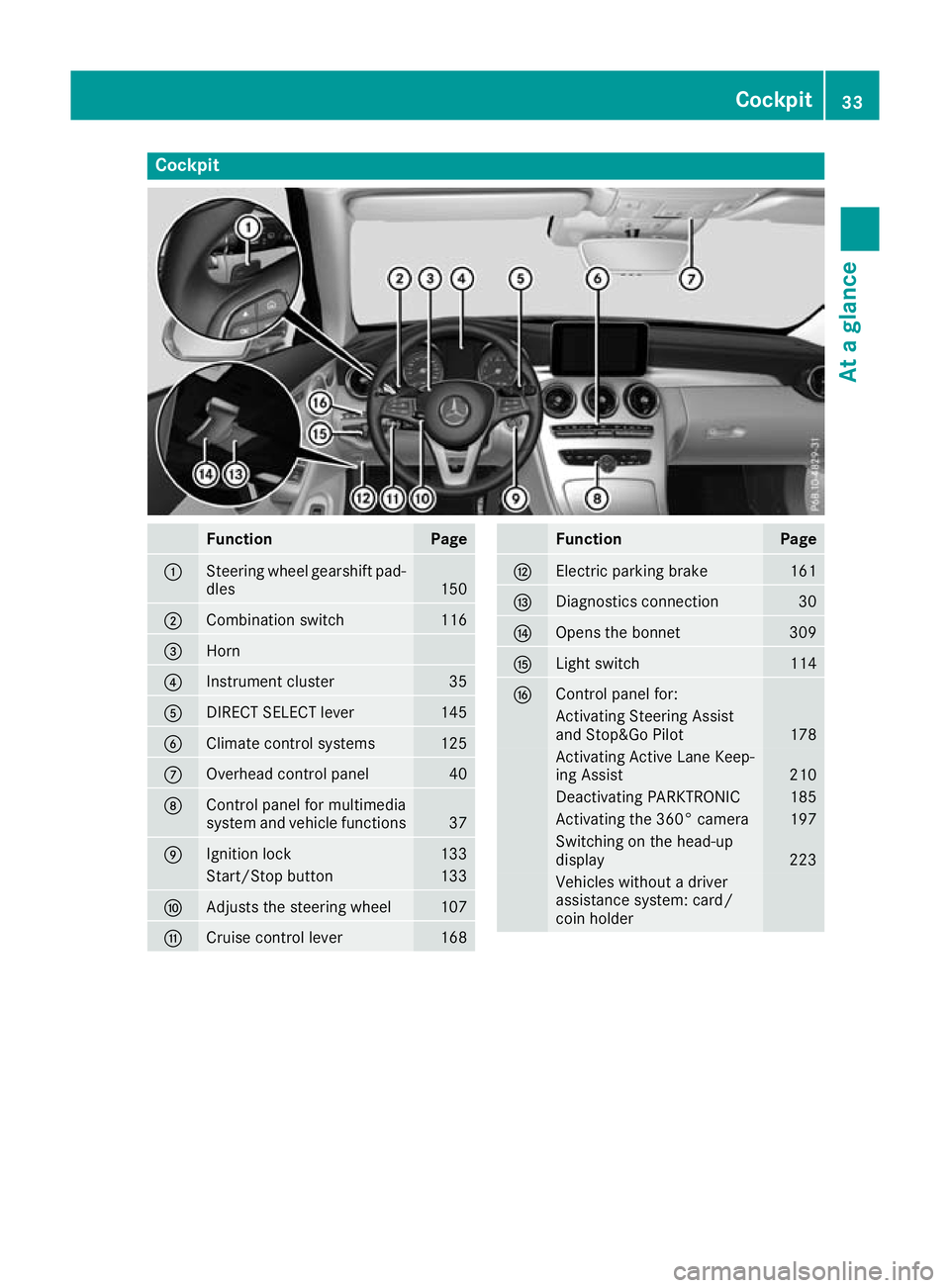
Cockpit
Function Page
:
Steering wheel gearshift pad-
dles 150
;
Combination switch 116
=
Horn
?
Instrument cluster 35
A
DIRECT SELECT lever 145
B
Climate control systems 125
C
Overhead control panel 40
D
Control panel for multimedia
system and vehicle functions 37
E
Ignition lock 133
Start/Stop button 133
F
Adjusts the steering wheel 107
G
Cruise control lever 168 Function Page
H
Electric parking brake 161
I
Diagnostics connection 30
J
Opens the bonnet 309
K
Light switch 114
L
Control panel for:
Activating Steering Assist
and Stop&Go Pilot
178
Activating Active Lane Keep-
ing Assist
210
Deactivating PARKTRONIC 185
Activating the 360° camera 197
Switching on the head-up
display
223
Vehicles without a driver
assistance system: card/
coin holder Cockpit
33At a glance
Page 37 of 377
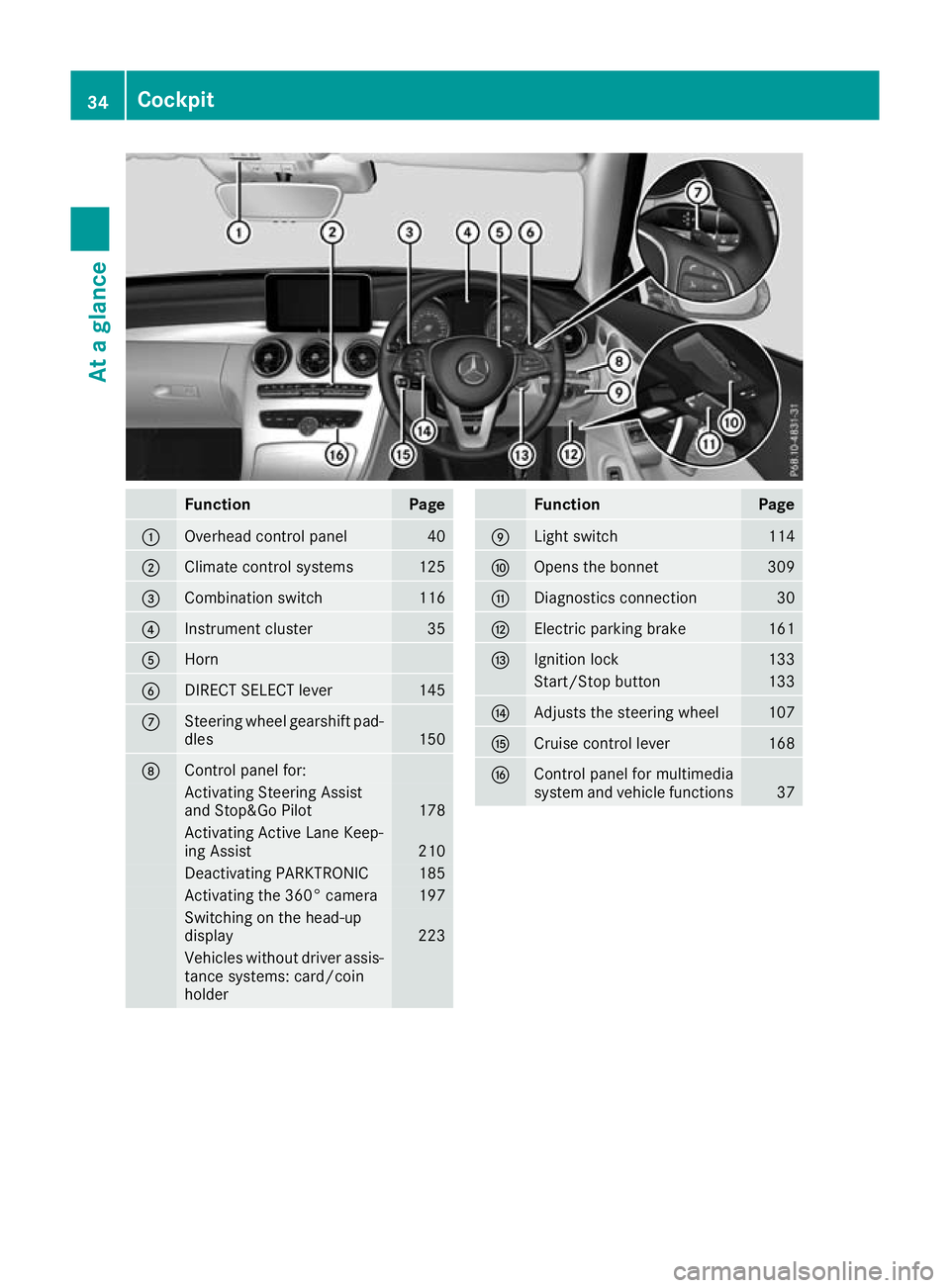
Function Page
:
Overhead control panel 40
;
Climate control systems 125
=
Combination switch 116
?
Instrument cluster 35
A
Horn
B
DIRECT SELECT lever 145
C
Steering wheel gearshift pad-
dles 150
D
Control panel for:
Activating Steering Assist
and Stop&Go Pilot
178
Activating Active Lane Keep-
ing Assist
210
Deactivating PARKTRONIC 185
Activating the 360° camera 197
Switching on the head-up
display 223
Vehicles without driver assis-
tance systems: card/coin
holder Function Page
E
Light switch 114
F
Opens the bonnet 309
G
Diagnostics connection 30
H
Electric parking brake 161
I
Ignition lock 133
Start/Stop button 133
J
Adjusts the steering wheel 107
K
Cruise control lever 168
L
Control panel for multimedia
system and vehicle functions
3734
CockpitAt a glance
Page 38 of 377
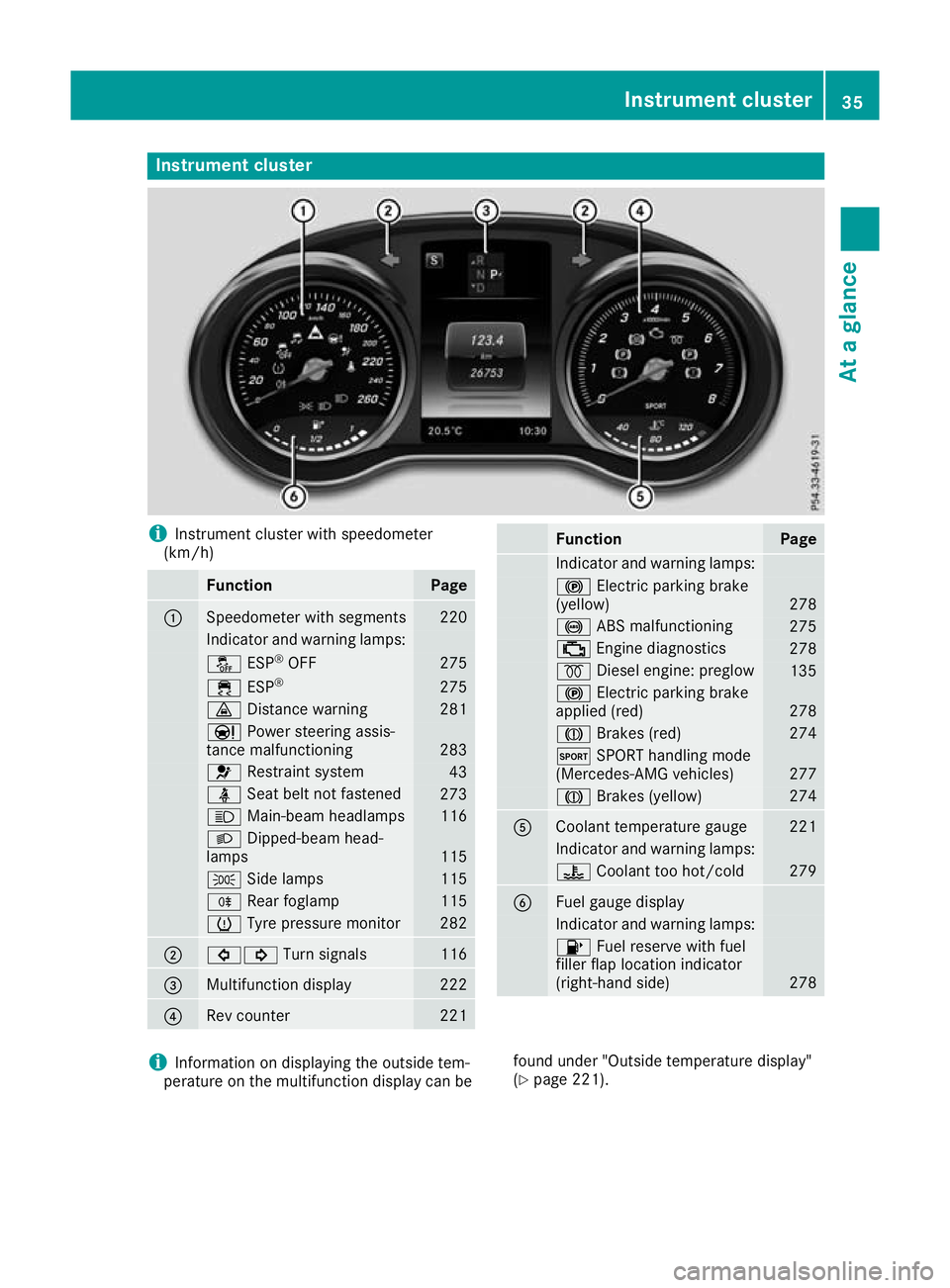
Instrument cluster
i
Instrument cluster with speedometer
(km/h) Function Page
:
Speedometer with segments 220
Indicator and warning lamps:
å
ESP®
OFF 275
÷
ESP® 275
·
Distance warning 281
Ð
Power steering assis-
tance malfunctioning 283
6
Restraint system 43
ü
Seat belt not fastened 273
K
Main-beam headlamps 116
L
Dipped-beam head-
lamps 115
T
Side lamps 115
R
Rear foglamp 115
h
Tyre pressure monitor 282
;
#!
Turn signals 116
=
Multifunction display 222
?
Rev counter 221 Function Page
Indicator and warning lamps:
!
Electric parking brake
(yellow) 278
!
ABS malfunctioning 275
;
Engine diagnostics 278
%
Diesel engine: preglow 135
!
Electric parking brake
applied (red) 278
J
Brakes (red) 274
M
SPORT handling mode
(Mercedes-AMG vehicles) 277
J
Brakes (yellow) 274
A
Coolant temperature gauge 221
Indicator and warning lamps:
?
Coolant too hot/cold 279
B
Fuel gauge display
Indicator and warning lamps:
8
Fuel reserve with fuel
filler flap location indicator
(right-hand side) 278
i
Information on displaying the outside tem-
perature on the multifunction display can be found under "Outside temperature display"
(Y
page 221). Instrument cluster
35At a glance
Page 39 of 377
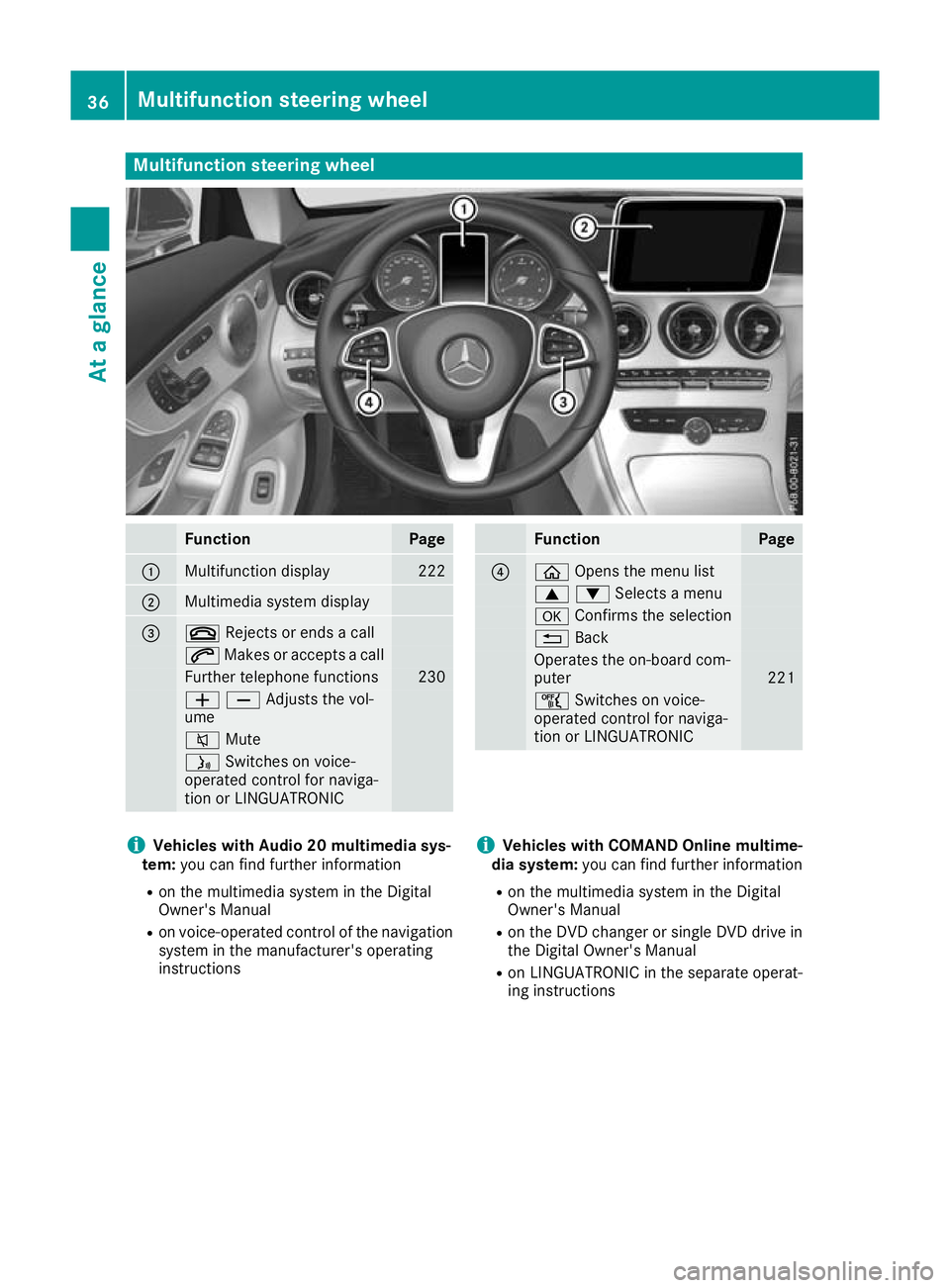
Multifunction steering wheel
Function Page
:
Multifunction display 222
;
Multimedia system display
=
~
Rejects or ends a call 6
Makes or accepts a call Further telephone functions 230
WXAdjusts the vol-
ume
8
Mute ó
Switches on voice-
operated control for naviga-
tion or LINGUATRONIC Function Page
?
ò
Opens the menu list 9:Selects a menu
a
Confirms the selection %
Back Operates the on-board com-
puter
221
ñ
Switches on voice-
operated control for naviga-
tion or LINGUATRONIC i
Vehicles with Audio 20 multimedia sys-
tem: you can find further information
R on the multimedia system in the Digital
Owner's Manual
R on voice-operated control of the navigation
system in the manufacturer's operating
instructions i
Vehicles with COMAND Online multime-
dia system: you can find further information
R on the multimedia system in the Digital
Owner's Manual
R on the DVD changer or single DVD drive in
the Digital Owner's Manual
R on LINGUATRONIC in the separate operat-
ing instructions 36
Multifunction steering wheelAt a glance
Page 46 of 377

Mercedes-Benz recommends that you use only
driving aids that have been approved specifi-
cally for your vehicle by Mercedes-Benz. Restraint system warning lamp
The functions of the restraint system are
checked after the ignition is switched on and at regular intervals while the engine is running.
Therefore, malfunctions can be detected in
good time.
The 6 restraint system warning lamp on the
instrument cluster lights up when the ignition is
switched on. It goes out no later than a few sec- onds after the vehicle is started. The compo-
nents of the restraint system are in operational
readiness.
A malfunction has occurred if the 6restraint
system warning lamp:
R does not light up after the ignition is switched
on
R does not go out after a few seconds with the
engine running
R lights up again while the engine is running G
WARNING
If the restraint system is malfunctioning,
restraint system components may be trig-
gered unintentionally or may not deploy as
intended during an accident. This may affect
the seat belt tensioner or airbag, for example. This poses an increased risk of injury or even
fatal injury.
Have the restraint system checked and
repaired immediately at a qualified specialist
workshop. PASSENGER AIR BAG indicator lamp
PASSENGER AIR BAG ON indicator lamp
:and
PASSENGER AIR BAG OFF indicator lamp ;are
part of the automatic deactivation system of the front-passenger front airbag.
The indicator lamps display the status of the
front-passenger front airbag.
R PASSENGER AIR BAG ON lights up for 60 sec-
onds, then both indicator lamps are off
(PASSENGER AIR BAG ON and OFF): the front-
passenger front airbag is able to deploy in the event of an accident.
R PASSENGER AIR BAG OFF lights up: the front-
passenger front airbag is disabled. It will then
not be deployed in the event of an accident.
If the PASSENGER AIR BAG ON indicator lamp is off, only the PASSENGER AIR BAG OFF indicator
lamp shows the status of the front-passenger
front airbag. The PASSENGER AIR BAG OFF indi-
cator lamp may be lit continuously or be off.
Depending on the person in the front-passenger seat, the front-passenger front airbag must be
either disabled or enabled; see the following
points. You must make sure of this both before
and during a journey.
R Children in a rearward-facing child
restraint system: the PASSENGER AIR BAG
OFF indicator lamp must be lit. The front-
passenger front airbag is disabled. It is imper-
ative to observe the notes on the "Automatic front-passenger front airbag deactivation sys-
tem" (Y page 50) and on "Children in the
vehicle" (Y page 59).
R Children in a forward-facing child
restraint system: depending on the installed
child restraint system and the age and size of the child, the front-passenger front airbag is
either disabled or enabled. Therefore, it is
imperative to observe the notes on the "Auto-
matic front-passenger front airbag deactiva- Occupant safety
43Safety Z
Page 54 of 377

front-passenger seat. The child restraint system
must not touch the roof or be put under strain bythe head restraint. Adjust the angle of the seat
backrest and the head restraint position accord-
ingly. Only then is the correct function of the
automatic front-passenger front airbag deacti-
vation system guaranteed. Always observe the
information on suitable positioning of the child
restraint system (Y page 62) in addition to the
child restraint system manufacturer's installa-
tion instructions.
Operation of automatic front-passenger
front airbag deactivation :
PASSENGER AIR BAG ON indicator lamp
; PASSENGER AIR BAG OFF indicator lamp
The indicator lamps inform you whether the
front-passenger front airbag is disabled or ena-
bled.
X Press the Start/Stop button once or twice, or
turn the key to position 1or 2in the ignition
lock.
The system carries out a self-diagnosis.
The PASSENGER AIR BAG OFF and PASSENGER
AIR BAG ON indicator lamps must light up simul- taneously for approximately six seconds.
The indicator lamps display the status of the
front-passenger front airbag:
R PASSENGER AIR BAG ON lights up for 60 sec-
onds, then both indicator lamps are off
(PASSENGER AIR BAG ON and OFF): the front-
passenger front airbag is able to deploy in the
event of an accident.
R PASSENGER AIR BAG OFF lights up: the front-
passenger front airbag is disabled. It will then
not be deployed in the event of an accident.
If the PASSENGER AIR BAG ON indicator lamp is
off, only the PASSENGER AIR BAG OFF indicator lamp shows the status of the front-passenger front airbag. The PASSENGER AIR BAG OFF indi-
cator lamp may be lit continuously or be off.
If the status of the front-passenger front airbag
changes while the vehicle is in motion, an airbag display message appears on the instrument
cluster (Y page 251). When the front-passenger
seat is occupied, always pay attention to the
PASSENGER AIR BAG OFF indicator lamp. Be
aware of the status of the front-passenger front
airbag both before and during the journey.
If a person sits in the passenger seat, he/she
must be:
R seated with the seat belt fastened correctly
R in an almost upright position with his/her
back against the seat backrest
R with his/her feet resting on the floor, if pos-
sible
If the front passenger does not observe these
conditions, the automatic front-passenger front
airbag deactivation system may be influenced,
e.g. because the front passenger:
R transfers his/her weight by supporting him-
self/herself on a vehicle armrest
R sits in such a way that his/her weight is raised
from the seat cushion
The front-passenger front airbag may be disa-
bled by mistake as a result of these or similar
actions. In this case, the PASSENGER AIR BAG
OFF indicator lamp lights up permanently. The
front-passenger front airbag then does not
deploy during an accident. G
WARNING
If the PASSENGER AIRBAG OFF indicator lamp is lit, the front-passenger front airbag is disa-
bled. It will not be deployed in the event of an
accident and cannot perform its intended pro-
tective function. A person in the front-
passenger seat could then, for example, come
into contact with the vehicle's interior, espe-
cially if the person is sitting too close to the
dashboard. This poses an increased risk of
injury or even fatal injury.
When the front-passenger seat is occupied,
always make sure that:
R the classification of the person in the front-
passenger seat is correct and that the front-
passenger front airbag is enabled or disa- Occupant safety
51Safety
Z
Page 70 of 377
R
ESP ®
(Electronic StabilityProgram)
(Y page 72)
R EBD ( electronic brake force distribution)
(Y page 75)
R ADAPTIVE BRAKE (Y page 76)
R PRE-SAFE ®
Brake (Y page 76)
R STEER CONTROL (Y page 78) Important safety notes
The driving safety systems can neither reduce
the risk of an accident if you fail to adapt your
driving style or are not paying attention nor
override the laws of physics. Driving safety sys-
tems are merely aids designed to assist driving. You are responsible for maintaining the distance
to the vehicle in front, for vehicle speed, for
braking in good time and for staying in lane.
Always adapt your driving style to suit the pre-
vailing road and weather conditions and main-
tain a safe distance from the vehicle in front.
Drive carefully.
The driving safety systems described work as
effectively as possible only when there is ade-
quate contact between the tyres and the road
surface. Pay particular attention to the informa-
tion regarding tyres, recommended minimum
tyre tread depths etc. in the "Wheels and tyres" section (Y page 342).
In wintry driving conditions, always use winter
tyres (M+S tyres) and, if necessary, snow
chains. Only in this way will the driving safety
systems described in this section work as effec-
tively as possible. ABS (Anti-lock Braking System)
General information ABS regulates brake pressure in such a way that
the wheels do not lock when you brake. This
allows you to continue steering the vehicle when
braking.
The ! ABS warning lamp on the instrument
cluster lights up when the ignition is switched
on. It goes out when the engine is running.
ABS works from a speed of about 8 km/h,
regardless of road-surface conditions. ABS
works on slippery surfaces, even when you
brake only gently. Important safety notes i
Observe the "Important safety notes" sec-
tion (Y page 67). G
WARNING
If ABS is faulty, the wheels could lock when
braking. The steerability and braking charac-
teristics may be severely impaired. Addition-
ally, further driving safety systems are deac-
tivated. There is an increased danger of skid- ding and accidents.
Drive on carefully. Have ABS checked imme-
diately at a qualified specialist workshop.
If ABS is malfunctioning, other systems, includ-
ing driving safety systems, will also become
inoperative. Observe the information on the ABS warning lamp (Y page 275) and display mes-
sages that may be shown on the instrument
cluster (Y page 242).
Brakes X
If ABS intervenes: continue to depress the
brake pedal with force until the braking sit-
uation is over.
X To make a full brake application: depress
the brake pedal with full force.
If ABS intervenes when braking, you will feel a
pulsing in the brake pedal.
The pulsating brake pedal can be an indication
of hazardous road conditions; this serves as a
reminder to take extra care while driving. BAS (Brake Assist System)
General notes BAS operates in emergency braking situations.
If you depress the brake pedal quickly, BAS
automatically boosts the braking force, thus
shortening the stopping distance.
Important safety notes i
Observe the "Important safety notes" sec-
tion (Y page 67). Driving safety systems
67Safety Z