battery MERCEDES-BENZ C-CLASS CABRIOLET 2018 User Guide
[x] Cancel search | Manufacturer: MERCEDES-BENZ, Model Year: 2018, Model line: C-CLASS CABRIOLET, Model: MERCEDES-BENZ C-CLASS CABRIOLET 2018Pages: 589, PDF Size: 10.55 MB
Page 92 of 589

Problem
Possible causes/consequences and 0050
0050Solutions 0007
Immediately af terth e window is bloc ked, pull the cor responding switch again until the side window has
closed, and hold the switch for an additional second.
The side window will be closed with increased forc e.
If a side window is obstructed again during closing and reopens again slightly: 0007
Repeat the pr evious step.
The side window is closed without the automatic reve rsing function.
The side windo wscannot be opened or
closed using the con venience opening
fe ature. The
key bat tery iswe ak or dischar ged. 0007
Check the battery using the battery indicator lamp and replace if necessary (0013 page76). Soft
top Opening and closing
the soft top using the
so ft-top switch 000A
WARNING Risk of becoming trapped
due tothe soft top lo wering unexpect‐
ed ly
If yo u do not fully open/close the soft top,
th e soft-to phy draulics depressurise af ter a
short time. This causes
the soft topto lowe r unexpect‐
edly and may cause you or others tobe trap‐
ped. 0007
Alw ays fully open or close the soft top. 000A
WARNING Risk of becoming trapped
when opening/closing the soft top .
When opening or closing the soft top, there
is a risk that parts of the body could become trapped
bymoving parts such as thero of
mechanism, the boot lid, or the side win‐
do ws. 0007
When opening or closing, make sure
that no body parts are in the vicinity of
moving components. 0007
Release the button if somebody
becomes trapped. Opening and closing
89
Page 113 of 589

0007
Maintain a suitable dis tance from the
outlet opening. Re
quirements:
R the po wer supp lyis switched on AIRSCARF
warmsth e head and neck area of
ve hicle occupants with warm air. The warm air
fl ow s out of theve nts in the head restra ints. 0007
Toswitch on: press button 1.
All indicator lamps are on.
0009 During the switch-on process, the blo wer
st arts up on lyafte r a preheating phase last‐
ing se ven seconds. 0007
Toreduce the le vel:press button 1
re peatedly until the desired heating le vel is
set.
Depending on the heating le vel, up tothree
indicator lamps light up. 0007
Toswitch off: press button 1repeatedly
until all the indicator lamps go out.
0009 After switching off, the blo werru ns on for a
fe w seconds tocool down the heating ele‐
ments.
0009 Ifth eve hicle battery voltage is too lo w,AIR‐
SCARF may switch off. 0007
Adjusting the AIRSCARF vent
(0013 page 146).
Make sure that there are no objects co vering the
air intake on the back of the head restra int. Make sure
that objects do not enter theve nts in
th e head restra ints. St
eering wheel Ad
justing the steering wheel manually 000A
WARNING Risk of inju rythro ugh adjust‐
ing vehicle settings while theve hicle is in
motion
Yo u could lose cont rol of theve hicle in the
fo llowing situations:
R ifyo u adjust the driver's seat, the head
re stra ints, thesteering wheel or the mir‐
ro r while theve hicle is in motion
R ifyo ufast enyour seat belt while theve hi‐
cle is in motion 0007
Before starting the engine: adjust the
driver's seat, the head restra ints, the
st eering wheel or the mir ror and fasten
yo ur seat belt. 11 0
Seats and stowing
Page 131 of 589
004B
0058 Low beam/high beam
6 005E Switches there ar fog lights on or off
When low beam is activated, the indicator lamp
fo rth est anding lights 0060is deactivated and
re placed bythe low beam indicator lamp 0058.0007
Alw ays park your vehicle safely and in a well-
lit area, in accordance with there leva nt le gal
st ipulations.
000E NO
TEBattery discharging byoperating
th est anding lights Operating
thest anding lights over a period of
hours puts a stra in on the batter y. 0007
Where possible, switch on the
ri ght 0064 or left 0063parking light. In
the case of se vere battery discharging, the
st anding lights or parking lights are automati‐
cally swit ched off tofacilitate the next engine
st art.
The exterior lighting (e xcept standing and park‐
ing lights) swit ches off automatically when the
driver's door is opened. R
Obser vethe no tes on sur round lighting
(0013 page135).
Au tomatic driving lights function
The standing lights, low beam and daytime run‐
ning lights are switched on au tomatical ly
depending on the ignition status and the light
conditions. 000A
WARNING Risk of accident when the
dipped beam is switched off in poor visi‐
bility
When the light switch is set to0058 ,the
dipped beam may not be switched on auto‐
matically if there is fog, snow or other causes
of poor visibility such as spr ay. 0007
In such cases, turn the light switch to
0058 . The automatic driving lights are only an aid.
Yo u
are responsible forve hicle lighting. Switching
there ar fog lights on or off
Re quirements:
R The light switch is in the0058 or0058 posi‐
tion. 0007
Press the 005E button.
Please obser vethe count ry-specific la wsonthe
use of rear fog lamps. 12 8
Light and sight
Page 142 of 589

0007
Before starting the engine: adjust the
driver's seat, the head restra ints, the
st eering wheel or the mir ror and fasten
yo ur seat belt. 000A
WARNING Risk of accident due tomis‐
judgement of dis tances when using the
outside mir ror
The outside mir rors reflect objects on a
smaller scale. The objects in view are in fact
closer than they appear.
As a result, you may misjud gethe dis tance
between you and thero ad user driving
behind you, e.g. when changing lanes. 0007
Therefore, alw ays look over your shoul‐
der in order toensure that you are
aw are of the actual dis tance between
yo u and thero ad users driving behind
yo u. Fo
lding the outside mir rors in/out 0007
Brief lypress switch 1.
Re setting the outside mir rors
0009 Ifth e battery has been disconnected or com‐
ple tely discharged, the outside mir rors must
be reset. Only then will the automatic mir ror
fo lding function workproperly. 0007
Brief lypress switch 1. Ad
justing the outside mir rors 0007
Press button 3or4 toselect the outside
mir rorto be adjus ted. 0007
Press button 2toadjust the position of the
mir rorgl ass.
Engaging the outside mir rors 0007
Vehicles without electrical lyfolding out‐
side mir rors:manually mo vethe outside
mir ror into the cor rect position. 0007
Vehicles with electrical lyfolding outside
mir rors: press and hold button 1.
Yo u will hear a click and the mir ror will audi‐
bly engage in position. The outside mir ror is
set tothe cor rect position. Au
tomatic anti-dazzle mir rors function 000A
WARNING Risk of bu rns and poisoning
due tothe anti-dazzle mir ror electrolyte
Electrolyte may escape if theglass in an
automatic anti-dazzle mir ror breaks. Light and sight
13 9
Page 154 of 589

If
yo ustart theve hicle via your smartphone, the
pr ev iously selec ted air conditioning adjustment
is active.
Ensure thefo llowing before starting the engine:
R the legal stipulations in the area where your
ve hicle is par ked allow engine starting via
smartphone.
R it is safe tostart and runth e engine where
yo ur vehicle is par ked.
R the fuel tank is su fficiently filled.
R thest ar ter battery is suf ficiently charge d.
0009 You can also set thete mp erature with your
smartphone. In form ation on Mercedes me
connect and other services: http://
www.mercedes.me
This function is not available for all models.
Charging the bat tery before commencing
yo ur journey
R Ifth eve hicle battery is discharged, you
re cei vea message on your smartphone.
R You can then start theve hicle with the
smartphone tocharge the batter y. R
The vehicle is automatically switched off
af te rte n minu tes.
Ensure thefo llowing before starting the engine:
R the legal stipulations in the area where your
ve hicle is par ked allow engine starting via
smartphone.
R it is safe tostart and runth e engine where
yo ur vehicle is par ked.
R the fuel tank is su fficiently filled.
St arting theve hicle 000A
WARNING Risk of crushing or entrap‐
ment due tounin tentional starting of the
engine
Limbs could be crushed or trapped if the
engine is star ted unintentionally during
service or maintenance work. 0007
Alw ays secure the engine against unin‐
te ntional starting before car rying out
maintenance or repair work. Re
quirements:
R park position 005Dis selected. R
the anti- theft alarm sy stem is not activated.
R the panic alarm is not activated.
R the hazard warning lights are switched off.
R the bonn etis closed.
R the doors are closed and loc ked.
R the windo wsand soft top are closed. 0007
Start theve hicle using the smartphone:
R afte reve ryvehicle start, the engine runs for
te n minu tes.
R you can car ryout a maximum of two consec‐
utive starting attem pts. The vehicle must be
st ar ted once with theke y before trying to
st art theve hicle again with the smartphone.
R you can stop theve hicle again at any time.
R further information can be found in the
smartphone app.
Securing the engine against starting before
car rying out maintenance or repair work: 0007
switch on the hazard warning lights.
or 0007
unlock the doors. Driving and parking
151
Page 185 of 589

0009
The electric parking brake is only securely
applied if the indicator lamp is lit continu‐
ously.
Re leasing 0007
Swit chon the ignition. 0007
Pull handle 1.
The red0024 indicator lamp in the instru‐
ment clus ter goes out.
Emer gency braking 0007
Press and hold handle 1.
When theve hicle has been braked to a
st andstill, the electric parking brake is
applied. The red0024 indicator lamp appears
in the instrument clus ter. Information on de
tecting dama geon a
pa rked vehicle If a collision is de
tected when theto w- aw ay pro‐
te ction is primed on a loc kedve hicle, you will
re cei vea notification in the multimedia sy stem
when you swit chon the ignition. Yo
u will recei veinformation about thefo llowing
points:
R The area of theve hicle that may ha vebeen
damaged.
R The forc e of the impact.
The following situations can lead toinadver tent
acti vation:
R The pa rked vehicle is mo ved, e.g. in a two-
st or ey garage.
0009 Deactivate tow- aw ay protection in order to
pr eve nt inadver tent acti vation. If you deacti‐
va te tow- aw ay protection, damage de tection
will also be deactivated.
Sy stem limitations
De tection may be restricted in thefo llowing sit‐
uations:
R The vehicle is damaged without impact, e.g.
if an outside mir ror is torn off or the paint is
damaged byakey.
R Impact occurs at low speed.
R The electric parking brake is not applied. Note
s on parking up theve hicle If
yo u lea vetheve hicle par ked up for longer than
fo ur we eks, the disconnected battery may be
damaged bydeep dischar ge.
If yo u lea vetheve hicle par ked up for longer than
six weeks, it may suf fer disuse dama ge.
0009 Further information can be obtained at a
qu alified specialist workshop. St
andby mode (extension of the star ter bat‐
te ry 's period out of use) St
andby mode function
0009 This function is not available for all models.
If standby mode is activated, theve hicle can be
par kedfo r an extended pe riod of time without
losing po wer.
St andby mode is characterised bythefo llowing:
R thest ar ter battery is preser ved.
R the maximum non-operational time out of
use is displa yed in the multimedia sy stem
displa y. 18 2
Driving and pa rking
Page 186 of 589

R
functions such as interior pr otection or tow-
aw ay protection are not available.
R the connection toonline services is inter rup‐
te d.
If th efo llowing conditions are fulfilled, standby
mode can be activated or deactivated using the
multimedia sy stem:
R the engine is switched off.
R the ignition is switched on.
Exceeding theve hicle's displa yed non-opera‐
tional time may cause incon venience, i.e. it can‐
not be guaranteed that thest ar ter battery will
re liably start the engine.
The star ter battery must be charge dfirs t in the
fo llowing situations:
R theve hicle's non-operational time must be
ex tended.
R theBattery charge insufficient for standby
mode message appears in the multimedia
sy stem displa y.
0009 Standby mode is automatically deactivated
when the ignition is switched on. Ac
tivating/deactivating standby mode
Multimedia sy stem:
0018 Vehicle 0019
î Vehicle settings
0019 Standby mode
0009 This function is not available for all models. 0007
Activate 0073or deacti vate 0053 the function.
When you activate the function, a prom pt
appears. 0007
Select Yes.
St andby mode is activated. Driving and driving saf
ety sy stems Driving sy
stems and your responsibility Yo
ur vehicle is equipped with driving sy stems
which assist you in driving, parking and manoeu‐
vring theve hicle. The driving sy stems are aids
and do not relie ve you of your responsibility per‐
ta ining toroad traf fic la w.Pay attention tothe
traf fic conditions at all times and inter vene
when necessa ry. Be aware of the limitations
re ga rding the safe use of these sy stems. Fu
nction of thera dar senso rs Some driving and driving sa
fety sy stems use
ra dar sensors tomonitor the area in front of,
behind or next totheve hicle (depending on the
ve hicle's equipment).
Depending on theve hicle's equipment, thera dar
sensors are integrated behind the bumpers
and/or behind the Mercedes star. Keep these
parts free of dirt, ice and slush
(0013 page 403). The sensors must not be cov‐
ered, forex ample bycycle rack s, overhanging
loads, sticke rs,fo il or foils toprotect against
st one chipping. In theeve nt of dama getothe
bumpers or radiator grille, or following a collision
impacting the bumpers or radiator grille, ha ve
th e function of thera dar sensors checked at a
qu alified specialist workshop. The driver assis‐
ta nce sy stem may no longer workproper ly. Driving and pa
rking 18 3
Page 249 of 589
Coupling up a trailer
000E NO
TEDama getotheve hicle battery due
to full discharge Charging
the trailer battery using the po wer
supply of the trailer can damage theve hicle
batter y. 0007
Do not use theve hicle's po wer supply
to charge the trailer batter y.0007
Remo vethe co ver from the ball head and
st ore it in a safe place (0013 page114). 0007
Position the trailer on a le vel sur face behind
th eve hicle and couple it up totheve hicle. 0007
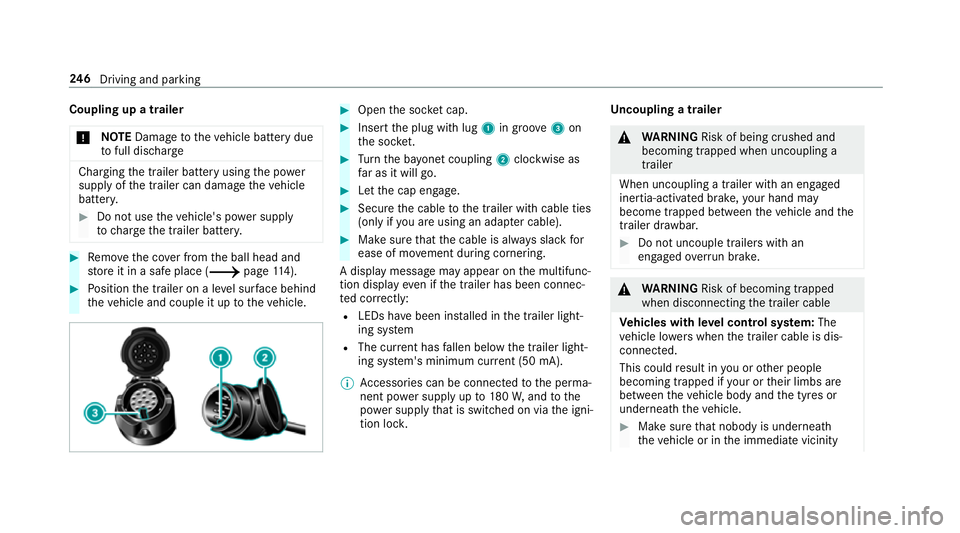
Open the soc ket cap. 0007
Inse rtthe plug with lug 1in groo ve3 on
th e soc ket. 0007
Turn the ba yonet coupling 2clockwise as
fa r as it will go. 0007
Let the cap engage. 0007
Secure the cable tothe trailer with cable ties
(only if you are using an adap ter cable). 0007
Make sure that the cable is alw ays slack for
ease of mo vement during cornering.
A display messa gemay appear on the multifunc‐
tion display even if the trailer has been connec‐
te d cor rectly:
R LEDs ha vebeen ins talled in the trailer light‐
ing sy stem
R The cur rent has fallen below the trailer light‐
ing sy stem's minimum cur rent (50 mA).
0009 Accessories can be connected tothe perma‐
nent po wer supp lyup to180W, and tothe
po we r supp lythat is swit ched on via the igni‐
tion loc k. Un
coupling a trailer 000A
WARNING Risk of being crushed and
becoming trapped when uncoupling a
trailer
When uncoupling a trailer wi than engaged
ine rtia-activated brake, your hand may
become trapped between theve hicle and the
trailer dr awbar. 0007
Do not uncouple trailers with an
engaged overrun brake. 000A
WARNING Risk of becoming trapped
when disconnecting the trailer cable
Ve hicles with le vel control sy stem: The
ve hicle lo werswhen the trailer cable is dis‐
connected.
This could result in you or other people
becoming trapped if your or their limbs are
between theve hicle body and the tyres or
underneath theve hicle. 0007
Make sure that nobody is unde rneath
th eve hicle or in the immediate vicinity 246
Driving and pa rking
Page 332 of 589
Te
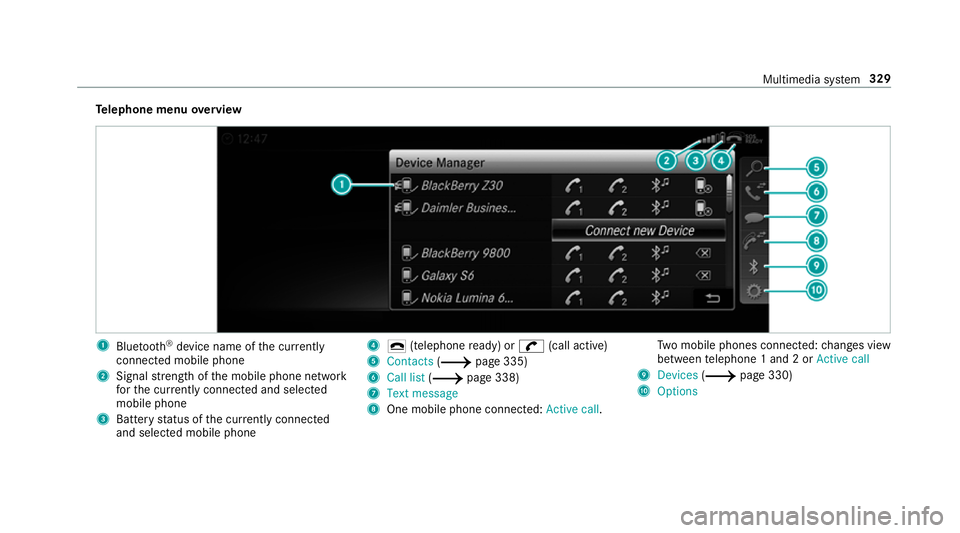
lephone menu overview 1
Blue tooth ®
device name of the cur rently
connected mobile phone
2 Signal stre ngth of the mobile phone network
fo rth e cur rently connected and selected
mobile phone
3 Battery status of the cur rently connected
and selected mobile phone 4
0071 (telephone ready) or 0097(call active)
5 Contacts (0013page 335)
6 Call list (0013page 338)
7 Text message
8 One mobile phone connec ted: Active call. Tw
o mobile phones connected: changes view
between telephone 1 and 2 or Active call
9 Devices (0013page 330)
A Options Multimedia sy
stem 329
Page 353 of 589
Tr
iggering an automatic emer gency call
Re quirements:
R The ignition is switched on.
R The star ter battery is suf ficiently charge d.
If re stra int sy stems such as airbags or seat belt
te nsioners ha vebeen activated af ter an acci‐
dent, the Mercedes-Benz emer gency call sy stem
may automatically initiate an emer gency call.
The emergency call has been made:
R Avo ice connection is made tothe Mercedes-
Benz emer gency call centre.
R A messa gewith accident data is transmitted
to the Mercedes-Benz emer gency call centre.
The Mercedes-Benz emergency call centre
can transmit theve hicle position data toone
of the public emer gency services call cen‐
tres.
R In cer tain situations data is also transmitted
in thevo ice channel tothe Mercedes-Benz
emer gency call centre. This allo
wsmeasu resfo rre scue, reco very or
to wing toa Mercedes-Benz Service Cent reto
be initiated quickl y.
The SOS button in theov erhead control panel
fl ashes until the emer gency call is finished.
It is not possible toimmediately end an auto‐
matic emer gency call.
If th e Mercedes-Benz emer gency call sy stem
cann otconnect tothe Mercedes-Benz emer‐
ge ncy call centre, the emer gency call is au tomat‐
ical lysent tothe public emer gency services call
centre.
If no connection can be made tothe public
emer gency services, a cor responding message
appears inthe displa y. 0007
Dial the emer gency call number 11 2onyour
mobile phone.
If an eme rgency call has been initiated:
R Remain in theve hicle if thero ad and traf fic
conditions permit youto do so until a voice
connection is es tablished with the emer‐
ge ncy call centre operator. R
Based on the call, the operator decides
whe ther it is necessary tocall rescue teams
and/or the police tothe accident site.
R If no vehicle occupant answers, an ambu‐
lance is sent totheve hicle immediately.
Tr iggering a manual emer gency call 0007
Press and hold the SOS button in theove r‐
head control panel for at least one second.
The emer gency call has been made:
R Avo ice connection is made tothe Mercedes-
Benz emer gency call centre.
R A messa gewith accident data is transmit ted
to the Mercedes-Benz emer gency call centre.
The Mercedes-Benz eme rgency call cent re
can transmit theve hicle position data toone
of the public emer gency services call cen‐
tres.
R Remain in theve hicle if thero ad and traf fic
conditions permit youto do so until a voice
connection is es tablished with the emer‐
ge ncy call centre service pr ovider.
R Onthe basis of the call, the service pr ovider
decides whe ther it is necessary tocall res‐ 350
Multimedia sy stem