seat adjustment MERCEDES-BENZ C-CLASS CABRIOLET 2018 User Guide
[x] Cancel search | Manufacturer: MERCEDES-BENZ, Model Year: 2018, Model line: C-CLASS CABRIOLET, Model: MERCEDES-BENZ C-CLASS CABRIOLET 2018Pages: 589, PDF Size: 10.55 MB
Page 116 of 589

If
th e easy entry andexitfeature is active, the
st eering wheel will mo veupwards or towa rdsthe
dashboard in thefo llowing situations:
R you swit chthe ignition off
R you open the driver's door
0009 The steering wheel mo ves upwards and
to wa rdsth e dashboard only if it has not
already reached thesteering limiter.
The steering wheel mo ves back tothe last drive
position in thefo llowing cases:
R you close the driver's door when the ignition
is switched on
R you press thest art/ stop button once.
The last drive position is stored in thefo llowing
situations:
R you swit chthe ignition off
R you sa vethe setting with the memory func‐
tion
If yo u press one of the memory function position
buttons, the adjustment process is stopped. Setting
the easy entry and exitfeature Multimedia sy
stem:
0018 Vehicle 0019
î Vehicle settings
0019 Easy Entry/Exit 0007
Select Steer. wheel and seat, Steering wheel
only orOff. Operating
the memory function 000A
WARNING Risk of an accident if the
memory function is used while driving
If yo u use the memory function on the driv‐
er's side while driving, you could lose cont rol
of theve hicle as a result of the adjustments
being made. 0007
Only use the memory function on the
driver's side when theve hicle is station‐
ar y. 000A
WARNING Risk of entrapment when set‐
ting the seat with the memory function
When the memory function adjusts the seat
or steering wheel, you and other vehicle
occupants – particularly children – could
become trapped. 0007
During the setting procedure of the
memory function, ensure that no body
parts are in the sweep of the seat or
th esteering wheel. 0007
If somebody becomes trapped, immedi‐
ately release the memory function posi‐
tion button.
The adjustment process is stopped. 000A
WARNING Risk of entrapment if the
memory function is activated bychildren
Children could become trapped if they acti‐
va te the memory function, particularly when
unattended. 0007
Never lea vechildren unat tended in the
ve hicle. Seats and
stowing 11 3
Page 117 of 589

0007
When leaving theve hicle, alw aysta ke
th eke y with you and lock theve hicle.
This also applies tothe digital vehicle
ke y if the "Digital Vehicle Key" function
is activated via Mercedes me connect. The memory function can be used when
the igni‐
tion is switched off.
St oring
Seat adjustments for up tothre e people can be
st ored and called up using the memory function.
The following sy stems can be selected:
R Seat, backrest and head restra int
R Steering wheel
R Outside mir rors
R Head-up display 0007
Set the seat, thesteering wheel, the head-up
display and the outside mir rors to the
desired position. 0007
Press memory button M and then press pre‐
set position button 1,2 or 3 within thre e sec‐
onds.
An acoustic signal sounds. The settings are
st ored. 0007
Tocall up: press and hold there leva nt pre‐
set position button 1,2 or 3 until the front
seat, thesteering wheel, head-up display and
outside mir ror are in thestored position.
0009 When youre lease the preset position button,
st eering wheel, the seat and mir ror setting
functions stop immediatel y.The head-up dis‐
play continues tobe adjus ted. St
ow age areas Note
s on loading theve hicle 000A
DANG ER Risk of exhaust gas poisoning
Combustion engines emit poisonous exhaust
ga ses such as carbon monoxide. Exhaust
ga ses can enter theve hicle interior if the
boot lid is open when the engine is running,
especially if theve hicle is in motion. 0007
Alw ays switch off the engine before
opening the boot lid. 0007
Never drive with the boot lid open. 11 4
Seats and stowing
Page 216 of 589

R
The vehicle is secured with the electric park‐
ing brake.
In thefo llowing situations, theve hicle is held by
th e transmission position 005Dorby the electric
parking brake:
R The seat belt is unfas tened and the driver's
door is opened.
R The drive sy stem is switched off.
R There is a malfunction in the sy stem or the
po we r supply is insuf ficient. DY
NA MIC BODY CONT ROL function DY
NA MIC BODY CONTROL continuously adjusts
th ech aracteristics of the suspension dampers to
th e cur rent operating and driving conditions. The da
mping is tuned individually for each wheel
and is af fected bythefo llowing factors:
R The road sur face conditions
R Vehicle load
R The drive program selected
R The driving style
The drive program can be adjus ted using the
DY NA MIC SELECT switch. AIRMATIC
Fu
nction of AIRMATIC
AIRMATIC is an air suspension sy stem with varia‐
ble damping for impr oved driving comfort. The
all-round le vel control sy stem ensures the best
possible suspension and const antground clear‐ ance,
even wi tha laden vehicle. When driving at
speed, theve hicle is lo wered automatically to
impr ovedriving saf ety and toreduce fuel con‐
sum ption. You also ha vethe option of manually
adjusting theve hicle le vel.
AIRMATIC includes thefo llowing components
and functions:
R Air suspension with automatic le vel control
R speed-dependent lo wering toreduce fuel
consum ption
R manually selec table high-le vel setting for
grea ter ground clea rance
R ADS PLUS (Ada ptive Damping Sy stem with
const ant damping forc e adjustment)
R DYNA MIC SELECT switch and le vel button Driving and parking
213
Page 279 of 589
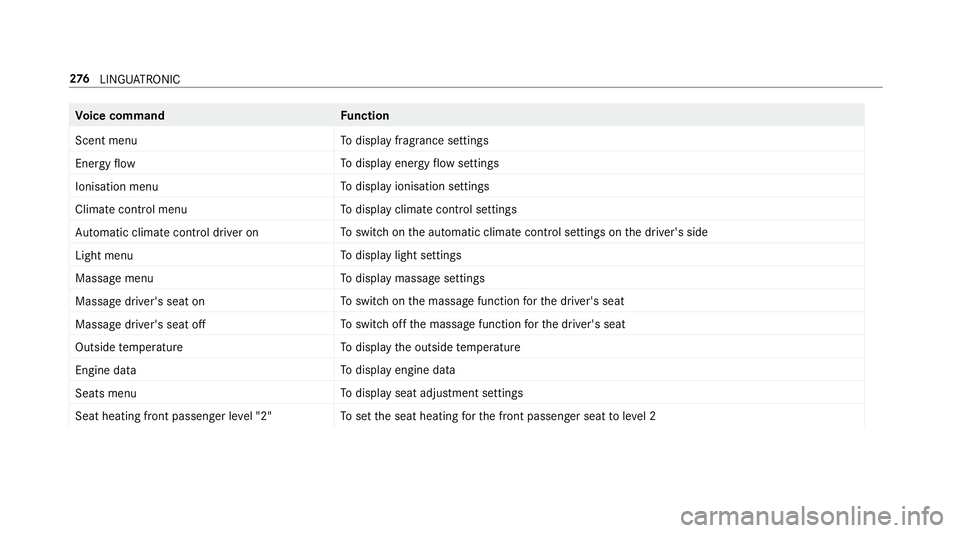
Vo
ice command Function
Scent menu To
display fragrance settings
Energy flow To
display energy flow settings
Ionisation menu To
display ionisation settings
Climate control menu To
display climate control settings
Automatic climate control driver on To
switch on the automatic climate control settings on the driver's side
Light menu To
display light settings
Massage menu To
display massage settings
Massage driver's seat on To
switch on the massage function forth e driver's seat
Massage driver's seat off To
switch off the massage function forth e driver's seat
Outside temperature To
display the outside temp erature
Engine data To
display engine data
Seats menu To
display seat adjustment settings
Seat heating front passenger level "2" To
set the seat heating forth e front passenger seat toleve l 2 276
LINGU ATRO NIC
Page 573 of 589
Re
storing (factory settings)
see Reset function (multimedia sy stem)
Re stra int sy stem ...................................... .32
Basic instructions forch ildren .............. .48
Fu nction in an accident ......................... 33
Fu nctionality .......................................... 33
Malfunction ........................................... 33
Pr otection ..............................................32
Re duced pr otection ...............................32
Self-test ................................................. 33
Wa rning lamp ........................................ 33
Re versege ar
Inserting .............................................. 16 3
Re versing camera .................................. .220
Care .................................................... 403
Fu nction .............................................. 220
Opening the camera co ver (360°
Camera) ............................................. .226
Setting favo urites (360° Camera) ...... .226
Switching auto matic operation
on/off (360° Camera) ......................... 226
Rims (Care) ............................................. .403
Ro llaw ay protection
see HOLD function Ro
ll bar
Fu nction ................................................ 46
Ro of lining (care) .................................... .405
Ro of load .................................................. 469
Ro ute ................................................ .309, 311
Ac tivating a commuter route ................ 311
Calculating .......................................... 309
Displaying destination information ...... .311
Planning ..............................................3 05
Selecting a type .................................. 309
Selecting an alte rnative route .............. 311
Selecting notifications ......................... 310
Selecting options ................................. 310
St arting the automatic service sta‐
tion sear ch........................................... 312
Switching the automatic filling sta‐
tion sear chon/off ...............................3 11
Using automatic filling station sear ch..311
Wi th intermediate destinations .......... .306
Ro ute guidance ........................................ 312
Cancelling ............................................ 316
Changing direction .............................. .313
Destination reached ............................ .314
Fr om an off-road location .................... 316Lane
recommendations ....................... 314
No tes ................................................... 312
Off-road ............................................... 316
To an off- road destination .................... 316
Ro ute-based speed adaptation
Displ ays in the instrument display .......2 09
Fu nction .............................................. 204
Ro ute-based speed adjustment
Setting ................................................ .205
Ru n-flat characteristics
MOExtended tyres ................................ 411
Ru nning-in no tes .....................................1 52 S
Saf ety sy stems
see Driving saf ety sy stem
Saf etyve st ............................................... 408
Satelli temap ............................................ 327
SD ca rd
Inserting/removing .............................. 361
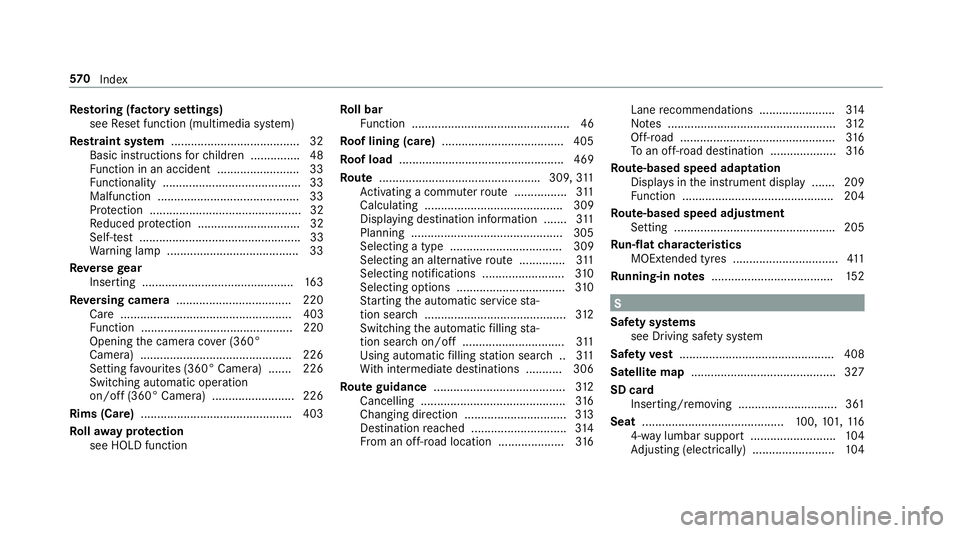
Seat ........................................... 100,101, 11 6
4-w aylumbar support .......................... 104
Ad justing (electrically) ........................ .104 57 0
Index
Page 574 of 589

Ad
justing (manually and electrically) ... 101
Ad justing (Seat Comfort) ..................... 103
Con figuring the settings ......................1 06
Cor rect driver's seat position .............. 100
Fo lding the backrest (rear) back ..........1 18
Fo lding the backrest (rear) forw ards .... 11 6
Fo lding the backrest forw ards/back
(with memory function) ...................... .106
Fo lding the backrest forw ards/back‐
wa rds (without memory function) ........ 107
Operating the memory function ........... 11 3
Pa nel heating ....................................... 109
Re setting the settings .......................... 106
Setting options ...................................... 16
Switching AIRSCARF on/off ................ 109
Seat belt ............................................... 34, 39
Ac tivating/deactivating seat belt
adjustment ............................................ 39
Ca re .................................................... 405
Fa stening ............................................... 37
Pr otection ..............................................34
Re ar seat belt status display ................ .39
Re duced pr otection ...............................35
Re leasing .............................................. .38
Seat belt adjustment (function) ............. 38 Seat belt
extender ................................. 37
Wa rning lamp ........................................ 39
Seat belt adju stment
Ac tivating/deactivating ......................... 39
Fu nction ................................................ 38
Seat belt extender .....................................37
Seat belt tensioners
Ac tivation .............................................. 33
Seat belt warning
see Seat belt
Seat co ver (Care) ..................................... 405
Seat hea ter
Ac tivating/deactivating ...................... .108
Seat ventilation
Ac tivating/deactivating ...................... .109
Second telephone .................................... 331
Connecting .......................................... 331
Fe atures .............................................. 331
Selecting a gear
see Changing gears
Selector le ver
see DIRECT SELECT le ver Self-test
Automatic front passenger front air‐
bag shutoff ............................................ 44
Sensors (Care) ......................................... 403
Service Menu (on-board computer) .................. 255
Service see ASS YST PLUS
Service centre see Qualified specialist workshop
Service inter val display
see AS SYST PLUS
Service station sear ch
St arting automatic sear ch.................... 312
Setting a speed see Cruise control
Setting summer time .............................. 288
Setting the da teform at .......................... 289
Setting the distance unit ........................ 293
Setting the map scale
see Map Index
571