mirror MERCEDES-BENZ C-CLASS COUPE 2011 Owner's Guide
[x] Cancel search | Manufacturer: MERCEDES-BENZ, Model Year: 2011, Model line: C-CLASS COUPE, Model: MERCEDES-BENZ C-CLASS COUPE 2011Pages: 373, PDF Size: 8.17 MB
Page 228 of 373
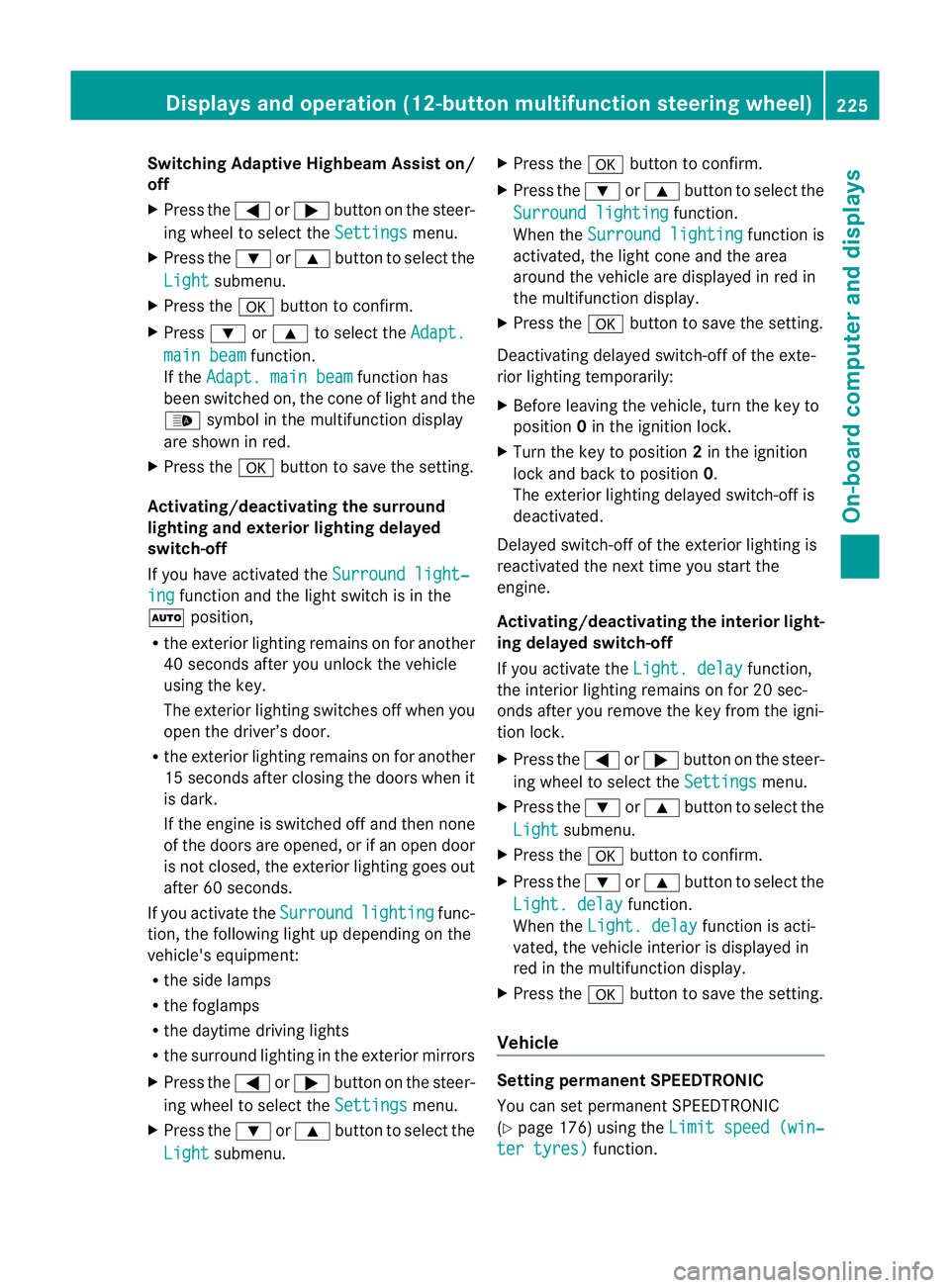
Switching Adaptive Highbeam Assist on/
off
X Press the =or; button on the steer-
ing wheel to select the Settings menu.
X Press the :or9 button to select the
Light submenu.
X Press the abutton to confirm.
X Press :or9 to select the Adapt. main beam function.
If the Adapt. main beam function has
been switched on, the cone of light and the
_ symbol in the multifunction display
are shown in red.
X Press the abutton to save the setting.
Activating/deactivating the surround
lighting and exterior lighting delayed
switch-off
If you have activated the Surround light‐ing function and the light switch is in the
à position,
R the exterior lighting remains on for another
40 seconds after you unlock the vehicle
using the key.
The exterior lighting switches off when you
open the driver’s door.
R the exterior lighting remains on for another
15 seconds after closing the doors when it
is dark.
If the engine is switched off and then none
of the doors are opened, or if an open door
is not closed, the exterior lighting goes out
after 60 seconds.
If you activate the Surround lighting func-
tion, the following light up depending on the
vehicle's equipment:
R the side lamps
R the foglamps
R the daytime driving lights
R the surround lighting in the exterior mirrors
X Press the =or; button on the steer-
ing wheel to select the Settings menu.
X Press the :or9 button to select the
Light submenu. X
Press the abutton to confirm.
X Press the :or9 button to select the
Surround lighting function.
When the Surround lighting function is
activated, the light cone and the area
around the vehicle are displayed in red in
the multifunction display.
X Press the abutton to save the setting.
Deactivating delayed switch-of fofthe exte-
rior lighting temporarily:
X Before leaving the vehicle, turn the key to
position 0in the ignition lock.
X Turn the key to position 2in the ignition
lock and back to position 0.
The exterior lighting delayed switch-off is
deactivated.
Delayed switch-off of the exterior lighting is
reactivated the next time you start the
engine.
Activating/deactivating the interior light-
ing delayed switch-off
If you activate the Light. delay function,
the interior lighting remains on for 20 sec-
onds after you remove the key from the igni-
tion lock.
X Press the =or; button on the steer-
ing wheel to select the Settings menu.
X Press the :or9 button to select the
Light submenu.
X Press the abutton to confirm.
X Press the :or9 button to select the
Light. delay function.
When the Light. delay function is acti-
vated, the vehicle interior is displayed in
red in the multifunction display.
X Press the abutton to save the setting.
Vehicle Setting permanent SPEEDTRONIC
You can set permanent SPEEDTRONIC
(Y
page 176) using the Limit speed (win‐ ter tyres) function.Displays and operation (12-button multifunction steering wheel)
225On-board computer and displays Z
Page 231 of 373
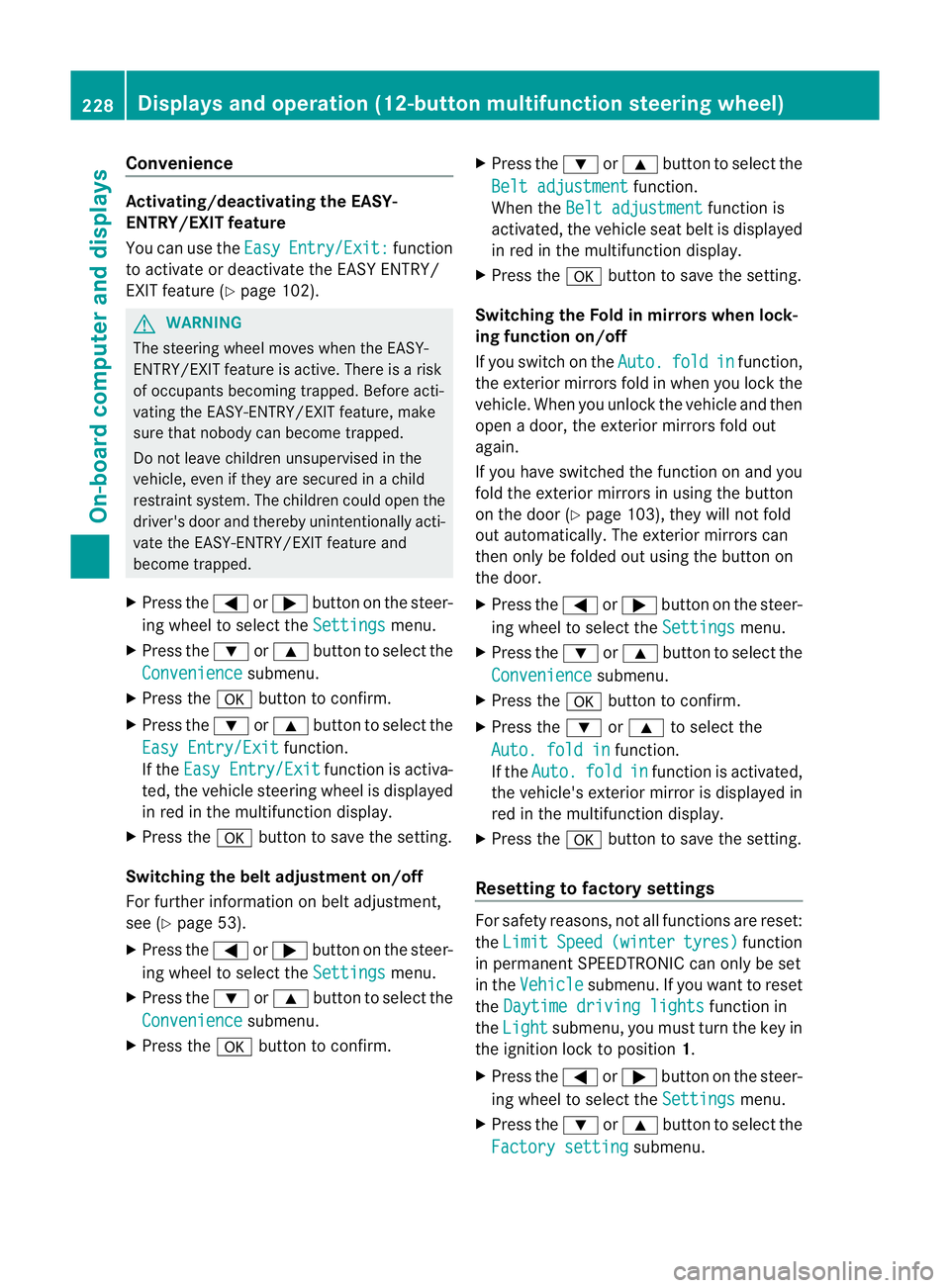
Convenience
Activating/deactivating the EASY-
ENTRY/EXIT feature
You can use the
Easy Entry/Exit: function
to activate or deactivate the EASY ENTRY/
EXIT feature (Y page 102). G
WARNING
The steering wheel moves when the EASY-
ENTRY/EXIT feature is active. There is a risk
of occupants becomin gtrapped. Before acti-
vating the EASY-ENTRY/EXIT feature, make
sure that nobody can become trapped.
Do not leave children unsupervised in the
vehicle, even if they are secured in a child
restraint system. The children could open the
driver's door and thereby unintentionally acti-
vate the EASY-ENTRY/EXIT feature and
become trapped.
X Press the =or; button on the steer-
ing wheel to select the Settings menu.
X Press the :or9 button to select the
Convenience submenu.
X Press the abutton to confirm.
X Press the :or9 button to select the
Easy Entry/Exit function.
If the Easy Entry/Exit function is activa-
ted, the vehicle steering wheel is displayed
in red in the multifunction display.
X Press the abutton to save the setting.
Switching the belta djustmenton/off
For further information on belt adjustment,
see (Y page 53).
X Press the =or; button on the steer-
ing wheel to select the Settings menu.
X Press the :or9 button to select the
Convenience submenu.
X Press the abutton to confirm. X
Press the :or9 button to select the
Belt adjustment function.
When the Belt adjustment function is
activated, the vehicle seat belt is displayed
in red in the multifunction display.
X Press the abutton to save the setting.
Switching the Fold in mirrors when lock-
ing function on/off
If you switch on the Auto. fold in function,
the exterior mirrors fold in when you lock the
vehicle. When you unlock the vehicle and then
open a door, the exterior mirrors fold out
again.
If you have switched the function on and you
fold the exterior mirror sinusing the button
on the door (Y page 103), they will not fold
out automatically. The exterior mirrors can
then only be folded out using the button on
the door.
X Press the =or; button on the steer-
ing wheel to select the Settings menu.
X Press the :or9 button to select the
Convenience submenu.
X Press the abutton to confirm.
X Press the :or9 to select the
Auto. fold in function.
If the Auto. fold in function is activated,
the vehicle's exterior mirror is displayed in
red in the multifunction display.
X Press the abutton to save the setting.
Resetting to factory settings For safety reasons, not all functions are reset:
the
Limit Speed (winter tyres) function
in permanent SPEEDTRONIC can only be set
in the Vehicle submenu. If you want to reset
the Daytime driving lights function in
the Light submenu, you must turn the key in
the ignition lock to position 1.
X Press the =or; button on the steer-
ing wheel to select the Settings menu.
X Press the :or9 button to select the
Factory setting submenu.228
Displays and operation (12-button multifunction steering wheel)On-board computer and displays
Page 248 of 373
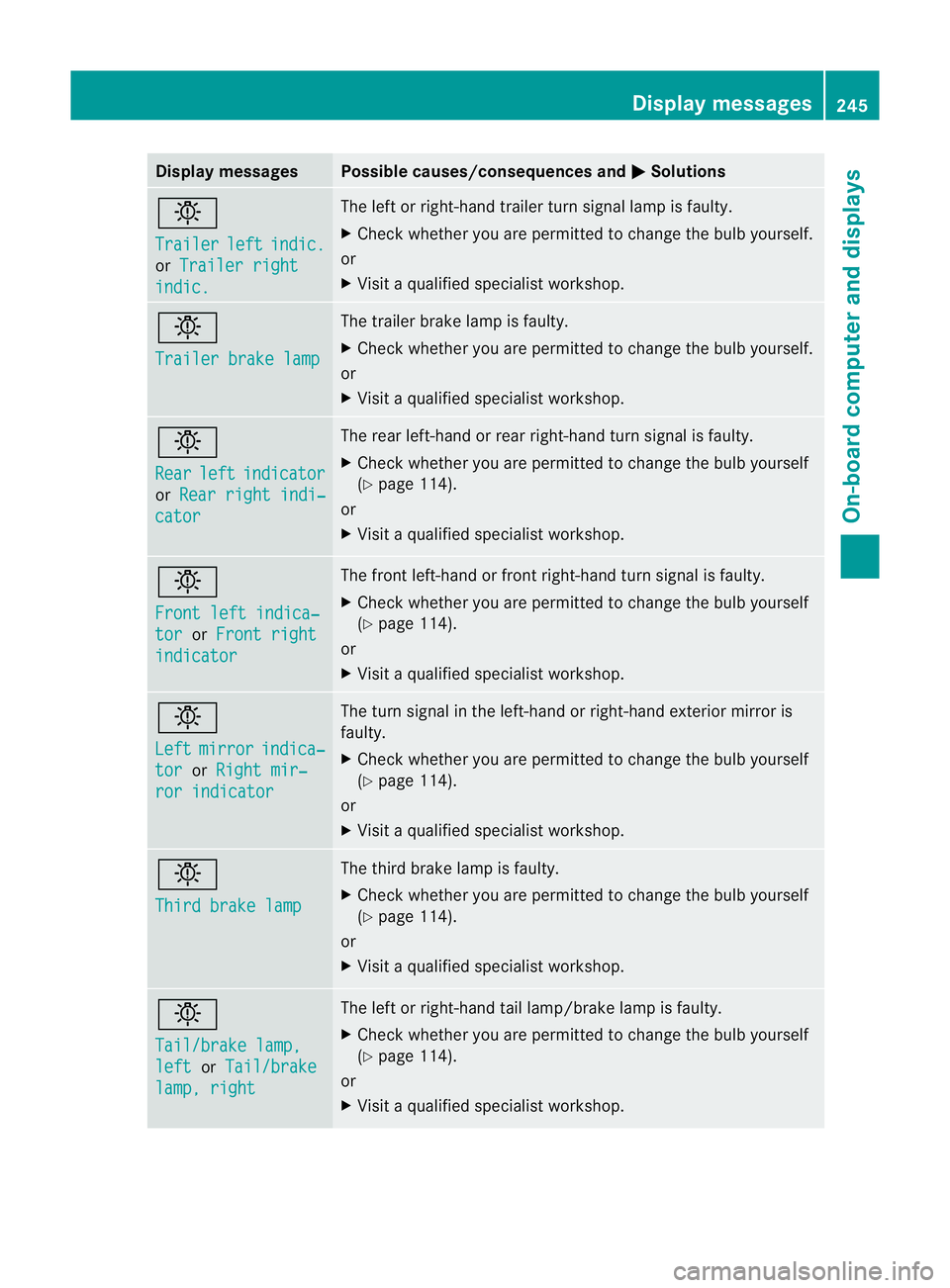
Display messages Possible causes/consequences and
M Solutions
b
Trailer
left indic.
or
Trailer right indic. The lef
torright-hand trailer tur nsignal lamp is faulty.
X Check whether you are permitted to change the bulb yourself.
or
X Visit a qualified specialist workshop. b
Trailer brake lamp The trailer brake lamp is faulty.
X
Check whether you are permitted to change the bulb yourself.
or
X Visit a qualified specialist workshop. b
Rear
left indicator
or
Rear right indi‐ cator The rear left-hand or rear right-hand tur
nsignal is faulty.
X Check whether you are permitted to change the bulb yourself
(Y page 114).
or
X Visit a qualified specialist workshop. b
Front left indica‐
tor or
Front right indicator The front left-hand or front right-hand turn signal is faulty.
X
Check whether you are permitted to change the bulb yourself
(Y page 114).
or
X Visit a qualified specialist workshop. b
Left
mirror indica‐
tor or
Right mir‐ ror indicator The turn signal in the left-hand or right-hand exterior mirror is
faulty.
X Check whether you are permitted to change the bulb yourself
(Y page 114).
or
X Visit a qualified specialist workshop. b
Third brake lamp The third brake lamp is faulty.
X
Check whether you are permitted to change the bulb yourself
(Y page 114).
or
X Visit a qualified specialist workshop. b
Tail/brake lamp,
left or
Tail/brake lamp, right The left or right-hand tail lamp/brake lamp is faulty.
X
Check whether you are permitted to change the bulb yourself
(Y page 114).
or
X Visit a qualified specialist workshop. Display messages
245On-board computer and displays Z
Page 252 of 373
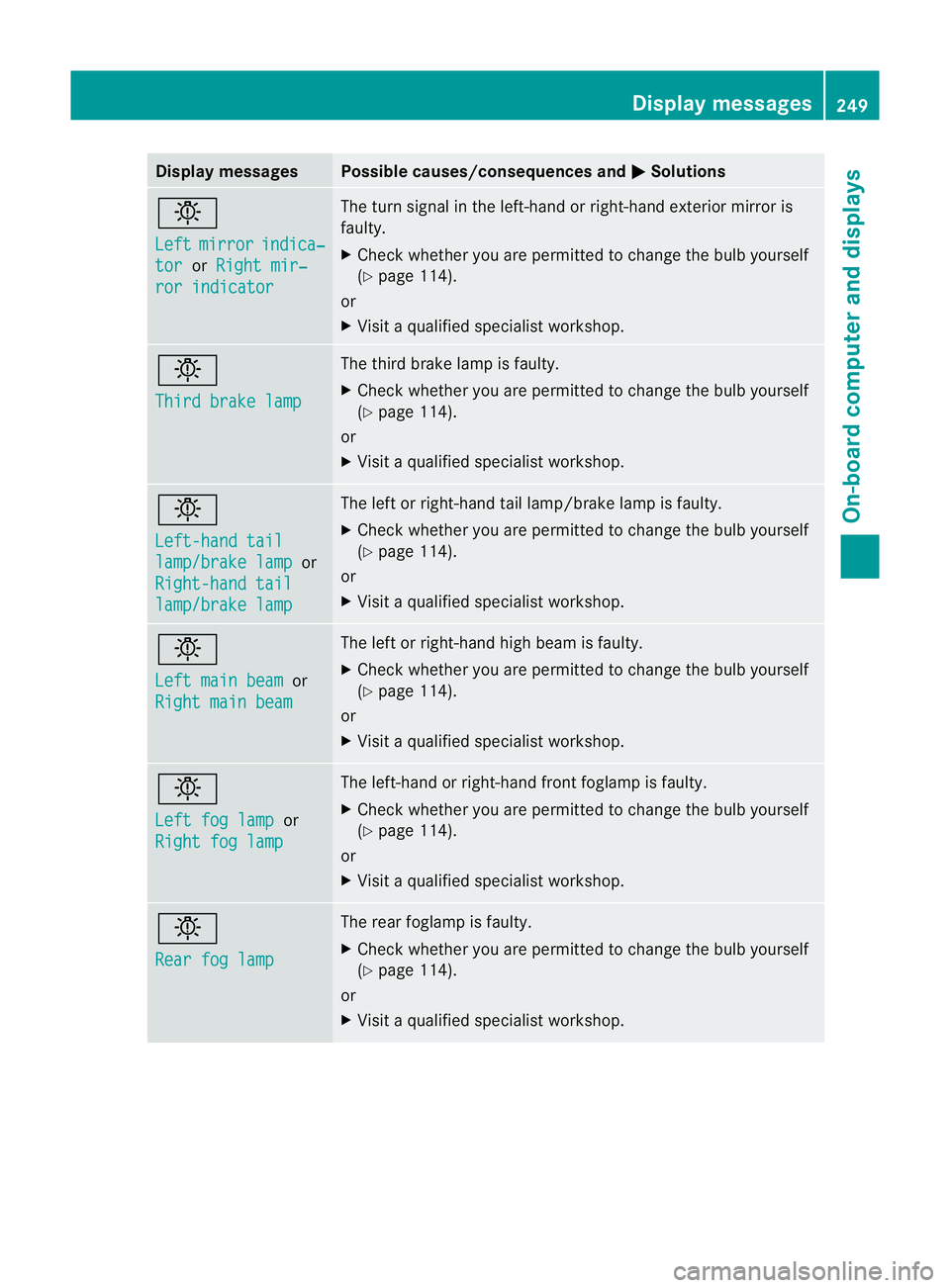
Display messages Possible causes/consequences and
M Solutions
b
Left
mirror indica‐
tor or
Right mir‐ ror indicator The turn signal in the left-hand or right-hand exterior mirror is
faulty.
X
Chec kwhether you are permitted to change the bulb yourself
(Y page 114).
or
X Visit a qualified specialist workshop. b
Third brake lamp The third brake lamp is faulty.
X
Check whether you are permitted to change the bulb yourself
(Y page 114).
or
X Visit a qualified specialist workshop. b
Left-hand tail
lamp/brake lamp or
Right-hand tail lamp/brake lamp The left or right-hand tail lamp/brake lamp is faulty.
X
Check whether you are permitted to change the bulb yourself
(Y page 114).
or
X Visit a qualified specialist workshop. b
Left main beam
or
Right main beam The left or right-hand high beam is faulty.
X
Check whether you are permitted to change the bulb yourself
(Y page 114).
or
X Visit a qualified specialist workshop. b
Left fog lamp
or
Right fog lamp The left-hand or right-hand front foglamp is faulty.
X Check whether you are permitted to change the bulb yourself
(Y page 114).
or
X Visit a qualified specialist workshop. b
Rear fog lamp The rear foglamp is faulty.
X
Check whether you are permitted to change the bulb yourself
(Y page 114).
or
X Visit a qualified specialist workshop. Display messages
249On-board computer and displays Z
Page 260 of 373
Display messages Possible causes/consequences and
M Solutions
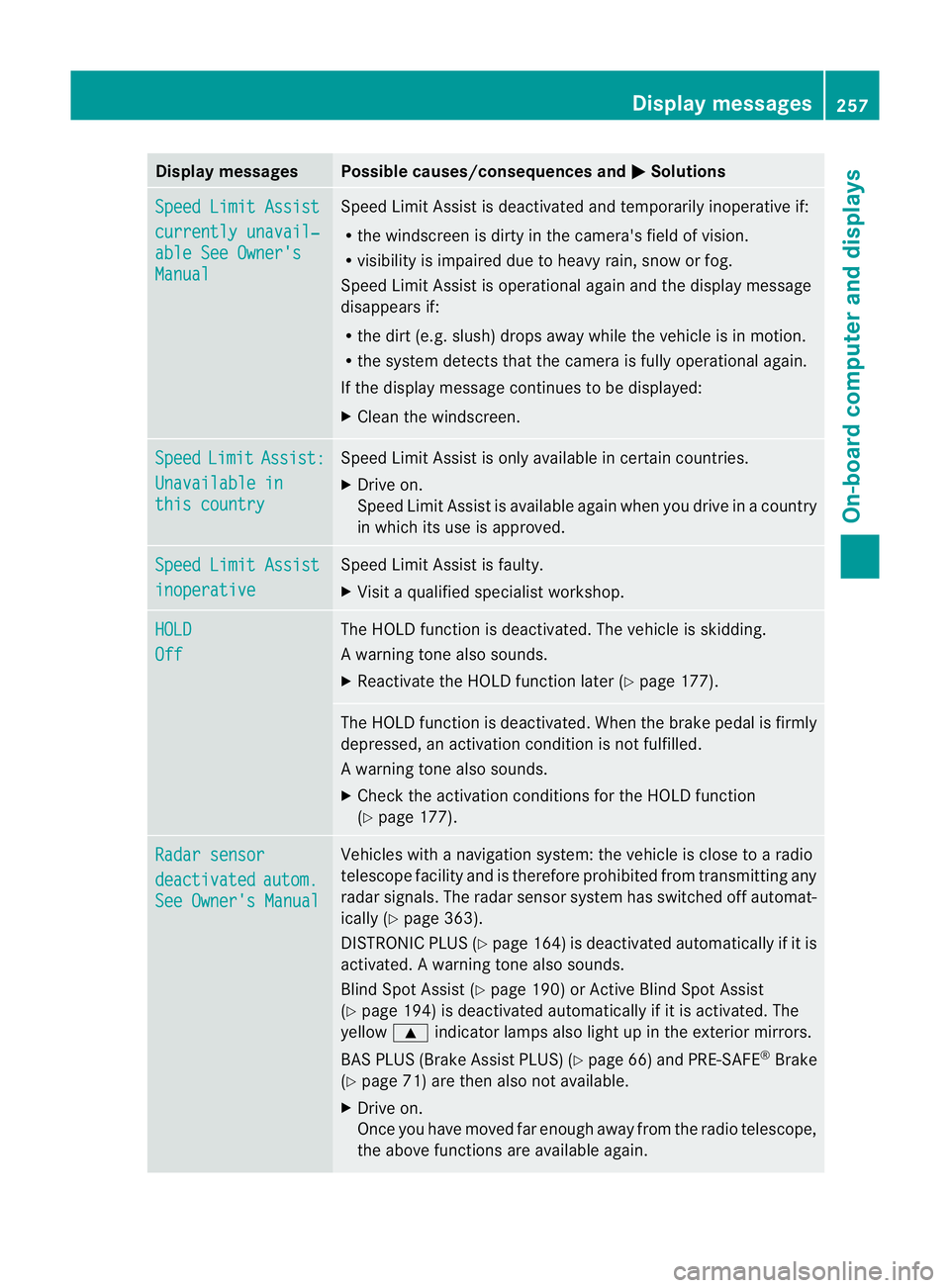
Speed Limit Assist
currently unavail‐
able See Owner's
Manual Speed Limit Assis
tis deactivated and temporarily inoperative if:
R the windscreen is dirty in the camera's field of vision.
R visibility is impaired due to heavy rain, snow or fog.
Speed Limit Assist is operational againa nd the display message
disappears if:
R the dirt (e.g. slush) drops away while the vehicle is in motion.
R the system detects tha tthe camera is fully operational again.
If the display message continues to be displayed:
X Cleant he windscreen. Speed Limit Assist:
Unavailable in
this country Speed Limit Assist is only available in certain countries.
X
Drive on.
Speed Limit Assist is available again when you drive in a country
in which its use is approved. Speed Limit Assist
inoperative Speed Limit Assist is faulty.
X
Visit a qualified specialist workshop. HOLD
Off The HOLD function is deactivated. The vehicle is skidding.
Aw
arning tone also sounds.
X Reactivate the HOLD function later (Y page 177). The HOLD function is deactivated. When the brak
epedal is firmly
depressed, an activation condition is not fulfilled.
Aw arning tone also sounds.
X Check the activation conditions for the HOLD function
(Y page 177). Radar sensor
deactivated autom.
See Owner's Manual Vehicles with a navigation system: the vehicle is close to a radio
telescope facility and is therefore prohibited from transmitting any
radar signals. The radar sensor system has switched off automat-
ically (Y
page 363).
DISTRONI CPLUS (Y page 164) is deactivated automatically if it is
activated. Awarning tone also sounds.
Blind Spo tAssist (Y page 190) or Active Blind Spot Assist
(Y page 194) is deactivated automatically if it is activated. The
yellow 9indicator lamps also light up in the exterior mirrors.
BAS PLUS (Brake Assist PLUS) (Y page 66) and PRE-SAFE®
Brake
(Y page 71) are then also not available.
X Drive on.
Once you have moved far enough away from the radio telescope,
the above functions are available again. Display messages
257On-board computer and displays Z
Page 293 of 373
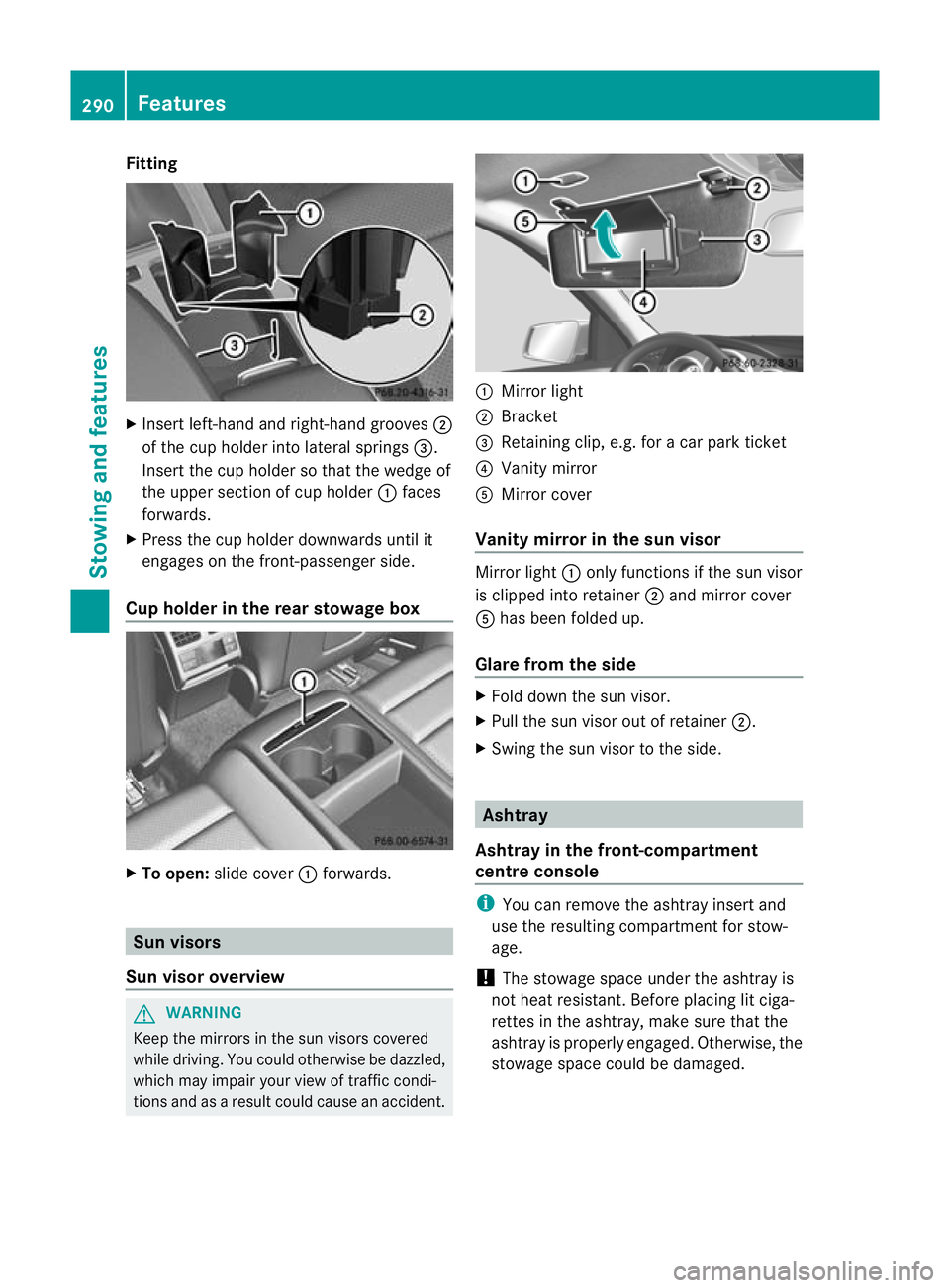
Fitting
X
Inser tleft-hand and right-hand grooves ;
of the cup holder into lateral springs =.
Inser tthe cup holder so that the wedge of
the upper section of cup holder :faces
forwards.
X Press the cup holder downwards until it
engages on the front-passenger side.
Cup holder in the rear stowage box X
To open: slide cover :forwards. Sun visors
Sun visor overview G
WARNING
Keep the mirrors in the sun visors covered
while driving. You could otherwise be dazzled,
which may impair your view of traffic condi-
tions and as a result could cause an accident. :
Mirror light
; Bracket
= Retaining clip, e.g. for a car park ticket
? Vanity mirror
A Mirror cover
Vanity mirror in the sun visor Mirror light
:only functions if the sun visor
is clipped into retainer ;and mirror cover
A has been folded up.
Glare from the side X
Fold down the sun visor.
X Pull the sun visor out of retainer ;.
X Swing the sun visor to the side. Ashtray
Ashtray in the front-compartment
centre console i
You can remove the ashtray insert and
use the resulting compartmentf or stow-
age.
! The stowage space under the ashtray is
not heat resistant .Before placing lit ciga-
rettes in the ashtray, make sure that the
ashtray is properly engaged. Otherwise, the
stowage space could be damaged. 290
FeaturesStowing and features
Page 297 of 373
Garage door opener
Important safety notes The HomeLink
®
garage door opener integra-
ted in the rear-view mirror allows you to oper-
ate up to three different door and gate sys-
tems.
i The garage door opener is only available
for certain countries. Observe the legal
requirements in each country.
The HomeLink ®
garage door opener is
compatible with most Europea ngarage and
gate opener drives. More informatio non
HomeLink ®
and/o rcompatible products is
available from:
R any Mercedes-Benz Service Centre
R the HomeLink ®
hotline
(0) 08000 466 354 65 (free of charge) or
+49 (0) 6838 907 277 (charges apply)
R on the Internet at:
http://www.homelink.com
Programming the integrated garage
door opener in the rear-view mirror Programming
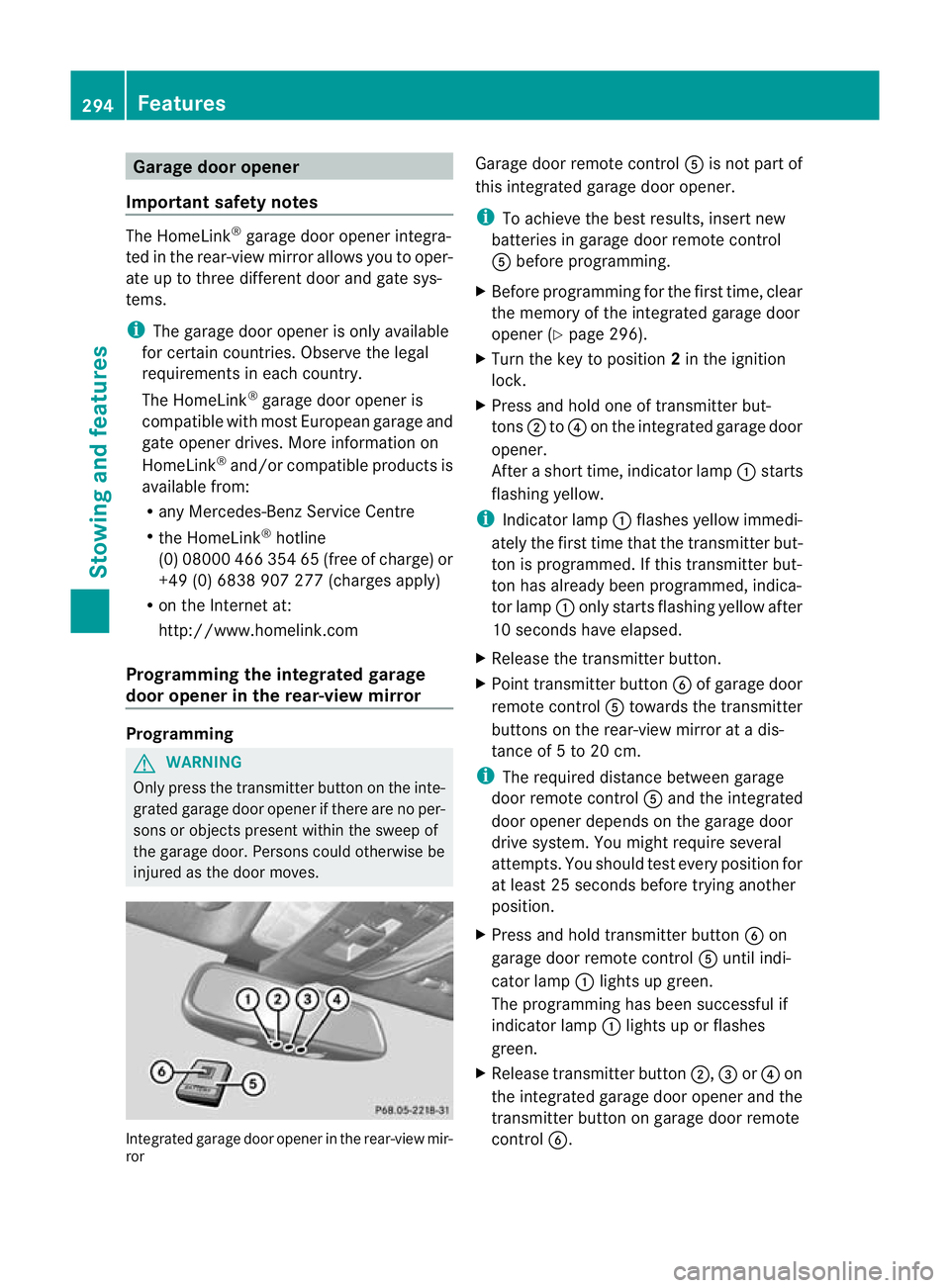
G
WARNING
Only press the transmitter button on the inte-
grated garage door opener if there are no per-
sons or objects present within the sweep of
the garage door. Persons could otherwise be
injured as the door moves. Integrated garage door opener in the rear-view mir-
ror Garage door remote control
Ais not part of
this integrated garage door opener.
i To achieve the best results, insert new
batteries in garage door remote control
A before programming.
X Before programming for the first time, clear
the memory of the integrated garage door
opener (Y page 296).
X Turn the key to position 2in the ignition
lock.
X Press and hold one of transmitter but-
tons ;to? on the integrated garage door
opener.
After a short time, indicator lamp :starts
flashing yellow.
i Indicator lamp :flashes yellow immedi-
ately the first time that the transmitter but-
ton is programmed. If this transmitter but-
ton has already been programmed, indica-
tor lamp :only starts flashing yellow after
10 seconds have elapsed.
X Release the transmitter button.
X Point transmitter button Bof garage door
remote control Atowards the transmitter
buttons on the rear-view mirror at a dis-
tance of 5 to 20 cm.
i The required distance between garage
door remote control Aand the integrated
door opener depends on the garage door
drive system. You might require several
attempts. You should test every position for
at least 25 seconds before trying another
position.
X Press and hold transmitter button Bon
garage door remote control Auntil indi-
cator lamp :lights up green.
The programming has been successful if
indicator lamp :lights up or flashes
green.
X Release transmitter button ;,=or? on
the integrated garage door opener and the
transmitter button on garage door remote
control B. 294
FeaturesStowing and features
Page 298 of 373
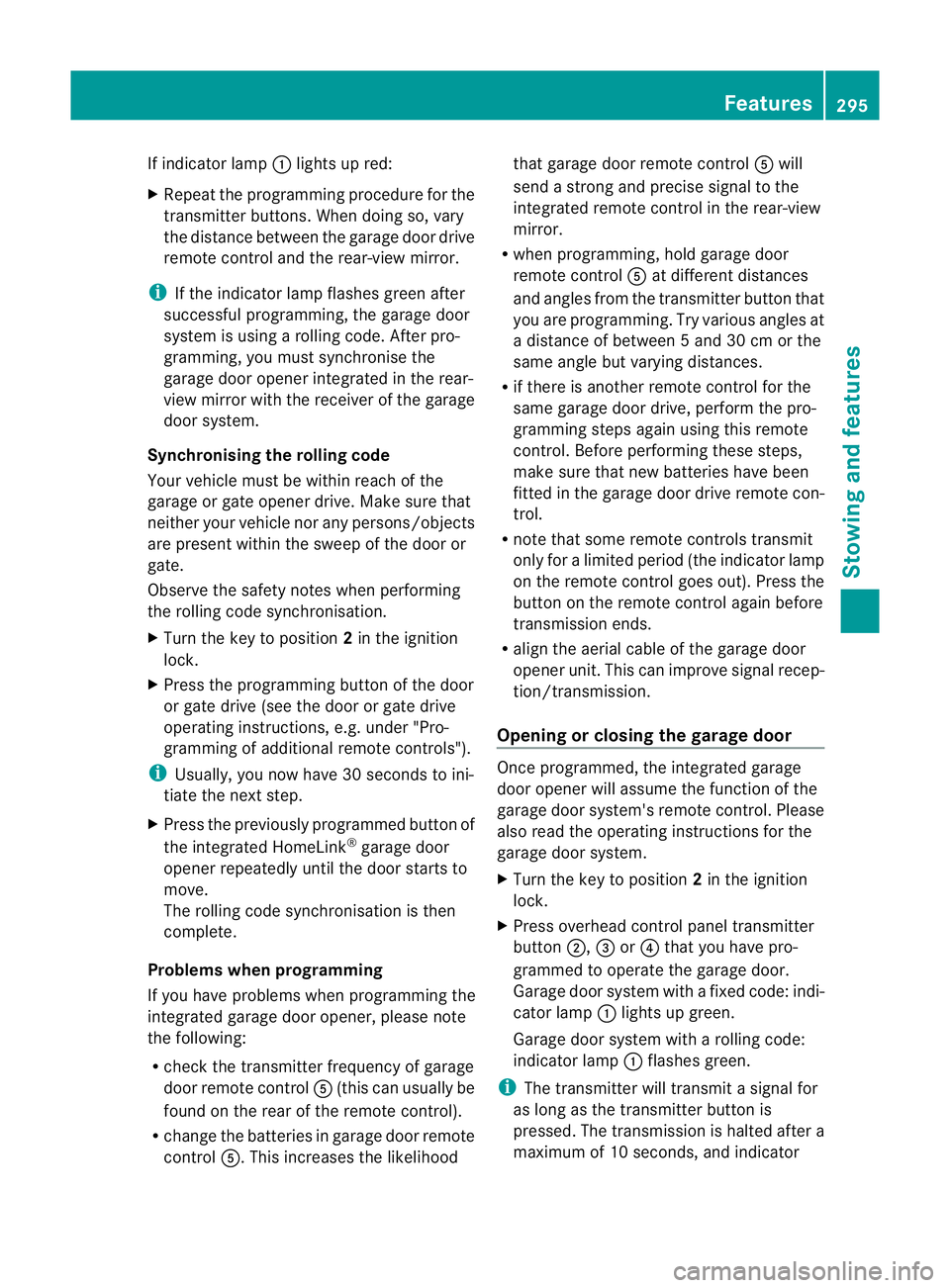
If indicator lamp
:lights up red:
X Repeat the programming procedure for the
transmitter buttons. When doing so, vary
the distance betwee nthe garage door drive
remote control and the rear-view mirror.
i If the indicator lamp flashes green after
successful programming, the garage door
system is using a rolling code. After pro-
gramming, you must synchronise the
garage door opener integrated in the rear-
view mirror with the receiver of the garage
door system.
Synchronising the rolling code
Your vehicle must be within reach of the
garage or gate opener drive. Make sure that
neither your vehicle nor any persons/objects
are present within the sweep of the door or
gate.
Observe the safety notes when performing
the rolling code synchronisation.
X Turn the key to position 2in the ignition
lock.
X Press the programming button of the door
or gate drive (see the door or gate drive
operating instructions, e.g. under "Pro-
gramming of additional remote controls").
i Usually, you now have 30 seconds to ini-
tiate the next step.
X Press the previously programmed button of
the integrated HomeLink ®
garage door
opener repeatedly until the door starts to
move.
The rolling code synchronisation is then
complete.
Problems when programming
If you have problems when programming the
integrated garage door opener, please note
the following:
R check the transmitter frequency of garage
door remote control A(this can usually be
found on the rear of the remote control).
R change the batteries in garage door remote
control A.This increases the likelihood that garage door remote control
Awill
send a strong and precise signal to the
integrated remote control in the rear-view
mirror.
R when programming, hold garage door
remote control Aat different distances
and angles from the transmitter button that
you are programming. Try various angles at
a distance of between 5 and 30 cm or the
same angle but varying distances.
R if there is another remote control for the
same garage door drive, perform the pro-
gramming steps again using this remote
control. Before performing these steps,
make sure that new batteries have been
fitted in the garage door drive remote con-
trol.
R note that some remote controls transmit
only for a limited period (the indicator lamp
on the remote control goes out). Press the
button on the remote control again before
transmission ends.
R align the aerial cable of the garage door
opener unit. This can improve signal recep-
tion/transmission.
Opening or closing the garage door Once programmed, the integrated garage
door opener will assume the function of the
garage door system's remote control. Please
also read the operating instructions for the
garage door system.
X
Turn the key to position 2in the ignition
lock.
X Press overhead control panel transmitter
button ;,=or? that you have pro-
grammed to operate the garage door.
Garage door system with a fixed code: indi-
cator lamp :lights up green.
Garage door system with a rolling code:
indicator lamp :flashes green.
i The transmitter will transmit a signal for
as long as the transmitter button is
pressed. The transmission is halted after a
maximum of 10 seconds, and indicator Features
295Stowing and features Z
Page 331 of 373
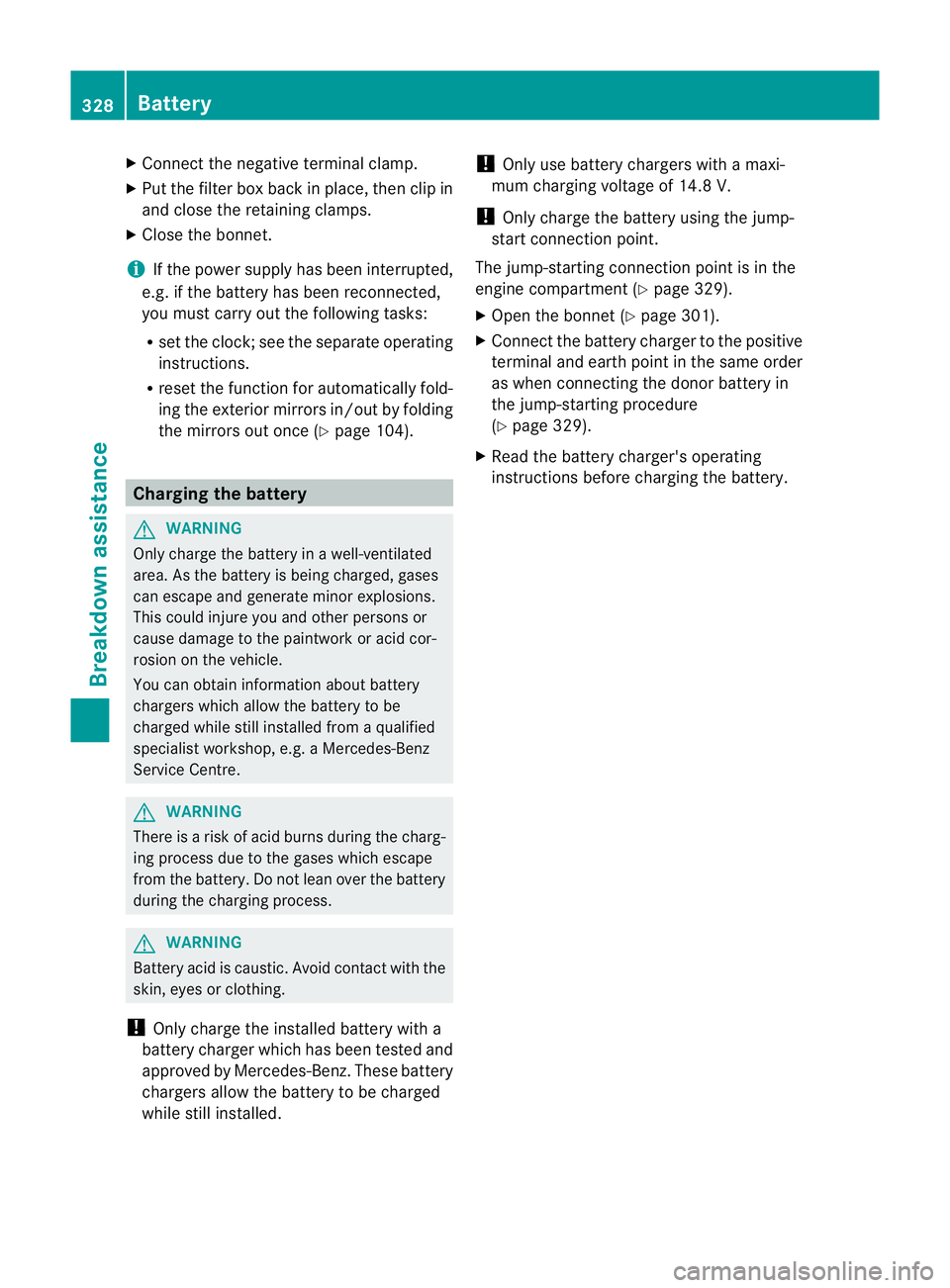
X
Connect the negative terminal clamp.
X Put the filter box back in place, then clip in
and close the retaining clamps.
X Close the bonnet.
i If the power supply has been interrupted,
e.g. if the battery has been reconnected,
you must carry out th efollowing tasks:
R set the clock; see the separate operating
instructions.
R reset the function for automatically fold-
ing the exterior mirrors in/out by folding
the mirrors out once (Y page 104).Charging the battery
G
WARNING
Only charge the battery in a well-ventilated
area. As the battery is being charged, gases
can escape and generate minor explosions.
This could injure you and other persons or
cause damage to the paintwork or acid cor-
rosion on the vehicle.
You can obtain information about battery
chargers which allow the battery to be
charged while still installed from a qualified
specialist workshop, e.g. aMercedes-Benz
Service Centre. G
WARNING
There is a risk of acid burns during the charg-
ing process due to the gases which escape
from the battery. Do not lean over the battery
during the charging process. G
WARNING
Battery acid is caustic. Avoid contact with the
skin, eyes or clothing.
! Only charge the installed battery with a
battery charger which has been tested and
approved by Mercedes-Benz .These battery
chargers allow the battery to be charged
while still installed. !
Only use battery chargers with a maxi-
mum charging voltage of 14.8 V.
! Only charge the battery using the jump-
start connection point.
The jump-starting connection point is in the
engine compartment (Y page 329).
X Open the bonnet (Y page 301).
X Connect the battery charger to the positive
terminal and earth point in the same order
as when connecting the donor battery in
the jump-starting procedure
(Y page 329).
X Read the battery charger's operating
instructions before charging the battery. 328
BatteryBreakdown assistance
Page 360 of 373
http://bevo.mercedes-benz.com
.You can
also consult a Mercedes-Benz Service
Centre.
! Always use a suitable coolant mixture,
even in countries where high temperatures
prevail.
Otherwise, the cooling system will not be
sufficiently protected from corrosion, and
the boiling point will be too low.
If antifreeze/corrosion inhibitor is present in
the correc tconcentration, the boiling point of
the coolant will be around 130 †.
The antifreeze/corrosion inhibitor concentra-
tion in the engine cooling system should:
R be at least 50%. This will protec tthe engine
cooling system against freezing down to
around -37 †.
R not exceed 55% (antifreeze protection
down to -45 †); otherwise, heat will not be
dissipated as effectively.
If the vehicle has lost coolant, top it up with
equal amounts of water and antifreeze/cor-
rosion inhibitor. Mercedes-Benz recom-
mends an antifreeze/corrosion inhibitor
which has been approved for Mercedes-Benz.
! The engine cooling system is filled with
coolant that must be renewed after 15
years, or after 250,000 km at the latest. Vehicle data
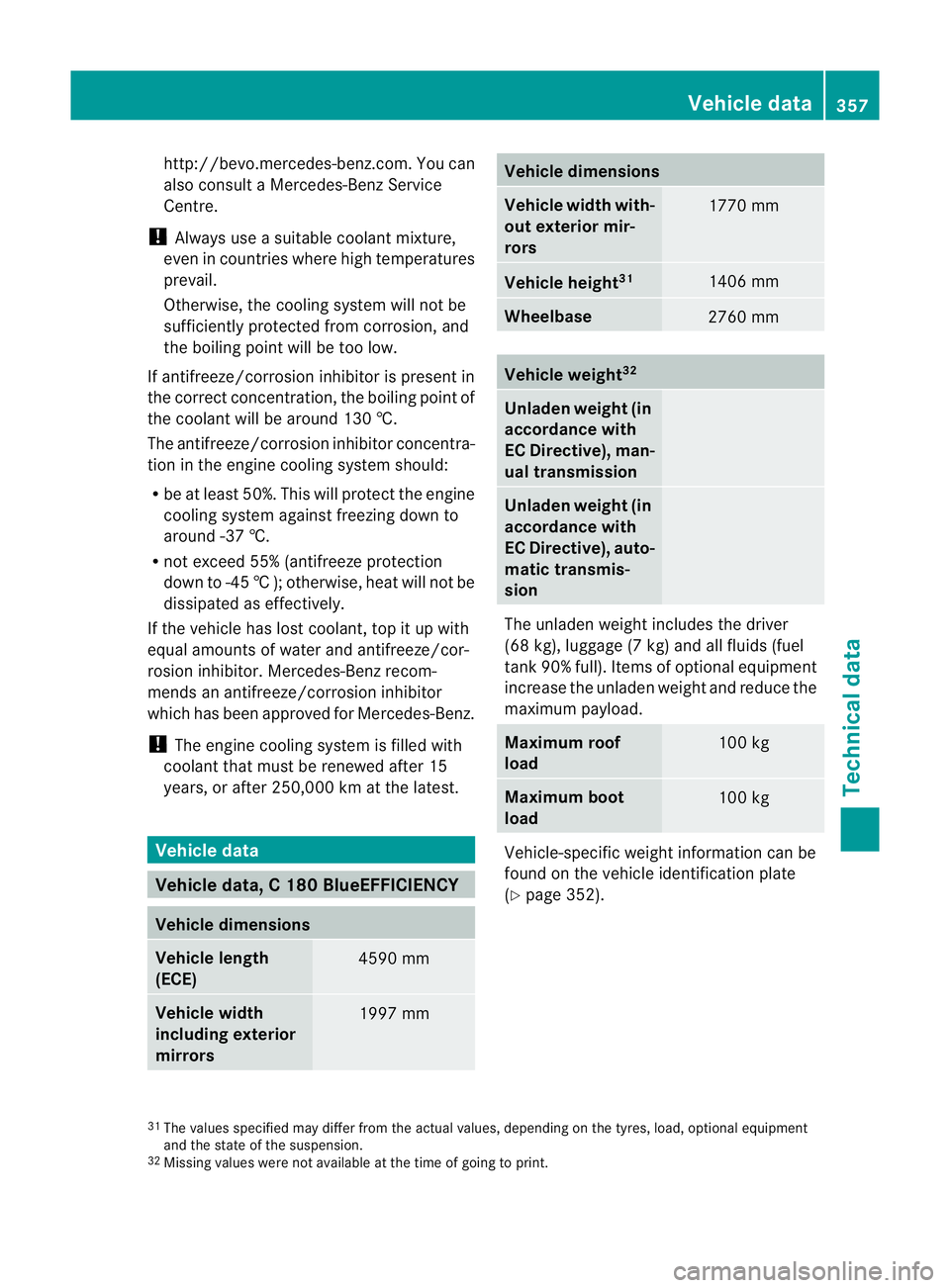
Vehicle data, C 180 BlueEFFICIENCY
Vehicle dimensions
Vehicle length
(ECE)
4590 mm
Vehicle width
including exterior
mirrors
1997 mm Vehicle dimensions
Vehicle width with-
out exterior mir-
rors
1770 mm
Vehicle height
31 1406 mm
Wheelbase
2760 mm
Vehicle weight
32 Unladen weight (in
accordance with
EC Directive), man-
ual transmission
Unladen weight (in
accordance with
EC Directive), auto-
matic transmis-
sion
The unladen weight includes the driver
(68 kg), luggage (7 kg) and all fluids (fuel
tan
k90% full). Items of optional equipment
increase the unladen weight and reduce the
maximum payload. Maximum roof
load
100 kg
Maximum boot
load
100 kg
Vehicle-specifi
cweight information can be
found on the vehicle identification plate
(Y page 352). 31
The values specified may differ from the actual values, depending on the tyres, load, optional equipment
and the state of the suspension.
32 Missing values were not available at the time of going to print. Vehicle data
357Technical data Z