ABS MERCEDES-BENZ C-CLASS COUPE 2015 User Guide
[x] Cancel search | Manufacturer: MERCEDES-BENZ, Model Year: 2015, Model line: C-CLASS COUPE, Model: MERCEDES-BENZ C-CLASS COUPE 2015Pages: 385, PDF Size: 13.12 MB
Page 69 of 385
Pets in the vehicle
G
WARNING
If you leave animals unsupervised or unse-
cured in the vehicle, they may push abutton
or as witch, for example.
They could:
R activate vehicle equipment and become
trapped, for example
R switch vehicle systems on or off, thus
endangering other road users
In the event of an accident, sudden braking or
abrupt changes of direction, unsecured ani-
mals could be flung around the vehicle, injur-
ing the vehicle occupants. There is arisk of an
accident and injury.
Never leave animals unattended in the vehi-
cle. Always secure animals correctly during a
journey, e.g. in an animal transport box. Driving safety systems
Driving safety systems overview
In this section,y ou will find information about
the following driving safety systems:
R ABS (Anti-lock BrakingSystem)
(Y page 66)
R BAS ( Brake Assist System) (Y page 67)
R BAS PLUS with Cross-Traffic Assist ( Brake
Assist System PLUS with Cross-Traffic Assist)
(Y page 67)
R COLLISION PREVENTION ASSIST PLUS
(Y page 69)
R Adaptive brake lights (Y page 71)
R ESP ®
(Electronic StabilityProgram)
(Y page 71)
R EBD ( electronic brakeforce distribution)
(Y page 75)
R ADAPTIVE BRAKE (Y page 75)
R PRE-SAFE ®
Brake (Y page 75)
R STEERC ONTROL (Y page 77) Important safety notes
If you fail to adapt your driving style or if you are
inattentive, the driving safety systems can nei-
ther reduce the risk of an accident nor override the laws of physics. Driving safety systems are
merely aids designed to assist driving. You are
responsible for maintaining the distance to the
vehicle in front,f or vehicle speed, for braking in
good time, and for staying in lane. Always adapt your driving style to suit the prevailing road and
weather condition sand maintain asafe distance
from the vehicle in front.D rive carefully.
The driving safety systems described only work
as effectively as possible when there is ade-
quate contact between the tyres and the road
surface. Pay particular attention to the informa- tion regarding tyres, recommended minimum
tyre tread depths etc. in the "Wheels and tyres" section (Y page 353).
In wintry driving conditions, always use winter
tyres (M+S tyres) and, if necessary, snow
chains. Only in this way will the driving safety
systems described in this section work as effec-
tively as possible. ABS (Anti-loc
kBraking System)
General notes ABS regulates brake pressure in such
away that
the wheels do not lock when you brake. This
allowsy ou to continue steering the vehicle when
braking.
The ! ABS warning lamp in the instrument
cluster lights up when the ignition is switched
on. It goes out when the engine is running.
ABS works from aspeed of about 8km/h,
regardless of road-surface conditions. ABS
works on slippery surfaces, even when you only brake gently.
Important safety notes i
Observe the "Important safety notes" sec-
tion (Y page 66). G
WARNING
If ABS is faulty, the wheels could lock when
braking. The steerability and braking charac-
teristic smay be severely impaired. Addition-
ally,f urther driving safety systems are deac- 66
Driving safety systemsSafety
Page 70 of 385
tivated
.There is an increase ddangerofs kid-
ding and accidents.
Drive on carefully. Hav eABS checked imme-
diately at aquali fied specialis tworkshop.
If ABS is malfunctioning ,othe rsystems, includ-
ing drivin gsafety systems, will also become
inoperative .Obser ve the information on the ABS
warning lamp (Y page 287)and displa ymes-
sage swhich ma ybeshown in the instrument
cluste r(Ypage 254).
Brakes X
If ABS intervenes: continue to depress the
brake peda lwithf orce unti lthe braking sit-
uatio niso ver.
X To make afullb rak eapplication: depress
the brake peda lwithf ullf orce.
If ABS intervenes when braking ,you will fee la
pulsing in the brake pedal.
The pulsating brake peda lcan be an indication
of hazardous roa dconditions ;thiss erve sasa
reminder to take extra car ewhile driving. BAS (Brak
eAssis t)
General notes BAS operates in emergency braking situations.
If yo udepress the brake peda lquickly, BAS
automaticall yboosts the braking force, thus
shortening the stopping distance.
Important safety notes i
Observe the "Important safety notes" sec-
tio n(Ypage 66). G
WARNING
If BAS is malfunctioning ,the braking distance
in an emergency braking situatio nis
increased. There is ariskofa ccident.
In an emergency braking situation, depress
the brake peda lwithf ullf orce. ABS prevents
the wheels fro mlocking. Braking X
Kee pthe brake peda ldep resse dfirml yuntil
the emergency braking situatio niso ver.
ABS prevents the wheels fro mlocking.
Th eb rakes will functio nasusual once you
release the brake pedal. BAS is deactivated. BAS PLUS (Brake Assist System
PLUS
)withC ross-Traffic Assist
General notes BAS PLU
Scan help yo utominimise th eriskofa
collision with avehicl eorap edestrian and
reduce the effects of such acollision. If BAS
PLU Sdetects adangerofc ollision, yo uare
assiste dwhenb raking.
i Pa
ya ttentio ntothe important safety notes
in the "Driving safety systems" section
(Y page 66).
BAS PLU Siso nlya vailable on vehicles with the
Drivin gAssistance package.
For BAS PLU Stoassistyou when driving, the
rada rsensors ystema nd the camera system
must be operational.
With the help of asensors ystema ndacamera
system, BAS PLU Scan detect obstacles:
R tha tare in the path of your vehicl efor an
extende dperiodoft ime
R tha tcros sthe path of your vehicle
In addition, pedestrians in the path of your vehi-
cle can be detected.
BAS PLU Sdetects pedestrians using typical
characteristics such as the body contour sand
posture of aperso ns tanding upright.
If the rada rsen sorsystemort he camera system
is malfunctioning ,BAS PLU Sfunctions are
restricted or no longe ravailable. The brake sys-
tem is still availabl ewithc omplete brake boost-
ing effect and BAS.
i Observe the restrictions describe
dinthe
"Important safety notes" section
(Y page 68). Driving safet
ysystems
67Safety Z
Page 72 of 385
At speed
sofuptoa pproximatel y70km/h,BAS
PLU Scan react to:
R stationar yobjects in the path of your vehicle,
e.g .stoppe dorp arked vehicles
R pedestrians in the path of your vehicle
R obstacle scrossing your path, which move in
the detection range of the sensors and are
detected
i If BAS PLU
Sdeman ds particularly high brak-
ing force, preventative passenge rprotection
measures (PRE-SAFE ®
)a re activated simulta-
neously (Y page 54).
X Kee pthe brake peda ldep resse duntilthe
emergency braking situatio niso ver.
ABS prevents the wheels from locking.
BAS PLU Sisdeactivated and the brakes func-
tio na susual againif:
R your elease the brake pedal
R ther eisnol ongerar iskofc ollision
R no obstacle is detecte dinfront of your vehicle
R youd epress the accelerator pedal
R youa ctivate kickdown COLLISIO
NPREVENTION ASSIST
PLUS
General notes i
Observ
ethe "Important safety notes "sec-
tio n(Ypage 66).
COLLISION PREVENTION ASSIST PLU Sconsists
of ad istance warning functio nwithana utono-
mou sbraking functio nand Adaptive Brake
Assist.
COLLISION PREVENTION ASSIST PLU Scan help
yo utom inimisethe ris kofa collision with the
vehicl einfront or reduce the effects of such a
collision.
If COLLISION PREVENTION ASSIST PLUS
detects tha tther eisar iskofa collision, yo uwill
be warned visuall yand acoustically. If yo udonot
react to the visua land audibl ecollision warning,
autonomou sbraking can be initiated in critical
situations. If yo uapply the brake yoursel fina
critical situation, the COLLISION PREVENTION
ASSIST PLU SAdaptive Brake Assist assists you. Important safety notes In particular, the detection of obstacle
scan be
impaired in the cas eof:
R dirt on the sensors or obscured sensors
R snow or heavy rain
R interference by othe rradar sources
R strong rada rreflections, for example, in multi-
storey car parks
R an arrow vehicl etravelling in front, e.g .a
motorcycle
R av ehicl etravelling in front on adifferent line
R new vehicles or afte raservice on the COLLI-
SION PREVENTION ASSIST PLU Ssystem
Observ ethe important safety notes in the
"Running-i nnotes "sectio n(Ypage 144).
Following damage to the front end of the vehicle,
have the configuratio nand operatio nofthe
rada rsensor checked at aquali fied specialist
workshop .Thisa lsoa pplies to collisions at slow
speed swhere ther eisnov isible damage to the
front of the vehicle.
Activating/deactivating The COLLISION PREVENTION ASSIST PLU
Sis
automaticall yactive afte rswitching on the igni-
tion.
Yo uc an activate or deactivate COLLISION PRE-
VENTION ASSIST PLU Sinthe on-board com-
puter (Y page 245). Whe ndeactivated ,the dis-
tance warning functio nand the autonomous
braking functio narealso deactivated.
If COLLISION PREVENTION ASSIST PLU Sis
deactivated ,the æ symbo lappears in the
assistance graphics display.
Distance warning function General notes
The distance warning functio ncan hel pyou to
minimis ethe ris kofa collision with the vehicl ein
front or reduce the effects of such acollision. If
the distance warning functio ndetects tha tthere
is ar iskofa collision, yo uwillbew arned visually
and acoustically.
Important safety notes
i Observ
ethe "Important safety notes "sec-
tio nfor driving safety system s(Ypage 66). Driving safety systems
69Safety Z
Page 74 of 385
brakin
gforc enecessary to avoid acollision. If
you apply the brakes forcefully, Adaptiv eBrake
Assist will automatically increase the braking
forc etoal evel suitable for the traffic conditions.
Adaptiv eBrakeA ssist provides brakin gassis-
tanc einh azardous situation satspeeds above
7k m/h. It uses radar sensor technology to
assess the traffic situation.
Up to aspeed of approximately 250 km/h,
Adaptiv eBrakeA ssist is capable of reacting to
movin gobjects that have already been detected
as such at least onc eover the period of obser-
vation.
Up to aspeed of approximately 70 km/h, Adap-
tive Brak eAssist react stostationary obstacles.
If Adaptiv eBrakeA ssist demands particularly
high brakin gforce, preventativ epassenger pro-
tection measures (PRE-SAFE ®
)a re activated
simultaneously (Y page 54).
X Keep the brake pedal depressed until the
emergency brakin gsituation is over.
ABSp revents the wheels from locking.
The brakes will work normally again if: R you release the brake pedal
R ther eisnol onger any danger of acollision
R no obstacle is detected in fron tofyour vehicle
Adaptiv eBrakeA ssist is then deactivated.
Important safet ynotes
i Observe the "Important safety notes" sec-
tion for driving safety systems (Y page 66).G
WARNING
Adaptiv eBrakeA ssist cannot always clearly
identify objects and complex traffic situa-
tions.
In such cases, Adaptiv eBrakeA ssist can:
R interven eunnecessarily
R not intervene
There is arisk of an accident.
Always pay careful attention to the traffic sit- uation and be ready to brake. Terminate the
intervention in anon-critical driving situation. G
WARNING
Adaptiv eBrakeA ssist does not react:
R to people or animals
R to oncoming vehicles
R to crossing traffic
R when cornering
As aresult, the Adaptiv eBrak eAssist may not
interven einall critical conditions. There is a
risk of an accident.
Always pay careful attention to the traffic sit- uation and be ready to brake.
Due to the natur eofthe system, particularly
complicated but non-critical driving conditions
may also cause Brak eAssist to intervene.
If Adaptiv eBrak eAssist is not available due to a
malfunction in the radar sensor system, the
brake system remains available with full brake
boostin geffec tand BAS. Adaptive brake lights
The adaptive brake lights warn following traffic
in an emergency brakin gsituation:
R by flashing brake lamps
R by activating the hazard warning lamps
If you brake sharply from aspeed of more than
50 km/ horifb raking is assisted by BAS or BAS
PLUS, the brake lamp sflashr apidly.Int his way,
traffic travelling behind you is warned in an even more noticeable manner.
If you brake sharply from aspee dofm ore than
70 km/h to astandstill, the hazard warning
lamp sare activated automatically. If the brakes
are applieda gain, the brake lamp slight up con-
tinuously.T he hazard warning lamp sswitch off
automatically if you travel faster than 10 km/h. You can alsos witch off the hazard warning
lamp susing the hazard warning button
(Y page1 20). ESP
®
(Electronic Stability Program)
General notes i
Observe the "Important safety notes" sec-
tion (Y page66). Driving safety systems
71Safety Z
Page 87 of 385
X
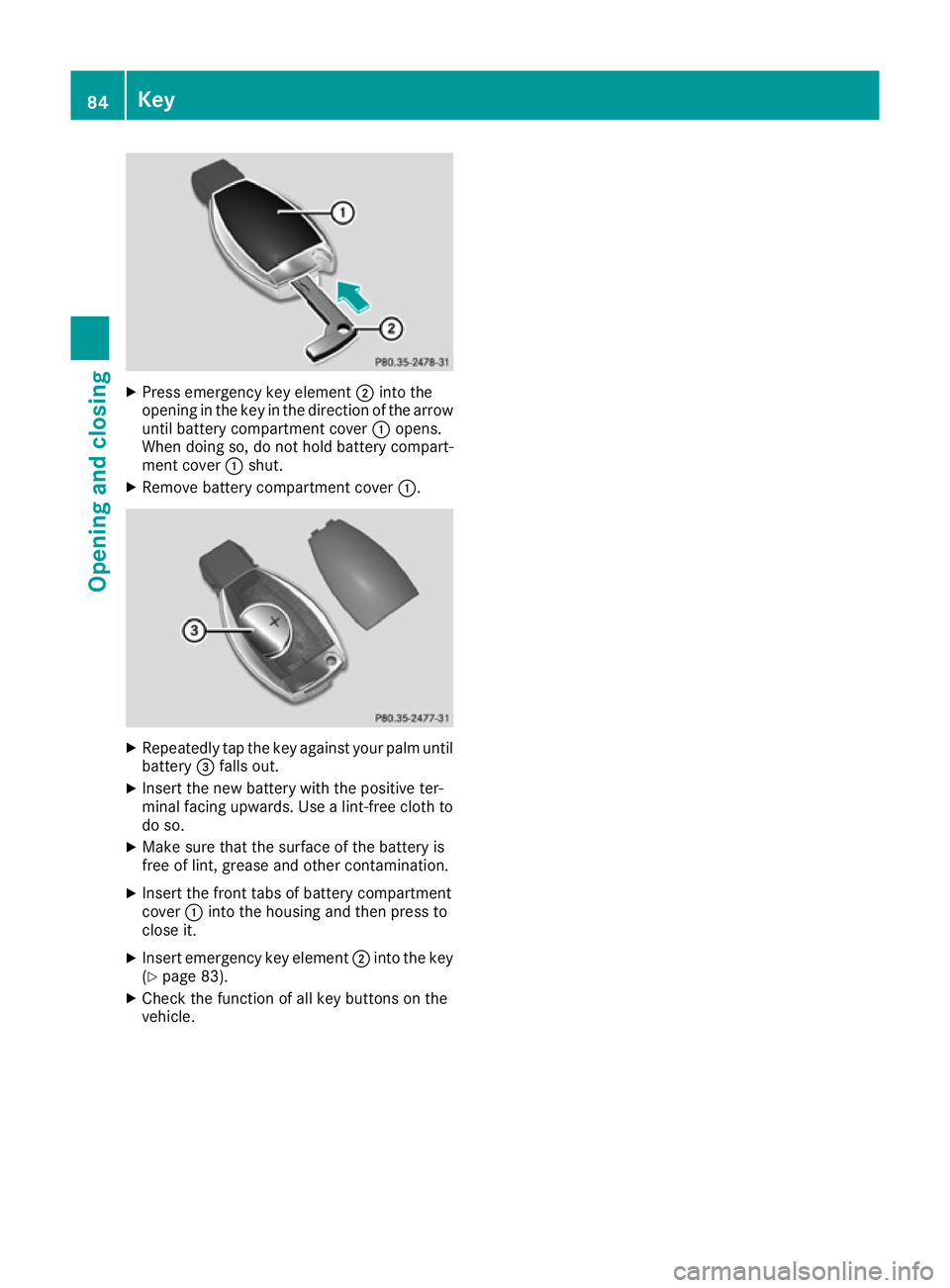
Press emergenc ykey element ;into the
opening in the key in the direction of the arrow
until battery compartment cover :opens.
When doing so, do not hold battery compart-
ment cover :shut.
X Remove battery compartment cover :.X
Repeatedly tap the key against your palm until
battery =falls out.
X Insert the new battery with the positive ter-
minal facing upwards. Use alint-free cloth to
do so.
X Make sure that the surface of the battery is
free of lint, grease and other contamination.
X Insert the frontt abs of battery compartment
cover :into the housing and then press to
close it.
X Insert emergenc ykey element ;into the key
(Y page 83).
X Check the function of all key button sonthe
vehicle. 84
KeyOpening and closing
Page 201 of 385
and parking remains with you. Mak
esure that
there are no persons, animals or object sin
range while manoeuvrin gand parking.
! When parking
,pay particular attention to
object sabov eorb elow th esensors, suc has
flowe rpotsort railer drawbars. PARKTRONIC
does no tdetect suc hobject swhen they are in
th ei mmediat evicinit yoft hevehicle .You
coul ddamage th evehicle or th eobjects.
The sensor smay no tdetect snow and objects
whic habsor bultrasonic sources.
Ultrasonic sources ,suc hasana utomatic car
wash, alorry's compressed-air brakes or a
pneumatic drill ,coul dc aus ePARKTRONIC to
malfunction.
PARKTRONIC may no tfunction correctly on
uneven terrain.
! Fol
dint heball coupling if th etrailer tow
hitch is no trequired. PARKTRONIC measures
th em inimum detection range to an obstacle
from th ebumper, no tthe ball coupling.
PARKTRONIC is activated automatically when
you: R switch on th eignition
R shif ttop osition D,Ror Non vehicle swith
automatic transmission
PARKTRONIC is deactivate datspeeds above
18 km/h. It is reactivate datlower speeds.
PARKTRONIC is deactivate dfor th erear area
when you establish an electrical connection
between your vehicle and atrailer.
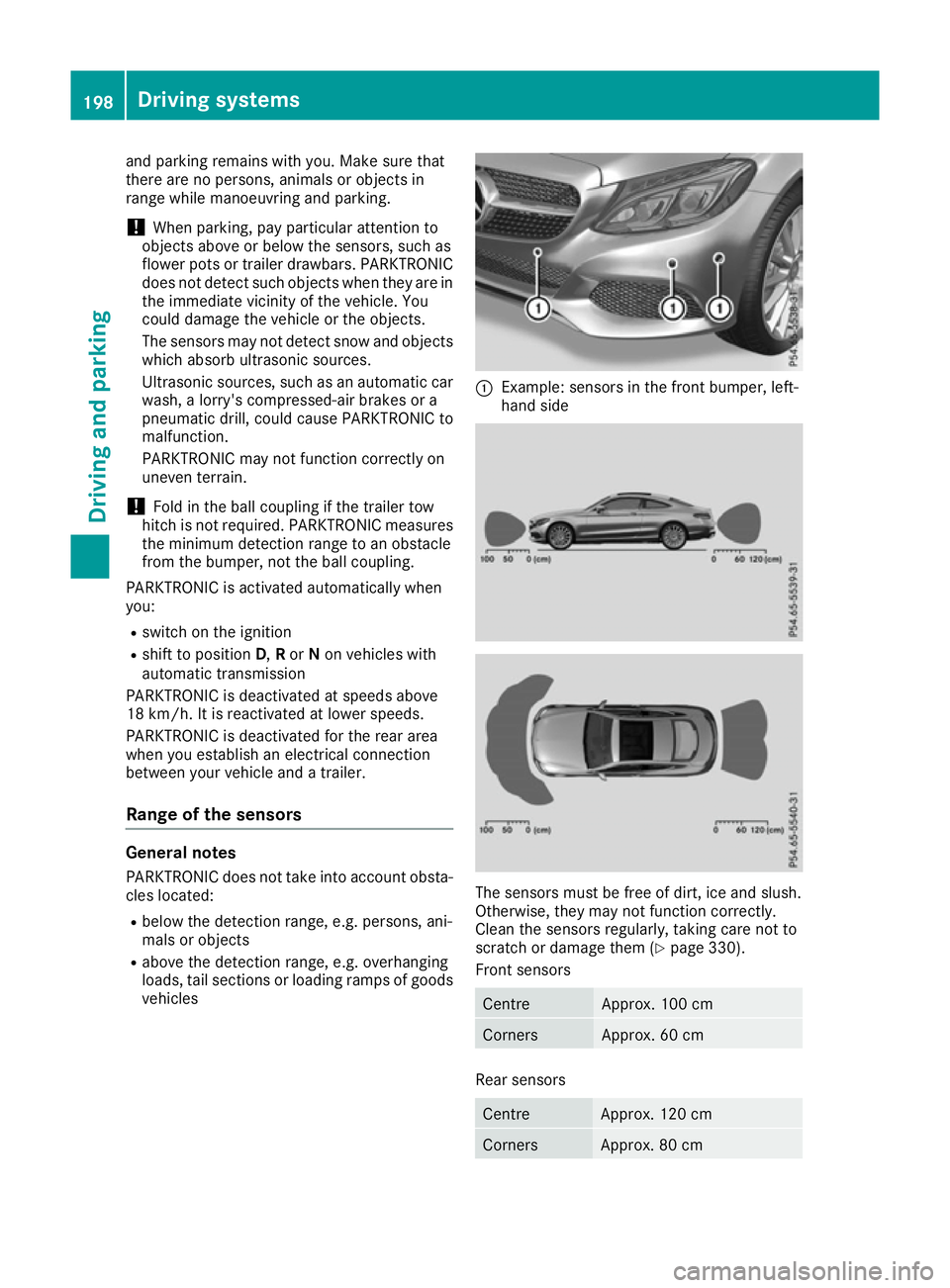
Range of th esensors General notes
PARKTRONIC does no ttak eintoa ccoun tobsta-
cle slocated:
R below th edetection range, e.g .persons, ani-
mals or objects
R abov ethe detection range, e.g .overhanging
loads, tail sections or loadin gramps of goods
vehicles :
Example :sensor sinthefron tbumper, left-
han dside The sensor
smust be free of dirt ,ice and slush.
Otherwise, they may no tfunction correctly.
Clean th esensor sregularly, taking car enotto
scratch or damage them (Y page 330).
Fron tsensors Centre Approx
.100 cm Corners Approx
.60cm Rear sensors
Centre Approx
.120 cm Corners Approx
.80cm 198
Driving systemsDriving and parking
Page 224 of 385
R
you hav eswitched on th eturns ignals. In this
case, th ewarnings are suppressed for acer-
tai np eriod of time.
R ad rivin gsafet ysystem intervenes, suc has
ABS, BA SorESP®
.
Adaptive
When Adaptive Adaptive is selected, no warnin gvibra-
tion occur sif:
R you hav eswitched on th eturns ignals. In this
case, th ewarnings are suppressed for acer-
tai np eriod of time.
R ad rivin gsafet ysystem intervenes, suc has
ABS, BA SorESP®
.
R you accelerate hard, e.g. kickdown.
R you brak ehard.
R you steer actively, e.g. swerve to avoid an
obstacle or chang elan eq uickly.
R you cut th ecorner onashar pbend.
In order that you are warned only when neces-
sar yand in goo dtimeify ou cross th elan em ark-
ing, th esystem detects certain condition sand
warn syou accordingly.
The warnin gvibration occur searlier if:
R you approac hthe outer lan emarking on a
bend
R ther oadh as ver ywide lanes, e.g. amotorway
R thes ystem detects soli dlanem arkings
The warnin gvibration occur slater if:
R ther oadh as narrow lanes
R you cut th ecorner onabend Driving Assistance Plu
spackage
Genera lnotes The Drivin
gAssistance PLU Spackag econsists
of DISTRONI CPLUS(Ypage 184), Active Blind
Spot Assis t(Y page 221) and Active Lan eKeep-
in gA ssist( Ypage 223).
Active Blind Spot Assist Genera
lnotes
Active Blind Spot Assis tmonitors th earea son
either side of th evehicl ethata re no tvisible to
th ed river wit htwo lateral ,rear-facing rada rsen-
sors. Awarnin gdisplay in th eexter iorm irrors
draw syour attention to vehicles detecte dinthe
monitore darea .Ify ou then switch on th ecor- respondin
gturns ignal to chang elanes, you will
also receiv eavisual and audibl ecollision warn-
ing. If ariskofs ide impact is detected, correc-
tive brakin gmay help you avoid acollision.
Active Blind Spot Assis tevaluates th efree
spac eint hedirection of travel and to th eside
before makin gacourse-correcting brak eappli-
cation .For this, Active Blind Spot Assis tuses
th ef orward-facing rada rsensors.
Active Blind Spot Assis tsupport syou from a
speed of approximately 30 km/h.
Important safety notes Active Blind Spot Assis tisonlyana id and is not
as ubstitut efor attentive driving. G
WARNING
Active Blind Spot Assis tdoes no treac tto
vehicles:
R overtaking to oclosely on th eside ,placing
them in th eblinds pota rea
R if th edifference in th espeed of approach
and overtaking is to ogreat
As aresult ,Activ eBlind Spot Assis tmay nei-
ther giv ewarnings no rintervene in suchsit-
uations. There is ariskofana ccident.
Always pay careful attention to th etraffic sit-
uation and maintai nasafed istanc eattheside
of th evehicle.
Rada rsensors
The Active Blind Spot Assis trada rsensor sare
integrate dintot he fron tand rear bumpers and
behind acover in th eradiato rtrim. Mak esure
that th ebumpers and th ecover in th eradiator
trim are free of dirt, ice or slush. The rear sen-
sor sm ustn otbe covered, e.g. by bicycle racks
or overhangin gloads .Following asevere impact
or in th eevent of damage to th ebumpers ,have
th ef unction of th erada rsensor schecked at a
qualified specialist workshop .Activ eBlind Spot
Assis tmay otherwise no longer function prop-
erly.
Monitoring range G
WARNING
Active Blind Spot Assis tdoes no tdetec tall
traffic situation sand roa dusers. There is a
ris kofana ccident. Driving systems
221Driving and parking
Z
Page 228 of 385
must have been issued by means of intermittent
vibration through the steering wheel. In addi-
tion, alane with lane markings on both sides
must be detected.
In the case of abroken lane marking being
detected, alane-correcting brake application
can only be made if avehicl ehas been detected
in the adjacent lane. Oncoming vehicles, over-
taking vehicles and vehicles in adjacent lanes
can be detected.
i Af
urther lane-correcting brake application
can only occur after yourv ehiclehas returned
to the original lane.
No lane-correcting brake application occurs if:
R you clearl yand activel ysteer, brake or accel-
erate
R you cut the corner on asharp bend
R you have switched on the turn signal
R ad riving safety system intervenes, such as
ESP ®
,P RE-SAFE ®
Brake or Active Blind Spot
Assist
R you have adopted asporty driving style with
high cornering speed sorhigh rates of accel-
eration
R ESP ®
is deactivated
R the transmission is not in position D
R on vehicles with atrailert ow hitch, the elec-
trical connection to the traile rhas been cor-
rectly established
R aloss of tyre pressure or adefective tyre has
been detected and displayed
R an obstacl einthe lane in which you are driving
has been detected
Active Lane Keeping Assist may not detect other
road users or traffic situations. An inappropriate
brake application may be interrupted at any time
if:
R you steer slightly in the opposite direction
R you switch on the turn signal
R you clearl ybrake or accelerate
Al ane-correcting brake application is interrup-
ted automatically if:
R ad riving safety system intervenes, such as
ESP ®
,P RE-SAFE ®
Brake or Active Blind Spot
Assist
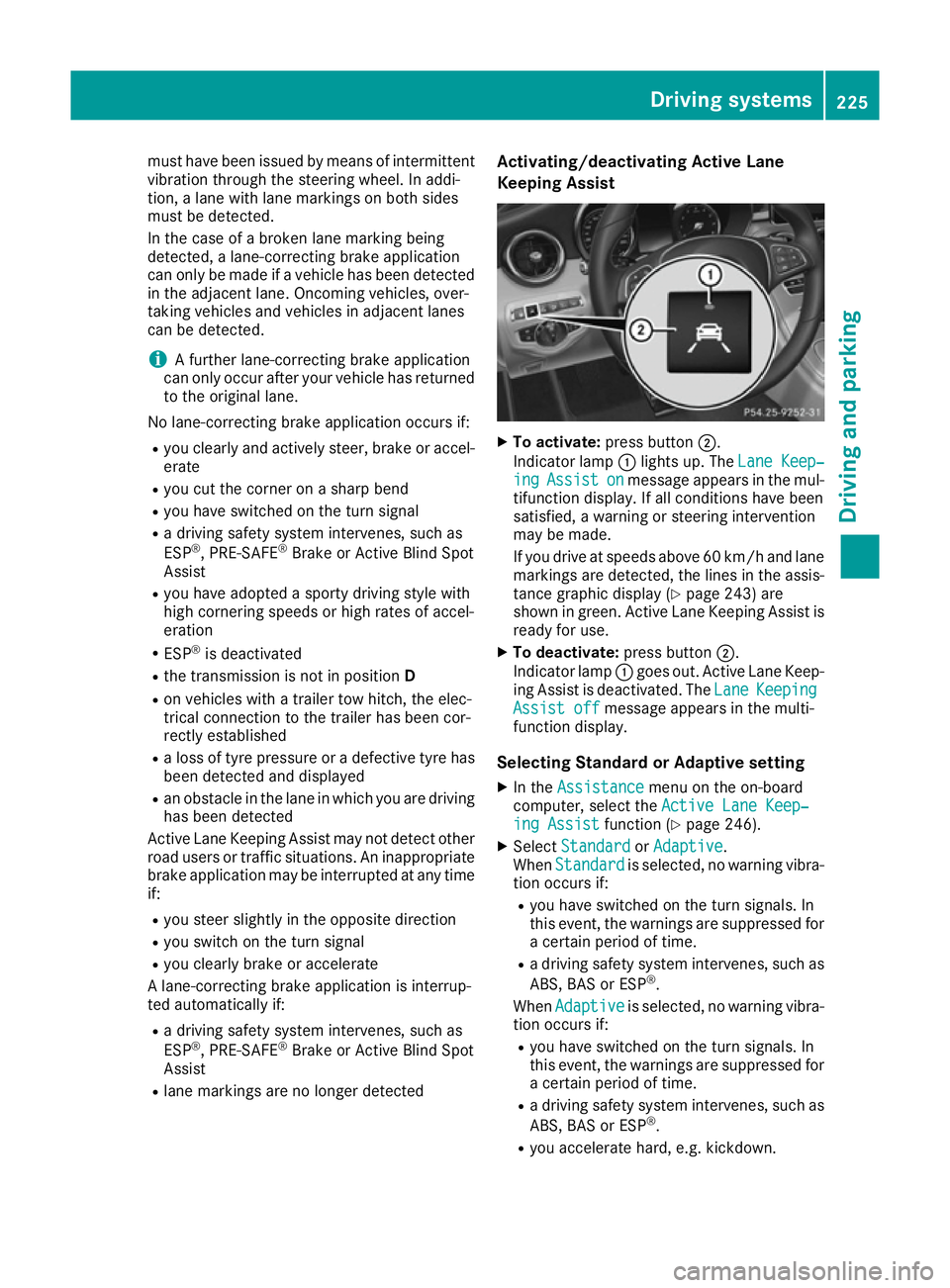
R lane markings are no longer detected Activating/deactivatin
gActive Lane
Keeping Assist X
To activate: press button ;.
Indicator lamp :lights up. The Lane Keep‐ Lane Keep‐
ing
ing Assist
Assist on
onmessage appears in the mul-
tifunction display.Ifa ll conditions have been
satisfied, awarning or steering intervention
may be made.
If you drive at speed sabove 60 km/h and lane
markings are detected, the lines in the assis- tance graphic display (Y page 243) are
shown in green. Active Lane Keeping Assist is
read yfor use.
X To deactivate: press button;.
Indicator lamp :goes out. Active Lane Keep-
ing Assist is deactivated. The Lane
Lane Keeping Keeping
Assist off
Assist off message appears in the multi-
function display.
Selecting Standard or Adaptive setting X In the Assistance
Assistance menu on the on-board
computer, select the Active Lane Keep‐
Active Lane Keep‐
ing Assist
ing Assist function (Ypage 246).
X Select Standard
Standard orAdaptive
Adaptive.
When Standard
Standard is selected, no warning vibra-
tion occurs if:
R you have switched on the turn signals. In
this event, the warnings are suppressed for
ac ertain perio doftime.
R ad riving safety system intervenes, such as
ABS, BAS or ESP ®
.
When Adaptive
Adaptive is selected, no warning vibra-
tion occurs if:
R you have switched on the turn signals. In
this event, the warnings are suppressed for
ac ertain perio doftime.
R ad riving safety system intervenes, such as
ABS, BAS or ESP ®
.
R you accelerate hard, e.g. kickdown. Driving systems
225Driving and parking Z
Page 257 of 385
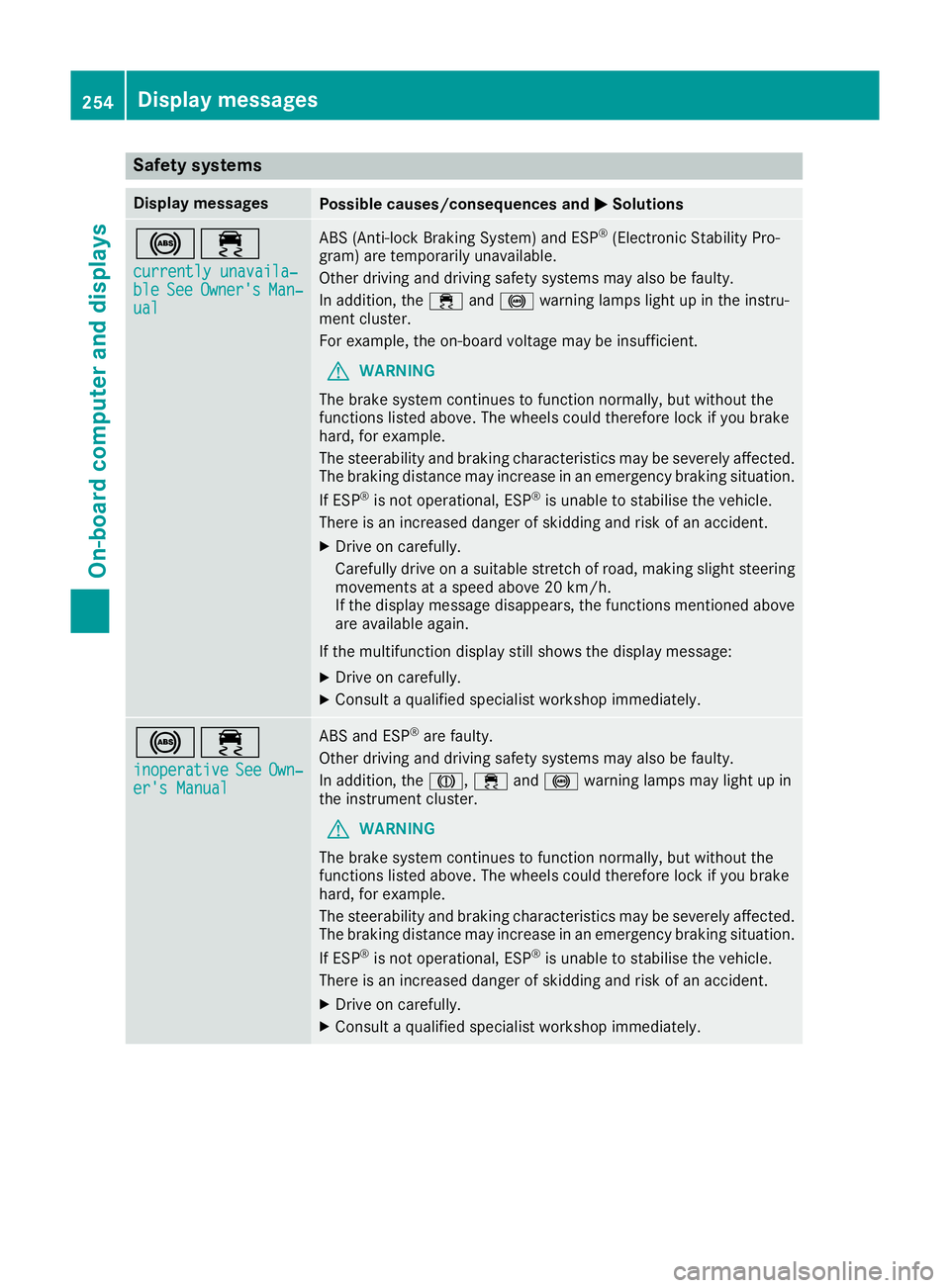
Safety systems
Display messages
Possible causes/consequences and
M
MSolutions !÷
currently unavaila‐
currently unavaila‐
ble ble See
SeeOwner's
Owner's Man‐
Man‐
ual
ual ABS (Anti-lock Braking System) and ESP
®
(Electronic Stability Pro-
gram) are temporarily unavailable.
Other driving and driving safety systems may also be faulty.
In addition, the ÷and! warning lamps light up in the instru-
ment cluster.
For example, the on-board voltage may be insufficient.
G WARNING
The brake system continues to function normally, but without the
functions listed above. The wheels could therefore lock if you brake
hard, for example.
The steerability and braking characteristics may be severely affected. The braking distance may increase in an emergency braking situation.
If ESP ®
is not operational, ESP ®
is unable to stabilise the vehicle.
There is an increased danger of skidding and risk of an accident.
X Drive on carefully.
Carefull ydrive on asuitable stretch of road, making slight steering
movement sataspeed above 20 km/h.
If the display message disappears, the functions mentioned above
are available again.
If the multifunction display still shows the display message: X Drive on carefully.
X Consult aqualified specialist workshop immediately. !÷
inoperative inoperative See SeeOwn‐
Own‐
er's Manual
er's Manual ABS and ESP
®
are faulty.
Other driving and driving safety systems may also be faulty.
In addition, the J,÷and! warning lamps may light up in
the instrumen tcluster.
G WARNING
The brake system continues to function normally, but without the
functions listed above. The wheels could therefore lock if you brake
hard, for example.
The steerability and braking characteristics may be severely affected. The braking distance may increase in an emergency braking situation.
If ESP ®
is not operational, ESP ®
is unable to stabilise the vehicle.
There is an increased danger of skidding and risk of an accident.
X Drive on carefully.
X Consult aqualified specialist workshop immediately. 254
Display messagesOn-board computer and displays
Page 290 of 385
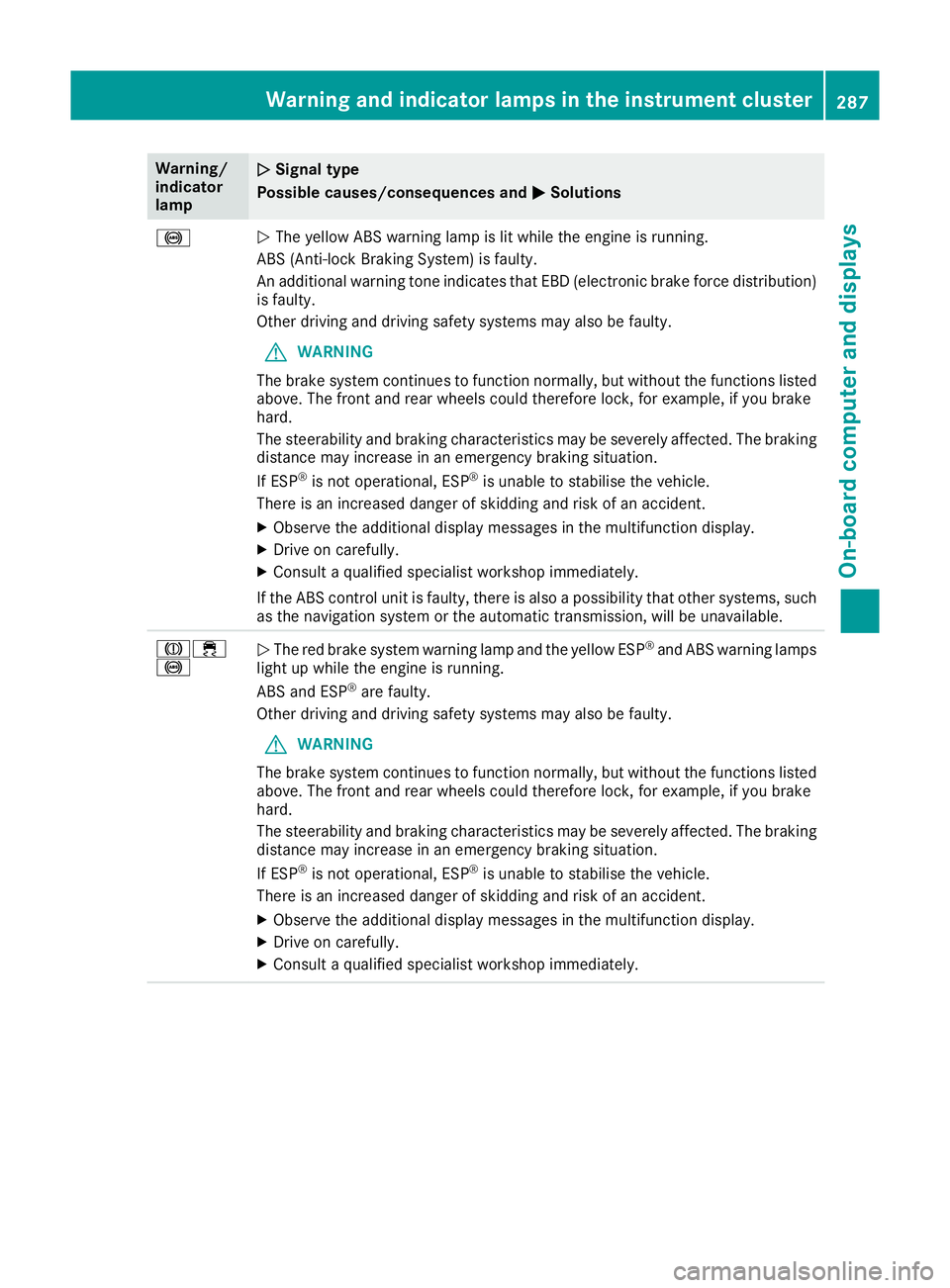
Warning/
indicator
lamp
N N
Signal type
Possiblec auses/consequences and M
MSolutions !
N
The yellow ABS warning lamp is lit while the engine is running.
ABS (Anti-lock Braking System) is faulty.
An additiona lwarning tone indicates that EBD (electronic brake force distribution)
is faulty.
Other driving and driving safety systems may alsobef aulty.
G WARNING
The brake system continues to function normally, but without the functions listed above. The front and rear wheels coul dtherefore lock, for example, if you brake
hard.
The steerability and braking characteristics may be severely affected. The braking
distance may increas einanemergency braking situation.
If ESP ®
is not operational ,ESP ®
is unable to stabilise the vehicle.
There is an increased dange rofskidding and risk of an accident.
X Observe the additiona ldisplay messages in the multifunction display.
X Drive on carefully.
X Consult aqualified specialist worksho pimmediately.
If the ABS control unit is faulty, there is alsoap ossibility that other systems,such
as the navigation system or the automatic transmission, willbeu navailable.J÷
!
N
The red brake system warning lamp and the yellow ESP ®
and ABS warning lamps
light up while the engine is running.
ABS and ESP ®
are faulty.
Other driving and driving safety systems may alsobef aulty.
G WARNING
The brake system continues to function normally, but without the functions listed above. The front and rear wheels coul dtherefore lock, for example, if you brake
hard.
The steerability and braking characteristics may be severely affected. The braking
distance may increas einanemergency braking situation.
If ESP ®
is not operational ,ESP ®
is unable to stabilise the vehicle.
There is an increased dange rofskidding and risk of an accident.
X Observe the additiona ldisplay messages in the multifunction display.
X Drive on carefully.
X Consult aqualified specialist worksho pimmediately. Warning and indicator lamps in the instrument cluster
287On-board computer and displays Z