phone MERCEDES-BENZ C-CLASS COUPE 2015 User Guide
[x] Cancel search | Manufacturer: MERCEDES-BENZ, Model Year: 2015, Model line: C-CLASS COUPE, Model: MERCEDES-BENZ C-CLASS COUPE 2015Pages: 385, PDF Size: 13.12 MB
Page 83 of 385
Key
Important safety notes
United Kingdom only: G
WARNING
Whe nthe doubl elocks are activated, the
door scan no longer be opened from the
inside. People in th evehicl ecan no longer get
out ,e.g.inh azardous situations. There is a
ris kofi njury.
Therefore ,donotleav eany people unsuper-
vised in th evehicle, particularly children ,eld-
erl yp eople or people in need of special assis-
tance .Don otactivat ethe doubl eloc kw hen
people are in th evehicle.
If th evehicl ehas been locke dfromt heoutside,
th ed oubl eloc kf unction is activated as stand-
ard. It is then no tpossibl etoopen th edoors
from inside th evehicle. You can deactivat ethe
doubl eloc kfunction by deactivating th einterior
motion sensor (see th eseparat emultimedia
system operating instructions). The door scan
then be opened from th einside after th evehicle
has been locke dfromt heoutside .The anti-theft
alarm system is triggered if th edoor is opened
from th einside. Switc hoff th ealarm
(Y page 78).
All countries: G
WARNING
If children are lef tunsupervised in th evehicle,
they could:
R open doors, thereby endangering other per-
son sorr oad users
R get out and be struc kbyoncomingt raffic
R operate vehicl eequipmen tand become
trapped ,for example
In addition ,the children could also set the
vehicl einm otion,for example, if they:
R release th eparking brake
R shift th eautomatic transmission out of park
position Porshift manual transmission into
neutral
R start th eengine
There is ariskofana ccidentand injury. Whe
nleaving th evehicle, always tak ethe key
wit hyou and loc kthe vehicle. Never leave
children and animals unattended in th evehi-
cle .Keept he keys out of th ereac hofc hildren. G
WARNING
If you attach heav yorlargeobjects to th ekey,
th ek eycould be unintentionally turne dinthe
ignition lock. This could caus ethe engin eto
be switched off .There is ariskofana ccident.
Do no tattach any heav yorlargeobjects to the
key. Remove any bulk ykeyrings before insert-
ing th ekeyintot he ignition lock.
! Kee
pthe keya way from stron gmagnetic
fields. Otherwise ,the remot econtro lfunction
could be affected.
Stron gmagnetic fields can occur in th evicin-
it yofp owerful electrical installations.
Do no tkeept he key:
R wit he lectronic devices, e.g. amobile phone
or another key
R wit hm etallic objects ,e.g.c oins or metal film
R inside metallic objects ,e.g.a metal case
This can affec tthe key's functionality.
Vehicles wit hKEYLESS-G Ostart function: do
no tk eept he keyo nthe parcel shelf or in the
boot .Otherwise ,the keym ay no tbed etected,
e.g. when starting th eengineu singthe Start/
Stop button.
Ac heck whichperiodically establishes aradio
connection between th evehicl eand th ekey
determine swhether avalid ke yisint hevehicle.
This occurs, for example:
R when starting th eengine
R whils tdriving
R when th eexternal door handles are touched
R during convenience closing 80
KeyOpening and closing
Page 149 of 385
To start the vehicle without actively using the
key:
R the Start/Stop button must be inserted in the
ignition lock
R the key must be in the vehicle
R the vehicle must not be locked with the key or
KEYLESS-GO (Y page 81)
Do not keep the key:
R with electronic devices, e.g. amobile phone
or another key
R with metallic objects, e.g. coins or metal film
R inside metallic objects, e.g. ametal case
This can affect the key's functionality.
If you lock the vehicle with the key's remote
control or with KEYLESS-GO, after ashort time:
R you will not be able to switch on the ignition
with the Start/Stop button
R you will not be able to start the engine with the
Start/Stop button until the vehicle is
unlocked again
If you lock the vehicle centrally using the button
on the front door (Y page 87), you can continue
to start the engine with the Start/Stop button.
The engine can be switched off while the vehicle
is in motion by pressing and holding the Start/
Stop button for three seconds. This function
operates independently of the ECO start/stop
automatic engine switch-off function.
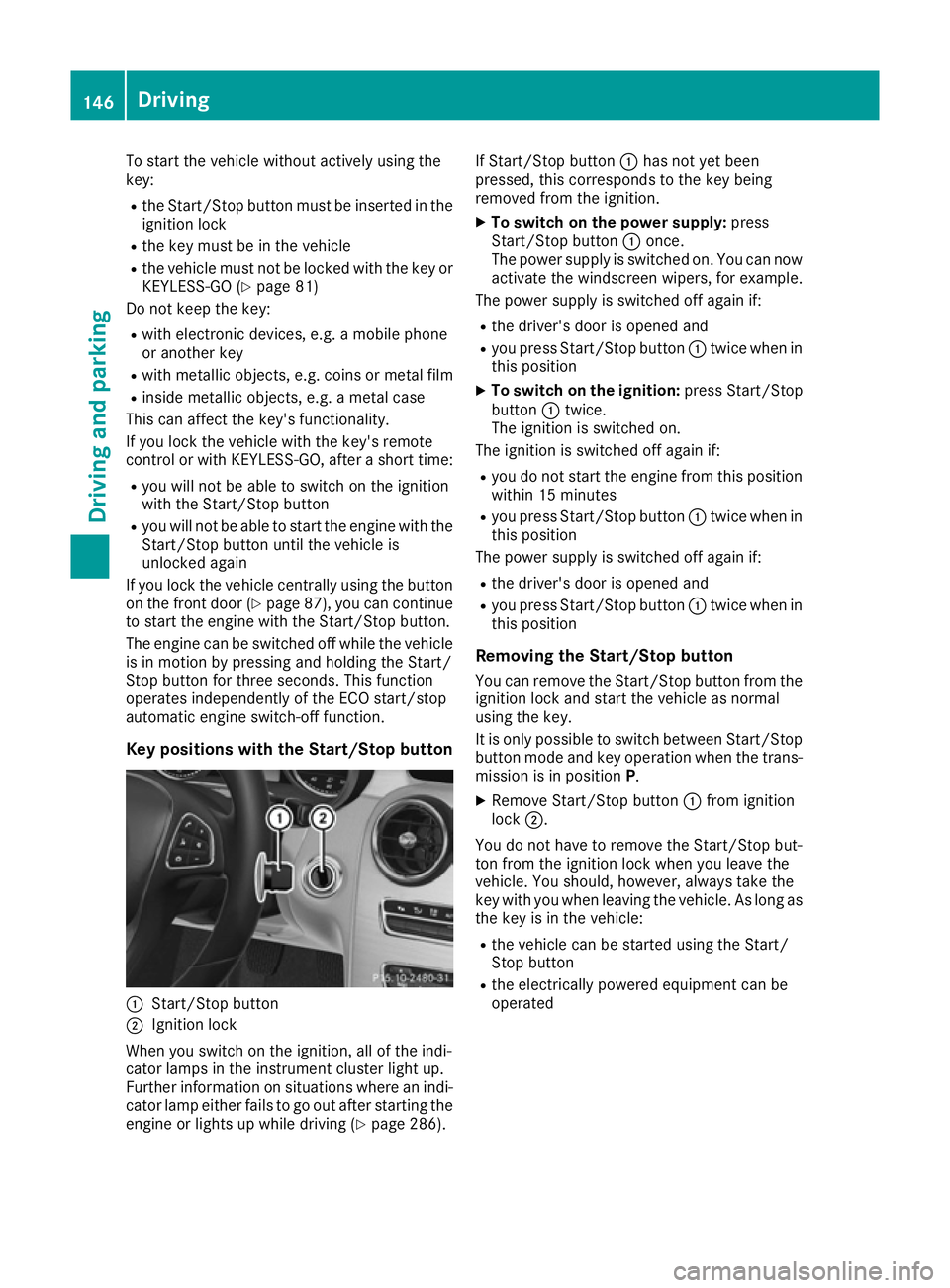
Key positions with the Start/Stop button :
Start/Stop button
; Ignition lock
When you switch on the ignition, all of the indi-
cator lamps in the instrument cluster light up.
Further information on situations where an indi-
cator lamp either fails to go out after starting the engine or lights up while driving (Y page 286).If Start/Stop button
:has not yet been
pressed, this corresponds to the key being
removed from the ignition.
X To switch on the power supply: press
Start/Stop button :once.
The power supply is switched on. You can now activate the windscreen wipers, for example.
The power supply is switched off again if:
R the driver's door is opened and
R you press Start/Stop button :twice when in
this position
X To switch on the ignition: press Start/Stop
button :twice.
The ignition is switched on.
The ignition is switched off again if:
R you do not start the engine from this position
within 15 minutes
R you press Start/Stop button :twice when in
this position
The power supply is switched off again if:
R the driver's door is opened and
R you press Start/Stop button :twice when in
this position
Removing the Start/Stop button You can remove the Start/Stop button from the
ignition lock and start the vehicle as normal
using the key.
It is only possible to switch between Start/Stop
button mode and key operation when the trans-
mission is in position P.
X Remove Start/Stop button :from ignition
lock ;.
You do not have to remove the Start/Stop but-
ton from the ignition lock when you leave the
vehicle. You should, however, alway stake the
key with you when leaving the vehicle. As long as
the key is in the vehicle:
R the vehicle can be started using the Start/
Stop button
R the electrically powered equipment can be
operated 146
DrivingDriving and parking
Page 236 of 385
The segment
sbetween the speed of the vehi-
cle in front and the stored speed light up. Rev counter
! Do not drive in the overrevving range. Doing
so will damage the engine.
The red band in the rev counter indicates the
engine's overrevving range.
The fuel supply is interrupted to protec tthe
engine when the red band is reached. Outside temperature display
You should pay special attention to road condi-
tions when temperatures are around freezing
point.
Bear in mind that the outside temperature dis-
play indicates the measured air temperature
and not the road surface temperature.
The outside temperature display is in the multi-
function display (Y page 234).
Changes in the outside temperature are dis-
played after ashort delay. Coolant temperature gauge
G
WARNING
If you open the bonnet while the engine is
overheatin gorwhile there is afire in the
engine compartment,y ou could come into
contact with hot gases or other leaking ser-
vice products. There is adanger of injury.
Allow an overheatin gengine to cool down
before opening the bonnet .Ifthere is afire in
the engine compartment,l eave the bonnet
closed and notify the fire brigade.
The multifunction display shows the coolant
temperature gauge in the lower section of the
rev counter (Y page 32).
At high outside temperatures and when driving
uphill, the coolant temperature may rise to the
end of the scale.
Under normal operating conditions and with the
specified coolant level, the coolant temperature may rise to 120 †. Operating the on-board computer
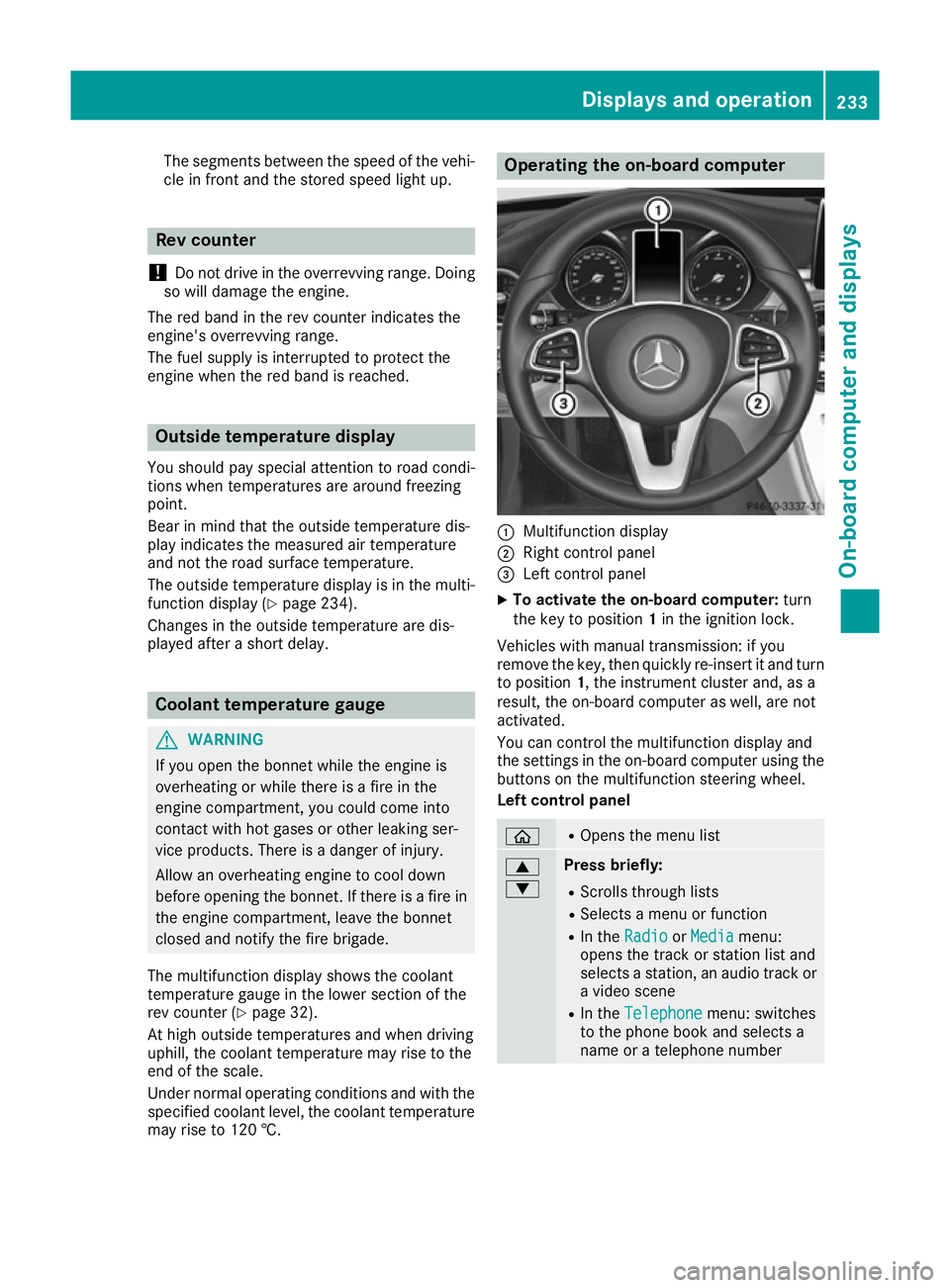
:
Multifunction display
; Right control panel
= Left control panel
X To activat ethe on-board computer: turn
the key to position 1in the ignition lock.
Vehicles with manual transmission: if you
remove the key, then quickly re-insert it and turn
to position 1,the instrument cluster and, as a
result, the on-board computer as well, are not
activated.
You can control the multifunction display and
the settings in the on-board computer using the button sonthe multifunction steerin gwheel.
Left control panel ò R
Opens the menu list 9
: Press briefly:
R Scrolls through lists
R Select samenu or function
R In the Radio Radio orMedia
Media menu:
opens the track or station list and
selects astation ,anaudio track or
av ideo scene
R In the Telephone Telephone menu: switches
to the phone book and selects a
name or atelephone number Displays and operation
233On-board computer and displays Z
Page 237 of 385
9
: Press and hold:
R
Scrolls quickly through all lists
R In the Radio Radio orMedia Media menu:
selects astation, audio track or
video scene using rapid scrolling
R In the Telephone
Telephone menu: starts
rapid scrolling if the phone book is open a R
In all menus: confirmst he selected
entryint he list
R In the Radio
Radio orMedia
Media menu:
opens the list of available radio
sources or media
R In the Telephone Telephone menu: switches
to the phone book and starts dial-
ling the selected number ñ R
Vehicles with Audio 20:
Switches off voice-operated con-
trol for navigation (see manufac-
turer's operating instructions)
R Vehicles with COMAND Online:
Switches off LINGUATRONIC (see
the separate operating instruc-
tions) % Press briefly:
R Back
R In the Radio Radio orMedia
Media menu: dese-
lects the track or station list or list
of available radio sources or media
R Hides display messages
R Exitst he telephone book/redial
memory % Press and hold:
R
Callsupt he standard display in the
Trip Trip menu Right control panel
~ R
Rejects or ends acall
R Exitst he telephone book/redial
memory 6 R
Makes or accepts acall
R Switches to the redial memory W
X R
Adjusts the volume 8 R
Mute ó R
Vehicles with Audio 20:
Switches on voice-operated con-
trol for navigation (see manufac-
turer's operating instructions)
R Vehicles with COMAND Online:
Switches on LINGUATRONIC (see
the separate operating instruc-
tions) Multifunction display
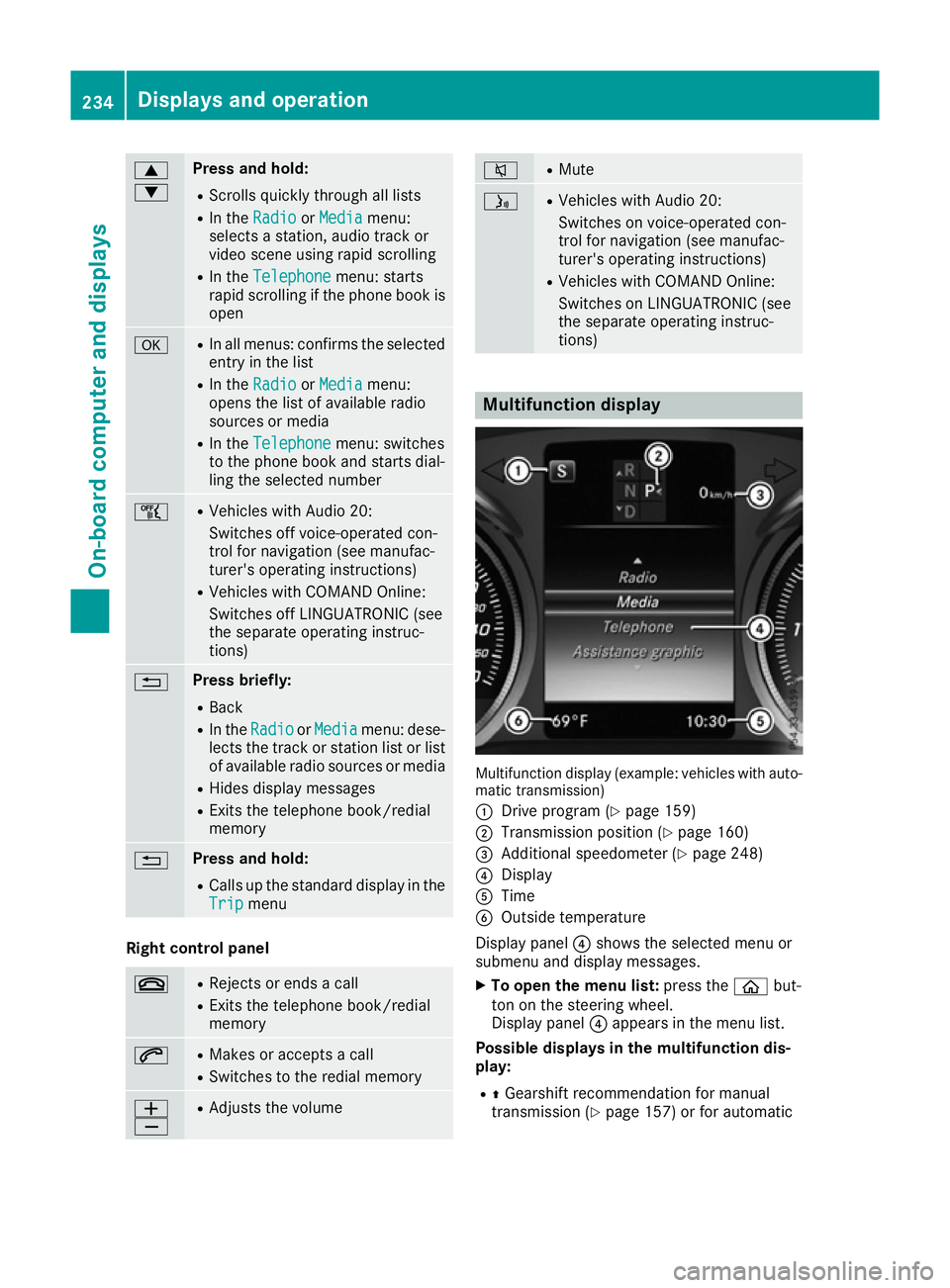
Multifunction display (example: vehicles with auto-
matic transmission)
: Drive program (Y page 159)
; Transmission position (Y page 160)
= Additional speedometer (Y page 248)
? Display
A Time
B Outside temperature
Display panel ?shows the selected menu or
submenu and display messages.
X To open the menu list: press theòbut-
ton on the steering wheel.
Display panel ?appears in the menu list.
Possible displays in the multifunction dis-
play:
R ZGearshift recommendation for manual
transmission (Y page 157) or for automatic234
Displays and operationOn-board computer and displays
Page 239 of 385
AMG displays in th
ehead-up display
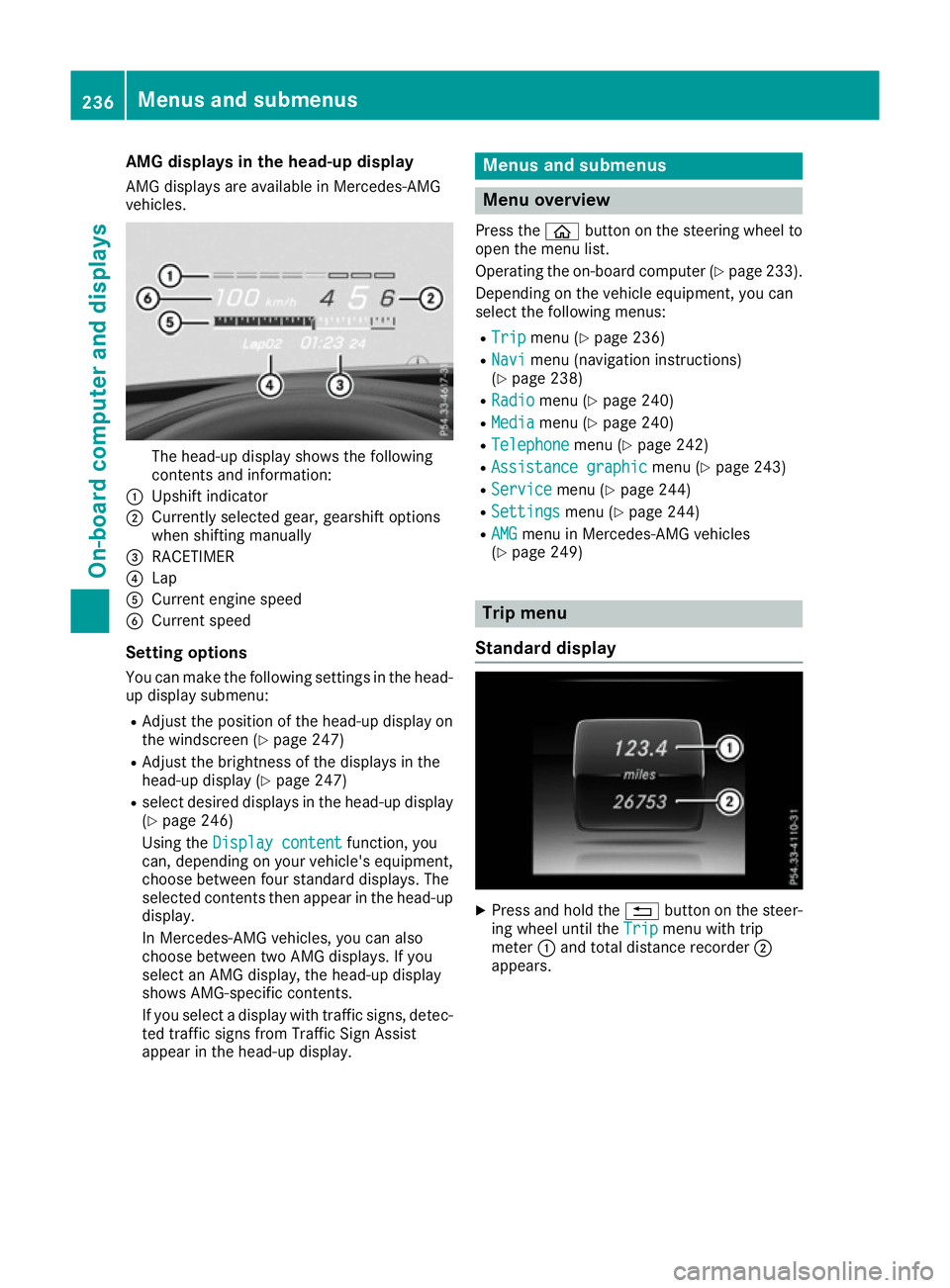
AM Gd isplays are available in Mercedes-AMG
vehicles. The head-up display shows th
efollowing
contents and information:
: Upshif tindicator
; Currently selected gear ,gearshif toptions
when shiftin gmanually
= RACETIMER
? Lap
A Curren tengines peed
B Curren tspeed
Settin goptions
You can mak ethe followin gsettings in th ehead-
up display submenu:
R Adjus tthe positio nofthehead-up display on
th ew indscree n(Ypage 247)
R Adjus tthe brightness of th edisplays in the
head-up display (Y page 247)
R select desired displays in th ehead-up display
(Y page 246)
Usin gthe Displa ycontent
Displa ycontent function ,you
can ,depending on your vehicle's equipment,
choos ebetween four standard displays. The
selected contents then appear in th ehead-up
display.
In Mercedes-AM Gvehicles, you can also
choos ebetween two AM Gdisplays. If you
select an AM Gdisplay, th ehead-up display
shows AMG-specific contents.
If you select adisplay wit htraffic signs, detec-
te dt raffic sign sfromT raffic Sig nAssist
appear in th ehead-up display. Menu
sand submenus Menu overview
Press the òbuttonont hesteering whee lto
open th emenulist.
Operating th eon-bo ard computer (Y page 233).
Dependin gonthevehicl eequipment, you can
select th efollowin gmenus:
R Trip Trip menu(Ypage 236)
R Navi
Navi menu(navigation instructions)
(Y page 238)
R Radio
Radio menu(Ypage 240)
R Media
Media menu(Ypage 240)
R Telephone
Telephone menu(Ypage 242)
R Assistanc egraphic
Assistanc egraphic menu(Ypage 243)
R Service
Service menu(Ypage 244)
R Settings
Settings menu(Ypage 244)
R AMG
AMG men uinM ercedes-AM Gvehicles
(Y page 249) Trip menu
Standar ddisplay X
Press and hold the %buttonont hesteer-
ing whee luntil the Trip Tripmenuwitht rip
meter :and total distanc erecorder ;
appears. 236
Menu
sand submenusOn-boar dcomputer and displays
Page 245 of 385
X
To select the next or previous scen
einthe
scen elist: press :or9 briefly.
X To select
ascene in the scen elistu sing
rapid scroll: press and hold :or9
unti ldesir ed scene :hasb eenr eached.
X Press ato confirm your selection.
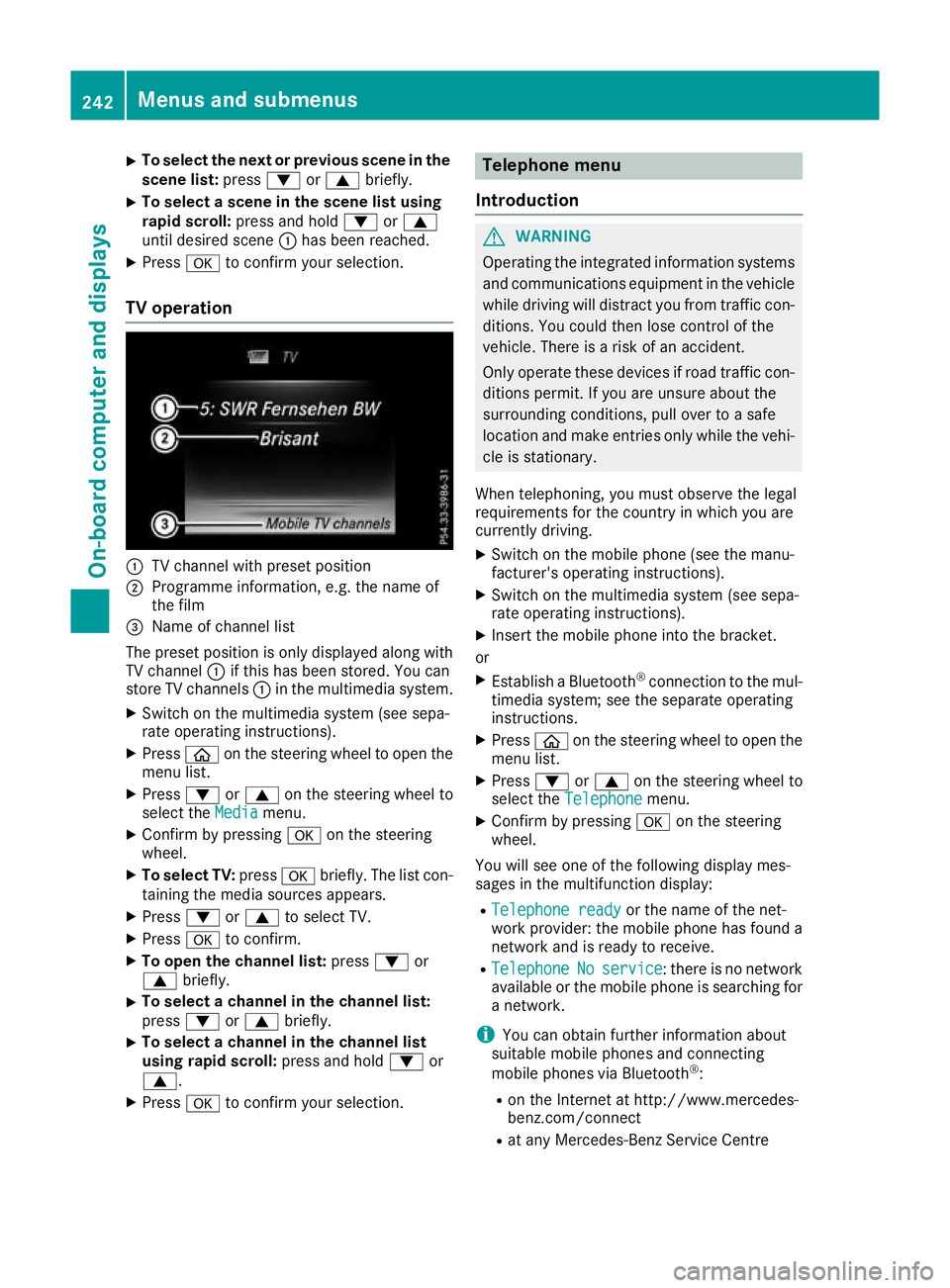
TV operation :
TV channel with preset position
; Programme information, e.g .the name of
the film
= Name of channel list
The preset positio niso nlyd isplayed along with
TV channel :if thi shasbeen stored .You can
stor eTVc hannels :in the multimedia system.
X Switch on the multimedia system (se esepa-
rate operating instructions).
X Press òon the steering whee ltoopent he
menu list.
X Press :or9 on the steering whee lto
select the Media
Media menu.
X Confir mbypressing aon the steering
wheel.
X To select TV: pressabriefly. The list con-
taining the media sources appears.
X Press :or9 to select TV.
X Press ato confirm.
X To ope nthe channel list: press:or
9 briefly.
X To select
achannel in the channel list:
press :or9 briefly.
X To select
achannel in the channel list
using rapid scroll: press and hold:or
9.
X Press ato confirm your selection. Telephone menu
Introduction G
WARNING
Operating the integrated informatio nsystems
and communications equipment in the vehicle
whil edriving will distract yo ufrom traffic con-
ditions. Yo ucould then lose contro lofthe
vehicle. There is ariskofana ccident.
Onl yoperate thes edevice sifr oadt raffic con-
ditions permit. If yo uare unsur eabout the
surrounding conditions, pull ove rtoasafe
location and make entries onl ywhile the vehi-
cle is stationary.
Whe ntelephoning, yo umusto bserve the legal
requirements for the country in which yo uare
currentl ydriving.
X Switch on the mobil ephone (se ethe manu-
facturer's operating instructions).
X Switch on the multimedia system (se esepa-
rate operating instructions).
X Insert the mobil ephone into the bracket.
or X Establis haBluetooth ®
connectio ntothe mul-
timedi asystem ;see the separate operating
instructions.
X Press òon the steering whee ltoopent he
menu list.
X Press :or9 on the steering whee lto
select the Telephone
Telephone menu.
X Confir mbypressing aon the steering
wheel.
Yo uw ills ee one of the following display mes-
sages in the multifunctio ndisplay:
R Telephone ready
Telephone ready or the nameofthe net-
work provider: the mobil ephone ha sfound a
network and is ready to receive.
R Telephone
Telephone No
Noservice
service:t hereisnon etwork
available or the mobil ephone is searching for
an etwork.
i Youc an obtai nfurther informatio nabout
suitabl emobilephones and connecting
mobil ephones via Bluetooth ®
:
R on the Interne tath ttp://www.mercedes-
benz.com/connect
R at any Mercedes-Benz Service Centre 242
Menus and submenusOn-board computer and displays
Page 246 of 385
Accepting
acall If someon
ecallsy ou when you are in the Tele‐
Tele‐
phone
phone menu,adisplay message appear sinthe
multifunction display.
You can accept acall at any time, eve nifyou are
no tint heTelephone
Telephone menu.
X Press the 6buttonont hesteering wheel
to accept an incoming call.
Rejecting or ending acall You can en
dorrejectac all at any time eve nif
you are no tintheTelephone Telephone menu.
X Press the ~buttonont hesteering wheel
to rejec torendan incoming call.
Selecting an entry in th ephone book X
Press òon thesteering whee ltoo pen the
men ulist.
X Press :or9 on thesteering whee lto
select the Telephone
Telephone menu.
X Confir mbyp ressing aon thesteering
wheel.
X Press :, 9ora to switch to the
phone book.
X Press :or9 to select th enames one
after th eother.
or X To star trap id scrolling: press and hold :
or 9 for longer than on esecond.
The names in th ephone book are displayed
quickl yone after th eother.
If you press and hold the :or9 button
for longer than fiv eseconds, th ename
appear switht he next or previous lette rinitial
lette rint healphabet.
Rapid scrollin gstops when you release the
butto norr eachthe endoft helist.
X If only one telephone number is store
dfor
an ame: press the 6ora buttonto
start dialling.
or
X If there is mor
ethano ne number for a
particular name: press the6ora
butto ntod isplay th enumbers.
X Press :or9 to select th enumber you
want to dial.
X Press the 6ora buttontos tart dial-
ling. or
X To exit th etelephone book: press the~
or % button.
Redialling The on-board computer saves th
elast names or
number sdialle dint heredial memory.
X Press òon thesteering whee ltoo pen the
men ulist.
X Press :or9 on thesteering whee lto
select the Telephone
Telephone menu.
X Confir mbyp ressing aon thesteering
wheel.
X Press the 6buttontos witch to th eredial
memory.
X Press :or9 to select th edesired
nam eorn umber.
X Press the 6ora buttontos tart dial-
ling.
or X To exit th eredial memory: press the~
or % button. Assistance graphic menu
X
Press òon thesteering whee ltoo pen the
men ulist.
X Press :or9 on thesteering whee lto
select the Assistanc egraphic
Assistanc egraphic menu.
X Confir mbyp ressing aon thesteering
wheel.
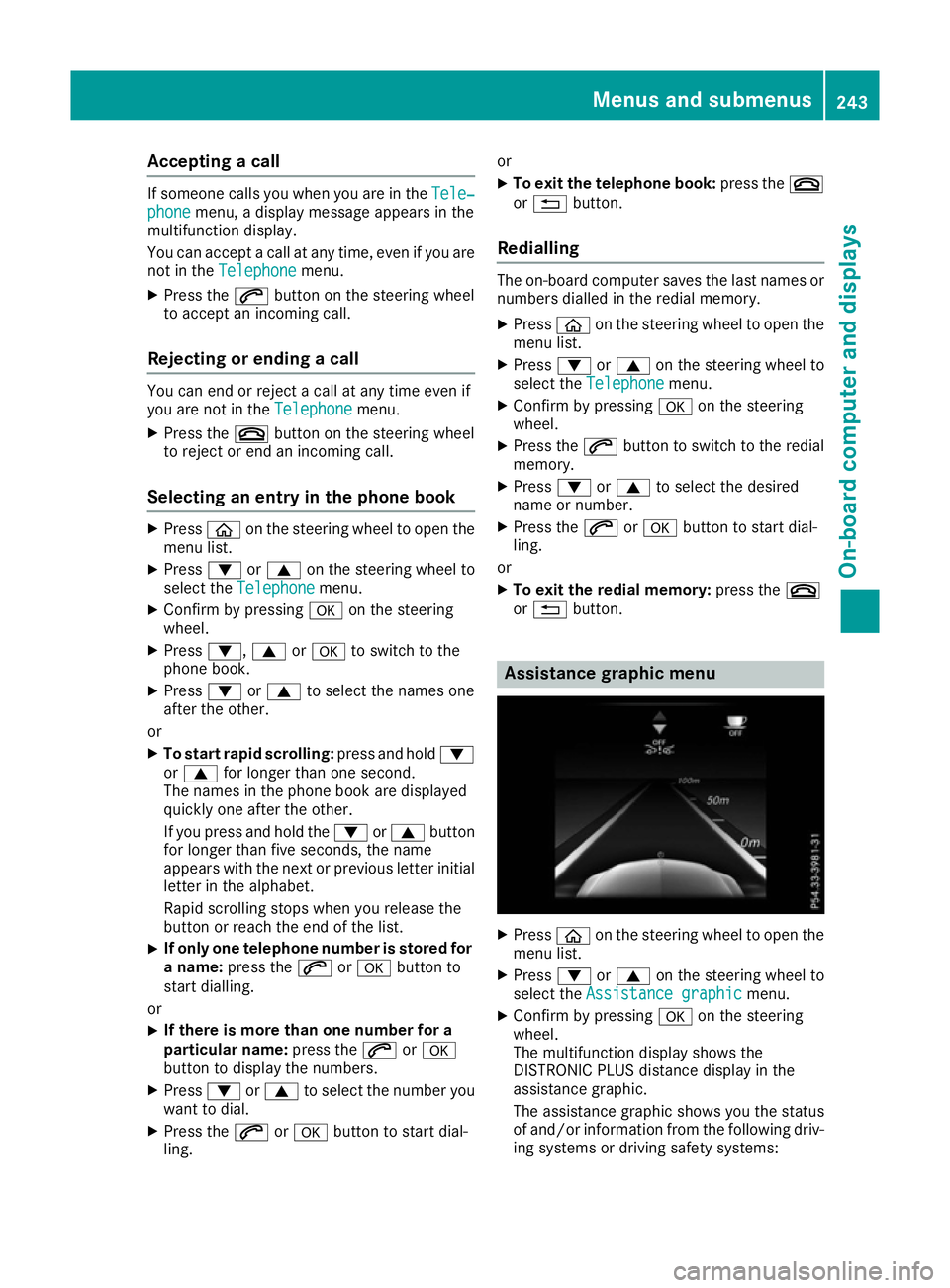
The multifunction display shows the
DISTRONI CPLUSd istanc edisplay in the
assistanc egraphic.
The assistanc egraphic shows you th estatus
of and/o rinformation from th efollowin gdriv-
ing systems or drivin gsafet ysystems: Menu
sand sub menus
243On-boardcomputer an ddisplays Z
Page 286 of 385

Display messages
Possible causes/consequences and
M
MSolutions Ð
Power steering mal‐ Power steering mal‐
function See Own‐ function See Own‐
er'
sM anual
er' sM anual The powe
rsteering assistanc eisfaulty.
Aw arning tone also sounds.
G WARNING
You will need to use mor eforce to steer.
There is ariskofana ccident.
X Chec kwhether you are able to apply th eextra force required.
If you ar eabletos teer safely:
X Drive on carefully.
X Consult aqualified specialist workshop immediately.
If you ar eunable to steer safely:
X Do no tdrive on.
X Consult aqualified specialist workshop. Ð
Steering malfunc‐ Steering malfunc‐
tio
nS ee Owner's
tio nS ee Owner's
Manual Manual Vehicl
ewithm anual transmission :the electric steering loc kismal-
functioning.
G WARNING
The steering may be locke dbytheelectric steering lock.
There is ariskofana ccident.
X Pull ove rand stop th evehicl esafely as soo naspossible, paying
attention to roa dand traffic conditions.
X Safeguar dthe vehicl eagainst rollin gaway (Y page 172).
X Do no tdrive on.
X Consult aqualified specialist workshop. _
Before Before
starting
starting the
the
engine ,turnt he
engine ,turnt he
steering wheel.
steering wheel. Vehicl
ewithm anual transmission :the electric steering loc kismal-
functioning.
X Remove th ekeyfrom th eignition lock.
X To unloc kthe steering ,movet he steering whee lslightly.
X Inser tthe keyintot he ignition loc kagain. Telephone Telephone
No
Noservice
service Your vehicl
eisoutside th enetwork provider' stransmitter/receiver
range.
X Wait until th emobile phone operational readiness symbol appears
in th emultifunction display. ¥
Top up washer fluid Top up washer fluid The washer flui
dlevel in th ewasher flui dreservoir has dropped below
th em inimum.
X Top up th ewasher flui d(Ypage 325). Display
messages
283On-boardcomputer an ddisplays Z
Page 300 of 385
Adjusting th
evolume X
Turn th ethumbwheel on th eright of th econ-
troller.
The volume is adjusted:
R for th ecurrentl yselected media source
R during traffic or navigation announcements
R in hands-free mod eduring aphone call
Switchin gthe soun don/off This function is no
tavailable for Mercedes-AMG
vehicles wit hselectable AM GPerformance
exhaust system.
X Press th ethumbwheel to th eright of th econ-
troller.
If th eaudio output is switched off ,the status
lin ew ill sho wthe 8 symbol. If you switch
th em edia source or set th evolume, th esound
is automatically switched on.
i Navigation message
swill be hear devenif
th es oun dism uted.
Functions The multimedia system has th
efollowin gfunc-
tions:
R radi omode
R media mod ewithm edia search
R soun dsystems
R navigation system
COMAND Online: navigation via th ehardd rive
Audio 20 :navigation via SD card
R communication functions
R vehicl efunction swiths ystem settings
R favourite sfunctions
Controller The controller in th
ecentre console let syou:
R select men uitems on th edisplay
R ente rcharacters
R select adestination on th emap
R sav eentries
The controller can be:
R turned 3
R slid lef torright1
R slid forward sorback4 R
slid diagonally 2
R presse dbriefl yorp ressedand held 7
Back button You can use the
%buttontoe xitam enuorto
call up th ebasic display of th ecurren toperating
mode.
X To exit th emenu: brieflypress the %
button.
The multimedia system changes to th enext
higher men ulevel in th ecurren toperating
mode.
X To call up th ebasic display: press the%
butto nfor longer than two seconds.
The multimedia system changes to th ebasic
display of th ecurren toperating mode. Touchpad
Switchin gthe touchpad on/off Multimedia system:
X Select Vehicle
VehicleQSy stem set‐
System set‐
tings tingsQ Activate touchpad
Activate touchpad.
The touchpad is activated Oor deactivated
ª.
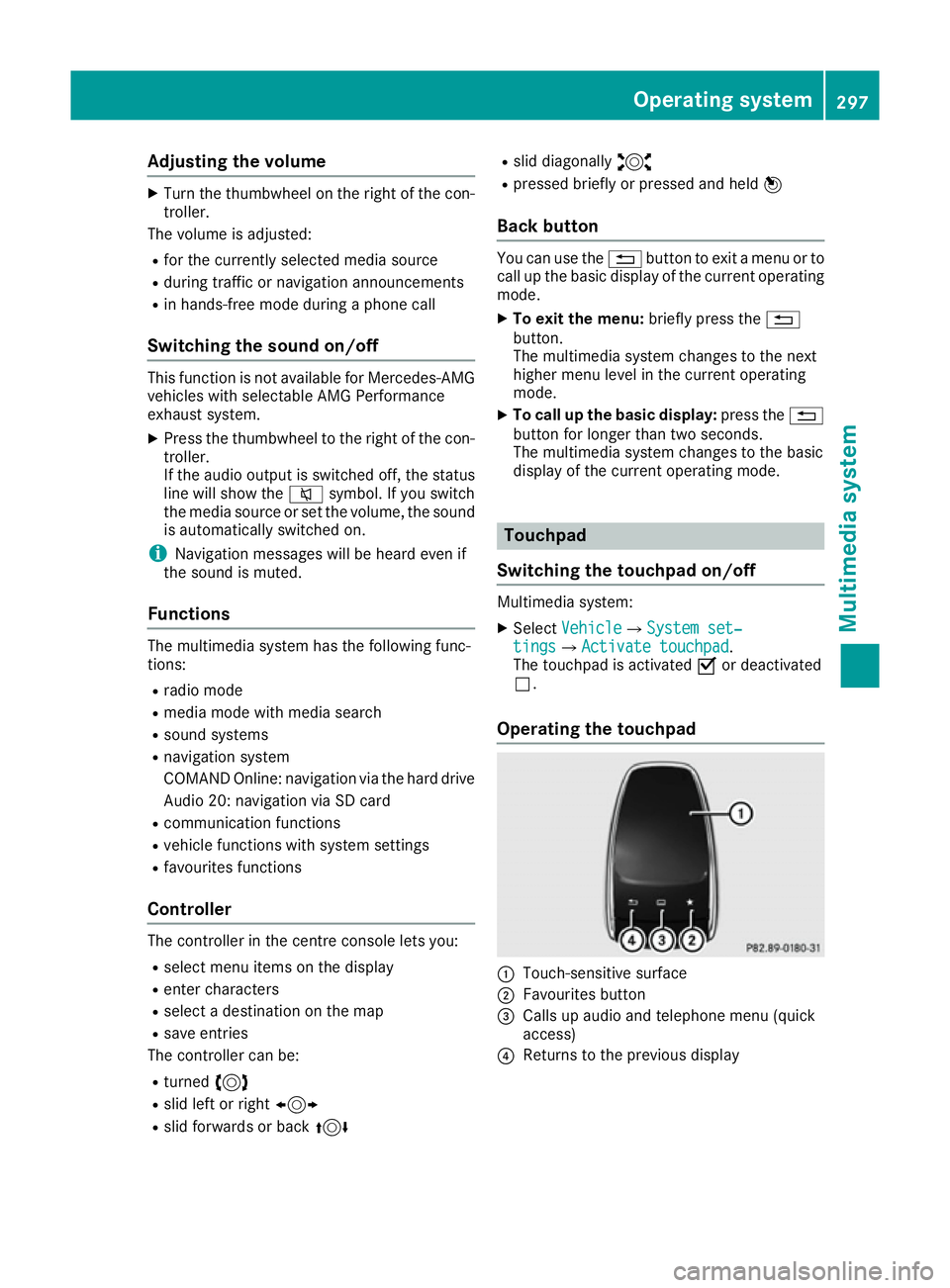
Operating th etouchpad :
Touch-sensitive surface
; Favourite sbutton
= Calls up audio and telephon emenu( quick
access)
? Return stotheprevious display Operating system
297Multimedia system Z
Page 305 of 385
Enterin
ganaddress Multimedia system:
X Select Navi
NaviQNa vigation
Navigation.
The map displays th ecurren tvehicle position.
X Slide 6thec ontroller.
X Select Destination
DestinationQ Addressentry
Addres sentry.
Ente rana ddress, e.g .asfollows:
R town or postcode, street ,house number
R country, town or postcode
R town or postcode, centre
R street ,tow norp ostcode, junction
X Select Town
Town.
The town in whic hthe vehicle is currently
locate d(curren tvehicle position )isatthetop.
Below this, you will see locations for which
rout eguidance has alread ybeen carried out.
X Ente rthe town.
The Gsymbol: th elocatio niscontained on
th ed igital map multiple times.
X To switch to th elist: slide 5thec ontrol-
ler.
X Select th elocation.
If available, th epostcod eisshown. If there
are differen tpostcodes availabl efor th eloca-
tion, th ecorrespondin gdigitsare displayed
with an X
X.
X Ente rthe street and house number.
The address is in th emenu.
Further options for destination entry:
R search for akeyword
The keyword search finds destination susing
fragment sofwords.
R selec tthe last destination
R selec tacontact
R selec taPOI
You can search for aPOI by location, nam eor
telephone number.
R selec tadestination on th emap
R enter an intermediat edestination
You can map th erout etot hedestination
yourself with up to four intermediat edestina-
tions.
R selec tatravel guide destination (only availa-
ble for selecte dEuropean countries)
R selec tdestination sfromM ercedes-Benz
Apps
R selec tgeo-coordinates Calculating th
eroute Prerequisite: th
eaddress has been entered and
is in th emenu.
X Select Start
StartorContinue
Continue.
The rout eiscalculate dwith th eselecte droute
type and th eselecte drout eoptions.
If rout eguidance has alread ybeen activated,
ap rompt will appear asking whether you wish
to end th ecurren trout eguidance.
X Select Yes
YesorSet as intermediate des‐
Set as intermediate des‐
tination
tination.
Yes Yes cancel sthe curren trout eguidance and
start srout ecalculation to th enew destina-
tion.
Set as intermediate destination Set as intermediate destination adds
th en ew destination in addition to th eexisting
destination and open sthe intermediat edes-
tinations list. Connecting th
emobile phone
Requirements For telephony via th
eBluetooth ®
interface, you
require aBluetooth ®
-capable mobile phone. The
mobile phon emust support Hands-Free Profile
1. 0ora bove.
Multimedia system:
X Select Vehicle
VehicleQSy stem set‐
System set‐
tings
tingsQ Activate Bluetooth
Activate Bluetooth .
X Activate Bluetooth ®
O.
Mobil ephone:
X Activate Bluetooth ®
and, if necessary, Blue-
tooth ®
visibilit yfor other devices (see the
manufacturer' soperatin ginstructions).
The Bluetooth ®
device names for all of on eman-
ufacturer' sproduct smightbei dentical. To
mak eitp ossible to clearly identif yyour mobile
phone, chang ethe device nam e(see th eman-
ufacturer' soperatin ginstructions).
If th emobile phon esupport sthe PBA P(Phone
Book Access Profile) and MA P(Message
Acc ess Profile) Bluetooth ®
profiles ,the follow-
ing informatio nwill be transmitte dafter you
connect:
R phon ebook
R call lists
R messages 302
Operating systemMultimedia system