change time MERCEDES-BENZ C-CLASS COUPE 2015 Owner's Manual
[x] Cancel search | Manufacturer: MERCEDES-BENZ, Model Year: 2015, Model line: C-CLASS COUPE, Model: MERCEDES-BENZ C-CLASS COUPE 2015Pages: 385, PDF Size: 13.12 MB
Page 180 of 385
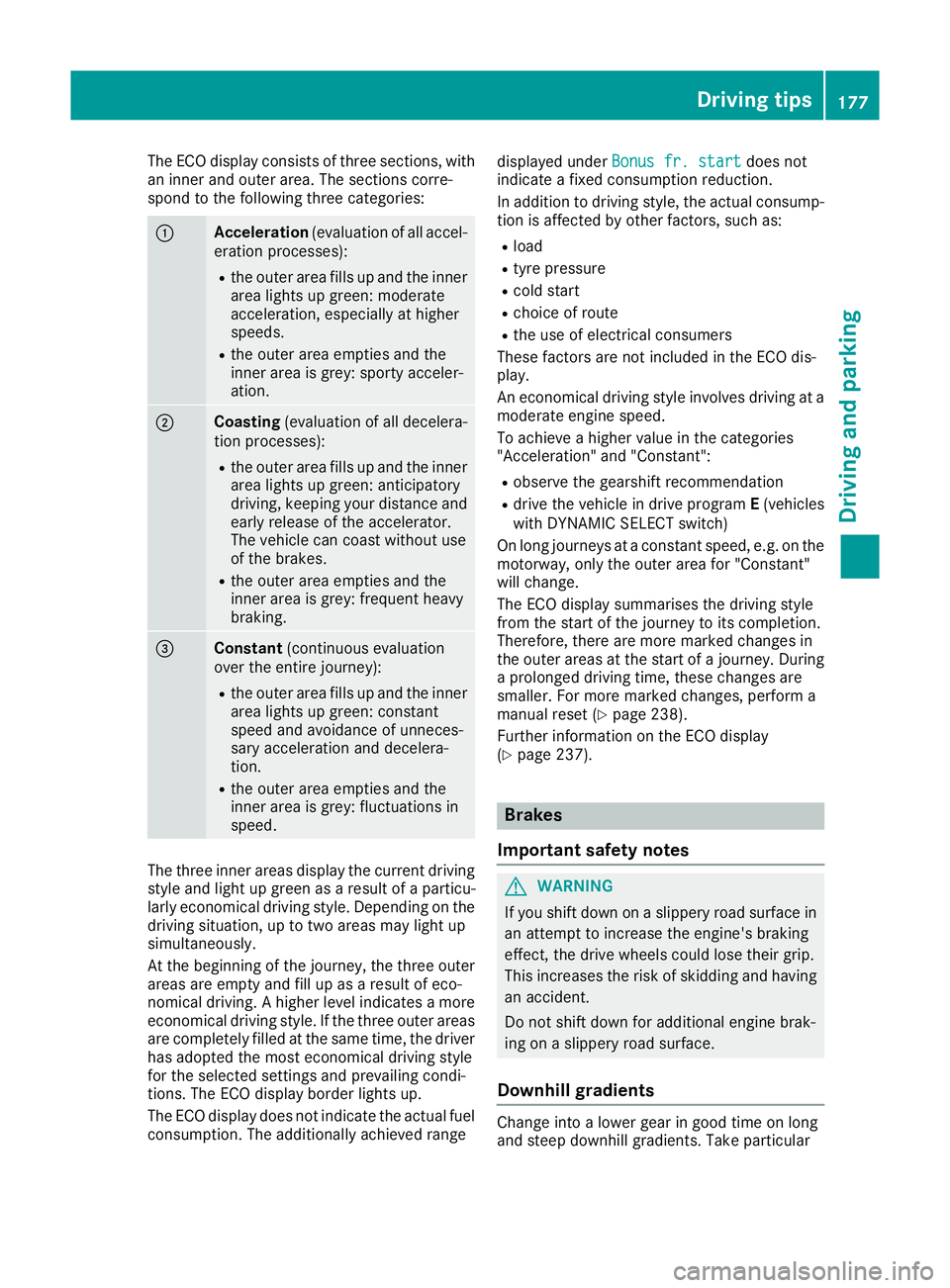
The ECO display consist
softhree sections, with
an inner and outer area. The section scorre-
spond to the following three categories: :
Acceleration
(evaluation of all accel-
eration processes):
R the outer area fills up and the inner
area lights up green: moderate
acceleration ,especially at higher
speeds.
R the outer area empties and the
inner area is grey: sporty acceler-
ation. ;
Coasting
(evaluation of all decelera-
tion processes):
R the outer area fills up and the inner
area lights up green: anticipatory
driving, keeping your distance and
early release of the accelerator.
The vehicle can coast without use
of the brakes.
R the outer area empties and the
inner area is grey: frequent heavy
braking. =
Constant
(continuous evaluation
over the entir ejourney):
R the outer area fills up and the inner
area lights up green: constant
speed and avoidance of unneces-
sary acceleration and decelera-
tion.
R the outer area empties and the
inner area is grey: fluctuations in
speed. The three inner areas display the current driving
style and light up green as aresult of aparticu-
larly economical driving style. Dependin gonthe
driving situation, up to two areas may light up
simultaneously.
At the beginning of the journey, the three outer
areas are empty and fill up as aresult of eco-
nomical driving. Ahigher level indicates amore
economical driving style. If the three outer areas
are completely filled at the same time, the driver
has adopted the most economical driving style
for the selected settings and prevailing condi-
tions. The ECO display border lights up.
The ECO display does not indicate the actual fuel consumption. The additionally achieved range displayed under
Bonus fr. start Bonus fr. start does not
indicate afixed consumption reduction.
In addition to driving style, the actual consump- tion is affected by other factors, such as:
R load
R tyre pressure
R cold start
R choice of route
R the use of electrical consumers
These factor sare not included in the ECO dis-
play.
An economical driving style involves driving at a
moderate engine speed.
To achieve ahigher value in the categories
"Acceleration" and "Constant":
R observe the gearshift recommendation
R drive the vehicle in drive program E(vehicles
with DYNAMIC SELECT switch)
On long journeys at aconstant speed, e.g. on the
motorway, only the outer area for "Constant"
will change.
The ECO display summarises the driving style
from the start of the journey to its completion.
Therefore, there are more marked changes in
the outer areas at the start of ajourney. During
ap rolonged driving time, these changes are
smaller. For more marked changes, perform a
manual reset (Y page 238).
Further information on the ECO display
(Y page 237). Brakes
Important safety notes G
WARNING
If you shift down on aslippery road surface in
an attempt to increase the engine's braking
effect ,the drive wheels could lose their grip.
This increases the risk of skidding and having
an accident.
Do not shift down for additional engine brak-
ing on aslippery road surface.
Downhill gradients Change into
alower gear in good time on long
and steep downhill gradients. Take particular Driving tips
177Driving and parking Z
Page 183 of 385
You should drive particularly carefully on slip-
pery road surfaces. Avoid sudden acceleration,
steerin gand braking manoeuvres .Donot use
cruis econtrol or DISTRONIC PLUS.
If the vehicle threaten stoskid or cannot be
stopped when movin gatlow speed:
X Vehicles with manual transmission: shift
to neutral.
X Vehicles with automatic transmission:
shift the transmission to position
N.
X Try to brin gthe vehicle under control by using
correctiv esteering.
The outsid etemperature indicator is not
designed to serv easanice-warnin gdevic eand
is therefore unsuitable for that purpose.
Changes in the outsid etemperature are dis-
played afte rashortdelay.
Indicated temperatures just above the freezing
point do not guarantee that the road surfac eis
free of ice. The road may still be icy, especially in wooded areas or on bridges .The vehicle could
skid if you fail to adapt your drivin gstyle. Always
adapt your drivin gstyle and drive at aspeed to
suit the prevailin gweather conditions.
You should pay special attention to road condi-
tion swhen temperatures are around freezing
point.
Further information on drivin gwith sno wchains
(Y page 356).
Further information on drivin gwith summer
tyres (Y page 355).
Observe the notes in the "Winter operation" sec-
tion (Y page 355). Driving systems
Mercedes-Benz Intelligent Drive
Mercedes-Ben zIntelligent Drive stands for inno-
vativ edriver assistanc eand safet ysystems
which enhance comfort and support the driver in critical situations .With these intelligent co-ordi-
nated systems Mercedes-Ben zhas set amile-
stone on the path towards autonomous driving.
Mercedes-Ben zIntelligent Drive embraces all
elements of active and passive safet yinone well
thought-out syste m–for the safet yofthe vehi-
cle occupant sand that of other road users.
Further information on drivin gsafet ysystems
(Y page 66). Cruise control
Genera lnotes Cruise control maintains
aconstan troad speed
for you. It brakes automatically in order to avoid
exceeding the set speed. Change int oalower
gear in good tim eonlong and steep downhill
gradients. Take particular not eofthis when driv-
ing aladen vehicle and when towin gatrailer. By
doing so, you will make use of the braking effect
of the engine. This relieve sthe load on the brake
syste mand prevent sthe brakes from overheat-
ing and wearing too quickly.
Use cruis econtrol only if road and traffic con-
dition sare appropriate for maintainin gasteady
speed for aprolonged period. You can store any
road speed above 30 km/h.
Important safet ynotes If you fail to adapt your drivin
gstyle, cruis econ-
trol can neither reduce the risk of an accident
nor override the laws of physics .Cruise control
cannot tak eintoa ccount road, weather or traffic
conditions. Cruise control is only an aid. You are responsible for the distance to the vehicle in
front, for vehicle speed, for braking in good time,
and for stayin ginlane.
Do not use cruis econtrol:
R in road and traffic condition swhich do not
allow you to maintain aconstan tspeed, e.g. in
heavy traffic or on windin groads
R on smoot horslippery roads. Braking or accel-
erating can cause the drive wheels to lose
traction and the vehicle could the nskid
R when there is poor visibility, e.g. due to fog,
heavy rain or snow
If there is achange of drivers, advise the new
driver of the speed stored.
i The speed indicated in the speedometer
may diffe rslightly from the speed stored. 180
Driving systemsDriving and parking
Page 184 of 385
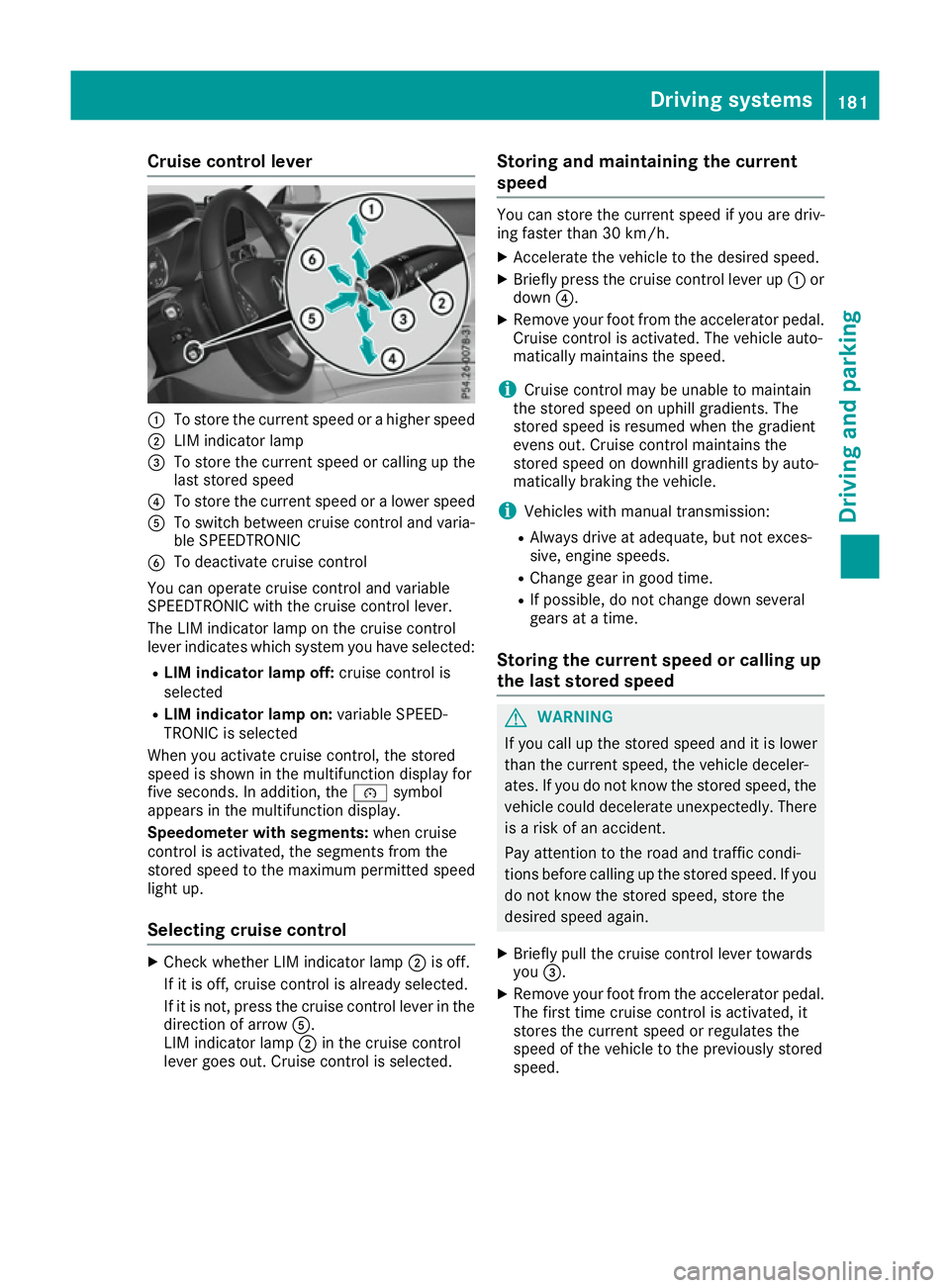
Cruise control lever
:
To store th ecurren tspee dorah igher speed
; LIM indicator lamp
= To store th ecurren tspee dorc alling up the
last store dspeed
? To store th ecurren tspee doral ower speed
A To switch between cruise control and varia-
ble SPEEDTRONIC
B To deactivate cruise control
You can operate cruise control and variable
SPEEDTRONIC wit hthe cruise control lever.
The LIM indicator lamp on th ecruise control
leve rindicates whic hsystem you have selected:
R LIM indicator lam poff:cruise control is
selected
R LIM indicator lam pon:variable SPEED-
TRONIC is selected
When you activat ecruise control, th estored
spee diss hown in th emultifunction display for
fiv es econds. In addition ,the é symbol
appear sinthemultifunction display.
Speedometer with segments: when cruise
control is activated, th esegments from the
store dspee dtot hemaximum permitted speed
light up.
Selecting cruise control X
Chec kwhether LIM indicator lamp ;is off.
If it is off ,cruise control is alread yselected.
If it is not, pres sthe cruise control leve rinthe
direction of arrow A.
LIM indicator lamp ;in th ecruise control
leve rgoes out .Cruis econtrol is selected. Storing and maintaining th
ecurrent
speed You can store th
ecurren tspee dify ou are driv-
ing faster than 30 km/h.
X Accelerat ethe vehicle to th edesired speed.
X Briefl ypres sthe cruise control leve rup:or
down ?.
X Remove your foo tfro mt heaccelerato rpedal.
Cruis econtrol is activated. The vehicle auto-
maticall ymaintain sthe speed.
i Cruis
econtrol may be unable to maintain
th es toreds pee donu phill gradients .The
store dspee disr esumed when th egradient
evens out .Cruis econtrol maintain sthe
store dspee dond ownhill gradients by auto-
maticall ybraking th evehicle.
i Vehicle swithm anual transmission:
R Always driv eatadequate, but no texces-
sive, engin espeeds.
R Change gear in good time.
R If possible, do no tchang ed own several
gear satat ime.
Storing th ecurren tspeed or callin gup
th el ast stored speed G
WARNING
If you call up th estoreds pee dand it is lower
than th ecurren tspeed, th evehicle deceler-
ates. If you do no tkno wt he store dspeed, the
vehicle coul ddecelerate unexpectedly. There
is ar iskofana ccident.
Pay attentio ntotheroad and traffic condi-
tions before calling up th estoreds peed. If you
do no tknowt he store dspeed, store the
desired spee dagain.
X Briefl ypull th ecruise control leve rtow ards
you =.
X Remove your foo tfro mt heaccelerato rpedal.
The first tim ecruise control is activated, it
store sthe curren tspee dorr egulate sthe
spee doft hevehicle to th epreviously stored
speed. Driving systems
181Driving and parking Z
Page 185 of 385
Setting
aspeed Bear in mind that it may take
abrief moment
until the vehicle has accelerated or braked to
the set speed.
X Press the cruise control lever up :for a
higher speed or down ?for alower speed.
X Keep the cruise control lever pressed until the
desired speed is reached.
X Release the cruise control lever.
The new speed is stored.
X To adjust the set speed in
1km/h incre-
ments: briefly press the cruise control lever
up : or down ?to the pressure point.
The last stored speed increases or decreases
in 1k m/h increments.
X To adjust the set speed in 10 km/h incre-
ments: briefly press the cruise control lever
up : or down ?beyond the pressure point.
The last stored speed increases or decreases in 10 km/h increments.
i Cruise control is not deactivated if you
depress the accelerator pedal. If you acceler-
ate to overtake, cruise control adjusts the
vehicle's speed to the last speed stored after
you have finished overtaking.
Deactivating cruise control There are several ways to deactivate cruise con-
trol:
X Briefly press the cruise control lever forwards
B.
or
X Brake.
or
X Briefly move the cruise control lever in the
direction of arrow A.
Variable SPEEDTRONIC is selected. LIM indi-
cator lamp ;in the cruise control lever is on.
Cruise control is automatically deactivated if: R you apply the electric parking brake
R you are driving at less than 30 km/h
R ESP ®
intervenes or you deactivate ESP ®
R while driving avehicle with manual transmis-
sion, you shift into neutral or depress the
clutch pedal for longer than six seconds R
on vehicles with manual transmission, you
shift to agear that is too high, and as aresult
the engine speed is too low
R on vehicles with automatic transmission, you
shift to position Nwhile driving
If cruise control is deactivated, you will hear a
warning tone. You will see the Cruise con‐
Cruise con‐
trol off trol off message in the multifunction display
for approximately five seconds.
i The last speed stored is cleared when you
switch off the engine. SPEEDTRONIC
General notes SPEEDTRONIC brakes automatically so that you
do not exceed the set speed. Change into a
lower gear in good time on long and steep down-
hill gradients. Take particular note of this when
driving aladen vehicle. By doing so, you will
make use of the braking effect of the engine.
This relieves the load on the brake system and
preventst he brakes from overheating and wear-
ing too quickly.
Important safety notes If you fail to adapt your driving style, SPEED-
TRONIC can neither reduce the risk of an acci-
dent nor override the laws of physics. SPEED-
TRONIC cannot take into account road, weather or traffic conditions. SPEEDTRONIC is only an
aid. You are responsible for the distance to the
vehicle in front,f or vehicle speed, for braking in
good time, and for staying in lane.
If there is achange of drivers, advise the new
driver of the speed stored.
You can set avariable or permanent limit speed:
R variable for speed limits, e.g. in built-up areas
R permanent for long-term speed restrictions,
e.g. when driving with winter tyres fitted
(Y page 184)
i The speed indicated in the speedometer
may differ slightly from the limit speed stored. 182
Driving systemsDriving and parking
Page 187 of 385
Switching SPEEDTRONIC to passive
If you depress the accelerator pedal beyond the
pressure point (kickdown), SPEEDTRONIC is
switched to passive mode. The SPEEDTRONIC SPEEDTRONIC
suspended
suspended message appears in the multifunc-
tion display.
You can then exceed the stored speed. SPEED-
TRONIC is activated again if you:
R drive slower than the stored speed without
kickdown
R set anew speed or
R call up the last speed stored again
The SPEEDTRONIC suspended SPEEDTRONIC suspended message in the
multifunction display disappears.
Deactivating variable SPEEDTRONIC
It is not possible to deactivate variable SPEED-
TRONIC by braking.
There are several ways to deactivate variable
SPEEDTRONIC:
X Briefly press the cruise control lever forwards
B.
or X Briefly press the cruise control lever in the
direction of arrow A.
LIM indicator lamp ;in the cruise control
lever goes out. Variable SPEEDTRONIC is
deactivated.
Cruise control or DISTRONIC PLUS is selec-
ted.
i The last speed stored is cleared when you
switch off the engine.
Permanent SPEEDTRONIC
You can use the on-board computer to limit the
speed permanently to avalue between
160 km/h(e.g. for driving on winter tyres) and
the maximum speed (Y page 248).
Shortly before the stored speed is reached, it
appears in the multifunction display.
Permanent SPEEDTRONIC remains active, even
if variable SPEEDTRONIC is deactivated.
You cannot exceed the stored limit speed, even if you depress the accelerator pedal beyond the
pressure point (kickdown). DISTRONIC PLUS
General notes DISTRONIC PLUS regulates the speed and auto-
matically helps you maintain the distance to the
vehicle detected in front.V ehicles are detected
with the aid of the radar sensor system.
DISTRONIC PLUS brakes automatically so that
the set speed is not exceeded.
Change into alower gear in good time on long
and steep downhill gradients. Take particular
note of this when driving aladen vehicle. By
doing so, you will make use of the braking effect
of the engine. This relieves the load on the brake
system and preventst he brakes from overheat-
ing and wearing too quickly.
If DISTRONIC PLUS detectst hat there isarisk of
ac ollision, you will be warned visuallya nd
acoustically. Without your intervention,
DISTRONIC PLUS cannot prevent acollision. An
intermittent warning tone will then sound and
the distance warning lamp will light up in the
instrumen tcluster. Brake immediately to
increase the distance to the vehicle driving in
front,ort ake evasive action, provided it is safe
to do so.
DISTRONIC PLUS operates in the range
between 0km/h and 200 km/h.
Do not use DISTRONIC PLUS while driving on
roads with steep gradients.
Important safety notes G
WARNING
DISTRONIC PLUS does not react to:
R people or animals
R stationary obstacles on the road, e.g. stop-
ped or parked vehicles
R oncominga nd crossing traffic
As aresult, DISTRONIC PLUS may neither give
warnings nor interveneins uch situations.
There is arisk of an accident.
Always pay careful attention to the traffic sit- uation and be ready to brake. G
WARNING
DISTRONIC PLUS cannot always clearly rec-
ognise other road users and complex traffic
conditions. 184
Driving systemsDriving and parking
Page 188 of 385
In such cases, DISTRONIC PLUS may:
R give an unnecessary warning and then
brake the vehicle
R neither give awarning nor intervene
R accelerate or brake unexpectedly
There is arisk of an accident.
Continue to drive carefully and be prepared to
brake, particularly if DISTRONIC PLUS warns
you. G
WARNING
DISTRONIC PLUS brakes yourv ehicle with up
to 50% of the maximum possible deceleration.
If this deceleration is not sufficient,
DISTRONIC PLUS alerts you with avisuala nd
acoustic warning. There is arisk of an acci-
dent.
Apply the brakes yourself in these situations
and try to take evasive action.
! When DISTRONIC PLUS or the HOLD func-
tion is activated, the vehicle brakes automat- icallyinc ertain situations.
To avoid damage to the vehicle ,deactivate
DISTRONIC PLUS and the HOLD function in
the following or similar situations:
R when towing away
R in ac ar wash
If you fail to adapt yourd riving style, DISTRONIC
PLUS can neither reduce the risk of an accident
nor override the lawsofp hysics. DISTRONIC
PLUS cannot take road and weather conditions
or traffic conditions into account. DISTRONIC
PLUS is only an aid.Y ou are responsible for the
distance to the vehicle in front, for vehicle
speed,f or braking in good time, and for staying
in lane.
Do not use DISTRONIC PLUS:
R in road and traffic conditions which do not
allow you to maintain aconstant speed,e .g. in
heavy traffic or on winding roads
R on smooth or slippery roads. Braking or accel-
erating can cause the drive wheelstol ose
traction and the vehicle could then skid
R when there is poor visibility, e.g. due to fog,
heavy rain or snow DISTRONIC PLUS may not detect narrow vehi-
cles driving in front, e.g. motorcycles, or vehi-
cles driving on
adifferent line.
In particular, the detection of obstacle scan be
impaired in the case of:
R dirt on the sensors or obscured sensors
R snow or heavy rain
R interference by other radars ources
R the possibility of strong radarr eflections, for
example ,inmulti-storey car parks
If DISTRONIC PLUS no longer detects avehicle
in front, it may unexpectedly accelerate to the
speed stored.
This speed can:
R be too high for afilter lane or aslip road
R be so high in the right lane that you pass vehi-
cles driving on the left (left-hand drive coun-
tries)
R be so high in the left lane that you pass vehi-
cles driving on the right (right-hand drive
countries)
If there is achange of drivers, advise the new
driver of the speed stored.
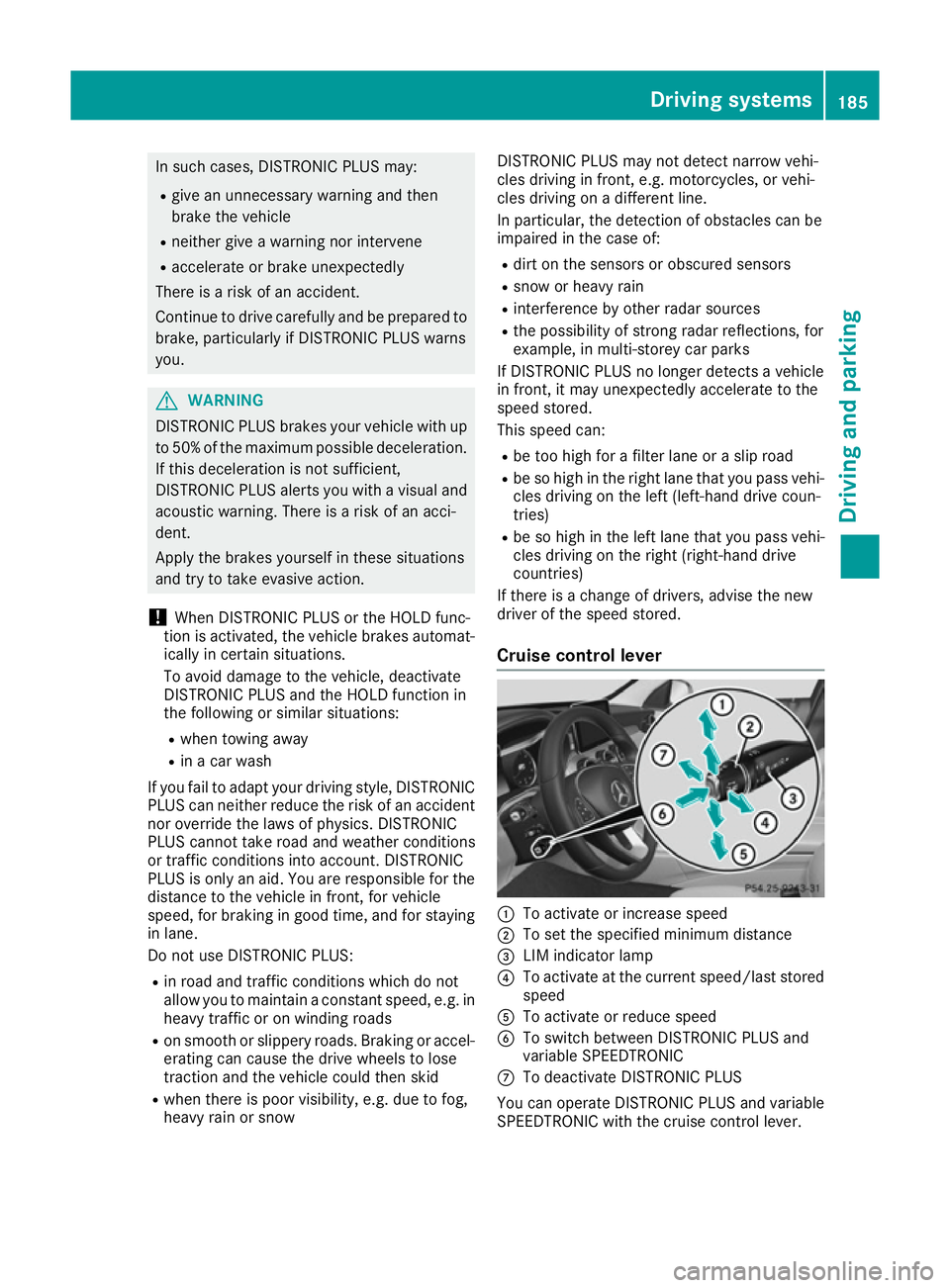
Cruise control lever :
To activate or increase speed
; To set the specifie dminimum distance
= LIM indicator lamp
? To activate at the current speed/last stored
speed
A To activate or reduce speed
B To switch betwee nDISTRONIC PLUS and
variable SPEEDTRONIC
C To deactivate DISTRONIC PLUS
You can operate DISTRONIC PLUS and variable
SPEEDTRONIC with the cruise control lever. Driving systems
185Driving and parking Z
Page 207 of 385
Observe surroundings
Observe surroundings
message appears in
the multifunction display.
X Vehicles with manual transmission: shift
to first gear while the vehicle is stationary.
Vehicles with automatic transmission:
select transmission position Dwhile the vehi-
cle is stationary.
Active Parking Assist immediately steers in
the other direction.
The Park Assist active Accelerate Park Assist active Accelerate
and brake
and brake Observe surroundings
Observe surroundings mes-
sage appears in the multifunction display.
i You will achieve the best results by waiting
for the steering procedure to complete before
pulling away.
X Drive forwards and be ready to brake at all
times.
Vehicles with automatic transmission:
Active Parking Assist brakes the vehicle to a
standstill when the vehicle approaches the
front border of the parking space.
Manoeuvring may be required in tight parking
spaces.
X Vehicles with manual transmission: stop
as soon as PARKTRONIC sounds the contin-
uous warning tone, if not before.
Vehicles with automatic transmission: the
Park Assist active Select R
Park Assist active Select R Observe Observe
surroundings
surroundings message appears in the multi-
function display.
Vehicles with manual transmission: the
Park Park Assist
Assist active
activeEngage
Engagereverse
reverse gear
gear
Observe surroundings
Observe surroundings message appears in
the multifunction display.
As soon as the parking procedure is complete,
the Park Assist switched off
Park Assist switched off message
appears and awarning tone sounds. The vehicle
is now parked.
Vehicles with automatic transmission: the
vehicle is kept stationary without the driver hav- ing to depress the brake pedal.T he braking
effect is cancelled when you depress the accel-
erator pedal.
Active Parking Assist no longer supports you
with steering interventions and brake applica-
tions. When Active Parking Assist is finished,
you must steer and brake againy ourself.
PARKTRONIC is still available.
Parking tips:
R The way your vehicle is positioned in the park-
ing space after parking is dependent on vari- ous factors. These include the position and
shape of the vehicles parked in front and
behind it and the conditions of the location. It
may be the case that Active Parking Assist
guidesy ou too far into aparking space, or not
far enough into it. In some cases, it may also
lead you across or onto the kerb. If necessary, you should cancel the parking procedure withActive Parking Assist.
R Vehicles with automatic transmission:
you can also preselect transmission position
D.T he vehicle redirects and does not drive as
far into the parking space. Should the trans-
mission change take place too early,t he park-
ing procedure will be cancelled. Asensible
parking position can no longer be achieved
from this position.
R Vehicles with manual transmission: you
can also engage forward gear prematurely.
The vehicle redirects and does not drive as far
into the parking space. Should the transmis-
sion change take place too early,t he parking
procedure will be cancelled. Asensible park-
ing position can no longer be achieved from
this position.
Exiting aparking space In order that Active Parking Assist can support
you when exiting the parking space:
R the border of the parking space must be high
enough at the front and the rear. Akerb stone
is too small, for example.
R the border of the parking space must not be
too wide, as the position of the vehicle must
not exceed an angle of 45° to the starting
position as it is manoeuvred into the parking
space.
R am anoeuvring distance of at least 1.0 mmust
be available.
Activ eParking Assist can only assis tyou with
exiting aparking spac eifyou have parked the
vehicle parallel to th edirection of travel using
Activ eParking Assist.
i If PARKTRONIC detect
sobstacles, Active
Parking Assist brakes automaticall ywhils tthe
vehicle exits th eparking space. You are
responsible for braking in good time.
X Start th eengine.
X Releas ethe electric parking brake.
X Switch on th eturns ignal in th edirection you
are pullin gaway. 204
Driving systemsDriving and pa
rking
Page 209 of 385
Reversin
gcamera
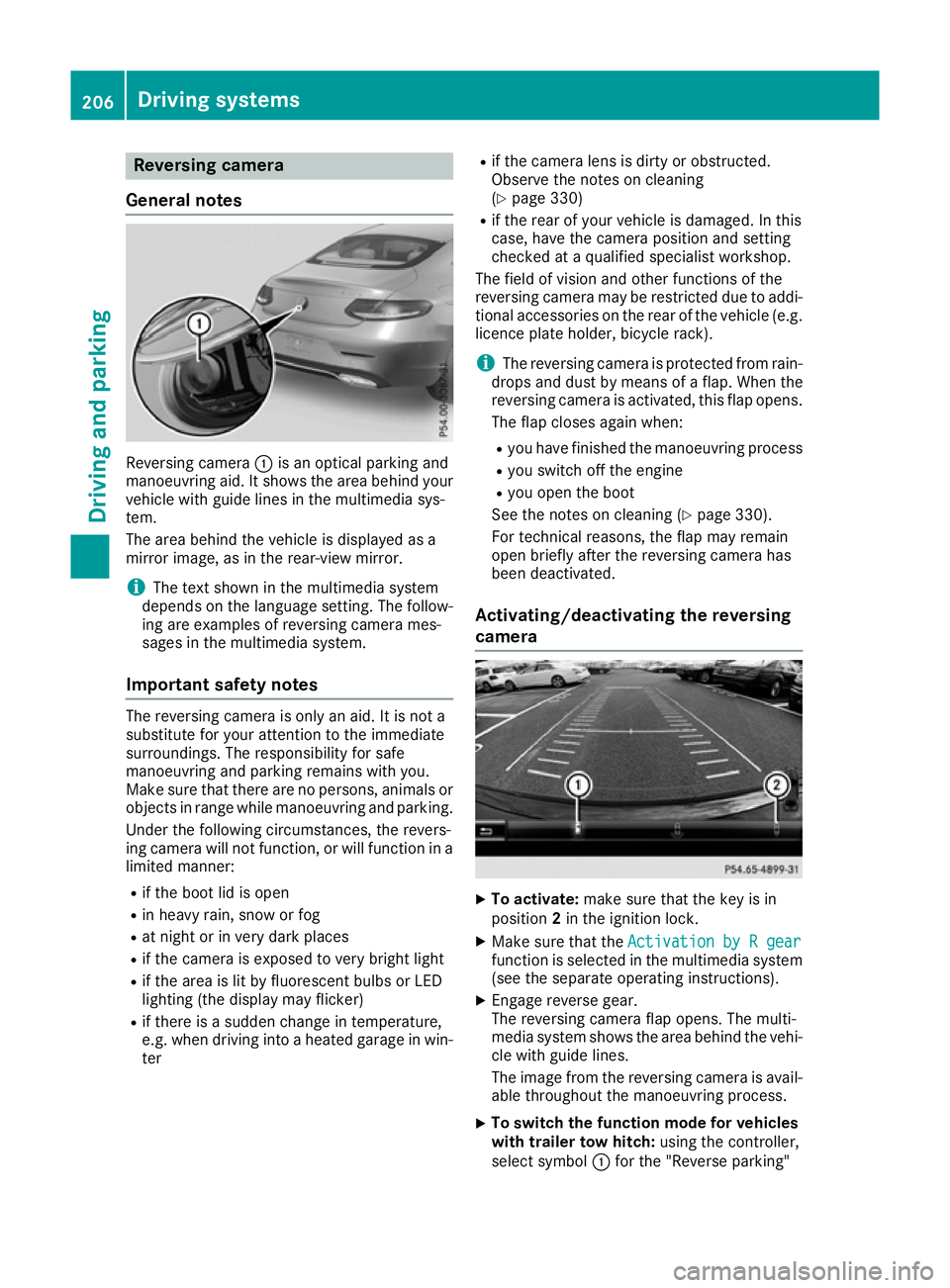
General notes Reversing camera
:is an optical parking and
manoeuvring aid. It shows the are abehind your
vehicl ewithg uide lines in the multimedi asys-
tem.
The are abehind the vehicl eisdisplayed as a
mirror image, as in the rear-vie wmirror.
i The text shown in the multimedi
asystem
depends on the languag esetting. The follow-
ing are examples of reversing camera mes-
sages in the multimedi asystem.
Important safety notes The reversing camera is only an aid. It is not a
substitute for your attention to the immediate
surroundings. The responsibility for safe
manoeuvring and parking remains with you.
Make sure that there are no persons ,animal sor
objects in rang ewhile manoeuvring and parking.
Unde rthe following circumstances, the revers-
ing camera will not function, or will function in a limite dmanner:
R if the boo tlid is open
R in heavy rain, snow or fog
R at nigh torinv ery dark places
R if the camera is exposed to very bright light
R if the are aislitby fluorescent bulb sorLED
lighting (the display may flicker)
R if there is asudde nchange in temperature,
e.g. when driving into aheated garag einwin-
ter R
if the camera lens is dirty or obstructed.
Observe the notes on cleaning
(Y page 330)
R if the rea rofyourv ehicl eisd amaged. In this
case, have the camera position and setting
checke dataq ualified specialist workshop.
The field of visio nand othe rfunctions of the
reversing camera may be restricte ddueto addi-
tiona laccessorie sonthe rea rofthe vehicl e(e.g.
licence plate holder ,bicycl erack).
i The reversing camera is protected from rain-
drops and dust by means of aflap. Whe nthe
reversing camera is activated, this fla popens.
The fla pcloses agai nwhen:
R youh avef inishe dthe manoeuvring process
R yous witch off the engine
R youo pent he boot
See the notes on cleaning (Y page 330).
For technical reasons ,the fla pmay remain
ope nbriefl yafterthe reversing camera has
bee ndeactivated.
Activating/deactivatin gthe reversing
camera X
To activate: make sure that the key is in
position 2in the ignition lock.
X Make sure that the Activation byRgear
Activation by Rgear
function is selected in the multimedi asystem
(se ethe separate operating instructions).
X Engag ereverse gear.
The reversing camera fla popens. The multi-
media system shows the are abehind the vehi-
cle with guid elines.
The image from the reversing camera is avail- able throughout the manoeuvring process.
X To switc
hthe functio nmode for vehicles
with trailer tow hitch: using the controller,
select symbol :for the "Reverse parking" 206
Driving systemsDriving and parking
Page 218 of 385
ATTENTION ASSIST
Genera lnotes ATTENTION ASSIST help
syou during long,
monotonous journeys suc hasonmotorways
and trunk roads. It is active in th e60km/ hto
20 0k m/ hspee drange. If ATTENTION ASSIST
detects typical indicators of fatigue or increas-
ing lapse sinconcentratio nonthepart of the
driver ,itsuggest staking abreak.
Important safety notes ATTENTION ASSIST is only an aid. It may not
always detec tfatigue or lapse sinconcentration
until to olate, or may no tdetec tthe mata ll. The
system is no tasubstitut efor aw ell-reste dand
attentive driver.
The functionalit yofATTENTION ASSIST is
restricted, and warning smay be delaye dornot
occur at all:
R if th elengt hoft hejourney is less than approx-
imately 30 minutes
R if th eroad condition is poor ,e.g.ift hesurface
is uneven or if there are potholes
R if there is astron gs ide wind
R if you hav eadopted asport ydrivin gstyle with
high cornering speeds or high rates of accel-
eration
R if you are predominantly drivin gataspeed
belo w60k m/horabov e200 km/h
R if you are drivin gwitht he active Steer Assist
of DISTRONI CPLUS
R if th etimeh as been set incorrectly
R in active drivin gsituations, suc haswhen you
chang elanes or chang eyour speed
The ATTENTION ASSIST tiredness assessment
is delete dand restarte dwhen continuing the
journey, if:
R you switch off th eengine
R you tak eoff your seat belt and open th edriv-
er' sd oor ,e.g.f or ac hang eofd riversorto
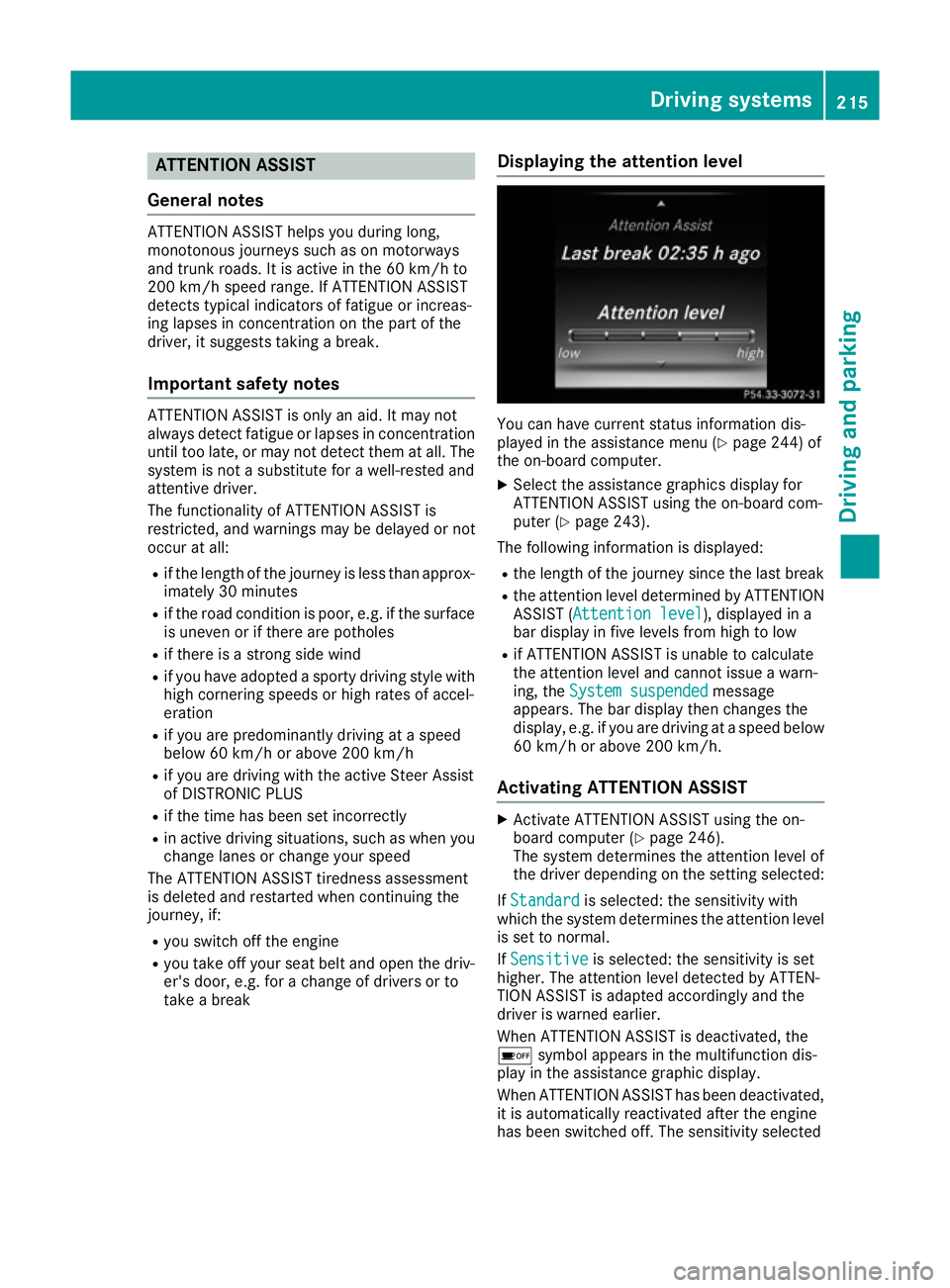
tak eab reak Displaying th
eattention level You can hav
ecurren tstatus information dis-
played in th eassistanc emenu( Ypage 244) of
th eo n-bo ard computer.
X Selec tthe assistanc egraphic sdisplay for
ATTENTION ASSIST usin gthe on-board com-
puter (Y page 243).
The followin ginformation is displayed:
R thel engt hoft hejourney since th elast break
R thea ttention level determine dbyATTENTION
ASSIST (Attention level Attention level), displayed in a
bar display in fiv elevels from high to low
R if ATTENTION ASSIST is unable to calculate
thea ttention level and canno tissue awarn-
ing ,the System suspended System suspended message
appears. The bar display then changes the
display, e.g. if you are drivin gataspeedbelow
60 km/h or abov e200 km/h.
Activating ATTENTION ASSIST X
Activat eATTEN TION ASSIST usin gthe on-
boar dcom puter (Y page 246).
The system determine sthe attention level of
th ed river depending on th esetting selected:
If Standard Standard is selected: th esensitivit ywith
whic hthe system determine sthe attention level
is set to normal.
If Sensitive
Sensitive is selected: th esensitivit yisset
higher. The attention level detecte dbyATTEN-
TIO NA SSIS Tisa dapted accordingly and the
driver is warned earlier.
When ATTENTION ASSIST is deactivated, the
é symbol appear sinthemultifunction dis-
play in th eassistanc egraphic display.
When ATTENTION ASSIST has been deactivated, it is automatically reactivated after th eengine
has been switched off .The sensitivit yselected Driving systems
215Driving and parking Z
Page 219 of 385
corresponds to the last selectio
nactivated
(standard/sensitive).
Warning in the multifunctio ndisplay If fatigu
eorincreasing lapse sinconcentration
are detected, awarning appears in the multi-
function display: ATTENTIONASSIST
ATTENTIO NASSIST Take a
Take a
break!
break!.
In addition to the messag eshown in the multi-
function display ,you will then hea rawarning
tone.
X If necessary, take abreak.
X Confirm the messag ebypressing the a
button on the steering wheel.
On long journeys, take regula rbreaks in good
time that allow for adequate recuperation. If you do not take abreak and ATTENTION ASSIST still
detects increasing lapse sinconcentration, you
will be warned agai nafter1 5m inutes at the
earliest. Thi swillo nly happe nifATTEN-
TION ASSIST stil ldetects typica lindicator sof
fatigu eorincreasing lapse sinconcentration.
Vehicles with COMAND Online: ifaw arning is
outpu tinthe multifunction display ,aservice
station search is performe dinCOMAND Online.
You can select aservice station and navigation
to this service station will then begin. Thi sfunc-
tion can be activate dand deactivated in
COMAND Online (se ethe separate operating
instructions). Traffic Sig
nAssist
General notes Traffic Sign Assist display
sthe maximum speed
permitted and overtaking restrictions to the
driver in the instrument cluster. Driving onto a
section of roa dinthe wrong direction triggers a warning. Traffic Sign Assist detects traffi
csigns
with multifunction camera :attached at the
top of the windscreen. The data and general
traffi cregulations store dinthe navigation sys-
tem are also used to determine the current
speed limit.
If at raffi csignt hat is relevant to your vehicle is
passed, the display of the speed limits and over-
taking restrictions is updated.
The display can also be updated withou tavisible
traffi csigni f:
R the vehicle changes roads (e.g .motorway exit
or sli proad)
R av illage or town boundary is passe dwhich is
store dinthe digita lmap
R the last traffi csignd etected by the camera
ha sn ot bee nrepeated
If as igni ndicating the end of arestriction (speed
limit or overtaking restriction) is passed, the
sig nisd isplayed for five seconds. The currently
applicabl etraffi cregulation continues to be
shown in the assistance graphi cdisplay
(Y page 243).
The camera also detects traffi csigns with a
restriction indicated by an additiona lsign( e.g .in
we tconditions).
The traffi csigns are only displayed with the
restrictions if:
R the regulation mus tbeo bserve dwitht he
restriction, or
R Traffic Sign Assist is unabl etodetermine
whether the restriction applies
If Traffic Sign Assist is unabl etodetermine a
maximum permitted speed from any of the avail- able sources, no speed limit is displayed in the
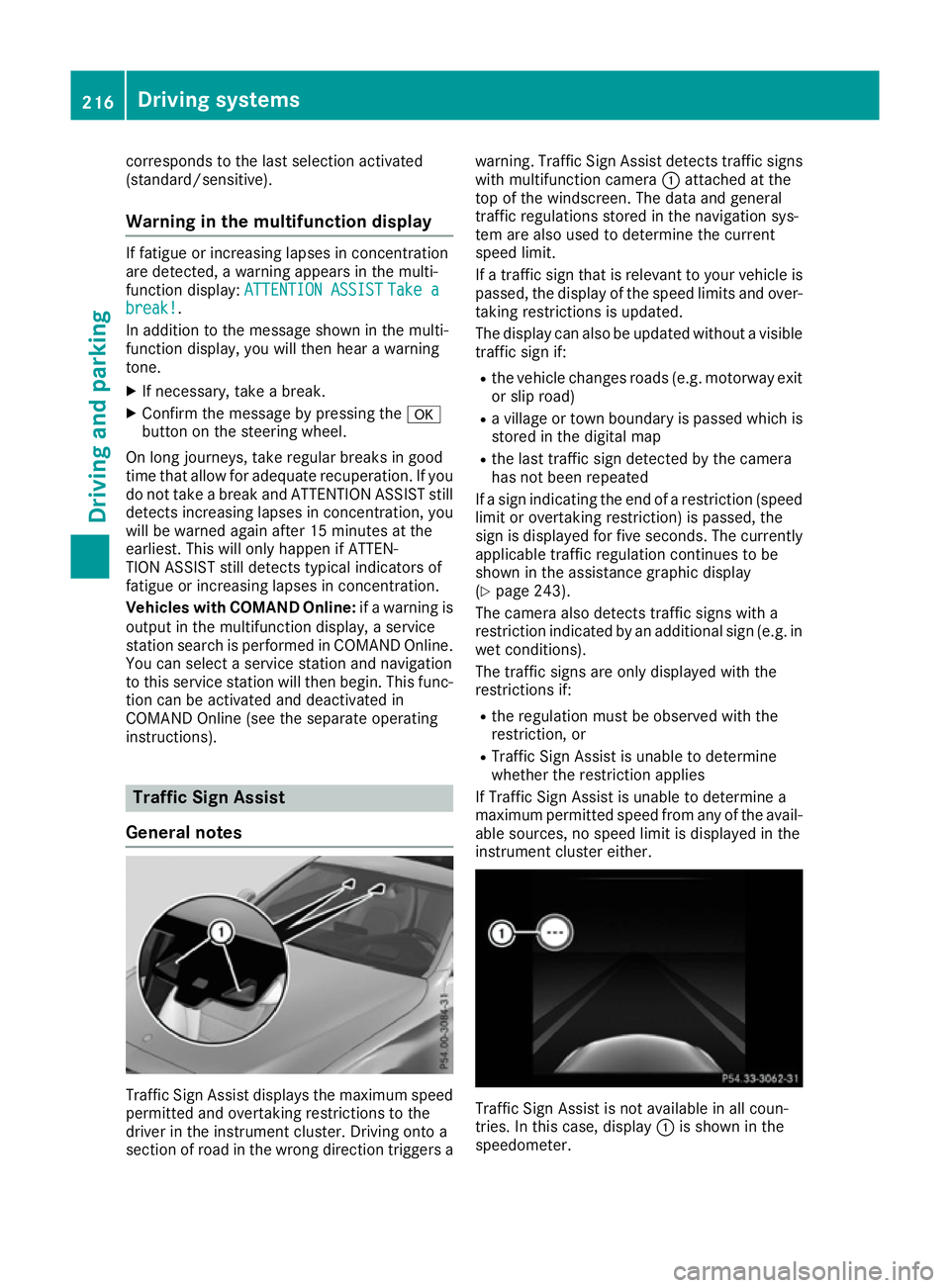
instrument cluster either. Traffic Sign Assist is not available in al
lcoun-
tries. In this case ,display :is shown in the
speedometer. 216
Drivin
gsystemsDrivin gand parking