change time MERCEDES-BENZ C-CLASS COUPE 2015 Service Manual
[x] Cancel search | Manufacturer: MERCEDES-BENZ, Model Year: 2015, Model line: C-CLASS COUPE, Model: MERCEDES-BENZ C-CLASS COUPE 2015Pages: 385, PDF Size: 13.12 MB
Page 301 of 385
You can navigate in menus and lists via touch-
sensitiv esurface :by using asingle finger
swiping gesture .
X To select th emenu item: swipe up, down, to
the left or right.
X Press the touchpad.
X To move th edigital map: swipe in all direc-
tions.
Use atwo-finger swiping gesture ,e.g. to use
these functions:
X To show or hide th eaudio menu: swipe up
or down with two fingers.
X To increase or reduce th
evehicle settings
and sound settings: turn two fingers clock-
wise or anti-clockwise.
X To zoom in and out of th emap:move two
fingers together or apart.
Character inpu twith handwriting rec-
ognition Entering characters
X Use one finger to write characters on the sur-
face.
The character is entered in the input line. If
the character that you have entered can be
interpreted in differen tways, the suggested
characters are displayed.
X If character suggestions are shown ,turn and
press the controller.
X Resume character input on the touchpad.
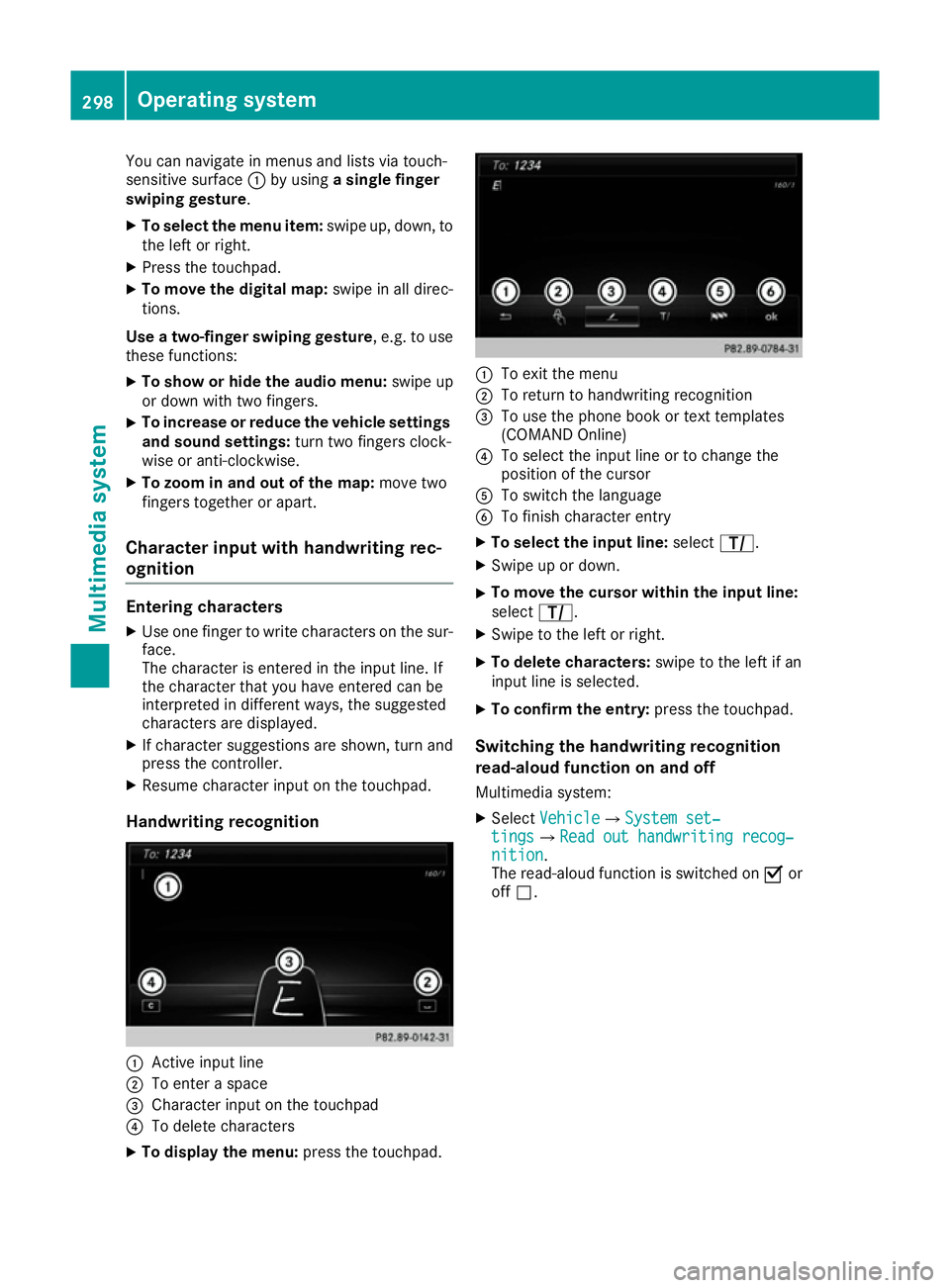
Handwriting recognition :
Activ einput line
; To enter aspace
= Character input on the touchpad
? To delete characters
X To display th emenu: press the touchpad. :
To exit the menu
; To return to handwritin grecognition
= To use the phon ebook or tex ttemplates
(COMAN DOnline)
? To selec tthe input line or to change the
position of the cursor
A To switc hthe language
B To finish character entry
X To select th einpu tline: select p.
X Swipe up or down.
X To move th
ecursor within th einpu tline:
select p.
X Swipe to the left or right.
X To delet echaracters: swipe to the left if an
input line is selected.
X To confirm th eentry: press the touchpad.
Switchin gthe handwriting recognition
read-aloud function on and off
Multimedia system:
X Select Vehicle VehicleQ System set‐ System set‐
tings
tingsQRead out handwriting recog‐ Read out handwriting recog‐
nition
nition.
The read-aloud function is switched on Oor
off ª. 298
Operating systemMultimedia system
Page 303 of 385
You can fin
dall available climat econtrol func-
tion sint he climat econtrol menu. You can use
the climat econtrol bar to switc htothe climate
control menu.
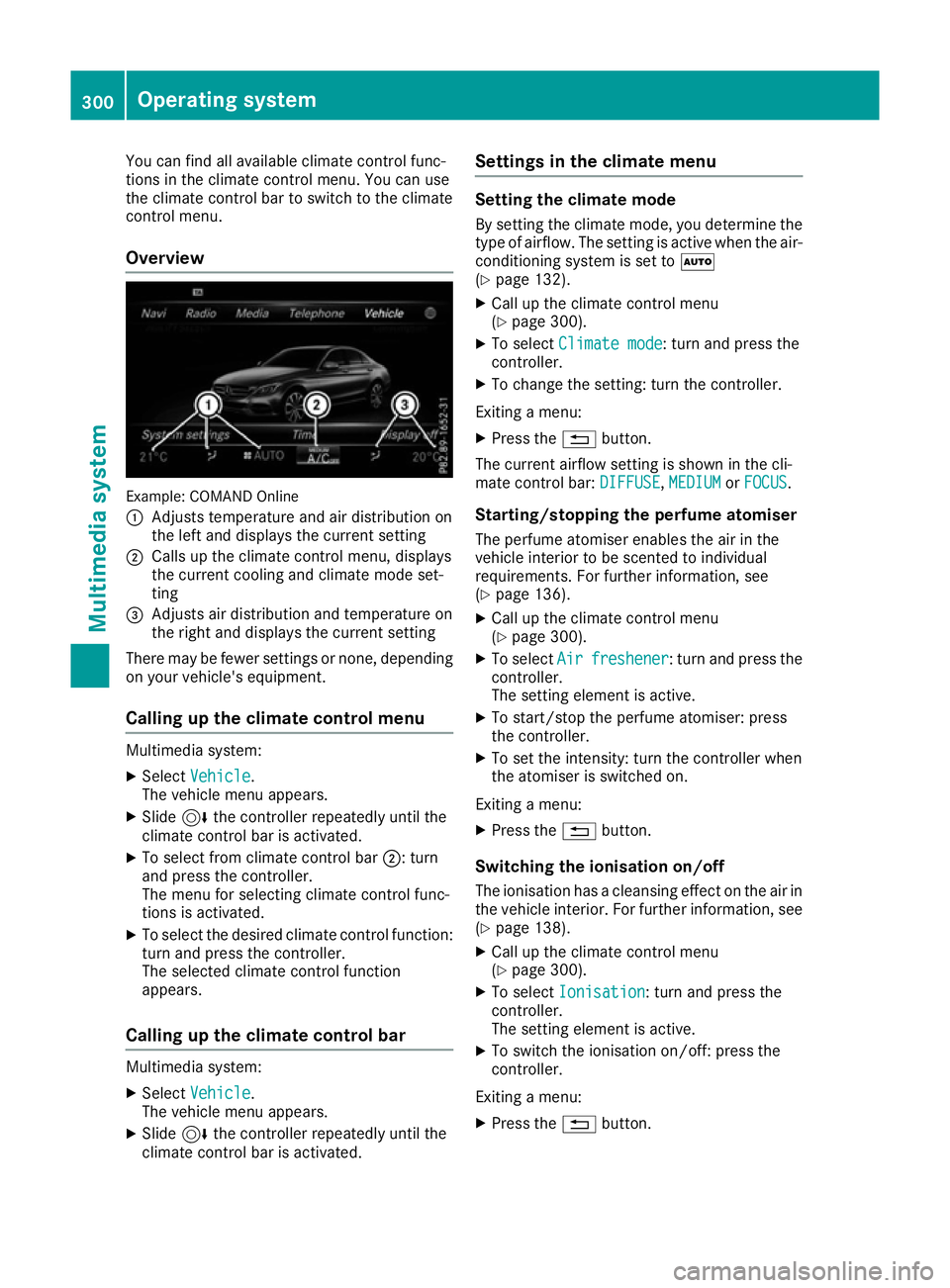
Overview Example: COMAN
DOnline
: Adjusts temperature and air distribution on
the left and displays the current setting
; Calls up the climat econtrol menu, displays
the current coolin gand climat emode set-
ting
= Adjusts air distribution and temperature on
the right and displays the current setting
There may be fewer settings or none, depending
on your vehicle's equipment.
Calling up th eclimate control menu Multimedia system:
X Select Vehicle
Vehicle.
The vehicle men uappears.
X Slide 6the controller repeatedly until the
climat econtrol bar is activated.
X To select from climat econtrol bar ;:turn
and press the controller.
The men ufor selecting climat econtrol func-
tion sisa ctivated.
X To select the desired climat econtrol function:
turn and press the controller.
The selected climat econtrol function
appears.
Calling up th eclimate control bar Multimedia system:
X Select Vehicle Vehicle.
The vehicle men uappears.
X Slide 6the controller repeatedly until the
climat econtrol bar is activated. Settings in th
eclimate menu Setting th
eclimate mode
By settin gthe climat emode, you determine the
type of airflow. The settin gisactive when the air-
conditioning syste misset toÃ
(Y page 132).
X Call up the climat econtrol menu
(Y page 300).
X To select Climate mode
Climate mode :turn and press the
controller.
X To change the setting: turn the controller.
Exitin gam enu:
X Press the %button.
The current airflow settin gisshown in the cli-
mate control bar: DIFFUSE
DIFFUSE,MEDIUM
MEDIUMorFOCUS
FOCUS.
Starting/stopping th eperfum eatomiser
The perfum eatomiser enables the air in the
vehicle interior to be scented to individual
requirements. For further information, see
(Y page 136).
X Call up the climat econtrol menu
(Y page 300).
X To select Air
Air freshener freshener:t urn and press the
controller.
The settin gelemen tisactive.
X To start/sto pthe perfum eatomiser: press
the controller.
X To set the intensity: turn the controller when
the atomiser is switched on.
Exitin gam enu:
X Press the %button.
Switchin gthe ionisation on/off
The ionisation has acleansing effect on the air in
the vehicle interior .For further information, see
(Y page 138).
X Call up the climat econtrol menu
(Y page 300).
X To select Ionisation
Ionisation:t urn and press the
controller.
The settin gelemen tisactive.
X To switc hthe ionisation on/off: press the
controller.
Exitin gam enu:
X Press the %button. 300
Operating systemMultimedia system
Page 308 of 385
Multimedia system:
X Select Connect device
Connect deviceQConnect MB Connect MB
SAP module
SAP moduleQStart search Start search.
The module is searched for and connected.
X To authorise amobile phone: selectStart
Start
search
search and follow the instructions of the mul-
timedia system. Further information on
authorising and connecting mobile phones
(Y page 303).
SIM card mode Inserting
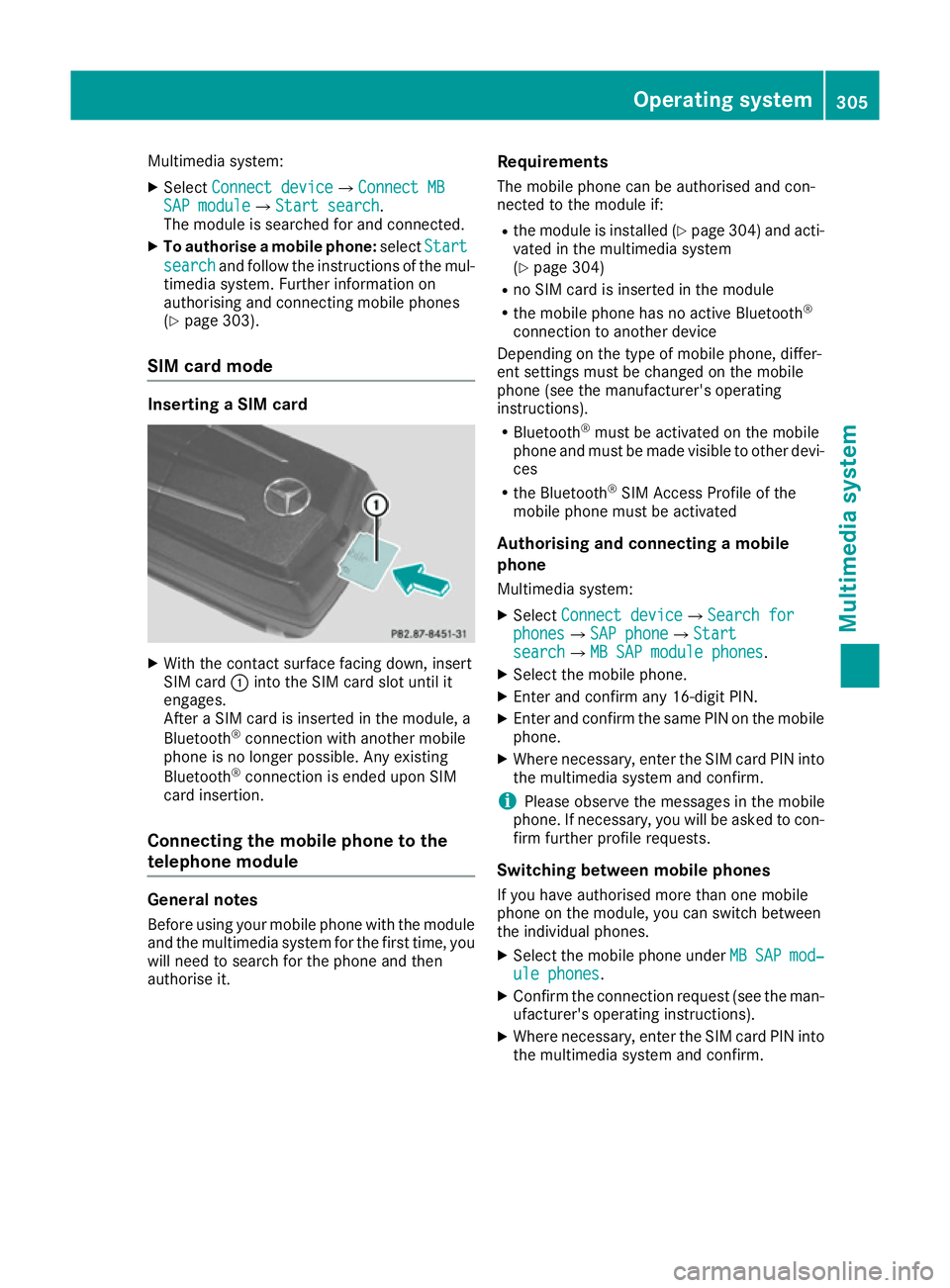
aSIM card X
With the contact surface facing down, insert
SIM card :into the SIM card slot until it
engages.
After aSIM card is inserted in the module, a
Bluetooth ®
connection with another mobile
phone is no longer possible. Any existing
Bluetooth ®
connection is ended upon SIM
card insertion.
Connecting the mobile phone to the
telephone module General notes
Before using your mobile phone with the module
and the multimedia system for the first time, you will need to search for the phone and then
authorise it. Requirements
The mobile phone can be authorised and con-
nected to the module if:
R the module is installed (Y page 304) and acti-
vated in the multimedia system
(Y page 304)
R no SIM card is inserted in the module
R the mobile phone has no active Bluetooth ®
connection to another device
Depending on the type of mobile phone, differ-
ent settings must be changed on the mobile
phone (see the manufacturer's operating
instructions).
R Bluetooth ®
must be activated on the mobile
phone and must be made visible to other devi- ces
R the Bluetooth ®
SIM Access Profile of the
mobile phone must be activated
Authorising and connecting amobile
phone
Multimedia system:
X Select Connect device
Connect deviceQSearch for Search for
phones phonesQSAP phone SAP phoneQStart Start
search
searchQMB SAP module phones MB SAP module phones.
X Select the mobile phone.
X Enter and confirm any 16-digit PIN.
X Enter and confirm the same PIN on the mobile
phone.
X Where necessary, enter the SIM card PIN into
the multimedia system and confirm.
i Please observe the messages in the mobile
phone. If necessary, you will be asked to con-
firm further profile requests.
Switching between mobile phones If you have authorised more than one mobile
phone on the module, you can switch between
the individual phones.
X Select the mobile phone under MB MBSAP
SAP mod‐
mod‐
ule phones
ule phones.
X Confirm the connection request (see the man-
ufacturer's operating instructions).
X Where necessary, enter the SIM card PIN into
the multimedia system and confirm. Operating system
305Multimedia system Z
Page 310 of 385
i
Information on the single CD/DVD drive or
DVD changer (see the Digital Owner's Man-
ual).
Activating media mode Multimedia system:
X Select Media
MediaQDevices Devices.
The available media sources willbes hown.
The #dot indicates the current setting.
X Select the media source.
Playable files are played back.
Inserting and removing an SD memory
card Important safety notes
G
WARNING
SD memory cards are small parts. They can be swalloweda nd cause asphyxiation. This
poses an increased risk of injury or even fatal injury.
Keep SD memory cards out of the reach of
children. If an SD memory card is swallowed,
seek immediate medica lattention.
! If you are no longer using the SD memory
card, you shouldr emove it and take it out of
the vehicle .High temperature scan damage
the card.
Inserting an SD memory card
The SD card slot is located in the stowage com-
partment under the armrest.
X Insert the SD memory card into the SD card
slot until it engages .The side with the con-
tacts must face downwards.
X Select the media source (Y page 307).
Ejectin ganSDm emory card
X Press the memory card.
The memory card is ejected.
X Remove the memory card.
Connecting USB devices There are two USB ports in the stowage space
under the armrest. X
Connect the USB device to the USB port.
X Select the media source (Y page 307). Operating system
307Multimedia system Z
Page 322 of 385
for example, request an appointment or call for
help in the event of abreakdown.
The Audi o20/COMAND Online display indi-
cates that acall is active. During the call ,you
can change to the navigation menu by pressing
the NAVI button on the multimedi asystem ,for
example.
Voice outpu tisnot available in this case.
You can find more information on Mercedes-
Benz Contact in the separate multimedi asys-
tem operating instructions.
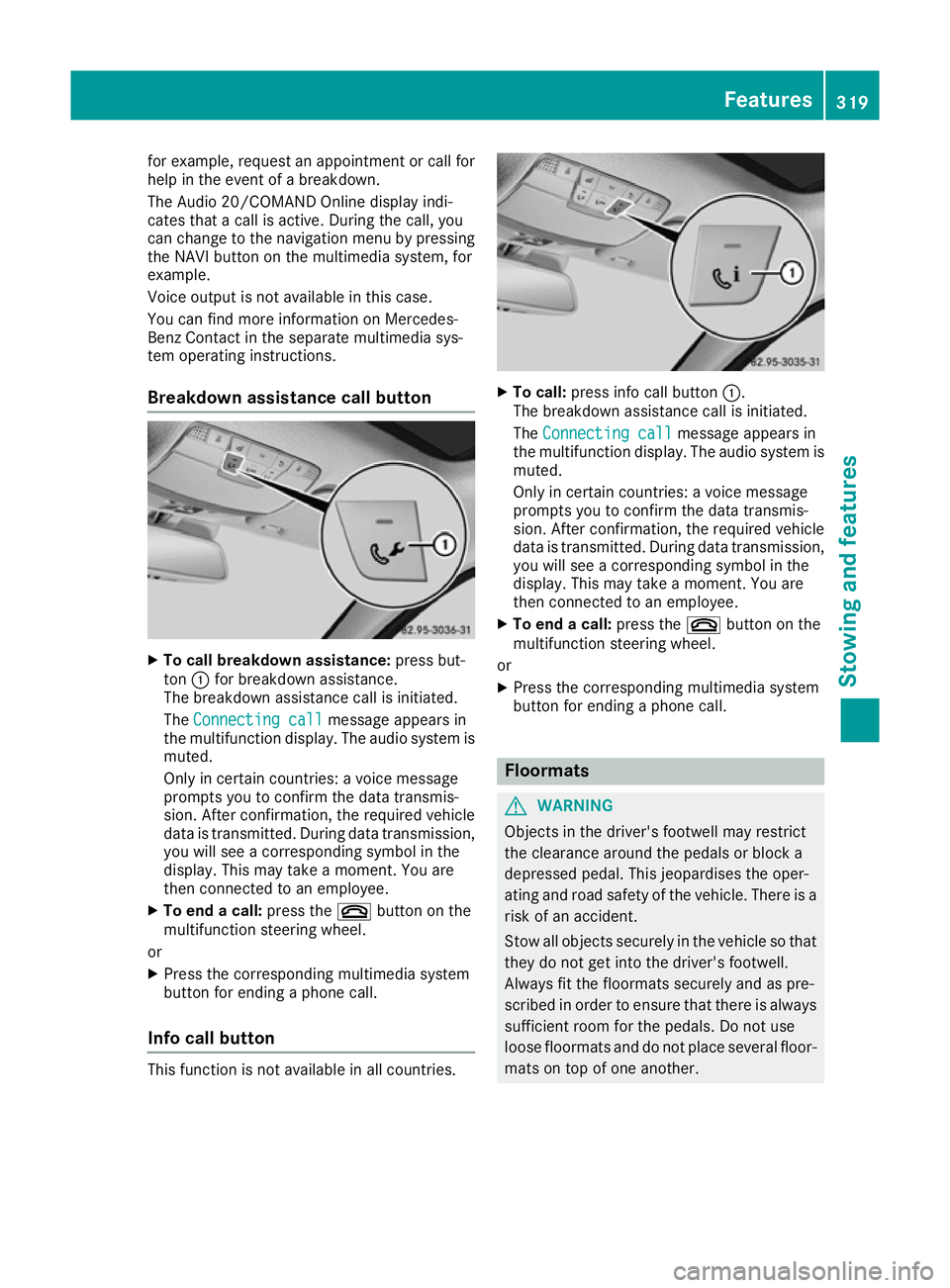
Breakdown assistance call button X
To call breakdow nassistance: press but-
ton :for breakdown assistance.
The breakdown assistance call is initiated.
The Connecting call
Connecting call message appears in
the multifunction display .The audio system is
muted.
Only in certain countries :avoice message
prompts you to confirm the data transmis-
sion. After confirmation, the required vehicle
data is transmitted. During data transmission, you wil lsee acorresponding symbol in the
display .This may take amoment. You are
then connected to an employee.
X To end acall: press the ~button on the
multifunction steering wheel.
or X Press the corresponding multimedi asystem
button for ending aphone call.
Info call button This function is not available in all countries. X
To call: press info call button :.
The breakdown assistance call is initiated.
The Connecting call Connecting call message appears in
the multifunction display .The audio syste mis
muted.
Only in certain countries :avoice message
prompts you to confirm the data transmis-
sion. After confirmation, the required vehicle
data is transmitted. During data transmission,
you wil lsee acorresponding symbol in the
display .This may take amoment. You are
then connected to an employee.
X To end acall: press the ~button on the
multifunction steering wheel.
or
X Press the corresponding multimedi asystem
button for ending aphone call. Floormats
G
WARNING
Objects in the driver's footwell may restrict
the clearance around the pedals or block a
depressed pedal. This jeopardise sthe oper-
ating and road safety of the vehicle. There is a risk of an accident.
Stow all objects securely in the vehicl esothat
they do not get into the driver's footwell.
Always fit the floormats securely and as pre-
scribe dinorder to ensure that there is always
sufficient room for the pedals. Do not use
loos efloormats and do not place severa lfloor-
mats on top of one another. Features
319Stowing and features Z
Page 335 of 385
!
Do not affix the following to plastic surfaces:
R stickers
R films
R scented oil bottles or similari tems
You could otherwise damage the plastic.
! Do not allow cosmetics, insect repellent or
sunscreen to come in contact with the plastic
trim. This maintains the high-quality look of
the surfaces.
X Wipe the plastic trim with adamp, lint-free
cloth, e.g. amicrofibre cloth.
X Heavy soiling: use car care and cleaning
products recommended and approved by
Mercedes-Benz.
The surface may change colour temporarily.
Wait until the surface is dry again.
Cleaning the steering wheela nd gear or
selector lever X
Thoroughly wipe with adamp cloth or use
leather care agents that have been recom-
mended and approved by Mercedes-Benz.
Cleaning wooden trim and trim ele-
ments !
Do not use solvent-based cleaning agents
such as tar remover, wheel cleaners, polishes or waxes. There is otherwise arisk of damag-
ing the surface.
X Wipe the wooden trim and trim elements with
ad amp, lint-free cloth, e.g. amicrofibre cloth.
X Trim elements with piano black finish:
clean with
asoft, damp cloth and acommer-
cially available soap solution.
X Heavy soiling: use care and cleaning prod-
ucts recommended and approved by
Mercedes-Benz.
Cleaning the seat covers General notes
! Do not use
amicrofibre cloth to clean covers
made out of real leather, artificial leather or
DINAMICA. If used frequently, this can dam-
age the cover.
Note that regularc are is essential to make sure
that the appearance and comfort of the covers
are retained over time. Genuine leather seat covers
! To retain the natural appearance of the
leather, observe the following cleaning
instructions:
R Cleang enuine leather covers carefully with
ad amp cloth and then wipe the covers
down with adry cloth.
R Make sure that the leather does not
become soaked. It may otherwise become
rough and cracked.
R Only use leather care agents that have
been tested and approved by Mercedes-
Benz. You can obtain these from aqualified
specialist workshop.
Leather is anatural product.
It has natural surface properties, e.g.:
R unevenness in structure
R marks caused by growth and injury
R subtle colour differences
These are characteristics of leather and not
material faults.
Seat covers from other materials
! Observe the following when cleaning:
R clean artificial leather covers with acloth
moistened with asolution containing 1%
detergent (e.g. washing-up liquid).
R clean cloth covers with amicrofibre cloth
moistened with asolution containing 1%
detergent (e.g. washing-up liquid). Rub
carefully,a nd always wipe entire seat sec-
tions to avoid leaving visible lines. Leave
the seat to dry afterwards. Cleaning results depend on the type of dirt and how long it
has been there.
R CleanD INAMICA covers with adamp cloth.
Make sure that you wipe entire seat sec-
tions to avoid leaving visible lines.
Cleaning the seat belts G
WARNING
Seat belts may be severely weakened if
bleached or coloured. This may lead to the
seat belts, for example, tearing or failing in an accident. There is an increased risk of injury,
possibly even fatal.
Never bleach or colour seat belts. 332
CareMaintenance and care
Page 342 of 385
If you come into contact with the tyre sealant,
observe the following:
R Rinse off the tyre sealant from yours kin
immediately with water.
R If the tyre sealant comes into contact with
youre yes,immediately rinse them thor-
oughlyw ith clean water.
R If tyre sealant is swallowed, immediately
rinse yourm outh out thoroughl yand drink
plenty of water. Do not induce vomiting,
and seek medica lattention immediately.
R Immediately change out of clothing which
has come into contact with tyre sealant.
R If an allergic reaction occurs, seek medical
attention immediately.
! Do not operate the tyre inflation compres-
sor for longer than ten minutes at atime with-
out abreak. It may otherwise overheat.
The tyre inflation compressor can be oper-
ated again once it has cooled down.
Complyw ith the manufacturer's safety instruc-
tions on the sticker on the tyre inflation com-
pressor.
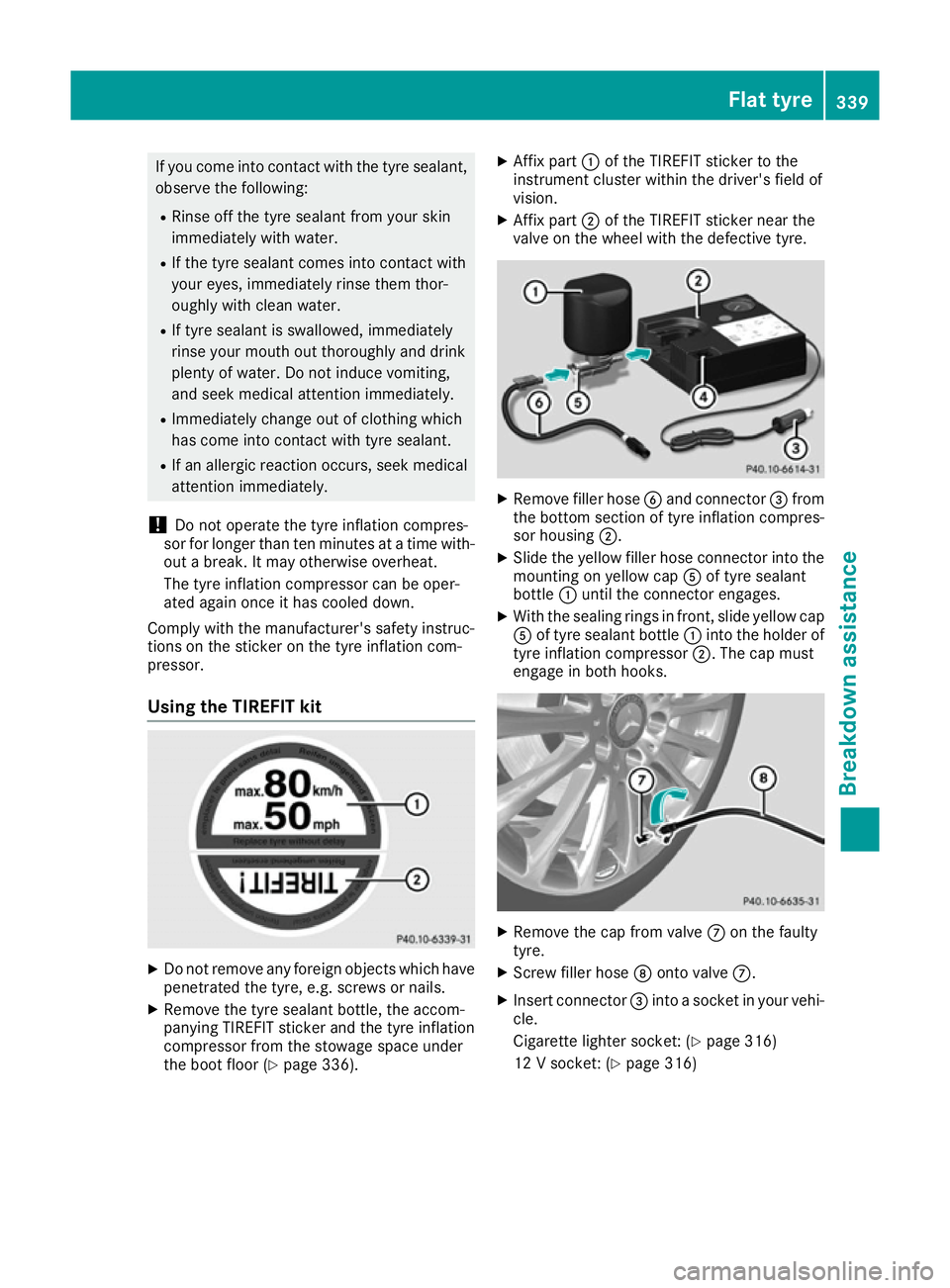
Usingt he TIREFITk it X
Do not remove any foreign objects which have
penetrated the tyre, e.g. screws or nails.
X Remove the tyre sealant bottle, the accom-
panying TIREFIT sticker and the tyre inflation
compressor from the stowage space under
the boot floor (Y page 336). X
Affix part :of the TIREFIT sticker to the
instrument cluster within the driver's field of
vision.
X Affix part ;of the TIREFIT sticker near the
valve on the wheel with the defective tyre. X
Remove fillerh oseBand connector =from
the bottom section of tyre inflation compres- sor housing ;.
X Slide the yellow fillerh ose connector into the
mounting on yellow cap Aof tyre sealant
bottle :until the connector engages.
X With the sealing rings in front, slidey ellow cap
A of tyre sealant bottle :into the holderof
tyre inflation compressor ;.The cap must
engage in both hooks. X
Remove the cap from valve Con the faulty
tyre.
X Screw fillerh oseDonto valve C.
X Insert connector =into asocket in yourv ehi-
cle.
Cigarette lighter socket: (Y page 316)
12 Vsocket: (Y page 316) Flat tyre
339Breakdowna ssistance Z
Page 361 of 385
This improves the ride comfor
tofyour vehicle;
however, fuel consumption may increase
slightly. Tyrep
ressure loss warning system
General notes While the vehicle is in motion
,the tyre pressure
loss warning system monitors the set tyre pres-
sure using the rotational speed of the wheels.
This enables the system to detect significant
pressure loss in atyre. If the speed of rotation of
aw heel changes as aresult of aloss of pressure,
ac orresponding warning message will appear in
the multifunction display.
You can recognise the tyre pressure loss warn-
ing by the Run Flat Indicator active
Run Flat Indicator active
Restart with OK Restart with OK message which appears in
the Service
Service menu of the multifunction display.
Information on the message display can be
found in the "Restarting the tyre pressure loss
warning system" section (Y page 358).
Important safety notes The tyre pressure warning system does not warn
you of an incorrectly set tyre pressure. Observe the notes on the recommended tyre pressure
(Y page 356).
The tyre pressure loss warning does not replace the need to regularly check the tyre pressures.
An even loss of pressure on several tyres at the
same time cannot be detected by the tyre pres-
sure loss warning system.
The tyre pressure monitor is not able to warn
you of asudden loss of pressure, e.g. if the tyre
is penetrated by aforeign object .Inthe event of
as udden loss of pressure, bring the vehicle to a
halt by braking carefully. Avoid abrupt steering
manoeuvres.
The function of the tyre pressure loss warning
system is limited or delayed if:
R snow chains are fitted to your vehicle's tyres.
R road conditions are wintry.
R you are driving on sand or gravel.
R you adopt avery sporty driving style (corner-
ing at high speeds or driving with high rates of
acceleration).
R you are towing avery heavy or large trailer. R
you are driving with aheavy load (in the vehi-
cle or on the roof).
R
Restarting the tyrep ressureloss warn-
ing system Restart the tyre pressure loss warning system if
you have:
R changed the tyre pressure
R changed the wheels or tyres
R fitted new wheels or tyres
X Before restarting, make sure that the tyre
pressures are set properly on all four tyres for
the respective operating conditions. The rec-
ommended tyre pressures can be found in the
tyre pressure table on the fuel filler flap.
The tyre pressure loss warning system can
only give reliable warnings if you have set the correc ttyre pressure. If an incorrect tyre
pressure is set, these incorrect values will be
monitored.
X Observe the notes in the section on tyre pres-
sures (Y page 356).
X Make sure that the key is in position 2in the
ignition lock (Y page 145).
X Press òon the steerin gwheel to call up
the menu list.
X Press 9or: on the steerin gwheel to
select the Service Servicemenu.
X Confirm by pressing aon the steering
wheel.
X Select Tyre pressure
Tyre pressure with9 or:.
X Press ato confirm.
The Run
Run Flat
Flat Indicator
Indicator active
activeRestart
Restart
with OK
with OK message is shown in the multifunc-
tion display.
If you wish to confirm the restart: X Press the abutton.
The Tyre pressure now OK?
Tyre pressure now OK? message is
shown in the multifunction display.
X Select Yes
Yeswith 9 or:.
X Press ato confirm.
The Run Flat Indicator restarted
Run Flat Indicator restarted mes-
sage is shown in the multifunction display.
After ateach-in period, the tyre pressure loss
warning system will monitor the set tyre pres- sures of all four tyres. 358
Tyrep
ressureWheels and tyres
Page 363 of 385
radios) that may be being operated in or near the
vehicle.
Checking the tyre pressure electroni-
cally X
Make sure that the key is in position 2in the
ignitio nlock (Y page145).
X Press òon the steering whee ltocall up
the menu list.
X Press 9or: on the steering whee lto
select the Service
Servicemenu.
X Confirm by pressing aon the steering
wheel.
X Select Tyre pressure
Tyre pressure with9 or:.
X Press ato confirm.
The multifunction display shows the current
tyre pressure of each wheel.
If the vehicl ewas parked for longer than
20 minutes ,the following message appears:
Tyre pressure swill be displayed
Tyre pressure swill be displayed
after afew minutes of driving
after afew minutes of driving.
After ateach-in period, the tyre pressure moni-
tor automatically detects new wheels or new
sensors. As long as acleara llocation of the tyre
pressure values to the individualw heels is not
possible, the Tyre Tyrepressure
pressure monitor
monitoractive
active
message is shown instead of the tyre pressure
display.T he tyre pressures are already being
monitored.
If an emergency spare whee lisfitted, for afew
minutes the system may continue to show the
tyre pressure of the whee lthat has been
removed .Ifthis occurs, note that the valu edis-
played for the position where the spare whee lis
fitted is not the same as the current tyre pres-
sure of the emergency spare wheel.
Warning message softhe tyre pressure
monitor If the tyre pressure monitor detects
apressure
loss in one or more tyres, awarning message is
shown in the multifunction display.T he yellow
tyre pressure warning lamp then lights up.
R If the Please correct tyre pressure
Please correct tyre pressure
message appears in the multifunction display,
the tyre pressure in at least one tyre is too
low.T he tyre pressure must be corrected
when the opportunity arises.
R If the Check Check tyre(s)
tyre(s) message appears in the
multifunction display,t he tyre pressure in at least one tyre has dropped significantly. The
tyres must be checked.
R If the Warning tyre defect Warning tyre defect message
appears in the multifunction display,t he tyre
pressure in at least one tyre has dropped sud- denly .The tyres must be checked.
Observe the instructions and safety notes in the display messages in the "Tyres" section
(Y page2 77).
If the whee lpositions on the vehicl eare inter-
changed ,the tyre pressures may be displayed
for the wrong positions for ashort time. After a
few minutes of driving, this is rectified and the
tyre pressures are displayed for the correct
positions.
Restarting the tyre pressure monitor When you restart the tyre pressure monitor, all
existing warning messages are deleted and the
warning lamp sgoout. The monitor uses the cur-
rently set tyre pressures as the reference values
for monitoring. In most cases, the tyre pressure monitor willa utomatically detect the new refer-
ence values after you have changed the tyre
pressure. However, you can alsos et reference
values manually as described here. The tyre
pressure monitor then monitors the new tyre
pressure values.
X Use the table on the insid eofthe fuel filler flap
to ensure that the tyre pressure is set cor-
rectly in all four tyres for the current operating
conditions.
Also observe the notes in the section on tyre
pressures (Y page356).
X Make sure that the key is in position 2in the
ignitio nlock (Y page145).
X Press òon the steering whee ltocall up
the menu list.
X Press 9or: on the steering whee lto
select the Service Servicemenu.
X Confirm by pressing aon the steering
wheel.
X Select Tyre pressure
Tyre pressure with9 or:.
X Press ato confirm.
The multifunction display shows the current
tyre pressure of each whee lortheTyre Tyre 360
Tyre pressureWheels and tyres
Page 364 of 385
pressures
pressures
will
willbe
bedisplayed
displayed after a
after a
few minutes of driving
few minutes of driving message.
X Press the :button.
The Use
Use current
current pressures
pressures as
asnew
new ref‐
ref‐
erence values
erence values message is shown in the
multifunction display.
If you wish to confirm the restart: X Press the abutton.
The Tyre
Tyre press.
press. monitor
monitor restarted
restarted mes-
sage is shown in the multifunction display.
After you have driven for afew minutes, the
system checks whether the current tyre pres- sures are within the specified range. The new
tyre pressures are then accepted as refer-
ence valuesa nd monitored.
If you wish to cancelt he restart:
X Press the %button.
The tyre pressure valuess tored at the last
restart will continue to be monitored. Changing
awheel Flat tyre
You can find information on what to do in the
event of aflat tyre in the "Breakdown assis-
tance" section (Y page 337). Information on
driving with MOExtended tyres in the event of a flat tyre can be found under "Breakdown assis-
tance" (Y page 337).
Vehicles with an emergency spare wheel: in
the event of aflat tyre, the emergency spare
wheel is fitted according to the description
under "Fitting awheel" (Y page 362). Interchanging the wheels
G
WARNING
Interchanging the front and rear wheels may
severely impair the driving characteristics if
the wheels or tyres have different dimensions. The wheel brakes or suspension components may also be damaged. There is arisk of acci-
dent.
Interchange front and rear wheels only if the
wheels and tyres are of the same dimensions. !
On vehicles fitted with
atyre pressure mon-
itor, electronic componentsa re located in the
wheel.
Tyre-fitting tools should not be applied in the area of the valve, as this could damage the
electronic components.
Only have tyres changed at aqualified spe-
cialist workshop.
Interchanging the front and rear wheels of dif-
fering dimensions can render the general oper-
ating permit invalid.
Observe the instructionsa nd safety notes in the
"Fitting awheel" section (Y page 362).
The wear patterns on the front and rear tyres
differ depending on the operating conditions.
Interchange the wheels before aclear wear pat-
tern has formed on the tyres. Front tyres typi-
cally wear more on the shoulders and the rear
tyres in the centre.
On vehicles that have the same size front and
rear wheels, you can interchange the wheels
every 5,000 to 10,000 km depending on the
degree of tyre wear. Ensure the direction of
rotation is maintained.
Cleant he contact surfaces of the wheel and the
brake disc thoroughly every time awheel is
interchanged. Check the tyre pressure and, if
necessary, restart the tyre pressure loss warn-
ing system (Y page 358) or the tyre pressure
monitor (Y page 360). Direction of rotation
Tyres with aspecified direction of rotation have
additional benefits, e.g. if there is arisk of aqua-
planing. These advantages can only be gained if
the tyres are fitted corresponding to the direc-
tion of rotation.
An arrow on the sidewall of the tyre indicates its correct direction of rotation. Storing wheels
Store wheels in acool, dry and preferably dark
place if they are not being used. Protect the
tyres against oil, grease, petrol and diesel. Changing
awheel
361Wheels and tyres Z