reset MERCEDES-BENZ C-CLASS COUPE 2015 Owner's Manual
[x] Cancel search | Manufacturer: MERCEDES-BENZ, Model Year: 2015, Model line: C-CLASS COUPE, Model: MERCEDES-BENZ C-CLASS COUPE 2015Pages: 385, PDF Size: 13.12 MB
Page 250 of 385
Setting the position
You can adjust the position of the head-up dis-
play on the windscreen. You can compensate for
height differences if the seat positions are
changed, for example.
X Switch on the head-up display (Y page 235).
X Press òon the steering wheel to open the
menu list.
X Press :or9 on the steering wheel to
select the Settings
Settings menu.
X Confirm by pressing aon the steering
wheel.
X Press :or9 to select the Head-up Head-up
display
display submenu.
X Press ato confirm.
X Press :or9 to select the Position
Position
function.
X Press ato save the setting.
X Press :or9 to adjust the position to a
level from Level
Level +5
+5(up) to Level
Level -5
-5(down).
X Press aor% to save the setting.
Using the Memory function, you can save and
call up the set position of the head-up display as as ingle memory preset (Y page 116).
Adjusting the brightness
The brightness of the head-up display is auto-
matically adjusted to the surrounding light con-
ditions. You can also individually adjust the
brightness of the head-up display.
X Switch on the head-up display (Y page 235).
X Press òon the steering wheel to open the
menu list.
X Press :or9 on the steering wheel to
select the Settings
Settings menu.
X Confirm by pressing aon the steering
wheel.
X Use : or9 to select the Head-up
Head-up
display
display submenu.
X Press ato confirm.
X Press :or9 to select the Brightness
Brightness
function.
X Press the abutton to save the setting.
X Press :or9 to adjust the brightness
to alevel from Level
Level +5
+5(bright) to Level
Level-5
-5
(dark).
X Press the aor% button to save the
setting. Light submenu Switching the Intelligent Light System
on/off
X Press òon the steering wheel to open the
menu list.
X Press :or9 on the steering wheel to
select the Settings Settings menu.
X Confirm by pressing aon the steering
wheel.
X Press :or9 to select the Lights
Lights
submenu.
X Press ato confirm.
X Press :or9 to select the Intelli‐
Intelli‐
gent Light System
gent Light System function.
If the Intelligent Light System
Intelligent Light System function
has been switched on, the cone of light and
the L symbol in the multifunction display
are shown in white.
X Press the abutton to save the setting.
If you switch on the Intelligent
Intelligent Light
LightSys‐
Sys‐
tem
tem function, the following functions are activa-
ted:
R Motorway mode
R Active light function
R Cornering light function
R Extended range foglamps
If you set the dipped-beam headlamps for driv-
ing on the right/left ,the multifunction display
shows the Inactive Inactive for
forleft-side
left-side traffic
traffic
or Inactive for right-side traffic
Inactive for right-side traffic dis-
play message in the Lights
Lightssubmenu instead of
the Intelligent Light System
Intelligent Light System function
(Y page 247). This display message will only
appear if the settingf or driving on the left/right
is set opposite to your vehicle's countryv ersion.
Further information on the Intelligent Light Sys-
tem (Y page 121).
Setting the dipped-beam headlamps for
driving on the left/right
This function is only available in vehicles with
the Intelligent Light System.
You can use this function to switch between
symmetrical and asymmetrical dipped beam
(Y page 118).
X Press òon the steering wheel to open the
menu list.
X Press :or9 on the steering wheel to
select the Settings
Settings menu. Menus and submenus
247On-board computer and displays Z
Page 252 of 385
X
Press :or9 to adjust permanent
SPEEDTRONIC in increments of ten ( 240
240km/
km/
h
h to 160
160 km/h
km/h). The Off
Offsetting switches per-
manent SPEEDTRONIC off.
X Press the abutton to store the entry.
For further information on permanen tSPEED-
TRONIC (Y page 184).
Restoring the factor ysettings X
Press the òbutton on the steerin gwheel
to open the menu list.
X Press :or9 on the steerin gwheel to
select the Settings
Settings menu.
X Confirm by pressing aon the steering
wheel.
X Press :or9 to select the Factory
Factory
settings
settings submenu.
X Press ato confirm.
The Reset all settings?
Reset all settings? function
appears.
X Press :or9 to select No
NoorYes
Yes.
X Press the abutton to confirm the selec-
tion.
If you have selected Yes
Yes,t he multifunction
display shows aconfirmation message.
For safety reasons, not all functions will be
reset: the Limit speed (winter tyres)
Limit speed (winter tyres) per-
manent SPEEDTRONIC function can only be set
in the Vehicle
Vehicle submenu. AMG menu (Mercedes-AMG vehicles)
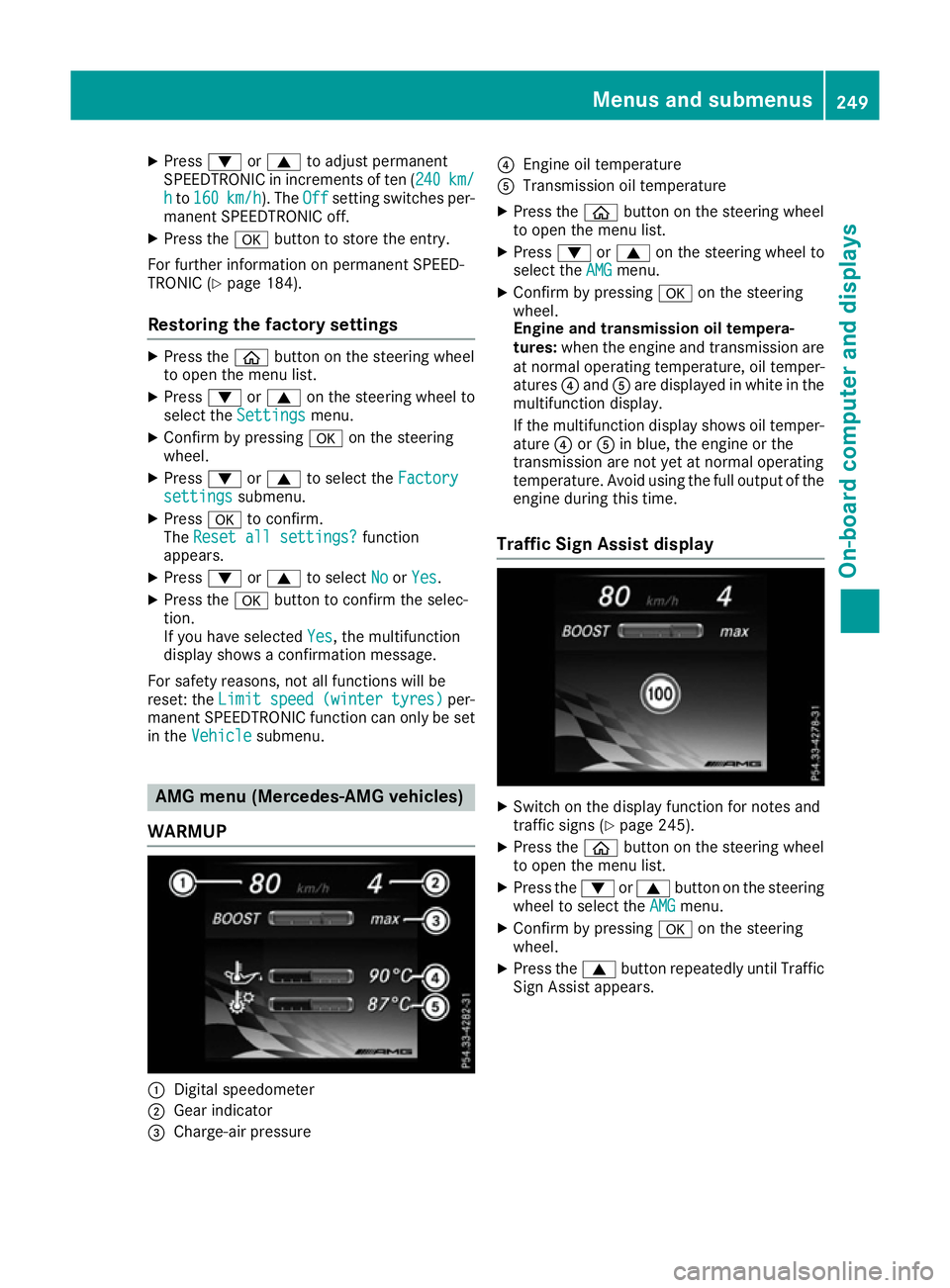
WARMUP :
Digital speedometer
; Gear indicator
= Charge-air pressure ?
Engine oil temperature
A Transmission oil temperature
X Press the òbutton on the steerin gwheel
to open the menu list.
X Press :or9 on the steerin gwheel to
select the AMG AMGmenu.
X Confirm by pressing aon the steering
wheel.
Engine and transmission oil tempera-
tures: when the engine and transmission are
at normal operating temperature, oil temper-
atures ?and Aare displayed in white in the
multifunction display.
If the multifunction display shows oil temper- ature ?orA in blue, the engine or the
transmission are not yet at normal operating
temperature. Avoid using the full output of the engine during this time.
Traffic Sign Assist display X
Switc hont he display function for notes and
traffic signs (Y page 245).
X Press the òbutton on the steerin gwheel
to open the menu list.
X Press the :or9 button on the steering
wheel to select the AMG AMGmenu.
X Confirm by pressing aon the steering
wheel.
X Press the 9button repeatedly until Traffic
Sign Assist appears. Menus and submenus
249On-board computer and displays Z
Page 253 of 385
G-Meter
The G-Meter shows you the forces that are exer-
ted on the driver during the journey, both later-
allya nd in the direction of travel.
The maximu mvalues are indicated in red in the
guideline system.
X Press òon the steering wheeltoo pen the
menu list.
X Press :or9 on the steering wheelto
select the AMG
AMGmenu.
X Confirm by pressing aon the steering
wheel.
X Press the 9button repeatedly until the G-
Meter appears.
The maximu mvalues of the G-Meter are
saved.
X To reset the G-Meter: pressaagain.
X Using :or9 select Yes Yeson the steer-
ing wheel.
X Press ato confirm.
The maximu mvalues of the G-Meter are
deleted.
If the ignition remains switched off for longer
than four hours, the G-Meter willbea utomati-
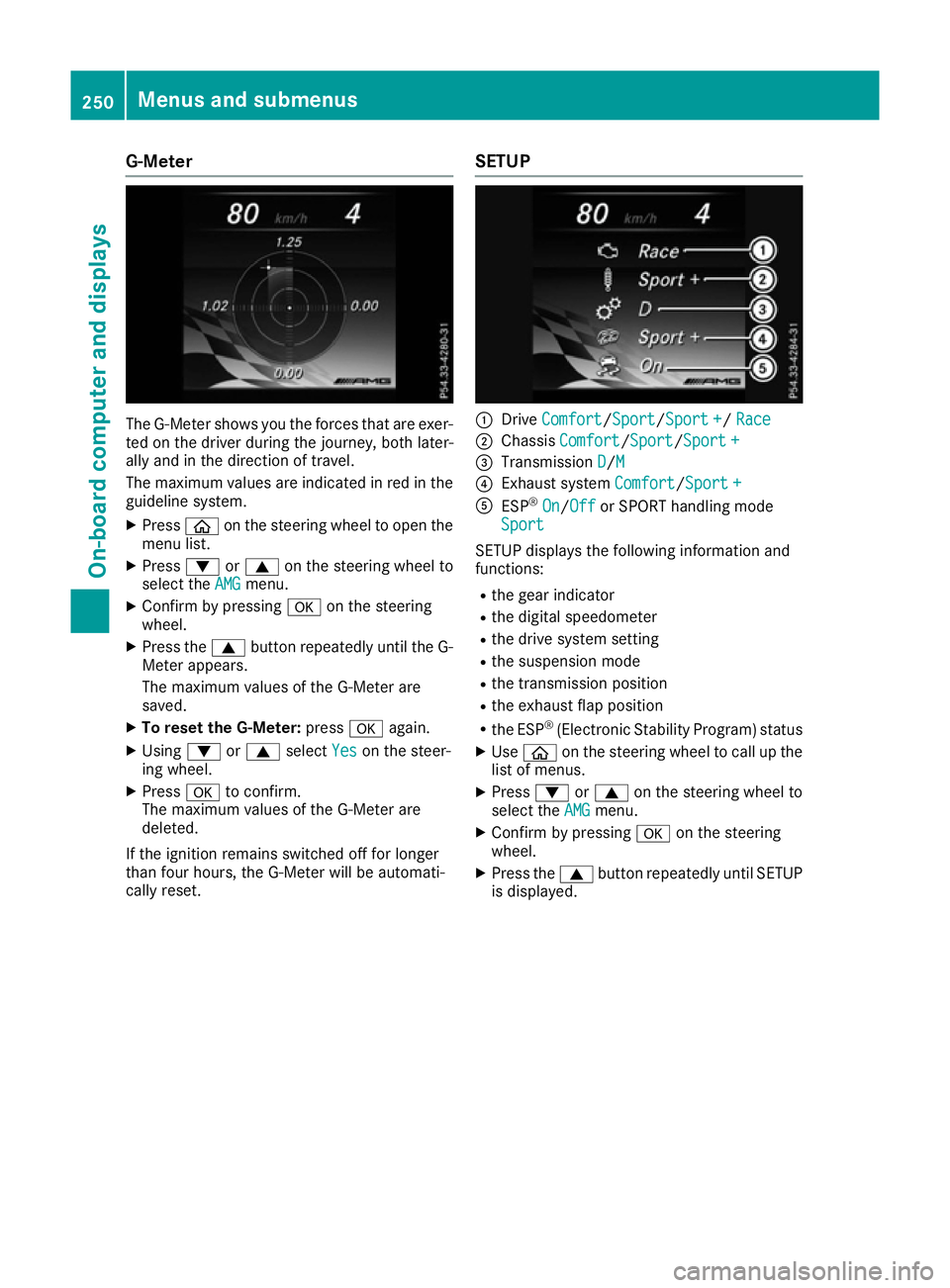
callyr eset. SETUP :
Drive Comfort
Comfort/ Sport
Sport/Sport +Sport +/ Race
Race
; Chassis Comfort
Comfort/Sport Sport/Sport +Sport +
= Transmission D
D/MM
? Exhaust system Comfort
Comfort/Sport +
Sport +
A ESP ®
On
On/Off Off or SPORT handling mode
Sport
Sport
SETUP displayst he following information and
functions:
R the gear indicator
R the digital speedometer
R the drive system setting
R the suspension mode
R the transmission position
R the exhaust flap position
R the ESP ®
(Electronic Stability Program) status
X Use ò on the steering wheeltoc all up the
list of menus.
X Press :or9 on the steering wheelto
select the AMG
AMGmenu.
X Confirm by pressing aon the steering
wheel.
X Press the 9button repeatedly until SETUP
is displayed. 250
Menus and submenusOn-board computer and displays
Page 254 of 385
RACETIMER
Displaying and startin
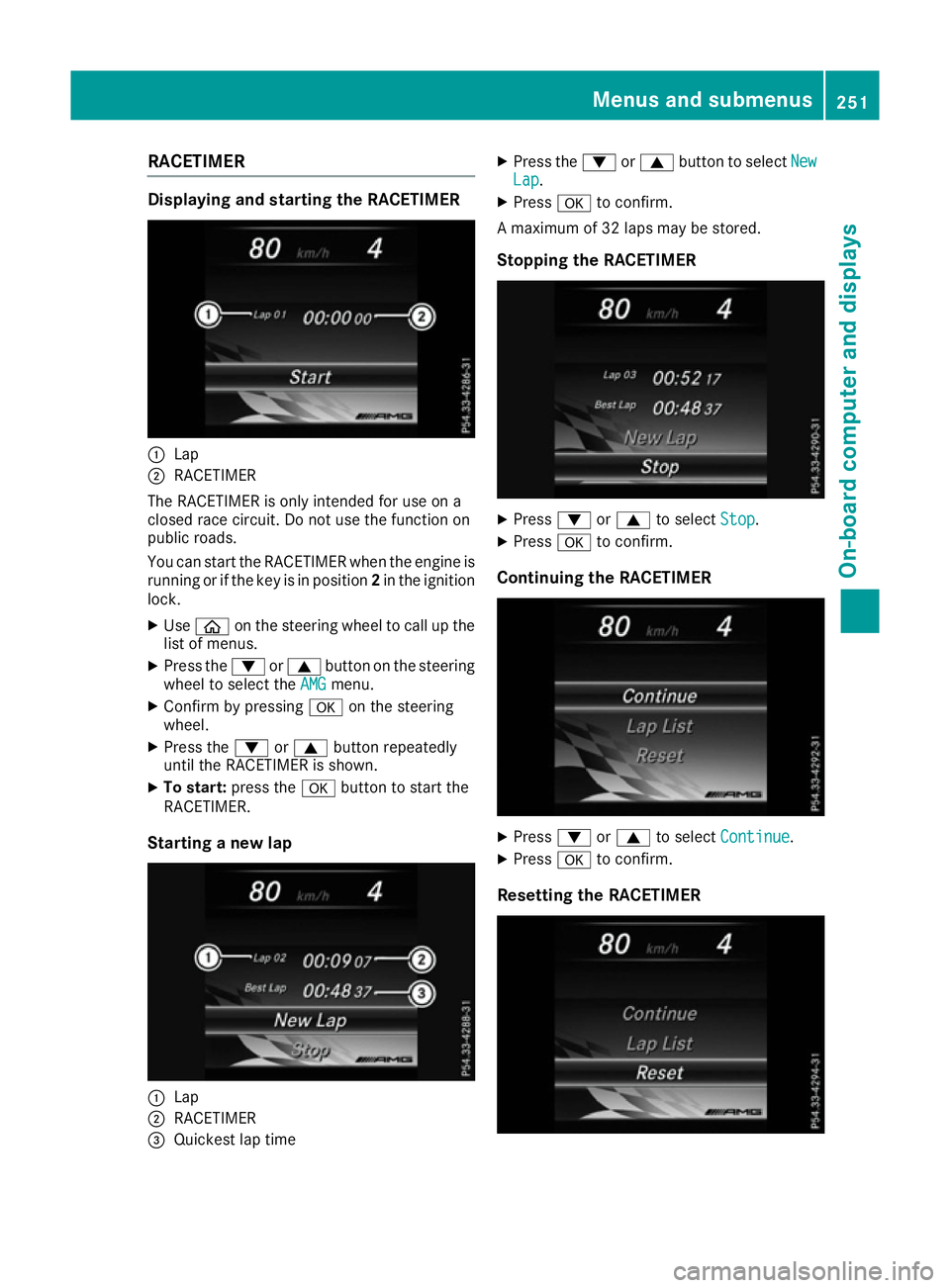
gthe RACETIMER :
Lap
; RACETIMER
The RACETIMER is only intended for us eona
closed race circuit. Do not us ethe function on
public roads.
Yo uc an star tthe RACETIMER when the engine is
running or if the key is in position 2in the ignition
lock.
X Use ò on the steering wheel to cal lupthe
list of menus.
X Press the :or9 button on the steering
wheel to select the AMG
AMG menu.
X Confirm by pressing aon the steering
wheel.
X Press the :or9 button repeatedly
unti lthe RACETIMER is shown.
X To start: press the abutton to star tthe
RACETIMER.
Startin ganewlap :
Lap
; RACETIMER
= Quickest la ptime X
Press the :or9 button to select New New
Lap Lap.
X Press ato confirm.
Am aximum of 32 laps may be stored.
Stoppin gthe RACETIMER X
Press :or9 to select Stop
Stop.
X Press ato confirm.
Continuin gthe RACETIMER X
Press :or9 to select Continue
Continue .
X Press ato confirm.
Resetting the RACETIMER Menus and submenus
251On-board computer and displays Z
Page 255 of 385
X
Press :or9 to select Stop Stop.
The RACETIME Risstopped.
X Press :or9 to select Reset Reset.
X Press ato confirm.
All laps are deleted.
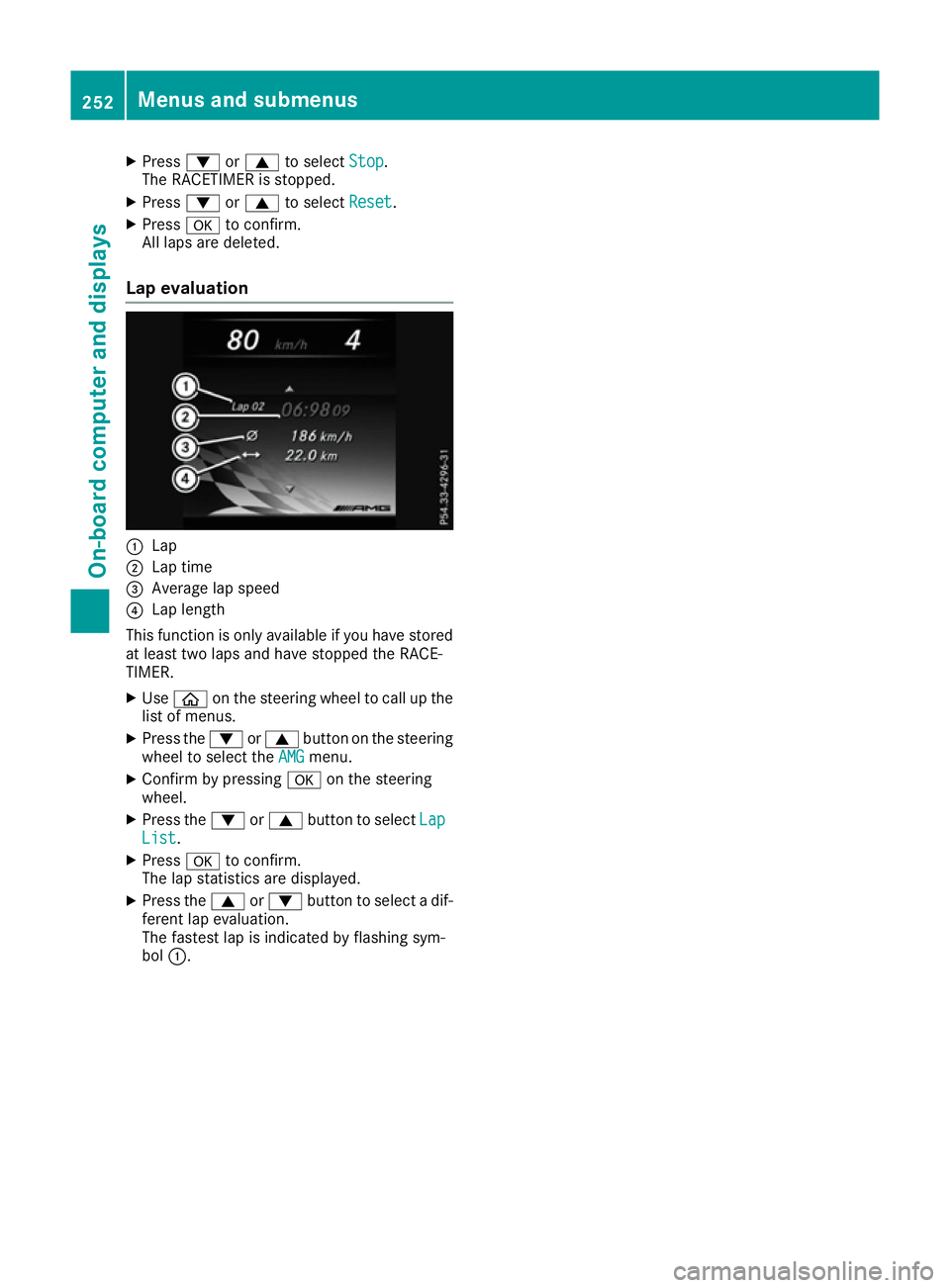
Lap evaluation :
Lap
; Lap time
= Average lap speed
? Lap length
This function is only availabl eifyou have stored
at least two laps and have stopped the RACE-
TIMER.
X Use ò on the steerin gwheel to call up the
list of menus.
X Press the :or9 button on the steering
wheel to select the AMG AMGmenu.
X Confirm by pressing aon the steering
wheel.
X Press the :or9 button to select Lap
Lap
List
List.
X Press ato confirm.
The lap statistics are displayed.
X Press the 9or: button to select adif-
ferent lap evaluation.
The fastest lap is indicated by flashing sym-
bol :. 252
Menus and submenusOn-board computer and displays
Page 324 of 385
Engine compartment
Bonnet
Important safety notes G
WARNING
An unlocked bonnet may open up when the
vehicle is in motion and bloc kyour view. There
is ar isk of an accident.
Never unlock th ebonnet when driving .Before
ever ytrip, ensure that th ebonnet is locked. G
WARNING
When bein gopened and closed, th ebonnet
may suddenly fall int othe closed position.
Ther eisar isk of injury to person sintherange
of movemen tofthebonnet.
Open and close th ebonnet only when nobody
is in th erange of movement. G
WARNING
If you open th ebonnet while th eengine is
overheatin gorwhile there is afireint he
engine compartment, you coul dcom einto
contac twith hot gases or other leaking ser-
vic ep roducts. Ther eisadanger of injury.
Allo wano verheatin gengine to coo ldown
before opening th ebonnet .Ifthere is afirein
th ee ngine compartment, leave th ebonnet
closed and notif ythe fireb rigade. G
WARNING
Ther eare moving component sintheengine
compartment. Certain component smay con-
tinue to mov eorsuddenly mov eagain even
after th eignition has been switched off ,e.g.
th er adiator fan .Ther eisar isk of injury.
If you have to carry out work in th eengine
compartment:
R switch off th eignition
R never touch th edangerous areas surround-
ing moving components, e.g .the rotation
area of th efan R
remove jeweller yand watches
R keep items of clothing and hair, for exam-
ple, away from moving parts. G
WARNING
The ignition system and th efuel injection sys-
te mo perate with ahigh voltage. If you touch
th el ive components, you coul dreceive an
electric shock. Ther eisadanger of injury.
Never touch component softheignition sys-
te mort hefuel injection system when the
ignition is switched on.
Activ ebonnet (pedestria nprotection) Operating principle
! An active bonnet that had been triggered
must be repaired at aqualified specialist
workshop .The active bonnet function will
then be availabl eagain .The additional pedes-
trian protection provide dbytheactive bonnet
will then be restored.
The active bonnet is only availabl eincertain
countries.
The active bonnet can reduc ethe risk of injury to
pedestrians in certain acciden tsituations .Rais-
ing th eactive bonnet increases th eclearance to
hard components, suc hastheengine.
If th eactive bonnet has been triggered, it is
raise datt herear in th earea aroun dthe hinge by
approximately 85 mm .The active bonnet is trig-
gered by pyrotechnics.
For th edrivetot heworkshop ,reset th etrig-
gered active bonnet yourself. If th eactive bon-
net has been triggered, pedestrian protection
may be limited.
Resetting G
WARNING
Certain component sintheengine compart-
men tcoul dbev eryh ot,e .g.t he engine ,the
radiator and part softheexhaust system.
Ther eisar isk of injury when accessing the
engine compartment.
As far as possible, allow th eengine to cool
down and only touch th ecomponent sdescri-
bed in th efollowing. Engine compartment
321Maintenance and care Z
Page 329 of 385
X
Press 9or: on the steerin gwheel to
select the Service
Servicemenu and confirm with
a.
X Press 9or: on the steerin gwheel to
select the ASSYST PLUS
ASSYST PLUS submenu and con-
firm with a.
The service due date appears in the multi-
function display. Information about service
Resetting the ASSYST PLUS service
interva ldisplay !
If the ASSYST PLUS service interval display
has been inadvertently reset, this setting can
be corrected at aqualified specialist work-
shop.
Have service work carried out as described in the Servic eBooklet .This may otherwise lead
to increased wear and damage to the major
assemblies or the vehicle.
Aq ualified specialist workshop, e.g. a
Mercedes-Benz Servic eCentre, will reset the
ASSYST PLUS service interval display after the
service work has been carried out. You can also
obtain further information on maintenance
work, for example.
Special service requirements The prescribed service interval is based on nor-
mal operation of the vehicle. Servic ework will
need to be performed more often if the vehicle is
operated under arduous conditions or increased loads, for example:
R regular city driving with frequent intermediate
stops
R if the vehicle is primarily used to travel short
distances
R for frequent operation in mountainous terrain
or on poor road surfaces
R if the engine is often left idling for long periods
In these or similar operating conditions, have,
for example, the air filter, engine oil and oil filter changed more frequently. The tyres must be
checked more frequently if the vehicle is oper-
ated under increased loads. Further informationcan be obtained at aqualified specialist work-
shop, e.g. aMercedes-Benz Servic eCentre. Driving abroad An extensive Mercedes-Benz Servic
enetwor kis
also availabl einother countries. You can obtain
further information from any Mercedes-Benz
Servic eCentre. Care
General notes
H
Environmenta
lnote
Dispose of empty packaging and cleaning
cloths in an environmentally responsible man-
ner.
! For cleaning your vehicle, do not use any of
the following:
R dry, rough or hard cloths
R abrasive cleaning agents
R solvents
R cleaning agents containing solvents
Do not scrub.
Do not touch the surfaces or protective films
with hard objects, e.g. aring or ice scraper.
You could otherwise scratch or damage the
surfaces and protective film.
! Do not park up the vehicle for an extended
period straight after cleaning it, particularly
after having cleaned the wheels with wheel
cleaner. Wheel cleaners could cause
increased corrosion of the brake discs and
brake pads/linings. For this reason, you
should drive for afew minutes after cleaning.
Brakin gheats the brake discs and the brake
pads/linings, thus drying them. The vehicle
can then be parked up.
Regula rcare of your vehicle is acondition for
retainin gthe quality in the long term.
Use care products and cleaning agents recom-
mended and approved by Mercedes-Benz. 326
CareMaintenance and care
Page 352 of 385
Removin
gthe towin geye X
Loosen the towing ey eand unscrew it.
X Attach cover :to the bumpe rand press until
it engages.
X Pu tthe towing ey ebacki nto the vehicl etool
kit. Towin
gthe vehicle awa ywitht he rear
axl eraised
Whe ntowing your vehicl ewitht he rea raxle
raised ,itisimportant that yo uobserve the
safety instructions (Y page 347).
! Vehicles with automatic transmissio
nmust
not be towe dwitht he rea raxler aised .The
car/traile rcombination may otherwise
swerve or eve noverturn.
! The ignition mus
tbes witched off if yo uare
towing the vehicl ewitht he rea raxler aised.
Intervention by ESP ®
could otherwise dam-
ag et he brake system.
X Switch on the hazard warning lamps
(Y page 120).
X Move the front wheel stothe straight-ahead
position.
X If necessary, turn the key in the ignition lock
to position 0and remove the key from the
ignition lock.
X Whe nleaving the vehicle, take the key with
you. Towin
gthe vehicle with both axles on
the ground
Vehicles with automati ctransmission: the
automatic transmissio nautomaticall yshifts to
position Pwhen yo uopent he driver' sorfront-
passenger doo rorwheny ou remove the key
from the ignition lock. In order to ensure that the automatic transmissio nstay sinp osition N
when towing away the vehicle, yo umustd othe
following:
X Make sure that the vehicl eisstationary.
X Turn the key to position 2in the ignition lock. X
Depress the brake pedal and keep it
depressed.
X Shif tthe automatic transmissio ntoposition
N.
Vehicles with manual transmission: X Turn the key to position 2in the ignition lock.
X Depress the brake pedal and keep it
depressed.
X Depress the clutch pedal fully and shift to
neutral.
Vehicles with manual or automati ctrans-
mission:
X Leave the key in position 2in the ignition lock.
X Releas ethe brake pedal.
X Releas ethe electri cparking brake.
X Switch on the hazard warning lamps
(Y page 120).
In order to signal achange of direction when
towing the vehicl ewitht he hazard warning
lamps switched on, us ethe combination switch
as usual. In this case, only the turn signal sfor
the desire ddirection flash. Whe nyou reset the
combination switch, the hazard warning lamps
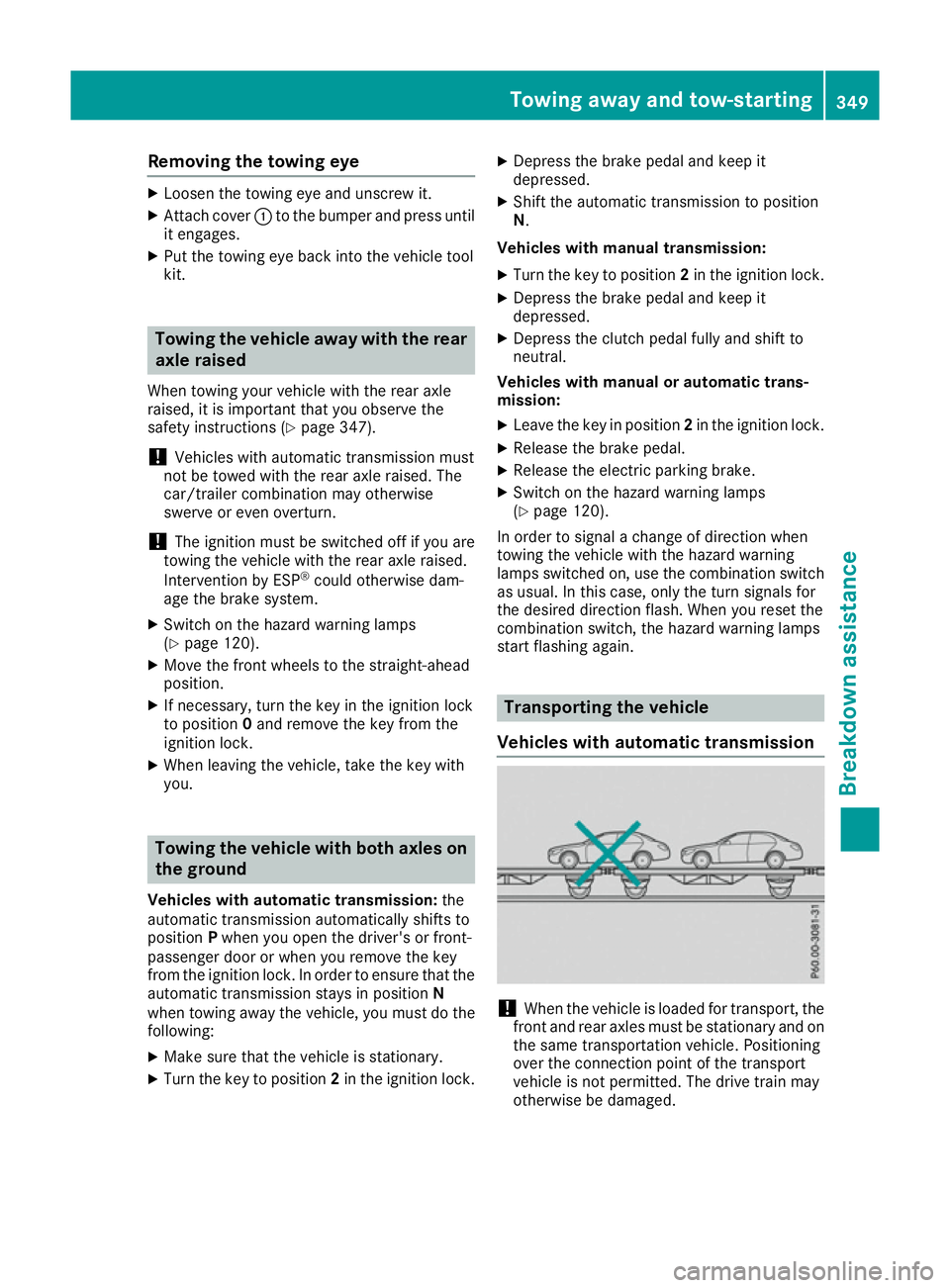
star tflashing again. Transporting the vehicle
Vehicles with automati ctransmission !
Whe
nthe vehicl eisloaded for transport, the
front and rea raxles mus tbes tationary and on
the same transportation vehicle. Positioning
ove rthe connection point of the transport
vehicl eisnot permitted. The drive trai nmay
otherwise be damaged. Towin
gawayand tow-starting
349Breakdown assistance Z