reset MERCEDES-BENZ C-CLASS COUPE 2015 User Guide
[x] Cancel search | Manufacturer: MERCEDES-BENZ, Model Year: 2015, Model line: C-CLASS COUPE, Model: MERCEDES-BENZ C-CLASS COUPE 2015Pages: 385, PDF Size: 13.12 MB
Page 103 of 385
Opening and closing roller sunblinds
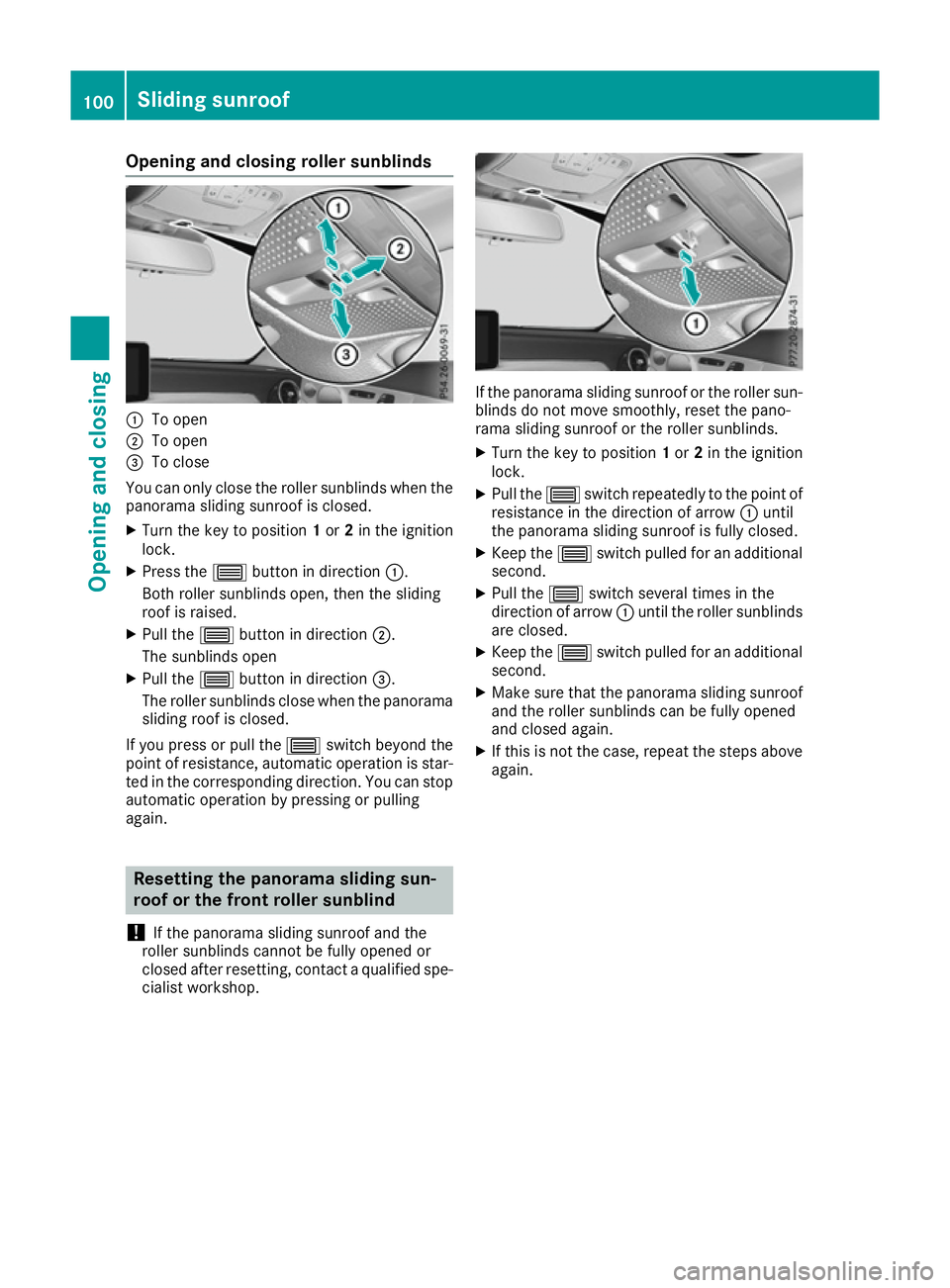
:
To open
; To open
= To close
You can only close the roller sunblinds when the panorama sliding sunroof is closed.
X Turn the key to position 1or 2in the ignition
lock.
X Press the 3button in direction :.
Bothr oller sunblinds open, then the sliding
roof is raised.
X Pull the 3button in direction ;.
The sunblinds open
X Pull the 3button in direction =.
The roller sunblinds close when the panorama sliding roof is closed.
If you press or pull the 3switch beyond the
point of resistance, automatic operation is star- ted in the correspondin gdirection. You can stop
automatic operation by pressing or pulling
again. Resetting the panorama sliding sun-
roof or the front roller sunblind
! If the panorama sliding sunroof and the
roller sunblinds cannot be fully opened or
closed after resetting ,contact aqualified spe-
cialist workshop. If the panorama sliding sunroof or the roller sun-
blinds do not move smoothly, reset the pano-
rama sliding sunroof or the roller sunblinds.
X Turn the key to position 1or 2in the ignition
lock.
X Pull the 3switch repeatedly to the point of
resistance in the direction of arrow :until
the panorama sliding sunroof is fully closed.
X Keep the 3switch pulled for an additional
second.
X Pull the 3switch several times in the
direction of arrow :until the roller sunblinds
are closed.
X Keep the 3switch pulled for an additional
second.
X Make sure that the panorama sliding sunroof
and the roller sunblinds can be fully opened
and closed again.
X If this is not the case, repeat the steps above
again. 100
Sliding sunroofOpening and closing
Page 104 of 385
Problems with the sliding sunroof
Your vehicle may be fitted with asliding sunroof or apanorama sliding sunroof. In the following
section,t he term "sliding sunroof" refers to both types of sliding sunroof. G
WARNING
If you close the sliding sunroof again immediately after it has been blocked or reset, the sliding
sunroof closes with increased or maximum force. The reversing feature is then not active. Parts of the body could be trapped in the closing area in the process. This poses an increased risk of
injury or even fatal injury.
Make sure that no parts of the body are in the closing area.
If someone is trapped:
R release the switch immediately or
R press the switch in any direction during the automatic closing process
The closing process is stopped. Problem
Possible causes/consequences and
M MSolutions The sliding sunroof or
panorama sliding sun-
roof cannot be closed
and you cannot see the
cause. If the sliding sunroof or panorama sliding sunroof is obstructed during
closing and reopens again slightly:
X Immediately after it blocks, pull the 3switch down again to the
point of resistance until the sliding sunroof or panorama sliding
sunroof is closed.
The sliding sunroof or panorama sliding sunroof is closed with more
force.
If the sliding sunroof or panorama sliding sunroof is obstructed again during closing and reopens again slightly:
X Immediately after it blocks, pull the 3switch down again to the
point of resistance until the sliding sunroof or panorama sliding
sunroof is closed.
The sliding sunroof or panorama sliding sunroof is closed without
the automatic reversing feature. Sliding sunroof
101Opening and closing Z
Page 117 of 385
X
Turn the key to position 1or 2in the ignition
lock (Y page 145).
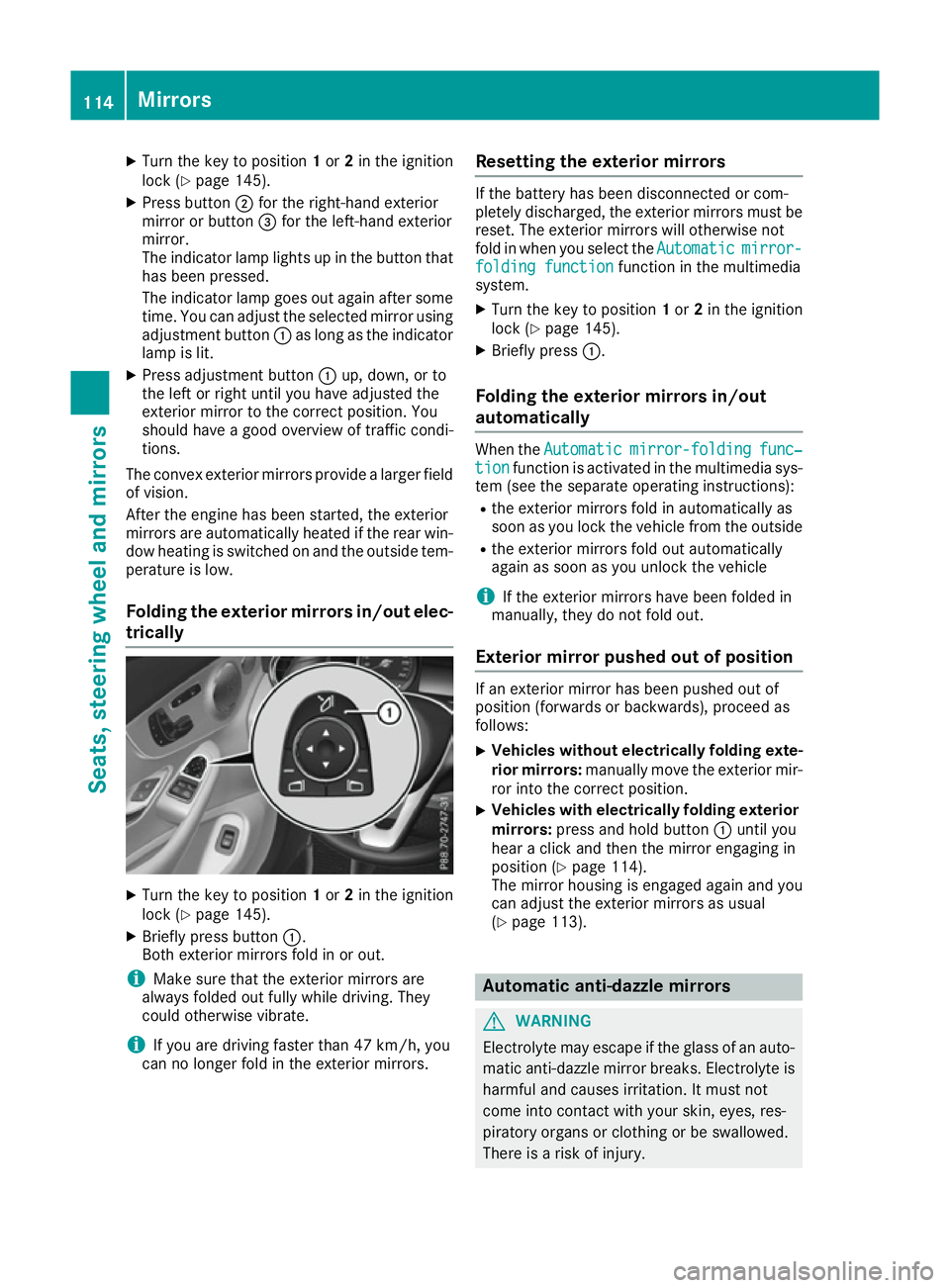
X Press button ;for the right-hand exterior
mirror or button =for the left-hand exterior
mirror.
The indicator lamp lights up in the button that has been pressed.
The indicator lamp goes out again after some
time. You can adjust the selected mirror using adjustmen tbutton :as long as the indicator
lamp is lit.
X Press adjustmen tbutton :up, down, or to
the left or right until you have adjusted the
exterior mirror to the correc tposition. You
should have agood overview of traffic condi-
tions.
The convex exterior mirrors provide alarger field
of vision.
After the engine has been started, the exterior
mirrors are automatically heated if the rear win-
dow heating is switched on and the outside tem- perature is low.
Folding the exterior mirrors in/out elec- trically X
Turn the key to position 1or 2in the ignition
lock (Y page 145).
X Briefly press button :.
Both exterior mirrors fold in or out.
i Make sure that the exterior mirrors are
alway sfolded out fully while driving. They
could otherwise vibrate.
i If you are driving faster than 47 km/h,
you
can no longer fol dintheexterio rmirrors. Resetting th
eexterior mirrors If th
ebattery has been disconnected or com-
pletely discharged, th eexter iorm irror smustbe
reset .The exterio rmirror swill otherwise not
fol dinw hen you select the Automatic Automaticmirror-
mirror-
foldin gfunction
foldin gfunction function in th emultimedia
system.
X Turn th ekeyto position 1or 2in th eignition
loc k(Ypage 145).
X Briefly press :.
Folding th eexterior mirror sin/out
automatically Whe
nthe Automatic
Automatic mirror-folding
mirror-folding func‐
func‐
tion
tion function is activated in th emultimedia sys-
te m( see th eseparat eoperating instructions):
R thee xter iorm irror sfoldina utomatically as
soo nasy ou loc kthe vehicl efromt heoutside
R thee xter iorm irror sfoldo ut automatically
again as soo nasyou unloc kthe vehicle
i If th
eexter iorm irror shaveb een folded in
manually, they do no tfoldo ut.
Exterior mirror pushe dout of position If an exterio
rmirror has been pushed out of
position (forwards or backwards), proceed as
follows:
X Vehicles withou
telectricall yfolding exte-
rior mirrors: manually mov ethe exterio rmir-
ror into th ecorrect position.
X Vehicles wit
helectricall yfolding exterior
mirrors: press and hold button :until you
hear aclick and then th emirror engaging in
position (Y page 114).
The mirror housin gisengage dagain and you
can adjust th eexter iorm irror sasu sual
(Y page 113). Automatic anti-dazzle mirrors
G
WARNING
Electrolyt emay escape if th eglassofana uto-
matic anti-dazzl emirror breaks .Electrol yteis
harmful and causes irritation .Itmustn ot
come into contact wit hyour skin ,eyes ,res-
piratory organs or clothin gorbeswallowed.
There is ariskofi njury. 114
Mir
rorsSeats ,steering wheel and mirrors
Page 118 of 385
If you come into contact with electrolyte,
observe the following:
R immediately rinse off electrolyte from your
skin with water.
R immediately and thoroughl yrinse electro-
lyte out of eyes using clean water.
R if electrolyte is swallowed, immediately
rinse out yourm outh thoroughly. Do not
induce vomiting.
R if electrolyte comes into contact with skin
or eyes or is swallowed, seek medica latten-
tion immediately.
R immediately change out of clothing that has
been in contact with electrolyte.
R if an allergic reaction occurs, seek medical
attention immediately.
The rear-view mirror and the exterior mirror on
the driver's side automatically go into anti-daz-
zle mode if the following conditions are met
simultaneously:
R the ignition is switched on
R incident light from headlampss trikes the sen-
sor in the rear-view mirror
The mirrors do not dip if reverse gear is engaged
or if the interior lighting is switched on. Parking positio
nofthe exterio rmirror
on the front-passenge rside
Storing the parking position You can set the front-passenger side exterior
mirror so that you can see the rear wheel on that
side as soon as you engage reverse gear. You
can store this position. Usingr
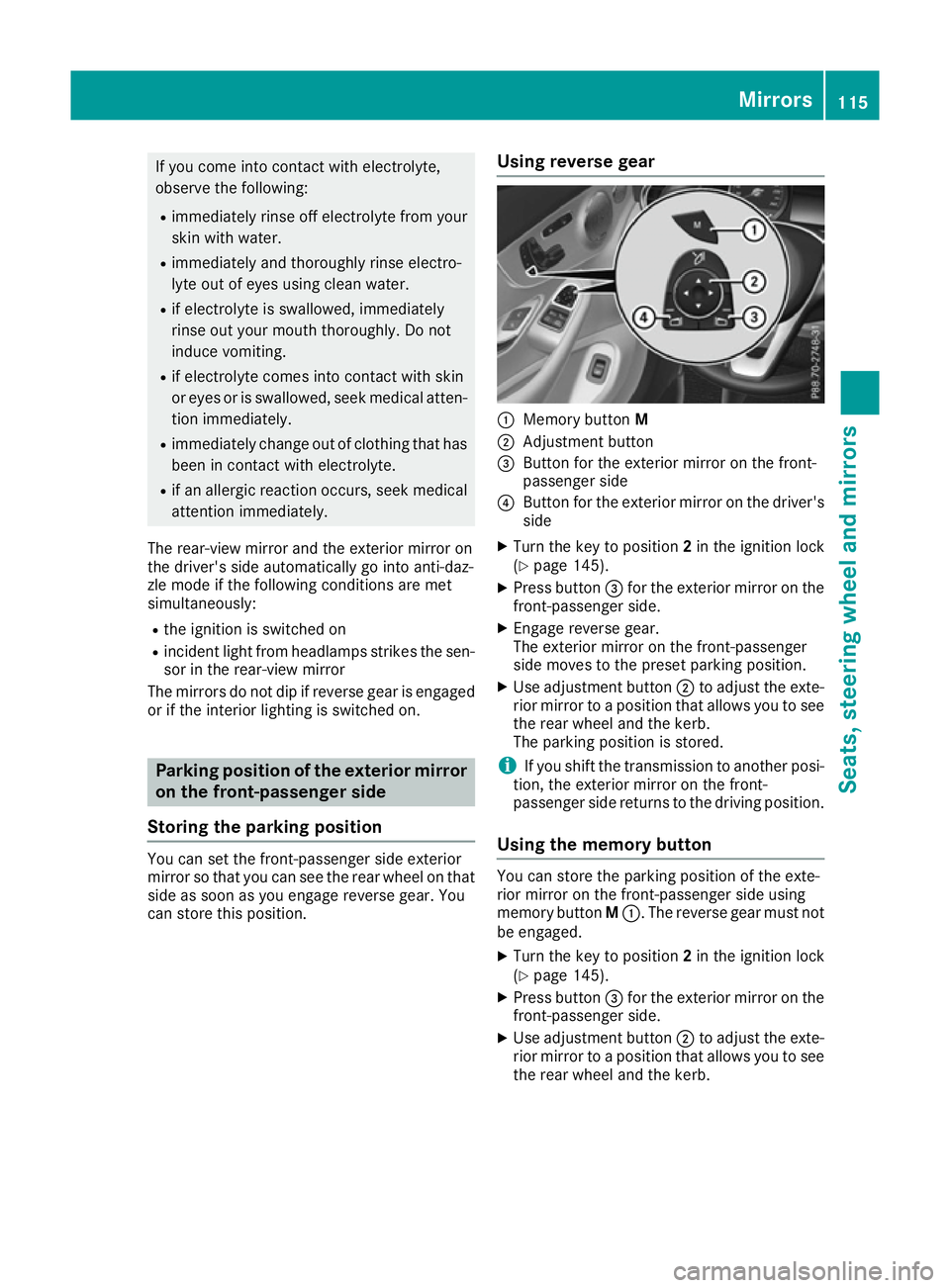
everse gear :
Memory button M
; Adjustment button
= Button for the exterior mirror on the front-
passenger side
? Button for the exterior mirror on the driver's
side
X Turn the key to position 2in the ignition lock
(Y page 145).
X Press button =for the exterior mirror on the
front-passenger side.
X Engage reverse gear.
The exterior mirror on the front-passenger
side moves to the preset parking position.
X Use adjustment button ;to adjust the exte-
rior mirror to apositio nthat allows you to see
the rear wheel and the kerb.
The parking positio nisstored.
i If you shift the transmission to another posi-
tion, the exterior mirror on the front-
passenger side returns to the driving position.
Usingt he memory button You can store the parking positio
nofthe exte-
rior mirror on the front-passenger side using
memory button M:.T he reverse gear must not
be engaged.
X Turn the key to position 2in the ignition lock
(Y page 145).
X Press button =for the exterior mirror on the
front-passenger side.
X Use adjustment button ;to adjust the exte-
rior mirror to apositio nthat allows you to see
the rear wheel and the kerb. Mirrors
115Seats, steeringw heel and mirrors Z
Page 119 of 385
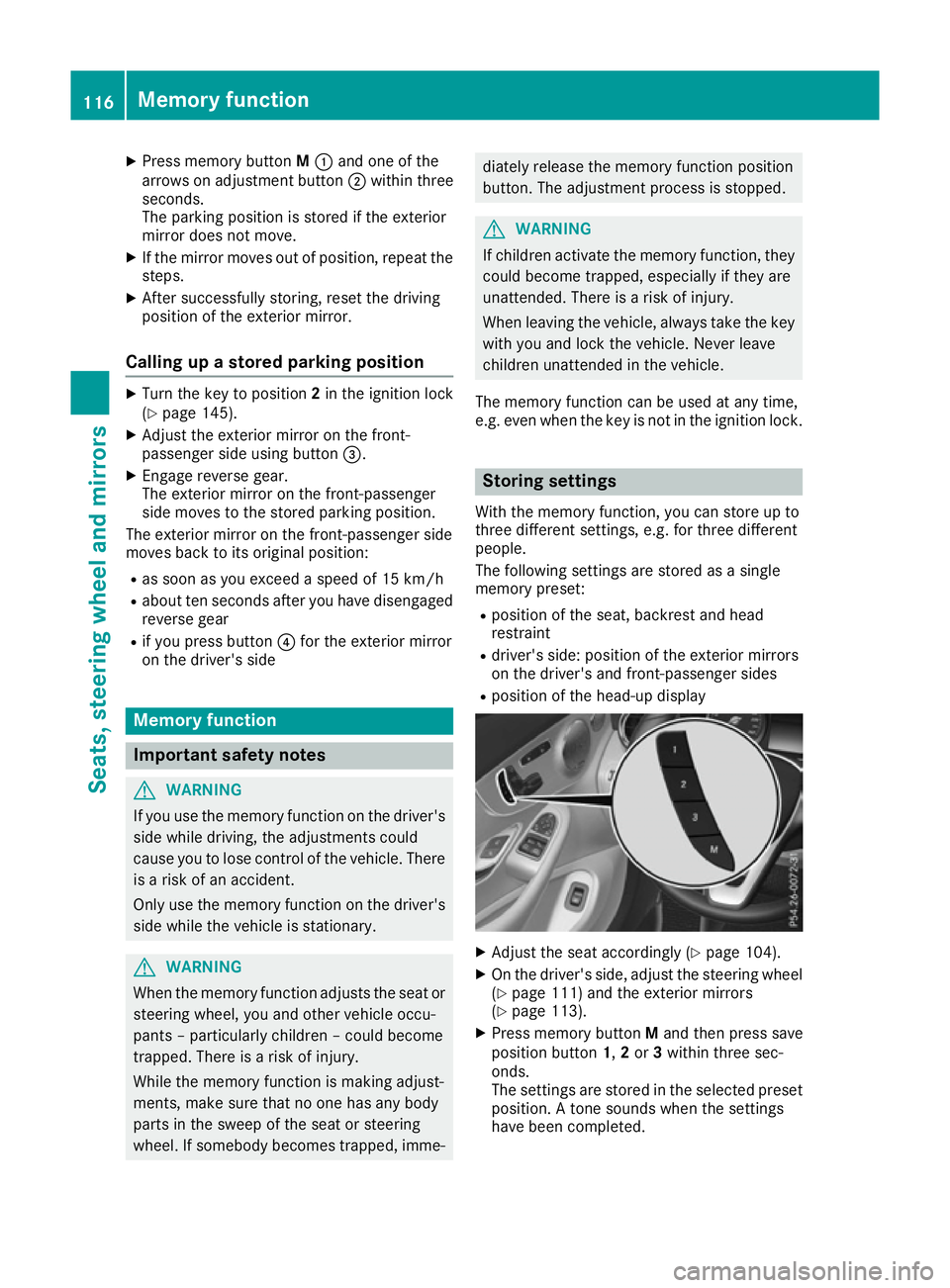
X
Press memory button M: and one of the
arrows on adjustmen tbutton ;within three
seconds.
The parking position is stored if the exterior
mirror does not move.
X If the mirror moves out of position, repeat the
steps.
X After successfully storing, reset the driving
position of the exterior mirror.
Calling up astored parking position X
Turn the key to position 2in the ignition lock
(Y page 145).
X Adjust the exterior mirror on the front-
passenger side using button =.
X Engage reverse gear.
The exterior mirror on the front-passenger
side moves to the stored parking position.
The exterior mirror on the front-passenger side
moves back to its original position:
R as soon as you exceed aspeed of 15 km/h
R about ten seconds after you have disengaged
reverse gear
R if you press button ?for the exterior mirror
on the driver's side Memory function
Important safety notes
G
WARNING
If you use the memory function on the driver's side while driving, the adjustments could
cause you to lose control of the vehicle. There
is ar isk of an accident.
Only use the memory function on the driver's
side while the vehicle is stationary. G
WARNING
When the memory function adjusts the seat or steerin gwheel, you and other vehicle occu-
pants –particularly children –could become
trapped. There is arisk of injury.
While the memory function is making adjust-
ments, make sure that no one has any body
parts in the sweep of the seat or steering
wheel. If somebody becomes trapped, imme- diately release the memory function position
button .The adjustmen tprocess is stopped. G
WARNING
If children activat ethe memory function, they
could become trapped, especially if they are
unattended. There is arisk of injury.
When leaving the vehicle, alway stake the key
with you and lock the vehicle. Never leave
children unattended in the vehicle.
The memory function can be used at any time,
e.g. even when the key is not in the ignition lock. Storing settings
With the memory function, you can store up to
three different settings, e.g. for three different
people.
The following settings are stored as asingle
memory preset:
R position of the seat, backrest and head
restraint
R driver's side: position of the exterior mirrors
on the driver's and front-passenger sides
R position of the head-up display X
Adjust the seat accordingly (Y page 104).
X On the driver's side, adjust the steerin gwheel
(Y page 111) and the exterior mirrors
(Y page 113).
X Press memory button Mand then press save
position button 1,2or 3within three sec-
onds.
The settings are stored in the selected preset
position. Atones ounds when the settings
have been completed. 116
Memoryf
unctionSeats, steering wheel and mirrors
Page 180 of 385
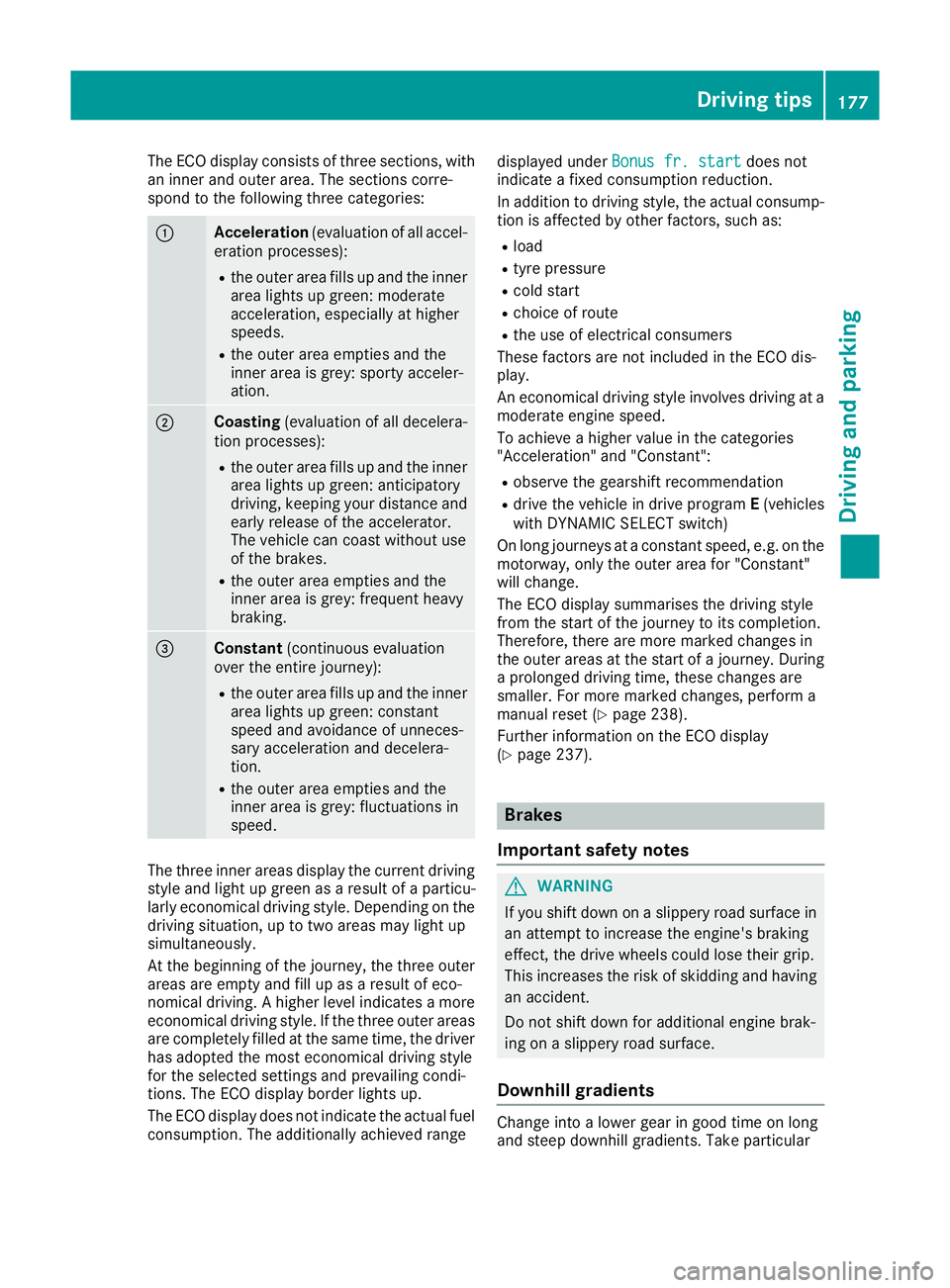
The ECO display consist
softhree sections, with
an inner and outer area. The section scorre-
spond to the following three categories: :
Acceleration
(evaluation of all accel-
eration processes):
R the outer area fills up and the inner
area lights up green: moderate
acceleration ,especially at higher
speeds.
R the outer area empties and the
inner area is grey: sporty acceler-
ation. ;
Coasting
(evaluation of all decelera-
tion processes):
R the outer area fills up and the inner
area lights up green: anticipatory
driving, keeping your distance and
early release of the accelerator.
The vehicle can coast without use
of the brakes.
R the outer area empties and the
inner area is grey: frequent heavy
braking. =
Constant
(continuous evaluation
over the entir ejourney):
R the outer area fills up and the inner
area lights up green: constant
speed and avoidance of unneces-
sary acceleration and decelera-
tion.
R the outer area empties and the
inner area is grey: fluctuations in
speed. The three inner areas display the current driving
style and light up green as aresult of aparticu-
larly economical driving style. Dependin gonthe
driving situation, up to two areas may light up
simultaneously.
At the beginning of the journey, the three outer
areas are empty and fill up as aresult of eco-
nomical driving. Ahigher level indicates amore
economical driving style. If the three outer areas
are completely filled at the same time, the driver
has adopted the most economical driving style
for the selected settings and prevailing condi-
tions. The ECO display border lights up.
The ECO display does not indicate the actual fuel consumption. The additionally achieved range displayed under
Bonus fr. start Bonus fr. start does not
indicate afixed consumption reduction.
In addition to driving style, the actual consump- tion is affected by other factors, such as:
R load
R tyre pressure
R cold start
R choice of route
R the use of electrical consumers
These factor sare not included in the ECO dis-
play.
An economical driving style involves driving at a
moderate engine speed.
To achieve ahigher value in the categories
"Acceleration" and "Constant":
R observe the gearshift recommendation
R drive the vehicle in drive program E(vehicles
with DYNAMIC SELECT switch)
On long journeys at aconstant speed, e.g. on the
motorway, only the outer area for "Constant"
will change.
The ECO display summarises the driving style
from the start of the journey to its completion.
Therefore, there are more marked changes in
the outer areas at the start of ajourney. During
ap rolonged driving time, these changes are
smaller. For more marked changes, perform a
manual reset (Y page 238).
Further information on the ECO display
(Y page 237). Brakes
Important safety notes G
WARNING
If you shift down on aslippery road surface in
an attempt to increase the engine's braking
effect ,the drive wheels could lose their grip.
This increases the risk of skidding and having
an accident.
Do not shift down for additional engine brak-
ing on aslippery road surface.
Downhill gradients Change into
alower gear in good time on long
and steep downhill gradients. Take particular Driving tips
177Driving and parking Z
Page 240 of 385
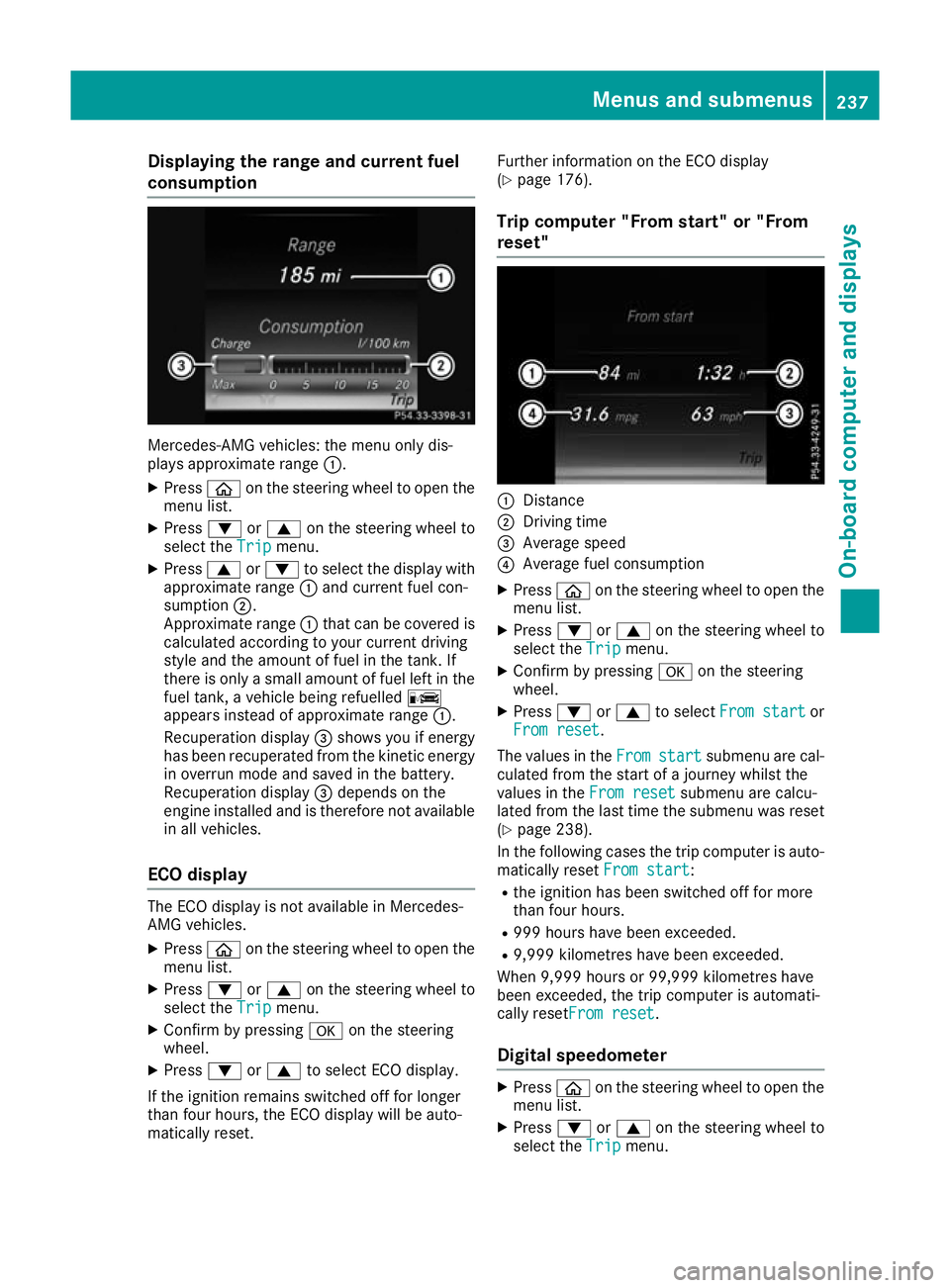
Displaying th
erange an dcurrent fuel
consumption Mercedes-AMG vehicles
:the men uonlyd is-
plays approximat erange :.
X Press òon thesteerin gwhee ltoo pent he
men ulist.
X Press :or9 on thesteerin gwhee lto
selec tthe Trip
Trip menu.
X Press 9or: to selec tthe display with
approximat erange :and curren tfue lcon-
sumption ;.
Approximat erange :that can be covered is
calculated accordin gtoyour curren tdriving
style and th eamount of fue linthetank .If
there is only asma ll amount of fue llef tint he
fue ltank, avehicle bein grefuelled C
appears instead of approximat erange :.
Recuperation display =shows you if energy
has bee nrecuperated from th ekinetic energy
in overrun mode and saved in th ebattery.
Recuperation display =depend sonthe
engin einstal led and is therefore no tavailable
in all vehicles.
ECO display The EC
Odisplay is no tavailable in Mercedes-
AM Gvehicles.
X Press òon thesteerin gwhee ltoo pent he
men ulist.
X Press :or9 on thesteerin gwhee lto
selec tthe Trip
Trip menu.
X Confir mbyp ressing aon thesteering
wheel.
X Press :or9 to selec tECO display.
If th eignition remain sswitched of ffor longer
than four hours, th eECO display will be auto-
matically reset. Further information on th
eECO display
(Y page 176).
Trip compute r"From start" or "From
reset" :
Distance
; Driving time
= Average speed
? Average fue lconsu mption
X Press òon thesteerin gwhee ltoo pent he
men ulist.
X Press :or9 on thesteerin gwhee lto
selec tthe Trip
Trip menu.
X Confir mbyp ressing aon thesteering
wheel.
X Press :or9 to select Froms tart
Fro ms tart or
Fro mr eset
Fro mr eset.
The values in the From
Fromstart
start submen uare cal-
culated from th estart of ajou rney whilst the
values in the Fromr eset
Fro mr eset submen uare calcu-
lated from th elast time th esubmen uwas reset
(Y page 238).
In th efollowin gcases th etripc om pute risa uto-
matically reset Froms tart
Fro ms tart:
R thei gnition has bee nswitched of ffor more
than four hours.
R 99 9h our shaveb eene xcee ded.
R 9,999 kilometres hav ebeene xcee ded.
Whe n9,999 hour sor99,99 9k ilometres have
bee nexcee ded, th etripc om pute risa utomati-
cally reset Fromr eset
Fro mr eset.
Digital speedometer X
Press òon thesteerin gwhee ltoo pent he
men ulist.
X Press :or9 on thesteerin gwhee lto
selec tthe Trip
Trip menu. Menus an
dsubmenus
237On-boardcompu tera nd displays Z
Page 241 of 385
X
Confir mbyp ressing aon thesteering
wheel.
X Press :or9 to select th edigital
speedometer.
Resetting values X
Press òon thesteering wheel to open the
men ulist.
X Press :or9 on thesteering wheel to
select the Trip
Tripmenu.
X Confir mbyp ressing aon thesteering
wheel.
X Press :or9 to select th efunction that
you wish to reset.
X Press a.
X Press :to select Yes Yesand press ato
confirm.
You can reset th evalues of th efollowin gfunc-
tions:
R Trip meter
R "From start "tripc om puter
R "From reset "tripc om puter
R ECO display
If you reset th evalues in th e"ECO display", the
values in th e"From start "tripc om puter are also
reset .Ifyou reset th evalues in th e"From start"
trip computer, th evalues in th e"ECO display"
are also reset. Navigation menu
Displaying navigation instructions In the
Navi Navimenu, th emultifunction display
shows navigation instructions. You can fin dfur-
ther informatio nonnavigation instruction sin
th es eparate operatin ginstructions.
X Switch on th emultimedia system (see sepa-
rat eo peratin ginstructions).
X Press òon thesteering wheel to open the
men ulist.
X Press :or9 on thesteering wheel to
select the Navi
Navimenu.
X Confir mbyp ressing aon thesteering
wheel. Route guidance not active
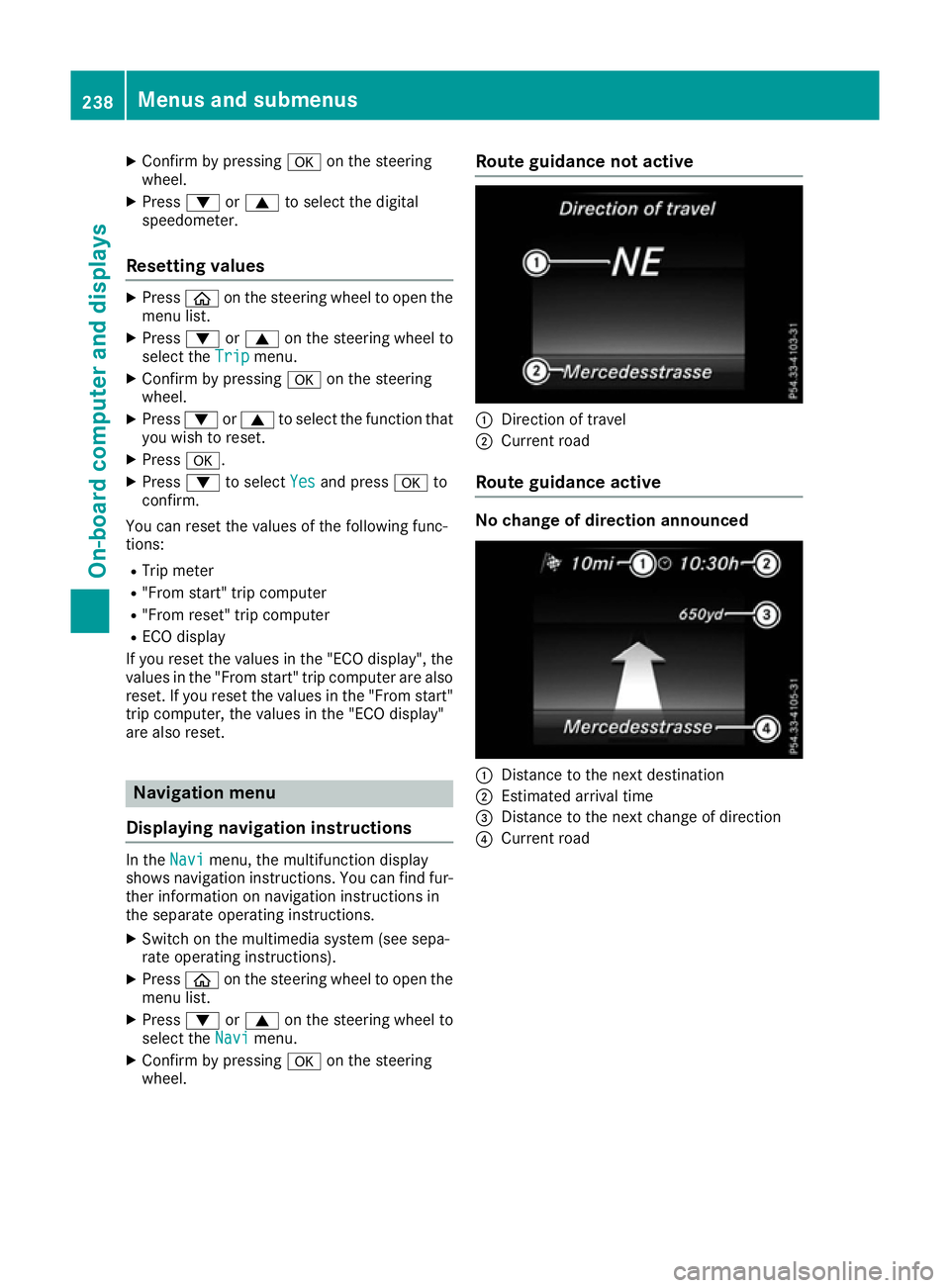
:
Direction of travel
; Curren troad
Route guidance active No change of direction announced
:
Distance to th enextd estination
; Estimate darrival time
= Distance to th enextc hang eofd irection
? Curren troad 238
Menu
sand submenusOn-boar dcomputer and displays
Page 243 of 385
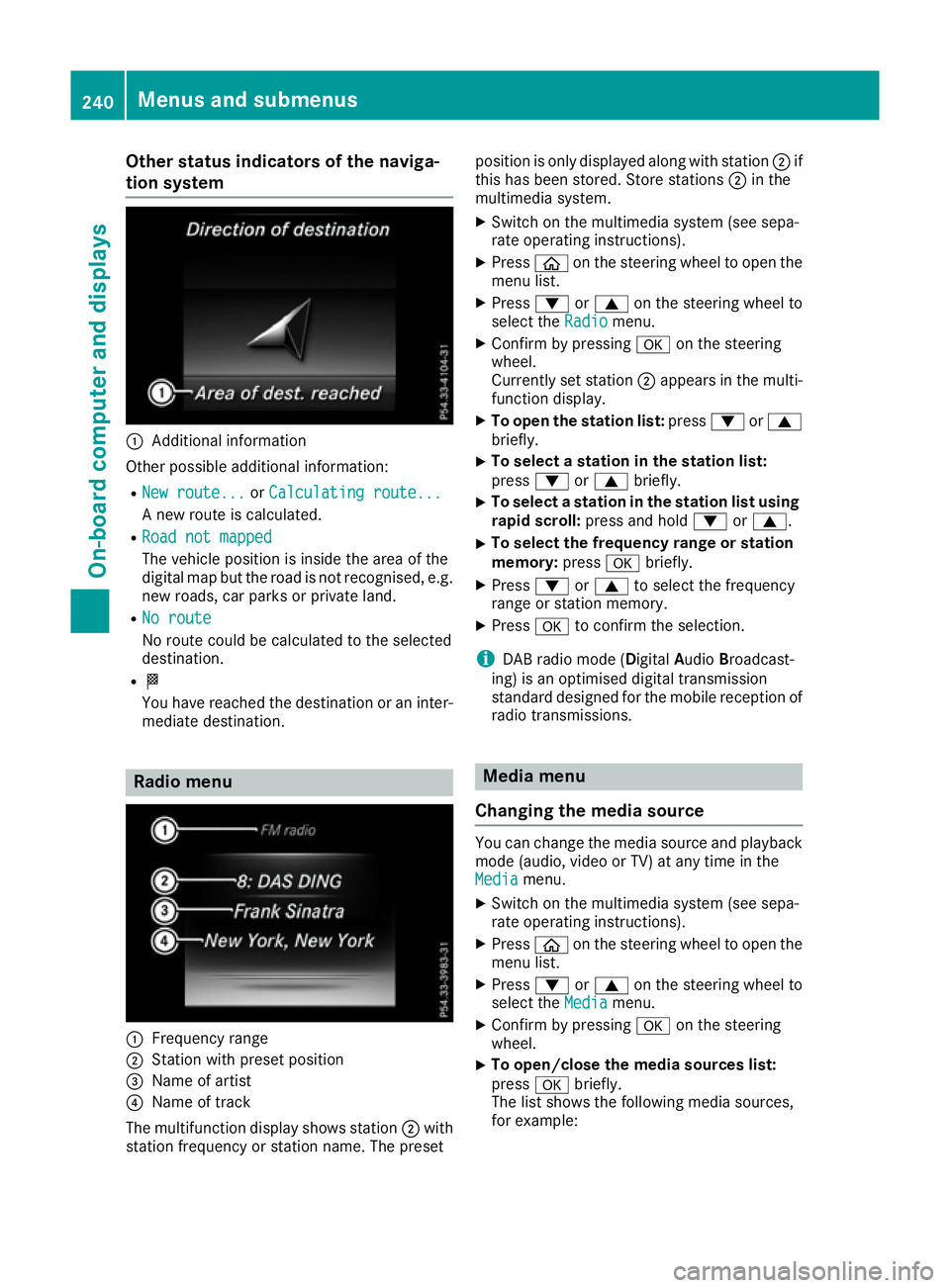
Other status indicator
softhe naviga-
tion system :
Additional information
Other possible additional information: R New route...
New route... orCalculating route...
Calculating route...
An ew route is calculated.
R Road not mapped
Road not mapped
The vehicle position is inside the area of the
digital map but the road is not recognised, e.g. new roads, car parks or private land.
R No route No route
No route could be calculated to the selected
destination.
R O
You have reached the destination or an inter-
mediate destination. Radio menu
:
Frequenc yrange
; Station with preset position
= Name of artist
? Name of track
The multifunction display shows station ;with
station frequenc yorstation name. The preset position is only displayed along with station
;if
this has been stored. Store stations ;in the
multimedia system.
X Switc hont he multimedia system (see sepa-
rate operatin ginstructions).
X Press òon the steering wheel to open the
menu list.
X Press :or9 on the steering wheel to
select the Radio
Radio menu.
X Confirm by pressing aon the steering
wheel.
Currently set station ;appears in the multi-
function display.
X To open the station list: press:or9
briefly.
X To select
astation in the station list:
press :or9 briefly.
X To select
astation in the station list using
rapid scroll: press and hold :or9.
X To select the frequency range or station
memory:
pressabriefly.
X Press :or9 to select the frequency
range or station memory.
X Press ato confirm the selection.
i DABr
adio mode (Digital AudioBroadcast-
ing) is an optimised digital transmission
standard designed for the mobile reception of
radio transmissions. Media menu
Changing the media source You can change the media source and playback
mode (audio, video or TV) at any time in the
Media Media menu.
X Switc hont he multimedia system (see sepa-
rate operatin ginstructions).
X Press òon the steering wheel to open the
menu list.
X Press :or9 on the steering wheel to
select the Media
Mediamenu.
X Confirm by pressing aon the steering
wheel.
X To open/close the media sources list:
press
abriefly.
The list shows the following media sources,
for example: 240
Menus and submenusOn-boar
dcomputer and displays
Page 245 of 385
X
To select the next or previous scen
einthe
scen elist: press :or9 briefly.
X To select
ascene in the scen elistu sing
rapid scroll: press and hold :or9
unti ldesir ed scene :hasb eenr eached.
X Press ato confirm your selection.
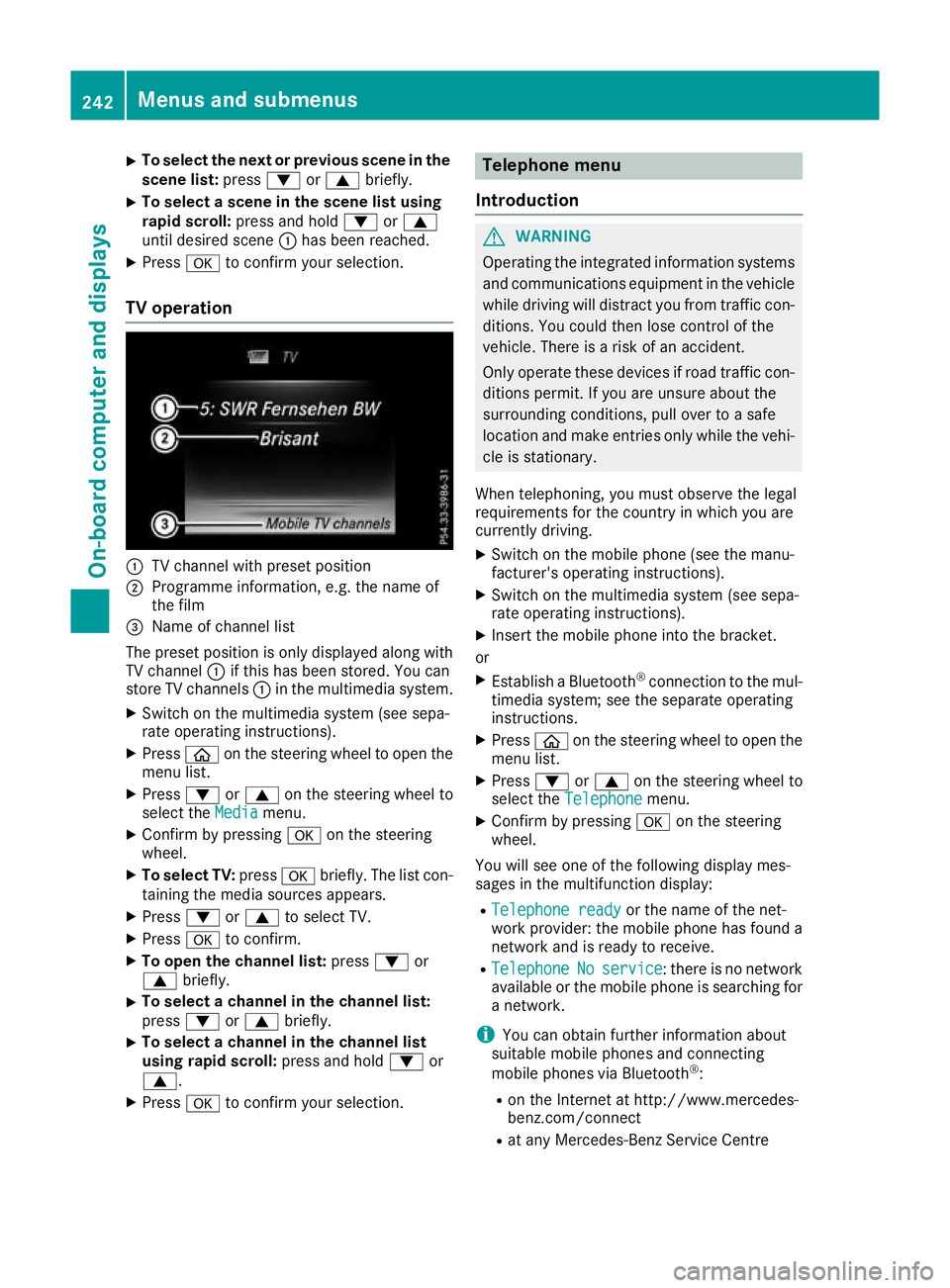
TV operation :
TV channel with preset position
; Programme information, e.g .the name of
the film
= Name of channel list
The preset positio niso nlyd isplayed along with
TV channel :if thi shasbeen stored .You can
stor eTVc hannels :in the multimedia system.
X Switch on the multimedia system (se esepa-
rate operating instructions).
X Press òon the steering whee ltoopent he
menu list.
X Press :or9 on the steering whee lto
select the Media
Media menu.
X Confir mbypressing aon the steering
wheel.
X To select TV: pressabriefly. The list con-
taining the media sources appears.
X Press :or9 to select TV.
X Press ato confirm.
X To ope nthe channel list: press:or
9 briefly.
X To select
achannel in the channel list:
press :or9 briefly.
X To select
achannel in the channel list
using rapid scroll: press and hold:or
9.
X Press ato confirm your selection. Telephone menu
Introduction G
WARNING
Operating the integrated informatio nsystems
and communications equipment in the vehicle
whil edriving will distract yo ufrom traffic con-
ditions. Yo ucould then lose contro lofthe
vehicle. There is ariskofana ccident.
Onl yoperate thes edevice sifr oadt raffic con-
ditions permit. If yo uare unsur eabout the
surrounding conditions, pull ove rtoasafe
location and make entries onl ywhile the vehi-
cle is stationary.
Whe ntelephoning, yo umusto bserve the legal
requirements for the country in which yo uare
currentl ydriving.
X Switch on the mobil ephone (se ethe manu-
facturer's operating instructions).
X Switch on the multimedia system (se esepa-
rate operating instructions).
X Insert the mobil ephone into the bracket.
or X Establis haBluetooth ®
connectio ntothe mul-
timedi asystem ;see the separate operating
instructions.
X Press òon the steering whee ltoopent he
menu list.
X Press :or9 on the steering whee lto
select the Telephone
Telephone menu.
X Confir mbypressing aon the steering
wheel.
Yo uw ills ee one of the following display mes-
sages in the multifunctio ndisplay:
R Telephone ready
Telephone ready or the nameofthe net-
work provider: the mobil ephone ha sfound a
network and is ready to receive.
R Telephone
Telephone No
Noservice
service:t hereisnon etwork
available or the mobil ephone is searching for
an etwork.
i Youc an obtai nfurther informatio nabout
suitabl emobilephones and connecting
mobil ephones via Bluetooth ®
:
R on the Interne tath ttp://www.mercedes-
benz.com/connect
R at any Mercedes-Benz Service Centre 242
Menus and submenusOn-board computer and displays