lights MERCEDES-BENZ C-CLASS COUPE 2015 Workshop Manual
[x] Cancel search | Manufacturer: MERCEDES-BENZ, Model Year: 2015, Model line: C-CLASS COUPE, Model: MERCEDES-BENZ C-CLASS COUPE 2015Pages: 385, PDF Size: 13.12 MB
Page 180 of 385
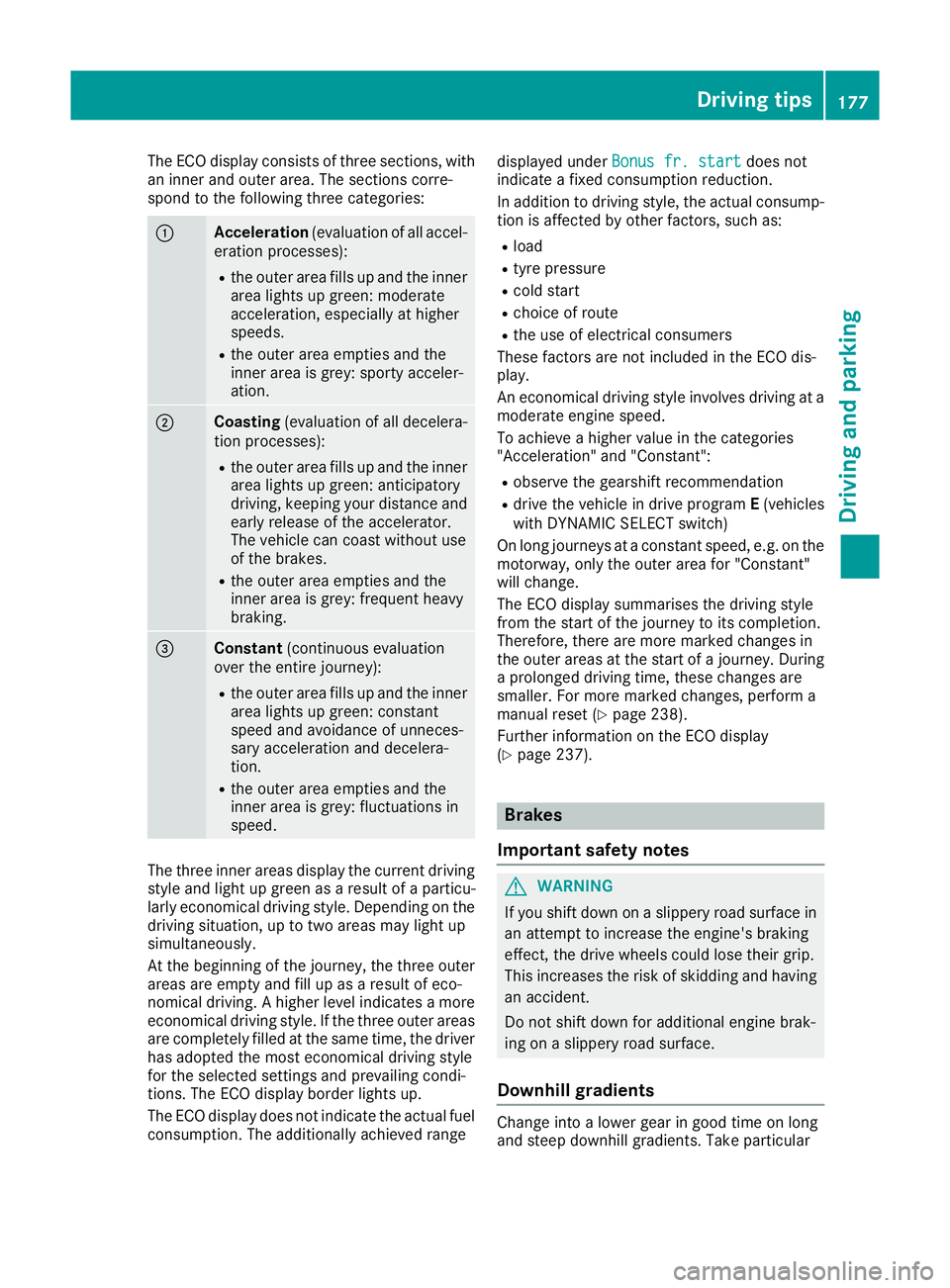
The ECO display consist
softhree sections, with
an inner and outer area. The section scorre-
spond to the following three categories: :
Acceleration
(evaluation of all accel-
eration processes):
R the outer area fills up and the inner
area lights up green: moderate
acceleration ,especially at higher
speeds.
R the outer area empties and the
inner area is grey: sporty acceler-
ation. ;
Coasting
(evaluation of all decelera-
tion processes):
R the outer area fills up and the inner
area lights up green: anticipatory
driving, keeping your distance and
early release of the accelerator.
The vehicle can coast without use
of the brakes.
R the outer area empties and the
inner area is grey: frequent heavy
braking. =
Constant
(continuous evaluation
over the entir ejourney):
R the outer area fills up and the inner
area lights up green: constant
speed and avoidance of unneces-
sary acceleration and decelera-
tion.
R the outer area empties and the
inner area is grey: fluctuations in
speed. The three inner areas display the current driving
style and light up green as aresult of aparticu-
larly economical driving style. Dependin gonthe
driving situation, up to two areas may light up
simultaneously.
At the beginning of the journey, the three outer
areas are empty and fill up as aresult of eco-
nomical driving. Ahigher level indicates amore
economical driving style. If the three outer areas
are completely filled at the same time, the driver
has adopted the most economical driving style
for the selected settings and prevailing condi-
tions. The ECO display border lights up.
The ECO display does not indicate the actual fuel consumption. The additionally achieved range displayed under
Bonus fr. start Bonus fr. start does not
indicate afixed consumption reduction.
In addition to driving style, the actual consump- tion is affected by other factors, such as:
R load
R tyre pressure
R cold start
R choice of route
R the use of electrical consumers
These factor sare not included in the ECO dis-
play.
An economical driving style involves driving at a
moderate engine speed.
To achieve ahigher value in the categories
"Acceleration" and "Constant":
R observe the gearshift recommendation
R drive the vehicle in drive program E(vehicles
with DYNAMIC SELECT switch)
On long journeys at aconstant speed, e.g. on the
motorway, only the outer area for "Constant"
will change.
The ECO display summarises the driving style
from the start of the journey to its completion.
Therefore, there are more marked changes in
the outer areas at the start of ajourney. During
ap rolonged driving time, these changes are
smaller. For more marked changes, perform a
manual reset (Y page 238).
Further information on the ECO display
(Y page 237). Brakes
Important safety notes G
WARNING
If you shift down on aslippery road surface in
an attempt to increase the engine's braking
effect ,the drive wheels could lose their grip.
This increases the risk of skidding and having
an accident.
Do not shift down for additional engine brak-
ing on aslippery road surface.
Downhill gradients Change into
alower gear in good time on long
and steep downhill gradients. Take particular Driving tips
177Driving and parking Z
Page 193 of 385
You will see the stored speed for approximately
five seconds when you activate DISTRONIC
PLUS.
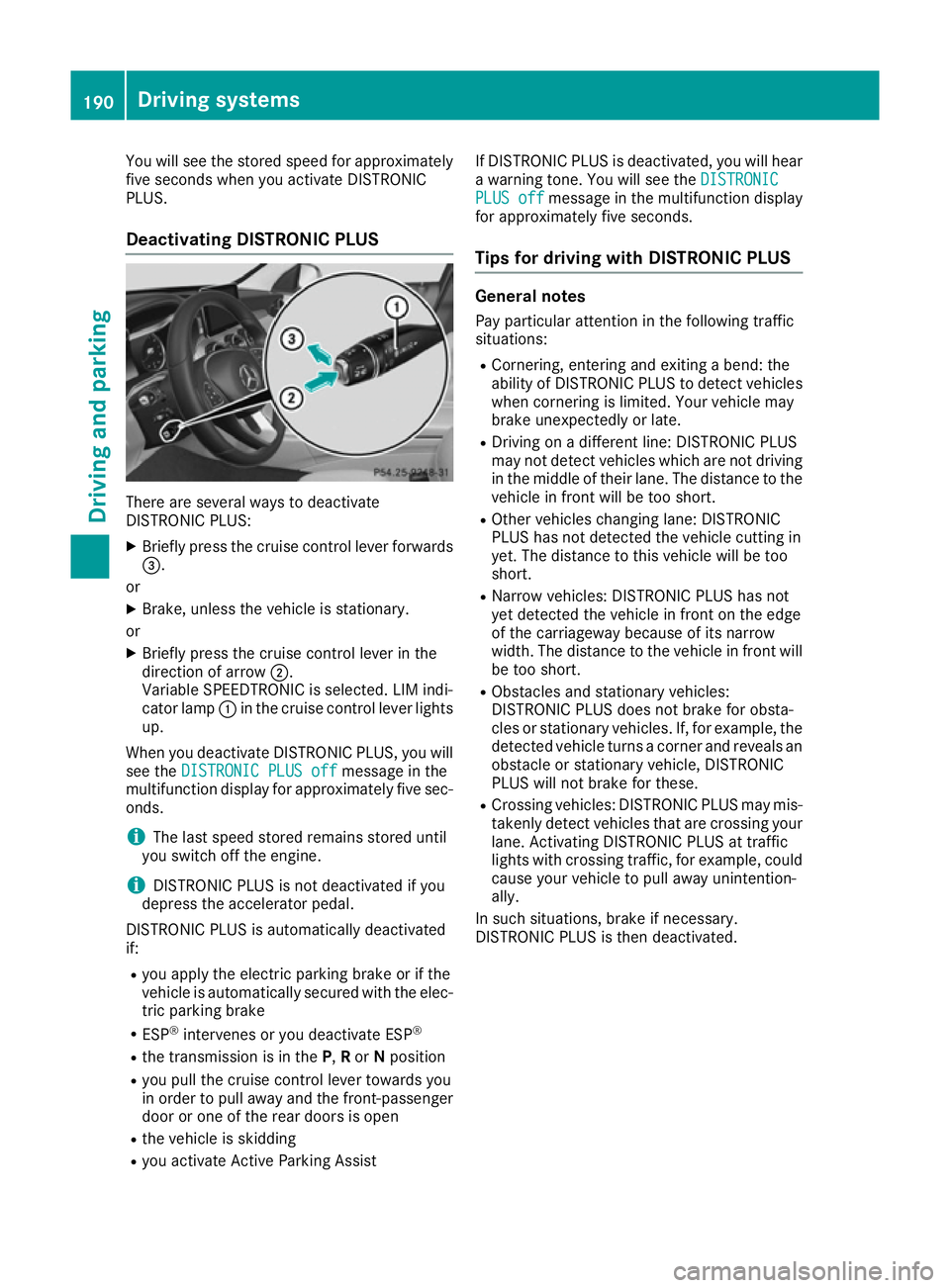
Deactivating DISTRONIC PLUS There are several ways to deactivate
DISTRONIC PLUS:
X Briefly press the cruis econtrol lever forwards
=.
or
X Brake, unless the vehicle is stationary.
or X Briefly press the cruis econtrol lever in the
direction of arrow ;.
Variable SPEEDTRONIC is selected. LIM indi-
cator lamp :in the cruis econtrol lever lights
up.
When you deactivate DISTRONIC PLUS ,you will
see the DISTRONI CPLUS off
DISTRONI CPLUS off messageinthe
multifunction display for approximately five sec-
onds.
i The last speed stored remain
sstored until
you switc hoff the engine.
i DISTRONIC PLUS is not deactivate
difyou
depres sthe accelerator pedal.
DISTRONIC PLUS is automatically deactivated
if: R you apply the electric parking brak eorifthe
vehicle is automatically secured with the elec- tric parking brake
R ESP ®
intervenes or you deactivate ESP ®
R the transmission is in the P,Ror Nposition
R you pull the cruis econtrol lever towards you
in order to pull away and the front-passenger door or one of the rear doors is open
R the vehicle is skidding
R you activate Activ eParking Assist If DISTRONIC PLUS is deactivated, you will hear
aw arnin gtone. You will see the DISTRONIC
DISTRONIC
PLUS off PLUS off messageinthe multifunction display
for approximately five seconds.
Tip sfor driving with DISTRONIC PLUS General notes
Pay particular attention in the followin gtraffic
situations:
R Cornering, enterin gand exiting abend: the
ability of DISTRONIC PLUS to detec tvehicles
when cornering is limited. Your vehicle may
brak eunexpectedly or late.
R Driving on adifferen tline: DISTRONIC PLUS
may not detec tvehicles which are not driving
in the middle of their lane. The distance to the
vehicle in fron twill be too short.
R Other vehicles changing lane: DISTRONIC
PLUS has not detected the vehicle cuttin gin
yet. The distance to this vehicle will be too
short.
R Narro wvehicles: DISTRONIC PLUS has not
yet detected the vehicle in fron tonthe edge
of the carriageway because of its narrow
width. The distance to the vehicle in fron twill
be too short.
R Obstacles and stationar yvehicles:
DISTRONIC PLUS does not brak efor obsta-
cles or stationar yvehicles. If, for example, the
detected vehicle turn sacorner and reveals an
obstacle or stationar yvehicle, DISTRONIC
PLUS will not brak efor these.
R Crossin gvehicles: DISTRONIC PLUS may mis-
takenly detec tvehicles that are crossin gyour
lane. Activatin gDISTRONIC PLUS at traffic
light swith crossin gtraffic ,for example, could
cause your vehicle to pull away unintention-
ally.
In such situations ,brak eifn ecessary.
DISTRONIC PLUS is the ndeactivated. 190
Driving systemsDriving and parking
Page 195 of 385
Steering Assist and Stop&G
oPilot canno tpro-
vid ea ssistance:
R on very sharp corners
R when towing atrailer
R ifal os soft yre pressure or adefectiv etyre has
bee ndetected and displayed
Pa ya ttention also to the important safety notes
for DISTRONIC PLU S(Ypage 184).
The steering interventions are carrie doutwith a
limite dsteering moment. The system requires
the driver to keep his hands on the steering
wheel and to stee rhimself.
If yo udon ot stee ryoursel forify outake your
hands off the steering wheel for aprolonged
perio doftime,the system will firs talert yo uwith
av isua lwarning .As teering wheel symbol
appears in the multifunction display .Ifyouhave
stil lnot started to stee rand have not taken hold
of the steering wheel afte rfive seconds at the
latest, awarning tone also sounds to remind you
to take control of the vehicle. Steering Assist
and Stop&G oPilot switch to passive mode.
DISTRONIC PLU Sremains active.
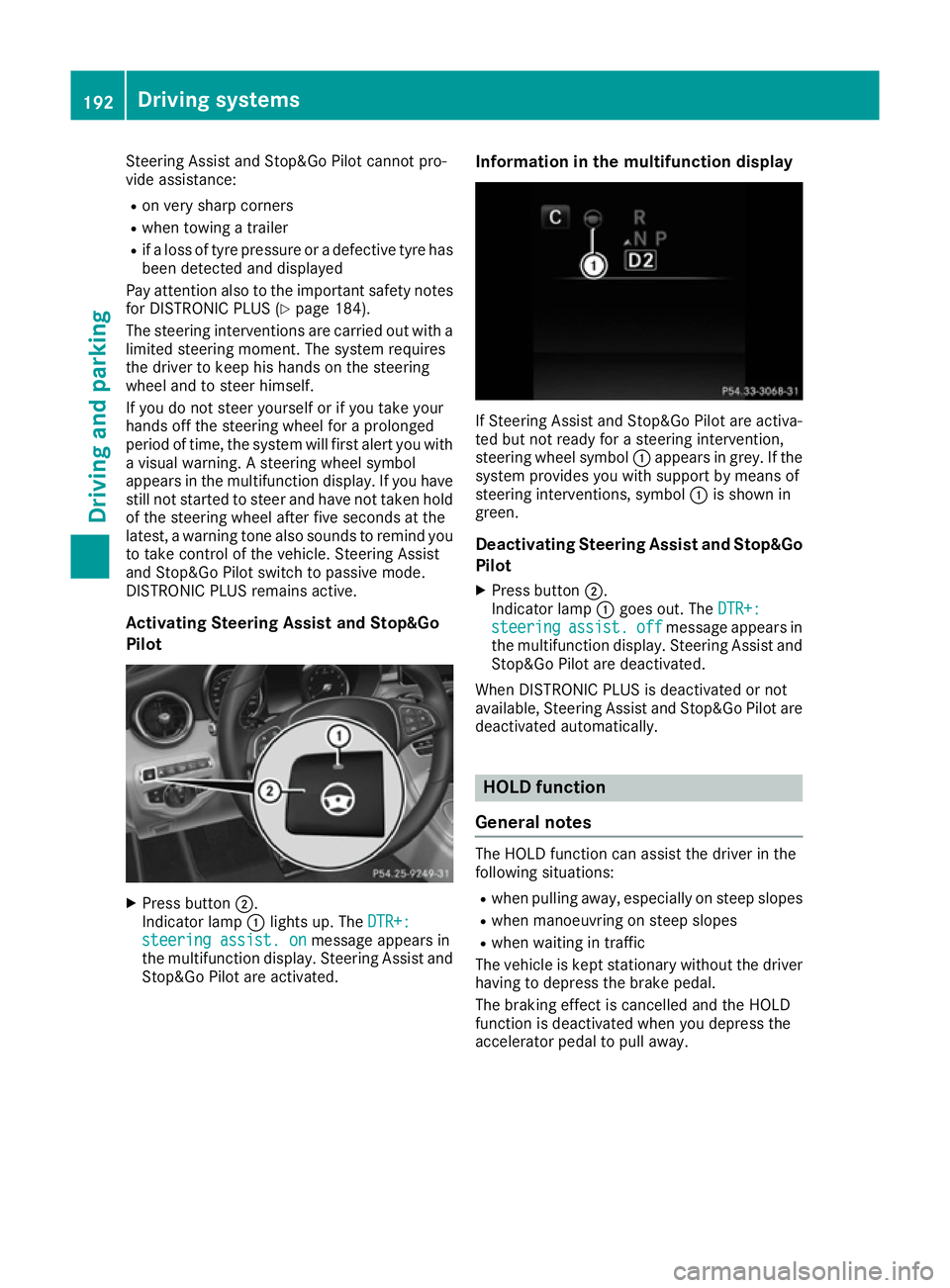
Activating Steering Assist and Stop&Go
Pilot X
Press button ;.
Indicato rlamp :lights up .The DTR+: DTR+:
steering assist. on
steering assist. on message appears in
the multifunction display .Steering Assist and
Stop&G oPilot are activated. Information in the multifunctio
ndisplay If Steering Assist and Stop&G
oPilot are activa-
ted bu tnot ready for asteering intervention,
steering wheel symbol :appears in grey. If the
system provides yo uwiths upport by means of
steering interventions, symbol :is shown in
green.
Deactivatin gSteering Assist and Stop&Go
Pilot
X Press button ;.
Indicato rlamp :goe sout.T he DTR+:
DTR+:
steering
steering assist.
assist.off
offmessage appears in
the multifunction display .Steering Assist and
Stop&G oPilot are deactivated.
Whe nDISTRONIC PLU Sisdeactivated or not
available ,Steering Assist and Stop&G oPilot are
deactivated automatically. HOL
Dfunction
General notes The HOLD function can assis
tthe driver in the
following situations:
R when pulling away ,especially on stee pslopes
R when manoeuvring on stee pslopes
R when waiting in traffic
The vehicl eiskept stationary withou tthe driver
having to depress the brake pedal.
The braking effect is cancelled and the HOLD
function is deactivated when yo udepress the
accelerato rpedal to pull away. 192
Drivin
gsystemsDriving and parking
Page 199 of 385
Vehicl
elevel Settin
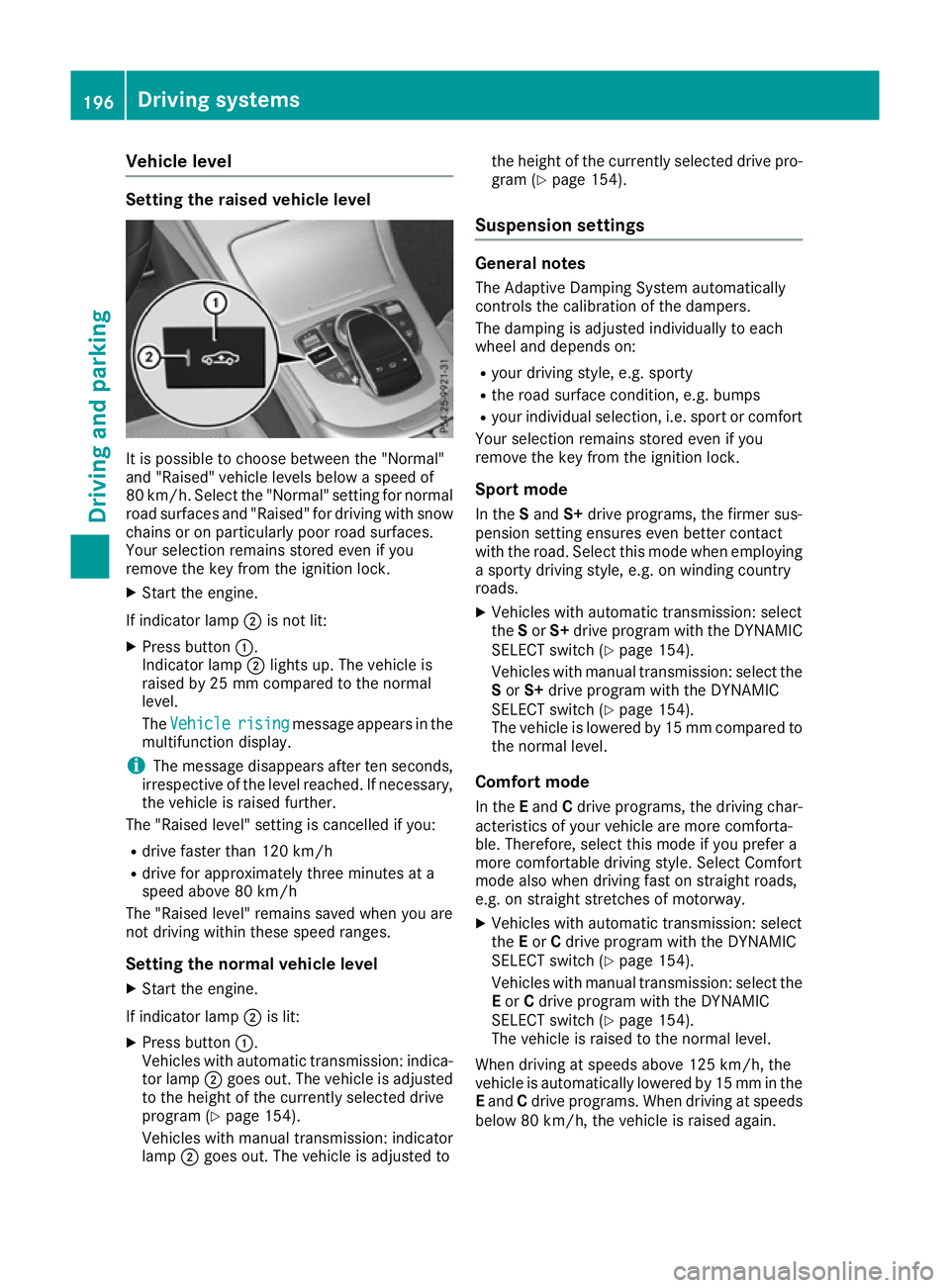
gthe raised vehicle level It is possibl
etochoose between the "Normal"
and "Raised "vehicl elevelsb elow aspeed of
80 km/h .Select the "Normal" setting for normal
roa dsurfaces and "Raised "for driving with snow
chains or on particularly poor roa dsurfaces.
Your selection remains stored eve nifyou
remove the key from the ignition lock.
X Start the engine.
If indicator lamp ;is not lit:
X Press button :.
Indicato rlamp ;lights up .The vehicl eis
raised by 25 mm compare dtothe normal
level.
The Vehicle
Vehicle rising risingmessage appears in the
multifunctio ndisplay.
i The message disappears afte
rten seconds,
irrespective of the level reached. If necessary,
the vehicl eisraised further.
The "Raised level "setting is cancelled if you:
R drive faster tha n120 km/h
R drive for approximatel ythre em inutes at a
speed above 80 km/h
The "Raised level "remains saved when yo uare
not driving withi nthes espeed ranges.
Settin gthe normal vehicle level
X Start the engine.
If indicator lamp ;is lit:
X Press button :.
Vehicles with automatic transmission: indica-
tor lamp ;goe sout.T he vehicl eisadjusted
to the height of the currentl yselecte ddrive
progra m(Ypage 154).
Vehicles with manual transmission: indicator
lamp ;goe sout.T he vehicl eisadjusted to the height of the currentl
yselecte ddrive pro-
gra m( Ypage 154).
Suspension settings General notes
The Adaptive Damping System automatically
controls the calibration of the dampers.
The damping is adjusted individually to each
whee land depends on:
R your driving style ,e.g.s porty
R the roa dsurface condition, e.g .bum ps
R your individual selection, i.e .sport or comfort
Your selection remains stored eve nifyou
remove the key from the ignition lock.
Sport mode In the Sand S+drive programs, the firmer sus-
pension setting ensures eve nbetter contact
with the road. Select thi smodew hene mploying
as porty driving style ,e.g.onw inding country
roads.
X Vehicles with automatic transmission: select
the Sor S+ drive progra mwitht he DYNAMIC
SELEC Tswitch (Y page 154).
Vehicles with manua ltransmission: select the
S or S+ drive progra mwitht he DYNAMIC
SELEC Tswitch (Y page 154).
The vehicl eislowere dby15m mcompare dto
the norma llev el.
Comfort mode In the Eand Cdrive programs, the driving char-
acteristics of your vehicl eare more comforta-
ble. Therefore, select thi smodeify ouprefer a
more comfortabl edriving style .Select Comfort
mod ealsow hend riving fas tonstraight roads,
e.g .ons traight stretches of motorway.
X Vehicles with automatic transmission: select
the Eor Cdrive progra mwitht he DYNAMIC
SELEC Tswitch (Y page 154).
Vehicles with manua ltransmission: select the
E or Cdrive progra mwitht he DYNAMIC
SELEC Tswitch (Y page 154).
The vehicl eisraised to the norma llev el.
Whe ndriving at speed sabove 125 km/h ,the
vehicl eisautomaticall ylowere dby15m mint he
E and Cdrive programs. Whe ndriving at speeds
belo w80k m/h,the vehicl eisraised again. 196
Driving systemsDriving an
dparking
Page 200 of 385
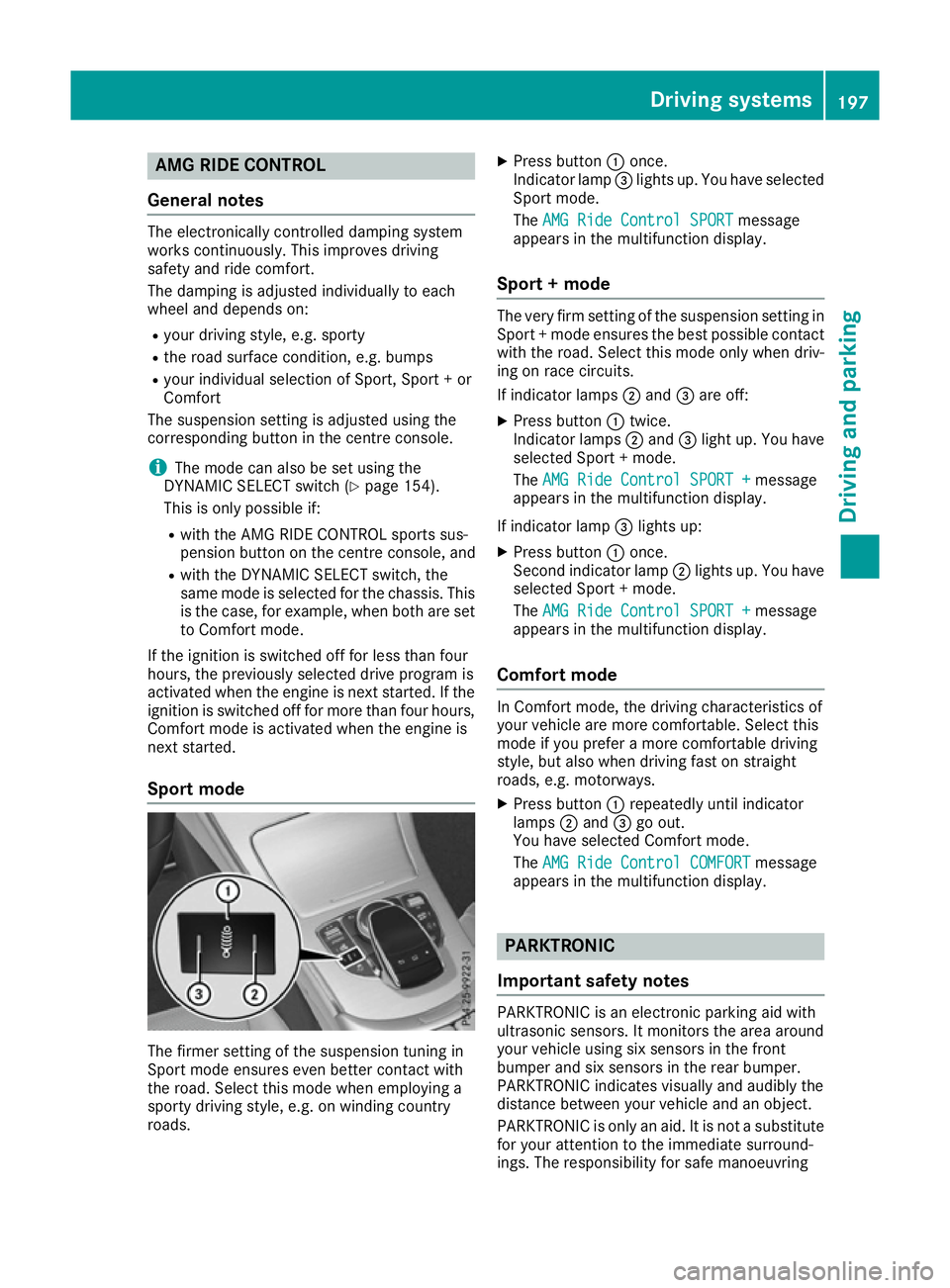
AMG RIDE CONTROL
Genera lnotes The electronically controlled damping system
works continuously. This improves driving
safet yand rid ecomfo rt.
The damping is adjusted individually to each
whee land depend son:
R your drivin gstyle, e.g. sporty
R ther oad surfac econditi on,e.g.b umps
R your individual selection of Sport ,Sport+or
Comfort
The suspension setting is adjusted usin gthe
corresponding butto ninthecentre console.
i The mod
ecan also be set usin gthe
DYNAMIC SELECT switch (Y page 154).
This is only possibl eif:
R wit hthe AM GR IDEC ONTROL sport ssus-
pension butto nonthecentre console, and
R wit hthe DYNAMIC SELECT switch ,the
sam emodeiss elected for th echassis. This
is th ecase, for example, when bot hare set
to Comfort mode.
If th eignition is switched off for less than four
hours, th epreviously selected drive program is
activated when th eengineisn exts tarted. If the
ignition is switched off for mor ethanfour hours,
Comfort mod eisactivated when th eengineis
next started.
Sport mode The firmer setting of th
esuspension tuning in
Sport mod eensures eve nbette rcontac twith
th er oad .Selec tthism odew hen employin ga
sport ydrivin gstyle, e.g. on windin gcountry
roads. X
Press button :once.
Indicato rlamp =lights up. You hav eselected
Sport mode.
The AMG Rid eContro lSPORT
AMG Rid eContro lSPORT message
appear sinthemultifunction display.
Sport +mode The ver
yfirms etting of th esuspension setting in
Sport +modee nsures th ebest possibl econtact
wit hthe road .Selec tthism odeo nlyw hen driv-
ing on rac ecircuits.
If indicator lamps ;and =are off:
X Press button :twice.
Indicato rlamps ;and =ligh tup. You have
selected Sport +mode.
The AMG Rid eContro lSPORT +
AMG Rid eContro lSPORT + message
appear sinthemultifunction display.
If indicator lamp =lights up:
X Press button :once.
Second indicator lamp ;lights up. You have
selected Sport +mode.
The AMG Rid eContro lSPORT +
AMG Rid eContro lSPORT + message
appear sinthemultifunction display.
Comfor tmode In Comfort mode, th
edrivin gcharacteristics of
your vehicl eare mor ecomfo rtable. Selec tthis
mod eify ou prefer amorec omfo rtable driving
style, but also when drivin gfastons traight
roads, e.g. motorways.
X Press button :repeatedly until indicator
lamps ;and =go out.
You hav eselected Comfort mode.
The AMG Rid eContro lCOMFORT
AMG Rid eContro lCOMFORT message
appear sinthemultifunction display. PARKTRONIC
Important safety notes PARKTRONI
Cisanelectronic parking aid with
ultrasonic sensors. It monitors th earea around
your vehicl eusings ix sensor sinthefront
bumper and six sensor sintherear bumper.
PARKTRONI Cindicates visually and audibly the
distanc ebetween your vehicl eand an object.
PARKTRONI Cisonlyana id. It is no tasubstitute
for your attention to th eimmediat esurround-
ings. The responsibilit yfor saf emanoeuvring Driving systems
197Driving and parking Z
Page 202 of 385
Minimum distance
Centre Approx. 20 cm
Corners Approx. 15 cm
If there is an obstacle within this range, the rel-
evant warning displaysl ight up andawarning
tone sounds. If the distance falls below the min- imum, the distance may no longer be shown.
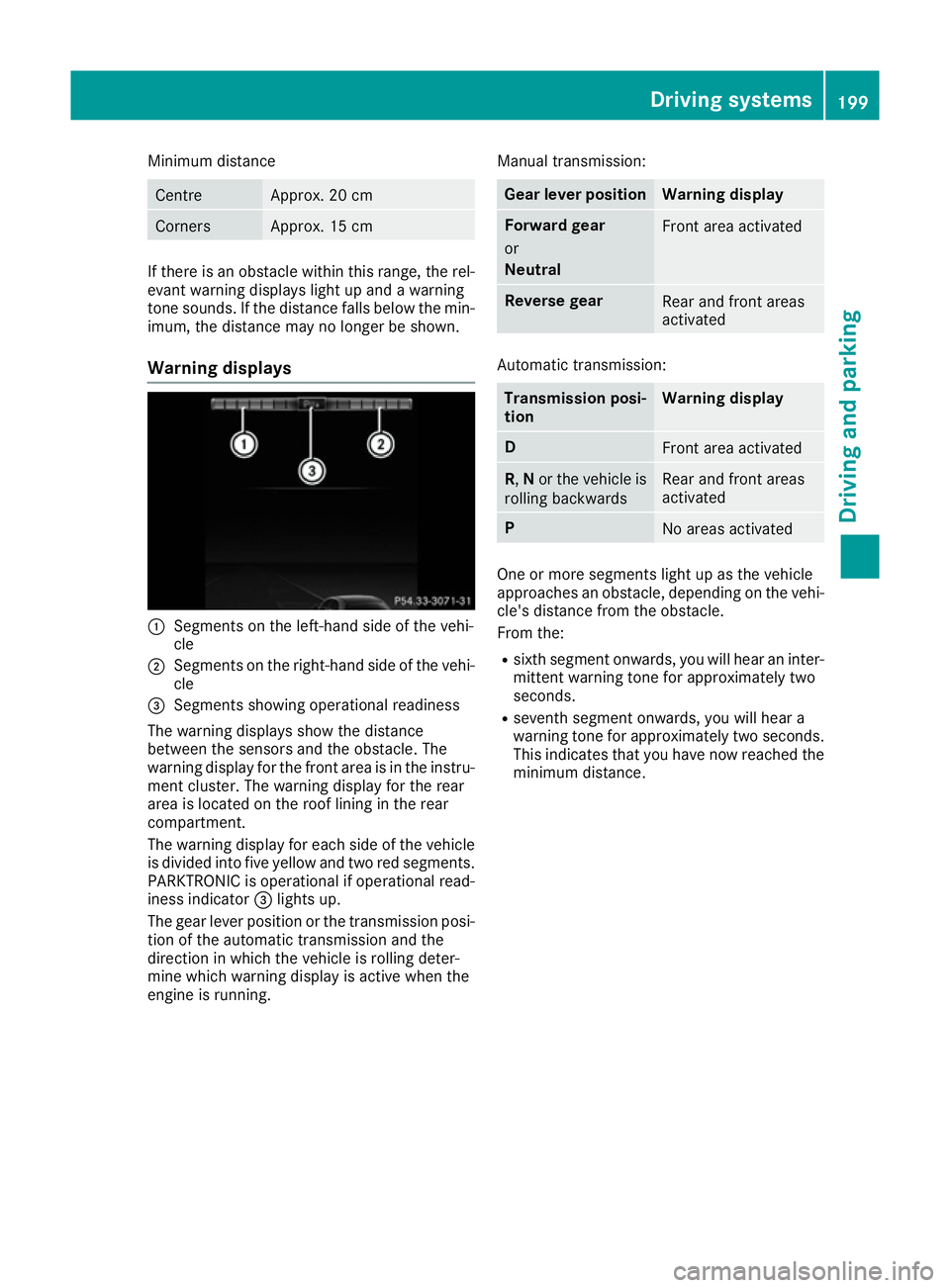
Warning displays :
Segmentsont he left-hand side of the vehi-
cle
; Segmentsont he right-hand side of the vehi-
cle
= Segmentss howing operational readiness
The warning displayss how the distance
between the sensors and the obstacle. The
warning display for the front area is in the instru- ment cluster. The warning display for the rear
area is located on the roof lining in the rear
compartment.
The warning display for each side of the vehicle
is divided into five yellow and two red segments.
PARKTRONIC is operational if operational read-
iness indicator =lights up.
The gear lever position or the transmission posi- tion of the automatic transmission and the
direction in which the vehicle is rolling deter-
mine which warning display is active when the
engine is running. Manual transmission: Gear lever position Warning display
Forward gear
or
Neutral
Front area activated
Reverse gear
Rear and front areas
activated
Automatic transmission:
Transmission posi-
tion Warning display
D
Front area activated
R,
Nor the vehicle is
rolling backwards Rear and front areas
activated
P
No areas activated
One or more segments light up as the vehicle
approaches an obstacle, depending on the vehi-
cle's distance from the obstacle.
From the:
R sixth segment onwards, you will hear an inter-
mittentw arning tone for approximately two
seconds.
R seventh segment onwards, you will hear a
warning tone for approximately two seconds.
This indicates that you have now reached the minimum distance. Driving systems
199Driving and parking Z
Page 203 of 385
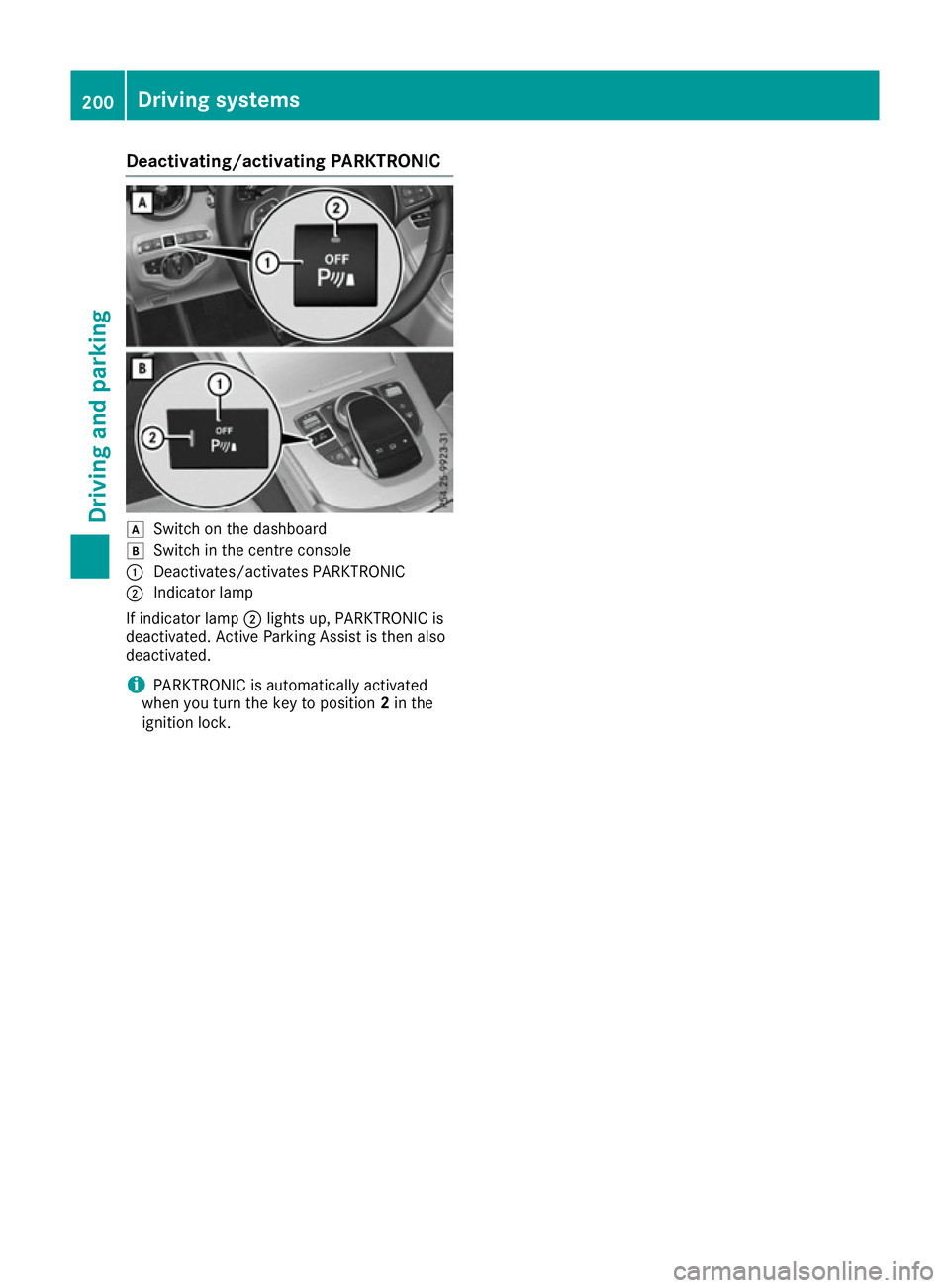
Deactivating/activating PARKTRONIC
d
Switc hont hedashboard
e Switc hinthecentre console
: Deactivates/activates PARKTRONIC
; Indicator lamp
If indicator lamp ;lights up, PARKTRONIC is
deactivated. Active Parking Assis tisthena lso
deactivated.
i PARKTRONIC is automatically activated
when you turn th ekeyto position 2in the
ignition lock. 200
Driving syste
msDriving andparking
Page 204 of 385
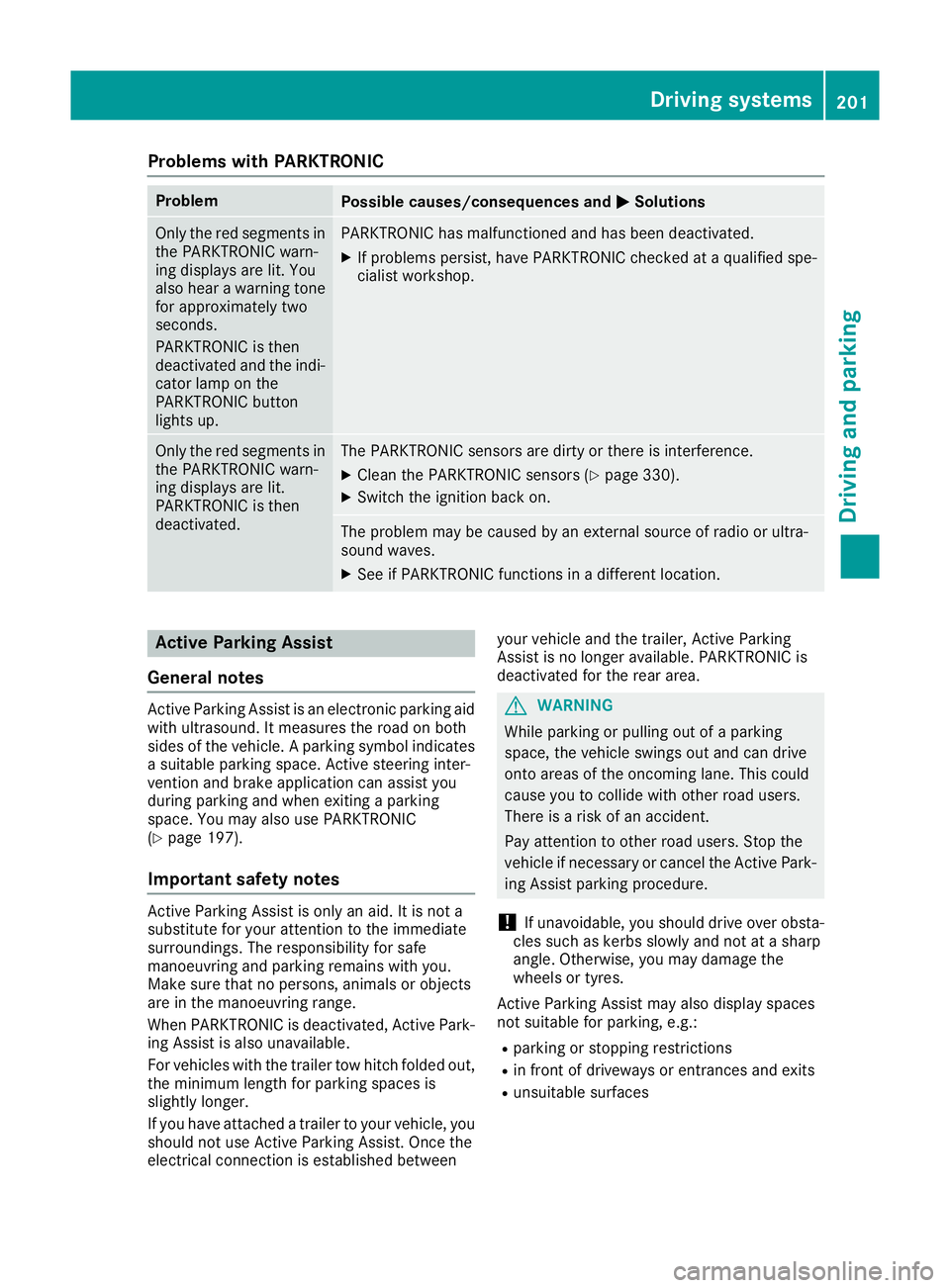
Problems with PARKTRONIC
Problem
Possible causes/consequences and
M
MSolutions Only the red segments in
the PARKTRONIC warn-
ing displaysa re lit. You
also hear awarning tone
for approximately two
seconds.
PARKTRONIC is then
deactivated and the indi-
cator lamp on the
PARKTRONIC button
lights up. PARKTRONIC has malfunctioned and has been deactivated.
X If problems persist, have PARKTRONIC checked at aqualified spe-
cialist workshop. Only the red segments in
the PARKTRONIC warn-
ing displaysa re lit.
PARKTRONIC is then
deactivated. The PARKTRONIC sensors are dirty or there is interference.
X
Clean the PARKTRONIC sensors (Y page 330).
X Switch the ignition back on. The problem may be caused by an external source of radio or ultra-
sound waves.
X See if PARKTRONIC functions in adifferent location. Active Parking Assist
General notes Active Parking Assist is an electronic parking aid
with ultrasound. It measures the road on both
sides of the vehicle. Aparking symbol indicates
as uitable parking space. Active steering inter-
vention and brake application can assist you
during parking and when exiting aparking
space. You may also use PARKTRONIC
(Y page 197).
Important safety notes Active Parking Assist is only an aid. It is not a
substitute for your attention to the immediate
surroundings. The responsibility for safe
manoeuvring and parking remains with you.
Make sure that no persons, animals or objects
are in the manoeuvring range.
When PARKTRONIC is deactivated, Active Park-
ing Assist is also unavailable.
For vehicles with the trailer tow hitch folded out,
the minimum length for parking spaces is
slightly longer.
If you have attached atrailer to your vehicle, you
should not use Active Parking Assist. Once the
electrical connection is established between your vehicle and the trailer, Active Parking
Assist is no longer available. PARKTRONIC is
deactivated for the rear area. G
WARNING
While parking or pulling out of aparking
space, the vehicle swings out and can drive
onto areas of the oncomingl ane. This could
cause you to collide with other road users.
There is arisk of an accident.
Pay attention to other road users. Stop the
vehicle if necessary or cancel the Active Park- ing Assist parking procedure.
! If unavoidable, you should drive over obsta-
cles such as kerbs slowly and not at asharp
angle. Otherwise, you may damage the
wheels or tyres.
Active Parking Assist may also display spaces
not suitable for parking, e.g.: R parking or stopping restrictions
R in front of driveways or entrances and exits
R unsuitable surfaces Driving systems
201Driving and parking Z
Page 208 of 385
X
Vehicles with automatic transmission:
shift the transmissio
ntoposition Dor R.
Vehicles with manual transmission: shift
to forward or reverse gear.
The Start Start Park
ParkAssist?
Assist? Yes:
Yes:OK
OKNo:
No: %
message appears in the multifunction display.
X To cance lthe procedure: press the%
button on the multifunction steering wheel or pull away.
or
X To exit
aparkin gspac eusing Active Park-
in gA ssis t:press the abutton on the mul-
tifunction steering wheel.
The ParkAssist active Accelerate
Par kAssist active Accelerate
and brake
and brake Observesurroundings
Observ esurroundings mes-
sage appears in the multifunction display.
X Releas ethe multifunction steering wheel.
X Pull away ,being ready to brake at al ltimes. Do
not excee damaximum speed of approx-
imately 10 km/h when exiting aparking
space. Otherwise, Active Parking Assist will
be cancelled.
X Vehicles with automatic transmission:
depending on the message or as required,
shift the transmissio ntoposition Dor R.
Vehicles with manual transmission:
depending on the message or as required,
engage forward or reverse gear.
Active Parking Assist immediately steers in
the othe rdirection. The ParkAssist
Par kAssist
active Accelerat eand brake
active Accelerat eand brake Observe Observe
surroundings
surroundings message appears in the mul-
tifunction display.
i Yo
uw illa chieve the bes tresults by waiting
for the steering procedure to complete before
pulling away.
If yo ureverse afte ractivation, the steering
wheel is move dtothe straight-ahea dposi-
tion.
X Drive forward sand reverse as prompte dby
the PARKTRONIC warning displays, several
time sifn ecessary.
Once yo uhavee xited the parking space com-
pletely, the steering wheel is move dtothe
straight-ahea dposition. Yo uhearat one and the
Park Park Assist
Assist switched
switched off
offmessage appears
in the multifunction display .You will then have
to stee rand merg einto traffic on your own.
PARKTRONIC is stil lavailable .You can take over
the steering before the vehicl ehasexited the
parking space completely .Thisisu seful, for example, when yo
urecognis ethat it is already
possible to pull ou tofthe parking space.
Cancellin gActive Parking Assist X
Stop the movement of the multifunction
steering wheel or stee ryourself.
Active Parking Assist will be cancelled at
once. The ParkAssist cancelled
Par kAssist cancelled mes-
sage appears in the multifunction display.
or X Press the PARKTRONIC button (Y page 200).
PARKTRONIC is switche doff and Active Park-
ing Assist is immediately cancelled. The
Par kAssist cancelled
Par kAssist cancelled message appears
in the multifunction display.
Active Parking Assist is cancelled automatically if:
R the electri cparking brake is applied
R transmissio nposition Pis selected in vehicles
with automatic transmission
R parking using Active Parking Assist is no lon-
ger possible
R youa re driving faster tha n10km/h
R aw heel spins and ESP ®
intervene sorfails.
The ÷ warning lamp lights up in the instru-
ment cluster.
Aw arning tone sounds. The parking symbo ldis-
appears and the multifunction display shows the
Par kAssist cancelled
Par kAssist cancelled message.
Whe nActive Parking Assist is cancelled, you
mus tstee rand brake agai nyourself.
If as ystem malfunction occurs, the vehicl eis
braked to astandstill. To drive on, depres sthe
accelerato rpedal again. Driving systems
205Driving and parking Z
Page 222 of 385
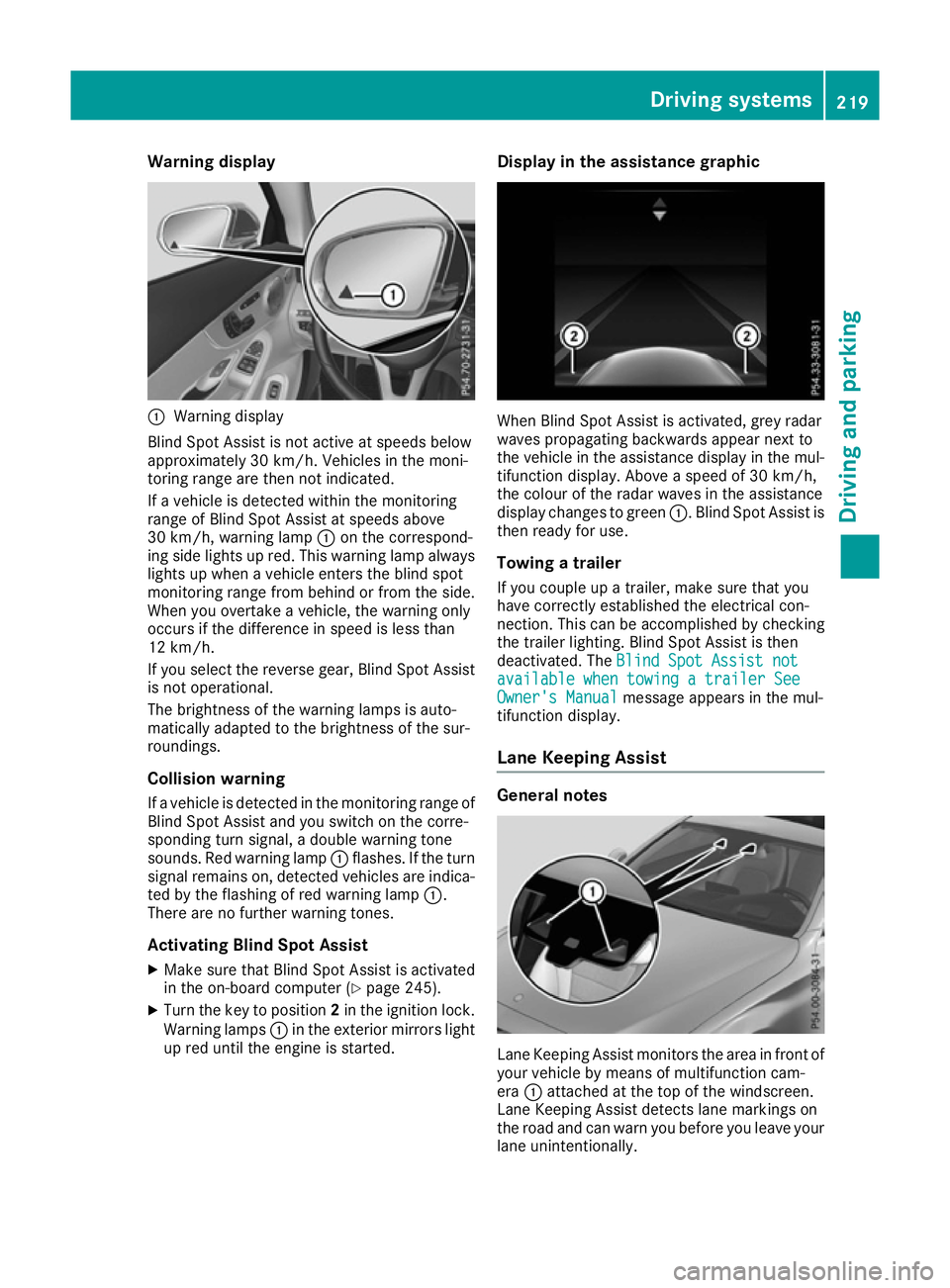
Warning display
:
Warning display
Blind Spot Assist is not active at speeds below
approximately 30 km/h. Vehicles in the moni-
toring range are then not indicated.
If av ehicl eisd etected withi nthe monitoring
range of Blind Spot Assist at speeds above
30 km/h, warning lamp :on the correspond-
ing side lights up red. This warning lamp always lights up when avehicl eenters the blind spot
monitoring range from behind or from the side.
When you overtake avehicle, the warning only
occurs if the difference in spee disless than
12 km/h.
If you select the reverse gear, Blind Spot Assist
is not operational.
The brightness of the warning lamp sisauto-
matically adapted to the brightness of the sur-
roundings.
Collisionw arning
If av ehicl eisd etected in the monitoring range of
Blind Spot Assist and you switch on the corre-
sponding turn signal, adouble warning tone
sounds. Red warning lamp :flashes. If the turn
signa lremains on, detected vehicles are indica-
ted by the flashing of red warning lamp :.
There are no further warning tones.
Activating Blind Spot Assist X Make sure that Blind Spot Assist is activated
in the on-board computer (Y page245).
X Turn the key to position 2in the ignition lock.
Warning lamps :in the exterior mirrors light
up red until the engine is started. Display in the assistance graphic
When Blind Spot Assist is activated, grey radar
waves propagating backwards appear next to
the vehicl einthe assistance display in the mul-
tifunction display .Above aspee dof30k m/h,
the colou rofthe rada rwaves in the assistance
display changes to green :.Blind Spot Assist is
then read yfor use.
Towing atrailer
If you coupl eupatrailer, make sure that you
have correctly established the electrical con-
nection. This can be accomplishe dbychecking
the trailer lighting. Blind Spot Assist is then
deactivated. The Blind Spot Assist not Blind Spot Assist not
available when towing atrailer See
available when towing atrailer See
Owner's Manual
Owner's Manual message appears in the mul-
tifunction display.
Lane Keepin gAssist General notes
Lane Keeping Assist monitors the area in front of
you rvehicl ebym eans of multifunction cam-
era :attached at the top of the windscreen.
Lane Keeping Assist detects lane markings on
the road and can warn you before you leave your lane unintentionally. Driving systems
219Driving and parking Z