change time MERCEDES-BENZ C-Class COUPE 2017 CL205 User Guide
[x] Cancel search | Manufacturer: MERCEDES-BENZ, Model Year: 2017, Model line: C-Class COUPE, Model: MERCEDES-BENZ C-Class COUPE 2017 CL205Pages: 354, PDF Size: 8.66 MB
Page 135 of 354
Starting the engine
Important safety notes
GWARNING
If children are left unsupervised in the vehicle,
they could:
Ropen the doors, thus endangering other
people or road users.
Rget out and disrupt traffic.
Roperate the vehicle's equipment.
Additionally, children could set the vehicle in
motion if, for example, they:
Rrelease the parking brake.
Rshifting the automatic transmission out of
park position P
RStart the engine.
There is arisk of an accident and injury.
When leaving the vehicle, always take the
SmartKey with you and lock the vehicle. Never
leave children or animals unattended in the
vehicle. Always keep the SmartKey out of
reach of children.
GWARNING
Combustion engines emit poisonous exhaust
gases such as carbon monoxide. Inhaling
these exhaust gases leads to poisoning. There
is ar isk of fatal injury. Therefore never leave
the engine running in enclosed spaces with-
out sufficient ventilation.
GWARNING
Flammable materials introduced through
environmental influence or by animals can
ignite if in contact with the exhaust system or
parts of the engine that heat up. There is arisk
of fire.
Carry out regular checkstom ake sure that
there are no flammable foreign materials in
the engine compartmentorint he exhaust
system.
General notes
The catalytic converter is preheated for up to
30 seconds after acold start. The sound of the
engine may change during this time.
Automatic transmission
XShift the transmission to position P
(Ypage 141).
The transmission position display in the mul-
tifunction display shows P(
Ypage 142).
iYou can start the engine in transmission
position Pand N.
Starting procedurew ith the SmartKey
To start the engine using the SmartKey instead
of the Start/Stop button, pull the Start/Stop
button out of the ignition lock.
XTurn the SmartKey to position 3in the ignition
lock and release it as soon as the engine is
running (
Ypage 131).
If the engine will not start:
XRemove the SmartKey from the ignition lock.
XReinsert the SmartKey into the ignition lock
after ashort waiting period.
XTurn the SmartKey to position 2in the ignition
lock (Ypage 131).
The indicator lamps in the instrumentc luster
light up (
Ypage 246).
XTurn the SmartKey to position 3in the ignition
lock (Ypage 131) and release it as soon as the
engine is running.
Starting procedurew ith the Start/Stop
button
The Start/Stop button is only available on vehi-
cles with KEYLESS-GO or the KEYLESS-GO start
function.
The Start/Stop button can be used to start the
vehicle manually without insertingt he SmartKey
into the ignition lock. The Start/Stop button
must be inserted in the ignition lock and the
SmartKey must be in the vehicle. This mode for
startin gthe engine operates independently of
the ECO start/stop automatic engine start func-
tion.
You can start the engine if avalid SmartKey is in
the vehicle. Switch off the engine and always
take the SmartKey with you when leaving the
Driving133
Driving and parking
Z
Page 141 of 354

DYNAMIC SELECT switch
All vehicles (exceptMercedes-AMG
vehicles )
Use theDYNAMIC SELECT switch to chang ethe
drive program. Dependin gonthedrive program
selecte dthe followin gvehicle characteristics
will change:
Rth ed rive (engin eand transmissio nmanage-
ment)
Rth es uspensio n
Rthes teerin g
Rthea vailabilit yofthe ECOs tart/sto pfunction
Rthec limat econtrol :
-thec limat econtrol setting s
-ther earw indow defroster operation period
-thep erformanc eoftheseat heatin g
Each time you start th eenginew itht he Smart -
Key or th eStart/Sto pbutton, drive program Cis
activated. Fo rfurther information about startin g
th ee ngine, see (
Ypage 133).
XPush DYNAMI CSELEC Tswitch :forwar dor
bac kuntil th edesire ddrive program is selec -
ted.
The status icon of th eselecte ddrive program
is shown in th emultifunction display.
In addition ,the curren tdrive program setting s
are displaye dbriefly in th emultimedia syste m
display.
iIn af ew countries, th eECO start/sto pfunc-
tion is deactivated at th efactory due to th e
available fue lgrade. In this case, th eECO
start/sto pfunction is no tavailable in any
drive program, regardles softhedisplay in th e
multimedia syste mdisplay. Available drive programs:
I
IndividualIndividual setting s
S+Spor tPlusParticularly sport ydrivin g
characteristics
S Spor tSporty drivin gcharacteris -
tics
C ComfortComfortable and economi-
cal drivin gcharacteristics
EEconom yParticularly economical
drivingcharacteristics
Additional information on drive programs fo r
vehicles wit hautomatic transmissio n
(
Ypage 144)
You can also chang egear yoursel fusin gthe
steerin gwhee lpaddle shifters .For further infor-
mation on th emanual drive program
(
Ypage 146).
Mercedes-AMG vehicles
General information
Selec tthe drive program usin gthe DYNAMI C
SELECT switch .
Available drive programs:
RAC E
(S ‑MODEL )Driving characteristics suit -
able fo rthe racetrac k
S+Spor tPlusParticularly sport ydrivin g
characteristics
S Spor tSporty drivin gcharacteris -
tics
C ComfortComfortable and economi-
cal drivin gcharacteristics
IIndividualIndividual setting s
Dependingonthedrive program selecte dthe
followin gvehicle characteristics will change:
Rthed rive (engin emanagement)
Rthet ransmissio nmanagemen t
RESP®
Rthes uspensio n
Rthep osition of th eexhaus tflap
Rthes teerin g
DYNAMIC SELECT switch139
Driving an dpark ing
Z
Page 142 of 354
Rthe availability of the ECO start/stopfun ction
Rthe driver assistance systems
Rthe availability of gliding mode
Furtheri nformation for automatic drive program
characteristics (
Ypage 144).
Additionally, in drive program Iyo uc an config-
ur et he respectiv evehicl echaracteristics using
the multimedia system. Yo ucan fin dinforma-
tio na bout thisint he Digita lOperator' sManual.
Each tim eyou start the engine with the Smart-
Key or the Start/Stop button, drive program Cis
activated .For furthe rinformation abou tstarting
the engine ,see (
Ypage 133).
Selecting the driv eprogram
XPress DYNAMIC SELECTs witch :forwards
or backwards unti lthe desired drive program
is selected.
The status ico nofthe selected drive program
is shown in the multifunctio ndisplay .
In addition, the current drive progra msettings
ar ed isplayed brieflyinthe multimedia system
display.
Yo uc an also change gear yourself using the
steering whee lpaddl eshifters. For furthe rinfor-
matio nont he manua ldrive program
(
Ypage 146).
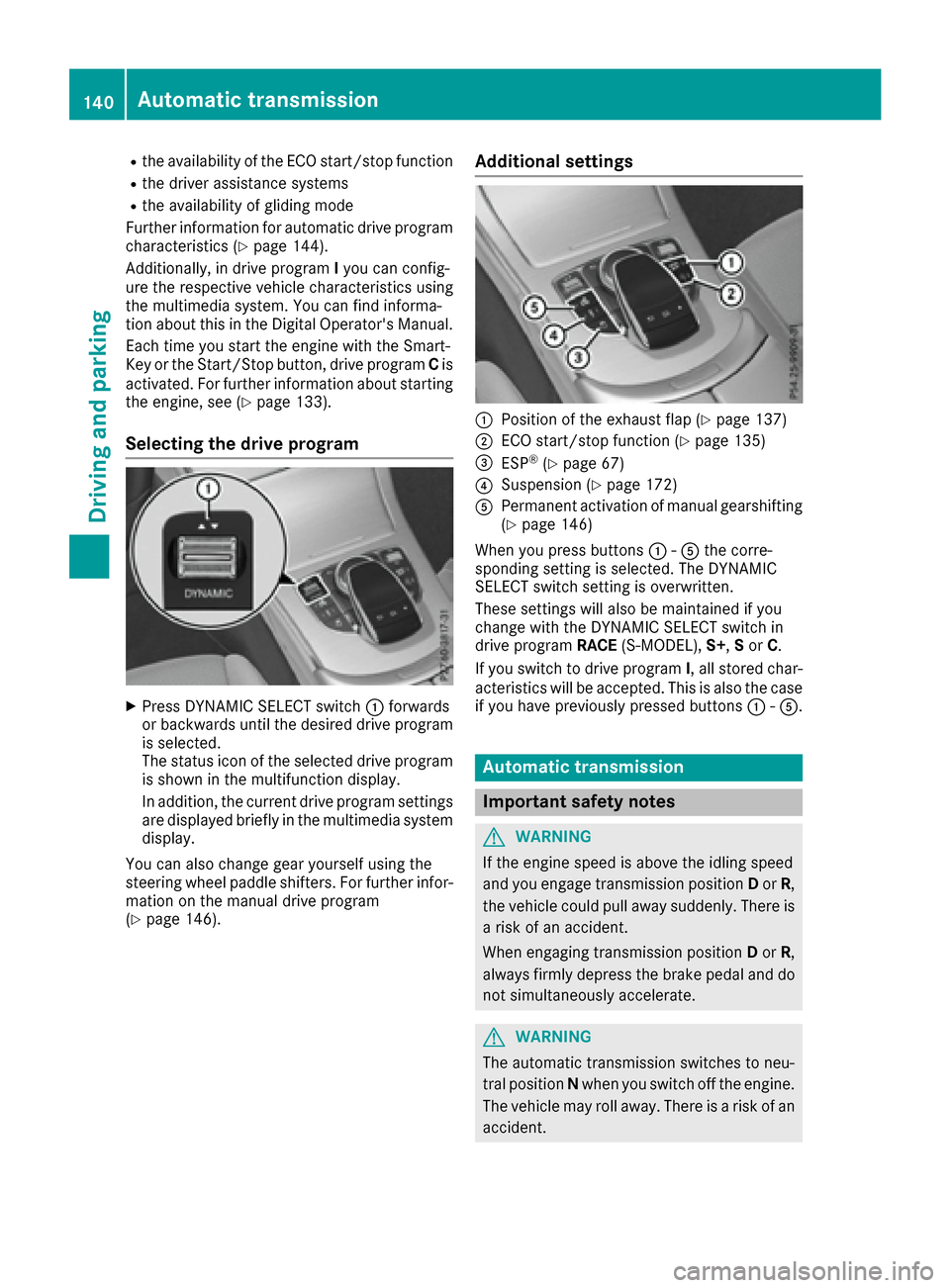
Additional settings
:Positio nofthe exhaust fla p(Ypage 137)
;ECO start/sto pfunctio n(Ypage 135)
=ESP®(Ypage 67)
?Suspension (Ypage 172)
APermanent activatio nofmanualgears hifting
(Ypage 146)
When yo upress buttons :-A the corre-
sponding setting is selected .The DYNAMIC
SELECT switc hsetting is overwritten.
These setting swilla lsobem aintaine difyou
change with the DYNAMIC SELECTs witch in
drive program RACE(S-MODEL), S+,Sor C.
If yo uswitch to drive program I,a llstored char-
acteristics will be accepted .This is als othe case
if yo uhavep reviously presse dbuttons :-A.
Automati ctransmission
Important safety notes
GWARNING
If the engine spee disabove the idling speed
and yo uengag etransmission position Dor R,
the vehicl ecould pull away suddenly. There is
ar iskofana ccident.
When engaging transmission position Dor R,
always firmlyd epress the brake peda land do
not simultaneously accelerate.
GWARNING
The automatic transmission switches to neu-
tralp ositionNwhen yo uswitch off the engine.
The vehicl emayrollaway. There is ariskofa n
accident.
140Automati ctransmission
Driving an dparking
Page 146 of 354
reduces loadchange reactions and is conducive
to as porty driving style .The sound generated by
the double-clutch function depends on the drive
programs elected.
Kickdown
Use kickdown for maximu macceleration.
XDepress the accelerator pedalb eyond the
pressure point.
The automatic transmission shifts to alower
gear depending on the engine speed.
XEase off the accelerator pedalo nce the
desired speedisr eached.
The automatic transmission shifts back up.
Rocking the vehicle free
Rocking the vehicl efree by shifting back and
forth between transmission positions Dand R
can help to free avehicl ethat has become stuck
in mud or snow.
The vehicle's engine management restricts
switching between transmission positions D
and Rto speeds up to amaximu mof5m ph
(9 km/h).
To shift back and forth between transmission
positions Dand R,m ove the DIRECT SELECT
lever up and down past the point of resistance.
Glidingm ode (Mercedes-AMG vehicles)
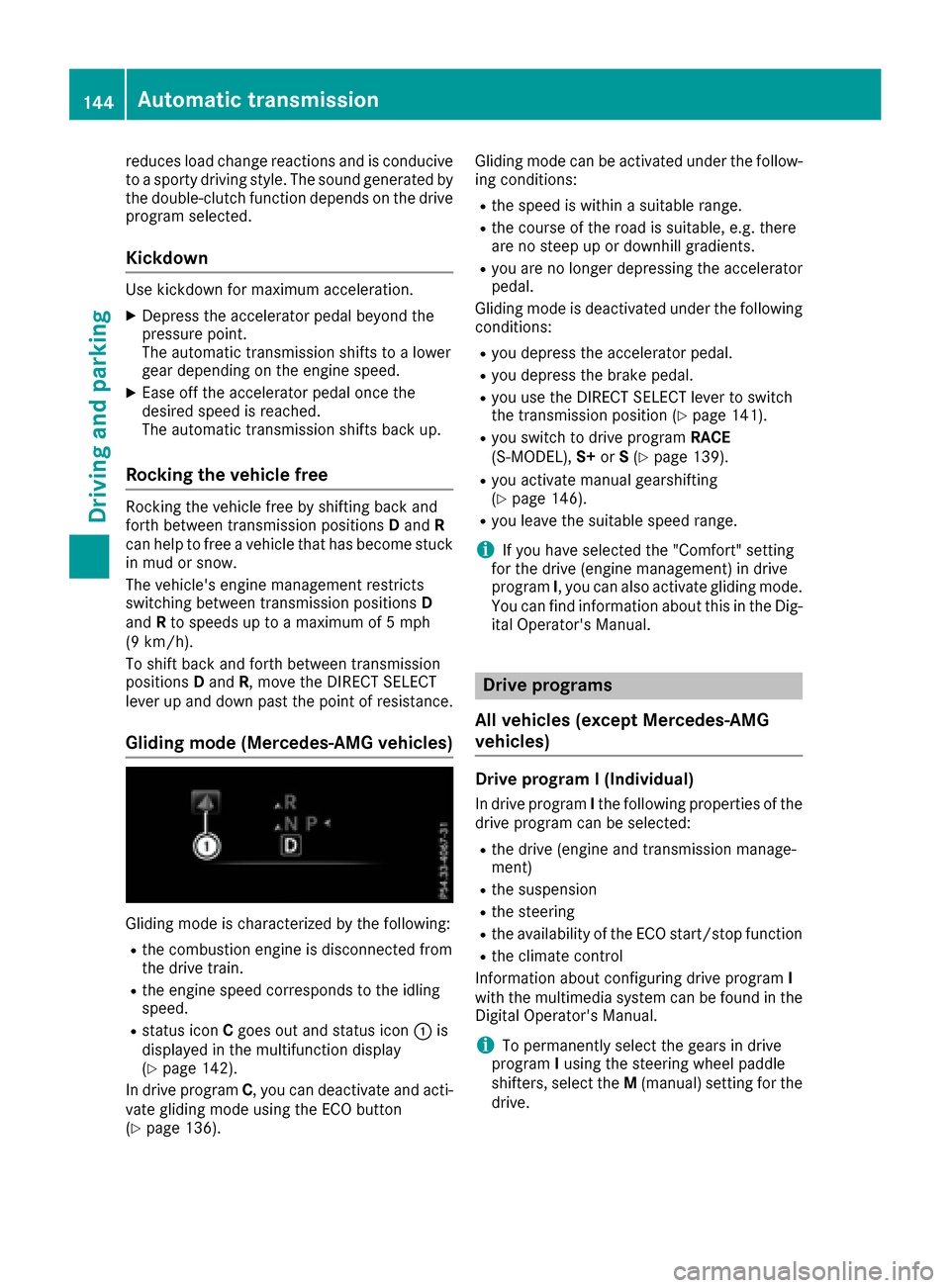
Gliding mode is characterized by the following:
Rthe combustion engine is disconnected from
the drive train.
Rthe engine speed corresponds to the idling
speed.
Rstatus icon Cgoes out and status icon :is
displayed in the multifunction display
(
Ypag e142).
In drive program C,y ou can deactivate and acti-
vate gliding mode using the ECO button
(
Ypag e136). Gliding mode can be activated under the follow-
ing conditions:
Rthe speedisw
ithinas uitable range.
Rthe course of the road is suitable ,e.g. there
are no steep up or downhill gradients.
Ryou are no longer depressing the accelerator
pedal.
Gliding mode is deactivated under the following conditions:
Ryou depress the accelerator pedal.
Ryou depress the brake pedal.
Ryou use the DIRECT SELECT lever to switch
the transmission position (Ypag e141).
Ryou switch to drive program RACE
(S‑MODEL), S+orS(Ypag e139).
Ryou activate manua lgearshifting
(Ypag e146).
Ryou leave the suitable speedr ange.
iIf you have selected the "Comfort" setting
for the drive (engine management) in drive
program I,y ou can als oactivate gliding mode.
You can find informatio nabout this in the Dig-
ital Operator's Manual.
Drive programs
All vehicles (except Mercedes-AMG
vehicles)
Drive program I(Individual)
In drive program Ithe following properties of the
drive programc an be selected:
Rthe drive (engine and transmission manage-
ment)
Rthe suspension
Rthe steering
Rthe availability of the ECO start/stop function
Rthe climate control
Information about configuring drive program I
with the multimedia system can be found in the
Digital Operator's Manual.
iTo permanently select the gears in drive
program Iusing the steering whee lpaddle
shifters, select the M(manual) setting for the
drive.
144Automatic transmission
Driving and parking
Page 148 of 354
Rthe suspensionexhibits particularly stiff
springing and damping setting s(vehicle swith
AIRMATIC).
Rgliding mod eisnot available.
Rthe ECO start/sto pfunctio nisn ot available.
Drive program S+ (Sport Plus)
Drive program S+is characterized by the fol-
lowing:
Rthe vehicl eexhibits particularly sporty driving
characteristics.
Rthe vehicl epulls away in first gear.
Rthe automatic transmission shifts up later.
The fuel consumption possibl ybeing higher
as aresul toft he later automatic transmission
shift points.
Rthe suspensio nexhibits particularly stiff
springing and damping setting s(vehicle swith
AIRMATIC).
Rgliding mod eisnot available.
Rthe ECO start/sto pfunctio nisn ot available.
Drive program S(Sport)
Drive program Sis characterized by the follow-
ing:
Rthe vehicl eexhibits sporty drivin gcharacter-
istics.
Rthe vehicl epulls away in first gear.
Rthe automatic transmission shifts up later.
The fuel consumption possibl ybeing higher
as aresul toft he later automatic transmission
shift points.
Rthe suspensio nexhibits hard springing and
damping setting s(vehicle swithA IRMATIC).
Rgliding mod eisnot available.
Rthe ECO start/sto pfunctio nisn ot available.
Drive program C(Comfort)
Drive program Cis characterized by the follow-
ing:
Rthe vehicl edelivers comfortable, economical
handling characteristics.
Rthe vehicl epulls away mor egently in forward
and revers egears ,unles sthe accelerator
peda lisdepresse dfully.
Rthe vehicl ehasimproved drivin gstability, for
exampl eonslipperyroads urfaces.
Roptimal fuel consumption resulting fromt he
automatic transmission shiftin gupsooner. The vehicl
eisdriven in the lo wengine speed
range and the wheels ar elesslikel ytos pin.
Rgliding mod eisavailable.
Rthe ECO start/sto pfunctio nisa vailable.
Drive program I(Individual)
In drive program Ithe following propertie softhe
drive progra mcan be selected:
Rthe drive (engine management)
Rthe transmission management
RESP®(Ypage 67)
Rthe suspension
Ractivatio nofthe exhaust flap
Informatio nabout configurin gdrive program I
with the multimedia systemc an be found in the
Digita lOperator' sManual.
iTo permanentl yselect the gear sindrive
program Iusing the steering whee lpaddles ,
select the M(manual) setting for th
e trans-
mission.
Manual gear shifting
General notes
Yo uc an change gear yourself using the steering
whee lpaddl eshifters. Th etransmission must be
in position D.
Depending on which steering whee lpaddl e
shifter is pulled ,the automatic transmission
immediatel yshifts into the next gear down or
up ,ifp ermitted.
Mercedes-AMG vehicles: to usemanualshift-
ing ,you have two options:
Rtemporary setting
Rpermanent setting
If yo uactivate manua lgears hifting, the multi-
functio ndisplay will sho wthe current gear
instea doftransmission position D.
If manua lgears hiftin gisd eactivated ,the gears
will be selected automatically.
146Automati ctransmission
Driving an dparking
Page 149 of 354
Temporary setting
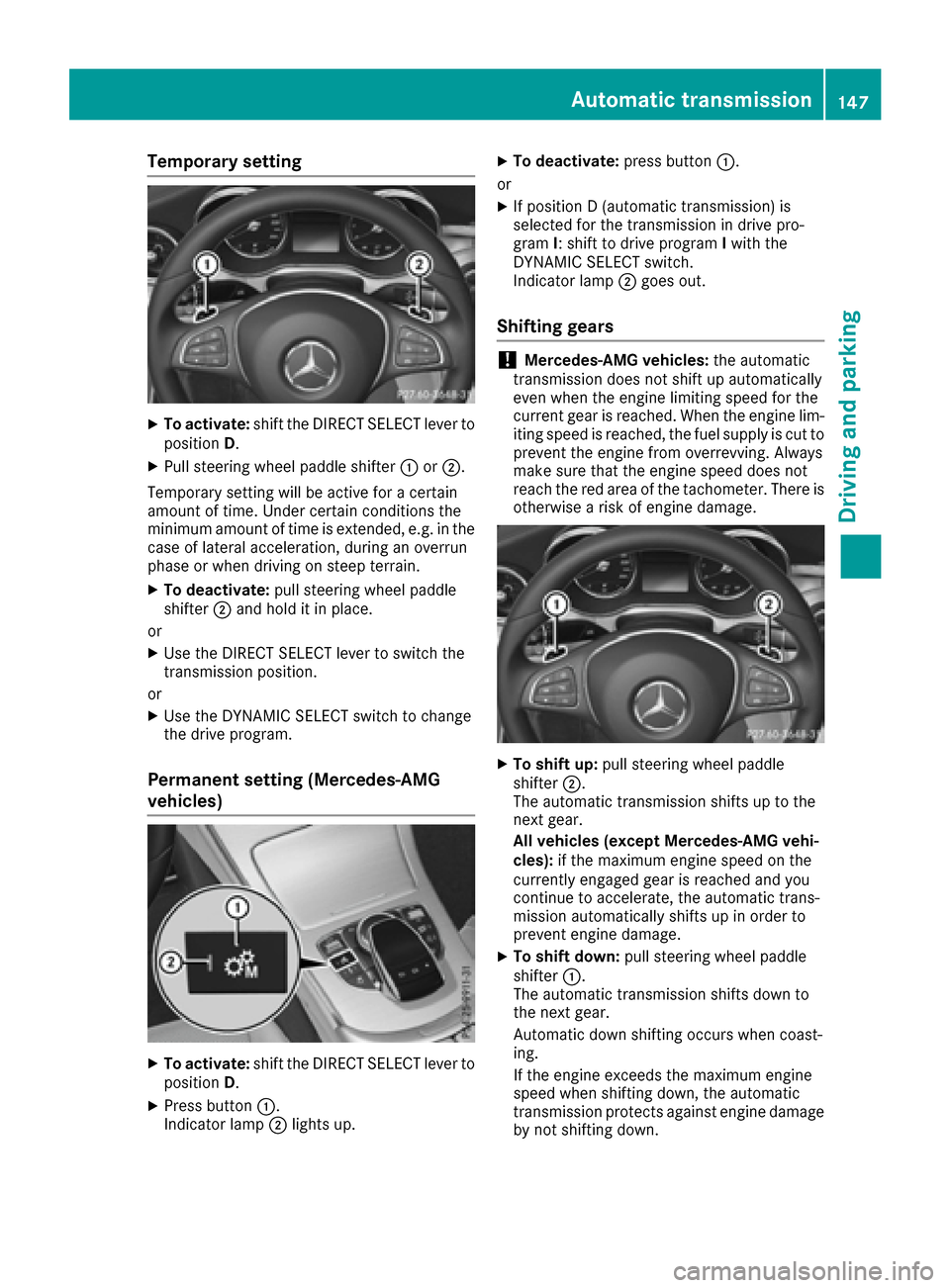
XTo activate:shift the DIRECT SELECTl ever to
position D.
XPull steerin gwheel paddle shifter :or;.
Temporary setting will be active for acertain
amount of time .Under certain conditions the
minimu mamount of time is extended, e.g .inthe
cas eofl atera lacceleration, durin ganoverrun
phas eorw hend rivin gons teepterrain.
XTo deactivate: pull steeringwheel paddle
shifter ;and hol ditinp lace.
or
XUse the DIRECT SELECTl ever to switch the
transmission position.
or
XUse the DYNAMIC SELECTs witch to change
the drive program.
Permanent settin g(Me rcedes-AMG
vehicles)
XTo activate: shift the DIRECT SELECTl ever to
position D.
XPress button :.
Indicato rlam p; lights up.
XTo deactivate: press button:.
or
XIf positio nD(automatic transmission) is
selecte dfor the transmission in drive pro-
gram I:s hift to drive program Iwith the
DYNAMIC SELECTs witch.
Indicato rlam p; goes out.
Shiftin ggears
!Mercedes-AMG vehicles: the automatic
transmission does not shift up automatically
eve nw hent he engine limiting spee dfor the
current gear is reached. When the engine lim-
iting spee disreached, the fuel supply is cut to
prevent the engine fromo verrevving. Always
make sure thatt he engine speeddoesn ot
reach the red area of the tachometer. There is
otherwis eariskofe ngine damage.
XTo shift up: pull steeringwheel paddle
shifter ;.
The automatic transmission shifts up to the
next gear.
Al lv eh icle s(exce pt Mercedes-AMG vehi-
cles): if the maximum engine spee donthe
currentl yengaged gear is reache dand you
continue to accelerate, the automatic trans-
mission automaticall yshifts up in order to
prevent engine damage.
XTo shift down: pull steeringwheel paddle
shifter :.
The automatic transmission shifts down to
the next gear.
Automatic down shifting occurs when coast-
ing.
If the engine exceed sthe maximum engine
spee dwhens hifting down, the automatic
transmission protects against engine damage
by not shifting down.
Automati ctransmission147
Driving an dparking
Z
Page 159 of 354
The ECO display consistsofthree sections, with
an inner and outer area. The section scorre-
spond to the following three categories:
:Acceleration (evaluation of all accel-
eration processes):
Rthe outer area fills up and the inner area lights up green: moderate
acceleration ,especially at higher
speeds
Rthe outer area empties and the
inner area is gray: sporty acceler-
ation
;Coasting (evaluation of all decelera-
tion processes):
Rthe outer area fills up and the inner area lights up green: anticipatory
driving, keeping your distance and
early release of the accelerator.
The vehicle can coast without use
of the brakes.
Rthe outer area empties and the
inner area is gray: frequent heavy
braking
=Constant (continuous evaluation
over the entir ejourney):
Rthe outer area fills up and the inner
area lights up green: constant
speed and avoidance of unneces-
sary acceleration and deceleration
Rthe outer area empties and the
inner area is gray: fluctuations in
speed
The three inner areas display the current driving
style and light up green as aresult of aparticu-
larly economical driving style. Dependin gonthe
driving situation, up to two areas may light up
simultaneously.
At the beginning of the journey, the three outer
areas are empty and fill up as aresult of eco-
nomical driving. Ahigher level indicates amore
economical driving style. If the three outer areas
are completely filled at the same time, the driver
has adopted the most economical driving style
for the selected settings and prevailing condi-
tions. The ECO display border lights up.
The ECO display does not indicate the actual fuel consumption. The additionally achieved range
displayed under Bonus fr. Start
does not
indicate afixed consumption reduction. In addition to driving style, the actual consump-
tion is affected by other factors, such as:
Rload
Rtire pressure
Rcold start
Rchoice of route
Relectrical consumer
sswitched on
These factor sare not included in the ECO dis-
play.
An economical driving style specially requires
driving at moderate engine speeds.
Achievingah igher value in the categories
"Acceleration" and "Constant":
Robserve the gearshift recommendations.
Rdrive in drive program E.
On long journeys at aconstant speed, e.g. on the
highway, only the outer area for "constant" will
change.
The ECO display summarizes the driving style
from the start of the journey to its completion.
Therefore, there are more marked changes in
the outer areas at the start of ajourney. On lon-
ger journeys, there are fewer changes. For more
marked changes, perform amanual rest
(
Ypage 206).
For further information on the ECO display,s ee
(
Ypage 205).
Braking
Important safety notes
GWARNING
If you shift down on aslippery road surface in
an attempt to increase the engine's braking
effect,t he drive wheels could lose their grip.
There is an increased danger of skidding and
accidents.
Do not shift down for additional engine brak-
ing on aslippery road surface.
Downhill gradients
!On long and steep gradients, you must
reduce the load on the brakes by shiftin gtoa
lower gear in good time. This allows you to
take advantage of the engine's braking effect.
This helps you to avoid overheating the
brakes and wearing them out excessively.
Driving tips157
Driving and parking
Z
Page 162 of 354
Winter driving
GWARNING
If you shift downonaslipperyr oad surface in
an attempt to increas ethe engine' sbraking
effect, the drive wheels coul dlose their grip.
There is an increased dange rofskidding and
accidents.
Do not shift downf or additionalengine brak-
ing on aslipperyr oad surface.
GDANGER
If the exhaust pip eisblocked or adequate
ventilation is not possible ,poisonousg ases
such as carbo nmonoxide (CO )may enter the
vehicle. This is the case, e.g. if the vehicle
becomest rappedinsnow. There is arisk of
fatal injury.
If you leave the engine or the auxiliary heating
running, make sure the exhaust pip eand area
around the vehicl eare clearofs now. To
ensure an adequate supply of fresh air, open a
window on the side of the vehicl ethat is not
facing into the wind.
Have you rvehicl ewinter-proofed at aqualified
specialist worksho patthe onset of winter.
Drive particularly carefully on slipperyr oad sur-
faces. Avoid sudden acceleration, steering and
braking maneuvers. Do not use the cruis econ-
trol or DISTRONIC PLUS.
If the vehicl ethreatens to skid or cannot be
stoppedw hen moving at low speed:
XShift the transmission to position N.
The outside temperature indicator is not
designed to serve as an ice-warning device and
is therefore unsuitable for that purpose.
Changes in the outside temperature are dis-
played after ashort delay.
Indicated temperatures just above the freezing
point do not guarantee that the road surface is
free of ice. The road may still be icy, especially in
wooded area soronbridges. The vehicl ecould
skid if you fail to adapt you rdriving style .Always
adapt you rdriving style and drive at aspeedt o
sui tthe prevailing weather conditions.
You should pay special attention to road condi-
tions when temperatures are around freezing
point. For more information on driving with snow
chains, see (
Ypag
e319).
For more information on driving with summer
tires, see (
Ypag e318).
Observe the notes i
n the "Winter operation" sec-
tion (Ypag e318).
Driving systems
Mercedes-Ben zIntelligen tDrive
Mercedes-Benz Intelligent Drive stands for inno-
vative drive rassistance and safety systems
which enhance comfort and support the drive rin
critical situations. With these intelligent co-ordi-
nated systems Mercedes-Benz has set amile-
stone on the path towards autonomous driving.
Mercedes-Benz Intelligent Drive embraces all
elements of active and passive safety in one well
though tout syste m–for the safety of the vehi-
cle occupants and that of other road users.
Further information on driving safety systems
(
Ypag e61).
Cruise control
General notes
Cruise control maintains aconstant road speed
for you .Itbrakes automatically in order to avoid
exceeding the set speed. Change into alower
gearing ood time on long and steep downhill
gradients. This is especially important if the
vehicl eisladen. By doing so, you wil lmake use
of the braking effect of the engine. This relieves
the loa donthe brake syste mand prevents the
brakes from overheating and wearing too
quickly.
Use cruis econtrol only if road and traffic con-
ditions make it appropriate to maintain asteady
speedf orap rolonged period. You can store any
road speeda bove 20 mph (30 km/h).
Important safety notes
If you fail to adapt you rdriving style ,cruis econ-
trol can neither reduce the risk of an accident
nor override the law sofphysics. Cruise control
cannot take into account the road ,traffic and
weather conditions. Cruise control is only an
aid .You are responsiblef or the distance to the
160Driving systems
Driving and parking
Page 163 of 354
vehicleinfront, for vehicl espeed, for braking in
good time and for staying in you rlane.
Do not use cruise control:
Rin road and traffic conditions which do not
allow you to maintai naconstant speed, e.g. in
heavy traffic or on winding roads
Ron slippery road surfaces. Braking or accel-
erating could caus ethe drive wheels to lose
traction and the vehicl ecould then skid
Rwhen there is poor visibility, e.g. due to fog,
heavy rain or snow
If there is achange of drivers ,advise the new
driver of the speeds tored.
iThe speedindicated in the speedometer
may differ slightly from the speeds tored.
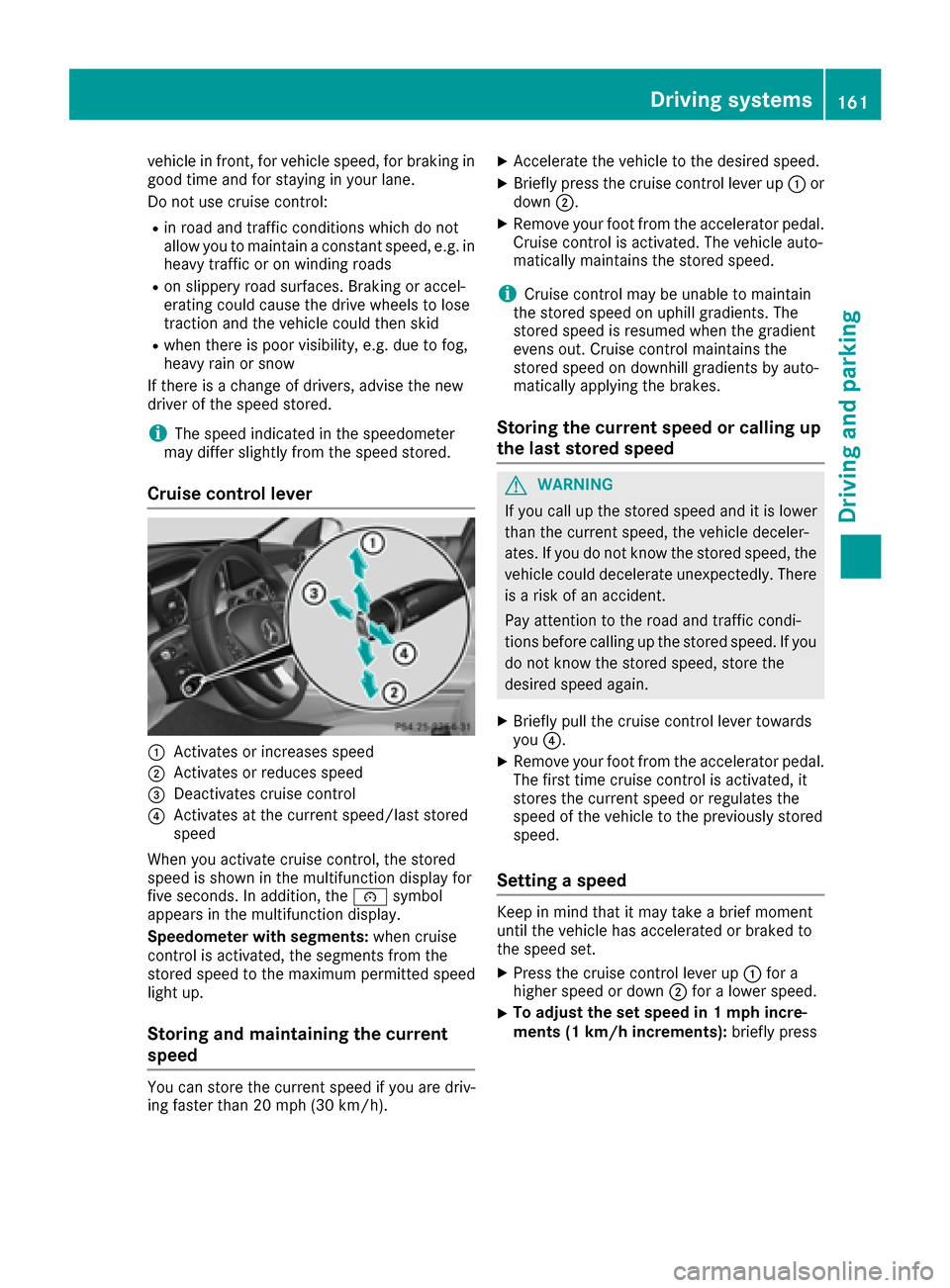
Cruise control lever
:Activates or increasesspeed
;Activates or reduces speed
=Deactivates cruise control
?Activates at the current speed/last stored
speed
When you activate cruise control, the stored
speediss howninthe multifunction display for
five seconds. In addition, the ésymbol
appears in the multifunction display.
Speedometer with segments: when cruise
control is activated ,the segments from the
stored speedtot he maximumpermitted speed
light up.
Storing and maintainingt he current
speed
You can store the current speedify ou are driv-
ing faster than 20 mph (30 km/h).
XAccelerate the vehicl etothe desired speed.
XBriefly press the cruise control lever up :or
down ;.
XRemove you rfoot from the accelerator pedal.
Cruise control is activated .The vehicl eauto-
matically maintains the stored speed.
iCruise control may be unable to maintain
the stored speedonu phill gradients. The
stored speedisr esumedwhen the gradient
evens out. Cruise control maintains the
stored speedond ownhill gradients by auto-
matically applying the brakes.
Storing the current spee dorcalling up
the last stored speed
GWARNING
If you call up the stored speeda nd it is lower
than the current speed, the vehicl edeceler-
ates. If you do not know the stored speed, the vehicl ecould decelerate unexpectedly. There
is ar isk of an accident.
Pay attention to the road and traffic condi-
tions before calling up the stored speed. If you
do not know the stored speed, store the
desired speeda gain.
XBriefly pullthe cruise control lever towards
you ?.
XRemove you rfoot from the accelerator pedal.
The first time cruise control is activated ,it
stores the current speedorr egulates the
speedoft he vehicletothe previousl ystored
speed.
Setting aspeed
Keep in mind that it may take abrief moment
until the vehicl ehas accelerated or braked to
the speeds et.
XPress the cruise control lever up :for a
highers peedord own;for alower speed.
XTo adjust the set spee din1 mph incre-
ments (1 km/h increments): brieflypress
Driving systems161
Driving and parking
Z
Page 165 of 354
Important safety notes
GWARNING
DISTRONI CPLUSd oes no treac tto:
Rpeople or animals
Rstationary obstacles on th eroad ,e.g.s top-
ped or parked vehicles
Roncomin gand crossing traffic
As aresult ,DISTR ONICPLUSm ay neither giv e
warning snorinterven einsuchs ituations.
Ther eisar iskofana ccident.
Always pay careful attention to th etraffic sit -
uation and be read ytob rake.
GWARNIN G
DISTRONI CPLUSc anno talways clearly iden -
tify other road user sand comple xtraffic sit -
uations.
In suc hcases, DISTRONI CPLUSm ay:
Rgiveanu nnecessary warning and then
brak ethe vehicl e
Rneither giv eawarning no rinterven e
Raccelerate or brak eunexpectedly
Ther eisar iskofana ccident.
Continue to driv ecarefully and be read yto
brake, in particular when warned to do so by
DISTRONI CPLUS.
GWARNIN G
DISTRONI CPLUSb rakes your vehicl ewithu p
to 50 %ofthe maximu mpossible deceleration.
If this braking force is insufficient, DISTRONIC
PLUS warns you visuall yand audibly.T here is
ar isk of an accident.
In such cases ,apply the brakes yourself and
try to take evasive action.
!If DISTRONIC PLUS or the HOLD function is
activated, the vehicl ebrakes automatically in
certain situations.
To prevent damage to the vehicle, deactivate
DISTRONIC PLUS and the HOLD function in
the following or other similar situations:
Rwhen towing the vehicle
Rin the car wash If you fail to adapt you
rdriving style ,DISTRONIC
PLUS can neither reduce the risk of accident nor
override the law sofphysics. DISTRONIC PLUS
cannot take into account the road ,traffic and
weather conditions. DISTRONIC PLUS is only an
aid .You are responsiblef or the distance to the
vehicl einfront, for vehicl espeed, for braking in
good time and for staying in you rlane.
Do not use DISTRONIC PLUS:
Rin road and traffic conditions which do not
allow you to maintain aconstant speede .g. in
heavy traffic or on winding roads
Ron slippery road surfaces. Braking or accel-
erating coul dcaus ethe drive wheels to lose
traction and the vehicl ecoul dthen skid
Rwhen there is poor visibility, e.g. due to fog,
heavy rain or snow
DISTRONIC PLUS may not detect narrow vehi-
cles driving in front, e.g. motorcycles, or vehi-
cles driving on adifferent line.
In particular, the detection of obstacles can be
impaired if:
Rthere is dirt on the sensors or anything else
covering the sensors
Rthere is snow or heavy rain
Rthere is interference by other rada rsources
Rthere are strong rada rreflections, for exam-
ple ,inp arking gara ges
If DISTR
ONIC PLUS no longe rdetects avehicle
in front, DISTRONIC PLUS may unexpectedly
accelerate the vehicl etothe stored speed.
This speedm ay:
Rbe too high if you are driving in afilter lane or
an exit lane
Rbe so high in the right lane that you pas svehi-
cles driving on the left (left-hand drive coun-
tries)
Rbe so high in the left lane that you pas svehi-
cles driving on the right (right-hand drive
countries)
If there is achange of drivers, advise the new
drive rofthe speeds tored.
Driving systems163
Driving and parking
Z