lock MERCEDES-BENZ C-CLASS COUPE 2018 Owner's Guide
[x] Cancel search | Manufacturer: MERCEDES-BENZ, Model Year: 2018, Model line: C-CLASS COUPE, Model: MERCEDES-BENZ C-CLASS COUPE 2018Pages: 354, PDF Size: 5.88 MB
Page 64 of 354
Always lock rear seat backrests after instal-
ling a Top Tether belt. Observe the lock veri-
fication indicator.
If the rear seat backrest is not engaged and
locked, this will be shown in the multifunction
display in the instrument cluster.
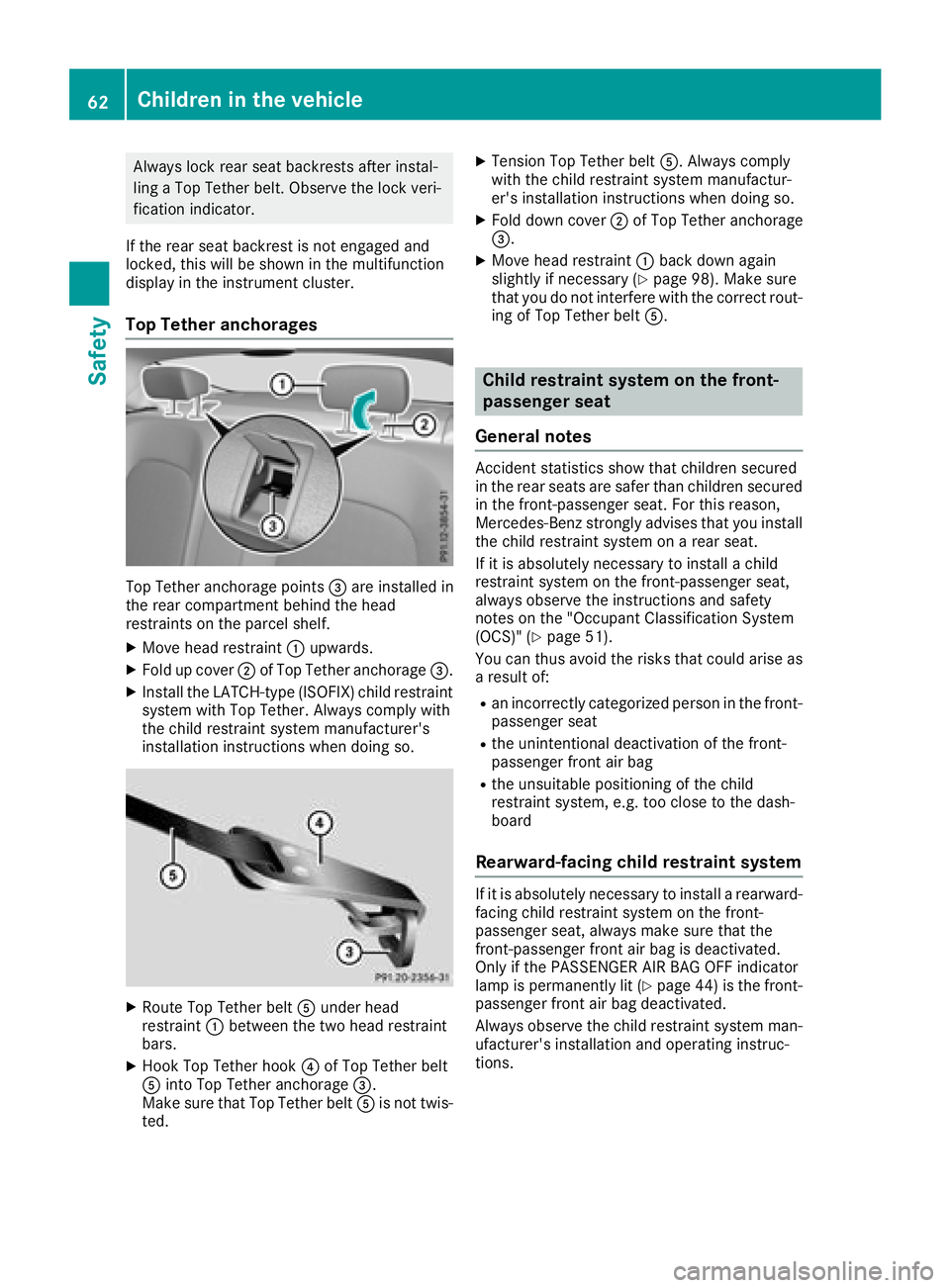
Top Tether anchorages
Top Tether anchorage points =are installed in
the rear compartment behind the head
restraints on the parcel shelf.
XMove head restraint :upwards.
XFold up cover ;of Top Tether anchorage =.
XInstall the LATCH-type (ISOFIX) child restraint
system with Top Tether. Always comply with
the child restraint system manufacturer's
installation instructions when doing so.
XRoute Top Tether belt Aunder head
restraint :between the two head restraint
bars.
XHook Top Tether hook ?of Top Tether belt
A into Top Tether anchorage =.
Make sure that Top Tether belt Ais not twis-
ted.
XTension Top Tether belt A. Always comply
with the child restraint system manufactur-
er's installation instructions when doing so.
XFold down cover ;of Top Tether anchorage
=.
XMove head restraint :back down again
slightly if necessary (Ypage 98). Make sure
that you do not interfere with the correct rout-
ing of Top Tether belt A.
Child restraint system on the front-
passenger seat
General notes
Accident statistics show that children secured
in the rear seats are safer than children secured
in the front-passenger seat. For this reason,
Mercedes-Benz strongly advises that you install
the child restraint system on a rear seat.
If it is absolutely necessary to install a child
restraint system on the front-passenger seat,
always observe the instructions and safety
notes on the "Occupant Classification System
(OCS)" (
Ypage 51).
You can thus avoid the risks that could arise as a result of:
Ran incorrectly categorized person in the front-
passenger seat
Rthe unintentional deactivation of the front-
passenger front air bag
Rthe unsuitable positioning of the child
restraint system, e.g. too close to the dash-
board
Rearward-facing child restraint system
If it is absolutely necessary to install a rearward-
facing child restraint system on the front-
passenger seat, always make sure that the
front-passenger front air bag is deactivated.
Only if the PASSENGER AIR BAG OFF indicator
lamp is permanently lit (
Ypage 44 )is the front-
passenger front air bag deactivated.
Always observe the child restraint system man-
ufacturer's installation and operating instruc-
tions.
62Children in the vehicle
Safety
Page 65 of 354
Forward-facing child restraint system
If it is absolutely necessaryto instal l aforward-
facing child restrain tsystem on th efront-
passenger seat ,always mov eth efront-
passenger seat as far bac kas possible. Full y
retrac tth eseat cushion length. The entire base
of th echild restrain tsystem must always res ton
th eseat cushion of th efront-passenger seat .
The backrest of th echild restrain tsystem must
lie as flat as possible against th ebackrest of th e
front-passenger seat .The child restrain tsystem
must no ttouch th eroo for be subjected to aload
by th ehead restraint. Adjus tth eangle of th e
seat backrest and th ehead restraint position
accordingly. Always mak esure that th eshoul-
der belt strap is correctly routed from th evehi-
cle belt outlet to th eshoulder belt guide on th e
child restrain tsystem. The shoulder belt strap
must be routed forward and down from th evehi-
cle belt outlet .If necessary, adjust th evehicl e
belt outlet and th efront-passenger seat accord -
ingly.
Always observ eth echild restrain tsystem man -
ufacturer' sinstallation and operating instruc-
tions.
Pets in the vehicle
GWARNIN G
If you leav eanimals unattended or unsecured
in th evehicle, they could press buttons or
switches, for example .
As aresult ,they could:
Ractivat evehicl eequipmen tand become
trapped ,for example
Ractivat eor deactivat esystems ,thereby
endangering other road user s
Unsecured animals could also be flun garoun d
th evehicl ein th eevent of an acciden tor sud-
den steering or braking ,thereby injurin gvehi-
cle occupants. Ther eis aris kof an acciden t
and injury.
Never leav eanimals unattended in th evehi-
cle .Always secure animals properly durin g
th ejourney, e.g. use asuitable animal trans -
por tbox .
Driving safety systems
Overview of driving safety systems
In this section ,you will fin dinformation about
th efollowin gdriving safet ysystems :
RABS (Anti-lock Braking System)
(Ypage 64)
RBA S (B rakeAssist System) (Ypage 64)
RActive Brake Assist (Ypage 64)
RESP®(Electronic StabilityProgram )
(Ypage 67)
REB D (Electronic Brak eforce Distribution )
(Ypage 70 )
RADAPTIV EBRAKE (Ypage 70 )
RActive Brake Assist wit hcross-traffic function
(Ypage 70)
RSTEE RCONTROL (Ypage 73)
Important safety notes
If you fail to adapt your driving style or if you are
inattentive, th edriving safet ysystems can nei-
ther reduce th eris kof an acciden tno roverride
th elaws of physics .Drivin gsafet ysystems are
merely aids designed to assist driving .You are
responsible for maintainin gth edistanc eto th e
vehicl ein front, for vehicl espeed, for braking in
goo dtime, and for staying in lane. Always adapt
your driving style to suit th eprevailing road and
weather condition sand maintai n asafedistanc e
from th evehicl ein front. Drive carefully.
The driving safet ysystems describe donly work
as effectivel yas possible when there is ade-
quat econtact between th etires and th eroad
surface .Pay particular attention to th einforma-
tion regarding tires ,recommended minimum
tire tread depths etc. in th e"Wheels and tires "
section (
Ypage 316).
In wintr ydriving conditions, always use winte r
tires (M+ Stires )and if necessary, snow chains.
Only in this way will the driving safety systems
described in this section work as effectively as
possible.
Driving safety systems63
Safety
Z
Page 66 of 354

ABS (Anti-lock Braking System)
Gene ral inform ation
ABSregulates brak epressur ein suc h away that
th ewheels do no tloc kwhen you brake. This
allows you to continu esteering th evehicl ewhen
braking .
The ! ABSwarning lamp in th einstrumen t
cluste rlights up when th eignition is switched
on .It goe sout when th eengin eis running.
AB Sworks from aspee dof about 5mph
(8 km/h), regardless of road-surface conditions.
AB Sworks on slipper ysurfaces, eve nwhen you
only brak egently.
Import ant safety notes
iObserveth e"Importan tsafet ynotes" sec -
tion (Ypage 63).
GWARNIN G
If AB Sis faulty, th ewheels could loc kwhen
braking .The steerabilit yand braking charac -
teristics may be severely impaired. Addition -
ally, further drivin gsafet ysystems are deac -
tivated. There is an increased danger of skid-
din gand accidents .
Drive on carefully. Hav eAB Schecke dimme-
diately at aqualified specialis tworkshop .
When AB Sis malfunctioning ,other systems ,
includin gdrivin gsafet ysystems ,will also
become inoperative. Observ eth einformation
on th eAB Swarning lamp (
Ypage 247) and dis-
play message swhic hmay be shown in th e
instrumen tcluste r (
Ypage 217).
Braking
XIf ABS intervenes: continueto depress th e
brak epedal vigorously until th ebraking sit -
uation is over.
XTo make afull brak eapplication: depress
th ebrak epedal wit hfull force .
If AB Sintervenes when braking ,you will fee l a
pulsing in th ebrak epedal .
The pulsating brak epedal can be an indication
of hazardous road conditions, and function sas a
reminder to tak eextr acar ewhile driving.
BAS (Brake Assist System)
Gene ral inform ation
BASoperate sin emergenc ybraking situations.
If you depress th ebrak epedal quickly, BA S
automatically boosts th ebraking force ,thus
shortening th estopping distance.
Imp ortant safety notes
iObserv eth e"Importan tsafet ynotes" sec -
tion (Ypage 63) .
GWARNIN G
If BA Sis malfunctioning ,th ebraking distanc e
in an emergenc ybraking situation is
increased. There is aris kof an accident.
In an emergenc ybraking situation ,depress
th ebrak epedal wit hfull force .AB Sprevents
th ewheels from locking .
Braking
XKeepth ebrak epedal firmly depressed until
th eemergenc ybraking situation is over.
AB Sprevents th ewheels from locking .
The brakes will function as usual once you
release th ebrak epedal .BA Sis deactivated.
Active Brake Assist
Gene ral inform ation
iObserveth e"Importan tsafet ynotes" sec -
tion (Ypage 63).
Active Brake Assis tconsist sof adistanc ewarn -
ing function wit han autonomous braking func-
tion and Adaptive Brake Assist.
Active Brake Assis tcan help you to minimiz eth e
ris kof acollision wit hth evehicl etraveling in
fron tor reduce th eeffects of suc h acollision .
If Active Brake Assis tdetects that there is aris k
of collision ,you will be warned visually and
acoustically. If you do no treac tto th evisual and
audible collision warning ,autonomous braking
can be initiate din critical situations. If you apply
th ebrak eyourself in acritical situation ,Adap-
tive Brake Assis tof th eActive Brake Assis tsys-
te m support syou.
64Driving safety systems
Safety
Page 68 of 354
Up to a speed of approximately 44 mph
(70 km/h), the distance warning function can
also react to stationary obstacles, such as stop-
ped or parked vehicles.
Autonomous braking function
If the driver does not react to the distance warn-ing signal in a critical situation, Active Brake
Assist can assist the driver with the autonomous
braking function.
Vehicles without Distance Pilot DISTRONIC:
the autonomous braking function is available in
the following speed ranges:
R4–65 mph (7–105 km/h) for moving objects
R4–31 mph (7–50 km/h) for stationary objects
Vehicles with Distance Pilot DISTRONIC: the
autonomous braking function is available in the
following speed ranges:
R4–124 mph (7–200 km/h) for moving objects
R4–31 mph (7–50 km/h) for stationary objects
Due to the nature of the system, particularly
complicated but non-critical driving conditions
may also cause the Autonomous Braking Func-
tion to intervene.
If the autonomous braking function requires a
particularly high braking force, preventative
passenger protection measures (PRE-SAFE
®)
are activated simultaneously (Ypage 57).
Adaptive Brake Assist
General information
iObserve the "Important safety notes" sec-
tion (Ypage 63).
With the help of adaptive Brake Assist, the dis-
tance warning signal can detect obstacles that
are in the path of your vehicle for an extended
period of time.
If adaptive Brake Assist detects a risk of colli-
sion with the vehicle in front, it calculates the
braking force necessary to avoid a collision. If
you apply the brakes forcefully, adaptive Brake
Assist will automatically increase the braking
force to a level suitable for the traffic conditions.
Adaptive Brake Assist provides braking assis-
tance in hazardous situations at speeds above
4 mph (7 km/h). It uses radar sensor technology
to assess the traffic situation.
Up to a speed of approximately 155 mph
(250 km/h), Adaptive Brake Assist is capable of reacting to moving objects that have already
been detected as such at least once over the
period of observation.
Up to a speed of approximately 44 mph
(70 km/h), Adaptive Brake Assist reacts to sta-
tionary obstacles.
If adaptive Brake Assist demands particularly
high braking force, preventative passenger pro-
tection measures (PRE-SAFE
®) are activated
simultaneously (Ypage 57).
XKeep the brake pedal depressed until the
emergency braking situation is over.
ABS prevents the wheels from locking.
The brakes will work normally again if:
Ryou release the brake pedal.
Rthere is no longer any danger of a collision.
Rno obstacle is detected in front of your vehi-
cle.
Adaptive Brake Assist is then deactivated.
Important safety notes
iObserve the "Important safety notes" sec-
tion for driving safety systems (Ypage 63).
GWARNING
Adaptive Brake Assist cannot always clearly
identify objects and complex traffic situa-
tions.
In such cases, Adaptive Brake Assist can:
Rintervene unnecessarily
Rnot intervene
There is a risk of an accident.
Always pay careful attention to the traffic sit- uation and be ready to brake. Terminate the
intervention in a non-critical driving situation.
GWARNING
Adaptive Brake Assist does not react:
Rto people or animals
Rto oncoming vehicles
Rto crossing traffic
Rwhen cornering
As a result, the Adaptive Brake Assist may not
intervene in all critical conditions. There is a
risk of an accident.
66Driving safety systems
Safety
Page 72 of 354
ESP®trailer stabilization
General information
ESP®trailer stabilization is not available in
Mercedes-AMG vehicles.
If your vehicle/trailer combination begins to
swerve, ESP
®assists you in this situation. ESP®
slows the vehicle down by braking and limiting
the engine output until the vehicle/trailer com-
bination has stabilized.
Important safety notes
GWARNING
If road and weather conditions are poor,
trailer stabilization will not be able to prevent
the vehicle/trailer combination from swerv-
ing. Trailers with a high center of gravity can
tip over before ESP
®can detect this. There is
a risk of an accident.
Always adapt your driving style to the prevail-
ing road and weather conditions.
If your vehicle with trailer (vehicle/trailer com-
bination) begins to lurch, you can only stabilize
the vehicle/trailer combination by depressing
the brake firmly.
ESP
®trailer stabilization is active above speeds
of approximately 40 mph (65 km/h).
ESP
®trailer stabilization does not work if ESP®
is deactivated or malfunctioning.
Crosswind Assist
General information
Strong crosswind gusts can impair the ability of
your vehicle to drive straight ahead. The cross-
wind driving assistance function integrated in
ESP
®noticeably reduces these impairments.
ESP®intervenes automatically according to the
direction and intensity of the crosswinds affect-
ing your vehicle.
ESP
®intervenes with stabilizing braking to
assist you in keeping the vehicle in the lane.
Crosswind Assist is active at vehicle speeds
above 50 mph (80 km/h) when driving straight
ahead or cornering gently.
Important safety notes
Crosswind Assist does not work if ESP®is
switched off or deactivated because of a mal-
function.
EBD (electronic brake force distribu-
tion)
General information
EBD monitors and controls the brake pressure
on the rear wheels to improve driving stability
while braking.
Important safety notes
iObserve the "Important safety notes" sec-
tion (Ypage 63).
GWARNING
If EBD is malfunctioning, the rear wheels can
lock, e.g. under full braking. This increases the
risk of skidding and an accident.
You should therefore adapt your driving style
to the different handling characteristics. Have
the brake system checked at a qualified spe-
cialist workshop.
Observe information regarding indicator and
warning lamps (
Ypage 247) as well as display
messages (Ypage 219).
ADAPTIVE BRAKE
ADAPTIVE BRAKE enhances braking safety and
offers increased braking comfort. In addition to
the braking function, ADAPTIVE BRAKE also has
the HOLD function (
Ypage 165) and hill start
assist (Ypage 130).
Active Brake Assist with cross-traffic
function
General information
iObserve the important safety notes in the
"Driving safety systems" section (Ypage 63).
Active Brake Assist with cross-traffic function
can help you to minimize the risk of a collision
with a vehicle in front or a pedestrian and reduce
70Driving safety systems
Safety
Page 75 of 354
When driving at a speed under 20 mph
(30 km/h): if you depress the brake pedal,
Active Brake Assist with cross-traffic function is
activated. The increase in brake pressure from
Active Brake Assist with cross-traffic function is
carried out at the last possible moment.
When driving at a speed above 20 mph
(30 km/h): if you depress the brake pedal
sharply, Active Brake Assist with cross-traffic
function automatically increases the brake pres-
sure to a degree suited to the traffic situation.
Active Brake Assist with cross-traffic function
provides braking assistance in hazardous situa-
tions with vehicles in front within a speed range
between 4 mph (7 km/h) and 155 mph
(250 km/h).
Up to a speed of approximately 44 mph
(70 km/h) the Active Brake Assist with cross-
traffic function assists you with braking in haz-
ardous situations with:
Rstationary obstacles in the path of the vehicle,
e.g. stopped or parked vehicles
Rstationary pedestrians in the path of the vehi-
cle
Robstacles crossing your path that move in the detection range of the sensors and are detec-
ted
XKeep the brake pedal depressed until the
emergency braking situation is over.
ABS prevents the wheels from locking.
You can prevent the intervention of Active Brake
Assist with cross-traffic function at any time by:
Rdepressing the accelerator pedal further.
Ractivating kickdown.
Rreleasing the brake pedal
The braking application of Active Brake Assist
with cross-traffic function is ended automati-
cally if:
Ryou maneuver to avoid the obstacle.
Rthere is no longer a risk of collision.
Ran obstacle is no longer detected in front of
your vehicle.
STEER CONTROL
General information
STEER CONTROL helps you by transmitting a
noticeable steering force to the steering wheel
in the direction required for vehicle stabilization. This steering assistance is provided in particular
if:
Rboth right wheels or both left wheels are on a
wet or slippery road surface when you brake
Rthe vehicle begins to skid
Important safety notes
iObserve the "Important safety notes" sec-
tion (Ypage 63).
No steering support is provided from STEER
CONTROL, if:
RESP®is deactivated
RESP®is malfunctioning
Rthe steering is malfunctioning
If ESP®is malfunctioning, you will be assisted
further by the electrical power steering.
Protection against theft
Immobilizer
The immobilizer prevents your vehicle from
being started without the correct SmartKey.
XTo activate with the SmartKey: remove the
SmartKey from the ignition lock.
XTo activate with KEYLESS-GO start-func-
tion or KEYLESS-GO: switch the ignition off
and open the driver's door.
XTo deactivate: switch on the ignition.
When leaving the vehicle, always take the
SmartKey with you and lock the vehicle. Anyone
can start the engine if a valid SmartKey has been
left inside the vehicle.
iThe immobilizer is always deactivated when
you start the engine.
In the event that the engine cannot be started
(yet the vehicle's battery is charged), the sys- tem is not operational. Contact an authorized
Mercedes-Benz Center or call
1-800-FOR-MERCedes (in the USA) or
1-800-387-0100 (in Canada).
Protection against theft73
Safety
Z
Page 76 of 354
ATA (anti-theft alarmsystem)
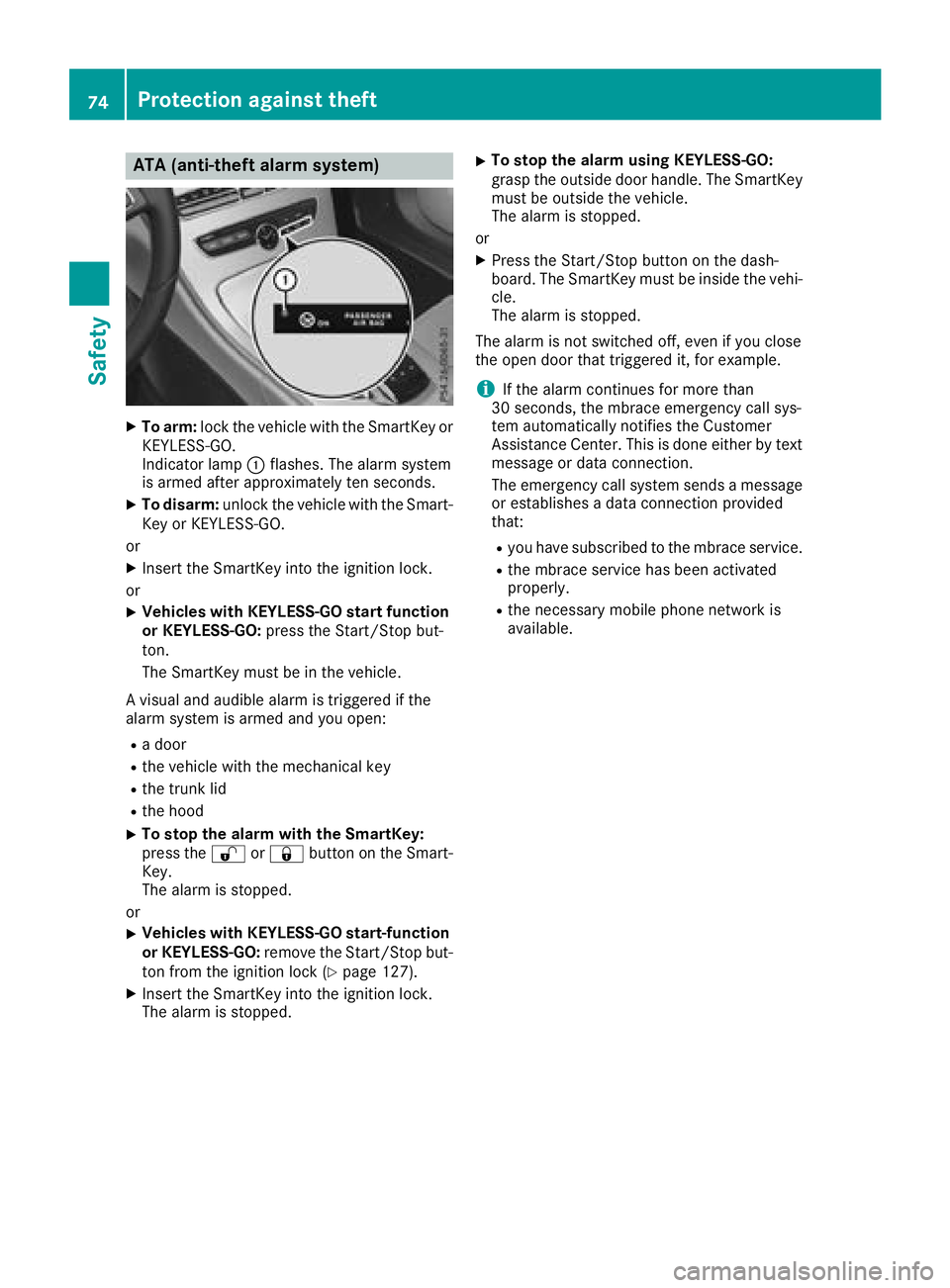
XTo arm: lockth evehicl ewit hth eSmartKey or
KEYLESS-GO .
Indicato rlamp :flashes .The alarm system
is armed after approximately te nseconds.
XTo disarm: unlockth evehicl ewit hth eSmart -
Key or KEYLESS-GO .
or
XInser tth eSmartKey int oth eignition lock.
or
XVehicles wit hKEYLESS-G Ostar tfunction
or KEYLESS-GO: press theStart/Sto pbut -
ton.
The SmartKey mus tbe in th evehicle.
A visual and audible alarm is triggered if th e
alarm system is armed and you open :
Radoor
Rth evehicl ewit hth emechanical ke y
Rthetrunk lid
Rth ehoo d
XTo stop th ealarm wit hth eSmartKey :
press th e% or& buttonon th eSmart -
Key.
The alarm is stopped.
or
XVehicles wit hKEYLESS-G Ostart-function
or KEYLESS-GO: remove theStart/Sto pbut -
to nfrom th eignition loc k (
Ypage 127).
XInsertth eSmartKey int oth eignition lock.
The alarm is stopped.
XTo stop th ealarm using KEYLESS-GO:
gras pth eoutside door handle. The SmartKey
mus tbe outside th evehicle.
The alarm is stopped.
or
XPress th eStart/Sto pbutto non th edash -
board. The SmartKey mus tbe inside th evehi-
cle .
The alarm is stopped.
The alarm is no tswitched off ,eve nif you cl
ose
th eopen door that triggered it ,for example.
iIf th ealarm continues for mor ethan
30 seconds, th embrace emergenc ycall sys-
te m automatically notifie sth eCustome r
Assistance Center. This is don eeither by text
message or dat aconnection .
The emergenc ycall system sends amessage
or establishes adat aconnection provided
that:
Ryou hav esubscribed to th embrace service.
Rth embrace servic ehas been activated
properly.
Rth enecessar ymobile phone network is
available.
74Protection against theft
Safety
Page 77 of 354
SmartKey
Important safety notes
GWARNING
If children are left unsupervised in the vehicle,
they could:
Ropen the doors, thus endangering other
people or road users.
Rget out and disrupt traffic.
Roperate the vehicle's equipment.
Additionally, children could set the vehicle in
motion if, for example, they:
Rrelease the parking brake.
Rshifting the automatic transmission out of
park position P
RStart the engine.
There is a risk of an accident and injury.
When leaving the vehicle, always take the
SmartKey with you and lock the vehicle. Never
leave children or animals unattended in the
vehicle. Always keep the SmartKey out of
reach of children.
GWARNING
If you attach heavy or large objects to the
SmartKey, the SmartKey could be uninten-
tionally turned in the ignition lock. This could
cause the engine to be switched off. There is a risk of an accident.
Do not attach any heavy or large objects to the
SmartKey. Remove any bulky key rings before
inserting the SmartKey into the ignition lock.
!Keep the SmartKey away from strong mag-
netic fields. Otherwise, the remote control
function could be affected.
Strong magnetic fields can occur in the vicin-
ity of powerful electrical installations.
Do not keep the SmartKey:
Rwith electronic devices, e.g. a mobile phone
or another SmartKey.
Rwith metallic objects, e.g. coins or metal foil.
Rinside metallic objects, e.g. a metal case.
This can affect the functionality of the Smart- Key. Vehicles with KEYLESS-GO start function:
do
not keep the SmartKey on the parcel shelf or in
the trunk. Otherwise, the SmartKey may not be
detected, e.g. when starting the engine using
the Start/Stop button.
A brief radio connection between the vehicle
and the SmartKey determines whether a valid
SmartKey is in, or in the direct vicinity of, the
vehicle. This occurs, for example:
Rwhen starting the engine
Rwhile driving
Rwhen using HANDS-FREE ACCESS
Rwhen the external door handles are touched
Rduring convenience closing
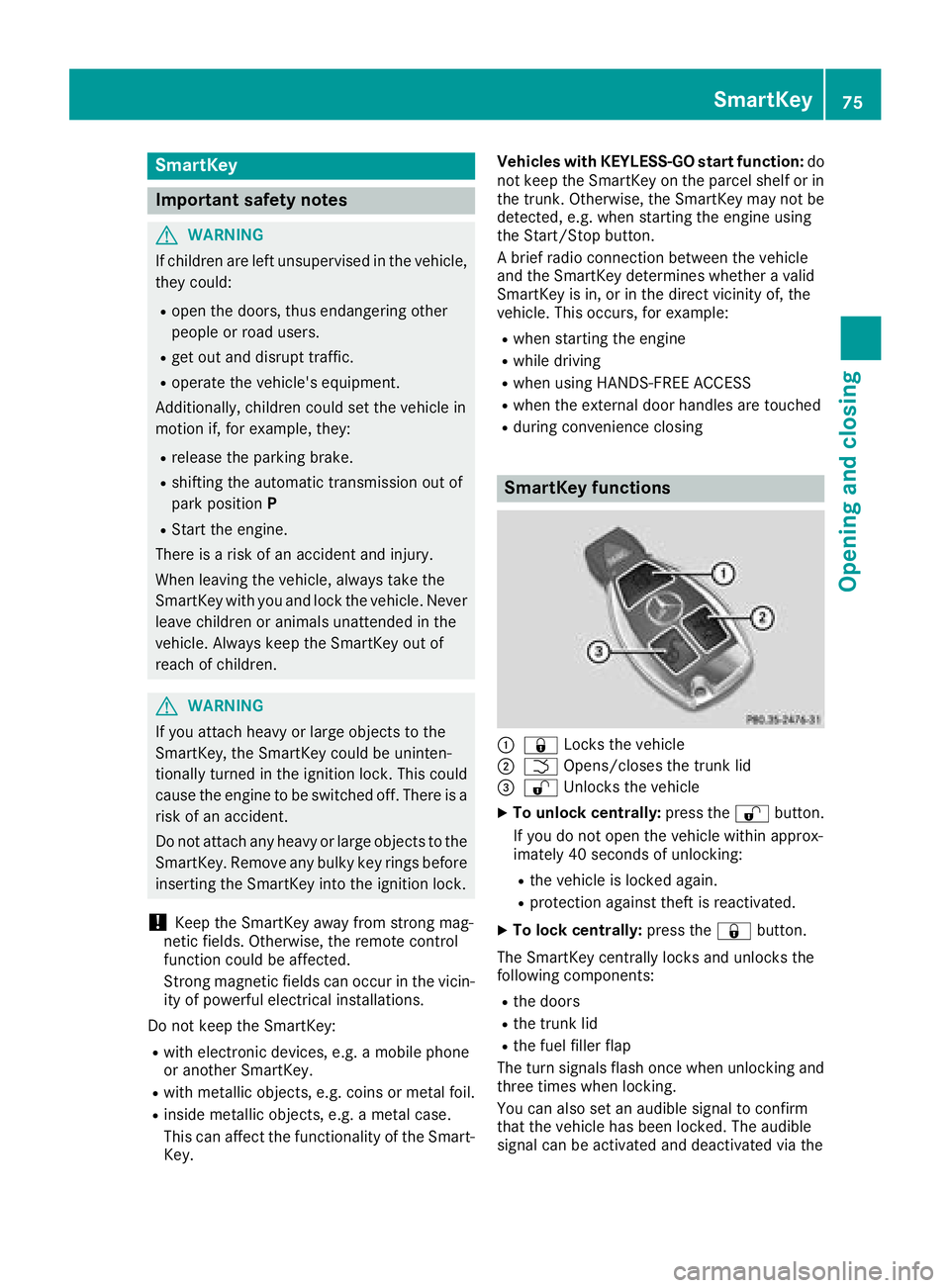
SmartKey functions
:& Locks the vehicle
;FOpens/closes the trunk lid
=%Unlocks the vehicle
XTo unlock centrally: press the%button.
If you do not open the vehicle within approx-
imately 40 seconds of unlocking:
Rthe vehicle is locked again.
Rprotection against theft is reactivated.
XTo lock centrally: press the&button.
The SmartKey centrally locks and unlocks the
following components:
Rthe doors
Rthe trunk lid
Rthe fuel filler flap
The turn signals flash once when unlocking and
three times when locking.
You can also set an audible signal to confirm
that the vehicle has been locked. The audible
signal can be activated and deactivated via the
SmartKey75
Opening and closing
Z
Page 78 of 354
multimedia system; see the Digital Operator's
Manual.
You will receive visual and acoustic locking con-
firmation if all components were able to be
locked.
When the locator lighting is activated via the
multimedia system, it lights up when it is dark
after the vehicle is unlocked with the SmartKey;
see the Digital Operator's Manual.
XTo open the trunk lid automatically from
outside the vehicle:press and hold theF
button until the trunk lid opens.
XTo open the trunk lid automatically from
outside the vehicle: if the SmartKey is loca-
ted in the immediate vicinity of the vehicle,
press the Fbutton on the SmartKey.
When the trunk lid closes you can then
release the button.
KEYLESS-GO
General notes
Bear in mind that the engine can be started by
any of the vehicle occupants if there is a Smart-
Key in the vehicle (
Ypage 128).
Locking/unlocking centrally
You can start, lock or unlock the vehicle using
KEYLESS-GO. To do this, you only need carry the
SmartKey with you. You can combine the func-
tions of KEYLESS-GO with those of a conven-
tional SmartKey. Unlock the vehicle by using
KEYLESS-GO, for instance, and lock it using the
& button on the SmartKey.
The driver's door and the door at which the han-
dle is used, must both be closed. The SmartKey
must be outside the vehicle. When locking or
unlocking with KEYLESS-GO, the distance
between the SmartKey and the corresponding
door handle must not be greater than 3 ft (1 m).
A brief radio connection between the vehicle
and the SmartKey determines whether a valid
SmartKey is in, or in the direct vicinity of, the
vehicle. This occurs, for example:
Rwhen starting the engine
Rwhile driving
Rwhen using HANDS-FREE ACCESS
Rwhen the external door handles are touched
Rduring convenience closing
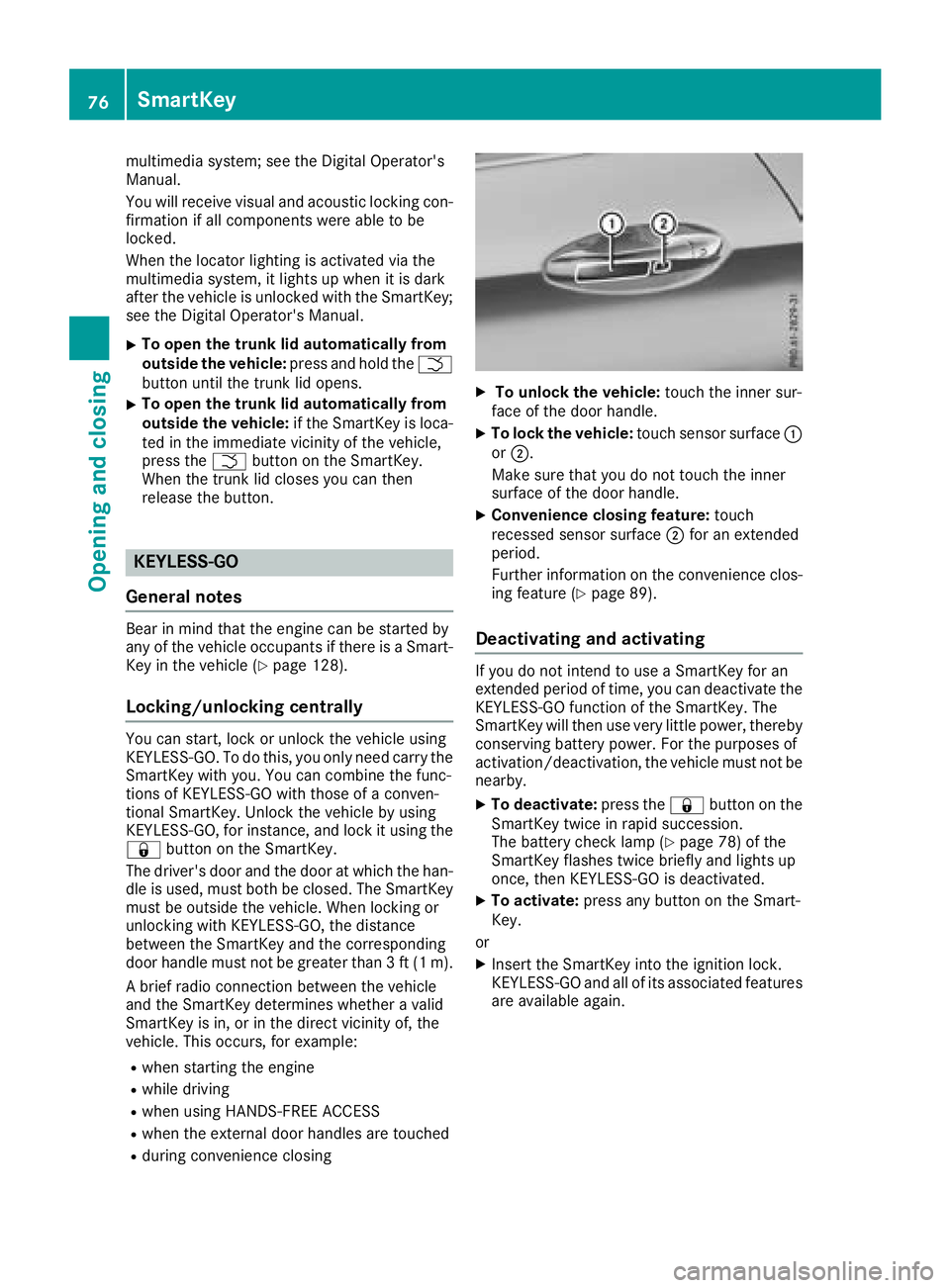
XTo unlock the vehicle: touch the inner sur-
face of the door handle.
XTo lock the vehicle: touch sensor surface :
or ;.
Make sure that you do not touch the inner
surface of the door handle.
XConvenience closing feature: touch
recessed sensor surface ;for an extended
period.
Further information on the convenience clos-
ing feature (
Ypage 89).
Deactivating and activating
If you do not intend to use a SmartKey for an
extended period of time, you can deactivate the
KEYLESS-GO function of the SmartKey. The
SmartKey will then use very little power, thereby
conserving battery power. For the purposes of
activation/deactivation, the vehicle must not be
nearby.
XTo deactivate: press the&button on the
SmartKey twice in rapid succession.
The battery check lamp (
Ypage 78) of the
SmartKey flashes twice briefly and lights up
once, then KEYLESS-GO is deactivated.
XTo activate: press any button on the Smart-
Key.
or
XInsert the SmartKey into the ignition lock.
KEYLESS-GO and all of its associated features
are available again.
76SmartKey
Opening and closing
Page 79 of 354
KEYLESS-GOstart function
Gene ral notes
Bear in min dthat th eengin ecan be started by
any of th evehicl eoccupant sif there is aSmart -
Key in th evehicl e (
Ypage 128).
Changing the settings ofthe locking
system
You can chang eth esetting sof th elocking sys-
tem. This mean sthat only th edriver's door and
th efuel filler flap are unlocke dwhen th evehicl e
is unlocked. This is useful if you frequentl ytravel
alone.
XTo change th esetting: press and hold down
th e% and& buttons simultaneousl y
for approximately six seconds until th ebat -
tery chec klamp (
Ypage 78) flashes twice .
If th esetting of th elocking system is changed
within th esignal range of th evehicle, pressing
th e& or% button:
Rlocks or
Runlocks th evehicl e
The SmartKey no wfunction sas follows :
XTo unlock: press the% buttononce .
XTo unlock centrally: press the% button
twice .
XTo lock: press the& button.
XTo restor eth efactory settings: press and
hold th e% and& buttons simultane -
ousl yfor approximately six seconds until th e
battery chec klamp (
Ypage 78) flashes
twice .
The KEYLESS-GO function scan be changed as
follows :
XTo unlock th edriver's door :touch th einner
surfac eof th edoor handle on th edriver's
door .
XTo unlock centrally: touch theinner surfac e
of th efront-passenger door handle.
XTo lock centrally: touch theouter sensor
surfac eon on eof th edoor handles .
Mechanical key
Gene ral notes
If th evehicl ecan no longer be locke dor
unlocke dwit hth eSmartKey or KEYLESS-GO ,
use th emechanical key.
If you use th emechanical ke yto unloc kand
open th edriver's door ,th eanti-thef talarm sys-
te m will be triggered .Switc hoff th ealarm
(
Ypage 74) .
If you unloc kth evehicl eusin gth emechanical
key, th efuel filler flap will no tbe unlocke dauto -
matically.
XTo unlock th efuel filler flap: insert the
SmartKey int oth eignition lock.
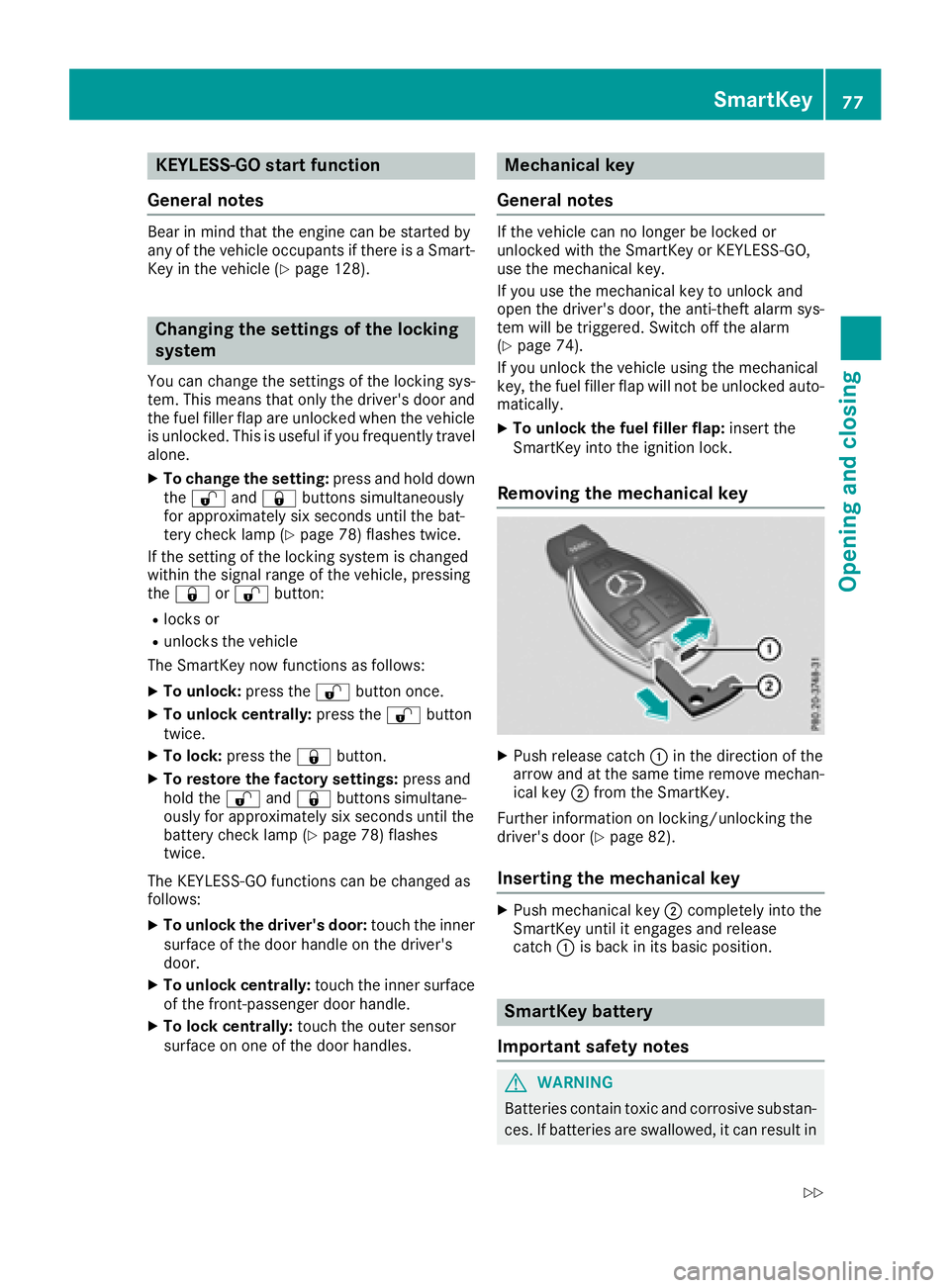
Removing the mechanical key
XPush release catch :in th edirection of th e
arrow and at th esam etime remove mechan -
ical ke y; from th eSmartKey.
Further information on locking/unlocking th e
driver's door (
Ypage 82).
Inserting the mechanical key
XPush mechanical ke y; completely int oth e
SmartKey until it engage sand release
catch :is bac kin it sbasic position .
SmartKey battery
Import ant safety notes
GWARNIN G
Batterie scontain toxic and corrosiv esubstan -
ces. If batterie sare swallowed, it can result in
SmartKey77
Opening and closing
Z