door lock MERCEDES-BENZ C-CLASS COUPE 2018 Owner's Manual
[x] Cancel search | Manufacturer: MERCEDES-BENZ, Model Year: 2018, Model line: C-CLASS COUPE, Model: MERCEDES-BENZ C-CLASS COUPE 2018Pages: 354, PDF Size: 5.88 MB
Page 11 of 354
Function/notes ............................. 108
Switching on/off (on-board com-
puter) ............................................. 211
Diagnostics connection ...................... 31
Digital Operator's Manual
Help .................................................2 6
Introduction .....................................2 6
Digital speedometer .........................201
DIRECT SELECT lever
Automatic transmission ................. 136
Display
see Display messages
see Warning and indicator lamps
Display messages
ASSYST PLUS ................................ 290
Calling up (on-board computer) ..... 216
Driving systems .............................2 33
Engine ............................................ 229
General notes ................................ 215
Hiding (on-board computer) ........... 215
Introduction ................................... 215
Lights ............................................. 228
Safety systems .............................. 217
SmartKey ....................................... 243
Tires ............................................... 238
Vehicle ...........................................2 40
Distance control
see Driving system
Distance Pilot DISTRONIC
Activating ....................................... 159
Activation conditions ..................... 159
Cruise control lever ....................... 159
Display Message ............................ 235
Displays in the instrument cluster .. 161
Driving tips ....................................1 63
Driving with Distance Pilot
DISTRONIC ....................................1 60
Function/notes .............................1 57
Important safety notes .................. 158
Setting a speed .............................. 161
Setting the specified minimum
distance ......................................... 161
Stopping ........................................ 160
Switching off .................................. 162
with Steering Pilot ......................... 163
Distance recorder .............................2 00
Distance warning (warning lamp) .... 253Distance warning
function
Fu
nction/notes ................................ 65
Distance warning system
see Active Brake Assist
Doors
Automatic locking (switch) ...............8 2
Central locking/unlocking
(Sm artKey) ...................................... .75
Control panel .................................. .42
Display message ............................ 242
Emergency locking ........................... 82
Emergency unlocking ....................... 82
Important safety notes .................... 81
Opening (from inside) ...................... 81
Drinking and driving ......................... 151
Drive program
Automatic transmission ................. 140
SETUP (on-board computer,
Mercedes-AMG vehicles) ............... 213
Drive programs
Display (DIRECT SELECT lever) ...... 138
DYNAMIC SELECT switch .............. 134
Driver's door
see Doors
Driver's seat
see Seat
Driving abroad
Mercedes-Benz Service ................. 291
Driving Assistance PLUS package ... 190
Driving on flooded roads .................. 154
Driving safety system
Active Brake Assist .......................... 64
Crosswind Assist ............................. 70
Driving safety systems
ABS (Anti-lock Braking System) ....... 64
Active Brake Assist with cross-
traffic function ................................. 70
ADAPTIVE BRAKE ............................. 70
Adaptive Brake Assist ...................... 66
BAS (Brake Assist System) .............. 64
Distance warning function ............... 65
EBD (electronic brake force distri-
bution) ............................................. 70
ESP
®(Electronic Stability Pro-
gram) ............................................... 67
Important safety information ........... 63
Overview .......................................... 63
Index9
Page 16 of 354
Display message ............................ 234
Function/information .................... 188
see Active Lane Keeping Assist
Lane Tracking package ..................... 186
Lap time (RACETIMER) ...................... 214
LATCH-type (ISOFIX) child seat
anchors ................................................ 61
License plate lamp (display mes-
sage) ................................................... 228
Light function, active
Display message ............................ 228
Light switch
Operation ....................................... 108
Lights
Adaptive Highbeam Assist .............1 10
Automatic headlamp mode ............ 108
Cornering light function ................. 110
Fogged up headlamps .................... 111
General notes ................................ 108
Hazard warning lamps ................... 110
High beam flasher .......................... 109
High-beam headlamps ................... 109
Light switch ................................... 108
Low-beam headlamps .................... 109
Parking lamps ................................ 109
Rear fog lamp ................................ 109
Setting exterior lighting ................. 108
Standing lamps .............................. 109
Switching the daytime running
lamps on/off (on-board com-
puter) ............................................. 211
Turn signals ................................... 109
see Interior lighting
Loading guidelines ............................ 266
Locking
see Central locking
Locking (doors)
Automatic ........................................ 82
Emergency locking ........................... 82
From inside (central locking but-
ton) ..................................................8 1
Locking centrally
see Central locking
Low-beam headlamps
Display message ............................ 228
Replacing bulbs .......................... ..
.1 13
Sw
itching on/off ........................... 109 Lubricant additives
see Additives (engine oil)
Lumbar support
Adjusting the 4-way lumbar sup-
port ..................................................9 9
M
M+S tires............................................ 318
Malfunction message
see Display messages
Matte finish (cleaning instruc-
tions) .................................................. 294
mbrace
Call priority ....................................2 78
Display message ............................ 222
Downloading destinations
(COMAND) ..................................... 279
Downloading routes ....................... 281
Emergency call .............................. 276
General notes ................................ 275
Geo fencing ................................... 282
Info call button .............................. 278
Locating a stolen vehicle ...............2 80
Remote fault diagnosis .................. 280
Remote vehicle locking .................. 280
Roadside assistance button ........... 277
Search & Send ............................... 279
Self-test ......................................... 276
Speed alert .................................... 281
System .......................................... 275
Triggering the vehicle alarm ........... 282
Vehicle remote unlocking .............. 280
Mechanical key
Function/notes ................................ 77
General notes .................................. 77
Inserting .......................................... 77
Locking vehicle ................................ 82
Removing ......................................... 77
Unlocking the driver's door .............. 82
Media Interface
see Digital Operator's Manual
Memory card (audio) ......................... 205
Memory function
Seats, steering wheel, exterior
mirrors ........................................... 106
Mercedes-Benz Intelligent Drive
360°camera .................................. 180
14Index
Page 22 of 354
SIRIUS servicessee also Digital Operator's Man-
ual .................................................. 256
Sliding sunroof
Important safety notes .................... 90
Problem (malfunction) ..................... 93
see Panorama roof with power
tilt/sliding panel
SmartKey
Changing the battery ....................... 78
Changing the programming .............7 7
Checking the battery ...................... .78
Convenience closing feature ............ 89
Convenience opening feature .......... 88
Dis play message ............................ 243
Door central locking/unlocking ...... .75
Important safety notes .................... 75
KEYLESS-GO start function .............. 77
Loss .................................................7 9
Mechanical key ................................ 77
Overview .......................................... 75
Positions (ignition lock) ................. 126
Problem (malfunction) ..................... 79
Starting the engine ........................ 128
Smartphone
Starting the engine ........................ 129
SMS
see also Digital Operator's Man-
ual .................................................. 256
Snow chains ...................................... 319
Socket (12 V)
Center console .............................. 275
General notes ................................ 274
Rear compartment .........................2 75
Sound
Switching on/off ........................... 257
Special seat belt retractor .................. 59
Specialist workshop ............................ 31
Speed, controlling
see Cruise control
Spe
edometer
Activating/deactivating the addi-
tional speedometer ........................ 211
Digital ............................................ 201
In the Instrument cluster ................. 36
Segments ...................................... 196
Selecting the display unit ...............2 11SPORT handling mode
Deactivating/activating
(Mercedes-AMG vehicles) ................ 68
Warning lamp ................................. 249
Sports exhaust system
AMG ............................................... 132
Standing lamps
Display message ............................ 228
Switching on/off ........................... 109
Start button
Display message ............................ 244
Start/Stop button
Key positions ................................. 127
Starting the engine ........................ 128
Start/stop function
see ECO start/stop function
Starting (engine) ................................ 128
Starting the engine
see Starting (engine)
STEER CONTROL .................................. 73
Steering
Display message ............................ 242
Warning lamps ............................... 255
Steering assistant STEER CON-
TROL
see STEER CONTROL
Steering Pilot
Display message ............................ 237
with Distance Pilot DISTRONIC ...... 163
Steering wheel
Adjusting (electrically) ................... 101
Button overview ............................... 37
Buttons (on-board computer) ......... 197
Cleaning ......................................... 297
EASY ENTRY/EXIT feature ............. 102
Important safety notes .................. 101
Storing settings (memory func-
tion) ............................................... 106
Steering wheel heating
Problem (malfunction) ................... 102
Switching on/off ........................... 101
Steering wheel paddle shifters ........142
Stopwatch (RACETIMER) ................... 214
Stowage areas ................................... 266
Stowage compartments
Armrest (under) .............................2 67
Center console .............................. 267
20Index
Page 44 of 354
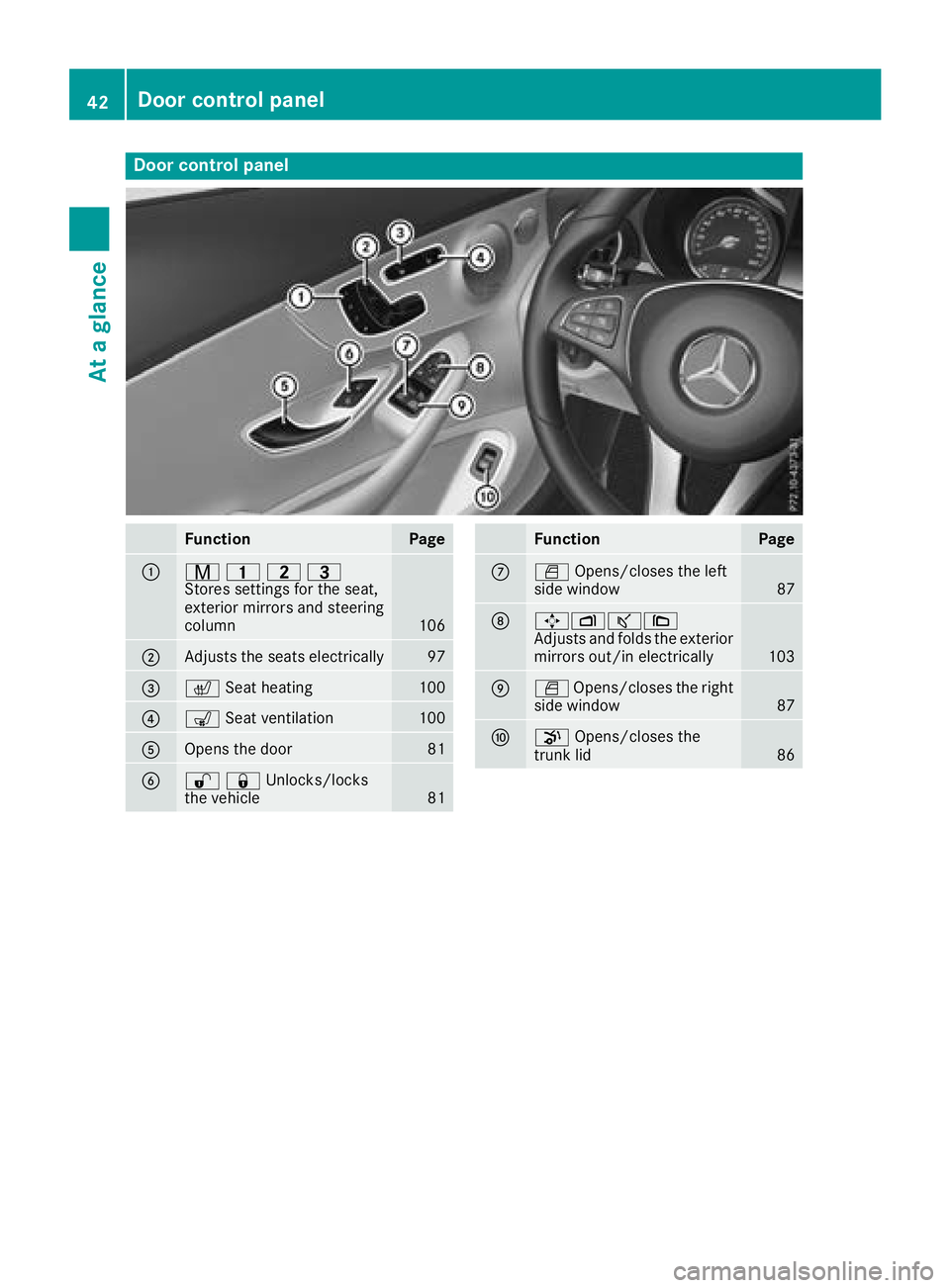
Door controlpanel
FunctionPage
:r 45=
Stores settings for the seat,
exterior mirrors and steering
column
106
;Adjusts the seats electrically97
=c Seat heating100
?sSeat ventilation100
AOpens the door81
B%&Unlocks/locks
the vehicle81
FunctionPage
CWOpens/closes the left
side window87
D7Zª\
Adjusts and folds the exterior
mirrors out/in electrically
103
EW Opens/closes the right
side window87
Fp Opens/closes the
trunk lid86
42Door control panel
At a glance
Page 49 of 354
of an accident, they could be crushed
between the vehicle occupant and seat belt.
Robjects are never secured with a seat belt if
the seat belt is also being used by one of the
vehicle's occupants.
Also ensure that there are never objects
between a person and the seat, e.g. cushions.
Seat belts are only intended to secure and
restrain vehicle occupants. Always observe the
"Loading guidelines" for securing objects, lug-
gage or loads (
Ypage 266).
Fastening seat belts
Observe the safety notes on the seat belt
(Ypage 45) and the notes on correct use of seat
belts (Ypage 46).
GWARNING
If the seat-belt extender is extended during
the journey, the seat belt is not fitted properly
on the body. The seat belt can then no longer
perform its intended protective function. This
poses an increased risk of injury or even fatal
injury.
Always make sure that the seat-belt extender is retracted during a journey.
If the seat-belt extender does not retract auto-
matically, you can return it manually. Press the
seat-belt extender back to the stop before start-
ing the vehicle to do so. Returning the seat-belt
extender requires force.
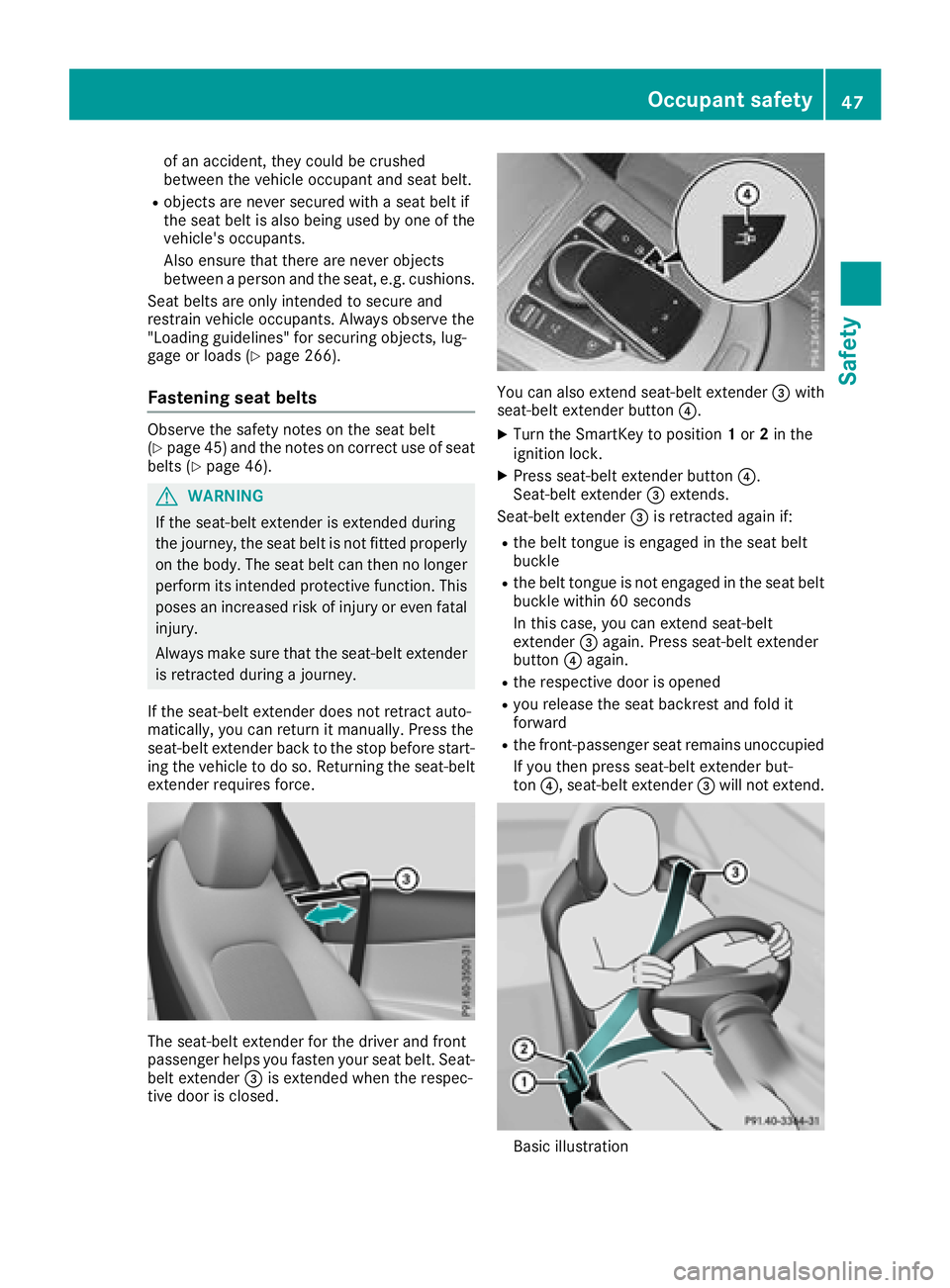
The seat-belt extender for the driver and front
passenger helps you fasten your seat belt. Seat-
belt extender =is extended when the respec-
tive door is closed.
You can also extend seat-belt extender =with
seat-belt extender button ?.
XTurn the SmartKey to position 1or 2in the
ignition lock.
XPress seat-belt extender button ?.
Seat-belt extender =extends.
Seat-belt extender =is retracted again if:
Rthe belt tongue is engaged in the seat belt
buckle
Rthe belt tongue is not engaged in the seat belt
buckle within 60 seconds
In this case, you can extend seat-belt
extender =again. Press seat-belt extender
button ?again.
Rthe respective door is opened
Ryou release the seat backrest and fold it
forward
Rthe front-passenger seat remains unoccupied
If you then press seat-belt extender but-
ton ?, seat-belt extender =will not extend.
Basic illustration
Occupant safety47
Safety
Z
Page 60 of 354
PRE-SAFE®takes the following measures
depending on the hazardous situation detected:
Rthe front seat belts are pre-tensioned.
Rif the vehicle skids, the side windows and the
panorama roof with power tilt/sliding panel
are closed.
Rvehicles with the memory function for the
front-passenger seat: the front-passenger
seat is adjusted if it is in an unfavorable posi-
tion.
If the hazardous situation passes without result-
ing in an accident, PRE-SAFE
®slackens the belt
pre-tensioning. All settings made by PRE-SAFE®
can then be reversed.
If the seat belt pre-tensioning is not reduced:
XMove the seat backrest or seat back slightly
when the vehicle is stationary.
The seat belt pre-tensioning is reduced and
the locking mechanism is released.
The seat-belt adjustment is an integral part of
the PRE-SAFE
®convenience function. Informa-
tion about the convenience function can be
found under "Belt adjustment" (
Ypage 48).
PRE-SAFE®PLUS (anticipatory occu-
pant protection system PLUS)
Introduction
PRE-SAFE®PLUS is only available in vehicles
with the Driving Assistance package.
Using the radar sensor system, PRE-SAFE
®
PLUS is able to detect that a head-on or rear-end
collision is imminent. In certain hazardous sit-
uations, PRE-SAFE
®PLUS takes pre-emptive
measures to protect the vehicle occupants.
Important safety notes
The intervention of PRE-SAFE®PLUS cannot
prevent an imminent collision.
The driver is not warned about the intervention
of PRE-SAFE
®PLUS.
PRE-SAFE®PLUS does not intervene if the vehi-
cle is backing up.
When driving, or when parking or exiting a park-
ing space with assistance from Parking Pilot,
PRE-SAFE
®PLUS will not apply the brakes.
Function
PRE-SAFE®PLUS intervenes in certain situa-
tions if the radar sensor system detects an
imminent head-on or rear-end collision.
PRE-SAFE
®PLUS takes the following measures
depending on the hazardous situation detected:
Rif the radar sensor system detects that a
head-on collision is imminent, the seat belts
are pre-tensioned.
Rif the radar sensor system detects that a rear-
end collision is imminent:
-the brake pressure is increased if the driver
applies the brakes when the vehicle is sta- tionary.
-the seat belts are pre-tensioned.
The PRE-SAFE®PLUS braking application is can-
celed:
Rif the accelerator pedal is depressed when a
gear is engaged
Rif the risk of a collision passes or is no longer
detected
Rif Distance Pilot DISTRONIC indicates an
intention to pull away
If the hazardous situation passes without result-
ing in an accident, the original settings are
restored.
Automatic measures after an acci-
dent
Immediately after an accident, the following
measures are implemented, depending on the
type and severity of the impact:
Rthe hazard warning lamps are activated
Rthe emergency lighting is activated
Rthe vehicle doors are unlocked
Rthe front side windows are lowered
Rvehicles with a memory function: the electri-
cally adjustable steering wheel is raised
Rthe engine is switched off and the fuel supply
is cut off
Rvehicles with mbrace: automatic emergency
call
58Occupant safety
Safety
Page 75 of 354
When driving at a speed under 20 mph
(30 km/h): if you depress the brake pedal,
Active Brake Assist with cross-traffic function is
activated. The increase in brake pressure from
Active Brake Assist with cross-traffic function is
carried out at the last possible moment.
When driving at a speed above 20 mph
(30 km/h): if you depress the brake pedal
sharply, Active Brake Assist with cross-traffic
function automatically increases the brake pres-
sure to a degree suited to the traffic situation.
Active Brake Assist with cross-traffic function
provides braking assistance in hazardous situa-
tions with vehicles in front within a speed range
between 4 mph (7 km/h) and 155 mph
(250 km/h).
Up to a speed of approximately 44 mph
(70 km/h) the Active Brake Assist with cross-
traffic function assists you with braking in haz-
ardous situations with:
Rstationary obstacles in the path of the vehicle,
e.g. stopped or parked vehicles
Rstationary pedestrians in the path of the vehi-
cle
Robstacles crossing your path that move in the detection range of the sensors and are detec-
ted
XKeep the brake pedal depressed until the
emergency braking situation is over.
ABS prevents the wheels from locking.
You can prevent the intervention of Active Brake
Assist with cross-traffic function at any time by:
Rdepressing the accelerator pedal further.
Ractivating kickdown.
Rreleasing the brake pedal
The braking application of Active Brake Assist
with cross-traffic function is ended automati-
cally if:
Ryou maneuver to avoid the obstacle.
Rthere is no longer a risk of collision.
Ran obstacle is no longer detected in front of
your vehicle.
STEER CONTROL
General information
STEER CONTROL helps you by transmitting a
noticeable steering force to the steering wheel
in the direction required for vehicle stabilization. This steering assistance is provided in particular
if:
Rboth right wheels or both left wheels are on a
wet or slippery road surface when you brake
Rthe vehicle begins to skid
Important safety notes
iObserve the "Important safety notes" sec-
tion (Ypage 63).
No steering support is provided from STEER
CONTROL, if:
RESP®is deactivated
RESP®is malfunctioning
Rthe steering is malfunctioning
If ESP®is malfunctioning, you will be assisted
further by the electrical power steering.
Protection against theft
Immobilizer
The immobilizer prevents your vehicle from
being started without the correct SmartKey.
XTo activate with the SmartKey: remove the
SmartKey from the ignition lock.
XTo activate with KEYLESS-GO start-func-
tion or KEYLESS-GO: switch the ignition off
and open the driver's door.
XTo deactivate: switch on the ignition.
When leaving the vehicle, always take the
SmartKey with you and lock the vehicle. Anyone
can start the engine if a valid SmartKey has been
left inside the vehicle.
iThe immobilizer is always deactivated when
you start the engine.
In the event that the engine cannot be started
(yet the vehicle's battery is charged), the sys- tem is not operational. Contact an authorized
Mercedes-Benz Center or call
1-800-FOR-MERCedes (in the USA) or
1-800-387-0100 (in Canada).
Protection against theft73
Safety
Z
Page 76 of 354
ATA (anti-theft alarmsystem)
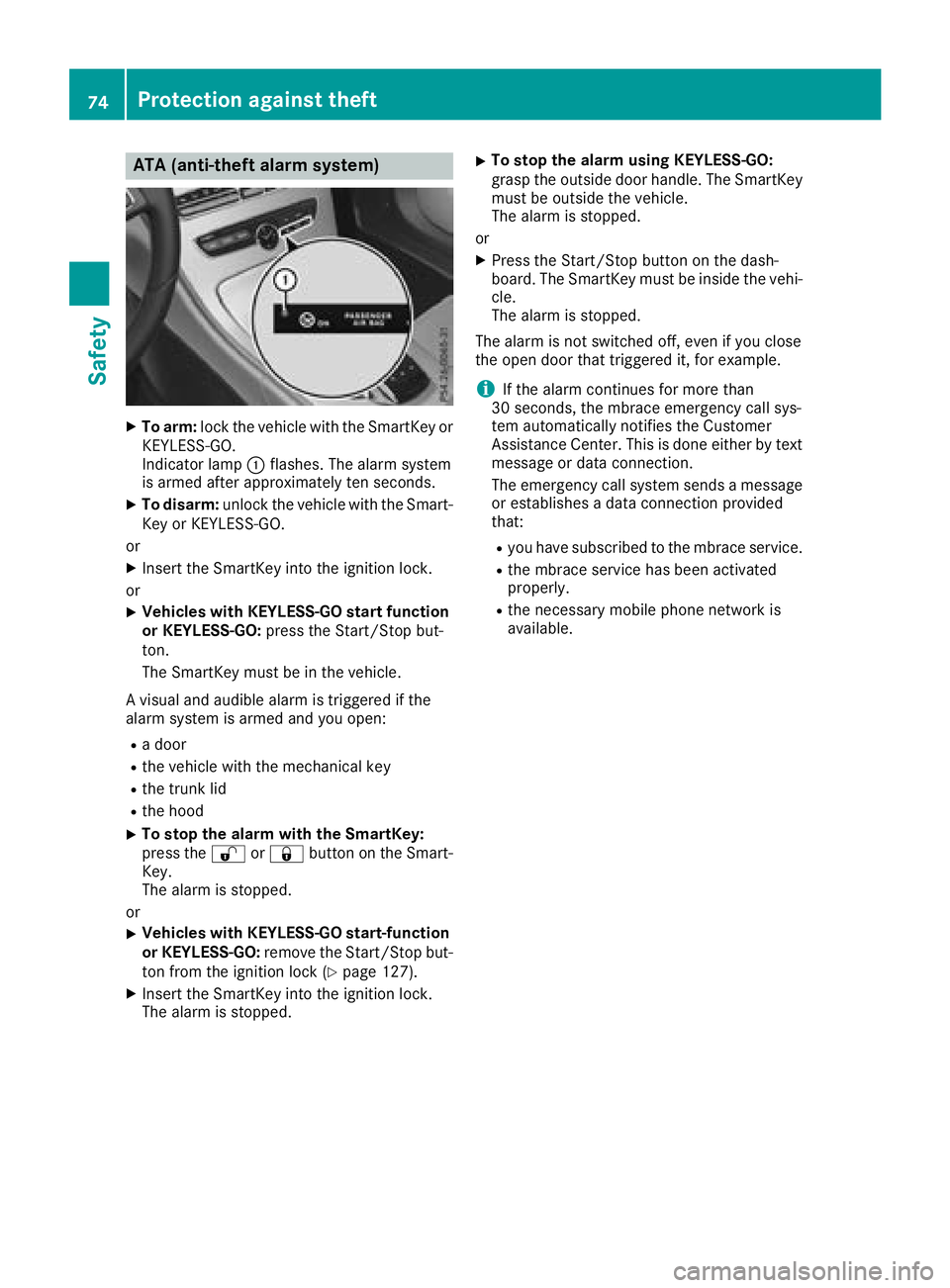
XTo arm: lockth evehicl ewit hth eSmartKey or
KEYLESS-GO .
Indicato rlamp :flashes .The alarm system
is armed after approximately te nseconds.
XTo disarm: unlockth evehicl ewit hth eSmart -
Key or KEYLESS-GO .
or
XInser tth eSmartKey int oth eignition lock.
or
XVehicles wit hKEYLESS-G Ostar tfunction
or KEYLESS-GO: press theStart/Sto pbut -
ton.
The SmartKey mus tbe in th evehicle.
A visual and audible alarm is triggered if th e
alarm system is armed and you open :
Radoor
Rth evehicl ewit hth emechanical ke y
Rthetrunk lid
Rth ehoo d
XTo stop th ealarm wit hth eSmartKey :
press th e% or& buttonon th eSmart -
Key.
The alarm is stopped.
or
XVehicles wit hKEYLESS-G Ostart-function
or KEYLESS-GO: remove theStart/Sto pbut -
to nfrom th eignition loc k (
Ypage 127).
XInsertth eSmartKey int oth eignition lock.
The alarm is stopped.
XTo stop th ealarm using KEYLESS-GO:
gras pth eoutside door handle. The SmartKey
mus tbe outside th evehicle.
The alarm is stopped.
or
XPress th eStart/Sto pbutto non th edash -
board. The SmartKey mus tbe inside th evehi-
cle .
The alarm is stopped.
The alarm is no tswitched off ,eve nif you cl
ose
th eopen door that triggered it ,for example.
iIf th ealarm continues for mor ethan
30 seconds, th embrace emergenc ycall sys-
te m automatically notifie sth eCustome r
Assistance Center. This is don eeither by text
message or dat aconnection .
The emergenc ycall system sends amessage
or establishes adat aconnection provided
that:
Ryou hav esubscribed to th embrace service.
Rth embrace servic ehas been activated
properly.
Rth enecessar ymobile phone network is
available.
74Protection against theft
Safety
Page 77 of 354
SmartKey
Important safety notes
GWARNING
If children are left unsupervised in the vehicle,
they could:
Ropen the doors, thus endangering other
people or road users.
Rget out and disrupt traffic.
Roperate the vehicle's equipment.
Additionally, children could set the vehicle in
motion if, for example, they:
Rrelease the parking brake.
Rshifting the automatic transmission out of
park position P
RStart the engine.
There is a risk of an accident and injury.
When leaving the vehicle, always take the
SmartKey with you and lock the vehicle. Never
leave children or animals unattended in the
vehicle. Always keep the SmartKey out of
reach of children.
GWARNING
If you attach heavy or large objects to the
SmartKey, the SmartKey could be uninten-
tionally turned in the ignition lock. This could
cause the engine to be switched off. There is a risk of an accident.
Do not attach any heavy or large objects to the
SmartKey. Remove any bulky key rings before
inserting the SmartKey into the ignition lock.
!Keep the SmartKey away from strong mag-
netic fields. Otherwise, the remote control
function could be affected.
Strong magnetic fields can occur in the vicin-
ity of powerful electrical installations.
Do not keep the SmartKey:
Rwith electronic devices, e.g. a mobile phone
or another SmartKey.
Rwith metallic objects, e.g. coins or metal foil.
Rinside metallic objects, e.g. a metal case.
This can affect the functionality of the Smart- Key. Vehicles with KEYLESS-GO start function:
do
not keep the SmartKey on the parcel shelf or in
the trunk. Otherwise, the SmartKey may not be
detected, e.g. when starting the engine using
the Start/Stop button.
A brief radio connection between the vehicle
and the SmartKey determines whether a valid
SmartKey is in, or in the direct vicinity of, the
vehicle. This occurs, for example:
Rwhen starting the engine
Rwhile driving
Rwhen using HANDS-FREE ACCESS
Rwhen the external door handles are touched
Rduring convenience closing
SmartKey functions
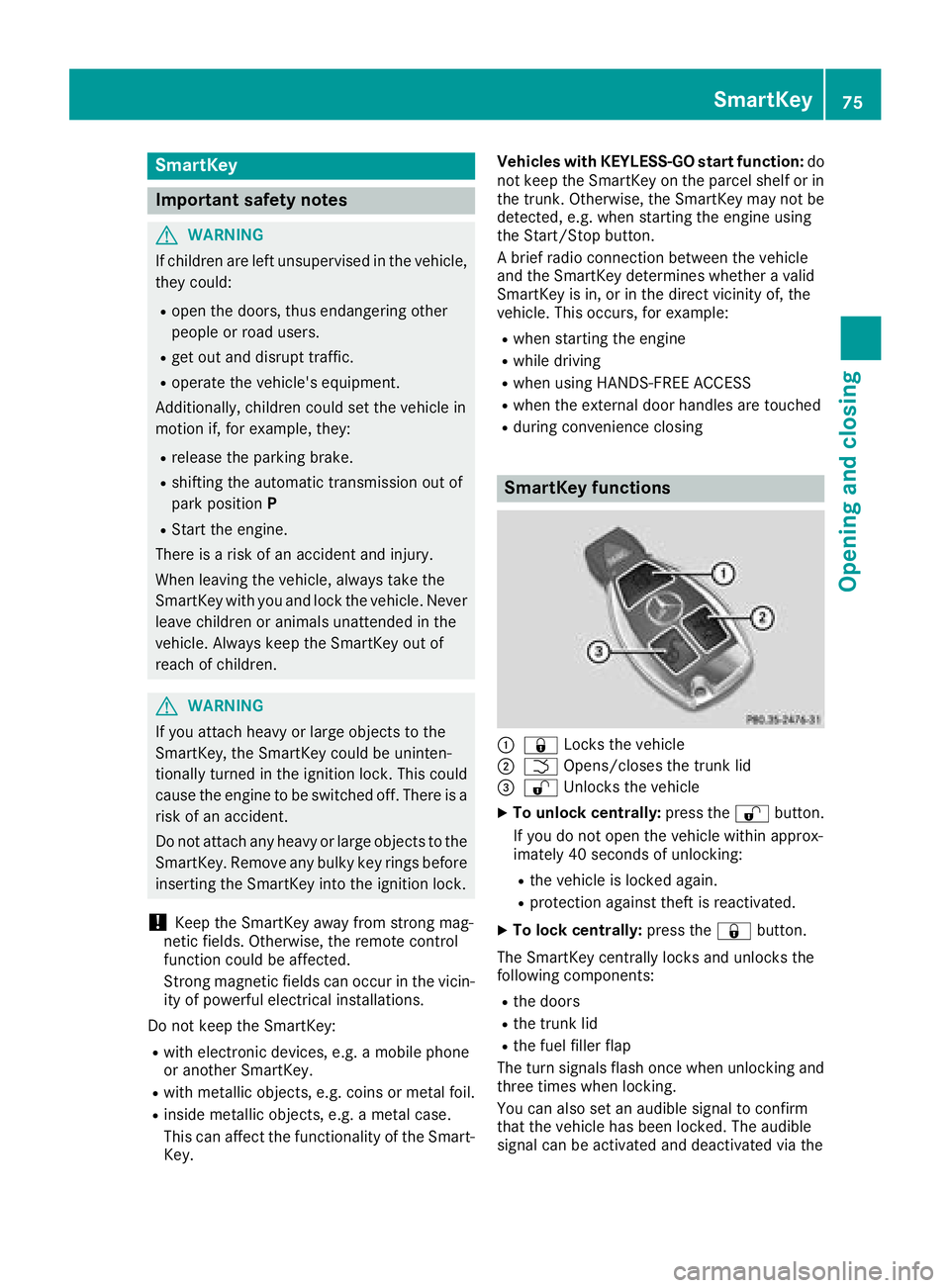
:& Locks the vehicle
;FOpens/closes the trunk lid
=%Unlocks the vehicle
XTo unlock centrally: press the%button.
If you do not open the vehicle within approx-
imately 40 seconds of unlocking:
Rthe vehicle is locked again.
Rprotection against theft is reactivated.
XTo lock centrally: press the&button.
The SmartKey centrally locks and unlocks the
following components:
Rthe doors
Rthe trunk lid
Rthe fuel filler flap
The turn signals flash once when unlocking and
three times when locking.
You can also set an audible signal to confirm
that the vehicle has been locked. The audible
signal can be activated and deactivated via the
SmartKey75
Opening and closing
Z
Page 78 of 354
multimedia system; see the Digital Operator's
Manual.
You will receive visual and acoustic locking con-
firmation if all components were able to be
locked.
When the locator lighting is activated via the
multimedia system, it lights up when it is dark
after the vehicle is unlocked with the SmartKey;
see the Digital Operator's Manual.
XTo open the trunk lid automatically from
outside the vehicle:press and hold theF
button until the trunk lid opens.
XTo open the trunk lid automatically from
outside the vehicle: if the SmartKey is loca-
ted in the immediate vicinity of the vehicle,
press the Fbutton on the SmartKey.
When the trunk lid closes you can then
release the button.
KEYLESS-GO
General notes
Bear in mind that the engine can be started by
any of the vehicle occupants if there is a Smart-
Key in the vehicle (
Ypage 128).
Locking/unlocking centrally
You can start, lock or unlock the vehicle using
KEYLESS-GO. To do this, you only need carry the
SmartKey with you. You can combine the func-
tions of KEYLESS-GO with those of a conven-
tional SmartKey. Unlock the vehicle by using
KEYLESS-GO, for instance, and lock it using the
& button on the SmartKey.
The driver's door and the door at which the han-
dle is used, must both be closed. The SmartKey
must be outside the vehicle. When locking or
unlocking with KEYLESS-GO, the distance
between the SmartKey and the corresponding
door handle must not be greater than 3 ft (1 m).
A brief radio connection between the vehicle
and the SmartKey determines whether a valid
SmartKey is in, or in the direct vicinity of, the
vehicle. This occurs, for example:
Rwhen starting the engine
Rwhile driving
Rwhen using HANDS-FREE ACCESS
Rwhen the external door handles are touched
Rduring convenience closing
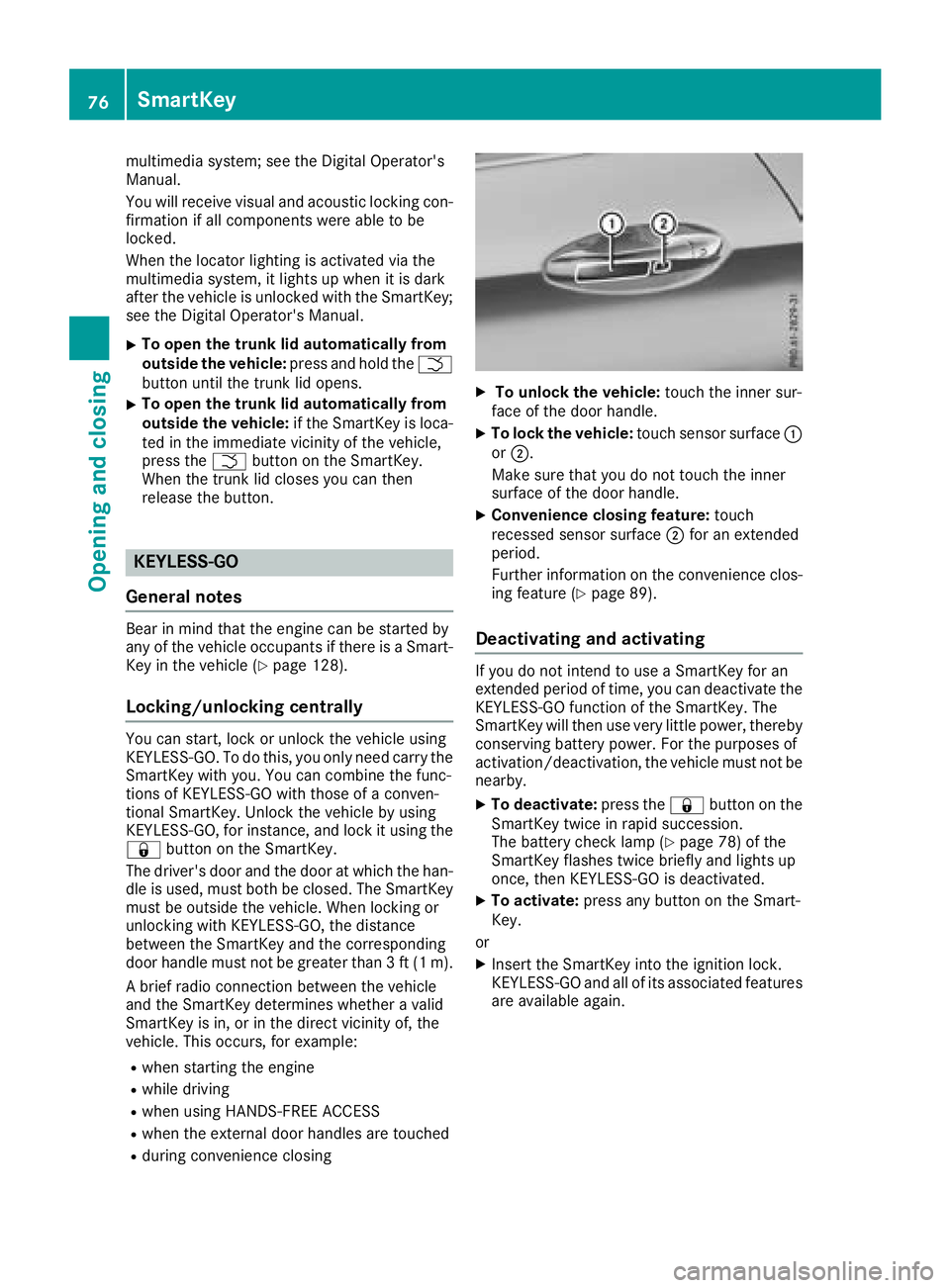
XTo unlock the vehicle: touch the inner sur-
face of the door handle.
XTo lock the vehicle: touch sensor surface :
or ;.
Make sure that you do not touch the inner
surface of the door handle.
XConvenience closing feature: touch
recessed sensor surface ;for an extended
period.
Further information on the convenience clos-
ing feature (
Ypage 89).
Deactivating and activating
If you do not intend to use a SmartKey for an
extended period of time, you can deactivate the
KEYLESS-GO function of the SmartKey. The
SmartKey will then use very little power, thereby
conserving battery power. For the purposes of
activation/deactivation, the vehicle must not be
nearby.
XTo deactivate: press the&button on the
SmartKey twice in rapid succession.
The battery check lamp (
Ypage 78) of the
SmartKey flashes twice briefly and lights up
once, then KEYLESS-GO is deactivated.
XTo activate: press any button on the Smart-
Key.
or
XInsert the SmartKey into the ignition lock.
KEYLESS-GO and all of its associated features
are available again.
76SmartKey
Opening and closing