display MERCEDES-BENZ C-CLASS ESTATE 2007 Owner's Manual
[x] Cancel search | Manufacturer: MERCEDES-BENZ, Model Year: 2007, Model line: C-CLASS ESTATE, Model: MERCEDES-BENZ C-CLASS ESTATE 2007Pages: 377, PDF Size: 6.19 MB
Page 81 of 377
Opening and closing
78
Important notes R
If the KEYLESS GO key is removed from the
vehicle (in luggage or an article of clothing,
for instance), it will no longer be possible
to lock or start the vehicle .
R If the KEYLESS GO key is removed from the
vehicle while the engine is running, e.g. if
the front passenger leaves the vehicle with
the KEYLESS GO key, the following mes-
sage will appear in the multi-function dis-
play as you pull away: Key not detec-
ted.
R If the KEYLESS GO key is in the vehicle, the
vehicle can be started at any time. If you
have left the KEYLESS GO key in the vehi-
cle, you will see the following message in
the multi-function display when you lock
the vehicle: Key still in vehicle.
Factory settings X
To unlock centrally :pull the door handle.
The turn signals flash once. The locking
knobs in the doors pop up. The anti-thef t
alarm system* is deactivated.
When it is dark, the surround lighting also
comes on if it is activated in the on-board
computer. i
If you do not open either a door or the
boot lid/tailgate after you have unlocked
the vehicle, it will relock automatically after
approximately 40 seconds.
i It is possible that the vehicle may be inad-
vertently unlocked if the KEYLESS GO key
is within a maximum of one metre of the
vehicle and the door handle is splashed by
a gush of water or if you are cleaning the
door handle . 1
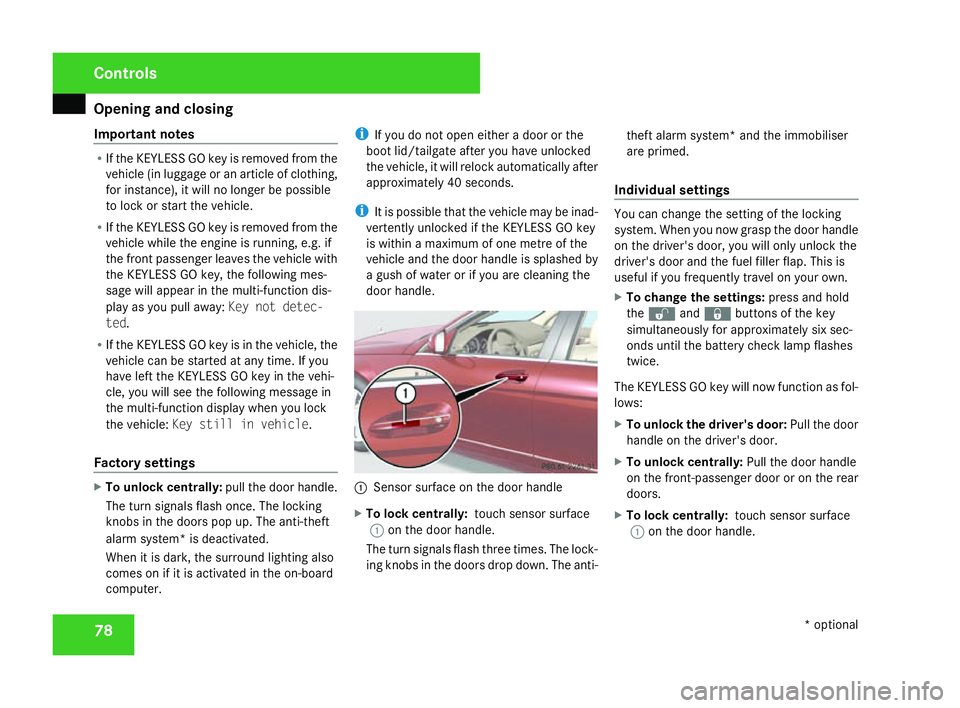
Sensor surface on the door handl e
X To lock centrally: touch sensor surface
1 on the door handle.
The turn signals flash three times. The lock-
ing knobs in the doors drop down. The anti- theft alarm system* and the immobiliser
are primed.
Individual settings You can change the setting of the lockin
g
system. When you now grasp the door handle
on the driver's door, you will only unlock the
driver's door and the fuel filler flap. This is
useful if you frequently travel on your own.
X To change the settings :press and hold
the k andj buttons of the key
simultaneously for approximately six sec-
onds until the battery check lamp flashes
twice.
The KEYLESS GO key will now function as fol-
lows:
X To unlock the driver's door: Pull the door
handle on the driver's door.
X To unlock centrally :Pull the door handle
on the front-passenger door or on the rear
doors.
X To lock centrally: touch sensor surface
1 on the door handle. Controls
* optional
204_AKB; 2; 3, en-GB
mkalafa,
2007-06-26T23:11:51+02:00 - Seite 78
Page 95 of 377
Steering wheel
92 Steering wheel
Depending on the vehicle equipment, you can
adjust the steering wheel either manually or
electrically*. G
Risk of injury
The electrically adjustable steering
wheel* can be adjusted when the key is
removed from the ignition lock. Therefore,
do not leave children unsupervised in the
vehicle as they could become trapped as
the steering wheel is adjusted. G
Risk of accident
Only adjust the steering wheel when the
vehicle is stationary and do not pull away
until the steering wheel adjustment mech -
anism is locked in position. You might oth-
erwise drive without the steering wheel
adjustment mechanism being locked in
position. As a result you could be distracte d
from road and traffic conditions by an unex-
pected movement of the steering wheel
and thereby cause an accident.
However, the steerability of the vehicle is
not affected .
When you adjust the steering wheel, make
sure that : R
the steering wheel can be reached with
your arms slightly bent
R you can move your legs freely
R you can see all the displays in the instru-
ment cluster clearly Adjusting the steering wheel man-
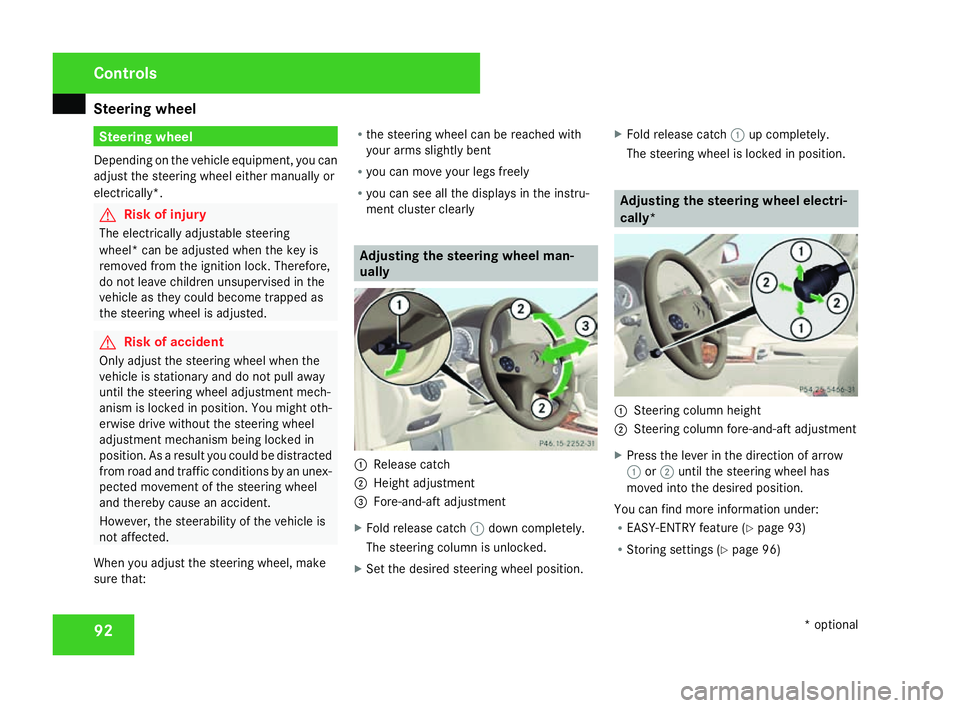
ually
1
Release catch
2 Height adjustment
3 Fore-and-aft adjustment
X Fold release catch 1down completely.
The steering column is unlocked.
X Set the desired steering wheel position. X
Fold release catch 1up completely.
The steering wheel is locked in position . Adjusting the steering wheel electri
-
cally * 1
Steering column height
2 Steering column fore-and-aft adjustment
X Press the lever in the direction of arrow
1 or2 until the steering wheel has
moved into the desired position .
You can find more information under :
R EASY-ENTRY feature (Y page 93)
R Storing settings (Y page 96) Controls
* optional
204_AKB; 2; 3, en-GB
mkalafa,
2007-06-26T23:11:51+02:00 - Seite 92
Page 103 of 377
Seat belts
100
X
Click belt tongue 2into buckle3 .
X If necessary, adjust the belt to the appro-
priate height (Y page 100).
X If necessary, pull upwards on the shoulder
section of the belt to tighten the belt across
your body.
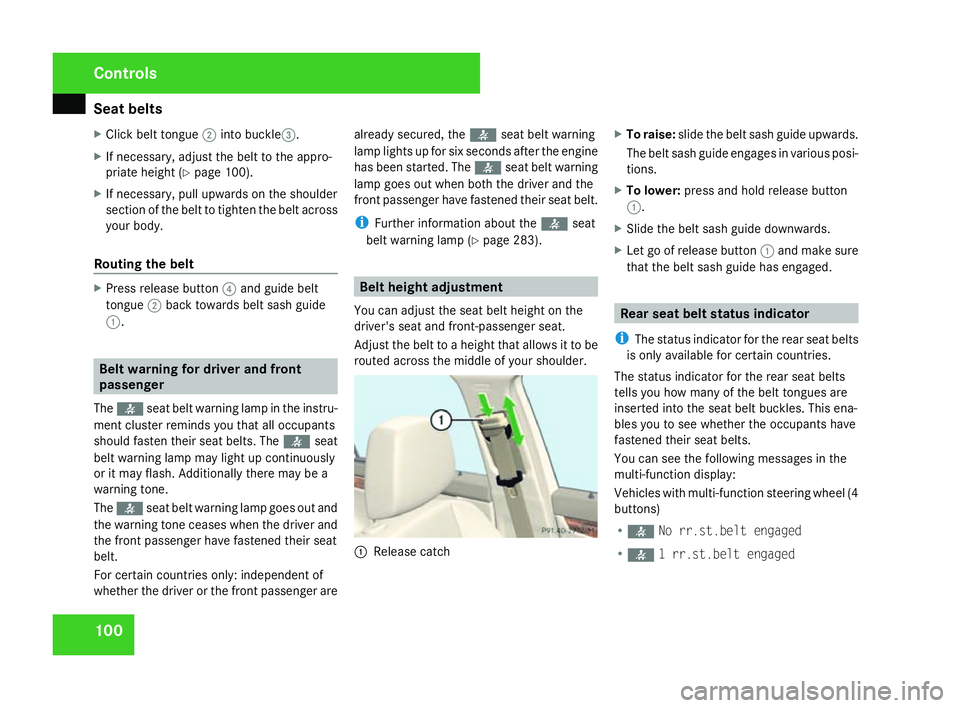
Routing the belt X
Press release button 4and guide belt
tongue 2back towards belt sash guide
1 . Belt warning for driver and fron
t
passenge r
The < seat belt warning lamp in the instru-
ment cluster reminds you that all occupants
should fasten their seat belts. The
or it may flash. Additionally there may be a
warning tone.
The < seat belt warning lamp goes out and
the warning tone ceases when the driver and
the front passenger have fastened their seat
belt.
For certain countries only: independent of
whether the driver or the front passenger are already secured, the
has been started. The
front passenger have fastened their seat belt.
i Further information about the
You can adjust the seat belt height on the
driver's seat and front-passenger seat.
Adjust the belt to a height that allows it to be
routed across the middle of your shoulder. 1
Release catch X
To raise: slide the belt sash guide upwards .
The belt sash guide engages in various posi-
tions.
X To lower: press and hold release button
1 .
X Slide the belt sash guide downwards .
X Let go of release button 1and make sure
that the belt sash guide has engaged . Rear seat belt status indicator
i The status indicator for the rear seat belts
is only available for certain countries.
The status indicator for the rear seat belts
tells you how many of the belt tongues are
inserted into the seat belt buckles. This ena-
bles you to see whether the occupants have
fastened their seat belts.
You can see the following messages in the
multi-function display :
Vehicles with multi-function steering wheel (4
buttons)
R < No rr.st.belt engaged
R < 1 rr.st.belt engaged Controls
204_AKB; 2; 3, en-GB
mkalafa,
2007-06-26T23:11:51+02:00 - Seite 100
Page 104 of 377
Seat belts
101
R
< 2 rr.st.belts engaged
R < 3 rr.st.belts engaged
Vehicles with a luxury multi-function steering
wheel* (12 buttons)
R < No rear seat belt engaged
R < 1 rear seat belt engaged
R < 2 rear seat belts engaged
R < 3 rear seat belts engaged
You will see the rear seat belt status indicator
in the multi-function display for about 30 sec-
onds when you pull away and drive above
9 km/h or when the rear-seat passengers
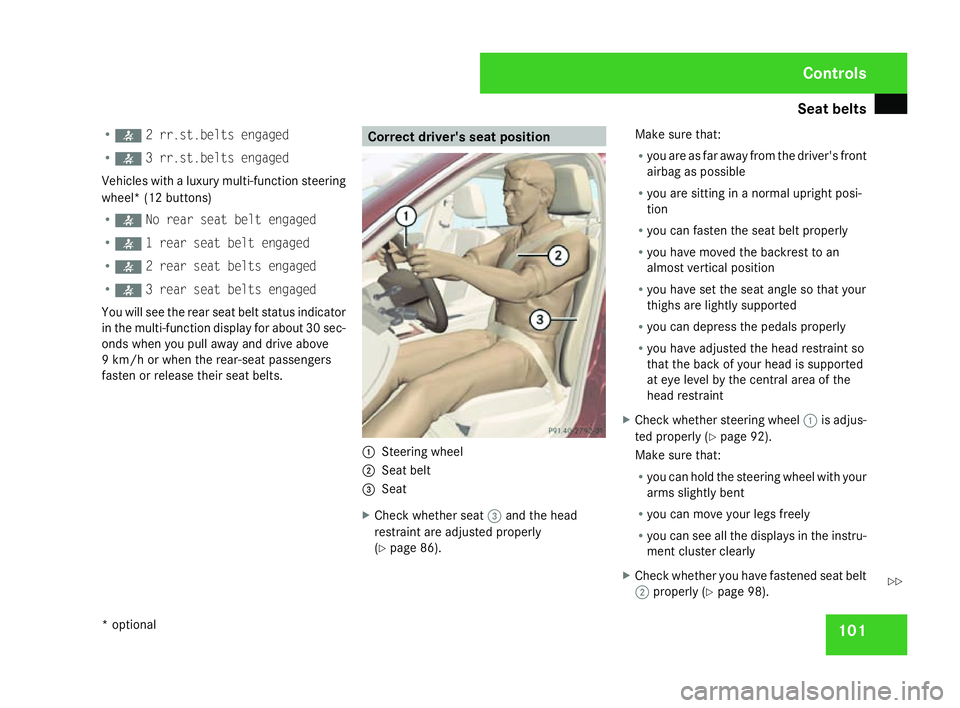
fasten or release their seat belts. Correct driver's seat position
1
Steering wheel
2 Seat belt
3 Sea t
X Check whether seat 3and the head
restraint are adjusted properl y
( Y page 86). Make sure that
:
R you are as far away from the driver's fron t
airbag as possible
R you are sitting in a normal upright posi-
tion
R you can fasten the seat belt properly
R you have moved the backrest to an
almost vertical position
R you have set the seat angle so that your
thighs are lightly supporte d
R you can depress the pedals properly
R you have adjusted the head restraint so
that the back of your head is supporte d
at eye level by the central area of th e
head restraint
X Check whether steering wheel 1is adjus-
ted properly (Y page 92).
Make sure that :
R you can hold the steering wheel with your
arms slightly ben t
R you can move your legs freely
R you can see all the displays in the instru-
ment cluster clearly
X Check whether you have fastened seat belt
2 properly (Y page 98). Controls
* optional
204_AKB; 2; 3, en-GB
mkalafa,
2007-06-26T23:11:51+02:00 - Seite 101 Z
Page 121 of 377
Transmission
11
8
X
Move the gear lever firmly to the left
beyond the point of resistance and then
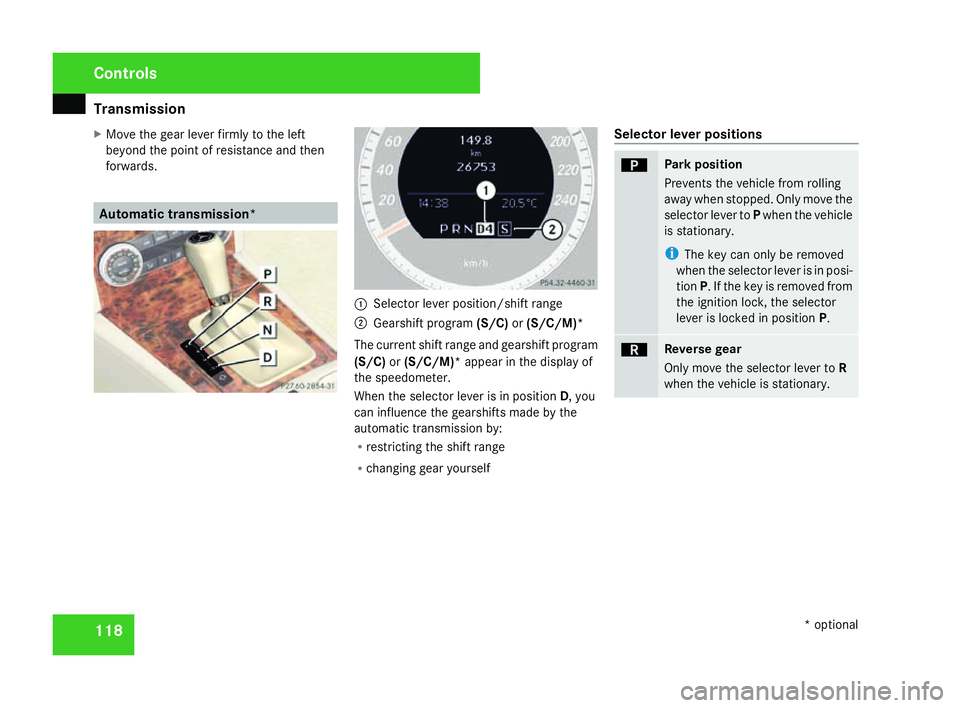
forwards. Automatic transmission*
1
Selector lever position/shift range
2 Gearshift program (S/C)or(S/C/M)*
The current shift range and gearshift program
(S/C) or(S/C/M)* appear in the display of
the speedometer.
When the selector lever is in position D, you
can influence the gearshifts made by the
automatic transmission by:
R restricting the shift range
R changing gear yoursel f Selector lever positions ì Park position
Prevents the vehicle from rolling
away when stopped. Only move the
selector lever to
Pwhen the vehicle
is stationary.
i The key can only be removed
when the selector lever is in posi-
tion P. If the key is removed from
the ignition lock, the selector
lever is locked in position P. í Reverse gear
Only move the selector lever to
R
when the vehicle is stationary. Controls
* optional
204_AKB; 2; 3, en-GB
mkalafa,
2007-06-26T23:11:51+02:00 - Seite 118
Page 122 of 377
Transmission
11
9 ë Neutral
Releasing the brakes will allow yo
u
to move the vehicle freely, e.g. to
push it or tow it.
Do not move the selector lever to
N while you are driving. The auto-
matic transmission could other-
wise be damaged .
If ESP ®
is deactivated or faulty:
only move the selector lever to Nif
the vehicle is in danger of skidding,
e.g. on icy roads. ê Drive
The automatic transmissio
n
changes gear automatically. All
forward gears are available .One-touch gearshifting
When the selector lever is in position
D, you
can perform gearshifts yourself, even on vehi-
cles with automatic transmission.
X To shift up: press the selector lever briefl y
to the right towards D+.
The automatic transmission shifts up to the
next gear, depending on the gearshift pro- gram selected. This also extends the shift
range.
X To shift down: press the selector lever
briefly to the left towards D–.
The automatic transmission shifts down to
the next gear, depending on the gear cur-
rently selected. This also restricts the shift
range.
i To prevent the engine from overrevving,
the automatic transmission does not shift
down if you push the selector lever towards
D– while driving at too high a speed.
X To derestrict the shift range: press and
hold the selector lever towards D+until D
is shown once more in the display.
The automatic transmission shifts from the
current shift range directly to D.
X To select the most effective shift
range: press and hold the selector lever to
the left towards D–.
The automatic transmission will shift to a
range which allows ideal acceleration and
deceleration. To do this, the automatic
transmission will shift down one or more
gears. Shift ranges When the selector lever is in position
D, it is
possible to restrict or derestrict the shift
range for the automatic transmission.
X Briefly press the selector lever to the right
towards D+or to the left towards D–.
The shift range selected is shown in the
speedometer display. The automatic trans-
mission shifts only as far as the selected
gear.
i If the maximum engine speed for the shift
range is reached and you continue to accel-
erate, the automatic transmission shifts up
in order to avoid engine overspeed even if
the shift range is restricted. Driving situation
è The braking effect of the engine can
be utilised in this position. Controls
204_AKB; 2; 3, en-GB
mkalafa,
2007-06-26T23:11:51+02:00 - Seite 119
Page 123 of 377
Transmission
12
0 ç To use the braking effect of the
engine on downhill gradients and
for driving:
R
on steep mountain roads
R in mountainous terrain
R in arduous conditions æ To use the braking effect of the
engine on extremely steep downhill
gradients and long downhill
stretches.
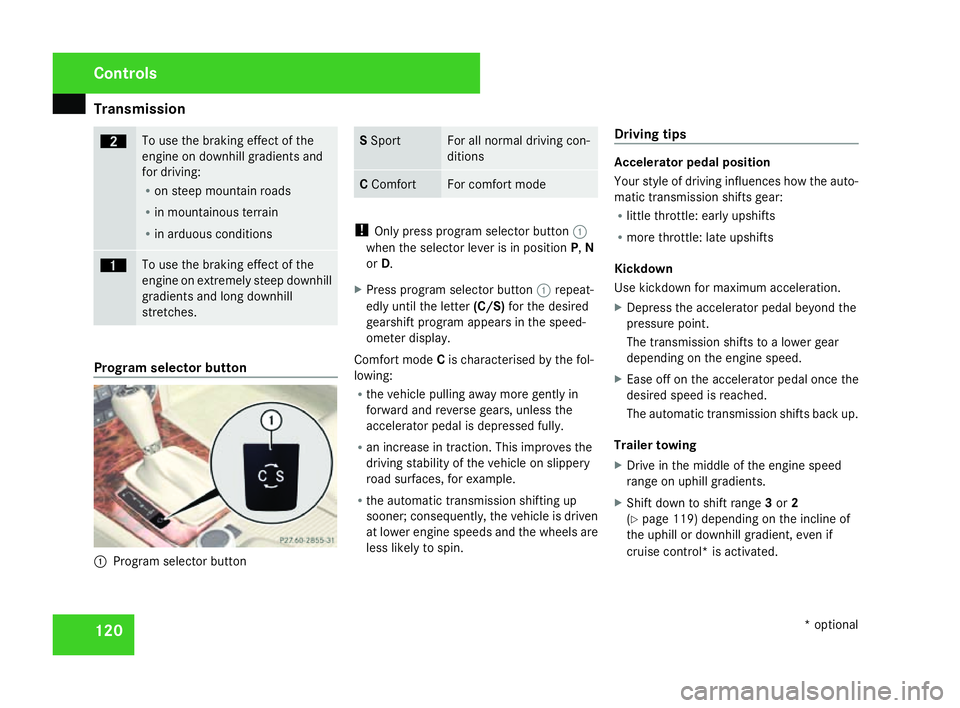
Program selector button
1
Program selector button S
Spor t For all normal driving con-
ditions
C
Comfort For comfort mod
e !
Only press program selector button 1
when the selector lever is in position P,N
or D.
X Press program selector button 1repeat-
edly until the letter (C/S)for the desired
gearshift program appears in the speed-
ometer display.
Comfort mode Cis characterised by the fol-
lowing :
R the vehicle pulling away more gently in
forward and reverse gears, unless the
accelerator pedal is depressed fully.
R an increase in traction. This improves th e
driving stability of the vehicle on slippery
road surfaces, for example.
R the automatic transmission shifting up
sooner; consequently, the vehicle is driven
at lower engine speeds and the wheels ar e
less likely to spin . Driving tips Accelerator pedal position
Your style of driving influences how the auto-
matic transmission shifts gear :
R little throttle: early upshift s
R more throttle: late upshifts
Kickdown
Use kickdown for maximum acceleration.
X Depress the accelerator pedal beyond the
pressure point.
The transmission shifts to a lower gear
depending on the engine speed.
X Ease off on the accelerator pedal once the
desired speed is reached.
The automatic transmission shifts back up .
Trailer towin g
X Drive in the middle of the engine spee d
range on uphill gradients.
X Shift down to shift range 3or 2
( Y page 119) depending on the incline of
the uphill or downhill gradient, even if
cruise control* is activated. Controls
* optional
204_AKB; 2; 3, en-GB
mkalafa,
2007-06-26T23:11:51+02:00 - Seite 120
Page 125 of 377
Transmission
12
2
i
On vehicles with the ADVANCED AGILITY
package with sports mode*, the program
S or Cis selected via the sport button
( Y page 152).
X To activate :press program selector but-
ton 1repeatedly until Mappears in th e
display.
If the selector lever is in position D, you can
shift up or down through the gears. The gear
currently selected and engaged is shown in
the display.
X To deactivate (vehicles with the
ADVANCED AGILITY package with
sports mode*) :press program selector
button 1repeatedly, until Sor Cappears.
To deactivate (vehicles without th e
ADVANCED AGILITY package with
sports mode*): press program selector
button 1.
M can no longer be seen in the display .
Upshifting
X Press the selector lever briefly to the right
towards D+.
or X
Pull the right-hand paddle on the steerin g
wheel (Y page 121).
The automatic transmission shifts up to the
next gear.
Downshifting G
Risk of accident
Do not change down for additional engine
braking on a slippery road surface. Thi s
could cause the drive wheels to lose thei r
grip and the vehicle could skid.
X Press the selector lever briefly to the left
towards D-.
or
X Pull the left-hand paddle on the steerin g
wheel (Y page 121).
The automatic transmission shifts down to
the next gear.
i For maximum acceleration, pull the left-
hand gearshift paddle until the transmis-
sion selects the optimum gear depending
on the speed.
Kickdown
You can also use kickdown for maximum
acceleration in manual gearshift program M. X
Depress the accelerator pedal beyond the
pressure point.
The transmission shifts to a lower gear
depending on the engine speed.
i It is not possible to shift gears using the
steering wheel gearshift paddles during
kickdown. Controls
* optional
204_AKB; 2; 3, en-GB
mkalafa
, 2007-06-26T23:11:51+02:00 - Seite 122
Page 126 of 377
Instrument cluste
r 123Instrument cluster
You will find an illustration of the instrumen t
cluster in the "At a glance" section
( Y page 28). G
Risk of accident
No messages can be displayed if instru -
ment cluster and/or the multi-function dis-
play fail .
This means that you will not see information
about the driving situation, such as the
speed, outside temperature, warning/indi-
cator lamps, display messages or system
failures. The vehicle's handling character-
istics may be affected. Adjust your driving
style and speed accordingly.
Immediately consult a qualified specialist
workshop which has the necessary special-
ist knowledge and tools to carry out the
work required. Mercedes-Benz recom-
mends that you use a Mercedes-Benz
Service Centre for this purpose. In particu-
lar, work relevant to safety or on safety-
related systems must be carried out at a
qualified specialist workshop. Activating the multi-function displa
y
X Switch on the ignition.
The multi-function display is also activate d
when you switch on the lights or open th e
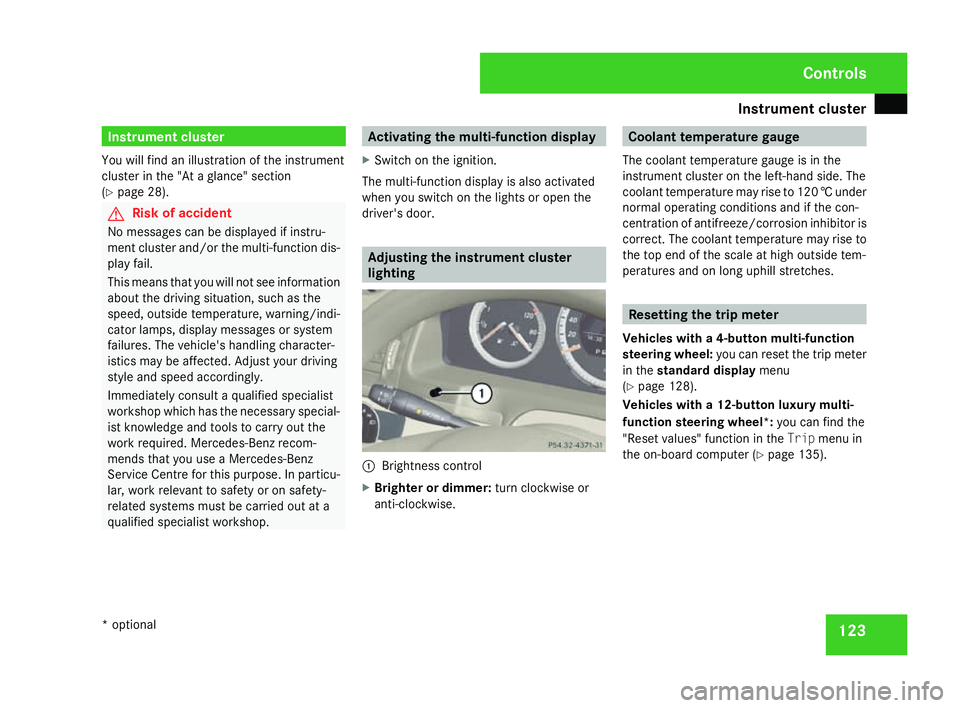
driver's door. Adjusting the instrument cluster
lighting
1
Brightness control
X Brighter or dimmer: turn clockwise or
anti-clockwise. Coolant temperature gaug
e
The coolant temperature gauge is in the
instrument cluster on the left-hand side. The
coolant temperature may rise to 120 †under
normal operating conditions and if the con-
centration of antifreeze/corrosion inhibitor is
correct. The coolant temperature may rise to
the top end of the scale at high outside tem-
peratures and on long uphill stretches. Resetting the trip meter
Vehicles with a 4-button multi-function
steering wheel: you can reset the trip meter
in the standard displa ymenu
( Y page 128).
Vehicles with a 12-button luxury multi-
function steering wheel* :you can find th e
"Reset values" function in the Tripmenu in
the on-board computer (Y page 135). Controls
* optional
204_AKB; 2; 3, en-GB
mkalafa,
2007-06-26T23:11:51+02:00 - Seite 123
Page 127 of 377
Instrument cluste
r124 Clock
In vehicles without audio equipment *or with
Audio 20*, you can set the time using the on-
board computer.
Vehicles with a 4-button multi-function steer-
ing wheel (Y page 129 )
Vehicles with a 12-button luxury multi-func-
tion steering wheel* (Y page 142 )
i Vehicles with a navigation system*
(Audio 50 APS* or COMAND APS*): your
navigation system *receives the time from
a GPS satellite. You must set the time zone
once on your Audio 50 APS* or COMAND
APS*. Refer to the separate Operating
Instructions for notes on how to do this. Speedometer with segments (vehi-
cles with luxury multi-function steer-
ing wheel*, 12 buttons)
The segments in the speedometer indicate
which speed range is available.
Cruise control* mode:
The segments light up from the stored speed
to the maximum speed.
Variable Speedtronic* mode:
The segments light up from the start of the
scale to the selected limit speed. Rev counter
The red band in the rev counter indicates the
engine's overrevving range. The fuel supply is
interrupted to protect the engine when the
red band is reached.
! Do not drive in the overrevving range.
Doing so will damage the engine. H
Environmental not
e
Avoid driving at high engine speeds, as thi s
increases your vehicle's consumption
unnecessarily and pollutes the environ -
ment through increased emissions. Outside temperature display
G
Risk of accident
The road surface may be icy, especially in
wooded areas or on bridges, even if tem-
peratures are just above freezing point. The
vehicle could skid if you fail to adapt your
driving style. You should therefore always
adapt your driving style and speed to suit
the weather conditions .
There is a short delay before a change in out-
side temperature is displayed. Controls
* optional
204_AKB; 2; 3, en-GB
mkalafa,
2007-06-26T23:11:51+02:00 - Seite 124