display MERCEDES-BENZ C-CLASS ESTATE 2007 Repair Manual
[x] Cancel search | Manufacturer: MERCEDES-BENZ, Model Year: 2007, Model line: C-CLASS ESTATE, Model: MERCEDES-BENZ C-CLASS ESTATE 2007Pages: 377, PDF Size: 6.19 MB
Page 190 of 377
Loading and stowing
1872
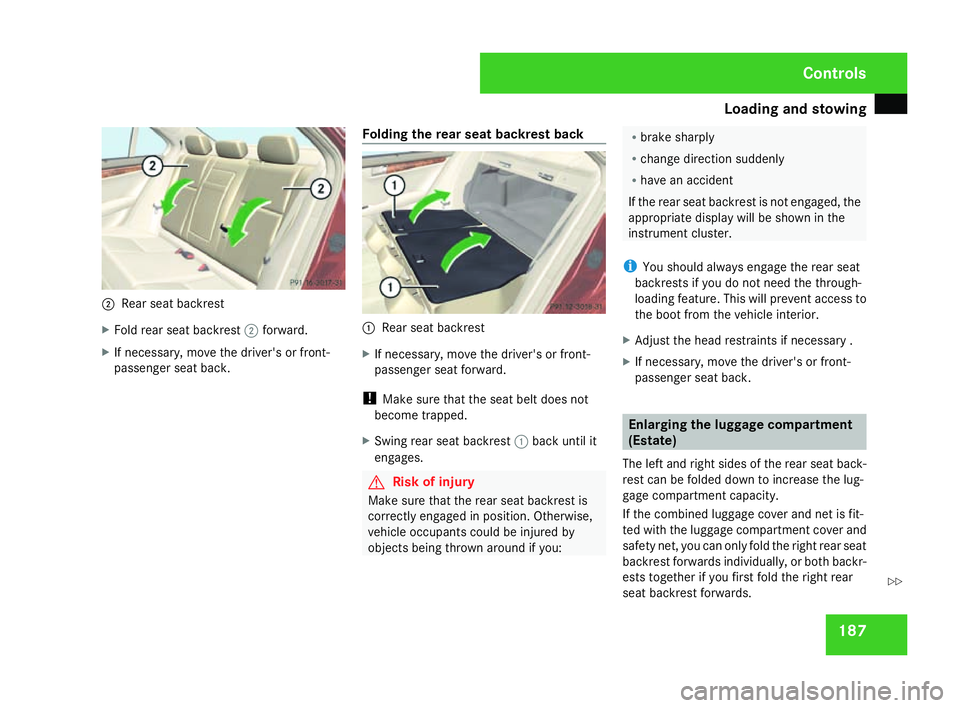
Rear seat backrest
X Fold rear seat backrest 2forward.
X If necessary, move the driver's or front-
passenger seat back. Folding the rear seat backrest back 1
Rear seat backrest
X If necessary, move the driver's or front-
passenger seat forward .
! Make sure that the seat belt does not
become trapped.
X Swing rear seat backrest 1back until it
engages. G
Risk of injury
Make sure that the rear seat backrest is
correctly engaged in position. Otherwise,
vehicle occupants could be injured by
objects being thrown around if you: R
brake sharply
R change direction suddenly
R have an accident
If the rear seat backrest is not engaged, the
appropriate display will be shown in the
instrument cluster.
i You should always engage the rear seat
backrests if you do not need the through-
loading feature. This will prevent access to
the boot from the vehicle interior .
X Adjust the head restraints if necessary .
X If necessary, move the driver's or front-
passenger seat back. Enlarging the luggage compartment
(Estate)
The left and right sides of the rear seat back-
rest can be folded down to increase the lug-
gage compartment capacity.
If the combined luggage cover and net is fit-
ted with the luggage compartment cover and
safety net, you can only fold the right rear seat
backrest forwards individually, or both backr-
ests together if you first fold the right rear
seat backrest forwards. Controls
204_AKB; 2; 3, en-GB
mkalafa,
2007-06-26T23:11:51+02:00 - Seite 187 Z
Page 197 of 377
Loading and stowing
194$
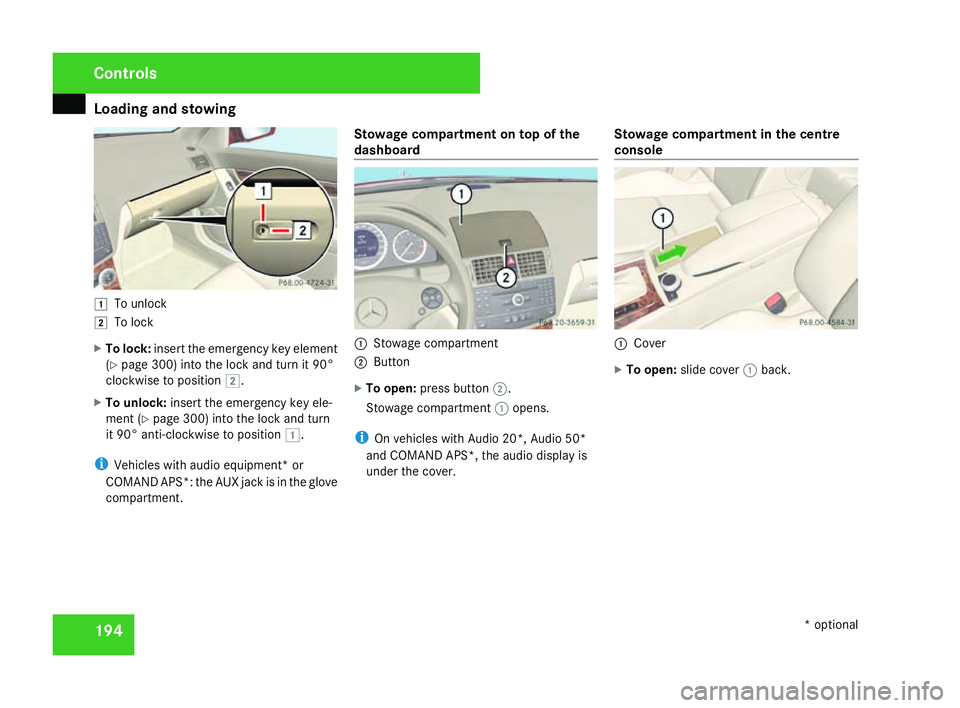
To unlock
% To lock
X To lock :insert the emergency key elemen t
( Y page 300) into the lock and turn it 90°
clockwise to position %.
X To unlock: insert the emergency key ele-
ment (Y page 300) into the lock and turn
it 90° anti-clockwise to position $.
i Vehicles with audio equipment* or
COMAND APS*: the AUX jack is in the glove
compartment. Stowage compartment on top of the
dashboard
1
Stowage compartment
2 Button
X To open: press button 2.
Stowage compartment 1opens.
i On vehicles with Audio 20*, Audio 50*
and COMAND APS*, the audio display is
under the cover. Stowage compartment in the centre
console 1
Cove r
X To open: slide cover 1back. Controls
* optional
204_AKB; 2; 3, en-GB
mkalafa,
2007-06-26T23:11:51+02:00 - Seite 194
Page 203 of 377
Features
200
X
Remove the cover of the aerial plug from
the back of the mobile phone and stow it in
a safe place. Example illustration
1
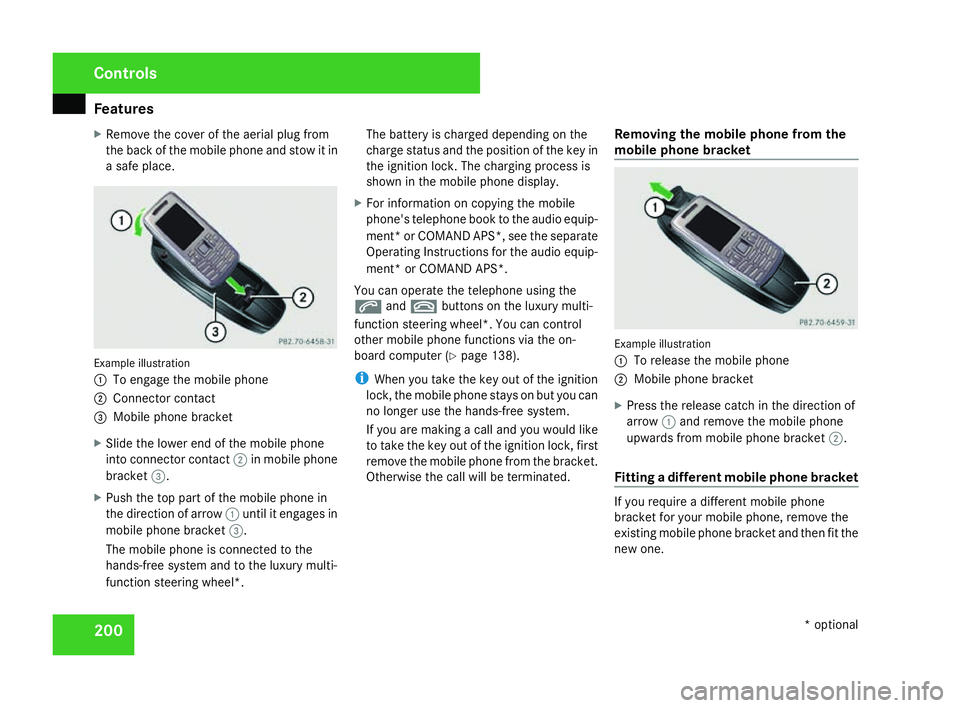
To engage the mobile phone
2 Connector contact
3 Mobile phone bracket
X Slide the lower end of the mobile phone
into connector contact 2in mobile phon e
bracket 3.
X Push the top part of the mobile phone in
the direction of arrow 1until it engages in
mobile phone bracket 3.
The mobile phone is connected to the
hands-free system and to the luxury multi-
function steering wheel*. The battery is charged depending on the
charge status and the position of the key in
the ignition lock. The charging process is
shown in the mobile phone display
.
X For information on copying the mobil e
phone's telephone book to the audio equip-
ment *or COMAND APS*, see the separate
Operating Instructions for the audio equip-
ment* or COMAND APS* .
You can operate the telephone using the
s andt buttons on the luxury multi-
function steering wheel*. You can contro l
other mobile phone functions via the on-
board computer (Y page 138).
i When you take the key out of the ignition
lock, the mobile phone stays on but you can
no longer use the hands-free system.
If you are making a call and you would like
to take the key out of the ignition lock, first
remove the mobile phone from the bracket .
Otherwise the call will be terminated. Removing the mobile phone from the
mobile phone bracket Example illustration
1
To release the mobile phone
2 Mobile phone bracket
X Press the release catch in the direction of
arrow 1and remove the mobile phon e
upwards from mobile phone bracket 2.
Fitting a different mobile phone bracket If you require a different mobile phon
e
bracket for your mobile phone, remove the
existing mobile phone bracket and then fit the
new one. Controls
* optional
204_AKB; 2; 3, en-GB
mkalafa,
2007-06-26T23:11:51+02:00 - Seite 200
Page 212 of 377
Engine compartment
209
Topping up the engine oil
Illustration: vehicle with a petrol engin
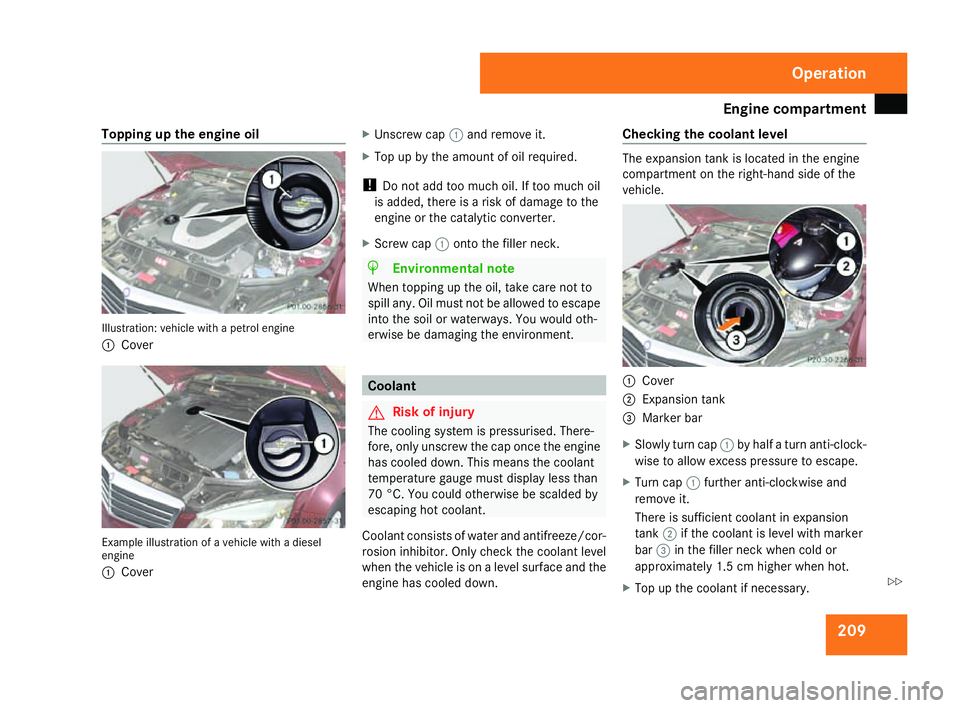
e
1 Cove r Example illustration of a vehicle with a diese
l
engine
1 Cove r X
Unscrew cap 1and remove it.
X Top up by the amount of oil required.
! Do not add too much oil. If too much oil
is added, there is a risk of damage to the
engine or the catalytic converter.
X Screw cap 1onto the filler neck. H
Environmental not
e
When topping up the oil, take care not to
spill any. Oil must not be allowed to escape
into the soil or waterways. You would oth-
erwise be damaging the environment . Coolan
t G
Risk of injury
The cooling system is pressurised. There-
fore, only unscrew the cap once the engine
has cooled down. This means the coolant
temperature gauge must display less than
70 °C. You could otherwise be scalded by
escaping hot coolant.
Coolant consists of water and antifreeze/cor -
rosion inhibitor. Only check the coolant leve l
when the vehicle is on a level surface and th e
engine has cooled down. Checking the coolant level The expansion tank is located in the engin
e
compartment on the right-hand side of the
vehicle . 1
Cove r
2 Expansion tank
3 Marker bar
X Slowly turn cap 1by half a turn anti-clock -
wise to allow excess pressure to escape.
X Turn cap 1further anti-clockwise and
remove it.
There is sufficient coolant in expansion
tank 2if the coolant is level with marker
bar 3in the filler neck when cold or
approximately 1.5 cm higher when hot .
X Top up the coolant if necessary. Operation
204_AKB; 2; 3, en-GB
mkalafa,
2007-06-26T23:11:51+02:00 - Seite 209 Z
Page 217 of 377
Tyres and wheels
21
4 Tyre pressure loss warning system
G
Risk of accident
The tyre pressure loss warning system*
does not warn you of an incorrectly set tyre
pressure. The table on the inside of the fue l
filler flap will help you decide whether the
tyre pressures should be corrected.
The tyre pressure loss warning system*
does not replace the need to regularly
check your vehicle's tyre pressures, since
an even loss of pressure on several tyres at
the same time cannot be detected by the
tyre pressure loss warning system*.
The tyre pressure loss warning system* is
not able to warn you of a sudden loss of
pressure, e.g. following penetration by a
foreign object.
In the event of a sudden loss of pressure,
bring the vehicle to a halt by braking care-
fully. Do not make any sudden steering
movements when doing so.
While the vehicle is in motion, the tyre pres-
sure loss warning system* monitors the set
tyre pressure using the rotational speed of
the wheels. This enables the system to detect
significant pressure loss in a tyre. If the spee d
of rotation of a wheel changes as a result of a loss of pressure, a corresponding warning
message will appear in the multi-function dis-
play.
The function of the tyre pressure loss warning
system* is limited or delayed if:
R
snow chains are fitted to your vehicle's
tyres
R road conditions are wintry
R you are driving on sand or grave l
R you adopt a very sporty driving style (cor -
nering at high speeds or driving with high
rates of acceleration)
R you are towing a very heavy or large trailer
R you are driving with a heavy load (in th e
vehicle or on the roof)
Restarting the tyre pressure loss warn-
ing system* Restart the tyre pressure loss warning sys-
tem* if you have
:
R changed the tyre pressure
R changed the wheels or tyre s
R fitted new wheels or tyres
X Before restarting, consult the table of tyre
pressures on the inside of the fuel filler fla pto ensure that the tyre pressure in all fou
r
tyres is set correctly for the operating con-
ditions concerned .
X Also observe the notes in the section on
tyre pressures (Y page 213). G
Risk of accident
The tyre pressure loss warning system* can
only give reliable warnings if you have set
the correct tyre pressure.
If an incorrect tyre pressure is set, thes e
incorrect values will be monitored.
A tyre with insufficient pressure results in
an instability of the vehicle when driving,
thus increasing the risk of an accident .
Configuring with the multi-function steer-
ing wheel
X Make sure that the key is in position 2in
the ignition lock .
X Press èto select Tyre pressure
menu: R.
X Press the íbutton.
The following appears in the multi-function
display: RFI active Reactivate: ROperation
* optional
204_AKB; 2; 3, en-GB
mkalafa,
2007-06-26T23:11:51+02:00 - Seite 214
Page 218 of 377
Tyres and wheels
21
5
X
Press the íbutton.
The following appears in the multi-function
display: Tyre press. OK?
Yes+ Cancel -
To confirm the restart of the tyre pressure
loss warning system:
X Press the +button.
The following appears in the multi-function
display: Run Flat Indicator restar -
ted.
After a teach-in period, the tyre pressure
loss warning system* will monitor the set
tyre pressures of all four tyres.
or
To cancel the restart of the tyre pressure
loss warning system:
X Press the -button.
The previous settings will not be changed.
Configuring with the luxury multi-func-
tion steering wheel*
X Make sure that the key is in position 2in
the ignition lock .
X Press (or& to select the Service
menu. X
Press $or% to select Tyre pres-
sur e.
X Press #.
The following appears in the multi-function
display: Run Flat Indicator active
Restart with OK
X Press #.
The following appears in the multi-function
display: Tyre press. now OK?
To confirm the restart of the tyre pressur e
loss warning system:
X Press $or% to select Yes.
X Press #.
The following appears in the multi-function
display: Run Flat Indicator restarted
After a teach-in period, the tyre pressure
loss warning system* will monitor the set
tyre pressures of all four tyres.
or
To cancel the restart of the tyre pressur e
loss warning system:
X Press $or% to select Cancel.
X Press #.
The previous settings will not be changed. Interchanging the wheels
G
Risk of accident
Interchange the front and rear wheels only
if they have the same dimensions, for exam-
ple size, offset, etc.
After every wheel interchange/change,
have the tightening torque checked at a
qualified specialist workshop that has the
necessary specialist knowledge and tools
to carry out the work required. Mercedes-
Benz recommends that you use a
Mercedes-Benz Service Centre for this pur-
pose. In particular, work relevant to safety
or on safety-related systems must be car-
ried out at a qualified specialist workshop.
The wheels could work loose if they are not
tightened to a tightening torque of
130 Nm.
For safety reasons, Mercedes-Benz recom -
mends that you only use wheel bolts of the
correct size which have been approved for
Mercedes-Benz vehicles.
The wheels may be interchanged every 5,000
km to 10,000 km depending on the degree of
tyre wear, provided that the vehicle has the
same size front and rear tyres. Do not reverse
the direction of tyre rotation. Operation
* optiona l
204_AKB; 2; 3, en-GB
mkalafa,
2007-06-26T23:11:51+02:00 - Seite 215 Z
Page 224 of 377
Trailer towing*
22
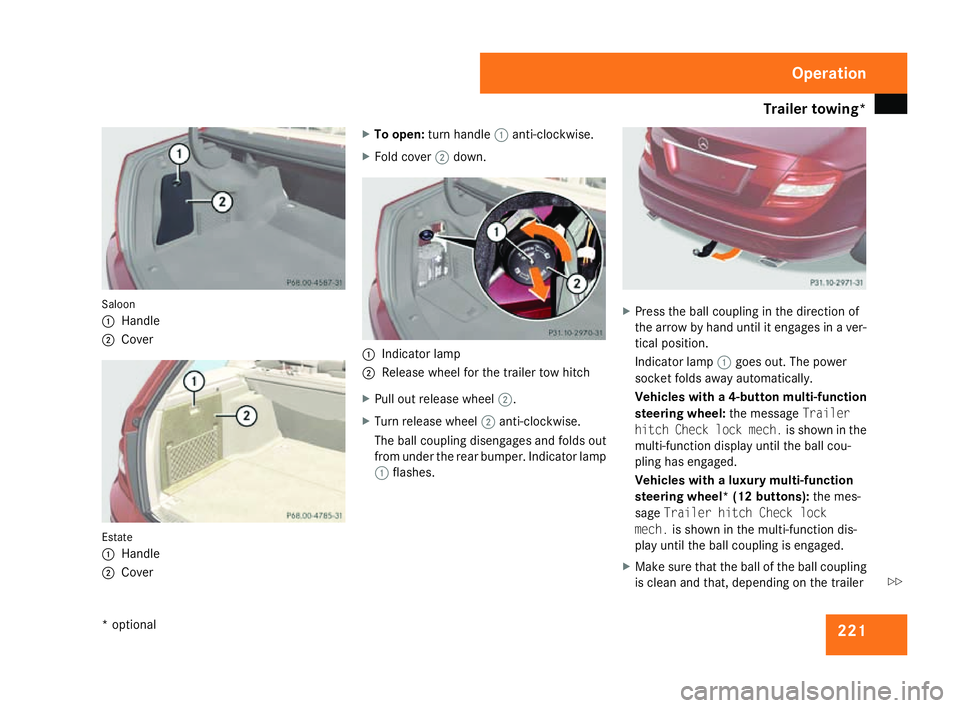
1 Saloon
1
Handl e
2 Cove r Estate
1
Handl e
2 Cove r X
To open: turn handle 1anti-clockwise.
X Fold cover 2down. 1
Indicator lamp
2 Release wheel for the trailer tow hitch
X Pull out release wheel 2.
X Turn release wheel 2anti-clockwise.
The ball coupling disengages and folds out
from under the rear bumper. Indicator lamp
1 flashes. X
Press the ball coupling in the direction of
the arrow by hand until it engages in a ver-
tical position.
Indicator lamp 1goes out. The power
socket folds away automatically.
Vehicles with a 4-button multi-function
steering wheel: the messageTrailer
hitch Check lock mech. is shown in the
multi-function display until the ball cou-
pling has engaged.
Vehicles with a luxury multi-function
steering wheel* (12 buttons): the mes-
sage Trailer hitch Check lock
mech. is shown in the multi-function dis-
play until the ball coupling is engaged.
X Make sure that the ball of the ball coupling
is clean and that, depending on the trailer Operation
* optional
204_AKB; 2; 3, en-GB
mkalafa,
2007-06-26T23:11:51+02:00 - Seite 221 Z
Page 227 of 377
Trailer towing*
22
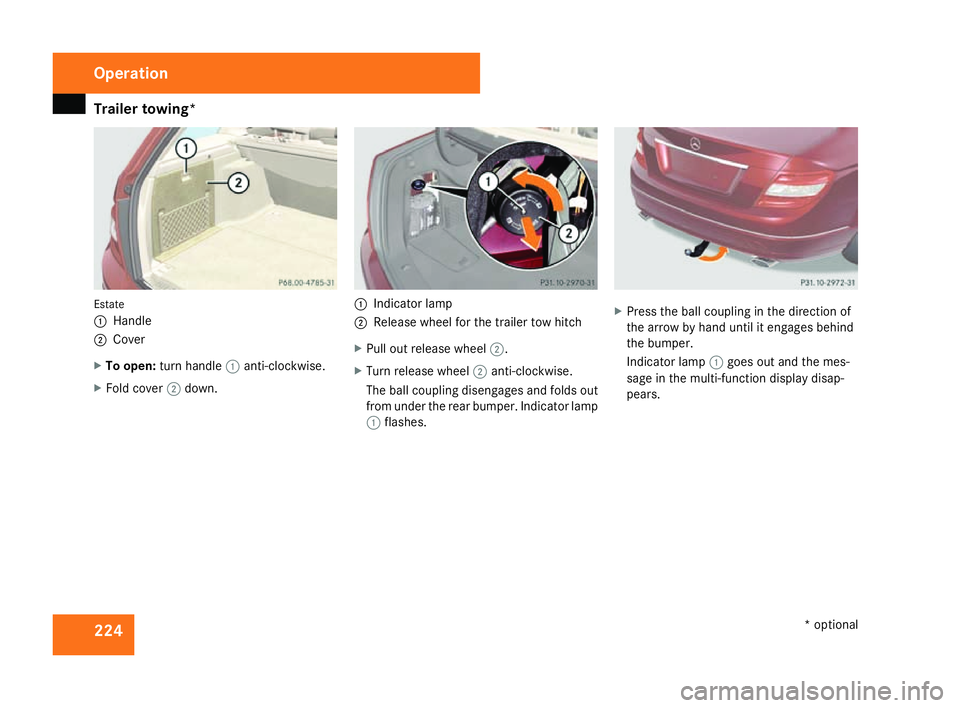
4 Estate
1
Handl e
2 Cove r
X To open: turn handle 1anti-clockwise.
X Fold cover 2down. 1
Indicator lamp
2 Release wheel for the trailer tow hitch
X Pull out release wheel 2.
X Turn release wheel 2anti-clockwise.
The ball coupling disengages and folds out
from under the rear bumper. Indicator lamp
1 flashes. X
Press the ball coupling in the direction of
the arrow by hand until it engages behind
the bumper.
Indicator lamp 1goes out and the mes-
sage in the multi-function display disap-
pears. Operation
* optional
204_AKB; 2; 3, en-GB
mkalafa,
2007-06-26T23:11:51+02:00 - Seite 224
Page 229 of 377
Service
226 Service
Active Service System
ASSYST PLUS, the Active Service System,
tells you when the next service is due.
Services that are due appear in the multi-
function display:
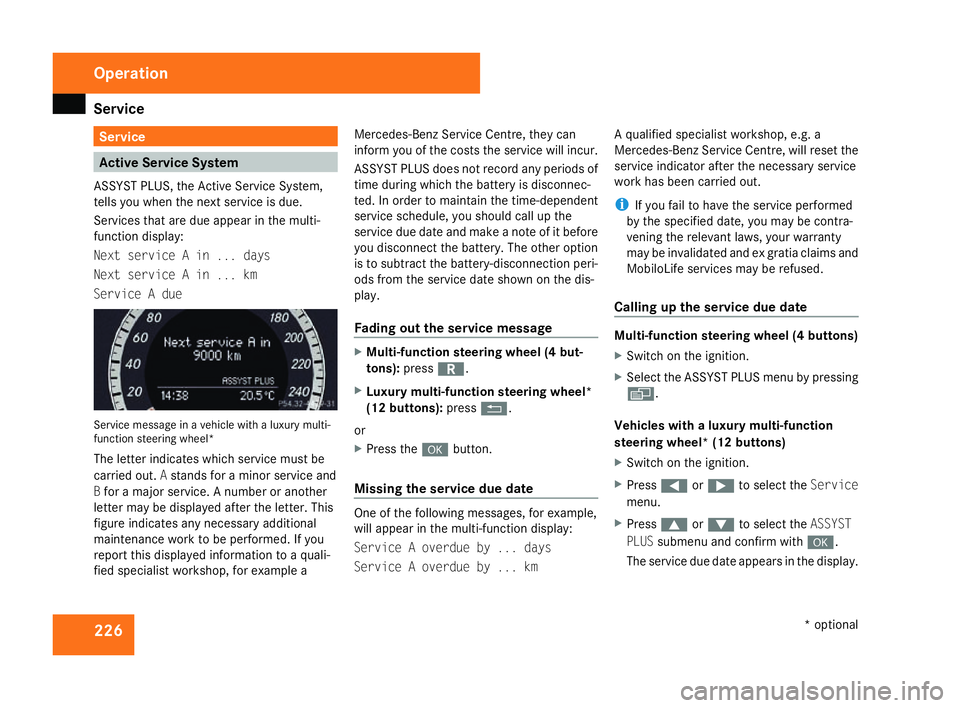
Next service A in ... days
Next service A in ... km
Service A due Service message in a vehicle with a luxury multi-
function steering wheel*
The letter indicates which service must be
carried out. Astands for a minor service and
B for a major service. A number or another
letter may be displayed after the letter. This
figure indicates any necessary additiona l
maintenance work to be performed. If you
report this displayed information to a quali-
fied specialist workshop, for example aMercedes-Benz Service Centre, they can
inform you of the costs the service will incur.
ASSYST PLUS does not record any periods of
time during which the battery is disconnec-
ted. In order to maintain the time-dependent
service schedule, you should call up the
service due date and make a note of it befor
e
you disconnect the battery. The other option
is to subtract the battery-disconnection peri-
ods from the service date shown on the dis-
play.
Fading out the service message X
Multi-function steering wheel (4 but-
tons) :press í.
X Luxury multi-function steering wheel*
(12 buttons): pressL.
or
X Press the #button.
Missing the service due dat e One of the following messages, for example,
will appear in the multi-function display:
Service A overdue by ... days
Service A overdue by ... kmA qualified specialist workshop, e.g.
a
Mercedes-Benz Service Centre, will reset the
service indicator after the necessary service
work has been carried out.
i If you fail to have the service performed
by the specified date, you may be contra-
vening the relevant laws, your warranty
may be invalidated and ex gratia claims and
MobiloLife services may be refused .
Calling up the service due date Multi-function steering wheel (4 buttons)
X
Switch on the ignition.
X Select the ASSYST PLUS menu by pressing
è .
Vehicles with a luxury multi-function
steering wheel* (12 buttons)
X Switch on the ignition.
X Press (or& to select the Service
menu.
X Press $or% to select the ASSYST
PLU Ssubmenu and confirm with #.
The service due date appears in the display .Operation
* optional
204_AKB; 2; 3, en-GB
mkalafa,
2007-06-26T23:11:51+02:00 - Seite 226
Page 234 of 377
231
Where will I find...?
...........................232
Display messages ............................. 236
Troubleshooting ................................ 276
Locking/unlocking in an emer-
gency ................................................. 300
Resetting triggered NECK-PRO
head restraints .................................. 303
Changing the batteries .....................304
Changing the bulbs ...........................305
Replacing the wiper blades ..............312
Flat tyre ............................................. 313
Battery ............................................... 324
Jump-starting .................................... 328
Towing and tow-starting ..................329
Fuses .................................................. 332 Practical advice
204_AKB; 2; 3, en-GB
mkalafa,
2007-06-26T23:11:51+02:00 - Seite 231