light MERCEDES-BENZ C-CLASS ESTATE 2014 User Guide
[x] Cancel search | Manufacturer: MERCEDES-BENZ, Model Year: 2014, Model line: C-CLASS ESTATE, Model: MERCEDES-BENZ C-CLASS ESTATE 2014Pages: 489, PDF Size: 15.08 MB
Page 19 of 489
Notes/placing in the bracket .........3
90
Transmission output (maximum) .... 468
Modifying the programming (key) ..... 92
MOExtended tyres .............................413
Motorway mode ................................ 138
MP3
Operating ....................................... 305
Multifunction display
Function/notes ............................ .297
Permanent display ......................... 314
Multifunction steering wheel
Operating the on-board computer .. 295
Overview .......................................... 36 N
Navigation Menu (on-board computer) ............ 302
Notes on running in a new vehicle .. 184O
Occupant safety Automatic measures after an acci-
dent ................................................. 63
Children in the vehicle ..................... 63
Important safety notes .................... 45
Pets in the vehicle ........................... 75
PRE-SAFE® (anticipatory occu-
pant protection) ............................... 62
Seat belts ........................................ 47
Odometer .......................................... .300
Oil
see Engine oil
On-board computer
Assistance graphic menu .............. .308
Assistance menu ........................... 309
Display messages .......................... 316
Displaying a service message ....... .399
DISTRONIC PLUS ........................... 232
Factory settings ............................ .315
Head-up displa y............................. 297
Important safety notes .................. 294
Instrument cluster menu ............... 314
Light menu ..................................... 313
Media menu ................................... 304
Menu overview .............................. 299
Message memory .......................... 316 Navigation menu ............................ 302
Operating the TV ............................ 306
Operating video DVD ..................... 305
Operation ....................................... 295
Radio menu ................................... 304
Service menu ................................. 308
Settings menu ............................... 309
Standard display ............................ 300
Telephone menu ............................ 306
Trip menu ...................................... 300
Vehicle menu ................................. 315
Opening and closing the side trim
panels ................................................. 144
Operating instructions
Vehicle equipment ........................... 25
Operating mode
Overrun mode ................................ 282
Stationary vehicle .......................... 281
Operating safety
Declaration of conformity ................ 27
Important safety note ...................... 25
Operating system
see On-board computer
Outside temperature display ........... 295
Overhead control panel ...................... 39
Override feature
Rear side window s........................... 75
Overrun mode .................................... 283
Overrun mode, extended .................. 283
Owner's Manual
Overview .......................................... 25 P
Paint code .......................................... 470
Paintwork (cleaning instructions) ... 402
Panic alarm .......................................... 44
Panorama sliding sunroof
Important safety information ......... 110
Opening/closing ............................ 112
Problem (malfunction) ................... 115
Rain closing feature ....................... 113
Resetting ....................................... 114
Parking
Hybrid vehicles .............................. 284
Important safety notes .................. 211
Parking brake ................................ 213 16
Index
Page 21 of 489
Setting the airflow ......................... 165
Setting the temperature ................ 163
Rear foglamp
Display message ............................ 333
Switching on/of f........................... 135
Rear lamps
see Lights
Rear window heating
Problem (fault) ............................... 168
Switching on/of f........................... 167
Rear window wiper
Replacing the wiper blad e.............. 149
Switching on/of f........................... 147
Rear-compartment seat belt sta-
tus indicator ........................................ 50
Rear-view mirror
Anti-dazzle mode (automatic) ........ 129
Dipping (manual) ........................... 127
Recuperation display ........................ 300
Refuelling
Fuel gaug e....................................... 34
Important safety notes .................. 204
Refuelling process ......................... 205
see Fuel
Remote control
Auxiliary heating/ventilation .......... 177
Changing the batteries (auxiliary
heating) ......................................... 179
Replacing bulbs
Important safety notes .................. 141
Overview of bulb types .................. 142
Removing/replacing the cover
(front wheel arch) .......................... 143
Replacing the battery (auxiliary
heating remote control) .................... 179
Reserve (fuel tank)
see Fuel
Reserve fuel
Display message ............................ 337
Warning lamp ................................. 362
Residual heat (climate control) ........ 169
Restraint system
Display message ............................ 327
Introduction ..................................... 44
Warning lamp ................................. 361
Warning lamp (function) ................... 45
Rev counter ........................................ 295 Reverse gear
Engaging (manual transmission) .... 195
Reversing camera
Cleaning instructions ..................... 405
Function/note s............................. 248
Switching on/of f........................... 249
Reversing feature
Panorama sliding sunroo f.............. 111
Roller sunblind s............................. 113
Side windows ................................. 107
Sliding sunroof ............................... 111
Tailgate .......................................... 101
Reversing lamp
Changing bulb s.............................. 144
Reversing lamp (display message) .. 333
Roller sunblind
Panorama sliding sunroo f.............. 113
Roller sunblinds (panorama sliding
sunroof)
Operating ....................................... 114
Roof carrier ........................................ 380
Roof lining and carpets (cleaning
instructions) ...................................... 408
Roof load (maximum) ........................ 478 S
Safety Automatic front-passenger front
airbag deactivation system .............. 54
Child restraint systems .................... 64
Children in the vehicle ..................... 63
see Operating safety
Safety net
Attaching ....................................... 378
Important safety information ......... 378
Safety notes
Hybrid vehicles ................................ 42
Safety system
see Driving safety systems
Seat
Folding the backrest (rear com-
partment) forwards/back .............. 374
Seat belt
Centre rear-compartment sea t........ 49
Correct usage .................................. 48 18
Index
Page 23 of 489
Selecting ........................................ 224
Storing the current speed .............. 224
Variabl e......................................... 223
SRS (Supplemental Restraint Sys-
tem)
Warning lamp ................................. 285
Start/Stop button
Starting the engine ........................ 188
Start/stop function
see ECO start/stop function
Starting (engine) ................................ 187
Stationary vehicle ............................. 281
STEER CONTROL .................................. 86
Steering
Warning lamps ............................... 367
Steering (display message) .............. 351
Steering Assist and Stop&Go Pilot
(DISTRONIC PLUS)
Display message ............................ 344
Steering assistant STEER CON-
TROL
see STEER CONTROL
Steering wheel
Adjusting (electrically) ................... 126
Adjusting (manually) ...................... 125
Button overview ............................... 36
Buttons (on-board computer) ......... 295
Cleaning ......................................... 407
EASY ENTRY/EXIT feature ............. 126
Gearshift paddle s........................... 202
Important safety notes .................. 125
Storing settings (memory func-
tion) ............................................... 131
Steering wheel gearshift paddles .... 202
Stowage areas ................................... 370
Stowage compartment
Map pockets .................................. 372
Stowage compartments
Armrest (under) ............................. 372
Centre console .............................. 371
Cup holde r..................................... 381
Door ............................................... 372
Glove compartment ....................... 371
Important safety information ......... 370
Rear ............................................... 372
Spectacles compartment ............... 371
Stowage net ....................................... 372 Stowage space
Stowage net ................................... 372
Summer tyres
In winter ........................................ 434
Sun blind
Rear side window s......................... 383
Sun visor ............................................ 382
Suspension tuning
AIRMATIC ...................................... 239
Switching the auxiliary heating/
ventilation
On/off ........................................... 177 T
Tail lamps Display message ............................ 332
see Lights
Tailgate
Display message ............................ 349
Emergency unlocking ..................... 106
Important safety notes .................. 101
Limiting the opening angle ............. 105
Obstruction detectio n.................... 101
Opening dimensions ...................... 478
Opening/closing ............................ 101
Opening/closing (automatically
from inside) ................................... 105
Opening/closing (automatically
from outside) ................................. 102
Opening/closing (manually from
outside) ......................................... 102
Technical data
Capacities ...................................... 470
Emergency spare wheel ................. 465
Information .................................... 468
Trailer load s................................... 480
Tyres/wheels ................................. 448
Vehicle data ................................... 478
Telephone
Accepting a call (multifunction
steering wheel) .............................. 307
Display message ............................ 351
Introduction ................................... 306
Menu (on-board computer) ............ 306
Number from the phone book ........ 307
Redialling ....................................... 308
Rejecting/ending a call ................. 307 20
Index
Page 24 of 489
Telephone compartment ................3
72
Temperature
Coolant (display in the instrumentcluster) .......................................... 295
Coolant (display in the on-board
computer) ...................................... 309
Outside temperature ..................... .295
Setting (climate control) ................ 163
TEMPOMAT
Function/notes ............................ .220
TIREFIT kit .......................................... 414
Top Tether ............................................ 65
Total distance recorder .................... 300
Tow-away protection
Activating ......................................... 88
Deactivating ..................................... 88
Function .......................................... .87
Tow-starting
Emergency engine starting ............ 428
Important safety notes .................. 424
Towing
Important safety notes .................. 424
Notes for 4MATIC vehicles ............ 427
With the rear axle raised ................ 426
Towing a trailer
Active Blind Spot Assist ................. 269
Active Lane Keeping Assist ............ 272
Active Parking Assist ..................... 243
Axle load, permissibl e.................... 482
Bulb failure indicator for LED
lamps ............................................. 290
ESP® (Electronic Stability Pro-
gram) ............................................... 83
General notes ................................ 287
Pulling away with a traile r.............. 189
Trailer tow hitch display message .. 349
Towing away
Fitting the towing eye .................... 426
Removing the towing eye ............... 426
With both axles on the ground ....... 427
Towing eye ......................................... 411
Traffic Sign Assist
Activating ....................................... 261
Activating/deactivating the warn-
ing function .................................... 310
Display message ............................ 342
Function/note s............................. 260
Important safety notes .................. 261 Instrument cluster display ............. 261
Trailer coupling
see Towing a trailer
Trailer towing
7-pin connecto r............................. 290
Blind Spot Assist ............................ 264
Cleaning the trailer tow hitch ......... 406
Coupling up a traile r...................... 288
Decoupling a trailer ....................... 289
Driving tip s.................................... 287
Folding in the ball coupling ............ 289
Folding out the ball coupling .......... 288
Important safety notes .................. 286
Lights display message .................. 331
Mounting dimensions .................... 478
Parktronic ...................................... 240
Power supply ................................. 290
Problem (fault) ............................... 292
Trailer load s................................... 480
Transfer case ..................................... 204
Transmission
see Automatic transmission
see Manual transmission
Transmission position display ......... 199
Transmission position display
(DIRECT SELECT lever) ...................... 199
Transporting the vehicle .................. 427
Trim pieces (cleaning instruc-
tions) .................................................. 407
Trip computer (on-board com-
puter) .................................................. 301
Trip meter
Calling up ....................................... 300
Resetting (on-board computer) ...... 301
Turn signals
Changing bulbs (front) ................... 144
Changing bulbs (rear) .................... 144
Switching on/of f........................... 137
TV
Operating (on-board computer) ..... 306
Two-way radio
Frequencies ................................... 468
Installation ..................................... 468
Transmission output (maximum) .... 468
Type identification plate
see Vehicle identification plate Index
21
Page 31 of 489
R
work on electronic components
R work on the hybrid system
Mercedes-Benz recommends that you use a
Mercedes-Benz Service Centre. Vehicle registration
Mercedes-Benz may ask its Service Centres
to carry out technical inspections on certain
vehicles. The quality or safety of the vehicle is
improved as a result of the inspection.
Mercedes-Benz can only inform you about
vehicle checks if it has your registration data.
It is possible that your vehicle has not yet
been registered in your name in the following
cases:
R if your vehicle was not purchased at an
authorised specialist dealer.
R if your vehicle has not yet been examined at
a Mercedes-Benz Service Centre.
It is advisable to register your vehicle with a
Mercedes-Benz Service Centre.
Inform Mercedes-Benz as soon as possible
about any change in address or vehicle own-
ership. You can do this at a Mercedes-Benz
Service Centre, for example. Correct use
If you remove any warning stickers, you or
others could fail to recognise certain dangers. Leave warning stickers in position.
Observe the following information when driv-ing your vehicle:
R the safety notes in this manual
R the technical data in this manual
R traffic rules and regulations
R laws and safety standards pertaining to
motor vehicles Implied warranty
! Follow the instructions in this manual
about the proper operation of your vehicle as well as about possible vehicle damage.
Damage to your vehicle that arises from
culpable contraventions against these
instructions are not covered either by
Mercedes-Benz implied warranty or by the
New or Used-Vehicle Warranty.
Data stored in the vehicle
A wide range of electronic components in
your vehicle contain data memories.
These data memories temporarily or perma-
nently store technical information about:
R the vehicle's operating state
R events
R faults
In general, this technical information docu-
ments the state of a component, a module, a
system or the surroundings.
These include, for example:
R operating conditions of system compo-
nents, e.g. fluid levels
R the vehicle's status messages and those of
its individual components, e.g. number of
wheel revolutions/speed, deceleration in
movement, lateral acceleration, accelera-
tor pedal position
R malfunctions and defects in important sys-
tem components, e.g. lights, brakes
R vehicle reactions and operating conditions
in special driving situations, e.g. airbag
deployment, intervention of stability con-
trol systems
R ambient conditions, e.g. outside tempera-
ture
This data is of an exclusively technical nature and can be used to:
R assist in detecting and rectifying faults and
defects
R analyse vehicle functions, e.g. after an acci-
dent
R optimise vehicle functions 28
Introduction
Page 35 of 489
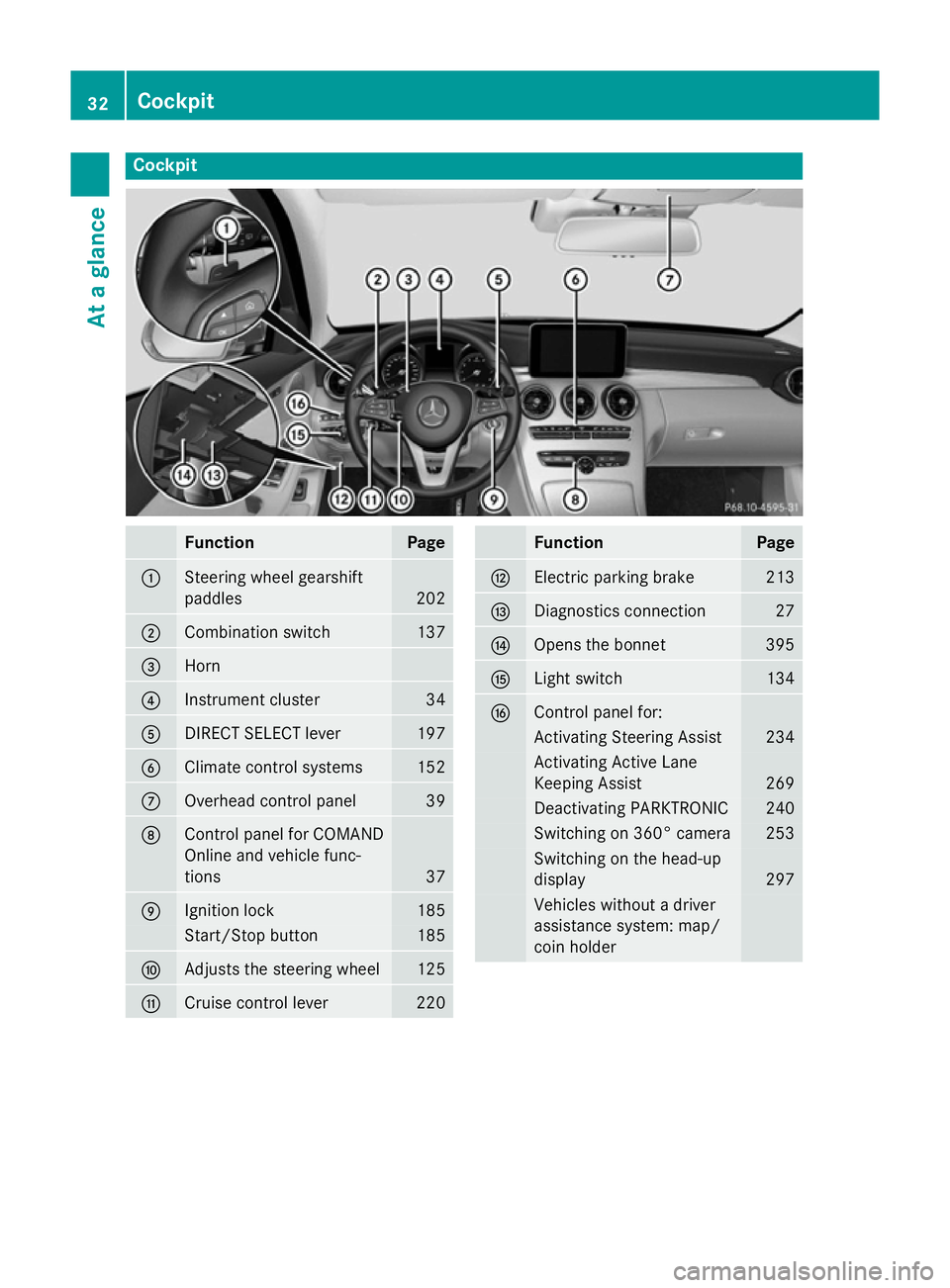
Cockpit
Function Page
:
Steering wheel gearshift
paddles
202
;
Combination switch 137
=
Horn
?
Instrument cluster 34
A
DIRECT SELECT lever 197
B
Climate control systems 152
C
Overhead control panel 39
D
Control panel for COMAND
Online and vehicle func-
tions
37
E
Ignition lock 185
Start/Stop button 185
F
Adjusts the steering wheel 125
G
Cruise control lever 220 Function Page
H
Electric parking brake 213
I
Diagnostics connection 27
J
Opens the bonnet 395
K
Light switch 134
L
Control panel for:
Activating Steering Assist 234
Activating Active Lane
Keeping Assist 269
Deactivating PARKTRONIC 240
Switching on 360° camera 253
Switching on the head-up
display
297
Vehicles without a driver
assistance system: map/
coin holder32
CockpitAt a glance
Page 36 of 489
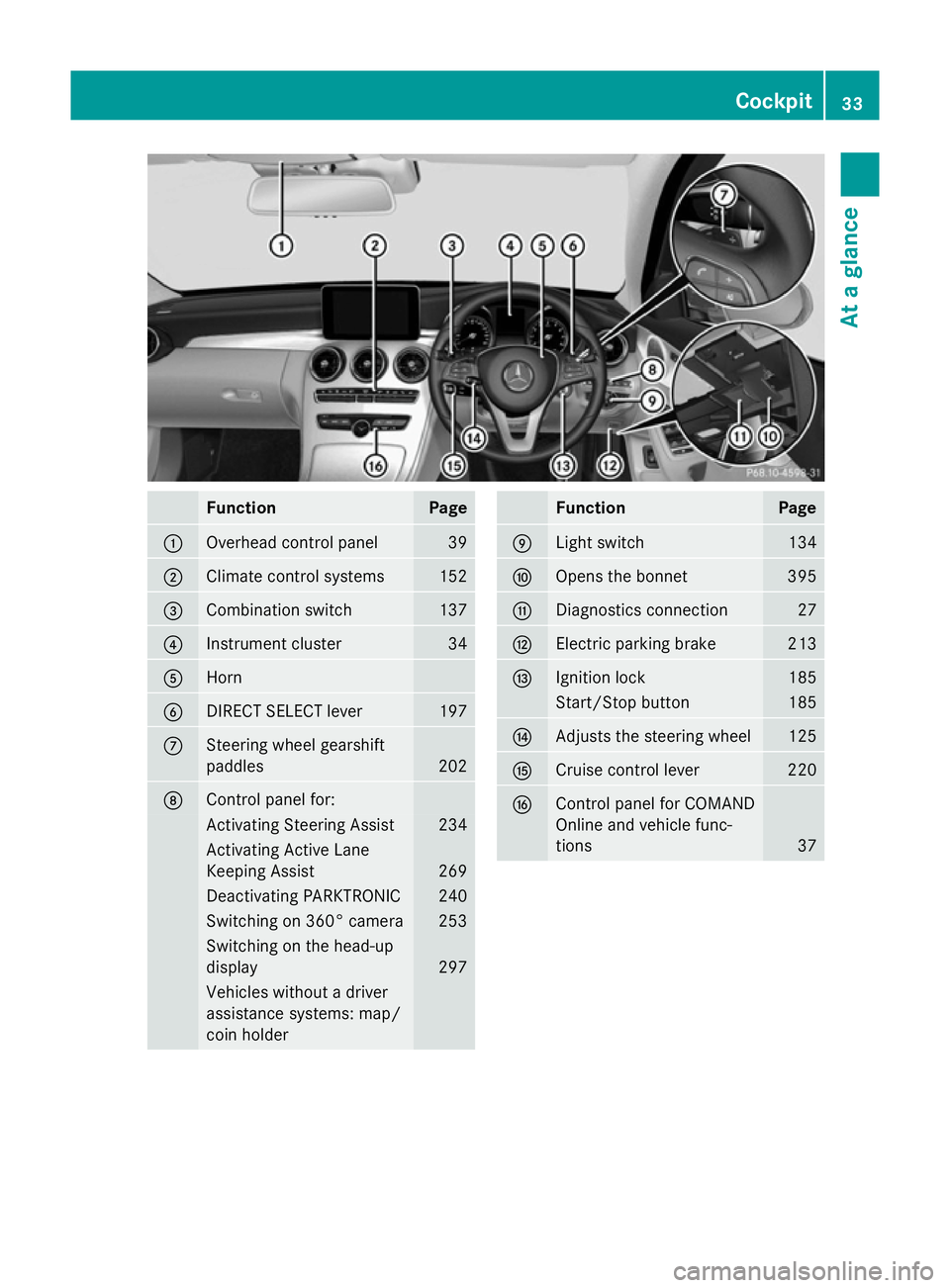
Function Page
:
Overhead control panel 39
;
Climate control systems 152
=
Combination switch 137
?
Instrument cluster 34
A
Horn
B
DIRECT SELECT lever 197
C
Steering wheel gearshift
paddles
202
D
Control panel for:
Activating Steering Assist 234
Activating Active Lane
Keeping Assist
269
Deactivating PARKTRONIC 240
Switching on 360° camera 253
Switching on the head-up
display
297
Vehicles without a driver
assistance systems: map/
coin holder Function Page
E
Light switch 134
F
Opens the bonnet 395
G
Diagnostics connection 27
H
Electric parking brake 213
I
Ignition lock 185
Start/Stop button 185
J
Adjusts the steering wheel 125
K
Cruise control lever 220
L
Control panel for COMAND
Online and vehicle func-
tions
37Cockpit
33At a glance
Page 38 of 489
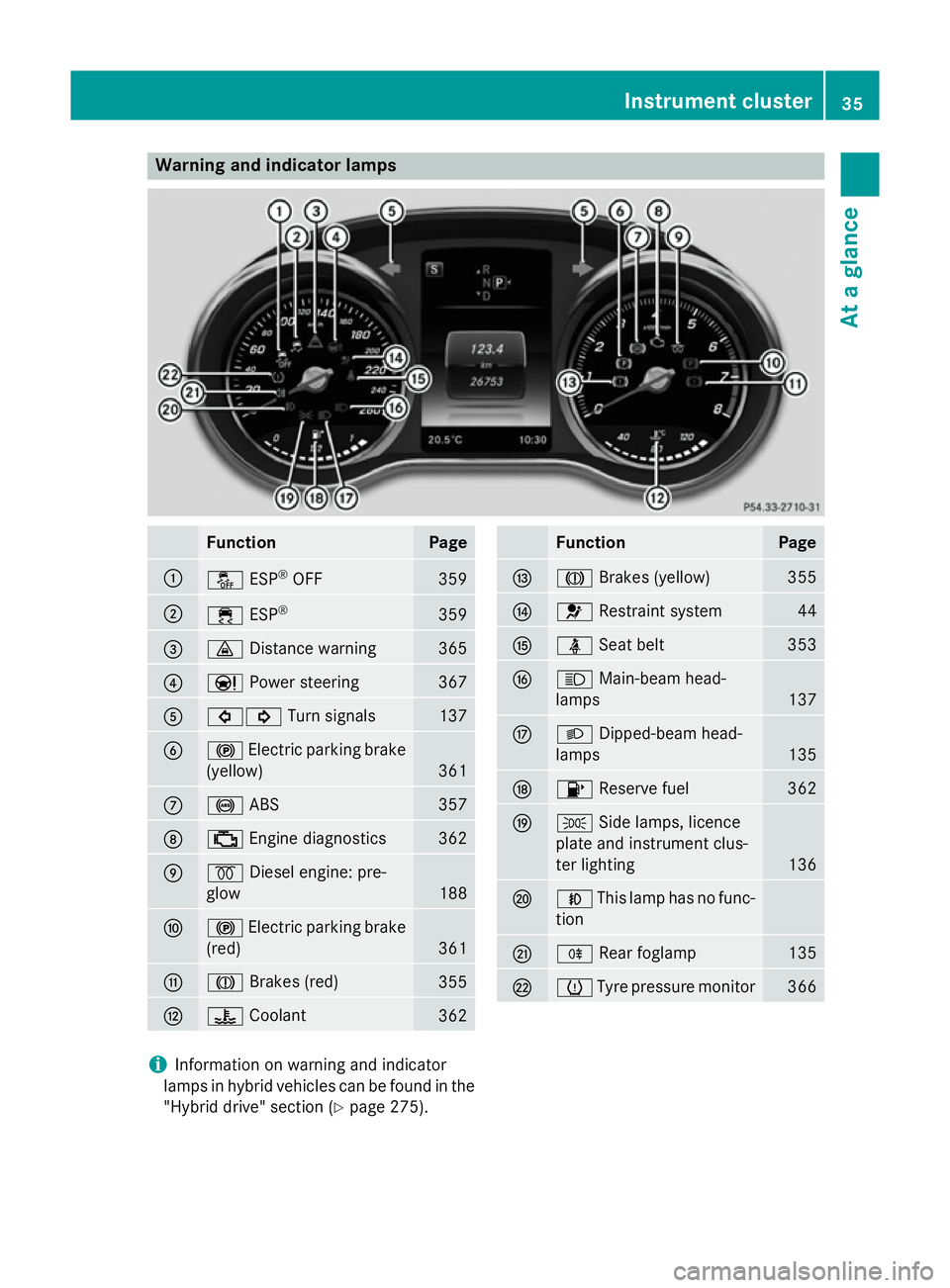
Warning and indicator lamps
Function Page
:
å
ESP®
OFF 359
;
÷
ESP® 359
=
·
Distance warning 365
?
Ð
Power steering 367
A
#!
Turn signals 137
B
!
Electric parking brake
(yellow) 361
C
!
ABS 357
D
;
Engine diagnostics 362
E
%
Diesel engine: pre-
glow 188
F
!
Electric parking brake
(red) 361
G
J
Brakes (red) 355
H
?
Coolant 362 Function Page
I
J
Brakes (yellow) 355
J
6
Restraint system 44
K
ü
Seat belt 353
L
K
Main-beam head-
lamps 137
M
L
Dipped-beam head-
lamps 135
N
8
Reserve fuel 362
O
T
Side lamps, licence
plate and instrument clus-
ter lighting 136
P
N
This lamp has no func-
tion Q
R
Rear foglamp 135
R
h
Tyre pressure monitor 366
i
Information on warning and indicator
lamps in hybrid vehicles can be found in the
"Hybrid drive" section (Y page 275). Instrument cluster
35At a glance
Page 41 of 489
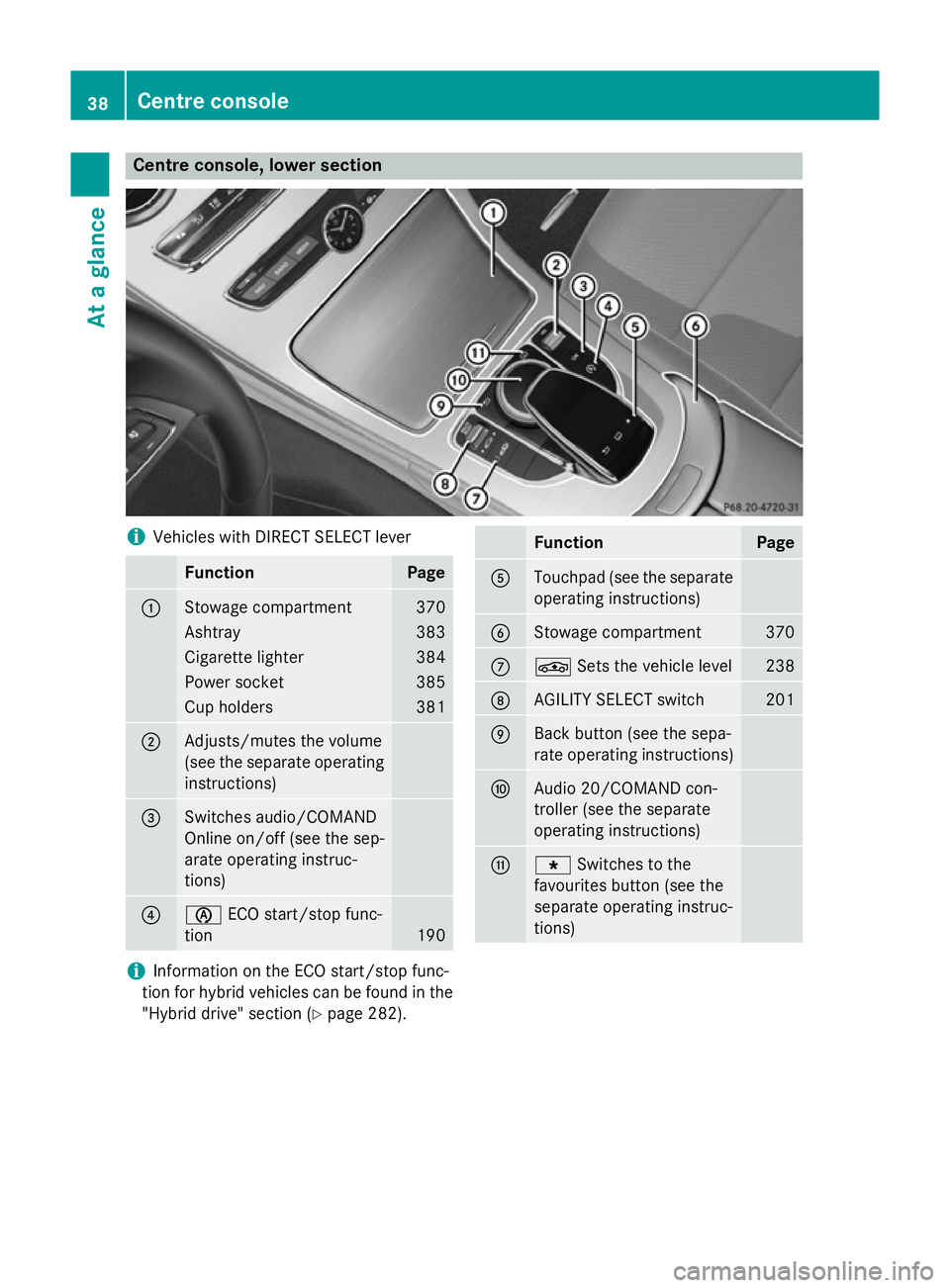
Centre console, lower section
i
Vehicles with DIRECT SELECT lever Function Page
:
Stowage compartment 370
Ashtray 383
Cigarette lighter 384
Power socket 385
Cup holders 381
;
Adjusts/mutes the volume
(see the separate operating
instructions) =
Switches audio/COMAND
Online on/off (see the sep-
arate operating instruc-
tions)
?
è
ECO start/stop func-
tion 190 Function Page
A
Touchpad (see the separate
operating instructions) B
Stowage compartment 370
C
É
Sets the vehicle level 238
D
AGILITY SELECT switch 201
E
Back button (see the sepa-
rate operating instructions)
F
Audio 20/COMAND con-
troller (see the separate
operating instructions)
G
g
Switches to the
favourites button (see the
separate operating instruc-
tions) i
Information on the ECO start/stop func-
tion for hybrid vehicles can be found in the "Hybrid drive" section (Y page 282).38
Centre consoleAt a glance
Page 42 of 489
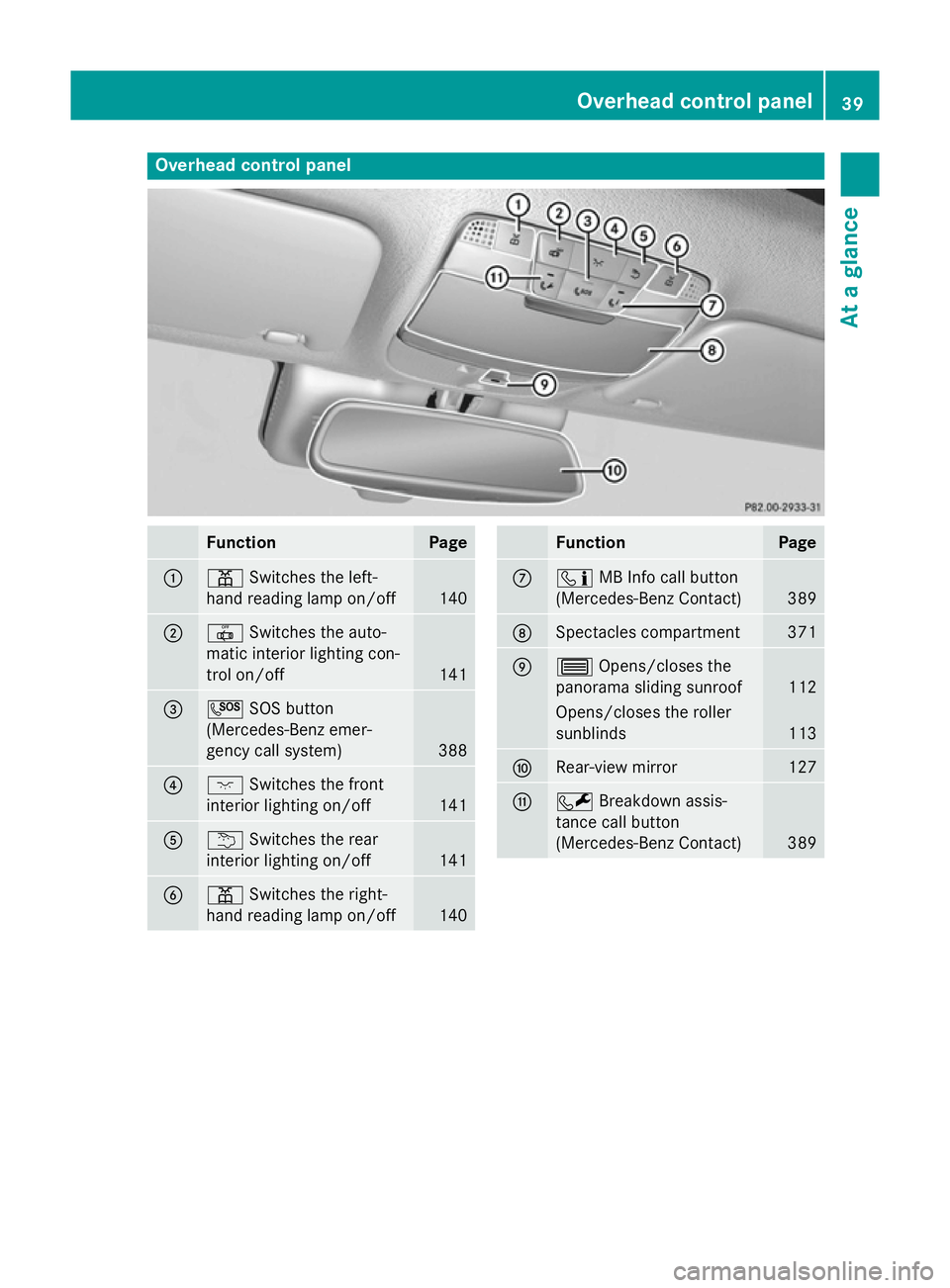
Overhead control panel
Function Page
:
p
Switches the left-
hand reading lamp on/off 140
;
|
Switches the auto-
matic interior lighting con-
trol on/off 141
=
G
SOS button
(Mercedes-Benz emer-
gency call system) 388
?
c
Switches the front
interior lighting on/off 141
A
u
Switches the rear
interior lighting on/off 141
B
p
Switches the right-
hand reading lamp on/off 140 Function Page
C
ï
MB Info call button
(Mercedes-Benz Contact) 389
D
Spectacles compartment 371
E
3
Opens/closes the
panorama sliding sunroof 112
Opens/closes the roller
sunblinds
113
F
Rear-view mirror 127
G
F
Breakdown assis-
tance call button
(Mercedes-Benz Contact) 389Overhead control panel
39At a glance