tailgate MERCEDES-BENZ C-CLASS ESTATE 2014 User Guide
[x] Cancel search | Manufacturer: MERCEDES-BENZ, Model Year: 2014, Model line: C-CLASS ESTATE, Model: MERCEDES-BENZ C-CLASS ESTATE 2014Pages: 489, PDF Size: 15.08 MB
Page 105 of 489
If someone is trapped:
R press the Fbutton on the key, or
R press the remote operating switch on the
driver’s door, or
R press the closing or locking button on the
tailgate or
R pull the handle on the tailgate.
Vehicles with HANDS-FREE ACCESS: it is
also possible to stop the closing process by
performing a kicking movement under the
rear bumper. Opening/closing from the outside
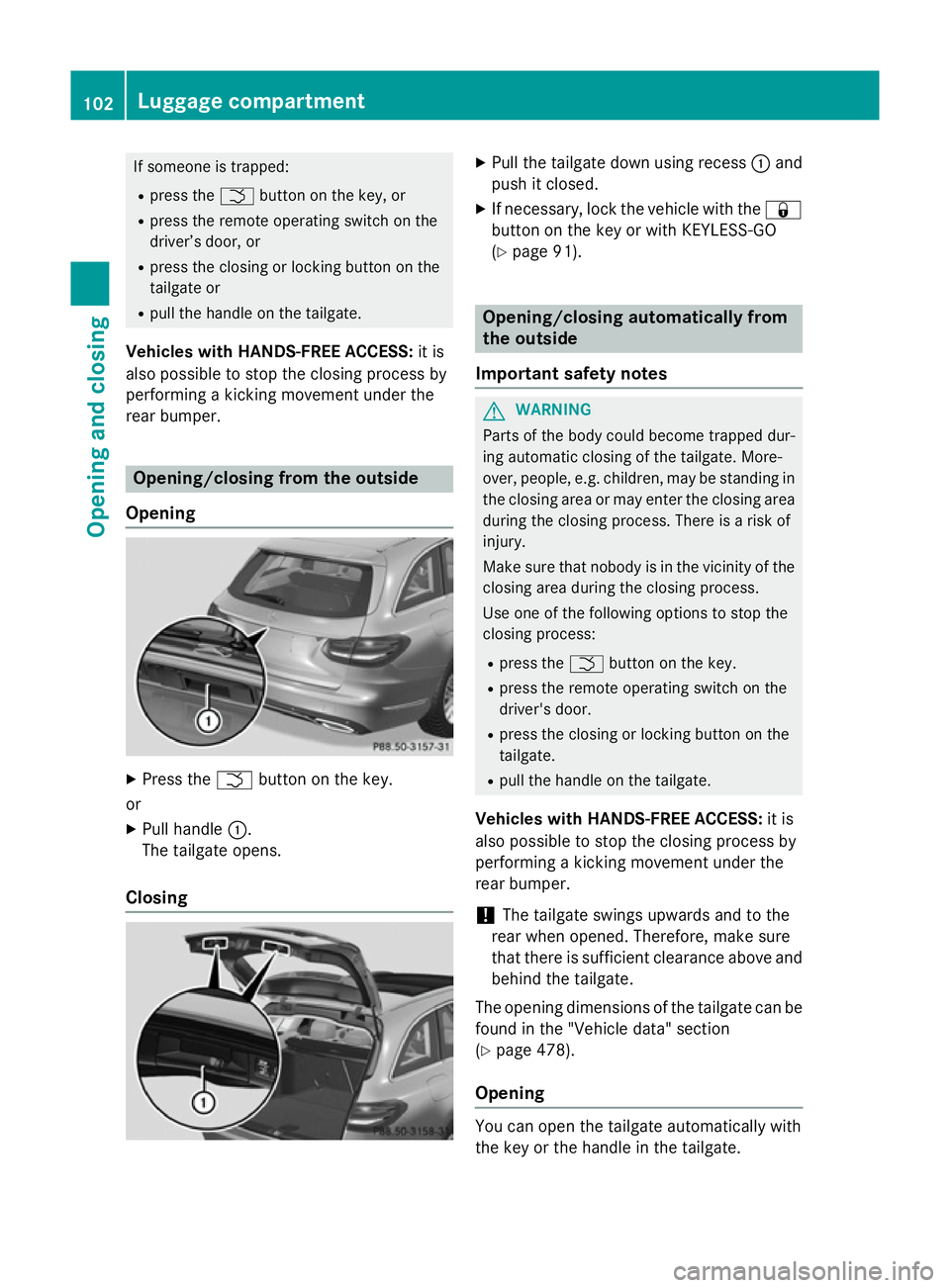
Opening X
Press the Fbutton on the key.
or X Pull handle :.
The tailgate opens.
Closing X
Pull the tailgate down using recess :and
push it closed.
X If necessary, lock the vehicle with the &
button on the key or with KEYLESS-GO
(Y page 91). Opening/closing automatically from
the outside
Important safety notes G
WARNING
Parts of the body could become trapped dur-
ing automatic closing of the tailgate. More-
over, people, e.g. children, may be standing in the closing area or may enter the closing area
during the closing process. There is a risk of
injury.
Make sure that nobody is in the vicinity of the closing area during the closing process.
Use one of the following options to stop the
closing process:
R press the Fbutton on the key.
R press the remote operating switch on the
driver's door.
R press the closing or locking button on the
tailgate.
R pull the handle on the tailgate.
Vehicles with HANDS-FREE ACCESS: it is
also possible to stop the closing process by
performing a kicking movement under the
rear bumper.
! The tailgate swings upwards and to the
rear when opened. Therefore, make sure
that there is sufficient clearance above and behind the tailgate.
The opening dimensions of the tailgate can be
found in the "Vehicle data" section
(Y page 478).
Opening You can open the tailgate automatically with
the key or the handle in the tailgate.102
Luggage compartmentOpening and closing
Page 106 of 489
X
Press and hold the Fbutton on the key
until the tailgate opens.
or X When the tailgate is unlocked, pull the han-
dle and let it go again immediately.
Closing X
If the key is located in the immediate vicin-
ity of the vehicle: press the Fbutton on
the key.
You can release the button as soon as the
tailgate starts to close.
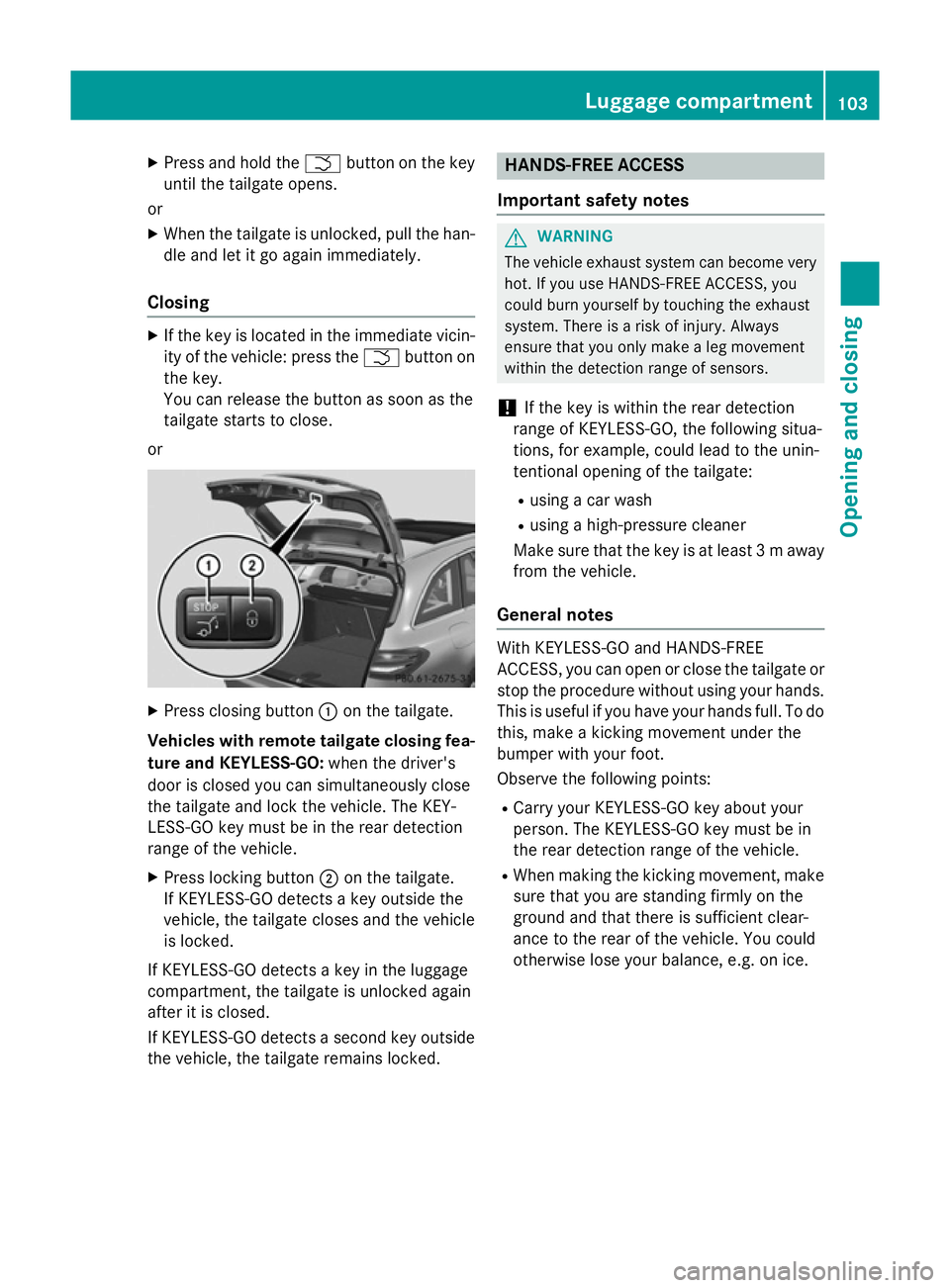
or X
Press closing button :on the tailgate.
Vehicles with remote tailgate closing fea- ture and KEYLESS-GO: when the driver's
door is closed you can simultaneously close
the tailgate and lock the vehicle. The KEY-
LESS-GO key must be in the rear detection
range of the vehicle.
X Press locking button ;on the tailgate.
If KEYLESS-GO detects a key outside the
vehicle, the tailgate closes and the vehicle
is locked.
If KEYLESS-GO detects a key in the luggage
compartment, the tailgate is unlocked again
after it is closed.
If KEYLESS-GO detects a second key outside
the vehicle, the tailgate remains locked. HANDS-FREE ACCESS
Important safety notes G
WARNING
The vehicle exhaust system can become very
hot. If you use HANDS-FREE ACCESS, you
could burn yourself by touching the exhaust
system. There is a risk of injury. Always
ensure that you only make a leg movement
within the detection range of sensors.
! If the key is within the rear detection
range of KEYLESS-GO, the following situa-
tions, for example, could lead to the unin-
tentional opening of the tailgate:
R using a car wash
R using a high-pressure cleaner
Make sure that the key is at least 3 maway
from the vehicle.
General notes With KEYLESS-GO and HANDS-FREE
ACCESS, you can open or close the tailgate or
stop the procedure without using your hands. This is useful if you have your hands full. To do
this, make a kicking movement under the
bumper with your foot.
Observe the following points:
R Carry your KEYLESS-GO key about your
person. The KEYLESS-GO key must be in
the rear detection range of the vehicle.
R When making the kicking movement, make
sure that you are standing firmly on the
ground and that there is sufficient clear-
ance to the rear of the vehicle. You could
otherwise lose your balance, e.g. on ice. Luggage compartment
103Opening and closing Z
Page 107 of 489
R
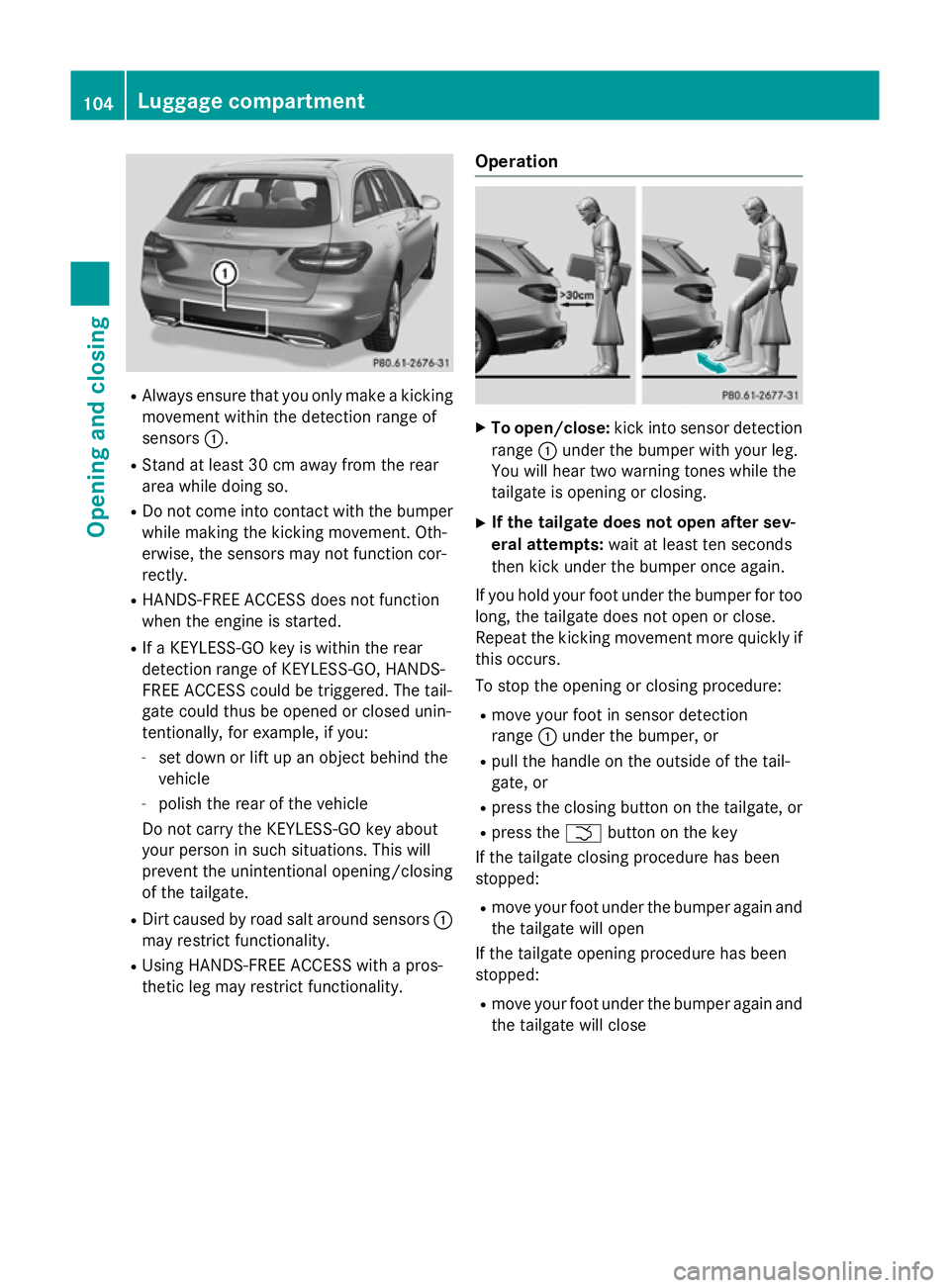
Always ensure that you only make a kicking
movement within the detection range of
sensors :.
R Stand at least 30 cm away from the rear
area while doing so.
R Do not come into contact with the bumper
while making the kicking movement. Oth-
erwise, the sensors may not function cor-
rectly.
R HANDS-FREE ACCESS does not function
when the engine is started.
R If a KEYLESS-GO key is within the rear
detection range of KEYLESS-GO, HANDS-
FREE ACCESS could be triggered. The tail-
gate could thus be opened or closed unin-
tentionally, for example, if you:
- set down or lift up an object behind the
vehicle
- polish the rear of the vehicle
Do not carry the KEYLESS-GO key about
your person in such situations. This will
prevent the unintentional opening/closing
of the tailgate.
R Dirt caused by road salt around sensors :
may restrict functionality.
R Using HANDS-FREE ACCESS with a pros-
thetic leg may restrict functionality. Operation X
To open/close: kick into sensor detection
range :under the bumper with your leg.
You will hear two warning tones while the
tailgate is opening or closing.
X If the tailgate does not open after sev-
eral attempts: wait at least ten seconds
then kick under the bumper once again.
If you hold your foot under the bumper for too
long, the tailgate does not open or close.
Repeat the kicking movement more quickly if
this occurs.
To stop the opening or closing procedure:
R move your foot in sensor detection
range :under the bumper, or
R pull the handle on the outside of the tail-
gate, or
R press the closing button on the tailgate, or
R press the Fbutton on the key
If the tailgate closing procedure has been
stopped:
R move your foot under the bumper again and
the tailgate will open
If the tailgate opening procedure has been
stopped:
R move your foot under the bumper again and
the tailgate will close 104
Luggage compartmentOpening and closing
Page 108 of 489
Opening/closing automatically from
the inside
Important safety notes G
WARNING
Parts of the body could become trapped dur-
ing automatic closing of the tailgate. More-
over, people, e.g. children, may be standing in the closing area or may enter the closing area
during the closing process. There is a risk of
injury.
Make sure that nobody is in the vicinity of the closing area during the closing process.
Use one of the following options to stop the
closing process:
R press the Fbutton on the key.
R press the remote operating switch on the
driver's door.
R press the closing or locking button on the
tailgate.
R pull the handle on the tailgate.
Vehicles with HANDS-FREE ACCESS: it is
also possible to stop the closing process by
performing a kicking movement under the
rear bumper.
! The tailgate swings upwards and to the
rear when opened. Therefore, make sure
that there is sufficient clearance above and behind the tailgate.
The opening dimensions of the tailgate can be
found in the "Vehicle data" section
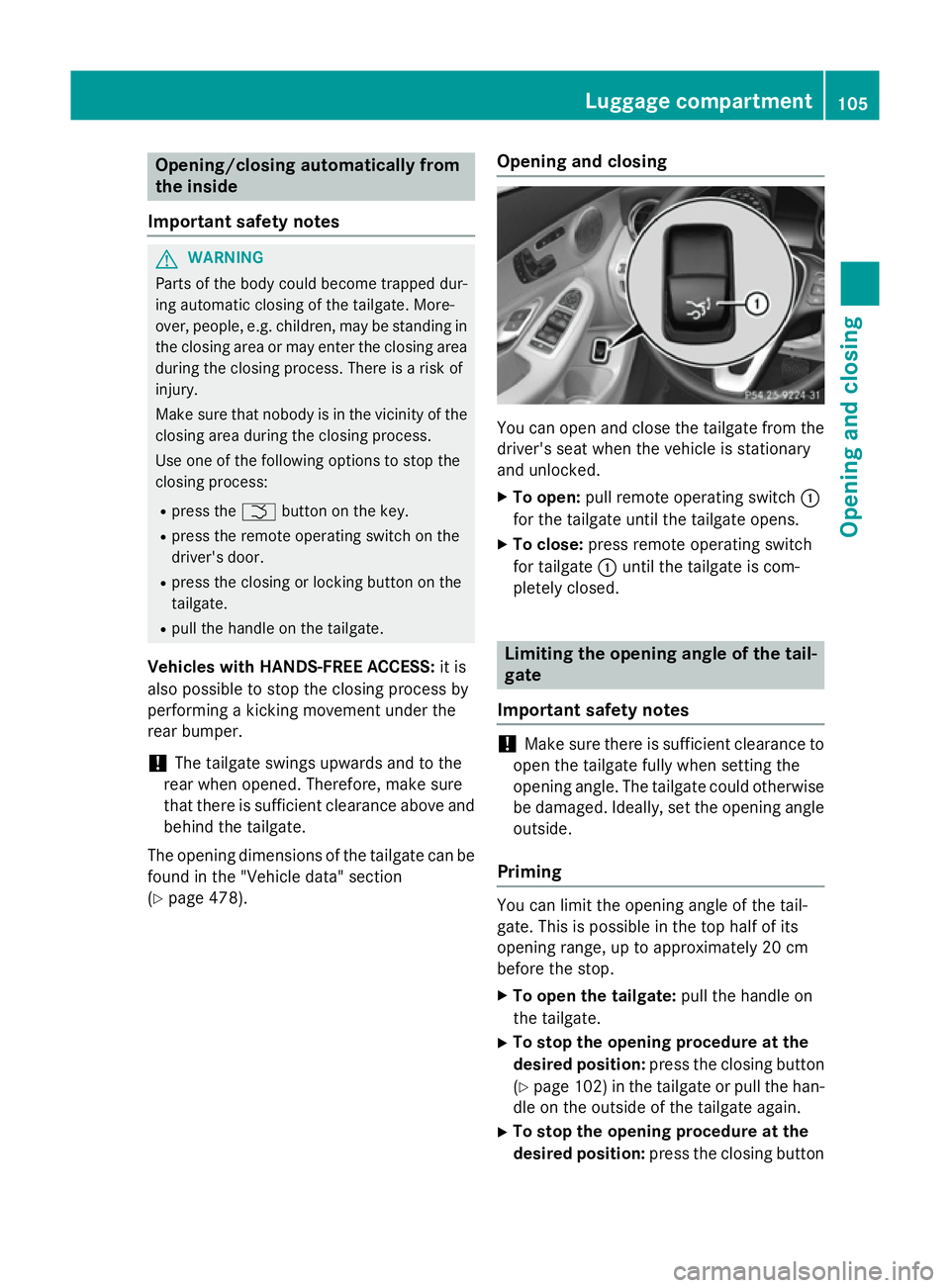
(Y page 478). Opening and closing You can open and close the tailgate from the
driver's seat when the vehicle is stationary
and unlocked.
X To open: pull remote operating switch :
for the tailgate until the tailgate opens.
X To close: press remote operating switch
for tailgate :until the tailgate is com-
pletely closed. Limiting the opening angle of the tail-
gate
Important safety notes !
Make sure there is sufficient clearance to
open the tailgate fully when setting the
opening angle. The tailgate could otherwise be damaged. Ideally, set the opening angleoutside.
Priming You can limit the opening angle of the tail-
gate. This is possible in the top half of its
opening range, up to approximately 20 cm
before the stop.
X To open the tailgate: pull the handle on
the tailgate.
X To stop the opening procedure at the
desired position: press the closing button
(Y page 102)i n the tailgate or pull the han-
dle on the outside of the tailgate again.
X To stop the opening procedure at the
desired position: press the closing button Luggage compartment
105Opening and closing Z
Page 109 of 489
(Y
page 102) in the tailgate or pull the han-
dle on the outside of the tailgate again.
X To store the position: press and hold the
closing button in the tailgate until you hear a short tone.
The opening angle limiter is activated. The
tailgate then stops in the stored position
when opened.
Switching off X
Press and hold the closing button
(Y page 102) in the tailgate until you hear
two short tones.
X Press and hold the closing button
(Y page 102) in the tailgate until you hear
two short tones. Emergency release
General notes !
The tailgate swings upwards and to the
rear when opened. Therefore, make sure
that there is sufficient clearance above and behind the tailgate.
The opening dimensions of the tailgate can be
found in the "Vehicle data" section
(Y page 478).
Use the emergency key element if the tailgate can no longer be unlocked:
R using the key
R using HANDS-FREE ACCESS
R using the remote operating switch in the
door control panel Opening X
Remove luggage compartment cover
(Y page 376).
X Fold the rear seat backrest forwards
(Y page 374).
X Take the emergency key element out of the
key (Y page 93).
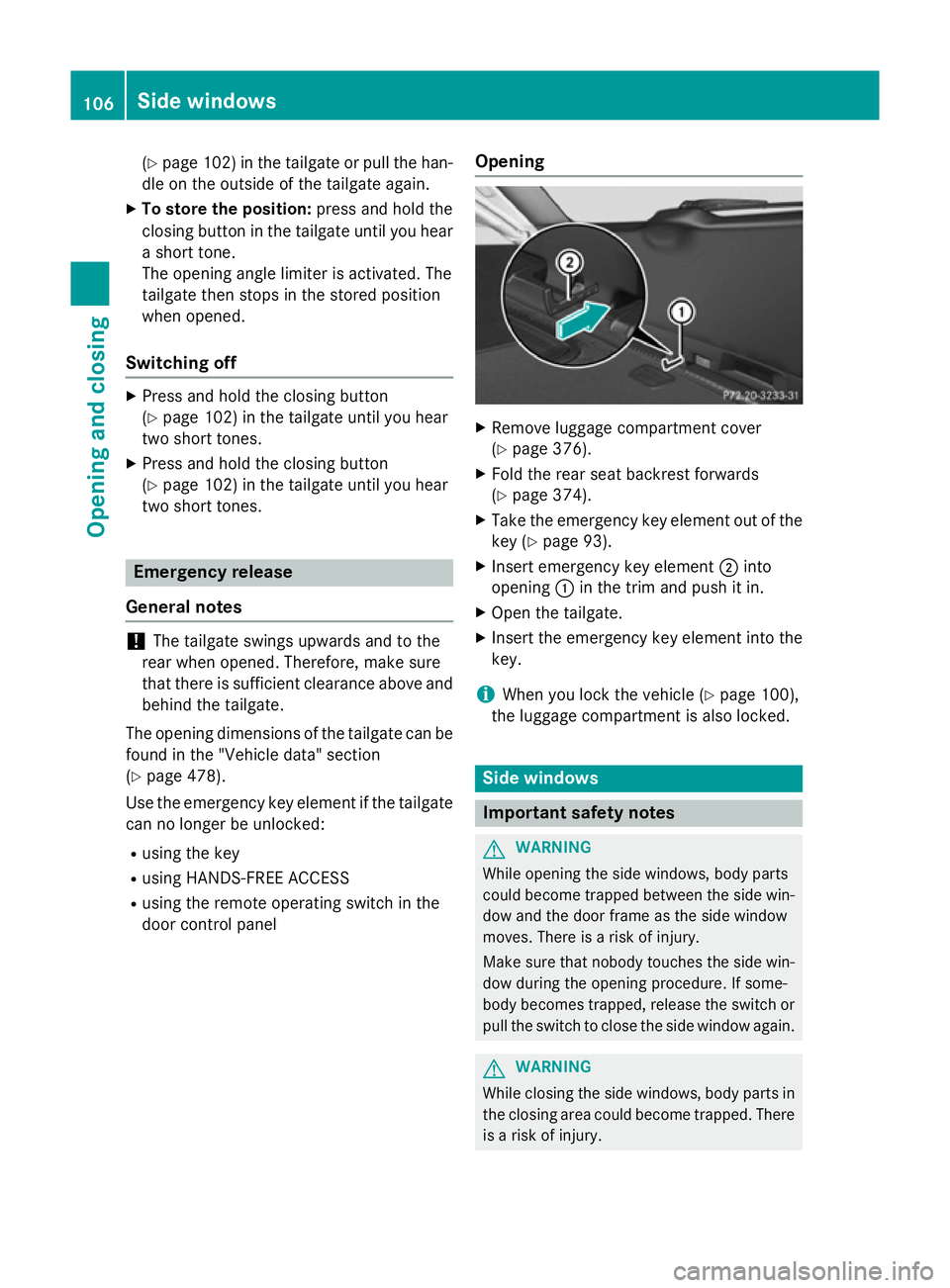
X Insert emergency key element ;into
opening :in the trim and push it in.
X Open the tailgate.
X Insert the emergency key element into the
key.
i When you lock the vehicle (Y
page 100),
the luggage compartment is also locked. Side windows
Important safety notes
G
WARNING
While opening the side windows, body parts
could become trapped between the side win- dow and the door frame as the side window
moves. There is a risk of injury.
Make sure that nobody touches the side win-
dow during the opening procedure. If some-
body becomes trapped, release the switch or pull the switch to close the side window again. G
WARNING
While closing the side windows, body parts in the closing area could become trapped. There is a risk of injury. 106
Side windowsOpening and closing
Page 147 of 489
Turn signals
X
Remove the cover in the front wheel arch
(Y page 143).
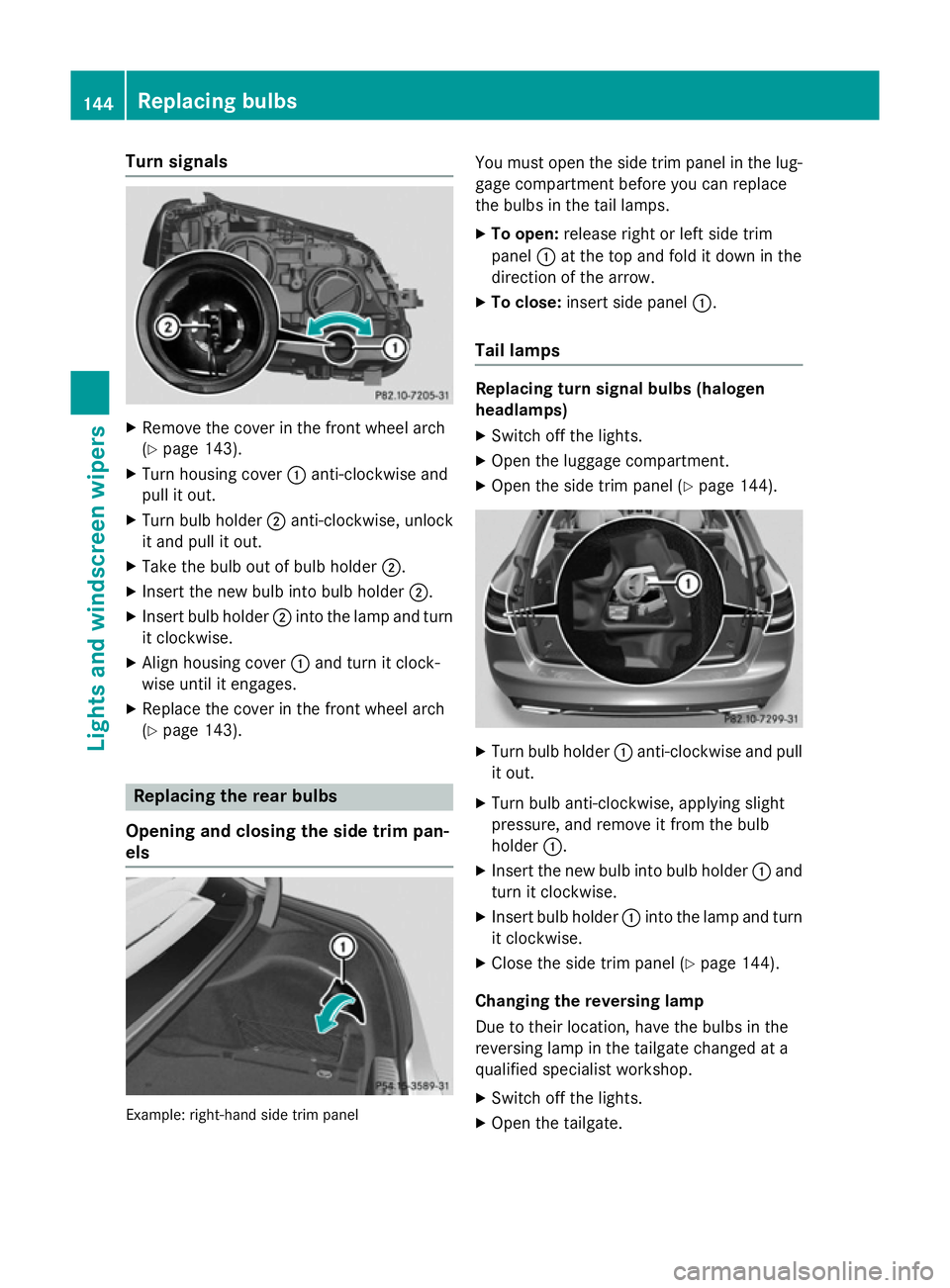
X Turn housing cover :anti-clockwise and
pull it out.
X Turn bulb holder ;anti-clockwise, unlock
it and pull it out.
X Take the bulb out of bulb holder ;.
X Insert the new bulb into bulb holder ;.
X Insert bulb holder ;into the lamp and turn
it clockwise.
X Align housing cover :and turn it clock-
wise until it engages.
X Replace the cover in the front wheel arch
(Y page 143). Replacing the rear bulbs
Opening and closing the side trim pan-
els Example: right-hand side trim panel You must open the side trim panel in the lug-
gage compartment before you can replace
the bulbs in the tail lamps.
X To open: release right or left side trim
panel :at the top and fold it down in the
direction of the arrow.
X To close: insert side panel :.
Tail lamps Replacing turn signal bulbs (halogen
headlamps)
X Switch off the lights.
X Open the luggage compartment.
X Open the side trim panel (Y page 144). X
Turn bulb holder :anti-clockwise and pull
it out.
X Turn bulb anti-clockwise, applying slight
pressure, and remove it from the bulb
holder :.
X Insert the new bulb into bulb holder :and
turn it clockwise.
X Insert bulb holder :into the lamp and turn
it clockwise.
X Close the side trim panel (Y page 144).
Changing the reversing lamp
Due to their location, have the bulbs in the
reversing lamp in the tailgate changed at a
qualified specialist workshop. X Switch off the lights.
X Open the tailgate. 144
Replacing bulbsLights and
windscreen wipers
Page 148 of 489
Example: right-hand side handle
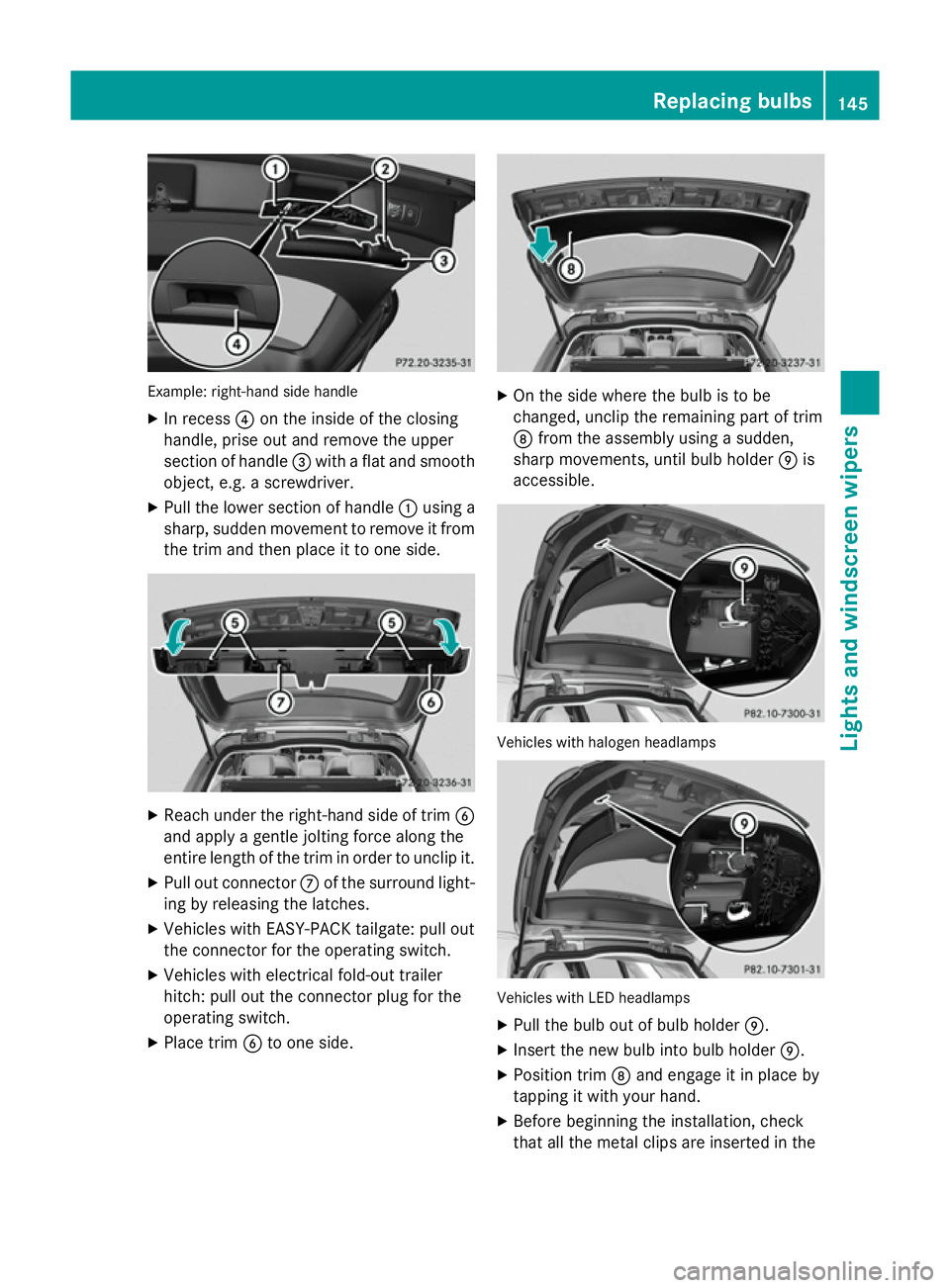
X In recess ?on the inside of the closing
handle, prise out and remove the upper
section of handle =with a flat and smooth
object, e.g. a screwdriver.
X Pull the lower section of handle :using a
sharp, sudden movement to remove it from the trim and then place it to one side. X
Reach under the right-hand side of trim B
and apply a gentle jolting force along the
entire length of the trim in order to unclip it.
X Pull out connector Cof the surround light-
ing by releasing the latches.
X Vehicles with EASY-PACK tailgate: pull out
the connector for the operating switch.
X Vehicles with electrical fold-out trailer
hitch: pull out the connector plug for the
operating switch.
X Place trim Bto one side. X
On the side where the bulb is to be
changed, unclip the remaining part of trim
D from the assembly using a sudden,
sharp movements, until bulb holder Eis
accessible. Vehicles with halogen headlamps
Vehicles with LED headlamps
X Pull the bulb out of bulb holder E.
X Insert the new bulb into bulb holder E.
X Position trim Dand engage it in place by
tapping it with your hand.
X Before beginning the installation, check
that all the metal clips are inserted in the Replacing bulbs
145Lights andwindscreen wipers Z
Page 149 of 489
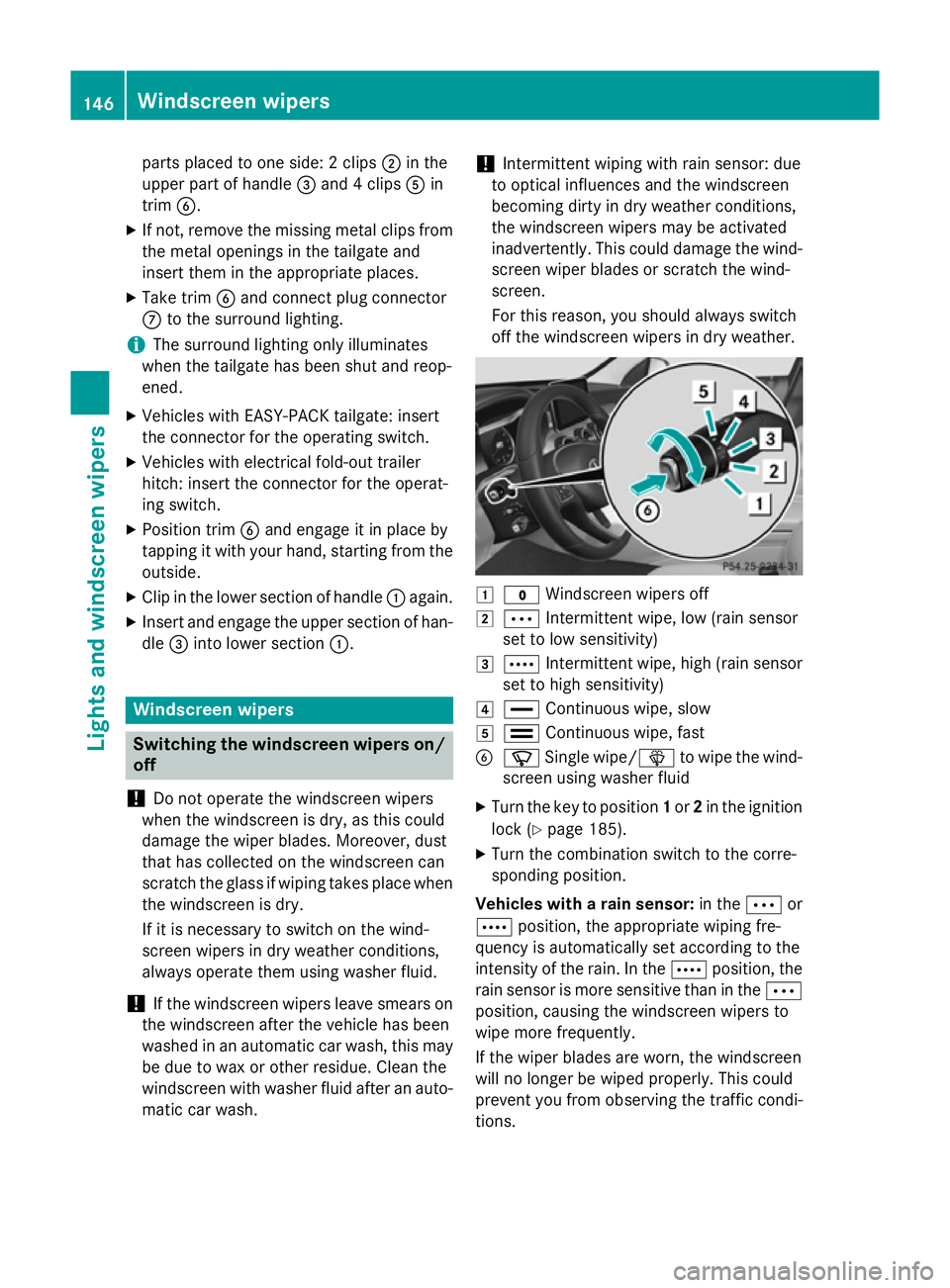
parts placed to one side: 2 clips
;in the
upper part of handle =and 4 clips Ain
trim B.
X If not, remove the missing metal clips from
the metal openings in the tailgate and
insert them in the appropriate places.
X Take trim Band connect plug connector
C to the surround lighting.
i The surround lighting only illuminates
when the tailgate has been shut and reop-
ened.
X Vehicles with EASY-PACK tailgate: insert
the connector for the operating switch.
X Vehicles with electrical fold-out trailer
hitch: insert the connector for the operat-
ing switch.
X Position trim Band engage it in place by
tapping it with your hand, starting from the outside.
X Clip in the lower section of handle :again.
X Insert and engage the upper section of han-
dle =into lower section :.Windscreen wipers
Switching the windscreen wipers on/
off
! Do not operate the windscreen wipers
when the windscreen is dry, as this could
damage the wiper blades. Moreover, dust
that has collected on the windscreen can
scratch the glass if wiping takes place when the windscreen is dry.
If it is necessary to switch on the wind-
screen wipers in dry weather conditions,
always operate them using washer fluid.
! If the windscreen wipers leave smears on
the windscreen after the vehicle has been
washed in an automatic car wash, this may
be due to wax or other residue. Clean the
windscreen with washer fluid after an auto- matic car wash. !
Intermittent wiping with rain sensor: due
to optical influences and the windscreen
becoming dirty in dry weather conditions,
the windscreen wipers may be activated
inadvertently. This could damage the wind- screen wiper blades or scratch the wind-
screen.
For this reason, you should always switch
off the windscreen wipers in dry weather. 1
$ Windscreen wipers off
2 Ä Intermittent wipe, low (rain sensor
set to low sensitivity)
3 Å Intermittent wipe, high (rain sensor
set to high sensitivity)
4 ° Continuous wipe, slow
5 ¯ Continuous wipe, fast
B í Single wipe/ îto wipe the wind-
screen using washer fluid
X Turn the key to position 1or 2in the ignition
lock (Y page 185).
X Turn the combination switch to the corre-
sponding position.
Vehicles with a rain sensor: in theÄor
Å position, the appropriate wiping fre-
quency is automatically set according to the
intensity of the rain. In the Åposition, the
rain sensor is more sensitive than in the Ä
position, causing the windscreen wipers to
wipe more frequently.
If the wiper blades are worn, the windscreen
will no longer be wiped properly. This could
prevent you from observing the traffic condi-
tions. 146
Windscreen wipersLights and windscreen wipers
Page 150 of 489
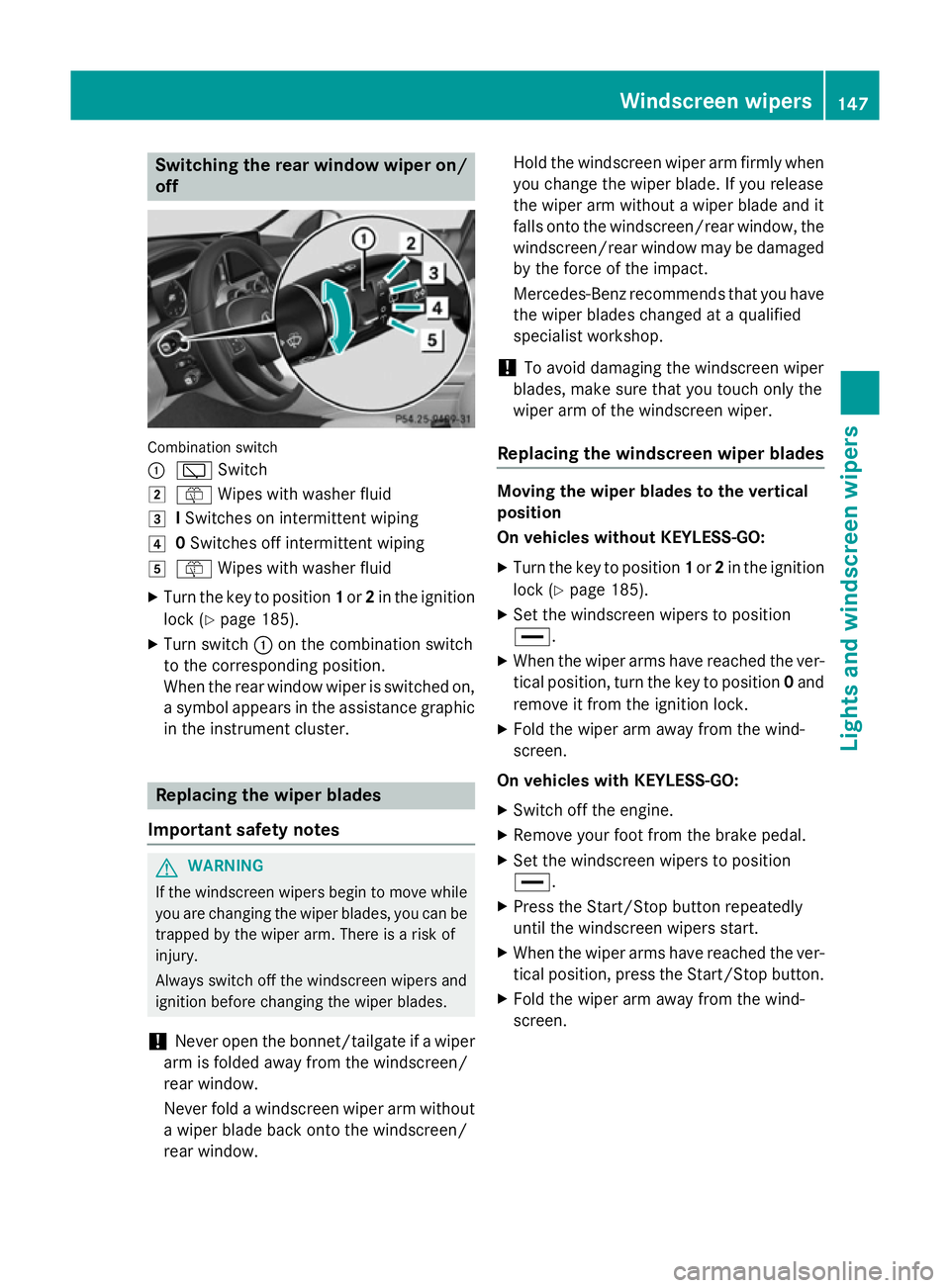
Switching the rear window wiper on/
off Combination switch
:
è Switch
2 ô Wipes with washer fluid
3 ISwitches on intermittent wiping
4 0Switches off intermittent wiping
5 ô Wipes with washer fluid
X Turn the key to position 1or 2in the ignition
lock (Y page 185).
X Turn switch :on the combination switch
to the corresponding position.
When the rear window wiper is switched on,
a symbol appears in the assistance graphic
in the instrument cluster. Replacing the wiper blades
Important safety notes G
WARNING
If the windscreen wipers begin to move while
you are changing the wiper blades, you can be trapped by the wiper arm. There is a risk of
injury.
Always switch off the windscreen wipers and
ignition before changing the wiper blades.
! Never open the bonnet/tailgate if a wiper
arm is folded away from the windscreen/
rear window.
Never fold a windscreen wiper arm without a wiper blade back onto the windscreen/
rear window. Hold the windscreen wiper arm firmly when
you change the wiper blade. If you release
the wiper arm without a wiper blade and it
falls onto the windscreen/rear window, the windscreen/rear window may be damaged
by the force of the impact.
Mercedes-Benz recommends that you have the wiper blades changed at a qualified
specialist workshop.
! To avoid damaging the windscreen wiper
blades, make sure that you touch only the
wiper arm of the windscreen wiper.
Replacing the windscreen wiper blades Moving the wiper blades to the vertical
position
On vehicles without KEYLESS-GO:
X Turn the key to position 1or 2in the ignition
lock (Y page 185).
X Set the windscreen wipers to position
°.
X When the wiper arms have reached the ver-
tical position, turn the key to position 0and
remove it from the ignition lock.
X Fold the wiper arm away from the wind-
screen.
On vehicles with KEYLESS-GO:
X Switch off the engine.
X Remove your foot from the brake pedal.
X Set the windscreen wipers to position
°.
X Press the Start/Stop button repeatedly
until the windscreen wipers start.
X When the wiper arms have reached the ver-
tical position, press the Start/Stop button.
X Fold the wiper arm away from the wind-
screen. Windscreen wipers
147Lights and windscreen wipers Z
Page 251 of 489
appears in the multifunction display. You will
then have to steer and merge into traffic on
your own. PARKTRONIC is still available. You
can take over the steering before the vehicle has exited the parking space completely. This is useful, for example when you recognise
that it is already possible to pull out of the
parking space.
Cancelling Active Parking Assist X
Stop the movement of the multifunction
steering wheel or steer yourself.
Active Parking Assist will be cancelled at
once. The Park Assist cancelled
Park Assist cancelled mes-
sage appears in the multifunction display.
or
X Press the PARKTRONIC button
(Y page 242).
PARKTRONIC is switched off and Active
Parking Assist is immediately cancelled.
The Park Assist cancelled Park Assist cancelled message
appears in the multifunction display.
Active Parking Assist is cancelled automati-
cally if:
R the electric parking brake is applied
R transmission position Pis selected in vehi-
cles with automatic transmission
R parking using Active Parking Assist is no
longer possible
R you are driving faster than 10 km/h
R a wheel spins and ESP ®
intervenes or fails.
The ÷ warning lamp lights up in the
instrument cluster.
A warning tone sounds. The parking symbol
disappears and the multifunction display
shows the Park Assist cancelled
Park Assist cancelled mes-
sage.
When Active Parking Assist is cancelled, you
must steer and brake again yourself.
If a system malfunction occurs, the vehicle is braked to a standstill. To drive on, depress the
accelerator pedal again. Reversing camera
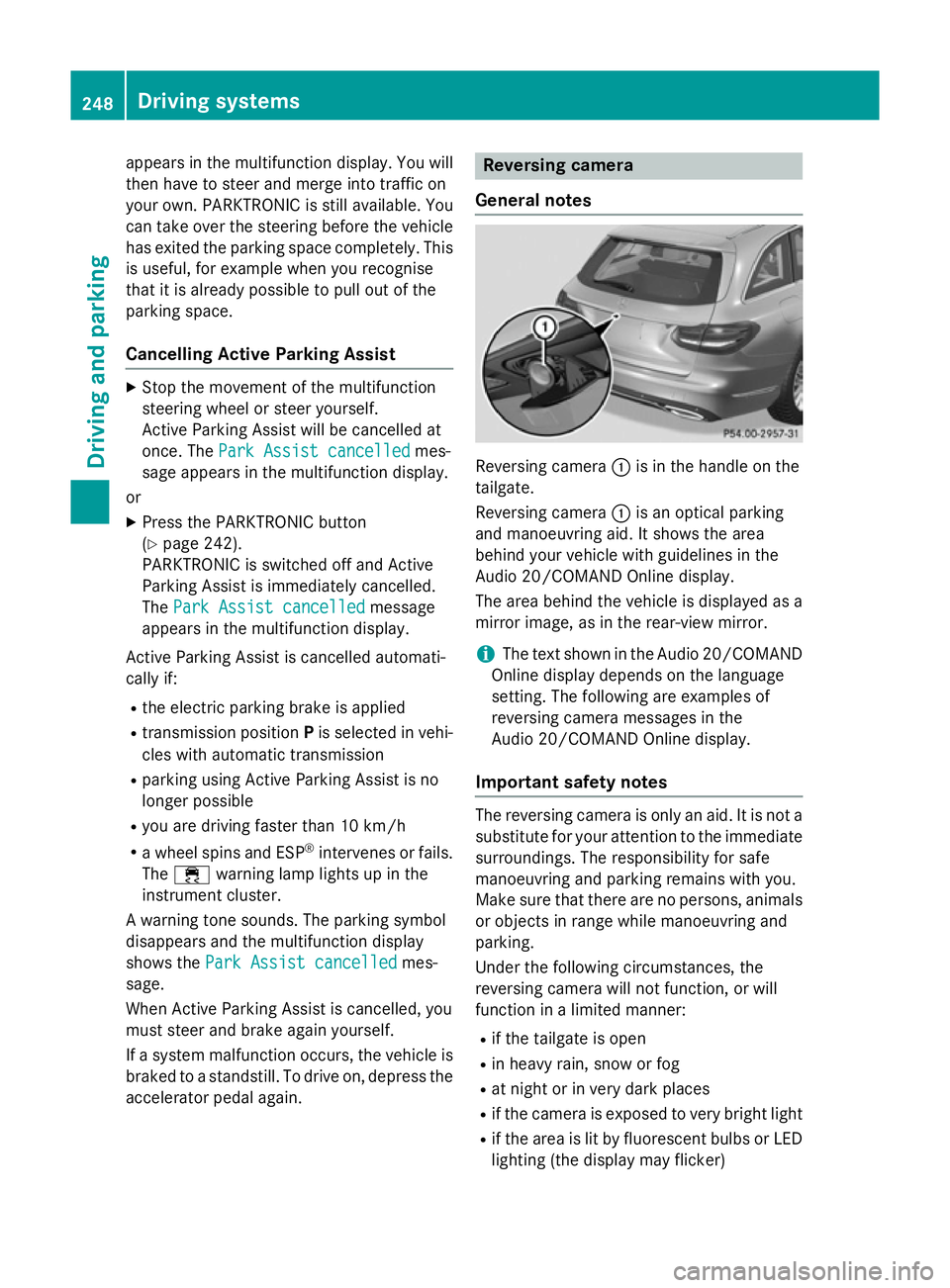
General notes Reversing camera
:is in the handle on the
tailgate.
Reversing camera :is an optical parking
and manoeuvring aid. It shows the area
behind your vehicle with guidelines in the
Audio 20/COMAND Online display.
The area behind the vehicle is displayed as a
mirror image, as in the rear-view mirror.
i The text shown in the Audio 20/COMAND
Online display depends on the language
setting. The following are examples of
reversing camera messages in the
Audio 20/COMAND Online display.
Important safety notes The reversing camera is only an aid. It is not a
substitute for your attention to the immediate surroundings. The responsibility for safe
manoeuvring and parking remains with you.
Make sure that there are no persons, animals
or objects in range while manoeuvring and
parking.
Under the following circumstances, the
reversing camera will not function, or will
function in a limited manner:
R if the tailgate is open
R in heavy rain, snow or fog
R at night or in very dark places
R if the camera is exposed to very bright light
R if the area is lit by fluorescent bulbs or LED
lighting (the display may flicker) 248
Driving systemsDriving and parking