light MERCEDES-BENZ C-CLASS SALOON 2007 Owner's Manual
[x] Cancel search | Manufacturer: MERCEDES-BENZ, Model Year: 2007, Model line: C-CLASS SALOON, Model: MERCEDES-BENZ C-CLASS SALOON 2007Pages: 377, PDF Size: 6.19 MB
Page 70 of 377
Driving safety sys
tems 67vehicle is in motion, injuring themselves
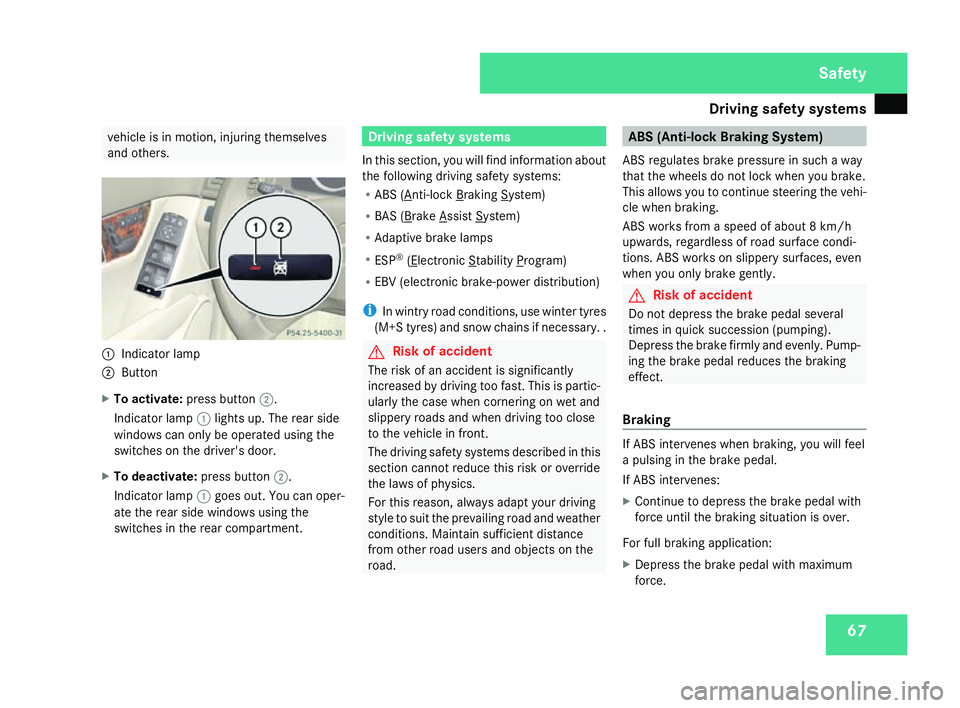
and others . 1
Indicator lamp
2 Button
X To activate :press button 2.
Indicator lamp 1lights up. The rear side
windows can only be operated using the
switches on the driver's door.
X To deactivate :press button 2.
Indicator lamp 1goes out. You can oper-
ate the rear side windows using the
switches in the rear compartment. Driving safety systems
In this section, you will find information about
the following driving safety systems:
R ABS ( Anti-lock Braking System)
R BAS ( Brake Assist System)
R Adaptive brake lamps
R ESP ®
( Electronic Stability Program)
R EBV (electronic brake-power distribution)
i In wintry road conditions, use winter tyres
(M+S tyres) and snow chains if necessary. . G
Risk of accident
The risk of an accident is significantl y
increased by driving too fast. This is partic-
ularly the case when cornering on wet and
slippery roads and when driving too clos e
to the vehicle in front.
The driving safety systems described in thi s
section cannot reduce this risk or override
the laws of physics.
For this reason, always adapt your driving
style to suit the prevailing road and weather
conditions. Maintain sufficient distance
from other road users and objects on the
road. ABS (Anti-lock Braking System)
ABS regulates brake pressure in such a way
that the wheels do not lock when you brake.
This allows you to continue steering the vehi-
cle when braking.
ABS works from a speed of about 8 km/h
upwards, regardless of road surface condi-
tions. ABS works on slippery surfaces, even
when you only brake gently. G
Risk of accident
Do not depress the brake pedal severa l
times in quick succession (pumping) .
Depress the brake firmly and evenly. Pump-
ing the brake pedal reduces the braking
effect.
Braking If ABS intervenes when braking, you will fee
l
a pulsing in the brake pedal.
If ABS intervenes:
X Continue to depress the brake pedal wit h
force until the braking situation is over.
For full braking application:
X Depress the brake pedal with maximum
force. Safety
204_AKB; 2; 3, en-G
B
mkalafa , 2007-06-26T23:11:51+02:00 - Seite 67
Page 71 of 377
Driving safety sys
tems68 G
Risk of accident
If ABS is faulty, the wheels could lock when
braking. This limits the steerability of the
vehicle when braking and the braking dis-
tance may increase.
If ABS is deactivated due to a malfunction,
then BAS and ESP are also deactivated. BAS (Brake Assist)
BAS operates in emergency braking situa-
tions. If you depress the brake pedal quickly,
BAS automatically boosts the braking force ,
thus shortening the stopping distance.
X Keep the brake pedal firmly depressed until
the emergency braking situation is over.
ABS prevents the wheels from locking.
The brakes will function as usual once you
release the brake pedal. BAS is deactivated. G
Risk of accident
If BAS has malfunctioned, the braking sys-
tem remains available with full brake boost-
ing effect. However, braking force is not
automatically increased in emergency
braking situations and the stopping dis-
tance may increase. Adaptive brake lamps
i Adaptive brake lamps are only available in
certain countries.
If you brake sharply from a speed of mor e
than 50 km/h or if braking is assisted by BAS,
the brake lamps flash rapidly. In this way,
traffic travelling behind you is warned in an
even more noticeable manner .
If you brake from a speed of more than
70 km/h and bring the vehicle to a halt, the
hazard warning lamps switch on automati-
cally once the vehicle is stationary and the
brake lamps light up constantly if you depres s
the brake pedal again. The hazard warning
lamps switch off automatically if you travel
faster than 10 km/h again. ES
P®
(Electronic Stability Program)
ES P®
monitors driving stability and traction,
i.e. power transmission between the tyres
and the road surface.
If ESP ®
detects that the vehicle is deviatin g
from the direction desired by the driver, one
or more wheels are braked to stabilise the
vehicle. The engine output is also modified, if
necessary, to keep the vehicle on the desired
course within the laws of physics. ESP assists
the driver when pulling away on wet or slip-
pery roads. ESP ®
can also stabilise the vehi-
cle during braking.
When ESP ®
intervenes, the vwarning
lamp flashes in the instrument cluster. G
Risk of accident
If the v warning lamp in the instrumen t
cluster flashes, proceed as follows:
R Do not deactivate ESP ®
under any cir -
cumstances .
R Only depress the accelerator pedal as far
as necessary when pulling away.
R Adapt your driving style to suit the pre -
vailing road and weather conditions.
The vehicle could otherwise go into a skid. Safety
204_AKB; 2; 3, en-GB
mkalafa,
2007-06-26T23:11:51+02:00 - Seite 68
Page 73 of 377
Anti-theft syste
ms70
i
If ESP ®
is deactivated and one or mor e
wheels start to spin, the vwarning lamp
in the instrument cluster flashes. ES P®
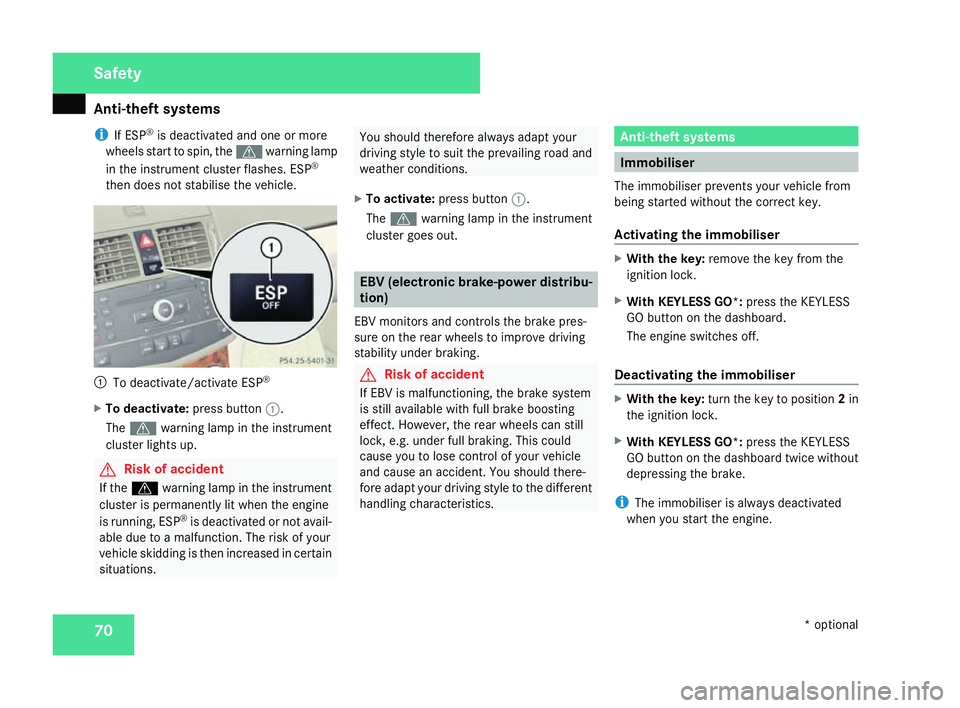
then does not stabilise the vehicle. 1
To deactivate/activate ESP ®
X To deactivate :press button 1.
The v warning lamp in the instrumen t
cluster lights up . G
Risk of accident
If the v warning lamp in the instrumen t
cluster is permanently lit when the engine
is running, ESP ®
is deactivated or not avail-
able due to a malfunction. The risk of your
vehicle skidding is then increased in certain
situations. You should therefore always adapt your
driving style to suit the prevailing road and
weather conditions.
X To activate :press button 1.
The v warning lamp in the instrumen t
cluster goes out. EBV (electronic brake-power distribu-
tion)
EBV monitors and controls the brake pres-
sure on the rear wheels to improve driving
stability under braking. G
Risk of accident
If EBV is malfunctioning, the brake system
is still available with full brake boosting
effect. However, the rear wheels can stil l
lock, e.g. under full braking. This could
cause you to lose control of your vehicle
and cause an accident. You should there-
fore adapt your driving style to the differen t
handling characteristics. Anti-theft systems
Immobiliser
The immobiliser prevents your vehicle from
being started without the correct key.
Activating the immobiliser X
With the key: remove the key from the
ignition lock.
X With KEYLESS GO*: press the KEYLESS
GO button on the dashboard.
The engine switches off.
Deactivating the immobiliser X
With the key: turn the key to position 2in
the ignition lock .
X With KEYLESS GO*: press the KEYLESS
GO button on the dashboard twice without
depressing the brake.
i The immobiliser is always deactivated
when you start the engine. Safety
* optional
204_AKB; 2; 3, en-GB
mkalafa,
2007-06-26T23:11:51+02:00 - Seite 70
Page 75 of 377
Anti-theft syste
ms72
Deactivate tow-away protection manually if
your vehicle:
R is being transported
R is being loaded, e.g. onto a ferry or car
transporter
R is being parked on a movable surface, e.g.
split-level garages
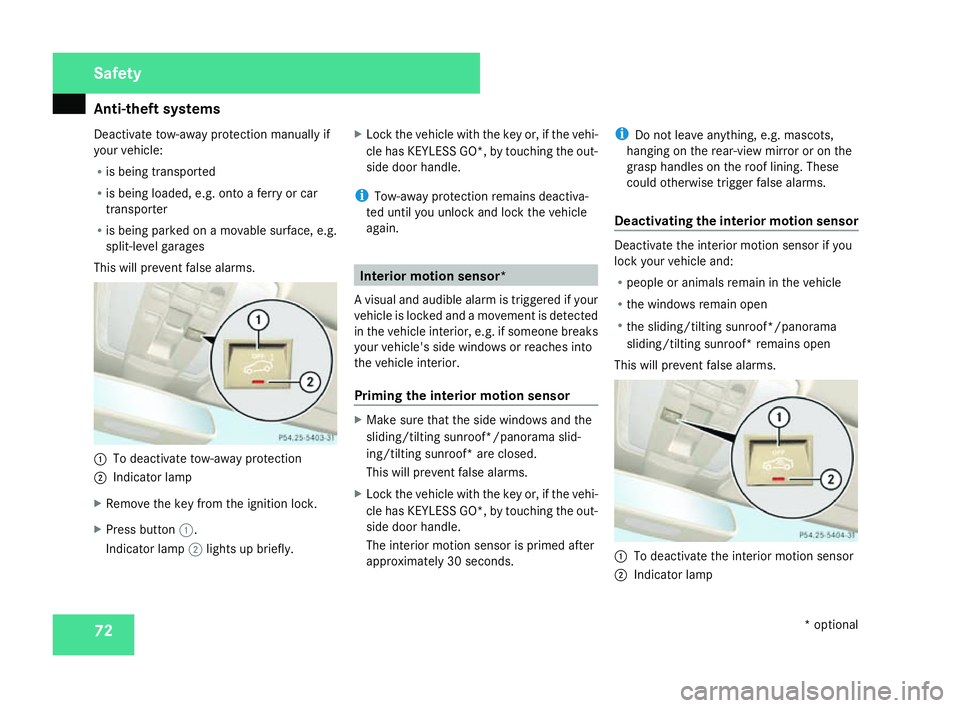
This will prevent false alarms. 1
To deactivate tow-away protection
2 Indicator lamp
X Remove the key from the ignition lock.
X Press button 1.
Indicator lamp 2lights up briefly. X
Lock the vehicle with the key or, if the vehi-
cle has KEYLESS GO*, by touching the out-
side door handle .
i Tow-away protection remains deactiva-
ted until you unlock and lock the vehicle
again. Interior motion sensor*
A visual and audible alarm is triggered if your
vehicle is locked and a movement is detected
in the vehicle interior, e.g. if someone breaks
your vehicle's side windows or reaches into
the vehicle interior.
Priming the interior motion sensor X
Make sure that the side windows and the
sliding/tilting sunroof*/panorama slid-
ing/tilting sunroof* are closed.
This will prevent false alarms.
X Lock the vehicle with the key or, if the vehi-
cle has KEYLESS GO*, by touching the out-
side door handle .
The interior motion sensor is primed after
approximately 30 seconds. i
Do not leave anything, e.g. mascots,
hanging on the rear-view mirror or on the
grasp handles on the roof lining. Thes e
could otherwise trigger false alarms.
Deactivating the interior motion senso r Deactivate the interior motion sensor if yo
u
lock your vehicle and:
R people or animals remain in the vehicle
R the windows remain open
R the sliding/tilting sunroof*/panorama
sliding/tilting sunroof* remains open
This will prevent false alarms. 1
To deactivate the interior motion sensor
2 Indicator lamp Safety
* optional
204_AKB; 2; 3, en-GB
mkalafa
, 2007-06-26T23:11:51+02:00 - Seite 72
Page 78 of 377
75
Opening and closing
...........................76
Key positions ...................................... .85
Seats .................................................... 86
Steering wheel .................................... 92
Mirrors ................................................. 93
Memory functions* .............................96
Seat belts ............................................ .98
Lights ................................................. 102
Windscreen wipers ...........................108
Side windows .................................... 110
Driving and parking ..........................113
Transmission ..................................... 117Instrument cluster
............................123
On-board computer (vehicles with
multi-function steering wheel, 4
buttons) ............................................. 125
On-board computer (vehicles with
the luxury multi-function steering
wheel*, 12 buttons) ..........................129
Driving systems ................................ 145
Air vents ............................................ 156
Thermatic .......................................... 158
Thermotronic* ................................... 165
Rear window heating ........................173
Sliding sunroof .................................. 173
Loading and stowing ........................179
Features ............................................. 195 Controls
204_AKB; 2; 3, en-GB
mkalafa,
2007-06-26T23:11:51+02:00 - Seite 75
Page 79 of 377
Opening and closing
76 Opening and closing
Key
The vehicle's equipment includes two keys
with remote control. Each key contains an
emergency key element .
The key is configured at the factory to cen-
trally lock and unlock the following:
R The doors
R The boot lid/tailgate
R The fuel filler flap G
Risk of accident
Never leave children unsupervised in the
vehicle. They could open even a locked
door from the inside or start the vehicle if
the key is left in it and thereby endanger
themselves and others. You should there -
fore take the key with you when leaving the
vehicle, even if you are only leaving it for a
short time. 1
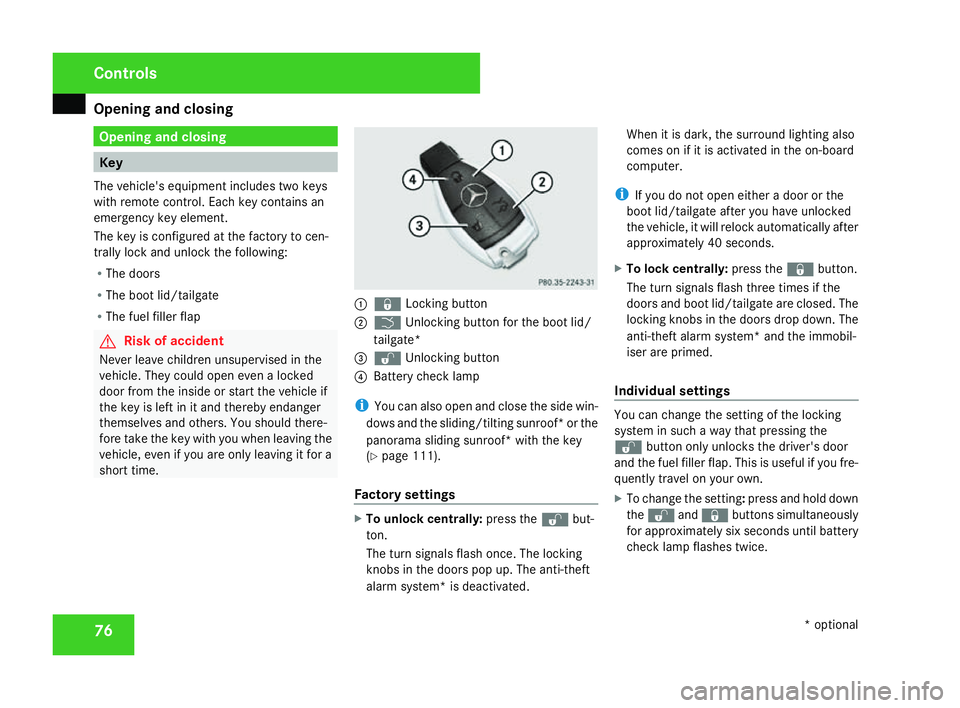
j Locking button
2 i Unlocking button for the boot lid/
tailgate*
3 k Unlocking button
4 Battery check lamp
i You can also open and close the side win-
dows and the sliding/tilting sunroof* or the
panorama sliding sunroof* with the key
( Y page 111).
Factory settings X
To unlock centrally :press the kbut-
ton .
The turn signals flash once. The lockin g
knobs in the doors pop up. The anti-theft
alarm system* is deactivated .When it is dark, the surround lighting also
comes on if it is activated in the on-board
computer.
i If you do not open either a door or the
boot lid/tailgate after you have unlocked
the vehicle, it will relock automatically after
approximately 40 seconds.
X To lock centrally :press the jbutton.
The turn signals flash three times if the
doors and boot lid/tailgate are closed. The
locking knobs in the doors drop down. The
anti-theft alarm system* and the immobil-
iser are primed.
Individual settings You can change the setting of the locking
system in such a way that pressing the
k button only unlocks the driver's door
and the fuel filler flap. This is useful if you fre-
quently travel on your own.
X To change the setting: press and hold down
the k andj buttons simultaneously
for approximately six seconds until battery
check lamp flashes twice. Controls
* optional
204_AKB; 2; 3, en-GB
mkalafa,
2007-06-26T23:11:51+02:00 - Seite 76
Page 81 of 377
Opening and closing
78
Important notes R
If the KEYLESS GO key is removed from the
vehicle (in luggage or an article of clothing,
for instance), it will no longer be possible
to lock or start the vehicle .
R If the KEYLESS GO key is removed from the
vehicle while the engine is running, e.g. if
the front passenger leaves the vehicle with
the KEYLESS GO key, the following mes-
sage will appear in the multi-function dis-
play as you pull away: Key not detec-
ted.
R If the KEYLESS GO key is in the vehicle, the
vehicle can be started at any time. If you
have left the KEYLESS GO key in the vehi-
cle, you will see the following message in
the multi-function display when you lock
the vehicle: Key still in vehicle.
Factory settings X
To unlock centrally :pull the door handle.
The turn signals flash once. The locking
knobs in the doors pop up. The anti-thef t
alarm system* is deactivated.
When it is dark, the surround lighting also
comes on if it is activated in the on-board
computer. i
If you do not open either a door or the
boot lid/tailgate after you have unlocked
the vehicle, it will relock automatically after
approximately 40 seconds.
i It is possible that the vehicle may be inad-
vertently unlocked if the KEYLESS GO key
is within a maximum of one metre of the
vehicle and the door handle is splashed by
a gush of water or if you are cleaning the
door handle . 1
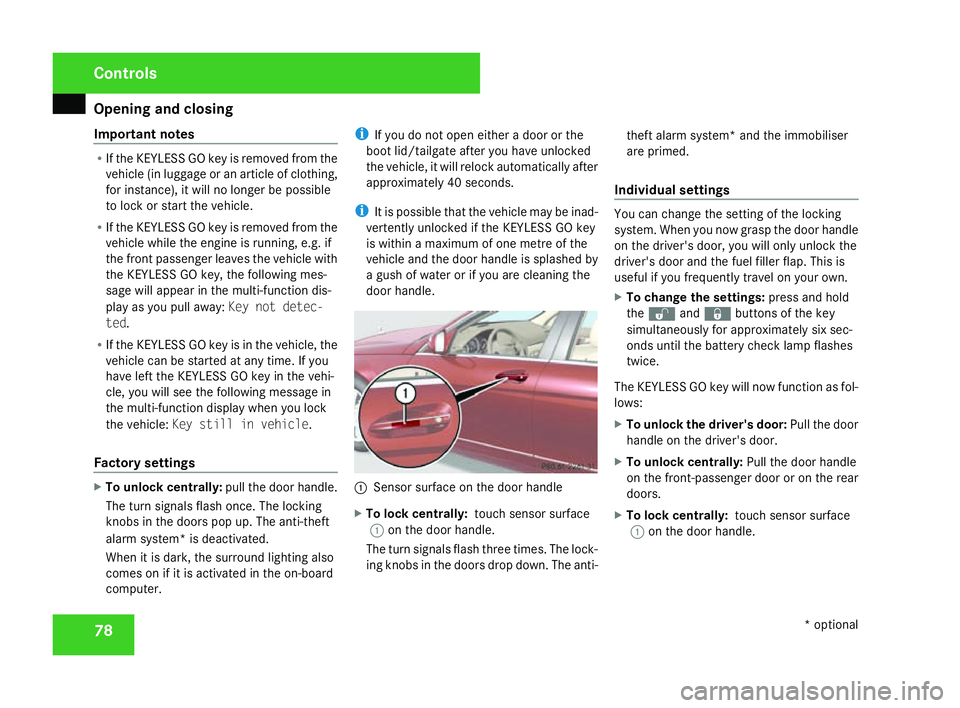
Sensor surface on the door handl e
X To lock centrally: touch sensor surface
1 on the door handle.
The turn signals flash three times. The lock-
ing knobs in the doors drop down. The anti- theft alarm system* and the immobiliser
are primed.
Individual settings You can change the setting of the lockin
g
system. When you now grasp the door handle
on the driver's door, you will only unlock the
driver's door and the fuel filler flap. This is
useful if you frequently travel on your own.
X To change the settings :press and hold
the k andj buttons of the key
simultaneously for approximately six sec-
onds until the battery check lamp flashes
twice.
The KEYLESS GO key will now function as fol-
lows:
X To unlock the driver's door: Pull the door
handle on the driver's door.
X To unlock centrally :Pull the door handle
on the front-passenger door or on the rear
doors.
X To lock centrally: touch sensor surface
1 on the door handle. Controls
* optional
204_AKB; 2; 3, en-GB
mkalafa,
2007-06-26T23:11:51+02:00 - Seite 78
Page 90 of 377
Seats
87G
Risk of injury
Make sure that nobody can become trap -
ped as you adjust the seat.
Observe the notes concerning the airbag
system .
Secure children as recommended; see the
"Children in the vehicle" section.
! When you move the seats, make sure tha t
there are no objects in the footwell or
behind the seats. Otherwise, you could
damage the seats and the objects .
i It is not possible to remove the head
restraints from the front seats, or, in vehi-
cles without the through-loading feature,
the head restraints on the rear bench seats. Adjusting the seats manually and
electricall
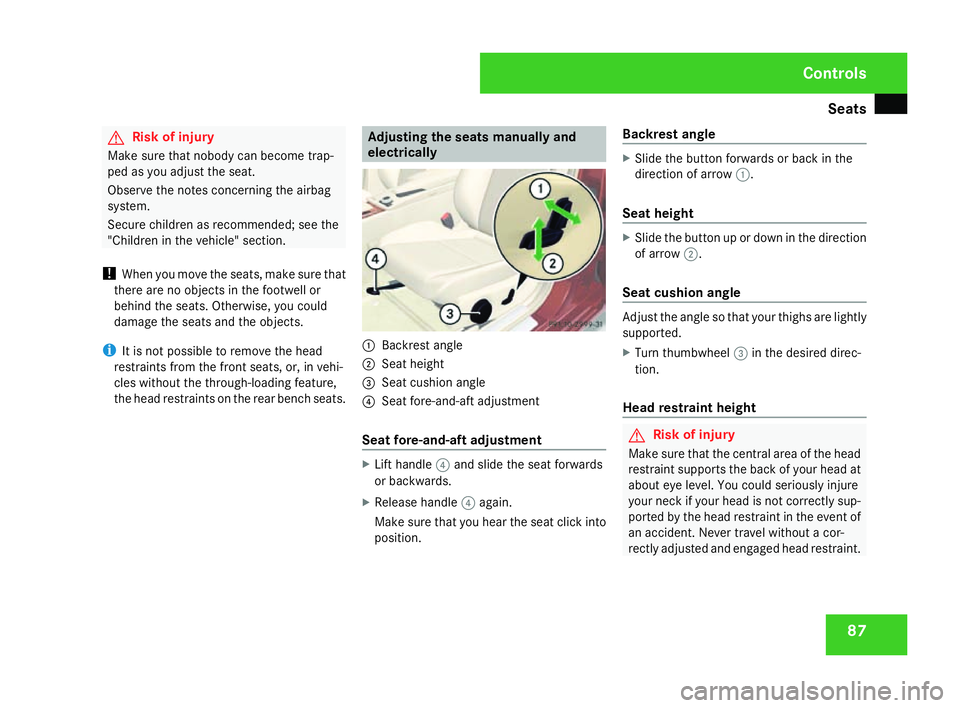
y 1
Backrest angl e
2 Seat height
3 Seat cushion angle
4 Seat fore-and-aft adjustment
Seat fore-and-aft adjustment X
Lift handle 4and slide the seat forwards
or backwards .
X Release handle 4again .
Make sure that you hear the seat click into
position. Backrest angle X
Slide the button forwards or back in the
direction of arrow 1.
Seat height X
Slide the button up or down in the direction
of arrow 2.
Seat cushion angle Adjust the angle so that your thighs are lightly
supported.
X Turn thumbwheel 3in the desired direc -
tion.
Head restraint height G
Risk of injury
Make sure that the central area of the hea d
restraint supports the back of your head at
about eye level. You could seriously injure
your neck if your head is not correctly sup-
ported by the head restraint in the event of
an accident. Never travel without a cor-
rectly adjusted and engaged head restraint . Cont
rols
204_AKB; 2; 3, en-GB
mkalafa,
2007-06-26T23:11:51+02:00 - Seite 87
Page 92 of 377
Seats
89
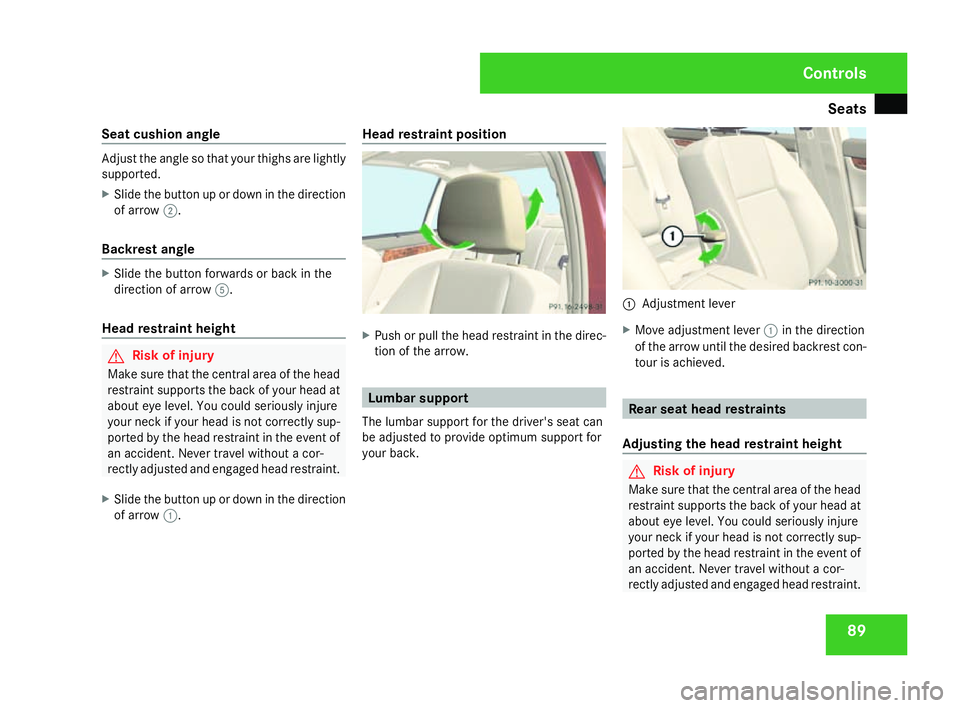
Seat cushion angle Adjust the angle so that your thighs are lightly
supported.
X Slide the button up or down in the direction
of arrow 2.
Backrest angle X
Slide the button forwards or back in the
direction of arrow 5.
Head restraint height G
Risk of injury
Make sure that the central area of the hea d
restraint supports the back of your head at
about eye level. You could seriously injure
your neck if your head is not correctly sup-
ported by the head restraint in the event of
an accident. Never travel without a cor-
rectly adjusted and engaged head restraint .
X Slide the button up or down in the direction
of arrow 1. Head restraint position
X
Push or pull the head restraint in the direc-
tion of the arrow. Lumbar support
The lumbar support for the driver's seat can
be adjusted to provide optimum support for
your back. 1
Adjustment lever
X Move adjustment lever 1in the direction
of the arrow until the desired backrest con -
tour is achieved . Rear seat head restraints
Adjusting the head restraint height G
Risk of injury
Make sure that the central area of the hea d
restraint supports the back of your head at
about eye level. You could seriously injure
your neck if your head is not correctly sup-
ported by the head restraint in the event of
an accident. Never travel without a cor-
rectly adjusted and engaged head restraint . Cont
rols
204_AKB; 2; 3, en-GB
mkalafa,
2007-06-26T23:11:51+02:00 - Seite 89
Page 93 of 377
Seats
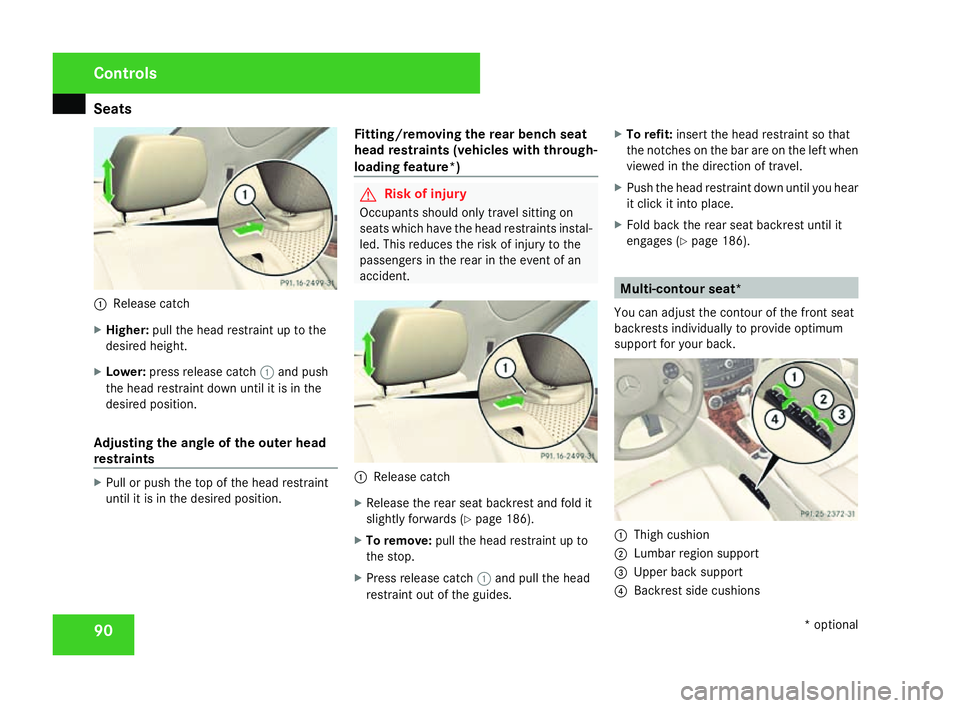
901
Release catch
X Higher: pull the head restraint up to the
desired height.
X Lower: press release catch 1and push
the head restraint down until it is in th e
desired position .
Adjusting the angle of the outer hea d
restraints X
Pull or push the top of the head restraint
until it is in the desired position. Fitting/removing the rear bench seat
head restraints (vehicles with through-
loading feature*) G
Risk of injury
Occupants should only travel sitting on
seats which have the head restraints instal-
led. This reduces the risk of injury to the
passengers in the rear in the event of an
accident. 1
Release catch
X Release the rear seat backrest and fold it
slightly forwards (Y page 186).
X To remove :pull the head restraint up to
the stop.
X Press release catch 1and pull the head
restraint out of the guides .X
To refit: insert the head restraint so tha t
the notches on the bar are on the left when
viewed in the direction of travel .
X Push the head restraint down until you hear
it click it into place.
X Fold back the rear seat backrest until it
engages (Y page 186). Multi-contour seat*
You can adjust the contour of the front seat
backrests individually to provide optimum
support for your back. 1
Thigh cushion
2 Lumbar region support
3 Upper back support
4 Backrest side cushions Control
s
* optional
204_AKB; 2; 3, en-GB
mkalafa,
2007-06-26T23:11:51+02:00 - Seite 90