light MERCEDES-BENZ C-CLASS SALOON 2007 Workshop Manual
[x] Cancel search | Manufacturer: MERCEDES-BENZ, Model Year: 2007, Model line: C-CLASS SALOON, Model: MERCEDES-BENZ C-CLASS SALOON 2007Pages: 377, PDF Size: 6.19 MB
Page 136 of 377
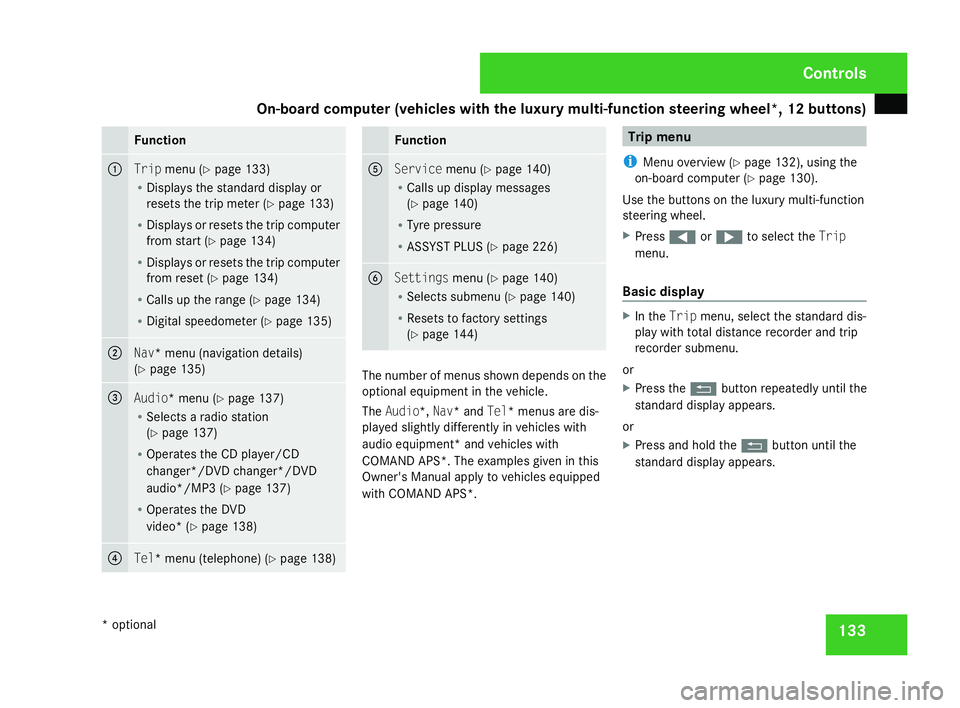
On-board computer (vehicles with the luxury multi-function steering wheel*, 12 buttons)
133Function
1
Trip
menu (Y page 133 )
R Displays the standard display or
resets the trip meter (Y page 133 )
R Displays or resets the trip compute r
from start (Y page 134 )
R Displays or resets the trip compute r
from reset (Y page 134 )
R Calls up the range (Y page 134 )
R Digital speedometer (Y page 135 ) 2
Nav* menu (navigation details)
( Y page 135 ) 3
Audio* menu
(Y page 137 )
R Selects a radio station
(Y page 137 )
R Operates the CD player/CD
changer*/DVD changer*/DVD
audio*/MP3 (Y page 137 )
R Operates the DVD
video* (Y page 138 ) 4
Tel* menu (telephone)
(Y page 138 ) Function
5
Service
menu(Y page 140 )
R Calls up display message s
( Y page 140 )
R Tyre pressure
R ASSYST PLUS (Y page 226 ) 6
Settings
menu(Y page 140 )
R Selects submenu (Y page 140 )
R Resets to factory setting s
( Y page 144 ) The number of menus shown depends on the
optional equipment in the vehicle.
The Audio*, Nav* and Tel* menus are dis-
played slightly differently in vehicles with
audio equipment* and vehicles with
COMAND APS*. The examples given in this
Owner's Manual apply to vehicles equipped
with COMAND APS*. Trip men
u
i Menu overview (Y page 132), using the
on-board computer (Y page 130).
Use the buttons on the luxury multi-function
steering wheel.
X Press (or& to select the Trip
menu.
Basic display X
In the Tripmenu, select the standard dis-
play with total distance recorder and trip
recorder submenu.
or
X Press the Lbutton repeatedly until the
standard display appears.
or
X Press and hold the Lbutton until the
standard display appears. Controls
* optional
204_AKB; 2; 3, en-GB
mkalafa,
2007-06-26T23:11:51+02:00 - Seite 133
Page 143 of 377
On-board computer (vehicles with the luxury multi-function steering wheel*, 12 buttons)
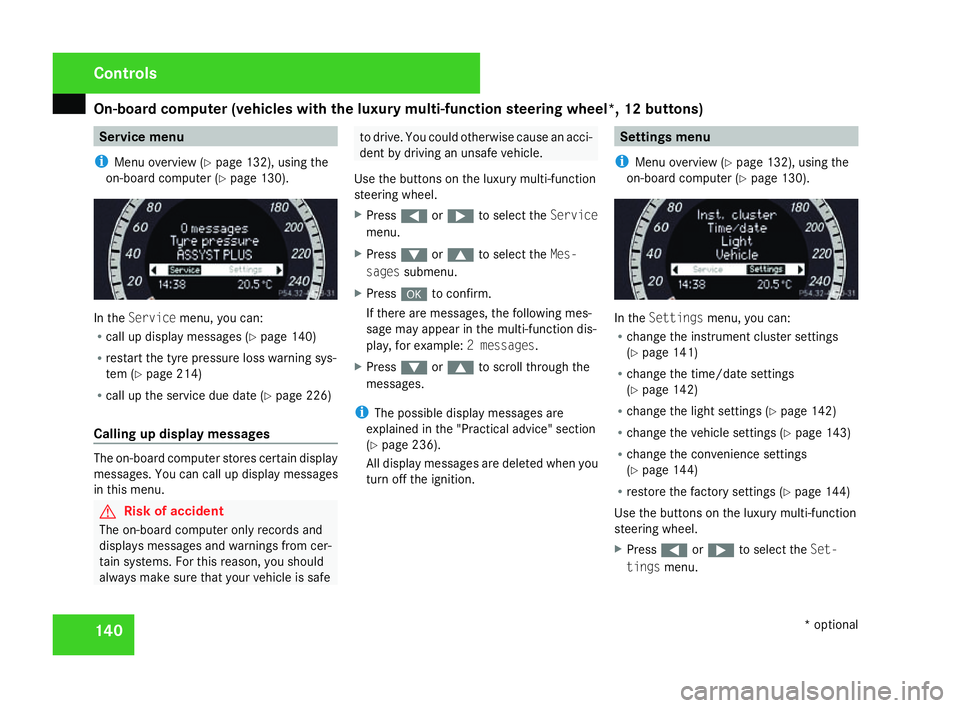
140 Service menu
i Menu overview (Y page 132), using the
on-board computer (Y page 130). In the
Servic emenu, you can:
R call up display messages (Y page 140 )
R restart the tyre pressure loss warning sys-
tem (Y page 214 )
R call up the service due date (Y page 226 )
Calling up display messages The on-board computer stores certain display
messages. You can call up display messages
in this menu. G
Risk of accident
The on-board computer only records and
displays messages and warnings from cer-
tain systems. For this reason, you shoul d
always make sure that your vehicle is safe to drive. You could otherwise cause an acci-
dent by driving an unsafe vehicle .
Use the buttons on the luxury multi-function
steering wheel.
X Press (or& to select the Service
menu.
X Press %or$ to select the Mes-
sages submenu.
X Press #to confirm.
If there are messages, the following mes -
sage may appear in the multi-function dis-
play, for example: 2 messages.
X Press %or$ to scroll through the
messages.
i The possible display messages are
explained in the "Practical advice" section
( Y page 236).
All display messages are deleted when you
turn off the ignition. Settings menu
i Menu overview (Y page 132), using the
on-board computer (Y page 130). In the
Settings menu, you can:
R change the instrument cluster settings
(Y page 141 )
R change the time/date settings
(Y page 142 )
R change the light settings (Y page 142 )
R change the vehicle settings (Y page 143 )
R change the convenience settings
(Y page 144 )
R restore the factory settings (Y page 144 )
Use the buttons on the luxury multi-function
steering wheel.
X Press (or& to select the Set-
tings menu. Controls
* optional
204_AKB; 2; 3, en-GB
mkalafa,
2007-06-26T23:11:51+02:00 - Seite 140
Page 145 of 377
On-board computer (vehicles with the luxury multi-function steering wheel*, 12 buttons)
142
X
Press %or$ to select the Dig.
speedo (mph) function.
You will see the selected setting: Onor
Off.
X Press #to change the selected setting .
Selecting the permanent display* on vehi-
cles with automatic transmission*
i Vehicles for the United Kingdom: this
menu is not available.
The Permanent display function allows you
to choose whether the multi-function display
always shows the outside temperature or the
speed in mph.
X Press %or$ to select the Instru-
ment cluster submenu.
X Press #to confirm.
X Press %or$ to select the Perma-
nent displa yfunction.
You will see the selected setting: Outside
temperature orSpeedometer (mph).
X Press #to change the selected setting .Time/date This menu is only available on vehicles with-
out audio equipment or with Audio 20*
.
i Vehicles with Audio 50 APS* or COMAND
APS*: this function is not available, since
the time/date of the audio equipment* is
used.
The Time/date menu allows you to set the
time and the date.
X Press %or$ to select the Time/
Dat esubmenu.
X Press #to confirm.
Setting the time
X Press %or$ to select the Time
function.
You will see the time currently set.
X Press #to change it.
X Press (or& to select the display to
be changed: hours, minutes.
X Press %and$ to set the selected
display.
X Press #to store the entry .Setting the date
X
Press %or$ to select the Date
function.
You will see the date currently set.
X Press #to change it.
X Press (or& to select the display to
be changed: day, month, year .
X Press %and$ to set the selected
display.
X Press #to store the entry .
Light s The
Lights menu contains the following
functions:
R Intelligent Light System
R Daytime driving lamps
R Surround lighting
R Interior lighting delayed switch-off
Switching the Intelligent Light System*
on/off
When you activate Intell. Light System,
you activate the following functions: Cont
rols
* optional
204_AKB; 2; 3, en-GB
mkalafa,
2007-06-26T23:11:51+02:00 - Seite 142
Page 146 of 377
On-board computer (vehicles with the luxury multi-function steering wheel*, 12 buttons)
143
R
Motorway mode
R Active light functio n
R Extended range foglamps
X Press %or$ to select the Light
submenu.
X Press #to confirm.
X Press %or$ to select the Intell.
Light System function.
You will see the selected setting: Onor
Off.
X Press #to change the selected setting .
Switching the daytime driving lights on/
off
If you have activated the Daylight driving
lights function and the light switch is in the
M or* position, the parking lamp,
dipped-beam headlamps and licence plate
lighting are switched on automatically when
the engine is running.
In countries where daytime driving lamps are
legally required, Onis the factory setting.
X Press %or$ to select the Light
submenu.
X Press #to confirm. X
Press %or$ to select the Daytime
driving lamps function.
You will see the selected setting: Onor
Off.
X Press #to change the selected setting .
Switching the surround lighting on or off
If you activate the Surround lighting func-
tion and you unlock the vehicle with the key
when it is dark, the following will light up:
R The side lamps
R The tail lamps
R The licence plate lighting
R The front foglamps
The surround lighting switches off automati-
cally after 40 seconds or if the driver's door
is opened.
X Press %or$ to select the Light
submenu.
X Press #to confirm.
X Press %or$ to select the Surround
lighting function.
You will see the selected setting: Onor
Off .
X Press #to change the selected setting .Activating or deactivating the interior
lighting delayed switch-off
If you activate the
Interior lighting
delay sw. off function and pull the key out
of the ignition lock, the interior lighting
remains on for around 10 seconds if it is dark .
X Press %or$ to select the Light
submenu.
X Press #to confirm.
X Press %or$ to select the Interior
Lighting Delay function.
You will see the selected setting: Onor
Off .
X Press #to change the selected setting .
Vehicl e In the
Vehicle menu, you can activate/deac-
tivate the automatic locking feature or set the
permanent Speedtronic with Speed limit
(winter tyres) function(Y page 151).
Activating/deactivating automatic door
locking
If you select the Automatic Door Lock func-
tion, the vehicle is centrally locked above a
speed of around 15 km/h. Controls
* optional
204_AKB; 2; 3, en-GB
mkalafa,
2007-06-26T23:11:51+02:00 - Seite 143 Z
Page 147 of 377
On-board computer (vehicles with the luxury multi-function steering wheel*, 12 buttons)
144
You will find further information on automatic
locking in the "Automatic locking" section
(
Y page 79).
X Press %or$ to select the Vehicle
submenu.
X Press #to confirm.
X Press %or$ to select the Auto-
matic Door Loc kfunction.
You will see the selected setting: Onor
Off.
X Press #to change the selected setting .
Convenience In the
Convenience menu, you can activate/
deactivate the easy-entry/exit feature* and
the "Fold in mirrors when locking" function .
Activating or deactivating the easy-entry /
exit feature*
You can use the Easy-Entry/Exit function
to activate or deactivate the easy-entry/exit
feature (Y page 93). G
Risk of injury
When the easy-entry/exit feature is active,
the steering wheel moves. There is a risk of
occupants becoming trapped. Before acti - vating the easy-entry feature, make sure
that nobody can become trapped.
Do not leave children unsupervised in the
vehicle, even if they are secured in a child
restraint system. The children could open
the driver's door and thereby unintention-
ally activate the easy-entry feature and
become trapped.
X Press %or$ to select the Conve-
nience submenu.
X Press #to confirm.
X Press %or$ to select the easy-
entry/exi tfeature.
You will see the selected setting: Onor
Off.
X Press #to change the selected setting .
Activating or deactivating the "Fold in
mirrors when locking*" function
If you activate the Fold in mirrors whe n
locking function, the exterior mirrors fold in
when you lock the vehicle. When you switch
on the ignition, the exterior mirrors fold out
again.
If you have switched the function on and you
fold in the exterior mirrors using the button on the door
(Y page 94), they will not fold out
when the ignition is switched on. The exterior
mirrors can then only be folded out using the
button on the door.
X Press %or$ to select the Conve-
nience submenu.
X Press #to confirm.
X Press %or$ to select the Fold in
mirrors when lockin gfunction.
You will see the selected setting: Onor
Off.
X Press #to change the selected setting .
Restoring the factory setting s Most of the submenus can be restored to the
default settings in the
Factory Setting
menu.
For safety reasons, not all functions are reset:
the Speed limit (winter tyres) function
in permanent Speedtronic can only be set in
the Vehicle menu. The Daytime driving
lamps function in the Lightmenu is only
reset if the vehicle is stationary.
X Press %or$ to select the Factory
setting submenu.
X Press #to confirm. Controls
* optional
204_AKB; 2; 3, en-G
B
mkalafa , 2007-06-26T23:11:51+02:00 - Seite 144
Page 148 of 377
Driving sys
tems 14
5
X
Press %or$ to select Reset all
settings? SelectNoorYes .
X Select Yesif you want to reset all the set-
tings .
X Press #to confirm the selection.
The multi-function display shows a confir -
mation message. Driving systems
Your vehicle's driving systems are described
on the following pages:
R Cruise control* and Speedtronic*, whic h
you can use to control the speed of th e
vehicl e
R Hill start assist, which makes pulling away
on steep uphill gradients easie r
R ADVANCED AGILITY package with sports
mode*
R 4MATIC* (permanent four-wheel drive )
R Parktronic*, which assists you in parking
and manoeuvrin g
The ABS, BAS, adaptive brake lights, ESP ®
and EBV (electronic brake-power distribution )
driving safety systems are described in the
"Driving safety systems" section
( Y page 67). Cruise control*
Cruise control maintains a constant road
speed for you. It brakes automatically in order
to avoid exceeding the set speed. On long and
steep downhill gradients, especially if the
vehicle is laden or towing a trailer, you must
shift to a lower gear in good time or select
shift range 1,2 or 3in vehicles with automatic
transmission*. In this way you will make use
of the braking effect of the engine, which
relieves the load on the brake system and
prevents the brakes from overheating and
wearing too quickly. G
Risk of accident
Do not change down for additional engine
braking on a slippery road surface. Thi s
could cause the drive wheels to lose thei r
grip and the vehicle could skid.
Use cruise control only if road and traffic con-
ditions make it appropriate to maintain a
steady speed for a prolonged period. You can
store any road speed above 30 km/h. G
Risk of accident
Cruise control cannot take account of roa d
and traffic conditions. Controls
* optional
204_AKB; 2; 3, en-GB
mkalafa
, 2007-06-26T23:11:51+02:00 - Seite 145 Z
Page 149 of 377
Driving sys
tems 14
6 Always pay attention to traffic conditions
even when cruise control is activated
.
Cruise control is only an aid designed to
assist driving. You are responsible for th e
vehicle's speed and for braking in good
time. G
Risk of accident
Do not use cruise control :
R in road and traffic conditions which do
not allow you to maintain a constant
speed (e.g. heavy traffic or windin g
roads). You could otherwise cause an
accident.
R on slippery roads. Braking or accelerat-
ing could cause the drive wheels to lose
traction and the vehicle could then skid.
R when there is poor visibility, e.g. due to
fog, heavy rain or snow
Cruise control display in speedometer
(vehicles with 12-button luxury multi-
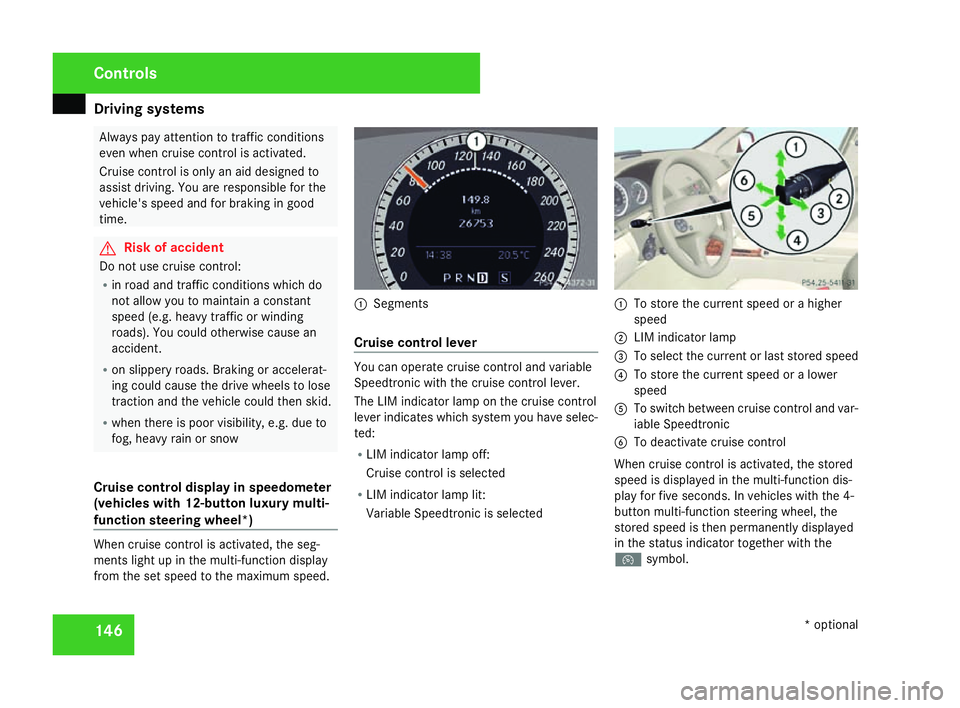
function steering wheel* )When cruise control is activated, the seg-
ments light up in the multi-function display
from the set speed to the maximum speed. 1
Segments
Cruise control leve r You can operate cruise control and variable
Speedtronic with the cruise control lever
.
The LIM indicator lamp on the cruise control
lever indicates which system you have selec-
ted:
R LIM indicator lamp off:
Cruise control is selected
R LIM indicator lamp lit:
Variable Speedtronic is selected 1
To store the current speed or a higher
speed
2 LIM indicator lamp
3 To select the current or last stored speed
4 To store the current speed or a lower
speed
5 To switch between cruise control and var-
iable Speedtronic
6 To deactivate cruise control
When cruise control is activated, the stored
speed is displayed in the multi-function dis-
play for five seconds. In vehicles with the 4-
button multi-function steering wheel, the
stored speed is then permanently displayed
in the status indicator together with the
Ñ symbol. Controls
* optional
204_AKB; 2; 3, en-GB
mkalafa,
2007-06-26T23:11:51+02:00 - Seite 146
Page 151 of 377
Driving sys
tems 14
8
Making adjustments in 1 km/h incre-
ments X
Briefly press the cruise control lever up to
pressure point 1for a higher speed or
down 4for a lower speed.
The last speed stored is increased or
reduced.
Making adjustments in 10 km/h incre-
ments X
Briefly press the cruise control lever up
beyond pressure point 1for a higher
speed or down 4for a lower speed.
The last speed stored is increased or
reduced.
Deactivating cruise control There are several ways to deactivate cruis
e
control :
X Briefly press the cruise control lever for-
wards 6.
or
X Brake .
or X
Briefly press the cruise control lever in the
direction of arrow 5.
Variable Speedtronic is selected. LIM indi-
cator lamp 2in the cruise control lever
lights up.
Cruise control is automatically deactivated if:
R you depress the parking brak e
R you are driving at less than 30 km/h
R ESP ®
(Y page 68) is intervening or if you
deactivate ESP ®
R with a vehicle with manual transmission ,
you change into neutral or if the clutch is
depressed for longer than 6 seconds
R you move the selector lever to Nin vehicles
with automatic transmission* while drivin g
If cruise control is deactivated, you will hear
a warning tone. You see the Cruise control
off message in the multi-function display for
approximately five seconds.
i The last speed stored is cleared when you
switch off the engine. Speedtronic*
Speedtronic brakes automatically so that you
do not exceed the set speed. On long and
steep downhill gradients, especially if the
vehicle is laden or towing a trailer, you must
shift to a lower gear in good time or select
shift range 1,2 or 3in vehicles with automatic
transmission*. In this way you will make use
of the braking effect of the engine, which
relieves the load on the brake system and
prevents the brakes from overheating and
wearing too quickly. If you need additional
braking, depress the brake pedal repeatedly
rather than continuously. G
Risk of accident
Never depress the brake pedal continu -
ously while the vehicle is in motion, e.g.
never cause the brakes to rub by applying
constant slight pedal pressure. This causes
the brake system to overheat, increases
the braking distance and can lead to the
brakes failing completely. G
Risk of accident
Do not change down for additional engine
braking on a slippery road surface. Thi s
could cause the drive wheels to lose thei r
grip and the vehicle could skid. Controls
* optional
204_AKB; 2; 3, en-GB
mkalafa,
2007-06-26T23:11:51+02:00 - Seite 148
Page 152 of 377
Driving sys
tems 14
9
You can set a variable or permanent limit
speed:
R Variable for speed limits, e.g. in built-up
areas
R Permanent for long-term speed restric-
tions, e.g. for driving on winter tyres
( Y page 151 ) G
Risk of accident
Speedtronic is only an aid designed to
assist driving. You are responsible for the
vehicle's speed and for braking in goo d
time.
i The speed indicated in the speedometer
may differ slightly from the limit speed
stored.
Variable Speedtronic You can operate cruise control* and variable
Speedtronic with the cruise control lever.
The LIM indicator lamp on the cruise control
lever indicates which system you have selec-
ted:
R
LIM indicator lamp off:
Cruise control* is selected
R LIM indicator lamp lit: Variable Speedtronic is selected
You can use the cruise control lever to restrict
the speed to any speed above 30 km/h while
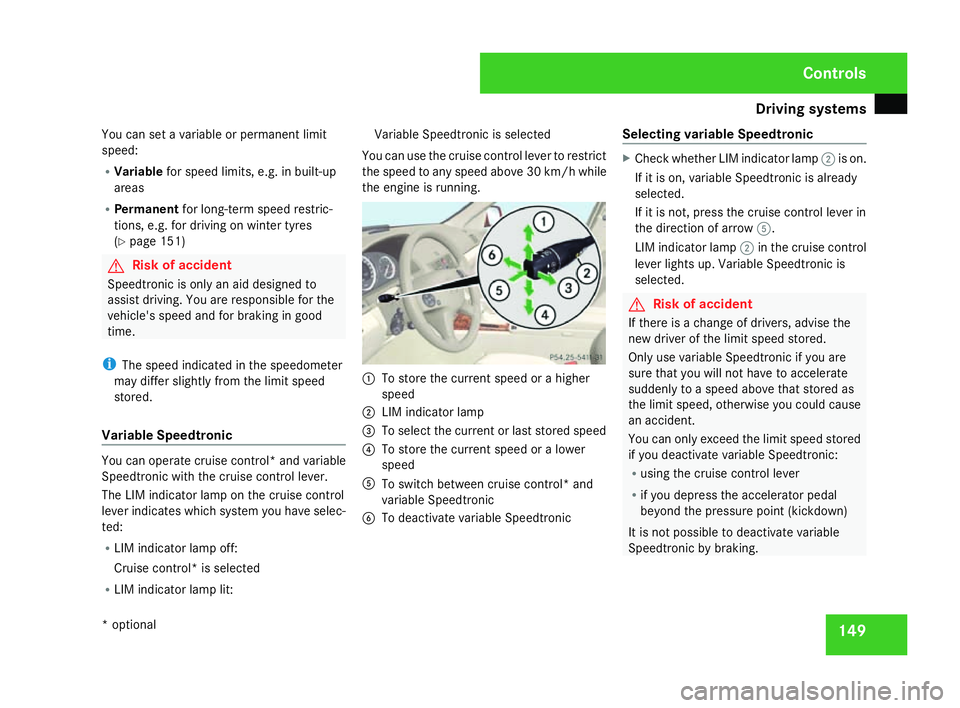
the engine is running . 1
To store the current speed or a higher
speed
2 LIM indicator lamp
3 To select the current or last stored speed
4 To store the current speed or a lower
speed
5 To switch between cruise control* and
variable Speedtronic
6 To deactivate variable Speedtronic Selecting variable Speedtronic X
Check whether LIM indicator lamp 2is on.
If it is on, variable Speedtronic is already
selected.
If it is not, press the cruise control lever in
the direction of arrow 5.
LIM indicator lamp 2in the cruise control
lever lights up. Variable Speedtronic is
selected. G
Risk of accident
If there is a change of drivers, advise the
new driver of the limit speed stored.
Only use variable Speedtronic if you are
sure that you will not have to accelerate
suddenly to a speed above that stored as
the limit speed, otherwise you could cause
an accident.
You can only exceed the limit speed store d
if you deactivate variable Speedtronic :
R using the cruise control leve r
R if you depress the accelerator pedal
beyond the pressure point (kickdown )
It is not possible to deactivate variable
Speedtronic by braking. Controls
* optional
204_AKB; 2; 3, en-GB
mkalafa
, 2007-06-26T23:11:51+02:00 - Seite 149
Page 153 of 377
Driving sys
tems 15
0
Storing the current speed You can use the cruise control lever to restrict
the speed to any speed above 30 km/h whil e
the engine is running .
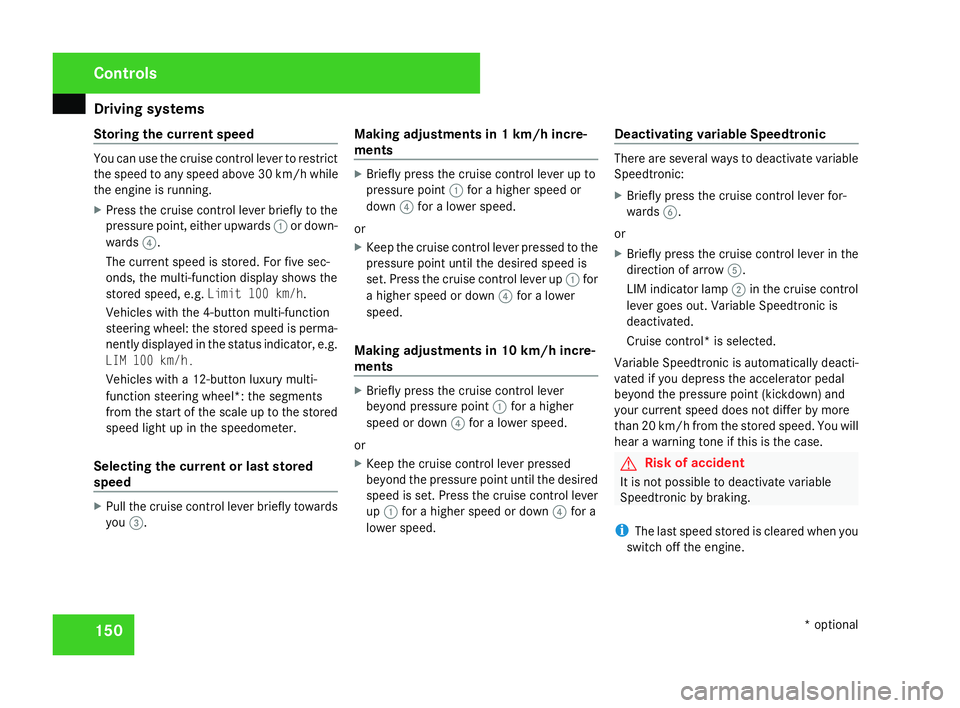
X Press the cruise control lever briefly to the
pressure point, either upwards 1or down-
wards 4.
The current speed is stored. For five sec-
onds, the multi-function display shows the
stored speed, e.g. Limit 100 km/h.
Vehicles with the 4-button multi-function
steering wheel: the stored speed is perma-
nently displayed in the status indicator, e.g.
LIM 100 km/h.
Vehicles with a 12-button luxury multi-
function steering wheel*: the segments
from the start of the scale up to the stored
speed light up in the speedometer.
Selecting the current or last stored
speed X
Pull the cruise control lever briefly towards
you 3. Making adjustments in 1 km/h incre-
ments X
Briefly press the cruise control lever up to
pressure point 1for a higher speed or
down 4for a lower speed.
or
X Keep the cruise control lever pressed to the
pressure point until the desired speed is
set. Press the cruise control lever up 1for
a higher speed or down 4for a lower
speed.
Making adjustments in 10 km/h incre-
ments X
Briefly press the cruise control lever
beyond pressure point 1for a higher
speed or down 4for a lower speed.
or
X Keep the cruise control lever pressed
beyond the pressure point until the desired
speed is set. Press the cruise control lever
up 1 for a higher speed or down 4for a
lower speed. Deactivating variable Speedtronic There are several ways to deactivate variable
Speedtronic
:
X Briefly press the cruise control lever for-
wards 6.
or
X Briefly press the cruise control lever in the
direction of arrow 5.
LIM indicator lamp 2in the cruise control
lever goes out. Variable Speedtronic is
deactivated.
Cruise control* is selected.
Variable Speedtronic is automatically deacti-
vated if you depress the accelerator pedal
beyond the pressure point (kickdown) and
your current speed does not differ by mor e
than 20 km/h from the stored speed. You will
hear a warning tone if this is the case. G
Risk of accident
It is not possible to deactivate variabl e
Speedtronic by braking.
i The last speed stored is cleared when you
switch off the engine. Controls
* optional
204_AKB; 2; 3, en-GB
mkalafa,
2007-06-26T23:11:51+02:00 - Seite 150