light MERCEDES-BENZ C-CLASS SALOON 2007 Repair Manual
[x] Cancel search | Manufacturer: MERCEDES-BENZ, Model Year: 2007, Model line: C-CLASS SALOON, Model: MERCEDES-BENZ C-CLASS SALOON 2007Pages: 377, PDF Size: 6.19 MB
Page 154 of 377
Driving sys
tems 15
1
Permanent Speedtronic (vehicles with
a
12-button luxury multi-function steer-
ing wheel*) i
Permanent Speedtronic is only availabl e
for certain countries.
You can use the on-board computer to limi t
the speed permanently to a value between
160 km/h (e.g. for driving with winter tyres )
and the maximum speed.
Shortly before the stored speed is reached, it
is displayed in the multi-function display.
You cannot exceed the stored limit speed,
even if you depress the accelerator pedal
beyond the pressure point (kickdown).
Setting permanent Speedtronic
X Press (or& to highlight the Set-
tings menu and select with #.
X Press %or$ to highlight the Vehi-
cle submenu and select with #.
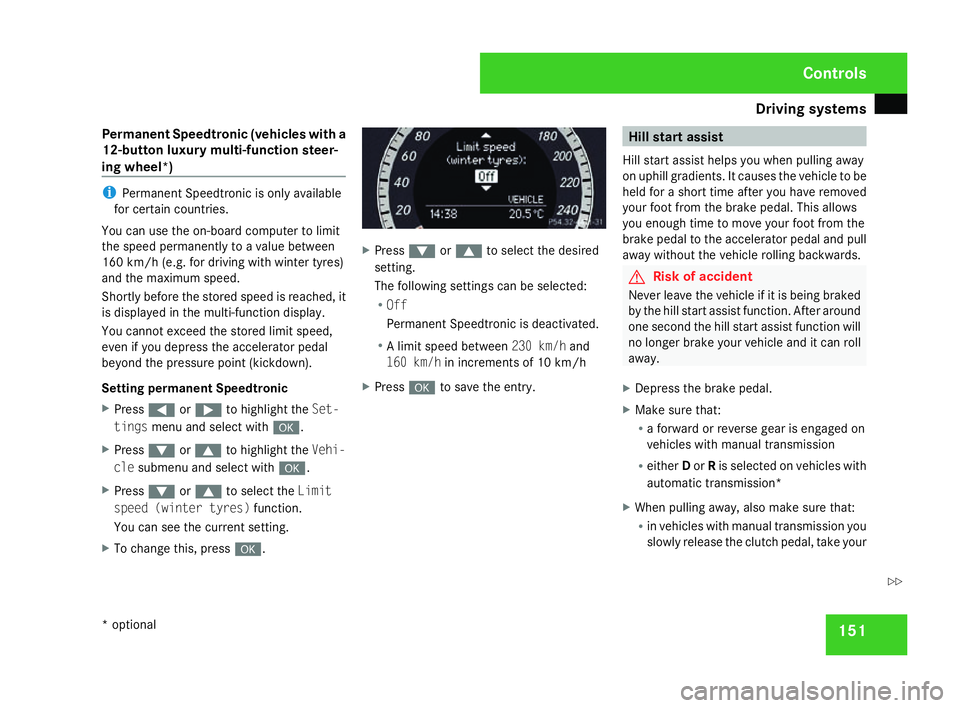
X Press %or$ to select the Limit
speed (winter tyres) function.
You can see the current setting .
X To change this, press #. X
Press %or$ to select the desired
setting .
The following settings can be selected:
R Off
Permanent Speedtronic is deactivated.
R A limit speed between 230 km/hand
160 km/ hin increments of 10 km/h
X Press #to save the entry . Hill start assis
t
Hill start assist helps you when pulling away
on uphill gradients. It causes the vehicle to be
held for a short time after you have removed
your foot from the brake pedal. This allow s
you enough time to move your foot from th e
brake pedal to the accelerator pedal and pull
away without the vehicle rolling backwards. G
Risk of accident
Never leave the vehicle if it is being braked
by the hill start assist function. After around
one second the hill start assist function will
no longer brake your vehicle and it can rol l
away.
X Depress the brake pedal.
X Make sure that:
R
a forward or reverse gear is engaged on
vehicles with manual transmission
R either Dor Ris selected on vehicles with
automatic transmission *
X When pulling away, also make sure that :
R in vehicles with manual transmission you
slowly release the clutch pedal, take your Controls
* optional
204_AKB; 2; 3, en-GB
mkalafa,
2007-06-26T23:11:51+02:00 - Seite 151 Z
Page 155 of 377
Driving sys
tems 15
2foot off the brake pedal and carefully
depress the accelerator pedal
R in vehicles with automatic transmis-
sion* you take your foot off the brak e
pedal and carefully depress the acceler -
ator pedal
i Once you have taken your foot off the
brake pedal, the vehicle is held for around
one second.
Hill start assist does not function:
R if you are pulling away on a level surface or
a downhill gradien t
R in vehicles with automatic transmission *if
the gear selector lever is in the Nposition
R if the vehicle is secured with the parking
brak e
R if ES P®
is defectiv e ADVANCED AGILITY package with
sports mode*
The most important part of the ADVANCE D
AGILITY package with sports mode is the
adjustable suspension system. This automat-
ically controls and adapts the suspension to
the respective driving situation.
The calibration of the suspension depends
on:
R your driving style
R the road surface conditions
R your individual selection; see also the fol-
lowing description
If your vehicle is equipped with automati c
transmission*, the ADVANCED AGILITY pack-
age with sports mode also includes steering-
wheel gearshift paddles* with a manua l
gearshift program* (Y page 121). 1
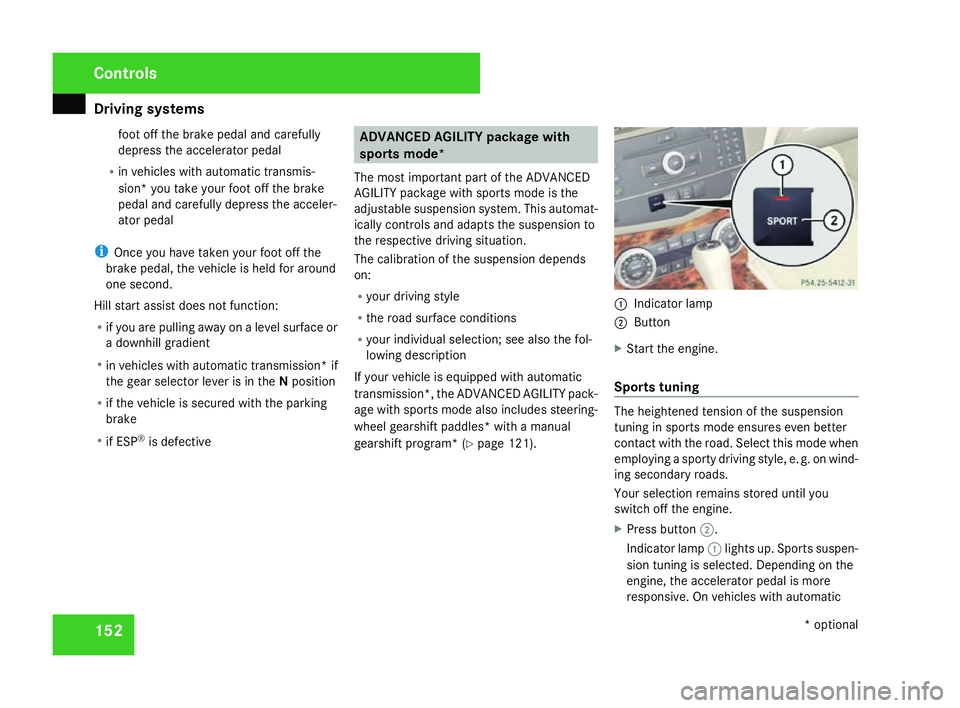
Indicator lamp
2 Button
X Start the engine.
Sports tuning The heightened tension of the suspensio
n
tuning in sports mode ensures even better
contact with the road. Select this mode when
employing a sporty driving style, e. g. on wind-
ing secondary roads .
Your selection remains stored until you
switch off the engine.
X Press button 2.
Indicator lamp 1lights up. Sports suspen -
sion tuning is selected. Depending on the
engine, the accelerator pedal is more
responsive. On vehicles with automatic Controls
* optional
204_AKB; 2; 3, en-GB
mkalafa,
2007-06-26T23:11:51+02:00 - Seite 152
Page 157 of 377
Driving sys
tems 15
4
Front sensor
s Centr
e Approximately 100 cm
Corner
s Approximately 60 cm
Rear sensors
Centre Approximately 120 cm
Corner
s Approximately 80 cm
!
Pay particular attention to objects above
or below the sensors when parking, such
as flower pots or trailer towbars. Parktroni c
does not detect such objects when they are
in the immediate vicinity of the vehicle. You
could damage the vehicle or the objects.
Ultrasonic sources such as an automatic
car wash, a lorry's compressed-air brakes
or a pneumatic drill could cause Parktronic
to malfunction .
Minimum distanc eCentr
e Approximately 20 cm
Corner
s Approximately 15 cm If there is an obstacle within this range, al
l
warning displays light up and a tone sounds.
If the distance falls below the minimum clear -
ance, it may no longer be shown.
Warning displays The warning displays show the distanc
e
between the sensors and the obstacle. The
warning display for the front area is located
on the dashboard above the centre air vents.
The warning display for the rear area is in the
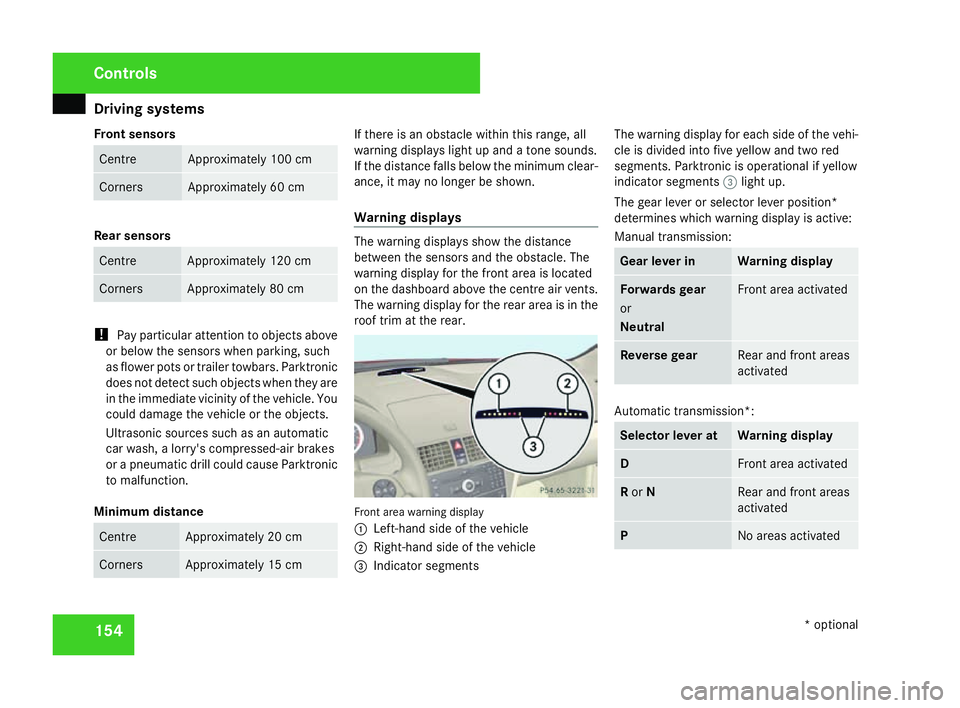
roof trim at the rear. Front area warning display
1
Left-hand side of the vehicle
2 Right-hand side of the vehicl e
3 Indicator segments The warning display for each side of the vehi-
cle is divided into five yellow and two red
segments. Parktronic is operational if yellow
indicator segments
3light up.
The gear lever or selector lever position*
determines which warning display is active:
Manual transmission : Gear lever in Warning display
Forwards gear
or
Neutral Front area activated
Reverse gear Rear and front areas
activated
Automatic transmission*:
Selector lever at Warning displa
y D Front area activate
d R
or N Rear and front area
s
activated P No areas activatedControls
* optional
204_AKB; 2; 3, en-GB
mkalafa,
2007-06-26T23:11:51+02:00 - Seite 154
Page 158 of 377
Driving sys
tems 15
5
One or more segments light up as the vehicle
approaches an obstacle, depending on the
vehicle's distance from the obstacle.
From the:
R sixth segment onwards, you will hear an
intermittent warning tone for approxi-
mately two seconds
R seventh segment onwards, you will hear a
warning tone for approximately two sec -
onds. You have reached the minimum dis-
tance.
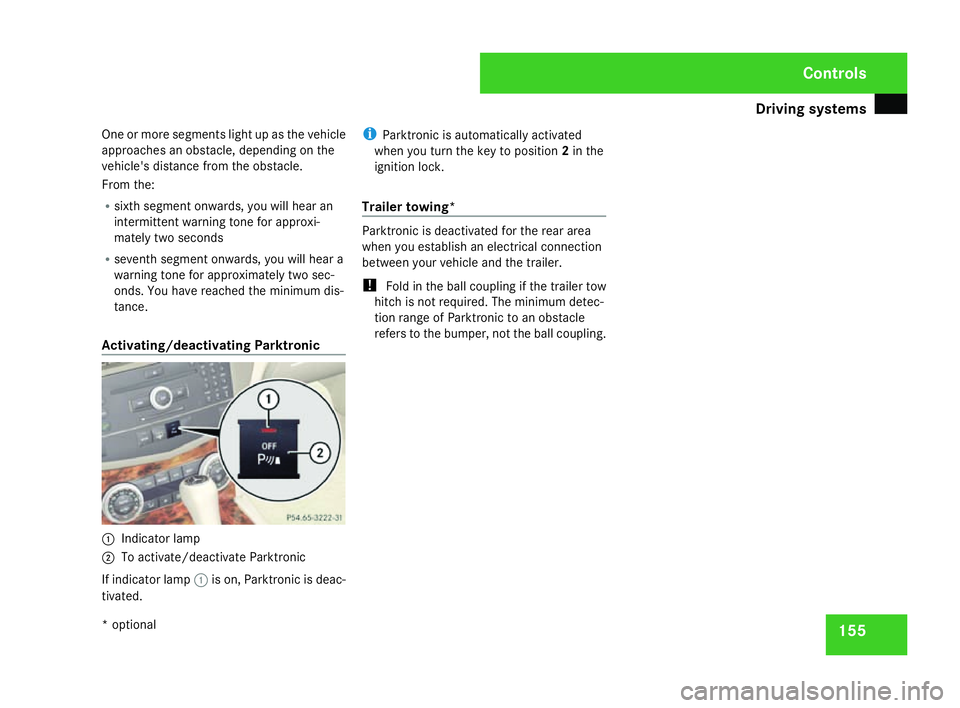
Activating/deactivating Parktronic 1
Indicator lamp
2 To activate/deactivate Parktronic
If indicator lamp 1is on, Parktronic is deac-
tivated. i
Parktronic is automatically activated
when you turn the key to position 2in the
ignition lock .
Trailer towing* Parktronic is deactivated for the rear area
when you establish an electrical connectio
n
between your vehicle and the trailer.
! Fold in the ball coupling if the trailer tow
hitch is not required. The minimum detec -
tion range of Parktronic to an obstacle
refers to the bumper, not the ball coupling . Cont
rols
* optional
204_AKB; 2; 3, en-GB
mkalafa,
2007-06-26T23:11:51+02:00 - Seite 155
Page 163 of 377
Thermatic
16
0
General notes Thermatic is only operational when the
engine is running. Optimum operation is only
achieved when you drive with the side win-
dows and sliding/tilting sunroof*/panorama
sliding sunroof* closed .
You can allow the air-conditioning system to
adjust automatically or you can adjust it man-
ually.
In automatic mode, Thermatic cools or heats
the vehicle interior according to:
R The selected temperature
R The outside temperature
R The intensity of the sunlight
i Ventilate the vehicle for a brief period
during warm weather, e.g. using the sum-
mer opening feature (Y page 111). This
helps you to achieve the desired interior
temperature more quickly.
The integrated filter filters out most particles
of dust and completely filters out pollen.
i A clogged filter reduces the amount of ai r
supplied to the vehicle interior. For this rea-
son, you should always observe the interval
for replacing the filter, which is specified in
the Service Booklet. As it depends on envi- ronmental conditions, e.g. heavy air pollu-
tion, the interval may be slightly shorter
than stated in the Service Booklet. G
Risk of accident
Follow the settings recommended on the
following pages for heating or cooling. The
windows could otherwise mist up. This may
prevent you from observing the traffic con-
ditions, thereby causing an accident. Activating/deactivating Thermati
c
Thermatic is only operational when the
engine is running.
X To activate :press the ´button.
The indicator lamp in the ´button goes
out. The previously selected settings come
into effect again.
or
X Press the Ubutton.
The indicator lamp in the Ubutton is lit.
Airflow and air distribution are set to auto-
matic mode.
X To deactivate: press the´button.
The indicator lamp in the ´button is lit. i
Select this setting when you drive with the
side windows or the sliding/tilting sun-
roof*/panorama sliding sunroof* open, for
example. When Thermatic is deactivated,
the air supply and air circulation are also
switched off. Only select this setting briefl y
when the side windows and the sliding/
tilting sunroof*/panorama sliding sun-
roof* are closed, otherwise the windows
may mist up. Controlling the air conditioning auto-
matically
i If you have set the air-conditioning sys-
tem to automatic, you only need to set the
temperature. In automatic mode, the air-
flow and air distribution do not need to be
adjusted. The cooling with dehumidifica-
tion function is switched on in automatic
mode. If necessary, cooling with dehumid-
ification can be deactivated.
X Make sure that the key is in position 2in
the ignition lock .
X Set the desired temperature .Cont
rols
* optional
204_AKB; 2; 3, en-GB
mkalafa,
2007-06-26T23:11:51+02:00 - Seite 160
Page 164 of 377
Thermatic
16
1
X
To activate :press the Ubutton.
The indicator lamp in the button is lit. Air-
flow and air distribution are set to auto-
matic mode.
X To deactivate: press theUbutton.
The indicator lamp in the Ubutton is off.
Automatic air distribution and airflow are
deactivated. Setting the temperatur
e
Different temperatures can be set for the
driver's and front-passenger sides.
X To increase or reduce the airflow: turn
thumbwheels 1and 6clockwise or anti -
clockwise. Only change the temperature
setting in small increments. Start at 22 °C .
i If you turn the temperature thumbwheel
on one side of the vehicle fully to the right
or left, you will increase or reduce the tem-
perature on the other side of the vehicle at
the same time. Setting the air distribution manually
You can also direct the airflow manually for
the entire vehicle .
The symbols for the air distribution have the
following meanings: Symbol Meaning
{
Directs the airflow through the
demister vents to the wind-
screen and side windows
a
Directs the airflow through the
centre and side air vents
Y
Directs the airflow into the front
and rear footwell
s i
You can also set combinations of air dis-
tribution positions .
X Press the Zbutton repeatedly until the
desired setting appears in the display.
The indicator lamp in the Ubutton goes
off. The automatic control is deactivated
and the air distribution is controlled
according to the selected setting. Setting the airflow manually
You can also set the airflow manually for the
entire vehicle.
X To increase/reduce: press theQor
the Ï button.
The airflow level set is shown in display
b . The indicator lamp in the Ubutton
goes out. Automatic air distribution
remains activated. Mono function
You can use the mono function to adopt the
settings configured for temperature and air
distribution on the driver's side for the front-
passenger side.
X To activate :press the zbutton.
The indicator lamp in the zbutton lights
up.
X To deactivate: press thezbutton.
The indicator lamp in the zbutton goes
out. Controls
204_AKB; 2; 3, en-GB
mkalafa,
2007-06-26T23:11:51+02:00 - Seite 161
Page 170 of 377
Thermotronic*
16
7 Function Recommendation/information
d Display
e Z
Adjusts the air distribution, left (
Y page 168 ) f ,
Activates/deactivates air-recirculation mod e i
Only use this operating mode for a short time, e.g. in
a tunnel. Otherwise, the windows can mist up due to
lack of fresh air. (
Y page 170 ) General notes
Optimum operation of Thermotronic is only
achieved when you drive with the side win-
dows and sliding/tilting sunroof*/panorama
sliding/tilting sunroof* closed
.
You can allow the air-conditioning system to
adjust automatically or you can adjust it man-
ually.
In automatic mode, Thermotronic cools or
heats the vehicle interior according to:
R The selected temperature
R The outside temperature
R The intensity of the sunlight
i Ventilate the vehicle for a brief period
during warm weather, e.g. using the sum-
mer opening feature (Y page 111). This helps you to achieve the desired interior
temperature more quickly.
The integrated filter filters out most particles
of dust and completely filters out pollen.
i A clogged filter reduces the amount of ai r
supplied to the vehicle interior. For this rea-
son, you should always observe the interval
for replacing the filter, which is specified in
the Service Booklet. As it depends on envi-
ronmental conditions, e.g. heavy air pollu-
tion, the interval may be slightly shorter
than stated in the Service Booklet. G
Risk of accident
Follow the settings recommended on the
following pages for heating or cooling. The
windows could otherwise mist up. This may prevent you from observing the traffic con-
ditions, thereby causing an accident. Activating/deactivatin
g
Thermotroni c
X Make sure that the key is in position 2in
the ignition lock .
X To activate :press the ´button.
The indicator lamp in the ´button is off.
The previously selected settings come int o
effect again.
or
X Press the Ubutton.
The indicator lamp in the Ubutton is lit.
Airflow and air distribution are set to auto-
matic mode. Controls
* optional
204_AKB; 2; 3, en-GB
mkalafa,
2007-06-26T23:11:51+02:00 - Seite 167
Page 172 of 377
Thermotronic*
16
9 Setting the airflow manually
You can also set the airflow manually for the
entire vehicle.
X To increase/reduce: press theQor
the Ï button.
The indicator lamp in the Ubutton goes
out. Automatic air distribution remains acti-
vated. Mono function
You can use the mono function to adopt the
settings configured for temperature, air dis-
tribution and airflow on the driver's side for
the front-passenger side and the rear com-
partment .
X To activate :press the zbutton.
The indicator lamp in the zbutton lights
up.
X To deactivate: press thezbutton.
The indicator lamp in the zbutton goes
out. Demisting
i You should only select the demisting
function until the windscreen is clear again.
You can use the following settings to demist
the windscreen, e.g. when it is covered with
frost:
X To switch on :press the ybutton.
The indicator lamp in the ybutton
comes on.
Thermotronic automatically switches to
the following functions:
R Cooling with dehumidification on
R High airflo w
R High temperature
R Air distribution to the windscreen and
front side windows
R Air-recirculation mode off
i You can modify the settings for tempera-
ture, airflow and air distribution. The other
settings of the demisting function are
retained.
X To deactivate: press theybutton.
The indicator lamp in the ybutton goes
off. The previously selected settings come into effect again. Cooling with dehumidifi-
cation remains active.
or
X Press the Ubutton.
The indicator lamp in the ybutton goes
off. The indicator lamp in the Ubutton
is lit. Airflow and air distribution are set to
automatic mode. Windows misted up
Windows misted up on the inside You can use the following settings to demist
the windscreen, e.g. when it is covered with
frost
:
X Activate automatic mode (Y page 168).
If the windows are still misted up:
X Activate the demisting functio n
( Y page 169).
Windscreen misted up on the outsid e X
Switch on the windscreen wipers.
X Close the centre air vents . Cont
rols
* optional
204_AKB; 2; 3, en-GB
mkalafa,
2007-06-26T23:11:51+02:00 - Seite 169 Z
Page 176 of 377
Sliding sunroof
173Rear window heating
G
Risk of accident
Clear all windows of ice or snow before set-
ting off. Impaired visibility could otherwise
endanger yourself and others.
i The rear window heating has a high cur-
rent draw. Therefore, switch it off as soon
as the rear window is free of snow and ice,
as it only switches itself off automatically
after between fifteen and thirty minutes.
i If the battery voltage is too low, the rear
window heating may switch off.
X Make sure that the key is in position 2in
the ignition lock .
X To switch on/off :press the ¯button.
The indicator lamp in the ¯switch is lit
or off. Sliding sunroof
Sliding/tilting sunroof*
G
Risk of injury
Never leave children unsupervised in the
vehicle. They could operate the sliding/tilt-
ing sunroof and injure themselves. Alway s
take the key with you when leaving the
vehicle, even if you only leave it for a short
time. G
Risk of injury
Make sure that nobody can become trap -
ped when you are opening and closing the
sliding/tilting sunroof. If danger threatens,
release the switch and push it briefly in any
direction to stop the sliding/tilting sunroof . G
Risk of injury
The glass in the sliding/tilting sunroof
could break in an accident. If you are not
wearing a seat belt, there is a risk that yo u
could be thrown through the opening in the
event of the vehicle overturning. Therefore,
always wear a seat belt to reduce the ris k
of injuries. !
Only open the sliding/tilting sunroof if it
is free of snow and ice. Otherwise, mal-
functions may occur.
Do not allow anything to protrude from the
sliding/tilting sunroof. The seals could oth-
erwise be damaged.
i Resonance noises can occur in addition
to the usual airflow noises when the slid -
ing/tilting sunroof is open. They are caused
by minor pressure fluctuations in the vehi-
cle interior .
Change the position of the sliding/tilting
sunroof or open a side window slightly to
reduce or eliminate these noises .
i It is also possible to open and close the
sliding/tilting sunroof from the outsid e
using the "Summer opening" (Y page 111 )
and "Convenience closing" (Y page 112 )
features respectively .
i If PRE-SAFE ®
has been activated, the slid-
ing/tilting sunroof closes automatically ,
leaving a small gap open . Cont
rols
* optional
204_AKB; 2; 3, en-GB
mkalafa,
2007-06-26T23:11:51+02:00 - Seite 173
Page 178 of 377
Sliding sunroof
175
Lowering and closing X
To lower manually: pull and hold the
switch in the direction of arrow 2until th e
sliding/tilting sunroof has moved to the
desired position.
X To lower fully: pull the switch briefl y
beyond the pressure point in the direction
of arrow 2and release it.
X To stop: push or pull the switch in any
direction.
Rain-closing feature *When the key is in position
0in the ignition
lock or is removed, the sliding/tilting sunroof
closes automatically:
R If it starts to rain
R At extreme outside temperatures
R After 6 hours
R If there is a malfunction in the power supply
The rear of the sliding/tilting sunroof is then
raised in order to ventilate the interior of the
vehicle .
i The sliding/tilting sunroof is opened
slightly again if it is obstructed while being closed by the rain-closing feature. The rain-
closing feature is then deactivated.
i The sliding/tilting sunroof does not close
if:
R It is raised at the rear
R It is blocked
R No rain is falling on the windscreen (e.g.
because the vehicle is under a bridge or
in a carport)
Opening and closing the cover The cover functions as a sunblind. When you
open the sliding/tilting sunroof, the cover
moves back with it.
When the sliding/tilting sunroof is closed or
raised at the rear, you can open or close the
cover manually.
Resetting the sliding/tilting sunroof
Reset the sliding/tilting sunroof if it does not
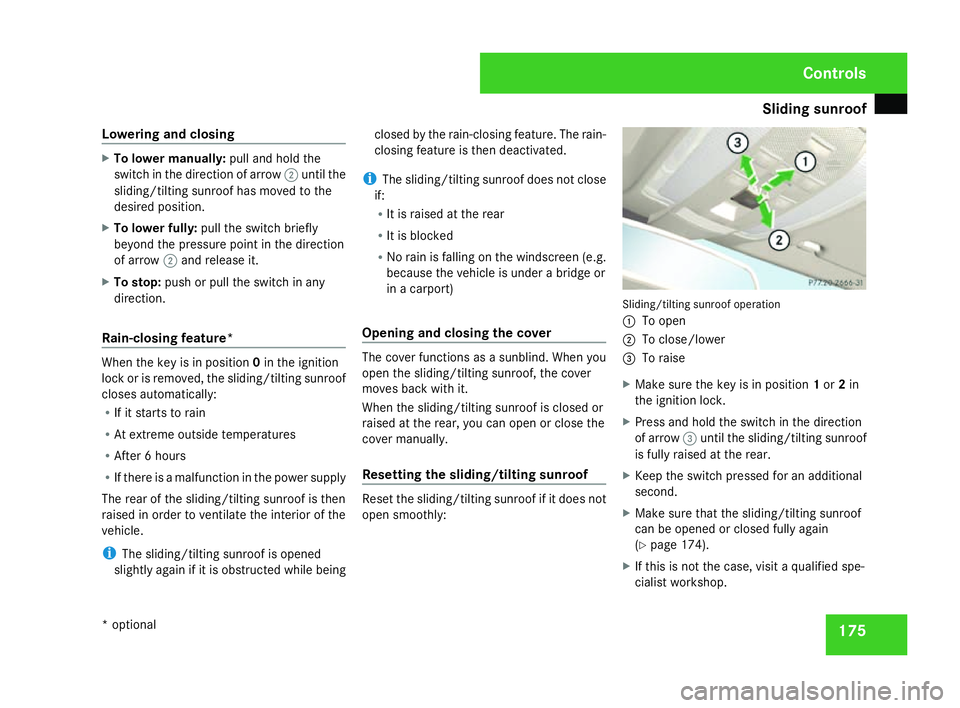
open smoothly: Sliding/tilting sunroof operation
1 To open
2 To close/lower
3 To raise
X Make sure the key is in position 1or 2in
the ignition lock .
X Press and hold the switch in the direction
of arrow 3until the sliding/tilting sunroo f
is fully raised at the rear.
X Keep the switch pressed for an additional
second.
X Make sure that the sliding/tilting sunroof
can be opened or closed fully again
(Y page 174).
X If this is not the case, visit a qualified spe-
cialist workshop. Controls
* optional
204_AKB; 2; 3, en-GB
mkalafa
, 2007-06-26T23:11:51+02:00 - Seite 175