lock MERCEDES-BENZ C-CLASS SALOON 2007 Repair Manual
[x] Cancel search | Manufacturer: MERCEDES-BENZ, Model Year: 2007, Model line: C-CLASS SALOON, Model: MERCEDES-BENZ C-CLASS SALOON 2007Pages: 377, PDF Size: 6.19 MB
Page 158 of 377
Driving sys
tems 15
5
One or more segments light up as the vehicle
approaches an obstacle, depending on the
vehicle's distance from the obstacle.
From the:
R sixth segment onwards, you will hear an
intermittent warning tone for approxi-
mately two seconds
R seventh segment onwards, you will hear a
warning tone for approximately two sec -
onds. You have reached the minimum dis-
tance.
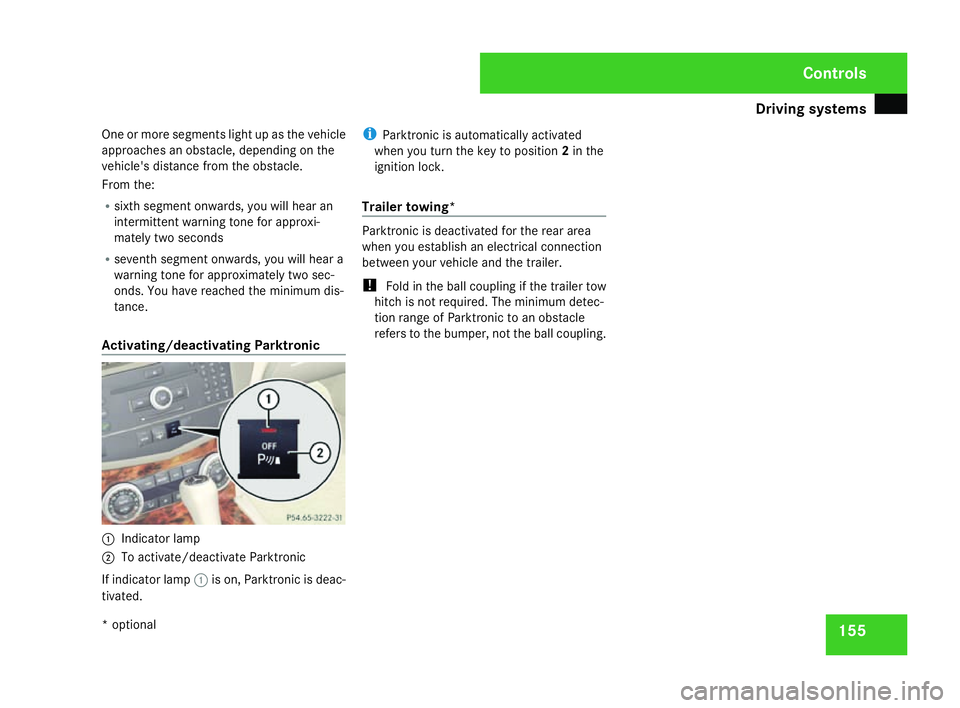
Activating/deactivating Parktronic 1
Indicator lamp
2 To activate/deactivate Parktronic
If indicator lamp 1is on, Parktronic is deac-
tivated. i
Parktronic is automatically activated
when you turn the key to position 2in the
ignition lock .
Trailer towing* Parktronic is deactivated for the rear area
when you establish an electrical connectio
n
between your vehicle and the trailer.
! Fold in the ball coupling if the trailer tow
hitch is not required. The minimum detec -
tion range of Parktronic to an obstacle
refers to the bumper, not the ball coupling . Cont
rols
* optional
204_AKB; 2; 3, en-GB
mkalafa,
2007-06-26T23:11:51+02:00 - Seite 155
Page 160 of 377
Air vent
s 157distribution controller to direct the airflow
away to a different area of the vehicle inte-
rior.
Please observe the following notes to ensur e
that the air can flow freely through the ai r
vents:
R Keep the air inlet on the bonnet free of
blockage, such as ice or snow, to guarantee
the supply of fresh air into the vehicle inte-
rior.
R Never cover the vents or air inlet and outlet
grilles in the vehicle interior. Opening/closing the air vents
i Position the sliders for the centre air
vents in the central position to provide vir-
tually draught-free ventilation.
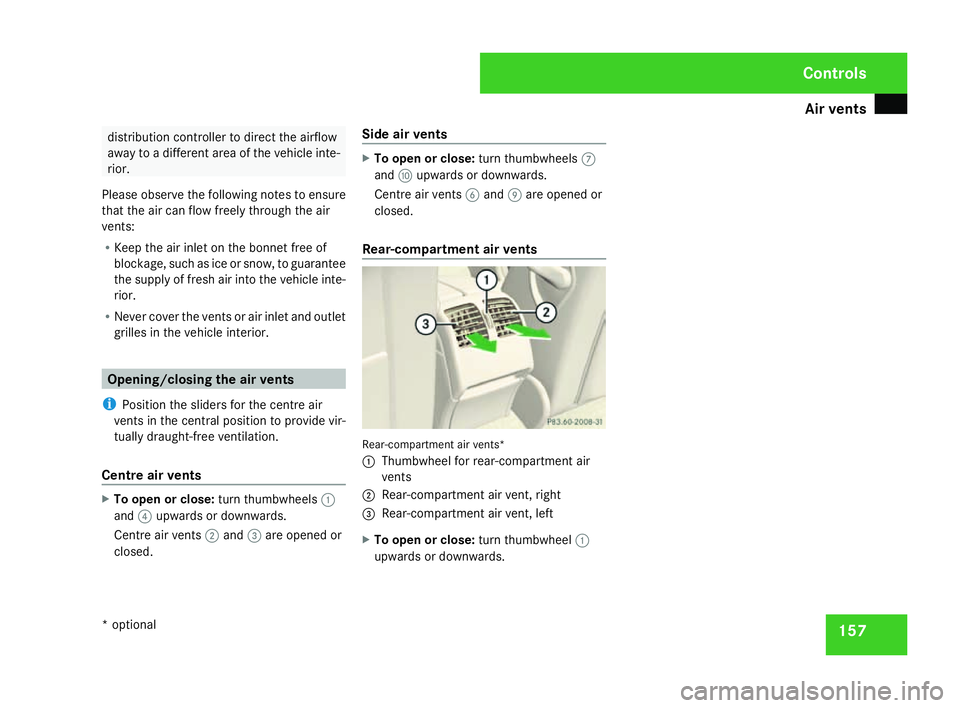
Centre air vents X
To open or close: turn thumbwheels1
and 4upwards or downwards .
Centre air vents 2and 3are opened or
closed. Side air vent
s X
To open or close: turn thumbwheels7
and aupwards or downwards .
Centre air vents 6and 9are opened or
closed.
Rear-compartment air vent s Rear-compartment air vents
*
1 Thumbwheel for rear-compartment air
vents
2 Rear-compartment air vent, right
3 Rear-compartment air vent, lef t
X To open or close: turn thumbwheel1
upwards or downwards . Cont
rols
* optional
204_AKB; 2; 3, en-GB
mkalafa,
2007-06-26T23:11:51+02:00 - Seite 157
Page 163 of 377
Thermatic
16
0
General notes Thermatic is only operational when the
engine is running. Optimum operation is only
achieved when you drive with the side win-
dows and sliding/tilting sunroof*/panorama
sliding sunroof* closed .
You can allow the air-conditioning system to
adjust automatically or you can adjust it man-
ually.
In automatic mode, Thermatic cools or heats
the vehicle interior according to:
R The selected temperature
R The outside temperature
R The intensity of the sunlight
i Ventilate the vehicle for a brief period
during warm weather, e.g. using the sum-
mer opening feature (Y page 111). This
helps you to achieve the desired interior
temperature more quickly.
The integrated filter filters out most particles
of dust and completely filters out pollen.
i A clogged filter reduces the amount of ai r
supplied to the vehicle interior. For this rea-
son, you should always observe the interval
for replacing the filter, which is specified in
the Service Booklet. As it depends on envi- ronmental conditions, e.g. heavy air pollu-
tion, the interval may be slightly shorter
than stated in the Service Booklet. G
Risk of accident
Follow the settings recommended on the
following pages for heating or cooling. The
windows could otherwise mist up. This may
prevent you from observing the traffic con-
ditions, thereby causing an accident. Activating/deactivating Thermati
c
Thermatic is only operational when the
engine is running.
X To activate :press the ´button.
The indicator lamp in the ´button goes
out. The previously selected settings come
into effect again.
or
X Press the Ubutton.
The indicator lamp in the Ubutton is lit.
Airflow and air distribution are set to auto-
matic mode.
X To deactivate: press the´button.
The indicator lamp in the ´button is lit. i
Select this setting when you drive with the
side windows or the sliding/tilting sun-
roof*/panorama sliding sunroof* open, for
example. When Thermatic is deactivated,
the air supply and air circulation are also
switched off. Only select this setting briefl y
when the side windows and the sliding/
tilting sunroof*/panorama sliding sun-
roof* are closed, otherwise the windows
may mist up. Controlling the air conditioning auto-
matically
i If you have set the air-conditioning sys-
tem to automatic, you only need to set the
temperature. In automatic mode, the air-
flow and air distribution do not need to be
adjusted. The cooling with dehumidifica-
tion function is switched on in automatic
mode. If necessary, cooling with dehumid-
ification can be deactivated.
X Make sure that the key is in position 2in
the ignition lock .
X Set the desired temperature .Cont
rols
* optional
204_AKB; 2; 3, en-GB
mkalafa,
2007-06-26T23:11:51+02:00 - Seite 160
Page 164 of 377
Thermatic
16
1
X
To activate :press the Ubutton.
The indicator lamp in the button is lit. Air-
flow and air distribution are set to auto-
matic mode.
X To deactivate: press theUbutton.
The indicator lamp in the Ubutton is off.
Automatic air distribution and airflow are
deactivated. Setting the temperatur
e
Different temperatures can be set for the
driver's and front-passenger sides.
X To increase or reduce the airflow: turn
thumbwheels 1and 6clockwise or anti -
clockwise. Only change the temperature
setting in small increments. Start at 22 °C .
i If you turn the temperature thumbwheel
on one side of the vehicle fully to the right
or left, you will increase or reduce the tem-
perature on the other side of the vehicle at
the same time. Setting the air distribution manually
You can also direct the airflow manually for
the entire vehicle .
The symbols for the air distribution have the
following meanings: Symbol Meaning
{
Directs the airflow through the
demister vents to the wind-
screen and side windows
a
Directs the airflow through the
centre and side air vents
Y
Directs the airflow into the front
and rear footwell
s i
You can also set combinations of air dis-
tribution positions .
X Press the Zbutton repeatedly until the
desired setting appears in the display.
The indicator lamp in the Ubutton goes
off. The automatic control is deactivated
and the air distribution is controlled
according to the selected setting. Setting the airflow manually
You can also set the airflow manually for the
entire vehicle.
X To increase/reduce: press theQor
the Ï button.
The airflow level set is shown in display
b . The indicator lamp in the Ubutton
goes out. Automatic air distribution
remains activated. Mono function
You can use the mono function to adopt the
settings configured for temperature and air
distribution on the driver's side for the front-
passenger side.
X To activate :press the zbutton.
The indicator lamp in the zbutton lights
up.
X To deactivate: press thezbutton.
The indicator lamp in the zbutton goes
out. Controls
204_AKB; 2; 3, en-GB
mkalafa,
2007-06-26T23:11:51+02:00 - Seite 161
Page 170 of 377
Thermotronic*
16
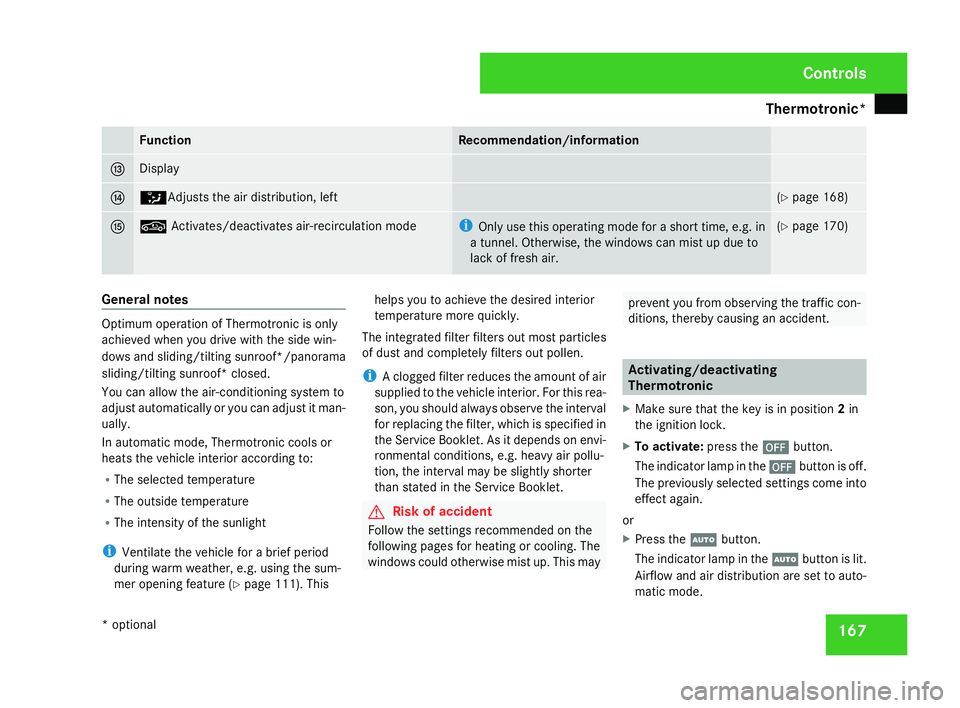
7 Function Recommendation/information
d Display
e Z
Adjusts the air distribution, left (
Y page 168 ) f ,
Activates/deactivates air-recirculation mod e i
Only use this operating mode for a short time, e.g. in
a tunnel. Otherwise, the windows can mist up due to
lack of fresh air. (
Y page 170 ) General notes
Optimum operation of Thermotronic is only
achieved when you drive with the side win-
dows and sliding/tilting sunroof*/panorama
sliding/tilting sunroof* closed
.
You can allow the air-conditioning system to
adjust automatically or you can adjust it man-
ually.
In automatic mode, Thermotronic cools or
heats the vehicle interior according to:
R The selected temperature
R The outside temperature
R The intensity of the sunlight
i Ventilate the vehicle for a brief period
during warm weather, e.g. using the sum-
mer opening feature (Y page 111). This helps you to achieve the desired interior
temperature more quickly.
The integrated filter filters out most particles
of dust and completely filters out pollen.
i A clogged filter reduces the amount of ai r
supplied to the vehicle interior. For this rea-
son, you should always observe the interval
for replacing the filter, which is specified in
the Service Booklet. As it depends on envi-
ronmental conditions, e.g. heavy air pollu-
tion, the interval may be slightly shorter
than stated in the Service Booklet. G
Risk of accident
Follow the settings recommended on the
following pages for heating or cooling. The
windows could otherwise mist up. This may prevent you from observing the traffic con-
ditions, thereby causing an accident. Activating/deactivatin
g
Thermotroni c
X Make sure that the key is in position 2in
the ignition lock .
X To activate :press the ´button.
The indicator lamp in the ´button is off.
The previously selected settings come int o
effect again.
or
X Press the Ubutton.
The indicator lamp in the Ubutton is lit.
Airflow and air distribution are set to auto-
matic mode. Controls
* optional
204_AKB; 2; 3, en-GB
mkalafa,
2007-06-26T23:11:51+02:00 - Seite 167
Page 171 of 377
Thermotronic*
16
8
X
To deactivate: press the´button.
The indicator lamp in the ´button is lit.
i When Thermotronic is deactivated, the air
supply and air circulation are also switched
off. Select this setting when you drive with
the side windows or the sliding/tilting sun-
roof*/panorama sliding sunroof *open, for
example. Select this setting only briefly if
the side windows and the sliding/tilting
sunroof*/panorama sliding/tilting sun-
roof* are closed, otherwise the windows
may mist up. Controlling the air conditioning auto-
matically
i If you switch the air conditioning to auto-
matic mode, you will only rarely need to
adjust the temperature, airflow or air dis-
tribution. The cooling with dehumidification
function is switched on in automatic mode.
If necessary, cooling with dehumidification
can be deactivated.
X Make sure that the key is in position 2in
the ignition lock .
X Set the desired temperature .X
To activate :press the Ubutton.
The indicator lamp in the Ubutton is lit.
Airflow and air distribution are set to auto-
matic mode.
X To deactivate: press theUbutton.
The indicator lamp in the Ubutton is off.
Automatic air distribution and airflow are
deactivated. Setting the temperatur
e
Different temperatures can be set for the
driver's and front-passenger sides.
X To increase or reduce the airflow: turn
thumbwheels 1and 8clockwise or anti -
clockwise. Only change the temperature
setting in small increments. Start at 22 °C .
i If you turn the temperature thumbwheel
on one side of the vehicle fully to the right
or left, you will increase or reduce the tem-
perature on the other side of the vehicle at
the same time. Setting the air distribution manually
You can select different air distribution set-
tings for the driver's and front-passenger side
manually.
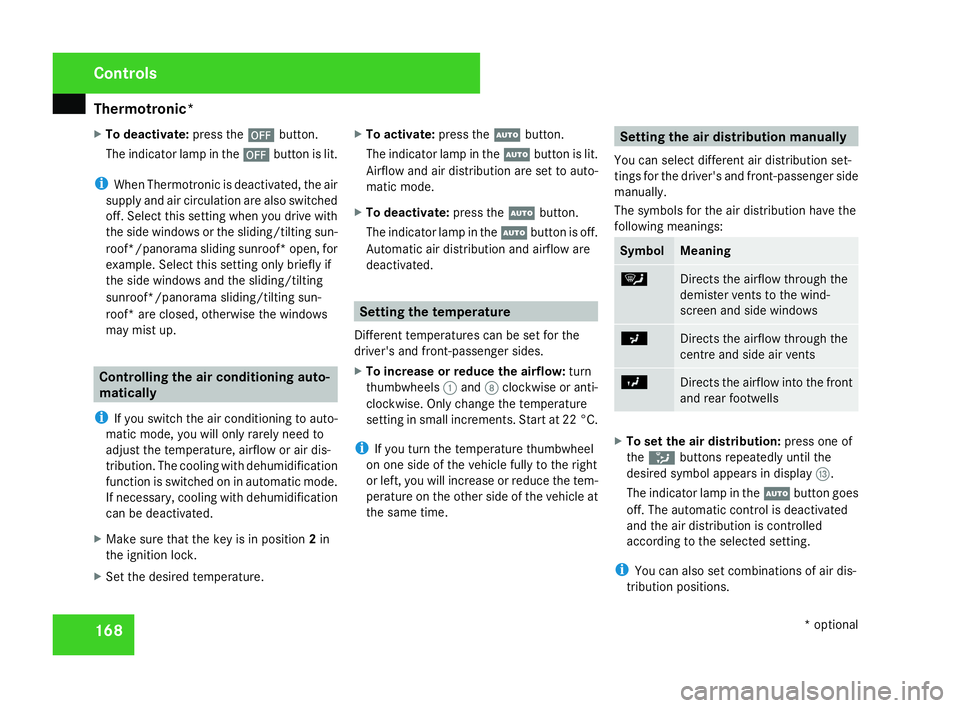
The symbols for the air distribution have the
following meanings: Symbol Meaning
{
Directs the airflow through the
demister vents to the wind-
screen and side windows
a
Directs the airflow through the
centre and side air vents
Y
Directs the airflow into the front
and rear footwell
s X
To set the air distribution: press one of
the Z buttons repeatedly until the
desired symbol appears in display d.
The indicator lamp in the Ubutton goes
off. The automatic control is deactivated
and the air distribution is controlled
according to the selected setting.
i You can also set combinations of air dis-
tribution positions .Cont
rols
* optional
204_AKB; 2; 3, en-GB
mkalafa,
2007-06-26T23:11:51+02:00 - Seite 168
Page 174 of 377
Thermotronic*
17
1
sliding sunroof* move back into their pre-
vious position.
The indicator lamp in the ,button is off.
Air-recirculation mode is deactivated.
i If you open a side window or the sliding/
tilting sunroof* or panorama sliding sun-
roof* manually after closing using the con-
venience closing feature, it will remain in
this position when opened using the con-
venience opening feature. Residual heat/auxiliary ventilation
It is possible to make use of the residual heat
of the engine to continue heating the station-
ary vehicle for up to 30 minutes after the
engine has been switched off. The heating
time depends on the coolant temperature and
on the interior temperature that has been set.
i If you activate residual heat at high tem-
peratures, only the ventilation is activated.
i The blower will run at a low speed regard-
less of the airflow setting.
X Make sure the key is in position 0in the
ignition lock or that it has been removed. X
To activate :press the Tbutton.
The indicator lamp in the Tbutton is lit.
The REST display message in the display is
lit.
X To deactivate: press theTbutton.
The indicator lamp in the Tbutton is off.
The REST display message in the display is
not lit.
i The residual heat/auxiliary ventilation is
automatically deactivated after about 30
minutes, or when:
R the ignition is switched on
R the battery voltage drops
R the coolant temperature is too lo w Cooling with air-dehumidification
G
Risk of accident
If you deactivate the cooling function with
air dehumidification, the vehicle will not be
cooled in warm weather and the air will not
be dehumidified. The windows could mis t
up more quickly. This may prevent you from
observing the traffic conditions, thereby
causing an accident. H
Environmental not
e
The cooling system uses the refrigerant
R134A. This refrigerant does not damage
the earth's ozone layer.
i Condensation may drip from the under-
side of the vehicle when Thermatic is in
cooling mode.
Cooling with dehumidification is operational
when the engine is running, and cools accord -
ing to the interior temperature selected. The
air inside the vehicle is also dried, thereby
preventing the windows from misting up.
X To activate :press the œbutton.
The indicator lamp in the œbutton is lit.
The cooling with dehumidification function
is activated. Controls
* optional
204_AKB; 2; 3, en-GB
mkalafa,
2007-06-26T23:11:51+02:00 - Seite 171 Z
Page 176 of 377
Sliding sunroof
173Rear window heating
G
Risk of accident
Clear all windows of ice or snow before set-
ting off. Impaired visibility could otherwise
endanger yourself and others.
i The rear window heating has a high cur-
rent draw. Therefore, switch it off as soon
as the rear window is free of snow and ice,
as it only switches itself off automatically
after between fifteen and thirty minutes.
i If the battery voltage is too low, the rear
window heating may switch off.
X Make sure that the key is in position 2in
the ignition lock .
X To switch on/off :press the ¯button.
The indicator lamp in the ¯switch is lit
or off. Sliding sunroof
Sliding/tilting sunroof*
G
Risk of injury
Never leave children unsupervised in the
vehicle. They could operate the sliding/tilt-
ing sunroof and injure themselves. Alway s
take the key with you when leaving the
vehicle, even if you only leave it for a short
time. G
Risk of injury
Make sure that nobody can become trap -
ped when you are opening and closing the
sliding/tilting sunroof. If danger threatens,
release the switch and push it briefly in any
direction to stop the sliding/tilting sunroof . G
Risk of injury
The glass in the sliding/tilting sunroof
could break in an accident. If you are not
wearing a seat belt, there is a risk that yo u
could be thrown through the opening in the
event of the vehicle overturning. Therefore,
always wear a seat belt to reduce the ris k
of injuries. !
Only open the sliding/tilting sunroof if it
is free of snow and ice. Otherwise, mal-
functions may occur.
Do not allow anything to protrude from the
sliding/tilting sunroof. The seals could oth-
erwise be damaged.
i Resonance noises can occur in addition
to the usual airflow noises when the slid -
ing/tilting sunroof is open. They are caused
by minor pressure fluctuations in the vehi-
cle interior .
Change the position of the sliding/tilting
sunroof or open a side window slightly to
reduce or eliminate these noises .
i It is also possible to open and close the
sliding/tilting sunroof from the outsid e
using the "Summer opening" (Y page 111 )
and "Convenience closing" (Y page 112 )
features respectively .
i If PRE-SAFE ®
has been activated, the slid-
ing/tilting sunroof closes automatically ,
leaving a small gap open . Cont
rols
* optional
204_AKB; 2; 3, en-GB
mkalafa,
2007-06-26T23:11:51+02:00 - Seite 173
Page 177 of 377
Sliding sunroof
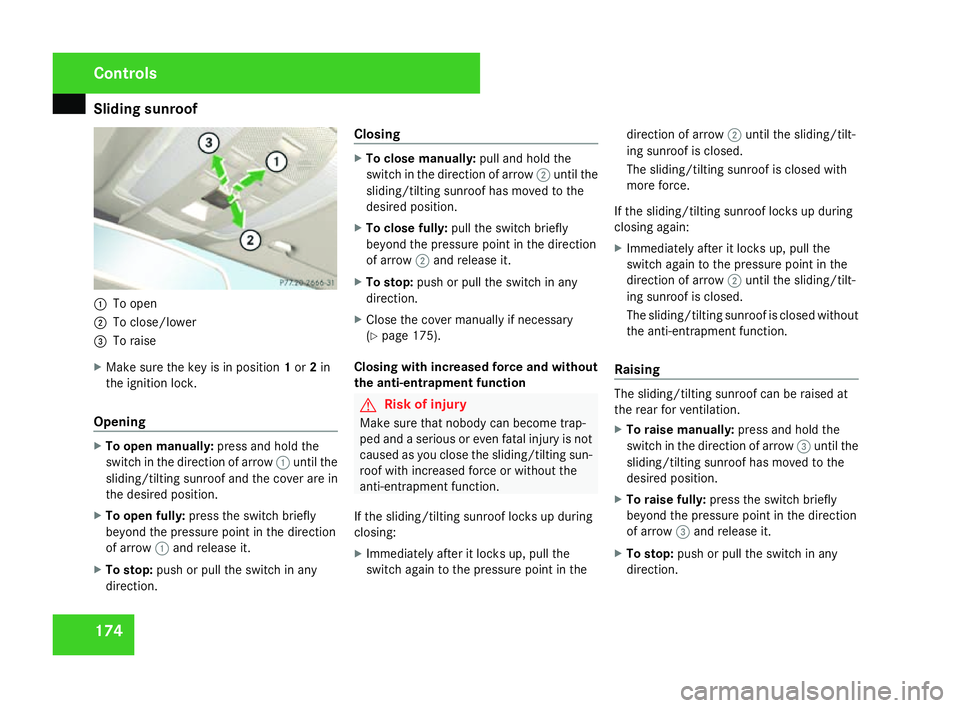
1741
To open
2 To close/lower
3 To raise
X Make sure the key is in position 1or 2in
the ignition lock .
Opening X
To open manually: press and hold the
switch in the direction of arrow 1until th e
sliding/tilting sunroof and the cover are in
the desired position.
X To open fully: press the switch briefl y
beyond the pressure point in the direction
of arrow 1and release it.
X To stop: push or pull the switch in any
direction. Closin
g X
To close manually: pull and hold the
switch in the direction of arrow 2until th e
sliding/tilting sunroof has moved to the
desired position.
X To close fully: pull the switch briefl y
beyond the pressure point in the direction
of arrow 2and release it.
X To stop: push or pull the switch in any
direction.
X Close the cover manually if necessary
(Y page 175).
Closing with increased force and without
the anti-entrapment function G
Risk of injury
Make sure that nobody can become trap -
ped and a serious or even fatal injury is not
caused as you close the sliding/tilting sun-
roof with increased force or without the
anti-entrapment function .
If the sliding/tilting sunroof locks up during
closing:
X Immediately after it locks up, pull the
switch again to the pressure point in the direction of arrow
2until the sliding/tilt -
ing sunroof is closed.
The sliding/tilting sunroof is closed with
more force.
If the sliding/tilting sunroof locks up durin g
closing again:
X Immediately after it locks up, pull the
switch again to the pressure point in the
direction of arrow 2until the sliding/tilt -
ing sunroof is closed.
The sliding/tilting sunroof is closed without
the anti-entrapment function .
Raisin g The sliding/tilting sunroof can be raised at
the rear for ventilation.
X
To raise manually: press and hold the
switch in the direction of arrow 3until th e
sliding/tilting sunroof has moved to the
desired position.
X To raise fully: press the switch briefl y
beyond the pressure point in the direction
of arrow 3and release it.
X To stop: push or pull the switch in any
direction. Controls
204_AKB; 2; 3, en-G
B
mkalafa , 2007-06-26T23:11:51+02:00 - Seite 174
Page 178 of 377
Sliding sunroof
175
Lowering and closing X
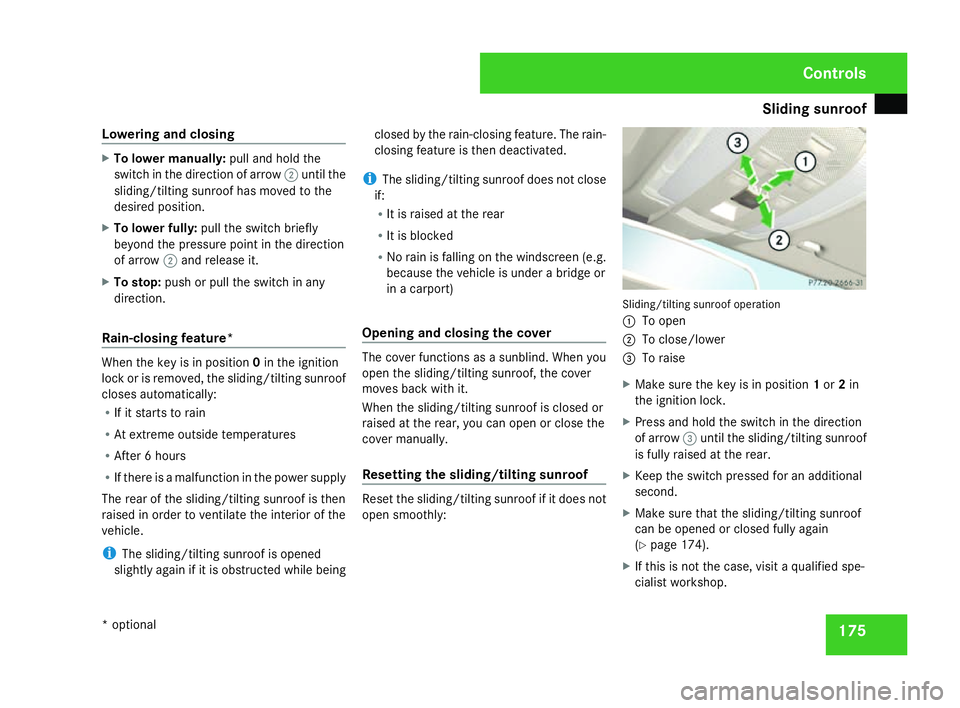
To lower manually: pull and hold the
switch in the direction of arrow 2until th e
sliding/tilting sunroof has moved to the
desired position.
X To lower fully: pull the switch briefl y
beyond the pressure point in the direction
of arrow 2and release it.
X To stop: push or pull the switch in any
direction.
Rain-closing feature *When the key is in position
0in the ignition
lock or is removed, the sliding/tilting sunroof
closes automatically:
R If it starts to rain
R At extreme outside temperatures
R After 6 hours
R If there is a malfunction in the power supply
The rear of the sliding/tilting sunroof is then
raised in order to ventilate the interior of the
vehicle .
i The sliding/tilting sunroof is opened
slightly again if it is obstructed while being closed by the rain-closing feature. The rain-
closing feature is then deactivated.
i The sliding/tilting sunroof does not close
if:
R It is raised at the rear
R It is blocked
R No rain is falling on the windscreen (e.g.
because the vehicle is under a bridge or
in a carport)
Opening and closing the cover The cover functions as a sunblind. When you
open the sliding/tilting sunroof, the cover
moves back with it.
When the sliding/tilting sunroof is closed or
raised at the rear, you can open or close the
cover manually.
Resetting the sliding/tilting sunroof
Reset the sliding/tilting sunroof if it does not
open smoothly: Sliding/tilting sunroof operation
1 To open
2 To close/lower
3 To raise
X Make sure the key is in position 1or 2in
the ignition lock .
X Press and hold the switch in the direction
of arrow 3until the sliding/tilting sunroo f
is fully raised at the rear.
X Keep the switch pressed for an additional
second.
X Make sure that the sliding/tilting sunroof
can be opened or closed fully again
(Y page 174).
X If this is not the case, visit a qualified spe-
cialist workshop. Controls
* optional
204_AKB; 2; 3, en-GB
mkalafa
, 2007-06-26T23:11:51+02:00 - Seite 175