navigation system MERCEDES-BENZ C-CLASS SALOON 2011 User Guide
[x] Cancel search | Manufacturer: MERCEDES-BENZ, Model Year: 2011, Model line: C-CLASS SALOON, Model: MERCEDES-BENZ C-CLASS SALOON 2011Pages: 401, PDF Size: 9.74 MB
Page 215 of 401

users or obstacles. You can, for example,
countersteer gently or depress the accelera-
to
rp edal at any time to cancel inappropriate
braking action.
You are responsible for the vehicle's speed,
correct steering and for braking in good time.
Always adapt your driving style to suit the
prevailing road and weather conditions.
Always pay attention to traffic conditions and
your surroundings. Otherwise, you may fail to
recognise dangers in time, cause an accident
and injure yourself and others.
Either a very slight course-correcting brake
application, or none at all, may occur if:
R there are vehicles or obstacles, e.g. crash
barriers, on both sides of your vehicle.
R a vehicle approaches too closely on the
side.
R you have adopted a sporty driving style with
high cornering speeds.
R you brake or accelerate decisively.
R a driving safety system intervenes, such as
ESP ®
or PRE-SAFE ®
Brake.
R ESP ®
is deactivated.
R a loss of tyre pressure or a defective tyre is
detected.
Activating Active Blind Spot Assist
X On vehicles without a navigation system,
make sure that the Becker ®
MAP PILOT is
connected; see the separate operating
instructions for Audio 20.
X Make sure that the radar sensor system
(Y page 242) and Active Blind Spot Assist
(Y page 238)a re activated in the on-board
computer.
X Turn the key to position 2in the ignition
lock.
Warning lamps :light up red in the exte-
rior mirrors for approximately 1.5 seconds
and then turn yellow. Trailer towing
If you attach a trailer, make sure that you have
correctly established the electrical connec-
tion. This can be accomplished by checking
the trailer lighting. Active Blind Spot Assist is
then deactivated. The indicator lamp in the
exterior mirrors lights up yellow, and the
Active Blind Spot Assist currently unavailable See Owner's Manual mes-
sage appears in the multifunction display.
Active Lane Keeping Assist Important safety notes
Active Lane Keeping Assist monitors the area
in front of yourv
ehicle by means of a camera
at the top of the windscreen. Active Lane
Keeping Assist detects lane markings on the
road and warns you before you leave your
lane unintentionally. If you do not react to the
warning, a lane-correcting application of the
brakes can bring the vehicle back into the
original lane. :
Active Lane Keeping Assist camera
If you have selected the Display unit Speed-/odometer (Y
page 239) function in
the on-board computer and select km as the
unit of measurement, Active Lane Keeping
Assist is active from speeds of 60 km/h. If
the miles display unit is selected, the assis-
tance range begins at 40 mph. G
WARNING
Active Lane Keeping Assist does not keep
your vehicle in its lane. It is only an aid and 212
Driving systemsDriving and parking
Page 233 of 401
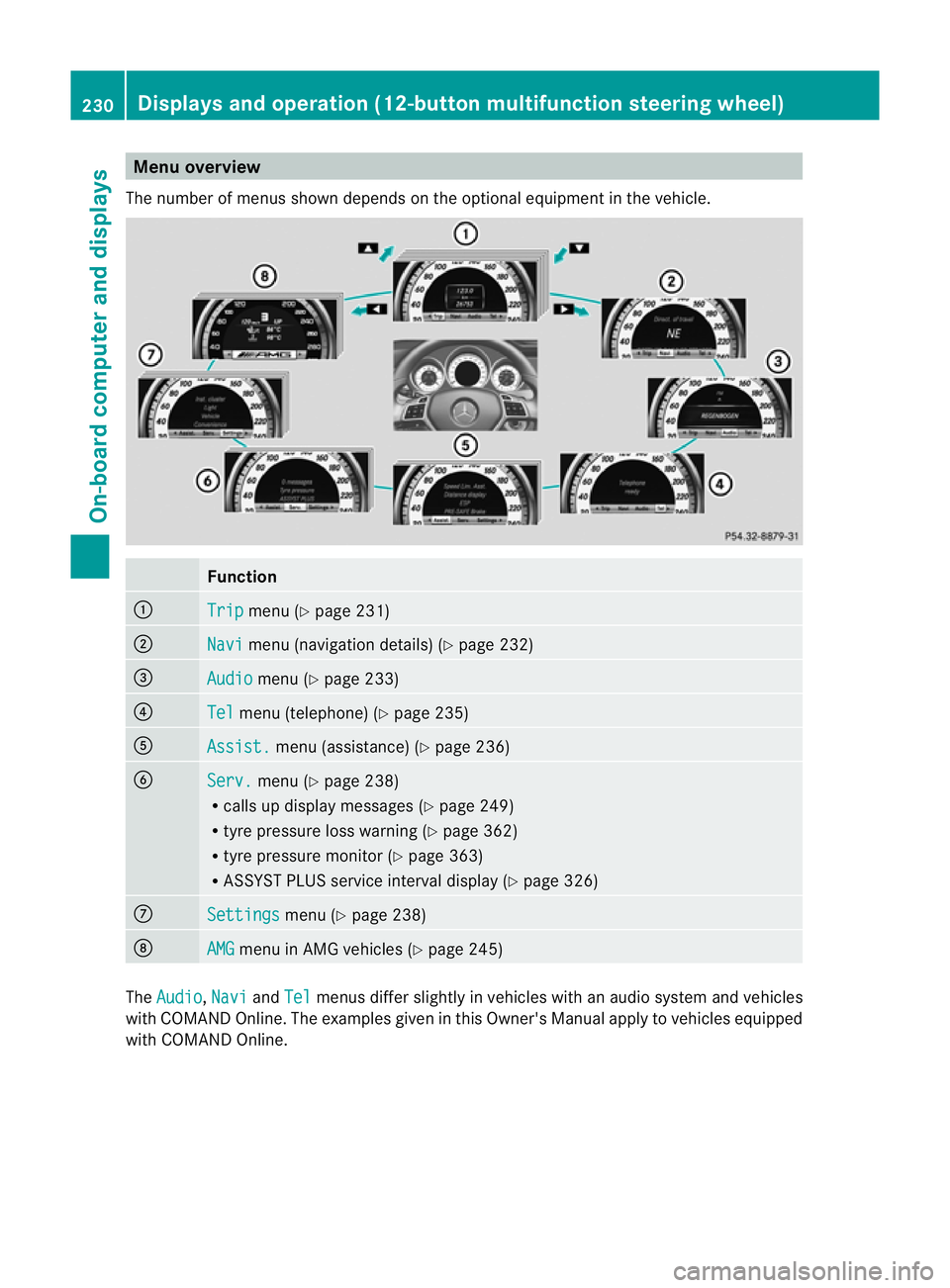
Menu overview
The number of menus show ndepends on the optional equipment in the vehicle. Function
:
Trip menu (Y
page 231) ;
Navi menu (navigation details) (Y
page 232)=
Audio menu (Y
page 233) ?
Tel menu (telephone) (Y
page 235)A
Assist. menu (assistance) (Y
page 236)B
Serv. menu (Y
page 238)
R calls up display messages ( Ypage 249)
R tyre pressure loss warning (Y page 362)
R tyre pressure monitor (Y page 363)
R ASSYST PLUS service interval display (Y page 326)C
Settings menu (Y
page 238) D
AMG menu in AMG vehicles (Y
page 245)The
Audio ,
Navi and
Tel menus differ slightly in vehicles with an audio system and vehicles
with COMAND Online. The examples given in this Owner's Manual apply to vehicles equipped
with COMAND Online. 230
Displays and operation (12-button multifunction steering wheel)On-board computer and displays
Page 235 of 401
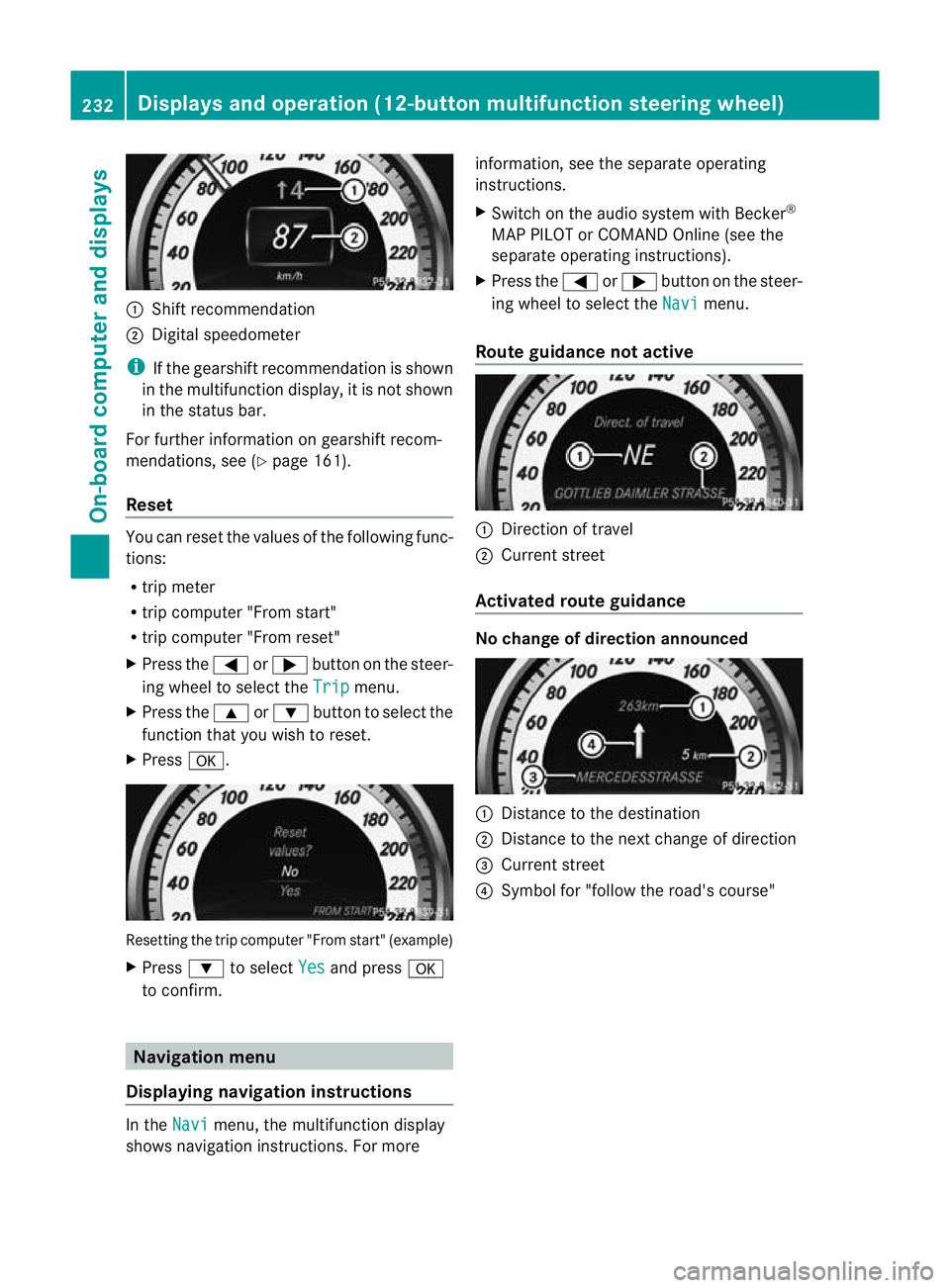
:
Shift recommendation
; Digital speedometer
i If the gearshift recommendation is shown
in the multifunction display, it is not shown
in the status bar.
For further information on gearshift recom-
mendations, see (Y page 161).
Reset You can reset the values of the following func-
tions:
R
trip meter
R trip computer "From start"
R trip computer "From reset"
X Press the =or; button on the steer-
ing wheel to select the Trip menu.
X Press the 9or: button to select the
function tha tyou wish to reset.
X Press a. Resetting the trip computer "From start" (example)
X
Press :to select Yes and press
a
to confirm. Navigation menu
Displaying navigation instructions In the
Navi menu, the multifunction display
shows navigation instructions. For more information, see the separate operating
instructions.
X
Switch on the audio system with Becker ®
MAP PILOT or COMAND Online (see the
separate operating instructions).
X Press the =or; button on the steer-
ing wheel to select the Navi menu.
Route guidance not active :
Direction of travel
; Current street
Activated route guidance No change of direction announced
:
Distance to the destination
; Distance to the next change of direction
= Current street
? Symbol for "follow the road's course" 232
Displays and operation (12-button multifunction steering wheel)On-board computer and displays
Page 277 of 401
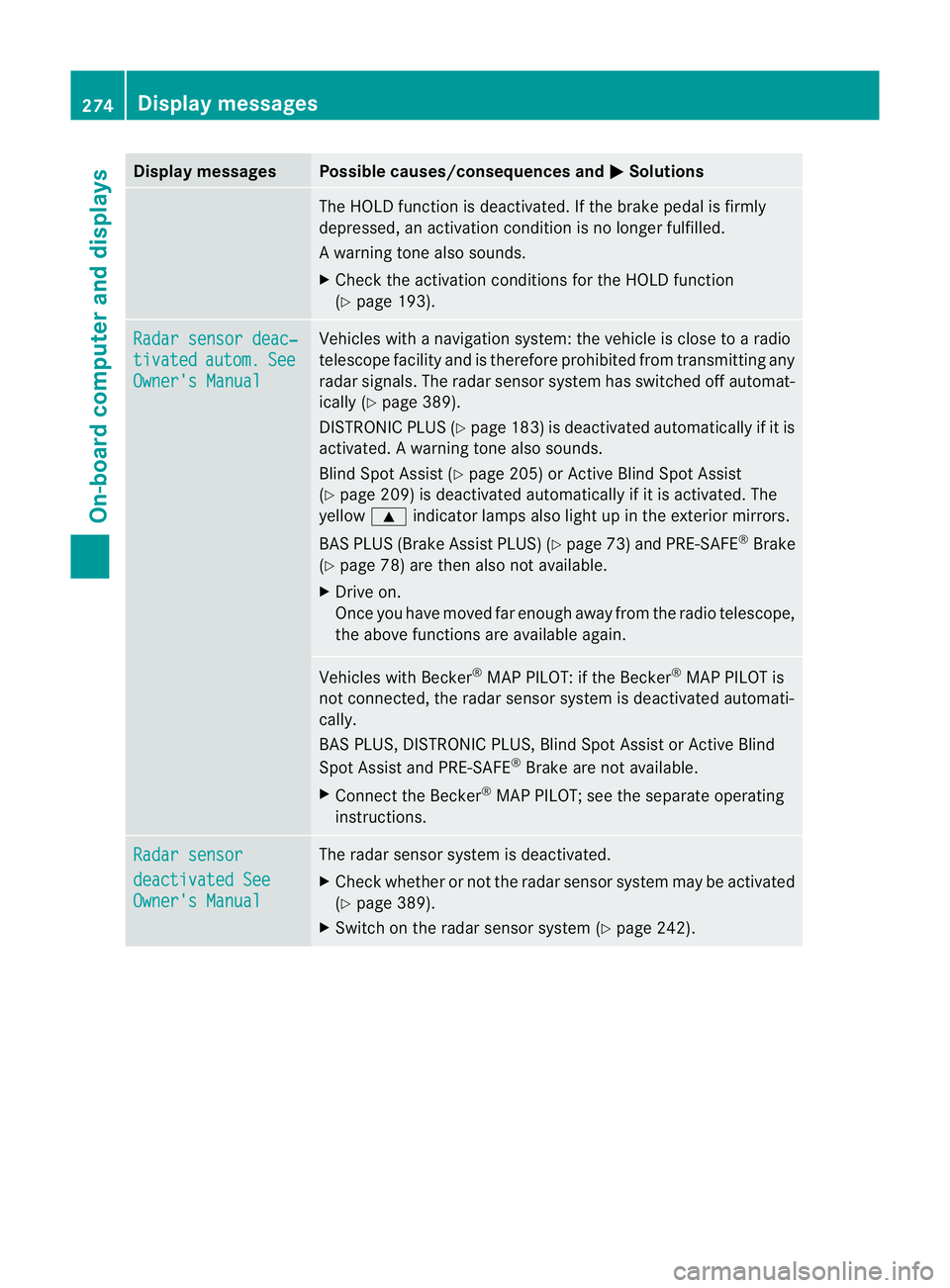
Display messages Possible causes/consequences and
M Solutions
The HOLD function is deactivated. If the brake pedal is firmly
depressed, an activation condition is no longer fulfilled.
Aw
arning tone also sounds.
X Check the activation conditions for the HOLD function
(Y page 193). Radar sensor deac‐
tivated autom. See
Owner's Manual Vehicles with a navigation system: the vehicle is close to a radio
telescope facility and is therefore prohibited from transmitting any
radar signals. The radar sensor system has switched off automat-
ically (Y
page 389).
DISTRONI CPLUS (Y page 183) is deactivated automatically if it is
activated. Awarning tone also sounds.
Blind Spo tAssist (Y page 205) or Active Blind Spot Assist
(Y page 209) is deactivated automatically if it is activated. The
yellow 9indicator lamps also light up in the exterior mirrors.
BAS PLUS (Brake Assist PLUS) (Y page 73) and PRE-SAFE®
Brake
(Y page 78) are then also not available.
X Drive on.
Once you have moved far enough away from the radio telescope,
the above functions are available again. Vehicles with Becker
®
MAP PILOT: if the Becker ®
MAP PILOT is
not connected, the radar sensor system is deactivated automati-
cally.
BAS PLUS, DISTRONIC PLUS, Blind Spot Assist or Active Blind
Spot Assist and PRE-SAFE ®
Brake are not available.
X Connect the Becker ®
MAP PILOT; see the separate operating
instructions. Radar sensor
deactivated See
Owner's Manual The radar sensor system is deactivated.
X
Check whether or not the radar sensor system may be activated
(Y page 389).
X Switch on the radar sensor system (Y page 242).274
Display messagesOn-board computer and displays
Page 296 of 401
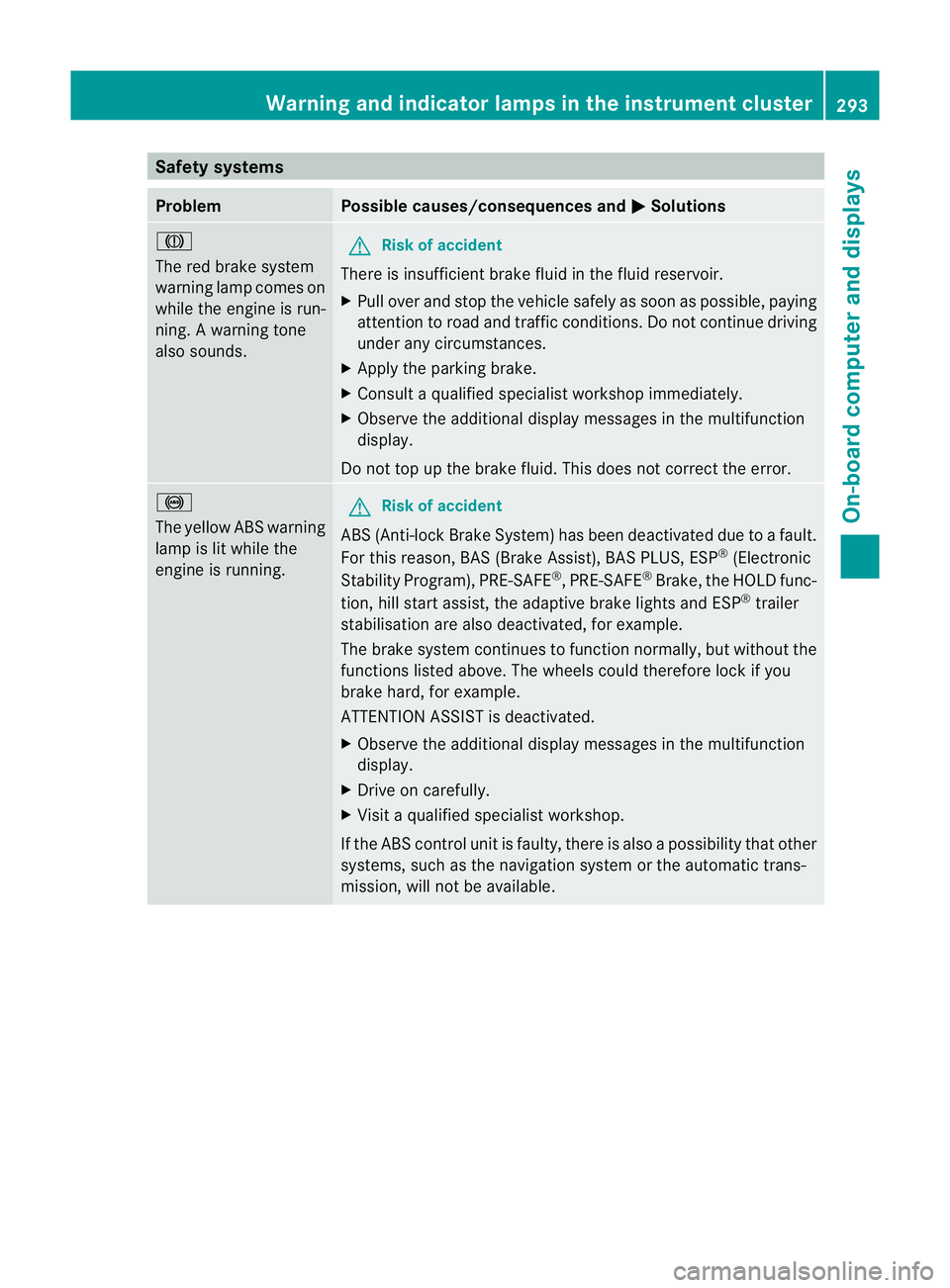
Safety systems
Problem Possible causes/consequences and
M Solutions
J
The red brake system
warning lamp comes on
while the engine is run-
ning. A warning tone
also sounds. G
Risk of accident
There is insufficient brake fluid in the fluid reservoir.
X Pull over and stop the vehicle safely as soon as possible, paying
attention to road and traffic conditions. Do not continue driving
under any circumstances.
X Apply the parking brake.
X Consult a qualified specialist workshop immediately.
X Observe the additional display messages in the multifunction
display.
Do not top up the brake fluid. This does not correct the error. !
The yellow ABS warning
lamp is lit while the
engine is running. G
Risk of accident
ABS (Anti-lock Brake System) has been deactivated due to a fault.
For this reason, BAS (Brake Assist), BAS PLUS, ESP ®
(Electronic
Stability Program), PRE-SAFE ®
,P RE-SAFE ®
Brake ,the HOLD func-
tion, hill start assist, the adaptive brake lights and ESP ®
trailer
stabilisation are also deactivated, for example.
The brake system continues to function normally, but without the
functions listed above. The wheels could therefore lock if you
brake hard, for example.
ATTENTION ASSIST is deactivated.
X Observe the additional display messages in the multifunction
display.
X Drive on carefully.
X Visit a qualified specialist workshop.
If the ABS control unit is faulty, there is also a possibility that other
systems, such as the navigation system or the automatic trans-
mission, will not be available. Warning and indicator lamps in the instrument cluster
293On-board computer and displays Z
Page 392 of 401
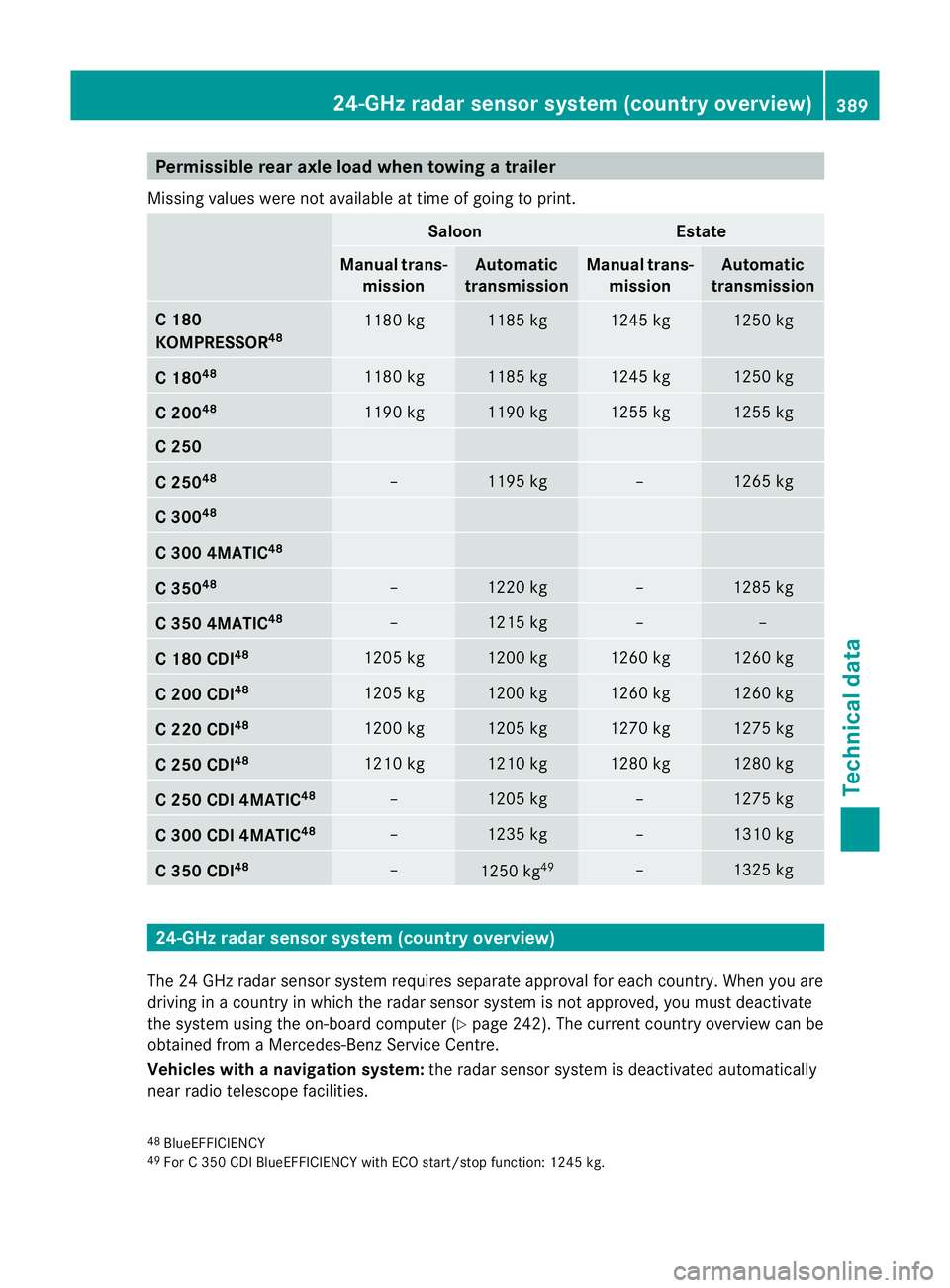
Permissible rear axle load when towing
atrailer
Missing values were not availabl eattime of going to print. Saloon Estate
Manual trans-
mission Automatic
transmission Manual trans-
mission Automatic
transmission C 180
KOMPRESSOR
48 1180 kg 1185 kg 1245 kg 1250 kg
C 180
48 1180 kg 1185 kg 1245 kg 1250 kg
C 200
48 1190 kg 1190 kg 1255 kg 1255 kg
C 250
C 250
48 – 1195 kg – 1265 kg
C 300
48 C 300 4MATIC
48 C 350
48 – 1220 kg – 1285 kg
C 350 4MATIC
48 – 1215 kg – –
C 180 CDI
48 1205 kg 1200 kg 1260 kg 1260 kg
C 200 CDI
48 1205 kg 1200 kg 1260 kg 1260 kg
C 220 CDI
48 1200 kg 1205 kg 1270 kg 1275 kg
C 250 CDI
48 1210 kg 1210 kg 1280 kg 1280 kg
C 250 CDI 4MATIC
48 – 1205 kg – 1275 kg
C 300 CDI 4MATIC
48 – 1235 kg – 1310 kg
C 350 CDI
48 –
1250 kg
49 – 1325 kg
24-GHz radar sensor system (country overview)
The 24 GHz radar sensor system requires separate approval for each country. When you are
driving in a country in which the radar sensor system is not approved, you must deactivate
the system using the on-board computer (Y page 242). The current country overview can be
obtained from a Mercedes-Benz Service Centre.
Vehicles with anavigation system: the radar sensor system is deactivated automatically
near radio telescope facilities.
48 BlueEFFICIENCY
49 For C 350 CDI BlueEFFICIENCY with ECO start/stop function: 1245 kg. 24-GHz radar sensor system (country overview)
389Technical data Z
Page 393 of 401
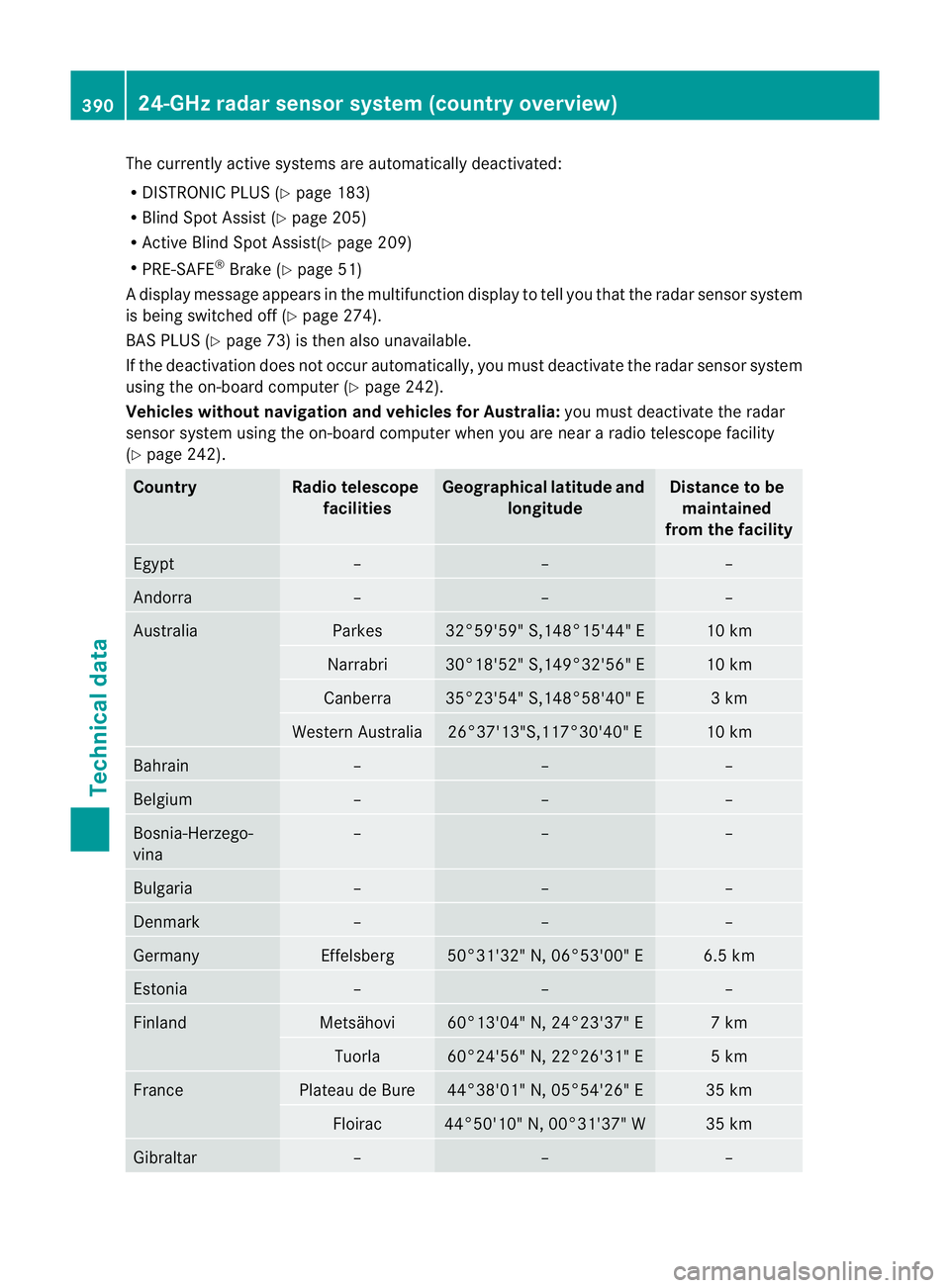
The currently active systems are automatically deactivated:
R
DISTRONIC PLUS (Y page 183)
R Blind Spot Assist (Y page 205)
R Active Blind Spot Assist(Y page 209)
R PRE-SAFE ®
Brake (Y page 51)
Ad isplay message appears in the multifunction display to tell you that the radar sensor system
is being switched off (Y page 274).
BAS PLUS (Y page 73) is the nalso unavailable.
If the deactivation does not occur automatically, you must deactivate the radar sensor system
using the on-board computer (Y page 242).
Vehicles withou tnavigation and vehicles for Australia: you must deactivate the radar
sensor system using the on-board computer whe nyou are near a radio telescope facility
(Y page 242). Country Radio telescope
facilities Geographical latitude and
longitude Distance to be
maintained
from the facility Egypt – – –
Andorra – – –
Australia Parkes 32°59'59" S,148°15'44" E 10 km
Narrabri 30°18'52" S,149°32'56" E 10 km
Canberra 35°23'54" S,148°58'40" E 3 km
Western Australia 26°37'13"S,117°30'40" E 10 km
Bahrain – – –
Belgium – – –
Bosnia-Herzego-
vina – – –
Bulgaria – – –
Denmark – – –
Germany Effelsberg 50°31'32" N, 06°53'00" E 6.5 km
Estonia – – –
Finland Metsähovi 60°13'04" N, 24°23'37" E 7 km
Tuorla 60°24'56" N, 22°26'31" E 5 km
France Plateau de Bure 44°38'01" N, 05°54'26" E 35 km
Floirac 44°50'10" N, 00°31'37" W 35 km
Gibraltar – – –390
24-GHz radar sensor system (country overview)Technical data