service MERCEDES-BENZ C-CLASS SALOON 2012 User Guide
[x] Cancel search | Manufacturer: MERCEDES-BENZ, Model Year: 2012, Model line: C-CLASS SALOON, Model: MERCEDES-BENZ C-CLASS SALOON 2012Pages: 557, PDF Size: 10.15 MB
Page 38 of 557

data can also be used
toexamine the cus tom‐
er's warranty and guarantee claims.
Fa ult memories in theve hicle can be reset by a
service outlet or at your requ est as part of repair
or maintenance work.
Con venience and inf otainment functions
Yo u can store con venience settings and individ‐
ual settings in theve hicle and change or reset
th em at any time.
Depending on theve hicle equipment, this
includes thefo llowing settings, forex ample:
R seat and steering wheel positions
R suspension and climate control settings
R individual settings, such as interior lighting
Depending on the selected equipment, you can
import data into vehicle inf otainment functions
yo urself.
Depending on theve hicle equipment, this
includes thefo llowing data, forex ample:
R multimedia data, such as music, films or pho‐
to sfo r playback in an integrated multimedia
sy stem R
address book data for use in connection with
an integrated hands-free sy stem or an inte‐
grated navigation sy stem
R entered navigation destinations
R data about the use of Internet services
These data for con venience and inf otainment
functions may be sa ved locally in theve hicle or
th ey may be located on a device which you ha ve
connected totheve hicle, such as a smartphone,
USB flash drive or MP3 pla yer.If yo u ha ve
entered these data yourself, you can dele tethem
at any time.
This data is transmit ted from theve hicle tothird
parties only at your requ est. This applies, in par‐
ticular, when you use online services in accord‐
ance with the settings that you ha veselected.
Smartphone integ ration (e.g. Android Autoor
Apple CarPlay)
If yo ur vehicle is accordingly equipped, you can
connect your smartphone or ano ther mobile end
device totheve hicle. You can then control them
by means of the control elements integrated in
th eve hicle. Images and audio from the smart‐
phone can be output via the multimedia sy stem. Cer
tain information is simultaneously transfer‐
re dto yo ur smartphone. Depending on the type
and integration, this includes position data, the
day/night mode and other general vehicle sta‐
tuses. For more information please consult the
Owner's Manual of theve hicle/inf otainment sys‐
te m.
This integration allows the use of selected
smartphone apps, such as navigation or music
pla yer apps. There is no fur ther interaction
between the smartphone and theve hicle; in par‐
ticular, vehicle data is not directly accessible.
The type of additional data processing is de ter‐
mined bythe pr ovider of the app being used.
Which settings you can make, if an y,depends on
th e specific app and the operating sy stem of
yo ur smartphone. Online services
Wi
reless network connection
If yo ur vehicle has a wireless network connec‐
tion, it enables data tobe exc hanged between
yo ur vehicle and additional sy stems. The wire‐
less network connection is made possible bythe Gene
ral no tes 35
Internal use only
Page 39 of 557
ve
hicle's own transmitter and recei ver or by a
mobile end device that you ha vebrought into the
ve hicle, forex ample, a smartphone. Online func‐
tions can be used via the wireless network con‐
nection. This includes online services and appli‐
cations/apps pr ovided to yo uby the manufac‐
turer or by other pr oviders.
Manu factu rer's se rvices
Re garding the manufacturer's online services,
th e individual functions are described bythe
manufacturer in a suita ble place,forex ample, in
th e Owner's Manual or on the manufacturer's
we bsite, where there leva nt da taprotection
information is also given. Personal data may be
used forth e pr ovision of online services. Data
are exchanged via a secure connection, such as
th e manufacturer's designated IT sy stems. Any
personal data which are collected, processed
and used, other than forth e pr ovision of serv‐
ices, is done so exclusively on the basis of legal
permission. This is the case, forex ample, for a
legally prescribed emergency call sy stem, a con‐
tractual agreement or when consent has been
given. Yo
u can ha veservices and functions, some of
which are subject toafe e, activated or deactiva‐
te d. This excludes legally prescribed functions
and services, such as an emer gency call sy stem.
Third party services
If yo u use online services from other pr oviders
(third parties), these services are there sponsi‐
bility of the pr ovider in question and subject to
th at pr ovider's data pr otection conditions and
te rm s of use. As a general rule, the manufac‐
turer has no influence on the conte nt
exc hanged.
Fo rth is reason, when services are pr ovided by
th ird parties, please ask the service pr ovider in
qu estion for information about the type, extent
and pu rpose of the collection and use of per‐
sonal data. Data pr
otection rights Depending on
your count ryor the equipment
and range of functions of your vehicle as well as
th e services you use and the services on of fer,
yo u are entitled todiffere nt da taprotection
ri ghts. Further information on data pr otection and
your data pr otection rights can either be
fo und on the manufacturer's website or you will
re cei vethis information as part of theva rious
services and service of fers . The reyou will also
fi nd the conta ct information forth e manufac‐
turer and its data pr otection of ficers.
At awo rkshop, forex ample, with the support of
a specialist and possibly for a fee, you can ha ve
data read out which is stored only locally in the
ve hicle. Copyright
Information on licences for free and open-sou rce
software used in your vehicle can be found on
th e data car rier in your vehicle document wallet
and with updates on thefo llowing website:
https://www.mercedes-benz.com/opensource 36
General no tes
Internal use only
Page 56 of 557
Mercedes-Benz
stronglyadvises that youfit a
ch ild restra int sy stem toare ar seat.
The generic term ch ildrestra int sy stem
The generic term child restra int sy stem is used
in this Owner's Manual. A child restra int sy stem
is, forex ample:
R a baby car seat
R are ar wa rd-facing child seat
R afo rw ard-facing child seat
R ach ild boos ter seat with a backrest and seat
belt guide
Mercedes-Benz recommends using a child
boos ter seat with a backrest.
The child restra int sy stem must be appropriate
to the age, weight and size of thech ild.
Obser velaws and legal requ irements
Alw ays obser vethe legal requirements when
using a child restra int sy stem in theve hicle.
Make sure that thech ild restra int sy stem is
appr oved in accordance with theva lid test speci‐
fi cations and guidelines. Further information can
be obtained at a qualified specialist workshop. Mercedes-Benz
recommends that you use a
Mercedes-Benz Service Centre forth is purpose.
Only use appr oved child restra int sy stems
Only child restra int sy stems that meet thefo l‐
lowing UNECE standards are permit tedfo r use in
th eve hicle:
R UN-R44
R UN-R129 (i-Size child restra int sy stems)
Information on child restra int sy stem appr oval
categories and de tails on the appr oval label on
th ech ild restra int sy stem (/ page57). De
tecting risks, avoiding dan ger Securing sy
stems forch ild restra int sy stems
in theve hicle
Only use thefo llowing securing sy stems forch ild
re stra int sy stems:
R the ISOFIX or i-Size securing rings
R theve hicle's seat belt sy stem
R theTo pTe ther anchorages Fitting an ISOFIX or an i-Size
child restra int sys‐
te m is prefer red.
Simply attaching tothe securing rings on the
ve hicle can reduce therisk of fitting thech ild
re stra int sy stem incor rectly.
When secu ring a child with the integrated seat
belt of the ISOFIX or i-Size child restra int sys‐
te m, alw ays comply with the permissible gross
we ight forth ech ild and child restra int sy stem
(/ page 61).
Ad vantage of a rear wa rd-facing child
re stra int sy stem
It is preferable totranspo rta baby or a small
ch ild in a suitable rear wa rd-facing child restra int
sy stem. In this case, thech ild sits in the oppo‐
site direction tothe direction of tr avel and faces
ba ckwa rds.
Babies and small children ha vecompa ratively
we ak neck muscles in relation tothe size and
we ight of their head. The risk of injury tothe cer‐
vical spine during an accident can be reduced in
a re ar wa rd-facing child restra int sy stem. Occupant saf
ety53
Internal use only
Page 59 of 557
#
Never lea vechildren unat tended in the
ve hicle. #
When leaving theve hicle, alw aysta ke
th eke y with you and lock theve hicle. #
Keep theve hicle key out of there ach of
ch ildren. &
WARNING Dangertolife due toexpo‐
sure toextreme heat or cold in theve hi‐
cle
If people, particularly children, are exposed
to extreme temp eratures over an extended
pe riod of time, there is a risk of serious
injury or danger tolife. #
Never lea vepersons, children in partic‐
ular, unat tended in theve hicle. Overview of
recommended child restra int
sy stems %
Further information on the cor rect child
re stra int sy stem can be obtained at a quali‐
fi ed specialist workshop. Mercedes-Benz re
commends that you use a Mercedes-Benz
Service Centre forth is purpose.
Securing with ISOFIX
We ight group 0+ (up to13 kgand up to
appr ox.15 months) Ty
pe 1
BABY SAFE plus
Size categor yE
App rova lE 1 04 30114 6
Order number 2
B6 6 86 8224
1 Manufacturer: Britax Römer .2 With colour code 9H95. We
ight category I (9 to18 kgand from
appr oxima tely 9 months to4ye ars) Ty
pe 1
DUO plus
Size catego ry B1
Appr oval E1 04 30113 3 Ty
pe 1
DUO plus
Order number 2
A 000970 43 02
1 Manu facturer: Britax Römer .2 With colour code 9H95. Securing with th
eve hicle seat belt
We ight category 0 (up to10 kgand appr ox‐
ima tely 6 months) and weight category 0+
(up to13 kgand appr oxima tely 15 months) Ty
pe 1
BABY SAFE plus II
App rova lE 1 04 30114 6
Order number 2
A 000970 38 02
1 Manu facturer: Britax Römer .2 With colour code 9H95. 56
Occupant saf ety
Internal use only
Page 147 of 557

Overview of climate control sy
stems Note
s on climate control An interior air
filter in combination with the pre‐
fi lter in the engine compartment must alw ays be
used so that the air conditioning sy stem, pollu‐
tion le vel monitoring and the air filtration work
cor rectl y.Make sure that thefilter is ins talled
cor rectly and thefilter housing in the engine
compartment is closed cor rectly using the cap
and alw ays tightly sealed when in operation. Use
fi lters recommended and appr ovedby
Mercedes-Benz. Alw ays ha veservice workcar‐
ri ed out at a qualified specialist workshop. Overview of
the air conditioning control
panel *
NO
TEPlug-in hybrid #
Obser vethe no tes in the Supplement.
Yo u could otherwise failto recognise
dangers. The indicator la
mps on the buttons indicate that
th e cor responding function is activated. THERMATIC air conditioning contro
l panel
with/without stationary heater (e xample)
1 w Setsthete mp erature on the driver's
side
2 _ Setsthe air distribution 3
H Setsthe air flow or switches off climate
control
4 Ã Sets climate control toautomatic
(/ page 146)
5 ¬ Demists the windscreen
6 Vehicles with THERMATIC air conditioning
contro l panel without stationary heater:
A calls up air conditioning menu
Ve hicles with THERMATIC air conditioning
contro l panel (with stationary heater) or
THERMOTRONIC (with/without stationary
heater): Åcalls up air conditioning menu,
swit ches residual heat on/off (/ page147)
7 ¤ Switches there ar wind owheater
on/off
8 Vehicles with THERMATIC air conditioning
contro l panel without stationary heater:
0 switches synchronisation on/off
(/ page 146)
Ve hicles with THERMOTRONIC air condition‐
ing contro l panel without stationary heater:
¿ switches the A/C function on/off
(/ page 145) 14 4
Climate cont rol
Internal use only
Page 160 of 557
Ensu
rethefo llowing before starting the engine:
R the legal stipulations in the area where your
ve hicle is par ked allow engine starting via
smartphone.
R it is safe tostart and runth e engine where
yo ur vehicle is par ked.
R The fuel tank is su fficiently full.
St arting theve hicle (Remo teOnline) &
WARNING Risk of crushing or entrap‐
ment due tounin tentional starting of the
engine
Limbs could be crushed or trapped if the
engine is star ted unintentionally during
service or maintenance work. #
Alw ays secure the engine against unin‐
te ntional starting before car rying out
maintenance or repair work. Re
quirements:
R park position jis selected.
R the anti- theft alarm sy stem is not activated.
R the panic alarm is not activated. R
the hazard warning light sy stem is switched
off.
R the bonn etis closed.
R the doors are closed and loc ked.
R the windo wsand sliding sun roof are closed. #
Start theve hicle using the smartphone.
Af tereve ryengine start, the engine runs for
te n minu tes.
Yo u can car ryout a maximum of two consecu‐
tive starting attem pts. Yo u must start theve hicle
once with theke y before trying tostart the
engine again with the smartphone. you can stop
th eve hicle again at any time.
% Further information can be found in the
smartphone app.
Securing the engine against starting before
car rying out maintenance or repair work: #
switch on the hazard warning light sy stem.
or #
unlock the doors.
or #
open a side window or the sliding sunroof. Ru
nning-in no tes To
preser vethe engine during thefirs t15 00 km:
R drive at varying road speeds and engine
speeds.
R do not drive at speeds greater than
14 0 km/h.
R drive theve hicle in drive program A
or ;.
R shift tothe next highest gear at theve ry lat‐
est when the needle reaches the last third
before there d area in there v counter.
R do not shift down a gear manually in order to
brake.
R avoidove rstraining theve hicle, e.g. driving at
full thro ttle.
R do not depress the accelera tor pedal past
th e pressure point (kickdown).
R only increase the engine speed gradually and
accelera tetheve hicle tofull speed af ter
15 00 km. Driving and parking
157
Internal use only
Page 179 of 557
Obser
vethe no tes on operating fluids
(/ page 430).
Ad Blue ®
is available here:
R AdBlue ®
can be topped up byfast service at
a qu alified specialist workshop, e.g. a
Mercedes-Benz Service Centre.
R AdBlue ®
is available at many filling stations
from AdBlue ®
filling pumps.
R Alternativel y,Ad Blue ®
is available at qualified
specialist workshops, e.g. Mercedes-Benz
Service Centres, and at many filling stations
in Ad Blue ®
re fill canis ters or AdBlue ®
re fill
bottles.
% Ensure the connection between there fill
con tainer and vehicle filler neck does not
drip. To
p up AdBlue ®
* NOTEEngine damage duetoAd Blue ®
being in the fuel #
AdBlue ®
must not be used tofill the
fuel tank. #
Only use AdBlue ®
to fill th eAd Blue ®
ta nk. #
Do not overfill theAd Blue ®
tank. *
NO
TEContamination of theve hicle inte‐
ri or due toAd Blue ®
lea kage #
Afterto pping up, carefully close the
Ad Blue ®
re fill conta iner. #
Avoid car rying AdBlue ®
re fill conta iners
permanently in theve hicle. Re
quirements:
R The vehicle is unloc ked. The
following messages appear in order in the
multifunction display when theAd Blue ®
tank
requ irestopping up:
R Refill AdBlue See Owner’s Manual The
Ad Blue ®
leve l has fallen below there ser ve
ra nge. Top up AdBlue ®
immediately.
R Top up AdBlue Emergency op. in XXX miles
See Owner's ManualThe low AdBlue ®
level
will lead tolimited per form ance af terthe
re maining dis tance displ ayed has been
driven. Top up AdBlue ®
immediately.
R XX,X l Top up AdBlue Emer. op.: max. XXX
km/h Start not poss. in XXX kmThe low
AdBlue ®
leve l will lead tolimited per form‐
ance from the speed displa yed. Af terthe
re maining dis tance displ ayed has been cov‐
ered, it will no longer be possible tostart the
engine. Top up with at least the amount of
Ad Blue ®
displ ayed.
R XX,X l Top up AdBlue Switch on ignition, wait
60 sec. or eng. start not poss. TheAdBlue ®
ta nk is em pty. Yo u can no lon gerst art the
engine. Top up with at least the amount of 176
Driving and pa rking
Internal use only
Page 180 of 557
Ad
Blue ®
displ ayed. Switch on the ignition
and waitfor appro ximately 60 seconds. Start
th e engine.
Yo u can see theAd Blue ®
ra nge and le vel in the
Service menu in the multifunction displa y.
% The AdBlue ®
ra nge shown depends strongly
on the driving style and operating condi‐
tions. The actual range can therefore deviate
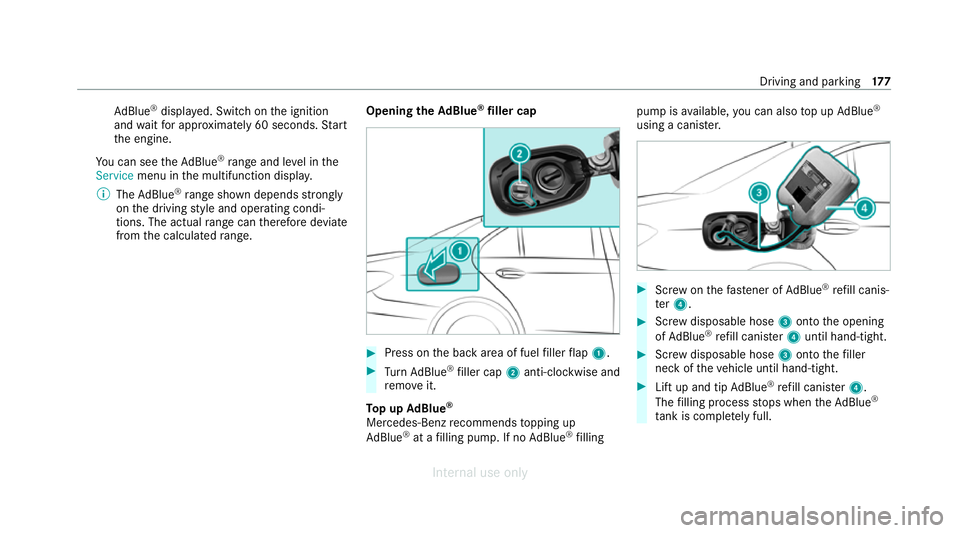
from the calculated range. Opening the
AdBlue ®
filler cap #
Press on the back area of fuel filler flap 1. #
Turn AdBlue ®
filler cap 2anti-clockwise and
re mo veit.
To p up AdBlue ®
Mercedes-Benz recommends topping up
Ad Blue ®
at a filling pump. If no AdBlue ®
filling pump is
available, you can also top up AdBlue ®
using a cani ster. #
Screw onthefast ener of AdBlue ®
re fill canis‐
te r4. #
Screw disposable hose 3onto the opening
of Ad Blue ®
re fill canis ter4 until hand-tight. #
Screw disposable hose 3onto thefiller
neck of theve hicle until hand-tight. #
Lift up and tip AdBlue ®
re fill canis ter4.
The filling process stops when theAd Blue ®
ta nk is compl etely full. Driving and parking
17 7
Internal use only
Page 182 of 557
#
When leaving theve hicle, alw aysta ke
th eke y with you and lock theve hicle. #
Keep theve hicle key out of there ach of
ch ildren. *
NO
TEDama getotheve hicle due toit
ro lling away #
Alw ays secure theve hicle against roll‐
ing away. *
NO
TEDama gedue totheve hicle lo wer‐
ing Ve
hicles with AIRMATIC or le vel control:
The vehicle can lo wer because of temp era‐
ture dif fere nces or longer non-operational
times. This can cause dama getoparts of the
body. #
When stopping theve hicle and when
driving off, make sure that there are no
obs tacles su chas curbs under or in the
immediate vicinity of the body. #
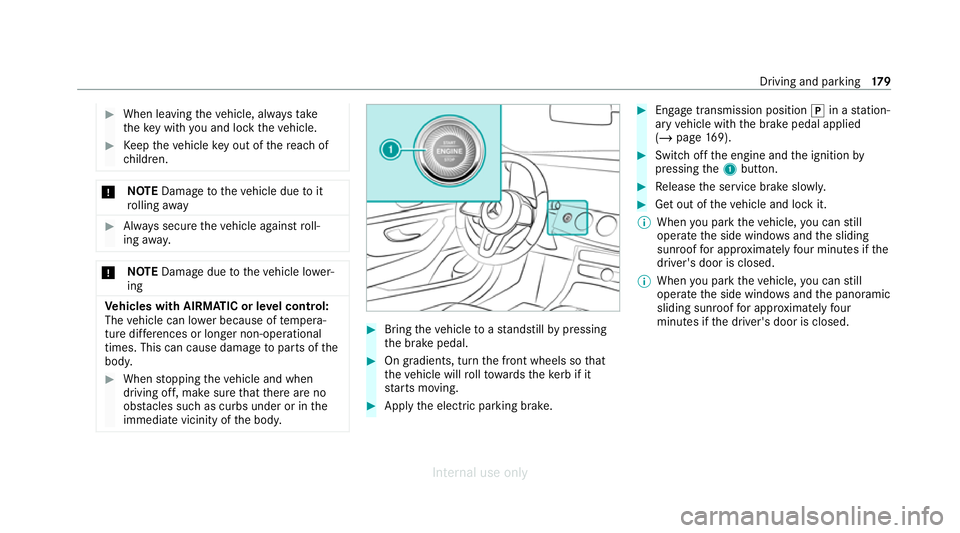
Bring theve hicle toast andstill bypressing
th e brake pedal. #
On gradients, turn the front wheels so that
th eve hicle will rollto wa rdsth eke rb if it
st arts moving. #
App lythe electric parking brake. #
Enga getransmission position jin a station‐
ary vehicle with the brake pedal applied
(/ page 169). #
Switch off the engine and the ignition by
pressing the1 button. #
Release the service brake slowl y. #
Get out of theve hicle and lock it.
% When you park theve hicle, you can still
operate the side windo wsand the sliding
sunroof for appro ximately four minutes if the
driver's door is closed.
% When you park theve hicle, you can still
operate the side windo wsand the panoramic
sliding sunroof for appro ximately four
minutes if the driver's door is closed. Driving and parking
17 9
Internal use only
Page 188 of 557
If
standby mode is activated, ene rgy loss will be
minimised during extended pe riods of non-oper‐
ation.
St andby mode is characterised bythefo llowing:
R The star ter battery is preser ved.
R The maximum non-operational time appears
inthe media displa y.
R The connection toonline services is inter rup‐
te d.
R The ATA (anti-theft alarm sy stem) is una vaila‐
ble.
R The interior pr otection and tow- aw ay protec‐
tion functions are not available.
R The function for de tecting collisions on a
pa rked vehicle is not available.
If th efo llowing conditions are fulfilled, standby
mode can be activated or deactivated using the
multimedia sy stem:
R The engine is switched off.
R The ignition is switched on.
Exceeding theve hicle's displa yed non-opera‐
tional time may cause incon venience, i.e. it can‐ not be guaranteed
that thest ar ter battery will
re liably start the engine.
The star ter battery must be charge dfirs t in the
fo llowing situations:
R The vehicle's non-operational time must be
ex tended.
R The Battery charge insufficient for standby
mode messa geappears in the media displa y.
% Standby mode is automatically deactivated
when the ignition is switched on.
Ac tivating/deactivating standby mode
Multimedia sy stem:
4 Vehicle 5
î Vehicle settings
5 Standby mode
% This function is not available for all models. #
Activate Oor deacti vate ª the function.
When you activate the function, a prom pt
appears. #
Select Yes.
St andby mode is activated. Driving and driving saf
ety sy stems Driving sy
stems and your responsibility Yo
ur vehicle is equipped with driving sy stems
which assist you in driving, parking and manoeu‐
vring theve hicle. The driving sy stems are only
aids. They are not a substitute foryo ur attention
to the sur roundings and do not relie ve you of
yo ur responsibility per taining toroad traf fic la w.
The driver is alw aysre sponsible for maintaining
a safe dis tance totheve hicle in front, forve hicle
speed, for braking in good time and forst ay ing
in lane. Pay attention tothe tra ffic conditions at
all times and inter vene when necessary . Be
aw are of the limitations rega rding the safe use of
th ese sy stems.
Driving sy stems can neither reduce therisk of
accident if youfa ilto adapt your driving style nor
ove rride the la wsof ph ysics. They cannot alw ays
ta ke into account road, weather or traf fic condi‐
tions. Driving and park
ing18 5
Internal use only