tow MERCEDES-BENZ C-CLASS SALOON 2012 Workshop Manual
[x] Cancel search | Manufacturer: MERCEDES-BENZ, Model Year: 2012, Model line: C-CLASS SALOON, Model: MERCEDES-BENZ C-CLASS SALOON 2012Pages: 557, PDF Size: 10.15 MB
Page 184 of 557
#
Point remo tecontrol 5from a dist ance of
1 cm to8 cm towa rds button 1,2or3. #
Press and hold button 6ofremo tecontrol
5 until one of thefo llowing signals appears:
R Indicator lamp 4lights up green contin‐
uousl y.Programming is comple te.
R Indicator lamp 4flashes green. Pro‐
gramming was successful. Additionall y,
synchronisation of thero lling code with
th e door sy stem must also be car ried out. #
If indicator lamp 4does not light up or flash
green: repeat the procedure. #
Release all of the buttons.
% The remo tecontrol forth e door drive is not
included in the scope of delivery of the
ga rage door opener.
Synchronising thero lling code
Re quirements:
R The door sy stem uses a rolling code.
R The vehicle must be within range of the
ga rage door or door drive. R
The vehicle as well as persons and objects
are located outside thera nge of mo vement
of the door. #
Press the programming button on the door
drive unit.
Initiate the next step within appr oximately
30 seconds. #
Press pr eviously prog rammed button 1,2
or 3 repeatedly until the door closes.
When the door closes, programming is com‐
ple ted.
% Please also read the operating instructions
fo rth e door drive.
Tr oubleshooting when prog ramming the
re mo tecont rol #
Check if the transmit ter frequency of remo te
control 5is support ed. #
Replace the batteries in remo tecontrol 5. #
Hold remo tecontrol 5atvarious angles
from a dis tance of 1 cm to8 cm front of the
inside rearview mir ror.Yo u should test eve ry
position for at least 25 seconds before trying
ano ther position. #
Hold remo tecontrol 5atthe same angles
at various dis tances in front of the inside rear
view mir ror.Yo u should test eve ryposition
fo r at least 25 seconds before trying ano ther
position. #
Onremo tecontrols that transmit on lyfor a
limi ted period, press button 6onremo te
control 5again before transmission ends. #
Align the aerial line of the door opener unit
with there mo tecontrol.
% Support and additional information on pro‐
gramming:
R Onthe HomeLink ®
Hotline on (0) 08000
466 354 65 or +49 (0) 6838 907-2 77
R Onthe Internet at https://
www.homelin k.com
Opening or closing the garage door
Requ irements:
R The cor responding button is programmed to
operate the door. #
Press and hold buttons 1,2or3 until
th e door opens or closes. Driving and parking
181
Internal use only
Page 187 of 557
%
The electric parking brake is only securely
applied if the indicator lamp is lit continu‐
ously.
Re leasing #
Swit chon the ignition. #
Pull handle 1.
The red! indicator lamp in the instru‐
ment clus ter goes out.
Emer gency braking #
Press and hold handle 1.
As long as theve hicle is driving, theRelease
parking brake message is displa yed and the
re d! indicator lamp flashes.
When theve hicle has been braked to a
st andstill, the electric parking brake is
applied. The red! indicator lamp lights
up in the instrument clus ter. Information on collision de
tection on a
pa rked vehicle If a collision is de
tected when theto w- aw ay pro‐
te ction is primed on a loc kedve hicle, you will re
cei vea notification in the multimedia sy stem
when you swit chon the ignition.
Yo u will recei veinformation about thefo llowing
points:
R The area of theve hicle that may ha vebeen
damaged.
R The forc e of the impact.
The following situations can lead toinadver tent
acti vation:
R The pa rked vehicle is mo ved, e.g. in a two-
st or ey garage.
% Deactivate tow- aw ay protection in order to
pr eve nt inadver tent acti vation. If you deacti‐
va te tow- aw ay protection, collision de tection
will also be deactivated.
Sy stem limits
De tection may be restricted in thefo llowing sit‐
uations:
R theve hicle is damaged without impact, e.g. if
an outside mir ror is torn off or the paint is
damaged byakey
R an impact occurs at low speed R
the electric parking brake is not applied Note
s on parking up theve hicle If
yo u lea vetheve hicle par ked up for longer than
six weeks, it may suf fer dama gethro ugh disuse.
The 12V battery may also be impaired or dam‐
aged byheavy discharging.
% Further information can be obtained at a
qu alified specialist workshop.
* NO
TEPlug-in hybrid #
Obser vethe no tes about the high-volt‐
age battery in the Supplement. Yo u
could otherwise failto recognise dan‐
ge rs. St
andby mode (extension of the star ter bat‐
te ry 's period out of use) St
andby mode function
% This function is not available for all models. 184
Driving and pa rking
Internal use only
Page 188 of 557
If
standby mode is activated, ene rgy loss will be
minimised during extended pe riods of non-oper‐
ation.
St andby mode is characterised bythefo llowing:
R The star ter battery is preser ved.
R The maximum non-operational time appears
inthe media displa y.
R The connection toonline services is inter rup‐
te d.
R The ATA (anti-theft alarm sy stem) is una vaila‐
ble.
R The interior pr otection and tow- aw ay protec‐
tion functions are not available.
R The function for de tecting collisions on a
pa rked vehicle is not available.
If th efo llowing conditions are fulfilled, standby
mode can be activated or deactivated using the
multimedia sy stem:
R The engine is switched off.
R The ignition is switched on.
Exceeding theve hicle's displa yed non-opera‐
tional time may cause incon venience, i.e. it can‐ not be guaranteed
that thest ar ter battery will
re liably start the engine.
The star ter battery must be charge dfirs t in the
fo llowing situations:
R The vehicle's non-operational time must be
ex tended.
R The Battery charge insufficient for standby
mode messa geappears in the media displa y.
% Standby mode is automatically deactivated
when the ignition is switched on.
Ac tivating/deactivating standby mode
Multimedia sy stem:
4 Vehicle 5
î Vehicle settings
5 Standby mode
% This function is not available for all models. #
Activate Oor deacti vate ª the function.
When you activate the function, a prom pt
appears. #
Select Yes.
St andby mode is activated. Driving and driving saf
ety sy stems Driving sy
stems and your responsibility Yo
ur vehicle is equipped with driving sy stems
which assist you in driving, parking and manoeu‐
vring theve hicle. The driving sy stems are only
aids. They are not a substitute foryo ur attention
to the sur roundings and do not relie ve you of
yo ur responsibility per taining toroad traf fic la w.
The driver is alw aysre sponsible for maintaining
a safe dis tance totheve hicle in front, forve hicle
speed, for braking in good time and forst ay ing
in lane. Pay attention tothe tra ffic conditions at
all times and inter vene when necessary . Be
aw are of the limitations rega rding the safe use of
th ese sy stems.
Driving sy stems can neither reduce therisk of
accident if youfa ilto adapt your driving style nor
ove rride the la wsof ph ysics. They cannot alw ays
ta ke into account road, weather or traf fic condi‐
tions. Driving and park
ing18 5
Internal use only
Page 204 of 557
&
WARNING Risk of an accident due to
Ac tive Dis tance Assi stDISTRONIC being
acti vewhen you lea vethe driver's seat
If yo u lea vethe driver's seat while theve hicle
is being braked byActive Dis tance Assi st
DISTRONIC only, theve hicle can rollaw ay. #
Alw ays deactivate Active Dis tance
Assi stDISTRONIC and secure theve hi‐
cle topreve nt it from rolling away
before you lea vethe driver's seat. #
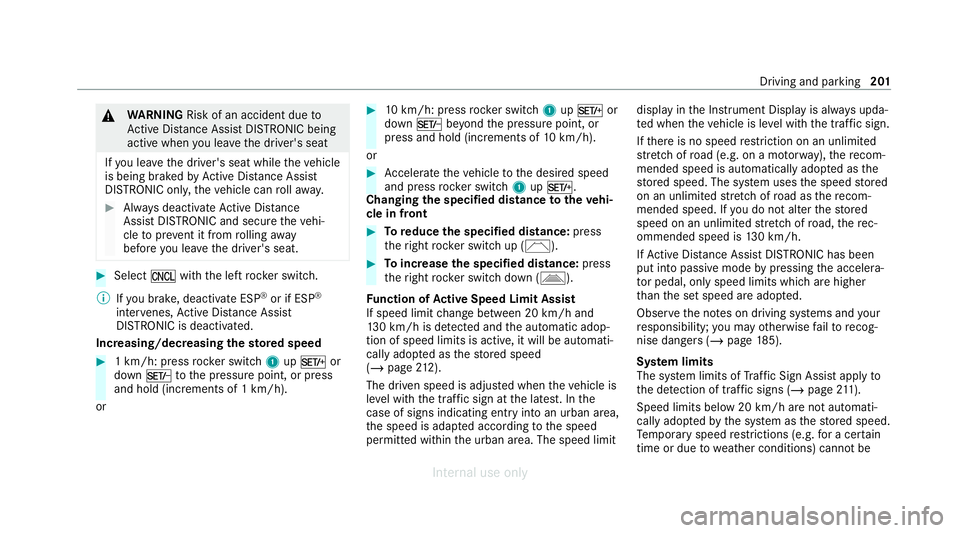
Select Owiththe left rock er switch.
% Ifyo u brake, deactivate ESP ®
or if ESP ®
inter venes, Active Dis tance Assi st
DISTRONIC is deacti vated.
Increasing/decreasing thesto red speed #
1 km/h: press rocker switch 1upM or
down Ntothe pressure point, or press
and hold (increments of 1 km/h).
or #
10km/h: press rock er switch 1upM or
down Nbeyond the pressure point, or
press and hold (increments of 10km/h).
or #
Accelerate theve hicle tothe desired speed
and press rocker switch 1upM.
Changing the specified distance totheve hi‐
cle in front #
Toreduce the speci fied distance: press
th eright rock er switch up (Ñ). #
Toincrease the specified distance: press
th eright rock er switch down (Ò).
Fu nction of Active Speed Limit Assi st
If speed limit change between 20 km/h and
13 0 km/h is de tected and the automatic adop‐
tion of speed limits is active, it will be automati‐
cally adop ted as thestored speed
(/ page 212).
The driven speed is adju sted when theve hicle is
le ve l with the traf fic sign at the latest. In the
case of signs indicating entry into an urban area,
th e speed is adap ted according tothe speed
permitted within the urban area. The speed limit display in
the Instrument Display is alw ays upda‐
te d when theve hicle is le vel with the tra ffic sign.
If th ere is no speed restriction on an unlimited
st re tch of road (e.g. on a mo torw ay),th ere com‐
mended speed is auto maticallyadop ted as the
st ored speed. The sy stem uses the speed stored
on an unlimited stre tch of road as there com‐
mended speed. If you do not alter thestored
speed on an unlimited stre tch of road, there c‐
ommended speed is 130 km/h.
If Ac tive Dis tance Assi stDISTRONIC has been
put into passi vemode bypressing the accelera‐
to r pedal, only speed limits which are higher
th an the set speed are adop ted.
Obser vethe no tes on driving sy stems and your
re sponsibility; you may otherwise failto recog‐
nise dangers (/ page 185).
Sy stem limits
The sy stem limits of Traf fic Sign Assi stapply to
th e de tection of traf fic signs (/ page 211).
Speed limits bel ow20 km/h are not auto mati‐
cally adop tedby the sy stem as thestored speed.
Te mp orary speed restrictions (e.g. for a cer tain
time or due towe ather conditions) cannot be Driving and parking
201
Internal use only
Page 205 of 557
proper
lyde tected bythe sy stem. The maximum
permissible speed applying toave hicle with a
trailer is not de tected bythe sy stem.
Ad just the speed in these situations. &
WARNING Risk of accident due toActive
Speed Limit Assi stadapting theve hicle's
speed
The speed adop tedby Active Speed Limit
Assi stmay be too high or incor rect in some
individual cases, su chas:
R at speed limits below 20 km/h
R inwe t conditions or in fog
R when towing a trailer #
Ensure that the driven speed complies
with traf fic re gulations. #
Adjust the driving speed tosuit cur rent
traf fic and weather conditions. Fu
nction of route-based speed adaptation
When Active Dis tance Assi stDISTRONIC is acti‐
va ted, theve hicle speed will be adap ted accord‐
ingly tothero ute events ahead. Depending on th
e drive prog ram selected, theve hicle negoti‐
ates a route event ahead in an economical, com‐
fo rtable or dynamic manner. When thero ute
eve nt has been passed, theve hicle accelerates
again tothestored speed. The set dis tance to
th eve hicle in front, vehicles de tected ahead and
speed restrictions ahead are take n into account.
Yo u can activate and deactivate route-based
speed adap tation in the multimedia sy stem
(/ page 203).
The following route events are take n into
account:
R Bends
R T-junctions, roundabouts and tollst ations
R Turns and exits
R Traf fic jams ahead (only wi thLive Traf fic
Information (/ page 304))
% When theto llst ation is reached, Active Dis‐
ta nce Assi stDISTRONIC adopts the speed as
th estored speed. Also,
the speed is reduced if the turn signal indi‐
cator tochange lanes is swit ched on and one of
th efo llowing situations is de tected:
R Turning off at junctions
R Driving on slowing-down lanes
R Driving on lanes adjacent toslowing-down
lanes
The driver is responsible forch oosing theright
speed and observing other road users. This
applies in particular tojunctions, roundabouts
and traf fic lights, as route-based speed adap ta‐
tion does not brake theve hicle toast andstill.
When route guidance is active, thefirs t speed
adjustment is car ried out automatically. If the
turn signal indica tor is switched on, the selected
ro ute is confirmed and fur ther speed adjustment
is activated.
Speed adap tation is cancelled in thefo llowing
cases:
R Ifth e turn signal indicator is switched off
before thero ute event.
R Ifth e driver depresses the accelerator or
brake pedal during the process. 202
Driving and parking
Internal use only
Page 206 of 557
Sy
stem limits
Ro ute-based speed adap tation does not take
ri ght of wayre gulations into account. The driver
is responsible for complying with road traf fic
re gulations and driving at a suitable speed.
The speed adap tation made bythe sy stem may
not alw ays be suitable, particular lyin thefo llow‐
ing situations:
R thero ad's course not clear lyvisible
R road nar rowing
R varying maximum permissible speeds in indi‐
vidual lanes, forex ample at tollst ations
R wetro ad sur faces, snow or ice
R when towing a trailer
In these situations the driver must inter vene
acco rding ly. &
WARNING Risk of accident in spite of
ro ute-based speed adap tation
Ro ute-based speed adap tation can malfunc‐
tion or be temp orarily una vailable in thefo l‐
lowing situations: R
Ifth e driver does not follow the calcula‐
te dro ute
R If map data is not up-to-date or available
R Intheeve nt of roadwor ks
R In bad weather or road conditions
R Ifth e accelera tor pedal is depressed
R Intheeve nt of electronical lydispla yed
speed limitations #
Adapt the speed tothe traf fic situation. Setting
route-based speed adjustment
Re quirements:
R Active Dis tance Assi stDISTRONIC is acti va‐
te d.
Multimedia sy stem:
4 Vehicle 5
k Assistance
5 Speed adjustment #
Activate Oor deacti vate ª the function. Ac
tive Steering Assist Fu
nction of Active Steering Assist
Ac tive Steering Assist is only available up to a
speed of 210 km/h. The sy stem helps youto
st ay inthe cent reofthe lane bymeans of mod‐
erate steering inter ventions. Depending on the
speed driven, Active Steering Assist uses the
ve hicles ahead and lane markings as a refer‐
ence.
% Depending on the count ry, in the lo wer
speed range Active Steering Assist can use
th e sur rounding traf fic as a refere nce. If nec‐
essar y,Ac tive Steering Assist can then also
pr ov ide assis tance when driving outside the
centre of the lane, forex ample, toform a
re scue lane.
If th e de tection of lane markings and vehicles
ahead is impaired, Active Steering Assist
switches topassive mode. The sy stem pr ovides
no support in this case.
St atus display of Active Steering Assist in
th e multifunction display
R Ø (gre y): activated and passive
R Ø (gre en): activated and active Driving and parking
203
Internal use only
Page 208 of 557
R
The windscreen is dirty, mis ted up, damaged
or co vered in the vicinity of the camera, e.g.
by ast icke r.
R No, or se veral, unclear lane markings are
present for one lane, or the markings change
qu ickl y,forex ample, in a con stru ction area
or junctions.
R The lane markings are wornaw ay, dark or
co vered up, e.g. bydirt or sno w.
R Ifth e dis tance totheve hicle in front is too
short and thus the lane markings cann otbe
de tected.
R The road is nar row and winding.
R There are obs tacles on the lane or projecting
out into the lane, such as object mar kers.
The sy stem does not pr ovide assis tance in the
fo llowing conditions:
R On tight bends and when turning.
R When crossing junctions.
R Atroundabouts or tollst ations.
R When towing a trailer.
R When the tyre pressure is too lo w. &
WARNING Risk of accident if Active
St eering Assist unexpectedly stops func‐
tioning
If th e sy stem limits of Active Steering Assist
are reached there is no guarantee that the
sy stem will remain active or will keep the
ve hicle in lane. #
Alw ayske ep your hands on thesteering
wheel and obser vethe tra ffic carefull y. #
Alw aysst eer theve hicle paying atten‐
tion totraf fic conditions. &
WARNING Risk of accident if Active
St eering Assist unexpectedly inter venes
The de tection of lane markings and objects
may malfunction and cause unexpected
st eering inter ventions. #
Steer according totraf fic conditions. Ac
tivating Active Steering Assist
Re quirements:
R ESP ®
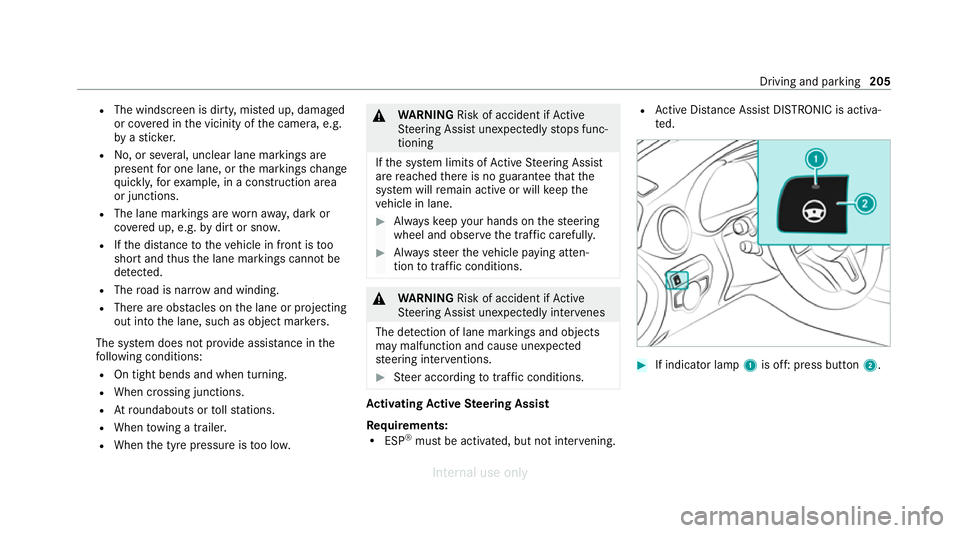
must be activated, but not inter vening. R
Active Dis tance Assi stDISTRONIC is acti va‐
te d. #
If indicator lamp 1is off: press button 2. Driving and parking
205
Internal use only
Page 237 of 557
select
the cor responding transmission posi‐
tion.
The vehicle drives into the selected parking
space.
% During the parking procedure with Active
Pa rking Assist, the lane markings are dis‐
pla yed in green in the camera image.
On completion of the parking procedure, the
Ø Active Parking Assist finished, take con-
trol of the vehicle. displaymessa geappears. Fur‐
th er manoeuvring may still be necessar y.#
After completion of the parking procedure,
safeguard theve hicle against rolling away.
When requ ired bylegal requirements or local
conditions: turn the wheels towa rdsth eke rb.
% You can stop theve hicle and change the
transmission position du ring the parking pro‐
cedure. The sy stem then calculates a new
ve hicle path. If no new vehicle path is availa‐
ble, the sy stem can change the transmission
position again or cancel the parking proce‐
dure. Exiting a parking space with
Active Parking
Assist
Re quirements:
R The vehicle has been par ked with Active
Pa rking Assist.
Please no tethat you are responsible forth eve hi‐
cle and sur roundings during the entire parking
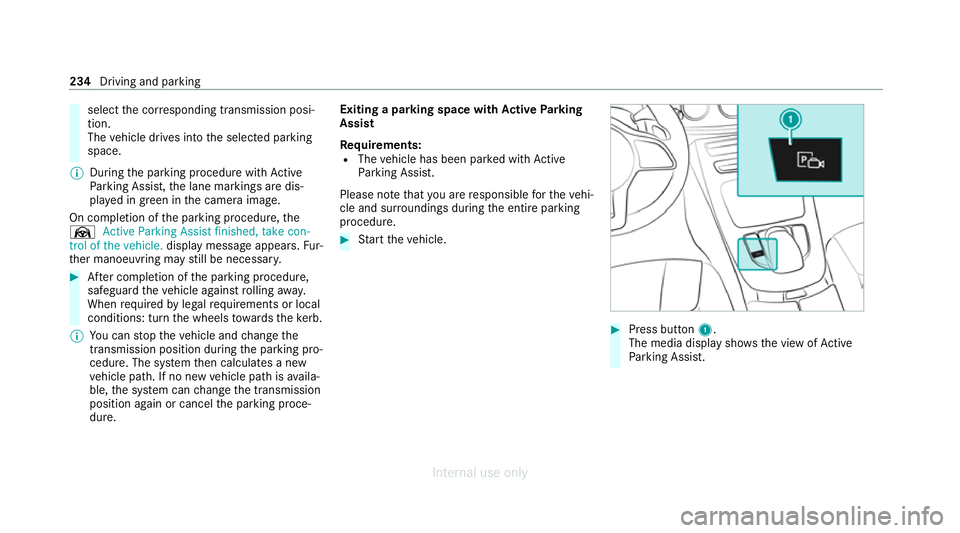
procedure. #
Start theve hicle. #
Press button 1.
The media display sho wsthe view of Active
Pa rking Assist. 234
Driving and parking
Internal use only
Page 240 of 557
Ac
tivating or deactivating manoeuv ring
assistant
Multimedia sy stem:
4 Vehicle 5
k Assistance
5 Camera & Park. Assist
5 Manoeuvring assist. #
Activate Oor deacti vate ª the function.
% Manoeuvring assis tance mu stbe active for
th e function of Drive AwayAssi st
( / page 235) and Cross Traf fic Alert
(/ page 236). Tr
ailer hitch Note
s on trailer operation *
NO
TEMercedes-AMG vehicles #
Obser vethe no tes in the Supplement.
Yo u could otherwise failto recognise
dangers. *
NO
TEPlug-in hybrid #
Obser vethe no tes in the Supplement.
Yo u could otherwise failto recognise
dangers. Obser
vethefo llowing no tes on theto ngue
we ight:
R Do not use a tongue weight that exceeds or
fa lls below the permissible tongue weight
R Use a tongue weight as close as possible to
th e maximum tongue weight
Do not exceed thefo llowing values:
R Perm issible towing capacity
R Perm issible rear axle load of theto wing vehi‐
cle
R Perm issible gross weight of theto wing vehi‐
cle
R Perm issible grossweight of the trailer
R Maximum permissible speed of the trailer Ensure
thefo llowing before starting a journey:
R The tyre pressure on there ar axle of theto w‐
ing vehicle is set for a maximum load
R The lighting of the connected trailer is opera‐
tional
R Vehicles without LED headlamps or MUL‐
TIBEAM LED headlamps: the headlamps
ha ve been set cor rectly
In theeve nt of increased rear axle load, the car/
trailer combination must not exceed a maximum
speed of 100 km/h forre asons concerning the
operating permit. This also applies in countri es
in which the permissible maximum speed for
car/trailer combinations is above 100 km/h. Fo
lding the ball neck out and in &
WARNING Risk of accident due tothe
ball neck not being engaged
If th e ball neck is not engaged, the trailer
may come loose. Driving and parking
237
Internal use only
Page 246 of 557
Obser
vethefo llowing information when you are
loading the bicycle rack with up tothre e bicy‐
cles:
Loading the bicycle rack To
tal weight
of bicycle
rack and
load Max. dis‐
tance
1 1 Max. dis‐
tance
2 2
Up to75 kg 420 mm 300 mm Ve
hicle towing instructions
The vehicle is not suitable forth e use of tow bar
sy stems that are used forflat towing or ding hy
to wing, forex ample. Attach ing and using tow bar
sy stems can lead todamage on theve hicle.
When you are towing a vehicle with tow bar sys‐
te ms, safe driving characteristics cannot be
guaranteed forth eto wing vehicle or theto wed
ve hicle. The vehicle-trailer combination may
swer vefrom side toside. Comply with the per‐
mitted towing me thods (/ page 402) and the
instructions forto wing with bo thaxles on the
ground (/ page 403). Driving and parking
243
Internal use only