stop start MERCEDES-BENZ C-CLASS SALOON 2014 Owner's Manual
[x] Cancel search | Manufacturer: MERCEDES-BENZ, Model Year: 2014, Model line: C-CLASS SALOON, Model: MERCEDES-BENZ C-CLASS SALOON 2014Pages: 489, PDF Size: 14.88 MB
Page 107 of 489
erwise, the sensors may not function cor-
rectly.
R HANDS-FREE ACCESS does not function
when the engine is started.
R If a KEYLESS-GO key is within the rear
detection range of KEYLESS-GO, HANDS-
FREE ACCESS could be triggered. The boot
lid could thus be opened or closed unin-
tentionally, for example, if you:
- set down or lift up an object behind the
vehicle
- polish the rear of the vehicle
Do not carry the KEYLESS-GO key about
your person in such situations. This will
prevent the unintentional opening/closing
of the boot.
R Dirt caused by road salt around sensors :
may restrict functionality.
R Using HANDS-FREE ACCESS with a pros-
thetic leg may restrict functionality.
Operation X
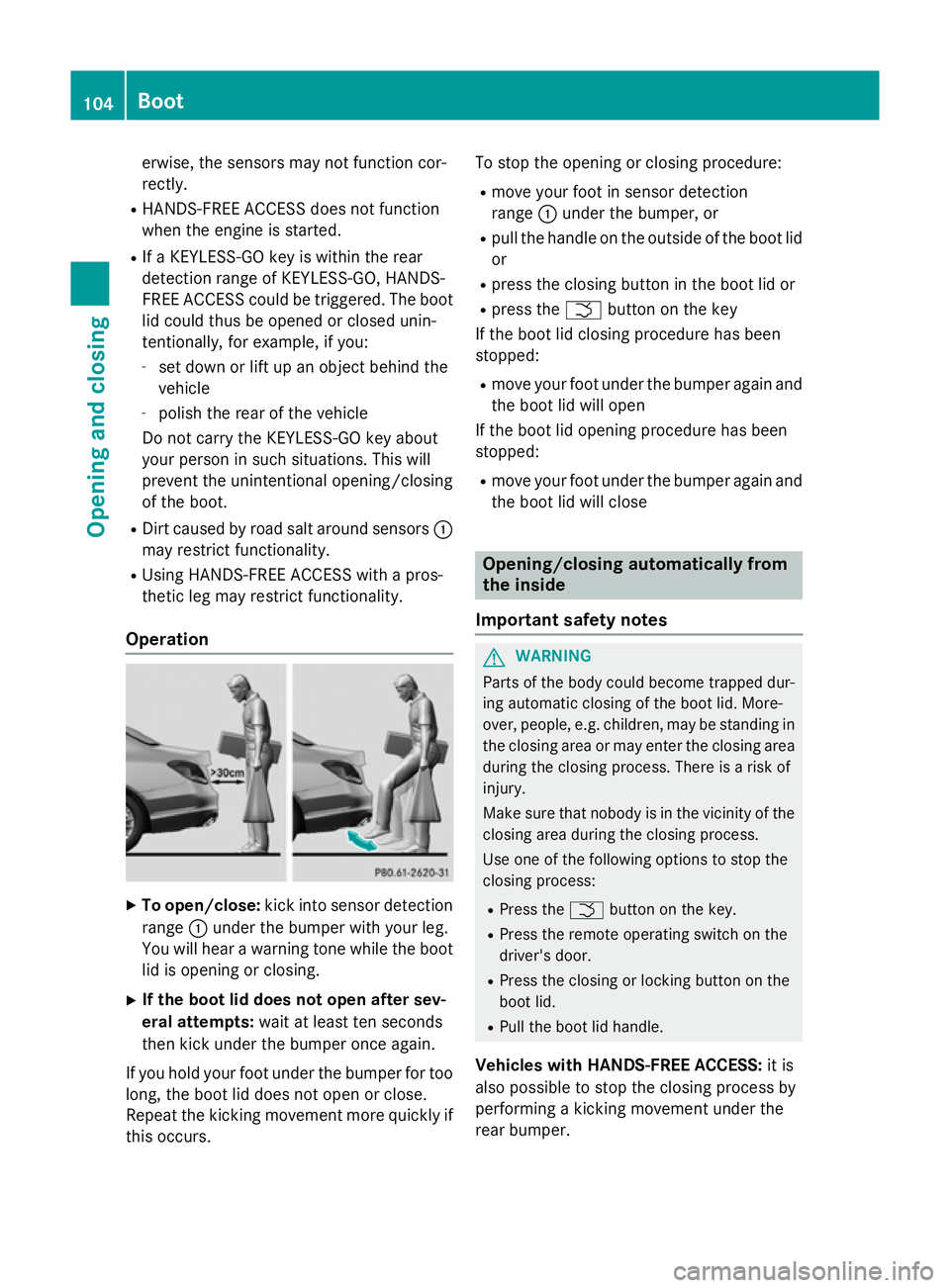
To open/close: kick into sensor detection
range :under the bumper with your leg.
You will hear a warning tone while the boot lid is opening or closing.
X If the boot lid does not open after sev-
eral attempts: wait at least ten seconds
then kick under the bumper once again.
If you hold your foot under the bumper for too
long, the boot lid does not open or close.
Repeat the kicking movement more quickly if this occurs. To stop the opening or closing procedure:
R move your foot in sensor detection
range :under the bumper, or
R pull the handle on the outside of the boot lid
or
R press the closing button in the boot lid or
R press the Fbutton on the key
If the boot lid closing procedure has been
stopped:
R move your foot under the bumper again and
the boot lid will open
If the boot lid opening procedure has been
stopped:
R move your foot under the bumper again and
the boot lid will close Opening/closing automatically from
the inside
Important safety notes G
WARNING
Parts of the body could become trapped dur-
ing automatic closing of the boot lid. More-
over, people, e.g. children, may be standing in the closing area or may enter the closing area
during the closing process. There is a risk of
injury.
Make sure that nobody is in the vicinity of the closing area during the closing process.
Use one of the following options to stop the
closing process:
R Press the Fbutton on the key.
R Press the remote operating switch on the
driver's door.
R Press the closing or locking button on the
boot lid.
R Pull the boot lid handle.
Vehicles with HANDS-FREE ACCESS: it is
also possible to stop the closing process by
performing a kicking movement under the
rear bumper. 104
BootOpening and closing
Page 110 of 489
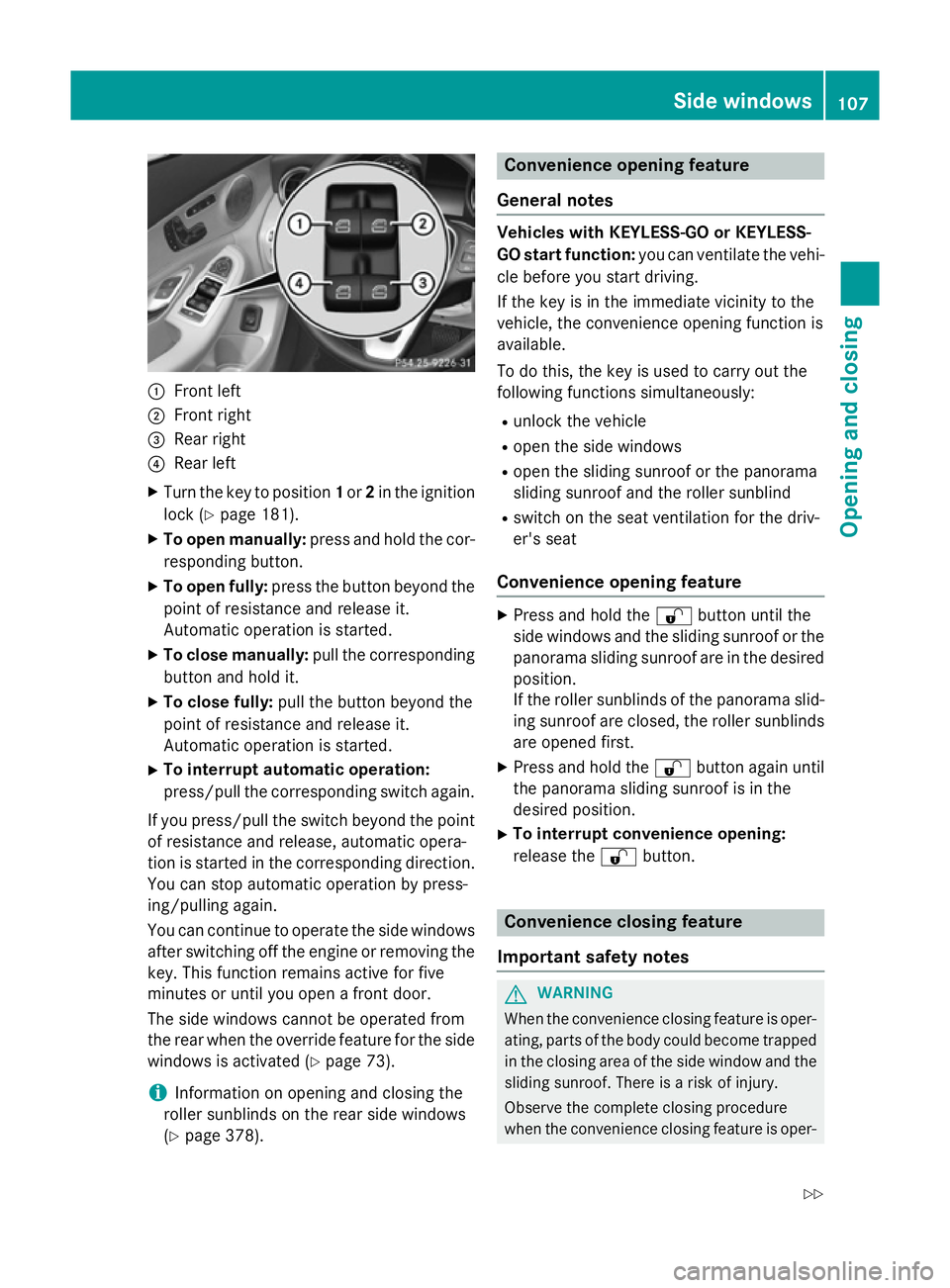
:
Front left
; Front right
= Rear right
? Rear left
X Turn the key to position 1or 2in the ignition
lock (Y page 181).
X To open manually: press and hold the cor-
responding button.
X To open fully: press the button beyond the
point of resistance and release it.
Automatic operation is started.
X To close manually: pull the corresponding
button and hold it.
X To close fully: pull the button beyond the
point of resistance and release it.
Automatic operation is started.
X To interrupt automatic operation:
press/pull the corresponding switch again.
If you press/pull the switch beyond the point
of resistance and release, automatic opera-
tion is started in the corresponding direction. You can stop automatic operation by press-
ing/pulling again.
You can continue to operate the side windowsafter switching off the engine or removing the
key. This function remains active for five
minutes or until you open a front door.
The side windows cannot be operated from
the rear when the override feature for the side
windows is activated (Y page 73).
i Information on opening and closing the
roller sunblinds on the rear side windows
(Y page 378). Convenience opening feature
General notes Vehicles with KEYLESS-GO or KEYLESS-
GO start function: you can ventilate the vehi-
cle before you start driving.
If the key is in the immediate vicinity to the
vehicle, the convenience opening function is
available.
To do this, the key is used to carry out the
following functions simultaneously:
R unlock the vehicle
R open the side windows
R open the sliding sunroof or the panorama
sliding sunroof and the roller sunblind
R switch on the seat ventilation for the driv-
er's seat
Convenience opening feature X
Press and hold the %button until the
side windows and the sliding sunroof or the panorama sliding sunroof are in the desired
position.
If the roller sunblinds of the panorama slid- ing sunroof are closed, the roller sunblinds
are opened first.
X Press and hold the %button again until
the panorama sliding sunroof is in the
desired position.
X To interrupt convenience opening:
release the %button. Convenience closing feature
Important safety notes G
WARNING
When the convenience closing feature is oper- ating, parts of the body could become trapped
in the closing area of the side window and the
sliding sunroof. There is a risk of injury.
Observe the complete closing procedure
when the convenience closing feature is oper- Side windows
107Opening and closing
Z
Page 114 of 489
!
Only open the panorama sliding sunroof if
it is free of snow and ice. Otherwise, mal-
functions may occur.
Do not allow anything to protrude from the sliding sunroof. Otherwise, the seals could
be damaged.
Resonance noises can occur in addition to the
usual airflow noises when the sliding sunroof is open. They are caused by minor pressure
fluctuations in the vehicle interior. Change
the position of the sliding sunroof or open a
side window slightly to reduce or eliminate
these noises.
Only for vehicles with panorama sliding
sunroof: G
WARNING
At high speeds the raised sliding sunroof auto- matically lowers slightly at the rear. This could
trap you or other persons. There is a risk of
injury. Make sure that nobody reaches into
the sweep of the sliding sunroof whilst the
vehicle is in motion.
If somebody becomes trapped, immediately
pull back the sliding sunroof switch. The slid- ing sunroof lifts during opening. Sliding sunroof reversing feature
Your vehicle may be fitted with a sliding sun-
roof or a panorama sliding sunroof. In this
section, the term "sliding sunroof" refers to
both types of sliding sunroof.
The sliding sunroof is equipped with an auto- matic reversing feature. If an object blocks or
restricts the sliding sunroof during the closing process, the sliding sunroof opens again
automatically. The automatic reversing fea-
ture is only an aid and is no substitute for your
attention when closing the sliding roof. G
WARNING
The reversing function does not react:
R to soft, light and thin objects, e.g. small fin-
gers
R over the last 4 mm of the closing movement R
during resetting
R when closing the sliding sunroof again man-
ually immediately after automatic reversing
This means that the reversing function cannot prevent someone being trapped in these sit-
uations. There is a risk of injury.
When closing make sure that no parts of the
body are in the closing area.
If someone is trapped:
R release the switch immediately or
R during automatic operation, press the
switch briefly in any direction
The closing process is stopped. Operating the sliding sunroof
Opening and closing Overhead control panel
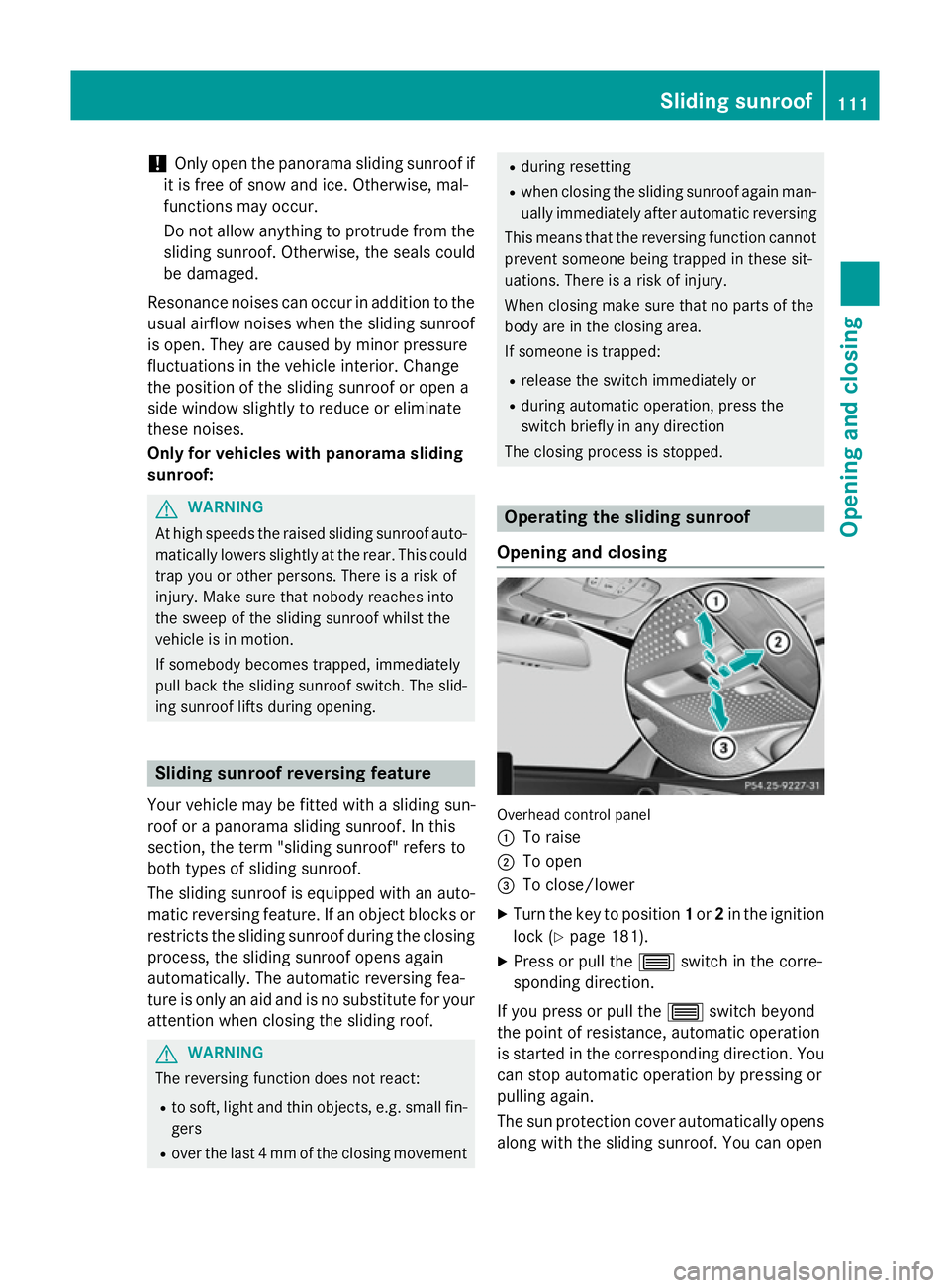
:
To raise
; To open
= To close/lower
X Turn the key to position 1or 2in the ignition
lock (Y page 181).
X Press or pull the 3switch in the corre-
sponding direction.
If you press or pull the 3switch beyond
the point of resistance, automatic operation
is started in the corresponding direction. You can stop automatic operation by pressing or
pulling again.
The sun protection cover automatically opens
along with the sliding sunroof. You can open Sliding sunroof
111Opening and closing Z
Page 115 of 489
or close the sun protection cover manually
when the sliding sunroof is raised or closed.
You can continue to operate the sliding sun-
roof after switching off the engine or remov-
ing the key. This function remains active for
five minutes or until the driver's or front-
passenger door is opened.
Rain-closing feature When the key is in position
0in the ignition
lock or is removed, the sliding sunroof closes
automatically:
R if it starts to rain.
R at extreme outside temperatures.
R after six hours.
R if there is a malfunction in the power sup-
ply.
The rear of the sliding sunroof is then raised in order to ventilate the vehicle interior.
If the sliding sunroof is obstructed when
being closed by the rain-closing feature, it
opens again slightly. The rain-closing feature
is then deactivated.
The sliding sunroof does not close if:
R it is raised at the rear.
R it is blocked.
R no rain is falling on the area of the wind-
screen being monitored by the rain sensor,
e.g. because the vehicle is under a bridge.
Resetting !
If the sliding sunroof still cannot be
opened or closed fully after resetting, con- tact a qualified specialist workshop.
Reset the sliding sunroof if it does not operate
smoothly.
X Turn the key to position 1or 2in the ignition
lock.
X Raise the sliding sunroof fully at the rear
(Y page 111).
X Keep the 3switch pressed for another
second. X
Make sure that the sliding sunroof can be
fully opened and closed again
(Y page 111).
X If this is not the case, repeat the steps
above again. Operating the panorama sliding sun-
roof
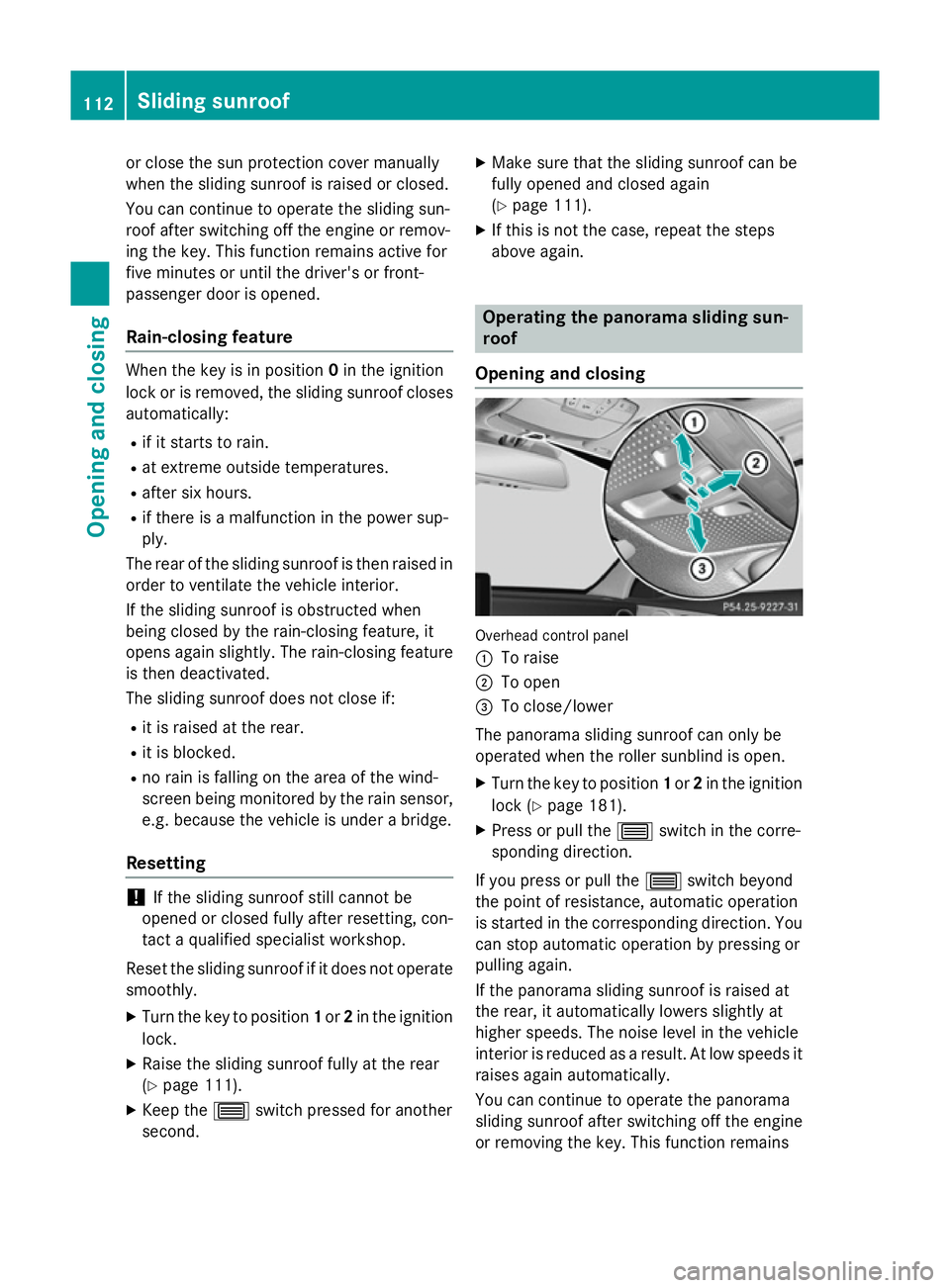
Opening and closing Overhead control panel
:
To raise
; To open
= To close/lower
The panorama sliding sunroof can only be
operated when the roller sunblind is open.
X Turn the key to position 1or 2in the ignition
lock (Y page 181).
X Press or pull the 3switch in the corre-
sponding direction.
If you press or pull the 3switch beyond
the point of resistance, automatic operation
is started in the corresponding direction. You can stop automatic operation by pressing or
pulling again.
If the panorama sliding sunroof is raised at
the rear, it automatically lowers slightly at
higher speeds. The noise level in the vehicle
interior is reduced as a result. At low speeds it
raises again automatically.
You can continue to operate the panorama
sliding sunroof after switching off the engine
or removing the key. This function remains 112
Sliding sunroofOpening and closing
Page 116 of 489
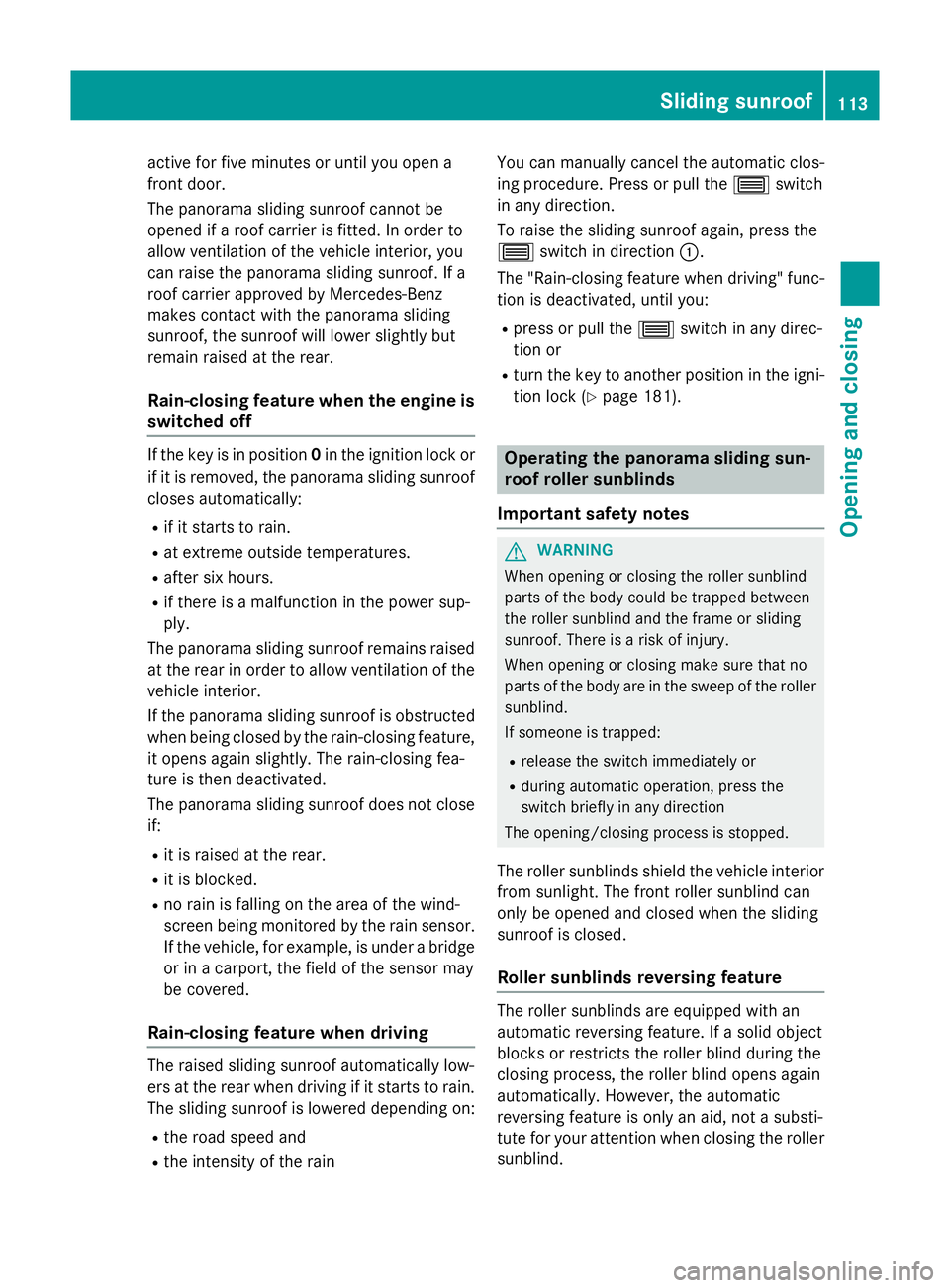
active for five minutes or until you open a
front door.
The panorama sliding sunroof cannot be
opened if a roof carrier is fitted. In order to
allow ventilation of the vehicle interior, you
can raise the panorama sliding sunroof. If a
roof carrier approved by Mercedes-Benz
makes contact with the panorama sliding
sunroof, the sunroof will lower slightly but
remain raised at the rear.
Rain-closing feature when the engine is
switched off If the key is in position
0in the ignition lock or
if it is removed, the panorama sliding sunroof
closes automatically:
R if it starts to rain.
R at extreme outside temperatures.
R after six hours.
R if there is a malfunction in the power sup-
ply.
The panorama sliding sunroof remains raised
at the rear in order to allow ventilation of the vehicle interior.
If the panorama sliding sunroof is obstructed
when being closed by the rain-closing feature,
it opens again slightly. The rain-closing fea-
ture is then deactivated.
The panorama sliding sunroof does not close if:
R it is raised at the rear.
R it is blocked.
R no rain is falling on the area of the wind-
screen being monitored by the rain sensor. If the vehicle, for example, is under a bridge
or in a carport, the field of the sensor may
be covered.
Rain-closing feature when driving The raised sliding sunroof automatically low-
ers at the rear when driving if it starts to rain.
The sliding sunroof is lowered depending on:
R the road speed and
R the intensity of the rain You can manually cancel the automatic clos-
ing procedure. Press or pull the
3switch
in any direction.
To raise the sliding sunroof again, press the
3 switch in direction :.
The "Rain-closing feature when driving" func-
tion is deactivated, until you:
R press or pull the 3switch in any direc-
tion or
R turn the key to another position in the igni-
tion lock (Y page 181). Operating the panorama sliding sun-
roof roller sunblinds
Important safety notes G
WARNING
When opening or closing the roller sunblind
parts of the body could be trapped between
the roller sunblind and the frame or sliding
sunroof. There is a risk of injury.
When opening or closing make sure that no
parts of the body are in the sweep of the roller sunblind.
If someone is trapped:
R release the switch immediately or
R during automatic operation, press the
switch briefly in any direction
The opening/closing process is stopped.
The roller sunblinds shield the vehicle interior from sunlight. The front roller sunblind can
only be opened and closed when the sliding
sunroof is closed.
Roller sunblinds reversing feature The roller sunblinds are equipped with an
automatic reversing feature. If a solid object
blocks or restricts the roller blind during the
closing process, the roller blind opens again
automatically. However, the automatic
reversing feature is only an aid, not a substi-
tute for your attention when closing the roller
sunblind. Sliding sunroof
113Opening and closing Z
Page 117 of 489
G
WARNING
The reversing feature especially does not
react to soft, light and thin objects, such as
small fingers. This means that the reversing
feature cannot prevent someone being trap-
ped in these situations. There is a risk of
injury.
When closing make sure that no parts of the
body are in the sweep of the roller sunblind.
If someone is trapped:
R release the switch immediately or
R during automatic operation, press the
switch briefly in any direction
The closing process is stopped.
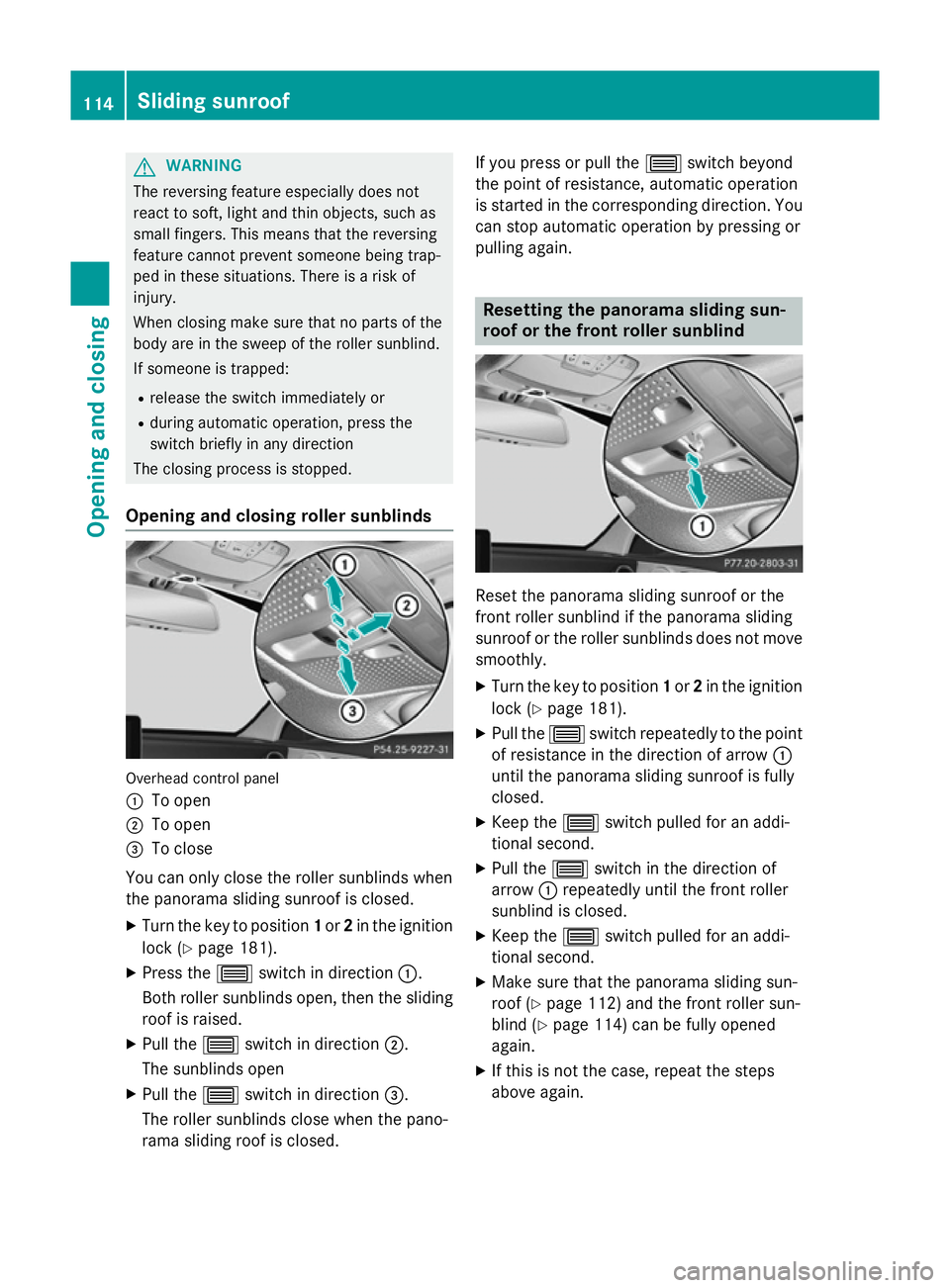
Opening and closing roller sunblinds Overhead control panel
:
To open
; To open
= To close
You can only close the roller sunblinds when
the panorama sliding sunroof is closed.
X Turn the key to position 1or 2in the ignition
lock (Y page 181).
X Press the 3switch in direction :.
Both roller sunblinds open, then the sliding
roof is raised.
X Pull the 3switch in direction ;.
The sunblinds open
X Pull the 3switch in direction =.
The roller sunblinds close when the pano-
rama sliding roof is closed. If you press or pull the
3switch beyond
the point of resistance, automatic operation
is started in the corresponding direction. You
can stop automatic operation by pressing or
pulling again. Resetting the panorama sliding sun-
roof or the front roller sunblind
Reset the panorama sliding sunroof or the
front roller sunblind if the panorama sliding
sunroof or the roller sunblinds does not move smoothly.
X Turn the key to position 1or 2in the ignition
lock (Y page 181).
X Pull the 3switch repeatedly to the point
of resistance in the direction of arrow :
until the panorama sliding sunroof is fully
closed.
X Keep the 3switch pulled for an addi-
tional second.
X Pull the 3switch in the direction of
arrow :repeatedly until the front roller
sunblind is closed.
X Keep the 3switch pulled for an addi-
tional second.
X Make sure that the panorama sliding sun-
roof (Y page 112) and the front roller sun-
blind (Y page 114) can be fully opened
again.
X If this is not the case, repeat the steps
above again. 114
Sliding sunroofOpening and closing
Page 130 of 489
The most recent driving position of the steer-
ing wheel is stored if:
R the ignition is switched off
R the setting is stored using the memory
function (Y page 131)
i The steering wheel only moves upwards if
it has not already reached the upper steer-
ing limiter.
Position of the steering wheel for driv-
ing The steering wheel is moved to the previously
set position if:
R the driver's door is closed and you insert
the key into the ignition lock
R you close the driver's door when the igni-
tion is switched on
R you press the Start/Stop button once on
vehicles with KEYLESS-GO
i The steering wheel only returns to the last
set position if the driving position is stored
after the seat or steering wheel has been
adjusted (Y page 131).
The most recent driving position of the steer-
ing wheel is stored if:
R the ignition is switched off
R the setting is stored using the memory
function (Y page 131)
Crash-responsive EASY-EXIT feature If the crash-responsive EASY-EXIT feature is
triggered in an accident, the steering column
will move upwards when the driver's door is
opened or the key is removed from the igni-
tion lock. This makes it easier to exit the vehi-
cle and rescue the occupants.
The crash-responsive EASY-EXIT feature is
only operational if the EASY-EXIT/ENTRY fea-
ture is activated in Audio 20/COMAND
Online; see the separate Audio 20/COMAND Online operating instructions. Mirrors
Rear-view mirror
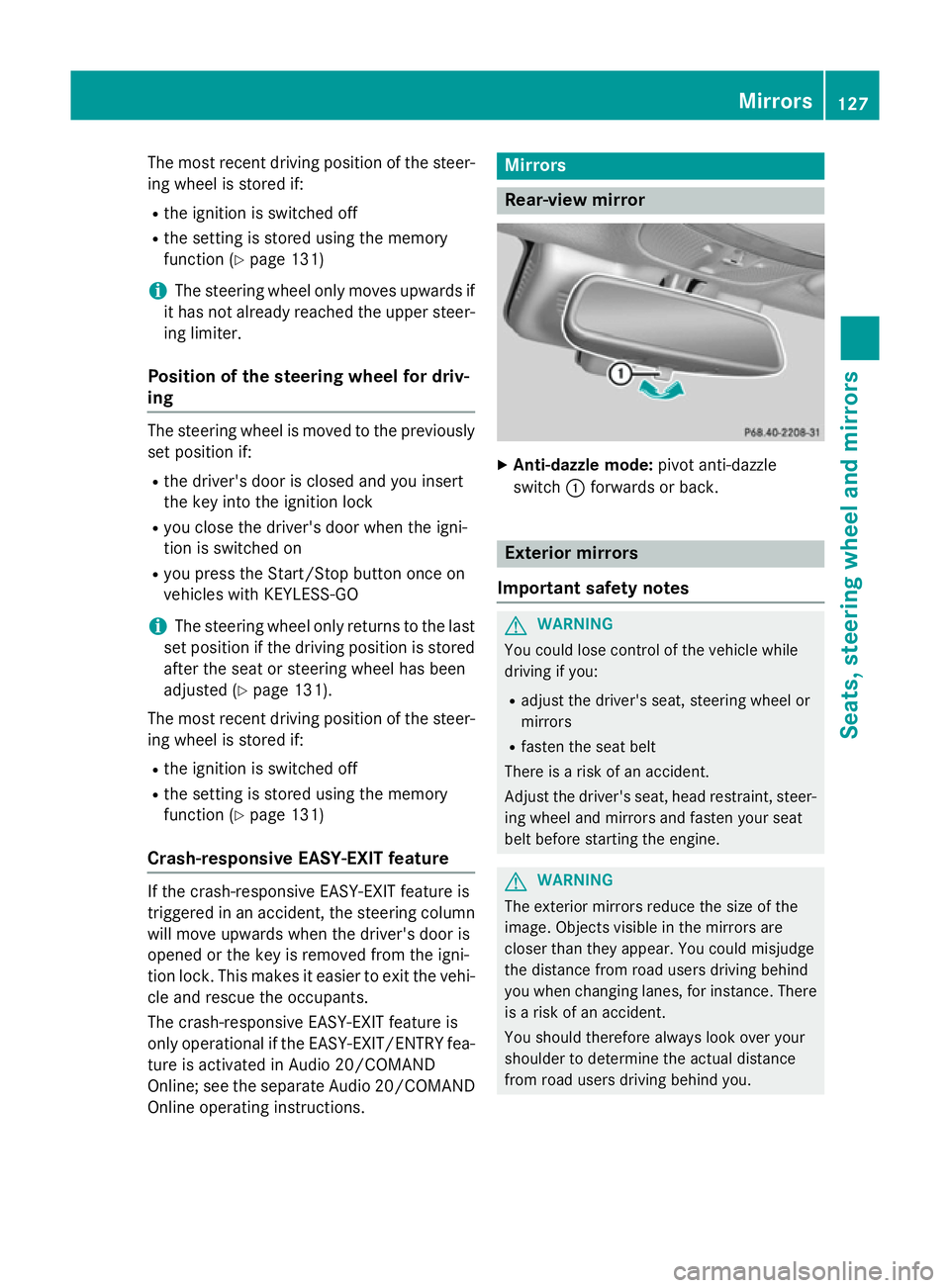
X
Anti-dazzle mode: pivot anti-dazzle
switch :forwards or back. Exterior mirrors
Important safety notes G
WARNING
You could lose control of the vehicle while
driving if you:
R adjust the driver's seat, steering wheel or
mirrors
R fasten the seat belt
There is a risk of an accident.
Adjust the driver's seat, head restraint, steer-
ing wheel and mirrors and fasten your seat
belt before starting the engine. G
WARNING
The exterior mirrors reduce the size of the
image. Objects visible in the mirrors are
closer than they appear. You could misjudge
the distance from road users driving behind
you when changing lanes, for instance. There is a risk of an accident.
You should therefore always look over your
shoulder to determine the actual distance
from road users driving behind you. Mirrors
127Seats, steering wheel and mirrors Z
Page 149 of 489
Always switch off the windscreen wipers and
ignition before changing the wiper blades.
! Never open the bonnet if a windscreen
wiper arm has been folded away from the
windscreen.
Never fold a windscreen wiper arm without
a wiper blade back onto the windscreen.
Hold the windscreen wiper arm firmly when you change the wiper blade. If you release
the windscreen wiper arm without a wiper
blade and it falls onto the windscreen, the
windscreen may be damaged by the force
of the impact.
Mercedes-Benz recommends that you have the wiper blades changed at a qualified
specialist workshop.
! To avoid damaging the windscreen wiper
blades, make sure that you touch only the
wiper arm of the windscreen wiper.
Replacing the windscreen wiper blades Moving the wiper blades to the vertical
position
On vehicles without KEYLESS-GO:
X Turn the key to position 1or 2in the ignition
lock (Y page 181).
X Set the windscreen wipers to position
°.
X When the wiper arms have reached the ver-
tical position, turn the key to position 0and
remove it from the ignition lock.
X Fold the wiper arm away from the wind-
screen.
On vehicles with KEYLESS-GO:
X Switch off the engine.
X Remove your foot from the brake pedal.
X Set the windscreen wipers to position
°.
X Press the Start/Stop button repeatedly
until the windscreen wipers start. X
When the wiper arms have reached the ver-
tical position, press the Start/Stop button.
X Fold the wiper arm away from the wind-
screen.
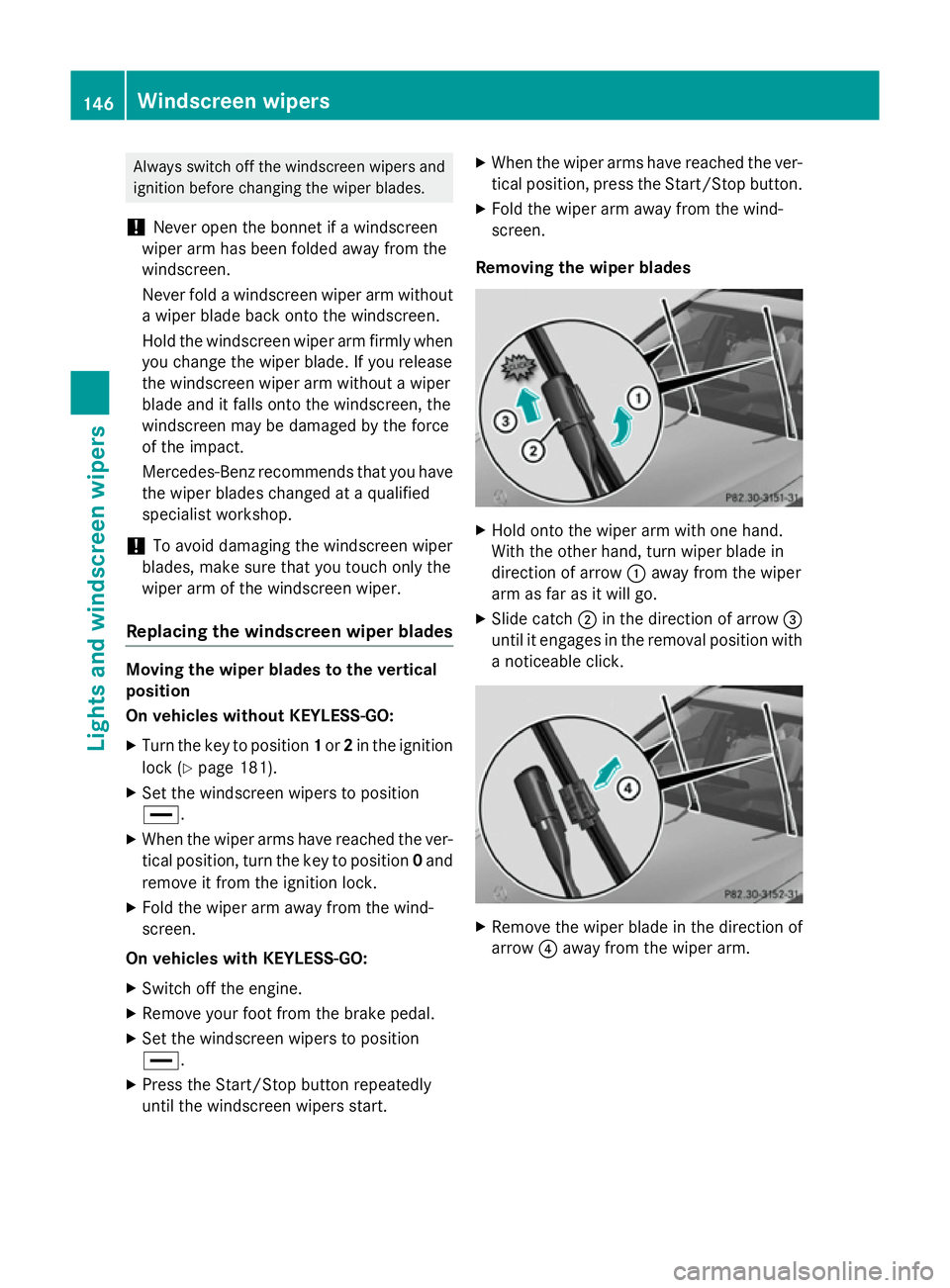
Removing the wiper blades X
Hold onto the wiper arm with one hand.
With the other hand, turn wiper blade in
direction of arrow :away from the wiper
arm as far as it will go.
X Slide catch ;in the direction of arrow =
until it engages in the removal position with
a noticeable click. X
Remove the wiper blade in the direction of
arrow ?away from the wiper arm. 146
Windscreen wipersLights and
windscreen wipers
Page 151 of 489
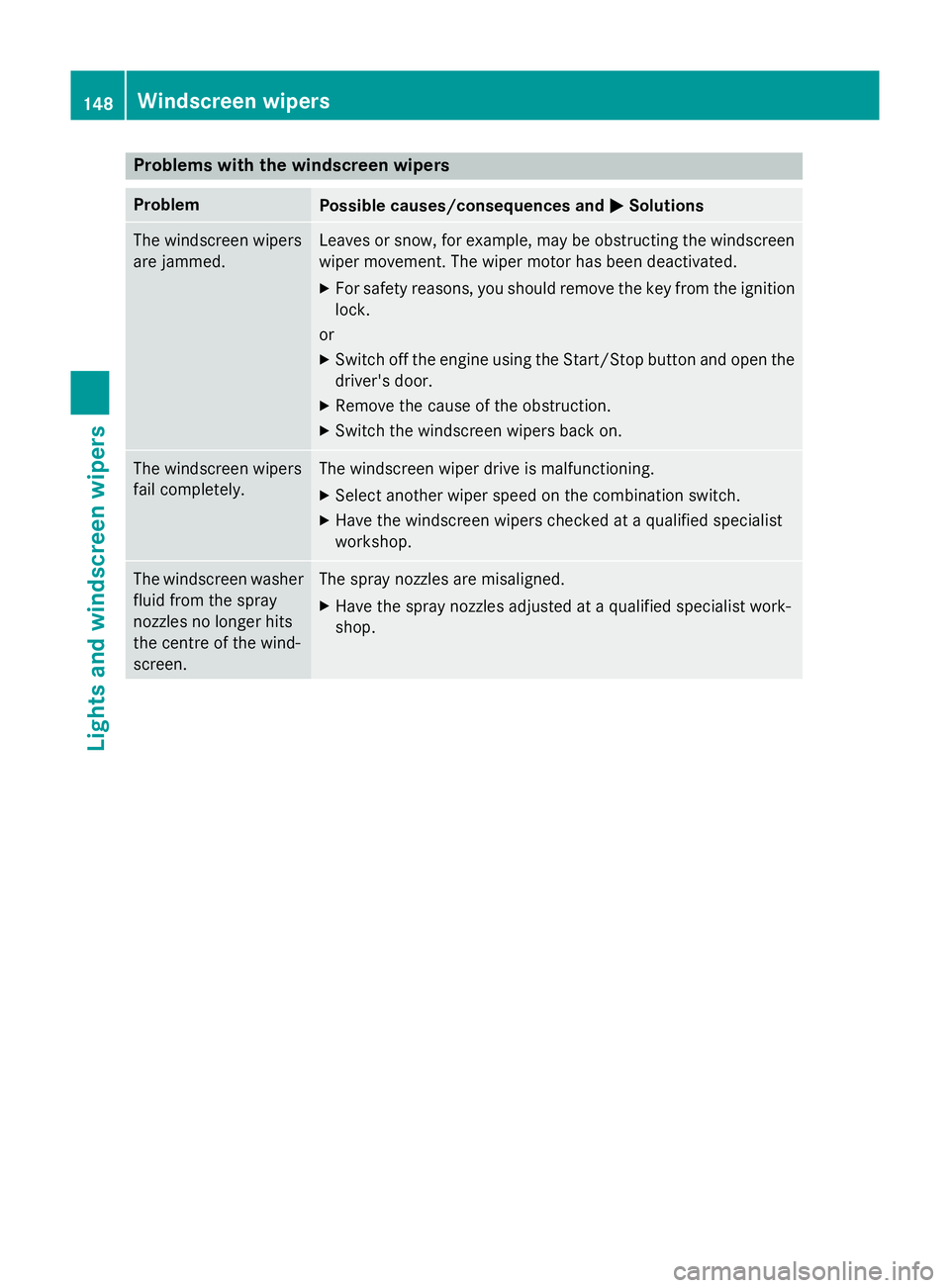
Problems with the windscreen wipers
Problem
Possible causes/consequences and
M
MSolutions The windscreen wipers
are jammed. Leaves or snow, for example, may be obstructing the windscreen
wiper movement. The wiper motor has been deactivated.
X For safety reasons, you should remove the key from the ignition
lock.
or
X Switch off the engine using the Start/Stop button and open the
driver's door.
X Remove the cause of the obstruction.
X Switch the windscreen wipers back on. The windscreen wipers
fail completely. The windscreen wiper drive is malfunctioning.
X Select another wiper speed on the combination switch.
X Have the windscreen wipers checked at a qualified specialist
workshop. The windscreen washer
fluid from the spray
nozzles no longer hits
the centre of the wind-
screen. The spray nozzles are misaligned.
X Have the spray nozzles adjusted at a qualified specialist work-
shop. 148
Windscreen wipersLights and windscreen wipers
Page 156 of 489
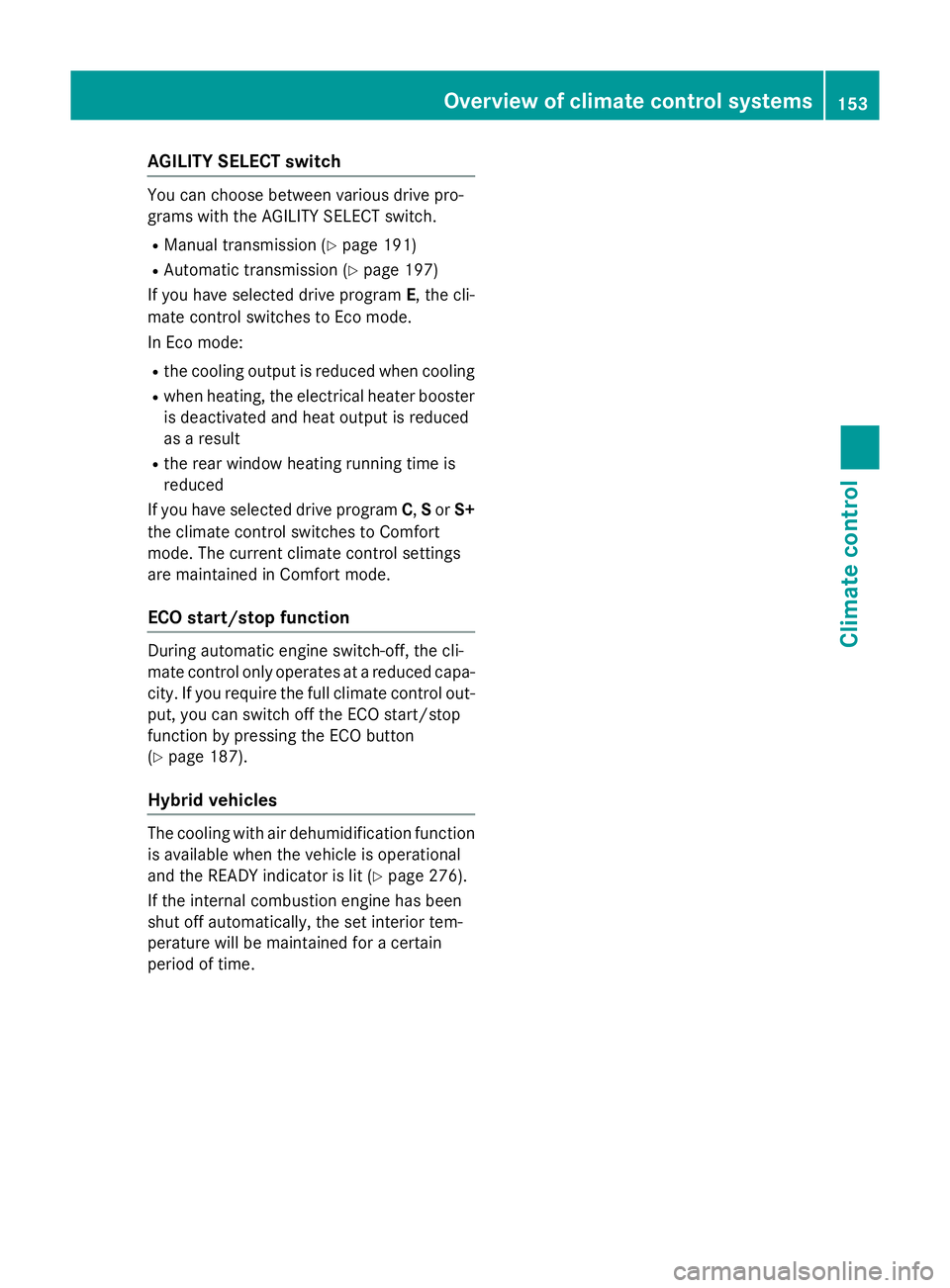
AGILITY SELECT switch
You can choose between various drive pro-
grams with the AGILITY SELECT switch.
R Manual transmission (Y page 191)
R Automatic transmission (Y page 197)
If you have selected drive program E, the cli-
mate control switches to Eco mode.
In Eco mode:
R the cooling output is reduced when cooling
R when heating, the electrical heater booster
is deactivated and heat output is reduced
as a result
R the rear window heating running time is
reduced
If you have selected drive program C,Sor S+
the climate control switches to Comfort
mode. The current climate control settings
are maintained in Comfort mode.
ECO start/stop function During automatic engine switch-off, the cli-
mate control only operates at a reduced capa-
city. If you require the full climate control out-
put, you can switch off the ECO start/stop
function by pressing the ECO button
(Y page 187).
Hybrid vehicles The cooling with air dehumidification function
is available when the vehicle is operational
and the READY indicator is lit (Y page 276).
If the internal combustion engine has been
shut off automatically, the set interior tem-
perature will be maintained for a certain
period of time. Overview of climate control systems
153Climate control