lights MERCEDES-BENZ C-CLASS SALOON 2014 Service Manual
[x] Cancel search | Manufacturer: MERCEDES-BENZ, Model Year: 2014, Model line: C-CLASS SALOON, Model: MERCEDES-BENZ C-CLASS SALOON 2014Pages: 489, PDF Size: 14.88 MB
Page 146 of 489
Replacing the front bulbs
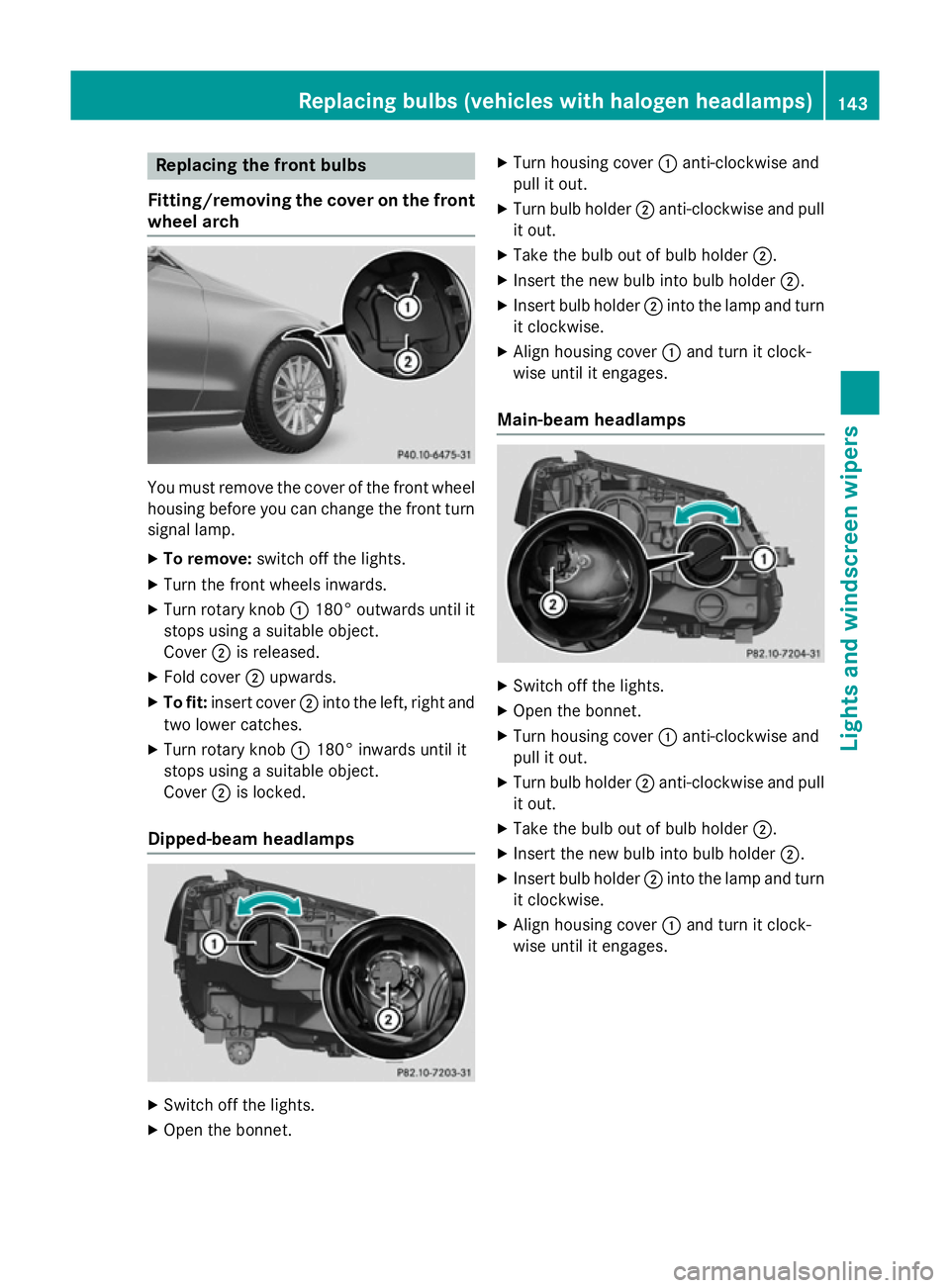
Fitting/removing the cover on the front wheel arch You must remove the cover of the front wheel
housing before you can change the front turn signal lamp.
X To remove: switch off the lights.
X Turn the front wheels inwards.
X Turn rotary knob :180° outwards until it
stops using a suitable object.
Cover ;is released.
X Fold cover ;upwards.
X To fit: insert cover ;into the left, right and
two lower catches.
X Turn rotary knob :180° inwards until it
stops using a suitable object.
Cover ;is locked.
Dipped-beam headlamps X
Switch off the lights.
X Open the bonnet. X
Turn housing cover :anti-clockwise and
pull it out.
X Turn bulb holder ;anti-clockwise and pull
it out.
X Take the bulb out of bulb holder ;.
X Insert the new bulb into bulb holder ;.
X Insert bulb holder ;into the lamp and turn
it clockwise.
X Align housing cover :and turn it clock-
wise until it engages.
Main-beam headlamps X
Switch off the lights.
X Open the bonnet.
X Turn housing cover :anti-clockwise and
pull it out.
X Turn bulb holder ;anti-clockwise and pull
it out.
X Take the bulb out of bulb holder ;.
X Insert the new bulb into bulb holder ;.
X Insert bulb holder ;into the lamp and turn
it clockwise.
X Align housing cover :and turn it clock-
wise until it engages. Replacing bulbs (vehicles with halogen headlamps)
143Lights and windscreen wipers Z
Page 147 of 489
Turn signals
X
Remove the cover in the front wheel arch
(Y page 143).
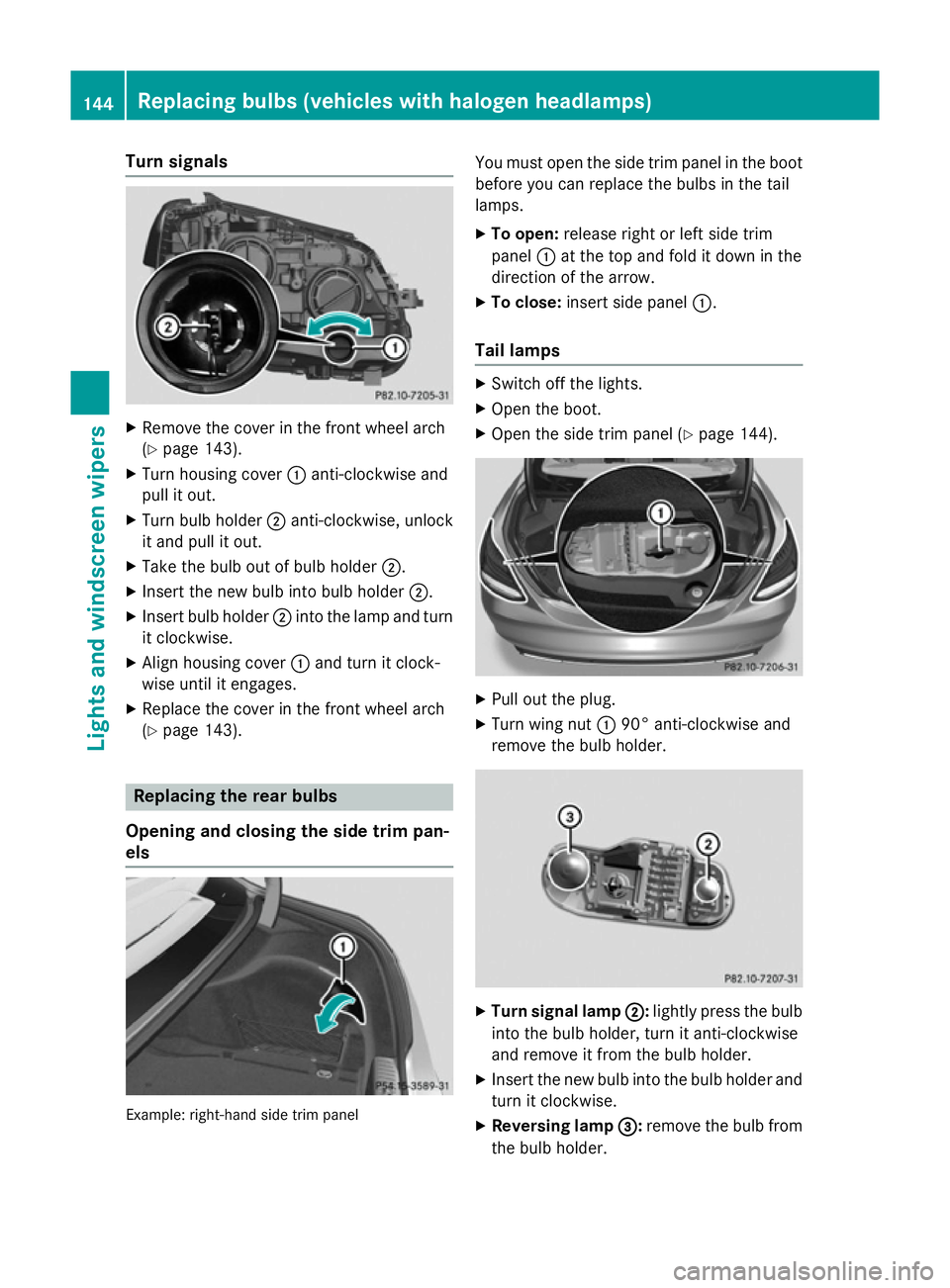
X Turn housing cover :anti-clockwise and
pull it out.
X Turn bulb holder ;anti-clockwise, unlock
it and pull it out.
X Take the bulb out of bulb holder ;.
X Insert the new bulb into bulb holder ;.
X Insert bulb holder ;into the lamp and turn
it clockwise.
X Align housing cover :and turn it clock-
wise until it engages.
X Replace the cover in the front wheel arch
(Y page 143). Replacing the rear bulbs
Opening and closing the side trim pan-
els Example: right-hand side trim panel You must open the side trim panel in the boot
before you can replace the bulbs in the tail
lamps.
X To open: release right or left side trim
panel :at the top and fold it down in the
direction of the arrow.
X To close: insert side panel :.
Tail lamps X
Switch off the lights.
X Open the boot.
X Open the side trim panel (Y page 144). X
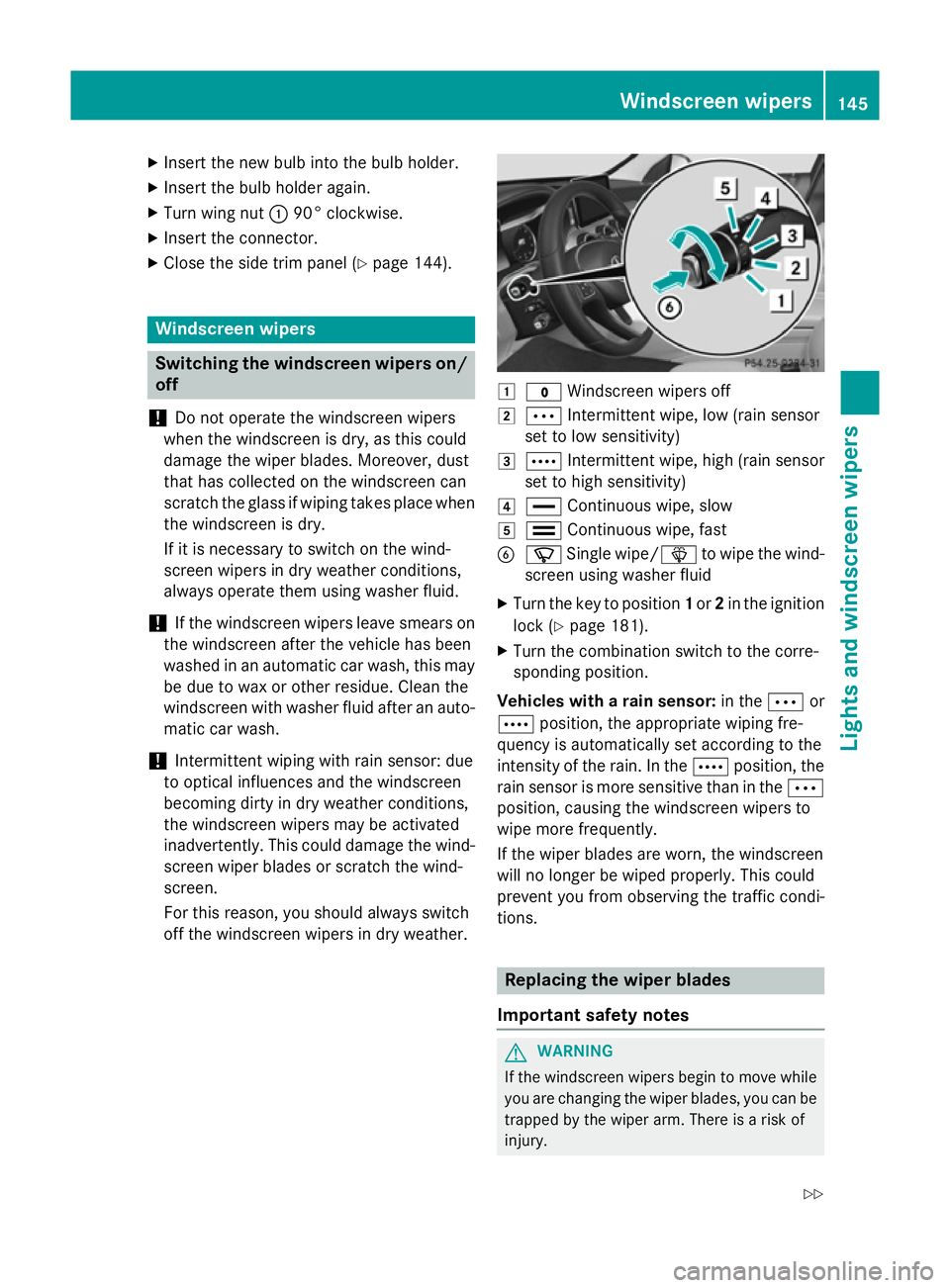
Pull out the plug.
X Turn wing nut :90° anti-clockwise and
remove the bulb holder. X
Turn signal lamp ; ;:lightly press the bulb
into the bulb holder, turn it anti-clockwise
and remove it from the bulb holder.
X Insert the new bulb into the bulb holder and
turn it clockwise.
X Reversing lamp =
=:remove the bulb from
the bulb holder. 144
Replacing bulbs (vehicles
with halogen headlamps)Lights and windscreen wipers
Page 148 of 489
X
Insert the new bulb into the bulb holder.
X Insert the bulb holder again.
X Turn wing nut :90° clockwise.
X Insert the connector.
X Close the side trim panel (Y page 144).Windscreen wipers
Switching the windscreen wipers on/
off
! Do not operate the windscreen wipers
when the windscreen is dry, as this could
damage the wiper blades. Moreover, dust
that has collected on the windscreen can
scratch the glass if wiping takes place when the windscreen is dry.
If it is necessary to switch on the wind-
screen wipers in dry weather conditions,
always operate them using washer fluid.
! If the windscreen wipers leave smears on
the windscreen after the vehicle has been
washed in an automatic car wash, this may
be due to wax or other residue. Clean the
windscreen with washer fluid after an auto- matic car wash.
! Intermittent wiping with rain sensor: due
to optical influences and the windscreen
becoming dirty in dry weather conditions,
the windscreen wipers may be activated
inadvertently. This could damage the wind- screen wiper blades or scratch the wind-
screen.
For this reason, you should always switch
off the windscreen wipers in dry weather. 1
$ Windscreen wipers off
2 Ä Intermittent wipe, low (rain sensor
set to low sensitivity)
3 Å Intermittent wipe, high (rain sensor
set to high sensitivity)
4 ° Continuous wipe, slow
5 ¯ Continuous wipe, fast
B í Single wipe/ îto wipe the wind-
screen using washer fluid
X Turn the key to position 1or 2in the ignition
lock (Y page 181).
X Turn the combination switch to the corre-
sponding position.
Vehicles with a rain sensor: in theÄor
Å position, the appropriate wiping fre-
quency is automatically set according to the
intensity of the rain. In the Åposition, the
rain sensor is more sensitive than in the Ä
position, causing the windscreen wipers to
wipe more frequently.
If the wiper blades are worn, the windscreen
will no longer be wiped properly. This could
prevent you from observing the traffic condi-
tions. Replacing the wiper blades
Important safety notes G
WARNING
If the windscreen wipers begin to move while
you are changing the wiper blades, you can be trapped by the wiper arm. There is a risk of
injury. Windscreen wipers
145Lights and windscreen wipers
Z
Page 149 of 489
Always switch off the windscreen wipers and
ignition before changing the wiper blades.
! Never open the bonnet if a windscreen
wiper arm has been folded away from the
windscreen.
Never fold a windscreen wiper arm without
a wiper blade back onto the windscreen.
Hold the windscreen wiper arm firmly when you change the wiper blade. If you release
the windscreen wiper arm without a wiper
blade and it falls onto the windscreen, the
windscreen may be damaged by the force
of the impact.
Mercedes-Benz recommends that you have the wiper blades changed at a qualified
specialist workshop.
! To avoid damaging the windscreen wiper
blades, make sure that you touch only the
wiper arm of the windscreen wiper.
Replacing the windscreen wiper blades Moving the wiper blades to the vertical
position
On vehicles without KEYLESS-GO:
X Turn the key to position 1or 2in the ignition
lock (Y page 181).
X Set the windscreen wipers to position
°.
X When the wiper arms have reached the ver-
tical position, turn the key to position 0and
remove it from the ignition lock.
X Fold the wiper arm away from the wind-
screen.
On vehicles with KEYLESS-GO:
X Switch off the engine.
X Remove your foot from the brake pedal.
X Set the windscreen wipers to position
°.
X Press the Start/Stop button repeatedly
until the windscreen wipers start. X
When the wiper arms have reached the ver-
tical position, press the Start/Stop button.
X Fold the wiper arm away from the wind-
screen.
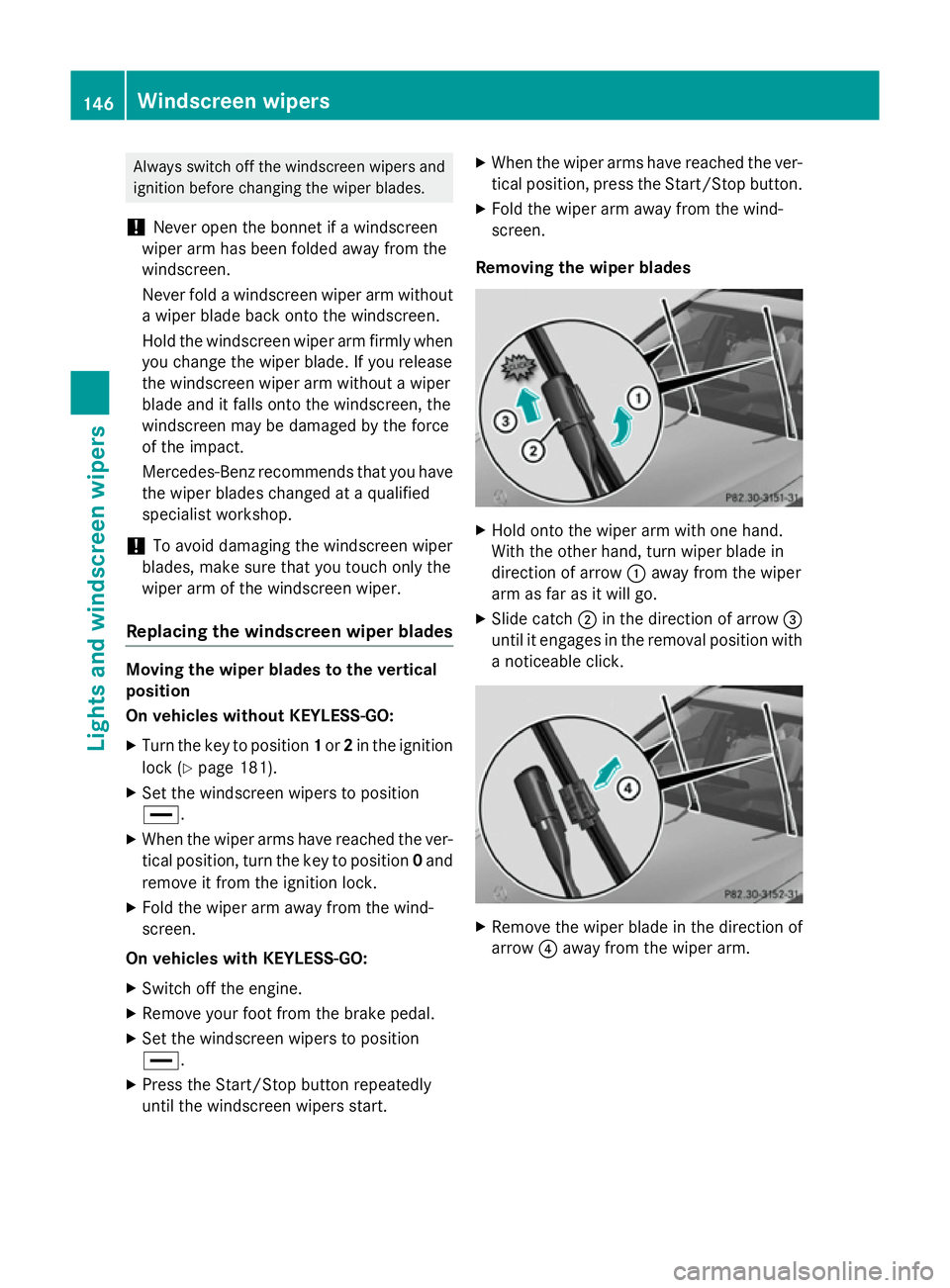
Removing the wiper blades X
Hold onto the wiper arm with one hand.
With the other hand, turn wiper blade in
direction of arrow :away from the wiper
arm as far as it will go.
X Slide catch ;in the direction of arrow =
until it engages in the removal position with
a noticeable click. X
Remove the wiper blade in the direction of
arrow ?away from the wiper arm. 146
Windscreen wipersLights and
windscreen wipers
Page 150 of 489
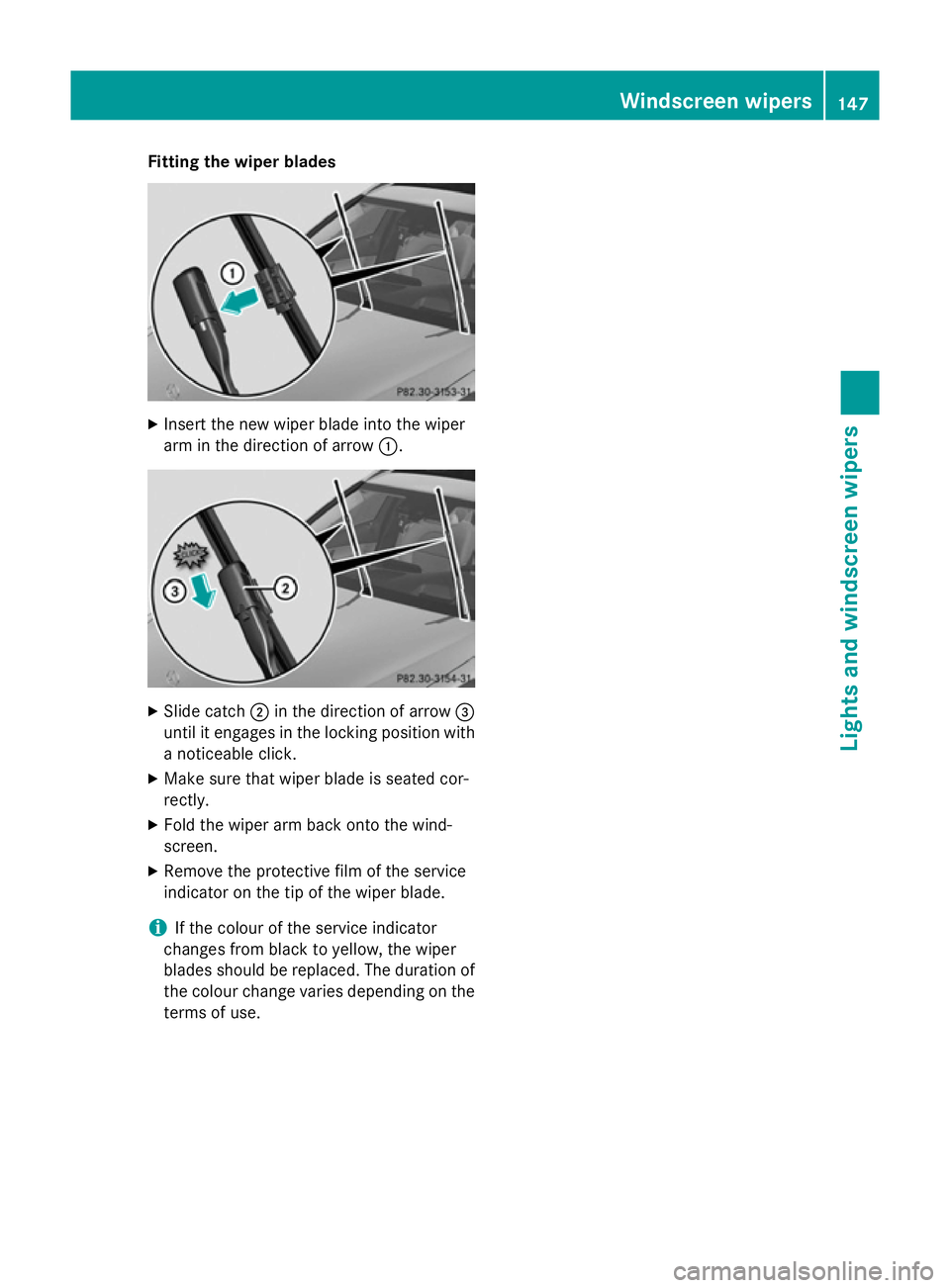
Fitting the wiper blades
X
Insert the new wiper blade into the wiper
arm in the direction of arrow :.X
Slide catch ;in the direction of arrow =
until it engages in the locking position with a noticeable click.
X Make sure that wiper blade is seated cor-
rectly.
X Fold the wiper arm back onto the wind-
screen.
X Remove the protective film of the service
indicator on the tip of the wiper blade.
i If the colour of the service indicator
changes from black to yellow, the wiper
blades should be replaced. The duration of the colour change varies depending on the
terms of use. Windscreen wipers
147Lights and windscreen wipers Z
Page 151 of 489
Problems with the windscreen wipers
Problem
Possible causes/consequences and
M
MSolutions The windscreen wipers
are jammed. Leaves or snow, for example, may be obstructing the windscreen
wiper movement. The wiper motor has been deactivated.
X For safety reasons, you should remove the key from the ignition
lock.
or
X Switch off the engine using the Start/Stop button and open the
driver's door.
X Remove the cause of the obstruction.
X Switch the windscreen wipers back on. The windscreen wipers
fail completely. The windscreen wiper drive is malfunctioning.
X Select another wiper speed on the combination switch.
X Have the windscreen wipers checked at a qualified specialist
workshop. The windscreen washer
fluid from the spray
nozzles no longer hits
the centre of the wind-
screen. The spray nozzles are misaligned.
X Have the spray nozzles adjusted at a qualified specialist work-
shop. 148
Windscreen wipersLights and windscreen wipers
Page 155 of 489
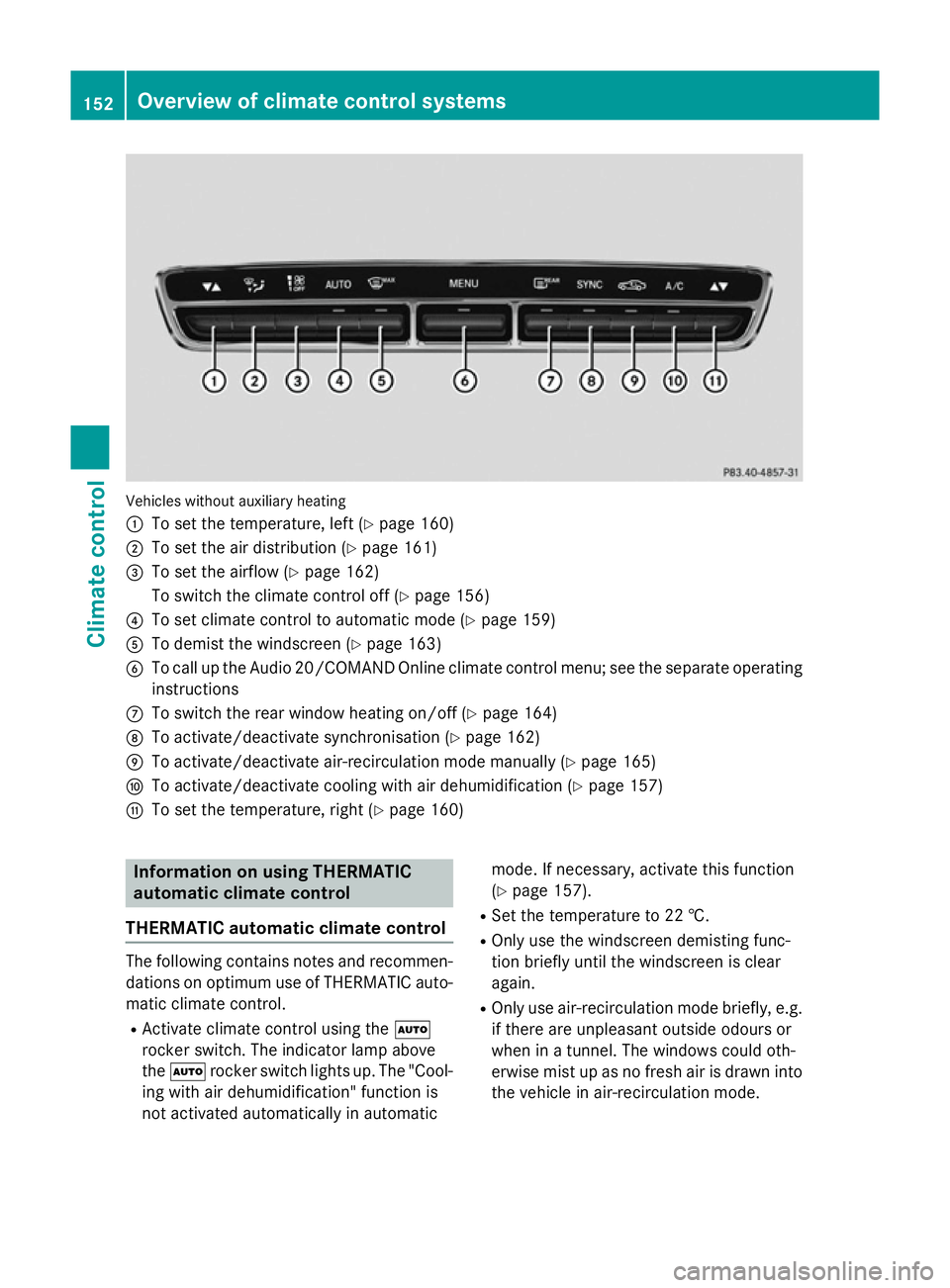
Vehicles without auxiliary heating
:
To set the temperature, left (Y page 160)
; To set the air distribution (Y page 161)
= To set the airflow (Y page 162)
To switch the climate control off (Y page 156)
? To set climate control to automatic mode (Y page 159)
A To demist the windscreen (Y page 163)
B To call up the Audio 20/COMAND Online climate control menu; see the separate operating
instructions
C To switch the rear window heating on/off (Y page 164)
D To activate/deactivate synchronisation (Y page 162)
E To activate/deactivate air-recirculation mode manually (Y page 165)
F To activate/deactivate cooling with air dehumidification (Y page 157)
G To set the temperature, right (Y page 160)Information on using THERMATIC
automatic climate control
THERMATIC automatic climate control The following contains notes and recommen-
dations on optimum use of THERMATIC auto-
matic climate control.
R Activate climate control using the Ã
rocker switch. The indicator lamp above
the à rocker switch lights up. The "Cool-
ing with air dehumidification" function is
not activated automatically in automatic mode. If necessary, activate this function
(Y page 157).
R Set the temperature to 22 †.
R Only use the windscreen demisting func-
tion briefly until the windscreen is clear
again.
R Only use air-recirculation mode briefly, e.g.
if there are unpleasant outside odours or
when in a tunnel. The windows could oth-
erwise mist up as no fresh air is drawn into
the vehicle in air-recirculation mode. 152
Overview of climate control systemsClimate control
Page 158 of 489
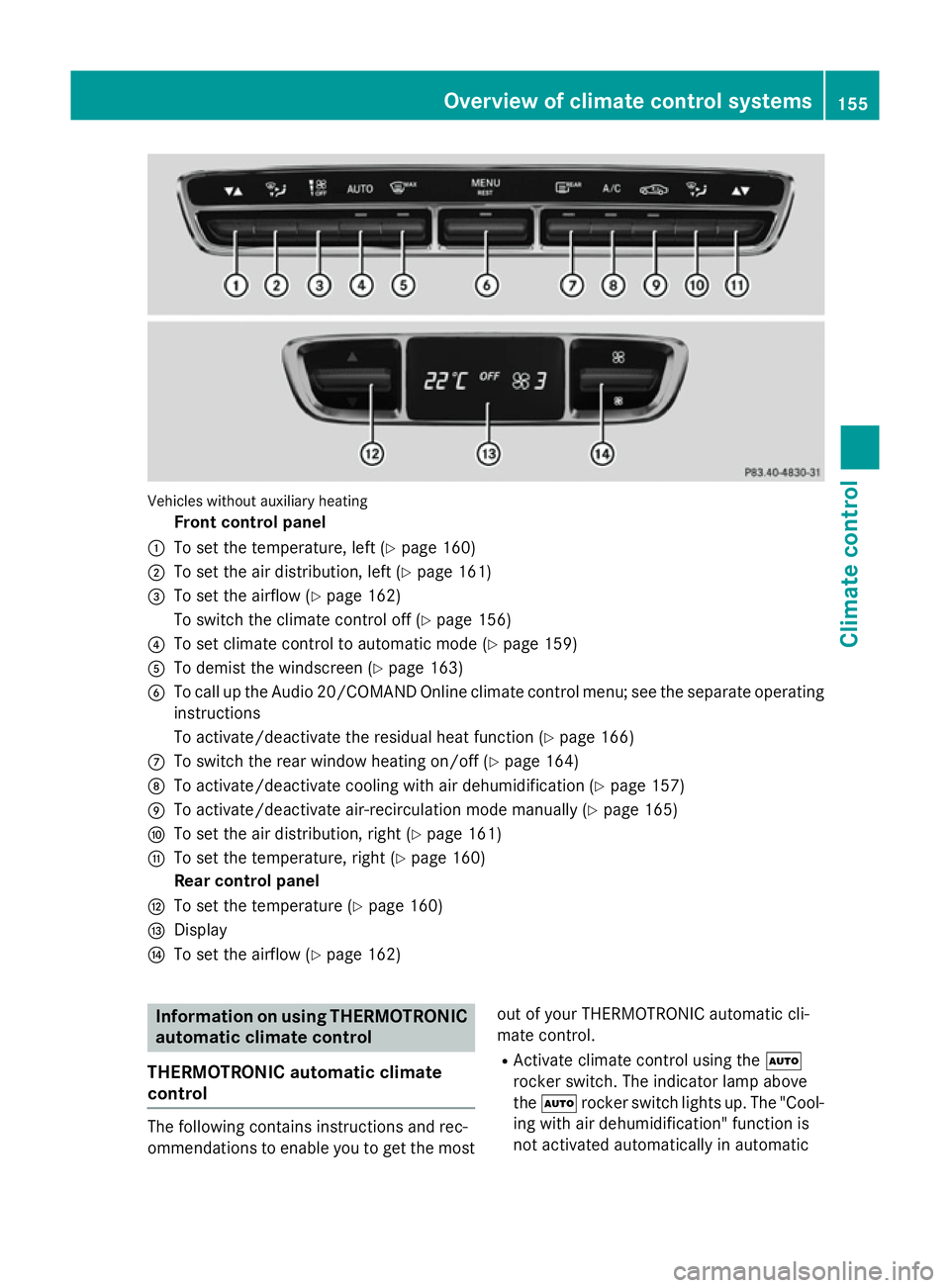
Vehicles without auxiliary heating
Front control panel
: To set the temperature, left (Y page 160)
; To set the air distribution, left (Y page 161)
= To set the airflow (Y page 162)
To switch the climate control off (Y page 156)
? To set climate control to automatic mode (Y page 159)
A To demist the windscreen (Y page 163)
B To call up the Audio 20/COMAND Online climate control menu; see the separate operating
instructions
To activate/deactivate the residual heat function (Y page 166)
C To switch the rear window heating on/off (Y page 164)
D To activate/deactivate cooling with air dehumidification (Y page 157)
E To activate/deactivate air-recirculation mode manually (Y page 165)
F To set the air distribution, right (Y page 161)
G To set the temperature, right (Y page 160)
Rear control panel
H To set the temperature (Y page 160)
I Display
J To set the airflow (Y page 162) Information on using THERMOTRONIC
automatic climate control
THERMOTRONIC automatic climate
control The following contains instructions and rec-
ommendations to enable you to get the most
out of your THERMOTRONIC automatic cli-
mate control.
R Activate climate control using the Ã
rocker switch. The indicator lamp above
the à rocker switch lights up. The "Cool-
ing with air dehumidification" function is
not activated automatically in automatic Overview of climate control systems
155Climate control
Page 160 of 489
X
To switch off: press thet/!
rocker switch up or down.
The Audio 20/COMAND Online climate
control menu opens.
X Deactivate the climate control using the
air-conditioning function bar; see the sep-
arate Audio 20/COMAND Online operating
instructions.
or
X Set the airflow to level 0 using the H
rocker switch. Activating/deactivating the cooling
with air dehumidification function
General notes If you deactivate the "Cooling with air-dehu-
midification" function, the air inside the vehi- cle will not be cooled. The air inside the vehi-
cle will also not be dehumidified. The win-
dows can mist up more quickly. Therefore,
deactivate the "Cooling with air-dehumidifi-
cation" function only briefly.
For vehicles without hybrid drive, the "Cooling with air dehumidification" function is availa-
ble when the engine is running. For hybrid
vehicles, the cooling with air dehumidification function is also available via the electric
refrigerant compressor when the engine is
not running. The air inside the vehicle is
cooled and dehumidified according to the
temperature selected.
Condensation may drip from the underside of
the vehicle when cooling mode is active. This is normal and not a sign that there is a mal-
function. Activating/deactivating THERMATIC automatic climate control
X To activate: press the¿rocker switch
up or down.
The indicator lamp above the rocker switch lights up.
or
X Activate the cooling with air dehumidifica-
tion function via Audio 20/COMAND
Online (see the separate operating instruc-
tions).
X To deactivate: press the¿rocker
switch up or down.
The indicator lamp above the rocker switch
goes out.
or
X Deactivate the cooling with air dehumidifi-
cation function via Audio 20/COMAND
Online (see the separate operating instruc-
tions).
THERMOTRONIC automatic climate con-
trol without auxiliary heating
X To activate: press the¿rocker switch
up or down.
The indicator lamp above the rocker switch lights up.
or
X Activate the cooling with air dehumidifica-
tion function via Audio 20/COMAND
Online (see the separate operating instruc-
tions).
X To deactivate: press the¿rocker
switch up or down.
The indicator lamp above the rocker switch
goes out.
or X Deactivate the cooling with air dehumidifi-
cation function via Audio 20/COMAND
Online (see the separate operating instruc-
tions). Operating the climate control system
157Climate control
Page 163 of 489
Automatic control
X
Turn the key to position 2in the ignition
lock (Y page 181).
X Set the desired temperature using the
w rocker switch on the front control
unit.
or X Set the desired temperature using
Audio 20/COMAND Online; see the sepa-
rate operating instructions.
X To activate: press theÃrocker switch
up or down.
The indicator lamp above the Ãrocker
switch lights up.
X To switch to manual operation: press the
H rocker switch up or down.
or
X Set the airflow using Audio 20/COMAND
Online; see the separate operating instruc-
tions.
or
X Press the upper or lower section of the
_ rocker switch.
or X Set the air distribution using Audio 20/
COMAND Online; see the separate operat-
ing instructions.
The indicator lamp above the Ãrocker
switch goes out.
In automatic mode, if you adjust the airflow or air distribution manually, the indicator lamp
above the Ãrocker switch goes out. The
function which has not been changed man-
ually, however, continues to be controlled
automatically. When the manually set func-
tion switches back to automatic mode, the
indicator lamp above the Ãrocker switch
lights up again. Setting the climate mode
This function is only available with
THERMOTRONIC automatic climate control. In automatic mode you can select the follow-
ing airflow settings for the driver's and front-
passenger areas:
FOCUS high airflow that is set slightly cooler
MEDIUM medium airflow, standard setting
DIFFUS Elow airflow that is set slightly
warmer and with less of a draught
X To set: set the climate mode using Audio
20/COMAND Online (see separate operat-
ing instructions). Setting the temperature
THERMATIC automatic climate control Different temperatures can be set for the
driver's and front-passenger sides.
X Turn the key to position 2in the ignition
lock (Y page 181).
X To increase/reduce: press the upper or
lower section of the wrocker switch.
or
X Set the temperature using Audio 20/
COMAND Online; see the separate operat-
ing instructions.
Only change the temperature setting in
small increments. Start at 22 †.
THERMOTRONIC automatic climate
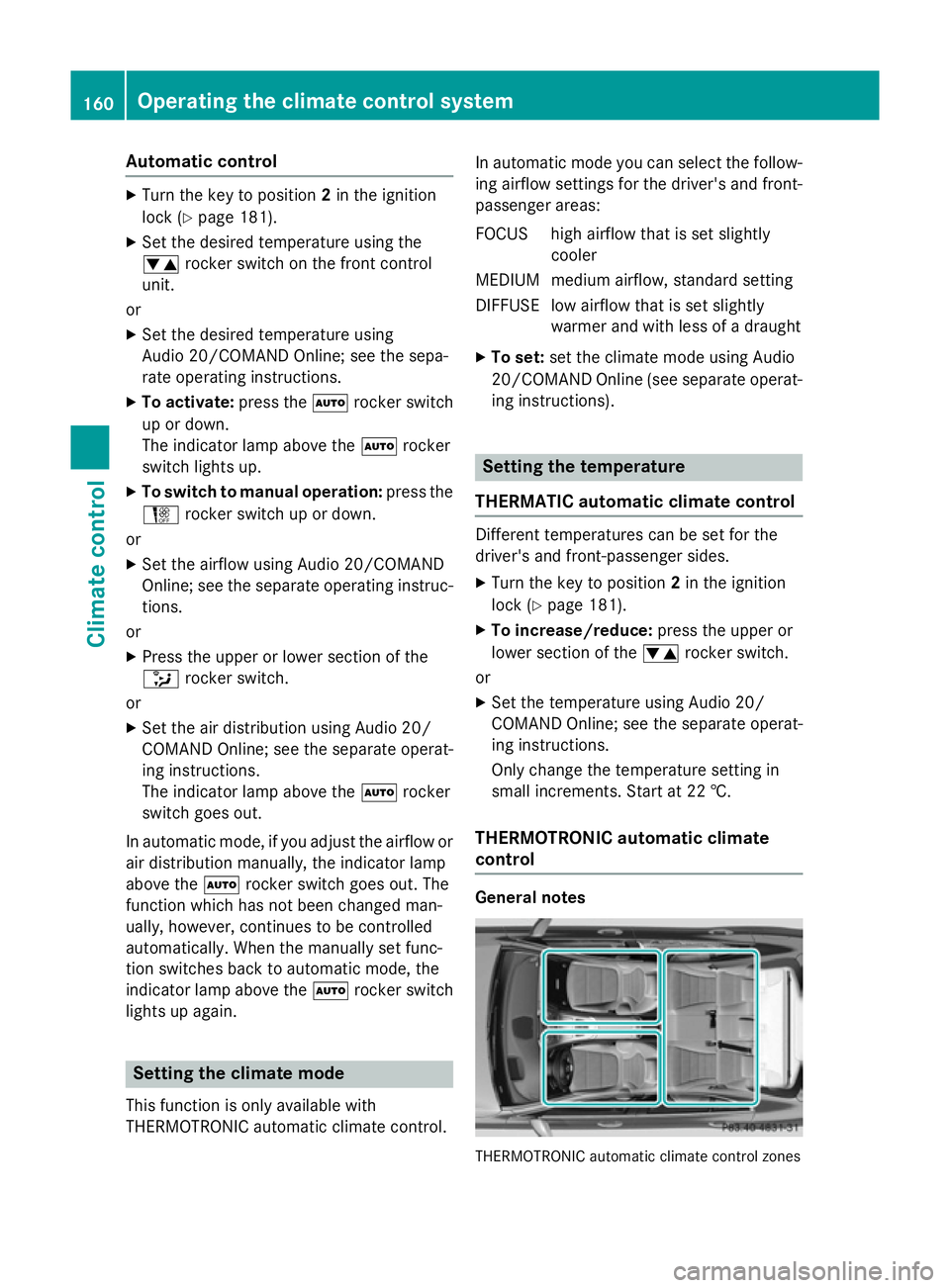
control General notes
THERMOTRONIC automatic climate control zones160
Operating the climate control systemClimate control