warning MERCEDES-BENZ C-CLASS SALOON 2018 Owners Manual
[x] Cancel search | Manufacturer: MERCEDES-BENZ, Model Year: 2018, Model line: C-CLASS SALOON, Model: MERCEDES-BENZ C-CLASS SALOON 2018Pages: 609, PDF Size: 11.19 MB
Page 272 of 609
Instrument display
overview
Mercedes-AMG vehicles: be sure toobser ve
th e information in the Supplement. Otherwise,
yo u may failto recognise dangers.
Plug-in hybrid: be sure toobser vethe no tes in
th e Supplement. Otherwise, you may failto rec‐
ognise dangers. 000A
WARNING Risk of accident due toan
instrument display malfunction
If th e Instrument Display has failed or mal‐
functioned, you may not recognise function
re strictions applying tosaf etyre leva nt sys‐
te ms.
The operating saf ety of your vehicle may be
impaired. 0007
Drive on carefull y. 0007
Have theve hicle checked immediately
at a qualified specialist workshop. If
th e operating saf ety of your vehicle is
impaired, park theve hicle safely as soon as pos‐
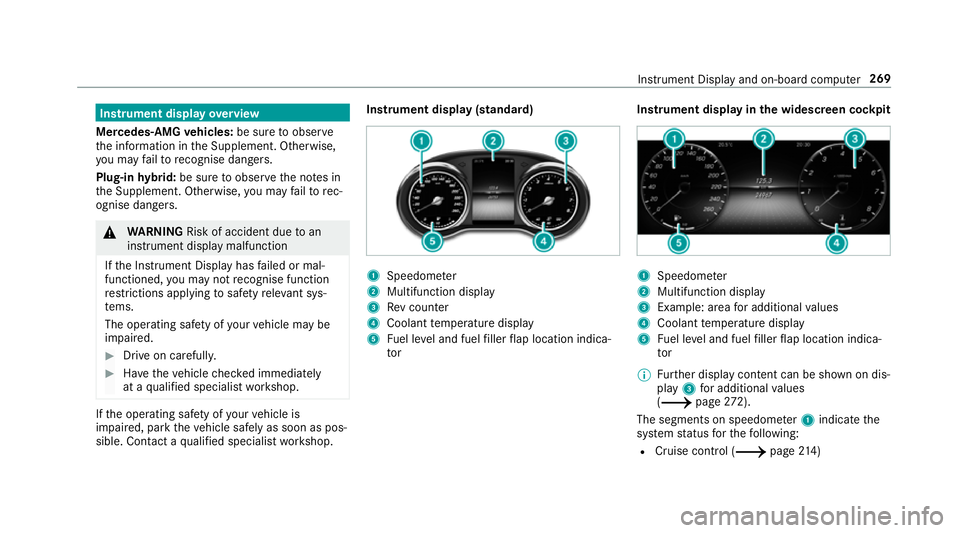
sible. Contact a qualified specialist workshop. Instrument display (standard)
1
Speedome ter
2 Multifunction display
3 Rev counter
4 Coolant temp erature display
5 Fuel le vel and fuel filler flap location indica‐
tor Instrument display in
the widescreen cockpit 1
Speedome ter
2 Multifunction display
3 Example: area for additional values
4 Coolant temp erature display
5 Fuel le vel and fuel filler flap location indica‐
tor
0009 Further display content can be shown on dis‐
play 3for additional values
(0013 page272).
The segments on speedome ter1 indica tethe
sy stem status forth efo llowing:
R Cruise control (0013 page214) Instrument Displ
ayand on-board computer 269
Page 273 of 609
R
Speed limiter (0013 page 215)
R Active Dis tance Assi stDISTRONIC
(0013 page 218)
000E NO
TEEngine dama gedue toexc essively
high engine speeds The engine will be damaged if
you drive with
th e engine in theov errevving range. 0007
Do not drive wi th the engine in theove r‐
re vving range. The fuel supply is inter
rupted toprotect the
engine when there d mark on there v counter 3
(o ve rrev ving range) is reached.
During no rmal operating conditions, the coolant
te mp erature display 4may rise to120 °C. 000A
WARNING Danger of bu rns when open‐
ing the bonn et
If yo u open the engine bonn etwhen the
engine has overheated or during a fire inthe
engine compartment, you could come into
contact with hot gases or other escaping
operating fluids. 0007
Before opening the bonn et, allow the
engine tocool down. 0007
Intheeve nt of a fire inthe engine com‐
partment, keep the engine bonn et
closed and call thefire service. Ve
hicles with a 48 V on-board electrical sys‐
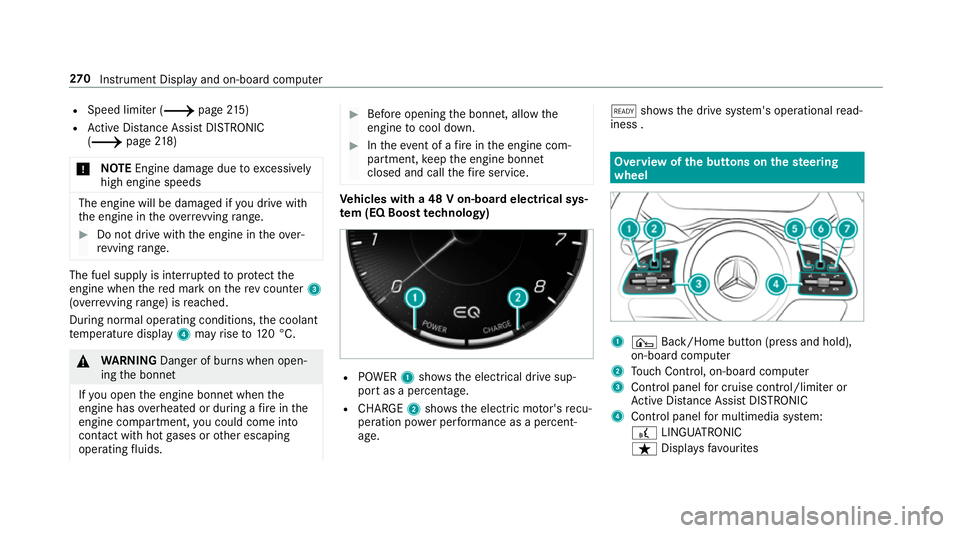
te m (EQ Boo sttech nology) R
POWER 1shows th e electrical drive sup‐
port as a percentage.
R CHARGE 2showsthe electric mo tor's recu‐
peration po wer per form ance as a percent‐
age. 00D0
showsthe drive sy stem's operational read‐
iness . Overview of
the but tons on thest eering
wheel 1
¤ Back/Home button (press and hold),
on-board computer
2 Touch Control, on-board co mputer
3 Control panel for cruise control/limiter or
Ac tive Dis tance Assi stDISTRONIC
4 Control panel for multimedia sy stem:
£ LINGU ATRO NIC
ß Displa ysfavo urites 270
Instrument Display and on-board computer
Page 274 of 609
VO
L: control knob, adjusts thevo lume or
switches the sound off 0063(press)
0061 Makes/accepts a call
0076 Rejects/ends a call
5 00E2 Calls up the home screen
6 Touch Control multimedia sy stem
7 0038 Back button (press and hold) Operating
the on-boa rdcompu ter 000A
WARNING Risk of di stra ction from infor‐
mation sy stems and communications
equipment
If yo u operate information and communica‐
tion equipment integ rated in theve hicle
when driving, you will be distracted from the
traf fic situation. This could also cause youto
lose control of theve hicle. 0007
Only operate this equipment when the
traf fic situation permits. 0007
Ifyo u cannot be sure of this, stop the
ve hicle whilst paying attention toroad and traf
fic conditions and ope rate the
equipment with theve hicle stationar y. Obser
vethe legal requ irements forth e count ry
in which you are cur rently driving when you
operate the on-board computer.
0009 The on-board computer displa ysappear on
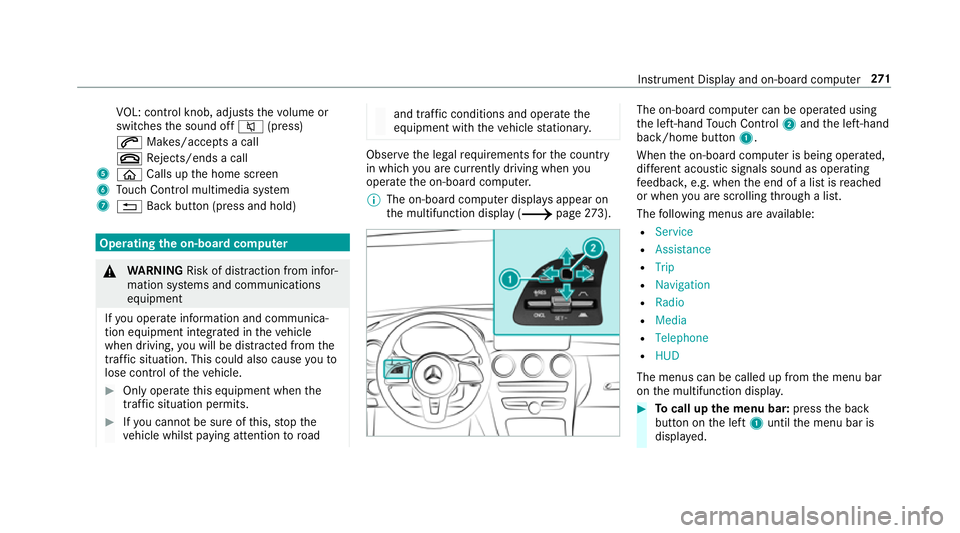
th e multifunction display (0013 page273). The on-boa
rdcompu ter can be operated using
th e left-hand Touch Control 2and the left-hand
back/home button 1.
When the on-board computer is being operated,
dif fere nt acoustic signals sound as operating
fe edbac k,e.g. when the end of a list is reached
or when you are sc rolling thro ugh a list.
The following menus are available:
R Service
R Assistance
R Trip
R Navigation
R Radio
R Media
R Telephone
R HUD
The menus can be called up from the menu bar
on the multifunction displa y. 0007
Tocall up the menu bar: pressthe back
button on the left 1until the menu bar is
displa yed. Instrument Display and on-board computer
271
Page 277 of 609
Ad
aptive Highbeam Assist Plus
(0013 page142)
00CB Maximum permissible speed
exceeded
(for cer tain countries only)
Ve hicles with Traf fic Sign Assis t:de tected
instructions and traf fic signs (0013 page 254). Ad
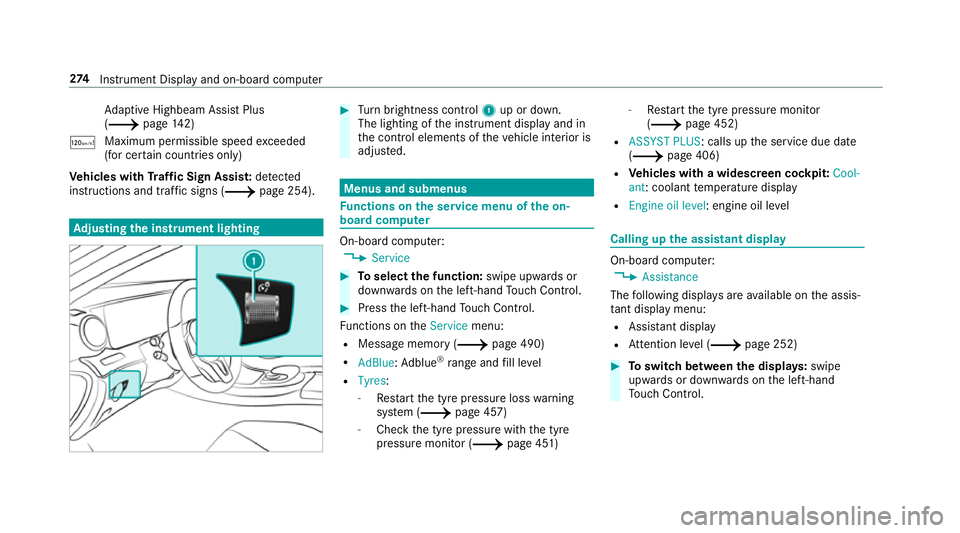
justing the in stru ment lighting 0007
Turn brightness control 1up or down.
The lighting of the instrument display and in
th e control elements of theve hicle interior is
adjus ted. Menus and submenus
Fu
nctions on the service menu of the on-
board compu ter On-board computer:
0018 Service 0007
Toselect the function: swipe upwards or
down wards on the left-hand Touch Control. 0007
Press the left-hand Touch Control.
Fu nctions on theService menu:
R Message memory (0013 page 490)
R AdBlue :Ad blue ®
ra nge and fill le vel
R Tyres:
- Restart the tyre pressure loss warning
sy stem (0013 page 457)
- Check the tyre pressure with the tyre
pressure monitor (0013 page 451)-
Restart the tyre pressure monitor
(0013 page 452)
R ASSYST PLUS: calls up the service due date
(0013 page 406)
R Vehicles with a widescreen cock pit:Cool-
ant : coolant temp erature display
R Engine oil level: engine oil le vel Calling up
the assistant display On-board computer:
0018 Assistance
The following displa ysare available on the assis‐
ta nt displ aymenu:
R Assis tant displ ay
R Attention le vel (0013 page 252) 0007
Toswitch between the displa ys:swipe
upwards or down wards on the left-hand
To uch Control. 274
Instrument Display and on-board computer
Page 282 of 609
Changing a media source
0007
Press the left-hand Touch Control. 0007
Toselect a media source: swipe upwards
or down wards on the left-hand Touch Con‐
trol. 0007
Press the left-hand Touch Control. Dialling
telephone numbers using the on-
board compu ter 000A
WARNING Risk of di stra ction from infor‐
mation sy stems and communications
equipment
If yo u operate information and communica‐
tion equipment integ rated in theve hicle
when driving, you will be distracted from the
traf fic situation. This could also cause youto
lose control of theve hicle. 0007
Only operate this equipment when the
traf fic situation permits. 0007
Ifyo u cannot be sure of this, stop the
ve hicle whilst paying attention toroad and traf
fic conditions and ope rate the
equipment with theve hicle stationar y. When
telephoning, you must obse rveth e legal
re qu irements forth e count ryin which you are
cur rently driving.
Re quirements:
R The mobile phone is connec tedto the multi‐
media sy stem.
On-board computer: 0018 Telephone
Ve hicles with the COMAND Online multime‐
dia sy stem: the most recent telephone calls
(dialled, recei ved and missed calls) are displa yed
on theTelephone menu. 0007
Toselect an entr y:swipe upwards or down‐
wa rds on the left-hand Touch Control. 0007
Press the left-hand Touch Control.
If th ere is only one telephone number
sa ve dto an entr y:thete lephone number
will be selec ted. 0007
Ifth ere are multiple telephone numbers
sa ve dto an entr y:swipe upwards or down‐ wa
rds on the left-hand touch cont rolto
select the desired telephone number. 0007
Press the left-hand Touch Control.
The telephone number will be dialled.
The following displa ysmay appear ins tead of the
te lephone numbers dialled:
R Please wait... :th e application is starting. If a
Blue tooth ®
connection tothe mobile phone
is not es tablished, the menu for auth orising
and connecting a mobile phone will be dis‐
pla yed on the multimedia sy stem
(0013 page 349).
R Updating data...: the call list is being upda‐
te d.
R Importing contacts... : contacts are being
impor ted from the mobile phone or a storage
medium.
Ac cepting/rejecting a call
Ve hicles with head-up displa y:When you
re cei vea call, theIncoming call message will
appear on the head-up displa y. Instrument Display and on-board computer
279
Page 283 of 609
0007
Swipe up wards or down wards on the left-
hand Touch Control and select 0061(Accept)
or 0076 (Reject). 0007
Press the left-hand Touch Control.
Yo u may accept/ reject the call using button
0061 or0076 onthesteering wheel. Ad
justing the head-up display settings on
the on-board co mputer On-board computer:
0018 HUD
The following head-up display settings can be
adjus ted:
R Position
R Brightness
R Display content 0007
Toselect a setting: swipe upwards or down‐
wa rds on the left-hand Touch Control. 0007
Press the left-hand Touch Control. 0007
Toadjust a value: swipe upwards or down‐
wa rds on the left-hand Touch Control. 0007
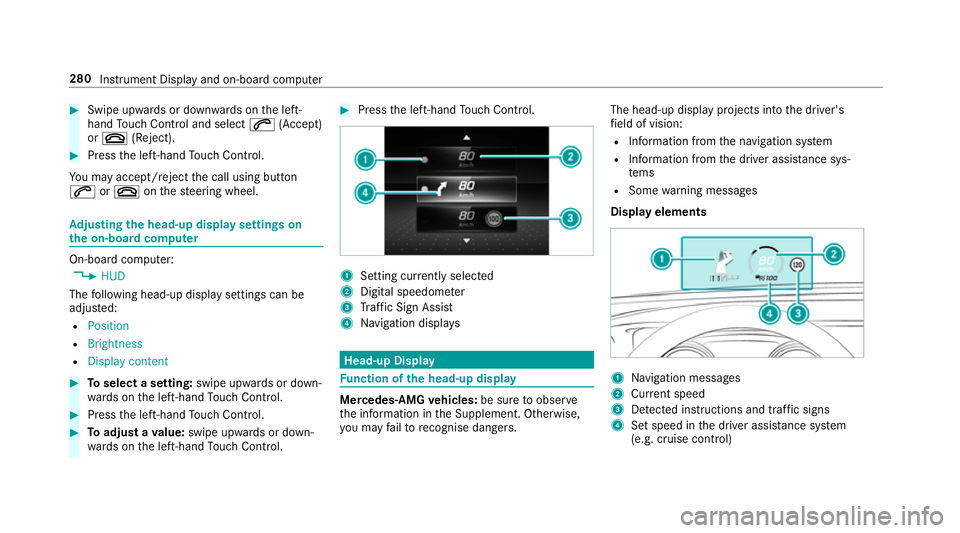
Press the left-hand Touch Control. 1
Setting cur rently selected
2 Digital speedome ter
3 Traf fic Sign Assi st
4 Navigation displa ys Head-up Display
Fu
nction of the head-up display Mercedes-AMG
vehicles: be sure toobser ve
th e information in the Supplement. Otherwise,
yo u may failto recognise dangers. The head-up displ
ayprojects into the driver's
fi eld of vision:
R Information from the navigation sy stem
R Information from the driver assis tance sys‐
te ms
R Some warning messages
Display elements 1
Navigation messa ges
2 Current speed
3 Detected instructions and traf fic signs
4 Set speed in the driver assis tance sy stem
(e.g. cruise control) 280
Instrument Display and on-board computer
Page 285 of 609
Note
s on operating saf ety000A
WARNING Risk of di stra ction from infor‐
mation sy stems and communications
equipment
If yo u operate information and communica‐
tion equipment integ rated in theve hicle
when driving, you will be distracted from the
traf fic situation. This could also cause youto
lose control of theve hicle. 0007
Only operate this equipment when the
traf fic situation permits. 0007
Ifyo u cannot be sure of this, stop the
ve hicle whilst paying attention toroad
and traf fic conditions and ope rate the
equipment with theve hicle stationar y. 000A
WARNING Risk of di stra ction from oper‐
ating mobile communication equipment
while theve hicle is in motion
If yo u operate mobile communication equip‐
ment when driving, you will be distracted from
the tra ffic situation. This could also
cause youto lose control of theve hicle. 0007
Only operate this equipment when the
ve hicle is stationar y. Fo
ryo ur ow n sa fety, al ways obser vethefo llow‐
ing points when operating mobile communica‐
tions equipment and especially your voice con‐
trol sy stem:
R Obser vethe legal requ irements forth e coun‐
try in which you are driving.
R While driving, on ly operate mobile communi‐
cations equipment and your voice control
sy stem when the tra ffic conditions permit it.
Yo u may otherwise be distracted from the
traf fic conditions and cause an accident,
inju ring yourself and others.
R Ifyo u use thevo ice control sy stem in an
emer gency your voice can change and your
te lephone call, e.g. an emer gency call, can
th ereby be unnecessarily dela yed.
R Familiarise yourself with thevo ice control
sy stem functions before starting the journe y. Operation
Overview of operation of LINGU
ATRO NIC on
the multifunction steering wheel LINGU
ATRO NIC is operational appr oximately
th irty seconds af terth e ignition is switched on. 282
LINGU ATRO NIC
Page 300 of 609
Overview and operation
Overview of
the multimedia sy stem 000A
WARNING Risk of di stra ction from infor‐
mation sy stems and communications
equipment
If yo u operate information and communica‐
tion equipment integ rated in theve hicle
when driving, you will be distracted from the
traf fic situation. This could also cause youto
lose control of theve hicle. 0007
Only operate this equipment when the
traf fic situation permits. 0007
Ifyo u cannot be sure of this, stop the
ve hicle whilst paying attention toroad
and traf fic conditions and ope rate the
equipment with theve hicle stationar y. Yo
u must obse rveth e legal requirements forthe
country in whi chyou are cur rently driving when
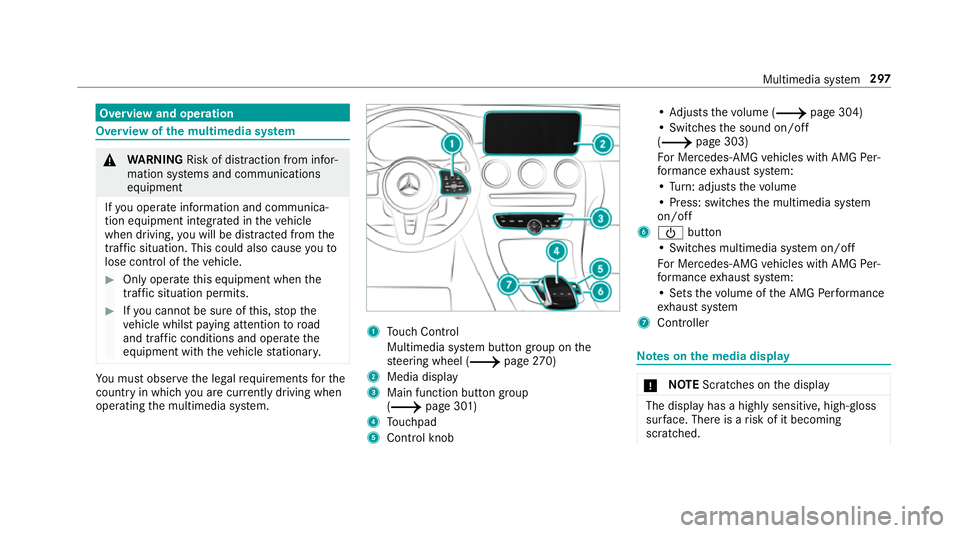
operating the multimedia sy stem. 1
Touch Control
Multimedia sy stem button group on the
st eering wheel (0013 page270)
2 Media display
3 Main fu nction button group
(0013 page 301)
4 Touchpad
5 Control knob •
Ad justs thevo lume (0013 page 304)
• Swit ches the sound on/off
(0013 page 303)
Fo r Mercedes-AMG vehicles with AMG Per‐
fo rm ance exhaust sy stem:
• Turn: adjusts thevo lume
• Press: switches the multimedia sy stem
on/off
6 00D0 button
• Switches multimedia sy stem on/off
Fo r Mercedes-AMG vehicles with AMG Per‐
fo rm ance exhaust sy stem:
• Sets thevo lume of the AMG Performance
ex haust sy stem
7 Controller Note
s onthe media display 000E
NO
TEScratches on the display The display has a highly sensitive, high-gloss
sur
face. The reis a risk of it becoming
scratched. Multimedia sy
stem 297
Page 307 of 609
0007
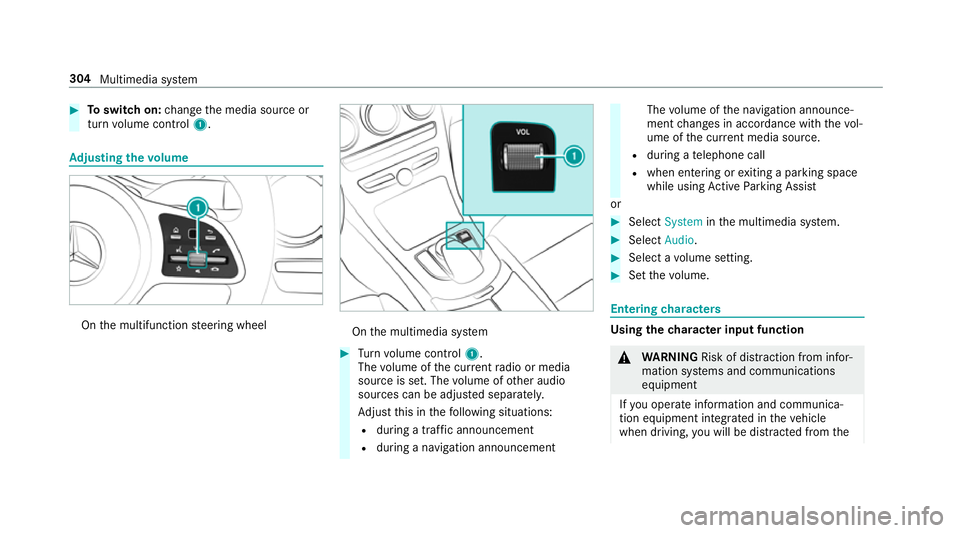
Toswitch on: change the media source or
turn volume control 1. Ad
justing the volume On
the multifunction steering wheel On
the multimedia sy stem 0007
Turn volume control 1.
The volume of the cur rent radio or media
source is set. The volume of other audio
sources can be adjus ted separatel y.
Ad just this in thefo llowing situations:
R during a traf fic announcement
R during a navigation announcement The
volume of the navigation announce‐
ment changes in accordance with thevo l‐
ume of the cur rent media sou rce.
R during a telephone call
R when entering or exiting a parking space
while using Active Parking Assist
or 0007
Select System inthe multimedia sy stem. 0007
Select Audio. 0007
Select a volume setting. 0007
Set thevo lume. Entering
characters Using
thech aracter input function 000A
WARNING Risk of di stra ction from infor‐
mation sy stems and communications
equipment
If yo u operate information and communica‐
tion equipment integ rated in theve hicle
when driving, you will be distracted from the304
Multimedia sy stem
Page 320 of 609
Re
quirements forth e ins tallation:
R The ignition is switched on.
R The engine is not running.
R Notes and warnings ha vebeen read and
accep ted.
R The parking brake is applied.
If all requirements are met, the update will be
ins talled. The multimedia sy stem cann otbe
operated while the update is being ins talled and
ve hicle functions are restricted.
If er rors should occur during the ins tallation, the
multimedia sy stem automatically attem ptsto
re store the pr evious version. If restoration of the
pr ev ious version is not possible, a symbol
appears on the cent reconsole displ ay. Please consult a
qualified specialist workshop to
re solve the problem. Re
set function Multimedia sy
stem:
0018 System 0019
Reset
Pe rsonal data is dele ted, forex ample:
R Station presets
R Connec ted mobile phones 0007
Select Yes.
If PIN pr otection is activated, a prom ptappears
asking if you also wish torestore this to thefa c‐
to ry settings during a reset. 0007
Select Yes. 0007
Enter the cur rent PIN.
The PIN is reset.
or 0007
Select No.
The cur rent PIN stay sth e same af terre set‐
ting.
0009 Ifyo u ha veforg ottenyo ur PIN, a Mercedes-
Benz service centre can deactivate the PIN
pr otection foryo u.
A prom ptappears again asking whe ther you
re ally wish toreset. 0007
Select Yes.
The multimedia sy stem is reset tothefa ctory
settings. Fi
t & Healthy ENE
RGIZING comfort Multimedia sy
stem 317