warning MERCEDES-BENZ C-CLASS SALOON 2018 Owners Manual
[x] Cancel search | Manufacturer: MERCEDES-BENZ, Model Year: 2018, Model line: C-CLASS SALOON, Model: MERCEDES-BENZ C-CLASS SALOON 2018Pages: 609, PDF Size: 11.19 MB
Page 323 of 609
0009
If a climate control setting is changed, a cli‐
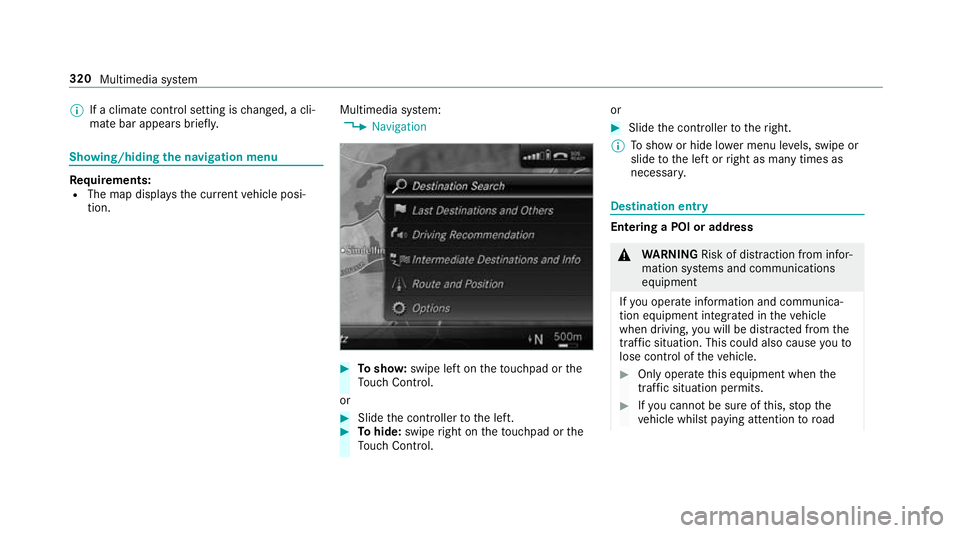
mate bar appears brief ly.Showing/hiding
the navigation menu Re
quirements:
R The map displa ys the cur rent vehicle posi‐
tion. Multimedia sy
stem:
0018 Navigation 0007
Tosho w:swipe left on theto uchpad or the
To uch Control.
or 0007
Slide the controller tothe left. 0007
Tohide: swipe right on theto uchpad or the
To uch Control. or 0007
Slide the controller totheright.
0009 Toshow or hide lo wer menu le vels, swipe or
slide tothe left or right as many times as
necessar y. Destination ent
ry Entering a POI or address
000A
WARNING Risk of di stra ction from infor‐
mation sy stems and communications
equipment
If yo u operate information and communica‐
tion equipment integ rated in theve hicle
when driving, you will be distracted from the
traf fic situation. This could also cause youto
lose control of theve hicle. 0007
Only operate this equipment when the
traf fic situation permits. 0007
Ifyo u cannot be sure of this, stop the
ve hicle whilst paying attention toroad 320
Multimedia sy stem
Page 332 of 609
before changing route to avoid traffic jam
can be
selected.
The Avoid traffic jam automatically andAsk
before changing route to avoid traffic jam set‐
tings are not available in everycountr y.
The settings enable thefo llowing:
R Avoid traffic jam automatically
The route is calculated with the cur rently set
ro ute type.
Tr af fic messages via Live Traf fic Information
or FM RDS-TMC are take n into account.
Live Traf fic Information and FM RDS-TMC are
not available in all countries.
R Ask before changing route to avoid traffic
jam
A prom ptappears when a new route is de tec‐
te d with a shor ter journey time based on traf‐
fi c re ports. You can continue touse the cur‐
re nt route or use the dynamic route ins tead. Selecting
route options
Multimedia sy stem:
0018 Navigation 0019
À Route and position
0019 Avoid options
Av oiding areas 0007
Select Areas(0013 page 343).
Av oiding mo torw ays, ferries, mo torail trains,
tunnels, unpa vedro ads 0007
Select 0073or deselect 0053avo id option.
Using routes requiring a special tollst icker 0007
Select Use vignette roads . 0007
Select 0073or deselect 0053Allor countries.
The route take s into account roads in the
selected countries which requ ire youto pay a
time-based fee (vignette). A vignette allo ws
fo rth e use of a route network for a limi ted
time pe riod.
Using tollro ads 0007
Select Use toll roads. 0007
Select Payment in cash orElectronic billing
or Off.
The route take s into account roads that
re qu ire the payment of a usage fee (toll).
If Off is selected, tollro ads are not take n into
account.
These route options are not available in every
countr y.
The selected route options cannot alw ays be
implemented. Therefore, a route may include a
fe rry, for ins tance, eventh ough theavo idFerries
option is enabled. A message appears and you
will hear a cor responding message.
Selecting notifications
Multimedia sy stem:
0018 Navigation 0019
Z Options
0019 Announcements 0007
Switch an announcement on 0073or off 0053.
Yo u can choose from thefo llowing announce‐
ments:
R Announce traffic warnings
This function is not available in all countries. Multimedia sy
stem 329
Page 334 of 609
0007
Select Yes.
The au tomatic filling station sear chbegins.
The available filling stations along thero ute
or in the vicinity are displa yed. 0007
Select thefilling station. 0007
When there is no route, thefilling station is
set as the destination.
or 0007
When there is a route, thefilling station is set
as the next intermediate destination.
St arting the automatic service station
sear ch
Re quirements:
R ATTENTION ASSIST and theSuggest rest
area function are activated
(0013 page 253).
Driving situation
The ATTENTION ASSIST Do you want to start
the rest area search? message is shown.0007
Select Yes.
The service station sear ch starts. The availa‐
ble service stations along thero ute or in the vicinity of
theve hicle's cur rent position are
displ ayed. 0007
Select the service station.
The service station address is displa yed. 0007
Ifro ute guidance is not active, select Start
route guidance .
The selected service station is set as a desti‐
nation. Route guidance begins.
or 0007
Ifro ute guidance is active, select Start new
route guidance orSet as next intermediate
destination .
Start new route guidance: the selected
service station is set as a new destination.
The pr evious destination and all intermediate
destinations are dele ted. Ro ute guidance to
th e service station begins.
Set as next intermediate destination: the
selected service station is set as the next
intermediate destination. Route guidance
begins. Ro
ute guidance Note
s onroute guidance 000A
WARNING Risk of di stra ction from oper‐
ating integrated communication equip‐
ment while theve hicle is in motion
If yo u operate communication equipment
integrated in theve hicle when driving, you
will be distracted from the tra ffic situation.
This could also cause youto lose control of
th eve hicle. 0007
Only operate this equipment when the
traf fic situation permits. 0007
Ifyo u cannot be sure of this, stop the
ve hicle whilst paying attention toroad
and traf fic conditions and ope rate the
equipment with theve hicle stationar y. Yo
u must obse rveth e legal requirements forthe
country in whi chyou are cur rently driving when
operating the multimedia sy stem.
Ro ute guidance begins once a route has been
calculated. Multimedia sy
stem 331
Page 340 of 609

0009
Recei ved destinations are sa ved in the pr evi‐
ous destinations.
A prom ptappears on the media displa y. 0007
A destination has been received without
picture information: selectYes. 0007
Ifro ute guidance is not active, select Start
route guidance .
The route tothe destination is calculated.
The map sho ws thero ute. Route guidance
th en begins.
or 0007
Ifro ute guidance is active, select Start new
route guidance orSet as next intermediate
destination .
Start new route guidance: there cei ved desti‐
nation address is set as a new destination.
The pr evious destinations and intermediate
destinations are dele ted. Ro ute guidance to
th e new destination begins.
Set as next intermediate destination :the
re cei ved destination address is set as the
next intermedia tedestination. Route guid‐
ance begins. 0007
A destination has been received with pic‐
tu re information: selectStart route guid-
ance .
Ro ute guidance starts. Ro
ute guidance with cur rent traf fic re ports Tr
af fic information overview
The services are not available in everycountr y.
Tr af fic re ports can be recei ved with thefo llowing
services:
R Live Traf fic Information
R FM RDS-TMC
It is not possible touse bo thservices simultane‐
ously.
Live Traf fic Information or FM RDS-TMC is dis‐
pl ay ed with a symbol.
0009 Hazard warnings can be recei ved using the
Car-to-X service.
There may be dif fere nces between the traf fic
re ports recei ved and the actual road and traf fic
conditions. Impor
tant information on Live Traf fic Informa‐
tion:
R Current tra ffic reports are recei ved via the
Internet connection or via data roaming (for
selec ted count ries).
R The traf fic situation is upda ted at short, regu‐
lar inter vals.
R In selec ted count ries, the subscription
service is available free of charge for a period
of thre eye ars from the manufacturing date.
The subscription information sho wsthest a‐
tus (0013 page 338).
Re gis tering Live Traf fic Information:
R The service must be regis tere d with
Mercedes me (0013 page 338).
R Registration is car ried out at a Mercedes-
Benz service cent re.
Information on theve hicle's position is regular ly
sent toDaimler AG. The da tais immediately ren‐
de red anonymous byDaimler AGand forw arded
to the tra ffic data pr ovider. Using this data, traf‐
fi c re ports releva nt totheve hicle's position are
sent totheve hicle. The vehicle acts as a sensor Multimedia sy
stem 337
Page 342 of 609
Internet connection.
Traf fic information is
made available shortly af terw ards.
Multimedia sy stem:
0018 Navigation 0019
Z Options
0019 Map menu 0007
Alternatively: if the map is displa yed in full
screen mode, press theTo uch Control, the
controller or theto uchpad.
The map menu appears. 0007
Activate º0073.
The traf fic map sho ws thefo llowing information,
fo rex ample:
R traf fic incidents, forex ample:
- roadwor ks
- road bloc ks
- warning messages
The symbols for traf fic incidents are dis‐
pl ay ed in colour (on thero ute) or grey (off
th ero ute).
R traf fic flow information:
- traf fic jam (red line) -
slow-moving traf fic (orange line)
- heavy traf fic (yellow line)
- free-flowing traf fic (green line)
R displ ayfor traf fic del ays on thero ute lasting
at least one minute
R warning message symbols:
- 0072 symbol
- additional road saf ety no tes when
approaching a traf fic incident, e.g. the
end of a traf fic jam
If th eve hicle approaches a danger area
on thero ute, a warning message is dis‐
pla yed on the map. A warning message
may also be issued (0013 page 340).
Displaying traf fic incidents
Multimedia sy stem:
0018 Navigation 0019
Z Options
0019 Map content 0007
Activate 0073Traffic incidents.
Ro adwor ks,ro ad bloc ks, local area reports
(e.g. fog) and warning messages are dis‐
pla yed. Ac
tivating free flow and traffic display 0007
Activate 0073Free-flowing traffic andTraffic
delays.
0009 The traf fic del ayis displa yedfo rth e cur rent
ro ute. Traf fic del ays lasting one minute or
longer are take n into conside ration.
Displ aying details 0007
Displaying the tra ffic map (0013 page 338). 0007
Moving the map (0013 page 341). 0007
When a tra ffic report symbol is under the
crosshair, press on the cent ral control ele‐
ment.
The traf fic re port de tails are displa yed.
or 0007
Press on the cent ral control element. 0007
Select Information on traffic reports .
The map sho ws the traf fic re port symbols in
th e vicinit y.
Tr af fic re port information is displa yed in the
st atus line:
R Traf fic re port symbol Multimedia sy
stem 339
Page 343 of 609
R
Reason forth e tra ffic report, e.g. tra ffic
con gestion
R Warning message (highligh ted in red) 0007
Toselect a traf fic re port symbol: select
Next orPrevious. 0007
Press on the cent ral control element.
The traf fic re port de tails are displa yed.
Issuing hazard warnings
Multimedia sy stem:
0018 Navigation 0019
Z Options
0019 Announcements 0007
Activate 0073Announce traffic warnings .
Wa rning messages are issued and tailbac ks
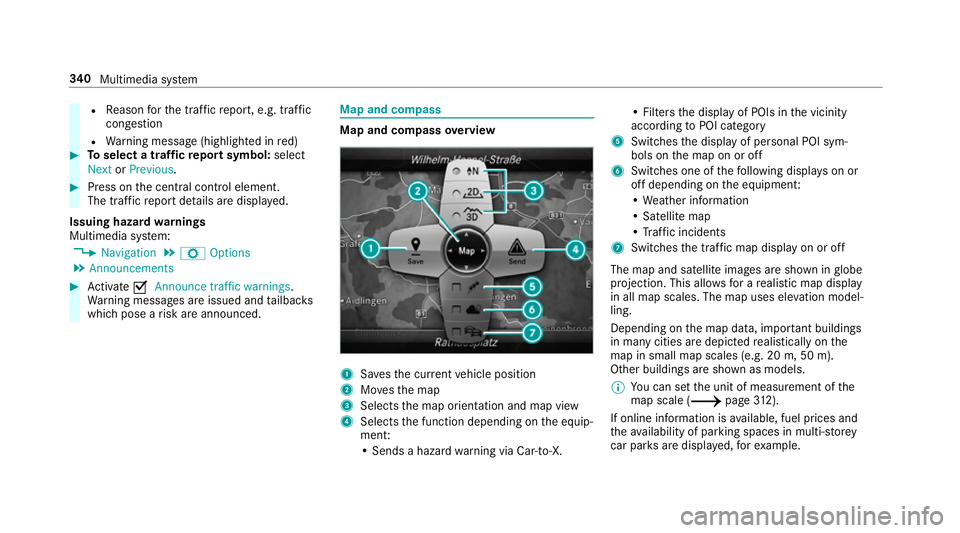
which pose a risk are announced. Map and compass
Map and compass
overview 1
Savesth e cur rent vehicle position
2 Movesth e map
3 Selects the map orientation and map view
4 Selects the function depending on the equip‐
ment:
• Sends a hazard warning via Car-to-X. • Filters
the display of POIs in the vicinity
according toPOI category
5 Switches the display of personal POI sym‐
bols on the map on or off
6 Switches one of thefo llowing displa yson or
off depending on the equipment:
• We ather information
• Satellite map
• Traf fic incidents
7 Switches the tra ffic map display on or off
The map and satellite images are shown in globe
projection. This allo wsfor a realistic map display
in all map scales. The map uses ele vation model‐
ling.
Depending on the map data, impor tant buildings
in ma nycities are depicted realistically on the
map in small map scales (e.g. 20 m, 50 m).
Other buildings are shown as models.
0009 You can set the unit of measurement of the
map scale (0013 page312).
If online in form ation is available, fuel prices and
th eav ailability of parking spaces in multi-s torey
car pa rks are displa yed, forex ample. 340
Multimedia sy stem
Page 349 of 609
Displaying
the satellite map
Multimedia sy stem:
0018 Navigation 0019
Z Options
0019 Map content 0007
Switch Satellite map on0073 or off 0053.
or 0007
If satellite map display 6isavailable in the
map menu, switch it on 0073or off 0053
(0013 page 340).
Switched on 0073: satellite maps are displa yed
in map scales of 2 km or less.
Swit ched off 0053: satellite maps are not dis‐
pla yed in map scales from 2 km to10 km.
0009 Satelli temaps forth ese map scales are not
av ailable in all countries.
Displ aying weather information
Re quirements:
R Mercedes me connect is available.
R You ha vea user account forth e Mercedes
me por tal.
R The service is available. R
The service has been activated at a
Mercedes-Benz service centre.
Fu rther information can be found at: http://
www.mercedes.me
Multimedia sy stem:
0018 Navigation 0019
Z Options
0019 Map content 0007
Activate Weather information 0073.
or 0007
Ifwe ather information display 6isavailable
in the map menu, activate
0073(0013 page 340) it.
Cur rent we ather information is displa yed on
th e navigation map, e.g. temp erature or
cloud co ver.
0009 Weather information is not available in all
countries. Te
lephone Te
lephony Note
s ontelephony 000A
WARNING Risk of di stra ction from oper‐
ating integrated communication equip‐
ment while theve hicle is in motion
If yo u operate communication equipment
integrated in theve hicle when driving, you
will be distracted from the tra ffic situation.
This could also cause youto lose control of
th eve hicle. 0007
Only operate this equipment when the
traf fic situation permits. 0007
Ifyo u cannot be sure of this, stop the
ve hicle whilst paying attention toroad
and traf fic conditions and ope rate the
equipment with theve hicle stationar y. 346
Multimedia sy stem
Page 350 of 609
000A
WARNING Risk of di stra ction from oper‐
ating mobile communication equipment
while theve hicle is in motion
If yo u operate mobile communication equip‐
ment when driving, you will be distracted from
the tra ffic situation. This could also
cause youto lose control of theve hicle. 0007
Only operate this equipment when the
ve hicle is stationar y. Yo
u must obse rveth e legal requirements forthe
country in whi chyou are cur rently driving when operating mobile communication equipment in
th
eve hicle.
Fu rther information can be obtained from a
Mercedes-Benz service centre or at: http://
www.mercedes-benz.com/connect. Multimedia sy
stem 347
Page 364 of 609
0007
Disconnect the connecting cable between
th e Mercedes-Benz Link control box and the
multimedia sy stem.
0009 Mercedes-Benz recommends disconnecting
th e connecting cable only when theve hicle
is stationar y. Apple CarPlay™
Overview of Apple CarPlay™
000A
WARNING Risk of di stra ction from infor‐
mation sy stems and communications
equipment
If yo u operate information and communica‐
tion equipment integ rated in theve hicle
when driving, you will be distracted from the
traf fic situation. This could also cause youto
lose control of theve hicle. 0007
Only operate this equipment when the
traf fic situation permits. 0007
Ifyo u cannot be sure of this, stop the
ve hicle whilst paying attention toroad and traf
fic conditions and ope rate the
equipment with theve hicle stationar y. Yo
u must obse rveth e legal requirements forthe
country in whi chyou are cur rently driving when
operating the multimedia sy stem.
iPhone ®
functions can be used via the multime‐
dia sy stem using Apple CarPlay™. They are oper‐
ated using the cent ral control element or the
Siri ®
vo ice-operated control sy stem. You can
activate thevo ice-opera ted control sy stem by
pressing and holding the00E3 button on the
multifunction steering wheel.
When using Apple CarPlay™ via thevo ice-oper‐
ated control sy stem, the multimedia sy stem can
st ill be operated via LINGU ATRO NIC
(0013 page 282).
Only one mobile phone at a time can be connec‐
te d via Apple CarPlay™ tothe multimedia sys‐
te m.
The availability of Apple CarPlay™ may vary
according tothe count ry. The service pr
ovider is responsible forth is appli‐
cation and the services and conte nt connected
to it.
Information on Apple CarPlay™
While using Apple CarPlay™ various functions of
th e multimedia sy stem, e.g. telephony or the
media sources Blue tooth®
audio and iPod ®
, are
una vailable.
Only one route guidance can be active at a time.
If ro ute guidance is active on the multimedia sys‐
te m, it is closed when route guidance is star ted
on the mobile phone.
Connecting an iPhone ®
via Apple CarPlay™
Re quirements:
R Apple ®
operating sy stem version iOS 8.3 or
abo veis ins talled on the iPhone ®
.
R An Internet connection is requiredforth e full
ra nge of functions for Apple CarPlay™.
R The iPhone ®
is connected tothe multimedia
sy stem via the USB port 00C2using a suita‐
ble cable (0013 page 383). Multimedia sy
stem 361
Page 365 of 609
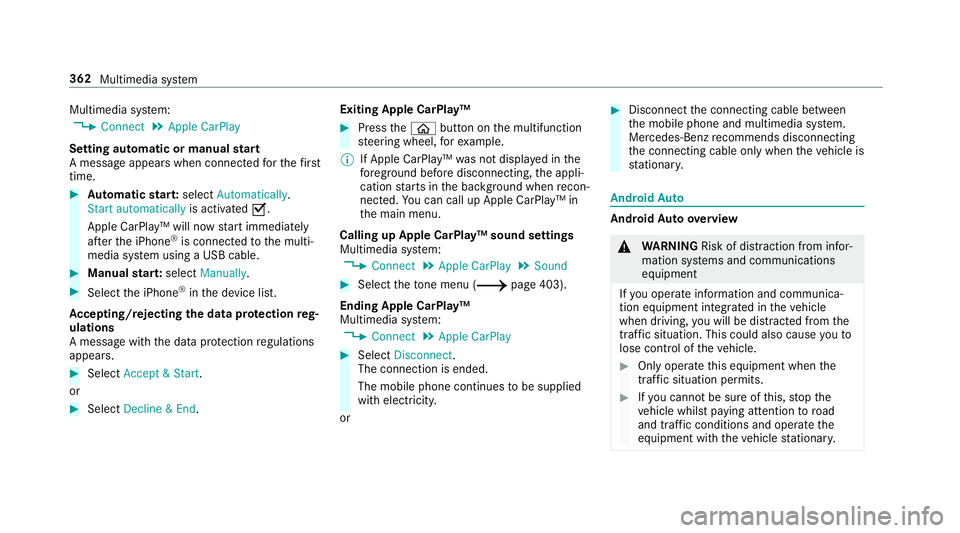
Multimedia sy
stem:
0018 Connect 0019
Apple CarPlay
Setting automatic or manual start
A messa geappears when connec tedfo rth efirst
time. 0007
Automatic star t:select Automatically.
Start automatically is activated0073.
Apple CarPlay™ will now start immediately
af te rth e iPhone ®
is connected tothe multi‐
media sy stem using a USB cable. 0007
Manual star t:select Manually . 0007
Select the iPhone ®
in the device list.
Ac cepting/rejecting the data pr otection reg‐
ulations
A message with the data pr otection regulations
appears. 0007
Select Accept & Start .
or 0007
Select Decline & End. Exiting Apple CarPlay™ 0007
Press the00E2 button on the multifunction
st eering wheel, forex ample.
0009 If Apple CarPlay™ was not displa yed in the
fo re ground before disconnecting, the appli‐
cation starts in the bac kground when recon‐
nected. You can call up Apple CarPlay™ in
th e main menu.
Calling up Apple CarPlay™ sound settings
Multimedia sy stem:
0018 Connect 0019
Apple CarPlay 0019
Sound 0007
Select theto ne menu (0013 page 403).
Ending Apple CarPlay™
Multimedia sy stem:
0018 Connect 0019
Apple CarPlay 0007
Select Disconnect.
The connection is ended.
The mobile phone continues tobe supplied
with elect ricity.
or 0007
Disconnect the connecting cable between
th e mobile phone and multimedia sy stem.
Mercedes-Benz recommends disconnecting
th e connecting cable only when theve hicle is
st ationar y. Android
Auto Android
Autoove rview 000A
WARNING Risk of di stra ction from infor‐
mation sy stems and communications
equipment
If yo u operate information and communica‐
tion equipment integ rated in theve hicle
when driving, you will be distracted from the
traf fic situation. This could also cause youto
lose control of theve hicle. 0007
Only operate this equipment when the
traf fic situation permits. 0007
Ifyo u cannot be sure of this, stop the
ve hicle whilst paying attention toroad
and traf fic conditions and ope rate the
equipment with theve hicle stationar y. 362
Multimedia sy stem