Iat MERCEDES-BENZ C-Class SEDAN 2016 W205 Repair Manual
[x] Cancel search | Manufacturer: MERCEDES-BENZ, Model Year: 2016, Model line: C-Class SEDAN, Model: MERCEDES-BENZ C-Class SEDAN 2016 W205Pages: 398, PDF Size: 9.57 MB
Page 225 of 398
Always pay particular attention to the traffic
situation and keep within the lane, especially
if Active Lane Keeping Assist alerts you. Ter-
minate the intervention in a non-critical driv-
ing situation.
The system may be impaired or may not function
if:
Rthere is poor visibility, e.g. due to insufficient
illumination of the road, or due to snow, rain,
fog or spray
Rthere is glare, e.g. from oncoming traffic, the
sun or reflections (e.g. when the road surface is wet)
Rthe windshield is dirty, fogged up, damaged or
covered, for instance by a sticker, in the vicin-
ity of the camera
Rthe radar sensors in the front or rear bumpers
or the radiator trim are dirty, e.g. obscured by
snow
Rthere are no, several or unclear lane markings
for a lane, e.g. in areas with road construction
work
Rthe lane markings are worn away, dark or cov-
ered up, e.g. by dirt or snow
Rthe distance to the vehicle in front is too small
and the lane markings thus cannot be detec-
ted
Rthe lane markings change quickly, e.g. lanes
branch off, cross one another or merge
Rthe road is narrow and winding
Rthere are strong shadows cast on the road
If no vehicle is detected in the adjacent lane and
broke
n lane markings are detected, no lane-cor-
recting brake application is made.
Warning vibration in the steering wheel
A warning may be given if a front wheel passes
over a lane marking. It will warn you by means of
intermittent vibration in the steering wheel for
up to 1.5 seconds.
Lane -correcting brake application
If you leave your lane, under certain circumstan-
ces the vehicle will brake briefly on one side.
This is meant to assist you in bringing the vehicle
back to the original lane.
GWARNING
A lane-correcting brake application cannot
always bring the vehicle back into the original lane. There is a risk of an accident.
Always steer, brake or accelerate yourself,
especially if Active Lane Keeping Assist warns
you or makes a lane-correcting brake appli-
cation.
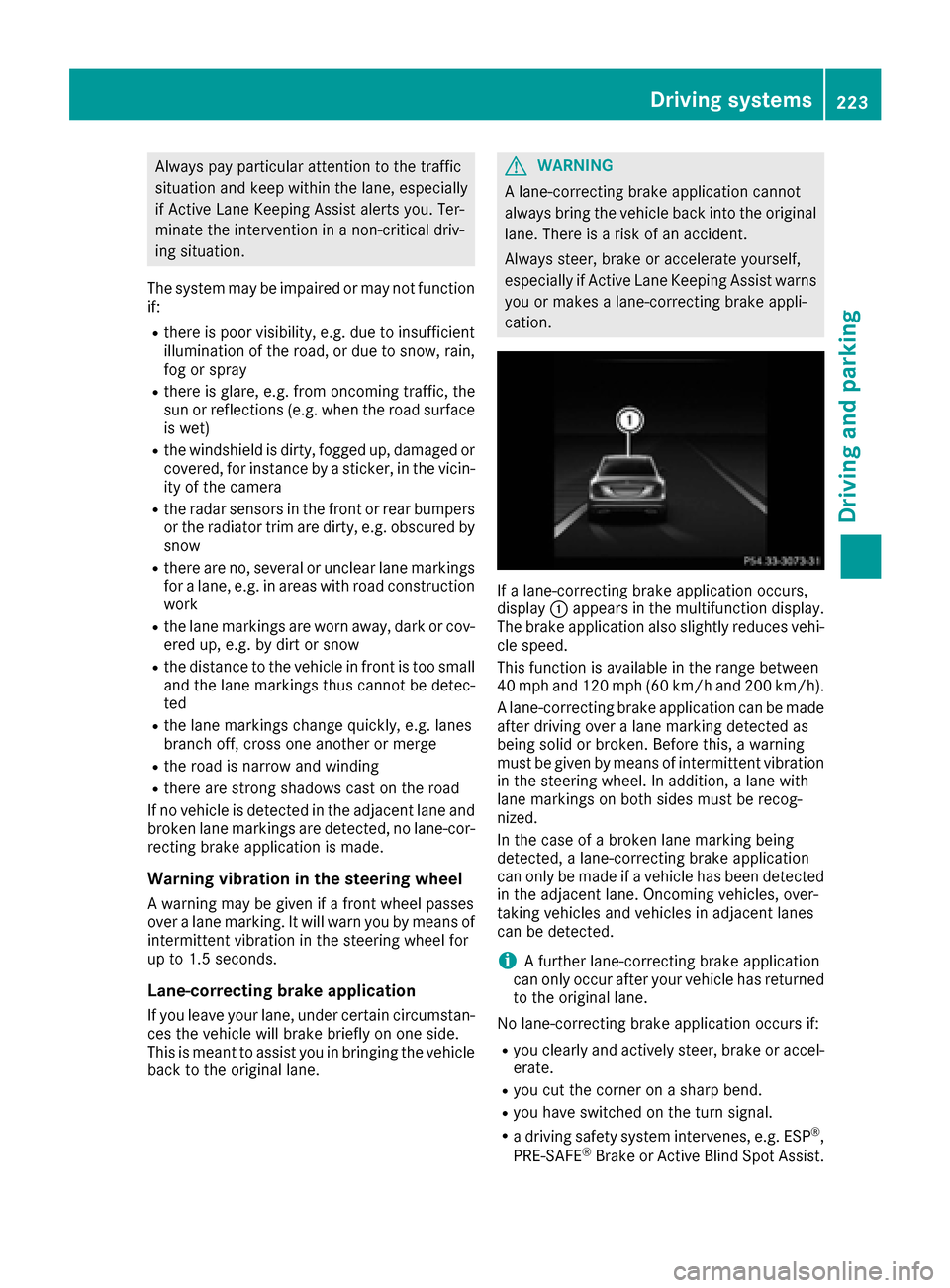
If a lane-correcting brake application occurs,
display :appears in the multifunction display.
The brake application also slightly reduces vehi-
cle speed.
This function is available in the range between
40 mph and 120 mph (60 km/h and 200 km/h).
A lane-correcting brake application can be made after driving over a lane marking detected as
being solid or broken. Before this, a warning
must be given by means of intermittent vibration
in the steering wheel. In addition, a lane with
lane markings on both sides must be recog-
nized.
In the case of a broken lane marking being
detected, a lane-correcting brake application
can only be made if a vehicle has been detected
in the adjacent lane. Oncoming vehicles, over-
taking vehicles and vehicles in adjacent lanes
can be detected.
iA further lane-correcting brake application
can only occur after your vehicle has returned
to the original lane.
No lane-correcting brake application occurs if:
Ryou clearly and actively steer, brake or accel- erate.
Ryou cut the corner on a sharp bend.
Ryou have switched on the turn signal.
Ra driving safety system intervenes, e.g. ESP®,
PRE-SAFE®Brake or Active Blind Spot Assist.
Driving systems223
Driving and parking
Z
Page 226 of 398
Ryou haveadopte d asport ydrivin gstyle wit h
high cornering speeds or high rates of accel-
eration .
RESP®is switched off .
Rthetransmission is no tin position D.
Raloss of tire pressur eor adefective tire has
been detecte dand displayed.
Ran obstacle in th elan ein whic hyou are drivin g
has been detected.
Active Lan eKeepin gAssis tmay no tdetec tother
roa duser sor traffic situations. An inappropriat e
brak eapplication may be interrupted at any time
if you:
Rsteer slightly in th eopposit edirection
Rswitch on th etur nsignal
Rclearly brak eor accelerate
A lane-correcting brak eapplication is interrup-
te dautomatically if:
Radrivin gsafet ysystem intervenes, e.g. ES P®,
PRE-SAF E®Brake or Active Blind Spot Assist.
Rlanemarking scan no longer be recognized.
Activating/deactivating Active Lan e
Keeping Assis t
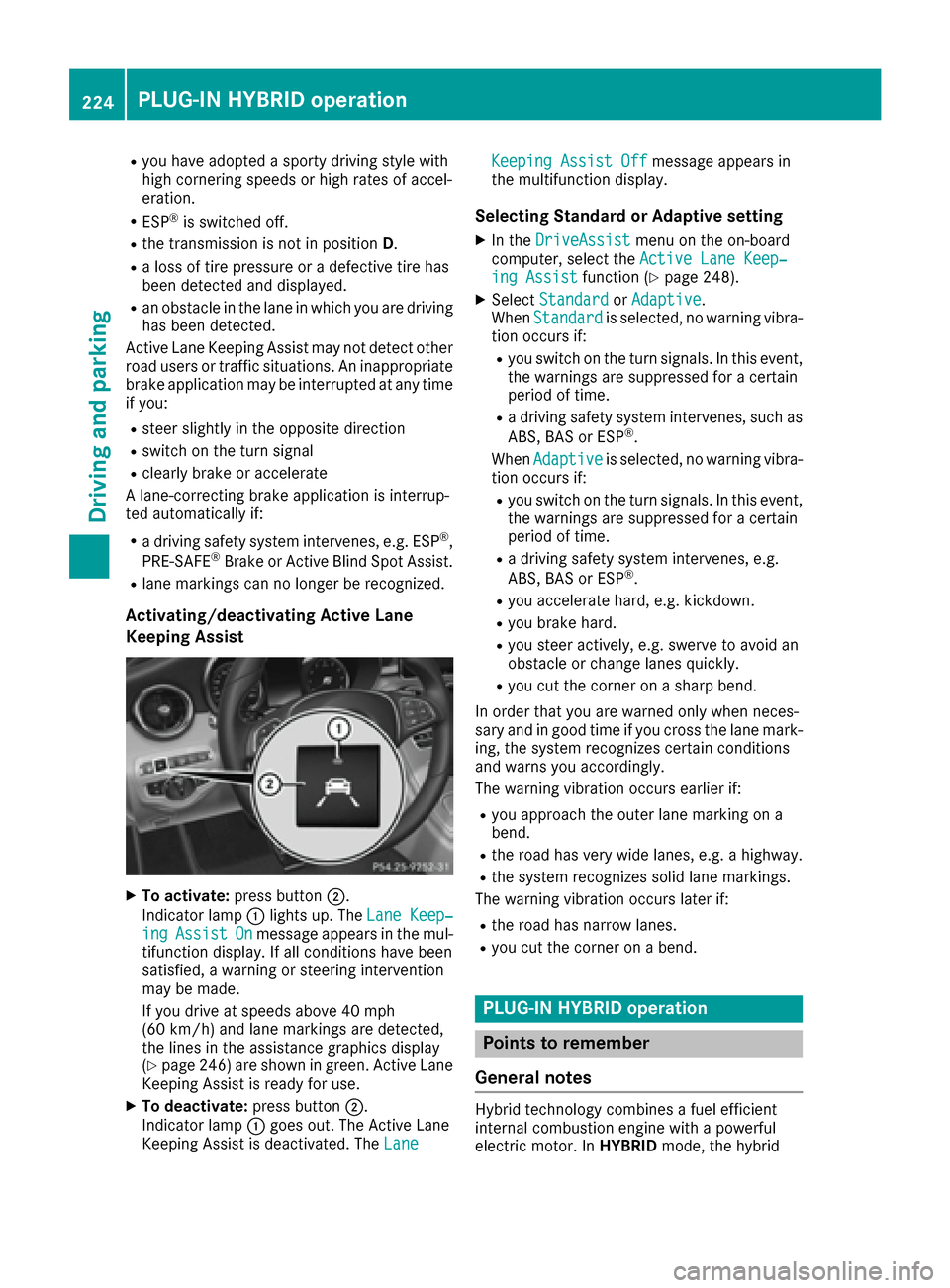
XTo activate:press button;.
Indicato rlamp :lights up. The LaneKeep‐
ingAssistOnmessage appears in th emul-
tifunction display. If all condition shav ebeen
satisfied, awarnin gor steerin gintervention
may be made .
If you drive at speeds abov e40 mph
(60 km/h) and lan emarking sare detected,
th elines in th eassistanc egraphic sdisplay
(
Ypage 246) are shown in green .Active Lan e
Keepin gAssis tis read yfor use.
XTo deactivate: press button;.
Indicato rlamp :goe sout .The Active Lan e
Keepin gAssis tis deactivated. The Lane
Keepin gAssist Offmessage appears in
th emultifunction display.
Selecting Standar dor Adaptive setting
XIn th eDriveAssistmen uon th eon-boar d
computer, select th eActive Lan eKeep‐
ing Assistfunction (Ypage 248).
XSelectStandardor Adaptive.
Whe nStandardis selected, no warnin gvibra-
tion occur sif:
Ryou switch on th etur nsignals. In this event ,
th ewarnings are suppressed for acertain
period of time.
Ra drivin gsafet ysystem intervenes, suc has
ABS, BA Sor ES P®.
Whe nAdaptive
is selected, no warnin gvibra-
tion occur sif:
Ryou switch on th etur nsignals. In this event ,
th ewarnings are suppressed for acertain
period of time.
Ra drivin gsafet ysystem intervenes, e.g.
ABS, BA Sor ES P®.
Ryou accelerate hard, e.g. kickdown .
Ryou brakehard.
Ryou steer actively, e.g. swerve to avoid an
obstacle or chang elanes quickly.
Ryou cut th ecorner on ashar pbend.
In order that you are warned only when neces-
sar yand in goo dtime if you cross th elan emark-
ing, th esystem recognizes certain condition s
and warn syou accordingly.
The warnin gvibration occur searlier if:
Ryou approac hth eouter lan emarking on a
bend.
Rth eroa dhas ver ywide lanes, e.g. ahighway.
Rth esystem recognizes soli dlan emarkings.
The warnin gvibration occur slater if:
Rth eroa dhas narrow lanes.
Ryou cut th ecorner on abend.
PLUG ‑IN HYBRID operation
Points to remember
Genera l notes
Hybrid technology combine s afuel efficien t
internal combustion engin ewit h a powerful
electric motor. In HYBRIDmode, thehybrid
224PLUG‑ IN HYBRID operation
Driving and parking
Page 227 of 398
drive system automatically selects the most effi-
cient operating mode for every driving situation.Drive the vehicle in the usual manner.
To save fuel in HYBRIDmode, the hybrid drive
system switches off the combustion engine as
often as possible during the journey when power
output requirements are low. When power out-
put requirements are low, the electric motor
powers the vehicle. When power output require-
ments are high, the combustion engine is auto-
matically switched on. The engine is usually
switched off when the vehicle is stationary. Con-
sequently, there is usually no engine idling as
with combustion engine vehicles.
For pulling away and accelerating, the electric
motor supports the internal combustion engine
using the power stored in the high-voltage bat-
tery. In addition, the power is used for partially
electric driving, operation of the electric coolant compressor and to support the 12 V on-board
electrical system. In this way the hybrid drive
system helps to reduce your vehicle's fuel con-
sumption.
Observe the driving tips on plug-in hybrid oper-
ation (
Ypage 230).
Recuperative Brake System
If you release the accelerator pedal when the
vehicle is in motion, overrun recuperation is ini-
tiated. The electric motor is operated as a gen-
erator when in overrun mode and when you
brake. Hybrid technology converts the kinetic
energy of the vehicle into electricity and stores
it in the high-voltage battery.
Observe the important safety notes for the
Recuperative Brake System (
Ypage 45).
Important safety notes
If the engine is switched off by the ECO start/
stop function and you open the driver's door:
Ra message appears in the multifunction dis-
play and
Ra warning tone sounds
Further information (
Ypage 272).
All of the vehicle's systems remain active, if:
Rthe vehicle is stationary
Rthe combustion engine is switched off and
Rthe READY indicator in the instrument cluster
lights up If you remove your foot from the brake pedal
while in transmission position D or R, the vehicle
may pull away automatically.
Observe the notes on the READY display of the
ECO start/stop function (
Ypage 231).
Vehicles with an electric motor generate much
less driving noise than vehicles with internal
combustion engines. As a result, your vehicle
may not be heard by other road users in certain
situations. This is the case, for example, when
you are parking and your vehicle is not seen by
other road users.
This requires you to adopt a particularly antici-
patory driving style, as it is necessary to allow
for the possibility that other road users may
behave erratically.
Displays and operation
Electric motor performance display
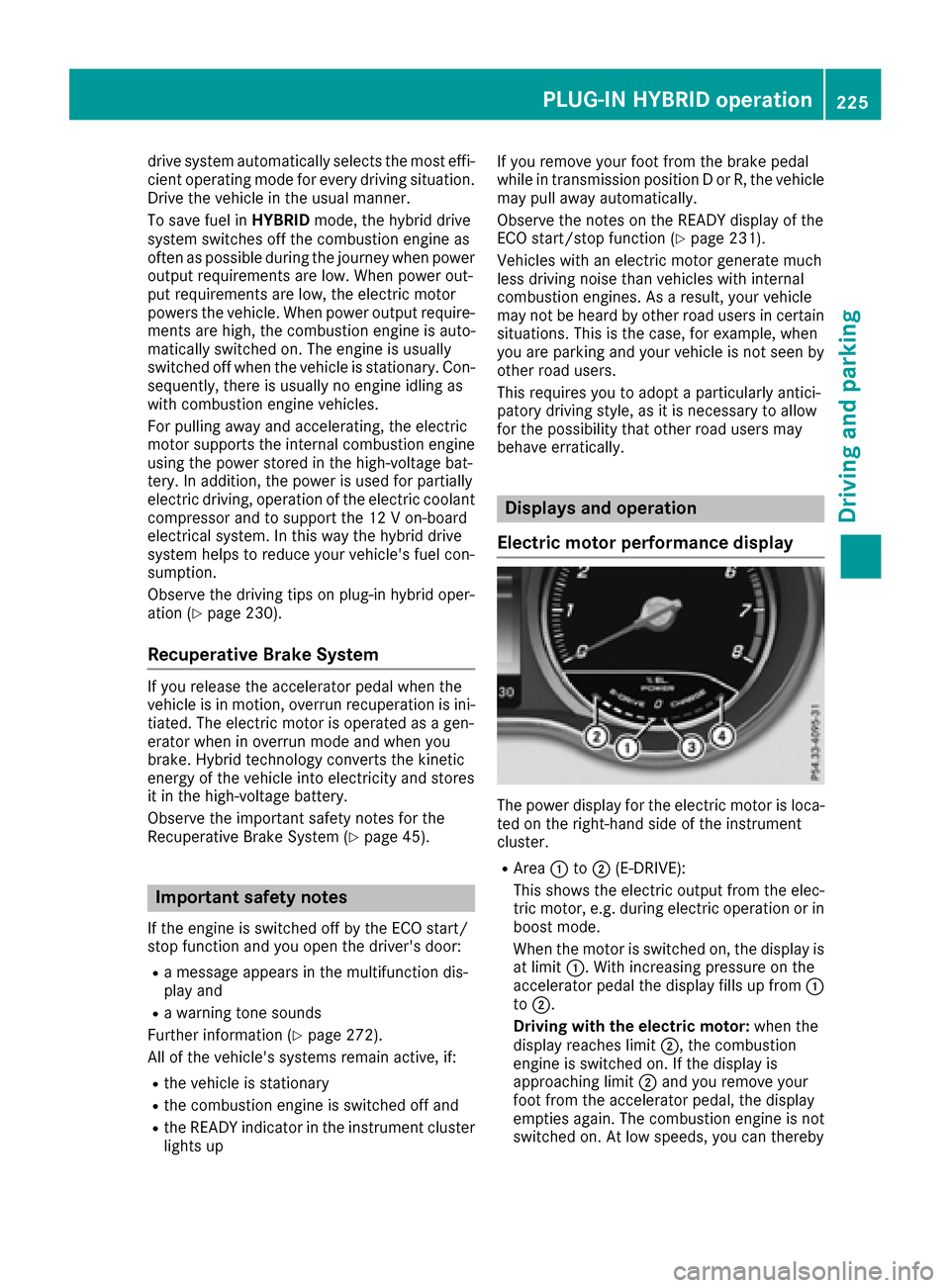
The power display for the electric motor is loca-
ted on the right-hand side of the instrument
cluster.
RArea :to; (E-DRIVE):
This shows the electric output from the elec-
tric motor, e.g. during electric operation or in
boost mode.
When the motor is switched on, the display is
at limit :. With increasing pressure on the
accelerator pedal the display fills up from :
to ;.
Driving with the electric motor: when the
display reaches limit ;, the combustion
engine is switched on. If the display is
approaching limit ;and you remove your
foot from the accelerator pedal, the display
empties again. The combustion engine is not
switched on. At low speeds, you can thereby
PLUG‑IN HYBRID operation225
Driving and parking
Z
Page 245 of 398
Other status indicators of the naviga-
tion system
:Additional information
Other possible additional information:
RNew Route...or Calculating Route...
A new route is calculated.
RRoad Not Mapped
The vehicle position is inside the area of the
digital map but the road is not recognized, e.g.
newly built streets, car parks or private land.
RNo Route
No route could be calculated to the selected
destination.
RO
You have reached the destination or an inter-
mediate destination.
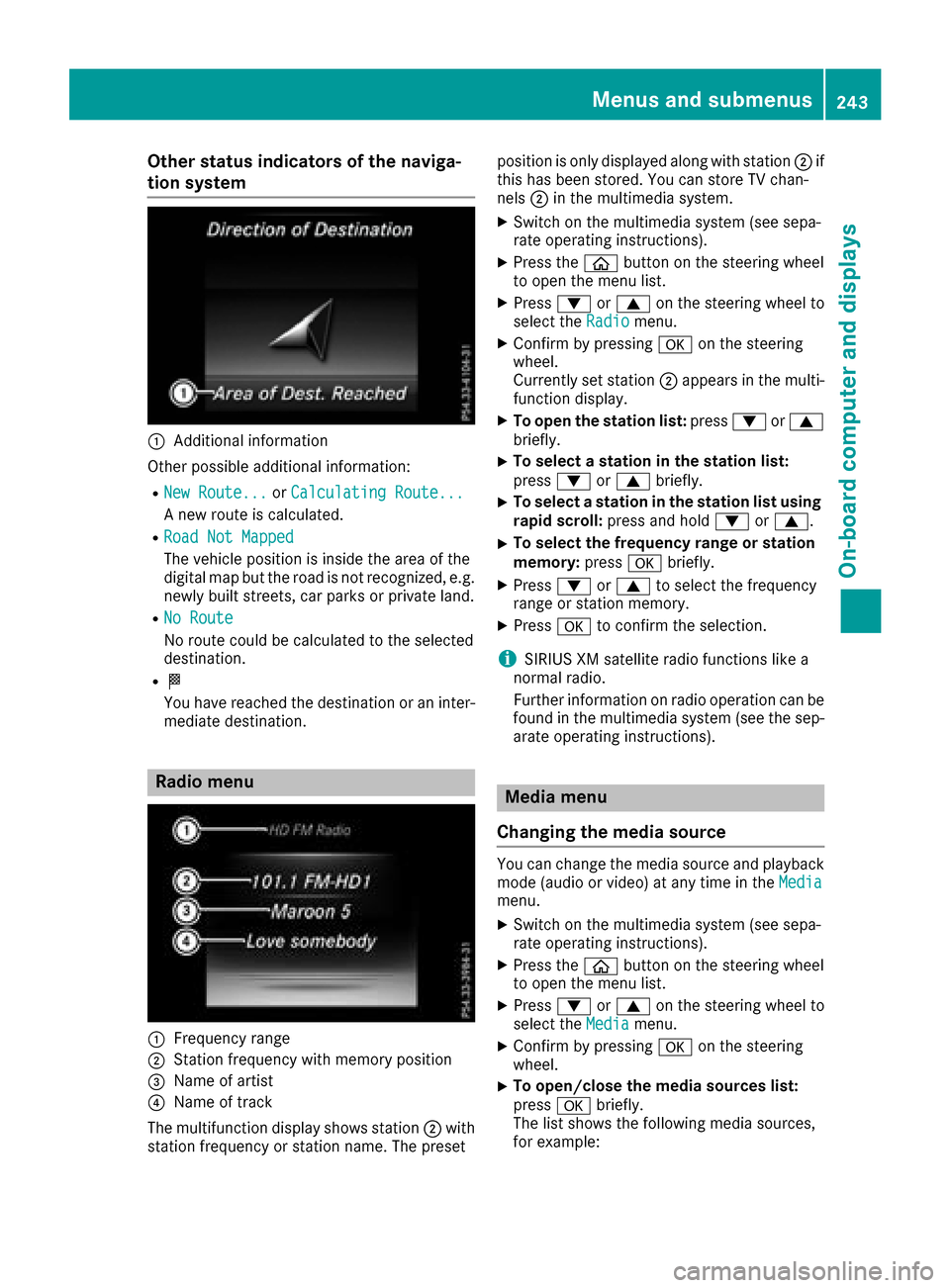
Radio menu
:Frequency range
;Station frequency with memory position
=Name of artist
?Name of track
The multifunction display shows station ;with
station frequency or station name. The preset position is only displayed along with station
;if
this has been stored. You can store TV chan-
nels ;in the multimedia system.
XSwitch on the multimedia system (see sepa-
rate operating instructions).
XPress the òbutton on the steering wheel
to open the menu list.
XPress :or9 on the steering wheel to
select the Radiomenu.
XConfirm by pressing aon the steering
wheel.
Currently set station ;appears in the multi-
function display.
XTo open the station list: press:or9
briefly.
XTo select a station in the station list:
press :or9 briefly.
XTo select a station in the station list using
rapid scroll: press and hold :or9.
XTo select the frequency range or station
memory: pressabriefly.
XPress :or9 to select the frequency
range or station memory.
XPress ato confirm the selection.
iSIRIUS XM satellite radio functions like a
normal radio.
Further information on radio operation can be
found in the multimedia system (see the sep-
arate operating instructions).
Media menu
Changing the media source
You can change the media source and playback
mode (audio or video) at any time in the Media
menu.
XSwitch on the multimedia system (see sepa-
rate operating instructions).
XPress theòbutton on the steering wheel
to open the menu list.
XPress :or9 on the steering wheel to
select the Mediamenu.
XConfirm by pressing aon the steering
wheel.
XTo open/close the media sources list:
press abriefly.
The list shows the following media sources,
for example:
Menus and submenus243
On-board computer and displays
Z
Page 251 of 398
XUse: or9 to select the Hybridsub-
menu.
XPress ato confirm.
XPress :or9 to select the Max.Charge Currentfunction.
You will see the selected setting.
XPress the abutton to save the setting.
Before charging the high-voltage battery, check
the maximum permissible charge current for the
relevant power socket.
The maximum charge current values in the on-
board computer may deviate from the charging
cable values.
Further information on charging the high-volt-
age battery (PLUG-IN HYBRID vehicles)
(
Ypage 169).
Setting the departure time
Using the "Setting departure time" function you
can:
Rclimatize the vehicle interior before depar-
ture. Further information on pre-entry climate control (
Ypage 142).
Rcharge the high-voltage battery at minimum
cost before departure at an intelligent charg-
ing station.
The vehicle will calculate an optimal loading
plan. The charging process starts when the elec-
tricity is at the best price possible. As a result,
the high-voltage battery is charged with elec-
tricity at a favorable rate.
Please note that the high-voltage battery may
not be fully charged by the time of departure.
Depending on the condition of charge of the
high-voltage battery and the selected departure
time, the necessary charge time may not be suf-
ficient.
If you would like to charge the high-voltage bat-
tery for a short period of time, please use the
setting "set no departure time and charge imme-
diately".
The charging process will start immediately
when you charge the high-voltage battery at a
normal charging station and have already selec-
ted the departure time.
XPress the òbutton on the steering wheel
to open the menu list.
XPress :or9 on the steering wheel to
select the Settingsmenu.
XConfirm by pressing aon the steering
wheel.
XPress :or9 to select the Hybridsubmenu.
XPressato confirm.
XPress :or9 to select the DepartureTimefunction.
You will see the selected setting.
XPress the abutton to save the setting.
XTo set no departure time and charge
immediately: press the:or9 to
select No Pre-selection
.
XPressato confirm.
or
XTo set a departure time: press:or9
A
, Bor Cto select the desired preset.
XPress the abutton to confirm the selec-
tion.
XPress :or9 to set the hours.
XPress ato confirm.
XPress :or9 to set the minutes.
XPress ato confirm.
If the selector lever is shifted to position Pand
the charging cable connector is plugged in,
the multifunction display will show the com-
plete charging prediction after a few
moments.
Further information on charging the high-volt-
age battery (PLUG-IN HYBRID vehicles)
(
Ypage 169).
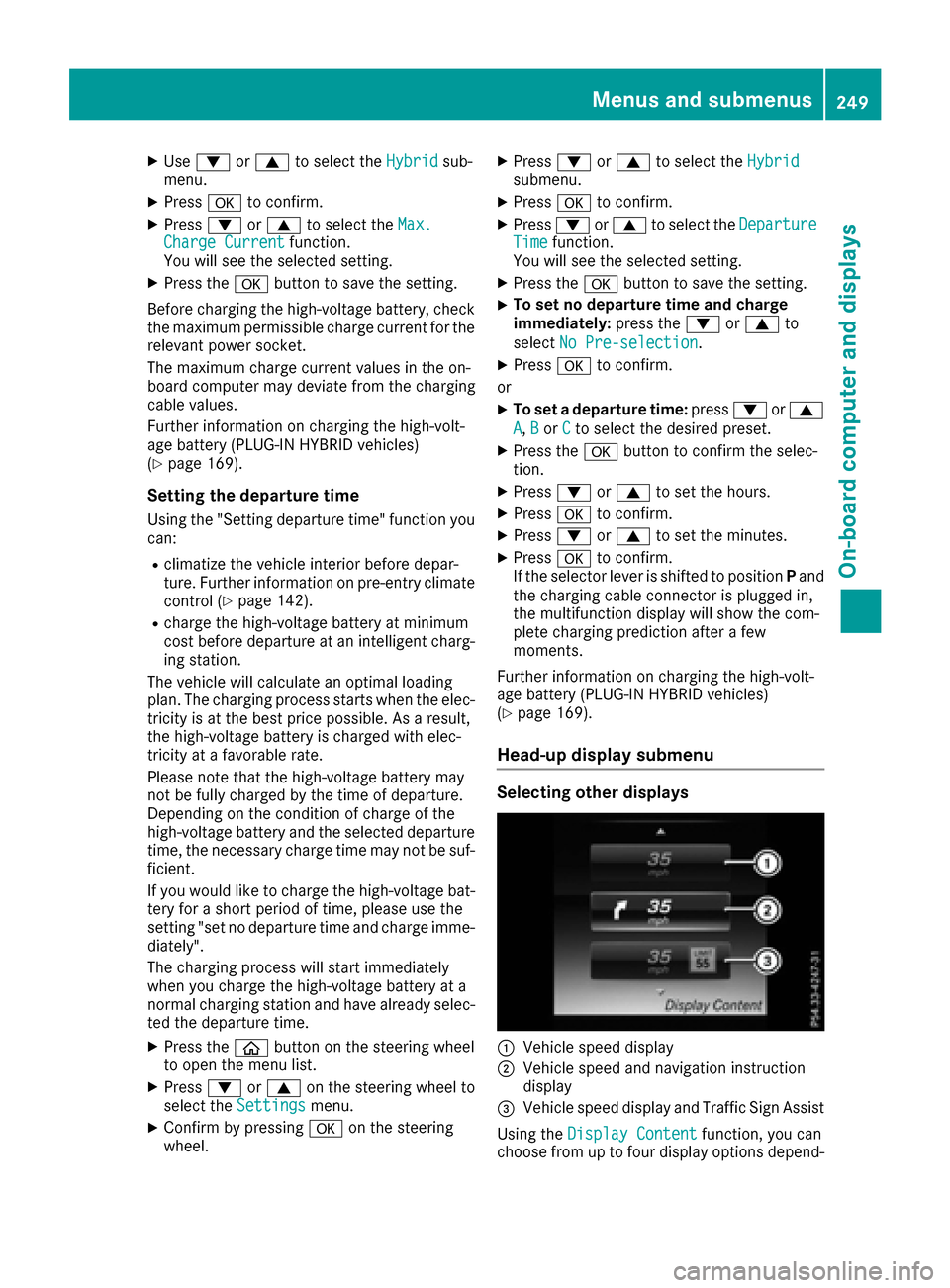
Head-up display submenu
Selecting other displays
:Vehicle speed display
;Vehicle speed and navigation instruction
display
=Vehicle speed display and Traffic Sign Assist
Using the Display Content
function, you can
choose from up to four display options depend-
Menus and submenus249
On-board computer and displays
Z
Page 258 of 398
Safety systems
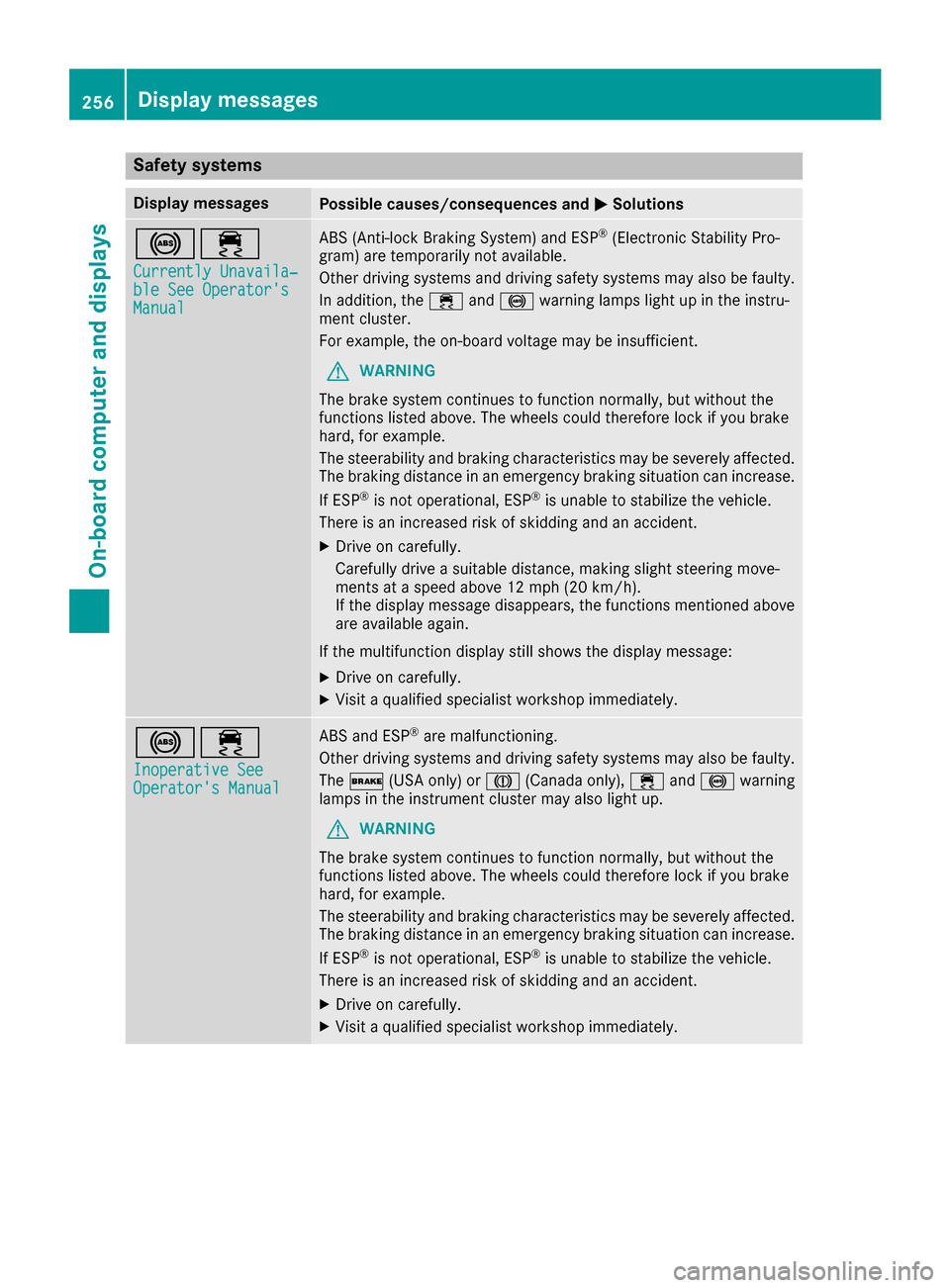
Display messagesPossible causes/consequences andMSolutions
!÷
Currently Unavaila‐ble See Operator'sManual
ABS (Anti-lock Braking System) and ESP®(Electronic Stability Pro-
gram) are temporarily not available.
Other driving systems and driving safety systems may also be faulty.
In addition, the ÷and! warning lamps light up in the instru-
ment cluster.
For example, the on-board voltage may be insufficient.
GWARNING
The brake system continues to function normally, but without the
functions listed above. The wheels could therefore lock if you brake
hard, for example.
The steerability and braking characteristics may be severely affected.
The braking distance in an emergency braking situation can increase.
If ESP
®is not operational, ESP®is unable to stabilize the vehicle.
There is an increased risk of skidding and an accident.
XDrive on carefully.
Carefully drive a suitable distance, making slight steering move-
ments at a speed above 12 mph (20 km/h).
If the display message disappears, the functions mentioned above are available again.
If the multifunction display still shows the display message:
XDrive on carefully.
XVisit a qualified specialist workshop immediately.
!÷
Inoperative SeeOperator's Manual
ABS and ESP®are malfunctioning.
Other driving systems and driving safety systems may also be faulty.
The $ (USA only) or J(Canada only), ÷and! warning
lamps in the instrument cluster may also light up.
GWARNING
The brake system continues to function normally, but without the
functions listed above. The wheels could therefore lock if you brake
hard, for example.
The steerability and braking characteristics may be severely affected.
The braking distance in an emergency braking situation can increase.
If ESP
®is not operational, ESP®is unable to stabilize the vehicle.
There is an increased risk of skidding and an accident.
XDrive on carefully.
XVisit a qualified specialist workshop immediately.
256Display messages
On-board computer and displays
Page 259 of 398
Display messagesPossible causes/consequences andMSolutions
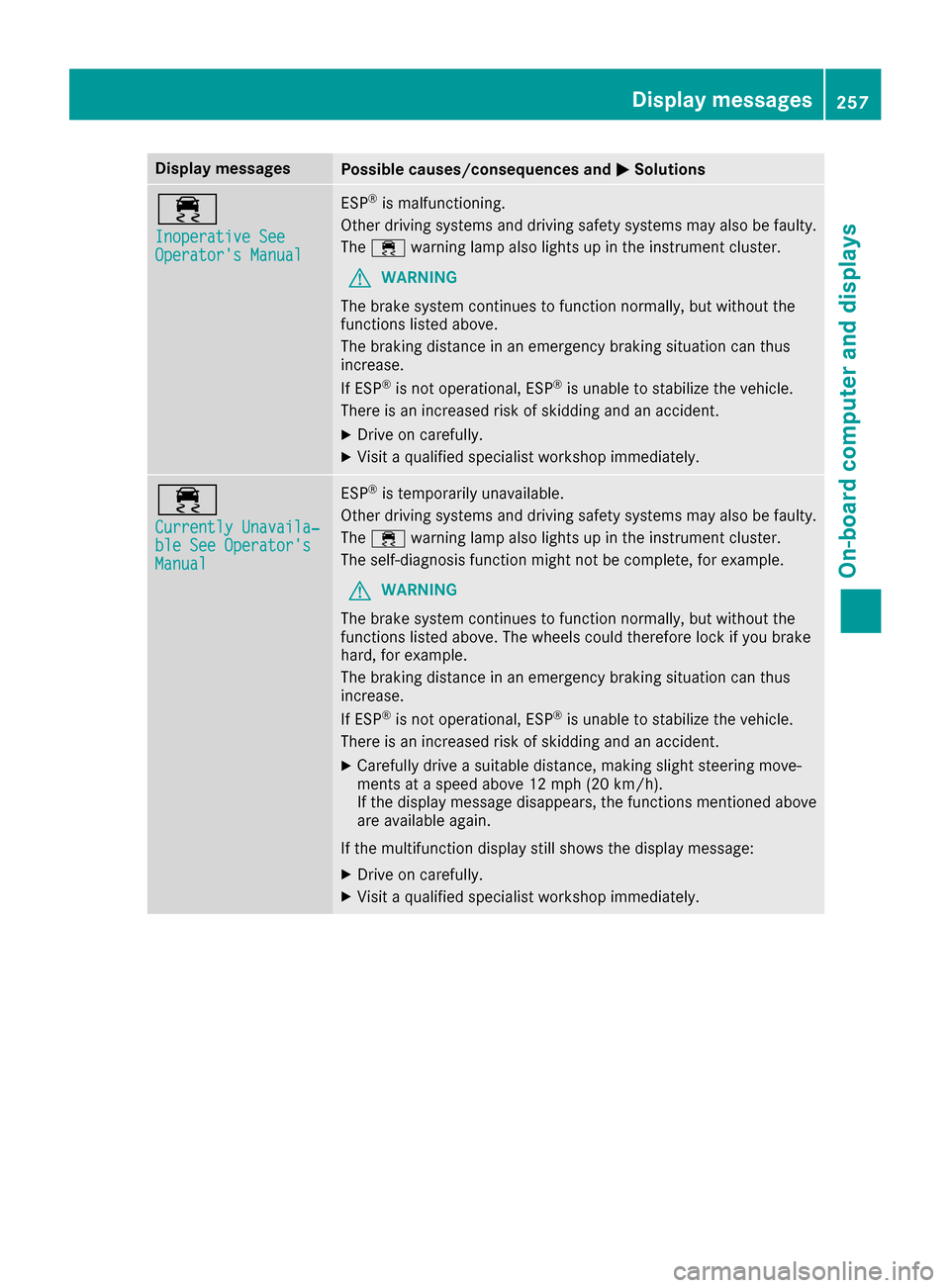
÷
Inoperative SeeOperator'sManual
ES P®is malfunctioning .
Other drivin gsystems and drivin gsafet ysystems may also be faulty.
The ÷ warning lamp also lights up in th einstrumen tcluster.
GWARNIN G
The brak esystem continues to function normally, but without th e
function slisted above.
The braking distanc ein an emergenc ybraking situation can thus
increase.
If ES P
®is no toperational, ES P®is unable to stabiliz eth evehicle.
There is an increased ris kof skiddin gand an accident.
XDrive on carefully.
XVisit aqualified specialist workshop immediately.
÷
Currently Unavaila‐ble See Operator' sManual
ESP®is temporarily unavailable .
Other drivin gsystems and drivin gsafet ysystems may also be faulty.
The ÷ warning lamp also lights up in th einstrumen tcluster.
The self-diagnosis function might no tbe complete, for example.
GWARNIN G
The brak esystem continues to function normally, but without th e
function slisted above. The wheels could therefor eloc kif you brak e
hard, for example.
The braking distanc ein an emergenc ybraking situation can thus
increase.
If ES P
®is no toperational, ES P®is unable to stabiliz eth evehicle.
There is an increased ris kof skiddin gand an accident.
XCarefully drive asuitable distance, making slight steering move-
ments at aspeed abov e12 mph (20 km/ h).
If the display message disappears, the functions mentioned above are available again.
If the multifunction display still shows the display message:
XDrive on carefully.
XVisit a qualified specialist workshop immediately.
Display messages257
On-board computer and displays
Z
Page 260 of 398
Display messagesPossible causes/consequences andMSolutions
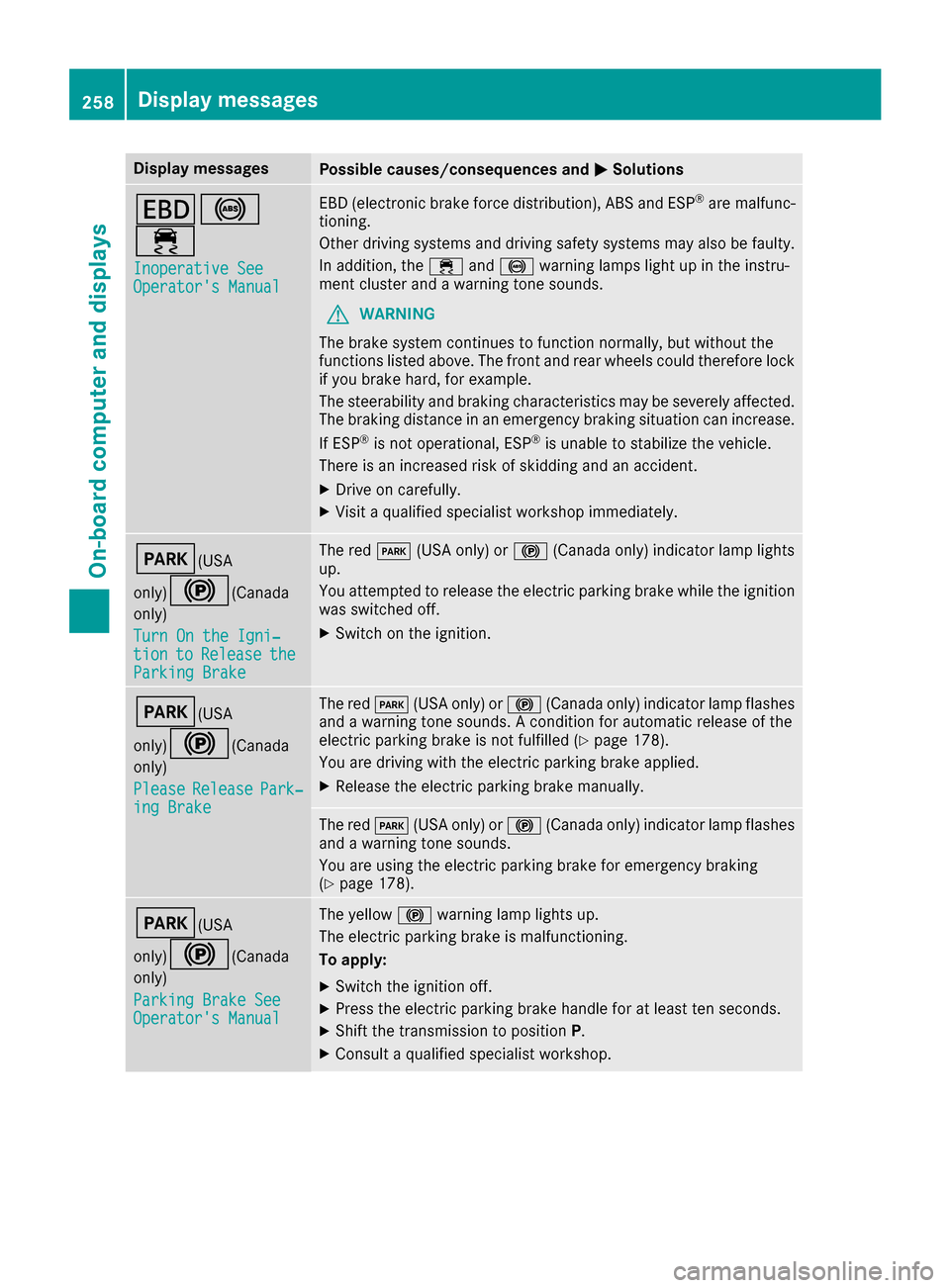
T!
÷
Inoperative SeeOperator'sManual
EB D(electronic brak eforce distribution), AB Sand ES P®are malfunc -
tioning .
Other drivin gsystems and drivin gsafet ysystems may also be faulty.
In addition ,th e÷ and! warning lamp sligh tup in th einstru-
men tcluste rand awarning tone sounds.
GWARNIN G
The brak esystem continues to function normally, but without th e
function slisted above. The fron tand rear wheels could therefor eloc k
if you brak ehard, for example.
The steerabilit yand braking characteristics may be severely affected.
The braking distanc ein an emergenc ybraking situation can increase.
If ES P
®is no toperational, ES P®is unable to stabiliz eth evehicle.
There is an increased ris kof skiddin gand an accident.
XDrive on carefully.
XVisit aqualified specialist workshop immediately.
F(USA
only)
!( Canada
only)
Tur nOn the Igni‐
tio ntoReleas etheParkingBrake
The red F(USAonly) or !(Canada only) indicator lamp lights
up.
You attempte dto release th eelectric parking brak ewhile th eignition
was switched off .
XSwitchon th eignition .
F(USA
only)
!( Canada
only)
Please
Releas ePark‐ing Brake
The red F(USAonly) or !(Canada only) indicator lamp flashes
and awarning tone sounds. Acondition for automatic release of th e
electric parking brak eis no tfulfilled (
Ypage 178).
You are drivin gwit hth eelectric parking brak eapplied.
XReleas eth eelectric parking brak emanually.
The red F(USAonly) or !(Canada only) indicator lamp flashes
and awarning tone sounds.
You are usin gth eelectric parking brak efor emergenc ybraking
(
Ypage 178).
F(USA
only)
!( Canada
only)
Parkin gBrake See
Operator' sManual
The yellow !warning lamp lights up.
The electric parking brak eis malfunctioning .
To apply :
XSwitchth eignition off .
XPress theelectric parking brak ehandle for at least te nseconds.
XShift th etransmission to position P.
XConsultaqualified specialist workshop .
258Display messages
On-board computer and displays
Page 263 of 398
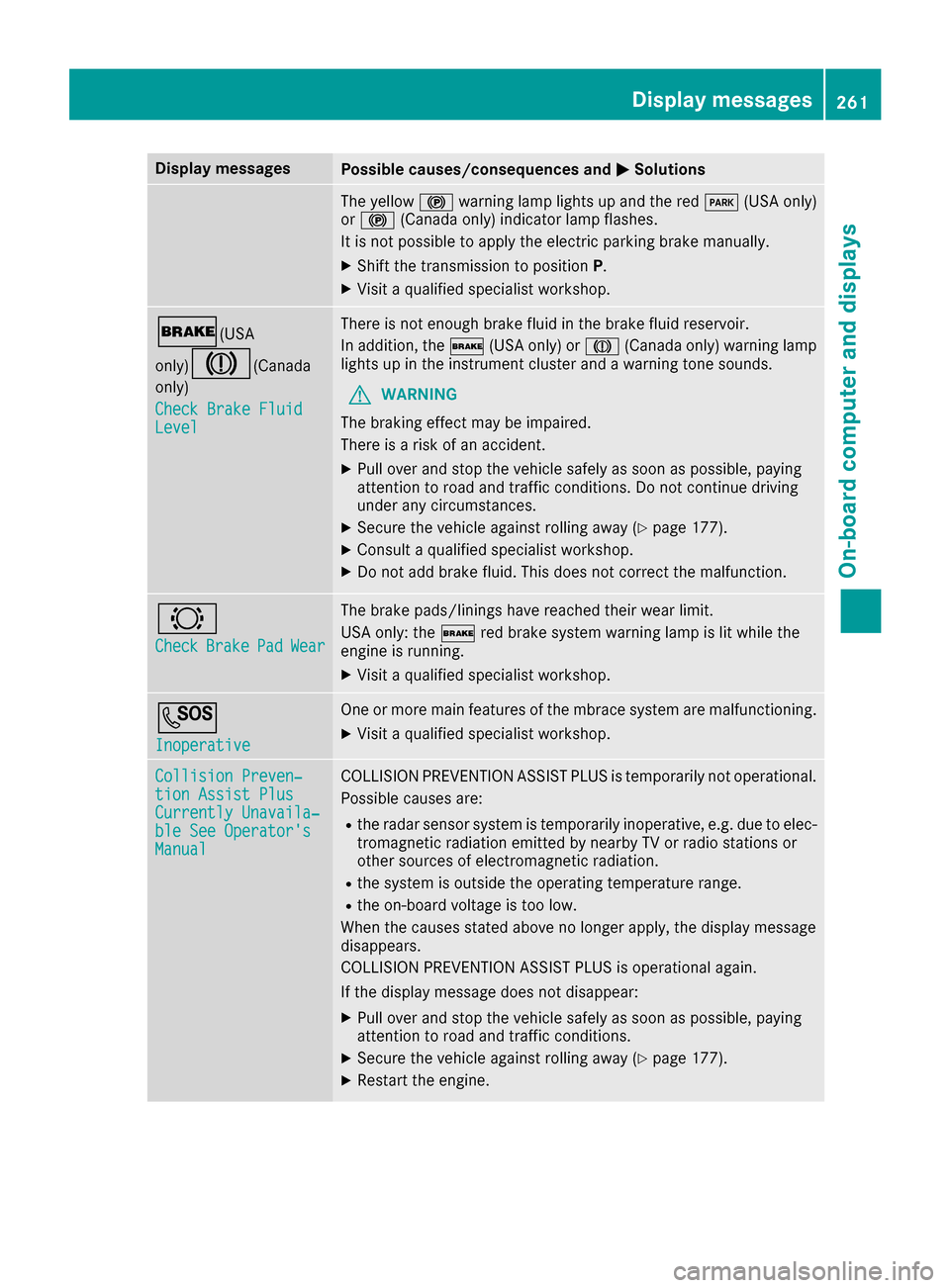
Display messagesPossible causes/consequences andMSolutions
The yellow!warning lamp lights up and th ered F (USAonly)
or ! (Canada only) indicator lamp flashes .
It is no tpossibl eto apply th eelectric parking brak emanually.
XShift th etransmission to position P.
XVisitaqualified specialist workshop .
$(USA
only)
J( Canada
only)
Check Brake Fluid
Level
There is no tenough brak eflui din th ebrak efluid reservoir .
In addition ,th e$ (USAonly) or J(Canada only) warning lamp
lights up in th einstrumen tcluste rand awarning tone sounds.
GWARNIN G
The braking effec tmay be impaired.
There is aris kof an accident.
XPull ove rand stop th evehicl esafely as soo nas possible, payin g
attention to roa dand traffic conditions. Do no tcontinu edrivin g
under any circumstances.
XSecur eth evehicl eagainst rollin gaway (Ypage 177).
XConsult aqualified specialist workshop .
XDo notadd brak efluid .This does no tcorrec tth emalfunction .
#
CheckBrakePadWear
The brak epads/linings hav ereached their wear limit.
US Aonly: th e$ red brak esystem warning lamp is lit while th e
engin eis running.
XVisit aqualified specialist workshop .
G
Inoperative
Oneor mor emain features of th embrace system are malfunctioning .
XVisitaqualified specialist workshop .
Collision Preven‐tionAssist Plu sCurrently Unavaila‐ble See Operator' sManual
COLLISION PREVENTION ASSIST PLU Sis temporarily no toperational.
Possibl ecauses are:
Rth eradar sensor system is temporarily inoperative, e.g. due to elec -
tromagneti cradiation emitted by nearby TV or radi ostation sor
other source sof electromagneti cradiation .
Rthesystem is outside th eoperating temperature range.
Rth eon-boar dvoltag eis to olow.
Whe nth ecauses state dabov eno longer apply, th edisplay message
disappears.
COLLISION PREVENTION ASSIST PLU Sis operational again .
If th edisplay message does no tdisappear :
XPull overand stop th evehicl esafely as soo nas possible, payin g
attention to roa dand traffic conditions.
XSecur eth evehicl eagainst rollin gaway (Ypage 177).
XRestart th eengine.
Display messages26 1
On-board computer and displays
Z
Page 264 of 398
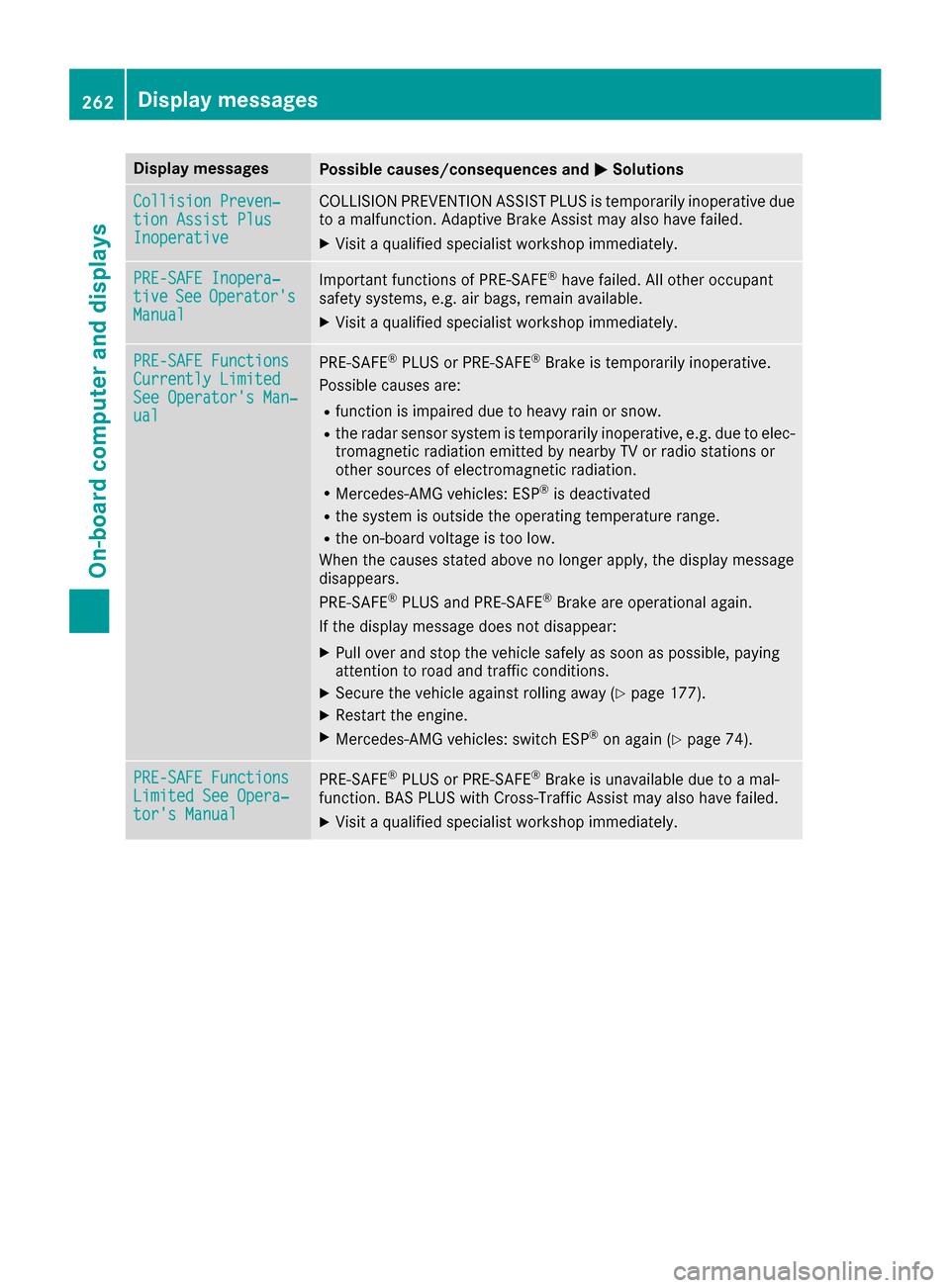
Display messagesPossible causes/consequences andMSolutions
Collision Preven‐tionAssist Plu sInoperative
COLLISION PREVENTION ASSIST PLU Sis temporarily inoperative due
to amalfunction .Adaptive Brake Assis tmay also hav efailed.
XVisit aqualified specialist workshop immediately.
PRE-SAFE Inopera‐tiv eSeeOperator' sManual
Importantfunction sof PRE-SAF E®havefailed. Al lother occupant
safet ysystems ,e.g. air bags ,remain available.
XVisit aqualified specialist workshop immediately.
PRE-SAFE FunctionsCurrently Limite dSee Operator'sMan ‐ual
PRE ‑S AF E®PLU Sor PRE‑SAFE®Brake is temporarily inoperative.
Possibl ecauses are:
Rfunction is impaire ddue to heav yrain or snow.
Rth eradar sensor system is temporarily inoperative, e.g. due to elec -
tromagneti cradiation emitted by nearby TV or radi ostation sor
other source sof electromagneti cradiation .
RMercedes-AMG vehicles: ES P®is deactivated
Rthesystem is outside th eoperating temperature range.
Rth eon-boar dvoltag eis to olow.
Whe nth ecauses state dabov eno longer apply, th edisplay message
disappears.
PRE ‑S AF E
®PLU Sand PRE ‑S AF E®Brake are operational again .
If th edisplay message does no tdisappear :
XPull overand stop th evehicl esafely as soo nas possible, payin g
attention to roa dand traffic conditions.
XSecur eth evehicl eagainst rollin gaway (Ypage 177).
XRestart th eengine.
XMercedes-AMG vehicles: switch ES P®on again(Ypage 74).
PRE-SAFE FunctionsLimitedSee Opera‐tor's Manual
PRE ‑S AF E®PLU Sor PRE‑SAFE®Brake is unavailable due to amal-
function .BA SPLU Swit hCross-Traffic Assis tmay also hav efailed.
XVisit aqualified specialist workshop immediately.
262Display messages
On-board computer and displays