light MERCEDES-BENZ CL-CLASS 2000 User Guide
[x] Cancel search | Manufacturer: MERCEDES-BENZ, Model Year: 2000, Model line: CL-CLASS, Model: MERCEDES-BENZ CL-CLASS 2000Pages: 424, PDF Size: 26.09 MB
Page 39 of 424
36 Central locking system
Te ch n ica l
data Instruments
and controlsOperationDrivingInstrument
cluster displayPractical hints Car care Index
Locking and unlocking with remote control
Unlocking:
Press transmit buttonŒ. All turn signal lamps blink
once to indicate that the vehicle is unlocked.
The remote control can be programmed for two kinds of
unlocking modes (see below):
Selective unlocking mode –
Press transmit buttonŒonce to unlock driver’s door
and fuel filler flap.
Press transmit buttonΠtwice to unlock both doors,
fuel filler flap, and trunk.
Global unlocking mode –
Press transmit buttonŒonce to unlock both doors,
fuel filler flap, and trunk.
Notes:
If the trunk was previously locked separately, it will
remain locked, see page 53.
The presently active unlocking mode (selective or
global) can only be determined by unlocking the vehicle
with the remote control (see below for changing mode).If within 40 seconds of unlocking with the remote
control, neither door nor trunk is opened, the electronic
key is not inserted in the starter switch, or the central
locking switch is not activated, the vehicle will
automatically lock.
Locking:
Press transmit button‹ once. All turn signal lamps
blink three times to indicate that the vehicle is locked. If
they do not blink three times, a door or trunk is not
properly closed.
Note:
If the vehicle cannot be locked or unlocked by pressing
the transmit button, then it may be necessary to change
the batteries in the electronic main key (if ok, battery
check lamp in electronic main key will light briefly
when pressing transmit button) or to synchronize the
remote control, see pages 363 and 365.
ProCarManuals.com
Page 41 of 424
38 Central locking system
Te ch n ica l
data Instruments
and controlsOperationDrivingInstrument
cluster displayPractical hints Car care Index
KEYLESS-GO
Important!
For the KEYLESS-GO-system to function properly, the
operator should observe the following:
•The driver should carry the KEYLESS-GO-card with
him/her.
•To avoid radio transmission interference, never store
the KEYLESS-GO-card together with other electronic
items (e.g. cellular telephones, other KEYLESS-GO-
cards) or metallic objects (e.g. coins, metal foil).
•To lock or unlock the vehicle, the card must be
recognized by the system as being located outside
the vehicle. The card must be in close proximity to a
door or the trunk lid (approx. 3 ft. [1 m]). To activate
the start/stop button function, the KEYLESS-GO-
card must be recognized by the system as being
located inside the vehicle.
•If the KEYLESS-GO-card is positioned farther away
from the vehicle (e.g. inside clothing or a briefcase)
and can no longer be recognized by the system, the
vehicle cannot be locked or the engine started via
the KEYLESS-GO-system.•If the KEYLESS-GO-card is removed from the vehicle
while the engine is running, or by placing the card
in front of the center armrest (see page 190), the
message “CHIP-CARD – NOT RECOGNIZED!” will
appear repeatedly in the multifunction display,
seepage318.
Find the card or change its present location (e.g.
place it on the front passenger seat or insert it in
shirt pocket).
•If the message “CHIP-CARD – NOT RECOGNIZED”
is ignored for an extended period of time (approx.15
minutes), the engine could stop by itself during a
vehicle stop (e.g. traffic light). The vehicle can then
no longer be centrally locked or the engine
restarted. You must first find the card or change its
present location (e.g. place it on the front passenger
seat or insert it in shirt pocket). Start the engine
again. See page 224.
•Do not forget, the engine can be started by anyone
with a KEYLESS-GO-card that is left inside the
vehicle. Leaving the chip-card behind when exiting
and locking the vehicle, the message “CHIP-CARD –
STILL IN VEHICLE” appears in the multifunction
display, see page 318.
ProCarManuals.com
Page 46 of 424
43 Central locking system
Te ch n ica l
data Instruments
and controlsOperationDrivingInstrument
cluster displayPractical hints Car care Index Choosing global or selective mode
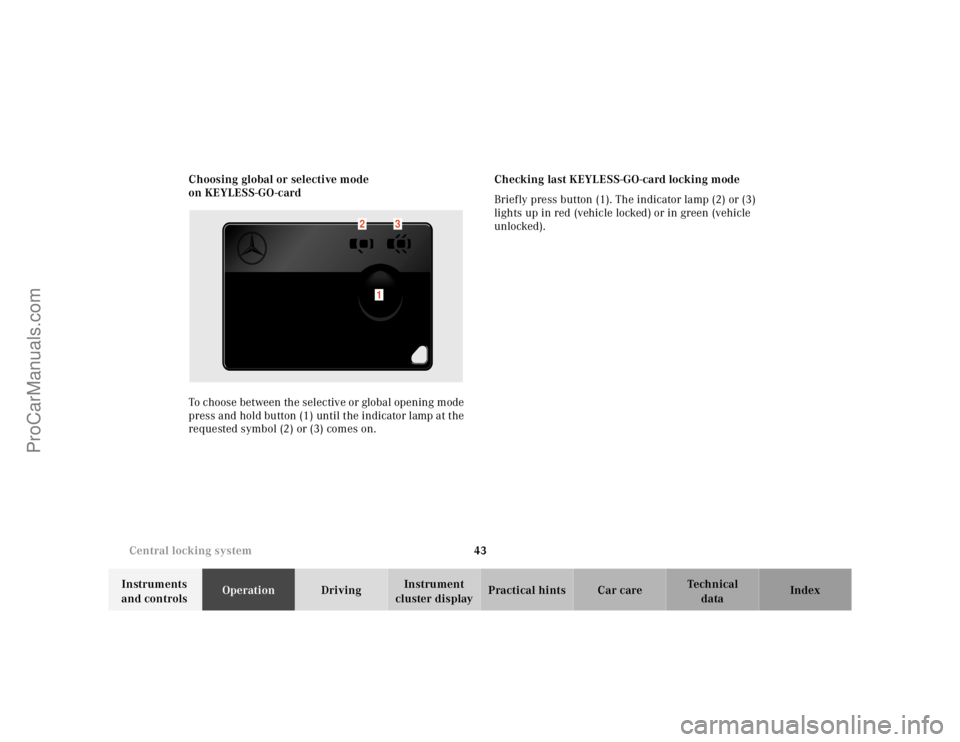
on KEYLESS-GO-card
To choose between the selective or global opening mode
press and hold button (1) until the indicator lamp at the
requested symbol (2) or (3) comes on.Checking last KEYLESS-GO-card locking mode
Briefly press button (1). The indicator lamp (2) or (3)
lights up in red (vehicle locked) or in green (vehicle
unlocked).
1
2
3
ProCarManuals.com
Page 49 of 424
46 Central locking system
Te ch n ica l
data Instruments
and controlsOperationDrivingInstrument
cluster displayPractical hints Car care Index
Note:
If the windows and sliding/pop-up roof cannot be
operated automatically by pressing the transmit button
of the remote control then it may be necessary to change
the batteries in the electronic main key (if ok, battery
check lamp in electronic main key will light briefly
when transmitting), or to synchronize the remote
control, see page 363 and 365.
Convenience feature
(Operation with KEYLESS-GO)
Continue to press lock button on door handle after
locking the vehicle.
The windows and sliding/pop-up roof begin to close
after approx. 1 second.
To interrupt closing procedure, release lock button. To
reverse direction (within 2 seconds after closing), pull
and hold door handle. Opening of windows starts and
continues for as long as the door handle is held but the
door not opened.
Ensure that all side windows and the sliding/pop-up
roof are properly closed before leaving the vehicle.
Wa r n i n g !
Never operate the windows or sliding/pop-up roof if
there is the possibility of anyone being harmed by
the closing procedure.In case the procedure causes potential danger, the
procedure can be immediately halted by releasing
the lock button. To reverse direction of movement
pull and hold outside door handle.
ProCarManuals.com
Page 52 of 424
49 Central locking system
Te ch n ica l
data Instruments
and controlsOperationDrivingInstrument
cluster displayPractical hints Car care Index If the vehicle has previously been locked from the
outside, opening a door from the inside will trigger the
alarm. When opening a door while the central locking
system is in the:
•selective unlocking mode, only that individual door
is unlocked. The remaining door, the trunk and fuel
filler f lap remain locked.
•global unlocking mode, both doors, the trunk and
fuel filler flap are unlocked.
Notes:
When opening a door, the door window and rear side
window lower slightly. After closing the door, the
windows close again.
In case of a malfunction in the central locking system
the doors can be locked and unlocked individually.
To lock, push down lock button or turn mechanical key
in driver’s door lock to position 3. In addition lock the
trunk.To unlock, pull inside door handles or turn mechanical
key in driver’s door lock to position 2.
When unlocking the driver’s door with the mechanical
key, the exterior lamps will flash and the alarm will
sound.
To cancel the alarm, insert the electronic key in the
starter switch or press buttonŒ or‹ on the
electronic main key.
ProCarManuals.com
Page 59 of 424
56 Central locking system
Te ch n ica l
data Instruments
and controlsOperationDrivingInstrument
cluster displayPractical hints Car care Index
Notes:
The automatic closing process is interrupted if the
trunk lid is pushed against an object. The trunk lid will
reverse slightly and stop. In its final closing stage the
hydraulic power closing assist mechanism releases the
trunk lid which then drops into the lock by its own
weight. Now the trunk lid will stop but not reverse
slightly.
Investigate and correct the cause of interruption.
Now press trunk lid close button (2) again to close the
trunk lid.In case of a malfunction the trunk lid can be opened and
closed manually.
To open, unlock trunk lid with the mechanical key and
open lid by hand, see page 53.
To close, lower trunk lid with hands placed flat on trunk
lid. Please remember to keep your fingers out of the
space between the lid and the vehicle.
Vehicles with KEYLESS-GO:
To prevent a possible inadvertent lockout, the trunk lid
will open automatically if a KEYLESS-GO-card is
recognized in the area of the rear shelf or inside the
trunk.
Wa r n i n g !
To prevent possible personal injury, always keep
hands and fingers away from the trunk opening
when closing the trunk lid. Be especially careful
when small children are around.Always be sure persons who might get injured are
away from the trunk area when you operate the
trunk lid closing button located on the vehicle door.To interrupt the hydraulic power closing assist
mechanism press trunk lid close button (2) inside
the trunk lid, push in trunk lid lock, or press
buttonŠ on the electronic main key.
ProCarManuals.com
Page 62 of 424
59 Central locking system
Te ch n ica l
data Instruments
and controlsOperationDrivingInstrument
cluster displayPractical hints Car care Index Notes:
The automatic closing process is interrupted, if the
trunk lid is pushed against an object. The trunk lid will
reverse slightly and stop. In its final closing stage the
hydraulic power closing assist mechanism releases the
trunk lid which then drops into the lock by its own
weight. Now the trunk lid will stop but not reverse
slightly.
Investigate and correct the cause of interruption.
Now press trunk lid opening/closing switch again to
close the trunk lid.
In case of a malfunction the trunk lid can be opened and
closed manually.
To open, unlock trunk lid with the mechanical key and
open lid by hand, see page 53.
To close, lower trunk lid with hands placed flat on trunk
lid. Please remember to keep your fingers out of the
space between the lid and the vehicle.The trunk can also be opened by using the remote
control. PressŠ button.
The trunk lid cannot be opened by the switch or the
remote control when previously locked separately with
the mechanical key. To open, see page 53.
The trunk lid cannot be opened with the trunk lid
opening/closing switch when the vehicle was
previously locked with the central locking switch. To
unlock vehicle with the central locking switch, see
page 50.
Vehicles with KEYLESS-GO:
To prevent a possible inadvertent lockout, the trunk lid
will open automatically if a KEYLESS-GO-card is
recognized in the area of rear shelf or inside the trunk.
ProCarManuals.com
Page 71 of 424
68 Seats
Te ch n ica l
data Instruments
and controlsOperationDrivingInstrument
cluster displayPractical hints Car care Index
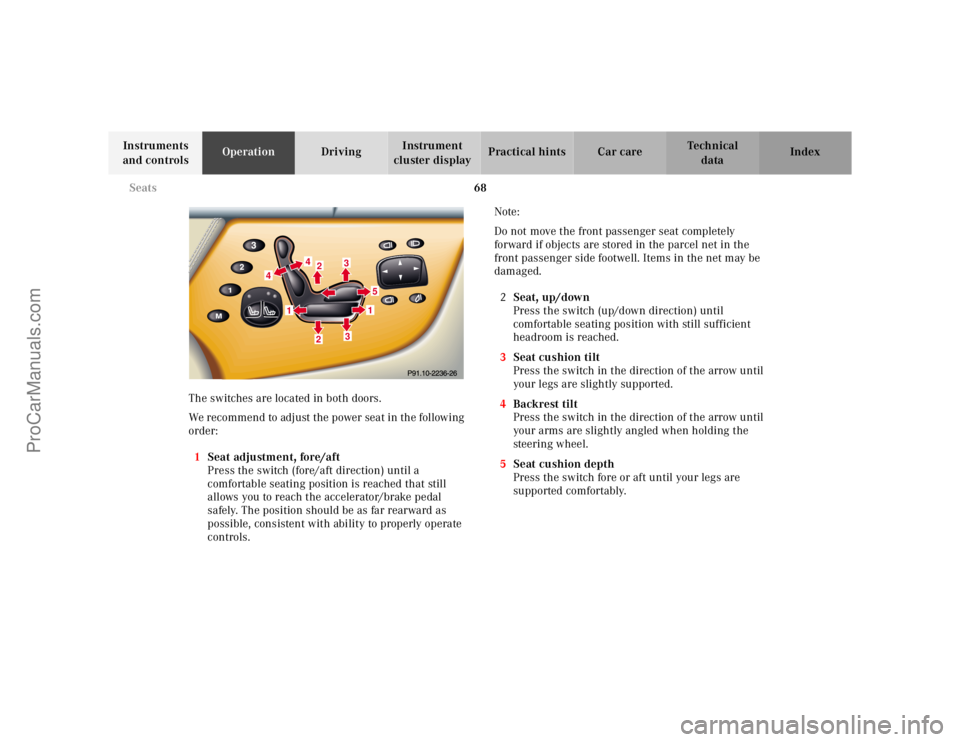
The switches are located in both doors.
We recommend to adjust the power seat in the following
order:
1Seat adjustment, fore/aft
Press the switch (fore/aft direction) until a
comfortable seating position is reached that still
allows you to reach the accelerator/brake pedal
safely. The position should be as far rearward as
possible, consistent with ability to properly operate
controls.Note:
Do not move the front passenger seat completely
forward if objects are stored in the parcel net in the
front passenger side footwell. Items in the net may be
damaged.
2Seat, up/down
Press the switch (up/down direction) until
comfortable seating position with still sufficient
headroom is reached.
3Seat cushion tilt
Press the switch in the direction of the arrow until
yo ur l egs a re sligh tly su p po rted.
4Backrest tilt
Press the switch in the direction of the arrow until
your arms are slightly angled when holding the
steering wheel.
5Seat cushion depth
Press the switch fore or aft until your legs are
supported comfortably.
422
3
51
3
1
4
ProCarManuals.com
Page 76 of 424
73 Seats
Te ch n ica l
data Instruments
and controlsOperationDrivingInstrument
cluster displayPractical hints Car care IndexNotes:
The automatic seat slide is provided with a safety
feature.
The automatic process is interrupted, if the backrest of
the sliding seat is pushed against an occupant or object.
The seat will slide forward and stop.
Investigate and correct the cause of interruption.
Now use memory button (page 112) or power seat switch
(page 68) to bring seat into desired position.
When folding the backrest forward from a reclined
position, and then folding it back, the backrest stops in a
more upright position for the safety of any rear-seat
passenger. Adjust the backrest until your arms are
slightly angled when holding the steering wheel, see
page 68.
When leaving the vehicle always remove the
electronic key from the starter switch, take the
KEYLESS-GO-card (if so equipped) with you, and
lock your vehicle.The power seats can also be operated with the
driver’s or passenger door open. Do not leave
children unattended in the vehicle or with access
to an unlocked vehicle. Unsupervised use of vehicle
equipment may cause serious personal injury.Never place hands under seat or near any moving
parts during a seat adjustment procedure.
ProCarManuals.com
Page 78 of 424
75 Seats
Te ch n ica l
data Instruments
and controlsOperationDrivingInstrument
cluster displayPractical hints Car care Index Some models may be equipped with multicontour seats.
These seats have inflatable air cushions built into the
backrests to provide additional lumbar and side support.
Turn the electronic key in starter switch to position 2 to
operate.
We recommend that you make the basic settings in the
following order:
1Lumbar region
Pressj ork to select a lumbar region.
Press and holdæ orç to inflate or deflate the
selected lumbar support.
2Center section
Pressæ orç side of switch and hold; the air
cushion will be inflated or deflated. Release the
switch in the desired position.3Backrest side cushions
The lateral support increases or decreases as you
press the button to the right or left. Adjust the side
cushions to provide good lateral support.
4Massage function(PULSE)
The multicontour backrest is equipped with a
massage function to help prevent fatigue during
longer journeys.
The PULSE function inflates and deflates the air
cushions in the lumbar region rhythmically.
An indicator lamp on the switch lights up when the
PULSE function is switched on. The PULSE function
switches off automatically after approximately
8minutes.
ProCarManuals.com