light MERCEDES-BENZ CL-CLASS 2000 Owner's Manual
[x] Cancel search | Manufacturer: MERCEDES-BENZ, Model Year: 2000, Model line: CL-CLASS, Model: MERCEDES-BENZ CL-CLASS 2000Pages: 424, PDF Size: 26.09 MB
Page 80 of 424
77 Seats
Te ch n ica l
data Instruments
and controlsOperationDrivingInstrument
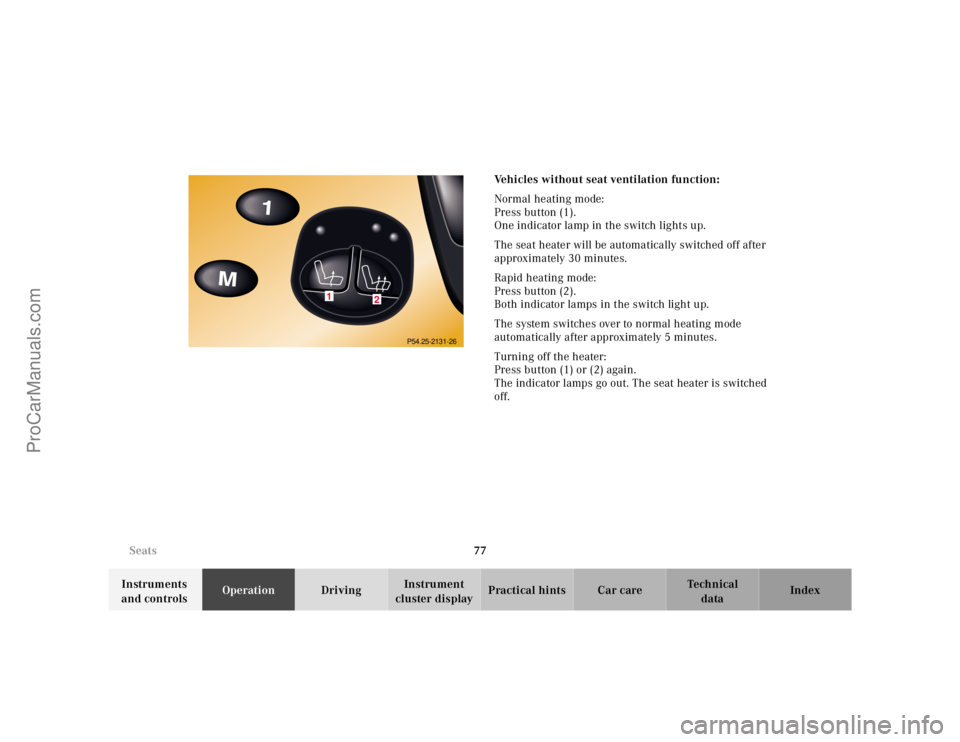
cluster displayPractical hints Car care IndexVehicles without seat ventilation function:
Normal heating mode:
Press button (1).
One indicator lamp in the switch lights up.
The seat heater will be automatically switched off after
approximately 30 minutes.
Rapid heating mode:
Press button (2).
Both indicator lamps in the switch light up.
The system switches over to normal heating mode
automatically after approximately 5 minutes.
Turning off the heater:
Press button (1) or (2) again.
The indicator lamps go out. The seat heater is switched
off.
1
2
P54.25-2131-26
ProCarManuals.com
Page 81 of 424
78 Seats
Te ch n ica l
data Instruments
and controlsOperationDrivingInstrument
cluster displayPractical hints Car care Index
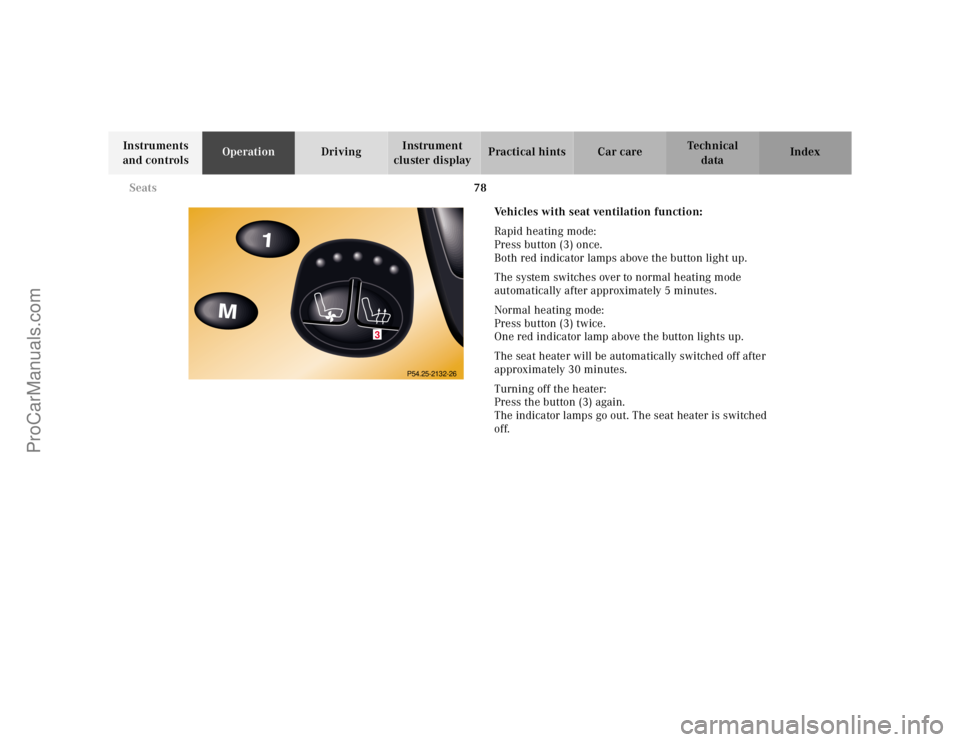
Vehicles with seat ventilation function:
Rapid heating mode:
Press button (3) once.
Both red indicator lamps above the button light up.
The system switches over to normal heating mode
automatically after approximately 5 minutes.
Normal heating mode:
Press button (3) twice.
One red indicator lamp above the button lights up.
The seat heater will be automatically switched off after
approximately 30 minutes.
Turning off the heater:
Press the button (3) again.
The indicator lamps go out. The seat heater is switched
off.
3
P54.25-2132-26
ProCarManuals.com
Page 83 of 424
80 Seats
Te ch n ica l
data Instruments
and controlsOperationDrivingInstrument
cluster displayPractical hints Car care Index
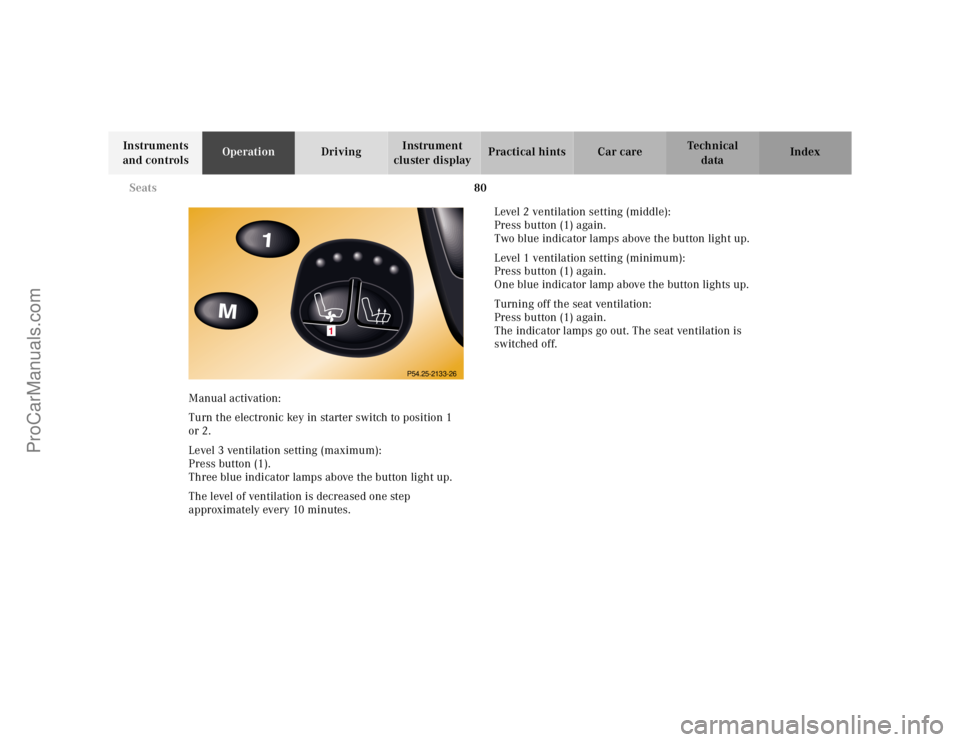
Manual activation:
Turn the electronic key in starter switch to position 1
or 2.
Level 3 ventilation setting (maximum):
Press button (1).
Three blue indicator lamps above the button light up.
The level of ventilation is decreased one step
approximately every 10 minutes.Level 2 ventilation setting (middle):
Press button (1) again.
Two blue indicator lamps above the button light up.
Level 1 ventilation setting (minimum):
Press button (1) again.
One blue indicator lamp above the button lights up.
Turning off the seat ventilation:
Press button (1) again.
The indicator lamps go out. The seat ventilation is
switched off.
1
P54.25-2133-26
ProCarManuals.com
Page 92 of 424
89 Restraint systems
Te ch n ica l
data Instruments
and controlsOperationDrivingInstrument
cluster displayPractical hints Car care Index Self-test BabySmart
TM without special child seat
installed
After turning electronic key in starter switch to
position 1 or 2, the 7 indicator lamp located on the
center console comes on for approx. 6 seconds and then
extinguishes.
If the indicator lamp should not come on or is
continuously lit, the system is not functioning. You must
see an authorized Mercedes-Benz Center before seating
any child on the front passenger seat. See page 296 for
notes on the 7 indicator lamp.
BabySmart
TM is a trademark of Siemens Automotive Corp.
Wa r n i n g !
The BabySmart
TM airbag deactivation system will
ONLY work with a special child seat designed to
operate with it. It will not work with child seats
which are not BabySmart
TM compatible.
Never place anything between seat cushion and
child seat (e.g. pillow), since it reduces the
effectiveness of the deactivation system.Follow the manufacturer’s instructions for
installation of special child seats.The passenger front airbag will not deploy only if
the 7 indicator lamp remains illuminated.Please be sure to check the indicator every time
you use the special system child seat. Should the
light go out while the restraint is installed, please
check installation. If the light remains out, do not
use the BabySmart
TM restraint to transport children
on the front passenger seat until the system has
been repaired.
ProCarManuals.com
Page 109 of 424
106 Rear view mirrors
Te ch n ica l
data Instruments
and controlsOperationDrivingInstrument
cluster displayPractical hints Car care Index
Rear view mirrors
Inside rear view mirror
Manually adjust the mirror.
Storing inside rear view mirror positions
The seat, exterior rear view mirror and steering wheel
positions are stored together with the interior rear view
mirror position. See page 111 for notes on the memory
function.
Rear view mirror, automatic antiglare
Antiglare mode:
With the electronic key in starter switch position 2, the
mirror reflection brightness responds to changes in
light sensitivity.
With the gear selector lever in position “R”, or with the
interior light switched on, the mirror brightness does
not respond to changes in light sensitivity.Note:
The automatic antiglare function does not react, if
incoming light is not aimed directly at sensors in the
mirror.
Wa r n i n g !
In the case of an accident liquid electrolyte may
escape the mirror housing when the mirror glass
breaks.Electrolyte has an irritating effect. Do not allow the
liquid come into contact with eyes, skin, clothing,
or respiratory system. In cases it does, immediately
flush affected area with water, and seek medical
help if necessary.
ProCarManuals.com
Page 113 of 424
110 Rear view mirrors
Te ch n ica l
data Instruments
and controlsOperationDrivingInstrument
cluster displayPractical hints Car care Index
Driver’s side exterior mirror, antiglare mode
Antiglare mode:
With the electronic key in starter switch position 2, the
mirror reflection brightness responds to changes in
light sensitivity.
With the gear selector lever in position “R”, or with the
interior light switched on, the mirror brightness does
not respond to changes in light sensitivity.
Note:
The automatic antiglare function does not react, if
incoming light is not aimed directly at sensors in the
mirror.Important!
Electrolyte drops coming into contact with the vehicle
paint finish can only be completely removed while in
their liquid state, by applying plenty of water.
Wa r n i n g !
In the case of an accident liquid electrolyte may
escape the mirror housing when the mirror glass
breaks.Electrolyte has an irritating effect. Do not allow the
liquid come into contact with eyes, skin, clothing,
or respiratory system. In cases it does, immediately
flush affected area with water, and seek medical
help if necessary.
ProCarManuals.com
Page 119 of 424
116 Instrument cluster
Te ch n ica l
data Instruments
and controlsOperationDrivingInstrument
cluster displayPractical hints Car care Index
•Turning the electronic key in starter switch to
position 1 or 2.
•Switching on the exterior lamps.
1 The instrument cluster is activated for approx. 30 seconds.Instrument cluster illumination
The instrument cluster illumination is dimmed or
brightened automatically to suit daylight lighting
conditions.
The instrument cluster illumination will also be
adjusted when the vehicle’s exterior lamps are
switched on.Display illumination, changing basic settings for driving
at dusk or in darkness:
Press adjusting knob (1) – the knob will pop out.
Rotate adjusting knob (1) clockwise – instrument lamp
intensity increases.
Rotate adjusting knob (1) counterclockwise –
instrument lamp intensity decreases.
Push knob back into panel.
Note:
It is not possible to select a basic brightness setting in
daylight – the intensity is adjusted automatically.
ProCarManuals.com
Page 121 of 424
118 Instrument cluster
Te ch n ica l
data Instruments
and controlsOperationDrivingInstrument
cluster displayPractical hints Car care Index
Speedometer (9)
When the cruise control is activated, the segments on
the speedometer scale between the set speed to the top
of the scale are illuminated. Cruise control, see
page 250.
When the Distronic (DTR) is activated, one or two
segments around the speed stored in memory light up
in the speedometer dial. Distronic (DTR), see page 253.Note:
The speed display is set to read out for
•USA in mph
•Canada in km/h.
ProCarManuals.com
Page 141 of 424
138 Multifunction steering wheel, multifunction display
Te ch n ica l
data Instruments
and controlsOperationDrivingInstrument
cluster displayPractical hints Car care Index
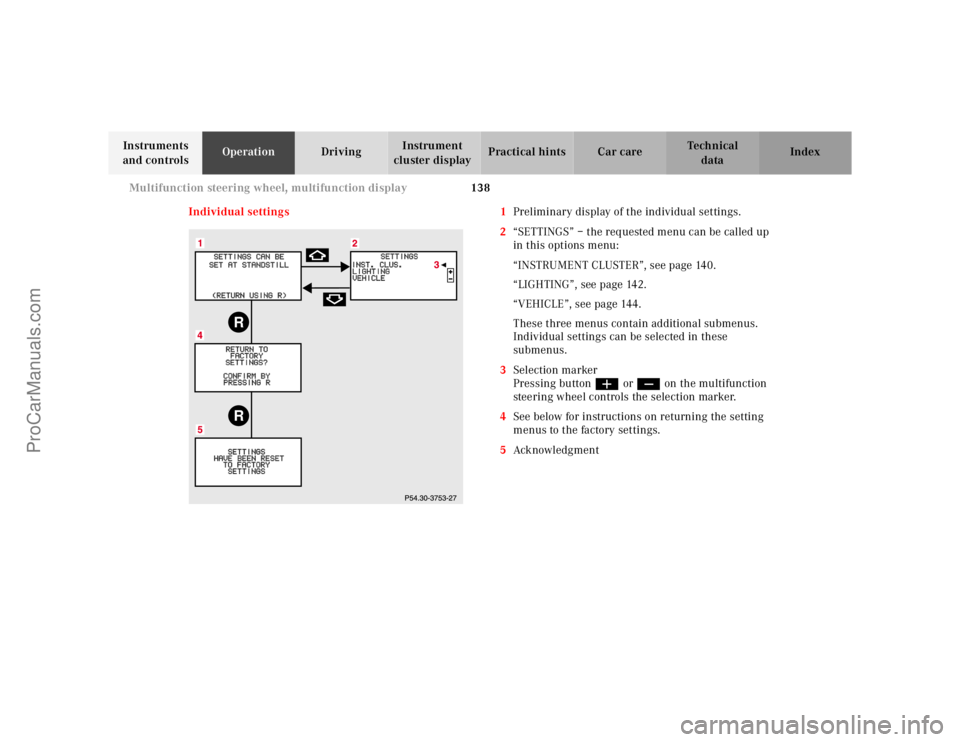
Individual settings 1Preliminary display of the individual settings.
2“SETTINGS” – the requested menu can be called up
in this options menu:
“INSTRUMENT CLUSTER”, see page 140.
“LIGHTING”, see page 142.
“VEHICLE”, see page 144.
These three menus contain additional submenus.
Individual settings can be selected in these
submenus.
3Selection marker
Pressing buttonæ orç on the multifunction
steering wheel controls the selection marker.
4See below for instructions on returning the setting
menus to the factory settings.
5Ack nowl edg ment
RR
ProCarManuals.com
Page 145 of 424
142 Multifunction steering wheel, multifunction display
Te ch n ica l
data Instruments
and controlsOperationDrivingInstrument
cluster displayPractical hints Car care Index
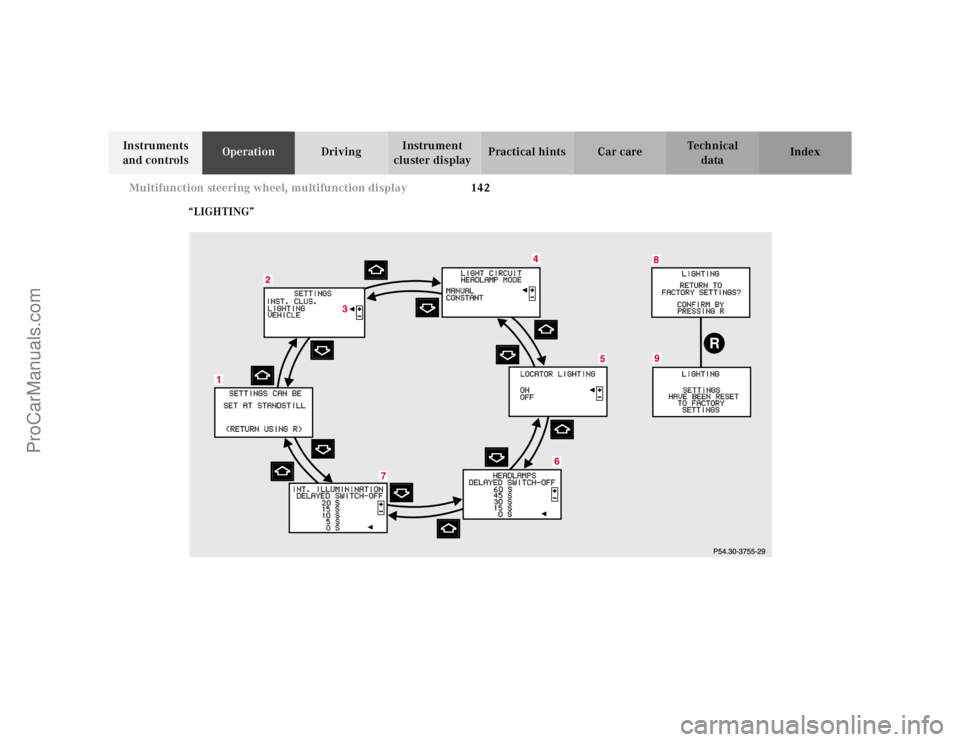
“LIGHTING”
R
7
ProCarManuals.com